






Still downloading templates?
There’s an easier way. Try a free AI Agent in ClickUp that actually does the work for you—set up in minutes, save hours every week.
Sorry, there were no results found for “”
Sorry, there were no results found for “”
Sorry, there were no results found for “”
Time tracking shouldn’t feel like a burden. ⏳
Done right, it empowers teams, builds trust, and helps everyone stay focused on what matters. But too often, it turns into micromanagement—clunky systems, invasive monitoring, and tools that create more friction than clarity.
Hubstaff is one of the most well-known time-tracking tools on the market. It offers activity monitoring, GPS tracking, and productivity data—but that doesn’t mean it’s the right fit for every team.
If you’re looking for a more flexible, transparent, or team-friendly alternative, you’re in the right place. Let’s explore how Hubstaff stacks—and the top tools that might suit you better.
Hubstaff is a go-to tool for teams that need detailed activity logs, GPS tracking, and proof of work. It’s especially popular with remote-first and field-based teams who prioritize accountability.
But for many teams, that level of tracking comes at a cost—both financially and culturally.
Here are some common reasons users start looking for alternatives:
If you’re focused on building a flexible, collaborative, and trust-driven workspace, Hubstaff might not check all the boxes anymore.
📮 ClickUp Insight: Our work-life balance survey found that 46% of workers put in 40-60 hours per week, while a staggering 17% exceed 80 hours! Yet, the grind doesn’t stop there—31% struggle to carve out personal time consistently. It’s a perfect recipe for burnout. 😰
But you know what? Balance at work starts with visibility! ClickUp’s built-in features like Workload View & Time Tracking make it easy to visualize workload, distribute tasks fairly, and track actual hours spent—so you always know how to optimize work and when.
💫 Real Results: Lulu Press saves 1 hour per day, per employee using ClickUp Automations—leading to a 12% increase in work efficiency.
To find the strongest alternatives to Hubstaff, we combined hands-on testing with in-depth user reviews, platform updates, and trusted resources across the productivity space. Our goal? Identify tools that don’t just track time—but improve how your team works.
Here’s what shaped our selection:
💡 Pro Tip: Feeling overwhelmed by your to-do list?
AI can help—but only if you know how to use it right. In this short video guide, we break down real ways to use AI tools like ClickUp Brain to automate tasks, reclaim focus time, and boost your productivity without burning out. Watch it before your next work sprint!
| Tool | Best Feature | Primary Use Case | Pricing |
|---|---|---|---|
| ClickUp | AI-powered time tracking with project management | Cross-functional teams replacing multiple tools with one platform | Free forever; Paid plans available |
| My Hours | Lightweight manual and timer-based logging | Freelancers and consultants needing billable hour tracking without surveillance | Free; Pro from $9/user/month |
| Clockify | Unlimited free time tracking with scheduling and reports | Startups and small businesses scaling time tracking affordably | Free; Paid plans from $4.99/user/month |
| Toggl Track | Simple time tracking with AI insights and no monitoring | Solo professionals prioritizing privacy and ease of use | Free; Paid plans from $9/user/month |
| Harvest | Time tracking with invoicing and project budgeting | Agencies and consultants turning hours into revenue | Free; Paid plans from $13.75/user/month |
| Apploye | AI-powered time tracking with employee monitoring, and payroll-ready reports | Remote teams, and agencies, needing visibility into work hours | Free trial; Paid plans from $4/user/month |
| Timely | AI-based automatic tracking with no surveillance | Creative and remote teams with ethical time tracking needs | Paid plans from $11/user/month |
| RescueTime | Focus time sessions and automatic behavior tracking | Individuals optimizing personal productivity and focus | Free; Paid plans from $12/month |
| Everhour | Integrated time tracking inside third-party PM tools | Teams using Asana, ClickUp, or Trello needing in-app time logs | Free; Paid plans from $10/user/month |
| Paymo | Time tracking, task management, and billing in one | Agencies and freelancers replacing 2–3 tools with one platform | Free; Paid plans from $9.90/user/month |
| Desklog | Free time tracking with optional screenshots and productivity scores | Support desks and engineering teams needing budget monitoring tools | Free; Paid plans from $3.50/user/month |
Proper project time management involves much more than simply tracking your employees’ time. It’s what you do with the information that makes the difference. Instead of monitoring their every move, invest your time and energy in a Hubstaff alternative that can do more with the time you track!

ClickUp is the only all-in-one productivity platform built for teams across industries to consolidate their work into one dynamic knowledge base. Its rich set of time-saving features is designed to streamline processes, align the team on goals, and stay on track. These features include customizable Dashboards, a global timer, and over 15 highly visual workflow views to manage productivity from every angle.
Whether you’re reprioritizing your daily tasks, adjusting project timelines to stay on budget, or invoicing a client, ClickUp makes it happen easily and efficiently.
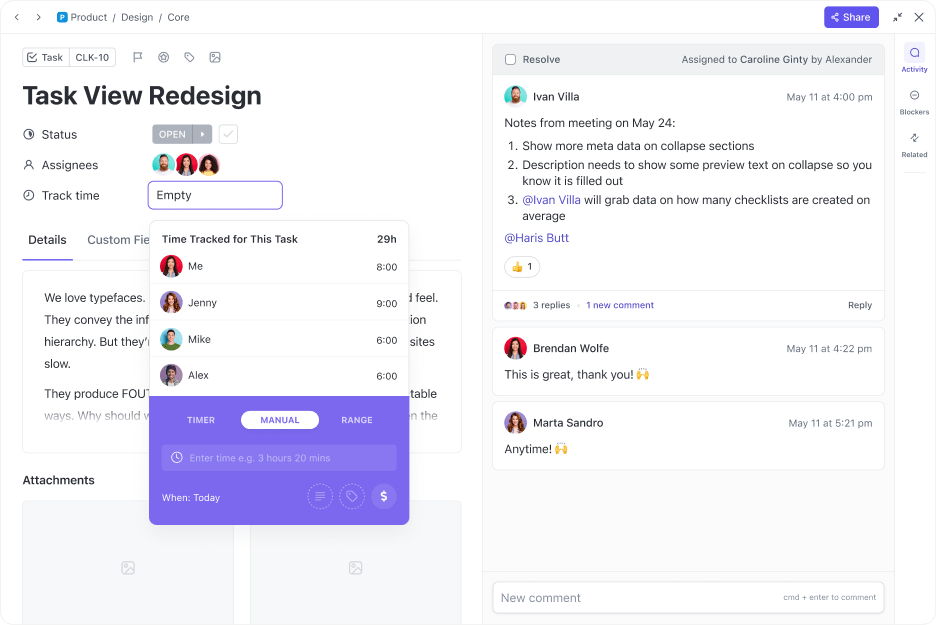
ClickUp offers built-in time tracking with manual entry, timers, and timesheets, plus seamless integrations with popular tools like Harvest and Toggl. You can track time directly from tasks or subtasks, making it easy to log billable hours and monitor project progress.

Unlike Hubstaff, ClickUp does not include surveillance features such as screenshot capture, keystroke logging, or GPS tracking. Instead, ClickUp prioritizes transparency and user control, giving teams the tools to track time and productivity—without compromising privacy.
⏩ AI Capability: ClickUp Brain uses GPT-4o, Claude, and Gemini to summarize timesheets, auto-log time entries, answer contextual time queries, and flag productivity gaps. You can also use Autopilot Agents to automate data entry, weekly reviews, and reporting.
Teams of 1–1,000+ replacing multiple tools with one connected workspace.
Agencies, remote teams, PMOs, product teams, and ops managers who want visibility without surveillance.
Yes—ClickUp is easily the most complete and powerful Hubstaff alternative. It delivers everything you need for ethical time tracking, project management, and team collaboration—without the need for invasive monitoring. If you want to consolidate tools and scale with confidence, this is the best place to start.
💡 Pro Tip: If you manage a team, time tracking isn’t about catching people slipping—it’s about clearing the path. Use logs to identify who’s overwhelmed, where blockers exist, or which deliverables keep derailing timelines. Data empowers support, not control.
If Hubstaff feels too complex, expensive, or invasive for your workflow, My Hours is a refreshing alternative. Built for freelancers and small teams, My Hours strips time tracking down to start/stop timers, project-level billing, and detailed reports. There are no screenshots, GPS tracking, or invasive monitoring—just clean, manual or automatic time logging with the flexibility to track billable hours across clients.
It’s particularly well-suited to professionals who want to keep work organized without overwhelming software. While Hubstaff leans into workforce oversight, My Hours focuses on individual accountability.
⏩ AI Capability: My Hours introduced smart suggestions for time logs and AI-assisted invoice preparation that groups tracked time into billable blocks automatically.
Freelancers, consultants, or small teams billing hours to multiple clients
Solo professionals, side-hustlers, and small business owners who don’t need activity tracking or advanced project management
Yes—if you’re switching from Hubstaff because it’s too invasive or team-centric, My Hours is a breath of fresh air. It’s ideal for solo operators who want accuracy and professionalism without the weight of a complete workforce management platform.
💡 Pro Tip: Start your day by tagging your top 3 priorities in your time tracker. It keeps focus and accountability aligned.
Clockify is one of the most popular Hubstaff alternatives for teams that want full-featured time tracking without hitting a paywall. It offers a generous free plan with unlimited users, projects, and reports—making it a perfect fit for startups and small companies looking to scale their operations affordably.
Unlike Hubstaff, which can feel locked down by pricing tiers and forced upgrades, Clockify gives you access to core functionality. You can use it for time tracking or layer on team scheduling, invoicing, and optional productivity monitoring.
⏩ AI Capability: Clockify introduced AI-powered activity detection and classification—helping managers and individuals categorize work with less manual effort.
Teams of all sizes looking for free time tracking with room to scale
Startups, small agencies, nonprofits, and remote teams managing hourly work or distributed projects
Yes—especially if you want a near feature match to Hubstaff but with a more flexible pricing model. It’s one of the best value-for-money time tracking tools today.
🎉 Fun Fact: Some of the earliest industrial time clocks required workers to punch in using a metal disc assigned to them. Today’s apps allow voice-activated timers and real-time reporting across the globe. We’ve come a long way from factory walls.
Toggl Track is a beautifully designed time tracking tool focusing on usability and simplicity—everything Hubstaff is not. It’s perfect for individuals or small teams who want to track time quickly, analyze their performance, and work without distraction.
Where Hubstaff emphasizes visibility for employers, Toggl puts the power in the hands of the user. It’s privacy-respecting, quick to set up, and integrates seamlessly with the tools you already use. If your priority is accurate time tracking without surveillance, Toggl should be high on your list.
⏩ AI Capability: Toggl Track introduced an AI-powered Digital Assistant that flags inconsistencies in tracked time, suggests recurring time blocks, and analyzes performance over time.
Ideal for
Freelancers and creatives who want to optimize their productivity without being monitored
Who it’s best for
Designers, writers, consultants, and solopreneurs who hate micromanagement
Pros
Cons
Toggl Track pricing
Do I recommend this tool?
Absolutely. If you’re moving away from Hubstaff because it’s overbearing or too employer-focused, Toggl Track gives you a modern, user-first alternative.
🧐 Did You Know? Most time-tracking tools focus on “what you did,” but advanced AI trackers can now suggest how you should work—based on when you’re most productive, your task load, and historical data. Tools like ClickUp Brain analyze patterns across your calendar, task status, and priorities to recommend better scheduling habits.
Harvest is a time tracking tool built with billing and invoicing in mind. Instead of just monitoring hours, it helps you turn them into revenue. You can track time, generate invoices, log expenses, and forecast future capacity. It’s ideal for agencies and freelancers who bill hourly or per project.
Where Hubstaff focuses on employee tracking and location data, Harvest focuses on project profitability and client payments—making it more useful for revenue-focused roles.
⏩ AI Capability: Harvest now offers AI-generated time summaries, automated invoicing drafts, and budget prediction tools that alert you before you go over scope.
Service-based teams and solo professionals who track time to bill clients.
Agencies, consultants, accountants, legal professionals, and anyone sending client invoices.
Yes—especially if your main reason for tracking time is to bill clients, not to monitor employees. It’s a financial tool with time tracking built in.
💡 Pro Tip: Use your time-tracking tool like a feedback loop, not just a stopwatch. At the end of the week, tag 3–5 entries that felt like “flow state.” Then reverse engineer what made them effective: Was it the time of day? The task type? The level of autonomy? This self-review will help you rebuild your schedule around peak performance.
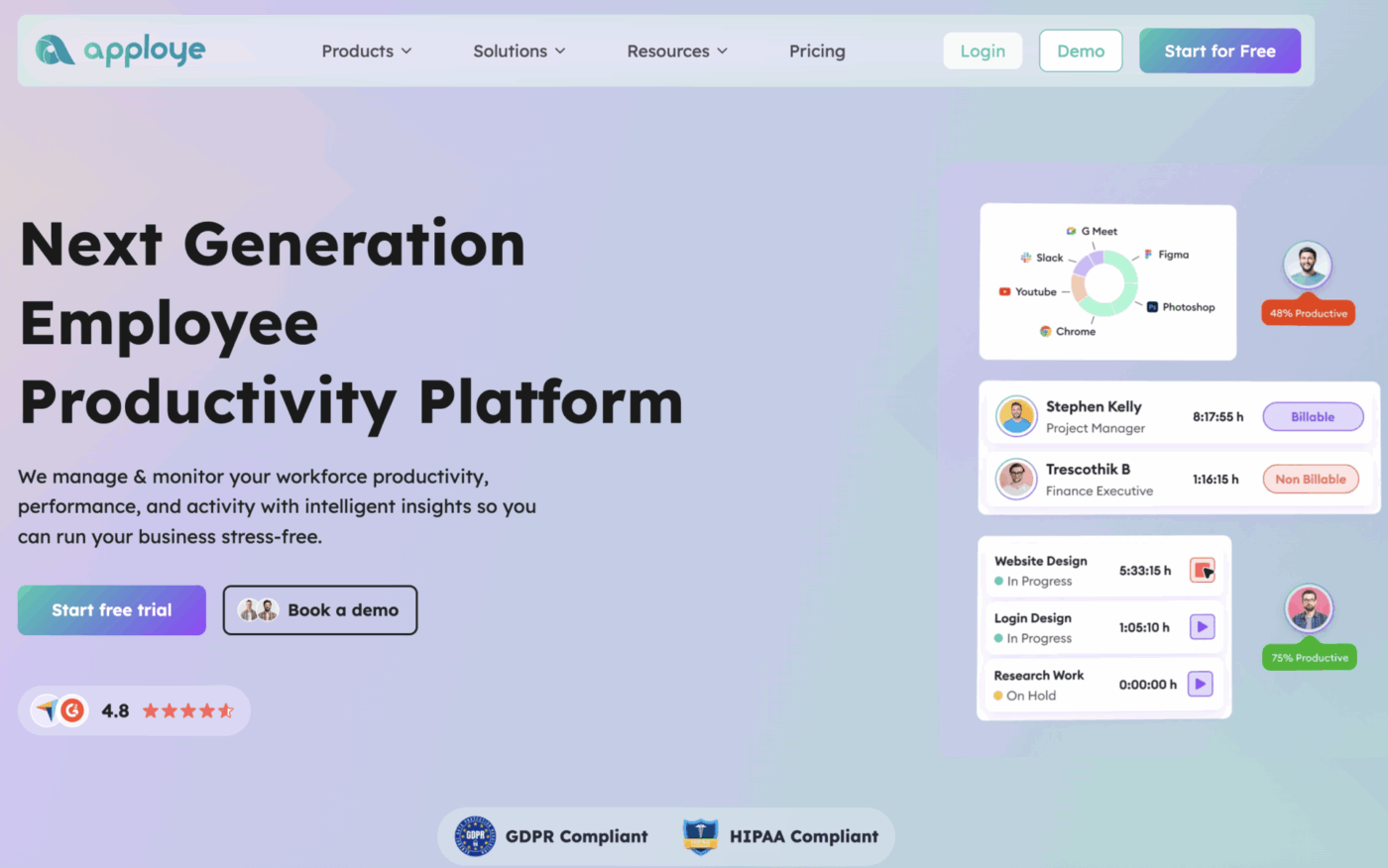
Apploye offers the same features as Hubstaff, like time tracking, automated timesheets, activity monitoring, payroll, and invoicing but at a much more affordable price point. It also offers screen recording that is not present in Hubstaff’s feature set. Apploye is easy to roll out with a free plan for up to 10 users and low-cost upgrades.
⏩ AI Capability: Apploye offers an AI chatbot that brings you catered performance data of your team members.
Teams that want the same time tracking features as Hubstaff without breaking the bank
Remote/hybrid teams, BPOs, and marketing agencies with a scaling team who are looking for an affordable option
Yes, Apploye has the same features as Hubstaff for time/productivity tracking. But if you want a more affordable & simpler option, Apploye is for you.
Timely is a productivity app best for remote workers to identify productivity trends across work. It’s designed to simplify how people organize their work and schedules. With Timely, you can easily track your time for any project with just a few clicks.
The app also has additional key features such as detailed reporting tools, budgeting tools, and real-time goal tracking. This allows you to easily monitor how much time you spend on each project or task and identify areas of improvement to increase productivity. Additionally, it integrates with popular services like Google Calendar, QuickBooks, Azure, and more to make managing projects easier.
Most employee time-tracking software is designed to monitor employees’ app and computer usage. If you have an anti-surveillance work policy, this software is for you!
⏩ AI Capability: Timely’s AI-powered Memory Assistant learns work patterns, fills in timesheets, and suggests edits based on your routine—making manual time tracking virtually obsolete.
Remote and hybrid teams that need smart time tracking without surveillance.
Design studios, distributed teams, consultants, and agencies with anti-monitoring policies.
Yes—if Hubstaff’s monitoring creates friction on your team, Timely offers a forward-thinking and respectful approach. It’s especially effective for creative or knowledge-based work where trust and focus matter more than screenshots.
💡 Pro Tip: Don’t just track time—track intention. Before starting a task, add a short “goal tag” (e.g., clarify X, draft Y, close Z). This habit keeps you outcome-focused, and the review process becomes more about impact than just hours spent.
RescueTime is built for individuals—not managers. If you’re looking to track and improve your personal time habits (rather than report to someone else), it’s a powerful alternative to Hubstaff. It runs quietly in the background and gives detailed breakdowns of how you spend your day—without any manual input.
It’s ideal for freelancers, writers, coders, and remote employees who want to self-manage without feeling watched. There are no task assignments or team reports—just clarity and focus.
⏩ AI Capability: RescueTime’s Focus AI recommends ideal work schedules, blocks distractions, and nudges you when productivity patterns shift.
Freelancers and individuals working without oversight
Remote professionals, creators, and anyone with screen-based work trying to optimize their habits
Yes—for personal productivity. It won’t help you manage a team, but it will help you understand and control how you use your time far better than Hubstaff ever could.
Progress isn’t about being busy—it’s about being intentional.
Even if today feels scattered, one focused hour tomorrow can shift your week. Don’t aim for perfection. Just aim for presence.
Everhour is a time-tracking and resource management platform designed to help teams stay organized, collaborate more easily, and increase productivity.
It features simple, intuitive interfaces for manually tracking time, allocating resources across projects, automating invoicing, budgeting projects, and more. Utilizing Everhour’s versatile suite of tools allows you to streamline processes within your organization without sacrificing visibility or control.
Another use case for Everhour’s time tracking features is categorizing standard leave types. This helps businesses manage their workforce and ensure they have the right coverage when employees are out for weeks or months. For example, managers can use these categories to estimate how many employees will be available each month, allowing them to plan projects better and anticipate workloads.
⏩ AI Capability: Based on live-tracked time, Everhour now features AI-powered project forecasting and budget overrun alerts.
Teams using third-party project management tools who want in-tool time tracking.
Agencies, client-facing teams, and companies using Asana, ClickUp, or Trello for projects.
Yes—if you’re not looking to replace your project management tool. Everhour is ideal for teams that want seamless time tracking without leaving their existing platforms.
📖 Read more: Check out the Everhour and ClickUp integration!
Paymo is a time-tracking tool that lets businesses track how much time employees spend on tasks, projects, and clients. For instance, Paymo’s automated reports provide a real-time overview of employee activity and billable hours, enabling managers to make informed decisions about resource allocation and budgeting.
Using the time log data allows clients to receive accurate invoices, resulting in improved client relationships and more revenue. The Paymo time tracking tool can also track billable and non-billable time, allowing businesses to understand their costs better and optimize pricing.
Overall, the Paymo time tracking tool offers a range of features that can help businesses improve their performance, boost productivity, and streamline their billing and invoicing processes.
⏩ AI Capability: Paymo recently added smart time predictions and project pacing suggestions based on prior work patterns.
Teams using third-party project management tools who want in-tool time tracking.
Agencies, client-facing teams, and companies using Asana, ClickUp, or Trello for projects.
Yes—especially if you already rely on tools like Asana or ClickUp. Everhour works best as a lightweight layer on top of your existing workflows, delivering time tracking that’s accurate, context-aware, and low-friction.
If you like Hubstaff’s structure—activity tracking, screenshots, and timesheets—but not the price, Desklog is a free alternative worth exploring. It’s especially helpful for engineering teams, support desks, and startups that need visibility into team productivity but don’t want the cost of enterprise surveillance software.
It supports basic PM features, app usage tracking, and automatic time logs, with optional screen capture and productivity scoring. You control what’s enabled—and your team knows exactly what’s being tracked.
⏩ AI Capability: Desklog uses AI to identify idle patterns, estimate productivity drops, and prompt break scheduling or work rebalancing.
Teams who need visibility but can’t afford Hubstaff’s pricing model.
IT teams, support desks, or budget-conscious startups that still need monitoring tools.
Not enough reviews
Yes—if you still need Hubstaff-style oversight but want to avoid the high price tag. Desklog gives you monitoring, reports, and even project tracking at a fraction of the cost. It’s not the sleekest option on the list, but it’s highly functional and fairly priced.
🧐 Did You Know? Employees who feel trusted by their managers—but still track their hours voluntarily—report higher productivity and satisfaction, according to organizational psychology research.
Time tracking shouldn’t feel like surveillance—or a struggle to manage. Whether you’re a remote team, a solo freelancer, or a fast-scaling agency, the right tool should help you build trust, improve workflows, and protect your team’s time—not just monitor it.
From flexible platforms like ClickUp to lightweight tools like Clockify and Toggl Track, you have a whole stack of Hubstaff alternatives designed for how teams work.
Each option in this list offers something Hubstaff doesn’t—better customization, more respectful tracking, or intelligent AI features that do more with your time.
✅ Ready to take back control of your workday?
Try ClickUp for free to streamline time tracking, project management, and team collaboration—all in one AI-powered workspace.

© 2026 ClickUp

There’s an easier way. Try a free AI Agent in ClickUp that actually does the work for you—set up in minutes, save hours every week.