
Sorry, there were no results found for “”
Sorry, there were no results found for “”
Sorry, there were no results found for “”
You know that feeling when you open a form and instantly regret it? Maybe it’s a never-ending list of fields that puts you off, maybe there are confusing instructions, or the worst—you’re required to enter one too many phone numbers.
Now, if you’re the one creating the form, the last thing you want is for people to sigh and close the tab.
A good online form builder software helps you avoid that.
With the right tool, you can create forms that are quick to complete, easy to navigate, and tailored to your needs. Here are some of the best options to make form creation (and completion) effortless. 💪🏼
These are our top picks for the best form builder software:
| Tool | Key features | Best for | Pricing* |
|---|---|---|---|
| ClickUp | – Auto-create tasks from form responses – Conditional logic – AI insights with ClickUp Brain – Form branding and dashboards | Best for teams of all sizes needing workflow automation, task integration, and real-time insights from form submissions | Free plan available; customizations available for enterprises |
| Typeform | – One-question-at-a-time interface – Branching logic and personalization – Heatmaps and analytics – 120+ integrations | Best for small businesses and marketers creating conversational, interactive surveys | Free plan available; paid plans start at $29/month; customizations available for enterprises |
| Jotform | – 10,000+ templates – PDF automation and e-signatures – Payment integrations – HIPAA compliance | Best for SMBs and healthcare orgs needing form flexibility, secure data handling, and payment collection | Free plan available; paid plans start at $39/month; customizations available for enterprises |
| Microsoft Forms | – Real-time collaboration in Office apps – Outlook/Teams integration – Excel sync – QR code sharing | Best for teams in the Microsoft 365 ecosystem needing seamless internal collaboration | Paid plans start at $7.20/user/month (via Microsoft 365) |
| Formstack | – Workflow automation and document generation – Field encryption and HIPAA/PCI/GDPR compliance – Conditional logic and branded portals | Best for enterprise teams in regulated industries needing secure, automated data workflows | Paid plans start at $99/month; Customizations available for enterprises |
| Zoho Forms | – CRM integration – Offline form access – Multi-language support – Automated workflows | Best for budget-conscious businesses needing CRM syncing and flexible data collection | Free plan available; paid plans start at $12/month |
| Google Forms | – Real-time results in Sheets – Embed in sites – Image/video integration – Section logic | Best for individuals and teams needing a free, no-frills form tool with basic analytics | Free plan available |
| Paperform | – Custom CSS and design controls – Quote calculators and product selling – Appointment fields and e-signatures | Best for design-conscious SMBs and creatives needing aesthetic, interactive forms | Paid plans start at $29/month |
| Wufoo | – Reliable uptime – Conditional logic and field validation – Report scheduling – Payment integrations | Best for teams needing a long-term, stable form builder with basic customization and analytics | Free plan available; paid plans start at $22/month |
| Forms.app | – AI-powered form builder – Multilingual (100+ languages) – Custom scoring and certificates – CSS customization | Best for global teams, educators, and quiz makers needing multilingual forms and auto-evaluation tools | Free plan available; paid plans start at $5/month |
A form builder is a digital tool that helps individuals and businesses create structured forms for collecting, organizing, and managing information efficiently.
It eliminates the need for manual data entry and paper-based processes by allowing users to design customizable forms with various input fields, such as text boxes, drop-down menus, radio buttons, checkboxes, and file upload options.
These online forms serve multiple purposes, including gathering customer feedback, processing sign ups, conducting surveys, managing job applications, and handling internal requests.
Most form builder software includes drag-and-drop editors, customizable fields, and automation features to make form creation easier. Many tools also integrate with customer relationship management (CRM) apps, email platforms, and workflow systems to keep responses organized.
🧠 Fun Fact: Ancient Egyptians used early forms to record taxes, census data, and trade transactions on papyrus scrolls. These were among the earliest examples of structured information collection.
Some form builders keep things simple, while others make you jump through hoops. To help you find the right fit, here are the best options that offer customization, ease of use, and smart features. 📝
Our editorial team follows a transparent, research-backed, and vendor-neutral process, so you can trust that our recommendations are based on real product value.
Here’s a detailed rundown of how we review software at ClickUp.
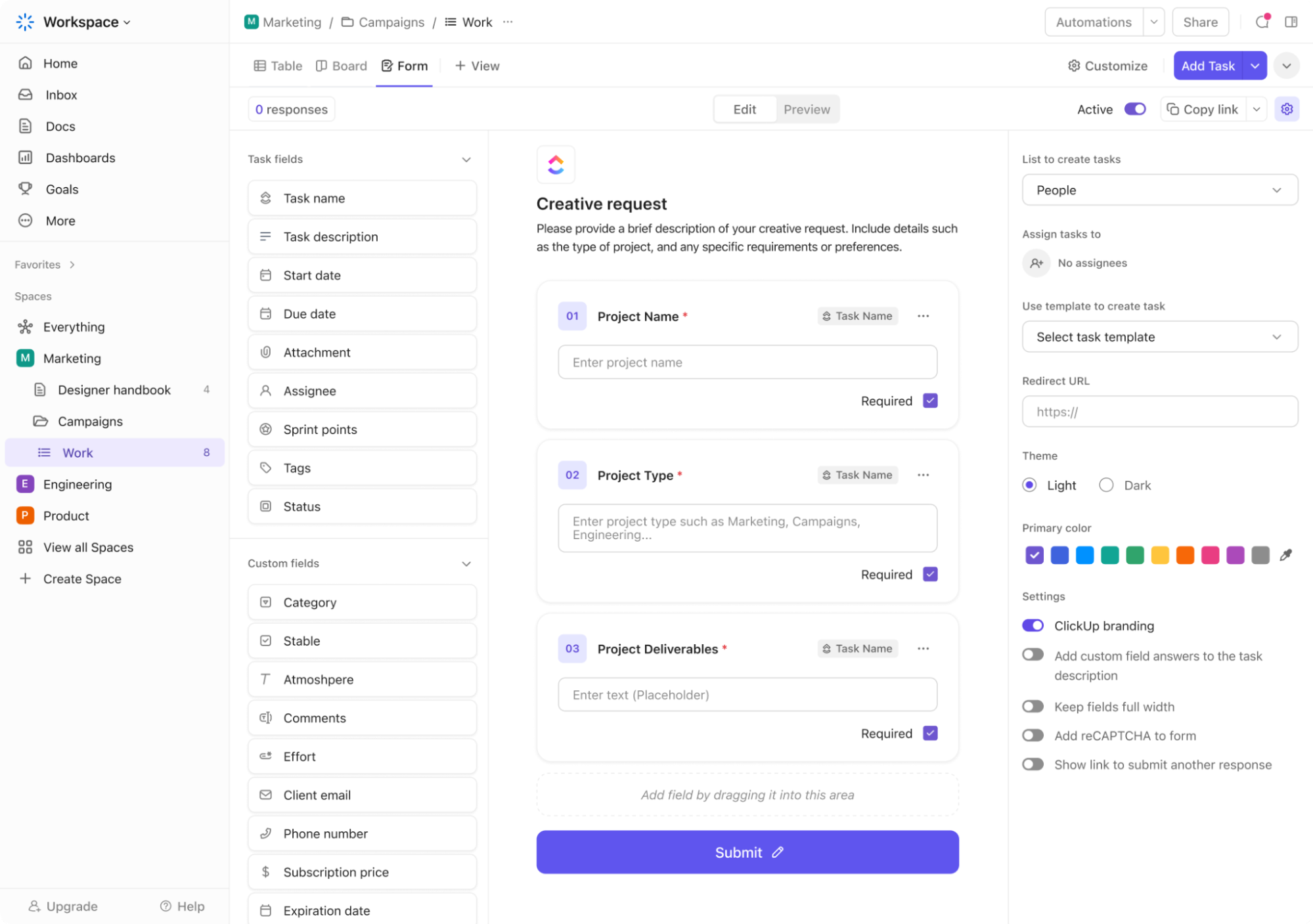
ClickUp is the everything app for work that combines project management, knowledge management, and chat—all powered by AI that helps you work faster and smarter. But what makes it stand out as an online form builder software is how seamlessly it connects form submissions to your workflows.
When teams receive form responses, they often need to take immediate action.
ClickUp Forms make this effortless by automatically converting each submission into a task. Suppose an IT team is handling bug reports. When a user fills out a form describing an issue, a ClickUp Task is created, categorized as a bug report, and assigned to a developer based on workload.
Plus, with the Forms Hub, teams also get a centralized location to access and manage all forms, simplifying the process of creating, sharing, and viewing forms across various use cases, such as surveys or bug reports.
Automation takes this a step further by handling repetitive work. For instance, a hiring team using forms as an applicant tracking system can set rules to sort and assign incoming applications automatically.
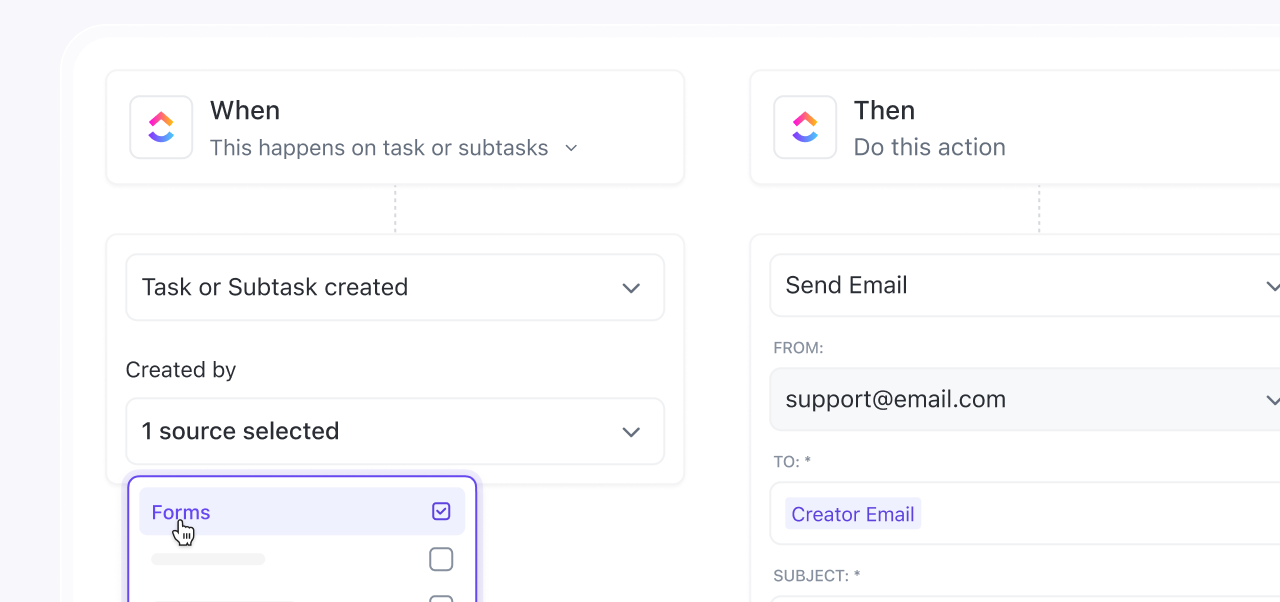
Suppose a form response candidate applies to a software engineering role. You can build a custom ClickUp Automation to assign the task to the technical recruiter instantly, move it to the ‘Initial Screening’ stage, and notify the hiring manager.
If the candidate meets key criteria, the system can trigger an automated email inviting them for an interview, saving the team hours of manual processing.
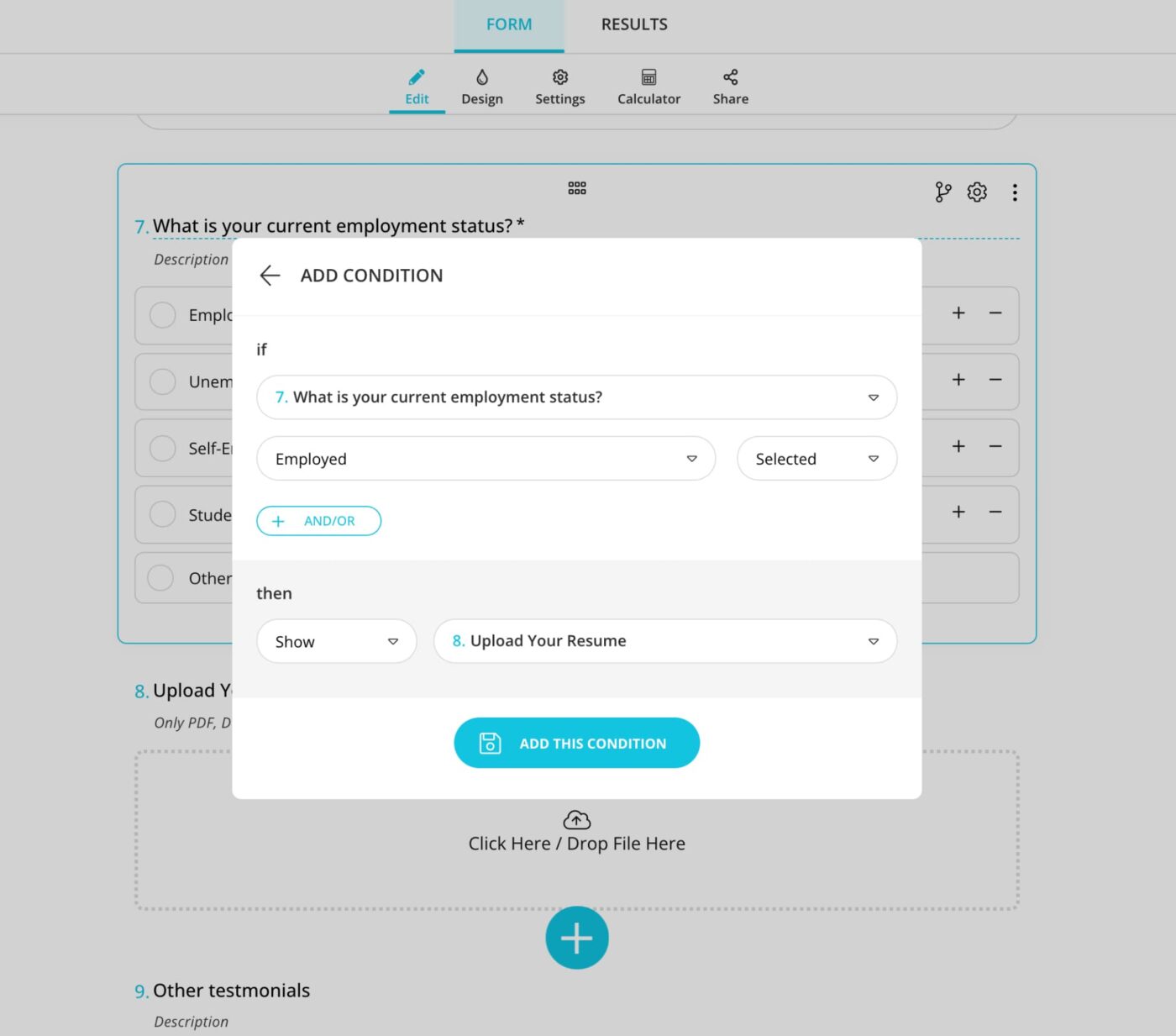
Customization also plays a big role in making forms more effective. Conditional logic in Forms shows or hides questions based on responses, making forms more relevant.
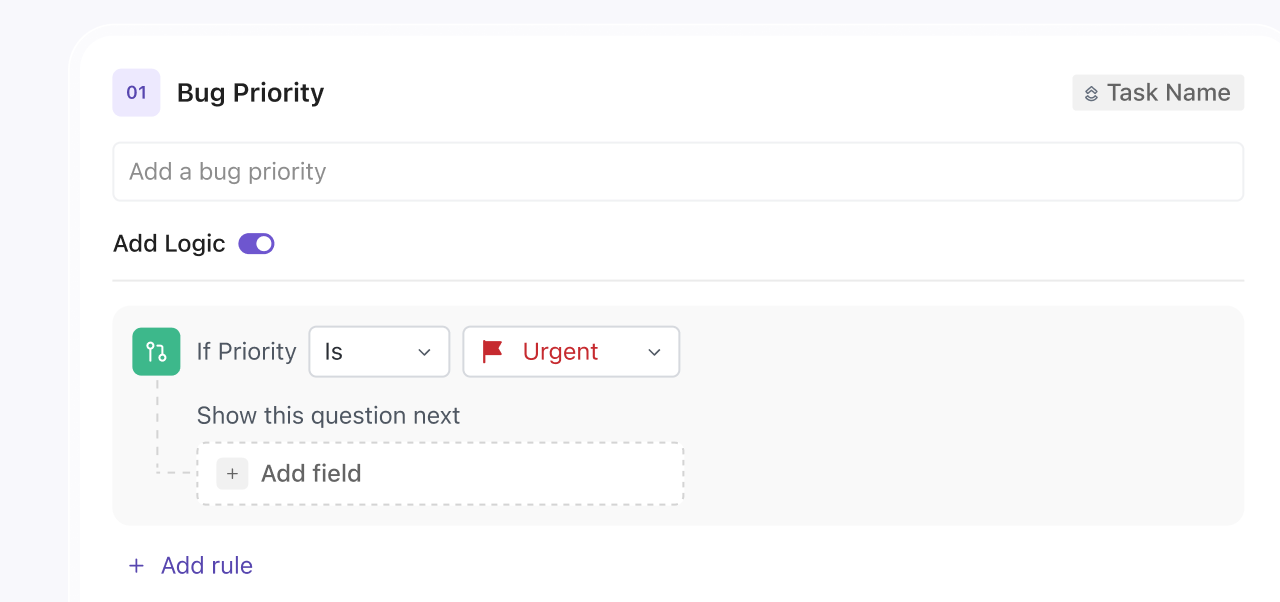
Let’s say your HR team is running an employee feedback survey. If someone responds that they are a ‘Remote Employee,’ additional questions about home office support appear, while onsite employees get questions about office facilities. This keeps forms organized and concise, without cluttering them with unnecessary fields.
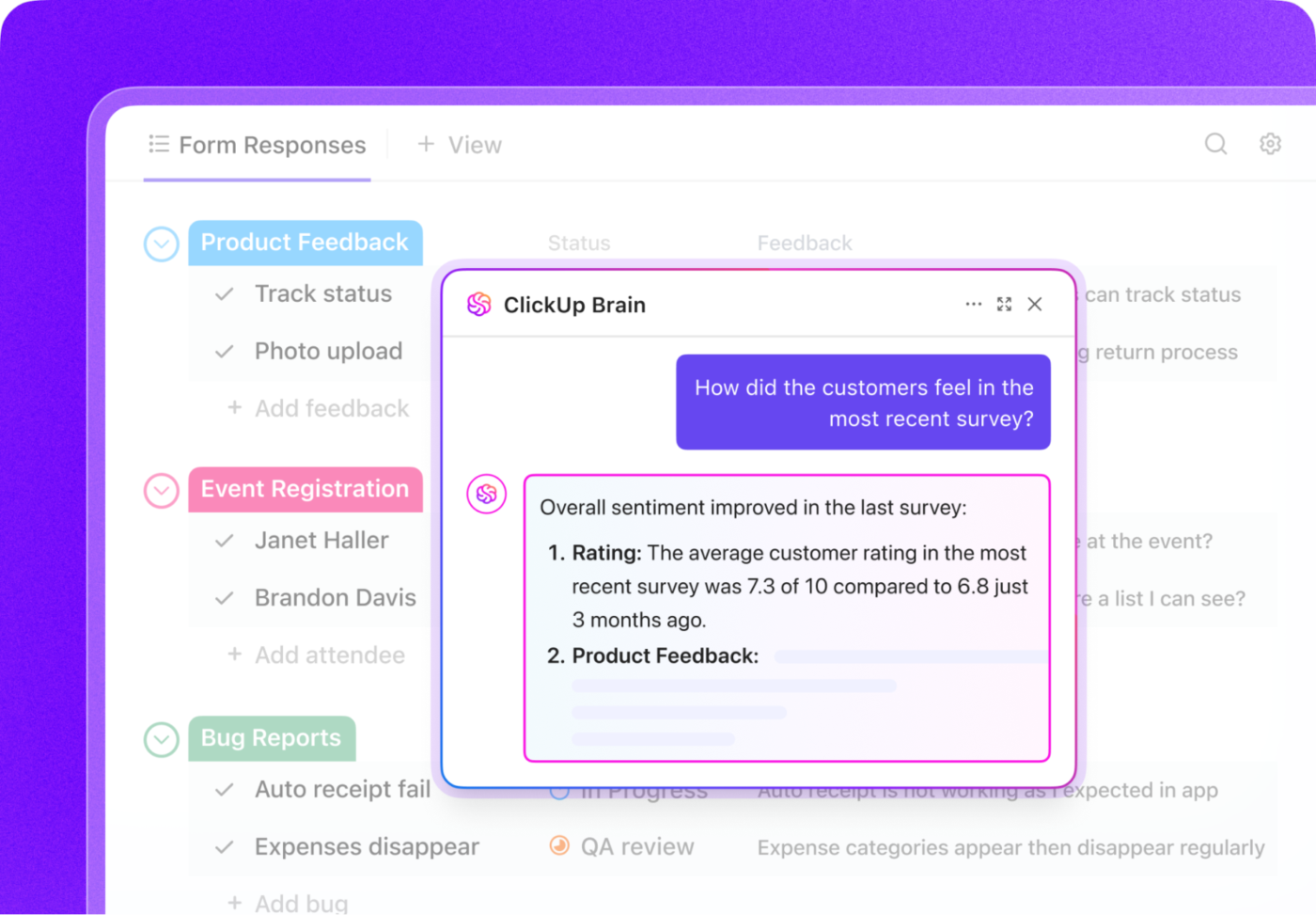
What if your form builder came with AI that made form responses easier to analyze?
ClickUp Brain, ClickUp’s built-in AI assistant, scans submissions and extracts key insights, so teams don’t have to review every response manually to identify trends.
Suppose a customer support team collects feedback on a recent software update. ClickUp Brain can summarize recurring issues—like users struggling with a new interface or reporting more crashes—helping the team prioritize fixes faster.
ClickUp even provides ready-to-use feedback form templates to speed things up.
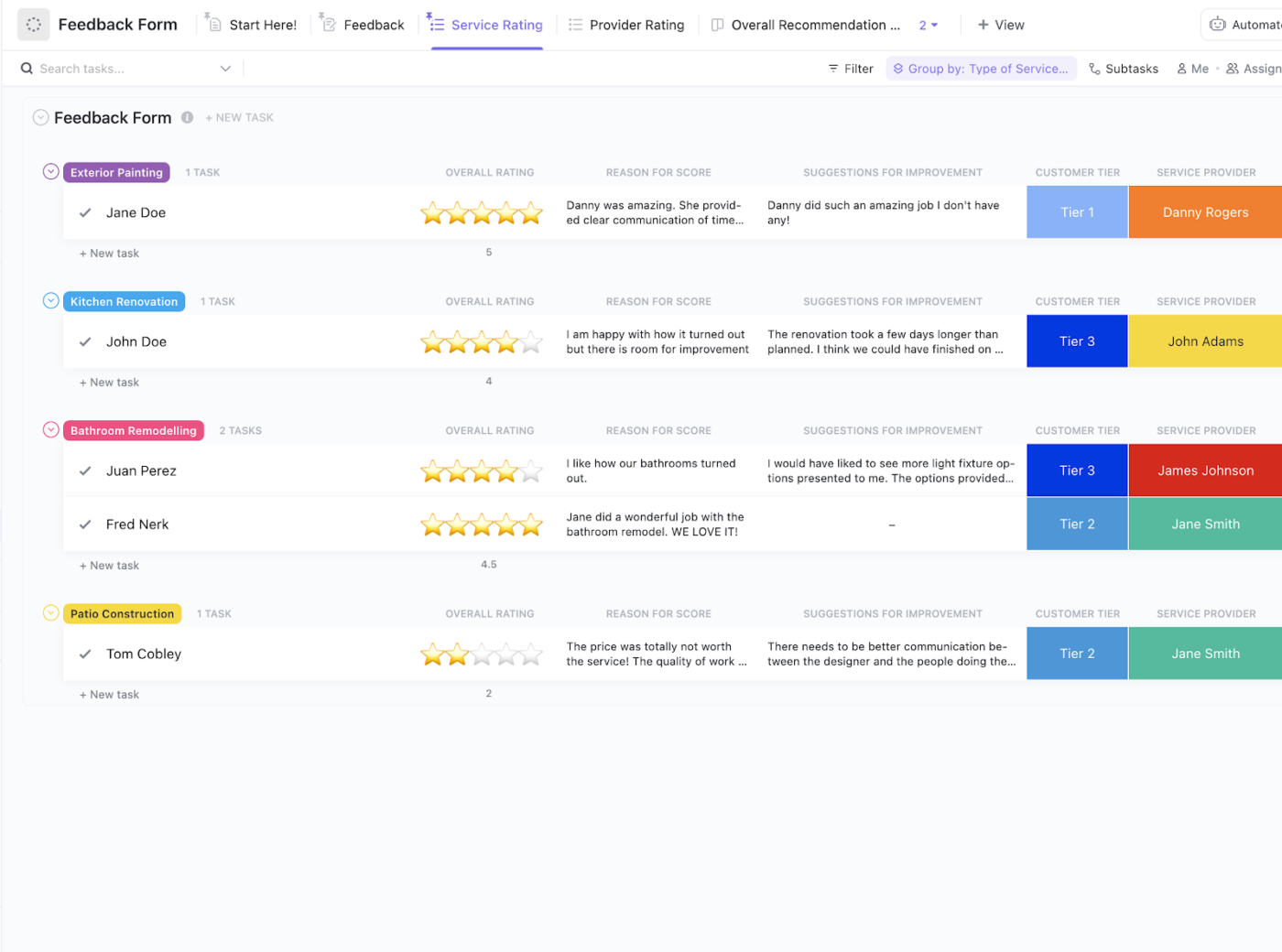
For instance, ClickUp’s Feedback Form Template helps businesses gather structured feedback while automating next steps. Different views, such as Overall Recommendation List, Feedback Table, and Provider Rating Table, make it easier to analyze responses and spot trends.
This take from Reddit stood out:
I really like the look of the Forms feature. Seems intuitive and the AI feature is kinda cool. I don’t get a ton of form responses, but I can see how this would save time if you’re constantly sorting through feedback or requests. Also, they let you customize forms more. I played around with the cover images and button colors, and it’s nice to not be stuck with the default.
📖 Also Read: Best Member Management Software for Organizations
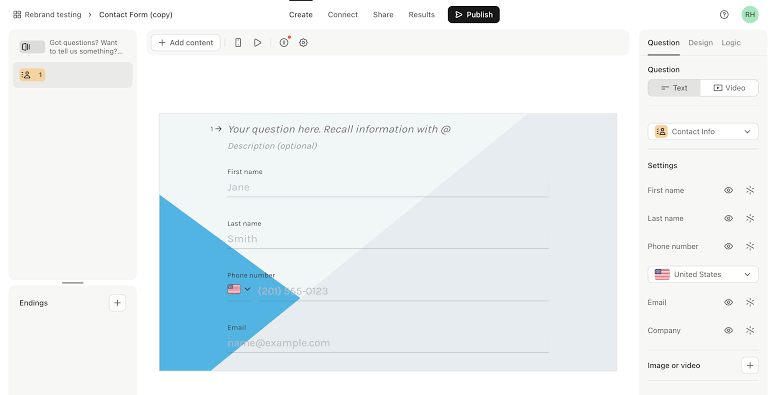
Many surveys feel robotic and impersonal, but Typeform completely flips this experience on its head.
The platform transforms traditional forms into flowing conversations through its signature one-question-at-a-time approach. This clever design keeps respondents engaged while significantly boosting completion rates across the board.
Its sleek interface requires zero design skills for form building, especially thanks to highly customizable intake form templates that seamlessly adapt to your brand identity. Behind the scenes, their intuitive analytics dashboard reveals where users spend time or abandon forms, helping you continuously refine your approach for maximum impact.
Here’s what stood out from a G2 review:
What I like about Typeform is its user-friendly interface. Its design and customization options allow us to create forms that are different from the existing ones. I like how smooth it runs while filling, it gives a refreshing experience. The only thing that I dislike about Typeform is the pricing. In free and basic plans, the features are very limited and the responses could be increased. Also, file upload features are not available in the free-tier plan.
🔍 Did You Know? Those annoying CAPTCHA forms that ask you to click on traffic lights or type distorted letters were originally designed to block spam bots. They also help train AI, teaching it to recognize images, text, and even street signs for self-driving cars.
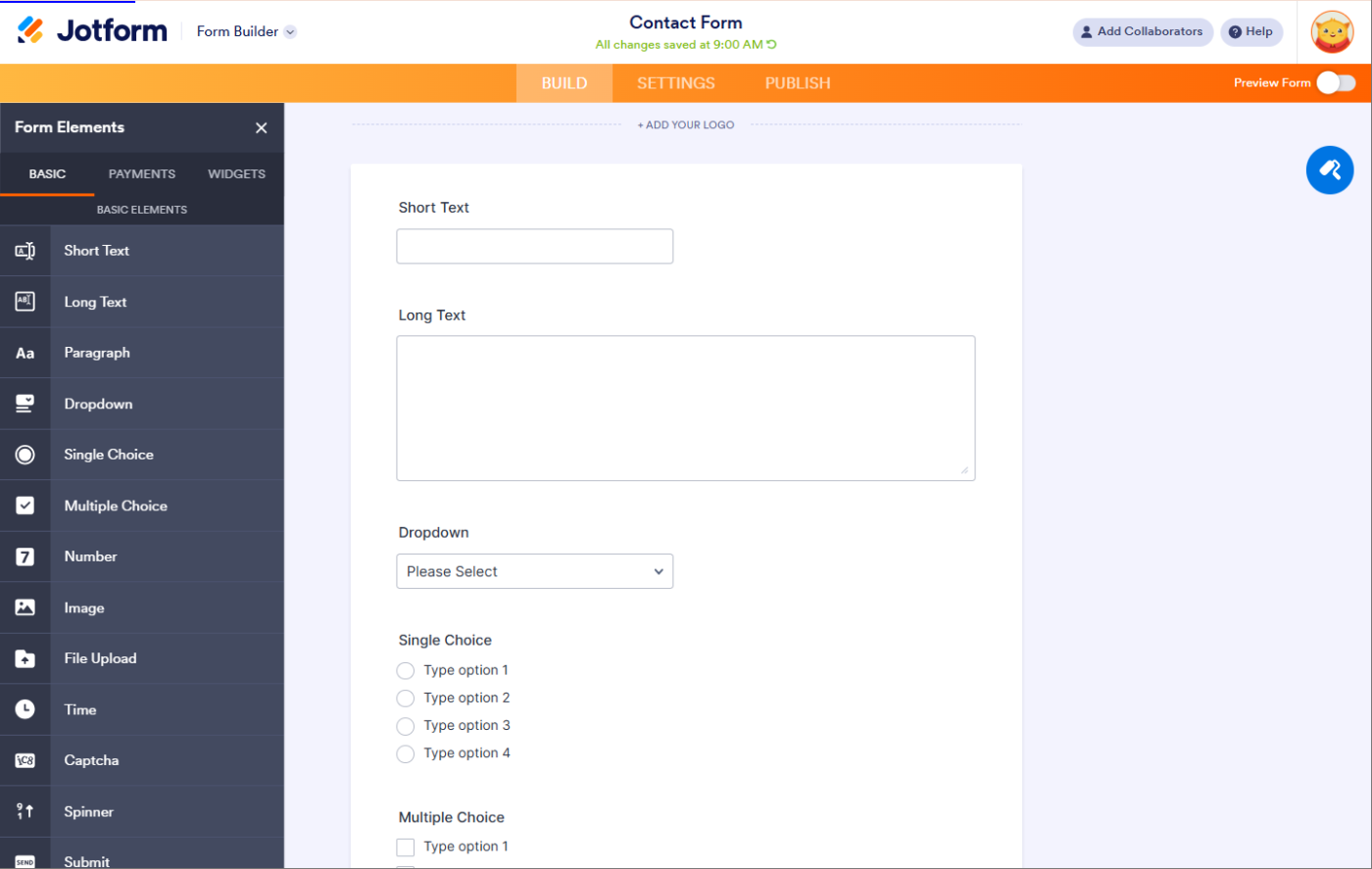
Searching endlessly for the right form template gets old fast. Thankfully, Jotform solves this problem with its massive library of over 10,000 templates covering practically every business scenario imaginable.
This veteran form builder strikes a perfect balance, combining intuitive drag-and-drop functionality with surprisingly powerful customization options. Small business owners particularly love the built-in feature for payment forms, which eliminates the need for separate payment processing systems.
Additionally, the platform stands out for security compliance, offering HIPAA-compliant forms that give healthcare providers and other regulated industries much-needed peace of mind.
Here’s what one G2 reviewer had to say:
While Jotform is quite robust in its functions, features, widgets, etc… much of these are outdated and antiquated, whereas we are moving into an age of self-developed, no/low code software that can accomplish many of these objectives more efficiently, and sometimes with more customization.
💡 Pro Tip: Each extra field reduces the chance of form completion. Identify the must-have fields and remove anything non-essential. If you need additional details later, consider collecting them through follow-up emails or progressive profiling.
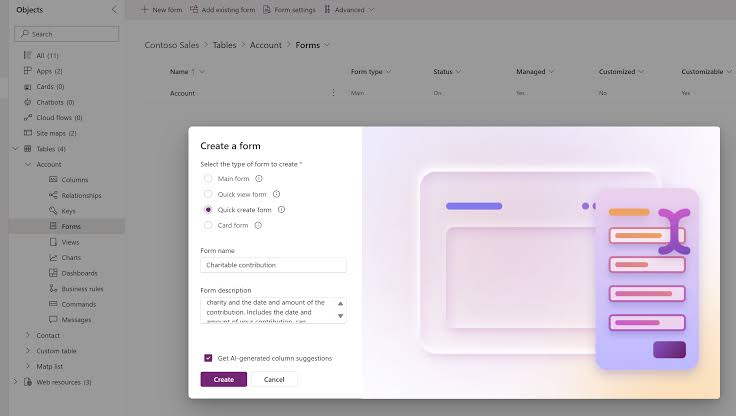
Microsoft Forms fits effortlessly into existing Office workflows, making it easy for teams to create surveys during meetings, refine questions together in real time, and watch responses flow directly into Excel spreadsheets for instant analysis. Educators particularly value how quickly they can create self-grading quizzes that save hours of manual scoring time.
The platform comes included with most Office subscriptions, eliminating the need for additional budget allocations.
For security-conscious organizations, Microsoft Forms offers enterprise-grade data protection, keeping sensitive information safe within the trusted Microsoft ecosystem.
A reviewer on Capterra put it this way:
The reports that are auto-generated are great, however, it would be amazing if we could select which type of chart is displayed. I like pie charts for some things, and bar charts for other things. Currently, the only way to do this is to export the data to Excel and create the charts there.
🧠 Fun Fact: The first-ever online order was a pizza from Pizza Hut in 1994, using an early web form. This helped pave the way for modern eCommerce checkout forms.
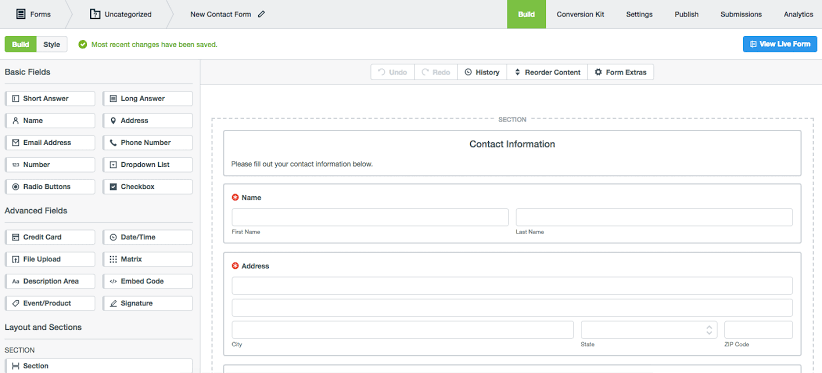
Formstack goes beyond simple form building to deliver a comprehensive data collection and form automation platform. It excels at turning collected data into polished documents, contracts, and reports without manual reformatting.
The visual workflow builder transforms complex approval processes into streamlined digital experiences. Many enterprise users appreciate the granular permission settings that allow teams to collaborate while maintaining appropriate access controls.
One TrustRadius review described it like this:
For most purposes, Formstack Forms is really good. You can ask all kinds of questions, split up the form into multiple pages, and save your progress to come back later. On the other hand, it isn’t aesthetically all that pleasing/doesn’t give you much control over the stylistic elements (including font, size, spacing). These things would offer a finishing touch to Formstack Forms that would really set it apart.
🔍 Did You Know? Studies show that online forms dramatically reduce errors compared to paper forms because they can include validation, dropdowns, and required fields to ensure accurate responses.
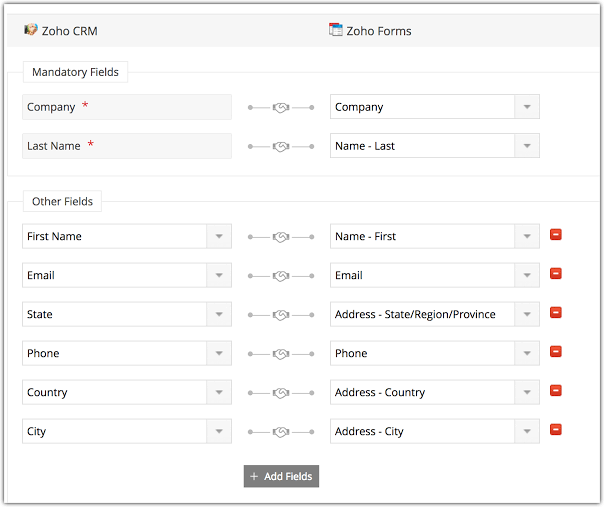
Zoho Forms delivers impressive functionality without breaking the bank, making it ideal for growing businesses watching their budget. It seamlessly connects with the broader Zoho ecosystem, particularly Zoho CRM, allowing customer data to flow automatically into your sales pipeline.
The software includes offline data collection capabilities, a standout feature missing from many pricier alternatives. Form creators appreciate the intuitive rule builder that enables complex conditional logic without requiring technical expertise.
The platform also includes practical features like digital signature fields and multi-language support right out of the box.
See what this Capterra reviewer had to say:
This software is a breeze to use and has saved me a lot of time. As we often have to modify a form, Zoho forms allow me to change just that section, quickly and without fuss. Once submitted, the form is emailed directly to the required recipient or recipients, which is easily set up in the settings for individual forms. The thing I find most frustrating is the fact that I can’t delete users and have to write to support to get them deleted.
💡 Pro Tip: Users should never guess what happens when they click a button. Make your call-to-action (CTA) buttons specific and action-driven.
❌ Submit
✅ Create My Account
✅ Get My Free eBook
✅ Start My 7-Day Trial
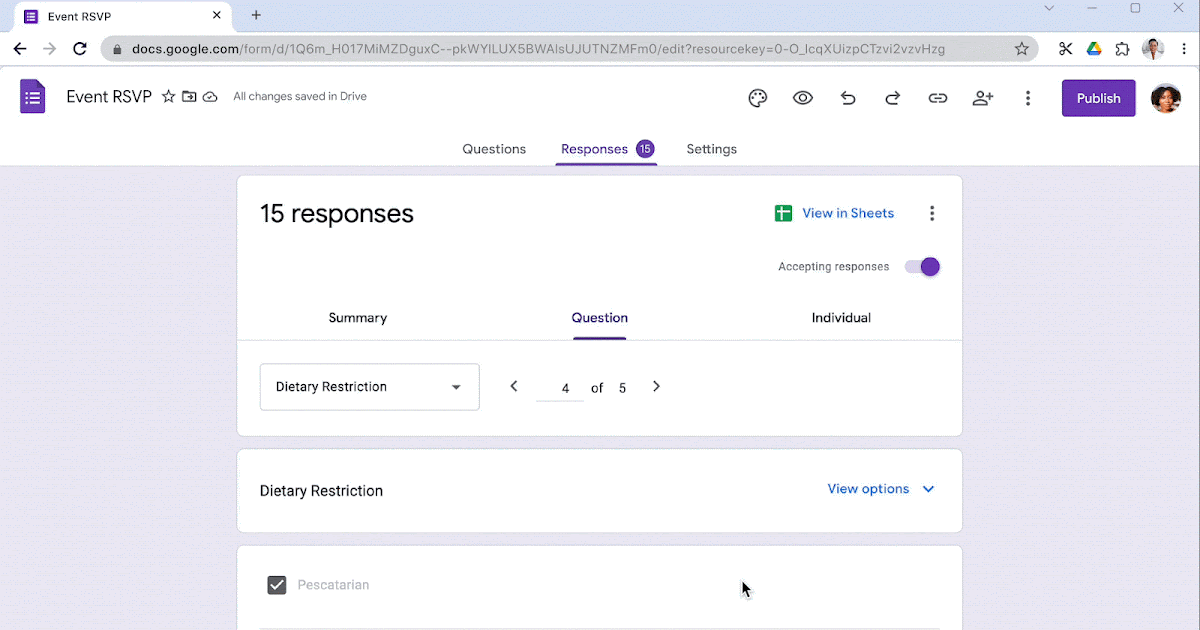
Google Forms strips away complexity to focus on speed and accessibility. The platform lets teams launch surveys, gather feedback, and collect registrations without spending a single dollar or minute on training.
Responses automatically organize into Sheets, creating instant visual summaries through charts and graphs. Collaboration happens naturally through familiar Google Drive mechanics—share editing access with colleagues or view-only links with the public.
Many organizations start their data collection journey with Google Forms before graduating to specialized tools as needs grow more complex.
This is how one Capterra reviewer described their experience:
It’s very easy to use and similar to other paid alternatives. I utilise this web app to get customer feedback on projects as it’s easy to manage the responses and easy to set up initially. My favourite area is the settings as you can set defaults for questions and adjust the style of the form.
🧠 Fun Fact: Certain tricky forms, like dark pattern subscription cancellation pages, are deliberately designed to make users give up, keeping them subscribed longer.
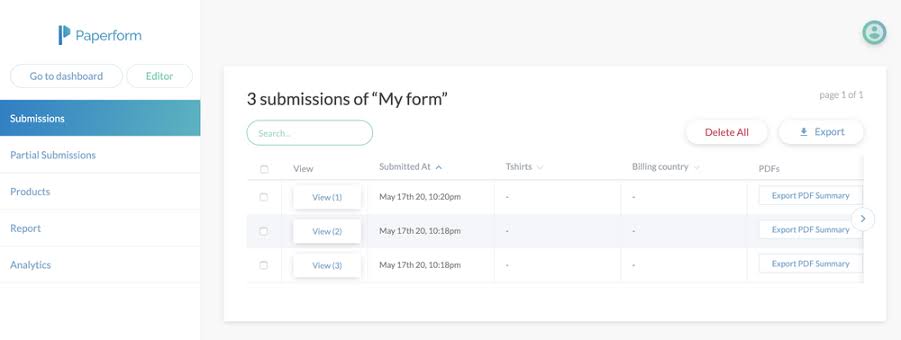
Paperform is built for small and growing businesses that want their forms to do more than just collect data. It combines strong visual flexibility with powerful workflows, allowing teams to create forms that feel like curated landing pages while still handling payments, bookings, and automation.
Form creators enjoy an intuitive document-style editor, freedom in layout design, including the ability to add multiple columns, embed rich media, and implement custom CSS for pixel-perfect branding. eCommerce businesses particularly appreciate the sophisticated product selling capabilities, including client management and customizable receipts.
Additionally, the platform offers impressive calculation capabilities for quote generators, pricing calculators, and other dynamic applications. Paperform has also introduced AI-powered features that help generate forms faster and assist with calculations and response analysis.
Straight from a G2 review:
We love how easy it is to create forms—from using their pre-built templates to even creating them from scratch. The templates are easy to customize, albeit with some limits (such as only two columns for questions side-by-side), but it does everything else so well that those limits are a non-issue.
🔍 Did You Know? A study found that people spend over 6.55 hours per year filling out government forms. The U.S. tax laws are among the most confusing, leading to a billion-dollar tax preparation industry.
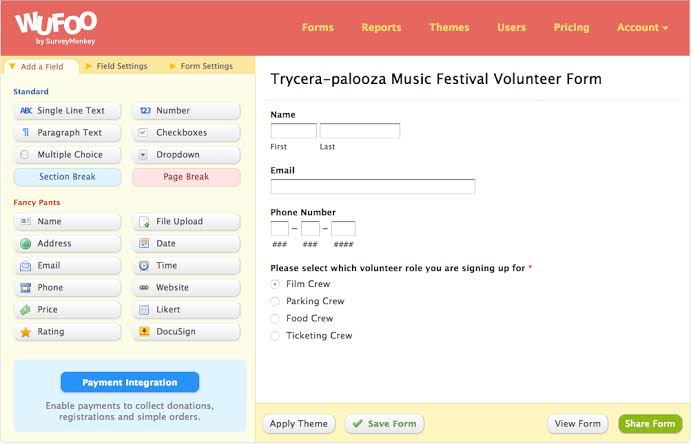
Wufoo stands as one of the original form builders that continues to deliver consistent performance year after year. The platform prioritizes stability over flashy features, though reliable capabilities hide just beneath the surface.
Its theme designer creates professional-looking forms matching organizational branding without requiring CSS knowledge. Field validation ensures data quality before submission, reducing errors and the need for constant follow-ups. Entry managers streamline response handling, assigning team members to specific submissions for accountability.
Organizations with critical data collection needs value Wufoo’s proven track record of uptime and reliability above all else.
A G2 reviewer summed it up like this:
I like that it is super straight forward on how to use and how to build a survey – it walks you through the steps.
I think the platform itself looks a little dated, could use a fresher interface to look modern.
🧠 Fun Fact: Ever noticed that some online forms remember what you typed if you accidentally close the page? That’s thanks to local storage, preventing frustration when users have to re-enter information.
📖 Also Read: Best Client Onboarding Software
Forms.app tackles the challenge of global data collection head-on. It supports over 100 languages, allowing organizations to deploy forms internationally without rebuilding for each market.
The AI assistant suggests effective questions and form structure improvements based on submission patterns and industry best practices. Small teams benefit from its straightforward pricing that scales reasonably without sudden jumps as data collection needs grow.
What’s more, the certificate generator adds unexpected value for educational assessments and training programs.
A G2 review explains it well:
I loved the AI functionality that allowed you to pose a topic/statement that the AI survey algorithm builds relevant questions off of. I also really love that it’s free! There’s no limit to the questions you can ask. Also has a very clean layout. […] There were some compatibility issues with using forms.app on Safari that I didn’t know existed until my colleagues told me they couldn’t open the survey.
🔍 Did You Know? The Common Gateway Interface (CGI) was one of the first ways to create interactive forms on the web. Before that, websites were purely static.
Choosing the right form builder software depends on your needs, but certain features ensure a smoother experience and better data collection. Here’s what to look for:
📮 ClickUp Insight: Teams without centralized access to work details often deal with scattered information, lost requests, and constant follow-ups. Low-performing teams are five times more likely to face these challenges, slowing progress and creating unnecessary roadblocks. On top of that, 80% of these teams still get stuck in busywork due to a lack of automation.
ClickUp simplifies the entire process with its task management software. Forms automatically turn responses into tasks, assign them to the right person, and flag urgent items. AI-powered insights help teams spot trends and act faster. Dashboards provide real-time visibility into responses, so nothing gets overlooked.
Forms are supposed to make life easier, not add to the chaos. But if you’re stuck juggling scattered responses, manually tracking data, or struggling to get real insights, it’s time for an upgrade. The right form builder helps you collect and act on information instantly.
ClickUp takes things a step further.
Submissions don’t sit in an inbox; they instantly turn into tasks, are assigned to the right people, and even trigger automated workflows. Need a quick overview? ClickUp Dashboards give real-time insights, while AI-powered analysis helps you spot trends without digging through endless responses.
Customization goes beyond basic branding, letting you tailor every question with detailed descriptions, dynamic fields, and smart logic that adapts based on responses. Everything connects seamlessly, so forms become an active part of your workflow, not an isolated tool.
Why let responses collect dust when they can drive results? Sign up for ClickUp today! ✅

Arya P Dinesh
Max 15min read

Manasi Nair
Max 15min read
Manasi Nair
Max 19min read

© 2026 ClickUp