


Sorry, there were no results found for “”
Sorry, there were no results found for “”
Sorry, there were no results found for “”
🔎 Did You Know? An astonishing 40% of business-critical data is trapped in data silos!
Think about that—nearly half of the information that could drive smarter decisions is stuck in fragmented systems, inaccessible when you need it most.
For business owners and managers, this isn’t just a statistic; it’s a daily headache.
That’s why web-based CRM software has become a game-changer.
By consolidating customer data into a single, cloud-based platform, these CRM systems break down silos and automate tedious tasks while providing actionable insights. ⚡
Whether you’re looking to upgrade your current setup or procure your first CRM software, this guide highlights the best web-based CRM options to transform how you manage your customer relationships.
Web-based CRM software is a game-changer for managing customer relationships, streamlining workflows, and eliminating data silos. These tools empower businesses by centralizing customer data, automating repetitive tasks, and providing actionable insights to enhance productivity.
Here’s a quick look at the best options for 2025 and what they excel at:
🔎 Did You Know? Mitch Muhney and Mike Sullivan developed the first customer relationship management (CRM) software, ACT! (Activity Control Technology), in 1987!
When choosing a web-based CRM, focus on features that address your business’s needs and eliminate inefficiencies. These software-as-a-service (SaaS) platforms provide flexibility and accessibility, allowing you to manage customer relationships from anywhere.
Here are some key features to prioritize:
➡️ Read More: Best Fully Customizable CRM Software Systems
Having the right web-based CRM software can save time and effort. Let’s take a closer look at the top web-based CRM software:
ClickUp CRM offers a comprehensive solution for managing customer relationships by combining customizable tools with powerful workflows. Built to cater to teams of any size, ClickUp enables you to tailor your CRM system to fit your business needs, ensuring a seamless customer management experience.
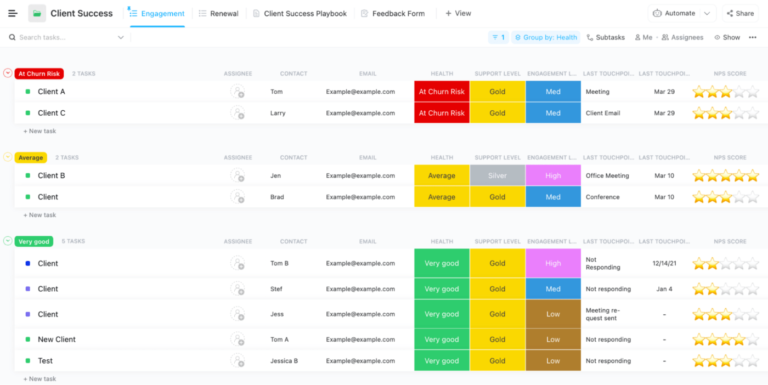
With Custom Fields in ClickUp, you can create a CRM database that tracks everything from lead status and deal value to contact details and next steps—all visible in one place. For example, you could generate a new field for Lead Source and add it alongside a “Priority” and “Follow-up Date” to ensure your team never misses an opportunity.
Using ClickUps Dashboards, you can assess the health of your pipeline in real-time, as well as the performance of your team and any pertinent revenue figures. You can use charts and cards to assess statistics such as “Deals Closed This Month” or “Top Performing Sales Reps.” This allows teams to streamline task prioritization and instantly identify obstacles in the sales process.

ClickUp’s custom workflows let you visually manage your sales pipeline using Kanban boards, lists, or Gantt charts. For instance, you can create stages like “New Lead,” “Contacted,” “Negotiation,” and “Closed,” on a pipeline board and drag and drop deals between stages to track progress.
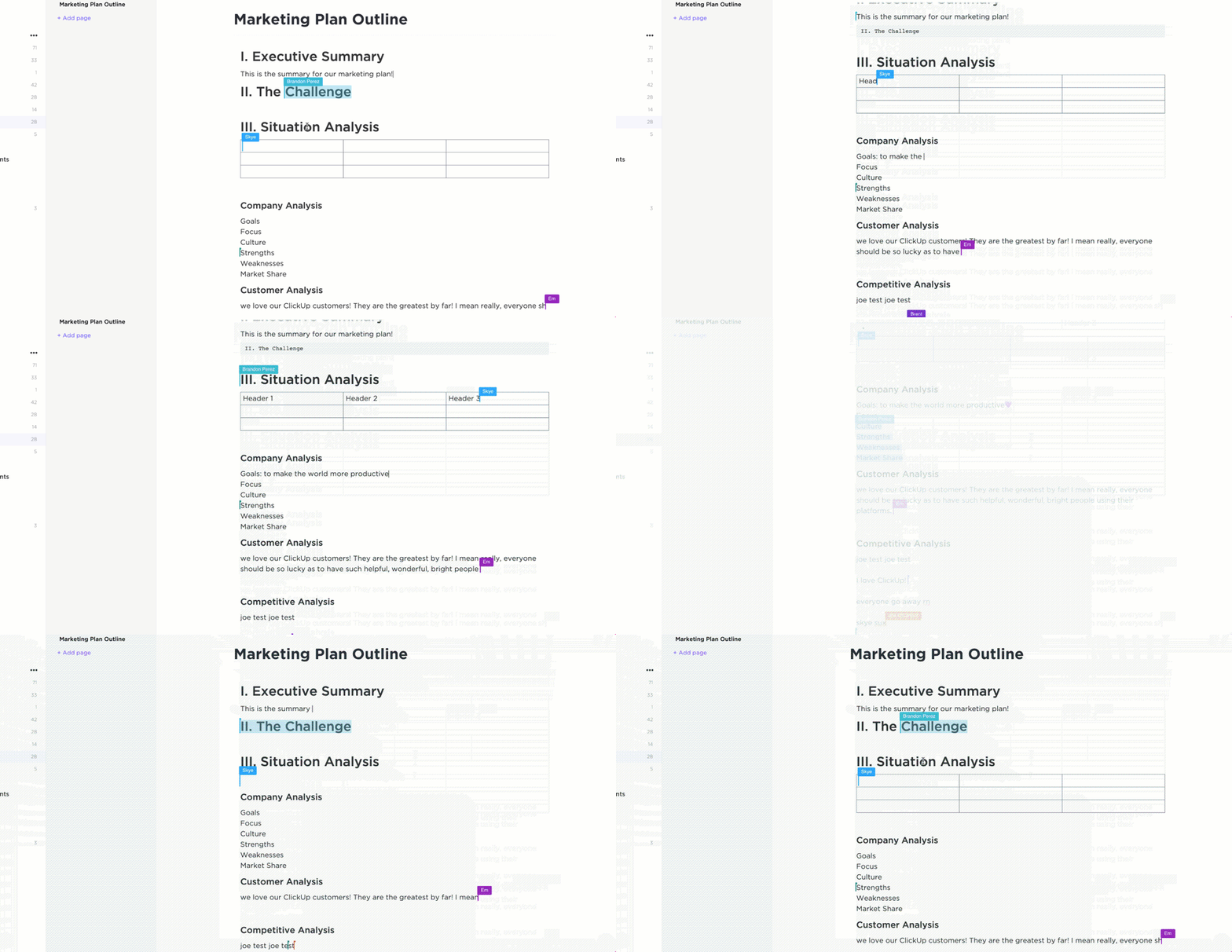
ClickUp’s real-time collaboration tools make it ideal for teams that must stay connected and aligned.
Features like task comments, ClickUp Chat, and collaborative ClickUp Docs eliminate the need to switch between multiple tools, keeping everything centralized. This promotes efficient communication and reduces potential errors. ⚡

The platform’s integration capabilities are another major advantage, with ClickUp supporting 1,000+ app integrations. From email tools and file storage to marketing software, these integrations ensure businesses connect with all their favorite apps, enhancing overall productivity and data management. 🔗

The AI-powered ClickUp Brain and ClickUp Automations are significant cornerstones of ClickUp’s CRM functionality.
Working in tandem, these tools enable businesses to save time by automating repetitive tasks such as follow-up reminders, task assignments, and data entry. This allows teams to focus on more strategic activities, improving efficiency. Brain also provides progress updates and smart replies, making managing your CRM workflows faster, smarter, and stress-free.
Moreover, ClickUp’s CRM Template is a game-changer for managing sales pipelines, tracking leads, and organizing customer data. With customizable statuses, fields, and views, this template allows teams to prioritize tasks by sales stages, eliminate inefficiencies, and uncover valuable insights to enhance customer interactions.
Talking about ClickUp’s automation and project management capabilities a user says,
Clickup has been the most straightforward and easy to set up project management tool for us. Task tracking is super easy with lots of granular details. Sharing with teams and inviting new members to collaborate with the board and task is super easy. Integration with 3rd party tools is also possible with many apps available. Datadog and Clickup integrations help a lot in creating incident tasks in Clickup for the events that need to be addressed and the team can then start working on the incidents.
💡 Pro Tip: Save yourself hours of setup with sales plan templates. These templates are perfect for getting a head start on structuring your sales strategy. Customize these pre-built plans instead of starting from scratch to fit your needs.
Salesforce’s web-based CRM, Sales Cloud, is designed to empower sales teams with AI-driven insights, guided selling, and streamlined automation. As a business manager, you can track leads, manage accounts, and optimize sales pipelines in real time.
This cloud-based CRM software has features that allow you to predict future sales with detailed forecasting, automate workflows to save time, and centralize all customer data into a single source of truth. Salesforce also integrates seamlessly with tools like Slack and Tableau, enabling collaboration and data-driven decisions across your team.

HubSpot’s web-based CRM is a dynamic solution for growing businesses. It combines powerful marketing, sales, and service tools into one seamless platform. With real-time sales pipeline tracking, automated email notifications, and detailed reporting, you gain full visibility into your customer management strategies.
HubSpot helps manage contacts, track deals, and analyze team performance. It uses AI features like an email writer and live chat to enhance customer interactions. The platform also supports integrations with third-party apps, ensuring scalability and adaptability for growing businesses.
Speaking of Hubspot’s CRM, a user working in the healthcare sector said,
HubSpot Service Hub stood out for us as it has been easy to set up, very user friendly as we introduce it to team members who will be using it every day, and it has the functionality you would expect from a CRM and much more. Setting up automation to save our team members time in their daily workflows has been very straightforward and all of the available resources online / through HubSpot customer support have helped us feel confident in what we are doing.
📚 Bonus Read: Looking for the right cloud-based CRM that fits your needs without all the tech headaches? This curated list of cloud-based CRM tools will help you find the best solution to streamline your workflows and easily scale your business.

Zoho CRM is a powerful web-based tool designed to optimize sales, marketing, and customer engagement while delivering a comprehensive 360° view of customer relationships. An intuitive interface and a wide range of features enable organizations to automate daily sales tasks and convert web visitors into leads.
This CRM platform enhances team collaboration, customer interactions, and decision-making by integrating smoothly with different apps and offering advanced AI-powered features through a web-based approach. Besides this, it offers tools for lead management, contact management, and sales pipeline tracking to help you turn customer information into actionable insights.
➡️ Read More: 10 Best CRM Software for Service Businesses

Pipedrive‘s web-based CRM software is designed for businesses that want to organize their sales pipeline management while focusing on closing deals. It lets you centralize all your customer information, integrates with your tech stack, and uses AI to supercharge your sales process and boost productivity—all while maintaining data security on a trusted platform.
This cloud-based CRM tool empowers your sales teams by automating repetitive tasks and providing instant sales insights. Additionally, Pipedrive offers features like email integration, activity reminders, and goal setting to keep sales teams organized and focused on closing deals.
Speaking of Pipedrive’s use case for sales teams, a sales development representative said,
Pipedrive has been a super incredible tool for me, it is the best CRM with which I have worked,and it has functionalities that are very useful for me in the B2B prospecting part, it is constantly updated, it incorporates new functionalities from the trends in the market and that contributes a lot worth.

Monday.com‘s CRM is built for businesses that demand flexibility and scalability in their cloud CRM solutions. It has been developed to adapt to your unique sales processes and lets you streamline everything from lead tracking to sales pipeline management with intuitive drag-and-drop customization.
This customizable cloud CRM software simplifies task management, enabling teams to centralize data, automate workflows, and focus on growing customer relationships. With customizable dashboards and various views, such as Kanban and Gantt charts, the platform allows teams to visualize their sales pipelines, monitor real-time progress, and enhance team collaboration.
These tier plans are based on 10 users:
➡️ Read More: How to Do Project Management for Sales Teams

Freshsales, part of the Freshworks Suite, is an AI-powered web-based CRM designed to help businesses improve sales productivity and streamline processes. Sales teams use this web-based CRM application to efficiently manage leads, track customer interactions, and automate repetitive tasks, improving efficiency and accelerating deal closures.
Freshsales also offers a 360° customer view, providing context for customer interactions across multiple channels. Its customizable dashboards and reports provide actionable insights into sales performance and pipeline health.
Speaking of the Freshsales UX, a user on G2 said,
As someone who used Freshworks CRM, Freshdesk for ticketing, and Freshteam, I can vouch for their UX, some of the intuitive easy to use features in the CRM. Quickness of their customer-facing teams getting things live was commendable.

Insightly blends CRM, marketing automation, and sales project management into one powerful platform. It helps manage the sales pipeline and create a unified system where your sales, marketing, and service teams work harmoniously.
Insightly stands out for its customizability. It allows you to tailor objects, fields, and workflows to meet your exact business needs, regardless of your industry. Furthermore, this cloud-based CRM provider makes tracking leads, managing opportunities, and overseeing post-sale projects easy without switching platforms.
💡 Pro Tip: Every customer interaction is a chance to build loyalty—or lose it. While adopting a CRM is crucial for strengthening customer relationships, using it properly is where most businesses stumble. The key? Prioritize a well-planned CRM implementation strategy tailored to your team’s needs, ensuring your CRM becomes a powerful tool for growth, not a missed opportunity. 🛠️
Less Annoying CRM (LACRM) lives up to its name. It is intuitive, straightforward, and made specifically for small businesses. The platform’s emphasis on simplicity and dedicated customer support ensures that users quickly adapt and integrate it into their daily operations, minimizing the learning curve and maximizing efficiency.
There’s no overwhelming list of features you don’t need—exactly what helps you track customer relationships, manage tasks, and stay organized. With unlimited contacts, pipelines, and custom fields, you’ll have everything you need to streamline your operations without the complexity or hidden fees in larger CRMs.
A G2 review says:
LACRM stands out because it’s not designed exclusively for “salesy” businesses. Instead, it accommodates our unique approach, staying out of our way while consistently delivering reliable performance. Features like robust export/import functionality and the ability to merge contacts and histories when needed have been invaluable.

Copper CRM is a cloud-based platform designed to integrate seamlessly with Google Workspace. It provides businesses with a user-friendly solution for managing leads, contacts, and complex sales processes.
Its deep integration with Gmail and Google Calendar allows users to track email conversations, schedule events, and add contacts directly from their inbox, streamlining workflows and enhancing productivity. Copper’s automation features, like task creation and email follow-ups, save time by eliminating repetitive tasks. Besides, the mobile app ensures you can stay on top of your deals even on the go.
When choosing a web-based CRM, don’t just focus on features—think about scalability, user adoption, and how well it integrates into your existing workflows. Your CRM should grow with your business, simplify processes, and provide a clear roadmap to measurable results. 🚀
While many tools on this list offer unique advantages, not all are built to handle customer management and internal collaboration seamlessly.
That’s where ClickUp sets itself apart. Combining CRM and project management tools, it’s a one-stop platform that centralizes your workflows, automates repetitive tasks, and empowers your team to stay productive. 🏆
Sign up on ClickUp today if you’re looking for a flexible, scalable, and intuitive solution to elevate your business operations!

Arya P Dinesh
Max 15min read

Manasi Nair
Max 15min read
Manasi Nair
Max 19min read

© 2026 ClickUp





