






Still downloading templates?
There’s an easier way. Try a free AI Agent in ClickUp that actually does the work for you—set up in minutes, save hours every week.
Sorry, there were no results found for “”
Sorry, there were no results found for “”
Sorry, there were no results found for “”
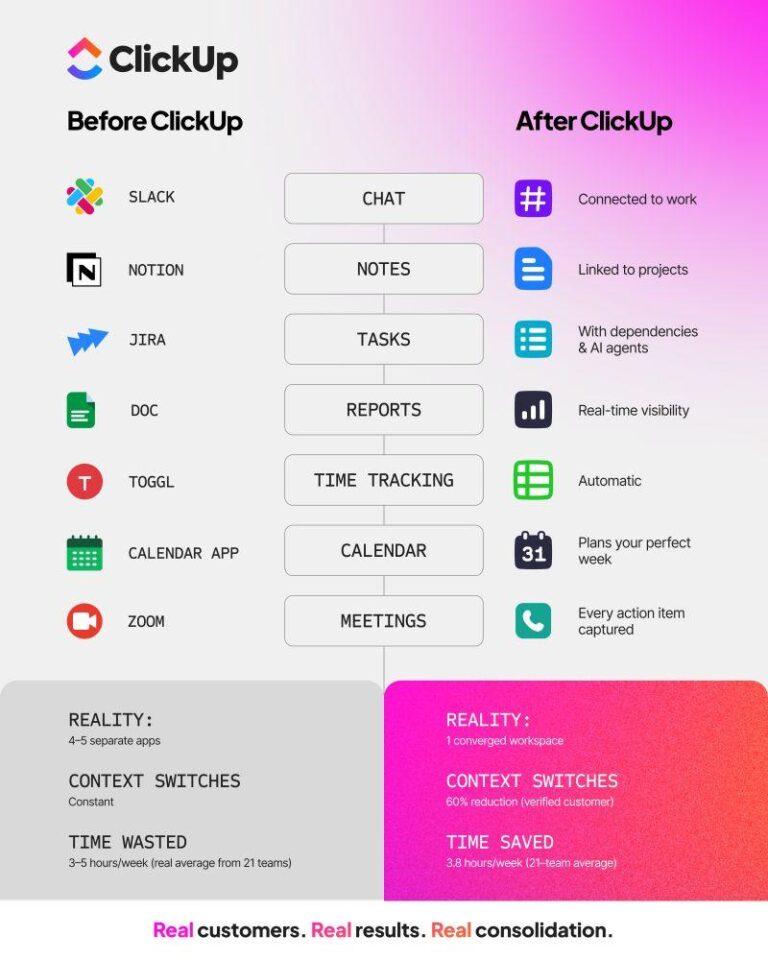
We all know we use way too many apps to get things done.
But here’s context that’ll blow your mind: We now toggle between apps roughly 1,200 times a day. 🤯
That means we’re losing nearly 4 hours every single week just reorienting ourselves to all these different tools. That’s nearly a tenth of our work week!!!
For small businesses, especially remote ones that depend on multiple collaboration tools, this is like a productivity tax you pay every day. Unlike bigger companies, you don’t have the luxury of extra headcount to patch the cracks.
That’s why modern remote collaboration can’t stop at Slack and email. Those tools are great for communication, but they weren’t built to run your projects, track accountability, or keep everyone aligned when nobody’s in the same room.
This blog will show you how to consolidate your team’s scattered workflows into a unified collaboration system—with remote team collaboration tools that work for a small business.
Let’s go!
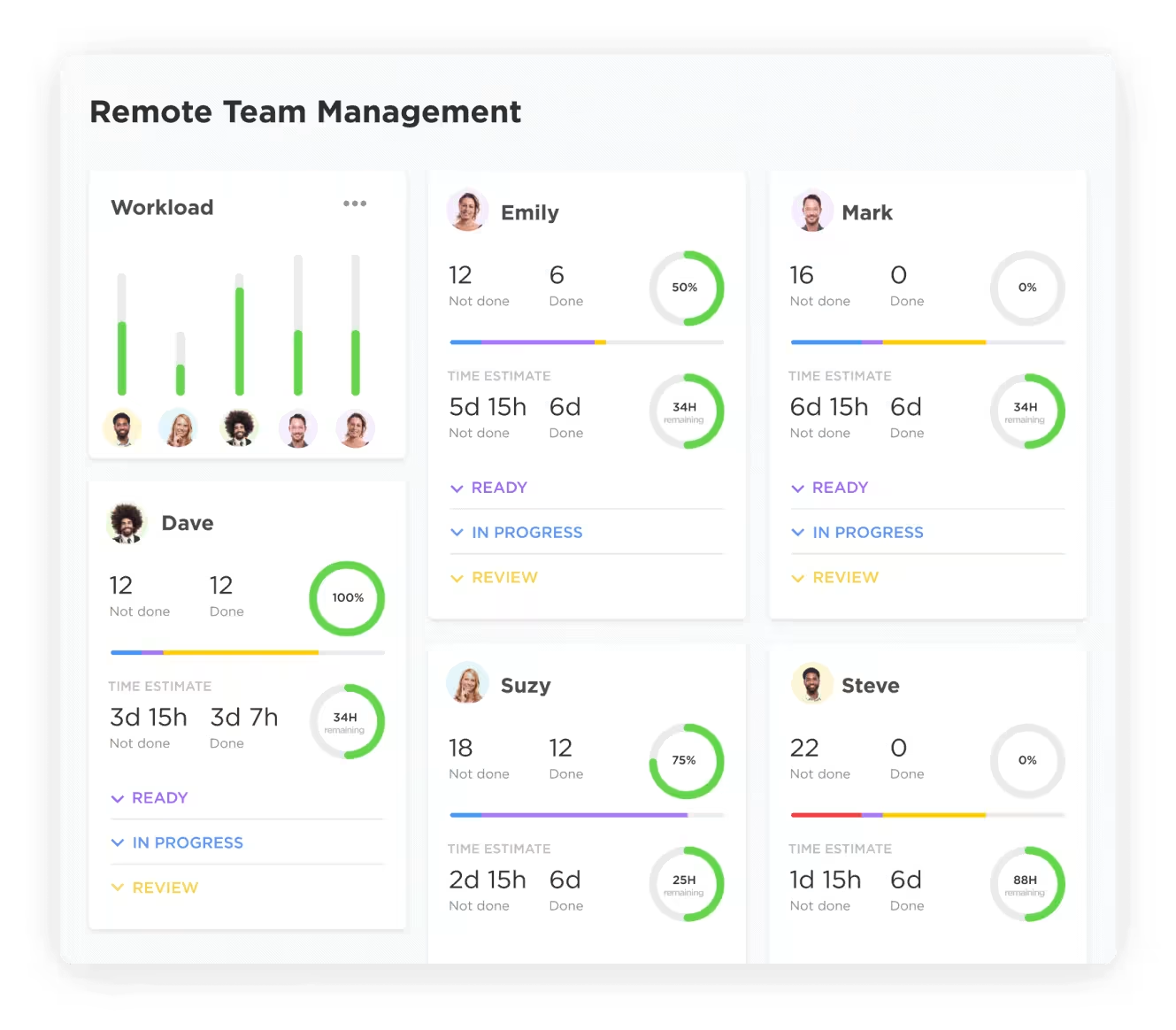
Remote team collaboration tools are digital platforms for distributed teams, which help you communicate, manage projects, and share files in one organized place. As the central nervous system of a remote or hybrid workplace, these tools go far beyond simple messaging. They offer a structured environment where work actually gets done.
Different types of remote collaboration tools include:
🤝 Friendly Reminder: While you can use separate tools for each, a Converged Workspace—a single platform where projects, documents, and conversations live together—like ClickUp combines these categories into a single platform. With such a tool, you needn’t constantly switch between apps, keeping your team focused and aligned.
If you’re already using email and maybe a chat app like Slack, work shouldn’t feel so…disorganized, right?
Um…wrong.
Yes, Slack and email are great at what they do. But they were built for just one thing: conversations. They’re great for quick updates and back-and-forth, but they don’t turn these conversations into clear next steps.
The result?
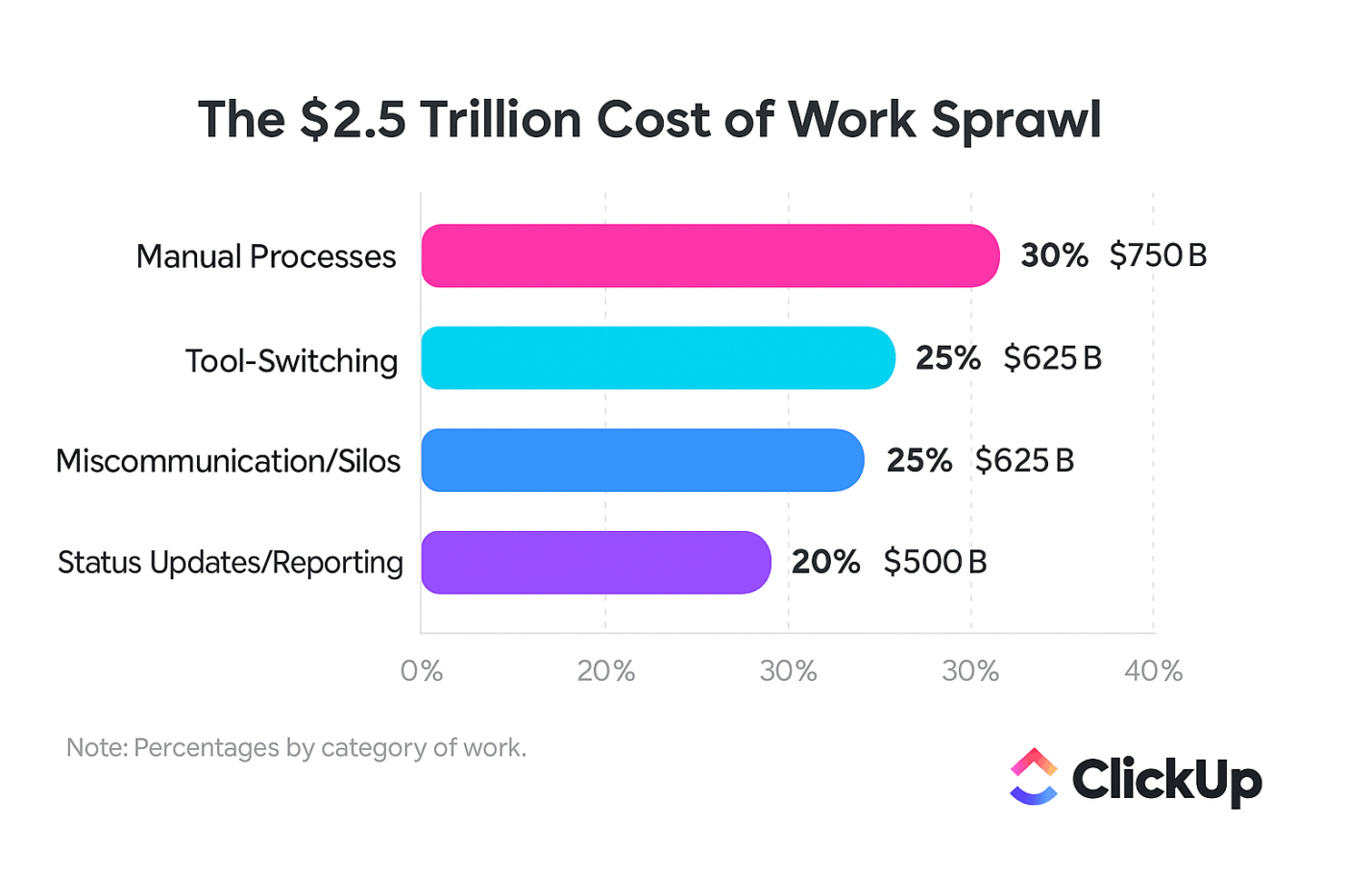
This leads to Work Sprawl. Your team is forced to juggle multiple apps that don’t talk to each other…just to complete a single project.
📌 For a five-person team, that’s 20+ hours weekly spent on coordination overhead. That’s like losing half an employee to administrative chaos.
This is why you need a dedicated collaboration system beyond email and Slack that bridges the gap between talking and doing.
| Factor | Slack | Dedicated collaboration tools | |
|---|---|---|---|
| Searchability | Limited and buried in threads | Conversations disappear over time | Organized, persistent, and searchable |
| Task tracking | No built-in tracking | Requires manual workarounds | Native tasks with assignees and deadlines |
| File organization | Scattered as attachments | Basic file sharing without context | Centralized with direct links to projects |
| Accountability | Unclear ownership and follow-up | No formal task assignment | Clear assignees, statuses, and priorities |
📮ClickUp Insight: Nearly half of survey respondents say the biggest extra step chat adds is manually moving tasks into another tool. Another 20% spend time re-reading threads just to find the real action item. Those tiny interruptions compound because each handoff is a small leak of time, energy, and clarity.
ClickUp replaces the relay race with a single motion. Within ClickUp Chat, your conversation threads can be instantly turned into trackable Tasks. You don’t lose momentum transferring context because ClickUp’s Converged AI Workspace keeps it intact for you.
Moving beyond email isn’t just a “nice-to-have” upgrade—it makes work feel lighter. Projects move faster, everyone’s on the same page, and you spend way less time untangling crossed wires.
And the best part? You don’t need an IT team to pull it off. The right collaboration tool can give you structure without adding complexity.
Here are the core benefits you can expect ✨
👀 Did You Know? 92% of knowledge workers risk losing important decisions scattered across chat, email, and spreadsheets! 😱
In an ideal world, you’d have one app that could fix your team collaboration for good. But in reality, you probably need a handful to be at your most productive: messaging, project tracking, docs, maybe even a whiteboard for planning.
You’d think finding good tools would be challenging. But what’s even harder is avoiding the “tool fatigue” that comes from having too many disconnected apps.
To help you choose better (and avoid app overload), we’ll break down the main categories of virtual team collaboration tools below.
👉🏼 And if you’re trying to simplify long-term, it’s worth looking at platforms built for tool consolidation—like ClickUp—which can cover multiple categories in one connected workspace (with integrations when you still need them).

Get the playbook that thousands of SMBs are using to consolidate their tech stack, reclaim countless hours of precious time, and eliminate Work Sprawl. ⬇️
Communication tools are where remote work lives day-to-day. They’re built for quick alignment: “Can you review this?” “What’s the status?” “Are we meeting today?”
Slack, Microsoft Teams, and Discord are popular because they make it easy to keep conversations moving—especially with specific project channels, threads, and quick calls built right in.
But here’s the catch: messages don’t come with built-in structure. A chat thread can feel productive while the actual work remains fuzzy, without ownership or deadlines mapped to it.
You need a communication tool that keeps conversations organized and connected to your projects.
And if you want our recommendation of a tool that does all of this (and more!), try ClickUp Chat! It’s one of the strongest alternatives for teams that want communication right inside their project workspace.
In ClickUp Chat, you can:

So instead of copying action items into a separate tool, your chat becomes a clean, searchable layer of context—right where your team already plans, builds, and ships
💡 Pro Tip: When a conversation starts getting too messy for chat (or you’re about to spend 20 minutes typing “so just to confirm…”), spin up a ClickUp SyncUp right inside the channel. It’s a fast face-to-face call without leaving your workspace.
You can also invite your ClickUp AI Notetaker to automatically record the SyncUp, generate notes, and save them as a private ClickUp Doc—so action items don’t vanish the second the call ends. For Channel SyncUps, ClickUp even posts the meeting notes Doc back into the SyncUp thread when you’re done.
Learn how to use it, with this video:
Bonus: Your team can later find recordings + transcripts in ClickUp’s Clips Hub, share them publicly, and even comment directly on the recording.
Project management tools are what turn “we should do this” into “here’s the plan, here’s the owner, here’s the deadline.” They help teams keep track of tasks, assignments, dependencies, timelines, and workflows without relying on memory.
You can pick from purpose-built options like ClickUp for Project Teams, Asana, Trello, and Monday.com, among others. They’re especially useful for small teams that need clarity without overcomplicating things.
The downside? Outside of ClickUp, many of them still rely on a separate communication app—so you end up planning work in one place and discussing it somewhere else. That’s how fragmentation creeps back in.
ClickUp Tasks solve this by combining strong project tracking with built-in collaboration. Your team can plan work across different views while threaded comments on tasks keep the conversation tied to the work itself.
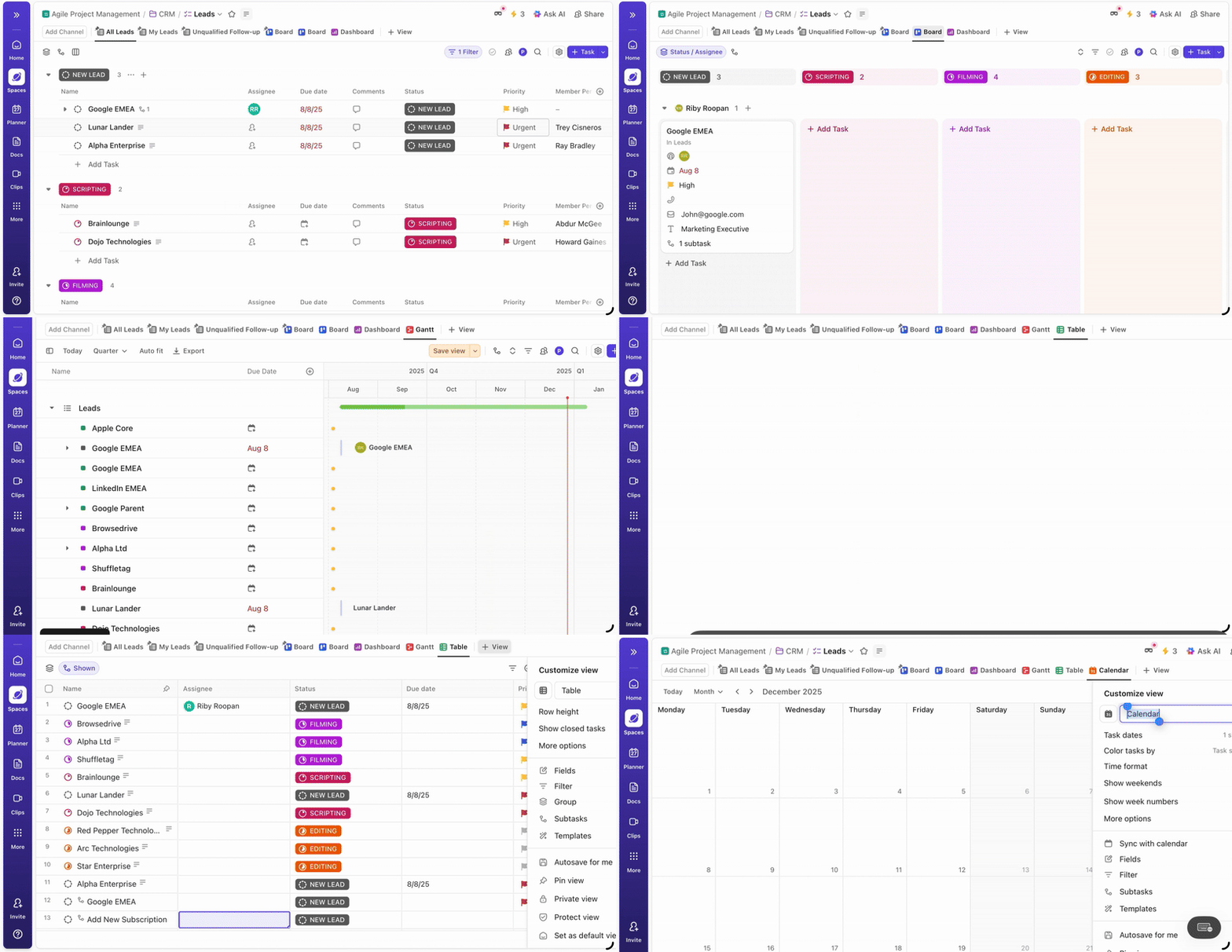
You get 15+ ClickUp Views to manage projects depending on how your team thinks, such as:
Progress-tracking is simple with ClickUp Dashboards. Add customizable cards to track KPIs such as tasks completed vs. overdue, team workload, and sprint burndown.
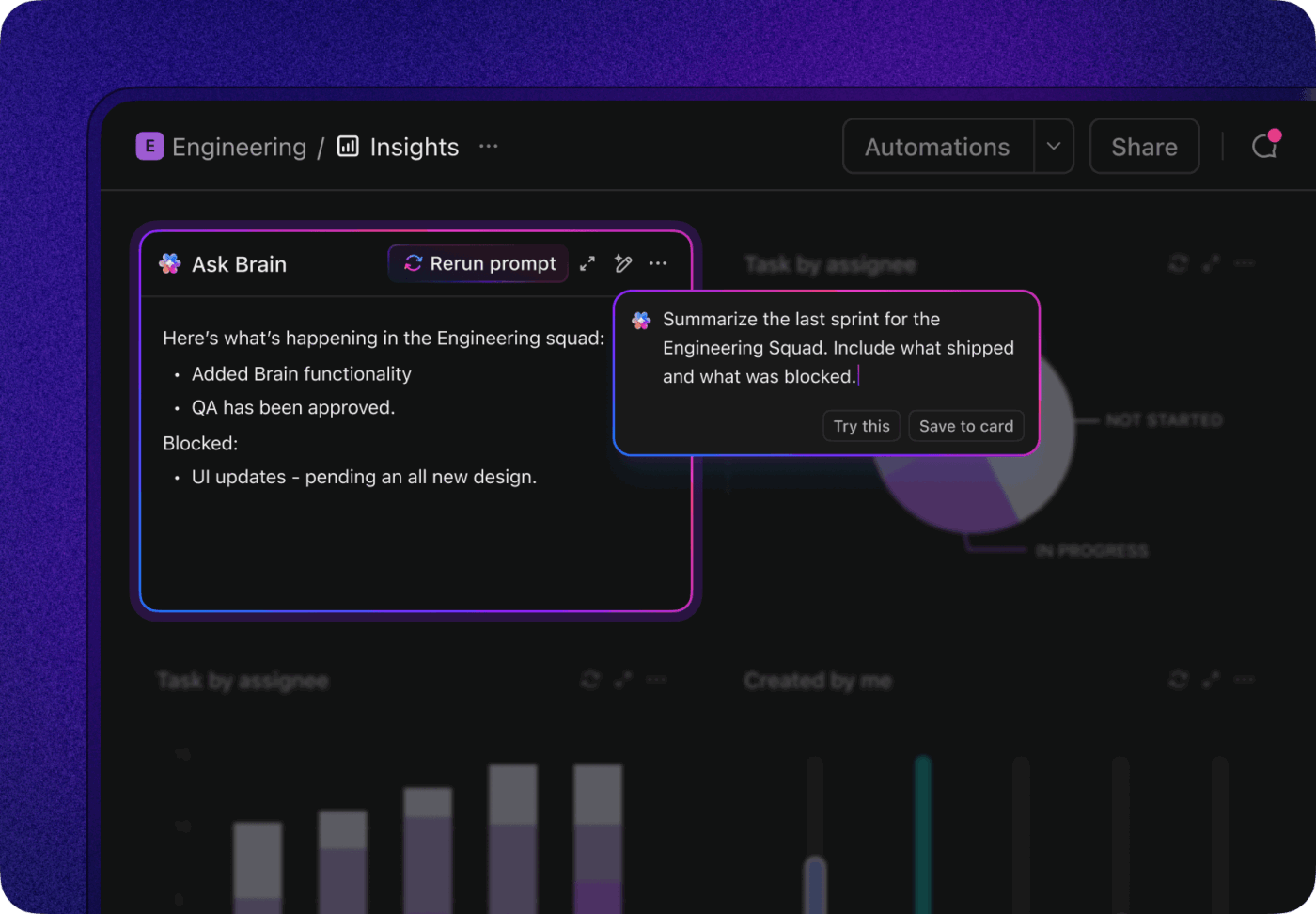
And with ClickUp Automations, you can take the busywork out of project updates. Set up an automation once using the if-then builder, and watch as tasks assign themselves on status changes and owners are pinged when risks are flagged.
Small businesses love ClickUp for project management:
With ClickUp, everything is in one place, my clients can be users and create tasks, deadlines and input copy and elements for the jobs – with deadlines automatically added and synced to my calendar when they input a date. Job tracking was done all on email and paper trails were a mess previously, now everything is with its task. ClickUp has been LIFE CHANGING for my small business as someone who is self employed.
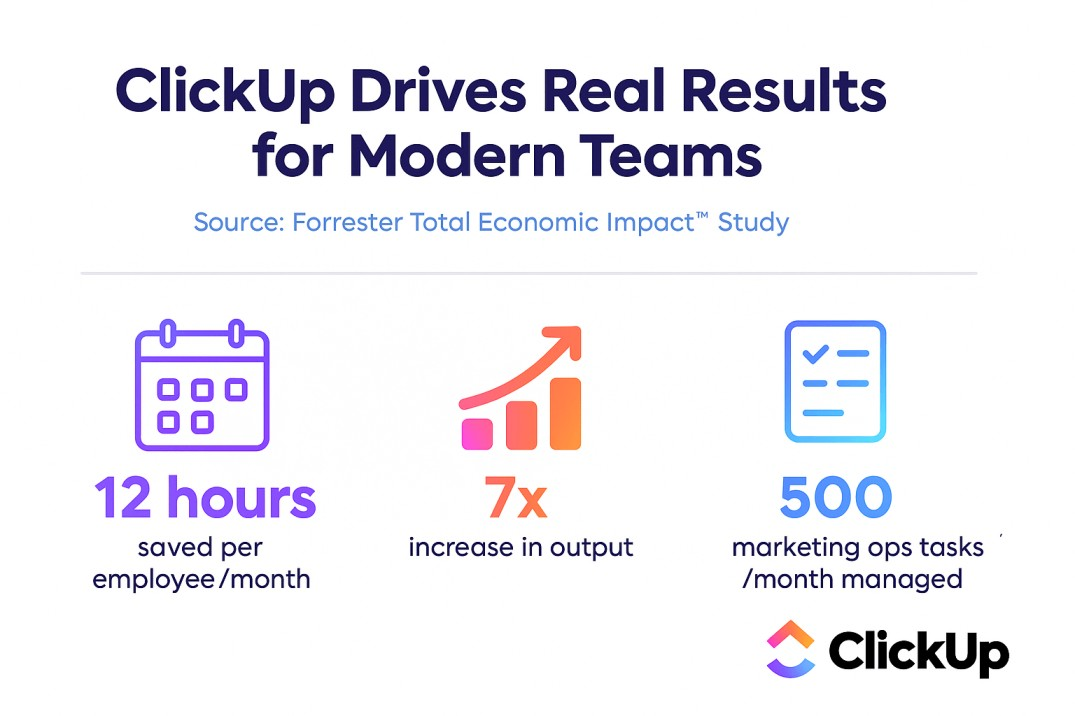
And the numbers speak for themselves:
Is your company’s knowledge scattered across Google Docs, Dropbox, and local hard drives? When your project briefs, SOPs, and meeting notes live in different systems, your team ends up bouncing between tools, trying to remember where the “final final version” is.
By doing this, you’re not only creating information silos, but also impacting key business processes. Onboarding new hires becomes a nightmare, and people may end up working off outdated information.
There’s no doubt that tools such as Google Workspace, Notion, Dropbox Paper, and Confluence are great for content creation, knowledge sharing, and building an internal wiki or knowledge base.
But all this info should live where your work happens. ClickUp Docs keep documentation connected to execution. Docs can live right alongside your tasks and projects, making it easier to move from planning → writing → doing without switching tools constantly.
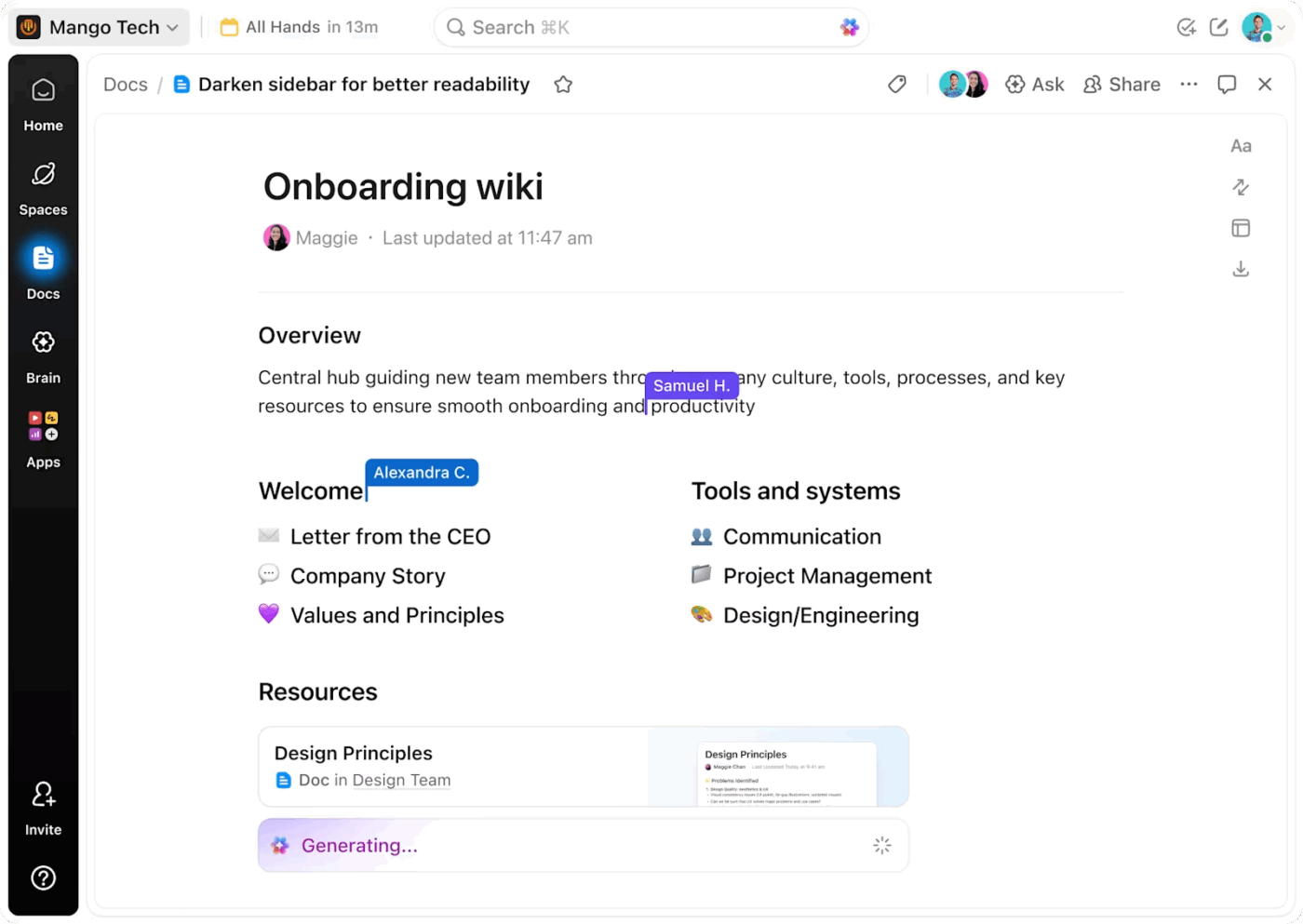
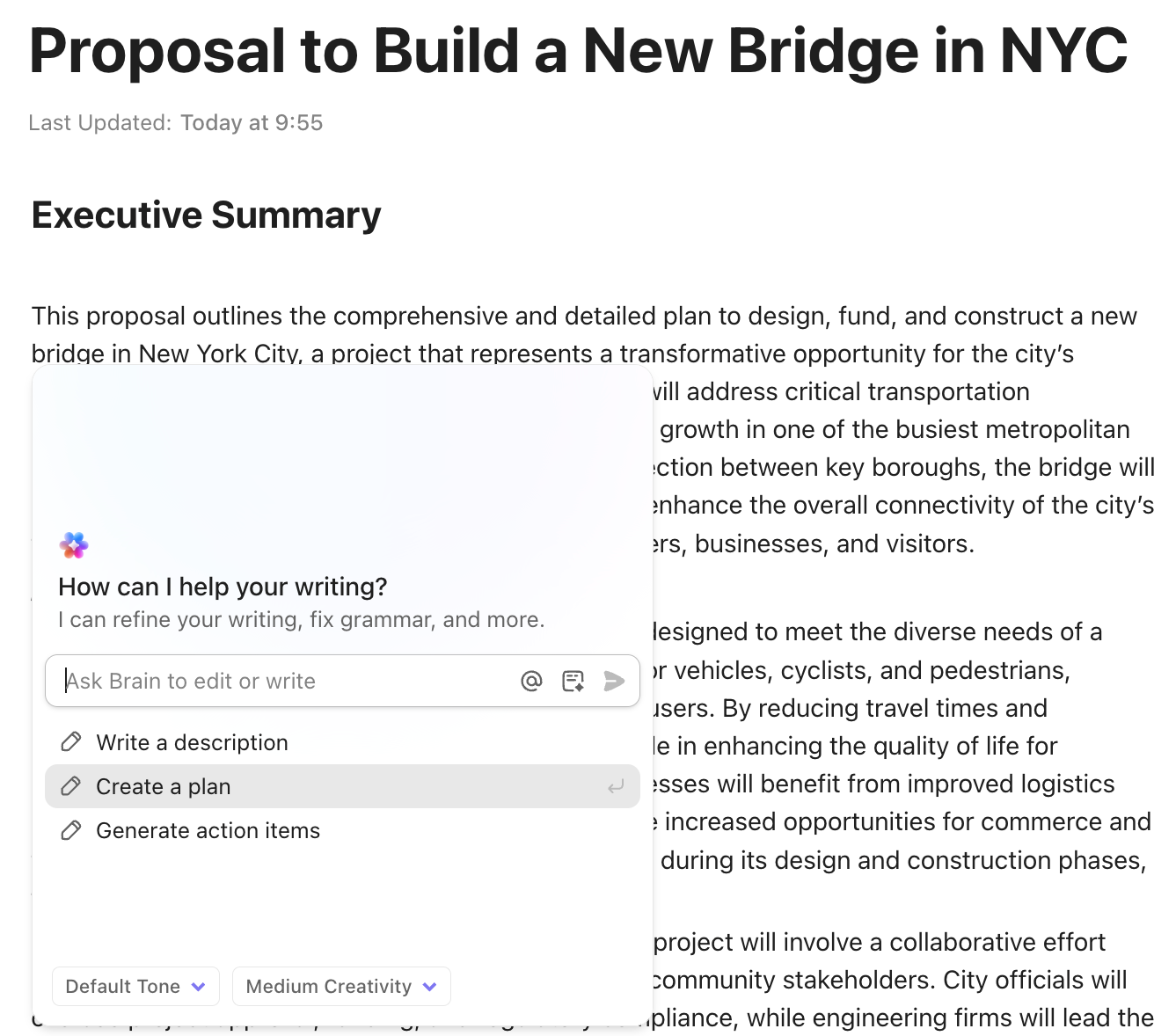
And for teams that want a little help getting content out of their heads and onto the page, ClickUp Brain, ClickUp’s built-in, context-aware AI, lends all the support you need. Use it for writing, summarizing, and pulling answers faster—especially when you need to search across docs, tasks, and conversations in one go.
Sometimes the fastest way to collaborate isn’t writing more messages—it’s getting ideas out visually.
That’s where whiteboarding tools shine. They’re perfect for brainstorming, mapping workflows, planning launches, sketching wireframes, or turning messy thoughts into something the whole team can see.
Tools like Miro, FigJam, and Lucidchart are great for:
The issue is what happens after the whiteboard session.
Too often, the board becomes a “great ideas museum” and the real work still has to be recreated somewhere else.
You need a tool that bridges the gap between ideation and action. That’s exactly what ClickUp Whiteboards are for. Your team can brainstorm on an infinite canvas, then convert shapes into tasks—complete with assignees and due dates—without redoing the work in another system.
This video shows you how:
✅ If that felt like a lot of information, don’t worry. The key takeaway remains really simple: The best collaboration tools for remote teams aren’t just “good” in their category; they actually work well together.
So you’re ready to move beyond email and Slack. Love that for you. 😄
But now you’re staring at a million tools that all promise to “streamline collaboration” and “boost productivity.”
To choose well (and avoid another shiny-tool regret), use this quick framework:
Your team already runs on a handful of essentials—maybe Google Calendar, QuickBooks, GitHub, Zoom, Google Drive, Figma, you name it. Your collaboration tool shouldn’t force you to abandon those. It should connect them.
If it can’t integrate, you’ll end up with the same problem in a new outfit: files in one place, tasks in another, conversations somewhere else… and nobody knows what’s “the source of truth.”
🧠 Fun Fact: ClickUp’s Integration Ecosystem connects to 1000+ tools you use every day, including Slack, Google Drive, and Figma, using ClickUp. Plus, you can find information across all your connected apps from a single command bar using ClickUp’s Enterprise Search.
We know small businesses like yours don’t have time for a complicated rollout—or a 47-minute onboarding video. 🤷🏻♀️
You want something your team can pick up quickly, and grow into over time. A clean, intuitive UI plus a simple setup for core workflows (projects, tasks, docs) go a long way. Even better are out-of-the-box templates that let you get started without reinventing the wheel for every process.
The most powerful software in the world is useless if your team finds it too complicated to use. Small businesses can’t afford to spend weeks on training and implementation. You need a tool that’s intuitive from day one and allows your team to increase business productivity immediately.
✅ ClickUp works well here because you can adopt it gradually: start with Tasks + Docs, then add Custom Fields and Automations once your team is comfortable. And the built-in library of 1000+ Templates makes it easy to spin up repeatable workflows in minutes.
ClickUp customers agree:
ClickUp has a lot of unique features and add ons that you might not see in other PM options, like time tracking, built in chat, and extensive resource management capabilities. If you’re a scrappy small business or startup, ClickUp has a lot of templates and easy ways to get started without spending hours investing in a custom setup. You get that custom big box feel in a more approachable product.
The intuitive interface makes it easy to start using from the get-go, yet it remains incredibly powerful as you learn and utilize more features. Additionally, its integration capabilities with my email, calendars, and CRM software are seamless, enhancing my workflow. I also find the available templates extremely helpful, simplifying the setup process and saving me time.
Your small business isn’t going to stay small forever. The collaboration tool you choose today should be able to support you as you grow. The last thing you want is to finally get organized… then hit a wall because your tool can’t handle new teams, new workflows, or more complex projects.
Pay close attention to pricing tiers and what they include. Many “free” plans have hidden limits on users, storage, or features that will force you to upgrade sooner than you think. Choose a platform that offers a clear and fair upgrade path.
Security isn’t just an enterprise problem. If you work with clients, contractors, employee info, invoices, or internal IP, you already have sensitive data worth protecting.
Remote work adds extra risk, too—files being shared across devices, logins happening from everywhere, and “quickly send it on WhatsApp” becoming a habit.
Look for:
Small teams end up spending more time reconstructing context than moving projects forward.
ClickUp solves this by acting as a converged workspace—one secure platform where your team can plan projects, collaborate in real time, document decisions, and track progress. And with AI built into the flow of work, you can move faster without the costs and security risks of AI Sprawl.
Here’s what that looks like in practice:
| Collaboration need | ClickUp feature | Key benefit |
|---|---|---|
| Communication | ClickUp Chat, Comments, recorded Clips | Keep conversations organized and linked directly to your work |
| Project Management | ClickUp Tasks, Automations, Dependencies | Get a clear view of all your projects and automate routine updates |
| Documentation | ClickUp Docs, Whiteboards | Centralize your team’s knowledge and connect ideas to action |
| Search | Enterprise Search, ClickUp Brain | Find anything across your entire workspace and connected apps instantly |
Even with an all-in-one tool like ClickUp, your team might be confused about where to put information. Should a quick update be a chat message or a task comment? Where do you document a final decision?
Here’s a simple guide to help your team use the right channel every time 🛠️
| Channel | Best for | Persistence | Context |
|---|---|---|---|
| ClickUp Chat | Quick, informal, or time-sensitive questions and announcements | Temporary | General or channel-specific |
| ClickUp Comments | Task-specific feedback, decisions, and status updates | Permanent | Attached directly to a task |
| ClickUp Docs | Permanent reference material, processes, and project briefs | Permanent | Searchable knowledge base |
The guiding principle is simple: the more permanent or important the information, the closer it should live to the work it references. Because all these channels exist within ClickUp, your team can move between them effortlessly.
Remote work (and flexible schedules) change how communication has to work, especially when nearly a third of meetings now span multiple time zones. You can’t just tap someone on the shoulder for a quick answer anymore. Asynchronous—or “async”—collaboration keeps your team aligned and productive, no matter where or when they work.
Adopting an async-first mindset means building habits around clear, documented communication.
Great remote collaboration doesn’t happen just because you picked the right tools. It happens because your team builds the right habits around them. With a few intentional async practices, your small business can stay aligned as you grow—without turning every update into another meeting.
ClickUp powers work for both small teams and big-name companies like Siemens, Chick-fil-A, and Wayfair. With 25,000+ reviews and an average 4.6-star rating, it’s a go-to choice for businesses that want to stay lean, move fast, and get more done without adding more tools.
Ready to consolidate your team’s communication, tasks, and docs in one workspace? Sign up for a free ClickUp account!
Project management software is focused on organizing tasks and workflows, while team collaboration tools cover broader communication. Modern platforms like ClickUp combine both so you don’t have to choose.
Yes, a converged workspace like ClickUp is designed to consolidate your internal chat, documentation, and task management. You may still use email for external communication, but all your internal work can live in one place.
Start with a single pain point, like task tracking, instead of trying to migrate everything at once. Run the new tool alongside your old systems for a short period as your team builds comfort and sees the benefits.
Basic plans are great for getting started, but growing businesses often need advanced features like unlimited integrations or enhanced security. Look for a platform with a clear upgrade path that allows you to scale without hitting a wall.

© 2026 ClickUp

There’s an easier way. Try a free AI Agent in ClickUp that actually does the work for you—set up in minutes, save hours every week.