









Still downloading templates?
There’s an easier way. Try a free AI Agent in ClickUp that actually does the work for you—set up in minutes, save hours every week.
Sorry, there were no results found for “”
Sorry, there were no results found for “”
Sorry, there were no results found for “”
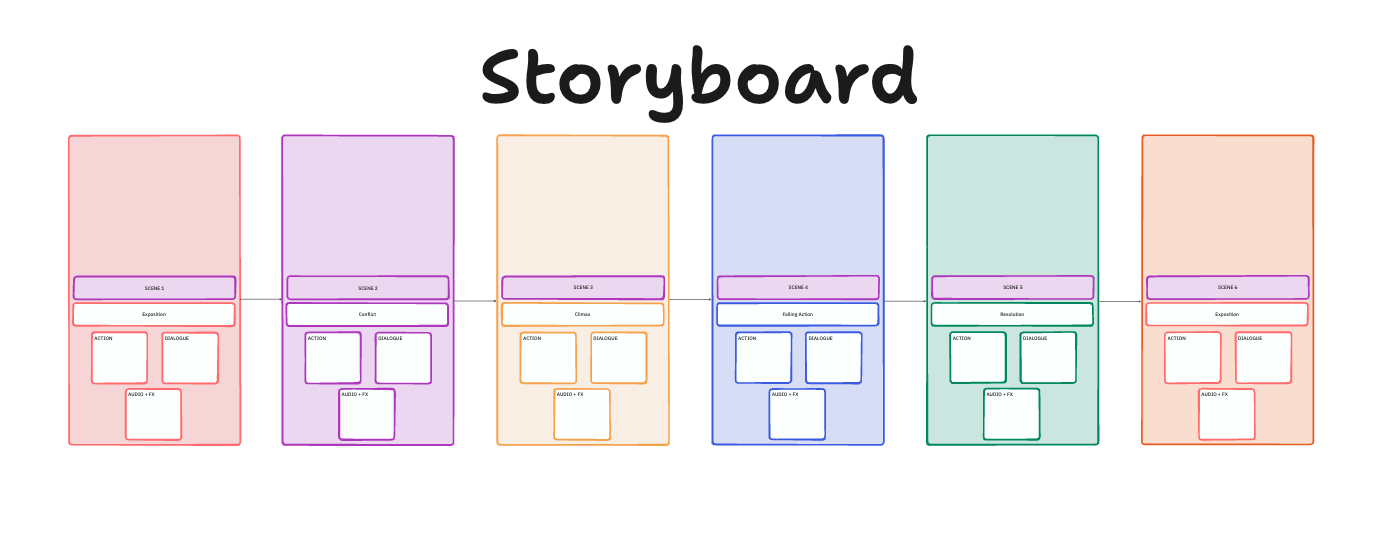

Most creative work starts with a mess of scenes, notes, and half-formed ideas. A storyboard is the moment everything clicks into place. It turns scattered thoughts into a clear sequence you can actually work with.
The same approach helps educators simplify complex topics and gives product teams a quick way to map customer journeys without long explanations.
Miro storyboard templates help teams map ideas visually—whether you’re working with a film storyboard template, exploring storyboard template examples, or managing complex creative projects that rely on clear visual storytelling.
In this blog, you will find helpful Miro storyboard templates across different creative and educational use cases. You will also find a few ClickUp templates that make it easier to turn your storyboard into organized work.
Miro storyboard templates are pre-built visual layouts that help you map scenes, steps, or ideas in a structured sequence. Designers, educators, professionals, and creative teams utilize them to visually plan projects, outline story arcs, or break down complex processes into clear, digestible panels.
These templates usually include frames, boxes, or grids where you can add sketches, notes, images, or descriptions. They support a range of formats—from simple six-frame setups to detailed, multi-layered boards for video production project management, product planning, and customer journey mapping.
✨ Fun Fact: Storyboarding began at Walt Disney Studios in the early 1930s, when animator Webb Smith pinned sketches to a wall to map out scenes. The method was first used on the 1933 short Three Little Pigs and changed how films were planned by letting teams see the whole story before animating.
Here is a quick overview of a few free storyboard templates you can use to optimize your workflow 👇
| Template Name | Download Template | Best Features | Ideal For | Visual Format |
| Miro Story & Telling Lite Template | Download this template | Two boards to separate story vs telling, pacing board, sample case walkthrough | Creative teams, educators | Panels + two-board narrative layout |
| Miro Reference Stories Template | Download this template | Drag-and-drop sorting of completed stories, Fibonacci-based effort categories, shared reference set for consistent estimates | Product teams, agile groups | Category lanes |
| Miro Cover Story Mockups Template | Download this template | Multiple magazine-style layouts, spaces for headlines, images, pull quotes | Designers, educators | Magazine mockup panels |
| Miro Dependency Diagram Starter Template | Download this template | Simple dependency lines, task state indicators, quick-start guide | Designers, PMs | Node-based diagram |
| Miro Design Thinking Board Template | Download this template | Ishikawa-inspired flow, confidence-value matrix, parking lot section | Designers, strategists | Root-cause diagram + quadrant matrix |
| Miro Toy Story Retrospective Template | Download this template | Character-based icebreaker, structured prompts, voting tokens | Agile groups, educators | Panel-based retro board |
| ClickUp Storyboard Template | Get free template | Scene frames, drag-to-reorder, links to ClickUp Tasks, export-ready | Filmmakers, educators | ClickUp Whiteboard frames |
| ClickUp Story Outline Template | Get free template | Guided prompts, color-coded pillars, and idea validation flow | Plot stages, character tracking, scene organization, and Custom Fields | Outline-style board (list + hierarchy) |
| ClickUp User Story Mapping Template | Get free template | Persona rows, release grouping, card-to-task conversion | Product managers, UX teams | Journey map |
| ClickUp Mood Board Template | Get free template | Color palette slots, UI/visual inspo sections, drag-to-cluster | Designers, creatives, agencies | Visual reference board |
| ClickUp Video Production Project Plan Template | Get free template | Editing workflow, cost & resource tracking, timeline views | Content teams, video producers | List + timeline/Gantt |
| ClickUp YouTube Video Production Template | Get free template | Metadata fields, content calendar, task-based script & asset management | Creators, social teams | Task board + calendar |
| ClickUp Vision Board Template | Get free template | Demographic tags, idea intake form | Product managers, founders | Grid-style strategic board |
| ClickUp Vision Whiteboard Template | Get free template | Guided prompts, color-coded pillars, idea validation flow | Product teams, strategists | Whiteboard with labelled columns |
| ClickUp Design Board Template | Get free template | Asset tracking, revision logs, approval workflow, timeline switching | UI/UX designers, agencies | Kanban + timeline |
| ClickUp Brainstorming Template | Get free template | Problem–solution rows, idea stages, resource allocation view | PMs, ops teams, marketing | Table-style board |
| ClickUp Creative Brief Whiteboard Template | Get free template | Clear phases, stakeholder ownership tags, whiteboard-to-task views | Agencies, brand strategists | Whiteboard with phase sections |
A good Miro Storyboard Template gives you structure without locking you in. It should support the key elements of your story while leaving room to adjust panels as your project grows.
The right template:
📚 Read More: Top Free Concept Map Makers & Software
Here are six free storyboard templates from Miro that help you visualize and organize your storyboards, ensuring your work starts on the right foot.
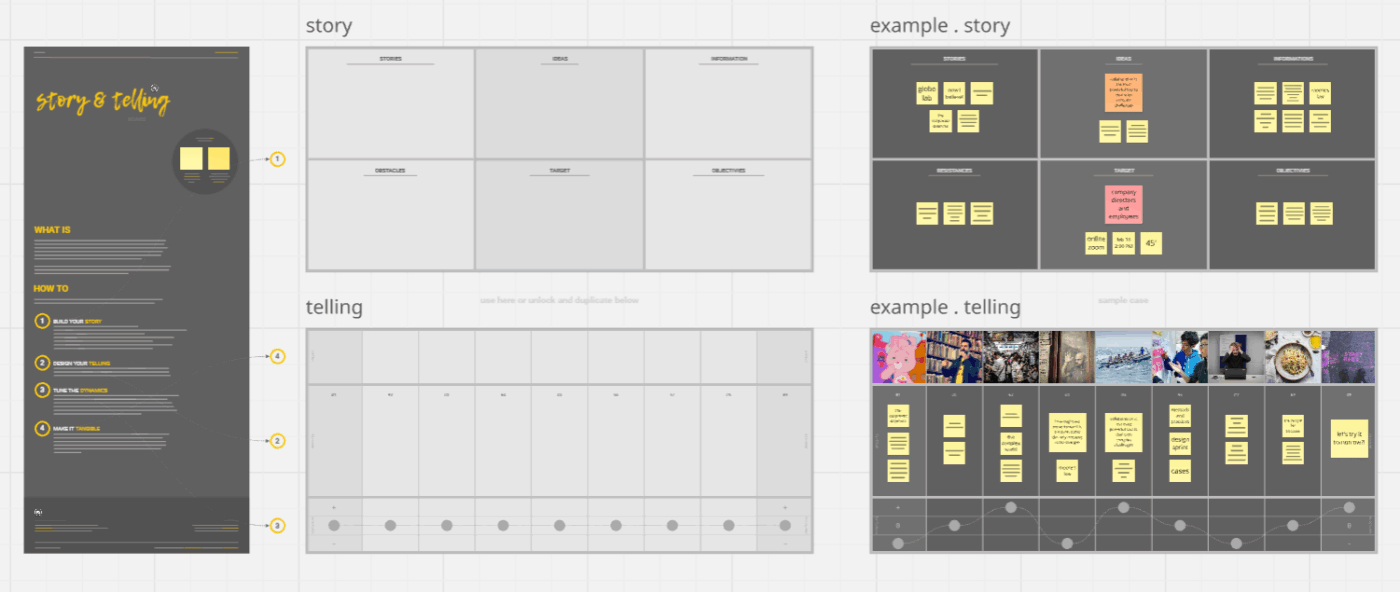
The Story & Telling Lite Template helps you turn your thoughts into clear stories without losing sight of your audience. It separates ‘story’ (what you say) from ‘telling’ (how you say it), so you can work on both sides of your narrative.
There are two main workspaces plus a sample case that shows completed narrative planning, which makes it easier to trace your own sequence. You can use this storyboard template to visually organize presentations or lectures.
✅ Ideal for: Creative teams and educators who want an easy layout for mapping narratives
💡 Pro Tip: Pair storyboard templates with AI content creation tools to instantly generate scene descriptions, character dialogue, narrative arcs, or visual captions.
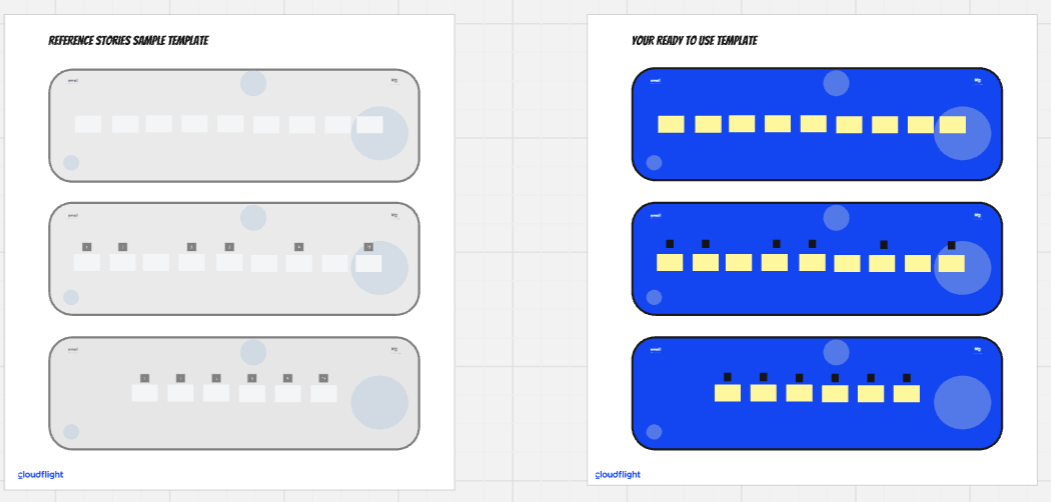
The Reference Stories Template gives teams a practical way to align on story point estimates. Instead of guesswork, everyone uses completed stories as anchors, which makes refinement sessions streamlined and keeps the whole team on the same page.
You drag finished stories onto the board, sort them by effort, and place them into Fibonacci categories. Then you select one story per value as the reference example. That reference set becomes a shared understanding for future work.
✅ Ideal for: Product teams and Agile groups who want consistent reference points for estimation
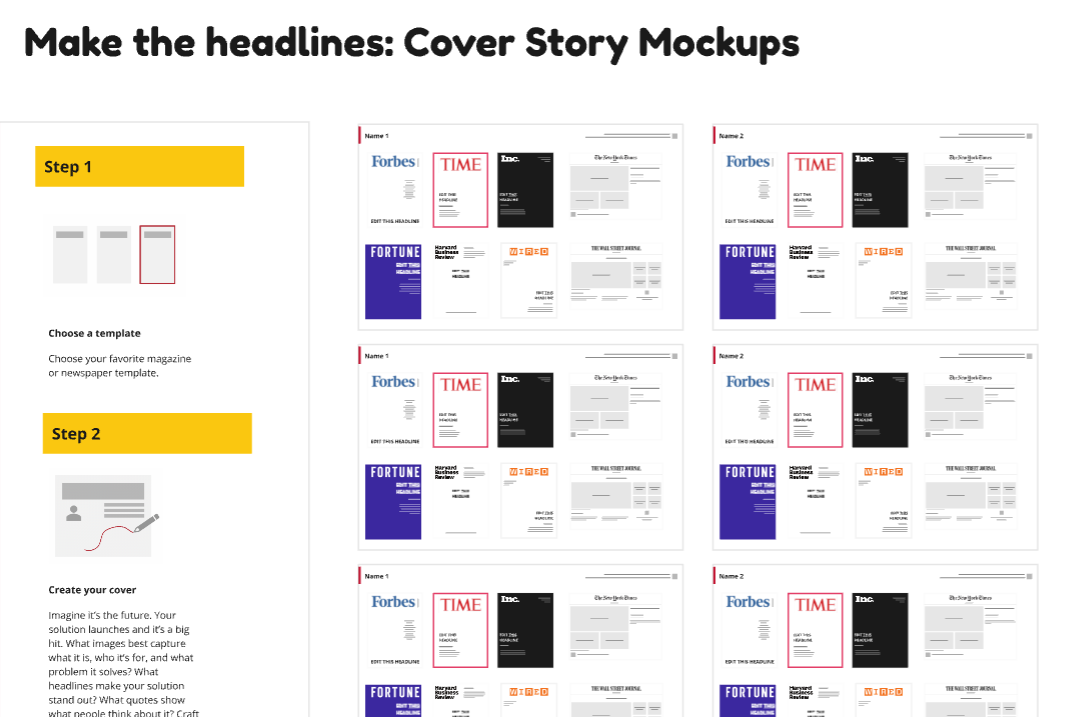
This Cover Story Mockups Template asks a fun question: If your project ended up on a magazine cover, what would it say? You can pick a layout, drop in images, and write headlines as if your work already made the front page.
This storyboard layout is useful when you want storytelling without a full slide deck.
✅ Ideal for: Designers and educators who want to quickly shape compelling narratives without building a full deck
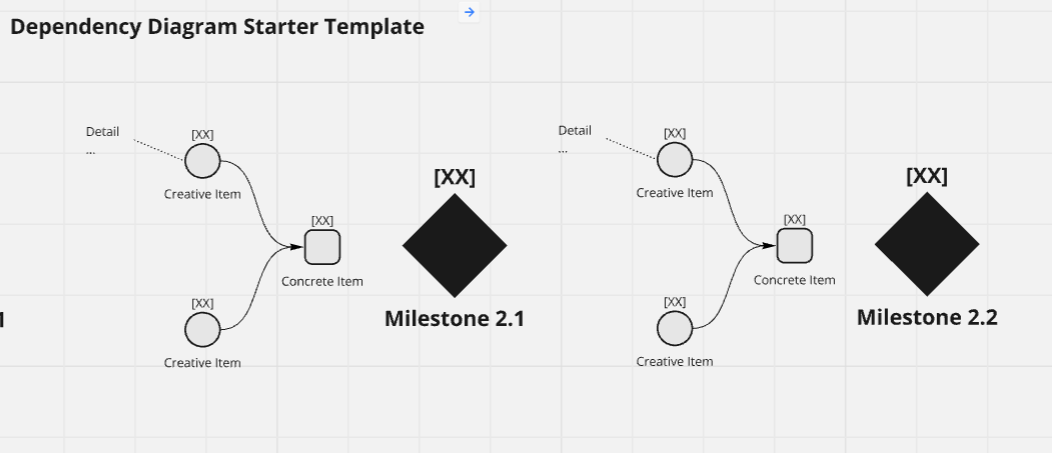
The Dependency Diagram Starter Template gives you a simple representation of how tasks connect to each other. It’s helpful when multiple people are working toward the same goal, and you want to see what needs to happen first and who depends on whom.
The layout stays simple, so it’s easy to update when timelines or responsibilities change.
✅ Ideal for: Designers and project managers who want visibility into task sequences quickly
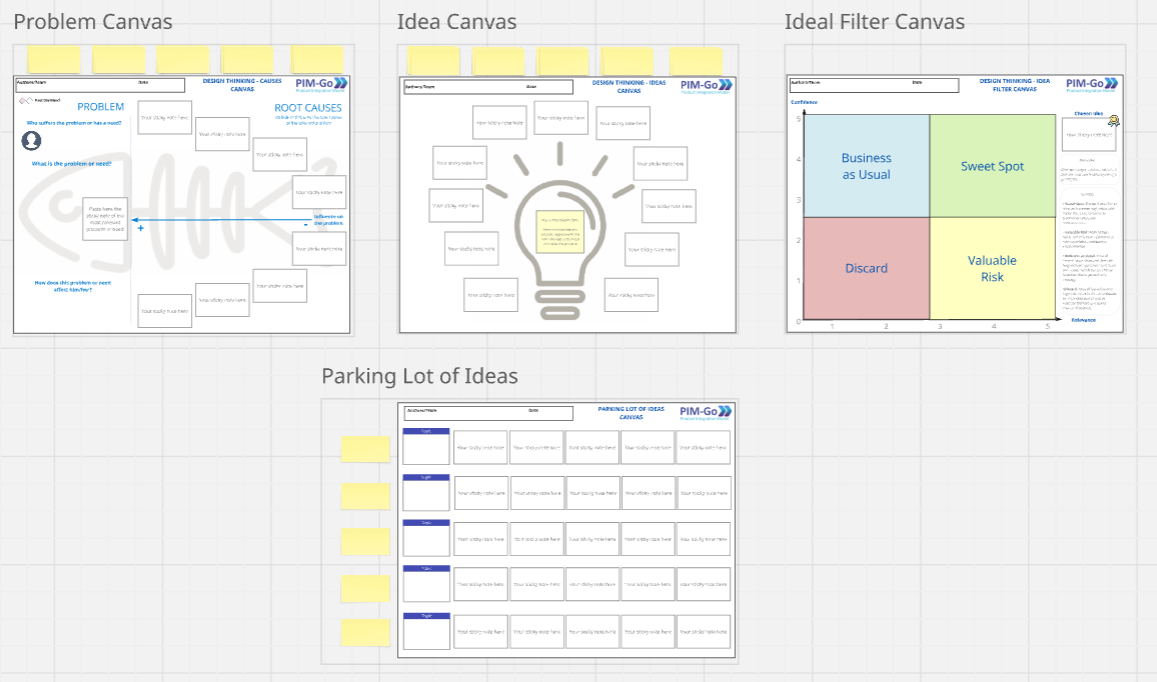
The Design Thinking Board (PIM-Go) Template walks you through a complete design thinking session without feeling overwhelmed. You start by unpacking the problem, then exploring possible causes and ideas. The layout helps you identify pain points and capture different options in one place.
You can sort concepts by confidence and value so strong ideas stand out. Anything that is not ready moves into a parking lot that you can revisit later.
✅ Ideal for: Designers and strategists who need a structured space to explore and sort inputs
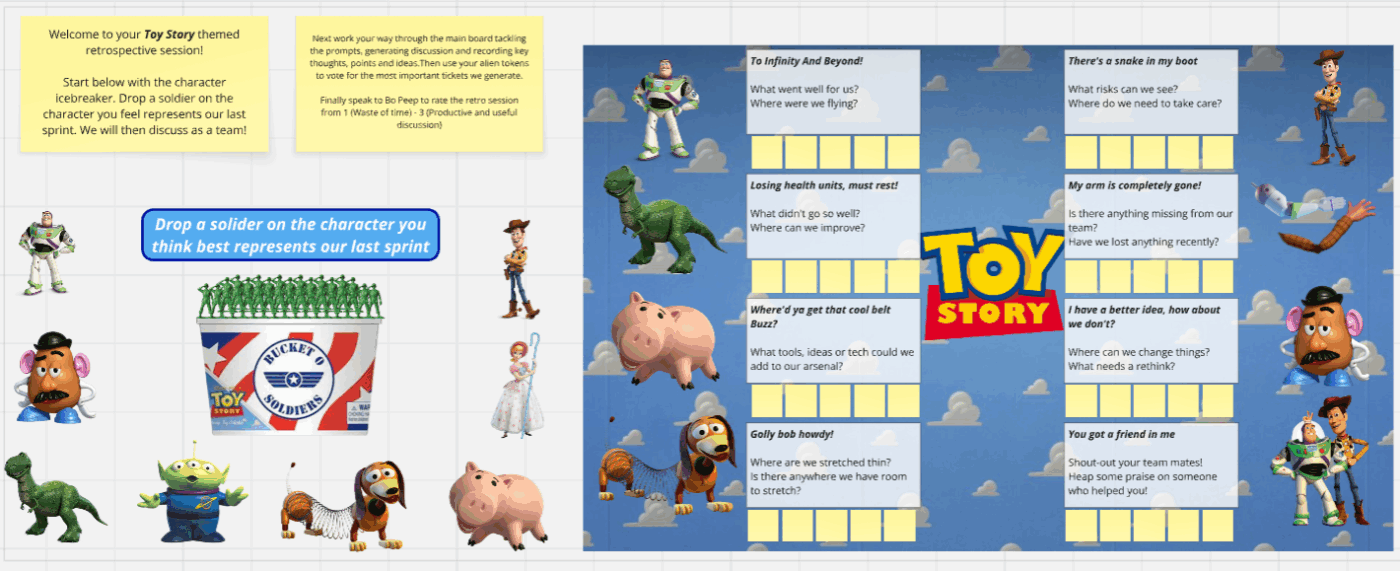
The Toy Story Retrospective Template turns a regular review session into something a little more fun. Each person places a marker (e.g., a soldier) on the Toy Story character they feel best represents the sprint.
After the icebreaker, the board walks the group through prompts tied to specific questions about the last sprint.
✅ Ideal for: Agile groups and educators who want a fun format for reflecting on a sprint
🎥 Storyboard templates are powerful—but Miro isn’t the only option. This video breaks down the top Miro alternatives that creative teams use for brainstorming, storyboarding, and visual planning.
For early brainstorming and sketching, Miro helps you take the first step. However, you start to notice gaps as your storyboards expand, and you need better control over your assets.
Here are the most common limitations to keep in mind 👇
At that point, it helps to look at a few alternative free storyboard templates that support the whole storyboarding process and make it easier to lay out your resources.
⚡ Template Archive: Brainstorming Templates & Techniques
ClickUp offers a vast library of storyboard templates that help break big ideas into frames, steps, or scenes, making it easier to see the full flow of a project or a campaign at a glance. Storyboard elements can be directly converted into tasks, docs, timelines, milestones, and dashboards, ensuring ideas don’t stay abstract and move quickly into delivery.
ClickUp also eliminates tool sprawl by bringing ideation, planning, collaboration, and execution in one place.
Let’s take a look at the top ClickUp storyboard templates.
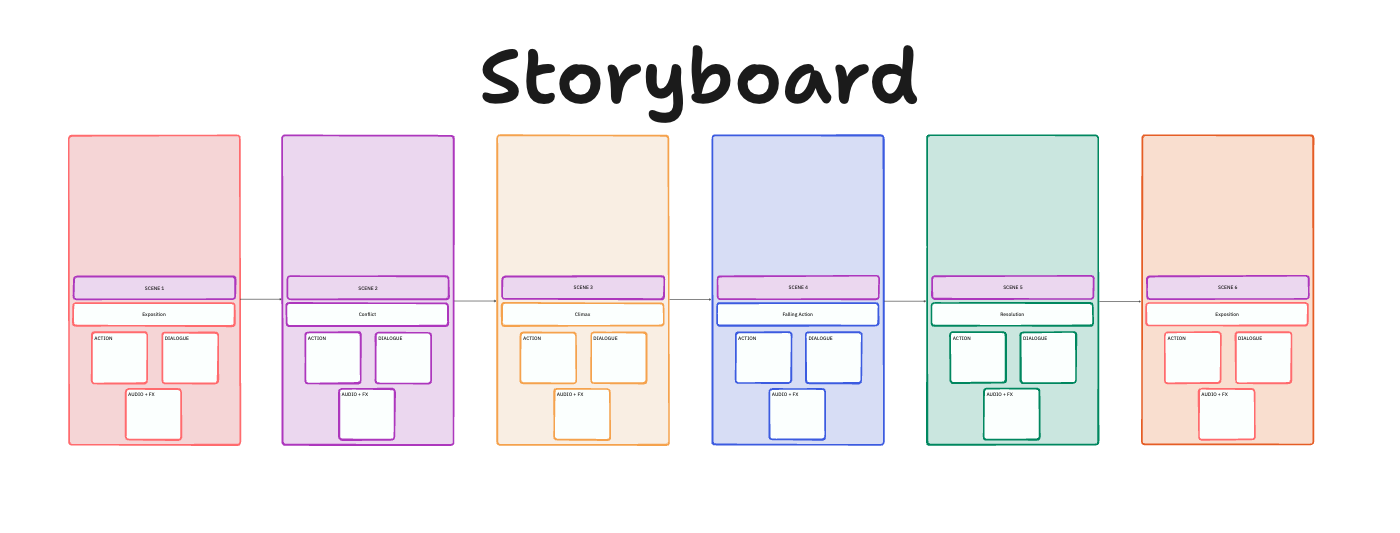
Visually planning in one place and keeping notes somewhere else often creates confusion. The ClickUp Storyboard Template fixes that by giving each scene its own frame, so your storyboard becomes a streamlined sequence instead of scattered references.
Built on ClickUp Whiteboards, each panel has space for action, dialogue, audio cues, and director’s remarks. Team members can attach images, add frames, adjust details, and comment directly on visual elements.
See what makes ClickUp Whiteboards ideal for storyboarding 📹
✅ Ideal for: Filmmakers and educators who want an easy workspace for structuring storyboards and linking tasks
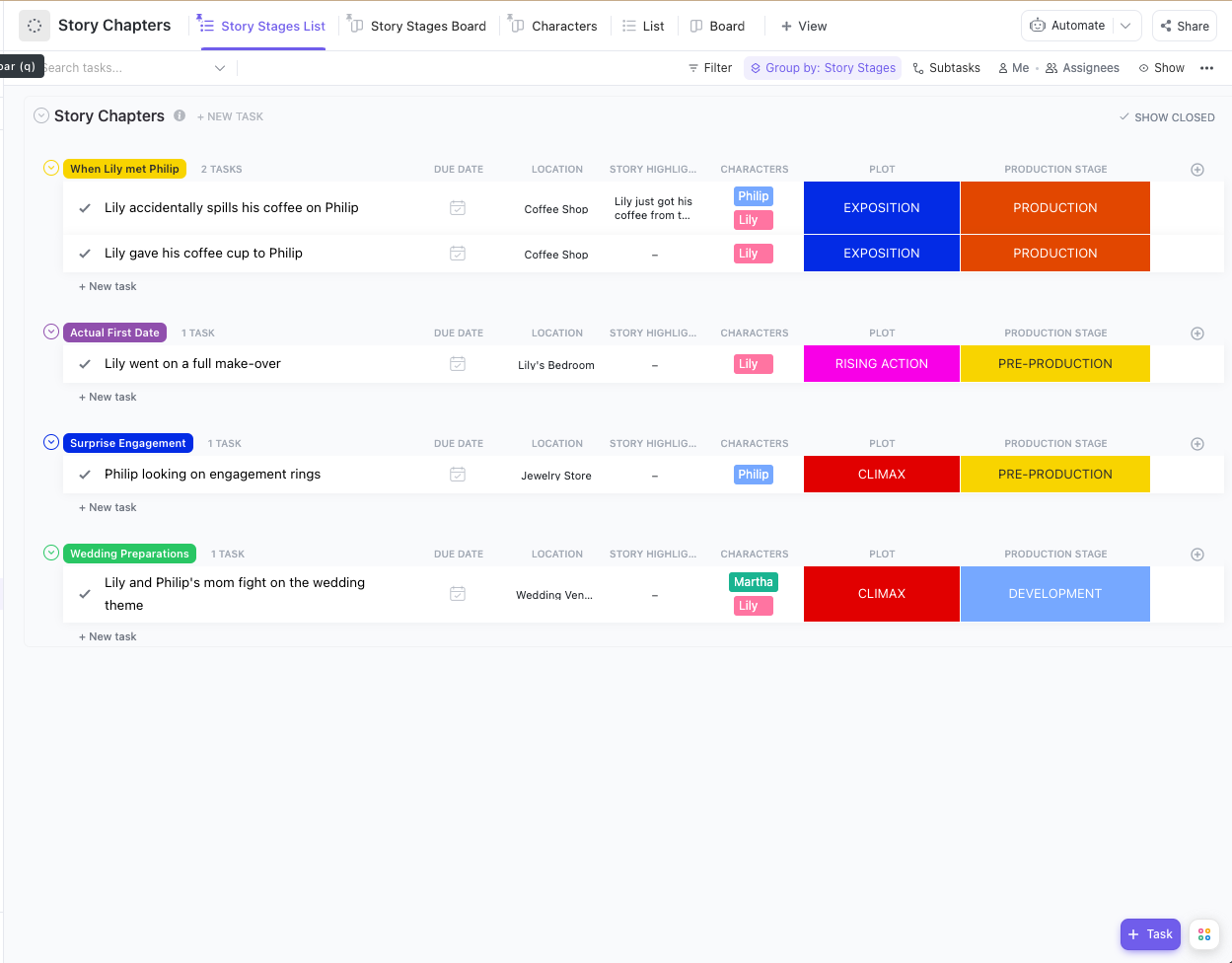
A storyboard template doesn’t have to be visual to be useful. Sometimes you want a structured outline that feels more like a folder system than a canvas. The ClickUp Story Outline Template gives you a simple way to track plot points and keep characters organized. Writers can use it for a manuscript, and it also works for planning narrative videos.
You can track plot points, dialogues, and keep scenes in order. Custom Fields and Task Statuses help you log location, characters, and where a scene fits in the narrative.
This storyboard-style outline keeps all your key elements in one place so you can see how the story develops across the sequence.
✅ Ideal for: Screenwriters, novelists, videographers, and content managers who want a simple outline for organizing multi-part stories or campaigns
📚 Read More: How to Write a Marketing Creative Brief
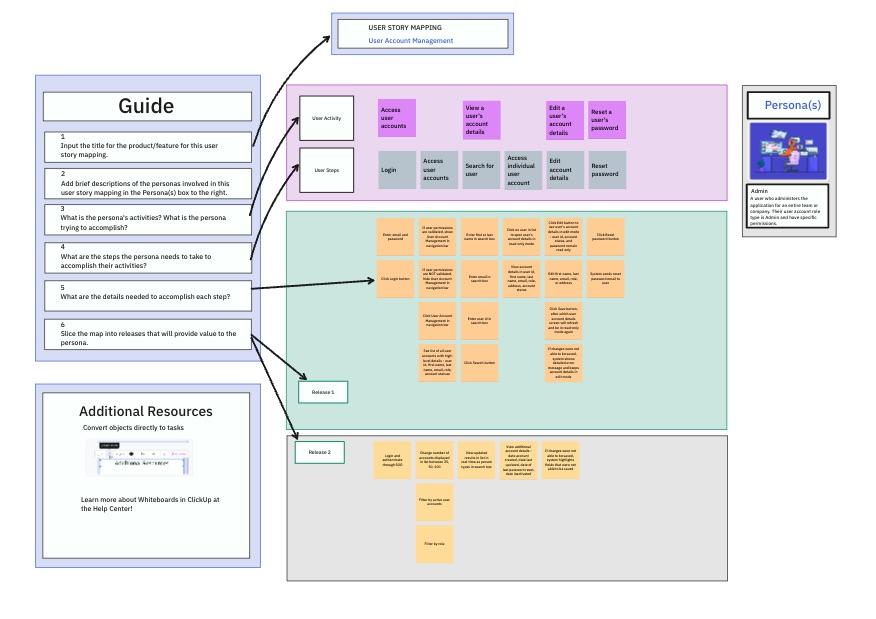
Understanding how a user moves through your product is easier when the entire flow is laid out visually. Think of the ClickUp User Story Mapping Template as storyboarding for your product experience. You can group user journeys by persona, release, or feature set. Each sticky note or card can become a task with an owner, due date, and status.
This visual representation helps you spot gaps in user pathways and align on which steps matter most.
✅ Ideal for: Product managers and UX designers who want a clear view of the customer journey
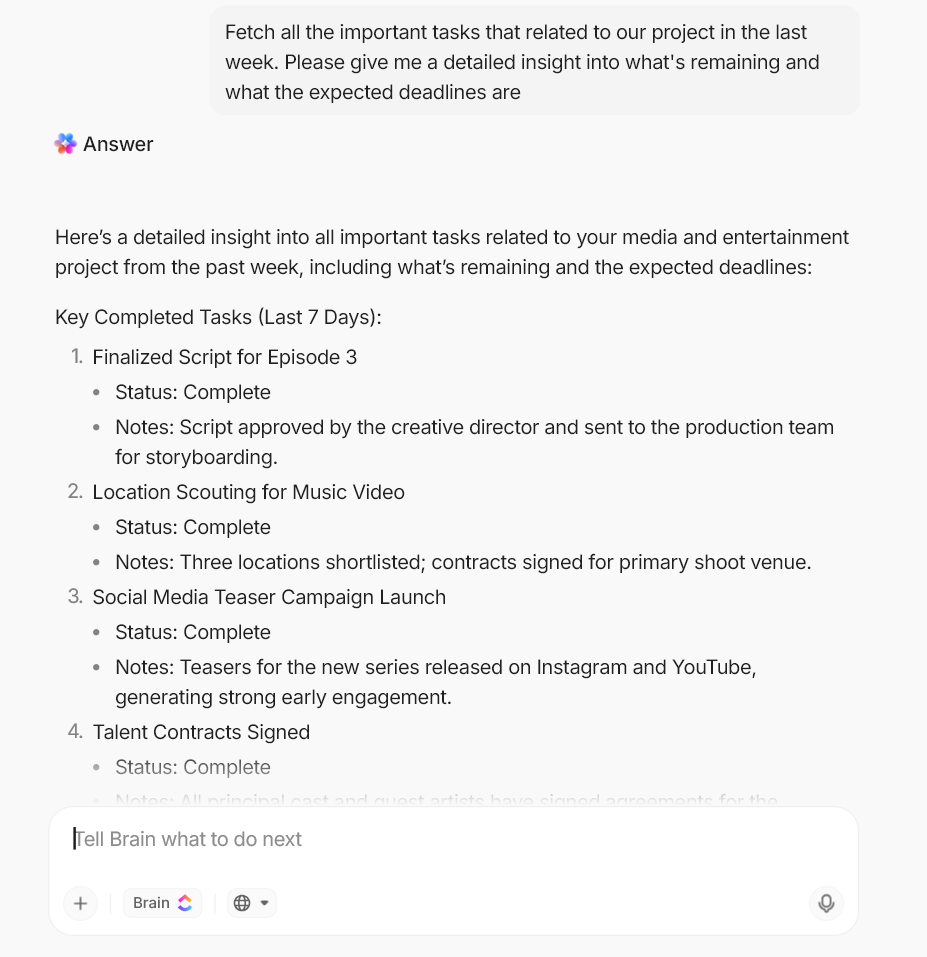
🚀 ClickUp Advantage: With ClickUp BrainGPT, you can make rough drafts, sort feedback, and figure out what needs to happen next without leaving your workspace.
It reads the context and gives you an answer that fits what you’re trying to do.
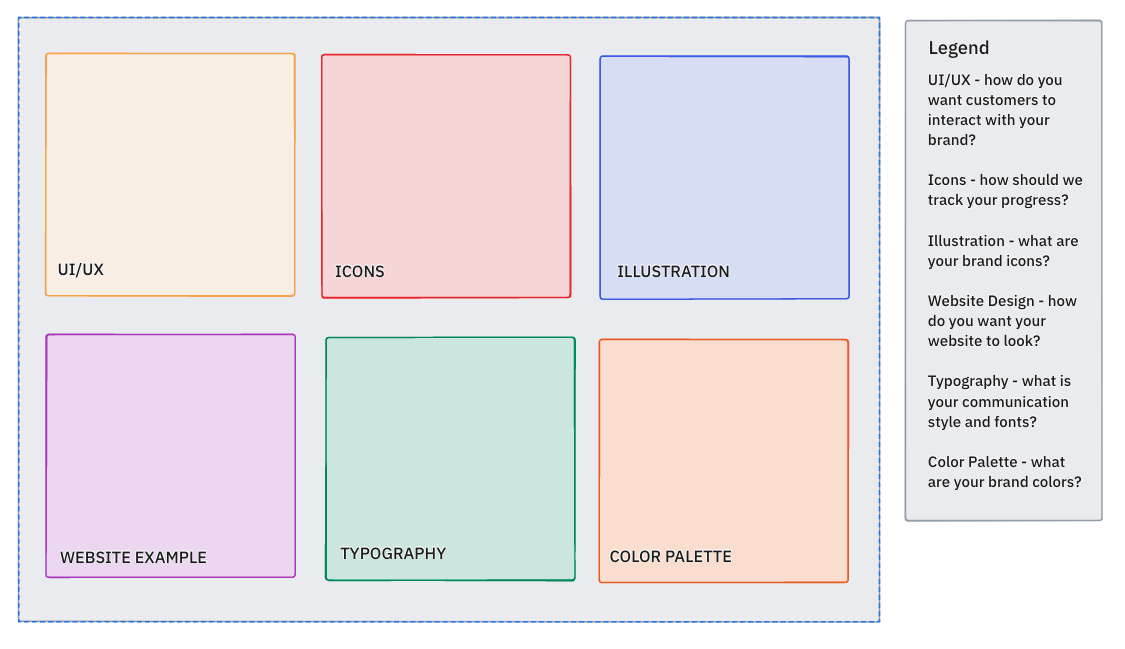
Before you worry about shots and camera angles, you usually just need to agree on the look and feel. The ClickUp Mood Board Template gives you a visual space to gather references for creative projects.
Instead of a blank storyboard template, you get dedicated space for UI samples, icons, illustrations, website inspo, typography, and color choices, and you can switch these sections out if your project needs something different. All you have to do is paste in your visuals and arrange them however you like.
This mood board template becomes a shared resource for creative visions. ✨
✅ Ideal for: Brand designers, creative directors, marketers, and agencies who want a unified visual reference for projects
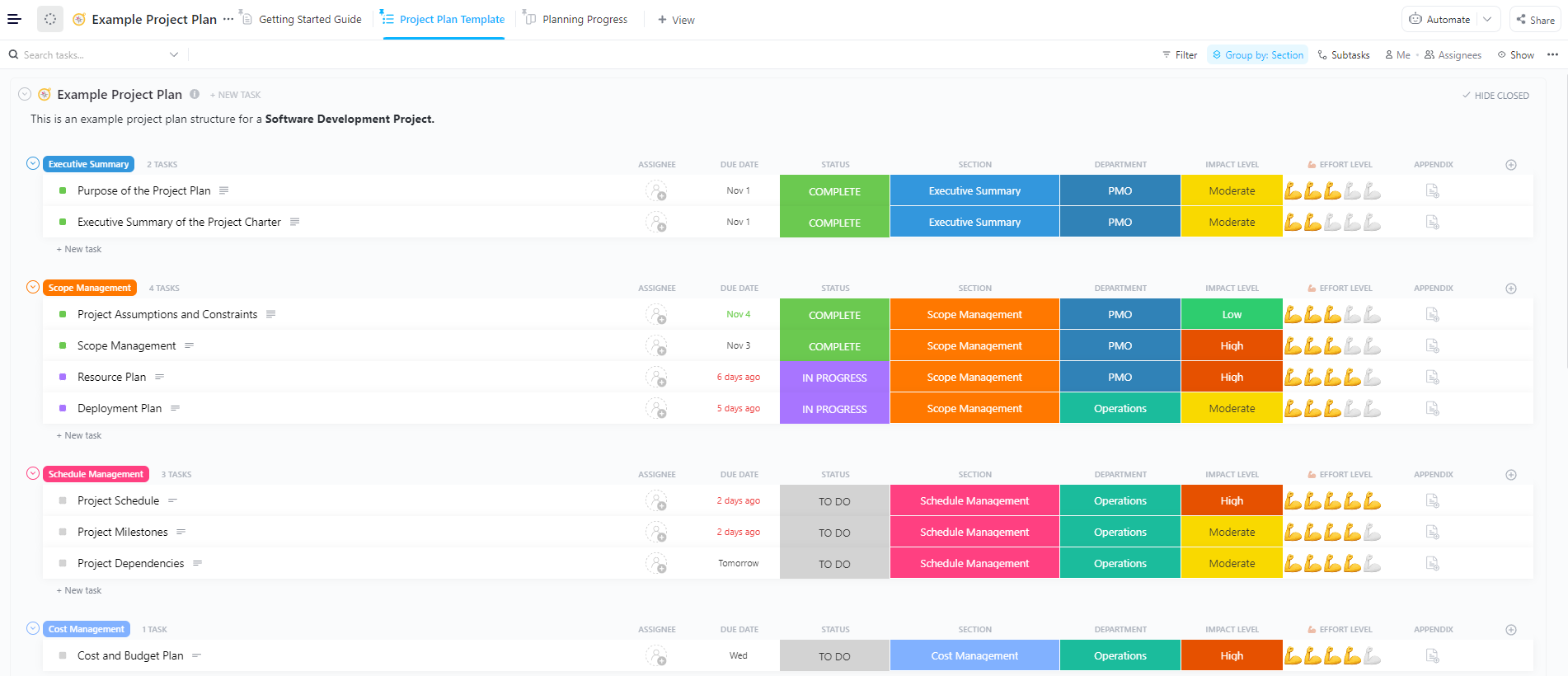
Video projects fall apart when pre-production, shooting, and editing aren’t tracked together. The ClickUp Video Production Project Plan Template organizes every stage—scripting, resource allocation, budget, milestones, and delivery—into color-coded task lists.
Each section (Executive Summary, Scope Management, Cost Management) comes pre-built. Add assignees, due dates, departments, and effort levels to see exactly who’s doing what and when.
✅ Ideal for: Content teams and video producers managing multi-step video workflows
If you publish YouTube content regularly, you need more than a simple video storyboard template. The ClickUp YouTube Video Production Template works as both a content calendar and tracker in one.
Each video has its own task, with Custom Fields for title, release date, tags, thumbnail, progress, and more. Scriptwriters, video editors, reviewers, and leadership teams can be added as watchers for each task so they get real-time alerts for each update and status change.
✅ Ideal for: YouTubers, content creators, and social media teams who want a clear system to create and manage every aspect of a YouTube video
📮 ClickUp Insight: Context-switching is silently eating away at your team’s productivity. Our research shows that 42% of disruptions at work come from juggling platforms, managing emails, and jumping between meetings. What if you could eliminate these costly interruptions?
ClickUp unites your workflows (and chat) under a single, streamlined platform. Launch and manage your tasks from across chat, docs, whiteboards, and more—while AI-powered features keep the context connected, searchable, and manageable!
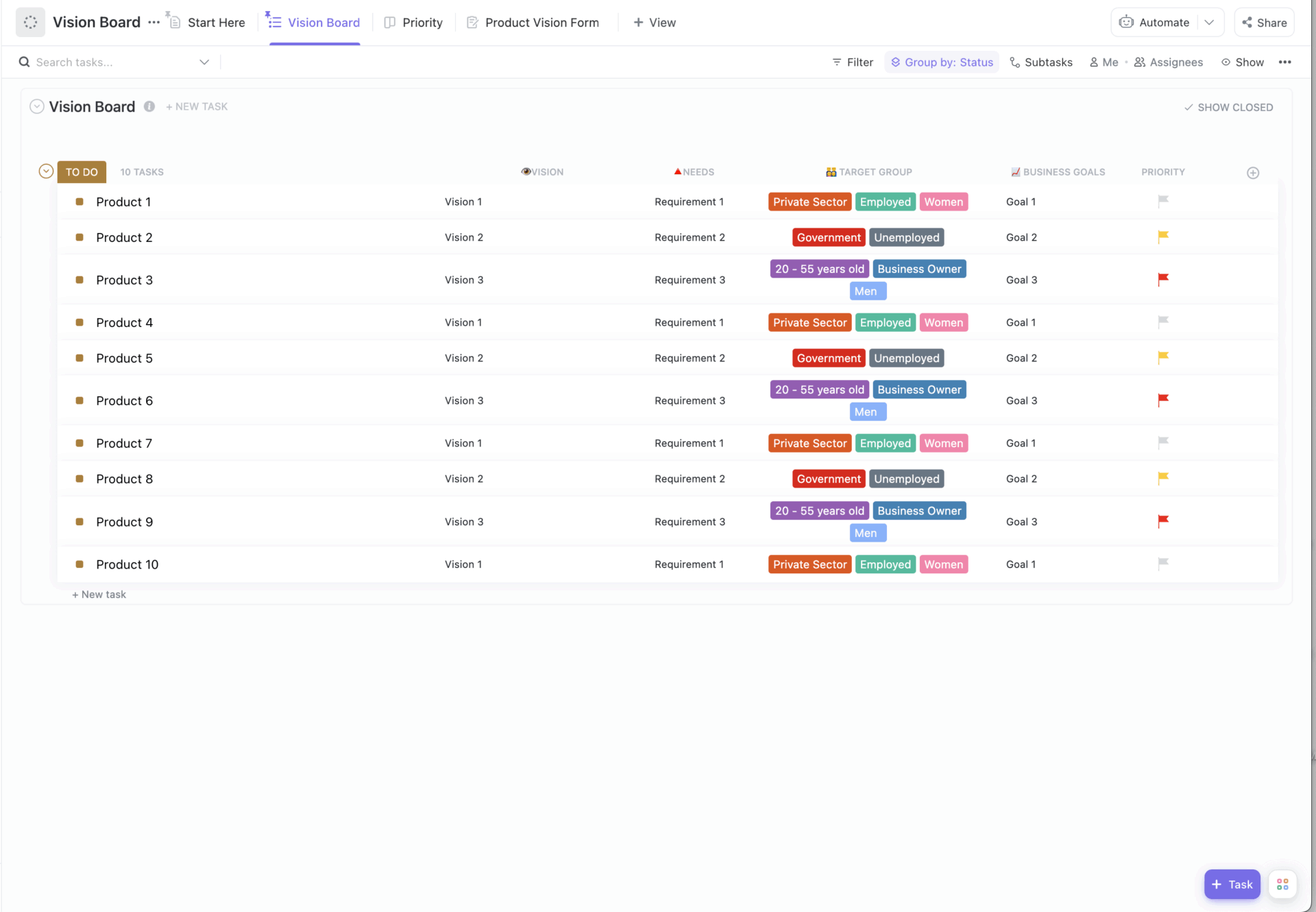
The ClickUp Vision Board Template helps clarify your product’s purpose and direction by defining who it’s for and what problem it solves. Each row represents a product or feature with columns for vision, business goal, target group, needs, and priority.
Demographic tags like age, employment, gender, etc., let you spot gaps in market coverage. You can use the Product Vision Form to collect ideas that auto-populate into the board.
✅ Ideal for: Product managers, founders, and strategists looking to map product opportunities in one place
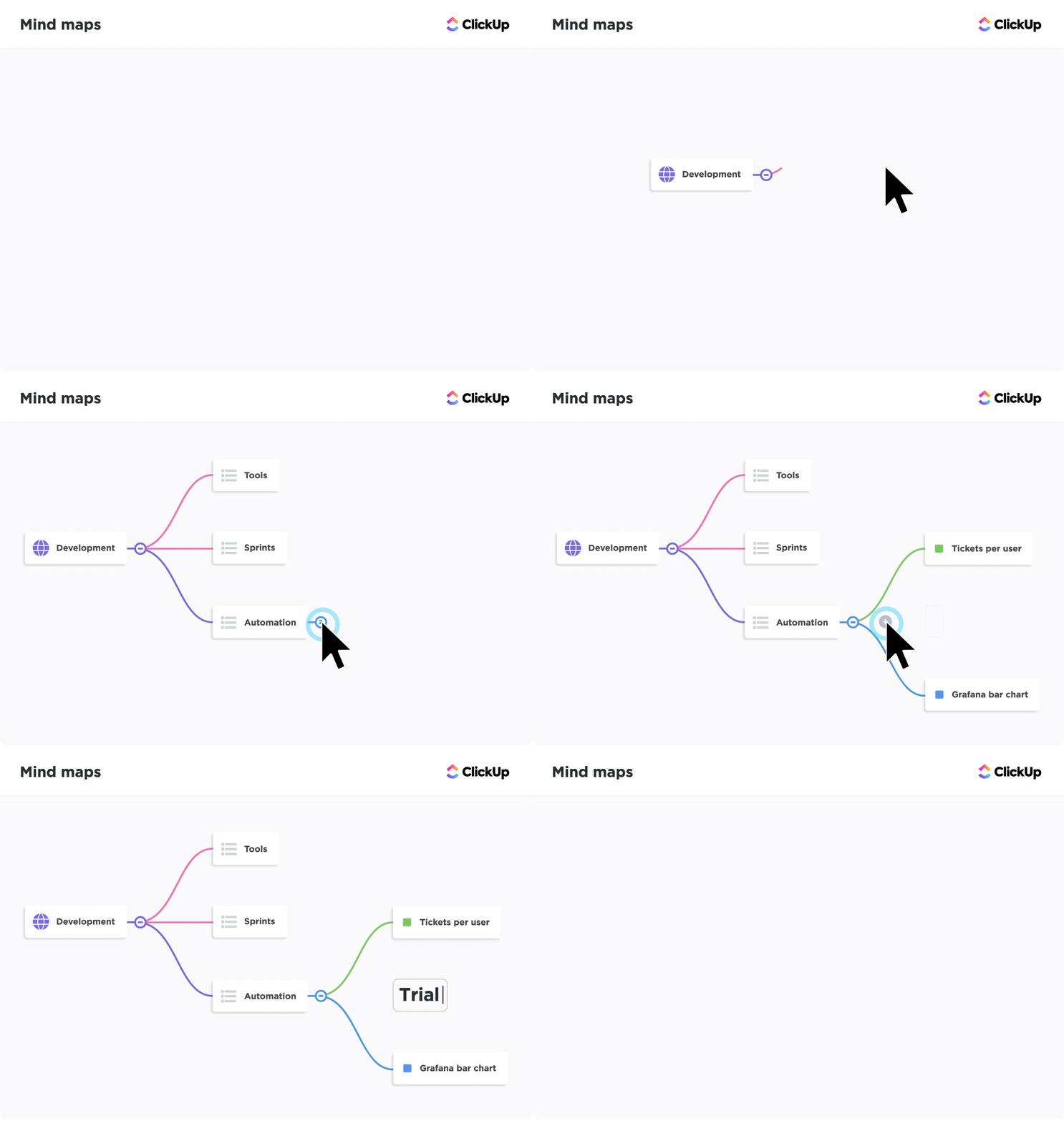
🚀 ClickUp Advantage: ClickUp Mind Maps are a powerful storyboarding tool for far more than just stories. Ideal for mapping sequences and process flows before you design or build anything visually, they help bring clarity before execution.
Start with a central idea and create top-level branches for major steps, screens, or phases. For complex and non-linear processes, you can tag dependencies and highlight parallel paths or variations.
Mind Map nodes can be turned into ClickUp Tasks with assignees, deadlines, priorities, assets, and references. This makes them suitable for everything from UX and product flows to process and system design.
The ClickUp Vision Whiteboard Template maps vision, target users, customer problems, product features, and value propositions into a single visual layout. The predefined color-coded sections help map the core vision to related ideas, providing a single reference point for team members.
ClickUp Whiteboards give you an interactive digital canvas where you can collaborate with your team in real time and use shapes, sticky notes, connectors, images, and sections to map out your vision.
Ideas on the whiteboard can be instantly converted into ClickUp Tasks and assigned to team members with due dates and priorities.
✅ Ideal for: Product teams, designers, and strategists aligning around a single product story
📚 Read More: What in the World is Whiteboard Project Management?
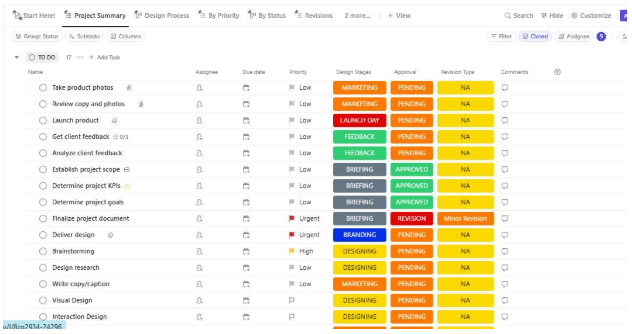
If you are looking for a ready-to-use project board to manage design projects, the ClickUp Design Board Template helps keep all assets and decisions in one collaborative space.
The design process Board View groups tasks by each stage of your design workflow. It gives you a clear snapshot of how many tasks are in each stage and exactly what’s being worked on. The Design Timeline View gives you a clear view of upcoming deadlines so you can keep work on track.
Since design projects can be complex to manage, the template also includes a By Priority List View, making it easy to see which tasks need attention first. To streamline feedback cycles, there’s also a Revisions List View that shows only tasks requiring changes, grouped by Major and Minor for separating significant UX changes from small UI tweaks.
✅ Ideal for: UI/UX designers and agencies who need a clear workflow for tracking design progress
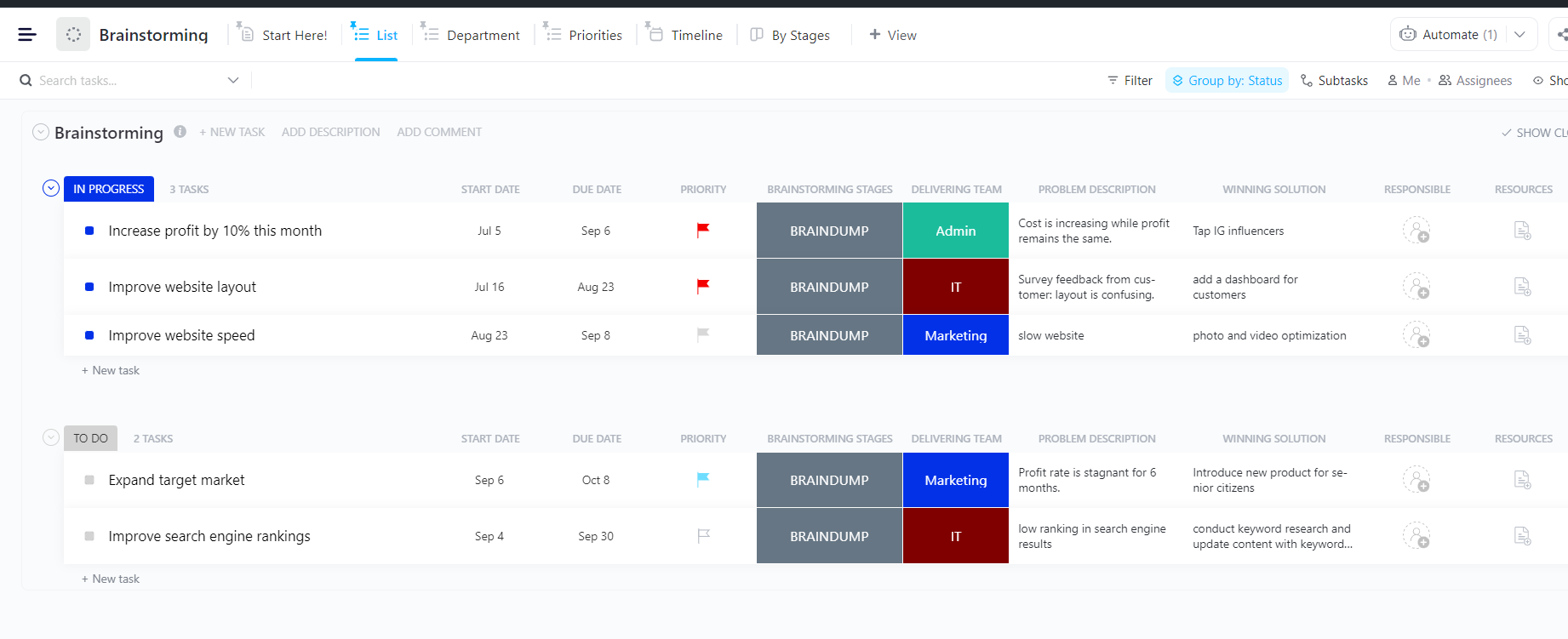
The ClickUp Brainstorming Template groups ideas around the problems they solve.
Once everyone’s aligned, simply click + New Task to create a task card and capture each idea as it comes up. Custom Fields like Problem Description, Responsible, Winning Solution, Delivering Team, Resources, etc., help collect detailed context for each idea.
✅ Ideal for: Product managers, operations groups, marketing squads, and cross-functional teams running regular ideation sessions
The ClickUp Creative Brief Whiteboard Template gives you a drag-and-drop digital whiteboard where you can brainstorm and map ideas during collaborative planning sessions.
Prebuilt phases guide you through each step. Tags show whether the client or internal team owns a particular part of the existing process. With ClickUp Automations, move ideas and tasks forward without manual steps, such as status changes as work progresses and email notifications when approvals are needed.
✅ Ideal for: Agencies, brand strategists, and client-facing teams that handle complex workflows
📚 Read More: Process Mapping Examples & Strategies
Miro storyboard templates are a good first step when you need space to sketch, map processes, or play with story structure.
But storyboards are only powerful when they move from ideas to action. With visual Whiteboards for brainstorming, structured templates for planning, and tasks that seamlessly connect creative thinking to execution, ClickUp helps you turn rough concepts into clear, actionable workflows.
Want to take your storyboard from a rough idea to something your team can build on? Sign up for ClickUp for free today.
A storyboard template helps you turn a loose idea into a clear sequence of steps—scene by scene or phase by phase. Creators use it to plan video shots, scripts, and transitions before production starts. Educators use it to break complex lessons into digestible panels. Product and UX teams use it to map user journeys, onboarding flows, or feature narratives without writing a long spec. The point isn’t “pretty visuals”—it’s clarity: what happens first, what comes next, and what’s missing.
Yes. Miro offers storyboard-style templates (and boards that work like storyboards) for narrative planning, workshops, retrospectives, and process mapping. They’re great for ideation, collaboration, and quick visual alignment—especially early in the project when you’re still shaping the sequence. Where teams can hit friction is later, when they need stronger structure, versioning, ownership, and execution tracking beyond the board.
If you’re producing videos, the “best” storyboard template is the one that supports both frames and handoffs. Look for: space for action/dialogue/audio cues, easy reordering, and a way to connect each panel to real work (script, assets, reviews, deadlines). If your team needs to move from storyboard → tasks → timeline, a template that converts frames into trackable work (owners, due dates, statuses) will beat a purely visual grid every time.
Absolutely—storyboards are basically “user story mapping with pictures.” You can storyboard: onboarding, checkout, permission flows, support journeys, and even internal workflows (like approvals). It’s especially useful when stakeholders need to see the experience rather than read a spec. Bonus: when each step becomes a task (design, copy, engineering, QA), you get a direct path from customer journey → execution without losing context.
Miro is excellent for visual planning, but teams often run into limits when the storyboard becomes a real project. Common issues: large boards can lag, boards get cluttered fast, and it’s harder to manage dependencies, milestones, and reporting without layering on more tools. If your storyboard needs approvals, timelines, workload visibility, or repeatable production workflows, you may end up doing the “plan in Miro, manage elsewhere” shuffle.
A strong alternative is a tool that keeps the visual storyboard and the operational work together. For example, ClickUp lets teams storyboard in Whiteboards, then turn frames into Tasks with owners, due dates, statuses, dependencies, and Dashboards for tracking. That means your storyboard doesn’t stay a planning artifact—it becomes the workflow. If your team is tired of “board here, tasks there, updates somewhere else,” this closes the loop.

© 2026 ClickUp

There’s an easier way. Try a free AI Agent in ClickUp that actually does the work for you—set up in minutes, save hours every week.