

In a connected world, conversations transcend borders. Whether you’re closing deals across continents or speaking with clients halfway around the globe, every interaction is vital. That’s why mastering timing is everything. ⏰
The solution? A time zone meeting planner! They account for the right working hours, participant availability, and regional differences, simplifying your meetings. 🧘
Want to keep your discussions, workshops, and reviews sharp, no matter where your team is located? With time zone planners, you can manage global projects seamlessly across diverse time zones. ⏳
But with so many options, choosing the perfect tool is a challenge. To help you decide, we’ve curated a list of the top 11 meeting planners to meet your specific business requirements. 🚀
60-second summary
- ClickUp: Best for comprehensive meeting and time management
- World Time Buddy: Best for easy visual time zone comparisons
- Morgen: Best for visualized daily planning
- Clockwise: Best for automated calendar optimization and time-blocking
- Time Zone Converter: Best for quick and basic time conversions
- Every Time Zone: Best for at-a-glance global time tracking
- Doodle: Best for simplifying group scheduling and polling
- Pizzatime: Best for team-building events and remote culture
- SavvyCal: Best for personalized scheduling with flexible time options
- Microsoft FindTime: Best for seamless scheduling within Microsoft 365
- Arrangr: Best for flexible one-on-one and group scheduling
Efficient Meeting Planner Time Zone: Schedule With Ease Across Regions
- What Should You Look for In a Meeting Time Zone Planner?
- The 11 Best Meeting Time Zone Planners to Use
- 1. ClickUp (Best for comprehensive meeting and time management)
- 2. World Time Buddy (Best for easy visual time zone comparisons)
- 3. Morgen (Best for visualized daily planning)
- 4. Clockwise (Best for calendar optimization and time-blocking)
- 5. Time Zone Converter (Best for quick and basic time conversions)
- 6. Every Time Zone (Best for at-a-glance global time tracking)
- 7. Doodle (Best for simplifying group scheduling and polling)
- 8. Pizzatime, formerly Spacetime.am (Best for team-building events and remote culture)
- 9. SavvyCal (Best for personalized scheduling)
- 10. Microsoft FindTime (Best for scheduling within Microsoft 365)
- 11. Arrangr (Best for flexible one-on-one and group scheduling)
- Revamp Your Meetings and Schedules With ClickUp

 Summarize this article for me please
What Should You Look for In a Meeting Time Zone Planner?
Before covering the best options, here are five key elements to look for in your meeting time zone planner:
- Handles multiple time zones: Choose a planner that adjusts for global time zones and daylight savings. It should facilitate meetings visualized in their local time
- Offers calendar integrations: Look for tools that sync seamlessly with your existing calendar apps. Prefer Google Calendar or Outlook integrations to prevent double-booking and optimize scheduling
- Provides customizable invites: Opt for a planner with personalized invitations and message templates to make each invite tailored to your needs
- Includes scheduling flexibility: Select a tool that lets participants suggest, vote on, or reserve times that work best for them. This minimizes time zone disruptions and reduces back-and-forth communication
- Ensures user-friendly design: Choose a planner with a clean, intuitive interface and easy navigation. Look for options that simplify viewing and comparing schedules to find convenient meeting times
Summarize this article for me pleaseThe 11 Best Meeting Time Zone Planners to Use
With these key elements in mind, we’ve compiled the top ten meeting time zone planners. Each tool simplifies coordination so you can schedule meetings at a suitable time, making management a breeze! 🍃
1. ClickUp (Best for comprehensive meeting and time management)

First up, we have ClickUp—your ultimate all-in-one meeting management powerhouse. A project planning expert, it primarily focuses on boosting productivity and efficiency for teams of all sizes.
If you want a clutter-free planner, this versatile tool is a game-changer. It specializes in task management, scheduling, real-time collaboration, and time zone mapping—all in one seamless platform.
ClickUp’s Calendar View is dedicated to handling global interactions and elevating your planning with visualized tasks, meetings, and deadlines. Plus, its drag-and-drop interface makes updating working hours or availability directly to the calendar easy.
Integrate it with your Google or Outlook calendar, and you won’t need to toggle between calendars again. ClickUp also offers Calendly integrations that are perfect for syncing tasks with existing calendar events
ClickUp even maps task responsibilities, organizes calendar apps, and provides instant time-zone synchronization.
In addition to this, ClickUp offers its users a comprehensive software solution for all remote work activities.

ClickUp’s Remote Team Management Software delivers seamless collaboration for remote work. Its standout features include instant time tracking and workload views, which keep teams accountable and optimize capacities.
The solution also empowers leaders to allocate resources, manage schedules, stay productive, and easily overcome time zone differences. Plus, it’s perfect for conducting effective cadence meetings for your team.
ClickUp also features excellent meeting management tools.

ClickUp Meetings provides a visual, user-friendly interface to manage your scheduling process.
It automatically adjusts meeting times according to the stakeholder’s working hours.
Plus, creating meeting links is as easy as typing a simple command. This simplifies coordination and keeps projects moving forward even when team members are in different locations.
Its note-taking feature helps you focus during discussions, while automated reminders keep your day on track.
💡 Pro Tip: Need help creating a customized solution for all time zones? ClickUp has numerous ready-to-use communication templates you can activate with a few clicks. 📈
A great example is the ClickUp Team Communication and Meeting Matrix Template, which includes pre-designed meeting agendas, notes, and follow-ups. 📨
With this simple solution, set an accurate project due date and assign responsibilities to simplify workflows as your team connects from different cities! 🔁
Overall, ClickUp offers tools to schedule everything efficiently and make quick and effective decisions.
ClickUp best features
- Organize meeting action points and tasks with ClickUp Tasks. Add comments and assign them to task owners so nothing is overlooked in your projects across different time zones
- Brainstorm and visualize ideas during conference calls with live-editing canvas tools like ClickUp Whiteboard
- Log working hours and team capacities with ClickUp Time Tracking
- Record discussion notes and agenda for upcoming meetings with ClickUp Docs
- Automate daily stand-ups, updates, and summaries with ClickUp Brain to avoid lengthy recaps of completed work and expected blockers
- Communicate with teammates in a range of modes using ClickUp Chat—chat within tasks, send direct messages or have group conversations in channels, follow up on tasks with FollowUps, or set up audio and video calls with SyncUps
- Set up meetings effortlessly with ClickUp’s user-friendly schedule templates
ClickUp limitations
- Making the most of ClickUp’s extensive features may require a longer learning curve for some users
ClickUp pricing
- Free Forever
- Unlimited: $7/month per user
- Business: $12/month per user
- Enterprise: Contact for pricing
- ClickUp Brain: Add to any paid plan for $7 per member per month
ClickUp ratings and reviews
- G2: 4.7/5 (9,000+ reviews)
- Capterra: 4.6/5 (4,000+ reviews)
💭 Bonus: Interested in an AI scheduling tool? Check out Motion vs. ClickUp for an in-depth comparison of the two. ✅
2. World Time Buddy (Best for easy visual time zone comparisons)
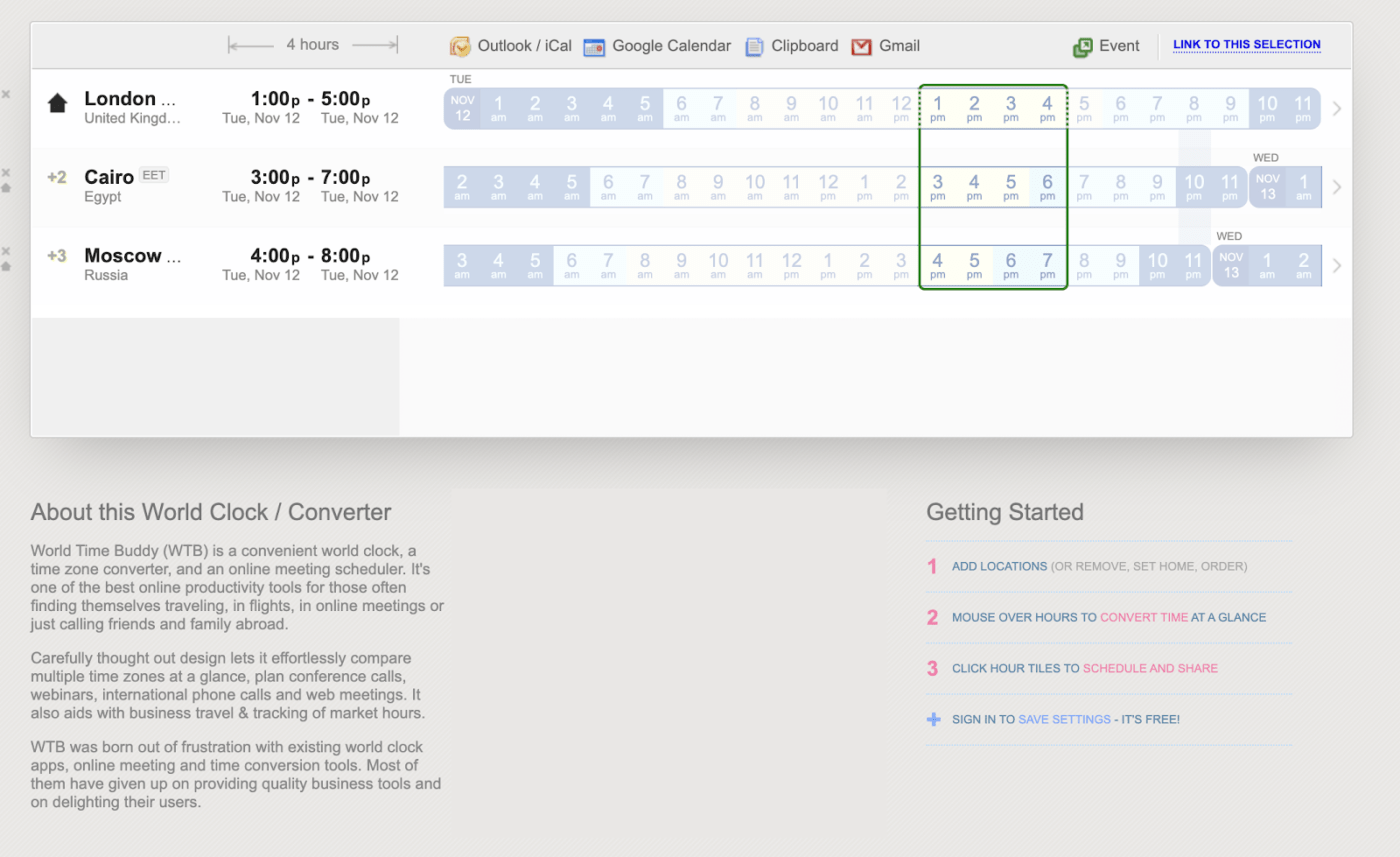
Need meeting invites across different time zones? World Time Buddy does it with three clicks. Its clean interface helps you set precise meeting durations. Plus, this world clock schedules a calendar event with local time and three other time zones in mind.
World Time Buddy lets you export directly to Google, Outlook, or iCal. It creates meeting links and email drafts. Planning an event? The tool visualizes a countdown, title, and description instantly.
World Time Buddy best features
- Update meeting times and invites instantly onto popular calendar integrations, like Google Calendar and Outlook
- Allow teammates to access plans before finalizing them with a dedicated viewing link
- Access the tool for free and without any mandatory sign-in
World Time Buddy limitations
- Lacks integrations to video and conference call apps
- Does not include team availability, leading to cluttered and off-platform scheduling
World Time Buddy pricing
- Free to use
World Time Buddy rating and reviews
- G2: Not enough reviews
- Capterra: Not enough reviews
💡 Pro Tip: Want to make your meeting planning simple with a free editable calendar? Learn how to make a calendar in Google Sheets to track the best times to connect with your team! 🗓️
3. Morgen (Best for visualized daily planning)

Morgen is a daily planner connecting your task managers and calendars in one view. It’s built for people who want their schedule to reflect real priorities, not just open slots. By bringing tasks and events together, it helps you plan meetings in the context of your work, so your day stays balanced and intentional.
Morgen has a free time zone meeting planner, making it simple to coordinate across regions without the friction. You can quickly compare time zones, find overlapping working hours, and schedule meetings that respect everyone’s day, then send them straight to your calendar.
Beyond scheduling, Morgen supports deep integrations with tools like ClickUp, allowing you to see tasks across multiple calendars.
Morgen best features
- Unified view of calendars and tasks for realistic daily planning
- Drag-and-drop time blocking to structure your day
- Integrations with leading task managers and calendar tools
Morgen limitations
- Offers lightweight task management features
- Not a full AI automated approach to daily planning
Morgen pricing
- Free 14 day trial (no credit card required)
- Pro: $30/month or $15/month annually
- Teams: $25/month per seat or $10/month per seat annually
Morgen ratings and reviews
- G2: 4.8/5 (20 reviews)
- App store: 4.5/5 (190 reviews)
4. Clockwise (Best for calendar optimization and time-blocking)

Next on this list is Clockwise, a calendar tool built to visualize schedules and boost time management. This intuitive tool helps you plan a meeting while keeping existing commitments in mind.
This meeting planner lets you connect multiple calendars to the same account so you don’t miss any meetings.
Clockwise has an intelligent calendar that eliminates manual effort—perfect for team meetings and incorporating time suggestions quickly.
Clockwise best features
- Insert key tasks into free spaces in your calendar automatically with AI features
- Let others book your working hours without back-and-forth emails through a meeting scheduler tool
- Get an overview of time spent across different types of activities
Clockwise limitations
- Gets quite expensive for small teams and individuals
- Focuses on calendar management and offers limited integrations—with no integral productivity elements like task management
Clockwise pricing
- Free
- Teams: $6.75/month per user (billed annually)
- Business: $11.50/month per user
- Enterprise: Custom pricing
Clockwise rating and reviews
- G2: 4.7/5 (50+ reviews)
- Capterra: 4.7/5 (60+ reviews)
5. Time Zone Converter (Best for quick and basic time conversions)
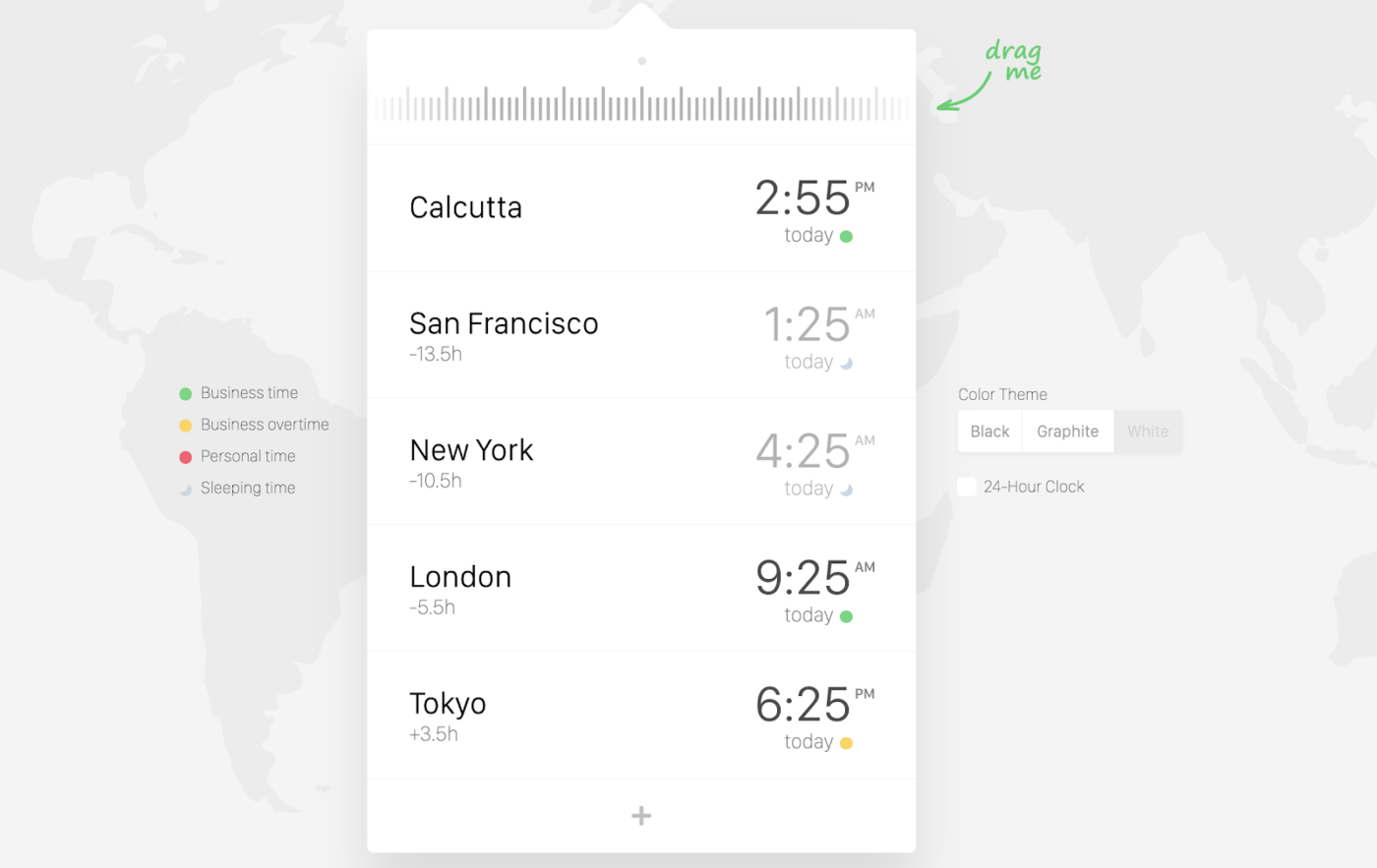
Want to find the ideal meeting times? The Time Zone Converter provides a clean and straightforward solution. This platform shows you the exact time anywhere in the world across different time zones.
The best part? It even includes smart adjustments for daylight saving time!
The world clock shows working hours, overtime, personal time, and sleeping hours, so all communication with overseas clients and friends happens at a suitable time.
Time Zone Converter best features
- Add and adjust different time zones with its simple drag feature
- Simplify time zone planning with the app’s estimates of local holidays and working hours
Time Zone Converter limitations
- Lacks world meeting planner features and acts as only a time zone overview
- Requires purchase for offline access to the tool
Time Zone Converter pricing
- Free
- Windows App: $3.25 per user (one-time purchase)
- MacOS App: $5.99 per user (one-time purchase)
Time Zone Converter rating and reviews
- G2: Not enough reviews
- Capterra: Not enough reviews
6. Every Time Zone (Best for at-a-glance global time tracking)

Every Time Zone is one of the most comprehensive meeting planners. The world clock meeting planner presents 17 time zones at every scheduling stage.
It creates instant meeting invites and iCal links to add events so everyone on the team stays updated. The meeting planner helps track your team’s availability by mapping their time zones and business hours.
Every Time Zone generates optimal workable times for meeting participants so you can organize events like webinars and workshops to bring your team together.
Every Time Zone best features
- Keep planning simple with the visual representation of multiple time zones
- Promote remote and flexible working with timezone-based meeting schedulers
- Utilize color-coded views to quickly know the best times to contact co-workers in different locations
Every Time Zone limitations
- May be an expensive option compared to other tools
- Meeting and time-tracking features are available only in the premium pricing plan
Every Time Zone pricing
- Free
- Every Time Zone Pro (up to 3 users): $39/year
- Every Time Zone Pro (up to 15 users): $119/year
- Every Time Zone Pro (more than 15 users): Custom pricing
Every Time Zone rating and reviews
- G2: Not enough reviews
- Capterra: Not enough reviews
7. Doodle (Best for simplifying group scheduling and polling)

Looking for an online meeting planner with a user-friendly interface? Doodle is a classic choice. Known for its group scheduling features, Doodle comes with possible time slots and unique meeting links.
Doodle also has group polls for participants to vote and suggest times. Its interactive and engaging layout presents time zones and meeting details.
Doodle best features
- Collect payments as customers book 1:1 time with you with its integrated checkout page
- Pull your availability details from Google Calendar, Microsoft Office 365, and iCal
- Send out meeting invites with ready-to-use conference call links and calendar files
Doodle limitations
- Can be expensive for professional use, especially for teams
- Requires a premium plan if you need basic customization like branding and features like reminders and advanced scheduling
Doodle pricing
- Free
- Pro: $14.95/month per user
- Team: Starts at $19.95/month per user (minimum 5 users)
Doodle rating and reviews
- G2: 4.4/5 (2000+ reviews)
- Capterra: 4.6/5 (1800+ reviews)
➡️ Read More: Explore the top 10 Doodle alternatives if you’ve used this tool and need a list of comprehensive choices that are equally user-friendly and efficient. 🎯
8. Pizzatime, formerly Spacetime.am (Best for team-building events and remote culture)

Looking to boost morale and teamwork in your meetings? Pizzatime (formerly Spacetime) brings a refreshing approach to event and meeting plans.
This tool sends out meeting invites and organizes virtual activities like pizza parties and team-building workshops. It helps you host events like virtual escape rooms and even book a stand-up comedian.
This meeting planner develops a sense of community among employees by engaging them in relaxing events.
Pizzatime best features
- Develop a healthy remote work culture with inclusive event scheduling
- Facilitate team engagement by offering a variety of group activities
- Save the time and effort of managing multiple contact details for deliveries
Pizzatime limitations
- Prioritizes event planning and catering over meeting-specific features
- Gets quite expensive for small teams. This also makes it more suited for one-time events like retreats or celebrations
Pizzatime pricing
- Orders: Starts at $25 per attendee (minimum $250)
- Add-on events: Starts at $49 per attendee
Pizzatime rating and reviews
- G2: Not enough reviews
- Capterra: Not enough reviews
9. SavvyCal (Best for personalized scheduling)
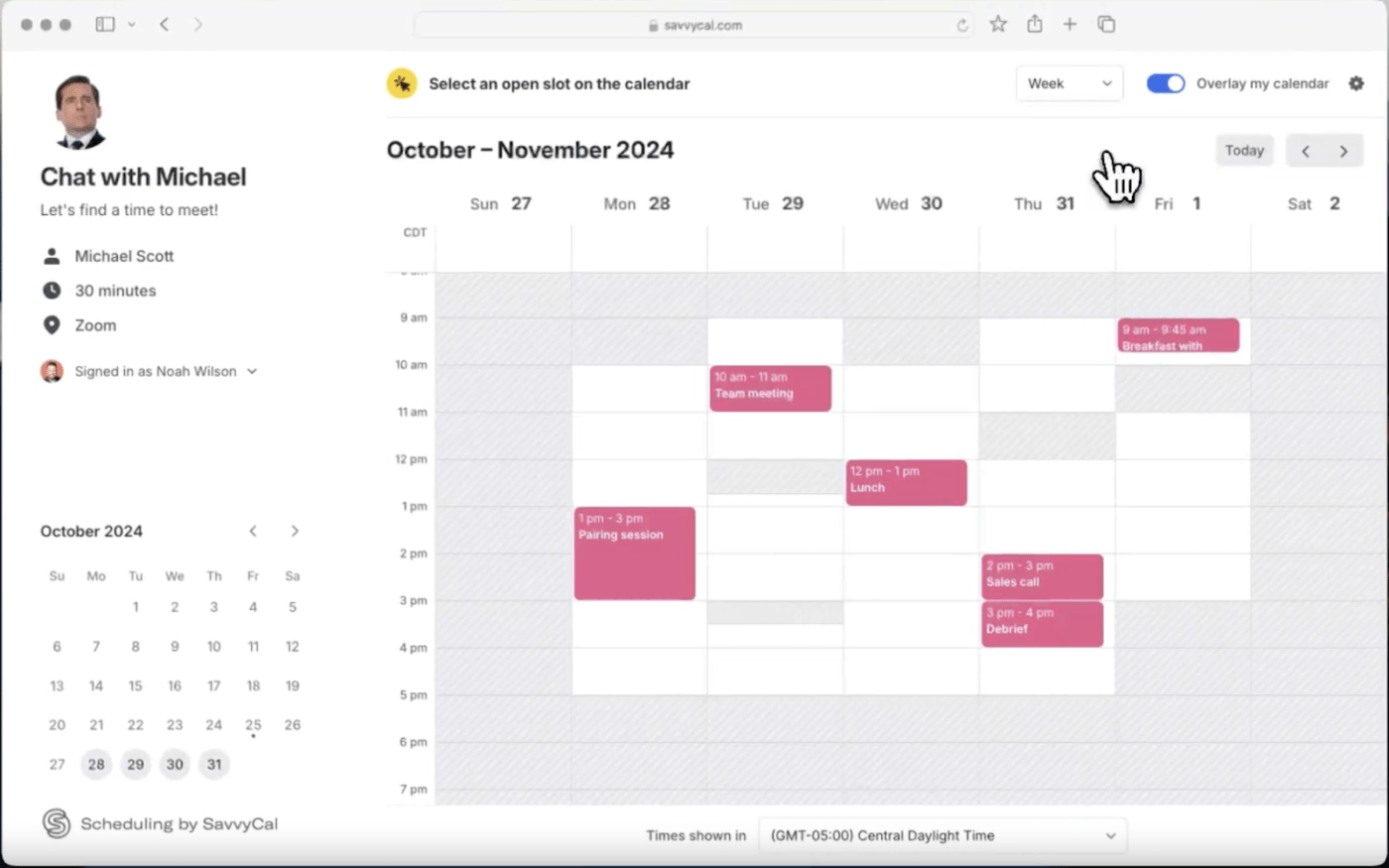
SavvyCal is a scheduling tool designed for easy, flexible meeting bookings. The meeting planner delivers user-friendly features to reduce the recipient’s burden of scheduling as attendees select times that work best for them.
The tool features major calendar integrations, time zone management, and personalized links.
SavvyCal ensures a professional booking experience and sets meeting buffers for better control. It is ideal for remote teams and client-facing professionals.
SavvyCal best features
- Respect users’ privacy with security features that mask availability details
- Streamline scheduling and save time with an option to overlay a recipient’s calendars
- Cap the number of meetings booked per day, week, or month
- Host your scheduling links on your own custom domain for a professional impression (Premium plan only)
SavvyCal limitations
- Pricing is not suited for individuals and solo users
- Focuses on integrations with calendar apps and not popular third-party productivity tools
SavvyCal pricing
- SavvyCal Basic: $12/month per user
- SavvyCal Premium: $20/month per user
SavvyCal rating and reviews
- G2: 4.7/5 (30+ reviews)
- Capterra: Not enough reviews
10. Microsoft FindTime (Best for scheduling within Microsoft 365)

Microsoft FindTime is an Outlook add-in that helps teams and clients find the best meeting times.
Designed for the Microsoft 365 ecosystem, it allows users to propose preferred slots and a simple voting option. These preferences are relayed in real-time on the meeting invite, making decisions easy.
Its voting polls offer diverse options, including ‘can do,’ ‘prefer,’ and ‘no way.’ Its integration with Outlook maintains a familiar environment and facilitates seamless adoption.
Microsoft FindTime best features
- Boost attendance in conference calls and accommodate preferences with a voting feature
- Blend instant email updates and seamless scheduling with the solution integrated into your Outlook app
- Let participants propose alternate times
Microsoft FindTime limitations
- Available only with a premium Microsoft subscription
- Has limited functionality and compatibility with the web and mobile applications
Microsoft FindTime pricing
- Comes with Microsoft 365, which starts at $7.2/month per user
Microsoft FindTime rating and reviews
- G2: Not enough reviews
- Capterra: Not enough reviews
11. Arrangr (Best for flexible one-on-one and group scheduling)
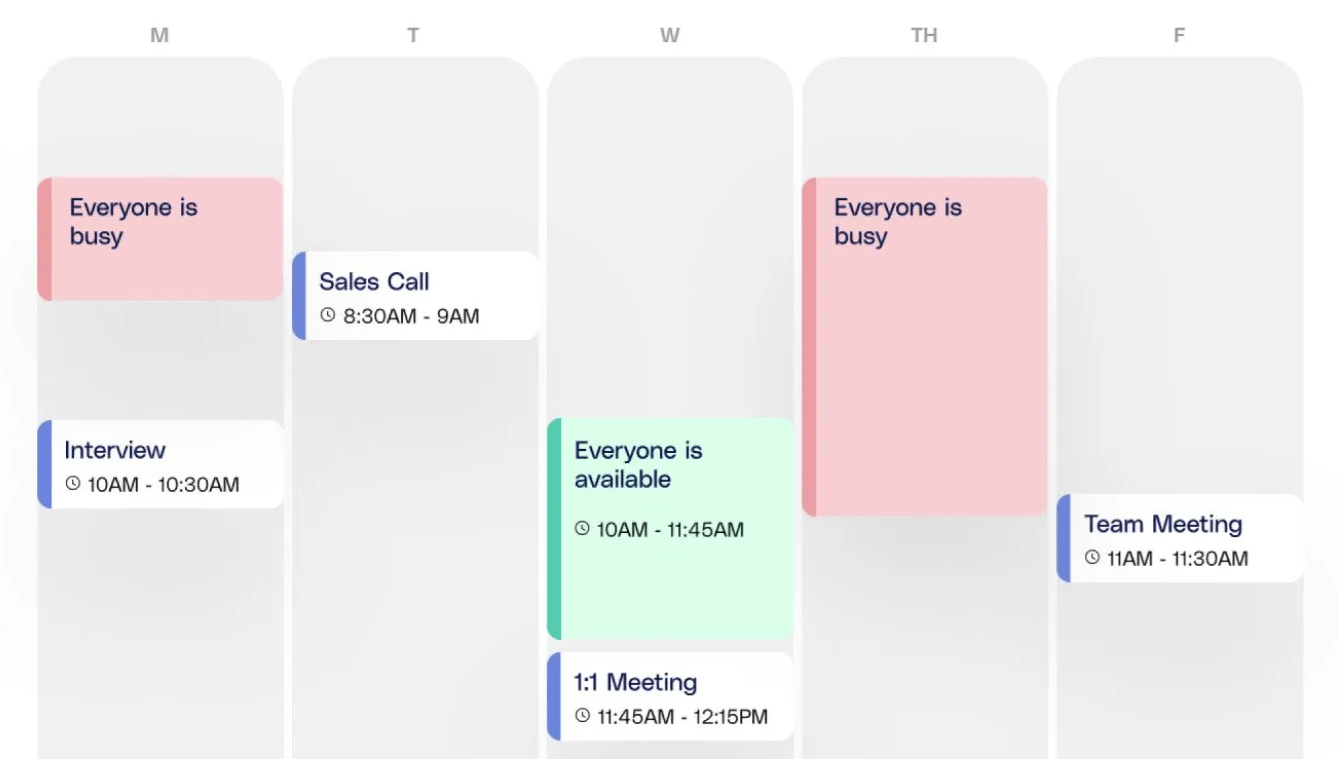
Arrangr is an intuitive tool gaining popularity for its smart calendar features that make scheduling efficient and instant. This Clockwise alternative is perfect for engaging with clients and colleagues, both inside and outside your organization.
The platform offers booking pages where recipients reserve time in advance.
Its one-on-one invites let you add specific meeting windows and slots. Plus, Arrangr’s user-friendly design helps recipients instantly compare their schedules.
Arrangr best features
- Keep all information ready when sending out invitations with auto-created links for online meetings
- Poll participants for their preferred times and locations
- Personalize your invitations with pre-built message templates
Arrangr limitations
- Restricts customization capabilities because of its limited integrations
- Lacks reporting tools and features for insights on meeting patterns and recipient engagement
Arrangr pricing
- Basic: Free
- Pro+: $5/month per user
- Add-ons: Start at $1.49/month per user
Arrangr rating and reviews
- G2: Not enough reviews
- Capterra: Not enough reviews
➡️ Read More: Here is Calendly review with pricing for a breakdown of how Calendly delivers as a planning tool. 📝
Summarize this article for me pleaseRevamp Your Meetings and Schedules With ClickUp
Equipping your team with the right time zone meeting planners is essential for optimizing workload management, boosting productivity, and building strong global relationships.
Among this guide’s ten comprehensive tools, ClickUp stands out for its robust suite of project execution and meeting management features.
With over 30 powerful tools and 1000+ integrations, ClickUp offers a complete meeting planner for scheduling, execution, and collaboration.
Whether coordinating across time zones or managing complex projects, ClickUp ensures seamless integration and efficiency.
Sign up with ClickUp today and transform the way your team works!


Everything you need to stay organized and get work done.

Recent Articles
How to Set Product OKRs That Survive the Quarter (With Examples) 
How to Set Product OKRs That Survive the Quarter (With Examples)
Stretch Goals: What They Are, When They Work, and How to Set Them
Stretch Goals: What They Are, When They Work, and How to Set Them
Agency Capacity Planning: How to Find the Hours You Already Pay For 
Agency Capacity Planning: How to Find the Hours You Already Pay For
