






Still downloading templates?
There’s an easier way. Try a free AI Agent in ClickUp that actually does the work for you—set up in minutes, save hours every week.
Sorry, there were no results found for “”
Sorry, there were no results found for “”
Sorry, there were no results found for “”

Online form builders are a lifesaver for anyone who doesn’t code or wants to avoid manual data entry. They’re easy to use, highly customizable, and built to simplify the entire process.
But you already know that—you’re here to determine if Jotfrom’s pricing structure is worth it. After all, why invest in an AI-powered form builder that might not fit your evolving needs six months down the line?
Understanding Jotform’s plans, strengths, and limitations upfront can prevent frustrating surprises later. This guide explains everything you need to know to decide if Jotform is the right fit and, more importantly, which plan offers the best value. 💡
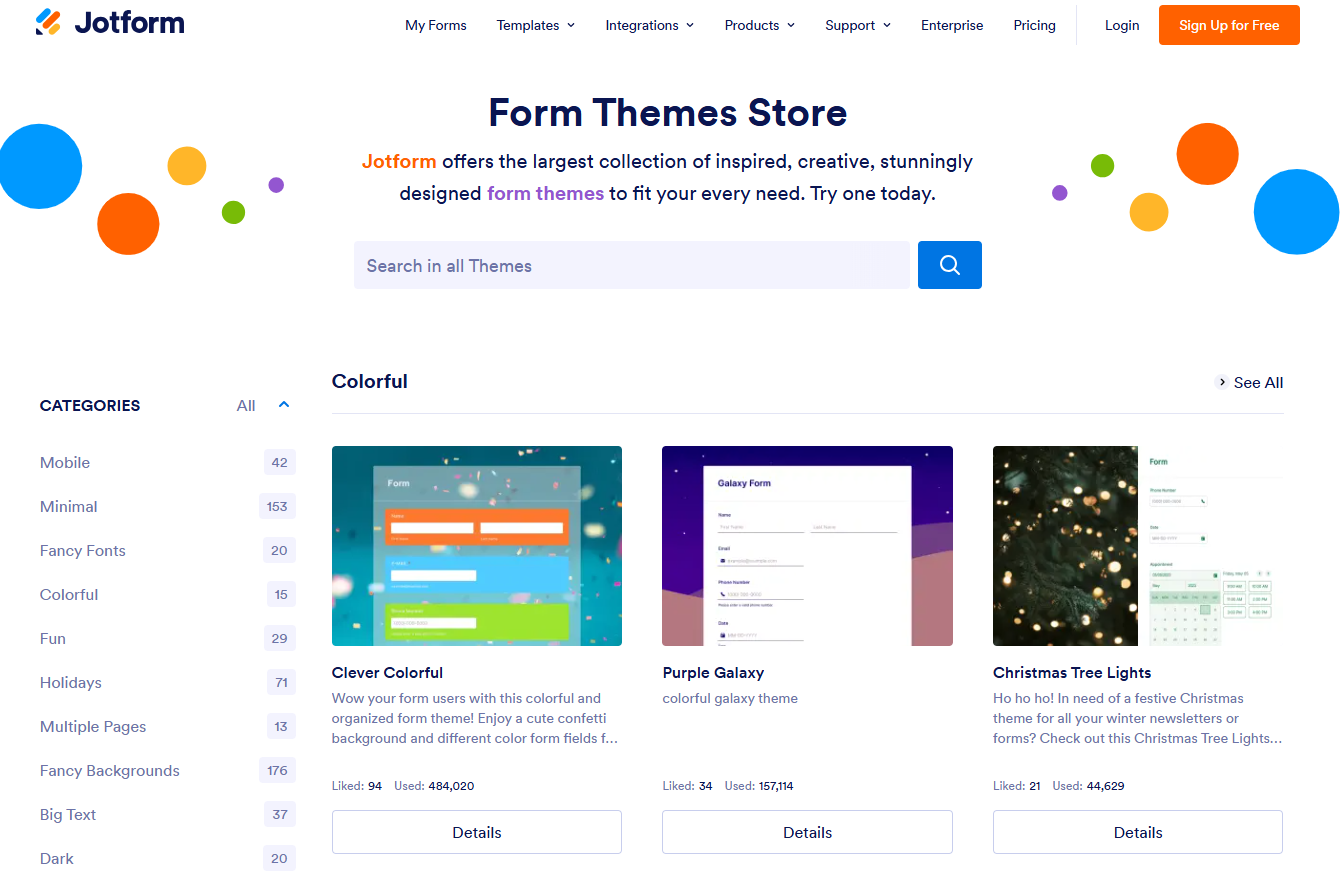
Jotform is a feature-rich no-code tool that lets you create, customize, and share forms for data collection, payments, surveys, and more—no coding required. But it’s more than a form builder: Jotform also includes tools like Jotform Tables for spreadsheet-style data management, Jotform Apps to create custom mobile apps, Jotform Sign for collecting legally binding e-signatures, and much more.
Whether you’re a small business owner, a teacher, or just organizing a potluck, it has you covered.
You can skip the hassle of starting from scratch by exploring Jotform’s template library, which has everything from simple contact forms to complex survey result templates. Its drag-and-drop interface lets you customize everything, from design to event management tools and signature fields. Sharing is easy, too, via links, embeds, or PDFs.
For healthcare professionals, its HIPAA compliance features ensure secure data collection and management of sensitive medical information.
💡Pro Tip: Download your Jotform source code and have your developers edit it to add extra features.
The best thing about a platform like Jotform is its ability to cater to different needs—not just through forms, but through connected tools like tables, workflows, and e-signature automation.
Here are three ways you can use Jotform:
📮ClickUp Insight: 92% of workers use inconsistent methods to track action items, which results in missed decisions and delayed execution. Whether sending follow-up notes or using spreadsheets, the process is often scattered and inefficient. ClickUp’s Task Management Solution ensures seamless conversion of conversations into tasks, so your team can act fast and stay aligned.
Note that prices are subject to change, and the pricing in this blog post is current as of date of publication. Please check Jotform’s website for the latest prices.
Now that you’re familiar with Jotform’s features, let’s examine its pricing plans and find the best fit for your needs.
If you’re new to online forms or have basic needs, Jotform’s Free plan is a good place to begin. It allows you to explore the platform and create simple forms without any cost.
Who’s it for: The Free plan is ideal for individuals, students, or small teams with basic form needs and limited budgets. It’s a great way to start creating forms, but you’ll likely need to upgrade as your usage grows.
Pricing:
The resource limit increases in the Bronze plan, and Jotform branding can be removed.
Who’s it for: The Bronze plan suits small businesses, freelancers, and organizations needing more forms, submissions, and storage than the free plan allows. It is also ideal for those wanting a professional, branded appearance.
👀 Did You Know: 81% of B2B decision-makers say it’s essential that the software they purchase has AI.
The Silver plan offers higher limits on forms and submissions while retaining all core Jotform features.
Who’s it for: Compared to the Bronze plan, the Silver plan is ideal for growing businesses that need to increase form usage, submissions, and storage.
The Gold plan is for larger organizations or businesses with high-volume form needs and HIPAA compliance requirements.
Who’s it for: The Gold plan is for large organizations, businesses in regulated industries, or healthcare providers who require HIPAA compliance and high-volume form capabilities.
For businesses with unlimited requirements, Jotform Enterprise plans can work out.
Who’s it for: The Enterprise plan is for large enterprises with complex workflows, high-volume requirements, and specific needs that the standard Jotform plans cannot meet. Custom pricing helps meet enhanced security and administrative needs, while the multi-user platform manages large teams.
Other pricing tiers: Jotform offers up to a 50% discount to nonprofit organizations and educational institutions
🧠 Fun Fact: In 1838, the Statistical Society of London conducted an early research initiative to assess the state of education in Westminster. This effort involved developing a structured questionnaire to systematically gather data, laying the groundwork for modern survey methodologies.
Now that we’ve explored Jotform’s pricing tiers, let’s break down their pros and cons to help you make an informed choice.
Here are some pros of the Jotform online form builder pricing tiers:
Weigh these limitations of the Jotform pricing structure before signing up.
📋 Also Read: Best Employee Survey Software Tools for HR Teams
Jotform accepts payments from most popular gateways, and is a great online form builder. However, other tools offer improved features and flexible pricing tiers.
For example, a user on G2 expressed how Jotform’s free version can be restrictive:
The only complaint is that the free version is just a little limited. If we could have a couple more forms and just a little more upload space, it would be perfect. A $5-$7 a month tier with just a modest upgrade over the free version would be ideal. We don’t need all the bandwidth the $20/mo plan provides. The free version is 90% of wht we need!
Investing in gold and enterprise-level plans can be a serious strain if you’re a small startup that relies heavily on online forms. That cost and other overhead expenditures won’t be the best value.
Therefore, consider a Jotform alternative that promises complete workflow management.
👀 Did You Know: The People’s Climate Vote 2024 is the world’s largest survey on climate change.

Once you’ve captured the data, what comes next? If the answer involves tasks, timelines, or teamwork, ClickUp connects the dots in one place. As the everything app for work, it brings together forms, tasks, docs, workflows, and collaboration—so your entire process flows from intake to execution without missing a beat.
For example, ClickUp Forms isn’t just about collecting information; it’s about connecting that information directly into your workflow. In other words, this software makes it easy to leverage user feedback to perform actions.
Imagine creating a form to gather feedback on a project. The gathered responses automatically become Tasks within that domain. You can then assign it to your team members, and they can make improvements, if any.
Once someone fills out the form, you can use ClickUp Automations to set up rules that trigger actions based on form submissions.
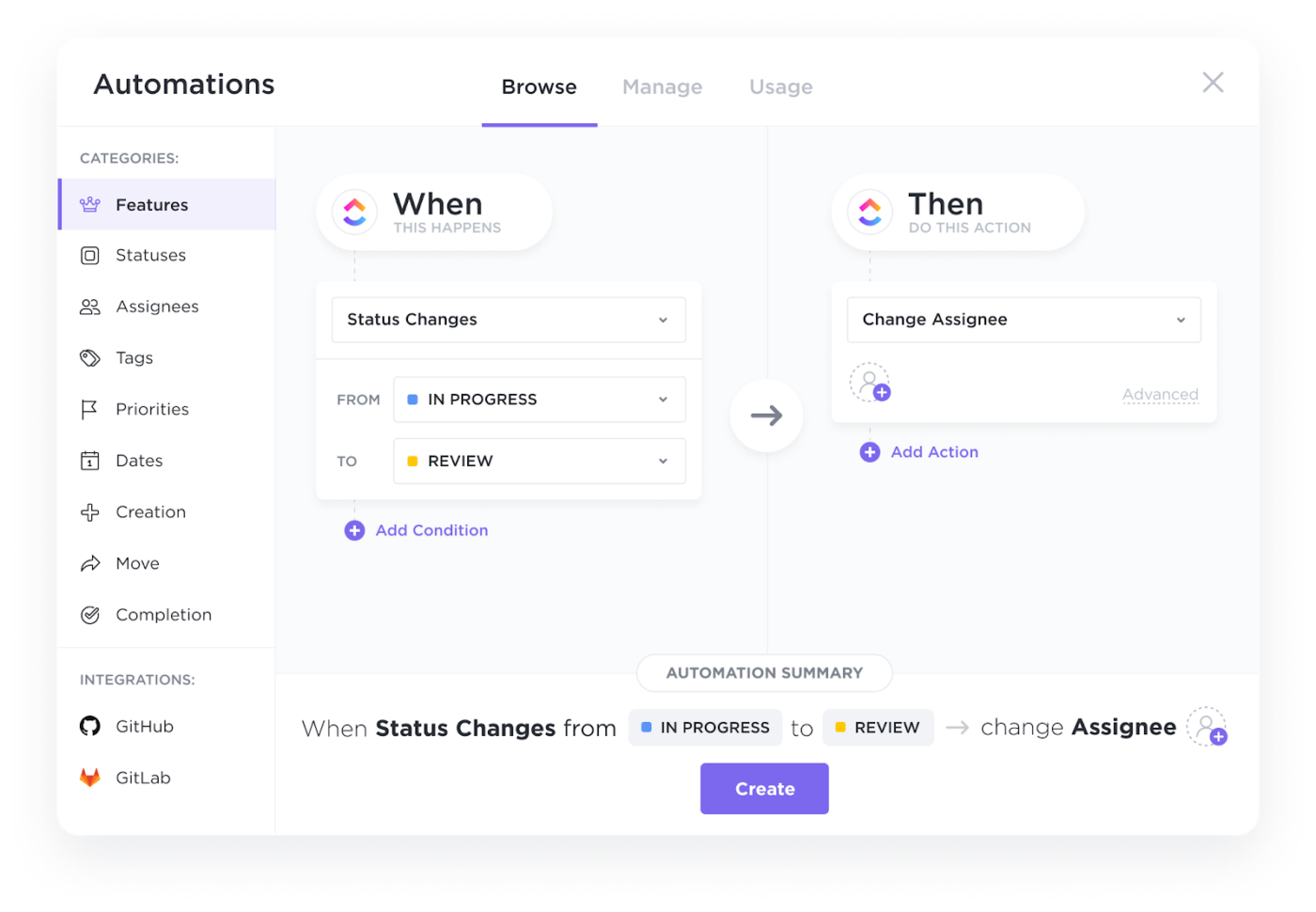
For example, based on a form’s response, you can automatically assign the task, send notifications, update statuses, and even create subtasks without lifting a finger.
Here’s how you can use ClickUp Automations:
ClickUp Automations allows businesses to handle increasing volumes of form submissions without manual effort.
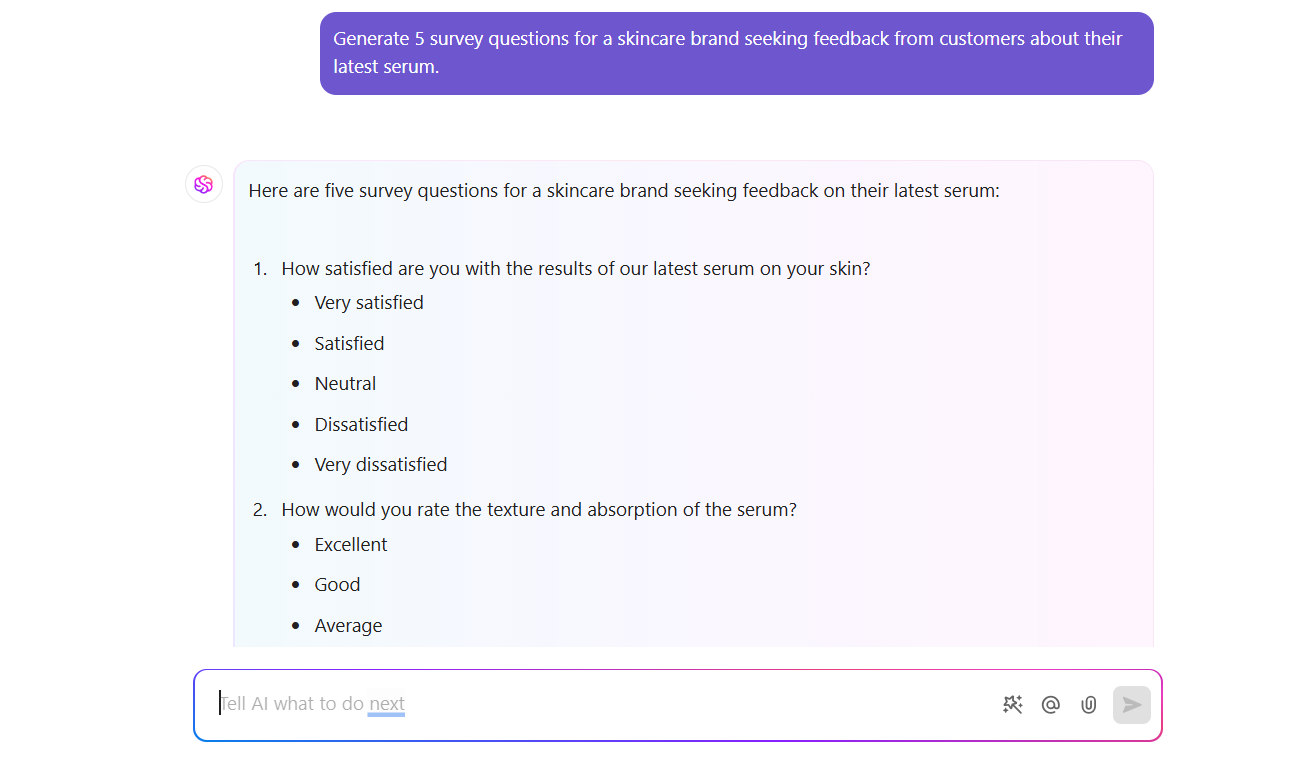
It also integrates the AI-powered ClickUp Brain into your workflow and improves data management. Collect and use data to gather deeper insights about your work processes and customer base.
Here’s how ClickUp Brain can be helpful:
Why should you consider ClickUp as a Jotform alternative?
ClickUp isn’t just a form builder; it’s a work management platform. Think of it this way: Jotform helps create and manage forms, but ClickUp takes it further by integrating those directly into your projects, tasks, and overall workflow.
You can organize your forms, to-do lists, team communication, and everything else in one place. This makes it more useful for teams that need more than data collection.
If you’re tired of toggling between different apps and manually transferring information, ClickUp’s all-in-one approach will save you much time.
ClickUp has features that stand out in the form-building space, especially for teams that need a more integrated solution. Let’s review them:
Imagine a feedback form where each submission instantly creates a task for your team to review and respond to. ClickUp works like that. Rather than sitting there to be reviewed, ClickUp’s forms are designed to participate in your work processes actively.
You can use ClickUp Chat to share forms, discuss responses, and track progress on the platform. It lets you link tasks and messages together so context is never lost. No more endless email chains or confusing spreadsheets.
ClickUp integrates with popular apps like Google Drive and Slack, allowing you to connect your forms and data to the internal tools you already use. This means less switching between apps and a smoother, more integrated workflow.
For example, you can automatically save form attachments to Google Drive or get Slack notifications when new forms are submitted.
📋 Also Read: How to Conduct User Research
ClickUp offers a tiered pricing structure to accommodate individuals, small teams, and large enterprises.
Here’s a breakdown of their plans:
This plan is designed for individuals or small teams just starting out. It allows you to access core ClickUp features like unlimited Tasks, collaborative Docs, Whiteboards, and a Custom Field manager, and experience the platform firsthand. And yes, you get a free ClickUp form as well!
Who’s it for: This plan is ideal for personal use or small teams with basic needs.
This plan removes storage limits and adds features that boost productivity and collaboration.
You can access everything in the Free plan with unlimited storage, Integrations, Dashboards, guest access, Gantt charts, Custom Fields, Chat messages, and more.
Who’s it for: Small to medium-sized teams (startups, small businesses, departments within larger companies) that need unlimited storage, integrations, and access to key productivity features like Gantt Charts, Custom Fields, and Time Tracking.
This plan adds advanced features for more control, automation, and administration.
You can use everything in the Unlimited plan, plus Google SSO, unlimited teams, custom exporting, advanced Automation, Dashboard features, Time Tracking, and more.
Enterprise
This plan is tailored for large organizations with complex needs, offering maximum security, control, and support.
Unlock everything in the Business plan, plus added features like white labeling, advanced permissions, form view conditional logic, enterprise API, unlimited custom roles, MSA & HIPAA availability, single sign-on (SSO), and more.
Who’s it for: This plan is for when off-the-shelf solutions aren’t enough, and a highly customized, enterprise-grade platform is essential.
ClickUp’s flexible pricing structure allows you to scale your usage as needed.
Tyler Guthrie, the Director of Revenue Operations working at Home Care Pulse, said:
Forms and approval processes are very easy to implement and make handing inter-departmental request much easier saving time.
Jotform is a solid tool for creating and managing forms, and its growing suite—like Jotform Tables, Apps, and Sign—adds more flexibility for specific workflows. However, it might not be the best choice for rapidly growing businesses.
When your team’s growing and the work’s moving fast, it helps to have a platform that connects every piece—forms included. For example, ClickUp!
With ClickUp, data management becomes easier. Say goodbye to manual data entry or transferring information between different apps, and create customized forms with your branding.
In short, ClickUp is a great choice for teams that want to connect their data collection directly to their workflows. ✨ Sign up for ClickUp for free today and organize your work process. ✅

© 2026 ClickUp

There’s an easier way. Try a free AI Agent in ClickUp that actually does the work for you—set up in minutes, save hours every week.