






Still downloading templates?
There’s an easier way. Try a free AI Agent in ClickUp that actually does the work for you—set up in minutes, save hours every week.
Sorry, there were no results found for “”
Sorry, there were no results found for “”
Sorry, there were no results found for “”

Grok is an AI chatbot built by xAI (an artificial intelligence company by Elon Musk) that can access real-time conversations on X (formerly Twitter) and the web. It can also generate engaging content in the form of images and text and have conversations with users.
Where it stands out for community engagement is its help in interpreting live conversations on X.
The conversational AI can surface patterns, emotional signals, recurring narratives, and community-specific norms that are easy to miss when you’re looking at individual posts in isolation.
Below, we show you how to use Grok AI for community engagement. We also outline how to set up community engagement workflows that run consistently in the background.
Unlike networks built around private groups or curated feeds, X’s engagement happens out in the open. Communities form around reply threads, quote posts, and reposts.
This creates some specific behaviors such as:
Successful engagement on X means jumping into conversations thoughtfully. Reply quickly, read the room (tone, context, current memes), and remember that replies build relationships more than polished feed posts ever will.
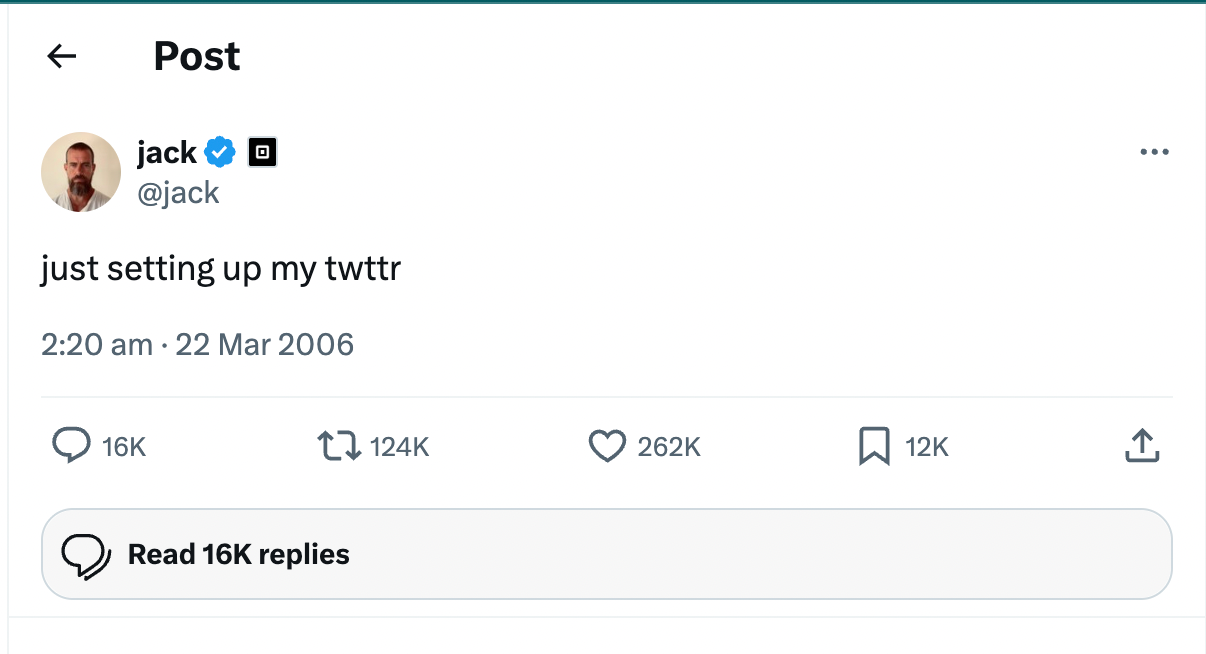
🧠 Fun Fact: Jack Dorsey sent the first tweet in 2006.
If you’re getting started with using Grok, here’s a quick primer:
Grok AI helps you with tasks like answering questions, solving problems, and brainstorming. It is available to X users and powered by xAI’s state-of-the-art large language models.
Grok answers almost any question with humor and wit, while providing helpful responses. With a rebellious streak and an outside perspective on humanity, it makes for an entertaining companion.
Here’s why Grok is useful for community engagement analysis 👇
Think of Grok as a research assistant for community managers who need to track sentiment shifts, catch emerging trends, or decode conversational etiquette. It won’t schedule posts or replace human moderation, but it gives you context-aware insights you’d otherwise miss.
💟 Bonus: Best AI Productivity Tools to Try
When you’re exploring conversations with Grok, watch for these categories of signals:
Grok helps you see the social layer underneath—who shaped the conversation, how people interpreted it, and what the community actually responded to. These signals emerge in replies and quote tweets, not dashboards.
📮 ClickUp Insight: While 34% of users operate with complete confidence in AI systems, a slightly larger group (38%) maintains a “trust but verify” approach. A standalone tool that is unfamiliar with your work context often carries a higher risk of generating inaccurate or unsatisfactory responses.
This is why we built ClickUp Brain, the AI that connects your project management, knowledge management, and collaboration across your workspace and integrated third-party tools. Get contextual responses without the toggle tax and experience a 2–3x increase in work efficiency, just like our clients at Seequent.
Grok works best when your goal is understanding, not the execution.
It is useful when the conversation feels active but ambiguous—when something is happening on X, and you need to figure out why before deciding how to respond.
You will find Grok to be the right tool when you want to:
Where Grok falls short is in operational community work. It isn’t designed to manage engagement at scale or sustain long-term community programs. Grok is not the right tool when you need to:
That’s where you will need to explore other Grok AI alternatives (more on that in the sections below).
Grok is most effective when you use it to spot momentum early, shape conversations, and respond intelligently once engagement starts.
Here’s how to use Grok AI strategically 👇
Prompt engineering determines the quality of Grok’s output.
The xAI prompt engineering guide stresses four core practices: provide necessary context, set explicit goals, refine your prompts, and assign agentic tasks.
Let’s look at the different prompt patterns you can use for community engagement:
🤖 Prompt: “Using real-time X data as of [today/current moment], what’s the dominant sentiment in [hashtag/keyword/community] right now? Summarize key themes in 3-4 bullet points, quote 2-3 representative posts (with links if possible), then suggest 3-5 positive, non-spammy ways to join the conversation that would encourage replies.”
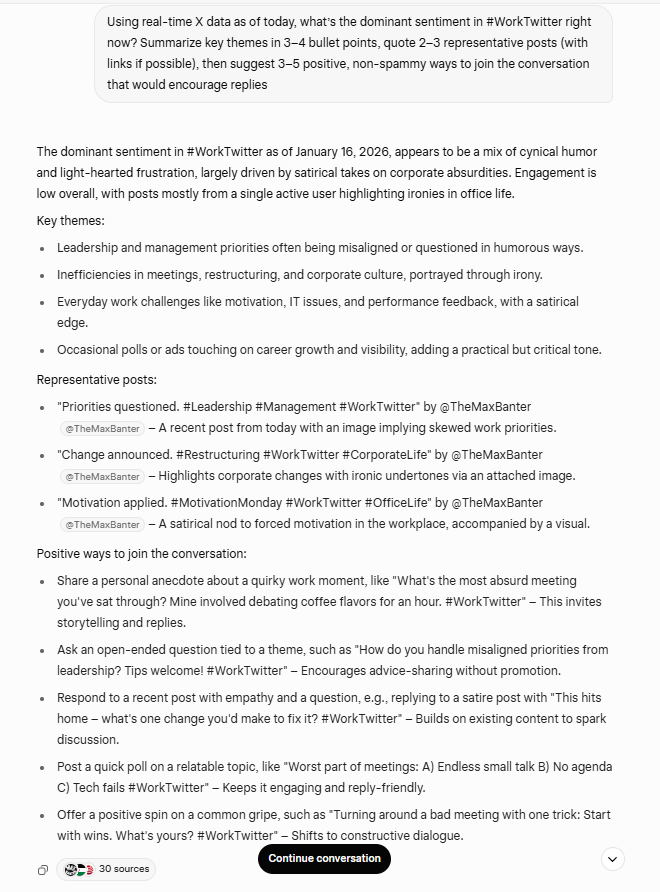
Variations: Add “focus on [sub-topic, e.g., ‘AI ethics complaints’]” or “include min_faves:20 filter for quality signals.”
✅ Why it works: Grounds ideas in what’s actually happening right now. Timely, relevant posts get algorithmic priority and higher engagement velocity.
🤖 Prompt: “Generate [5-7] scroll-stopping tweet hooks for [topic/niche] right now. Make them short, sharp, use pattern interrupts, curiosity gaps, bold questions, or contrarian takes. Match my voice: [describe tone, e.g., witty + helpful + slightly sarcastic]. Include suggested emojis and 2-3 relevant trending hashtags.”
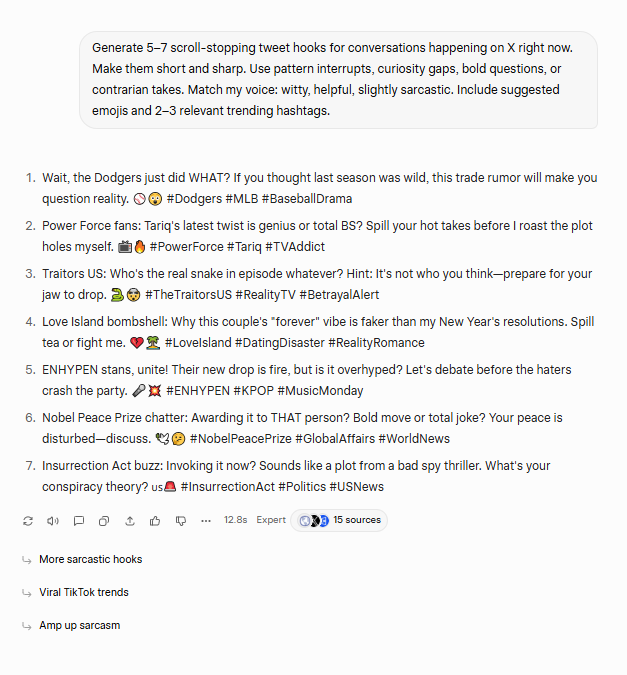
Variations: “Base hooks on today’s top [niche] trends” or “Make them suitable for threads (hook + teaser for more).”
✅ Why it works: The first 5-10 words determine if people stop scrolling. Strong hooks generate higher impressions and more engagement.
🤖 Prompt: “Here’s a post I’m considering replying to: [paste link or text]. Write 4 reply variations in my brand voice ([describe: fun, insightful, teasing]). Each under 200 chars, end with a question to spark discussion, avoid generic praise. Suggest which one has the highest engagement potential and why.”
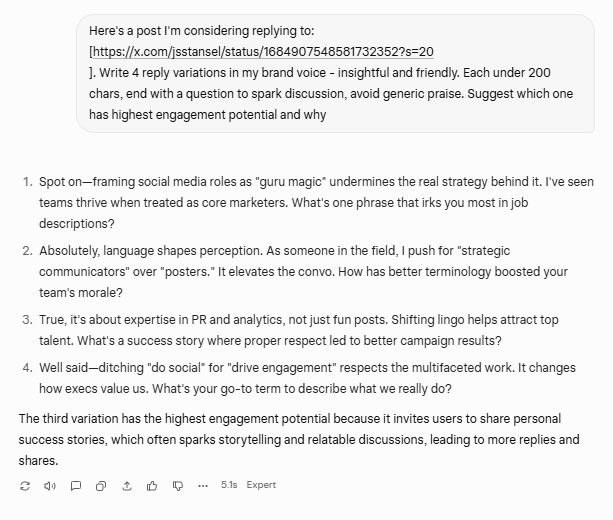
✅ Why it works: Personalized, thoughtful replies stand out in noisy threads. Builds relationships and increases visibility through meaningful interaction.
🤖 Prompt: “Who are the top 5-8 most active users in [niche/hashtag] conversations this week (high replies, quotes, or original posts)? For each, give: @handle, follower count approx, typical tone, and one personalized engagement idea (e.g., question to ask them, shared interest to mention).”
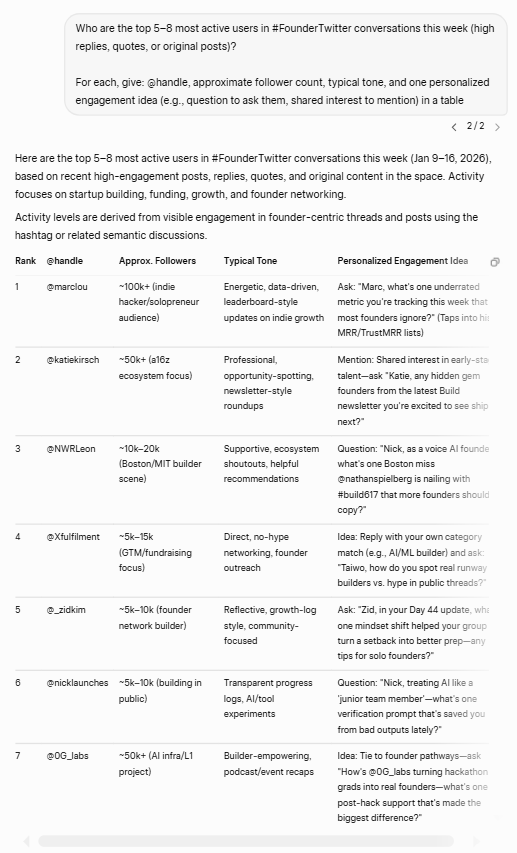
Variations: “Exclude big accounts (>100k followers)” or “focus on rising voices (growing fast last 30 days).”
✅ Why it works: Targeted outreach to active voices increases the chance of meaningful interaction and exposure to their audiences.
🧠 Fun Fact: The first to accumulate 100 million followers on Twitter is Katy Perry (USA, b. Katheryn Hudson), achieved on 16 June 2017.
🤖 Prompt: “Brainstorm a 5-8 tweet thread on [topic] optimized for X engagement. Structure: Strong hook → 3-5 value tweets with insights/examples → final CTA tweet. Use current trends/data where possible. Include suggested visuals (image prompts) and hashtags. Keep each tweet <270 chars.”
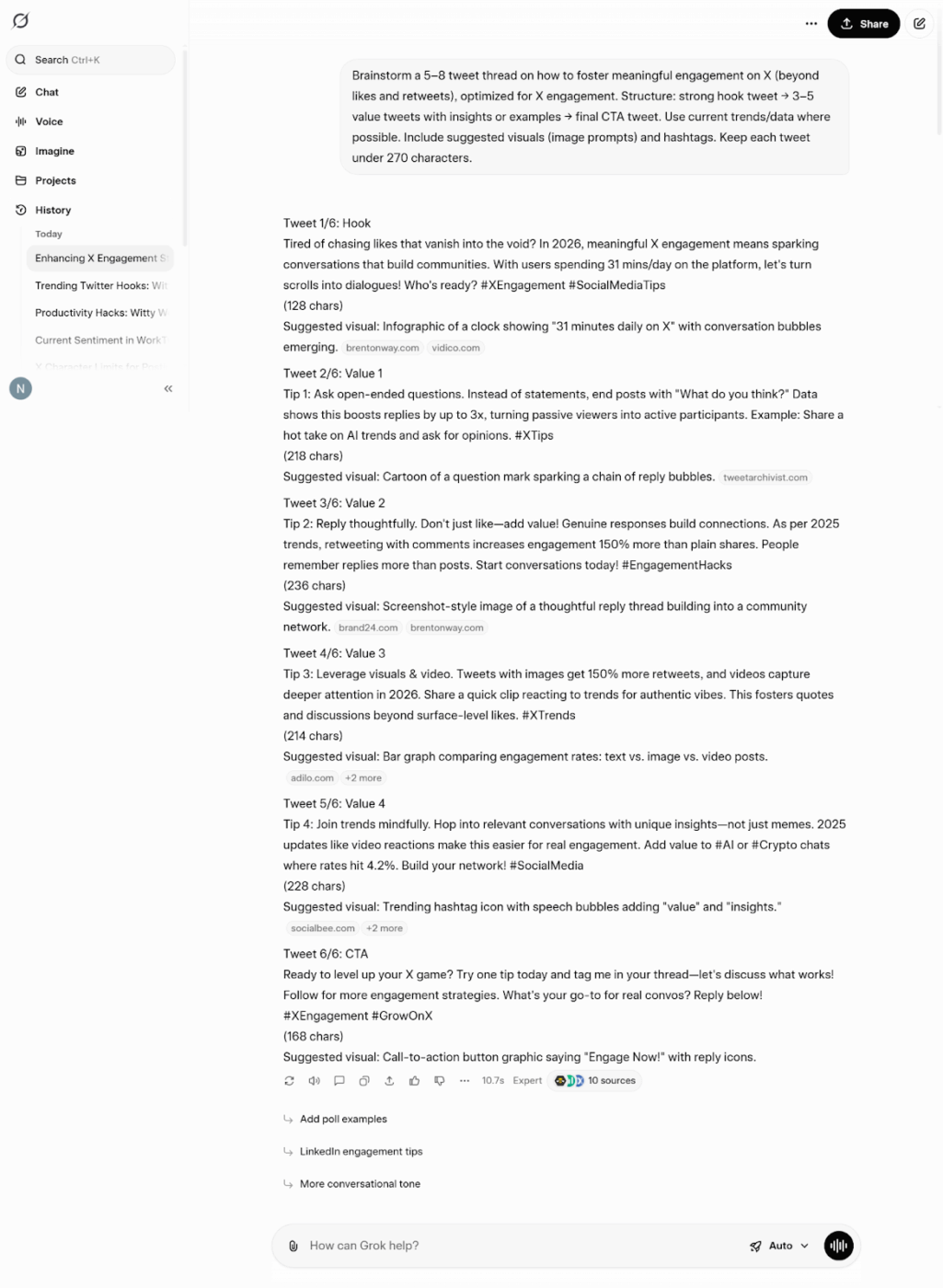
Variations: “Make it educational + controversial” or “include poll in tweet 4.”
✅ Why it works: Threads keep users engaged longer, which signals quality to Grok’s algorithm and increases distribution.
🤖 Prompt: “Create a simple 7-day engagement playbook for my X account focused on [goal: grow followers, increase replies, launch something]. Include daily prompt ideas for me to ask you, post types, and expected outcomes based on current X patterns.”
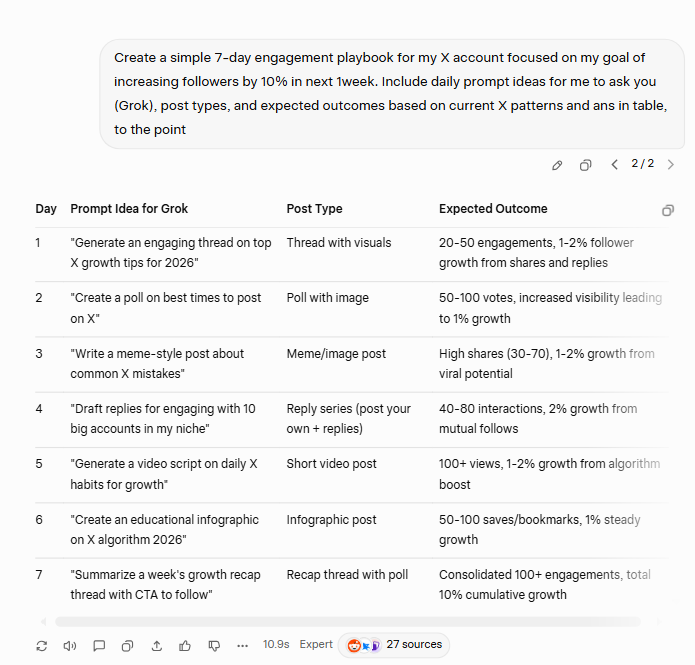
Variations: “Focus on low-effort, high-impact tactics” or “include contingency plans for trending topics.”
✅ Why it works: Transforms sporadic activity into a consistent system, creating compounding results through regular engagement.
These patterns work at different levels, from quick wins like better hooks and replies to longer-term plays like threads and audience building.
Start with 2–3 that address your biggest gap.
⚡ Template Archive: Free Voice of the Customer Templates to Understand Your Customers Better
📌 Example: If replies are low, focus on reply writing and finding the right people to engage with.
Test what works, track responses, and tweak your prompts over time. Grok’s real advantage is freshness, so revisit the same prompts regularly to stay in sync with shifts in conversation and mood. Whether you’re developing blog ideas or refining your digital marketing approach, these prompt patterns help you stay relevant.
⭐ Bonus: Here are some tips to make any pattern work better:
Grok can surface what’s happening across X’s platform in real-time, but the output only becomes useful when you interpret it with intent and restraint!
Grok pulls from public X activity, including live posts, user profiles, visible engagement metrics, trending topics, and Community Notes. Keep in mind that these insights reflect on-platform behavior only and may not capture sentiment forming elsewhere.
When evaluating engagement, prioritize bookmarks, detailed replies, quote posts, and full thread interactions. These signals indicate intent and depth, not just surface-level visibility like likes or reposts.
📚 Also Read: Best AI Productivity Tools to Use
A rapid increase in thoughtful replies or saves often signals that a topic is resonating in real-time. Slower growth can suggest weaker relevance or timing that isn’t right for amplification.
Because it incorporates Community Notes for context and fact-checking, posts that attract notes often point to disagreement, confusion, or potential misinformation. Treat these as cues to slow down and investigate further.
📚 Also Read: Best Note-taking Apps for Personal and Business Use
Pay attention to how content spreads and which accounts are driving interaction. Engagement led by specific sub-communities or influential voices can help you decide where to invest effort, such as targeted replies or partnerships.
Ask it to cite primary sources when possible and treat its conclusions as starting points, not final answers. This is especially important when output informs decisions with reputational impact.
Use Grok to surface themes and engagement metrics, then manually review representative posts or conversations. Human judgment in content creation is critical to preserve nuance and cultural context that automated summaries can miss.
💡 Pro Tip: Turn on Grok’s Fun Mode when you are analyzing reply threads to better surface sarcasm, in-jokes, irony, and meme-driven sentiment.
Remember to switch it off when you need precise analysis or decision-ready outputs, since this Grok feature optimizes for tone and wit over rigor.
X updates its ranking systems regularly, which can affect how content is surfaced and engaged with. Stay aware of product updates or announcements from X or xAI, so you can adjust your approach as visibility dynamics shift.
⚡ Template Archive: Free Social Media Templates for Posts, Campaigns, and Performance
The most common pitfalls of using Grok for community engagement on X include 👇
🧠 Did You Know? 45% of our survey respondents say that they keep work-related research tabs open for weeks. For another 23%, these treasured tabs include AI chat threads stuffed with context. Basically, a huge majority are outsourcing memory and context to fragile browser tabs.
Repeat after us: Tabs are not knowledge bases. 👀
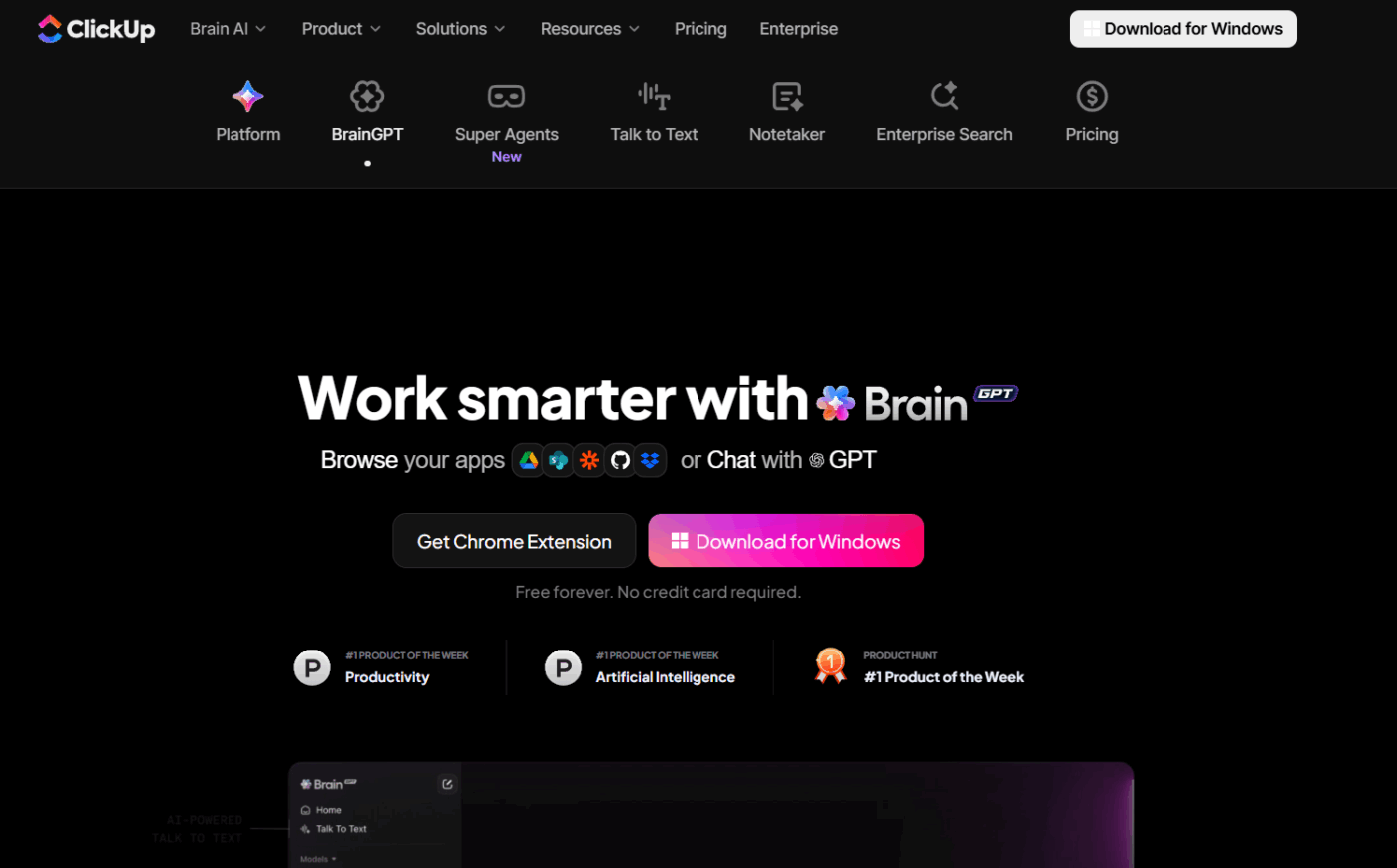
ClickUp BrainGPT changes the game here. This AI super app lets you search your workspace, interact with multiple AI models, and even use voice commands to retrieve context from a single interface. Since it lives in your PC, it doesn’t compete for tab space and can save conversations until you delete them!
If you’re on the free tier or just logged into X, you will face strict query limits, usually around 10-20 requests every few hours with painfully slow resets. When you’re trying to iterate on post ideas, reply to a bunch of comments at once, or run daily trend scans, it becomes a problem.
Accessing Grok AI (unlimited queries, the latest version like Grok 3 or 4, advanced features) requires X Premium or Premium+ at $8-16 per month.
Analyzing 20 comments quickly or generating 50 hook variations? Not happening on the free tier.
Grok cannot post, reply, like, repost, or manage your X account for you. It is a conversational AI assistant. You still have to do all the manual work yourself. You’ll still need tools for workflow automation and business process automation.
Also, it can’t access any private data, such as DMs, likes, and other non-public engagement metrics. It only analyzes what’s publicly visible on X, so you’re missing a chunk of the full picture.
Grok powers the ranking for Following and For You feeds based on predicted engagement. But it heavily favors short, meme-heavy, rage-bait, or controversial content because those generate quick velocity.
Nuanced threads, thoughtful analysis, or specialized content might get buried, even when posted by established accounts.
If you use patterns like repetitive replies or low-effort comment chains, Grok detects that as spam. Instead of helping your visibility, it actively hurts it.
Every time you start a new conversation with Grok, it resets. There’s no long-term memory of your past chats unless you’re continuing the exact same thread. You end up re-explaining context.
For anyone trying to build an ongoing community strategy, that’s painfully inefficient.
Grok pulls from public X data, which is useful for spotting trends but can also surface biased or straight-up inaccurate content, such as misinformation, in replies.
Insights generated in Grok often stay siloed. Product, marketing, and support teams can’t easily share, refine, or build on those insights together.
Grok can help you understand why something is happening, but it can’t track what you did in response or whether that response worked.
Regulatory scrutiny is increasing globally, especially around AI-generated images, misinformation, and data use. Grok has already triggered investigations and feature restrictions in multiple regions.
👀 Did You Know? In December 2025, the European Union fined Elon Musk’s social media platform X €120 million (~$140 million) for breaching transparency obligations under the EU’s Digital Services Act (DSA), the first major enforcement of this law. Regulators said the violations included misleading use of the blue check verification system and failures in ad transparency and researcher data access.
⭐ Bonus: Grok vs. ChatGPT: Let’s take a quick look at some of the differences between Grok 4 and ChatGPT 👇
| Aspect | Grok | ChatGPT |
| Strength | Real-time sense-making of conversations on X | Structured reasoning, writing, and analysis across many domains |
| Access to live X data | Yes | No |
| Best use for community work | Interpreting reply tone, narrative shifts, memes, and emerging sentiment | Drafting responses, documentation, playbooks, and long-form analysis |
| Context awareness | Strong for what’s happening right now on X | Strong for historical context, logic, and multi-step reasoning |
| Output style | Conversational, exploratory, often informal | More structured, neutral, and controllable |
| Memory and continuity | Session-based, no long-term community memory | Can maintain longer conversational context within a session |
| Workflow support | No task ownership, tracking, or approvals | Works well when paired with tools for planning and execution |
Grok helps you understand what’s happening on X. But it stops at interpretation. It cannot manage projects, automate workflows, or centralize knowledge.
That’s where ClickUp comes in. As the world’s first converged AI workspace, it unifies your tools and workflows.
Let’s see how ClickUp helps you create community engagement workflows that don’t reset every time the conversation shifts 🏅
ClickUp Brain is a collection of AI features seamlessly integrated into the ClickUp workspace. You can use it right where your projects already live.
It helps you summarize discussions, surface patterns across campaigns, and turn observations into next steps—without losing the surrounding context.
The contextual AI understands context from your tasks, projects, Docs, and comments.
This awareness is helpful for community engagement. For example, insights from X conversations can be linked to specific initiatives, tracked over time, and referenced alongside past decisions and outcomes.
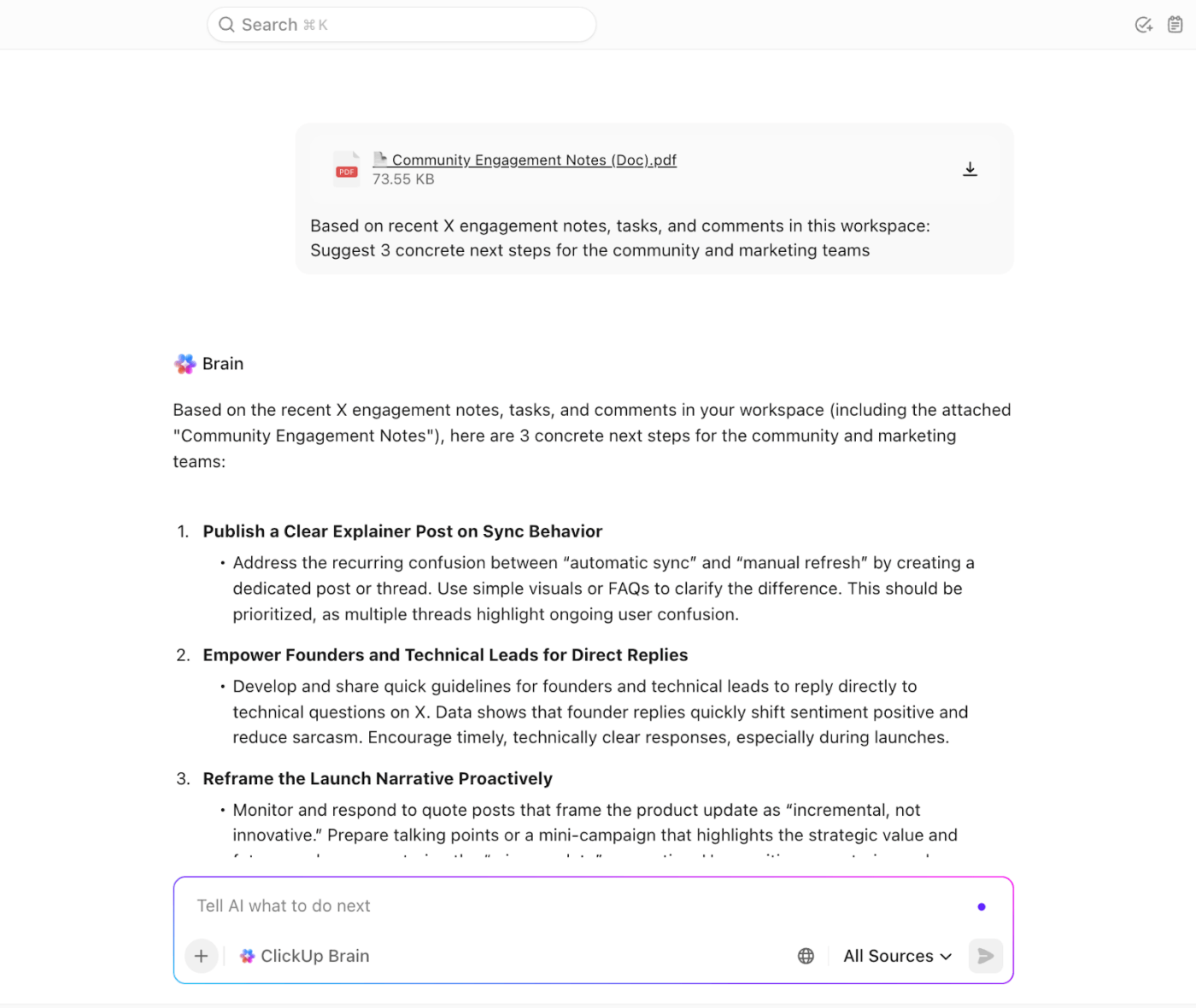
ClickUp’s AI is also available in other tool features like ClickUp Docs. You can generate content scripts, outline processes for content planning and approval workflows, and share them with your team.
When you need comprehensive document management for your social media posts, ClickUp Docs keeps everything organized and accessible!
⭐ Bonus: ClickUp BrainGPT addresses some of the limits you’ll run into with standalone Grok usage. This includes:
ClickUp offers 1,000+ pre-built templates that help you turn insight into action without starting from scratch. These templates act as ready-made systems—giving your team structure, visibility, and ownership from day one.
Use ClickUp’s Community Engagement Action Plan Template to organize your entire community operation in one place. Instead of juggling scattered spreadsheets, random notes, and different platforms, you get a pre-built hub where every conversation, campaign metric, and follow-up task has a clear home.
Here’s why you’ll love this template:
Managing customer engagement means being present where your audience is.
ClickUp’s Social Media Template lets you plan, create, review, and publish social media content across multiple platforms such as X, LinkedIn, Instagram, etc.
You can organize content with custom statuses and views tailored to multi-platform workflows.
Here’s why you will love this template:
⚡ Template Archive: Free Process Workflow Templates for Every Use Case
Community engagement breaks down when insights don’t turn into action quickly enough. ClickUp Automations are built to bridge that gap by converting signals into repeatable workflows—without manual handoffs.
Some automation capabilities that matter for community engagement include:
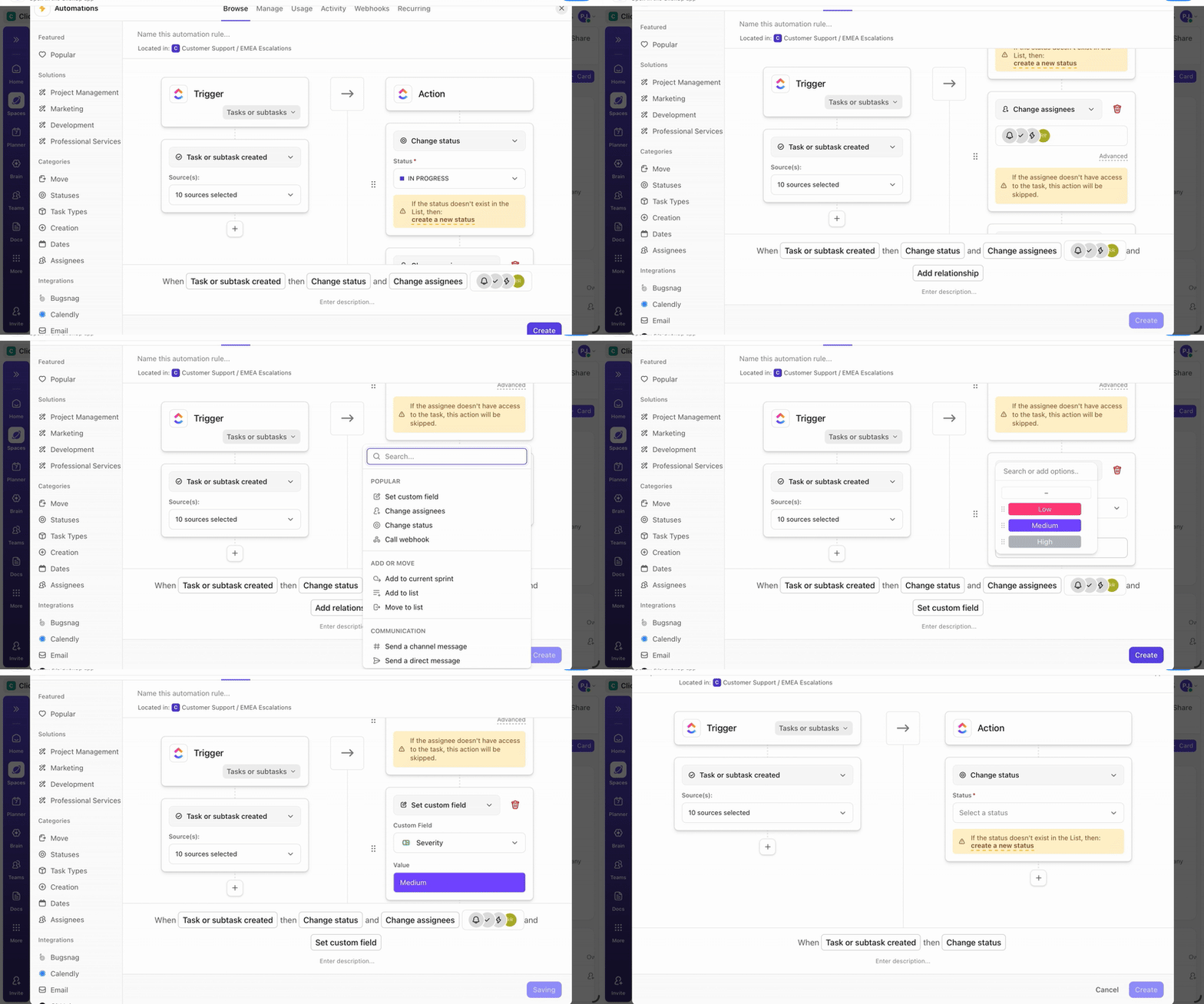
📌 Example: You can automatically create follow-up tasks when a spike in replies or negative sentiment is logged, assign ownership based on topic or priority, update campaign statuses, and notify relevant stakeholders. It keeps community insights, responses, and next steps aligned as conversations evolve across platforms.
Here’s a video showing how you can automate your daily workflows with ClickUp 👇
🚀 ClickUp Advantage: Want Grok-like AI assistance but greater customization and multi-step workflows? You’ll love ClickUp’s AI Super Agents.
Super Agents are deeply integrated into the ClickUp platform, with access to your workspace’s tasks, docs, chats, and connected apps. You can create, configure, customize, and control Super Agents, including their permissions, memory, and which tools/data they can access.
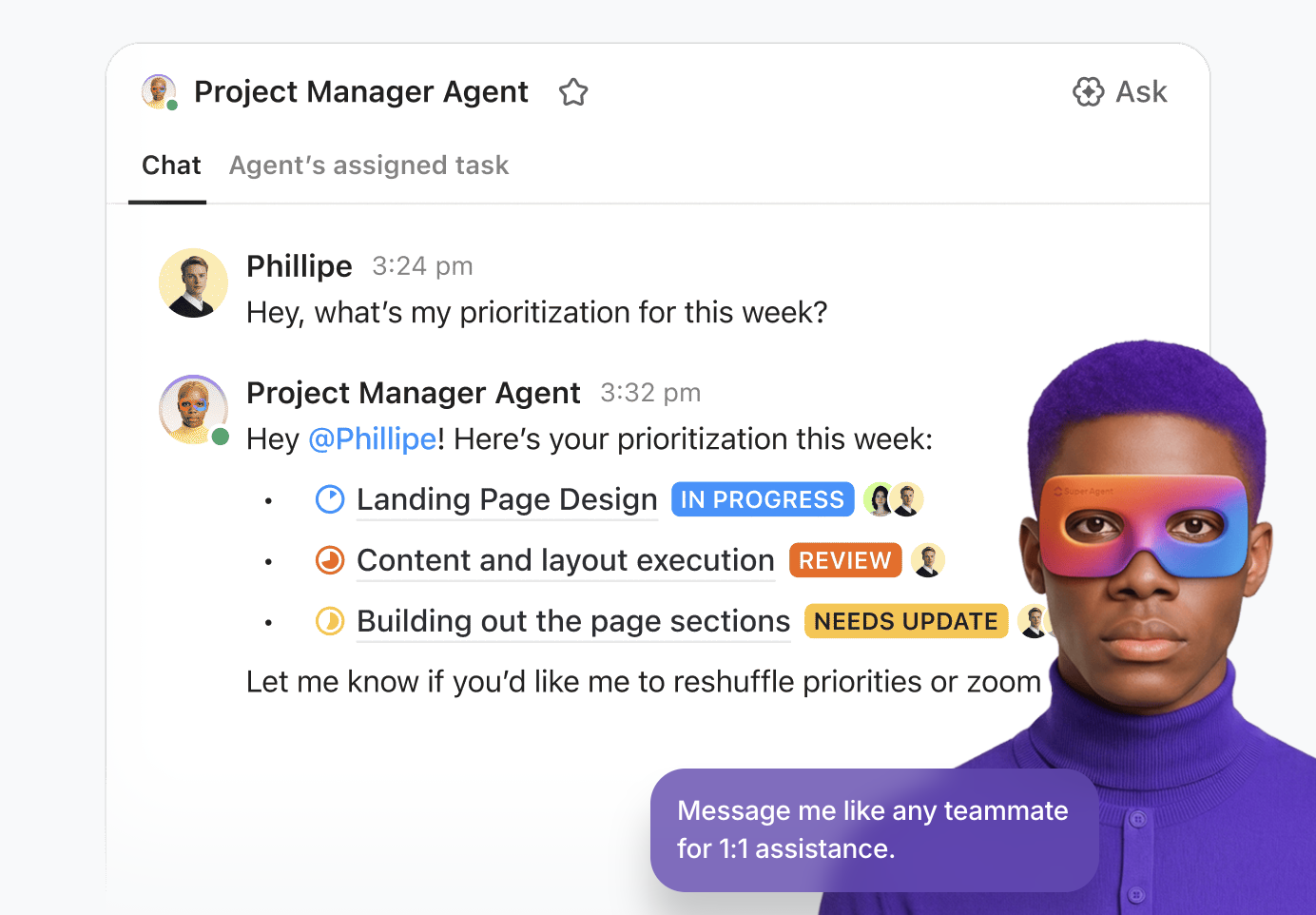
They’re designed for collaborative, intuitive, and flexible interactions within ClickUp, including seeking human approval for critical actions.
✏️ Note: While some tools offer basic trigger-and-action rules in isolated areas, ClickUp Automations operate across your entire workspace. That means community signals can influence planning, execution, and reporting in one continuous system—rather than living in disconnected workflows.
Learn more about Super Agents in this video 👇
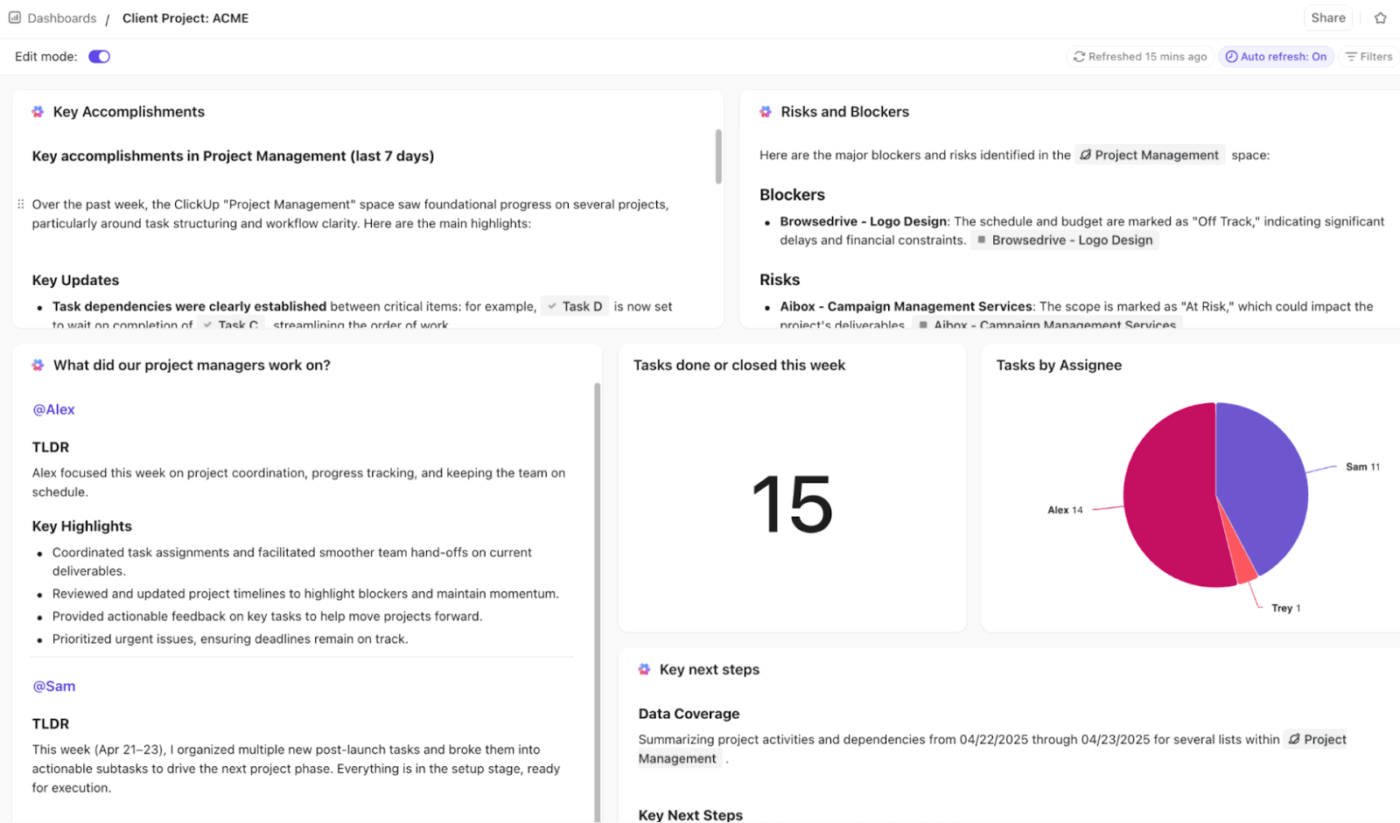
ClickUp Dashboards give you a real-time view of how community engagement work is progressing. Using customizable cards, you can track response status, ownership, workload, and follow-ups across campaigns without jumping between tools.
Plus, AI Cards automatically summarize activity, highlight blockers, and generate stand-up or executive-style updates. You don’t need to manually pull in project reports and stitch up the data; AI cards do the heavy-lifting for you.
📚 Also Read: Top Document Management Software to Try
Grok excels at real-time trend analysis and content ideation within X. ClickUp excels at turning those insights into sustained, multi-channel community operations that scale.
Use Grok to identify what’s trending, understand sentiment, and craft compelling hooks. Use Grok AI to answer questions about emerging conversations and identify trending topics.
Then, ClickUp allows you to schedule follow-ups, assign team responsibilities, track long-term relationships, and measure what’s actually moving your community forward over time.
The combination gives you both the intelligence layer (what to say and when) and the operational layer (how to execute consistently across your entire community ecosystem).
Sign up for ClickUp for free and transform your Grok insights into lasting community growth!
No. Grok does not publish posts, schedule content, assign tasks, or reply to users. If you want to turn insights from Grok into execution, you need a separate work management tool.
When using Grok, focus on signals that explain how and why a conversation is evolving. These include engagement patterns such as replies, reposts, and likes, along with sentiment shifts and recurring topic clusters.
ClickUp helps you turn community insights into structured, repeatable workflows. Start by using ClickUp Brain—contextual AI to find insights and patterns from the data. Then, pre-built templates help you plug-and-play the information to set up content calendars. ClickUp Docs becomes the place to create content and share SOPs with team members.
With automations and Super Agents, set repetitive actions on autopilot. Lastly, use Dashboards to get a real-time view of how community engagement work is progressing
X is built around real-time, public conversations rather than closed or algorithmically curated feeds. Replies and quote posts often merge multiple audiences into a single thread, which can amplify both reach and conflict.
The platform’s character limits encourage concise, often humorous or ironic responses, while context collapse can lead to misunderstandings or polarization. As a result, effective engagement on X requires active participation in conversations, not just scheduled broadcasting.

© 2026 ClickUp

There’s an easier way. Try a free AI Agent in ClickUp that actually does the work for you—set up in minutes, save hours every week.