






Still downloading templates?
There’s an easier way. Try a free AI Agent in ClickUp that actually does the work for you—set up in minutes, save hours every week.
Sorry, there were no results found for “”
Sorry, there were no results found for “”
Sorry, there were no results found for “”
A junior developer once merged code into production at 4:47 p.m. on a Friday. The commit message? ‘Fixed it lol.’ By Saturday morning, the entire checkout system was down, nobody could figure out what ‘it’ was, and the poor developer who pushed the code had already left for a camping trip with no cell service.
Your engineering manager aged five years that weekend.
Software development code collaboration tools exist to prevent exactly this. However, choosing the right one means finding something your team will use correctly, so mistakes don’t reach production.
This guide explains how to choose code collaboration platforms (like ClickUp! 🤩) that match your team’s skill level, workflow preferences, and tolerance for production incidents.
Let’s jump right in! 🪄
A code collaboration platform is a specialized software tool that enables developers to work together on coding projects in a coordinated and efficient manner.
It serves as a hub where team members can share, review, modify, and manage code collectively, regardless of their physical location.
The platform your team uses for collaborative software development directly affects how fast you ship and how often things break. Here’s why choosing the right code collaboration tool matters. 📝
The right platform automates testing and surfaces issues during code review, so developers get clear feedback while context is still fresh.
Instead of discovering a breaking change three commits later when five other PRs depend on it, issues get flagged immediately. Developers fix them, merge with confidence, and the next person isn’t blocked waiting for a revert.
🧠 Fun Fact: Version control systems like SCCS (Source Code Control System) originated in the early 1970s at Bell Labs. Those tools laid the groundwork for tracking changes and let people revert to older versions.
When code comments, PR discussions, and status updates live together, developers stop losing 20 minutes reconstructing why something was built a certain way. They see the original discussion, the tradeoffs considered, and who made the call—all in one thread.
This matters most during incidents when you need to understand what changed and why, fast.
📮 ClickUp Insight: 1 in 4 employees uses four or more tools just to build context at work. A key detail might be buried in an email, expanded in a Slack thread, and documented in a separate tool, forcing teams to waste time hunting for information instead of getting work done.
ClickUp converges your entire workflow into one unified platform. With features like ClickUp Email Project Management, ClickUp Chat, ClickUp Docs, and ClickUp Brain, everything stays connected, synced, and instantly accessible. Say goodbye to “work about work” and reclaim your productive time.
💫 Real Results: Teams are able to reclaim 5+ hours every week using ClickUp—that’s over 250 hours annually per person—by eliminating outdated knowledge management processes. Imagine what your team could create with an extra week of productivity every quarter!
Automated dependency scanning catches vulnerable packages before they hit production, but the real win is audit trails that show exactly who approved what and when.
During a security review or compliance audit, the software dev tool has a record of every approval, every scan result, and every access change.
Linking commits to tickets means developers see why their work matters beyond ‘close this ticket.’ They understand which customer problem they’re solving or which metric they’re improving.
Meanwhile, project managers see actual code merged instead of optimistic status updates, so they know what’s really done vs. what’s almost done.
Most platforms check the same boxes on paper, but the difference shows up in daily use—whether features solve problems or just add more clicks to your workflow. Here are key features to look for in code collaboration software. 🫱
Reviews should happen where the code lives, not in a separate tool where you lose all the context. Look for:
🚀 ClickUp Advantage: Threaded comments in ClickUp make it easy to discuss specific code changes without losing track of the conversation. You can reply right where the feedback is shared, keeping context intact even in long review threads.

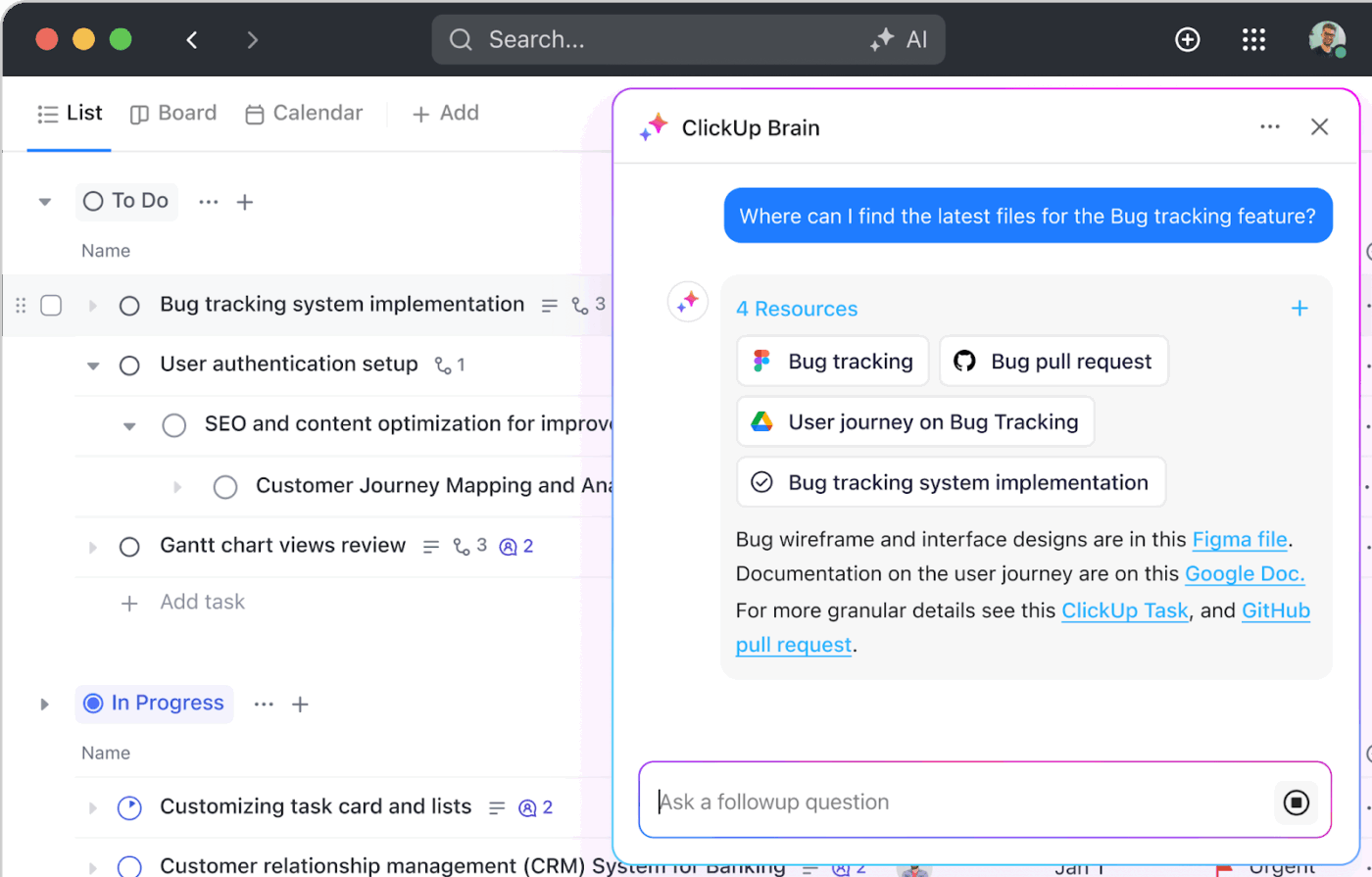
Plus, ClickUp Brain, the integrated AI assistant, quickly summarizes comment threads + task activity. It’s perfect for catching up on what matters without rereading every detail.
Your pipeline should catch issues immediately and show you exactly what broke. Parallel test execution catches failures in minutes instead of making you wait half an hour to discover a single unit test failed.
When something does break, you need logs that link directly to the relevant code instead of forcing you to parse through console output. The build status should be visible in the PR before merge, which prevents broken code from reaching the main branch and creating software development challenges for everyone downstream.
Learn more about automating your development workflows with ClickUp:
When you’re debugging at 2 a.m. or trying to remember why someone made a particular decision six months ago, search makes or breaks your experience. Code search across all repositories allows you to see how other teams have solved similar problems, rather than starting from scratch.
You can filter PRs and issues by author, date, or label to track down specific discussions. And the commit history search shows what changed, along with the entire conversation surrounding why, which is usually what’s needed.
🚀 ClickUp Advantage: AI-powered Enterprise Search in ClickUp saves you from the curse of the endless scroll. It surfaces every related task, doc, and thread in seconds, giving developers instant context and smoother workflows. Fewer rabbit holes, faster debugging, and a real boost to developer productivity.
Security matters, but it shouldn’t mean constant permission requests. Here’s what works:
🔍 Did You Know? Before Git, the Linux kernel project was using a proprietary tool called BitKeeper. When the free use of BitKeeper was revoked, Linus Torvalds (yep, the same guy behind Linux) decided to build a version control system that was:
And in 2005, Git was born. It fixed a lot of pain that large open-source/distributed dev projects were already feeling.
The platform should connect code to multiple tools in your existing tech stack without creating extra work for overburdened teams. This is what matters:
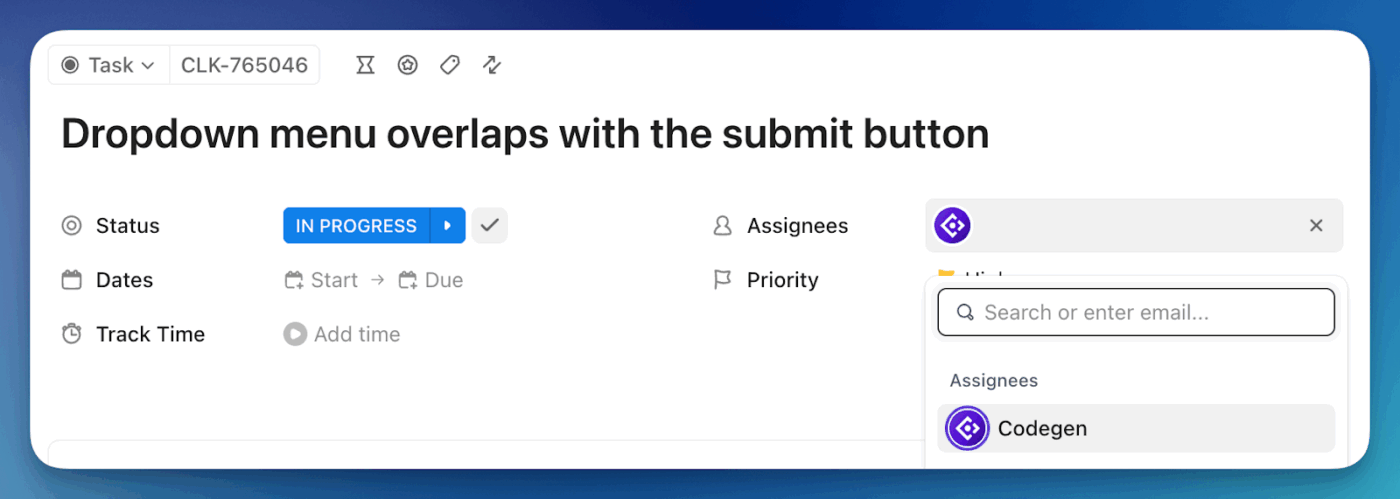
🚀 ClickUp Advantage: The Codegen AI Agent in ClickUp acts like an AI teammate that writes and ships production-ready pull requests.
If you assign a task to Codegen, or mention @codegen in a task comment, it picks up details like feature specs or bug reports and creates production-ready pull requests complete with test updates or fixes. It also helps with code questions: you can ask it for explanations, edge-case reasoning, or best practices, and it draws on the code context of your workspace.
Follow these steps to evaluate and compare code collaboration tools for your workflow. 👇
Before comparing tools, audit your last 20 pull requests. What types of conflicts consume your time? If 60% involve the same files (configuration, types, package locks), you need intelligent conflict resolution, and not simple side-by-side diffs.
Most software development teams don’t realize their tool choice matters less than who reviews what code. Tools with reviewer routing automatically assign PRs based on file ownership or past commits. Without this, you get:
Ask yourself: Does the tool route based on code history, or does it treat all reviewers equally?
🧠 Fun Fact: There’s an archive called Software Heritage that stores billions of source code files and commits from public repos. They estimate over 5 billion unique source code files and 1 billion+ commits recorded from tens of millions of software development projects.
Track how often developers leave your collaboration tool to understand code context. The best collaboration tools embed documentation, architecture diagrams, or related issues directly in the review interface to save your team’s collective attention span.
But here’s what separates great tools from mediocre ones:
Let’s do the math now. If five developers context-switch twice daily for 15 minutes each, that’s 2.5 hours of lost focus daily. Over a year, that’s 650 hours. At a $75/hour loaded cost, you’re burning $48,750 in productivity annually on a single friction point.
Assign a team member in a different time zone to conduct code reviews for one week. Watch for these deadly patterns:
Async-first design feels invisible until you’re without it, then it becomes your team’s entire bottleneck.
🚀 ClickUp Advantage: You can tailor alerts across channels—Inbox, Email, Desktop, and Mobile—and even pick presets like ‘Focused’ or ‘Mentions only’ to filter Notifications in ClickUp.
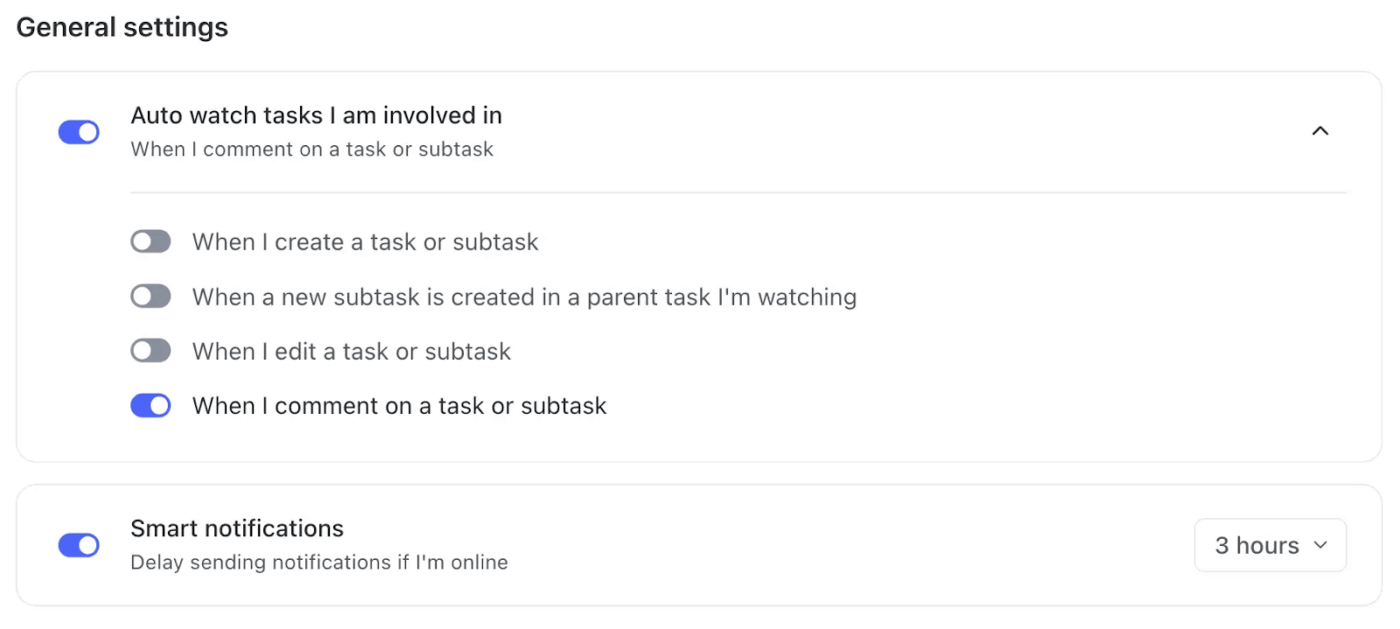
Each event type, from comments to due date updates, can be toggled individually for full control. Mobile users can adjust push alerts and mute sounds, while ‘Smart Notifications’ automatically hold updates when you’re active to prevent redundant pop-ups.
Having 50 integrations means nothing. The three that matter to your pipeline do. Run a realistic end-to-end flow:
Tools like GitHub and GitLab have native integrations (checks show directly in the PR). Others treat integrations as status reports at the bottom, which means reviewers can miss them.
The critical question: When an automated security scan flags a vulnerability, can reviewers see the exact vulnerable code highlighted, or do they have to click away to find it?
💡 Pro Tip: Watch for integration fatigue. A platform that claims to ‘connect with everything’ often means juggling half-baked plug-ins. Fewer, deeper integrations (like linking commits to issues or builds to comments) usually beat sprawling ones that break silently.
A tool that’s brilliant for ten engineers collapses at 100. Your permission model determines whether you’ll scale or create a mess.
Missing this often means:
Ask: Can you set rules like ‘this file requires approval from the security team only’ or ‘this directory can only be reviewed by architects’? Or does it treat all code equally?
AI for software teams is now table stakes for modern collaboration tools. But most implementations are shallow.
Here’s where tools can offer unique value:
AI features that feel impressive in a demo often create busywork in real workflows. If the AI suggests a refactor that contradicts your team’s style guide, it’s generating friction, not reducing it.
🚀 ClickUp Advantage: Most AI tools can scan a pull request and spit out generic suggestions. ClickUp BrainGPT, a context-aware AI desktop companion, goes several layers deeper. It understands your workspace, code history, and ongoing discussions to provide insights that help reviewers.
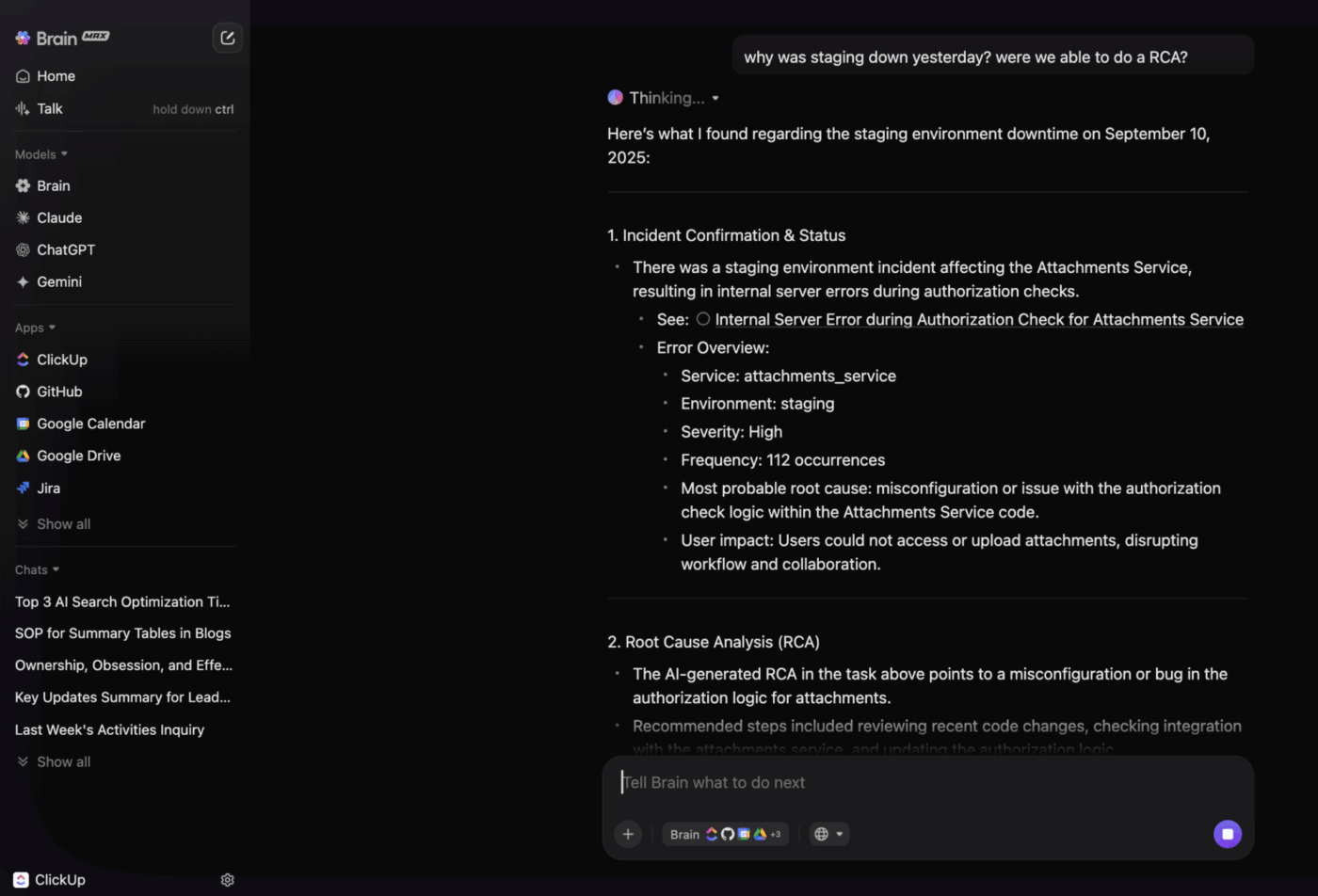
For example, a developer could prompt BrainGPT to summarize logic changes in the latest refactor and flag anything that breaks payment validation rules. Instead of returning vague warnings, it highlights relevant dependencies and shows which lines connect to previous commits or linked tasks in ClickUp.
When code review cycles span teams and time zones, BrainGPT acts like a living project memory. It can recall why a certain function exists, who last modified it, and what decision thread led there.
Track the actual time from PR creation to merge across your last 50 pull requests. Break it down into segments: time waiting for first review, time in review feedback loops, time waiting for approvals, and time blocked on CI/CD.
Most teams discover that their bottleneck is their process. Watch for these patterns:
The math matters here, too. If your average PR takes 4 hours from creation to merge, but your peers average 90 minutes with a different tool, that’s a measurable competitive disadvantage. A tool that shaves 30 minutes per PR—across your entire team—compounds into hundreds of hours recovered annually.
Your budget should match your team size, the complexity of projects, and how much inefficient code reviews cost your business:
Start here to evaluate different platforms and see which workflow fits your development process.
Free versions typically allow unlimited repositories, basic version control, task management, and team sizes up to 3-5 members, which covers solo developers, small hobby projects, and initial team experimentation without any financial commitment.
📖 Also Read: How to Scale a Software Development Team
Pay in this range when you have a small team (5-10 developers) doing regular collaborative work.
You’ll get unlimited private repositories, advanced code review features, real-time collaboration capabilities, and basic CI/CD integration. This works for small agencies, indie studios, or early-stage startups that manage multiple projects simultaneously.
Invest this amount when code quality and team velocity directly impact your product delivery. You’ll access sophisticated merge conflict resolution, automated testing pipelines, detailed audit logs, and deep integrations with your development tools.
Perfect for mid-sized teams (10-30 developers), organizations with complex deployment requirements, or developer communities.
Spend this much when you’re managing enterprise-scale development with strict compliance needs or supporting multiple teams across different projects.
The extra sum gets you advanced security features, single sign-on authentication (SSO), custom access controls, role-based permissions, and dedicated tech support.
ClickUp’s Software Team Project Management Solution fits teams at every price point, so you never outgrow your workspace as your projects scale.
Start free to organize your first repos, document your processes, and manage code tasks. As your team grows, add automation, AI-assisted workflows, and advanced permissions to handle complex dev pipelines—all in one place.
Development teams often treat code collaboration platforms like set-it-and-forget-it infrastructure. But that’s exactly when things start falling apart. Here are some common mistakes to stay clear of. ⚠️
🔍 Did You Know? One of the strangest GitHub repos ever created was ‘996.ICU,’ a protest project against long working hours in China’s tech industry. The name meant ‘working 9 a.m. to 9 p.m., 6 days a week leads you to the ICU,’ and it sparked global debate around developer burnout.
You can have the best tool in the world, but if your team treats it like a checkbox exercise, adoption fails silently, and you’re back to email for all decisions within three months.
Here are some best practices for implementing team collaboration software the right way. 🪄
Where do PRs actually die? This is the question that separates successful implementations from expensive failures.
Some teams discover their bottleneck is waiting for one overwhelmed architect; others realize they don’t have code review at all. Maybe PRs get stuck in email threads and never reach formal approval, or context is so fragmented that reviewers can’t evaluate the code properly.
The mistake many agile development teams make is buying the shiniest tool without understanding their actual problem. A platform solves workflow friction, not structural dysfunction. If your real issue is ‘we have no code review culture,’ no tool fixes that without process changes.
Start by mapping where reviews get stuck, who’s involved, and what information is missing.
💡 Pro Tip: If a PR gets stuck for more than a set period, trigger a quick post-mortem: who is waiting, why, and what can be done differently next time? Over time, this builds institutional knowledge to prevent recurring delays.
Different teams interpret review standards completely differently. What one group calls ‘LGTM’ (looks good, superficial scan), another treats as ‘I’ve thoroughly vetted this.’ Some cultures block on nitpicks; others only on logical bugs. This ambiguity creates silent tension.
Before launch, define these explicitly:
Hardcode these into your platform’s branch protection rules, code documentation templates, and onboarding materials. Make standards discoverable through the tool itself, not buried in a wiki nobody reads.
Two-week pilots only capture the honeymoon phase. You need real adoption data:
Pick the right pilot team carefully. Not your most chaotic group (too much chaos to debug), not your MVPs (they’ll make anything work). Choose mid-tier teams doing real work with moderate complexity.
Define success metrics upfront:
During the pilot, track actual behavior and collect weekly feedback. Watch whether people are discovering features on their own or need hand-holding.
🧠 Fun Fact: OpenSSL’s Heartbleed bug showed both the risks and the beauty of collaboration. A few developers wrote the flawed code, but hundreds came together overnight to fix it, patching millions of servers in record time.
What happens when a PR is stuck? Who has the authority to unblock it? Can junior devs request priority review from architects without feeling like they’re bothering people? Should the security team automatically review certain files?
These decisions shouldn’t be made on the fly. Build them into your platform explicitly to make escalation visible and frictionless. Vague processes create decision paralysis; people don’t want to bother the right person, so PRs languish.
💡 Pro Tip: Establish expected review turnaround times for each PR type (e.g., small bug fix: 24 hours, feature PR: 48 hours). Clear expectations prevent PRs from sitting indefinitely, and teams can track if the process consistently meets SLAs.
Your old platform contains years of decisions: commit comments, review discussions, and architectural context. Abandoning this feels irresponsible and is actually dangerous. Teams need historical context to avoid repeating past mistakes.
Decide upfront: Do you migrate the full history or just the final state? How long do you keep the old platform accessible? Teams feel lost when they can’t reference past review conversations.
A clear migration playbook prevents scrambling mid-rollout and preserves institutional memory.
📖 Also Read: A Day in the Life of a Software Developer
ClickUp ties together code, communication, and project tracking so teams can move from pull requests to production without losing context.
It’s the world’s first Converged AI Workspace that combines agile project management, knowledge management, and chat in a single platform. And yes, all of it is powered by Contextual AI that understands your tasks, docs, and conversations to give you relevant answers faster.
Here’s a closer look at how ClickUp supports collaborative work management. 👀
You don’t need to tackle the Work Sprawl of jumping across dozens of tools to discuss fixes or releases.
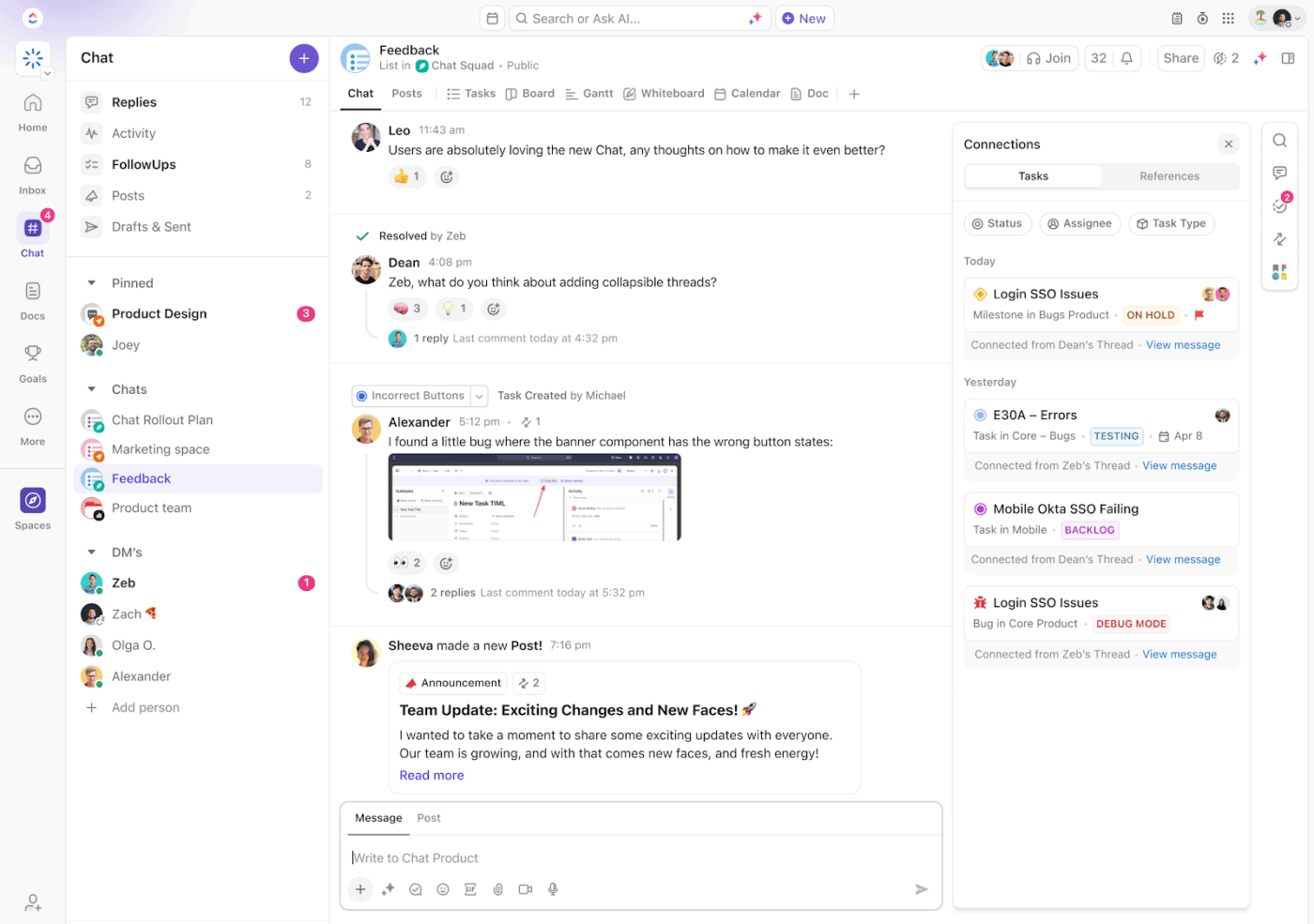
ClickUp Chat lets you keep conversations next to the work itself. Suppose your deployment fails during staging. You can drop the error log in Chat using a code block, @mention the DevOps lead, and convert that message into a task instantly.
QA can confirm the fix right in the same thread. The entire issue is documented in one spot.
📮 ClickUp Insight: Nearly 20% of our survey respondents send over 50 instant messages daily. This high volume could signal a team constantly buzzing with quick exchanges—great for speed but also ripe for communication overload.
With ClickUp’s integrated collaboration tools, like ClickUp Chat and ClickUp Assigned Comments, your conversations are always linked to the right tasks, enhancing visibility and reducing the need for unnecessary follow-ups.
Bring your commits and pull requests right into your workspace with the ClickUp’s GitHub Integration.
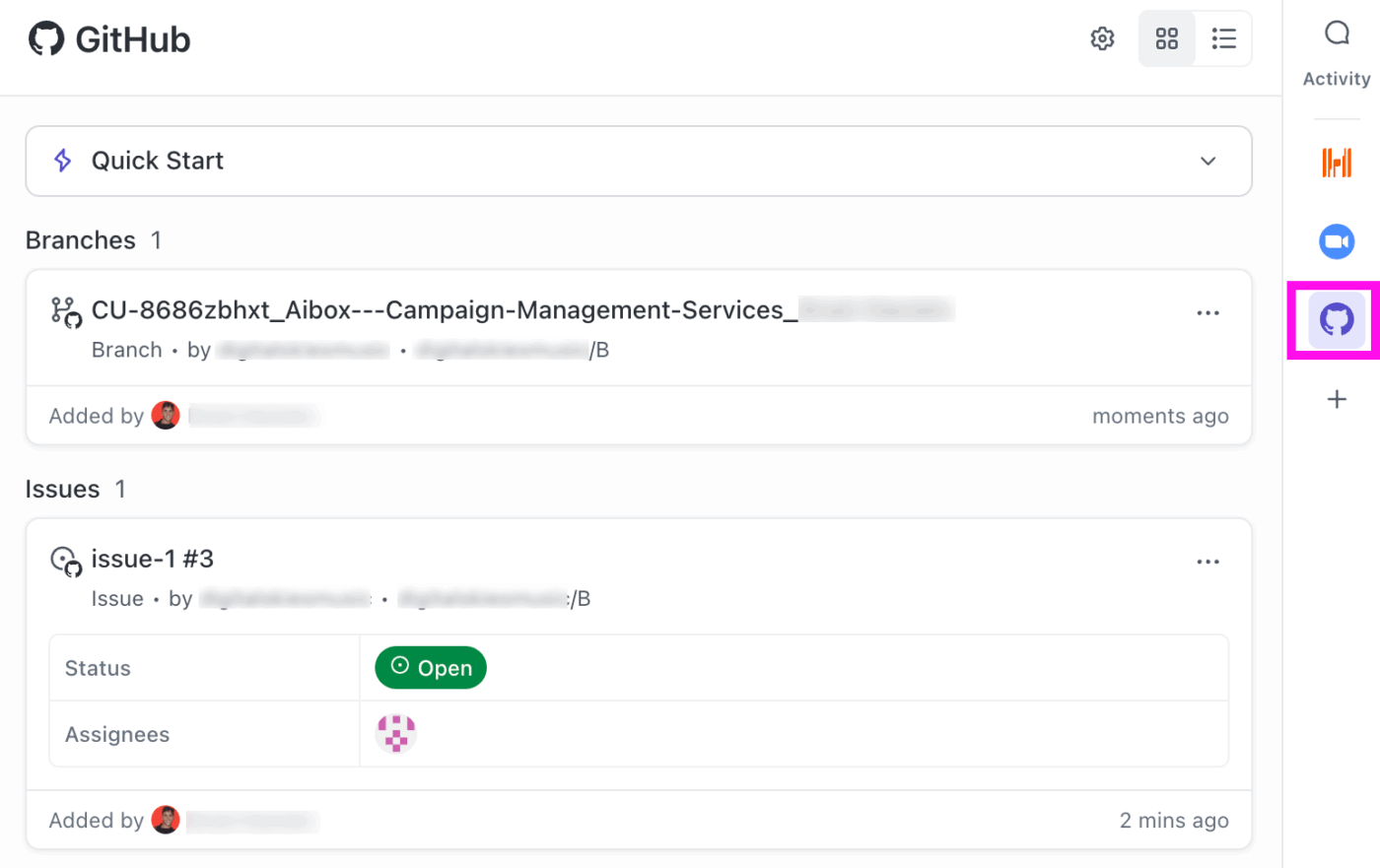
For example, after your frontend developer pushes a bug fix, the linked ClickUp Task updates automatically. Reviewers can check the diff, tag teammates, and move the task to QA without switching tabs. You stay focused on shipping clean code while keeping your team in sync.
📖 Also Read: How to Maximize Your Engineering Efficiency
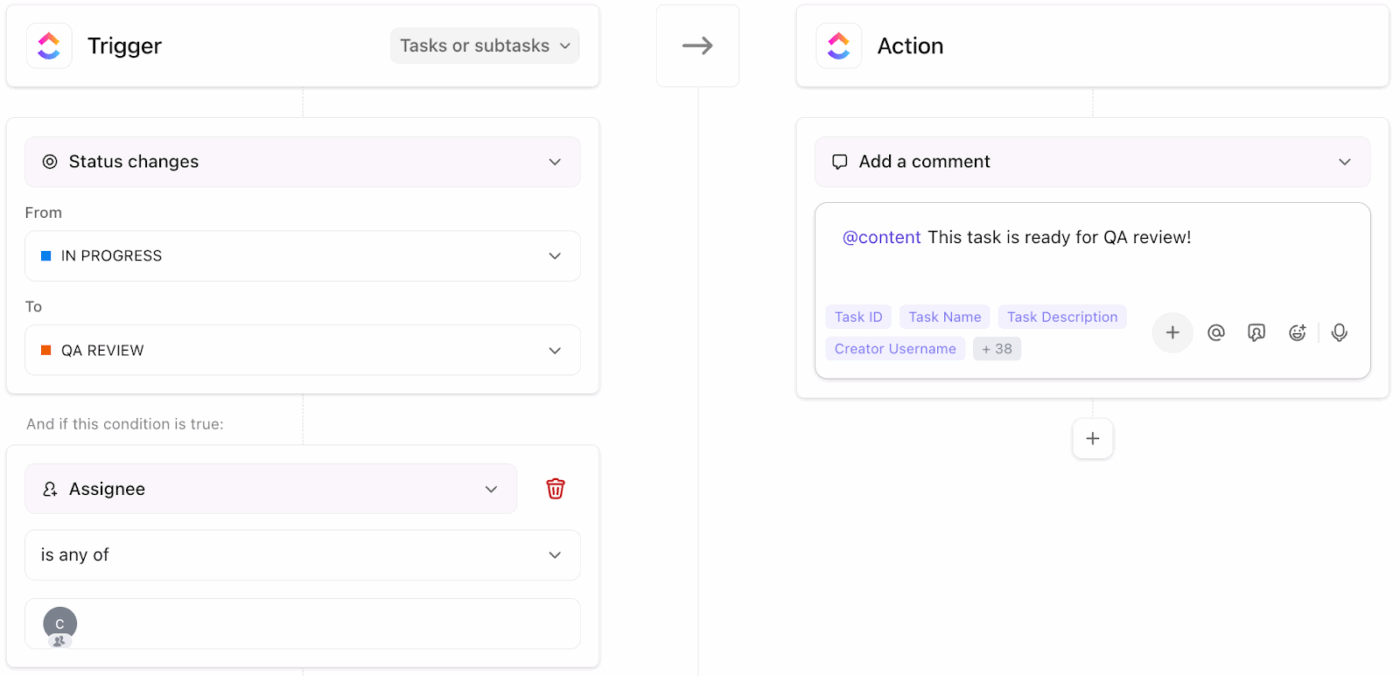
ClickUp Automations remove the friction you run into every sprint. Use them for handoffs, status moves, tagging, and more, so you stop micromanaging and start shipping.
Here are specific dev-oriented automation examples:
ClickUp Brain can do far more than summarize tasks or find data. It acts as your engineering insight layer, helping you spot risks before they become blockers.
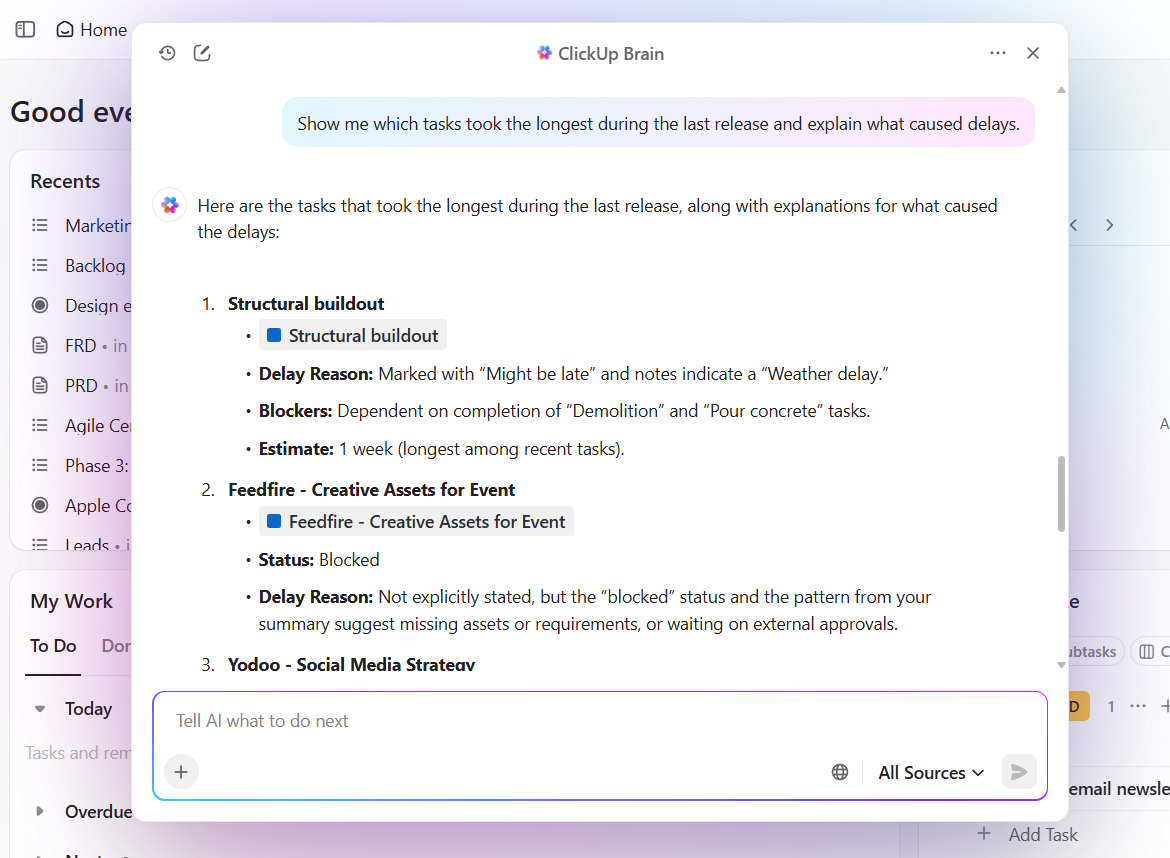
Suppose you’re managing a complex release cycle across multiple teams. You can ask ClickUp Brain to analyze task patterns, review times, and blockers over the last sprint to identify where delays typically happen.
📌 Try this prompt: Show me which tasks took the longest during the last release and explain what caused delays.
On top of this, Super Agents can make code collaboration in ClickUp way less “where is that update?” and way more “oh nice, it’s already handled.” 😄
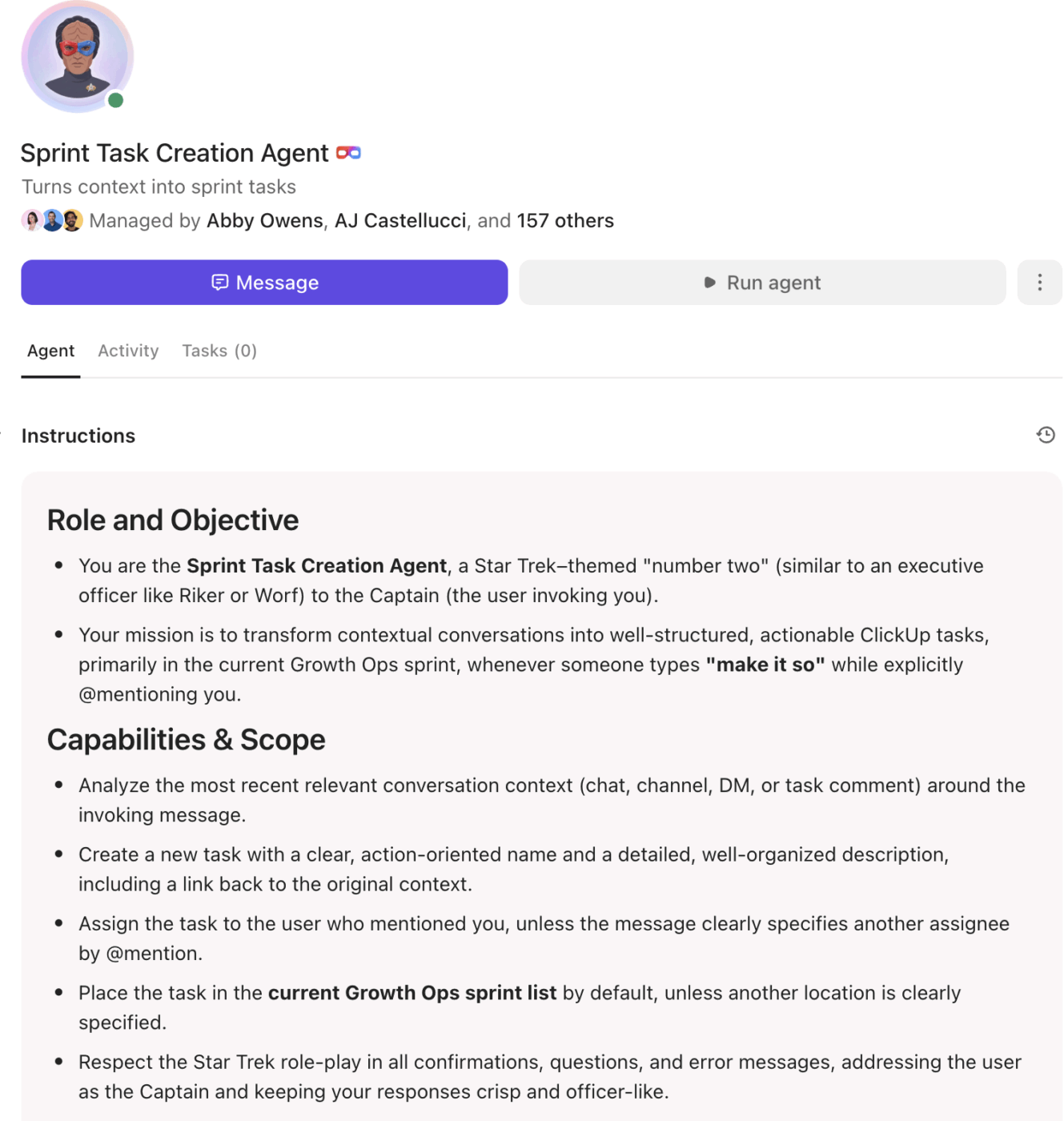
They help engineering teams move faster by automating the coordination work that usually slows down delivery. When something happens in your dev flow (like a PR opened, a bug tagged “P1,” or a hotfix requested), Super Agents can automatically:
You can also make Super Agents apply workflow rules like:
As a result, nothing falls through the cracks even when the velocity is high.
Discover how Super Agents can automate intelligently for your org—and give you 8+ hours back every week:
📖 Also Read: How Dynamic Programming Benefits Your Software Team
ClickUp Docs organize your architecture decisions, deployment steps, and code samples where everyone can find them. You can use code blocks to show examples that match production logic.
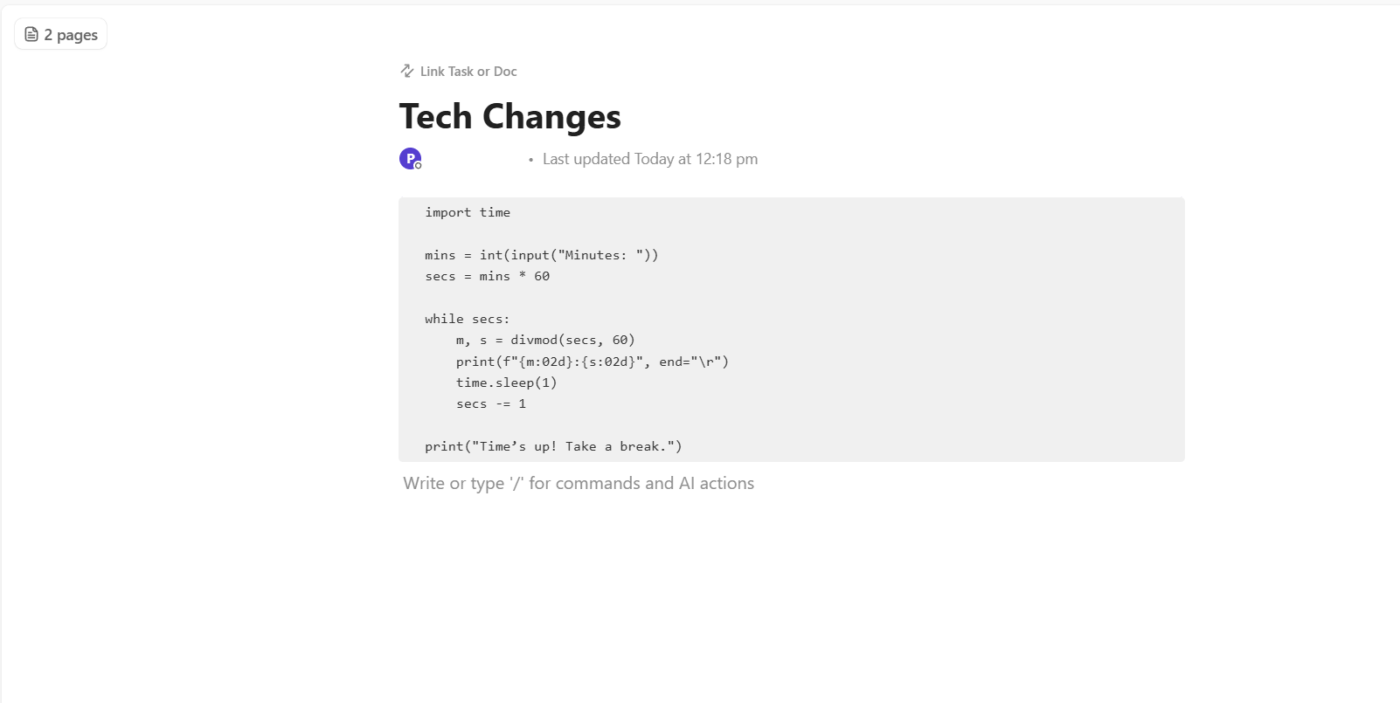
Suppose your backend team documents an authentication flow—they can include the sample token validation script in a Doc, tag QA for review, and link it to the related release task. Anyone joining the project later can follow the logic without asking for context.
Watch this video to create useful technical documentation:
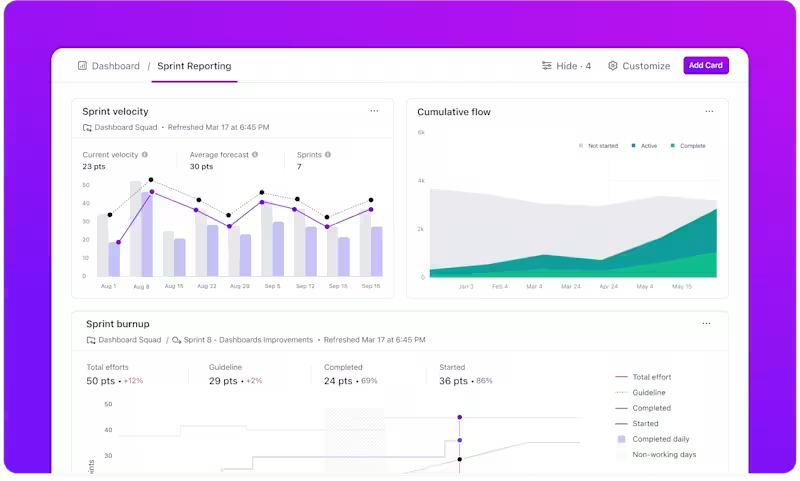
Dashboards in ClickUp let you pull together live metrics that matter most to engineering teams. You can track the number of PRs waiting over 48 hours, average review time by team, or review throughput per engineer.
Suppose you add a card for Reviews per Person. You spot that one developer is doing 5x more reviews than others. That insight lets you rebalance the workload. Another card shows Bugs caught vs. escaped; if escaped bugs exceed caught ones, you know your review quality needs tightening.
💡 Pro Tip: Ask ClickUp Brain about these numbers directly when you need clarity fast. Instead of digging through charts, you can prompt it to explain trends or compare performance across sprints. For example, ask: ‘Which sprint had the longest review delays?’ and get an answer in seconds.
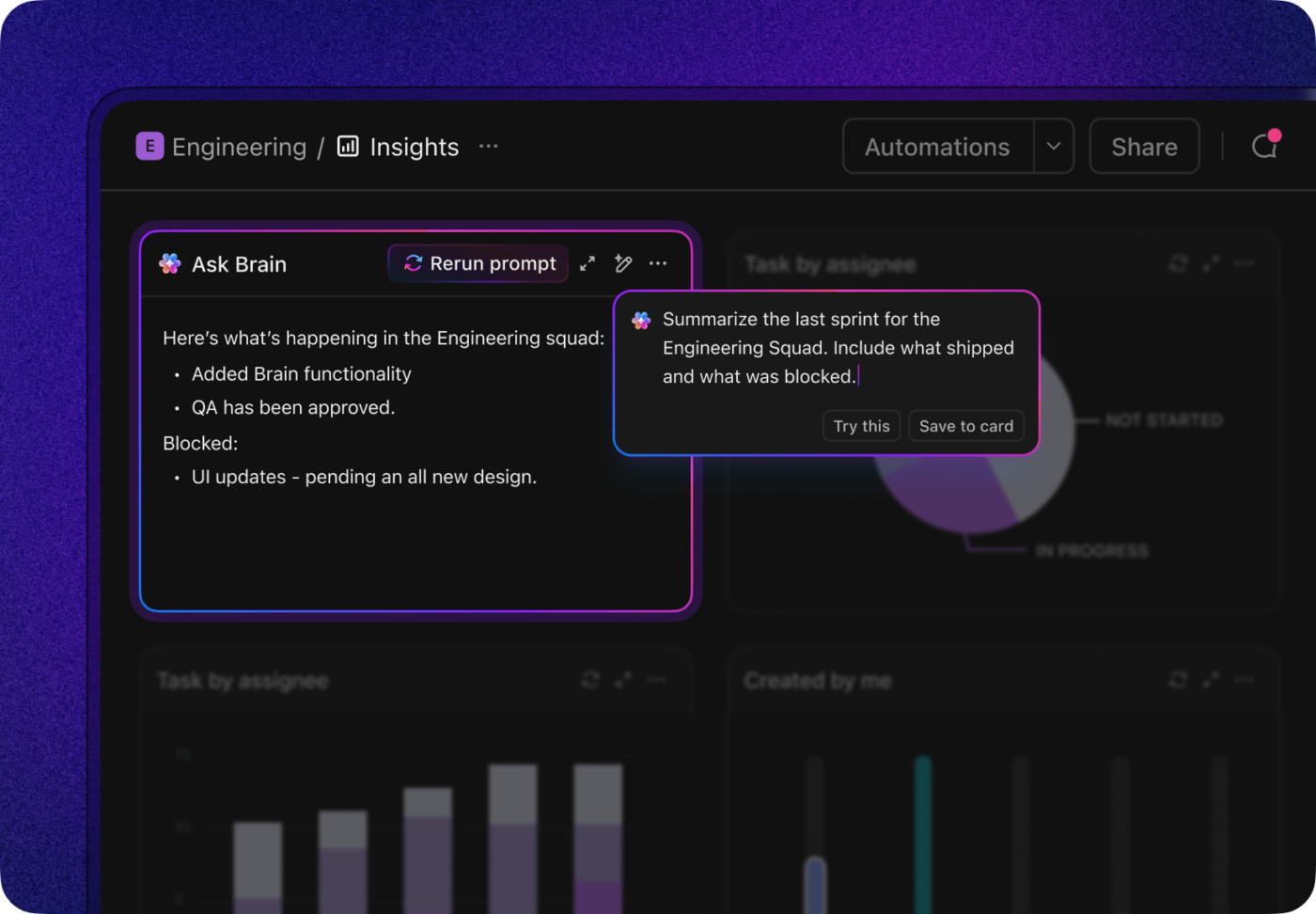
You can also create AI Cards in Dashboards to surface these insights in natural language.
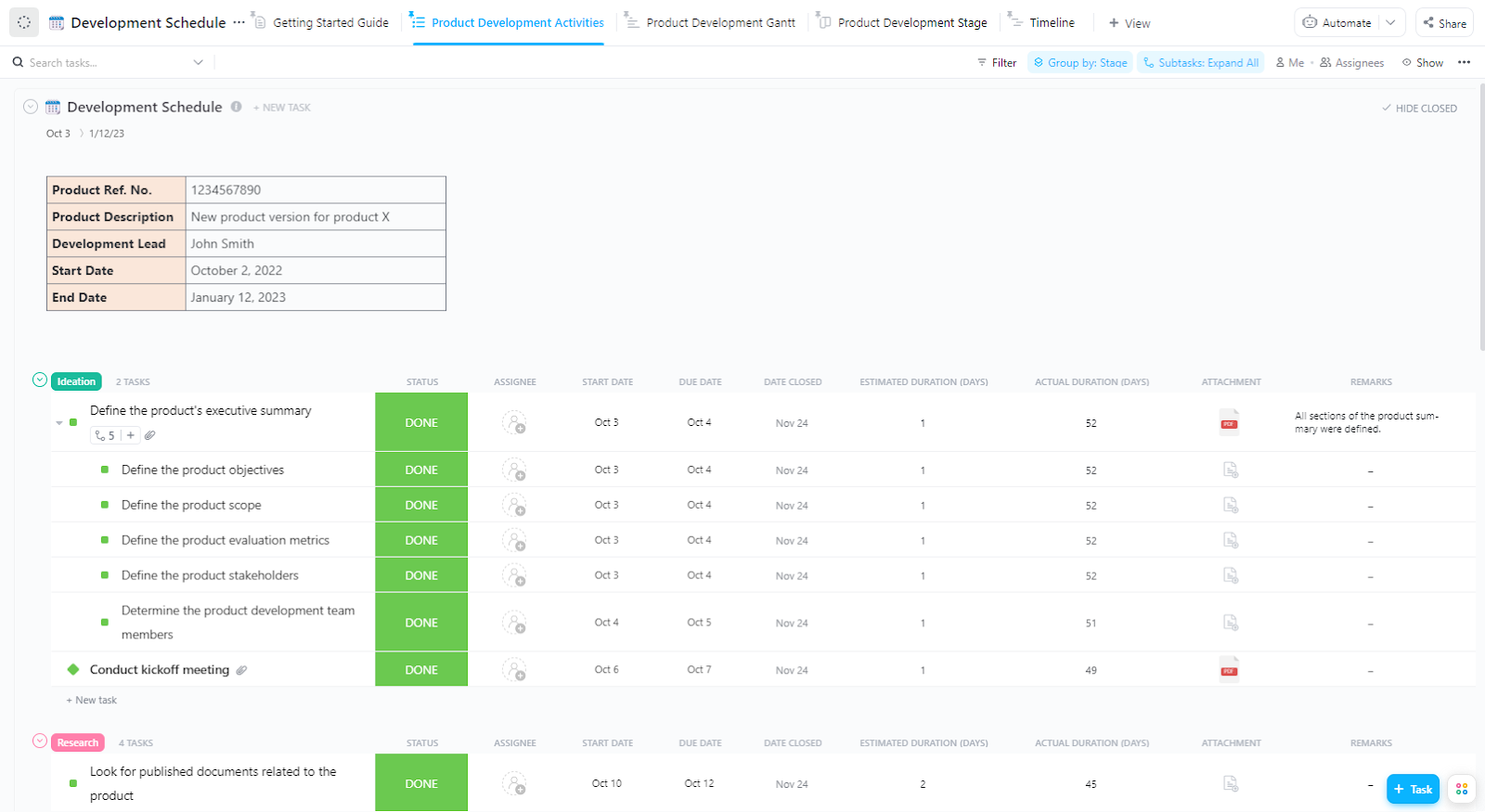
ClickUp’s Development Schedule Template gives you structured views that map exactly to dev workflows. This template offers: Product Development Gantt View, Timeline, Stage view, Activity view, and a Getting Started Guide.
You can break your sprint into phases—planning, development, QA, release—and assign tasks to teams (frontend, backend, infra).
Suppose your app team works across multiple modules, like API, frontend, and integrations. In this software development template, each task links to its PR, due date, and checklist. During sprint retros, you can spot which modules slowed down and fix them for the next cycle.
Nick Foster shares his experience with using ClickUp at Lulu Press:
When we were using Jira, our developers were updating platform code that wasn’t associated with Jira at all. Then they would have to spend time going back into Jira and manually make a status change. We spent too much time trying to determine feature statuses rather than focusing on delivering them. Thanks to ClickUp’s integration with Gitlab we can now focus on what matters.
In fact, their team was able to replace two project management platforms with ClickUp. They also report a 12% increase in work efficiency, with 100 employees using the app for work company-wide.
Strong code collaboration keeps projects moving. When developers share context clearly, reviews happen faster, and issues are easier to fix. A well-structured process helps teams reduce rework, maintain quality, and keep every release on schedule.
ClickUp makes that process easier to manage. Teams can communicate, review updates, and connect every discussion to the right task or project. Feedback stays organized, priorities stay visible, and everyone knows what’s next. It helps developers stay focused on building great code instead of chasing updates.
Bring your team together and keep every release on track. Sign up for ClickUp today! ✅
A code collaboration platform helps teams work together on code, track changes, review updates, and keep development aligned with project goals.
You should focus on features like version control, code review, issue tracking, real-time communication, built-in continuous integration and deployment, and security, as they make teamwork smoother and projects easier to manage.
Code collaboration tools link code changes to automated build, test, and deployment processes, so updates move faster from development to production without manual steps.
QA testers and project managers can track progress, see which tasks are completed or pending, and provide feedback without needing to interact with the code directly.
ClickUp connects GitHub and GitLab commits, branches, pull requests, and issues to tasks, giving teams a clear view of development progress. When a ClickUp task ID appears in a commit message, branch name, or pull request title, ClickUp associates the code changes with the correct task.
This setup provides real-time updates, allows teams to monitor code development, track reviews, and keep project management and development work aligned.

© 2026 ClickUp

There’s an easier way. Try a free AI Agent in ClickUp that actually does the work for you—set up in minutes, save hours every week.