






Still downloading templates?
There’s an easier way. Try a free AI Agent in ClickUp that actually does the work for you—set up in minutes, save hours every week.
Sorry, there were no results found for “”
Sorry, there were no results found for “”
Sorry, there were no results found for “”
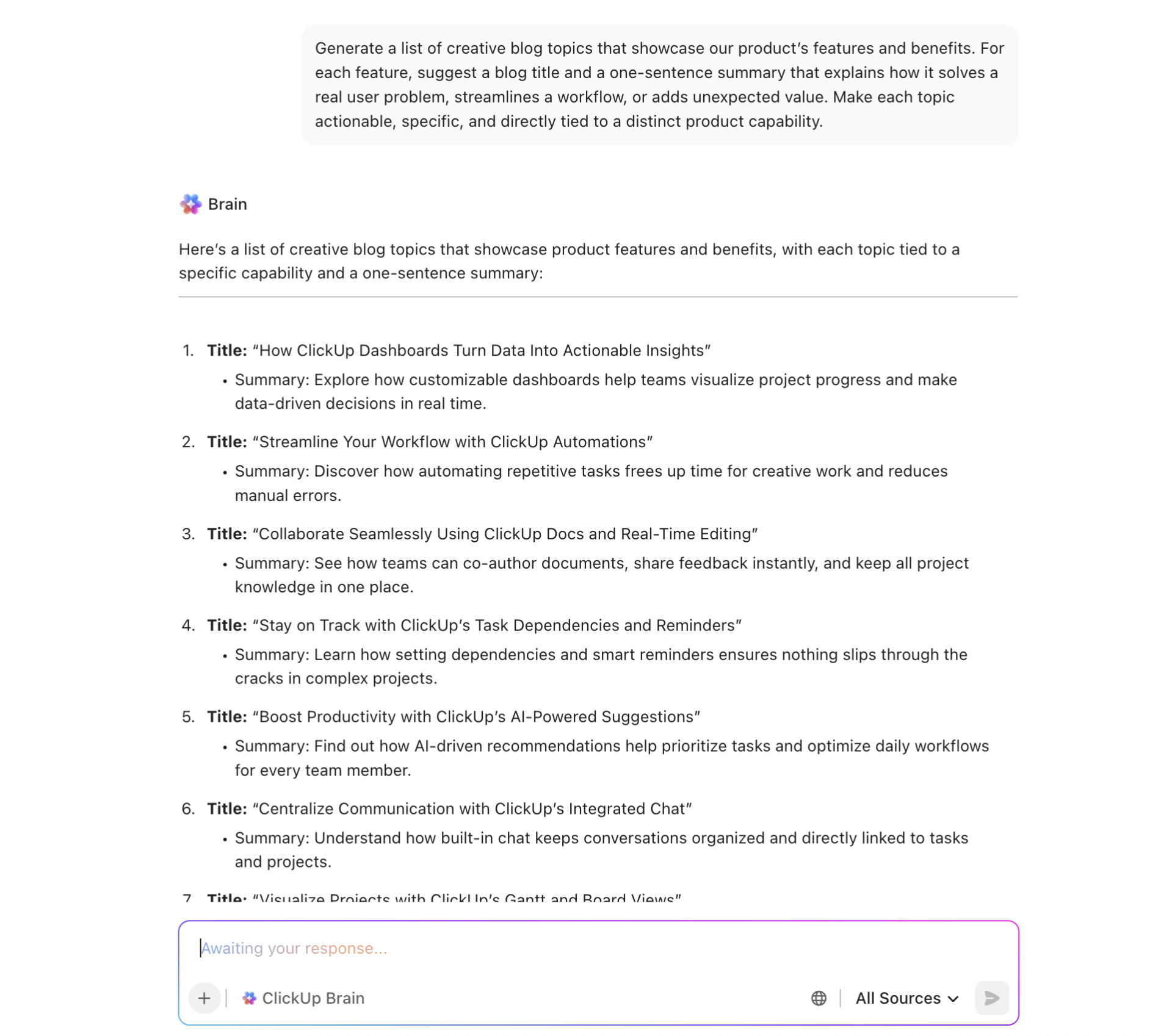
If you want blog content that brings in the right readers, you need topics tied to real problems and real search intent, not only thought leadership.
That’s why feature-based blog topics work. Every feature can map to a pain point, a workflow, and an outcome. The key is choosing the right features and framing them in customer language instead of product language.
In this article, we’ll show you how to generate blog topics from product features, which features to prioritize, and the best formats to turn them into posts that rank and convert.
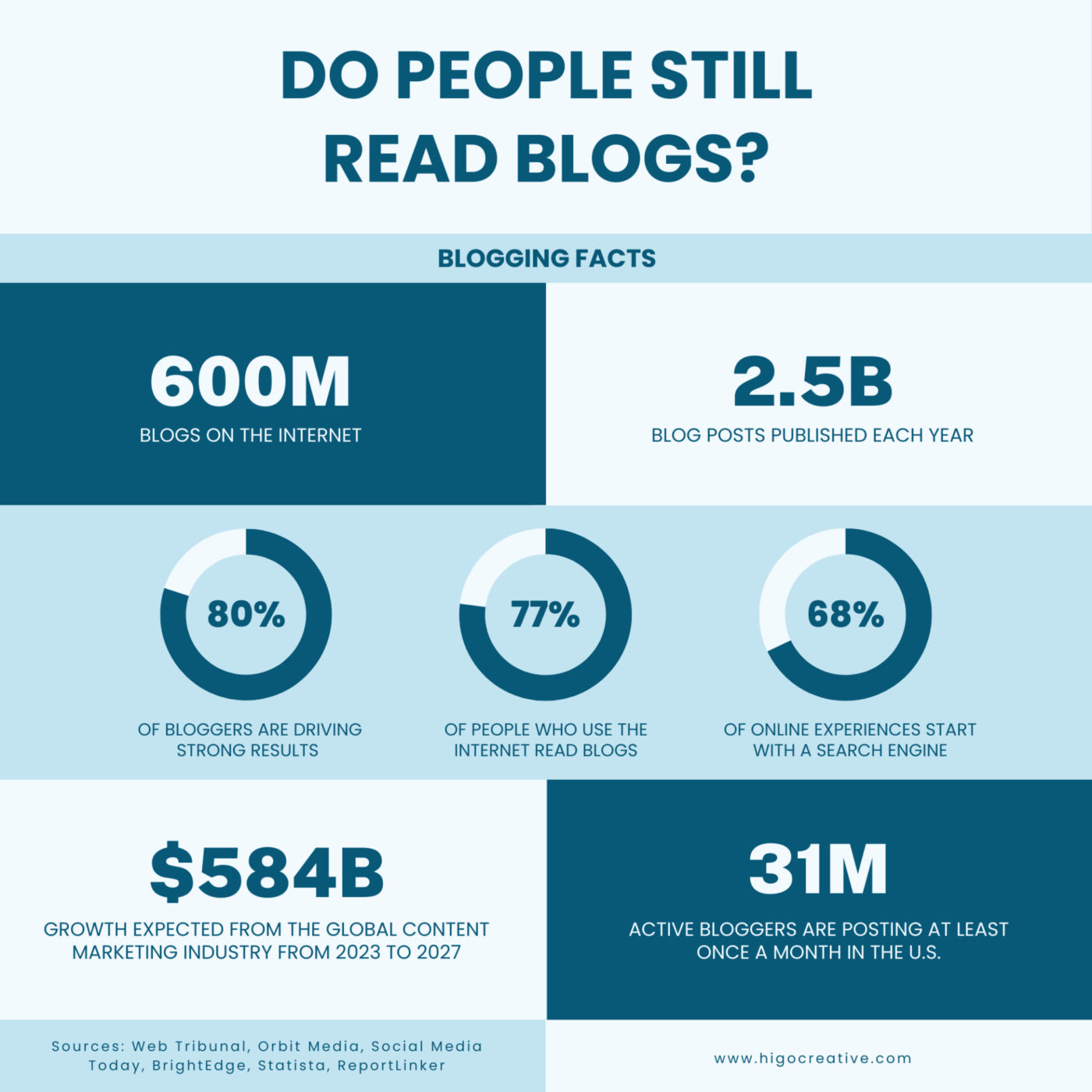
Blogs are a proven growth channel.
In B2B marketing, 84% of companies say content marketing has helped them boost brand awareness. Product management blogs are one of the most cost-effective and versatile formats for making that happen.
But instead of writing generic thought leadership pieces, tying your blog content directly to product features gives your marketing a stronger edge. Show your target audience how your tool solves a real problem in the exact language they search for.
Visual blogs help readers imagine your product in action. Emotion-led narratives help them connect with your brand. Together, they make your product feel relevant, relatable, and ready to solve their problem.
Here are some tips on building a persuasive case for your product:
📖 Also Read: Best Blogging Tools and Software to Use
Not every product feature deserves a spotlight.
A free blog idea generator or a blog title generator helps identify the features that can anchor a strong blog post and speak directly to what your audience cares about. The key is knowing which features have real storytelling potential, and not just technical depth.
If you’re unsure which product features to turn into blog content, your support inbox has the answers, literally. FAQs, ticket logs, and chatbot conversations are full of questions that your target audience is already asking.
✅ FAQs and support tickets are real, recurring problems that need clear explanations, walkthroughs, or use-case examples.
Instead of letting those queries live and die in your helpdesk system, turn them into blog content that works harder across search, email, and social.
A single FAQ can spark multiple blog topic ideas: a feature deep dive, a troubleshooting guide, a “did you know” list, or even a myth-busting post about what your product can’t do and why.
📌 Example: Say your support team notices users repeatedly asking how to set up a specific feature — something powerful but not always intuitive for beginners. Instead of adding another line to the FAQ page, you publish a step-by-step blog post with screenshots, real-world use cases, and template links. That single post can rank for dozens of long-tail queries and continue driving organic traffic from users actively trying to solve that exact problem.
👀 Fun Fact: In 2002, Julie Powell started a blog to cook all 524 recipes in Julia Child’s cookbook in 365 days. Her journey became the bestselling memoir Julie & Julia. And later, a film starring Meryl Streep.
Sales calls are where product interest meets hesitation. Every objection, question, or “but can it…” moment is a clue to what your target audience truly needs to hear and a source of rich, ready-to-go blog post ideas.
If your sales reps are constantly fielding the same concerns (slow onboarding, missing integrations, complex pricing, or lack of visibility), it’s time to turn those pain points into content.
If you’re already collecting call recordings, ClickUp AI Notetaker can capture smart summaries and turn action items into assigned tasks after the meeting.
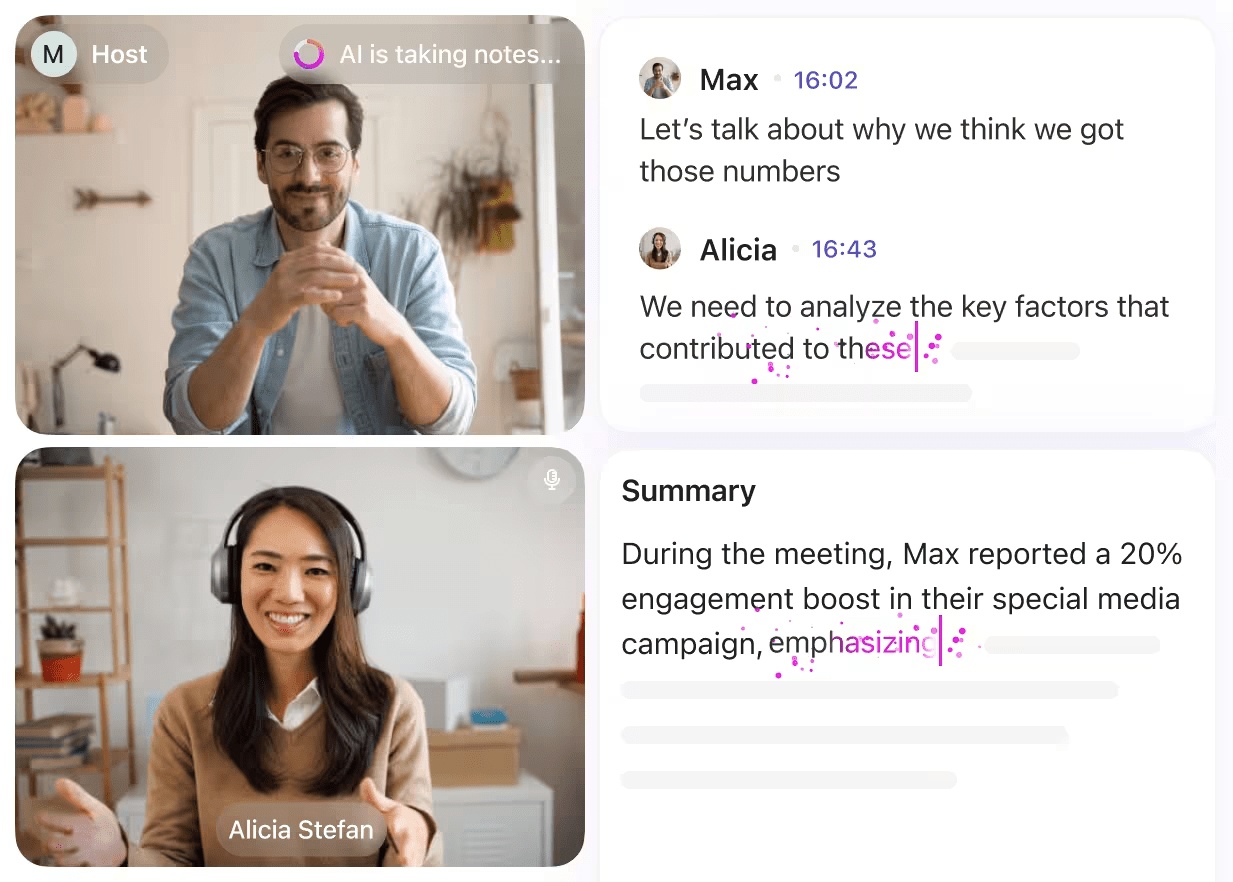
This makes it easier to turn “sales call transcripts” into clean inputs for blog content planning (without someone manually rewriting notes).
Maybe operations teams want to know how your tool handles scaling. Another post. You can also use ClickUp Brain to generate more blog ideas and outlines directly from your workspace context.
Once you’ve identified patterns, you can even use ClickUp Brain to quickly turn those repeated questions into angles for blog topics and multiple blog post title options.
Here’s a detailed overview of how you can review sales conversations to generate different blog posts:
✅ Turn top objections into comparison posts, FAQs, or workflow breakdowns
✅ Use repeated feature requests to generate blog topics based on product features that matter most
✅ Create “customer story” posts using real quotes (with permission) to build trust and relatability
✅ Repurpose common sales questions into SEO-friendly creative ideas that match what buyers search for
📖 Also Read: Best AI Blog Writers to Try
When you’re sitting on a long list of features, it’s tempting to cover everything. But the smart move is to identify the ones that drive the most impact and reflect your product’s unique positioning.
Think about the features that your competitors can’t replicate easily or the ones your most loyal users rave about, but your prospects don’t know exist. These are ideal candidates for a dedicated blog post.
Likewise, underutilized features often hide untapped content value. If product analytics show low engagement, your content can step in to explain use cases, break down benefits, and improve adoption. A strong how-to post or feature walkthrough can give these hidden gems new life.
📖 Also Read: SEO Goals & Objectives to Target
📮 ClickUp Insight: Half of professionals organize their week by setting aside specific days for admin versus focus work. Yet, only 22% actually automate or delegate their tasks. While planning helps, it doesn’t fully eliminate repetitive work that interrupts deep focus.
ClickUp’s Calendar, Time Blocking, and AI Agents help reclaim that time by auto-scheduling recurring tasks, shifting priorities when things change, and sending reminders to keep work moving.
💫 Real Results: Lulu Press cut 1 hour of manual work per employee each day using ClickUp Automations, boosting their overall work efficiency by 12%.
Every product has a few standout users who push it to its limits. These power users explore, adopt, and rely on features that many users might overlook. If you want to create blog content that reflects real value, studying how your most engaged users behave is a smart starting point.
Usage analytics help you uncover which features drive consistent engagement, which paths lead to deeper product adoption, and which workflows set your most successful users apart.
Perhaps that’s the reason why the content analytics market is projected to grow at a compound annual growth rate of 18.9%.
So if you’re looking to generate blog topics based on product features, here’s how you can go about it:
👀 Fun Fact: The word “blog” comes from “weblog,” a term coined in 1997. It was later humorously split into “we blog” by Peter Merholz, which popularized the term “blog.”
With the right frameworks, you can map each feature to a clear narrative that resonates with readers. Below are five reliable content structures you can use to consistently generate high-quality blog posts.
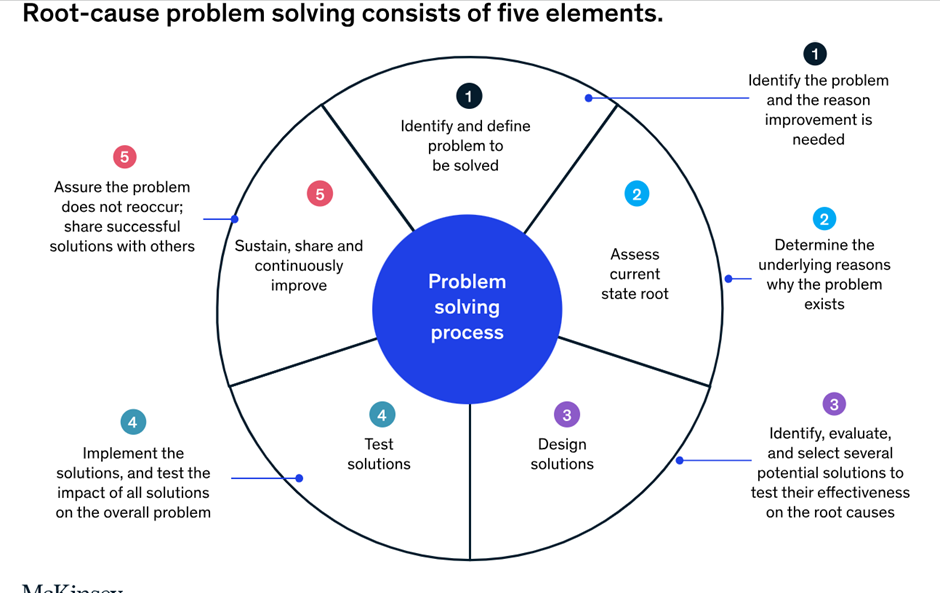
This is one of the most effective ways to connect a product feature to your audience’s actual pain points. Start by identifying a challenge your users frequently encounter. Then walk them through how your feature solves it in a way that’s simple, actionable, and measurable.
This format works especially well for time-saving, error-reducing, or cost-cutting functionalities.
📌 Example: Struggling with missed deadlines? Use task dependencies in your project tool to stay on track
You could begin with the common challenge of overlapping work or bottlenecks in project timelines, then introduce how task dependencies streamline project flow. Support the narrative with data, real-world scenarios, and before-and-after visuals.
📖 Also Read: Scaling Content Production at ClickUp
Features without context often go underused. This format flips the lens: show what users can do with the feature instead of what it does.
Pick one audience segment or role—say, marketing managers or customer support leads—and walk them through a practical scenario that unfolds using your feature.
📌 Example: How to use a shared dashboard to manage a marketing campaign from start to finish
This type of blog post outlines a complete workflow. From the content brief to reporting, it shows how a feature integrates into daily tasks, team collaboration, and measurable outcomes.
💡 Pro Tip: ClickUp Dashboards help you visualize campaign progress and performance metrics across departments. Use real dashboard layouts to guide your outline or screenshots for blog visuals.
When buyers are choosing between tools, they often search for “vs” content. This format helps you meet that demand while controlling the narrative around your product’s strengths.
📌 Example: Whiteboard vs Miro: Which is better for team brainstorming?
Rather than being overly competitive, explain the core use cases for each tool, then guide readers toward what’s best for their workflow.
💡 Pro Tip: Use ClickUp Whiteboards to map out side-by-side comparisons, flow diagrams, or visual content for the blog post. It’s especially helpful when outlining multi-feature breakdowns.
This format is for unpacking a single feature thoroughly. Think of it as your product’s “explainer content.” These posts break down the what, why, and how of a feature while giving users the confidence to try it themselves.
📌 Example: What are conditional fields, and how do you use them to simplify form inputs
Start by defining the feature in simple terms, then explain the problem it solves. Use diagrams, real examples, and layered explanations to build understanding.
As video and product education continue to intersect, this format becomes even more valuable. In fact, 45% of global marketers are already using explainer videos to guide their strategy, and 73% of consumers say they’ve made a purchase after watching one.
Deep-dive blog posts can extend the same trust and clarity in written form, especially when paired with visuals, GIFs, or embedded product walkthroughs.
This framework is especially useful for technical or overlooked features that have a learning curve. It’s also a great way to align with search engine queries like “how to use X” or “what is Y.”
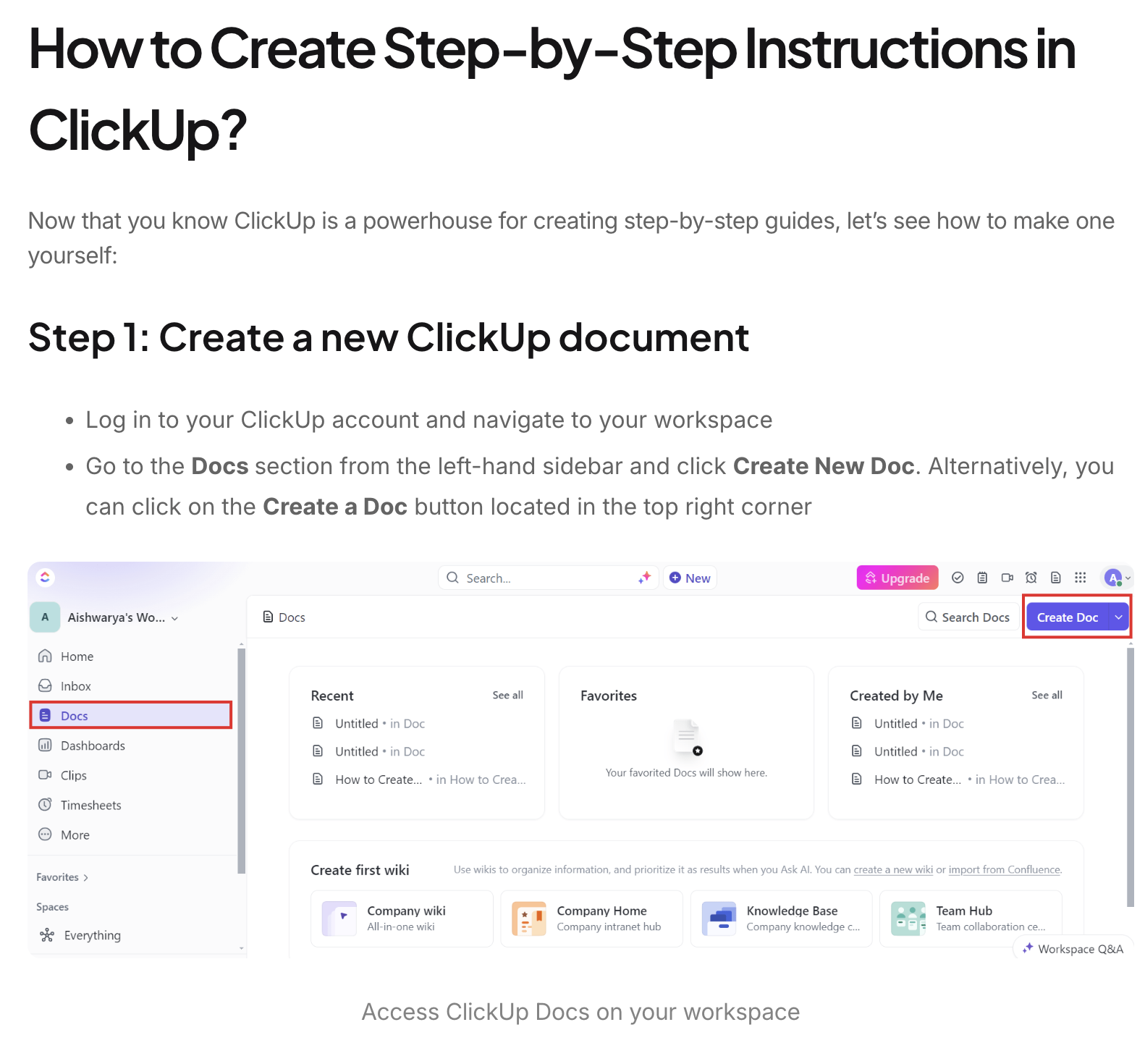
Everyone loves a shortcut. If your product includes templates or repeatable systems, this format lets you offer hands-on value while promoting the feature in action.
📌 Example: A ready-to-use onboarding checklist template and how to adapt it for different teams
Start by introducing the use case, then break down how to access, use, and customize the template. Visuals matter here. Use annotated screenshots, setup walkthroughs, and real examples of the template applied in different scenarios.
If possible, include downloadable assets or in-product links to drive engagement directly from the post.
📖 Also Read: Free Content Calendar Templates for Social Media
Let’s say you’ve found a great feature to write about, mapped it to a relevant use case, and shaped it into a strong format. But if no one can find it, it won’t deliver the visibility or traffic you’re aiming for. This is where SEO turns your blog from a product companion into a growth channel.
Feature-driven content can perform exceptionally well on search if you treat it with the same care you’d give to a high-intent landing page or keyword cluster.
Target specific use-case keywords like “how to automate task reminders in project management tools” instead of broad ones like “task reminders.”
Here are a few more guidelines you can follow:
✅ Use structured headings and long-tail variations such as “what are task dependencies,” “task dependencies example,” or “how to set up task dependencies”
✅ Include internal links to product documentation, related blog content, or feature overview pages to build topic relevance and help users explore more
✅ Write for search intent by offering real solutions to questions like “how to use conditional logic in forms,” not just feature descriptions
✅ Add schema markup (like How-To or FAQ) when appropriate to increase visibility in search results and win featured snippets
✅ Refresh older feature blogs with new screenshots, updated UI flows, and use case examples to stay relevant as your product evolves
💡 Pro Tip: Use Google Search Console, Ahrefs, or Semrush to see which of your feature-focused blogs are already gaining traction. To build on those wins, generate blog ideas around workflows, integrations, or problems that the feature solves.
Content teams don’t just deal with Work Sprawl anymore. They deal with AI sprawl too: drafts in one tool, feedback in another, call notes somewhere else, and a separate set of AI tools to generate blog ideas and outlines.
That fragmentation slows everything down and increases the odds you publish something outdated.
ClickUp helps by bringing docs, tasks, collaboration, timelines, and AI into one converged AI workspace, so feature knowledge stays connected to the content you’re creating and the deadlines you’re shipping against.
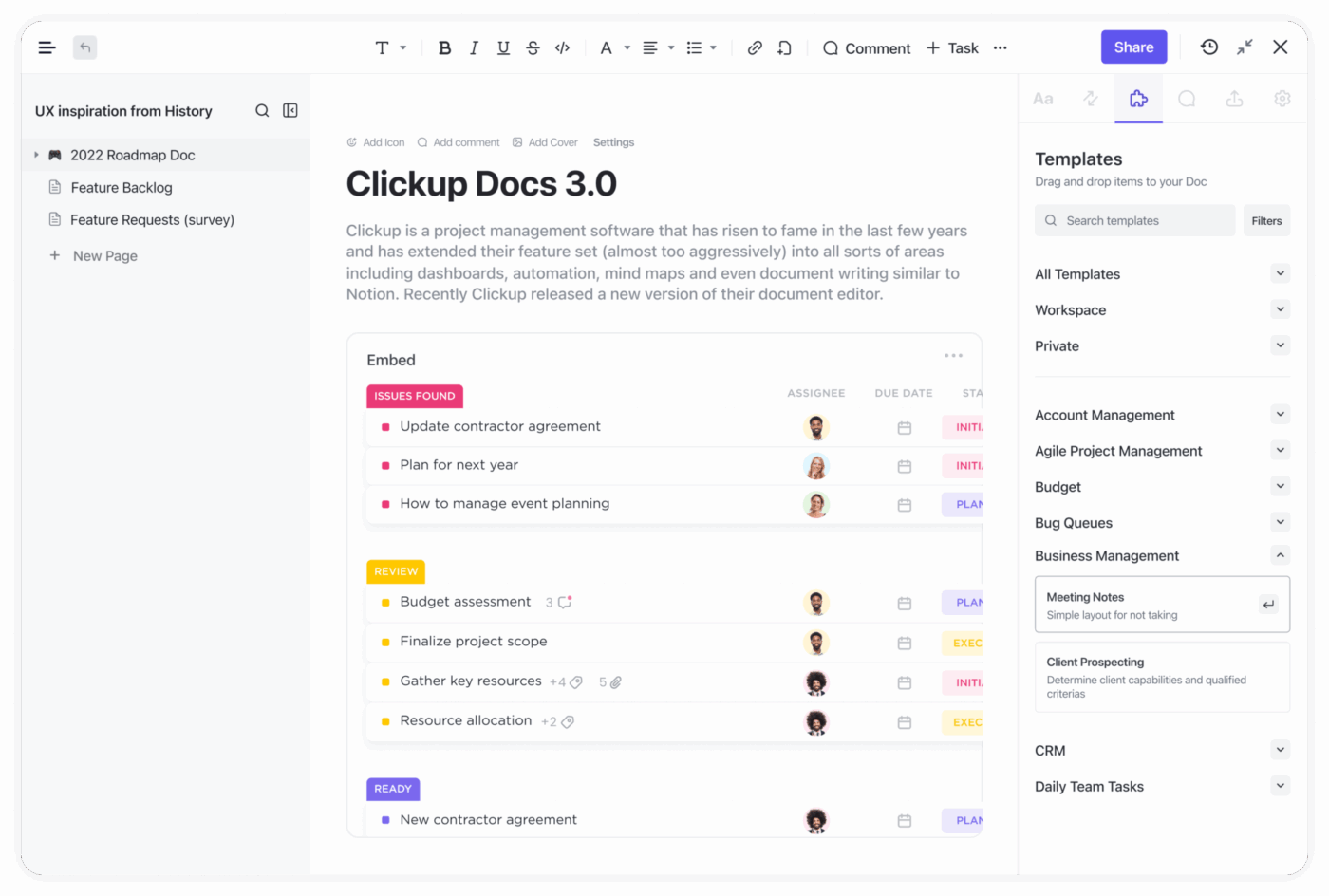
Marketers can’t join every sprint call or track every changelog. Without a single source of truth, you end up asking: “Where’s the latest screenshot?” or “Is this feature name still accurate?”
With ClickUp Docs, you can create a living product wiki organized by release, feature, persona, or use case. Keep customer quotes, positioning notes, competitive context, and approved screenshots in one place so writers can pull what they need without hunting through old links.
If your team manages a lot of Docs, Docs Hub makes it easier to find and manage docs and wikis from one view, so writers can grab the latest notes fast.
And if you’re dealing with hundreds of specs, comments, and attachments, Enterprise Search helps you pull context across Docs, tasks, comments, and files, so you’re not rewriting the same “where is that info?” Slack message forever.
📌 Example: When your mobile team rolls out gesture shortcuts, they document it in the wiki. A content lead can later use that page to write “10 Tips for Mastering Mobile Gestures.” By linking to official screenshots and UX guidelines, the post becomes a go-to resource for users learning the feature.
📖 Also Read: Workflow Automation Examples and Use Cases
Writers often receive feature documentation that’s heavy on technical detail and light on story. Turning that into a blog post takes leaving the draft, rewriting, simplifying, and second-guessing tone.
ClickUp Brain speeds this up by summarizing long notes into user-friendly outlines, translating jargon into clearer language, and generating sections like intros, subheadings, FAQs, and title options directly inside your workspace.
This is especially useful when you’re turning internal feature language into content that matches how your audience actually searches and talks.
Additionally, you can use ClickUp Brain to switch between AI models, GPT-4 for analytical topic suggestions, Claude for tighter blog titles, or Gemini for more creative angles. All without leaving your workspace.
🎥 If managing content feels slow or scattered, this video breaks down how AI agents help teams create faster, stay consistent, and reduce manual work across the content lifecycle.
📌 Example: Your team is launching a new analytics dashboard. You use ClickUp Brain to convert a 5,000-word spec into a clean 10-point blog structure. When the UI changes mid-cycle, the designer leaves a comment directly in the doc. Everyone sees it, makes adjustments, and avoids publishing outdated screenshots.
💡 Pro Tip: Build a feature-to-blog-topic routine with ClickUp BrainGPT.
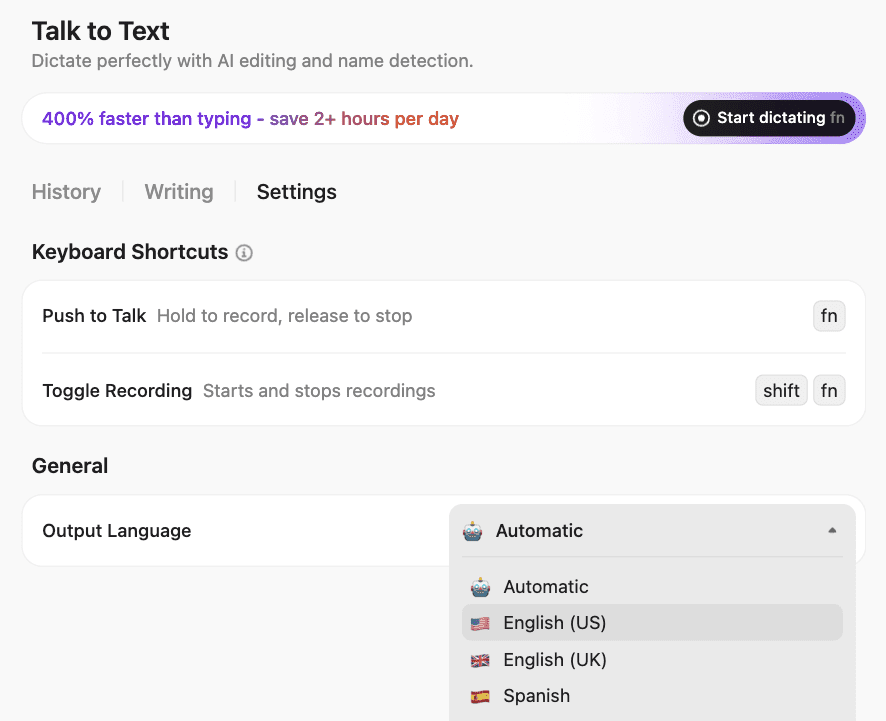
When you’re turning product features into blog topics, use ClickUp BrainGPT as your “capture, question, and retrieve” layer so good angles don’t get lost in release notes, call takeaways, or scattered draft docs
A common breakdown is simple: product and content teams operate on two separate calendars. Features ship without blog support, or blogs sit waiting for final UI because the launch date moved.
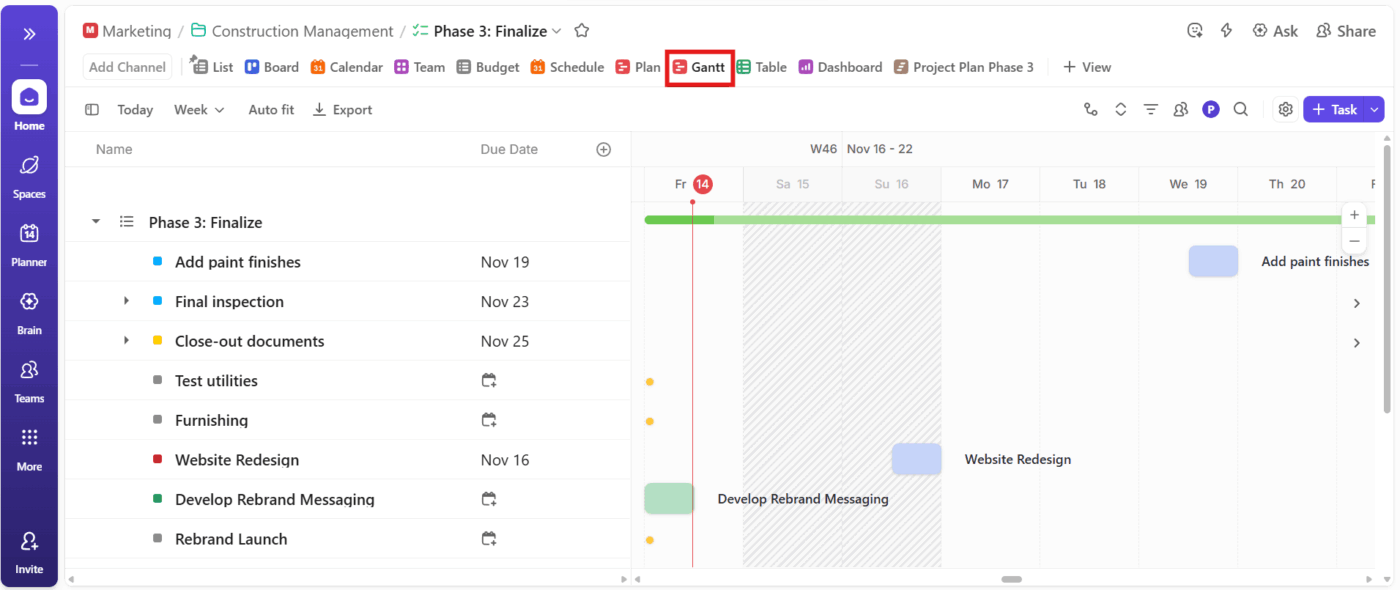
ClickUp Calendar and ClickUp Gantt Chart View help you align both teams on one timeline. You can map dependencies, assign due dates, set reminders, and sync tasks with tools like Google Calendar or Outlook Calendar to keep launch work realistic.
For launches, dependency mapping matters. Gantt makes it easier to spot when “docs approved” or “screenshots ready” is the real blocker.
📖 Also Read: A Guide to Using AI in Content Marketing
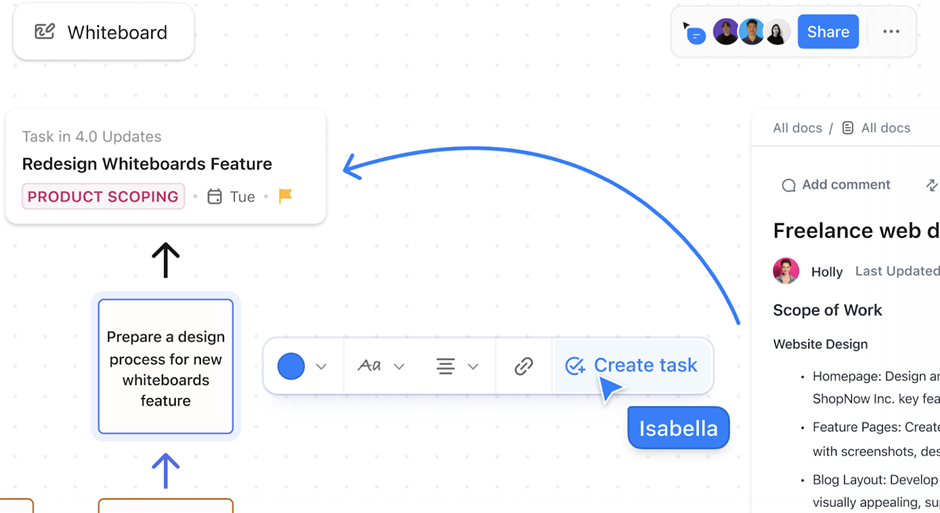
Even when a feature is great, finding a fresh angle can take longer than writing the post. And brainstorms often disappear into screenshots, sticky notes, or forgotten meeting notes.
ClickUp Whiteboards give you a place to map angles, connect use cases, and capture stakeholder input. You can link ideas directly to tasks and Docs so the brainstorm becomes real work instead of “cool thoughts” that die in chat.
👀 Fun Fact: Darren Murph holds the Guinness World Record for most blog posts written by a professional blogger. Over a span of seven years, Murph authored 17,212 blog posts for tech site Engadget. That’s the equivalent of writing nearly seven articles every weekday without a break.
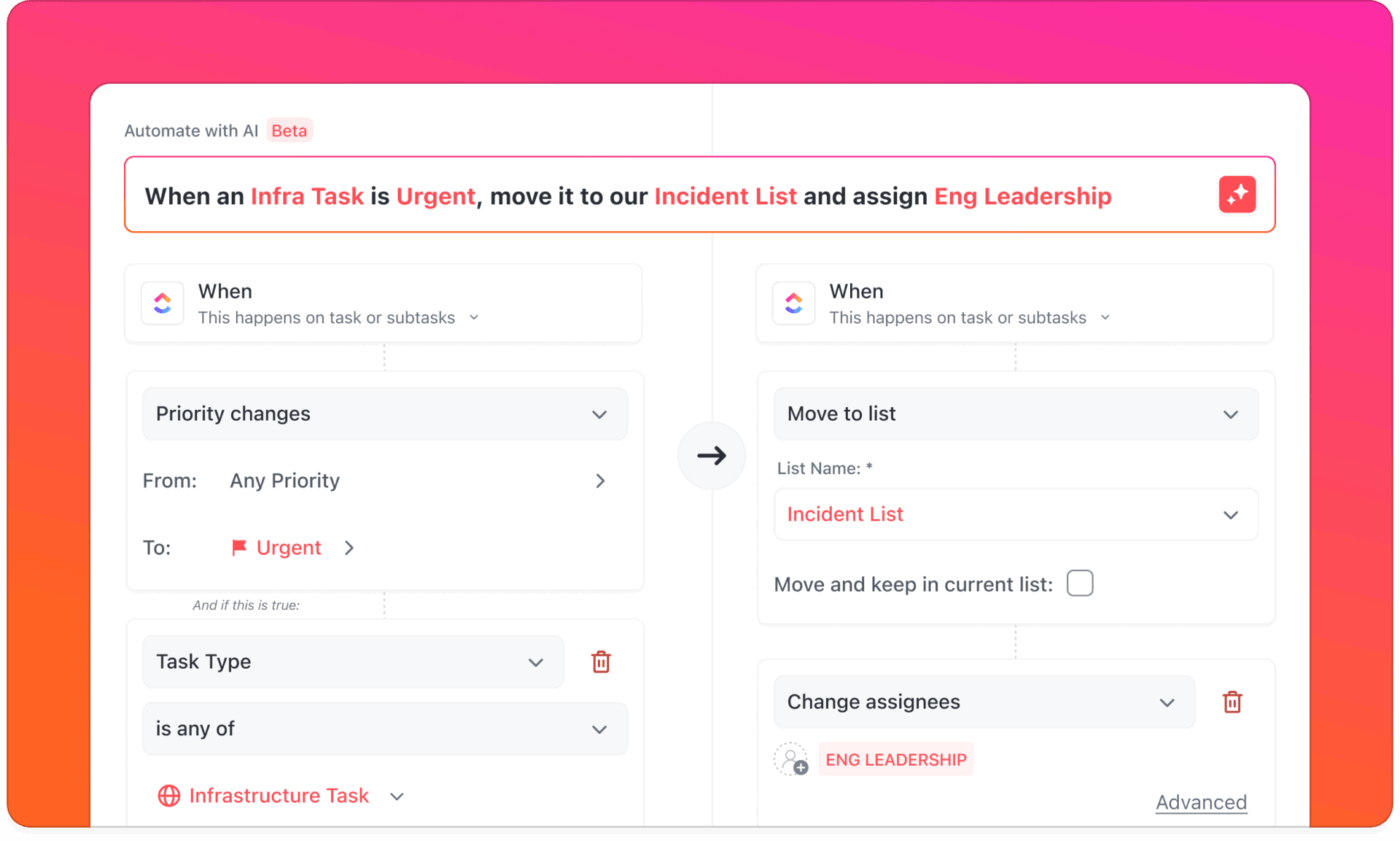
One of the most common content creation workflow slowdowns? We wait for approvals without knowing who is in charge or when the next stage starts. Writers pause. Designers make last-minute rushes. Editors stay out of the loop.
ClickUp Automations reduce those stalls by automatically assigning tasks, updating statuses, and notifying the right people when work moves stages (like Draft → Review). It keeps your workflow consistent even when the team is moving fast.
💫 Smooth it even further with Super Agents:
For heavier pipelines, ClickUp Super Agents quietly support editors by watching for stalled tasks, missed handoffs, or overdue reviews. They surface the right next steps without anyone digging through threads, keeping the editorial flow moving even when humans get busy.
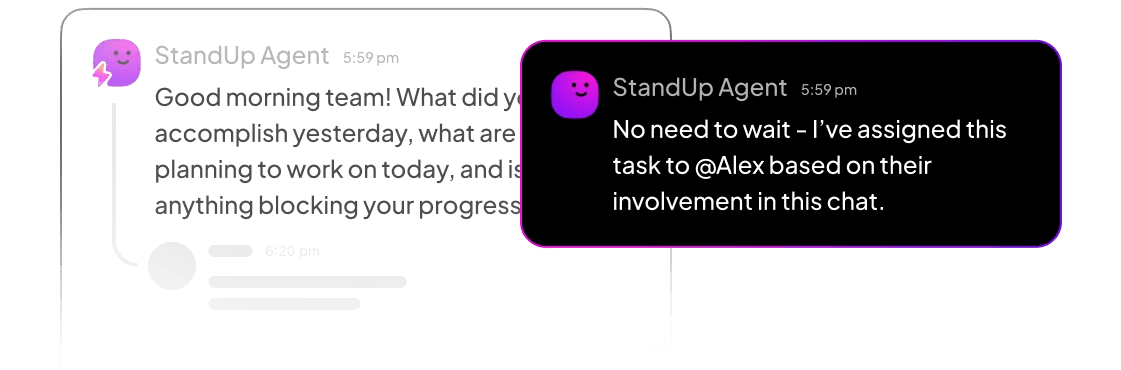
📌 Example: When a blog post was moved to “Ready for Review,” ClickUp automatically tagged the assigned editor and sent a Slack notification. Once approved, the writer was reassigned the task with a due date to wrap up edits. This process cut the back-and-forth dramatically and halved the overall feedback cycle.
📽️ Watch a video: Here’s how ClickUp Automations, when combined with AI, helps you build no-code automations within minutes:
📖 Also Read: How to Build a Content Database
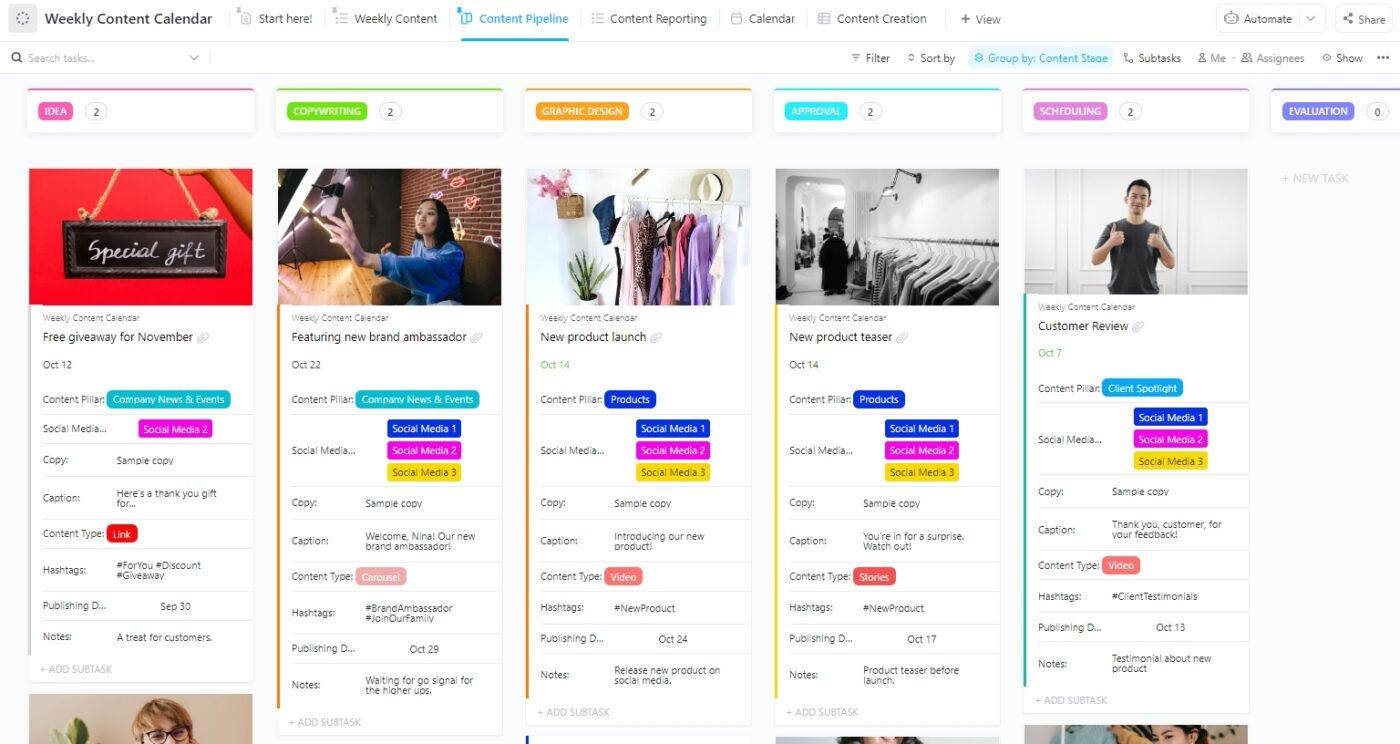
Without a consistent structure, blog production becomes reactive. One week metadata gets skipped, the next week the designer is brought in too late, and quality becomes uneven.
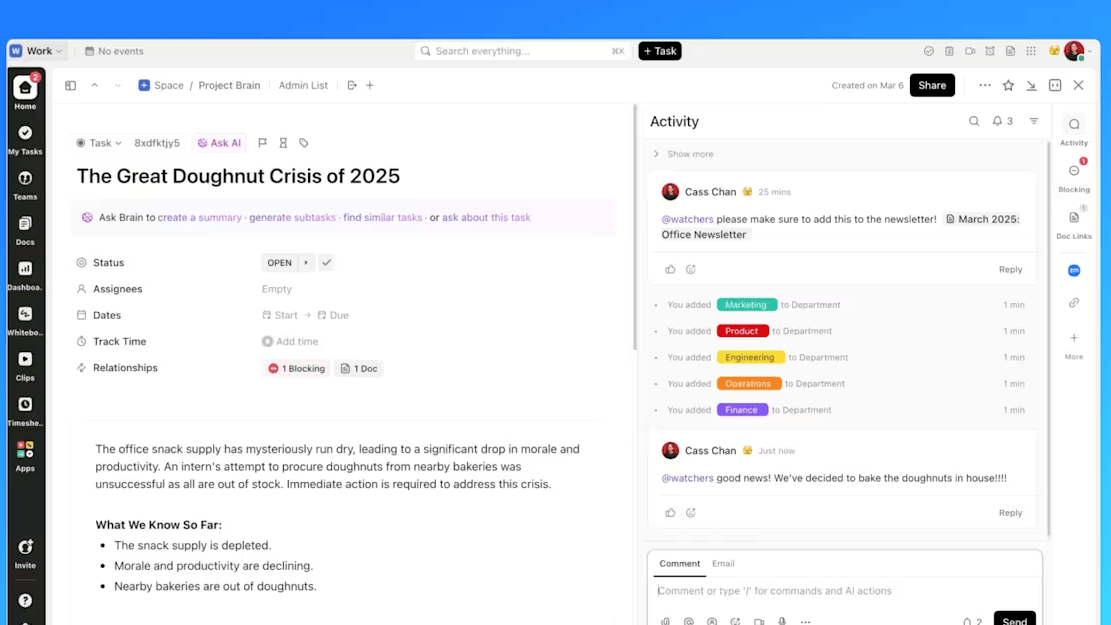
ClickUp’s 1000+ ready-to-use templates make ClickUp Tasks easy to execute and repeatable. Each post can follow the same checklist, subtasks, assignees, due dates, and stages, with all feedback captured in one place.
That visibility makes it easy to see what’s on track, what’s stuck, and what needs attention before it becomes a fire drill.
📖 Also Read: Why Is Document Version Control Important?
You can rely on blog topic generators to create blog ideas for you, but you often need more than just blog ideas to create engaging content with relevant keywords for your loyal readers.
Oftentimes, you need to combine the generated ideas with industry trends, search engine results, and keyword research to create SEO-focused copies.
ClickUp makes this entire process seamless. From AI-powered blog outlines to automated task assignments and synced content calendars, it brings every moving part into one collaborative space to create content with unique ideas.
Whether you’re working from a product spec, managing team feedback, or racing toward launch day, ClickUp gives you clarity and speed without compromise.
Especially with ClickUp Brain and ClickUp BrainGPT, you can review your blog drafts and optimize them for language, tone, and keyword placement with a few simple prompts.
Ready to connect your product and content teams? Sign up for ClickUp completely free!
Start with customer support tickets, sales objections, and usage analytics. Features that solve recurring pain points or have low adoption despite high value are ideal candidates for blog content.
Yes. Tools like ClickUp Brain can summarize lengthy product documentation into blog-ready outlines, suggest headline variations, and even draft intro paragraphs based on your target audience.
Problem-solution posts, use case expansions, and step-by-step tutorials tend to perform best. Match the format to your audience’s search intent, for example, educational deep dives for “what is X” queries, tutorials for “how to use X” queries, etc.
Review quarterly or whenever the product UI changes significantly. Outdated screenshots or deprecated features hurt credibility and SEO.

© 2026 ClickUp

There’s an easier way. Try a free AI Agent in ClickUp that actually does the work for you—set up in minutes, save hours every week.