

Sorry, there were no results found for “”
Sorry, there were no results found for “”
Sorry, there were no results found for “”
Apple Notes is more than a simple note-taking app. It is a popular medium for expressing creativity, managing tasks, and planning day-to-day activities. 📝
One of its lesser-known features is its ability to use templates, which saves you time and effort when organizing your thoughts, lists, or plans. If you want to maximize the utility of Apple Notes, this blog will guide you through some fantastic free templates to boost your productivity. Let’s get started! 🚀
As an alternative, ClickUp has specialized collaborative, AI-powered notes features like ClickUp Docs, ClickUp Notepad, and of course, ClickUp AI Notetaker to transcribe, summarize, and organize meeting notes. With them, you can turn your text into action items and tasks. Keep scrolling for tons of Apple Notes templates and other note templates that make you a documentation ninja!
Whether you’re using Apple Notes as a tool to organize notes or for niche applications like a daily planner app, using templates can elevate your productivity and optmize your processes.
Here are some compelling reasons to use Apple Notes templates:
🧠 Remember: The Apple Notes app is available on iOS, iPadOS, visionOS, and macOS. You can simply log into your iCloud account and access your Apple Notes for other devices!
It’s very easy to create note templates on the Apple Notes app. Simply follow the instructions shared below:
➡️ Also Read: Best Note-Taking Apps (Free & Paid)
Creating templates in the Apple Notes app is quick and easy, and the best part is these templates are completely free!
Here are a few customizable templates you can create in Apple Notes to suit your needs:
Are you a content manager seeking a more efficient way to structure and organize your blog posts? The Blog Post Template is the perfect solution.
You can easily create it in Apple Notes to outline key elements like headings, subheadings, and calls to action, ensuring you don’t miss any important details. This organized format helps speed up your drafting process, allowing you to focus on delivering impactful, well-structured posts.
Ideal for: Bloggers, content creators, and content managers looking for a systematic approach to writing and managing tasks.

Stay on top of your fitness and weight loss/gain goals with the Weight Tracker Template. This template lets you log your weight over time, track your progress, and set specific goals. The journal entries are great for setting and monitoring your fitness milestones. Overall, you can use it to stay motivated as you achieve your personal goals.
Create it in your Apple Notes and use it as your go-to Apple Notes journal template to keep everything organized and easily accessible on your fitness journey.
Ideal for: Fitness enthusiasts and individuals looking to track their weight loss or weight gain journey.

Want to build a new habit? Or do you wish to break an existing one? The Habit Tracker Template works either way.
Featuring customizable sections for different habits that you wish to track daily, it is a great tool to nurture positive habits and quit unhelpful ones. You may even pivot this template as a project tracker, making it suitable for personal and professional uses.
Ideal for: Individuals on the path to building good habits or improving productivity by tracking daily actions.

The Goods Delivery Note Template is perfect for individuals and businesses looking for a simple and efficient way to track deliveries. It includes sections for supply number, product description, expiry date, quantity, unit price, and amount.
Having the delivery details, item list, and order details on the same page supports recordkeeping, enhances communication between parties, and prevents disputes.
Ideal for: Small business owners, delivery managers, or anyone involved in goods deliveries.

The Case Notes Template is ideal for professionals who need to document case details efficiently.
Featuring editable fields and customizable sections, this template adapts to your needs. It lets you customize essential details, highlight key information, and update terms for documenting success. This template not only helps you stay organized but also ensures that all case details are accurately recorded.
By creating it in Apple Notes, you can quickly access and update your case notes, keeping everything neatly organized in one place.
Ideal for: Lawyers, healthcare professionals, social workers, or anyone responsible for documenting case details and updates.
🔎 Did You Know? You can protect a note with a custom password or your device’s login passcode or through Touch ID/Face ID! (Available in iOS/iPadOS 16 or higher)

This Meeting Notes Template helps you stay focused and organized. Offering a clean, modern layout, it lets you capture key discussion points, action items, and priorities within a single document. It’s a great way to structure all thoughts, discussions, and decisions made during a meeting.
Whether you’re documenting team meetings or one-on-one discussions, this template allows you to stay on top of high-priority topics. Plus, the design with dedicated boxes allows you to identify the critical takeaways at a glance.
Ideal for: Team leaders and professionals looking for a simplified solution to document discussions in meetings
➡️ Also Read: Best AI Note-Taking Apps for Meetings

The Daily Notes Template blends style with ease of use. The pink and beige notes have a dedicated space for the date and aesthetic outlines of ruled pages, sticky notes, and notepads for a playful look.
Use these spaces to plan your day, set priorities, and track important tasks throughout the day. Its design makes using this template fun while ensuring nothing from your daily agenda slips through the cracks.
This template can be easily created in Apple Notes. You can also customize it further to fit your personal style, adding or removing sections as needed to make it work best for your daily planning.
Ideal for: Anybody seeking a simple yet effective way to plan and manage their daily schedule, tasks, and appointments.
The Design Process Template is created for designers and creative professionals. It offers a clear step-by-step guide to managing your design process. To do this, it breaks down the process into smaller, manageable steps, making it easier to track ideas, revisions, and final concepts.
Whether you’re building a brand, designing the UI/UX, or starting a creative project, this template allows you to track your progress closely and ensure every step gets executed perfectly.
Ideal for: Anybody seeking a simple yet effective way to plan and manage their daily schedule, tasks, and appointments.
While the Apple Notes app is user-friendly and highly useful, it does have its limitations that will leave you looking for Apple Notes alternatives.
There’s no doubt that Apple Notes gets the job done for basic actions like jotting down your fleeting thoughts. But if you’re looking for advanced features, it will leave you unsatisfied.
As the everything app for work, ClickUp offers a suite of built-in tools designed to streamline note-taking and task management.
For starters, you have ClickUp Notepad to jot down your ideas and tasks. Then you have ClickUp’s AI Notetaker, a powerful tool to transform meeting discussions into actionable outcomes. It automatically captures key insights, decisions, and action items and streamlines the workflow by providing clear, actionable summaries that connect discussions to ongoing projects.
Similarly, ClickUp Docs allows you to create rich, collaborative documents within the ClickUp ecosystem. You and your team can draft, edit, and share documents in real time.
Finally, you have ClickUp Tasks that integrates with Notepad and Docs and allows you to convert action points into tasks. You can then assign priorities, set deadlines, and track the progress of these tasks to stay on top of your work.
I can’t live without ClickUp! ClickUp is the best thing to ever happen to me. I am the Art Director at Kredo Inc, the parent company of 3 subsidiaries. I manage a team of designers so ClickUp helps me project manage, time manage, delegate work, and much more!
Most importantly, ClickUp comes with a variety of templates that make your job easier.
Here are our top recommendations:
The ClickUp Teams Docs Template allows teams to document their goals, processes, and best practices in a centralized location. It ensures that all team members can access the latest information and collaborate efficiently.
The ability to share crucial resources, establish standard operating procedures (SOPs), and share internal guidelines makes it easier to onboard new members, align existing members, and share knowledge seamlessly. Having access to the latest documents also fosters a culture of transparency and collaboration while eliminating redundancies.
Ideal for: Teams looking to document internal processes, manage knowledge sharing, and facilitate smooth collaboration.
📮 ClickUp Insight: 74% of employees use two or more tools just to find the information they need—while jumping between emails, chat, notes, project management tools, and documentation. This constant context-switching wastes time and slows down productivity. As the everything app for work, ClickUp unifies all your work—email, chat, docs, tasks, and notes—into a single, searchable workspace, so everything is exactly where you need it.
The ClickUp Project Documentation Template is a hub for all project-related information. From timelines and milestones to resource allocation, this template documents everything and stores it in an organized manner. This makes it easier to track progress, manage deadlines, and inform stakeholders.
The template helps collaboration, allowing team members to track action items, add updates, and upload relevant material in a centralized location. Such a bird’s-eye view makes it easier for project managers to oversee the project’s lifecycle.
Ideal for: Project managers and teams requiring comprehensive records of project details, deliverables, and resources in an organized workspace.
If you’re looking to create and maintain a centralized repository of all your internal knowledge, then the ClickUp Knowledge Base Template is perfect for you.
Whether you’re compiling FAQs or putting together troubleshooting guides, this template offers quick and easy access to the crucial information that your employees or customers may need.
Ideal for: Project managers and teams requiring comprehensive records of project details, deliverables, and resources in an organized workspace.
We’ve already seen an Apple Notes template for Meeting Notes above. However, the ClickUp Meeting Notes Template takes it to a whole new level. It allows you to keep track of all discussions, action points, and follow-ups during team meetings, helping you organize meeting agendas, track key decisions, and assign tasks.
The incorporation of rich text into the template makes it easier to extract key takeaways, timelines, and deadlines, keeping you focused on high-priority actions. The resulting structured notes reduce confusion, cultivate accountability, and ensure all meeting participants are aligned.
Ideal for: Teams and professionals who wish to capture detailed meeting notes, convert them into traceable tasks, and address action items in a timely manner.
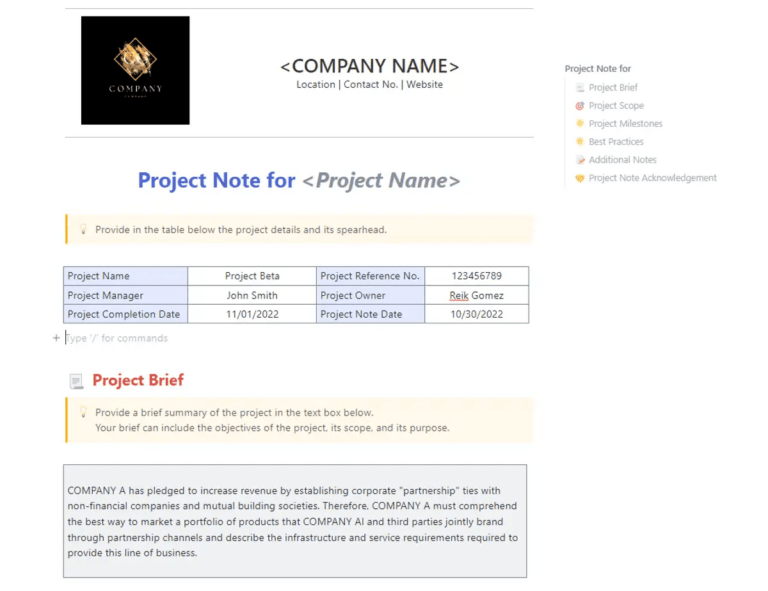
The ClickUp Project Notes Template is designed to centralize all project-related documents, details, tasks, and milestones. This improves organization and collaboration.
The template is geared toward teams looking to document key facets of their project, such as the scope, deliverables, deadlines, and ongoing progress so that everything stays on track.
The integration with ClickUp’s project management capabilities makes these notes actionable as you can effortlessly translate activities into tasks, assign priorities, and focus on doing rather than planning.
Ideal for: Project managers and teams that document and track key project details, from objectives and milestones to deadlines and deliverables, in a single, accessible location.
As the name suggests, the ClickUp Class Notes for College Students Template is a dynamic solution for college students to keep track of their lecture notes, assignments, and important deadlines.
Students can easily organize class materials either by subject or topic and integrate them with tasks to ensure timely delivery of assignments.
Use it to jot down highlights from a lecture, questions, and references, while enjoying the freedom and flexibility to link resources for deeper study.
Ideal for: College students aiming to become more organized while taking notes during lectures, submitting assignments, and managing academic tasks over a single platform.
The ClickUp Class Schedule and Time Study Template supports students and educators in optimizing their schedules for improved time management. It helps build detailed class schedules, break down study hours, and allocate time for different academic activities. This level of organization prevents any scheduling conflicts and helps make the best of available time.
Ideal for: Students and teachers who require a detailed schedule to track class timings, study sessions, and other activities to improve time management.
Want to lift your productivity to an all-time high? This ClickUp Personal Productivity Template will get you there. The template is designed to help individuals organize their personal goals, tasks, and habits to maximize efficiency.
It lets you break down your day into manageable tasks, prioritize them, and benchmark your growth. Whether you’re planning to get through a busy day or build lasting habits, this template will help you stay focused and productive.
Ideal for: Individuals who wish to improve their personal productivity in their day-to-day lives.
The ClickUp Weekly Planner Template acts as an efficient framework for planning out your week to the T. It lets you break down tasks by day and time, allowing you to plan and prioritize activities across the week.
You may also customize it with sections for goals, reminders, and notes, ensuring that the key tasks and events stay in check. It’s a great tool for going through your week methodically, as you balance your work, personal activities, and other commitments. Its vibrant layout is just the cherry on top!
Ideal for: Professionals, project managers, students, and anyone looking to fine-tune their weekly routine by planning tasks and managing time effectively.
ClickUp’s Calendar To-Do List Template combines the best of a traditional to-do list with the visual nature of a calendar. The result—a hassle-free way to manage tasks and deadlines! With the task management features baked directly into the calendar, you can drag and drop tasks, set due dates, and track progress in real time.
It also makes it easier to visualize your daily/weekly/monthly workload so that you can allocate resources, assign priorities, and review deadlines.
As an Apple Notes calendar template alternative, it offers greater flexibility and task management capabilities. Unlike Apple Notes, ClickUp’s Calendar To-Do List Template is specifically designed for task tracking, offering more structure and a clearer overview of deadlines and progress.
Ideal for: Visual learners who prefer a calendar-based approach to manage daily tasks and deadlines.
The ClickUp Daily To-Do List Template is a simple yet effective tool to structure your daily schedule while maintaining productivity. This to-do list template allows users to create a list of tasks for each day, which helps you stay focused and organized.
The customizable features, such as task descriptions, tags, and due dates, allow you to organize the tasks while the subtask feature lets you break down larger tasks into smaller units for easy use.
Ideal for: Users who need a straightforward tool to stay organized while planning their day.
ClickUp’s Task Management Template optimizes task organization and drives productivity. The template lets users create tasks, assign them to team members, set due dates, and monitor progress in real time. Featuring built-in tools for task prioritization, time tracking, and status updates, it lets you stay on top of your tasks without missing crucial deadlines.
Ideal for: Teams and individuals who need a robust system for managing and tracking tasks with full visibility of the progress and deadlines.
➡️ Also Read: Free Task Management Templates in ClickUp & Excel
The ClickUp Project Tracker Template offers an exhaustive overview of the project progress, allowing teams to manage and track milestones from start to finish. You may create and assign tasks, set dependencies, and monitor completion timelines in real time.
This project tracker template also boosts collaboration between team members, making it easier to share resources, notify updates, and adjust project scopes if necessary. Its visual nature also helps users gain key insights in a single glance.
Ideal for: Teams working on multi-phase projects who need a similar structure for tracking milestones, dependencies, and project progress at various stages.
Want a visual representation of the project timeline? Give ClickUp’s Simple Gantt Chart Template a try! This template creates intuitive Gantt charts to organize tasks, set deadlines, and visualize project progress.
With an effortless drag-and-drop functionality, you may easily adjust timelines, task dependencies, and resources with an almost negligible learning curve. The real-time synching of data brings everyone on the same page about project goals and deadlines.
Ideal for: Project managers and teams who wish to visualize their project timelines, task dependencies, and overall project progress in a simple format.
The ClickUp Project Reporting Template simplifies project tracking with its easy-to-use reporting tools. Use it to generate detailed reports that illustrate progress, resource requirements, and any bottlenecks. These insights keep stakeholders informed of all the strengths, weaknesses, and opportunities, building a culture of transparency and open communication.
This template converts all data points into ingestable insights through detailed analysis to power efficient decision-making. This ensures that you can make data-driven adjustments to keep the project on track and aligned with its goals.
Ideal for: Project managers and teams who rely on data to make key project decisions.
Apple Notes offers a simple way to organize notes, to-do lists, and more. However, its reach is limited to Apple devices such as iPhones or iPads.
If you’re seeking a more flexible solution, ClickUp is the clear winner. It combines advanced task management, project tracking, and collaboration features within one powerful platform. It consolidates all your essential tools into one app, making it perfect for both personal productivity and large remote teams.
Ready to make note-taking—and everything else—more intuitive? Sign up for ClickUp and feel the difference! 📈

PMO Team
Max 9min read

Praburam Srinivasan
Max 16min read
Praburam Srinivasan
Max 21min read

© 2026 ClickUp





