







Still downloading templates?
There’s an easier way. Try a free AI Agent in ClickUp that actually does the work for you—set up in minutes, save hours every week.
Sorry, there were no results found for “”
Sorry, there were no results found for “”
Sorry, there were no results found for “”

Ever found yourself deep in focus, ticking off one task after another—only to pick up your phone to check the timer and lose the next couple of minutes to a series of Instagram reels?
Despite what you think, time management isn’t the real challenge—it’s staying consistent in a world full of distractions, endless notifications, and bite-sized content fighting for your attention.
Aesthetic Pomodoro timers provide a solution in this situation. They combine beautiful design with functionality—letting you picture your progress more clearly as each session completes.
With every completed 25-minute Pomodoro cycle, you gain a sense of progress, as the whole process feels more enjoyable and visually rewarding. Below, we’ve listed the most effective and aesthetically pleasing Pomodoro timers that transform your screen into the perfect tool for staying focused.
Here’s a quick glimpse into the tools we discussed in our blog:
| Tool Name | Best For | Key Features | Pricing* |
| ClickUp | Students, remote workers, professionals, and teams of all sizes who want to get work done in Pomodoro bursts, within automated workflows | Break down tasks, track time, AI work intervals, and List View | Free forever plan, Customizations available for enterprises |
| Pomodoro Aesthetic | Freelancers, who need visual motivation | Multiple aesthetic themes, task tracking | Free |
| Flocus | Solopreneurs who want better focus, and AV customization | Ambient sounds, playlists, task dashboard, and focus stats | Free; Paid plans start at $9/month per user |
| Pomodoro Kitty | Individuals who want gentle focus sessions | Cat themes, visual cues, and session history | Free |
| WonderSpace | Remote professionals who like an ambient workspace, with live backgrounds | Animated visuals, soundscapes, and work journaling | Free; Paid plans start at $5.99/month per user |
| Astrostation | Students and professionals: Habit building with insights | Custom widgets, Pomodoro + Spotify, and task trackers | Free |
| Focus Keeper | Students and professionals who want habit building | Charts, white noise, to-do list, mobile only | Free |
| Flow | Solopreneurs; Minimalist focus, distraction blockers | Apple ecosystem, site blocking, and time tracking | Free; Paid plans start at $2.99/month per user |
| Forest | Creative Professionals, who enjoy Gamified focus, and real-world tree planting | Grow trees, earn coins, sync, and stats | Free |
| Be Focused | Students and professionals who want habit-building | Custom timers, task manager, CSV export | Free; Paid plans start at $1.99/month per user |
An aesthetic pomodoro timer combines the structure of the pomodoro technique with visually appealing designs and soothing ambient sounds. This helps enhance focus and productivity during work or study sessions, ultimately creating an engaging user experience
Whether in the form of an app, browser extension, or physical device, these timers turn ordinary project time management (or any other type of time management) into a work or study experience you actually want to return to.
Here’s what the timers do:
🧠 Fun Fact: The Pomodoro Technique gets its name from a literal tomato (Pomodoro is Italian for tomato)! The technique’s creator, Francesco Cirillo, used a tomato-shaped kitchen timer as a student in the late 1980s to time his study sessions, later naming the method after it.
One Pomodoro a day keeps procrastination away.
We have covered how aesthetic Pomodoro timers guide you into focus mode with thoughtfully designed visuals.
Now let’s explore the science behind how Pomodoro timers work:
Whether you’re a remote worker trying to minimize distractions or a student looking to stay on top of study sessions, here are some of the most popular, well-designed, and productive tools to help you stay in focus mode and enjoy every 25-minute sprint.
Our editorial team follows a transparent, research-backed, and vendor-neutral process, so you can trust that our recommendations are based on real product value.
Here’s a detailed rundown of how we review software at ClickUp.

Most Pomodoro timers help you maintain focus in the present moment, but what happens if your to-do list extends over a week or if your tasks are scattered across email threads, docs, and meeting notes?
Unlike minimalist timers built for short bursts of work, ClickUp is designed to support long-term productivity.
Stick to your schedule with ClickUp Reminders
Even with the maximum preparation, it’s easy to lose track of time or skip a break when you’re deep in focus—especially during back-to-back Pomodoro sessions.
ClickUp Reminders solves this issue by letting you set custom, recurring alerts for both work intervals and breaks, so your flow stays structured without needing a second timer.

Generate Pomodoro Work Intervals with ClickUp Brain
The length of your focus sessions and breaks affects how sustainable your day feels.
ClickUp Brain can suggest AI-powered session timings based on your preferences, helping you build a schedule that feels both productive and human.
You can also try ClickUp’s free online Pomodoro timer which runs in the background as just another tab, while you power through your tasks!

At the heart of ClickUp’s time management system is the ClickUp’s AI-powered Calendar. Here’s how it helps:
✅ AI-powered time blocking: Intelligently block time for your priority tasks based on estimates, deadlines, and availability. Pair with ClickUp Brain, and it can even auto-schedule your day in seconds
✅ Real-time task integration: Every task in ClickUp (from your LineUp, backlog, or overdue list) can be scheduled directly onto your calendar. Just drag it, drop it, done
✅ Custom views and filters: Filter by team member, priority, or task status. Zoom into your day or zoom out to see your week at a glance (your calendar, your way)
Pro Tip: Want to build your own version of Pomodoro according to your habits and workflow? Within ClickUp Chat, you can use ClickUp’s pre-built AI Agents to send you reminders with custom messages and even reminders on what tasks to do during your next ‘pomo’.
Manage your time efficiently with ClickUp Time Tracking
Tracking your time helps you understand your true productivity patterns. Maybe writing takes you two Pomodoros, but editing takes only one.
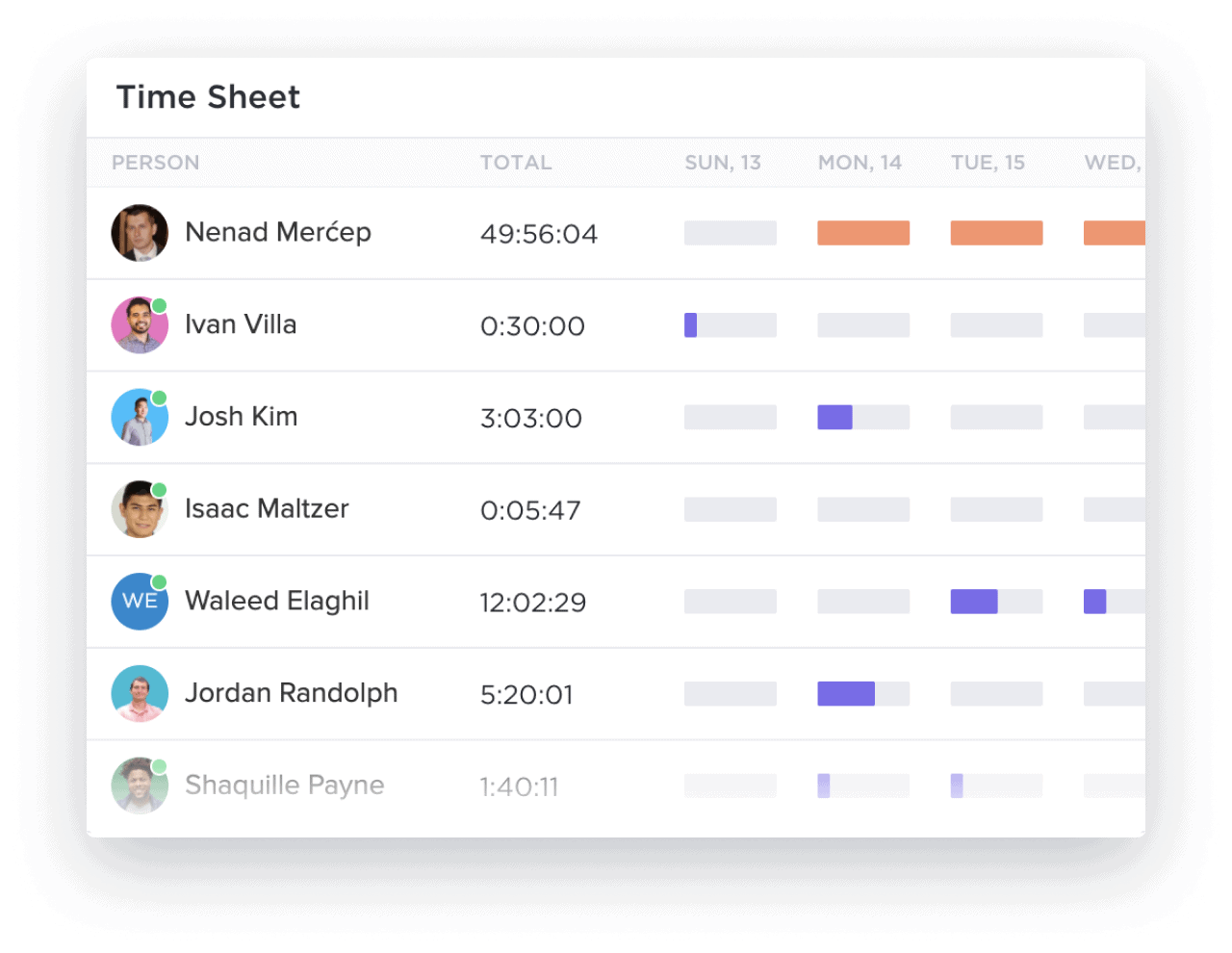
By using ClickUp Time Tracking, you can record how long each session takes and analyze your flow, making it easier to plan realistic work intervals next time.
ClickUp also syncs across all your devices and integrates with third-party Pomodoro timer apps like Pomodone, so every minute is logged, and every task stays tracked.
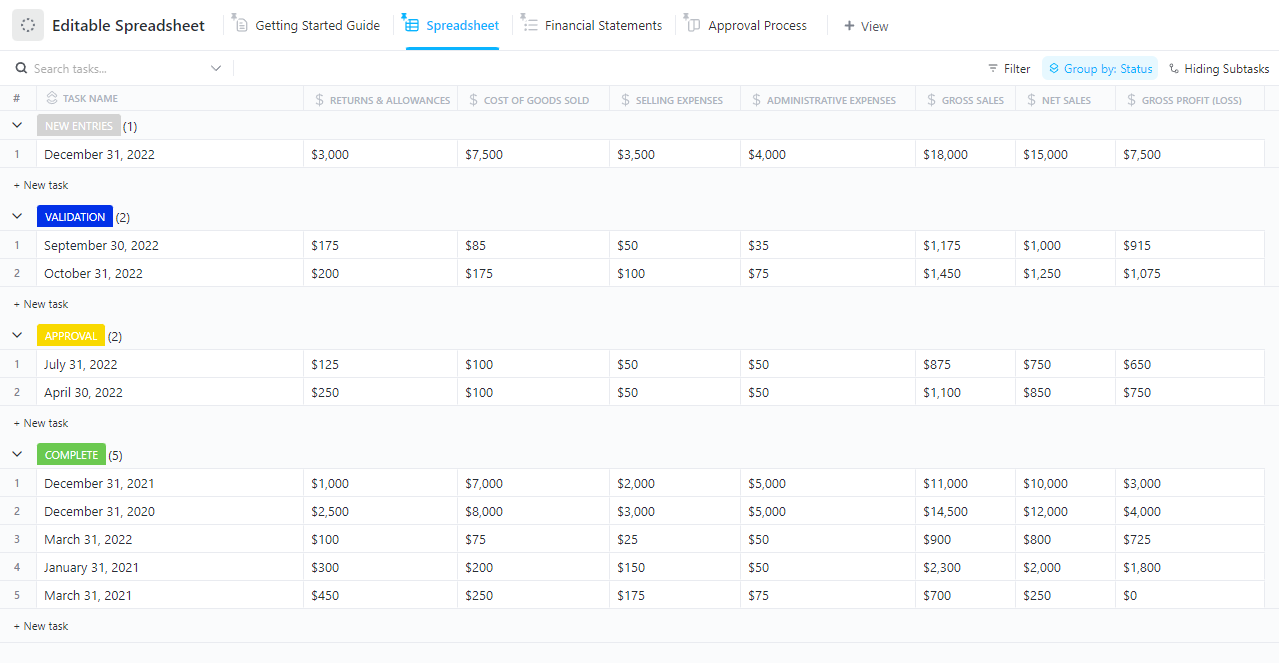
To make that data even more actionable, ClickUp’s Editable Spreadsheet Template helps you organize time logs, monitor task progress, and surface key insights.
It’s a smarter alternative to traditional spreadsheets, and you don’t have to deal with rigid rows or manual formatting.
A G2 user says:
I like the task management the most in ClickUp. I used to set deadlines for myself on my calendar manually, but now I don’t need to use my brainpower to try to remember and track all my tasks. I can use the due dates and my homepage as my way of tracking all my to-dos each day.
💡 Pro Tip: If you’ve ever cleared every distraction but still felt unproductive, it’s time to look inward. Productivity Killers and How to Overcome Them reveals the sneaky internal habits sabotaging your focus (and how to fix them fast).
Most timers focus on productivity by function, while Pomodoro Aesthetic focuses on productivity by feeling. For users who struggle with the mental barrier of starting a task, this timer turns their work session into a visually enjoyable ritual.
Whether you’re drawn to pixel-perfect nostalgia (think Windows 98 and Nintendo) or soft color palettes like Pink and Blue, this timer creates an emotionally resonant space to work in.
⭐ How companies save time with ClickUp: Smokeball went from hours to seconds for weekly task setup
Challenge: Initially, they used a combination of SharePoint, Excel, and Word documents to manage their projects, which led to significant challenges. The fragmented setup made it difficult to maintain visibility and accuracy, causing inefficiencies and hindering collaboration
Solution: Smokeball’s marketing team transitioned from using multiple disjointed tools to ClickUp, significantly enhancing project visibility and efficiency. By consolidating their operations into a single platform, they streamlined workflows, reduced task setup times dramatically, and improved collaboration across the board.
Impact:
For me, a bigger benefit of ClickUp than the time savings is just the peace of mind. I know it’s all in ClickUp and nothing’s being forgotten.

Flocus is an entire focus environment. Where most Pomodoro tools stop at tracking time, Flocus creates a full sensory workspace that blends ambient soundscapes, curated playlists, personalized dashboards, and inspirational visuals.
What makes it unique is its deep attention to emotional comfort and sensory motivation. You’re not just counting down 25 minutes—you’re choosing how you want to feel while you do it.
Whether you’re working with a soft lofi beat, ambient café sounds, or a quote that hits just right, Flocus helps you build a ritual around your work sessions that’s consistent and calming.
📖 Also Read: Best Productivity Tools & Software Apps

Not every timer needs to feel like a countdown clock. Pomodoro Kitty brings a softer, friendlier vibe to your work sessions, using an animated cat theme to support time management techniques.
It’s designed for those who want to follow the Pomodoro Technique without the rigidity of traditional interfaces. And if visual comfort helps you stay focused, Pomodoro Kitty offers exactly that.
📮ClickUp Insight: 78% of survey respondents struggle with staying motivated on long-term goals. It’s not a lack of drive—it’s how our brains are wired! We need to see the wins to stay motivated. 💪That’s precisely where ClickUp delivers.
Track achievements with ClickUp Milestones, get instant progress overviews with rollups, and remain focused with smart ClickUp Reminders; visualizing these small wins builds momentum for the long haul.
💫 Real Results: ClickUp users report they can handle ~10% more work without the overwhelm.

For those who can only focus when their environment feels right, WonderSpace offers something rare: a fully immersive productivity hub that combines ambient animations, soothing soundscapes, and classic Pomodoro structure into one tranquil digital workspace.
What sets WonderSpace apart is its blend of visual and auditory customization. You’re not just tracking time—you’re building a mood.
You can even layer these with animated backgrounds, such as snow or rain, making your screen feel like a cozy retreat rather than a sterile timer.
💡 Pro Tip: Struggling with scattered tools and constant context switching? Unlocking the Future of Productivity With ClickUp reveals how to simplify your workflow by keeping tasks, docs, and goals all in one place.

Unlike most Pomodoro timers that follow a fixed format, Astrostation is widget-based and fully modular, letting you build a custom layout with task trackers, timers, Spotify widgets, quote boxes, sticky notes, and even embedded YouTube videos.
What sets Astrostation apart is its developer-friendly, open-source foundation paired with deeply aesthetic customization.
✨ Fun Fact: According to productivity coach Carl Pullein, even doing just one focused Pomodoro per day can dramatically reduce task avoidance over time.

If you’re looking to move beyond just staying focused and actually build sustainable work habits, Focus Keeper is designed to help you do exactly that.
While many timers stop at the countdown, Focus Keeper adds a powerful layer of progress tracking, goal setting, and insightful charts that help users understand how they focus—and how to improve it over time.
💡 Pro Tip: If you constantly feel busy but not productive, the ClickUp Time Management Matrix shows you how to prioritize tasks based on urgency and importance—so you focus on what truly matters, not just what’s loudest.

For those who want to stay focused without sacrificing simplicity, Flow delivers a clean, elegant workspace with just the right amount of control.
It’s not overloaded with features—it’s intentional. Flow shines in its ability to keep your attention locked in by combining Pomodoro-style time blocking, distraction prevention, and seamless Apple ecosystem integration.
📖 Also Read: Time Management Games

For those who need more than a ticking timer to stay focused, Forest adds a layer of purpose and accountability by turning your work sessions into trees—literally. Every time you start a focus session, you plant a virtual tree.
If you leave the app early, your tree dies. But if you stay focused, it grows—and over time, so does your virtual forest.
✨ Friendly Reminder: Visualization reduces task-switching by 40%. Visual cues help you stay locked in on what to do next, instead of bouncing between tools or tabs.

Be Focused is for those who want a no-frills Pomodoro timer that still gives them control.
You can break down your day into focused intervals, manage tasks, and access everything from your iPhone, iPad, Mac, or even Apple Watch.
What makes Be Focused different is its blend of detailed control (like assigning timer settings per task, planning how many Pomodoros you’ll need, or exporting session data) without requiring a subscription.
Using an aesthetic Pomodoro timer becomes even more powerful when combined with a task management system like ClickUp. While visual timers help reduce resistance, ClickUp makes sure your time is spent on the right tasks, tracked effectively, and optimized over time.
Here’s how you can structure and track your Pomodoro sessions directly inside ClickUp:

Start by creating a list titled “Pomodoro Sessions” or something aligned with your current project. This method gives your sessions a clear structure and helps centralize your focus.

Break down large goals into main tasks, then divide them further into subtasks that can realistically be completed in a single Pomodoro (roughly 25 minutes). Such an approach prevents overwhelm and improves task clarity.
Make things easier for yourself by automating tasks using this quick guide:

In each task or subtask, use the description field to note down the goal of the session when using ClickUp Tasks. This technique ensures you’re not guessing what to do when the timer starts, keeping your focus tight.

Use ClickUp’s Priority markers and Status tags to visually sort urgent tasks and organize your day. You can drag and drop them in Board View or filter by priority when your focus window starts.

Use ClickUp Time Tracking to log every Pomodoro. After completing a session, stop the timer and log your notes. Over time, this approach helps identify which tasks take longer and where your time is best spent.

Set up recurring tasks for daily or weekly focus blocks. Pair it with ClickUp Automations to send you reminders when it’s time for a short or long break.
📣 Customer voice: As Deanna Connolly, Brokerage Services Associate at Foundry Commercial, puts it:
ClickUp is fun! It’s fun to set up and visually appealing. The little things, like the fireworks animation that appears when you clear all of your notifications, seem silly, but they’re fun, and they remind you to give yourself a pat on the back.
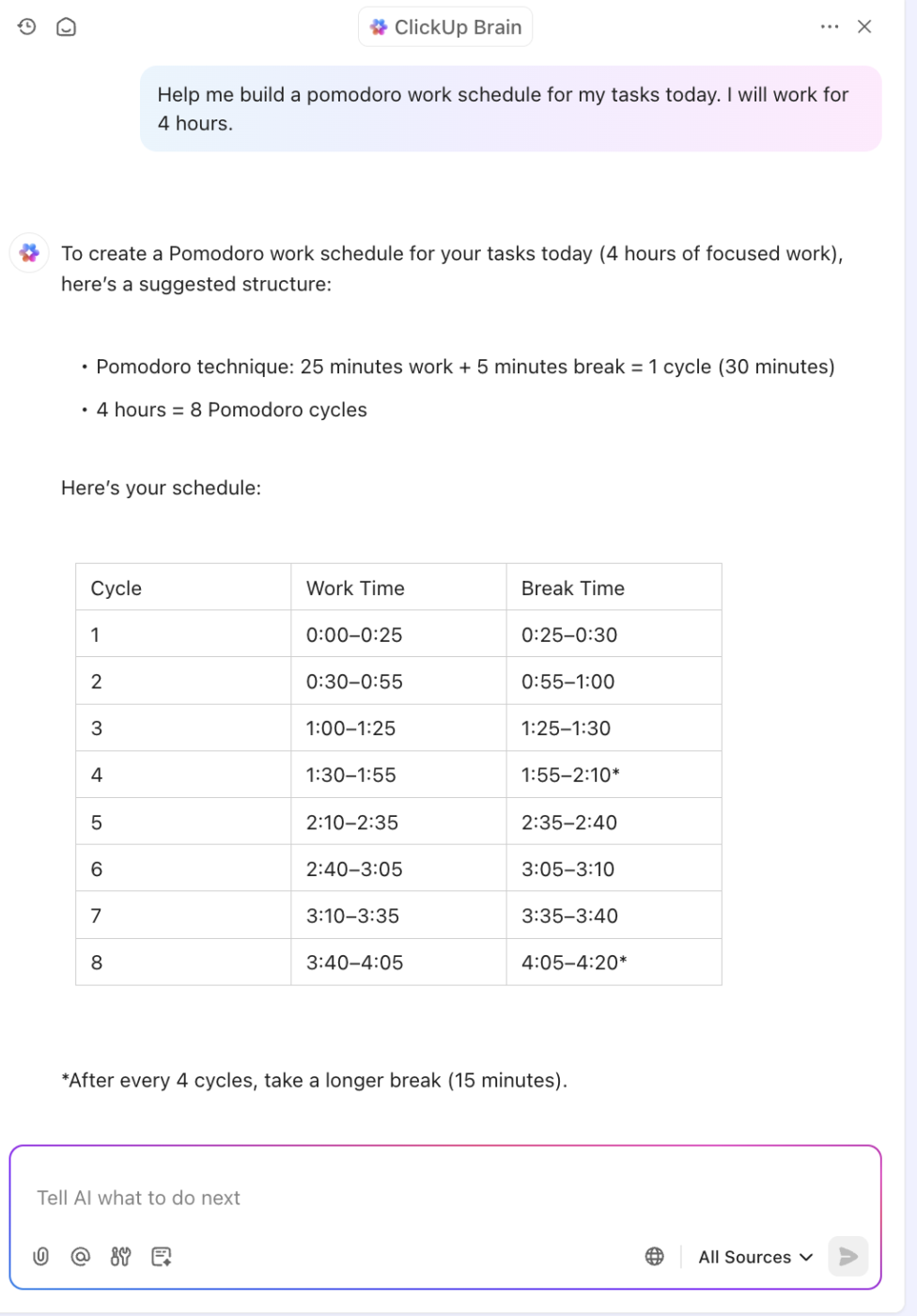
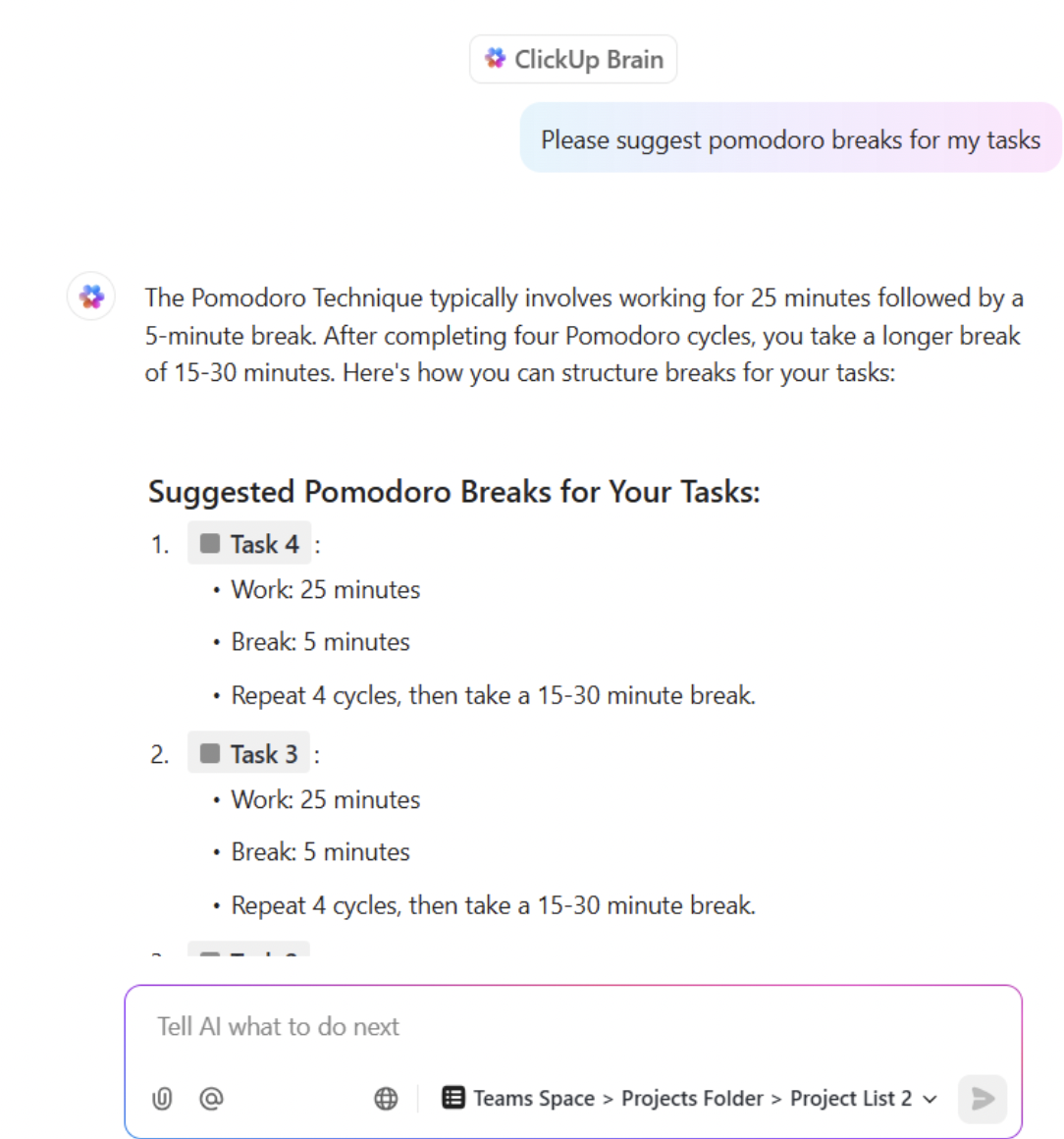
If you want to experiment with timing, let ClickUp Brain suggest customized work/break intervals based on your task type and time of day. Simply describe your focus goals in the Brain chat, and it will propose a Pomodoro rhythm that suits your flow.
The Pomodoro Technique is built on a deceptively simple idea: work in short, focused bursts and take regular breaks to maintain momentum.
But beneath that simplicity lies a crucial balance—measuring your time with clarity.
ClickUp’s built-in Time Tracking feature shows you exactly where your time goes, without needing a separate app or stopwatch.
You can start and stop timers directly from any task, whether you’re at your desk, on mobile, or using the Chrome extension. This feature makes it easy to jump into a 25-minute session without disrupting your flow.
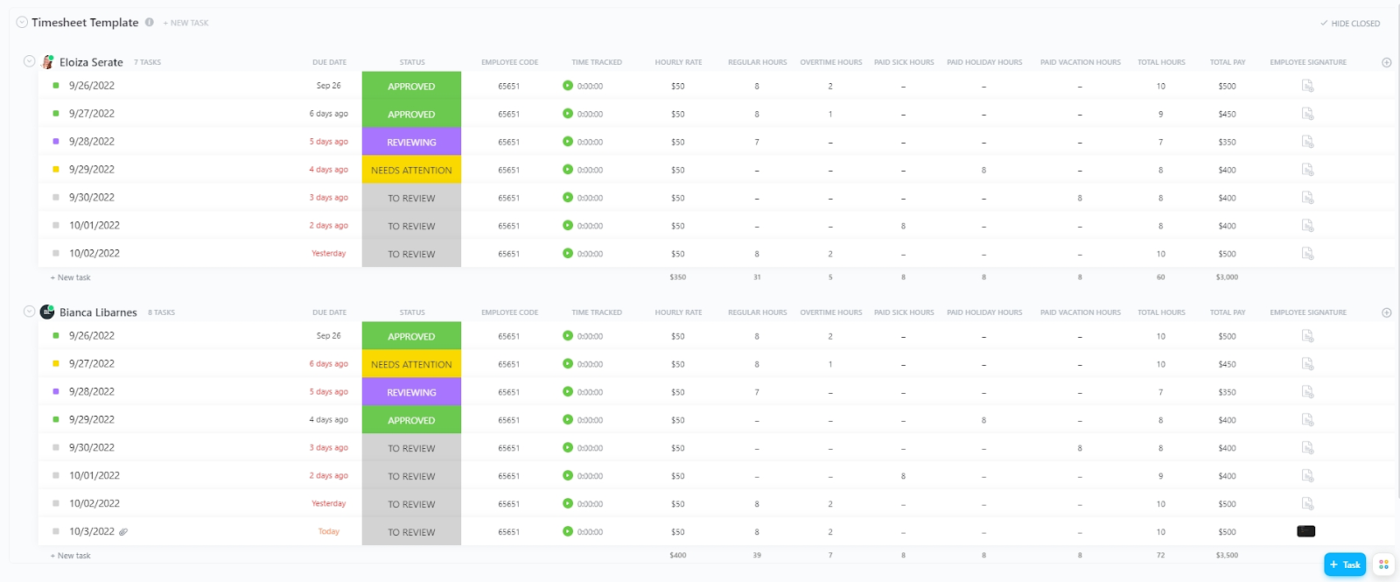
If you forget to track a session, no problem—ClickUp lets you manually log or adjust time entries afterward, so every Pomodoro counts.
Each time entry can be labeled, annotated, and even marked as billable if you’re working with clients.
Over time, your tracked sessions feed into visual timesheets and reports, helping you identify how long tasks actually take, where you’re spending too much effort, or when to tweak your routine.
💡 Pro Tip: Struggling to balance leadership and results? The One Minute Manager Summary breaks down timeless, bite-sized management lessons you can apply immediately—especially when paired with tools like ClickUp to put those insights into action.
Here are some tips on using Pomodoro timers sustainably and turning focus into a habit:
Here’s a list of additional aesthetic Pomodoro timers that didn’t make our top 10 list but are quite helpful with their unique features:
The Pomodoro Technique works because it’s simple and structured. By dividing your day into focused 25-minute sprints followed by short breaks, you give your brain the rhythm it needs to stay sharp.
ClickUp helps you break down goals into manageable Pomodoro-length tasks, track every session with built-in Time Tracking, and use AI to generate your ideal focus rhythm.
ClickUp brings everything into one cohesive, customizable workspace.
And sometimes, those little moments of celebration are exactly what you need to keep going. Sign up for ClickUp now!

© 2026 ClickUp

There’s an easier way. Try a free AI Agent in ClickUp that actually does the work for you—set up in minutes, save hours every week.