
8 Best Practices for Creating an Effective Social Media Workflow

Sorry, there were no results found for “”
Sorry, there were no results found for “”
Sorry, there were no results found for “”
The social media landscape is constantly evolving. What worked yesterday may not work today, and what works today may not work tomorrow. That’s why it’s important to have a social media workflow that you can rely on to keep your content strategy organized and effective.
There is no one-size-fits-all solution for every business, but there are some best practices that can help you create a social media workflow that works for you. Here are eight of them that you can implement to create a streamlined and successful social media workflow.
A social media workflow is a system for managing the creation, publication, and promotion of your social media posts. Managed by different members of the social media team, it includes all of the steps involved in creating, preparing, publishing, and promoting your content, from ideation to analysis.
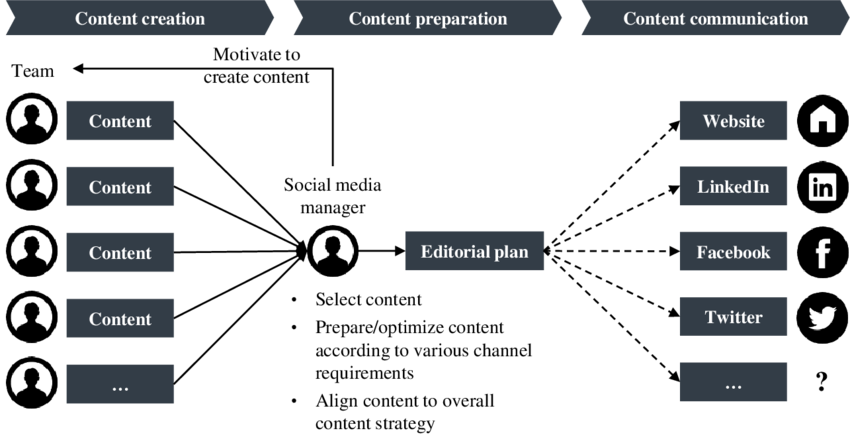
The best social media workflows are flexible and adaptable; they can be tweaked as needed to fit the changing landscape. They should also be easy to use and understand to help your team manage their social media tasks as efficiently as possible.
There are many benefits to having a social media workflow management, including:

Now, before digging into specific social media workflow practices, let’s go over a few general aspects to keep in mind to get you started:
Now that you have a general understanding of social media workflows, let’s dive into specific best practices for creating one that works for you and your team.
The first step in creating a social media workflow is to establish who will be involved and what their roles and responsibilities will be. This will help you ensure that everyone is on the same page and knows their role and contributions in the process.
Here are a few roles that can work together in social media management:
Not all of these roles will be relevant for every business, so you’ll need to tailor your team to fit your specific needs. Once you’ve established who will be involved, it’s time to start creating your social media content workflow.
Optimize your workflow with AI social media tools!
There are a few specific situations that you may need to consider when creating your social media workflow. Here are a few examples:
This section will cover the approval processes more than social media workflow per se, but it still warrants its own clarifications.
So, should HR and legal be involved in your workflow? It all depends on the size of the organization, the shared goals of your entire organization, and the scope of the content. If the goal of the content is employer branding, then HR should definitely be involved from the start due to their expertise and knowledge of the organization. Legal should step in to ensure that the content is copyright-safe and legally sound.
The next best practice involves planning. You should have initial ideas on what kind of content you want to post and know when to post them in a timely manner. This will help you stay organized, on track, and prepared.
To do this, you’ll need to create a content calendar. A social media calendar is a tool that helps you plan and schedule your content. It can be as simple as a spreadsheet or an online tool like Google Calendar or a Calendar view in ClickUp.
Use the ClickUp Content Management Template to create content calendar views across your marketing team. Give specific views for email, social, and the blog team to all use separately but also have insights into the complete content calendar.
We’ll dig into this later in the article, so for now, here are a few tips for creating a content calendar:
Social media strategies are created around a team’s workflow and not the other way around. Basically, you need to consider logistical aspects such as content creation, distribution, and monitoring before sketching a strategy. The reason is quite simple — by doing this, you’ll be able to create a strategy that is tailored to your team’s needs, strengths, and limitations.
The most basic example in this sense would be planning a visual-heavy content initiative without having the necessary bandwidth to support it. “Bandwidth” doesn’t necessarily mean X number of designers for Y amount of visual assets. Sadly, there’s no formula for this. It also means working with copywriters, editors, approvers, and so on. Remember the designer-copywriter symbiosis that I mentioned earlier? It plays a role here as well.
Now, as for some general tips for creating a social media strategy around your workflow, here’s what you should keep in mind:
For a good starting point, the image below shows some of the questions you could ask yourself when developing your social media strategy:
When it comes to social media, there are a lot of different platforms to choose from. Each platform has its own strengths and weaknesses, so before you start creating your social media content, you need to choose the right platform for your strategy.
Here are a few things to consider when choosing a social media platform:
This thought process will save you a lot of headaches in the long run. As tempting as it may be to be everywhere, there’s only so much high-quality content a team can produce. Don’t spread yourself too thin — focus on your team’s strengths and the places you know your target audience hangs out.
And now we get to one of the best parts of our blog *looks ahead and notices that there’s more than half an article to go* – social media publishing logistics!
One could say that scheduling posts are one of the pillars of a sturdy social media workflow, and for good reason. The most obvious one is that, by doing this, you’ll be able to ensure that your content is consistent and published regularly. Makes perfect sense, doesn’t it?

Now, while some platforms support content-scheduling natively, there is a strong case to be made for using a dedicated social media management tool like Planable. That’s because a scheduling tool allows you to schedule posts for all of your pages in one place instead of logging into each platform and doing this manually.
Additionally, scheduling your posts in advance is a great way to ensure that your content is consistent and published regularly. However, it’s important to remember that you should also be prepared to post in real-time *insert International Cat’s Day anecdote*.
So, how can Planable help you make the perfect workflow? In many ways, but let’s just focus on two for now: Planable’s approval system and collaboration features.
Planable comes with 4 approval workflows (None, Optional, Required, and Multi-Level) designed to fit teams of all sizes. This approval system ensures that no piece of content goes live before being 100% ready and that it reaches the relevant decision-makers before being released into the wild. It can make the difference between a post being stuck in approval limbo and being published on time.
Then there are the collaboration features. Because Planable mimics the feel and flow of social media, feedback is displayed right next to the posts that need attention in the form of comments and replies. There, you can tag team members and clients to share their thoughts and drop assets (visuals, copy, you name it).
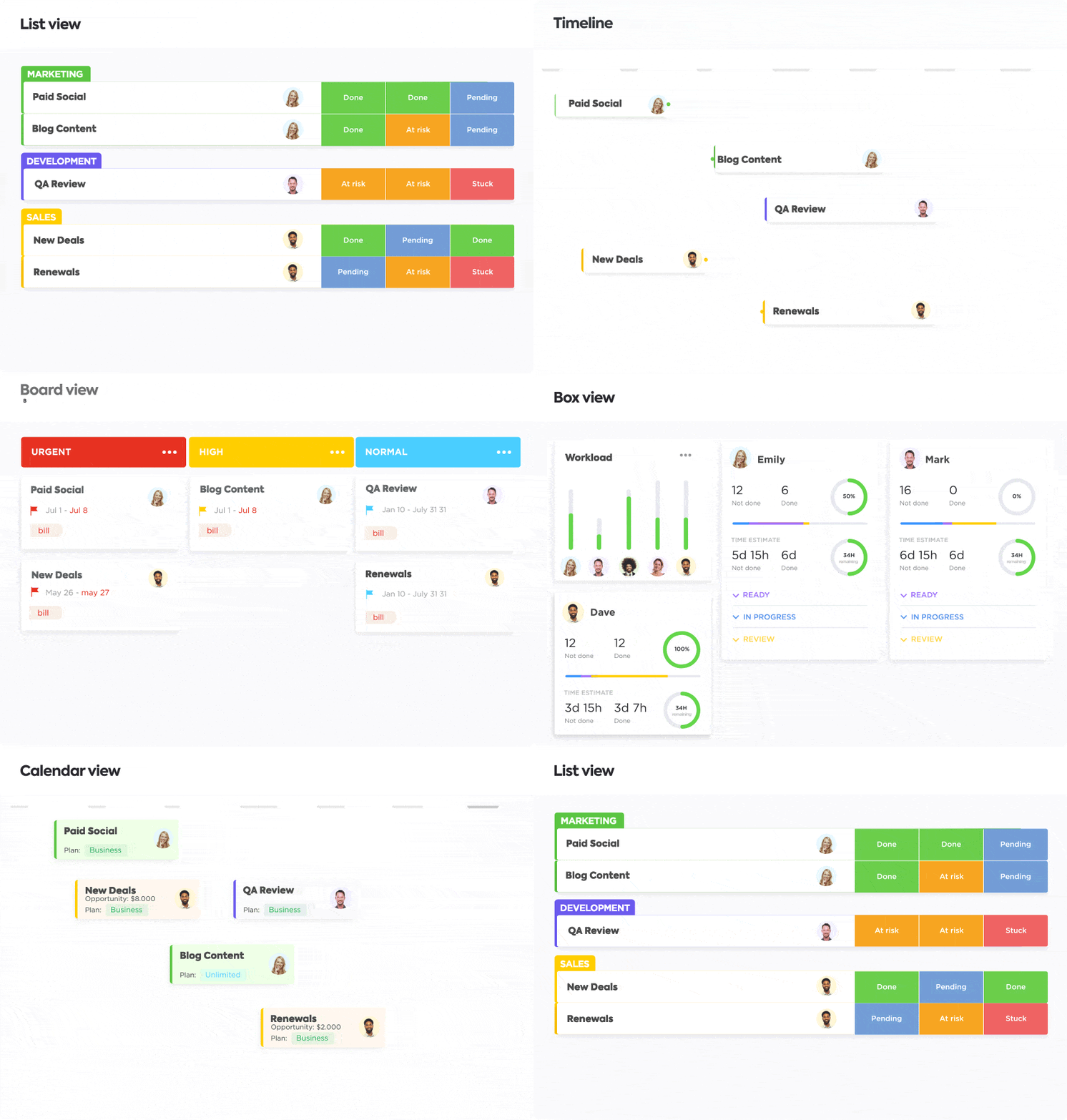
Another equally great tool to develop a streamlined social media team workflow is ClickUp. ClickUp is a project management tool that helps teams stay organized and efficient. It gives team members a place to track their work, communicate with each other, and collaborate on projects.
ClickUp also provides tools for managing deadlines, assigning tasks, and tracking progress. With its flexible features and intuitive interface, ClickUp makes it easy to manage any project, big or small. You could also use their ready-to-use and customizable templates to level up your current social media workflow. All in all, it’s a great tool to use in tandem with Planable to create a foolproof workflow for your team.
It’s important to have an approval process in place within your social media workflow. This is especially true if you’re working with a team. By having a consistent approval workflow, you’ll be able to ensure that all of your content is high-quality and on brand.
There are a few things to consider when creating an approval process:
The answer to this question will vary depending on your team and your goals. However, there are a few key people who should always be involved:
Regarding social media, it’s important to have clear posting guidelines. This is especially true if you’re working with a team. By having posting guidelines, you’ll be able to ensure that all of your content is high-quality, meets company policy, and exemplifies the brand’s tone.
Some things to consider when creating posting guidelines:
Alternatively, you could also consider a social media workflow diagram. The beauty of process diagrams is that they not only outline the tasks that make up a process (like a to-do list with a beginning and an end), but they can also help you visualize data and social media posts, decision-making journeys, and even key milestones in any given process.
Awesome, right?
And visualization is just one of many benefits. This documentation can help everyone involved understand the process and refer to it whenever necessary to speed things up.
A social media workflow is (and should always be) a vital part of any social media strategy.
Remember to establish clear roles, have clear guidelines, and always create your social media strategy around your workflow to the best of your ability. By following these practices coupled with social media workflow tools, you can ensure that your team delivers content fast without sacrificing quality.
More specifically, Planable’s firm focus on social media management and streamlining collaboration processes, as well as ClickUp’s social media project management features and templates.
Happy work flowing!

Marco Guiliani is a Content Marketer at Planable, with expertise in content writing, SEO, and copywriting.
© 2025 ClickUp




