


Sorry, there were no results found for “”
Sorry, there were no results found for “”
Sorry, there were no results found for “”
Automation applied to an efficient operation will magnify the efficiency.
Handling repetitive tasks like follow-ups, data entry, and status updates can eat into your team’s day, leaving little time for high-value work.
That’s why many businesses are turning to task automation software to simplify operations and improve efficiency across departments like HR, marketing, and finance.
In this blog post, we’ll explore 15 of the best task automation software options that can transform how you work, tackling everything from workflow bottlenecks to team communication hiccups.
Here are our top 15 recommendations for task automation software that make your (work)life easier:
Finding the right task automation software can feel like a big decision. With so many options out there, it helps to know what really matters. Let’s discuss the key features to consider so you can pick a tool that works for your team and goals. 👇
Now that you know what to look for, let’s explore the 15 best task automation tools to help streamline your work and boost productivity across your team. These solutions are tailored to make your daily tasks easier and more efficient. ⚙️
| Software | Best for | Standout feature | Free tier |
| ClickUp | Complete AI task and project management in one place | Custom workflows, task management, time tracking, and integrations | Available |
| Zapier | Automating workflows between apps | Connects 2,000+ apps, supports multi-step workflows, no coding required | Available |
| Microsoft Power Automate | Automating workflows for the Microsoft ecosystem | Deep integration with Microsoft apps, AI-based automation, advanced workflow design | Available |
| Asana | Project and task management | Task management, timelines, reporting, customizable templates, and integrations | Available |
| Trello | Visual project management | Kanban boards, Power-Ups (integrations), task automation | Available |
| Airtable | Flexible project and data management | Customizable databases, templates, and collaboration tools; integrates with hundreds of apps | Available |
| Integromat (Make) | Visual automation design | Advanced, no-code automations, detailed scenario builder, connect over 1,000 apps | Available |
| Automation Anywhere | Enterprise-level automation | Robotic Process Automation (RPA), AI integration, complex workflow automation | Not available |
| UiPath | Robotic process automation | AI-powered RPA, scalable bots, end-to-end automation in business operations | Available |
| IFTTT | Simple task automation | Applets that connect devices, apps, and services with 600+ services | Available |
| Wrike | Project management for teams | Task tracking, real-time collaboration, file sharing, and Gantt charts | Available |
| TimeHero | Time and task management | Smart scheduling, automated task prioritization, time tracking, and intelligent planning | Available |
| Kissflow | Workflow automation and business process management | Visual workflow builder, process management, integrations with multiple tools | Available |
| Motion | Personal productivity and scheduling | AI-driven task prioritization, smart calendar integration, auto-scheduling | Available |
| Monday.com | Team project and task management | Customizable dashboards, time tracking, reporting, automations, and integrations with multiple apps | Available |
Managing tasks can quickly become a headache, especially when repetitive work starts piling up. ClickUp, the everything app for work, makes it easier with AI-powered task automation that handles the busy work for you.
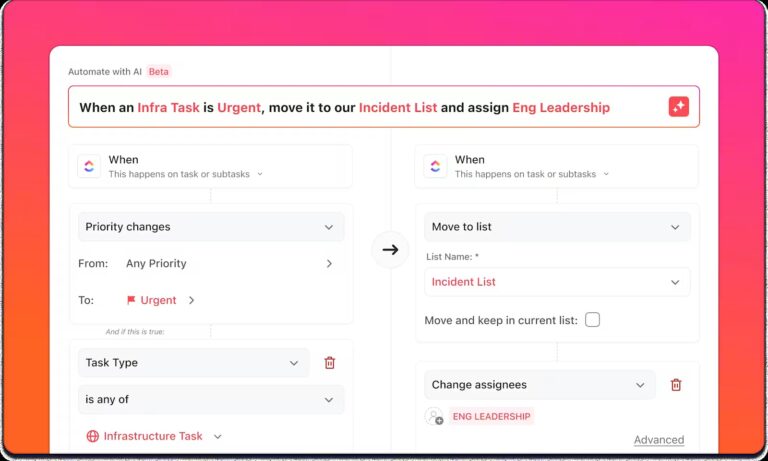
ClickUp Automations simplify repetitive tasks by allowing you to set custom rules. You can automate actions like task assignments, status updates, and follow-ups, making your workflows more efficient without the manual effort.
For example, you can set an automation to automatically assign ClickUp Tasks to specific team members once a project reaches a certain stage. If a task’s status changes to ‘In Progress,’ you can automatically trigger a reminder email to the person assigned.
The beauty of it is that once it’s set up, everything runs on autopilot, keeping your team focused on the bigger picture while ClickUp handles the routine work.

ClickUp’s NLP Automation Builder, powered by ClickUp Brain, an integrated AI assistant, makes automation simple and quick. Just tell it what you need in plain English, and the AI will automatically set up the workflow for you.
To any organization struggling with how to manage their projects, ClickUp will help in task collaboration. With this software, people can keep track of the to-do list items and work on those tasks within the stipulated time. It also helps the project management team to track the overall progress of the projects to ensure deadlines are kept.

Once you’ve set up Automations, you can take it a step further with ClickUp Chat to ensure your team stays in the loop. While Automations in ClickUp handle the heavy lifting by managing tasks and reminders, Chat keeps communication flowing in real time.
Instead of bouncing between emails or multiple messaging apps, Chat allows you to have real-time conversations directly in ClickUp. You can message team members, ask questions, or share updates on tasks without losing track of important information.
📮 ClickUp Insight: About 41% of professionals prefer instant messaging for team communication. Although it offers quick and efficient exchanges, messages are often spread across multiple channels, threads, or direct messages, making it harder to retrieve information later.
With an integrated solution like ClickUp Chat, your chat threads are mapped to specific projects and tasks, keeping your conversations in context and readily available. In Chat, conversations, tasks, and projects don’t just connect—they converge.
Personally, I really like ClickUp’s board view and its “Me Mode,” as it helps me stay aware of all my tasks at all times. I can also easily customize the columns to display only the ones I want, which is something I really love.
I also appreciate its automation feature (ClickUpBot). For example, if I forget some tasks from a previous sprint, it automatically adds them to my current sprint. It also helps automate task status updates.
Additionally, ClickUp provides excellent support. A couple of days ago, I got stuck on some issues, but I was able to find solutions easily through its forum.
🤝 Friendly Reminder: Automation isn’t a one-and-done process. Regularly test and refine your workflows to ensure they’re serving the team’s evolving needs.

Zapier is a no-code platform that simplifies workflow automation for businesses of all sizes. Connecting over 7,000 apps, it enables users to automate processes across tools without needing developers or IT support.
With Zapier, you can use AI to automate tasks, integrate third-party apps, and leverage enterprise-grade security.
🧠 Fun Fact: A task automation sequence that connects two or more apps via Zapier is called a Zap.
What I love about Zapier is the ease of use. Specifically, that even without coding skills, setting up “Zaps” (automated workflows) is intuitive and straightforward. The step-by-step guidance ensures a smooth setup for even complex automations. I also like being able to customize Zapier. I love the ability to tailor Zaps with filters, conditions, and multi-step actions allows for nuanced workflows that align perfectly with my needs.
If you’ve ever wished there was an easier way to automate repetitive processes without needing a background in coding, Microsoft Power Automate might be what you need.
It’s a low-code platform designed to help you automate workflows, connect apps, and optimize how your team works. With a mix of AI, RPA, and digital process automation (DPA), Power Automate makes even the most tedious processes more efficient.

Asana is a work management platform that connects tasks to strategic goals, facilitating team collaboration and progress tracking. It offers automation features, including rules for complex tasks based on triggers, and integrates with no-code platforms like Bardeen.ai.
The platform’s pre-built templates optimize workflows for various processes, making automation quick and efficient, while its AI-powered tools enhance clarity and accountability for businesses of all sizes.
🔍 Did You Know: Asana was co-founded by Dustin Moskovitz, one of Facebook’s co-founders. This connection to a tech giant has influenced Asana’s approach to efficient, user-friendly design and widespread collaborative capabilities.

Trello is a visually intuitive project management tool that uses boards, lists, and cards to organize and track tasks. Whether you’re managing daily workflows or scaling up to handle larger projects, Trello adapts effortlessly to your needs.
With built-in automation through its Butler feature, Trello allows you to rationalize repetitive tasks, ensuring teams focus on what truly matters. It also automatically updates linked cards across different boards when changes are made, keeping all teams aligned.
Trello has been the best tool to keep me and my coworkers organized with the many tasks that we do everyday. It is very customizable which allows any business to cater it to their own goals. My favorite features are task assignments, automation, and unlimited column creation.
🧠 Fun Fact: Trello was inspired by the Kanban philosophy, which originated in Toyota factories in the 1940s as a way to optimize workflows.

Airtable combines the simplicity of spreadsheets with the power of relational databases, making it an ideal platform for organizing and automating your workflows. Its no-code automation feature lets you create triggers and actions to save time and reduce errors.
Conditional logic supports dynamic workflows while running history and version tracking help monitor and adjust automations as needed.
Make helps individuals, teams, and enterprises design, build, and automate tasks, workflows, apps, and systems—all without coding. You can activate workflows with a single click.
If your focus is on marketing campaigns, IT automation, or leveraging Make integrations, it adapts to your needs, delivering speed and flexibility.
Make.com is a fantastic platform for building automations and no-code solutions. In our company, we often use it for creating prototypes of solutions that we later implement in native programming languages. The number of features it offers is astonishing—significantly more than most competitors. It’s a dream tool for developers, as it allows deep customization and flexibility.
🧠 Fun Fact: The first known automation device, the water clock, was invented by the Greeks around 300 BC to measure time without human intervention.
Automation Anywhere is an AI-powered platform combining automation, AI, and integrations to optimize enterprise workflows.
It simplifies complex processes, improves efficiency, and drives innovation by enabling users to automate tasks and extract key insights faster. The cloud-native architecture ensures scalability and flexibility for businesses of all sizes.
💡 Pro Tip: Keep an eye on how your automations are performing. Make adjustments if needed to improve efficiency or accuracy over time.

UiPath transforms business operations by seamlessly integrating RPA, AI, and cloud technology.
Additionally, UiPath’s advanced features, such as dynamic form creation and automated task assignments, empower teams to streamline processes, enhance collaboration, and focus on strategic initiatives that drive growth and innovation.
This solution It is easy to implement and use, enables you to automate the categorization system, some decision-making procedures, and other processes connected to new applicant hiring. With UiPath Automation Hub, people from throughout the business may contribute automation ideas, ensuring that automation potential are not confined to simply technical teams.
📖 Also Read: Best Office Automation Software

IFTTT (If This Then That) simplifies task management by connecting various apps, devices, and services. It allows users to create custom workflows, known as Applets, which automate repetitive tasks through a straightforward ‘if this, then that’ logic.
This tool connects over 900 apps, including Google Calendar, Slack, and Spotify, making it ideal for managing business workflows or automating smart home devices. Its AI-powered features enable content creation, meeting summaries, and advanced custom automations.
Overall, IFTTT is an excellent tool for automating a wide range of tasks. Its simple setup, vast range of applets, and ability to create custom applets make it a great choice for streamlining your digital life. The only downside is that it can be unreliable at times, and the range of services it can integrate with is limited. However, if you are willing to put up with these issues, IFTTT is a great tool for automation.
📖 Also Read: 10 IT Automation Software to Streamline IT Processes

Wrike is a project management platform designed to help teams stay organized, collaborate seamlessly, and track progress efficiently. Its features, such as automated task creation, conditional logic forms, and real-time updates, eliminate repetitive manual tasks.
Additionally, Wrike offers customizable dashboards to track progress and key metrics, along with integrations with over 400 apps to optimize data flows and automate alerts.

TimeHero is a smart task management tool that automatically plans and adjusts your daily tasks, projects, and recurring work based on availability. It dynamically creates schedules, ensuring timely task completion even amidst changing priorities.
The automation features include autonomous recurring tasks, smart workflow templates, and integrations with over 1,000 applications via Zapier, allowing for seamless task capture and efficient project management without constant manual adjustments.
🧠 Fun Fact: In 1495, Leonardo da Vinci sketched plans for an automated mechanical knight. It could sit, wave its arms, and even move its head.

Kissflow is a cloud-based business process automation tool designed to simplify process automation without requiring extensive coding skills. It lets you create and automate workflows by combining a visual editor with a drag-and-drop form builder.
Kissflow’s unique workflow orchestration capabilities make it a standout in our workflow automation software list, enabling teams to connect multiple siloed workflows and boost productivity and collaboration across the organization.
What stands out most about Kissflow for me is its ability to manage and automate different workflows according to a business process. For this reason, the design of the various workflows can be done easily, through the use of drag and drop, without requiring coding skills. Apparently, its integration with such tools as Google Workspace and Slack make the work with the data more comfortable and effective in case of our team. This integration and flexibility have hence been responded to with a marked enhancement of efficiency.

Motion uses artificial intelligence to enhance productivity by automatically planning, prioritizing, and adjusting tasks. It proactively alerts you about upcoming deadlines, even if tasks are weeks away, ensuring you stay ahead.
Additionally, Motion’s automation features include AI-driven task auto-scheduling, which optimizes your calendar by considering priorities and deadlines, and automated task reallocation, which lets you seamlessly adjust tasks when priorities shift without causing overwhelm.

Monday.com is a versatile task management platform that leverages automation to boost productivity and streamline workflows. Its no-code automation features allow users to easily create triggers and actions for managing tasks, deadlines, and team assignments.
Key features include status-based triggers, customizable workflow templates, and cross-board automations, all designed to reduce manual effort and simplify task management.
It has a very intuitive and visually appealing interface, which makes it easy to understand, allowing anyone to quickly learn how to use Monday. I enjoy using this tool because it enables real-time collaboration with my colleagues and allows me to automate tasks that need to be completed.
🔍 Did You Know? Monday.com wasn’t always called monday.com. It was initially launched under the name ‘dapulse,’ which was later changed to better reflect the tool’s mission to facilitate the start of the workweek and help teams achieve a productive week right from Monday.
Task automation software can significantly enhance productivity by streamlining workflows and eliminating repetitive tasks. With so many options available, it’s important to find the right solution that aligns with your team’s needs and business goals.
After evaluating some of the top options, ClickUp proves to be the best choice for many businesses. It’s an all-in-one platform that combines task management, AI-powered automation, and powerful collaboration features.
ClickUp allows you to automate everything from task assignments to status updates, integrate seamlessly with third-party apps, and customize workflows to suit your needs.
Sign up to ClickUp for free today and free up your day for meaningful work!

Arya P Dinesh
Max 27min read

Manasi Nair
Max 27min read
Manasi Nair
Max 32min read

© 2026 ClickUp





