



Sorry, there were no results found for “”
Sorry, there were no results found for “”
Sorry, there were no results found for “”
Worker productivity is a mythological creature in any organization—how do we know someone is actually productive? So, we created checkpoints, such as in-sync meetings, cubicle presence, timed lunch breaks, and 9-5 routines.
Times have changed, though. Synchronous, in-office work is no longer the only kind of work. Workers today seek more flexibility, not just in the hours they work, but also in the way they do.
As a business leader, manager, or HR professional, how can you implement asynchronous work strategies to help them? Let’s find out.
Asynchronous work refers to a style of work where employees complete tasks and communicate with colleagues on their own schedule, minus the pressure of real-time interaction or collaboration. It’s a flexible work arrangement that gives employees greater control of their workday.
Essentially, the working hours of each individual on the team don’t always synchronize with those of others, hence, this operating style is called asynchronous.
Working asynchronously doesn’t necessarily mean everyone on your team is a remote worker or that they’re in various parts of the world. It simply means that everyone has the freedom to design how, where, and when they work.
Working asynchronously is characterized by the following:
In short, asynchronous work decouples productivity from visibility and availability. As Tyler Gillespie, Founder and async worker, points out in his blog on asynchronous communication,
[Async work is] a testament to the fact that employees and team members are adults who do not need to be monitored or managed constantly.
The bottom line? You don’t need to sit in your cubicle to be seen as working!
📮 ClickUp Insight: 48% of employees say hybrid work is best for work-life balance. Yet, with 50% still working mostly in the office, staying aligned across locations can be a challenge. But ClickUp is built for all kinds of teams: remote, hybrid, async, and everything in between.
With ClickUp Chat & Assigned Comments, teams can quickly share updates, give feedback, and turn discussions into action—without endless meetings. Collaborate in real time via ClickUp Docs and ClickUp Whiteboards, assign tasks directly from comments, and keep everyone on the same page no matter where they work from!
💫 Real Results: STANLEY Security saw an 80% increase in teamwork satisfaction thanks to ClickUp’s seamless collaboration tools.
Asynchronous work decouples productivity from constant communication. Async communication helps get the job done in the least disruptive way possible without the need for an immediate response or reaction. In this style of working, colleagues come to respect each other’s autonomy and value workplace flexibility.
Well, how is it different from traditional work (which we call synchronous work)? Let’s find out.
Asynchronous and synchronous work are two operational models that differ primarily in terms of team members’ availability at a given time. Synchronous work is typically 9-5 when everyone is in the office or available online.
Asynchronous work occurs when teams set their goals and acceptance criteria together and then go away to do their part of the work in their own time and space. This difference manifests itself in various ways.
| Attribute | Asynchronous work | Synchronous work |
|---|---|---|
| Working model | Employees exercise both location and time independence | Even distributed teams collaborate in real time and work together |
| Communication | Through project management tools, emails, messaging, etc. | In-person or via live video/audio calls |
| Management | Highly self-managed | Managers play a big role |
| Response time | Collectively agreed by the team | Immediate response expected |
| Trust | High trust and autonomy | Low trust (with monitoring) |
Imagine an in-office situation: You clock in, pleasantries are over, and one colleague asks you to create a piece of content, a blog post for the website. You start working on it.
Knock knock; you are interrupted by another colleague passing by your desk who wants to discuss the monthly Google Analytics report. You peek at the numbers and do some mental math when…ping! Your manager wants you to take a quick call with them.
You reprioritize a few tasks and discuss some people issues on your team. Before you know it, it’s lunchtime.
Summary: While you have been busy, your original list of work remains untouched.
While this can occur in async work, too, the systems provide certain tactics and methods to prevent it.
Asynchronous work is a tap on the shoulder that remains suspended until you or your colleague log in or begin co-writing documents across different time zones.
📮ClickUp Insight: Context-switching is silently eating away at your team’s productivity. Our research shows that 42% of disruptions at work come from juggling platforms, managing emails, and jumping between meetings.
What if you could eliminate these costly interruptions? ClickUp unites your workflows (and chat) under a single, streamlined platform. Launch and manage your tasks from across chat, docs, whiteboards, and more—while AI-powered features keep the context connected, searchable, and manageable!
Does that mean all synchronous work is a productivity killer? Nope!
Not all synchronous communication is unnecessary. There are multiple cases where real-time collaboration is necessary to bring teams to the same page.
📚 Bonus Read: How asynchronous work changes collaboration
Synchronous work is best when real-time communication is essential, such as:
Asynchronous work is better when teams need the space to do focused work, such as:

💡 Pro Tip: Need help transitioning to async onboarding? Download ClickUp’s Employee Onboarding Template for free—it’s your one-stop resource for organizing an onboarding checklist, setting up meetings and tasks to introduce employees to their role, and managing training.
If you follow a model that combines the two, you can make your hybrid workplace communication more effective.
Now that we’ve understood what asynchronous work is and how it differs from traditional models, here’s how you can embrace it wholeheartedly.
In theory, asynchronous work is simple—let people manage themselves and their work in ways that are best suited to them. In practice, this can create chaos.
To implement asynchronous work seamlessly, you need people, processes, and technology that enable not just employees but also managers, HR, etc. Let’s see how you can leverage these best practices to ensure success.
You can’t get anything done if people don’t believe in and identify with it.
To enable async work, you need to know your audience’s pulse. You’ve got to get both leadership buy-in and assess what employees truly want.
Getting leadership buy-in for async work is all about connecting the dots between their goals (efficiency, productivity, culture, results) and the benefits of async.
Connect async work to outcomes leaders care about:
Use sentences like: “Async communication gives us more time to think clearly and respond with quality, without waiting on meeting slots.“
💡 Pro Tip: If you already use async tools (like ClickUp), highlight wins. For example, since switching to ClickUp, teams reported:
Leadership might be wary of another big shift. So, propose a pilot:
This lowers the perceived risk and gives them a taste of the upside.
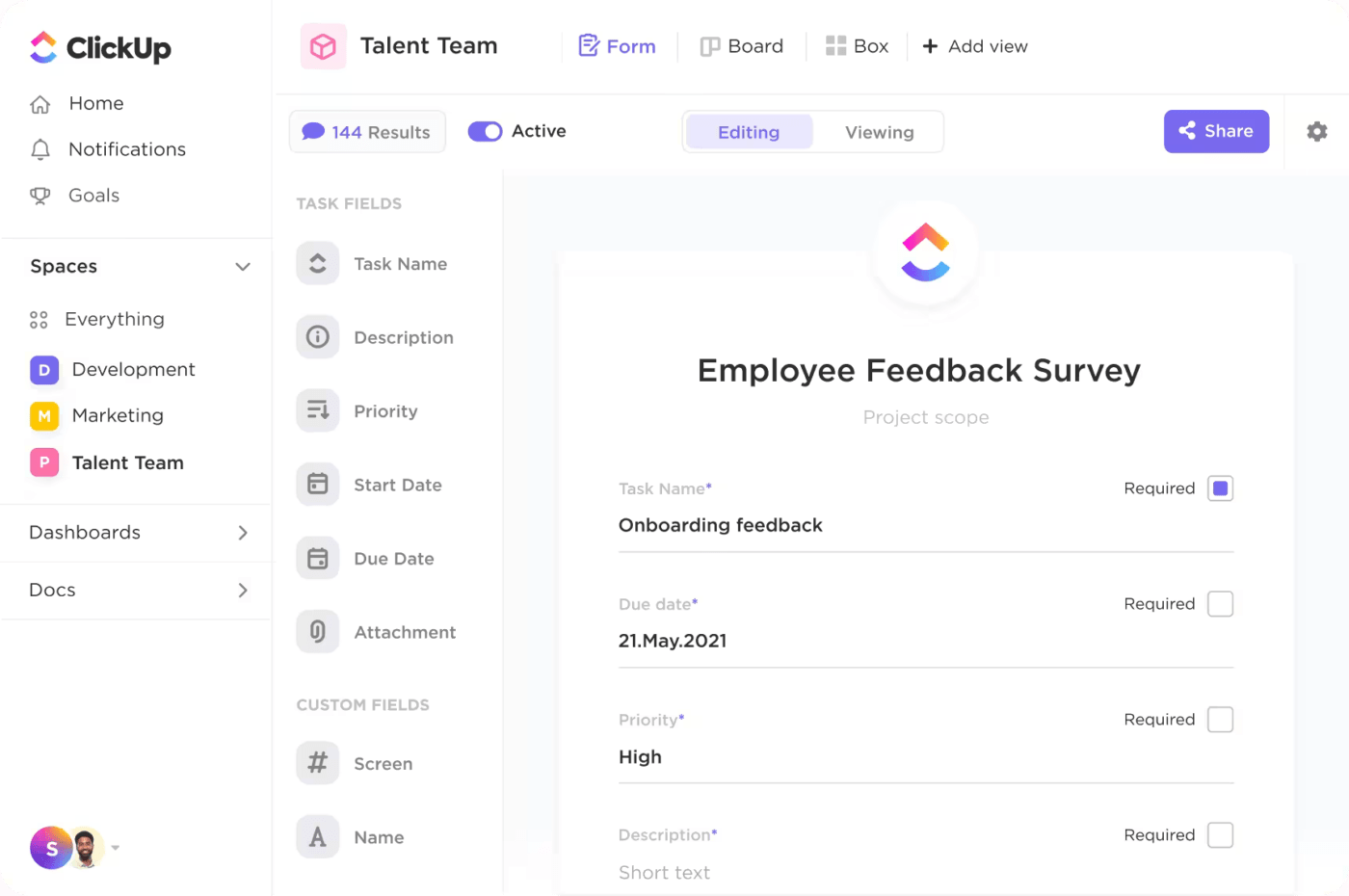
Then, identify the especially enthusiastic members of your team who will champion the cause among the rest of them. Empower them with the tools and processes needed to strengthen change management
Remote teams also need a common workplace, except it’s a virtual one. Enable a comprehensive, multi-faceted virtual workspace for your team. ClickUp’s all-in-one work platform for remote work gives you everything you need to power async work:
📮ClickUp Insight: Low-performing teams are 4 times more likely to juggle 15+ tools, while high-performing teams maintain efficiency by limiting their toolkit to 9 or fewer platforms. But how about using one platform?
As the everything app for work, ClickUp brings your tasks, projects, docs, wikis, chat, and calls under a single platform, complete with AI-powered workflows. Ready to work smarter? ClickUp works for every team, makes work visible, and allows you to focus on what matters while AI handles the rest.
Ensure that any system you set up enables async communication, idea exchange, and collaboration on action items.
ClickUp includes a number of asynchronous communication features as well. ClickUp Tasks offer nested comments for teams to debate/discuss ideas in context. ClickUp Whiteboards and Mind Maps make virtual collaboration both visual and effective by giving teams a shared canvas to brainstorm ideas, connect them to existing knowledge via ClickUp Docs, and even create actionable tasks for follow-up.

ClickUp Chat is purpose-built for asynchronous work, designed to keep conversations focused, actionable, and right where the work happens.
Instead of switching between messaging apps and task tools, teams can discuss projects directly within ClickUp—on the same page as their tasks, docs, and timelines. You can tag teammates, link to specific tasks or Docs, and even turn messages into action items with a single click.
Threads help keep discussions organized, while notifications ensure nothing gets missed, even if you’re hours apart. It’s real-time when you need it, async when you don’t.
When texting, especially among people who speak a different dialect or come from a different culture, your tone can be misunderstood. So, cut the Slack—ditch distracting chat apps and create communication opportunities across text, audio, video, and more.
For instance, ClickUp Clips allow you to share screen recordings instantly and offer voice-based feedback. Instead of making a video call (which needs common availability), you can create a video (with or without narration) so that the receiver can view it later.
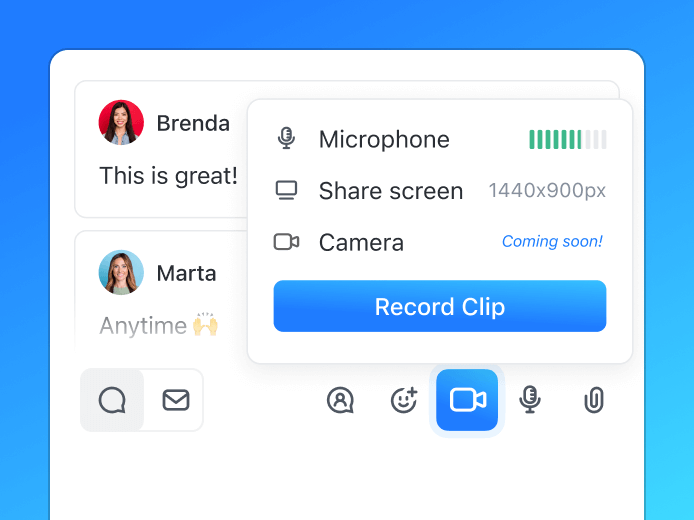
With Clips, you can also:
🎥 Learn how you can use ClickUp Brain, ClickUp’s native AI, to transcribe voice and video messages for async work here:
Bring the team together to set guardrails and expectations for each other. This might include making decisions on:
Create an asynchronous work charter for your team/organization on ClickUp Docs. Share with everyone relevant. Invite them to comment/give feedback. Evolve as you go along!

In an async work culture, overcommunication isn’t a bug—it’s a feature. Because you’re not relying on real-time conversations to fill in the blanks, being extra clear and detailed upfront helps prevent misunderstandings, delays, and rework.
Here’s how to overcommunicate effectively in an async work culture—without overwhelming your team
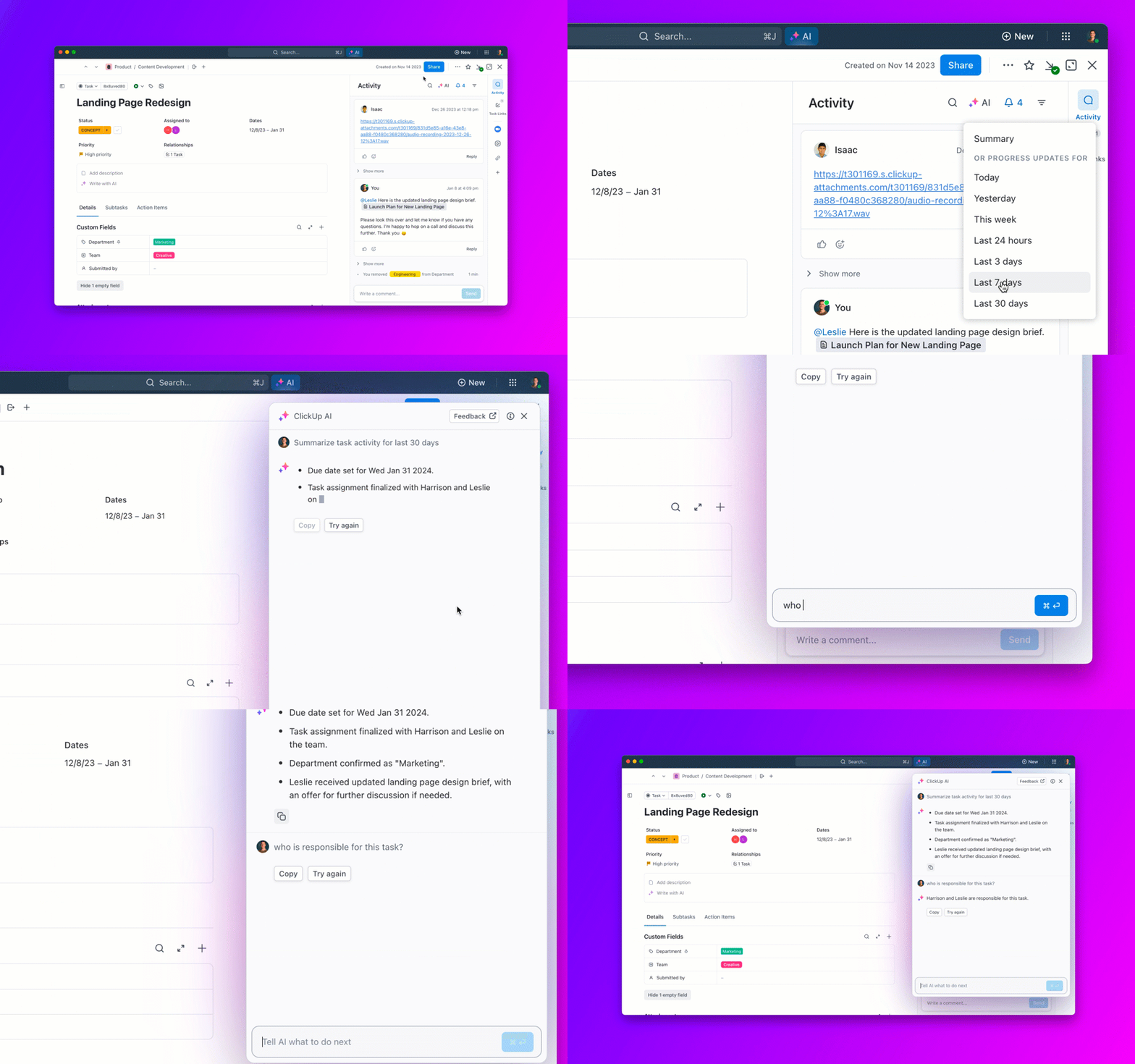
💡 Pro Tip: Use ClickUp Brain’s AI features to summarize lengthy documents or discussion threads in seconds, using simple prompts.
While teams might dislike being monitored on what they’re doing, when they’re working, etc., it helps the organization to track productivity. Encourage team members to:

Also track how much time goes in meetings, emails, chat messages, Slack huddles, etc. to measure the productivity impact of going asynchronous.
Groupthink, simply put, is an uncritical consensus on something because people want to avoid confrontation. This can be a bigger problem in remote teams because it is easier for those who disagree to just stay quiet.
To prevent this from occurring:
Most teams use several tools to accomplish their work. Effectively integrating your asynchronous communication tools makes work easier.
For instance, you might integrate Zoom with ClickUp to start calls directly from your project management platform. With Slack integration, you can notify specific people of a change in task status. Software teams integrate tools like GitHub, LambdaTest, etc., to make their workflows seamless.

Despite your best efforts, challenges are inevitable. Let’s see what you might face and how you can overcome them.
We’ve seen that asynchronous collaboration offers several benefits and is highly preferred by modern teams. However, in and of itself, async isn’t the best approach for all cases. Here’s why and how you can overcome such limitations.
Not working in the same physical environment might cause people to ping each other too often or demand too many meetings. This can defeat the very purpose of going async.
🔷 Solution
Build a culture of documentation in the organization. Encourage teams to record key ideas, thought processes, opinions, and more, so people can access them whenever they need to. Use this to create an asynchronous workflow that makes life easier for everyone in the long run.
📮ClickUp Insight: According to our meeting effectiveness survey, nearly 40% of respondents attend between 4 to 8+ meetings per week, with each meeting lasting up to an hour. This translates to a staggering amount of collective time dedicated to meetings across your organization.
What if you could reclaim that time? ClickUp’s integrated AI Notetaker can help you boost productivity by up to 30% through instant meeting summaries—while ClickUp Brain helps with automated task creation and streamlined workflows—turning hours of meetings into actionable insights.
Ever sent a “hi” and by the time the receiver responds, you’ve forgotten what you wanted? This can happen more often when teams work across time zones.
🔷 Solution
Isolation from being remote and not interacting face-to-face with peers can affect motivation. Body language and in-person energy play a key role in keeping morale high. Team members may lose their sense of purpose and alignment with organizational goals.
🔷 Solution
Include team engagement in managers’ key responsibility areas (KRAs). Include bonding and fun activities once in a while. (You may even ask your team member to share their cat photo—always works!)
Working remotely means that team members might not understand certain issues’ urgency or impact. For instance, a “priority one” ticket needs to be attended to immediately, which a flexible team might not have anyone available for.
🔷 Solution
Plan your flexible schedule to ensure your service level agreements (SLAs) are met. If you need team members available at certain times, outline that early and schedule accordingly.
Even as self-paced individualized learning is gaining popularity, it is often not the most effective. It is nearly impossible to document or transfer tacit knowledge within the work environment. Working in the same office helps model behaviors that can be difficult async.
🔷 Solution
Build action-oriented learning modules. Bring the teams together to learn from each other. Make lesson plans interactive. Don’t stop at the initial onboarding—create avenues to regularly train and retrain team members.
Business leaders and HR professionals can no longer avoid asynchronous work structures for several reasons.
🧠 Fun Fact: Around 98% of the workforce wants to work remotely, at least part-time.
GenZ employees are far more likely to engage in remote work, and the flexibility appeals to women in the workforce.
Several modern knowledge workers prefer to work as they travel. Some of the most specialized and highly paid skill sets are only available among those who want location and time independence. For them, asynchronous work and digital nomad tools become fundamental to effectiveness.
Until now, one full-time job has been performed by one person, who has been allotted a fixed number of days as paid leave. Today, employees want a lot more flexibility. They seek to take sabbaticals and long leaves to pursue other interests.
This has given rise to job sharing, which enables two employees to share the responsibility of a single full-time position. The practice is becoming common in law firms, where consultants divvy tasks according to urgency and take responsibility for specific tasks.
It helps employees share their work and time, ensuring someone covers the tasks. This flexibility also means less reliance on a single employee, minimizing bottlenecks due to dependencies.
Every organization is considering remote/hybrid work these days.
🧠 Fun Fact: AirBnB has a live and work anywhere policy. Internet search provider DuckDuckGo has employees in 15+ countries. And ClickUp also has a remote workforce with employees and offices in several countries, including the United States, Canada, Ireland, the United Kingdom, and Australia!
You need to be an asynchronous company to attract top talent in today’s competitive market.
Speaking of talent gaps, an organization comfortable with asynchronous work can hire from anywhere in the world. This can be cost-effective and reap significant benefits in the long run.
If that sounds attractive (or inevitable), here’s how to implement asynchronous work practices in your organization.
Naturally, asynchronous work demands a huge shift in the culture and emotional fabric of the entire organization.
Employees need to be self-managed, and managers need to be more trusting of employees they don’t see regularly or have never seen.
The expanding talent gap, especially in knowledge work, has forced managers to accept and encourage asynchronous work.
🧠 Fun Fact: 55% of employers prioritize hiring the best talent, even if that means recruiting employees who live in different countries. Simultaneously, 60% of employers admit to receiving higher-quality applicants ever since they moved to a distributed workforce system.
Whether you’re working synchronously or asynchronously, productivity is often mythical, like unicorns or Cheshire cats. In traditional work environments, the marker of productivity used to be visibility, being online, sitting in their cubicle, speaking up in meetings, etc.
In the asynchronous world, visibility takes a back seat. To make it functional, async teams need a radical new way to manage their work, communication, and performance.
ClickUp’s project management software is designed to enable precisely this. With whiteboards, mind maps, real-time chats, task management, documents, dashboards, and more, ClickUp will transform your team’s work—no matter where they’re located.
See for yourself. Try ClickUp today!

Manasi Nair
Max 23min read

Praburam Srinivasan
Max 13min read

© 2026 ClickUp






