
Sorry, there were no results found for “”
Sorry, there were no results found for “”
Sorry, there were no results found for “”
AI chatbots are making everyone’s life easier.
But two tools have entirely transformed people’s work: Google Gemini (previously Bard) and ChatGPT.
No one thought AI tools would become a solid part of our workday to the extent they already have.
And why not? An AI chatbot will take a lot off your plate—from doing academic research and writing emails to coding and composing songs!
Productivity hacks have a new name: AI.
The real question is: Is using artificial intelligence a novelty for organizations, or will it help people work smarter?
We will do an ultimate showdown between Google Gemini and ChatGPT for you to decide based on facts.
We also have a great third option for people who want more. So, stay with us till the end!
| Feature | Google Gemini | ChatGPT | ClickUp Brain |
| Core Purpose | Conversational assistant layered into Google ecosystem | General-purpose generative AI chatbot | AI engine built directly into ClickUp to support work, tasks, docs, and workflows |
| Real-Time Information | Yes — pulls live data from the web | Limited — depends on model browsing and training cutoff | No live web browsing; operates on workspace context and stored knowledge |
| Generative Writing Quality | Good for short-form, contextual, Google-style summaries | Strong long-form, creative, structured writing | Strong for work content: briefs, summaries, requirements, tasks, SOPs |
| Image Input | Yes — accepts images and gives contextual responses | Yes — image understanding in paid plans | Yes — understands images attached to tasks (workspace-contextual) |
| Voice Input | Yes (Assistant with Gemini) | Yes (new voice capabilities) | Not a voice assistant; text-based with in-workspace automation |
| Modifying Responses | Offers “Modify Response” options; multiple rewrite modes | Regenerate + feedback options | Rewrite, shorten, expand, and summarise with work-related accuracy |
| Integrations | Deep native integration with Google Workspace (Gmail, Drive, Maps, YouTube) | Integrates through API + Custom GPTs | Deep native integration with ClickUp tasks, docs, comments + third-party apps (GitHub, Slack, Figma, etc.) |
| Collaboration | Limited — mostly single-user conversations | Limited — mostly single-user conversations | Built for teams: collaborative Docs, task comments, assignments, summaries, automations |
| Data Context | Pulls context from Gmail, Docs, Maps, Drive (with permission) | Learns within a single session; no workspace memory | Reads entire workspace context: tasks, docs, conversations, threads |
| Accuracy for Work | Good for quick lookups and Google-linked summaries | Strong reasoning but occasional hallucinations, relies on training data | Modeled for factual, structured work output (requirements, summaries, checklists) |
| AI Customization | Gemini Extensions + Assistant overlay | Custom GPT creation | Workspace-aware AI that adapts to team workflows and terminology |
| Project/Task Management | None | None | Built-in task creation, assignment, dependencies, and reminders |
| Best For | Google Workspace users who need quick, contextual info | Users needing broad generative AI and creative capabilities | Teams needing AI embedded in their workflow to execute work, not just draft content |
| Pricing* | Free | Free + Paid Plans | Free; Paid from $7/user/mo + Brain add-on ($5/user/mo) |
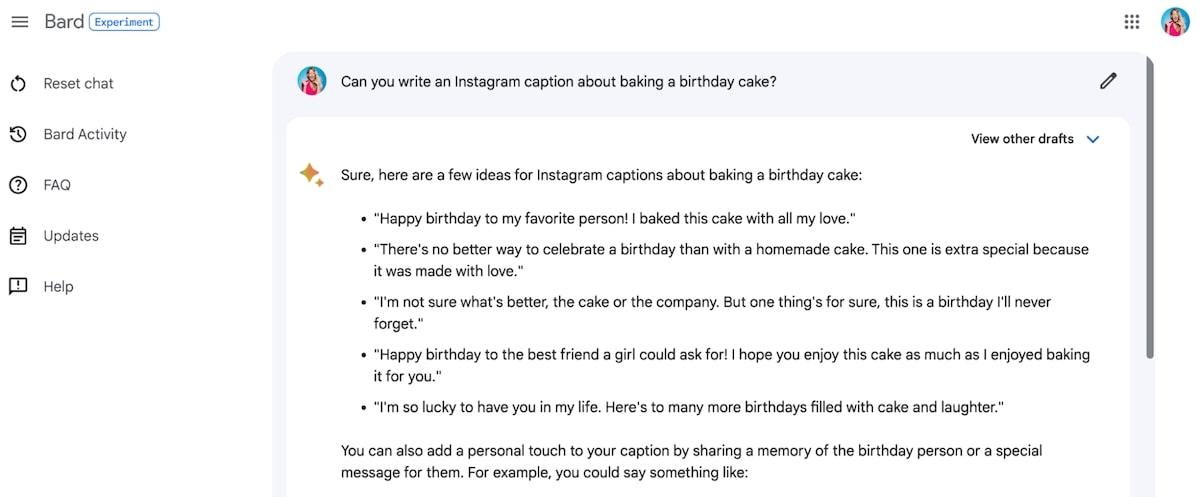
In February of 2023, Google released an artificial intelligence bot, Bard.
Experts claim Bard (now Gemini) is Google’s response to OpenAI’s ChatGPT.
Gemini is built on Google’s AI language model for dialogue applications (LaMDA).
According to Sundar Pichai, CEO of Google and Alphabet, Gemini is an experimental conversational AI service that answers questions and provides information like Google search in a refined manner.
He says: “The technology can combine the breadth of the world’s knowledge and draw on information from the web to provide fresh, high-quality responses.”
Interestingly, human reviewers assess Gemini’s conversations to improve the quality of responses.
Gemini’s strength lies in its ability to offer simple and contextual answers (as opposed to endless pages of web content).
The way Gemini retrieves information is what sets it apart from other AI chatbots.
It extracts data in real-time, having been trained in conversational data (instead of books, articles, etc.), making it a chattier chatbot than others.
Here’s a look at its top three features:
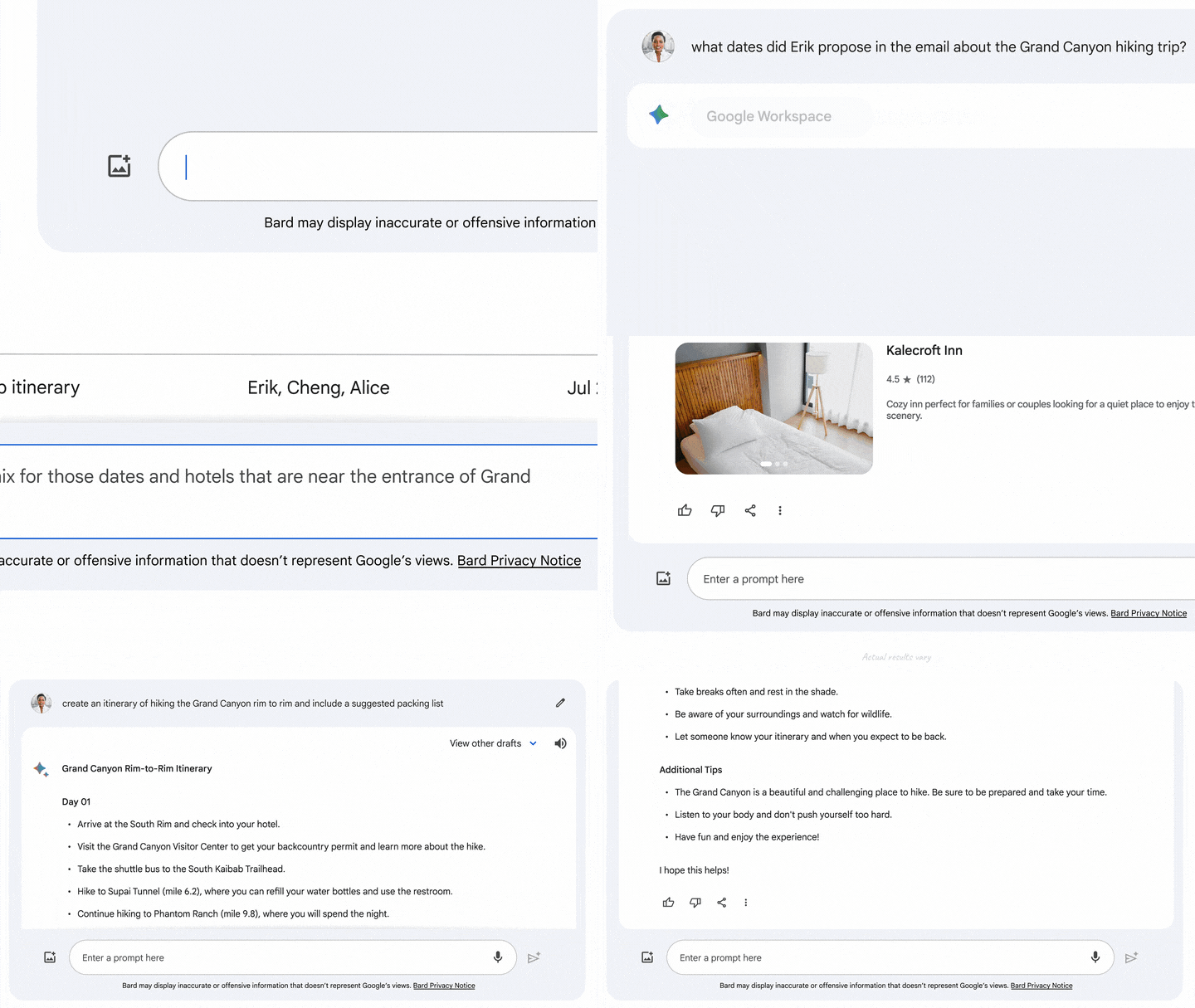
Google keeps upgrading Gemini’s features, with the latest one being—Gemini Extensions—a chatbot that pulls your information from Gmail, Google Docs, Google Maps, Google Drive accounts, and more.
For instance, let’s assume you plan to go to the Grand Canyon with your work team.
Instead of juggling multiple tabs and wasting time asking who’s free and when, let Google Gemini’s AI model take over.
This AI-powered tool will:
Google Gemini has also rolled out a new feature that may be particularly interesting to you: Assistant in Gemini. It is the marriage of a personalized assistant that will listen to you and a generative AI technology that will reason with and respond to you.
Use text, voice, or images to interact with this tool and get your personalized assistant.
Here’s an example of how helpful the Assistant in Google Gemini is:
Say you want to upload a pic of your puppy on social media. But you struggle with ‘smart’ captions.
Assistant with Gemini will help.
All you need to do is float the overlay on top of your photo and ask it to pen a quick social media post for you.

Assistant with Gemini will use the image as the primary visual cue and curate a contextual post for you.
This conversational overlay has a first-mover advantage, having never been tried by any brand before!
Gemini has also introduced another exciting feature with its ‘Google it’ button to double-check its answers quickly.
When you click on the ‘G’ icon after a result, Gemini reviews the response and evaluates if there is similar content across the web to substantiate it.

To get insights into similar content by Google Search, click the highlighted phrases.
Share a Gemini chat with a public link to continue the conversation with someone else. The person you share it with can ask Gemini additional questions about that topic and build on the exchange.
While Google Gemini stands out with its unique features and extensive real-time information capabilities, it’s important to address the limitations that users might face. Understanding these constraints adds a layer of transparency and helps users set realistic expectations. Here are a few Google Gemini limitations to consider:

Released in November 2022, ChatGPT is OpenAI’s AI-powered chatbot that answers questions and prompts in any format you want.
ChatGPT’s superpower is that despite being an artificial intelligence tool, it carries out human-like conversations.
Moreover, this generative AI tool does what only humans have been capable of doing until now—creative thinking.
Want to have a voice conversation or show ChatGPT what you’re talking about? Well, now it’s possible.
ChatGPT is rolling out new voice and image capabilities, offering a more intuitive interface type.
Say you’re at home and want to know what to make for dinner.
You only need to snap a picture of your fridge and pantry to get suggestions! Ask follow-up questions for a step-by-step recipe!

If you think ChatGPT does not offer personalized inputs, the platform’s new GPTs update will surprise you.
You can now create your custom version of ChatGPT for any specific purpose in your daily life—and share said creation with others:
For example, GPTs help teach your kid math or even design stickers, for that matter.
Test drive the platform to see for yourself!
The platform has also made initiating a new conversation slightly less intimidating, thanks to the introduction of ‘Prompt Examples.’
So now, instead of staring at the blank space, use sample AI prompt templates at the beginning of a chat to drive engaging and meaningful conversations.
Despite the impressive capabilities that ChatGPT brings to the table, it has its limitations. Understanding these limitations is crucial for users to set realistic expectations and find workarounds for their specific needs. Here’s a look at some of the notable limitations of ChatGPT:
We’ve covered ChatGPT and Google Gemini’s unique features to make your life easier.
But let’s address the elephant in the room: ‘Is one better than the other?’
Read on to explore a few critical differences between ChatGPT and Google Gemini and understand if there is a clear winner.
Gemini doesn’t boast the same generative AI capabilities as ChatGPT.
Let’s see what these AI tools show when I write the prompt, ‘Write an essay on why we feel sad about Matthew Perry dying.’
First up, we have Gemini’s response:

While Gemini’s goal (at least at the moment) is to support Google search, it also writes creatively for you. The conclusive message on mental health towards the end is an excellent addition to the essay, which differs from the ChatGPT version.
ChatGPT, too, does a great job of delivering a high-quality essay that doesn’t stray off the path.

The verdict: It is a tie when it comes to evaluating the generative AI capabilities of both ChatGPT and Google Gemini.
One of the key differences between Google Gemini and ChatGPT is the type of Large Language Models (LLMs) they employ.
While Gemini is on the PaLM 2 architecture, ChatGPT is on the Transformer architecture.
But what does this mean for a user like you and me?
ChatGPT’s research stems from feeding training data into the system. Naturally, the research quickly becomes dated.
Gemini, in contrast, scours web pages in real-time, making the conversations more relevant to ensure more up to date answers.
Our verdict: Gemini has the upper hand for the latest information, given its training model.

Google Gemini allows users to modify the response by the tool and offers many options for the same.
The AI chatbot also enables you to upload image attachments.
Both these features are not available on the free version of ChatGPT. However, ChatGPT allows you to give feedback on the response and regenerate it.
Our verdict: Both ChatGPT and Google Gemini give users some options regarding making changes to the response quality. So, it would be a tie.
In terms of integrations, Google Gemini’s extensions offer more convenience as they are tailored for common Google tools that people use every day.
On the other hand, ChatGPT offers unique custom versions (GPTs) to suit personal needs. It also allows image and voice inputs.
Our verdict: ChatGPT has an edge for offering custom versions, but Google Gemini’s extensions are a massive source of help to most users who work with multiple Google tools.
When evaluating Google Gemini and ChatGPT, considering the user experience and ease of accessibility is critical. Google Gemini seamlessly integrates with all other Google apps, making it inherently more accessible for users already within the Google ecosystem. Its intuitive interface and conversational overlay make it easy for users of all levels of technological proficiency to engage with Gemini.
ChatGPT, while not directly integrated with specific platforms, is known for its responsive and straightforward user interface. Its capability to understand and generate human-like text across various topics makes it accessible and valuable to a broad audience. ChatGPT’s introduction of voice and image capabilities also significantly enhances its accessibility, catering to users who prefer audio-visual interactions over text.
Our verdict: For Google Workspace users, Gemini may offer a more seamless experience. However, ChatGPT’s versatile and user-friendly interface, coupled with its innovative voice and image features, makes it highly accessible and appealing to a wide range of users, marking this category as a tie.
Let’s turn to Reddit to see what users say about ChatGPT Vs. Google Gemini rivalry.
When you search Google Gemini Vs. ChatGPT on Reddit, you’ll see polarizing opinions on both.
Some users say, “Google might have a scale advantage in data and compute.” Plus, another user notes, “The fact that LaMDA isn’t a static model and is constantly updating itself is a massive advantage over GPT-3.5.”
But not all scales tip in favor of Gemini.
Some users feel that ChatGPT’s responses provide more quality and accurracy as compared to Gemini.
Here’s an interesting distinction a user makes that might be worth looking into:
“For looking up current information, Gemini is a mile better than ChatGPT with browsing. The “with browsing” implementation in Bing and ChatGPT is absolutely terrible. I’m presuming Google can leverage cached search queries to return current information much more quickly. Gemini also does a much better job of formatting responses, it includes pictures etc., and it’s faster.
However, Google Gemini provides a lot of fake/unreliable information, IMO more than ChatGPT does. And I don’t think it’s as good at the “other” sorts of “write me a poem” kinds of tasks. So personally I think this is now a 2-way race. ChatGPT for raw capability of the model, Gemini for current info lookup and usability in general.”
I tried using Google Gemini and ChatGPT to spin a blog on its comparative features.
However, both AI tools need more regarding factual accuracy and verified research.
AI is still evolving in the new-age battle of Google Gemini vs ChatGPT alternatives.
Luckily, a third option is a better natural fit for your AI chatbot needs: ClickUp Brain.
Instead of streamlining workflows, spend your time ideating, creating, and doing things a machine will not do.
And ClickUp Brain cuts your workflow time in half. Tailor this AI-powered assistant to any role of your choosing.
It comprises hundreds of research-backed AI tools for every function and use case—from project management and customer support to product engineering and marketing.

For instance, get a personal copy editor who will work on your writing to make it clearer, more concise, and more engaging.
You don’t need to invest in separate AI writing tools to get the job done.
Use pre-structured headers, tables, etc., to structure your content better. All in all, ClickUp is one of the best AI content generators in the market that focuses on content quality, accuracy, and relevance.
📮 ClickUp Insight: 92% of knowledge workers risk losing important decisions scattered across chat, email, and spreadsheets.
According to research, critical business insights get lost in the digital noise without a unified system for capturing and tracking decisions. With ClickUp, you never have to worry about this. Create tasks from chat, task comments, docs, and emails with a single click!
ClickUp Brain has advanced summarising capabilities. See a long comments thread on a task? Use ClickUp Brain to summarise the whole thread for you in seconds so you grasp the context immediately.
Just got off a long customer meeting. Get to the critical action points sooner with ClickUp Brain.
Creating wikis, Docs, etc., is one part of the equation, but mapping it to your workflows and allowing the team to work on it together is equally important. ClickUp Docs does this and more.

Features like nested pages and styling options take your Doc to the next level.
With ClickUp Docs, embed bookmarks and add tables to roadmaps, knowledge bases, and other documents.
Using Google Docs, edit with the team in real-time, tag comments like you’d tag on Instagram or Facebook, assign action items, and more.
Organizing tasks are the foundation for successful projects. Use ClickUp Tasks to assign tasks to multiple assignees and add comment threads for different tasks.
Save time with shareable screen recordings and leave little to no chance for errors
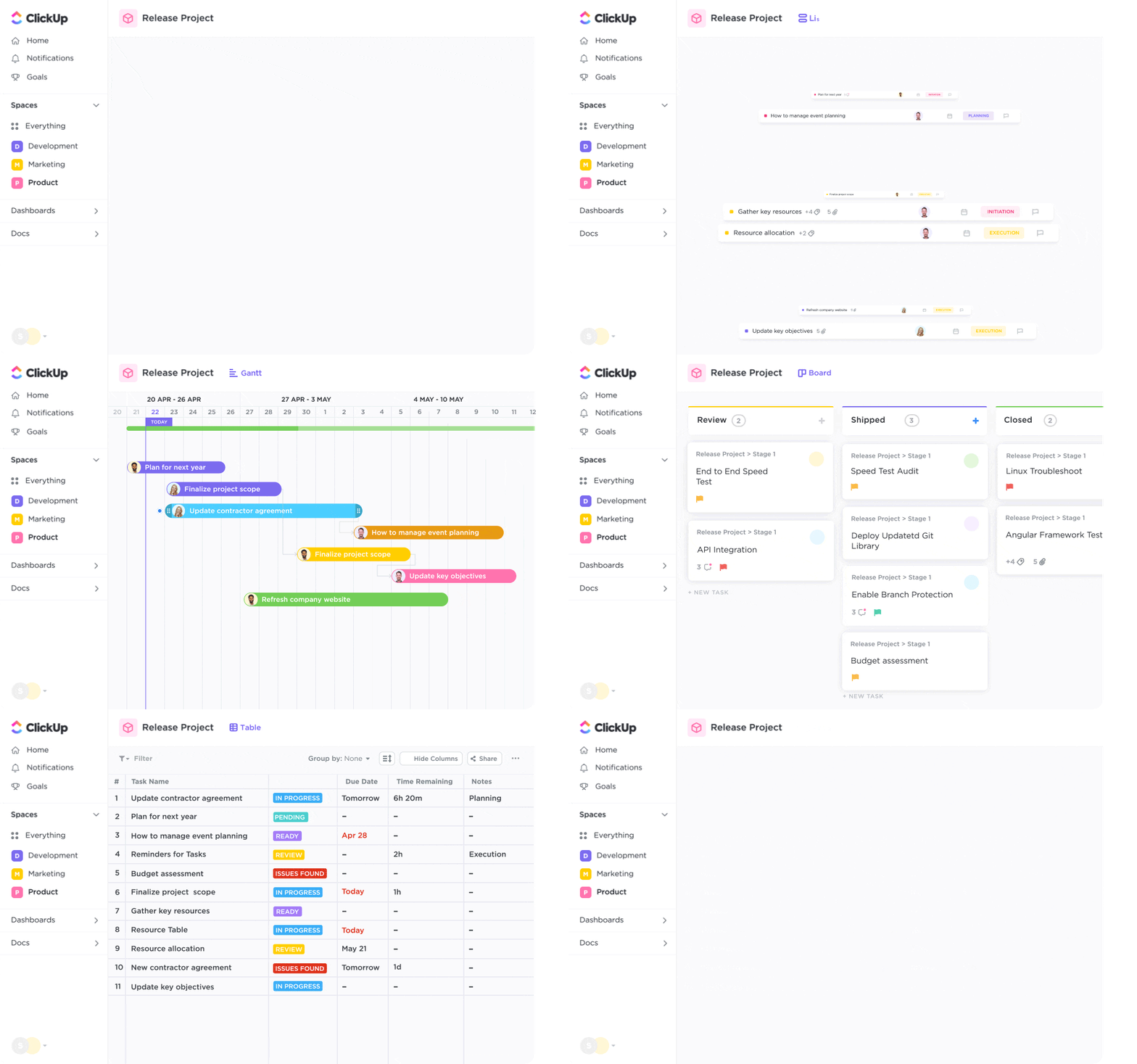
But ClickUp Tasks is not unidimensional—it lets you customize subtasks and surface the information you need at your fingertips!
Customize your Workspace and manage work while defining task types your team understands best.
Try all these features for free and supercharge your productivity.
ClickUp’s AI chatbot automates every aspect of your work so that you can focus on what truly matters—your customers.
Instead of toggling between AI project management tools, designing apps, and content creation apps, get everything together with ClickUp. You get the added advantage of simple navigation across various tools and effective collaboration between multiple teams.
Sign up for ClickUp’s Free Forever Plan to see how ClickUp Brain supercharges your productivity 10x.

Arya Dinesh
Max 22min read

Manasi Nair
Max 27min read

Praburam Srinivasan
Max 25min read

© 2026 ClickUp