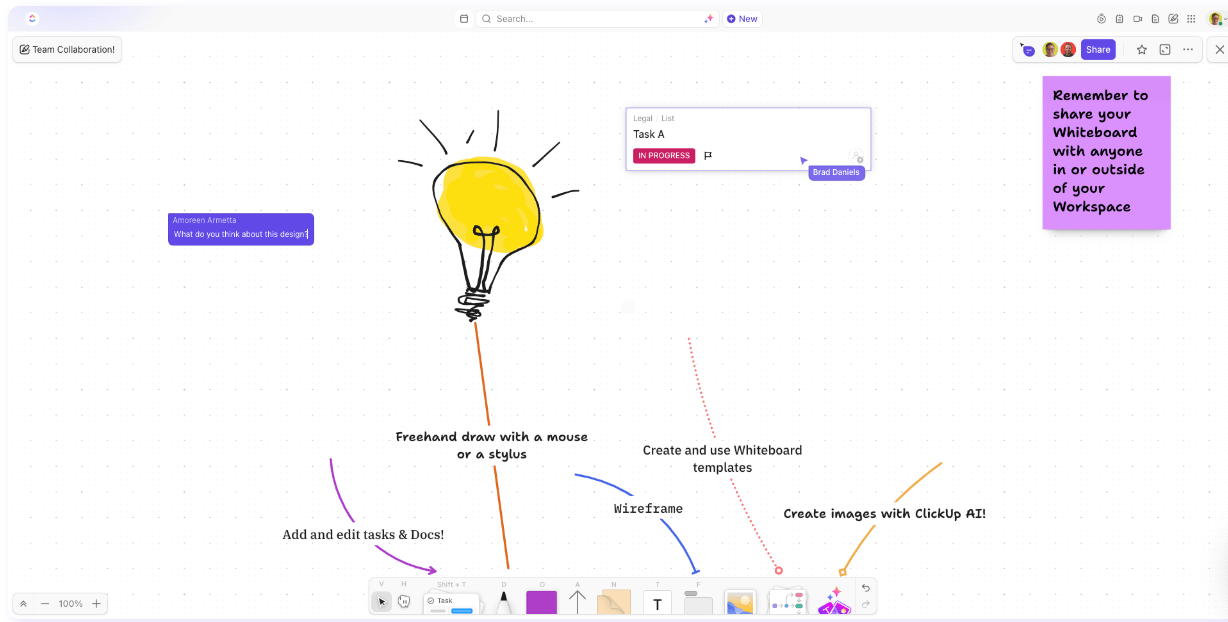

Sorry, there were no results found for “”
Sorry, there were no results found for “”
Sorry, there were no results found for “”
If all you have is a spreadsheet, you’ll be forced to think in rows and columns.
This concept applies to any tool you use. Imagine jotting down information—ideas, meeting minutes, or notes from a brainstorming session.
If you’re using a Google Doc, you’ll write in bullet points. If you’re using stickie notes, you’ll write down pithy phrases or sentences. On a whiteboard, you’ll likely draw a diagram. Essentially, the tools you use subconsciously influence your thought process.
So, choosing the right tool for your ideation and brainstorming sessions is critical, especially when collaborating with a remote team, with each team member working from their own environment. Virtual idea boards offer the perfect solution. Let’s explore how.
An idea board is a visual representation of ideas, inspiration, and thoughts. It is a collaborative tool used to bring together various team members to map out their input, whether you’re brainstorming, problem-solving, or scenario planning.
✨No need to waste time staring at a blank canvas. ClickUp’s Mood Board Templates give your team an instant starting point to brainstorm, collect inspiration, align ideas, and bring creative visions to life.✨
To create an idea board, begin by defining its purpose—whether it’s for brainstorming, planning, or visual inspiration. Collect relevant materials like images, notes, links, or sketches. Organize them on a physical or digital board using categories or themes for clarity. Invite team members to contribute, offer feedback, and evolve the ideas collaboratively. Once the board takes shape, translate the best ideas into action by building a plan, timeline, or project roadmap.
A typical idea board enables teams to:
The physical form of an idea board can be anything like glass walls, easel boards, blackboards, presentation software, or a digital whiteboard. However, there are some approaches that best serve specific purposes. Let’s explore the different types of idea boards.
A brainstorming idea board is a typical whiteboard, with space to add anything you need, such as:
For example, if your content team is short of ideas for upcoming blog posts, you can use an idea board to do some brainwriting. Everyone can write down their content ideas for a few minutes without unnecessary filters or self-doubt. Then, they pass it on to the next person to add to or refine.
📮ClickUp Insight: 11% of our respondents leverage AI primarily for brainstorming and ideation. But what happens to these brilliant ideas afterward? This is where you need an AI-powered whiteboard, like ClickUp Whiteboards, which helps you instantly turn ideas from the brainstorming session into tasks.
And if you can’t quite explain a concept, simply ask the AI image generator to create a visual based on your prompt. It’s the everything app for work that enables you to ideate, visualize, and execute faster!
You can also adapt this brainstorming technique to solve problems as well. Reverse brainstorming is useful when the team knows the problem but not the solution. This helps explore the various reasons the problem could occur and then list ways to solve it.
A flow chart visualizes processes— whether a customer journey or a technical data pipeline. It helps map out every step in the process, along with the direction of flow and branches. Flow charts are handy for complex processes with multiple points of decision.
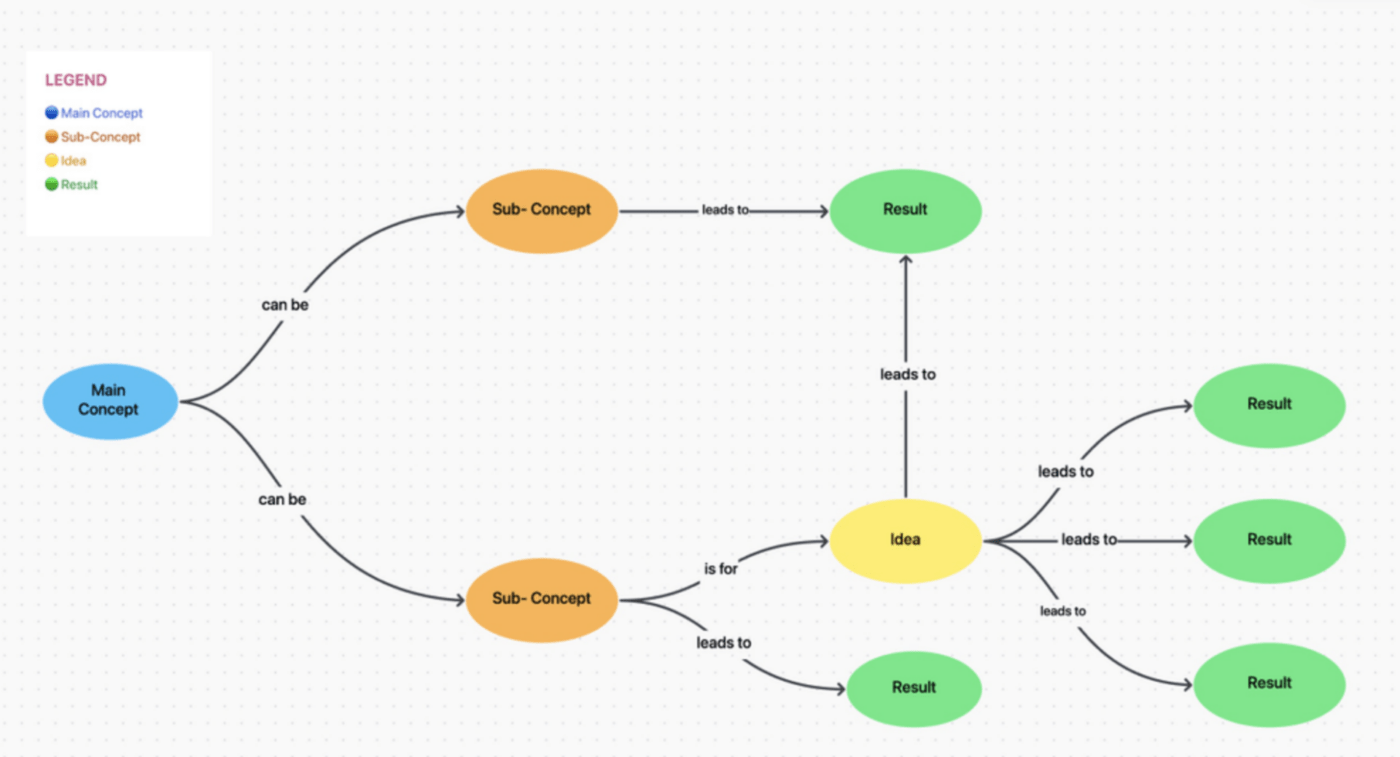
A concept map simplifies complex ideas by breaking them down into smaller pieces and showing how these combine to form a whole.
For example, if you’re exploring the concept of database design for your next product, you might include sub-concepts such as tables, relationships, and data quality, further breaking them down into parameters that define them.
Also Read: 12 Best Mind Mapping Software
The 2×2 matrix is a popular decision support tool teams and leaders use. On a 2×2 matrix, you can plot your options/statuses and prioritize creative ideas effectively. The Eisenhower matrix, for instance, is popular and plots tasks based on urgency and importance. You might prioritize tasks on a 2×2 matrix, as shown below.

Mood boards are used when the visual element plays a much larger role than everything else. It is typically less about taking specific action than finding the right inspiration or feel for a project.
For instance, architects use mood boards as starting points for space design. Visual/UI designers use mood boards to identify styles for colors, icons, illustrations, typography, etc. Event management teams use mood boards to identify themes.
You can also save time and effort with mood board templates.
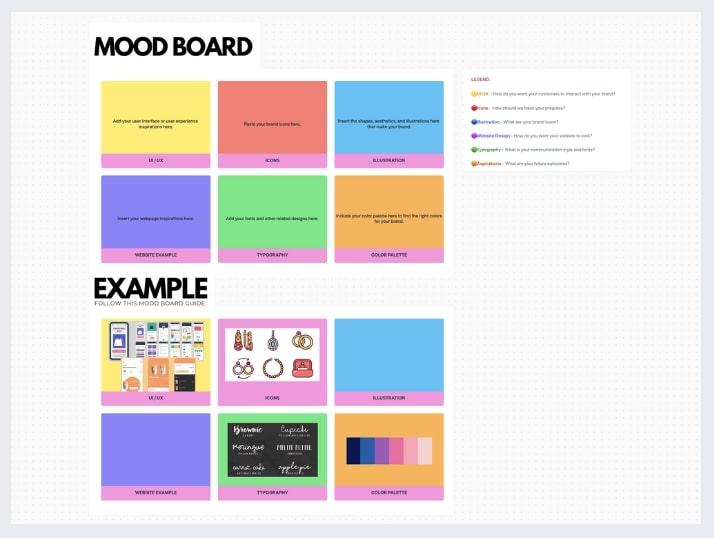
A vision board is a visualization of the end game. For a product team, this might be the view of what a completed product might look like or what goals will have been achieved.
A UX vision board might bring together images representing how users feel when using the product. ClickUp offers several vision board templates for you to choose from.
When teams have too many ideas and thoughts going around in their head without direction or action, an idea board offers them the perfect launch pad. It captures and streamlines good ideas to make them actionable. Here’s how.
When everyone throws their thoughts onto an idea board, you’ll most likely encounter some innovative ideas. This is important because it encourages team members to think radically, exploring solutions otherwise considered foolhardy.
While you might or might not implement all of them, it gives teams the freedom to think outside the box.
Complex problems need radical ideas and solutions but also a simple way to organize and execute them. An idea board supports collaboration, enabling teams to collate ideas, evaluate them, share feedback, debate possibilities, explore requirements and dependencies, assign tasks, and take responsibilities all in one place.
It visually does all this, enhancing comprehension and recall.
A good idea board gives project managers a structured and scalable foundation to streamline their operations for faster delivery and better customer experience. A kanban board is an excellent example of an idea board used in project management.
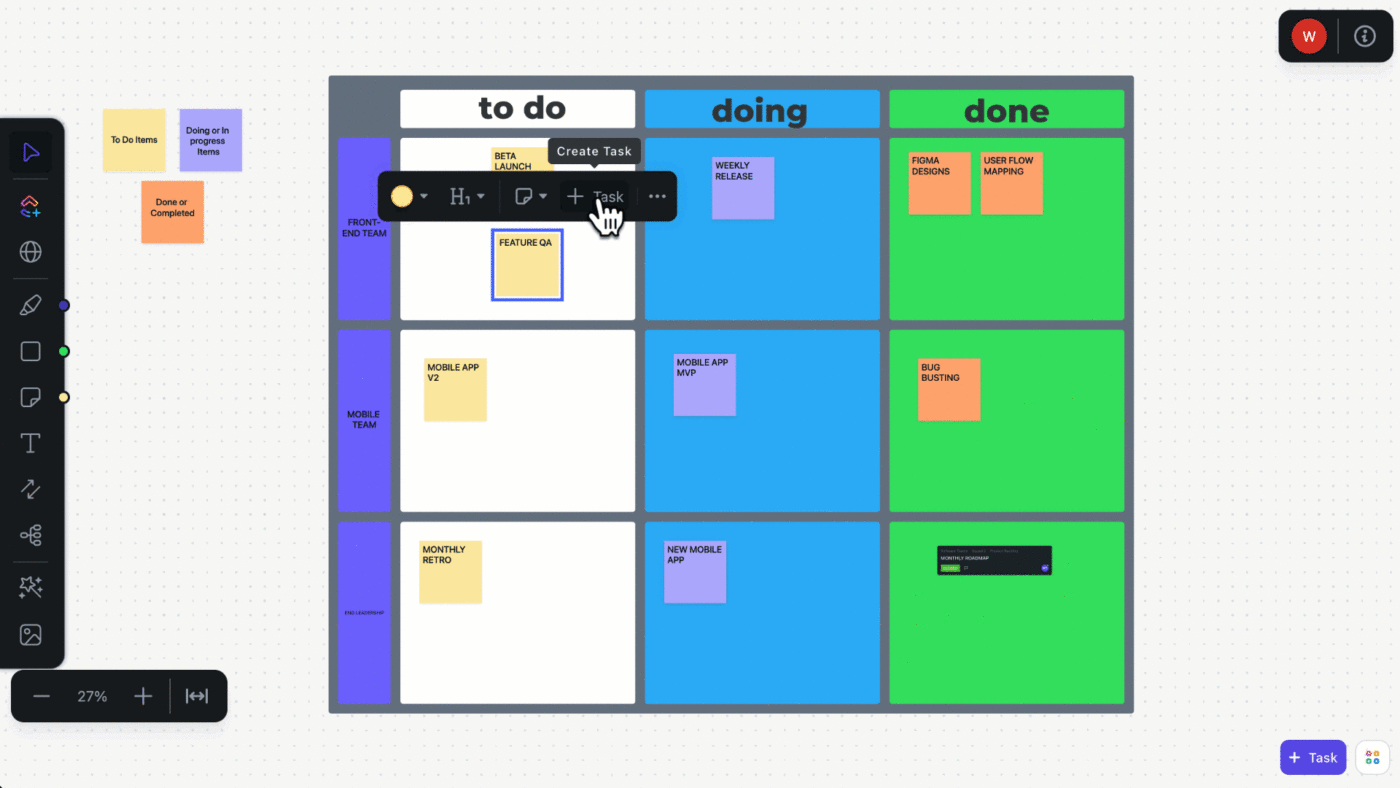
Idea boards allow teams to visualize relationships and dependencies. This helps clarify the idea, gauge feasibility, and plan for contingencies.
For example, say a writer has an idea to create an ebook about using project management software for creative agencies. This requires a lot of research, outlining, writing, editing, visual design, a landing page, CRM, social media distribution, and more.
Using an idea board, they can map the entire process, break it down into individual tasks or steps, identify where they’ll need help from others, define a timeline, and discuss any dependencies with their editor or client.
Every brainstorming session contains a wealth of knowledge—conversations around why some ideas are chosen or rejected feed into how decisions are made in the organization.
Past idea boards offer frameworks and blueprints for future projects. They are records of organizational thinking and preferred ideation techniques.
Archiving past idea boards supports learning and development for new employees, creating self-serve assets without any additional effort.
In addition to the benefits we’ve just mentioned, a digital idea board offers a few more advantages, such as:
Here’s how you can get started with an idea board.
A blank space and a pen are all you need to make an idea board. A whiteboard, an easel board, or a piece of paper can get you started.
However, a digital whiteboard with purpose-designed features can effortlessly elevate your ideas to action. But first.
As you would for any brainstorming session, identify the purpose and outline the agenda for the meeting. You can make this as detailed as you like, but include the following:
Also Read: Best Goal Tracking Apps for Teams

Choose a tool like the AI-powered ClickUp Whiteboard, which is purpose-designed for teams to collaborate, ideate, and take action. It offers:
Once you’ve chosen the best whiteboard software and invited team members to it, you’re all set to begin.
Don’t let a blank canvas scare you. To structure your brainstorming session and lead it effectively, an idea board template will best serve you.
For instance, ClickUp Whiteboard offers templates for flow charts, concept mapping, standup meetings, retrospectives, reverse brainstorming, and brainwriting.
For something more specific, consider ClickUp’s New Whiteboard Template, which offers complete flexibility with custom Statuses, Custom Fields, Custom Views, and other project management features.
If you’re using an online idea board synchronously, bring team members on to a call and brief them on the expectations from the meeting.
It also helps to assign an owner who can collate, share ideas, and manage the board, controlling the chaos of everyone drawing on the board simultaneously.
Now invite everyone to give their ideas. For instance, if you’re looking for ideas on what to name your next product, ask everyone to paste sticky notes to the digital idea board. If you’re planning an event, your team can pin photographs of their inspiration.
To make your idea boarding successful, it is essential to carefully consider every single idea respectfully. This encourages teams to share their thoughts without fear of being ridiculed. So, go through every idea and give feedback.
Also, invite team members to strengthen each other’s ideas by combining similar ideas and structuring them meaningfully.
Now, organize them based on your purpose using any of the following visualization techniques.
Once the idea is converted into a task, project managers often forget about this. This is a mistake. An idea board can be a gift that keeps on giving with focused idea management practices.
By thoughtfully organizing and archiving past ideas, organizations can save teams from the grind of generating new ideas repeatedly.
Once you’ve brainstormed and agreed on the ideas, it’s time to make them actionable. You can go from idea to execution by creating tasks directly from your whiteboards.
💡Pro Tip: The integrated AI assistant in ClickUp Whiteboards can automatically generate tasks and write their descriptions for you. You can add context to these tasks by linking to files, Docs, chat threads, and more.
Different teams can use idea boards in various ways at work. Here are the most common uses of digital idea boards:
Also Read: Best Team Collaboration Apps & Tools
Here are our suggestions and best practices for making the most use of idea boards for work:
All kinds of knowledge work rely heavily on people’s ideas. However, ideas are plenty. What differentiates successful teams is their ability to streamline and execute them consistently.
The idea board is an essential tool to achieve that. As we mentioned, the tool you use to ideate as a team often influences your thought process. Pick a tool that fits well into your current processes and doesn’t just end with ideation.
ClickUp Whiteboards is designed to help teams generate and organize ideas and take them to execution effortlessly.
Try ClickUp for free today. Ideate with clarity and move to execution with speed.

Sudarshan Somanathan
Max 23min read

Manasi Nair
Max 28min read
Sudarshan Somanathan
Max 26min read

© 2026 ClickUp