






Still downloading templates?
There’s an easier way. Try a free AI Agent in ClickUp that actually does the work for you—set up in minutes, save hours every week.
Sorry, there were no results found for “”
Sorry, there were no results found for “”
Sorry, there were no results found for “”

Ever tried to explain a process and watched everyone nod…but still feel confused?
That is what happens when workflows live only in people’s heads.
Process mapping fixes that. With the right templates, you can turn messy workflows into clear visuals that everyone can easily understand. And, with Miro, you don’t have to start from a blank board. Its pre-built process-mapping templates help teams work more efficiently and improve their processes.
In this article, we’ll look at the best Miro process mapping templates you can use to visualize your process workflows and make them better without overthinking it. We will also include how you can use ClickUp process mapping templates to turn those visuals into actionable workflows you can actually run and track.
🎥 Watch: New to process mapping? This short video breaks down the basics and walks you through real-life examples to help you get started confidently.
| Template Name | Download Template | Ideal For | Best Features |
| Miro Process Map Template | Download this template | Teams mapping end-to-end workflows | Step-by-step visual flow, clear handoffs, easy collaboration |
| Miro Organization and Process Mapping Template | Download this template | Operations and org design teams | Role clarity, ownership mapping, structured process views |
| Miro Basic Process Map Template | Download this template | Cross-functional teams | Simple process visualization, flexible layout, real-time edits |
| Miro Client Experience Process Map Template | Download this template | Customer success and service teams | Full client journey mapping, touchpoints, feedback loops |
| Miro BPMN Process Flow Template | Download this template | Business analysts, process engineers | BPMN symbols, standardized process logic, compliance-ready |
| Miro Agentic Doc-To-Flowchart Process Template | Download this template | Creative and AI-driven teams | Turns raw ideas into structured flows, agent-assisted logic |
| Miro Design Process Flowchart Template | Download this template | Product and design teams | Visual design stages, iteration tracking, decision points |
| Miro Swimlane Flowchart Template | Download this template | Teams managing role-based workflows | Swimlanes for ownership, clear handoffs, reduced confusion |
| Miro Outcome Mapping Template | Download this template | Strategy and planning teams | Outcome-focused planning, cause-effect mapping |
| Miro Customer Touchpoint Map Template | Download this template | CX and marketing teams | Customer interactions, channel mapping, experience gaps |
| ClickUp Processes Map Whiteboard Template | Get free template | Operations and project teams | Multi-stage process mapping, goals → activities → actions |
| ClickUp Process Map Flow Chart Template | Get free template | Teams managing approvals and handoffs | Legend-based flowcharts, decisions, role clarity |
| ClickUp Processes Map Whiteboard Template | Get free template | Cross-functional teams | Visual planning connected directly to tasks |
| ClickUp PDCA Process Map Template | Get free template | Continuous improvement teams | Plan-Do-Check-Act cycle, improvement tracking |
| ClickUp Process Mapping Template | Get free template | Process owners and managers | Ownership fields, progress tracking, linked diagrams |
| ClickUp Simple Process Map Task Template | Get free template | Teams documenting simple processes | Checklist-based steps, dependencies, fast setup |
| ClickUp Swimlane Process Map Template | Get free template | HR, ops, and service teams | Role-based swimlanes, decision checkpoints |
| ClickUp Simple Mind Map Template | Get free template | Brainstorming and early planning | Blank and task modes, idea-to-task conversion |
| ClickUp Concept Map Template | Get free template | Strategy and learning teams | Concept-idea-result relationships, logical structure |
| ClickUp Work Plan Whiteboard Template | Get free template | Business analysts and ops teams | DMAIC framework, execution-ready planning |
Miro process mapping templates are ready-made visual layouts that help teams visualize how work actually happens. Rather than drawing shapes from scratch, you start with a structured template and simply plug in your steps, decisions, and roles.
Inside Miro, these templates are created for clarity and remote collaboration. By using flowchart elements like actions, decision points, and handoffs, they make it easy for anyone to understand the process at a glance.
🎉 Fun Fact: Process mapping didn’t start as a ‘nice-to-have’ diagram. It started as an efficiency weapon. When Frank and Lillian Gilbreth introduced process charts in 1921, the goal was simple: to make work visible so that waste couldn’t hide.
📚 Read More: Miro vs. Jira: Which is the Better Option for You?
A well-designed Miro process mapping template makes a process clear, even to someone seeing it for the first time. Here’s what truly separates a great template from an average one 👇
📌 Did You Know? The global workflow management system market has reached $10.1 billion. That same market is expected to continue growing, driven by digital transformation and hybrid work needs.
This growth is driven by one core need. Companies aren’t paying for more tools; they’re paying for clarity. And process mapping templates reflect this shift. They make starting and ending points obvious, highlight decision paths, clearly show ownership, and remain flexible as work evolves.
Miro offers a range of free process mapping templates that help teams move from discussion to clarity in minutes.
Here are some of the best ones.
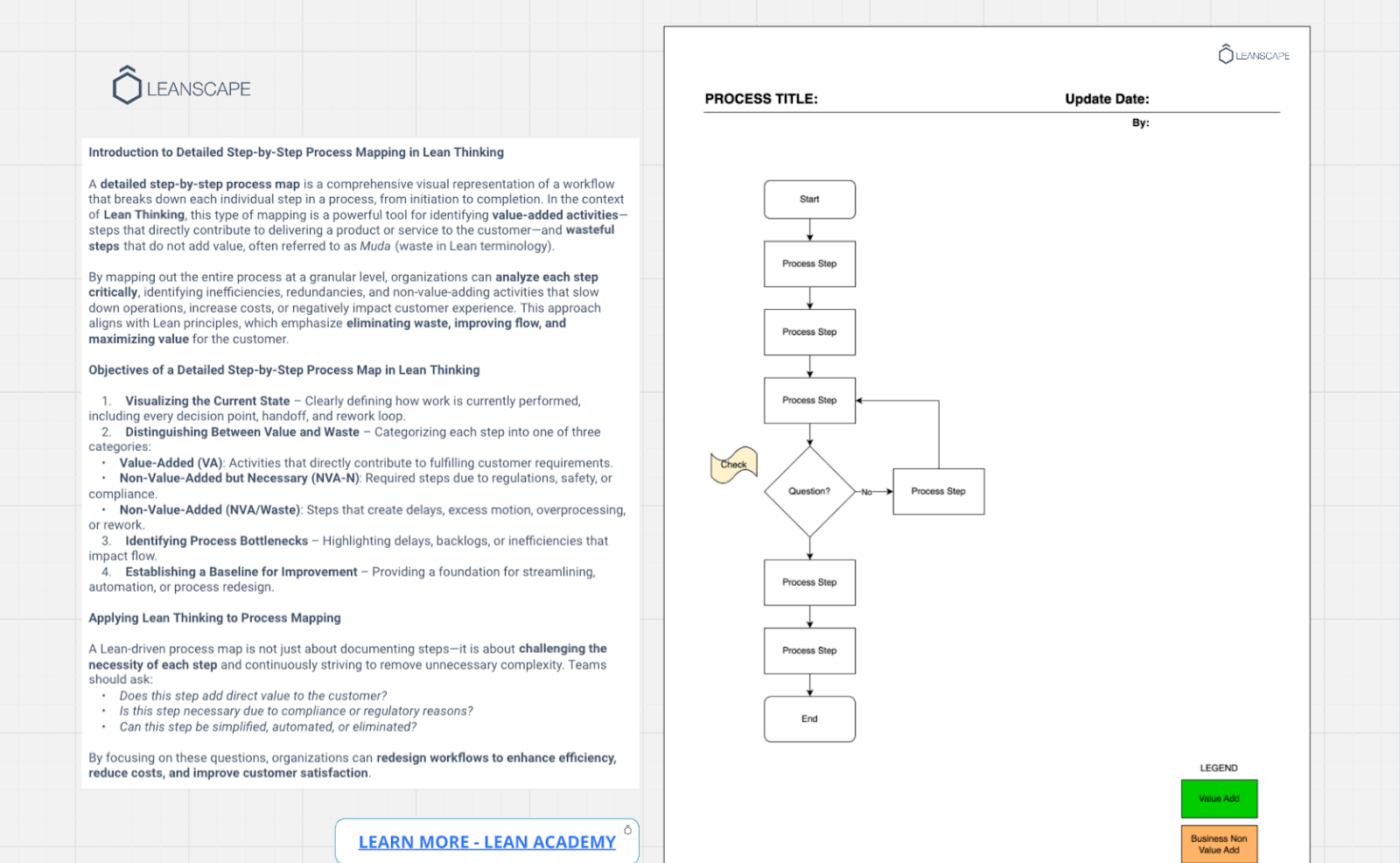
The Miro Process Map Template helps you break down any workflow into step-by-step actions from start to finish. It makes every handoff, decision, delay, and rework loop visible, so nothing stays hidden.
As you map each step, the template naturally encourages lean thinking, i.e, pushing you to question whether an action truly adds value for the customer, is required for compliance, or exists simply because ‘that’s how it’s always been done’.
✅ Ideal for: Business analysts and operations teams mapping current-state workflows to uncover bottlenecks and improvement opportunities in Miro
📊 Stat Alert: According to a Camunda survey, 50% of organizational processes are already partially or fully automated, and 90% of IT decision-makers plan to increase automation investment over the next 24 months.
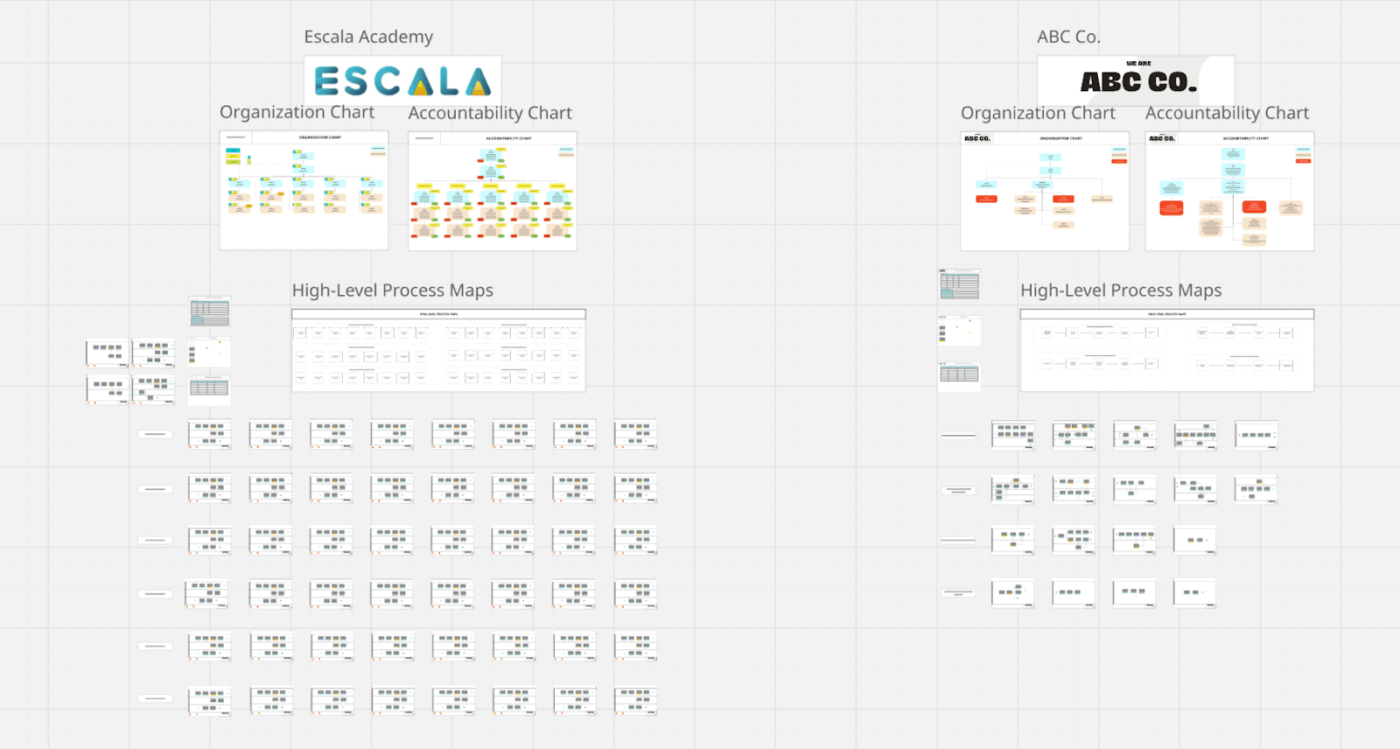
Most teams have organization charts, process docs, and responsibilities distributed across different places. The Miro Organization and Process Mapping Template brings all of that together.
It helps you understand who does what and how work flows between people. The high-level process maps show how the company runs day to day, breaking work into core functions like sales, marketing, operations, finance, or support, with the major processes that live inside each one.
✅ Ideal for: Founders and scaling teams who need a single source of truth to map organization structure and document end-to-end processes
📚 Read More: Explore workflow diagram examples to understand how you can map each step to a real owner, input, and outcome in your processes.
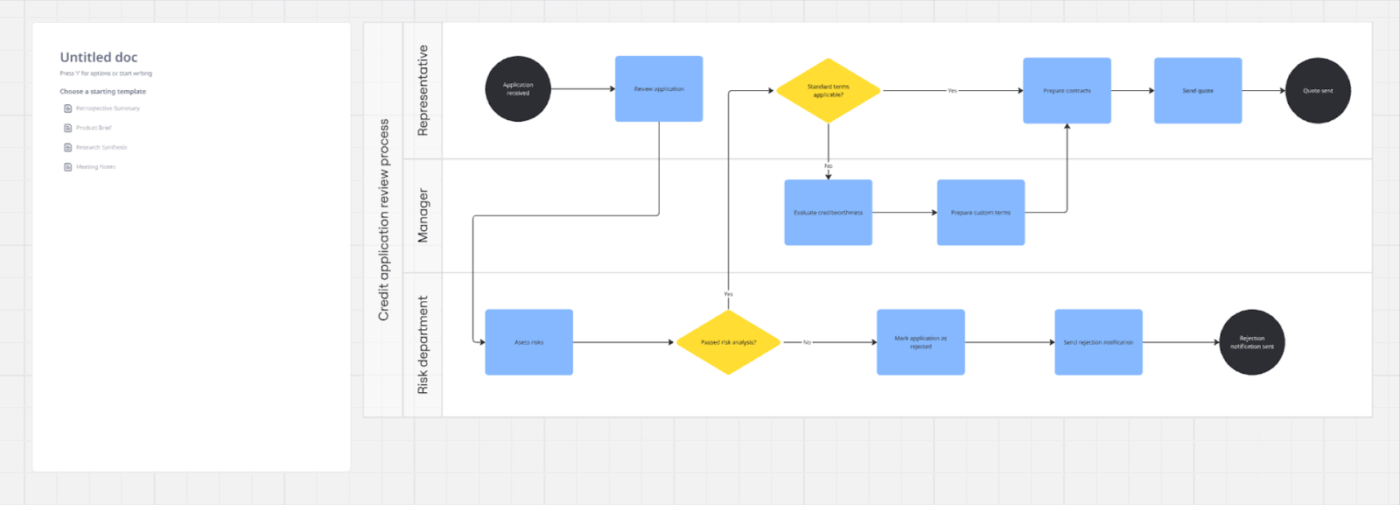
The Miro Basic Process Map Template uses swimlanes to make even complex workflows easy to understand from start to finish. Work moves left to right in practical steps, so even someone seeing the process for the first time can quickly understand what’s happening.
Each lane shows who is responsible at every stage, making handoffs visible and helping spot where delays usually happen. Approvals, rejections, and exceptions are shown with equal clarity, ensuring special cases are handled the same way every time, and the process stays predictable for both teams and customers.
✅ Ideal for: Process teams and organizations that want to understand how work actually flows across multiple roles and departments
📚 Read More: Best Microsoft Word Alternatives
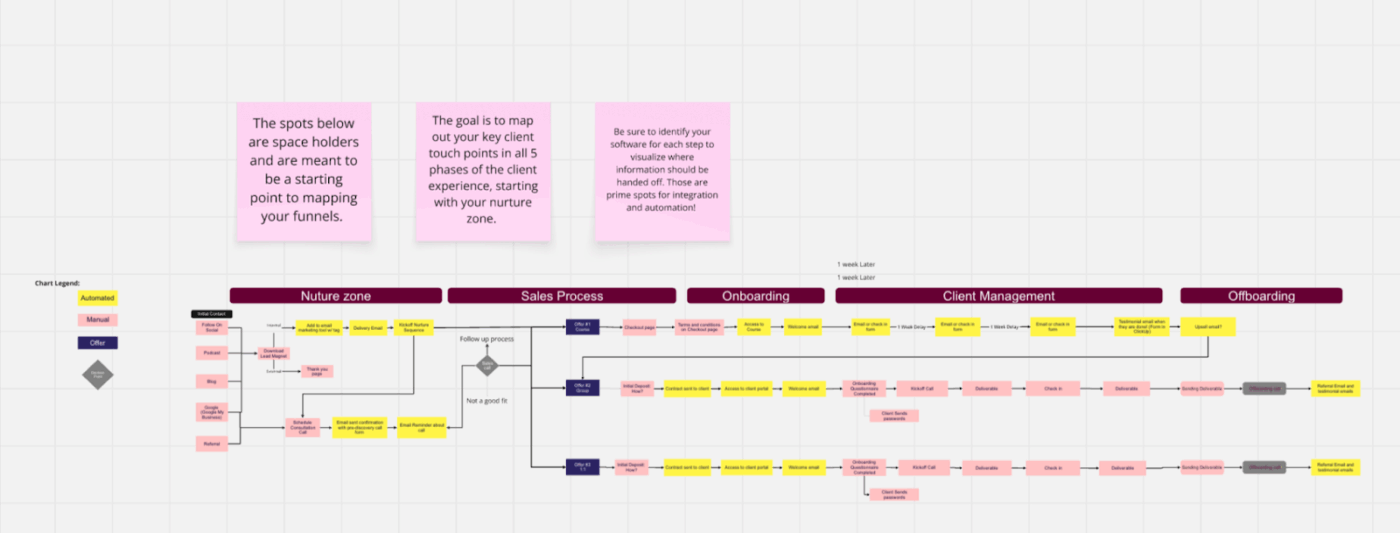
The Miro Client Experience Process Map Template is a comprehensive, end-to-end blueprint of how a client navigates your business. It starts with the nurture zone, where leads first come in and early trust is built. This is where people discover you through referrals, content, outreach, or conversations. The process then moves into sales, where discussions turn into proposals, follow-ups, approvals, or rejections.
Once a deal is closed, the map shifts to onboarding and then flows into client management. Deliverables, check-ins, feedback, and ongoing communication are shown step by step. Finally, the process ends with offboarding, which is treated as a planned part of the experience. Final handovers, feedback, and referrals are included so clients leave with clarity and a positive final impression.
✅ Ideal for: Teams that want a straight view of their client journey so they can deliver a more consistent client experience from first contact to offboarding
💡 Pro Tip: Customer journeys are rarely single-channel. One widely cited omnichannel study found 73% of shoppers used multiple channels during their journey. That’s exactly why process maps should show digital touchpoints, handoffs between teams, and where inconsistent communication breaks the experience.
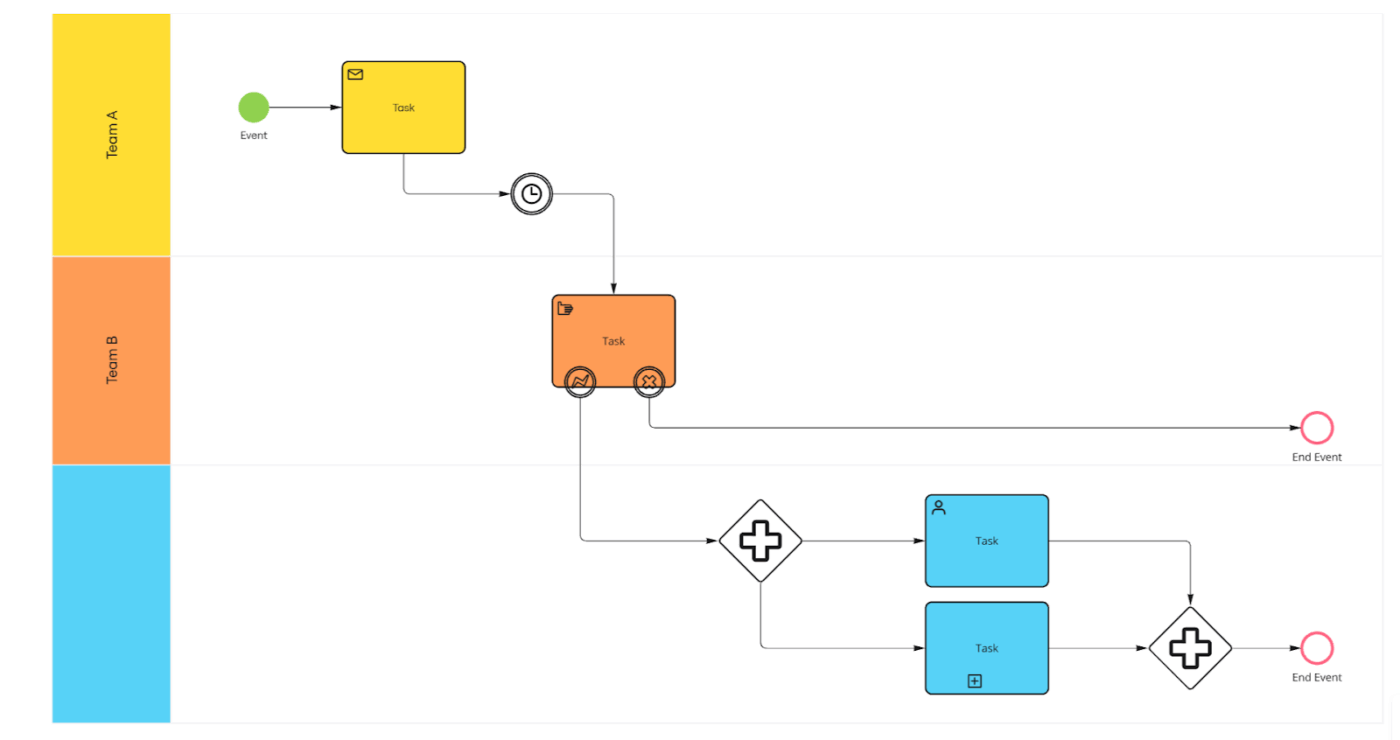
The BPMN standards are a widely used way to document processes so that business, operations, and technical teams can all understand the same diagram without misinterpretation.
In the Miro BPMN Process Flow Template, every process starts with a trigger that could be a customer request, an internal decision, a system event, or a scheduled action. The core of the process is made up of task blocks. Each task represents a specific action performed by a person or a system and is placed within a swimlane to clearly show ownership and responsibility.
The flow then moves toward defined end points, showing whether a request is completed, rejected, paused, or closed due to an exception.
✅ Ideal for: Teams that want to map real-world workflows and align multiple stakeholders without relying on long, outdated documentation
🎯 ClickUp Advantage: ClickUp Mind Maps focus on structure and logic. They help you break a process into smaller steps, organize dependencies, and see how everything connects. Mind Maps are especially useful when you’re designing or refining a process before locking it into a final workflow.
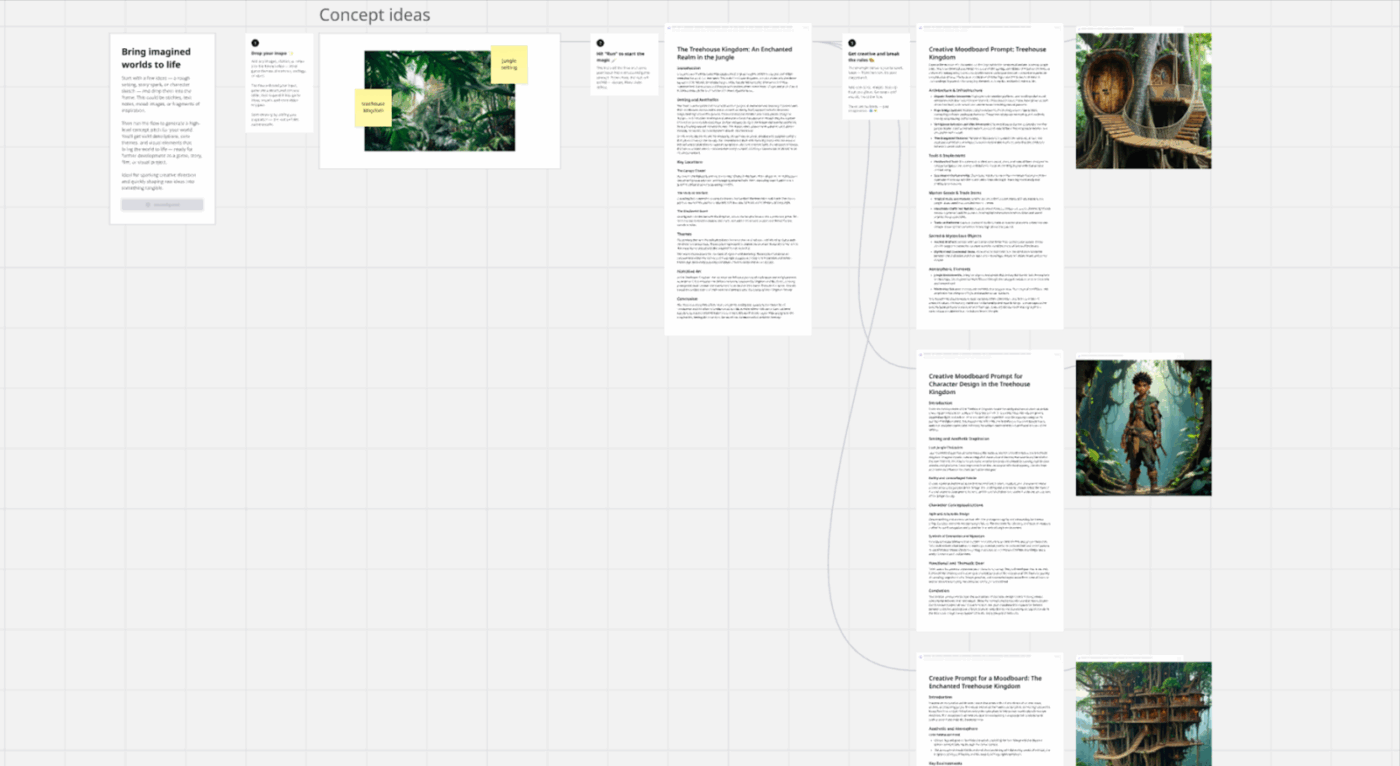
The Miro Agentic Doc-to-Flowchart Process Template shows how raw, unstructured ideas can be transformed into a structured visual system using agentic workflows. You don’t need perfect inputs: loose thoughts, sticky notes, short text, images, or sketches work. The idea is simple: add whatever inspiration you have and let the system make sense of it.
The agent takes over and turns those inputs into predefined outputs, such as tables, prompts, logical expansions, and idea breakdowns. From there, you’re encouraged to experiment, like add new ideas, change direction, expand characters, or break the flow. The template stays flexible, just like real creative work, which rarely moves in a straight line.
✅ Ideal for: Teams working on games, films, animation, storytelling, branding, or world-building projects, where ideas evolve rapidly and need to stay aligned
📌 Did You Know? According to a McKinsey Global Survey, 23% of organizations have scaled agentic AI systems in at least one business function, while 39% have already started experimenting with AI agents in their workflows.
This shift shows teams are moving beyond pilots and need structured ways to turn unstructured ideas into usable systems.
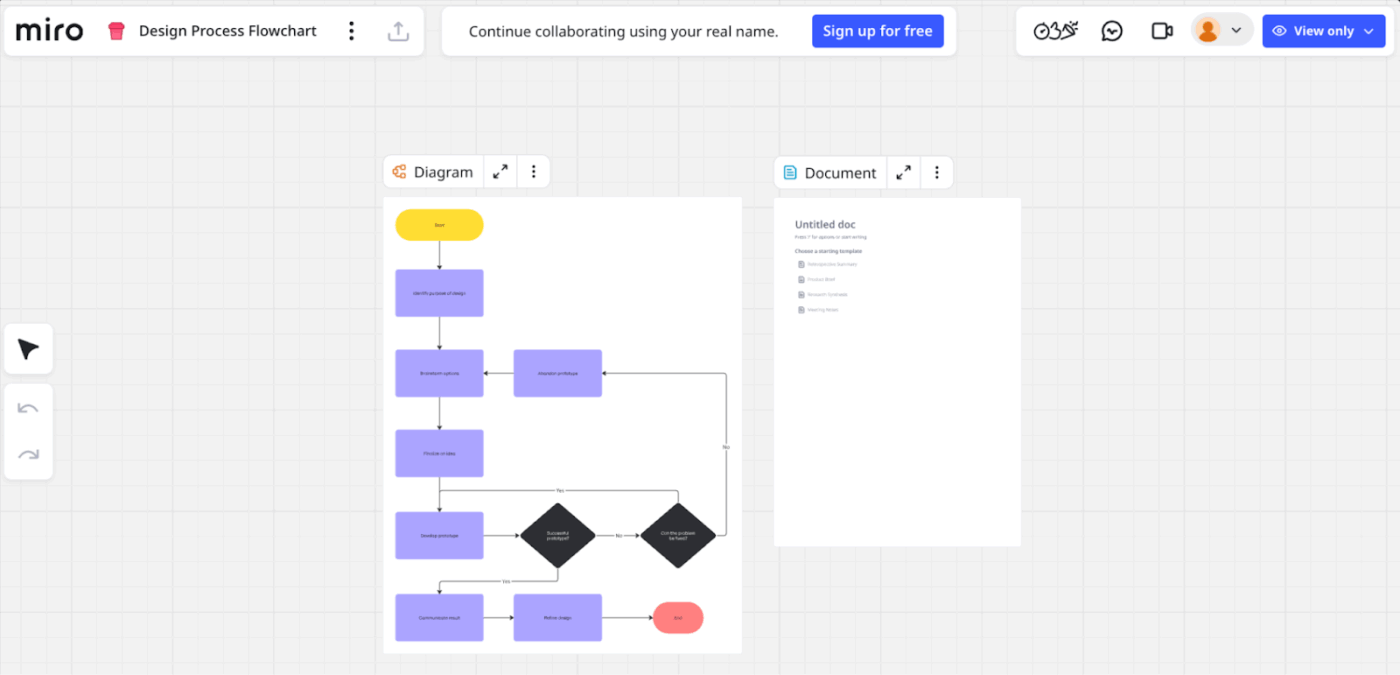
The Miro Design Process Flowchart Template is a visual decision system that helps teams map how design ideas are created, tested, and improved. After defining a beginning, the flow moves through defining the goal, exploring ideas, building prototypes, and testing solutions.
Checkpoints help teams pause, review what’s working, and decide whether to improve an idea or move forward. If something doesn’t work, the flow naturally loops back instead of pushing teams forward mindlessly.
✅ Ideal for: Design teams, product teams, agencies, and non-designers who want to understand and improve the design process without relying on long documents or unclear handoffs
⚡ ClickUp Super Agents for process execution
Even the best workflow breaks down if no one maintains it. Super Agents help with that. They can watch your workflows, remind teams when steps are overdue, flag missing approvals, and keep your mapped processes running the same way every time. Think of them as a tiny process ops teammate who never forgets a step.
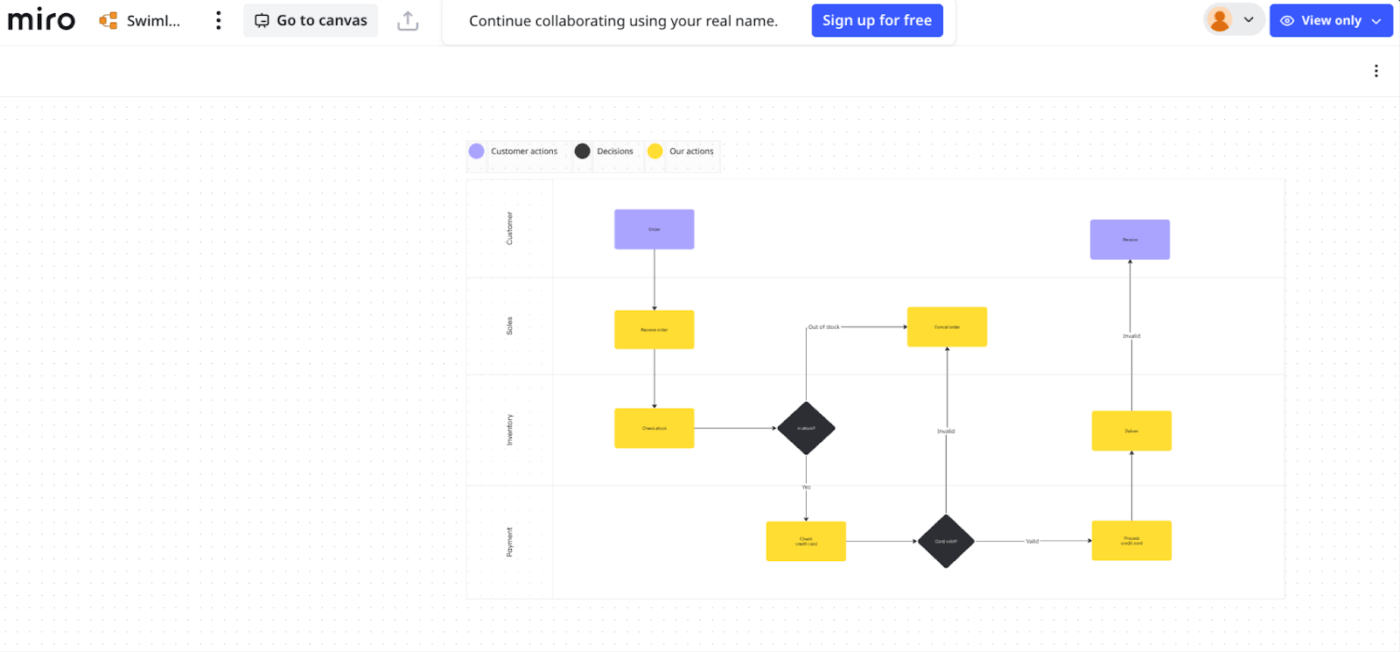
Unlike a regular flowchart that only shows a sequence of steps, the Miro Swimlane Flowchart Template divides the process into horizontal lanes. Each lane represents a specific actor, such as a team, role, customer, or system. Every task is placed in the lane of the person or system responsible for it, so ownership is always visible. When work moves from one lane to another, the handoff is also easy to spot.
The flowchart focuses on real tasks, like checking information, processing requests, or delivering results, and also includes paths for exceptions. If something goes wrong, the next steps are already mapped. This makes the template especially useful for onboarding, as new team members can quickly see how work flows, where they fit, and who they need to work with.
✅ Ideal for: Cross-functional teams that want to bring structure to complex workflows that involve multiple people or systems
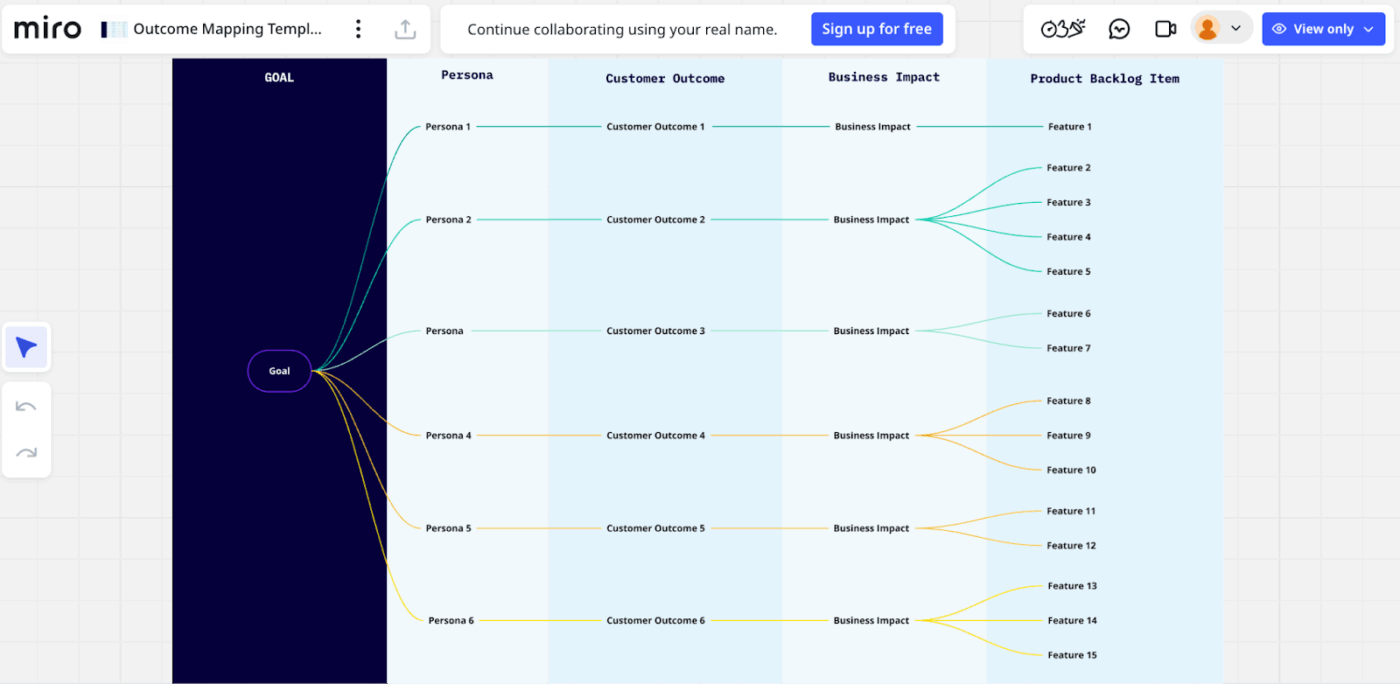
The Miro Outcome Mapping Template helps you start any project with the results you want, then work step by step toward what needs to be built.
It lets you define a shared objective, map key personas involved, and focus on desired outcomes rather than features. The template then connects those outcomes to measurable business impact and translates them into actionable backlog items.
✅ Ideal for: Product managers and strategy teams who want to align goals, user outcomes, and backlog priorities while staying flexible as plans evolve
⚡ Template Archive: If you’re moving from outcome planning into execution, Miro also offers a wide range of Miro project management templates that help you turn goals into timelines, tasks, and delivery plans without losing the strategic context you’ve mapped.
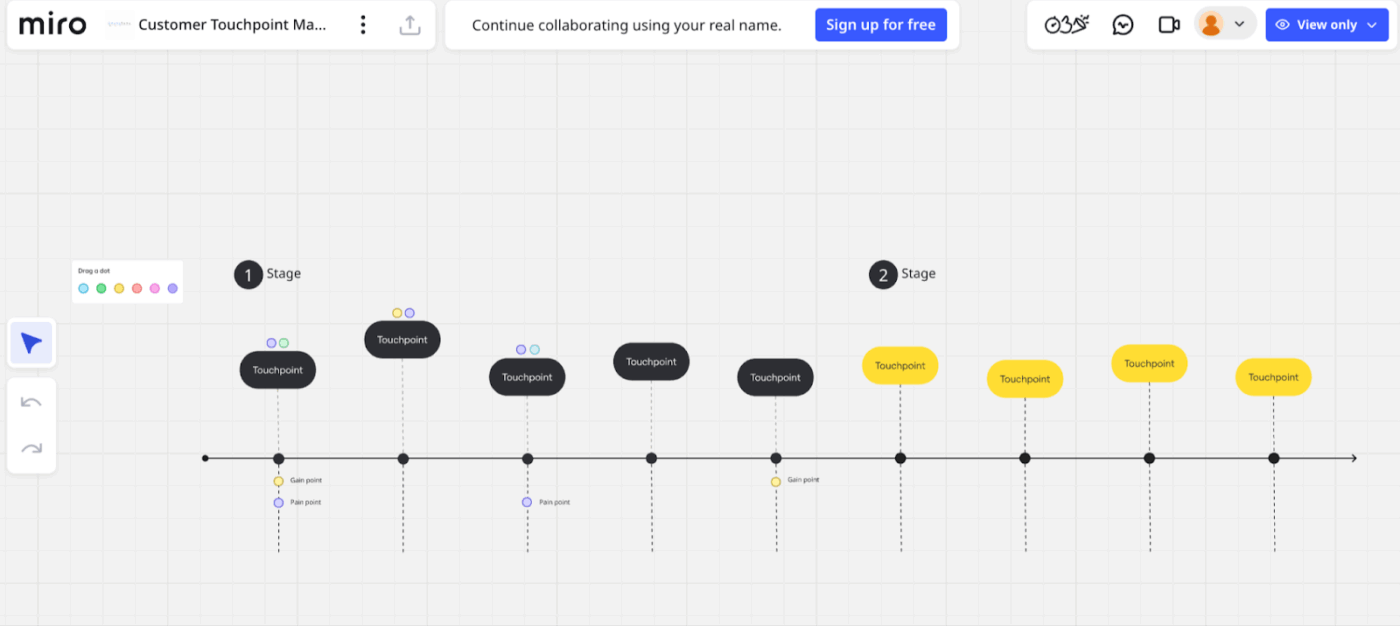
The Miro Customer Touchpoint Map Template helps see your customer’s entire experience with your brand on one single timeline. It breaks the journey into stages like awareness, purchase, onboarding, usage, support, and renewal, so you understand what customers need at each phase.
Each point on the timeline represents a key moment where the customer interacts with your brand, such as visiting the website, talking to sales, using the product, or contacting support.
✅ Ideal for: Product, UX, and operations teams who want to map customer interactions step by step, and improve how work flows across teams at each customer touchpoint
⚡ Template Archive: Once you’ve decoded the customer journey, the next step is deciding what to build and when. That’s where Miro product roadmap templates help teams turn customer insights into clear product priorities.
They’re especially useful for:
Miro is good for fast, collaborative mapping, but some users report a few repetitive issues once your workflow diagrams get complex or need long-term maintenance. Here are the most common limitations customers call out across review sites and user discussions:
⚡ Template Archive: Explore more Miro templates to find the right balance between visual clarity and ease of execution for your workflows.
Miro is great for visualizing ideas, but many teams eventually want those visuals to turn into real, trackable work. That’s where ClickUp fits in naturally. It goes beyond diagrams and supports business process management by connecting process mapping with execution, ownership, and progress tracking in one place.
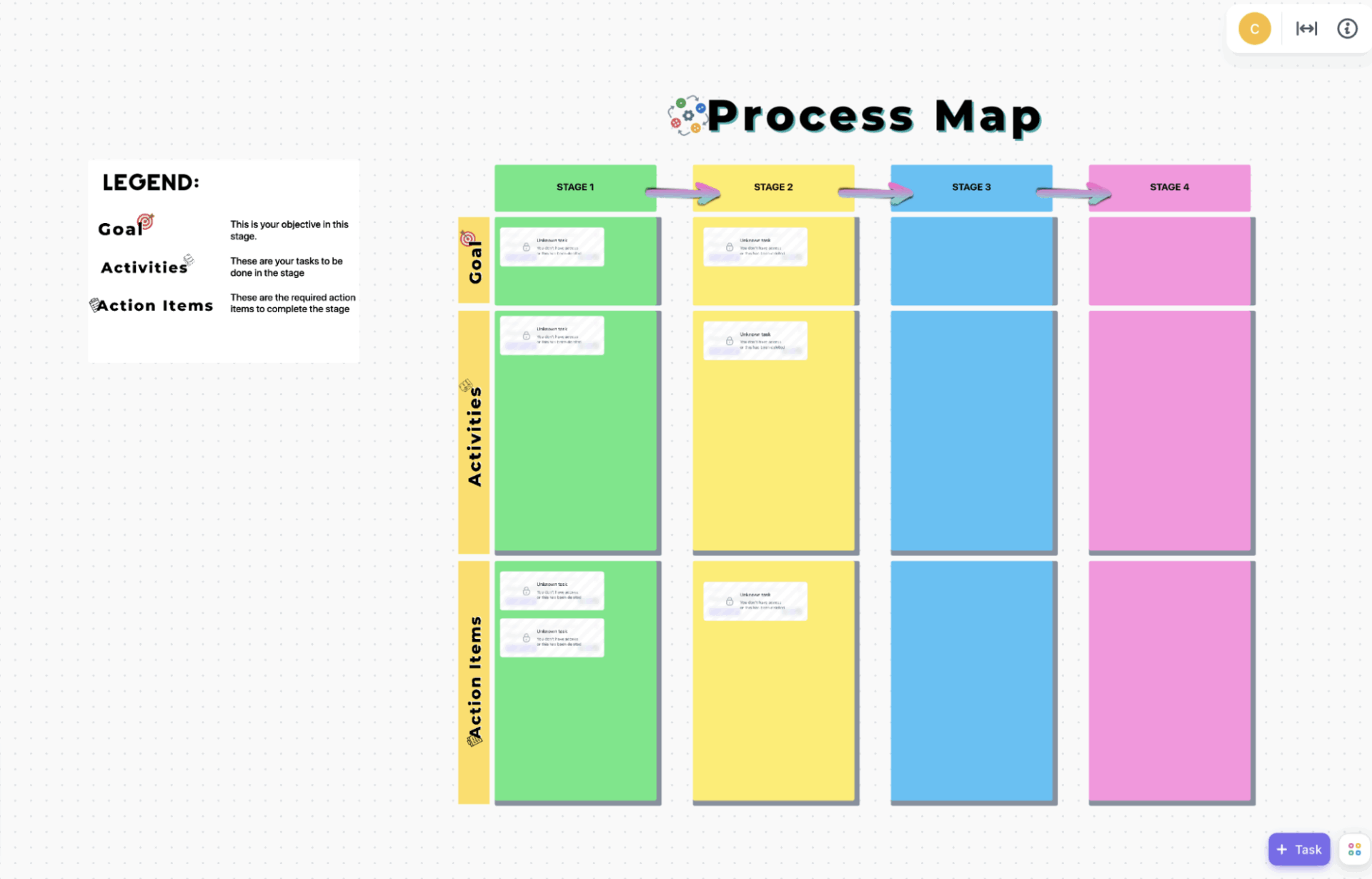
The ClickUp Processes Map Whiteboard Template is a productivity tool that illustrates how work progresses from one stage to the next, outlining exactly what needs to happen at each stage. The best part is that it’s not just for planning like a normal whiteboard, but is connected to real tasks, so your process map can actually turn into work that gets done.
ClickUp Whiteboards are perfect for visual thinking. You can sketch workflows, map steps, add decision points, and collaborate with your team in real time. This is very similar to a whiteboard experience, but with one big advantage. Unlike tools that rely on external whiteboard integrations, ClickUp’s Whiteboards are built directly into the platform.
This means teams can map a process visually and then turn steps, shapes, or sections into executable tasks instantly. The result is a smoother transition from process design to execution, without losing context or clarity.
Why you’ll love this template:
✅ Ideal for: Teams that want to visually map multi-stage processes and define goals, activities, and action items at every step
💬 Quick reality check
A lot of process problems aren’t process problems at all. They’re Work Sprawl problems. When steps live in one tool, approvals in another, owners in a doc, and feedback in a separate board, teams lose clarity fast. Process mapping helps surface that fragmentation so you can finally see where information is scattered and what needs to be brought together.
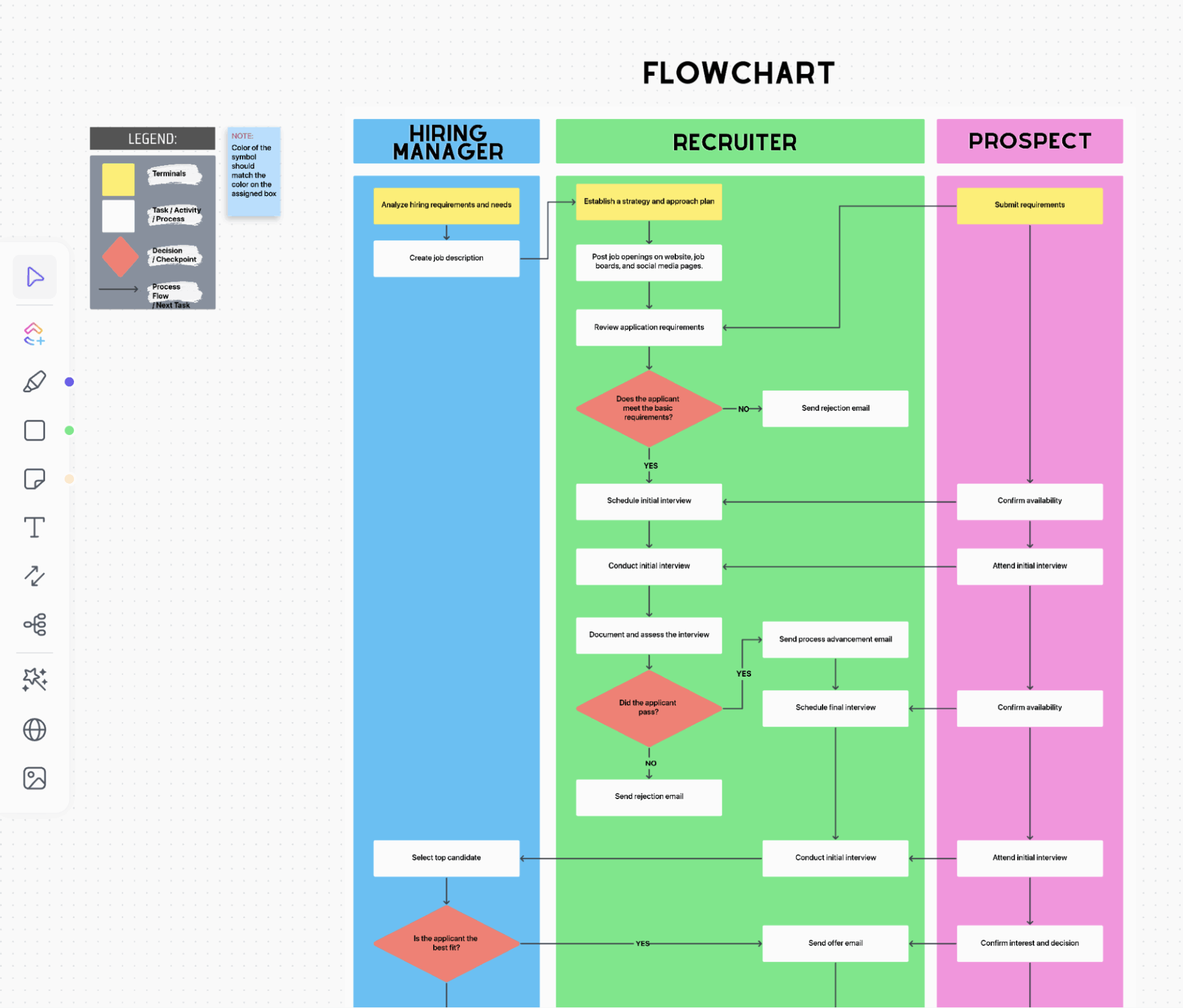
The ClickUp Process Map Flow Chart Template is basically a ready-made whiteboard flowchart system.
It splits the workflow into two major parts: Process Players and Process Activities.
Process Players show who is involved, using vertical columns for each role, while Process Activities show what each role actually does. You place the workflow steps in the relevant role’s column, making responsibilities clear and the entire process feel realistic, not just theoretical on paper.
✅ Ideal for: Teams managing handoffs between departments such as sales, delivery, and customer success.
📮 ClickUp Insight: Nearly half of all workers have considered automation—but never followed through. Limited time, tool overload, and uncertainty often get in the way.
ClickUp changes that. With AI agents, you can build in minutes, and simple natural language commands make automation approachable. With features like task auto-assignment and AI-powered summaries, ClickUp streamlines work without imposing a steep learning curve.
💫Real Results: QubicaAMF reduced reporting time by 40% using ClickUp’s dynamic dashboards and automated charts—turning hours of manual effort into instant insights.
🎥 Bonus Watch: To see how these flowcharts translate into real workflows, watch this quick overview of workflows in ClickUp:
Another great alternative to Miro process mapping templates is the ClickUp Processes Map Whiteboard Template.
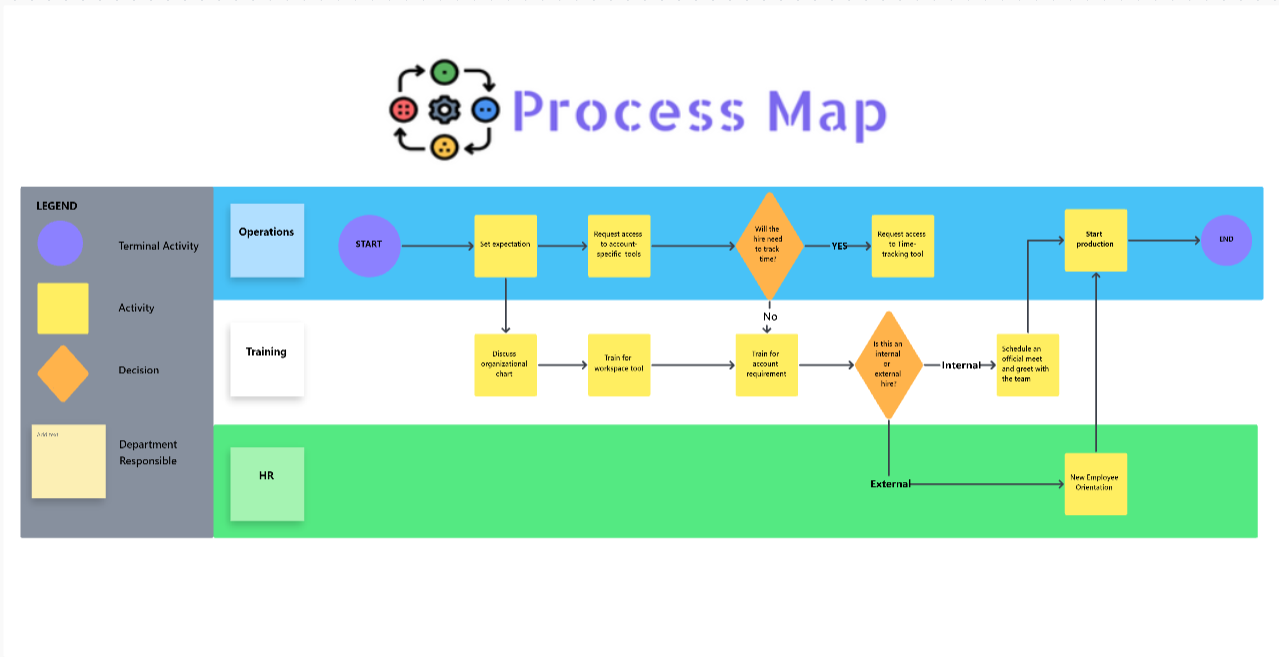
The template is built around three defined groups of elements: Terminal activities mark where the process starts and ends, Activity elements represent the actual work being done at each step, and Decision elements highlight key checkpoints where the workflow branches based on a yes-or-no outcome, reflecting real-world scenarios where processes don’t always move in a straight line.
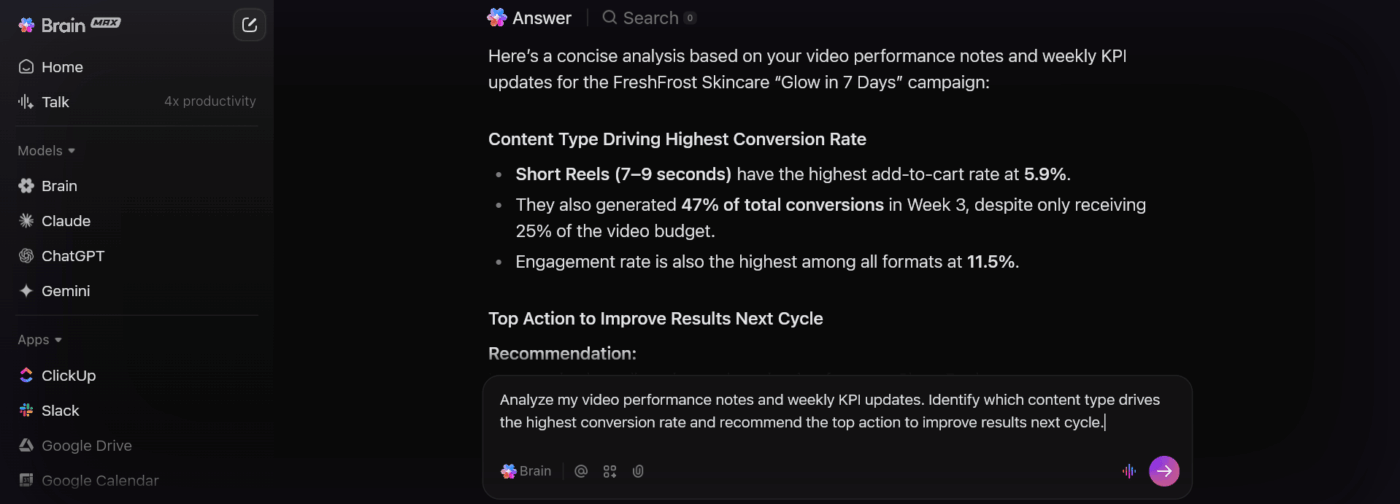
To take this even further, ClickUp BrainGPT adds an intelligent layer on top of your mapped processes. You can ask questions about your workflows, generate summaries, draft documentation, or even create automations using simple, natural language.
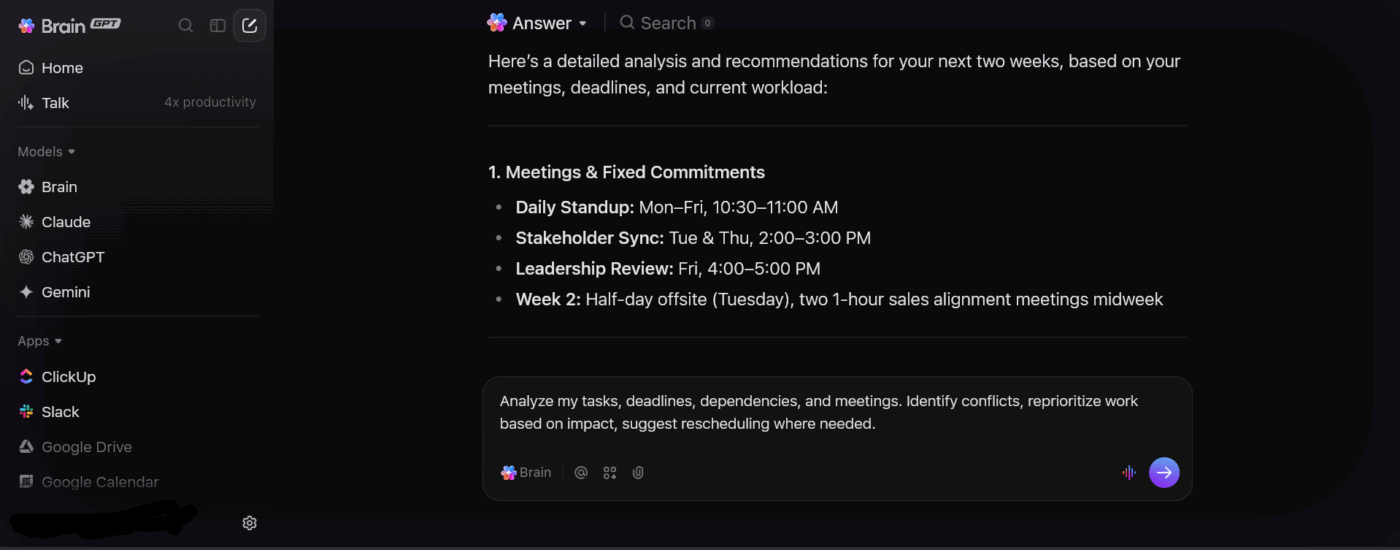
✅ Ideal for: Operations managers and process owners who need to untangle multi-team workflows and turn them into easy-to-follow visuals that everyone can actually execute
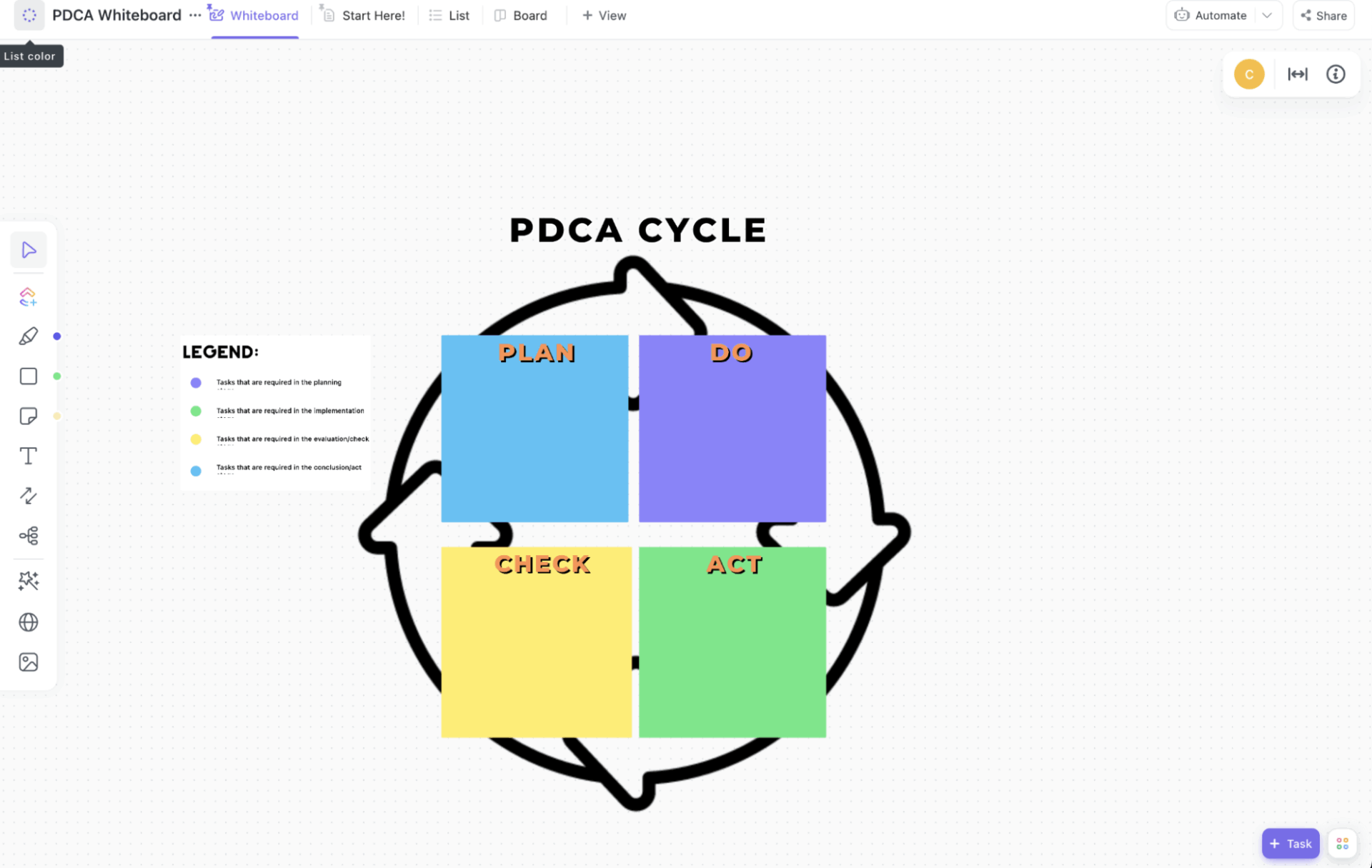
The ClickUp PDCA Process Map Template turns the Plan, Do, Check, and Act concept into an executable system. The whole idea is simple: you capture an improvement opportunity, plan it properly, test it, review results, and then lock in what worked.
Visually, the template combines a circular PDCA whiteboard for brainstorming and flow tracking with a List View that turns every idea into a real ClickUp task.
✅ Ideal for: Process teams and managers who want to run continuous improvement cycles without losing clarity using a single visual and task-based system
Here’s what a real user says about using ClickUp to manage and run their workflows:
ClickUp gives me a true “work operating system.” I love how I can move seamlessly between Whiteboards, Docs, tasks, and dashboards without losing context. It’s the only platform where I can map an entire service blueprint, convert the nodes into tasks, build automations around the workflow, and then track execution in one place. It keeps my client work, product sprints, and internal projects unified instead of scattered across different tools.
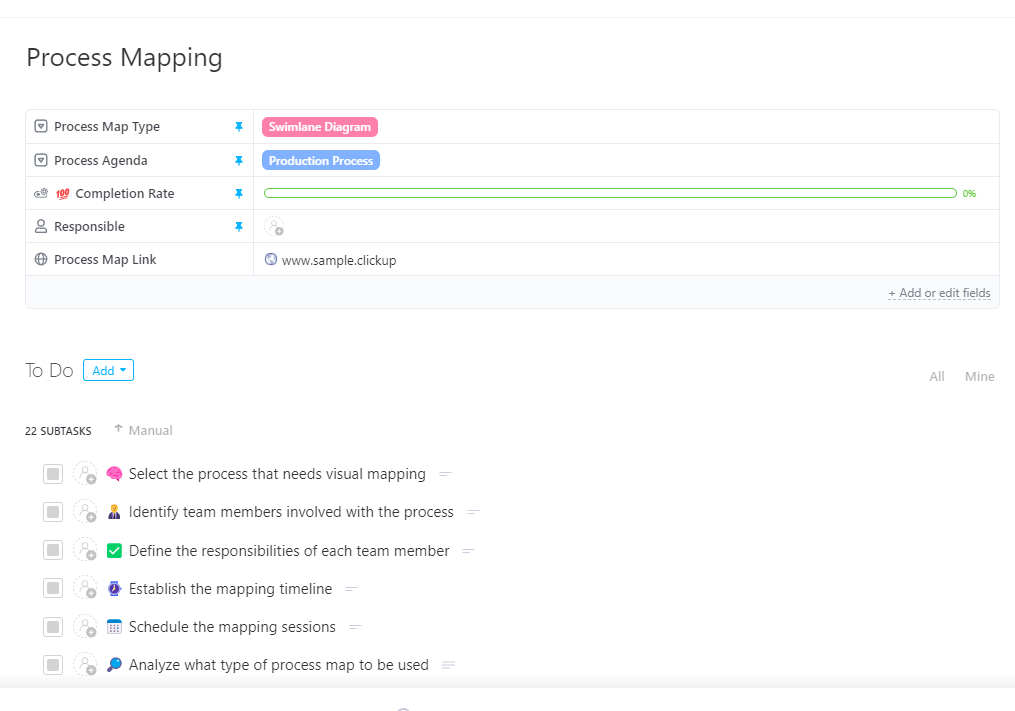
The ClickUp Process Mapping Template gives you a step-by-step way to document any process, visualize how it actually works, and then improve it with structure. You can choose how you want to map the process, whether using a flowchart, a swimlane diagram, or even a value stream map. There’s also a built-in progress bar that automatically shows how much of the process mapping work is complete, so you always know where you stand.
You get 22 well-sequenced subtasks that guide you from start to finish. These tasks guide you through every phase, including aligning stakeholders, setting up documentation, understanding the current process, identifying problems and waste, designing the improved future state, and finally deploying and standardizing the new process.
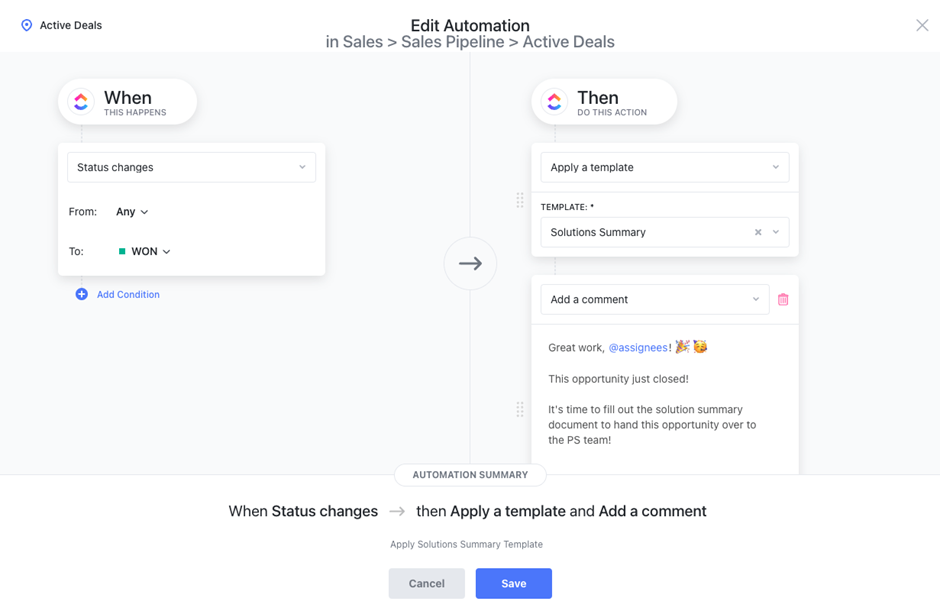
Once your process is clearly mapped, ClickUp makes sure it runs smoothly without constant manual effort. ClickUp Automations help teams simplify repetitive steps and reduce handoffs once a process goes live. You can set up rules that automatically assign tasks, update statuses, notify stakeholders, or trigger follow-up actions based on what’s happening in your workflow.
✅ Ideal for: Operations and project managers managing cross-functional processes who need clean handoffs and reliable execution
🎯 Bonus: ClickUp BrainGPT can analyze your mapped processes, summarize complex flows, suggest improvements, and even help generate SOPs or automation ideas directly from your workflows.
Additionally, with Talk-to-Text, you can simply speak your process steps, decisions, or exceptions, and BrainGPT instantly converts them into structured text.
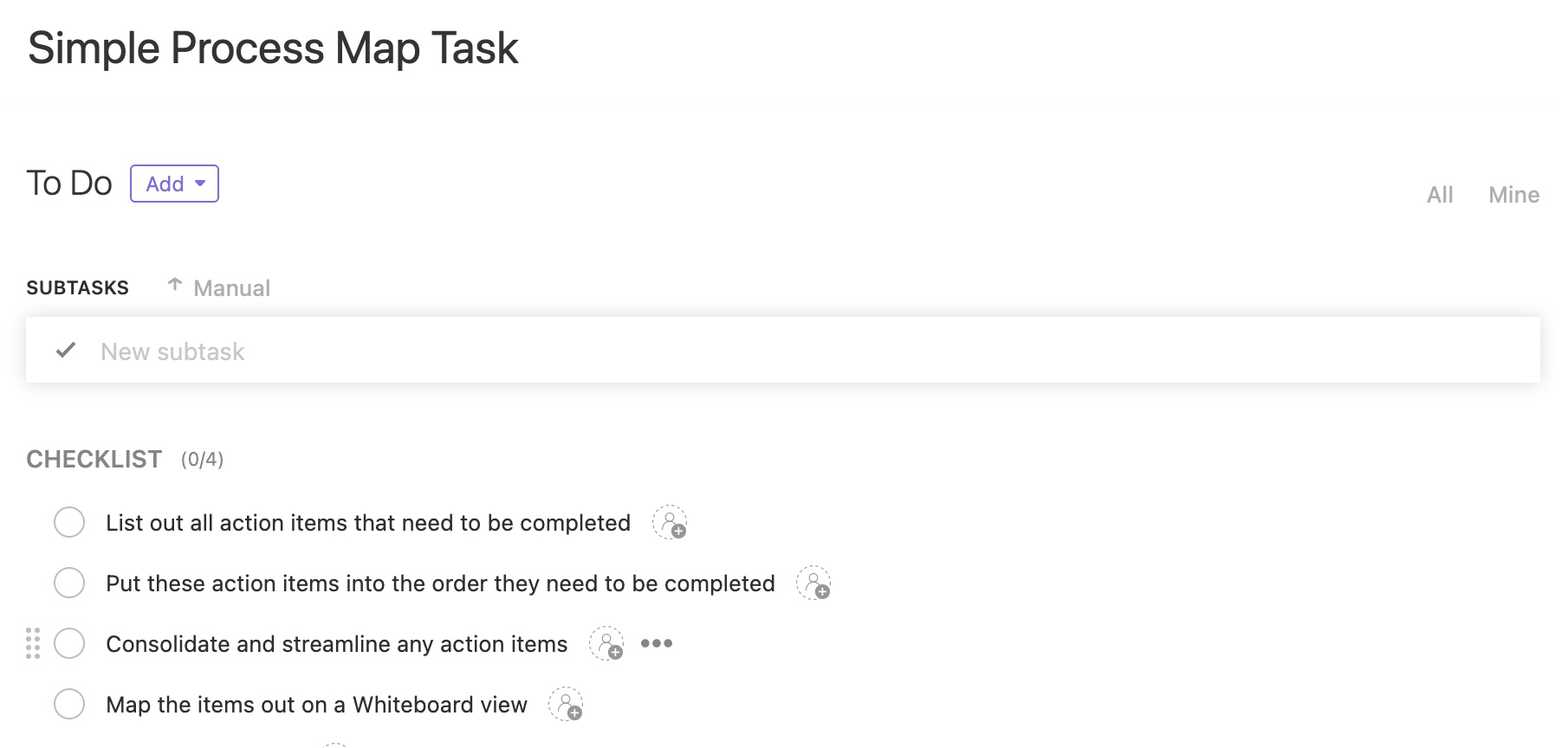
The ClickUp Simple Process Map Task Template starts with simple written prompts that guide your thinking. First, you identify what needs to happen at the very beginning. Then you list everything else that needs to be done without worrying about order. Only after everything is visible does the template ask you to arrange the items in the order they need to be completed.
What makes this template highly useful is how it captures context and ownership. ClickUp Custom Fields let you define the type of process, explain the purpose and scope through a process agenda, and assign a single person as responsible for the process overall.
The process is broken into subtasks, with each subtask representing one defined step in the process. This turns process documentation into something practical that is easy to maintain and ready for real execution.
✅ Ideal for: Teams and operations managers who want to quickly document and sequence real-world processes without building heavy or over-engineered process maps
📚 Read More: Top Microsoft Excel Alternatives
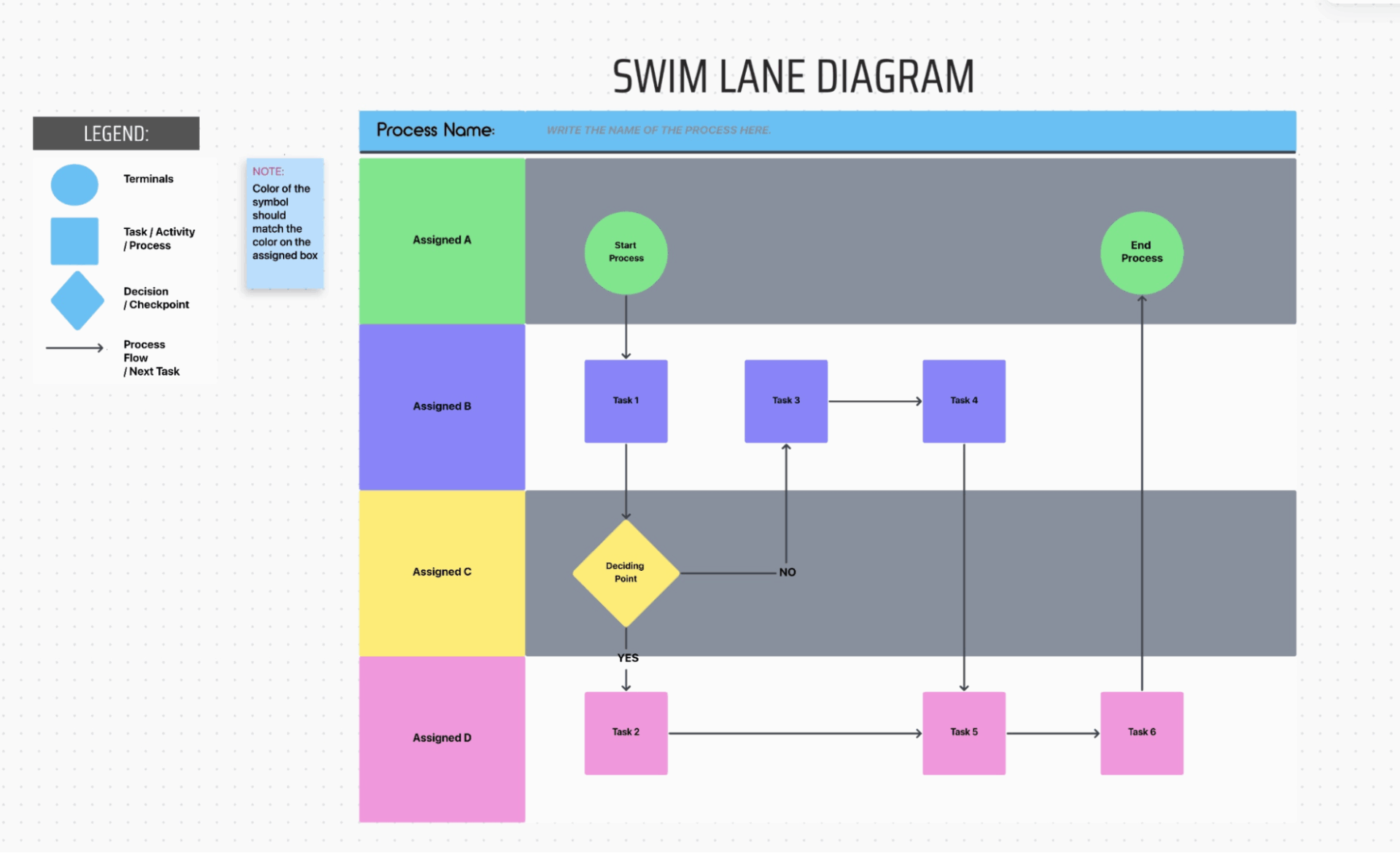
The ClickUp Swimlane Process Map Template is a process-mapping system that helps you document who does what, when, and in what order inside a process. The template starts by helping you name the process you’re mapping, such as client onboarding, hiring, order fulfillment, or support handling. This simple step sets context and ensures everyone knows exactly what the workflow is about.
Each lane represents a specific role or team, and any step placed inside a lane belongs to that owner. Inside these lanes, you add action boxes for the actual work that needs to happen, like sending proposals or collecting documents. Because every step is tied to a role and shown in sequence, the process becomes repeatable, bringing clarity and accountability without extra explanations.
✅ Ideal for: Operations, HR, and customer-facing teams mapping multi-step workflows with frequent handoffs and approvals.
⚡ Template Archive: Looking for inspiration before building your own process? These workflow templates bring together ready-to-use layouts for common business flows, from approvals and handoffs to onboarding and delivery.
Also, check these workflow examples that show how teams structure steps, roles, and decisions in practice, making it easier to adapt a template to your own way of working.
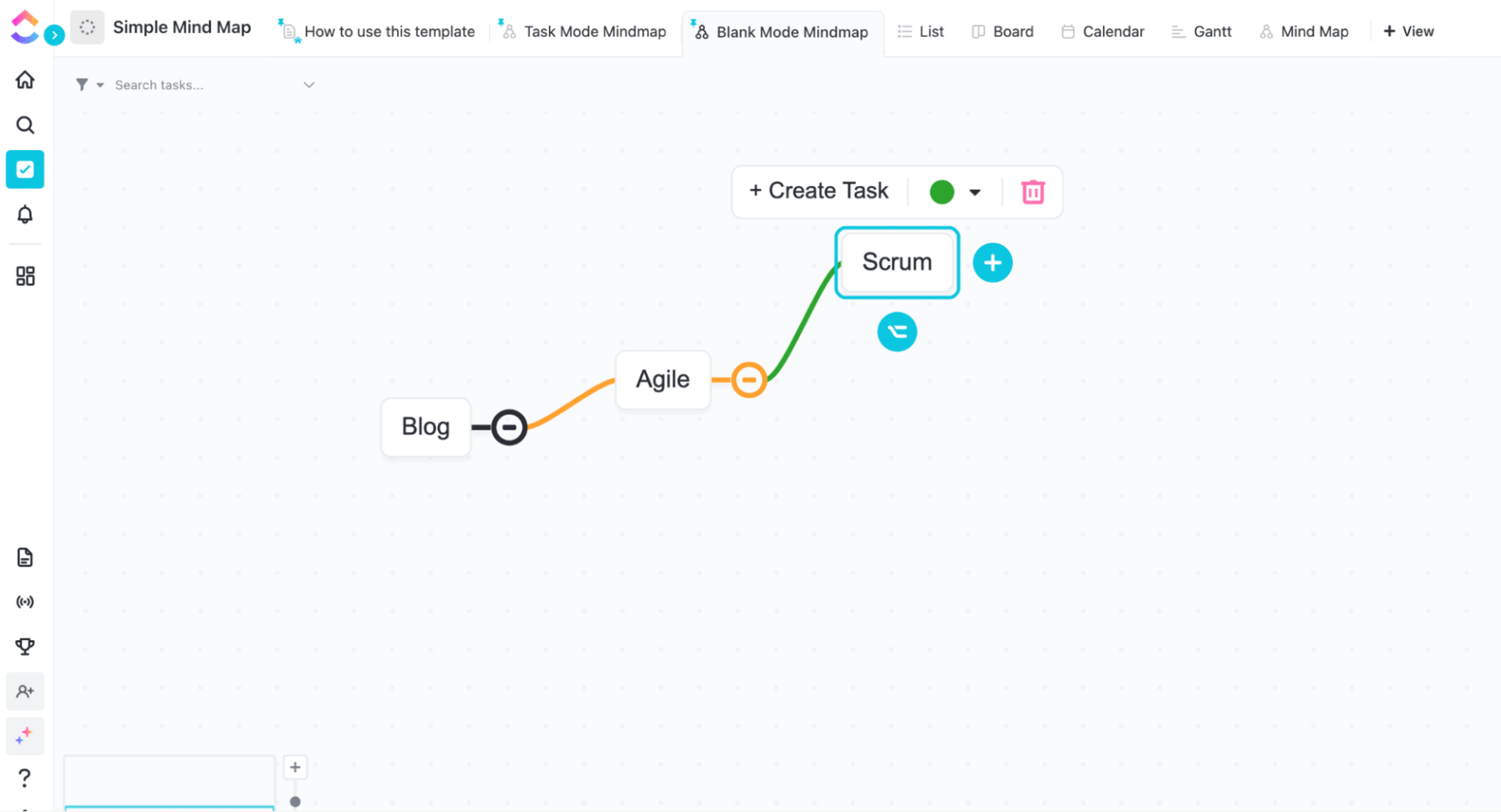
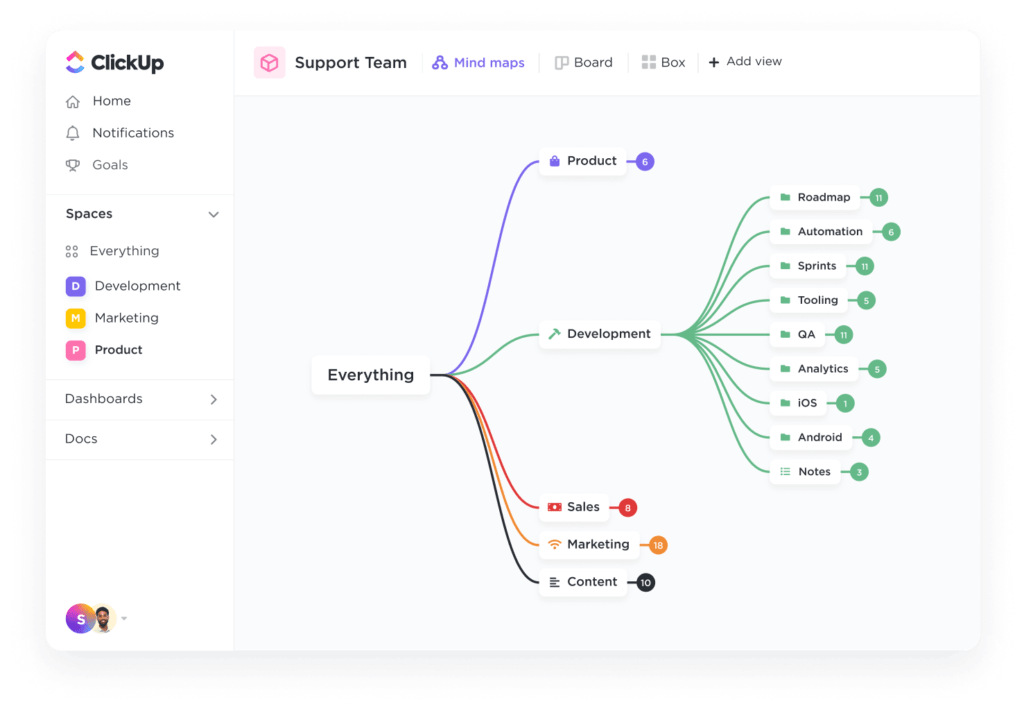
The ClickUp Simple Mind Map Template is a beginner-friendly way to take a chaotic idea in your head and turn it into something that actually makes sense. You start with one main idea in the center, like a project, plan, or process, and then build branches around it. Each branch breaks the idea into parts, and smaller branches go deeper into details.
The best part about this template is that it supports two different ways of working: Tasks Mode and Blank Mode.
In Tasks Mode, every node connects to real ClickUp Tasks and subtasks so that you can see your entire project like a tree instead of a long, overwhelming list. However, in Blank Mode, it functions like a free-flow brainstorming board, where nodes represent ideas, allowing you to think openly without any pressure.
✅ Ideal for: Teams and individuals who want to brainstorm ideas visually, and convert the right ideas into tasks only when they’re ready to execute
📚 Read More: Mind-Blowing Mind Map Examples
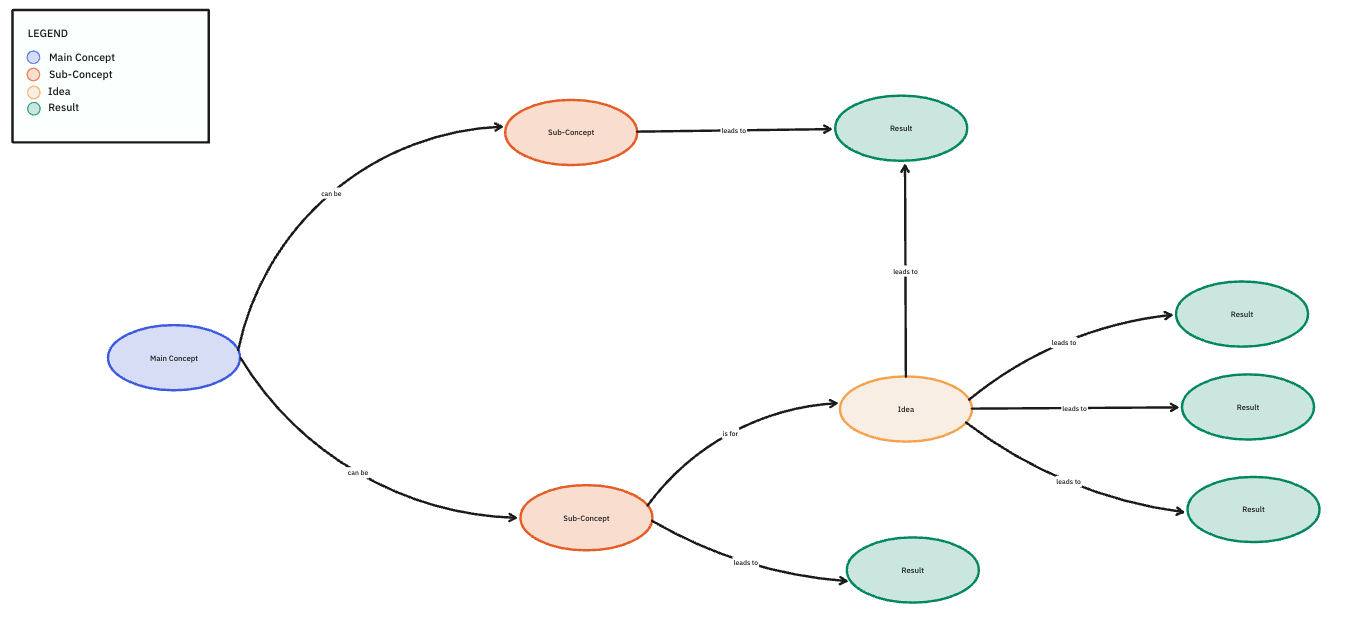
The ClickUp Concept Map Template also helps you take a big idea and break it down into smaller parts. The main concept keeps your thinking focused, because everything you add later connects back to this one central idea.
From there, you add sub-concepts, which are basically the main pillars of your main topic. For example, if your main concept is ‘Content Strategy,’ your sub-concepts could be Audience Research, Content Creation, Distribution, and Tracking Results.
Every idea connects to an expected outcome, forcing you to think beyond ‘what to do’ and focus on ‘what this will achieve.’ This makes the concept map an outcome-driven way to plan and explain ideas.
✅ Ideal for: Process teams planning strategies, learning frameworks, or managing complex projects that need logic and actionable outcomes
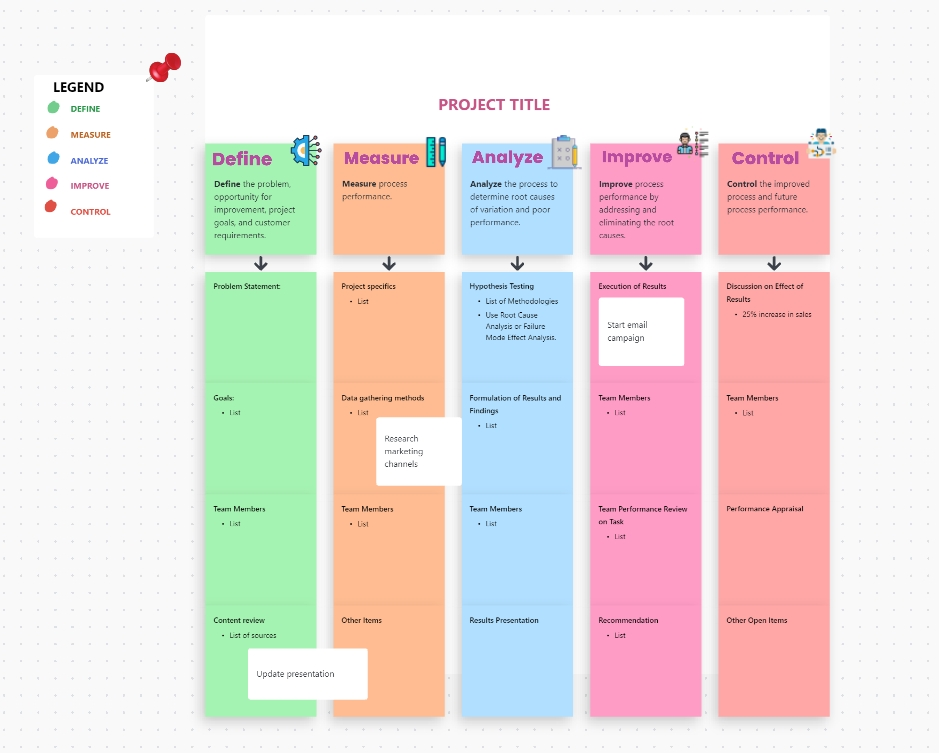
The ClickUp Work Plan Whiteboard Template is inspired by the DMAIC methodology, which is widely used in process improvement.
It guides teams through the whole planning journey, from defining the problem to controlling performance after execution. Laid out on a whiteboard, it works like a living project management chart, making priorities easier to understand and collaboration more effective in real time. This makes it especially useful during brainstorming sessions, planning workshops, or internal meetings where alignment matters.
Teams can use this template to break down goals, identify what needs to be measured, analyze gaps, plan improvements, and decide how results will be tracked.
✅ Ideal for: Business analysts and operations teams that want to visually plan improvement-focused projects with goals, actions, and outcomes
Miro process mapping templates are a great starting point. They help you visualize workflows and bring clarity to complex processes. If your goal is discussion, discovery, and shared understanding, Miro does that well.
But once the process is in place, the next challenge is execution. That’s where ClickUp stands out. ClickUp process mapping templates help you turn visuals into action.
So, if you want your process maps to do more than just look good, ClickUp is worth exploring. Start mapping, executing, and let your workflows actually move forward with ClickUp.
Sign up for free on ClickUp today.

© 2026 ClickUp

There’s an easier way. Try a free AI Agent in ClickUp that actually does the work for you—set up in minutes, save hours every week.