






Still downloading templates?
There’s an easier way. Try a free AI Agent in ClickUp that actually does the work for you—set up in minutes, save hours every week.
Sorry, there were no results found for “”
Sorry, there were no results found for “”
Sorry, there were no results found for “”

Dave from Accounting just approved a purchase order that was supposed to go to Dave from Facilities. Someone named ‘Pending’ has been assigned to 17 tasks. The intern built a workaround in a spreadsheet, and now the entire Q3 budget lives there.
If your workflows currently run on a combination of email chains and undocumented knowledge, you’ve probably started eyeing platforms that promise to fix everything.
And if you’ve done your research, Kissflow vs. ClickUp must’ve popped up in your browser tabs at least once.
These two platforms approach workflow automation from completely different starting points, features, and philosophies. Let’s figure out which one works for you. 📝
Our editorial team follows a transparent, research-backed, and vendor-neutral process, so you can trust that our recommendations are based on real product value.
Here’s a detailed rundown of how we review software at ClickUp.
Before we explore each tool in detail, here’s a side-by-side snapshot to quickly see which one fits your team’s operational needs. 🧩
| Criteria | ClickUp | Kissflow |
| Primary functionality | Unified project management, workflows, task execution, docs, dashboards, and AI | No-code workflow builder and lightweight business applications |
| Workflow automation | Advanced automations plus AI Agents that analyze context and take intelligent actions | Drag-and-drop process builder for routing rules, approvals, and conditions |
| Task & project management | Deep task hierarchy, dependencies, dashboards, workload, timelines, goals | Basic projects, boards, cases, and matrix views for operational work |
| AI capabilities | Built-in ClickUp Brain, workspace search, contextual answers, multi-model AI through Brain MAX | Limited; it depends on robust integrations with extensive features or add-ons for AI |
| Customization | Highly customizable fields, dashboards, statuses, views, permissions, pre-built templates | Strong customization inside process flows and apps; limited PM customization |
| Collaboration | Chat, comments, Whiteboards, Docs, real-time co-editing inside the workspace | Basic comments inside flows; no native multi-layer collaboration tools |
| Use cases | Operations, PMOs, product, engineering, HR, IT, support for end-to-end execution | Approvals, process management, purchase requests, onboarding flows, low-code internal apps |
| Integrations | Large ecosystem + APIs + native AI | Integrations available with multiple software, like Google Drive and Slack; deeper workflow logic happens inside the builder |
Work today is broken.
Our projects, knowledge, and communication are scattered across disconnected tools that slow us down.
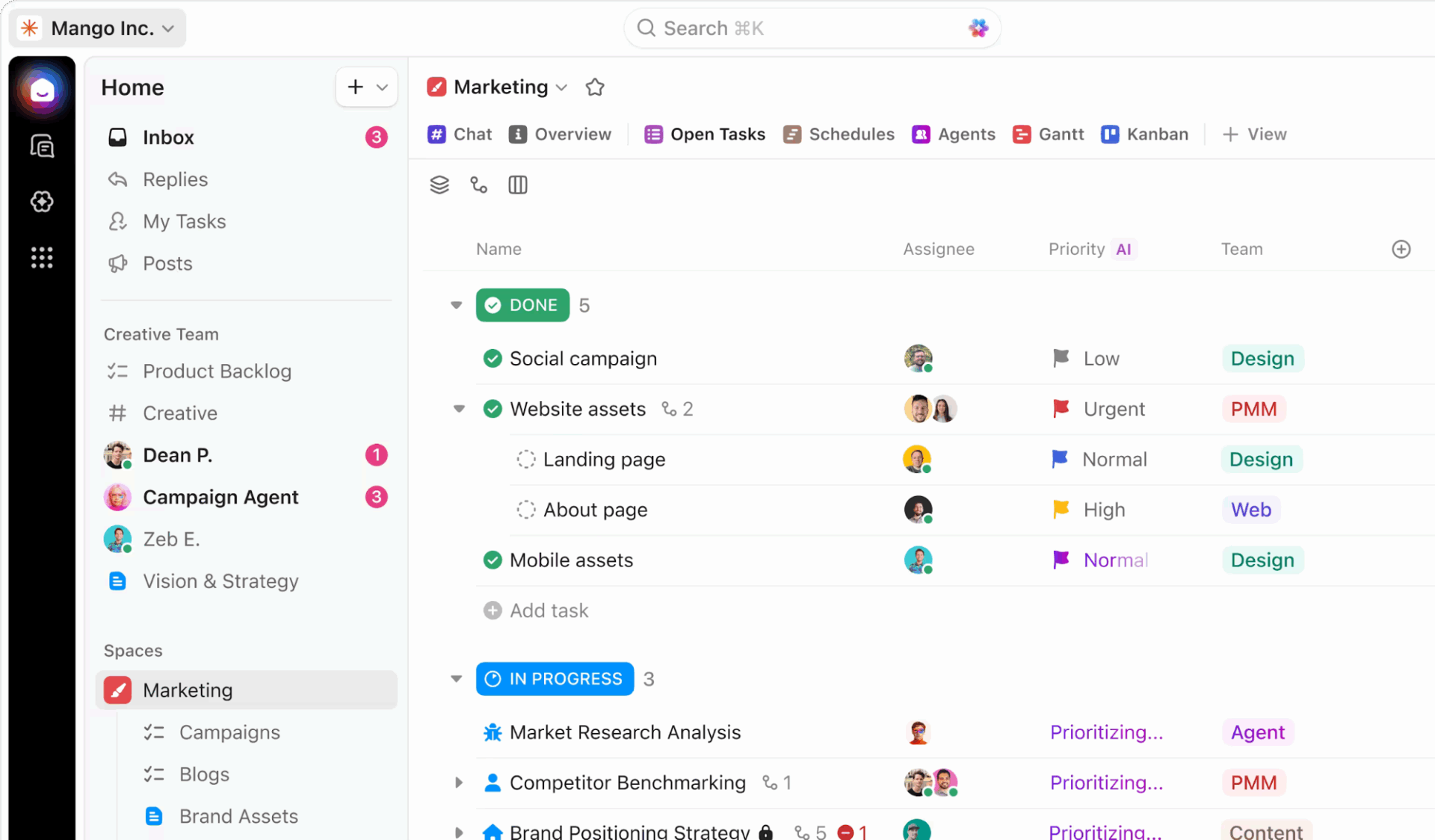
ClickUp’s Project Management Software fixes this with the everything app for work that combines projects, knowledge, and chat in one place—all powered by AI that helps you work faster and smarter.
It gives you the freedom to manage the messy, evolving side of work with a user-friendly interface. You can map complex processes, track every moving part, centralize documentation, and keep conversations tied to the work they belong to.
🔍 Did You Know? Automations follow cue → routine → reward, the same pattern Charles Duhigg describes in The Power of Habit. In operations terms: trigger → workflow → outcome. That’s why automations feel so intuitive; they mirror how our brains already operate.
ClickUp adapts to how your teams already think and operate. Here’s a closer look at its features. 💁
For teams trying to streamline operations, reduce tool sprawl, and scale processes, ClickUp combines workflow automation with AI-driven task execution.
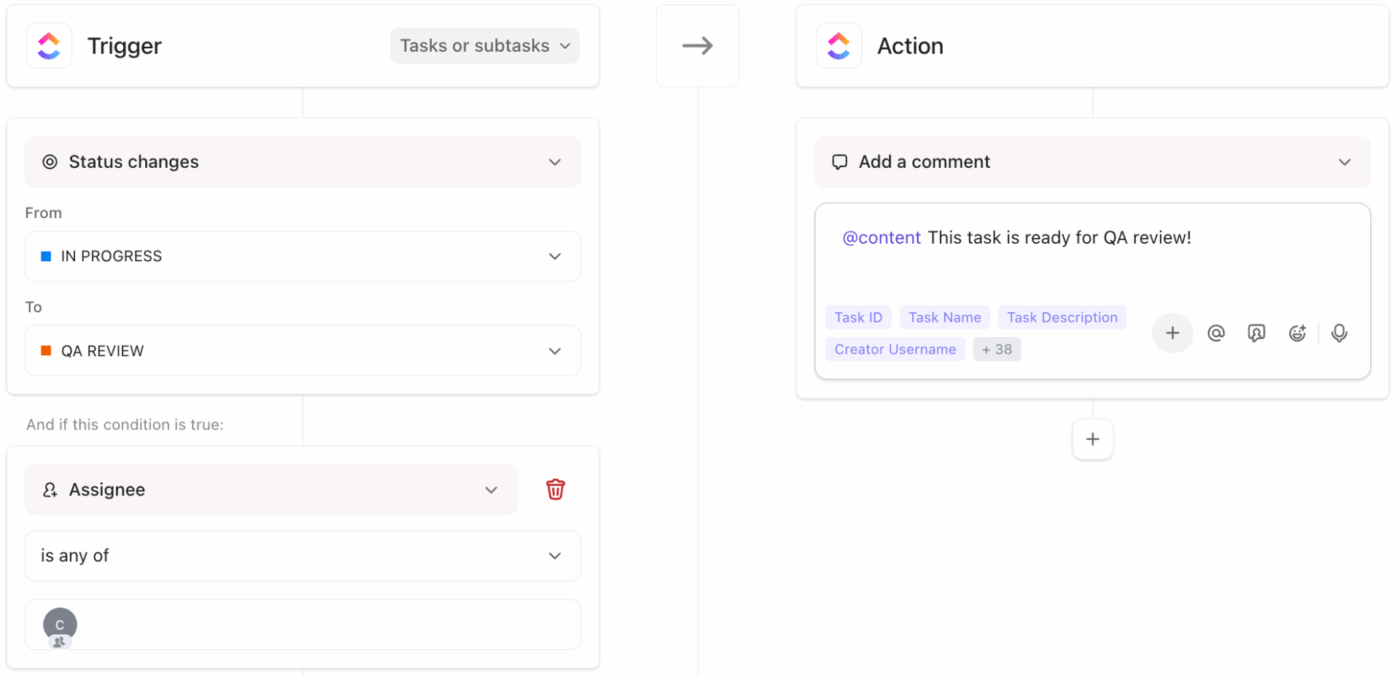
ClickUp Automations take the routine work off your plate. You set a trigger, and they handle the rest, like moving tasks, assigning owners, tagging items, sending notifications, updating fields, or shifting work into the right list. It’s the easiest way to keep a process consistent, even as volume increases.
Suppose the PMO team reviews new project requests. Each time someone fills out the project intake form, you can set up a workflow automation system to:

And when you need to automate complex workflows, try ClickUp AI Agents. Instead of just reacting to a trigger, they read the task, understand what it’s about, and then take the right action.
Say an operations manager is triaging internal process issues. When a new feedback task arrives, the AI Agent:
Learn how to build your own:
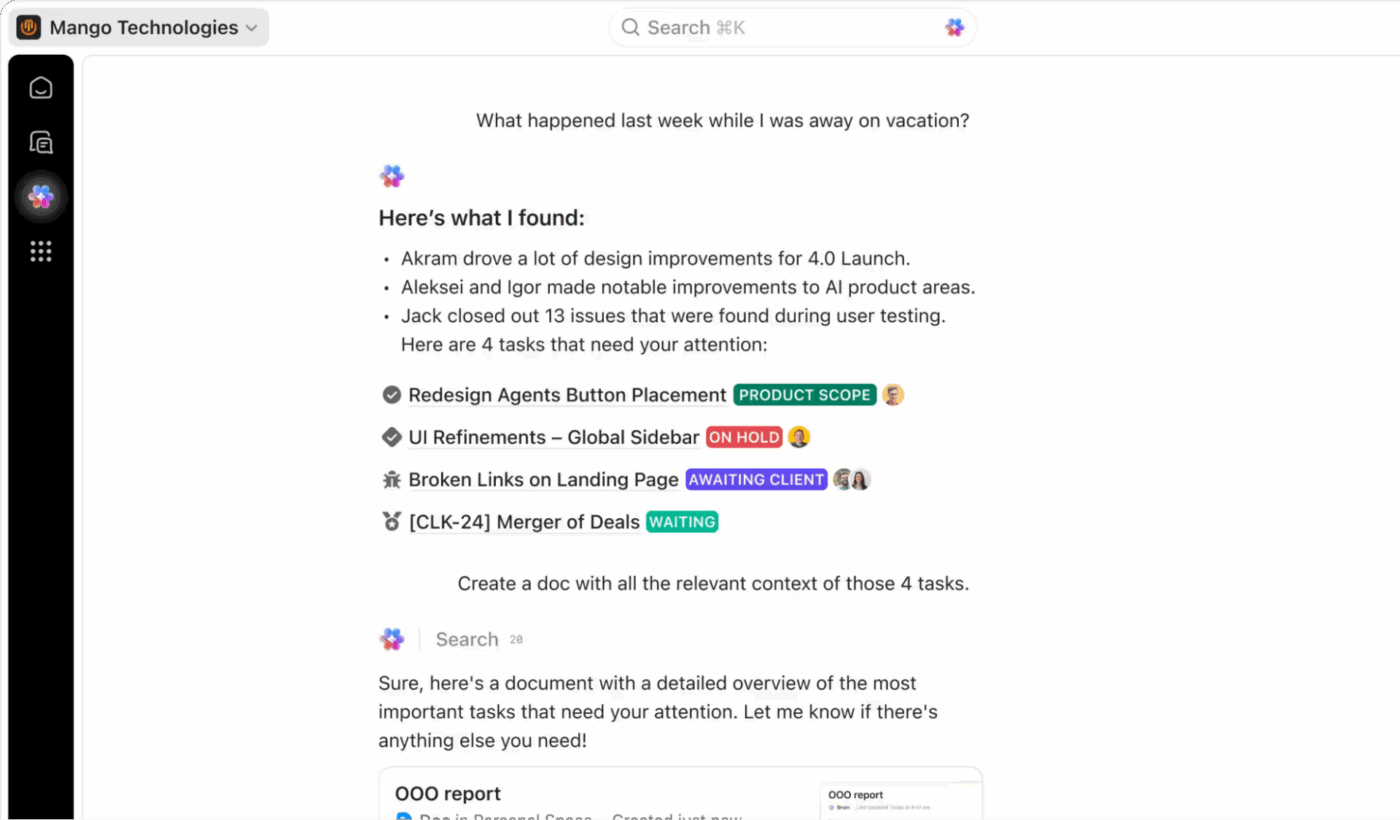
ClickUp Brain, the platform’s AI-powered assistant, sits inside your tasks, docs, and project structures. It understands your workflows, process notes, change logs, and operational decisions.
Suppose you manage a quarterly process refresh covering onboarding, procurement, and access control. You open the main project task and ask ClickUp Brain to pull the latest activity across those workflows.
It reviews change logs, dependencies, and owner updates, then produces a precise status summary you can share with leadership. You use that output to confirm handoff points, adjust deadlines, and surface risks early.
Teams using ClickUp Brain report saving 1.1 days each week because your thinking and execution live together in one project management software.
📌 Example Prompt: Review activity across our onboarding, procurement, and access control workflows. Summarize the current state, name delays, and recommend next steps for each team.

You can also use the AI desktop companion, ClickUp Brain MAX, which pulls premium AI models such as ChatGPT, Claude, and Gemini into one space. This eliminates AI sprawl and gives you a unified AI layer across your entire workflow.
Suppose you need to prepare an implementation plan for a systems upgrade with input from IT, product, and support. You could ask Claude to restructure your draft into a clean phased rollout. Then, switch to ChatGPT in Brain MAX to shape the messaging for stakeholders. Finally, use Gemini to compress the plan into a short version for your ticketing team.
📌 Example Prompt: Restructure this implementation plan into three clear phases. Then prepare a short update version for stakeholder communication.
🚀 ClickUp Advantage: ClickUp Talk-to-Text within Brain MAX supports voice-first productivity, so your operational knowledge flows into tasks without delay. You speak once, and it’ll convert the thought into structured work.
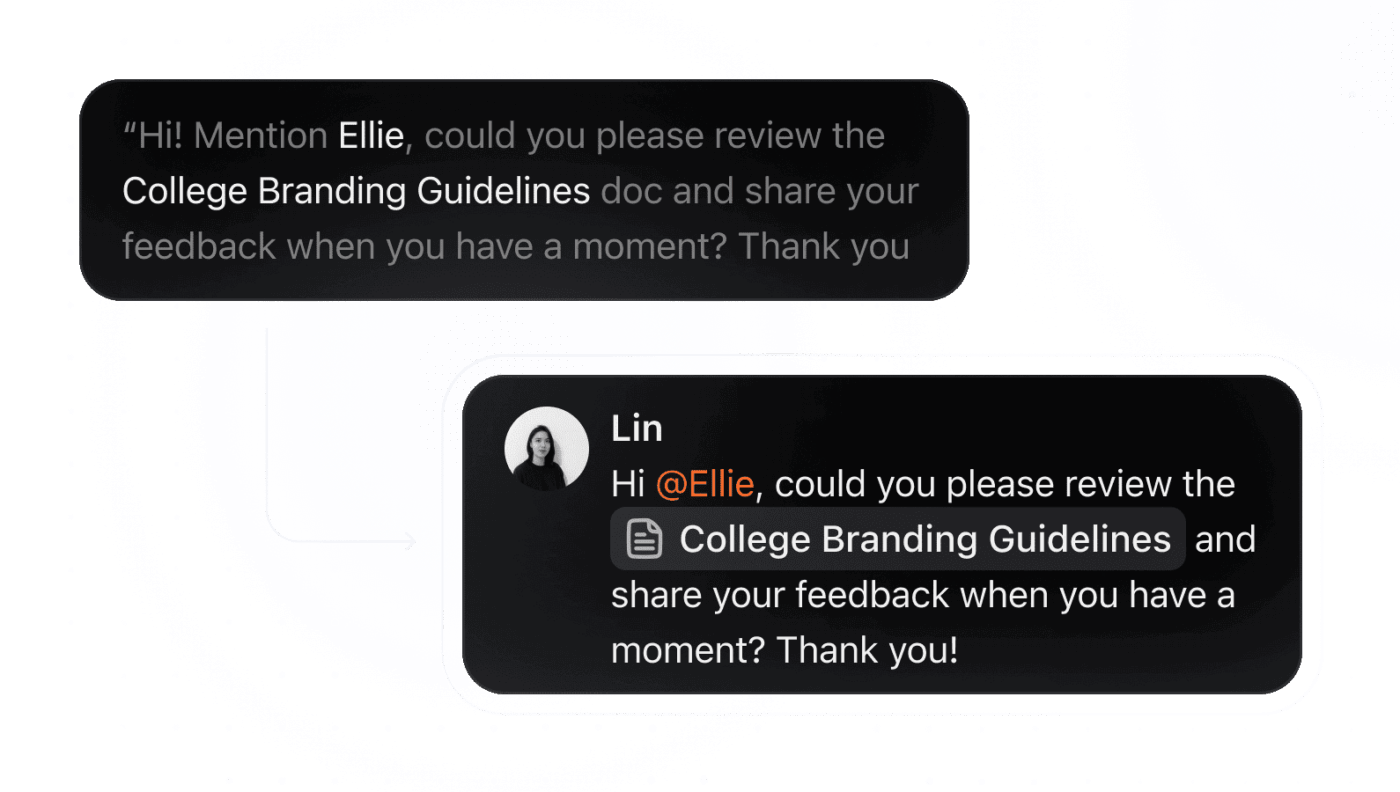
For instance, an operations manager walks into the server room mid-audit and hears a technician explain a repeat-failure pattern. The manager opens the floating Brain MAX bar (or presses the shortcut key) and speaks the summary.
Talk to Text transcribes it, creates a sub-task in the audit project, auto-mentions the technician, and attaches the relevant sensor log doc. Since everything happens in the same workspace, you work faster because the follow-up happens the very next day.
At the center of every workflow is ClickUp Tasks—your single source of truth for what needs to get done, who owns it, and where it sits in the larger process.
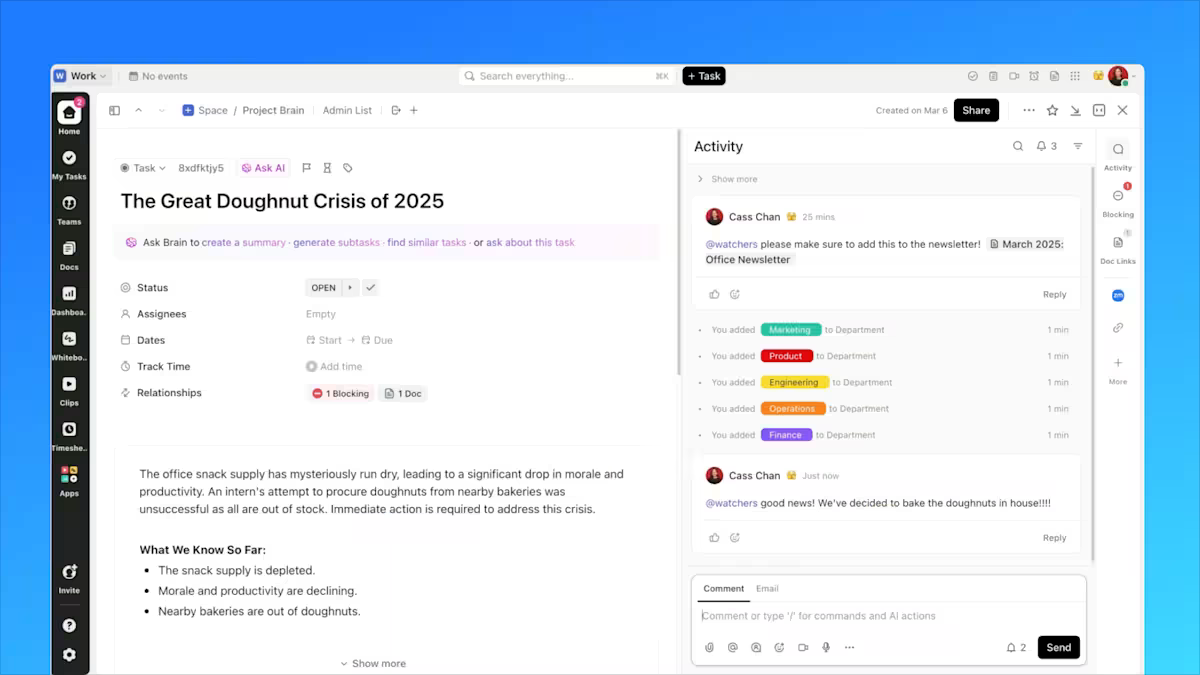
Tasks work like flexible containers that can hold everything your team needs to move work forward: descriptions, attachments, subtasks, checklists, custom fields, dependencies, comments, and even full discussion threads.
You can capture a request, categorize it with ClickUp Custom Fields, assign the right owner, log historical context, connect it to the larger initiative, and track every update without switching between tools.
But once the volume picks up, knowing what’s happening inside individual tasks isn’t enough. You need to see the pattern, which is where ClickUp Dashboards become useful.
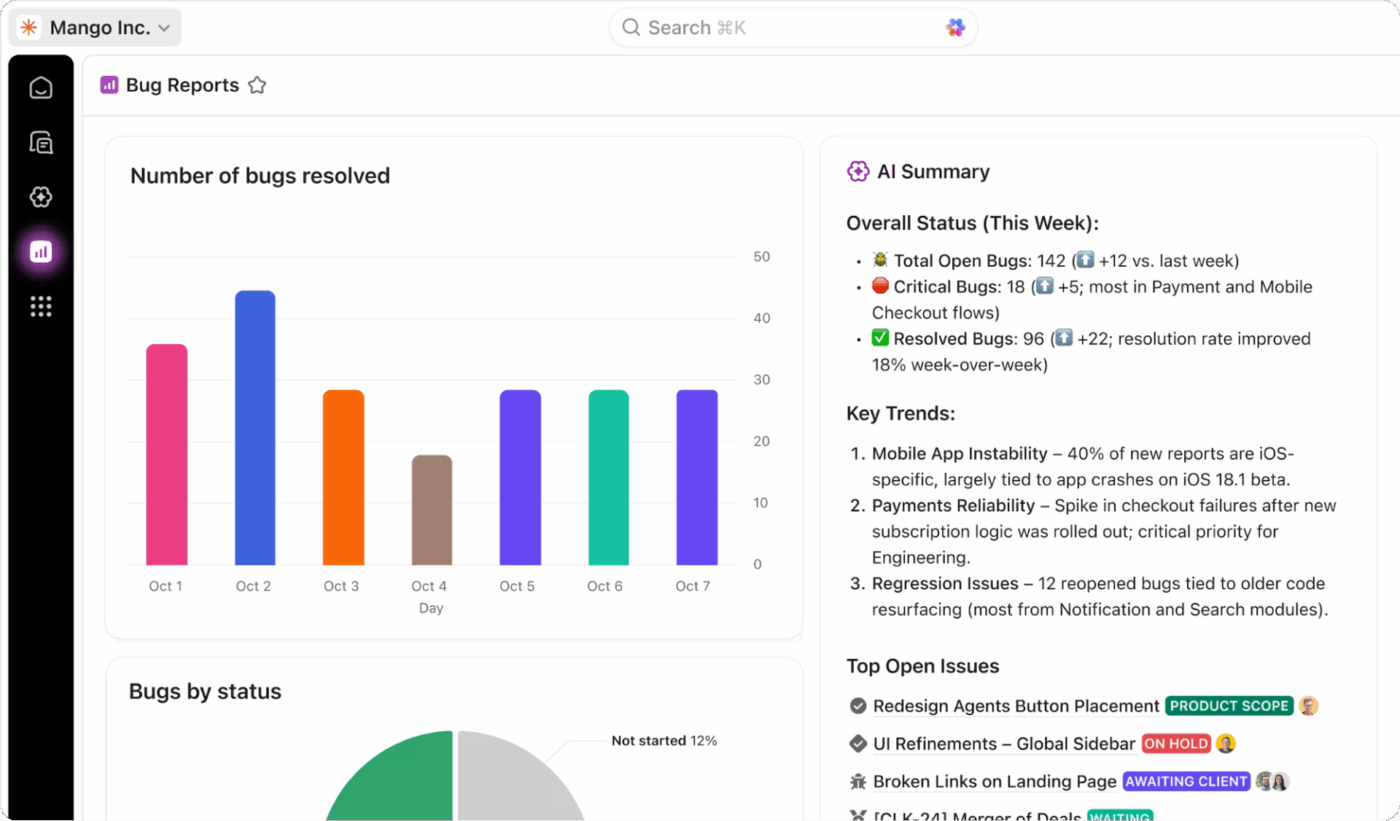
Dashboards give you a top-down view of everything your tasks are doing beneath the surface. Instead of checking progress one task at a time, they pull live data from across your workspace: statuses, workload, bottlenecks, cycle times, completion rates, team capacity, outcomes, and other project management KPIs.
🔍 Did You Know? In the 1800s, a deadline referred to a physical line around prisons. If you crossed it, you’d be shot.
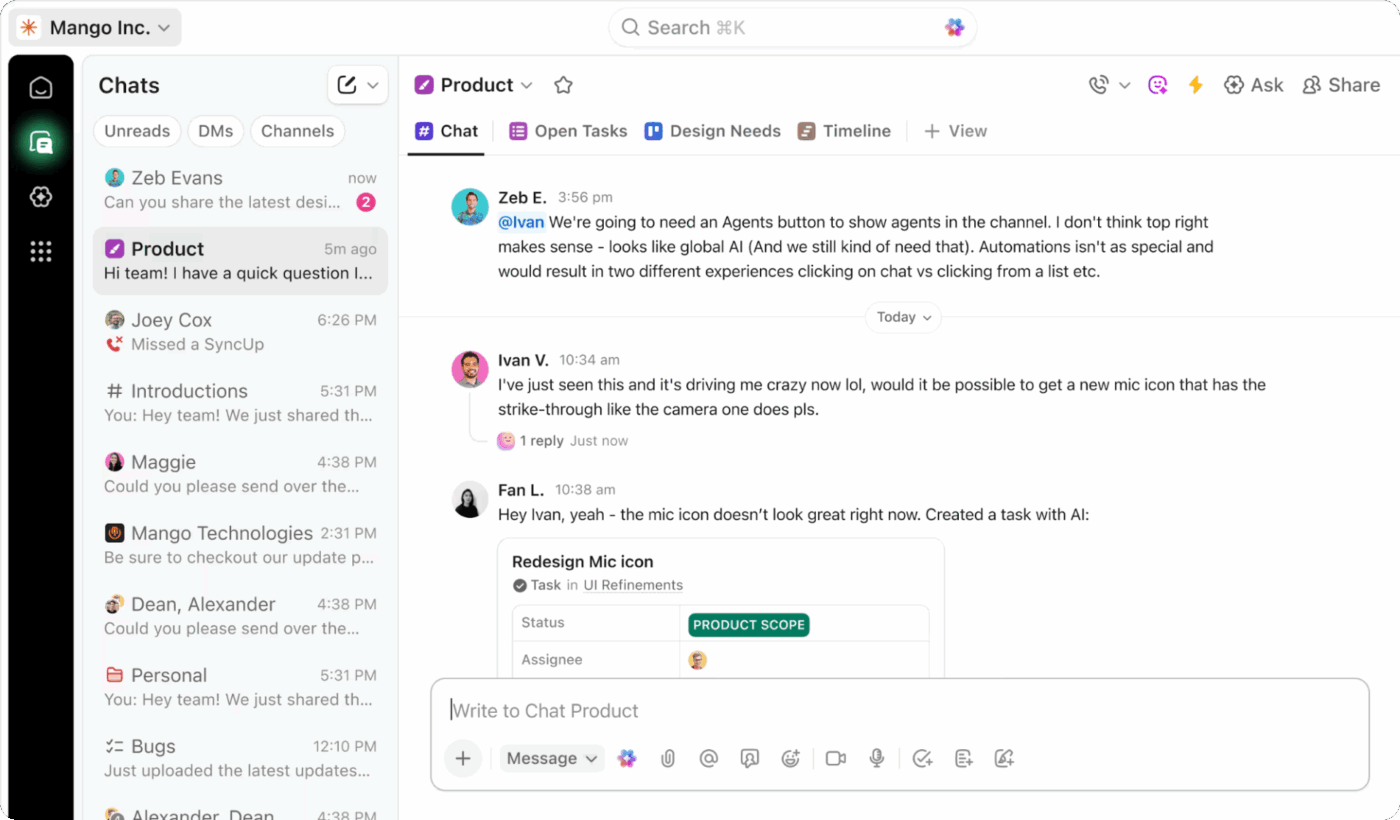
ClickUp Chat brings conversations back to where your work lives. With Channels and Direct Messages, you can discuss tasks, ask questions, drop files, share quick updates, and keep cross-team conversations tied directly to the project they’re shaping.
Hop onto a quick audio or video call to discuss stand-ups with ClickUp SyncUps, assign work with @mentions, and turn any message into a task with just a click. Plus, ClickUp AI (Brain) can help you summarize chat threads, create tasks, find related tasks, and more.
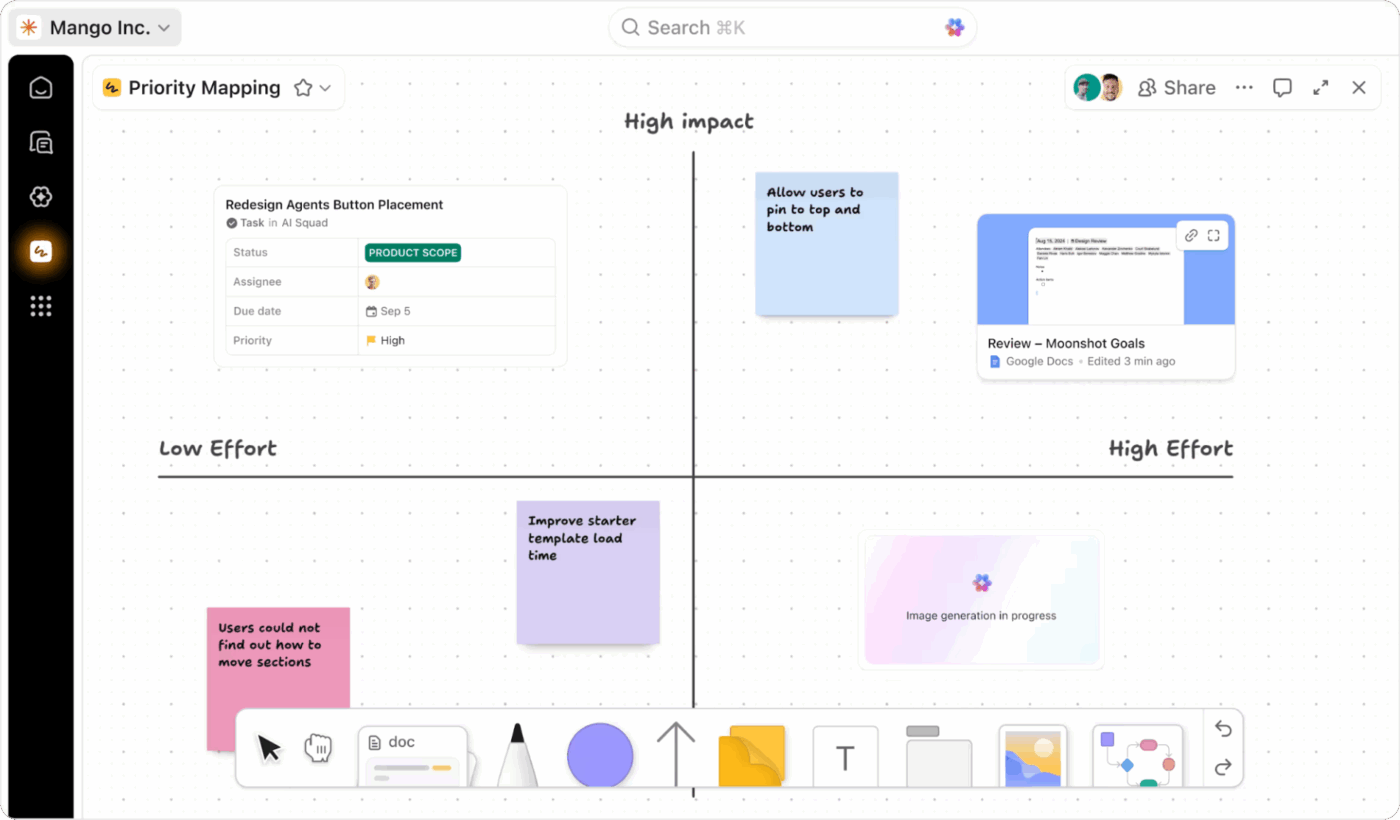
ClickUp Whiteboards are a visual canvas that let you map workflows, sketch out processes, outline project phases, cluster ideas, or design cross-team solutions. You move from ‘talking about it’ to ‘building it’ without losing momentum.
For instance, say your product team is planning the rollout of a new onboarding experience. On a whiteboard, they sketch the high-level user flow, drop sticky notes with open questions, and cluster customer pain points pulled from feedback tasks.
From there, they convert every sticky note into a task, assign owners, and add due dates within the project management tool.
Once the ideas are mapped and the direction is clear, turn those concepts into something more polished.
ClickUp Docs helps you turn the raw thinking from whiteboards into organized, long-form content your team can use: SOPs, project briefs, process documentation, knowledge bases, proposals, decision logs, or cross-functional plans.
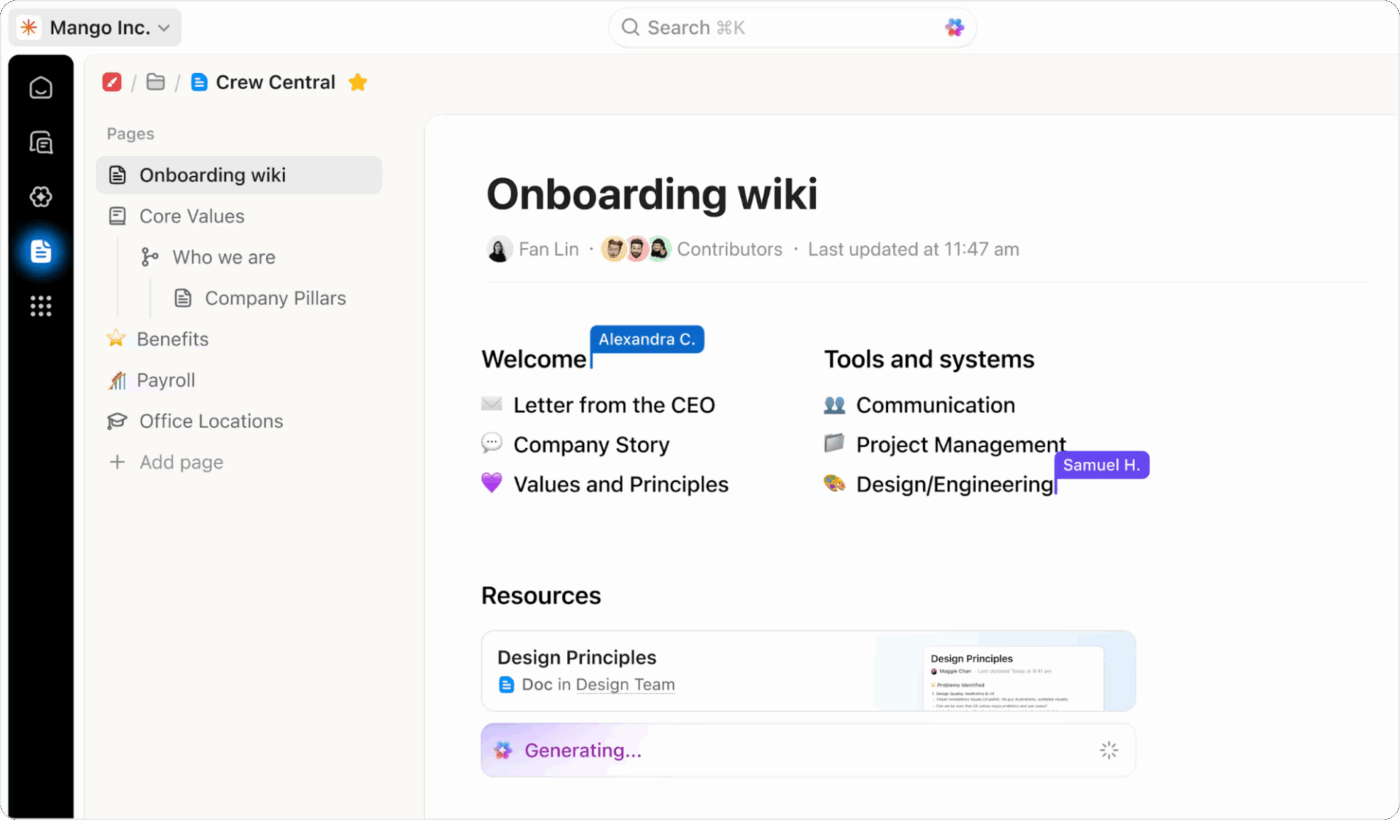
Every doc lives in the same workspace as your tasks and whiteboards, so you can link directly to work items, embed views, tag teammates, and keep documentation connected to the execution.
🧠 Fun Fact: In 1968, a 3M scientist invented a failed weak glue that didn’t bond well. Another employee later used it to mark choir hymn pages, and the Post-it Note was born.
📮 ClickUp Insight: 50% of people structure their time by dedicating certain days to admin vs. focused work, but only 22% say they automate or delegate tasks.
Manual time management helps, but it doesn’t eliminate the repetitive tasks that still eat into deep work. ✔️
ClickUp’s Calendar, Time Blocking, and AI Agents work together to protect your time. Automatically schedule repetitive work, move tasks based on priority, and trigger reminders—so your week runs itself.
💫 Real Results: Lulu Press saves 1 hour per day, per employee using ClickUp Automations—leading to a 12% increase in work efficiency.
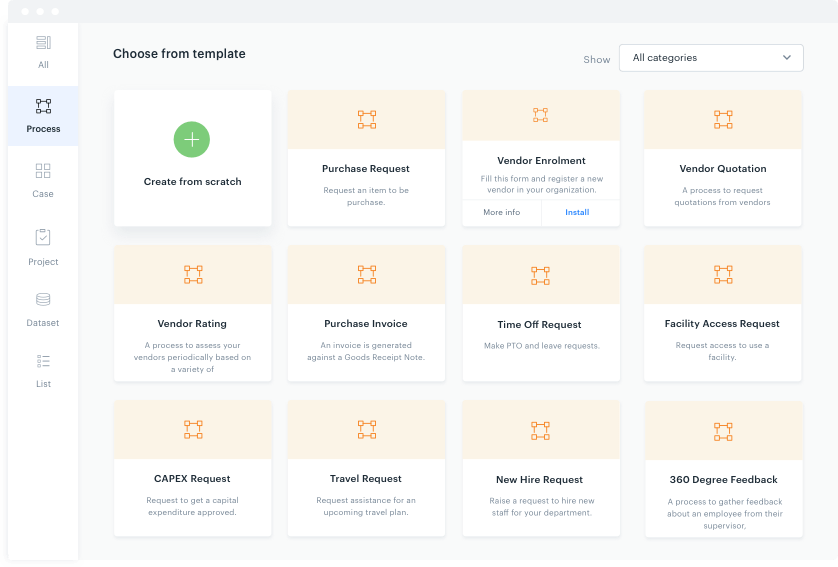
Kissflow is a no-code platform used to build and automate internal approval flows, request processes, and lightweight business applications.
Teams often use it to create things like purchase request systems, employee onboarding flows, vendor management processes, travel approvals, IT ticketing setups, and service request portals.
You can define each step in a process, decide who needs to take action, set routing rules, attach forms, and track the status of every item moving through the workflow.
🔍 Did You Know? IBM pioneered remote work in 1979 with just five employees in a telecommuting pilot. It worked so well that by 1983, more than 2,000 IBM workers were remote, making the company one of the earliest champions of distributed work.
Here are Kissflow features that help you standardize workflows.
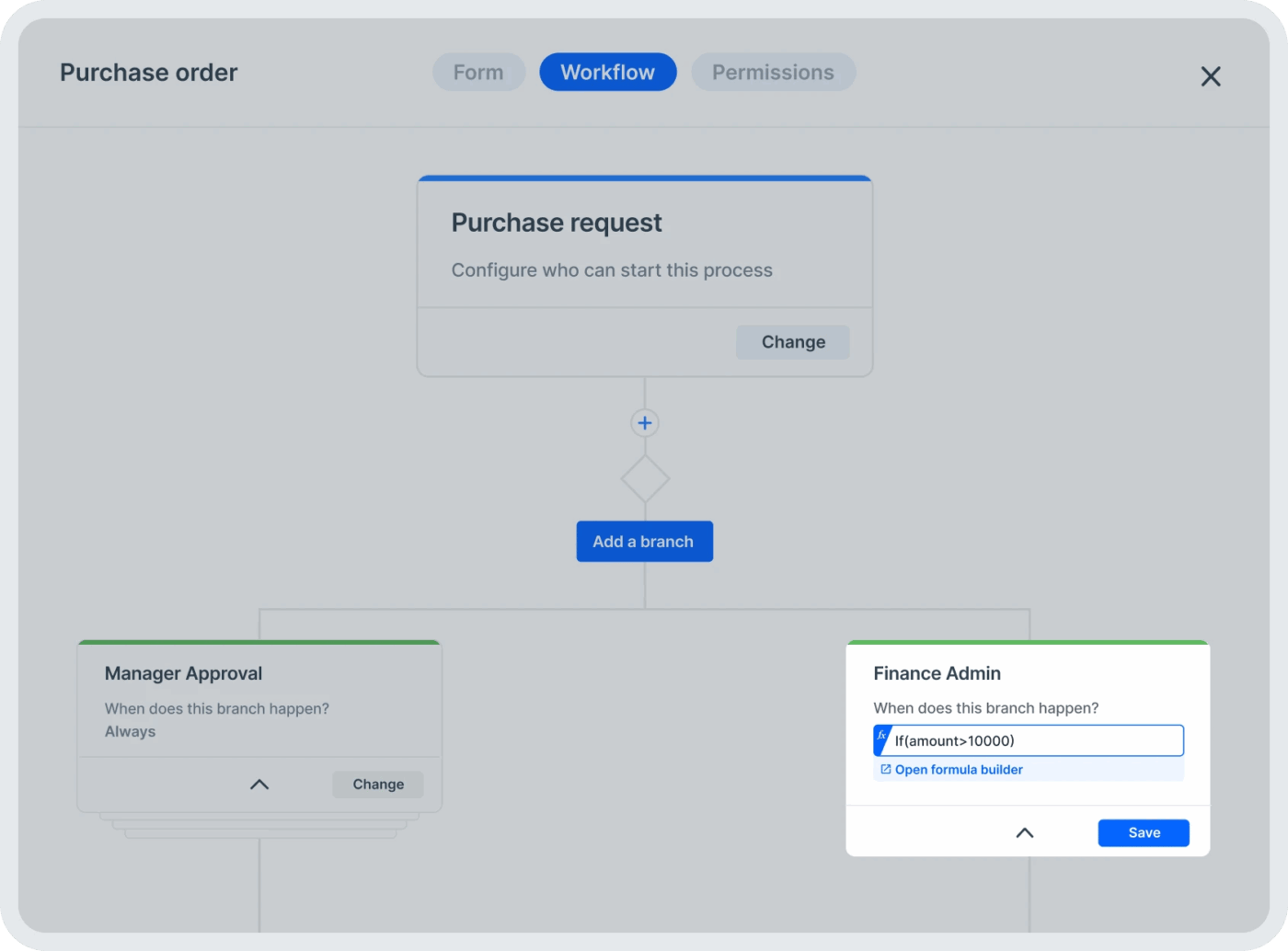
Kissflow helps teams standardize and scale workflows through its intuitive visual Process Builder. Teams can map each step using drag-and-drop elements, define conditions, configure task-level rules, and add parallel branches.
For example, an expense request can automatically route to a manager, skip to finance if it exceeds a limit, and trigger reminders if it stays pending too long. These flows support deeper business process automations without forcing teams to write code.
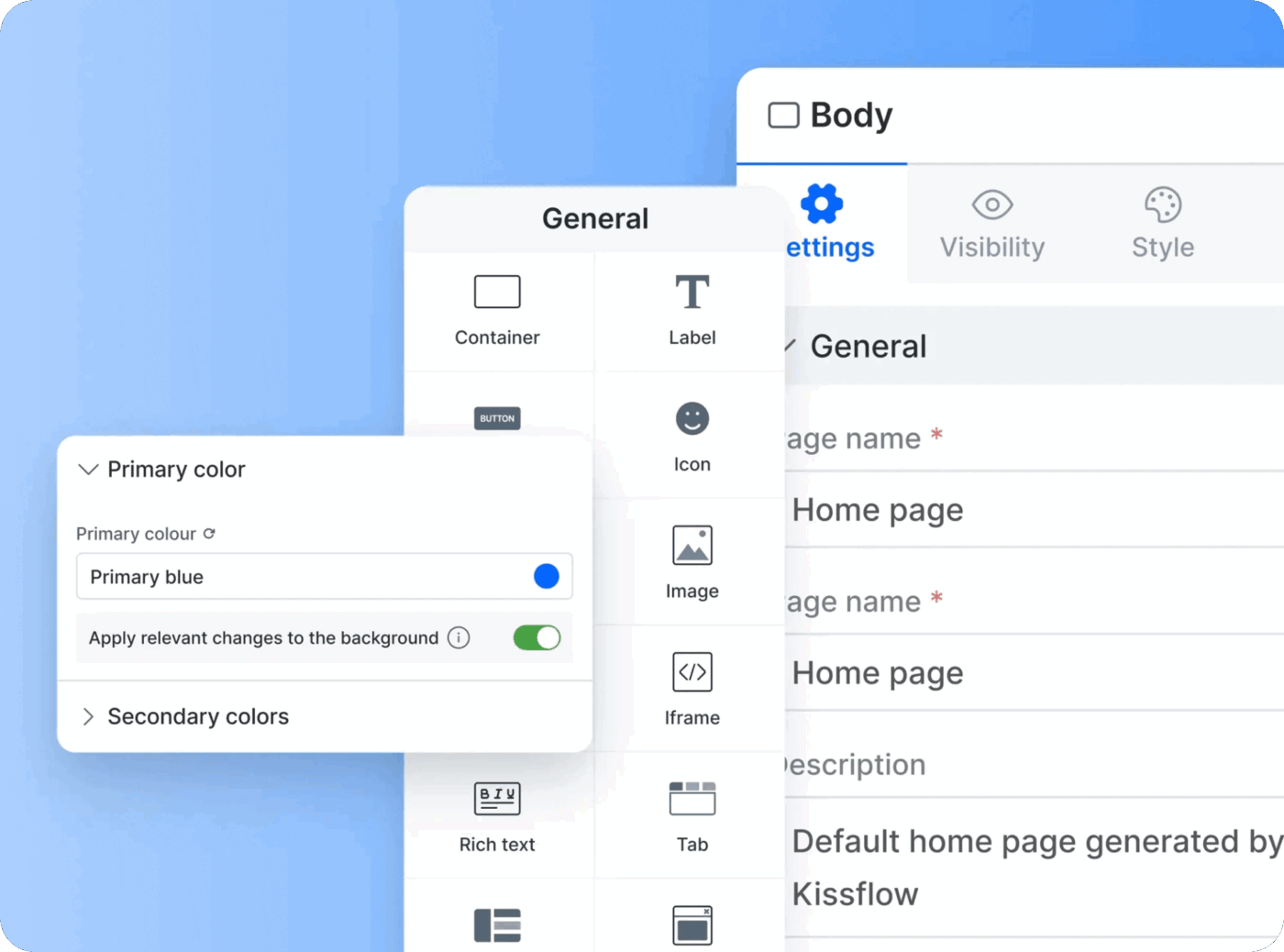
Kissflow also offers a low- and no-code app builder that empowers teams to create custom internal solutions using visual forms, data tables, workflows, and rule-based automations.
With this, a team might build a small internal inventory tracker or onboarding request tool entirely as a no-code app. IT can still set access controls and monitor changes, while business users build and iterate quickly.
🧠 Fun Fact: Cyril Northcote Parkinson discovered that ‘work expands to fill the time available.’ This explains why teams that design tighter workflows and automated SLAs move 2-3x faster.
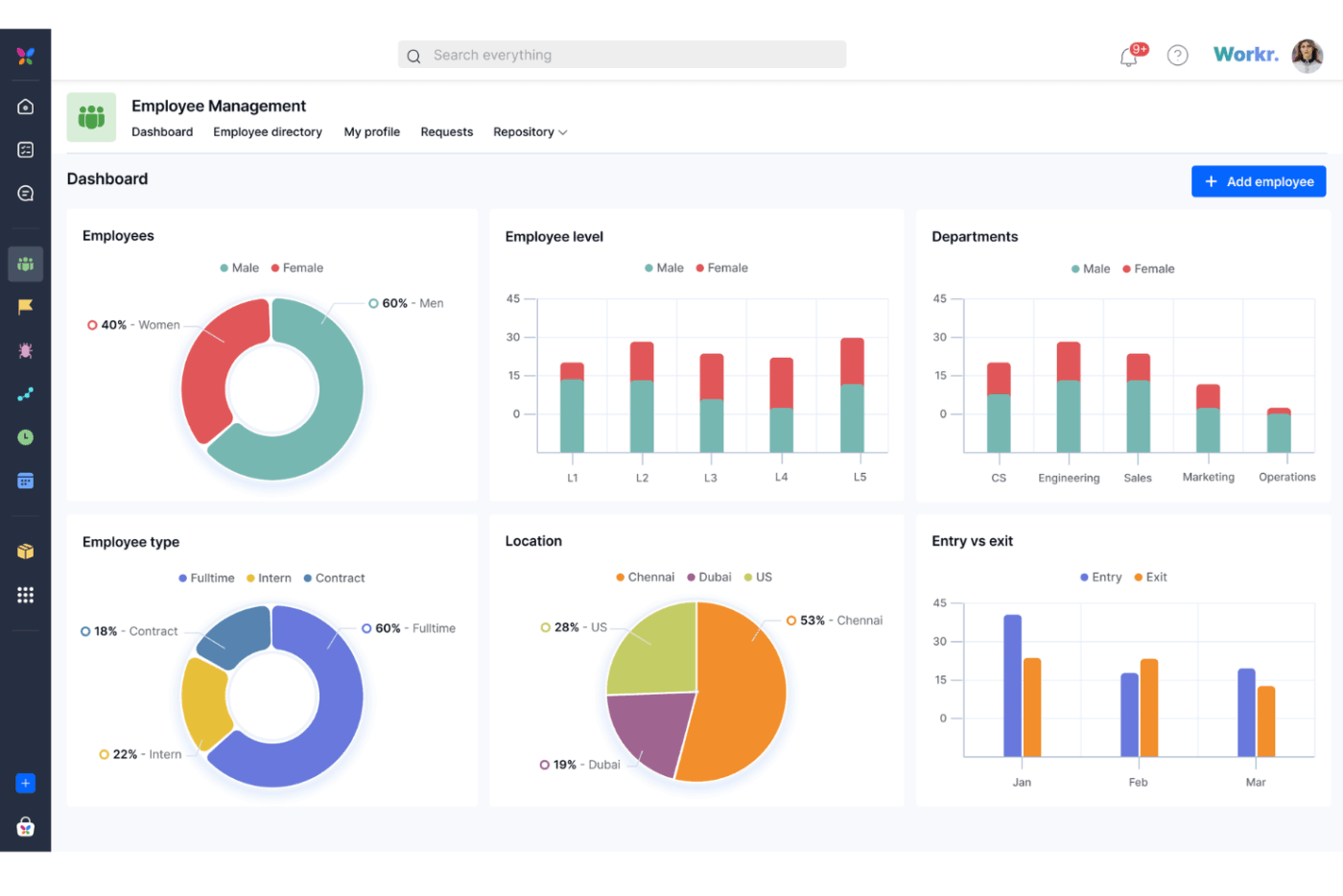
Alongside traditional CRM workflows, Kissflow lets you switch between Kanban boards, list views, matrix layouts, and detailed project spaces depending on how they prefer to visualize work.
This enables teams to manage structured processes and ongoing operational tasks within the same platform.
🔍 Did You Know? Most process delays don’t happen during the work itself; they happen between the work. Studies show that the biggest slowdowns occur in the ‘white space’ between teams, tools, or approvals, where information gets stuck, communication breaks down, and tasks simply wait.
🔍 Did You Know? The checklist was born after a tragic 1935 Boeing Model 299 crash caused by a missed pre-flight step. The aircraft’s complexity made it impossible to rely on memory alone, so Boeing created the world’s first formal checklist, now a standard safety practice in aviation, healthcare, and modern workflow design.
Teams exploring process automation and structured workflow management often compare ClickUp vs. Kissflow because both help organize work and streamline operations.
ClickUp leans into AI-driven project execution, task management depth, and collaboration across tasks, docs, and dashboards. Kissflow focuses on creating structured approval flows and lightweight internal apps using visual no-code builders.
Here’s a feature-by-feature comparison of the two:
First up, let’s look at how ClickUp and Kissflow compare when shaping processes to fit your team’s unique way of working.
ClickUp gives teams the freedom to design workflows that match real-day-to-day work. You can customize statuses, fields, views, task types, dashboards, and permissions. Teams building fast-moving projects get complete control over how work is organized, tracked, and viewed, which makes it easier to adapt as priorities shift.
Kissflow focuses on structured, form-based workflows. You can customize steps in a process or approval chain, but customization mainly supports linear workflows. Its low-code tools work well for fixed business processes like purchase orders or HR requests.
🏆 Winner: It’s a tie! ClickUp excels at providing flexible project management features, while Kissflow shines when teams need structured, process-driven workflows.
How do these tools help your team stay aligned and connected throughout the workday? Let’s find out:
ClickUp centralizes workplace collaboration within the work itself. Teams can chat in real time inside tasks, add threaded comments, attach files, and embed docs or whiteboards. Every discussion stays tied to a specific project or deliverable, so teams never lose context.
Additionally, ClickUp Docs allows teams to build handbooks, SOPs, plans, and internal knowledge bases inside the workspace. Docs connect directly to tasks, projects, and goals, keeping decisions, plans, and actions united. Teams don’t need extra tools for document storage.
Kissflow includes comments inside workflows, but collaboration is secondary to the process flow. Most communication happens outside the platform, forcing teams to use external tools for discussions, feedback, or brainstorming. It works fine for approvals but not for project-heavy teamwork.
Moreover, Kissflow provides basic documentation inside workflow descriptions, but it doesn’t support deep, interconnected docs or long-form content.
🏆 Winner: ClickUp takes the lead with its integrated collaboration features and fully integrated documentation.
Now, let’s talk automation and how each tool handles repetitive work.
ClickUp Automations and AI Agents help teams speed up everything from task assignments and status changes to reminder schedules and handoff steps. You can connect automations across lists, spaces, and workflows, which supports both structured and dynamic work.
It’s built for teams that need automation to scale across multiple departments.
Kissflow shines in automating structured processes like finance approvals or procurement workflows. However, automation is tied to forms and predefined paths, so it’s not ideal for creative or non-linear project work.
🏆 Winner: ClickUp takes this one with its flexible automation system that adapts to both complex workflows and everyday project needs.
Finally, let’s compare real-time reporting features that give your team insights into progress.
ClickUp offers dashboards, cards, workload charts, sprint metrics, time tracking, and everything leaders need to monitor progress. Visibility extends across departments, projects, and teams, making it ideal for operational clarity.
Kissflow reporting is strong for process audits and identifying approval bottlenecks, but it doesn’t provide detailed project visibility or cross-team reporting. It’s more suited to business operations than ongoing project work.
🏆 Winner: ClickUp secures this round with its comprehensive reporting and real-time dashboards for team-wide visibility.
📖 Also Read: Best Kissflow Alternatives and Competitors
We scoured Reddit to understand how users talk about ClickUp vs. Kissflow. While there aren’t many direct comparison threads between the two, conversations around each tool offer clear insights into how people perceive them.
On the ClickUp side, one user shared how deeply it reshaped their agency’s day-to-day work:
We’ve been running our agency on ClickUp for about half a year now, and honestly, it’s changed how we work in ways I didn’t expect… Their Docs system has quietly replaced most of our Google Docs work. Everything just flows better when our documentation lives in the same place as our projects.
They also highlighted how ClickUp Brain went from a skeptic’s concern to a practical time-saver:
I was on the fence about ClickUp Brain at first…but it’s saved me from some tedious writing tasks, especially when I need to summarize lengthy client emails or get a draft started.
Another Redditor summed up Kissflow’s appeal clearly:
Kissflow is probably what you’d want if you were seeking a tool that combines ease of use, flexibility, and powerful capabilities in one. Kissflow is specifically developed to allow the non-technical user to develop applications on his own… making Kissflow a robust player for the needs of streamlining operations on an all-encompassing scale.
Across Reddit, the pattern is consistent. Teams that want structured process apps, form-heavy workflows, and straightforward citizen development lean toward Kissflow. Teams that want project management, documentation, and AI-driven execution in one workspace find ClickUp a better long-term fit.
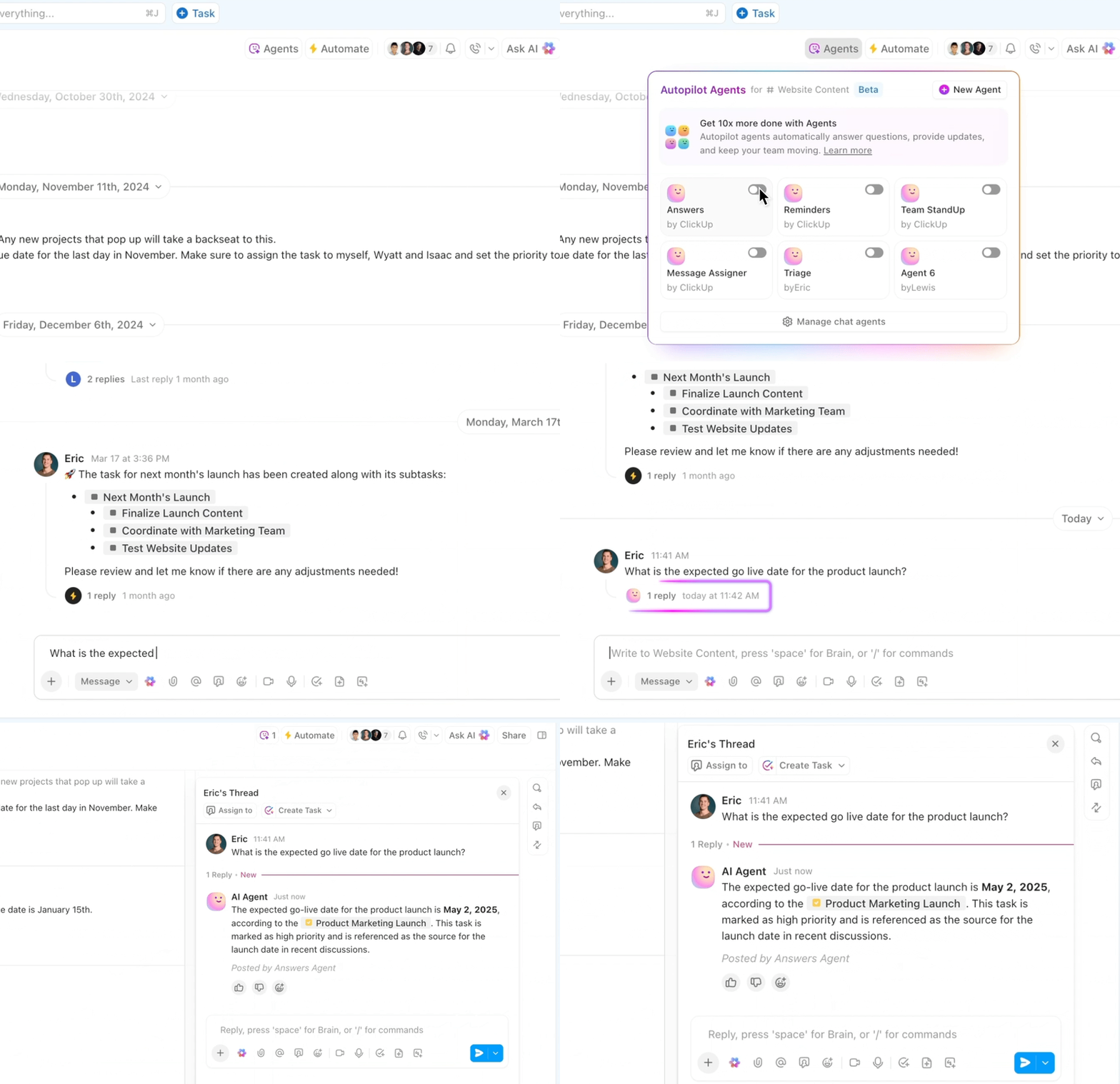
🚀 ClickUp Advantage: Automate routine tasks with Prebuilt AI Agents within ClickUp. Here are our favourite picks:
The results are in, and we’ve got a clear winner. 💪
It’s ClickUp! 🤩
Kissflow works well for structured approval flows, form-driven processes, and basic no-code apps. For operations teams that only need routing, forms, and straightforward process steps, it gets the job done.
ClickUp, the everything app for work, goes much further. It brings tasks, docs, dashboards, automation, AI, and collaboration into one workspace. You can manage daily work, build complex workflows, track performance, document processes, and use AI to interpret context and push tasks forward.
Sign up for ClickUp today! ✅

© 2026 ClickUp

There’s an easier way. Try a free AI Agent in ClickUp that actually does the work for you—set up in minutes, save hours every week.