

Sorry, there were no results found for “”
Sorry, there were no results found for “”
Sorry, there were no results found for “”
Ever had a colleague gasp at your triple-digit unread email count?
A cluttered inbox isn’t just messy; it’s a shortcut to stress and missed deadlines. If you’ve ever been tempted to delete everything and start fresh, pause for a second. There’s a smarter way: Inbox Zero.
This method isn’t about obsessing over an empty inbox but regaining control. You can declutter your inbox in five steps and under 20 minutes to stay on top of incoming emails—without feeling overwhelmed.
This guide breaks down the Inbox Zero approach and how ClickUp, the everything app for work, makes email management a breeze.
First, let’s bust a common myth: Inbox Zero isn’t about a zero inbox with no emails. 📩
It’s a structured email management method designed to help you control your inbox and prevent incoming emails from draining your time and focus. Instead of obsessing over an empty inbox, the goal is to respond quickly, sort messages, and prioritize important emails so your inbox works for you—not against you.
Inbox Zero relies on key principles that combine prioritization and action. It helps you maintain inbox clarity without spending all day on email.
Before we dive into the steps to get your inbox organized, here’s a quick look at the core ideas behind Inbox Zero:
A cluttered inbox slows you down, distracts you, and buries essential information. The Inbox Zero method flips the script, helping you take control instantly. Here’s how:
📮 ClickUp Insight: 83% of knowledge workers rely primarily on email and chat for team communication. However, nearly 60% of their workday is lost switching between these tools and searching for information.
With an everything app for work like ClickUp, your project management, messaging, emails, and chats all converge in one place! It’s time to centralize and energize!
Now, let’s explore achieving Inbox Zero step by step and check out key email management tips to keep your inbox under control.
Your inbox isn’t a digital attic—it’s meant to be your command center. Clear the clutter and make room for what truly matters. The first step to achieving inbox zero is swiftly removing unnecessary emails. This optimizes cloud storage, cuts through distractions, and sharpens your focus.
Not every email is your responsibility. Forwarding messages to the right person saves time and ensures tasks are handled efficiently.
The second step of optimizing your inbox is trusting your team and distributing the workload smartly. Here’s how to delegate like a pro:
📮 ClickUp Insight: Knowledge workers send an average of 25 messages daily, searching for information and context. This indicates a fair amount of time wasted scrolling, searching, and deciphering fragmented conversations across emails and chats. 😱
If only you had a smart platform that connects tasks, projects, chat, and emails (plus AI!) in one place. But you do!
Delegating tasks becomes easier with a task management system that lets you assign action items to people, set deadlines, and monitor progress.
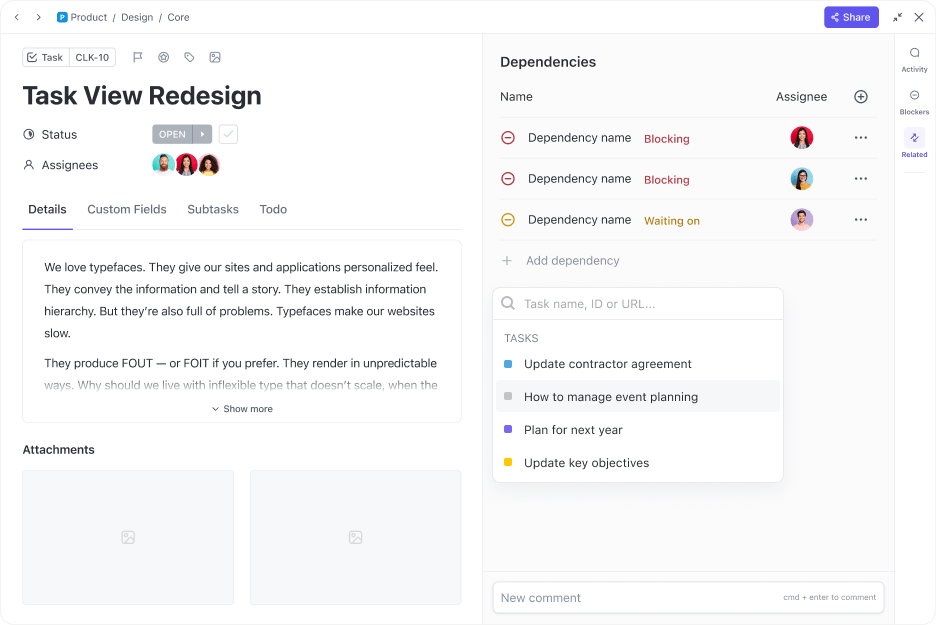
Whether you’re looking to stay on top of your tasks or boost accountability, ClickUp Tasks have got you covered! Create tasks in a single click with comprehensive details, such as descriptions, assignees, and status tracking to maintain full visibility across multiple inboxes.
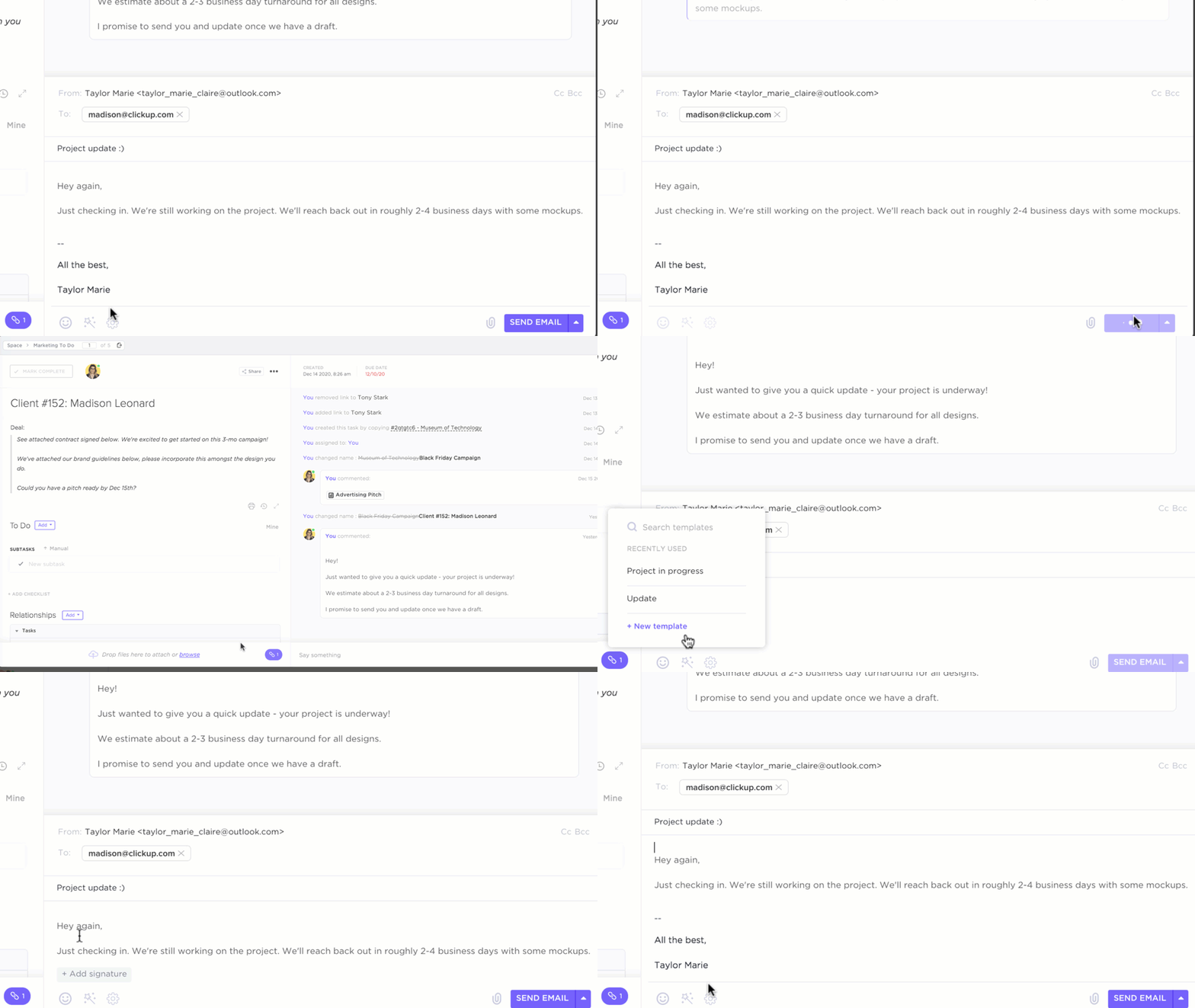
Each task list in ClickUp has a unique email address that allows you to create tasks directly from emails. Here’s how it works:
You can also watch this video explainer to get a clearer idea of the process 👇🏽
💡 Pro Tip: Need to provide additional context when delegating? ClickUp Tasks offer dedicated space for comments, subtasks, and Custom Fields to communicate requirements clearly.
For complex projects requiring sequential work, ClickUp Task Dependencies ensure your team completes preliminary steps before moving forward.
Delayed responses create backlogs. If you have the information handy, respond immediately to keep conversations moving and prevent unnecessary follow-ups.
Delivering quick replies with short, clear messages also reduces the pressure of perfecting phrasing and tonality. Here’s how to stay responsive without feeling overwhelmed:
🧠 Fun Fact: American programmer Ray Tomlinson sent the world’s first email, introducing the ‘@’ symbol that connects users across devices on the internet.
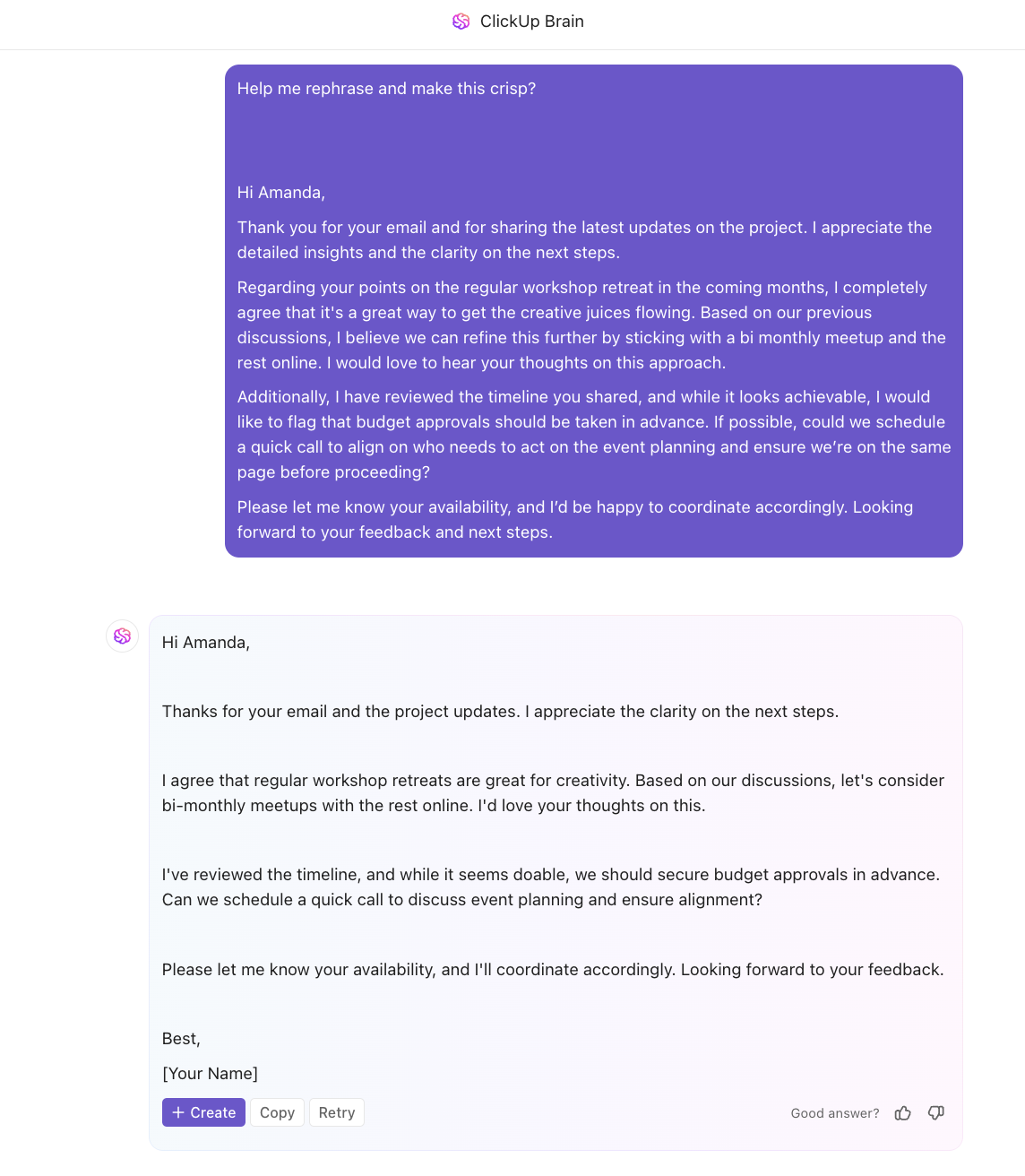
When you need to respond quickly to an email but can’t think of the right words, ClickUp Brain acts as your go-to AI assistant.

As a conversational tool, ClickUp Brain can analyze the content and tone of the incoming email and draft a relevant, professional response based on the email context. You can instruct it to maintain the appropriate tone and formality for business communications.
Since Brain is integrated into your ClickUp Workspace, it is completely context-aware and can include necessary details from previous conversations or tasks in the email draft.
📮 ClickUp Insight: Only 7% of professionals depend on AI primarily for task management and organization. This could be because the tools are restricted to specific apps like calendars, to-do lists, or email apps.
With ClickUp, the same AI powers your email or other communication workflows, calendar, tasks, and documentation. Simply ask, “What are my priorities today?”.
ClickUp Brain will search across your workspace and tell you exactly what’s on your plate based on urgency and importance. Just like that, ClickUp consolidates 5+ apps for you within a single, super app!
Whether you need to make communication more impactful, refine its tonality, or tighten the word count, ClickUp Brain helps you craft the perfect response—without overthinking every word.
💡 Pro Tip: ClickUp Brain goes beyond simple email replies by helping you:
Learn how to write better documentation with AI through this helpful explainer 👇🏽
Some email messages require more thought or action. Scheduling them for later ensures you stay focused on immediate priorities without losing track of important follow-ups.
Worried they’ll disappear forever into the abyss? Try these mail management strategies to stay on top of things, even when juggling multiple email accounts:
One of the smartest ways to manage a flood of incoming emails is by automating what happens as they arrive. While that might sound technical, ClickUp makes it so simple that no expertise is required.
With its intuitive automation features, you can sort messages, assign tasks, and streamline your mail management strategies—all without lifting a finger.
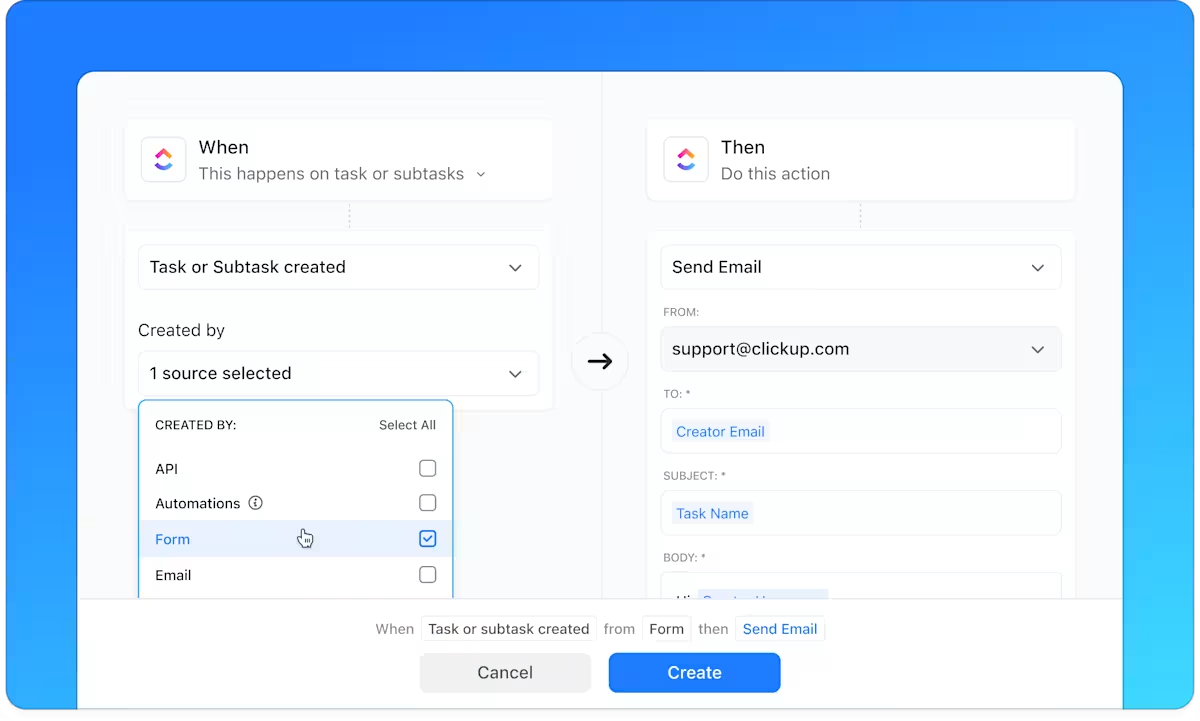
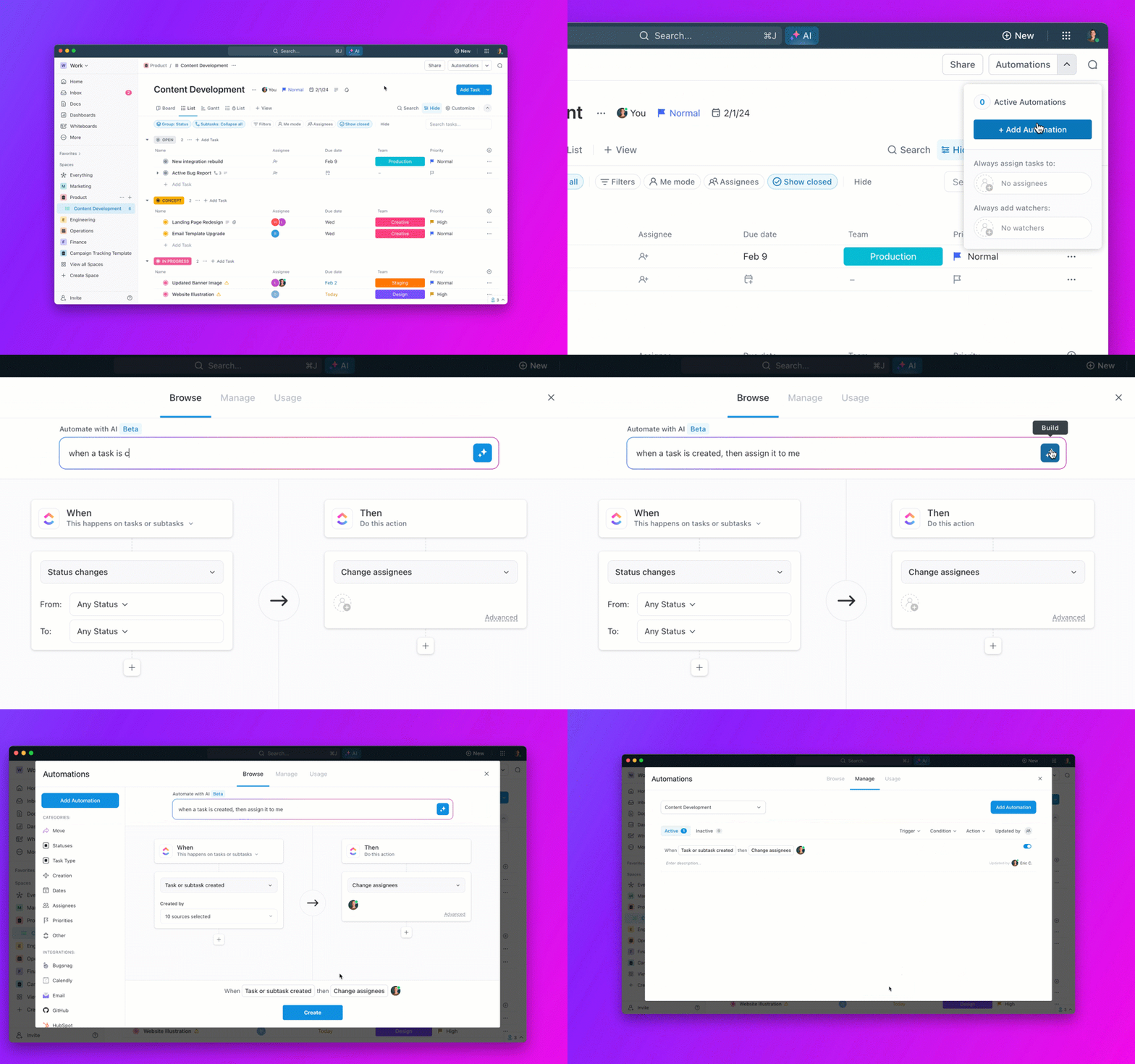
ClickUp Automations combine natural language instructions and conditional logic to improve your workflow. With intuitive drop-downs and When-Then conditions, you can set rules to automate inbox management, task assignments, and follow-ups—no coding required.
ClickUp Brain also makes automation effortless. Simply describe what you need in plain language, and it will build the workflow for you.
And users love it!
Thanks to automation, we have a tool that replaces a number of other applications, and we are constantly reducing software costs.
📖 Also Read: How to Organize Your Email Inbox
Scheduling for later should be a last resort, reserved for complex or time-consuming emails. If your schedule allows, handling emails immediately helps prevent procrastination and backlog buildup.
That said, balancing smart prioritization with swift action isn’t always straightforward. Use these strategies to decide when it’s time to act:
👀 Did You Know? Productivity expert Merlin Mann introduced Inbox Zero to help manage your attention, not just emails. So, obsessively clearing your inbox to reach zero emails actually goes against the original idea.
To perfect the art of doing, having a quick overview of your backlog is essential. That’s where workspaces that highlight your workload and upcoming tasks play an important role.

With multiple projects in motion, maintaining Inbox Zero can feel like a juggling act—unless you have a tool that keeps everything in check. ClickUp Inbox is that solution, giving teams a centralized space to track their messages, pending action items, recent activities, and even snoozed topics.
And for those looking to streamline email management, ClickUp offers an email solution that’s more efficient than constantly switching between multiple tools.
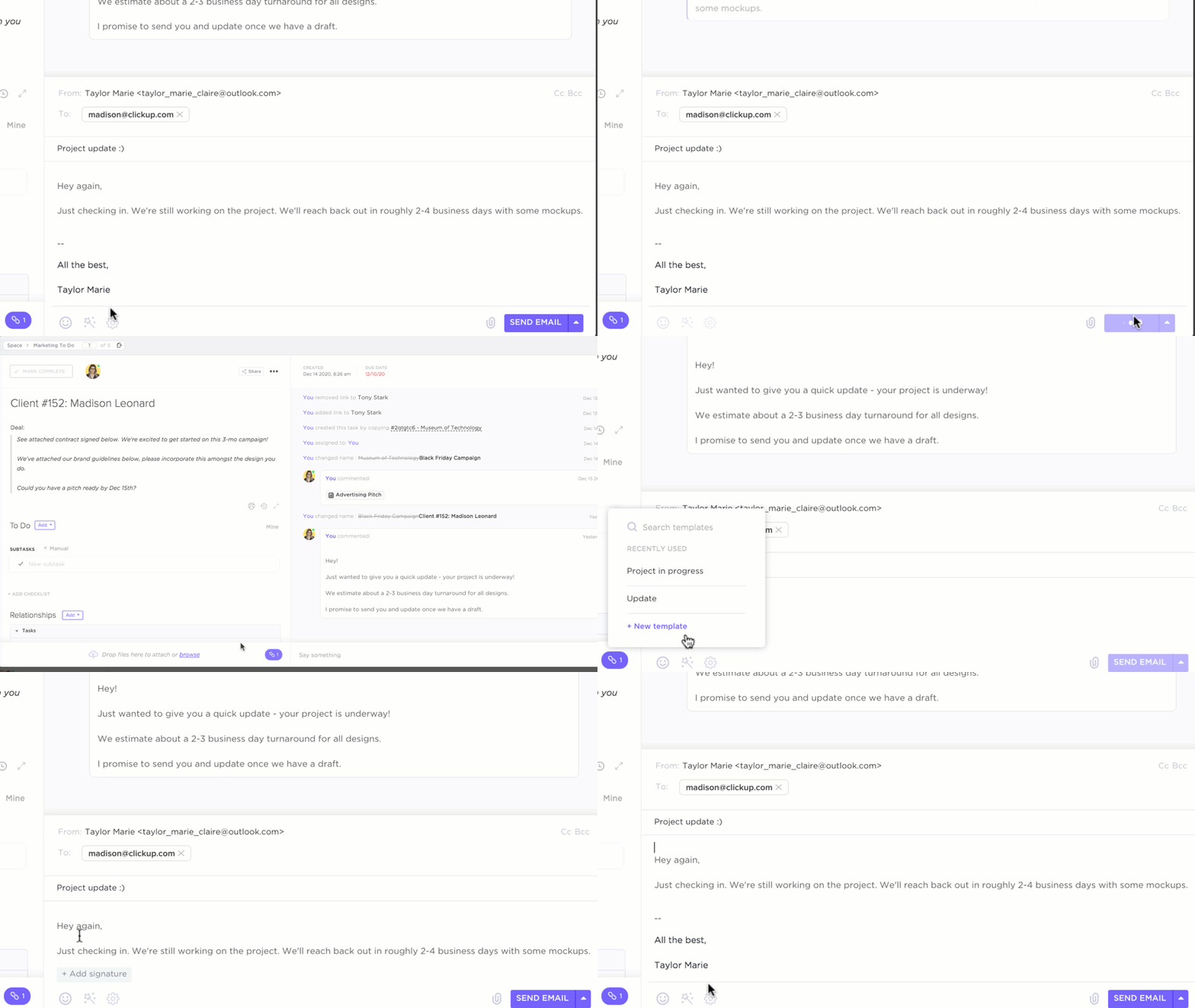
If you’d like a one-stop app that handles everything from sending emails to managing projects, you’ll love ClickUp Email Project Management. With its Microsoft Outlook and Gmail integrations, you can send and receive emails—both internal and client-facing— without ever leaving ClickUp.
Beyond its intuitive email interface, ClickUp makes collaboration easier. You can attach files, embed emails in tasks, and tag team members, ensuring conversations stay actionable and aligned with clear goals.
Want to take email efficiency up a notch? This email management software lets you schedule and automate emails based on Custom Fields, form submissions, or events. And when follow-ups are needed, you can easily convert customer emails, support tickets, and bug reports into tasks.
📖 Also Read: The Ultimate Guide To Email Project Management
Even with a solid Inbox Zero system, you may face hurdles. Emails keep rolling in, priorities shift, and you’re suddenly buried in unread messages—again.
Let’s break down the biggest challenges—and how to tackle them:
Ever open your inbox and find that everything seems critical? When everything seems urgent, it’s easy to waste hours debating what to handle first. Without a clear system, essential emails get buried, and decision fatigue takes over.
Feels like a ticking time bomb? Getting your email priorities straight with these quick tips:
📮 ClickUp Insight: Think your to-do list is working? Think again. Our survey shows that 76% of professionals use their own prioritization system for task management. However, recent research confirms that 65% of workers tend to focus on easy wins over high-value tasks without effective prioritization.
ClickUp’s Task Priorities transform how you visualize and tackle complex projects, highlighting critical tasks easily. With ClickUp’s AI-powered workflows and custom priority flags, you’ll always know what to tackle first.
🧠 Fun Fact: AOL once had an actual “You’ve Got Mail” sound! Back in the ’90s, hearing “You’ve Got Mail” was exciting! Now, most people dread seeing an inbox full of unread messages.
Just when you think you’re making progress, a fresh wave of newsletters, ‘quick questions,’ CC’d threads, and email notifications flood your inbox. With emails pouring in nonstop, Inbox Zero can feel like a losing battles.
Take control with these innovative email management strategies:
You know those emails you keep ‘just in case’? They stack up quickly. Before long, your inbox is overflowing with outdated threads and old attachments you’ll likely never need.
Remember, only useful data is powerful. Keep your inbox relevant with these email hacks:
Clearing inbox clutter instantly refreshes your digital workspace and supercharges your efficiency.
Inbox Zero isn’t about claiming an empty inbox as a trophy—it’s about cutting through the noise and building sustainable habits for working smarter. While we’ve covered key strategies for email management in depth, the right tool defines how much effort you’ll actually need.
With its email integrations, seamless email-to-task conversion, robust task management, AI-driven content generation, and smart automations, ClickUp reshapes how you manage mail.
Ready to take control of your inbox? Sign up for ClickUp today!

Sudarshan Somanathan
Max 22min read
Sudarshan Somanathan
Max 23min read

Manasi Nair
Max 28min read

© 2026 ClickUp




