






Still downloading templates?
There’s an easier way. Try a free AI Agent in ClickUp that actually does the work for you—set up in minutes, save hours every week.
Sorry, there were no results found for “”
Sorry, there were no results found for “”
Sorry, there were no results found for “”

Books are not made to be believed, but to be subjected to inquiry.
Academic research breaks down when inquiry turns into volume management. You’re reading carefully, taking notes in good faith, and still struggling to keep arguments straight across sources.
What slows you down is the work of comparing positions, tracking nuance, and deciding how ideas relate before you ever commit to a claim.
Learning how to use Claude for academic research helps with that exact layer of work. Claude can support source comparison, clarify dense passages, and help you articulate relationships between papers while you’re still thinking things through.
In this blog post, we’ll look at how Claude supports academic research. As a bonus, we’ll also explore how ClickUp fits into this as a great alternative. 🤩
Academic research extends far beyond drafting manuscripts. Here’s what typically consumes researchers’ time:
🔍 Did You Know? The Frascati Manual, published by the OECD, is an internationally accepted standard for defining and classifying research activities. It distinguishes between basic research (to gain new knowledge), applied research (to solve practical problems), and experimental development.
Claude functions as an intelligent study tool and AI assistant that supports researchers at every stage of their work. Here’s how it integrates into the process and which tasks it handles particularly well.
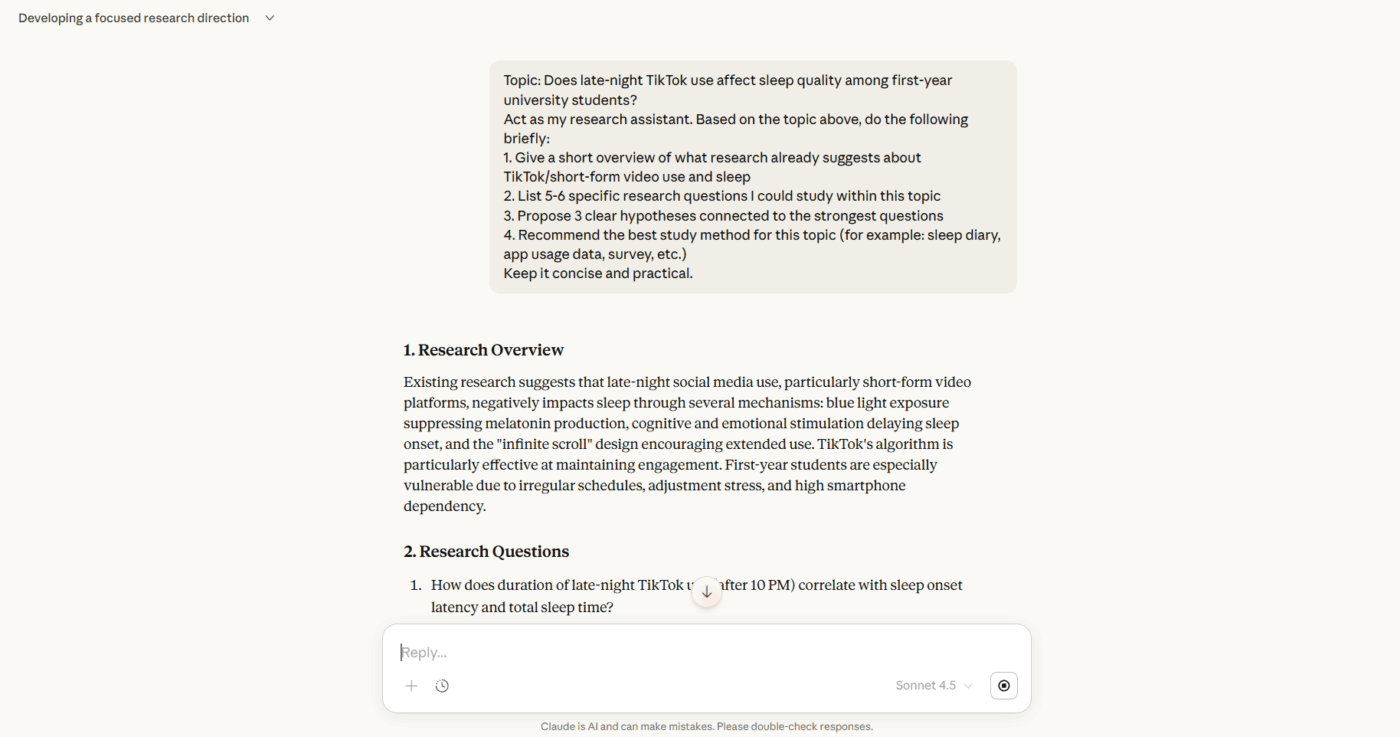
This is where ideas begin taking shape.
Claude helps researchers brainstorm research questions, pressure-test hypotheses, and synthesize literature across dozens of sources. Staring at a broad topic, wondering where to focus? Claude can map out what’s already been studied, highlight conflicting findings across papers, and spotlight gaps worth investigating.
Tasks Claude handles well here:
💡 Pro Tip: Request counterarguments and steel-manning. When there’s a draft argument, ask Claude to present the strongest possible objections. This helps anticipate reviewer comments and strengthens the work.
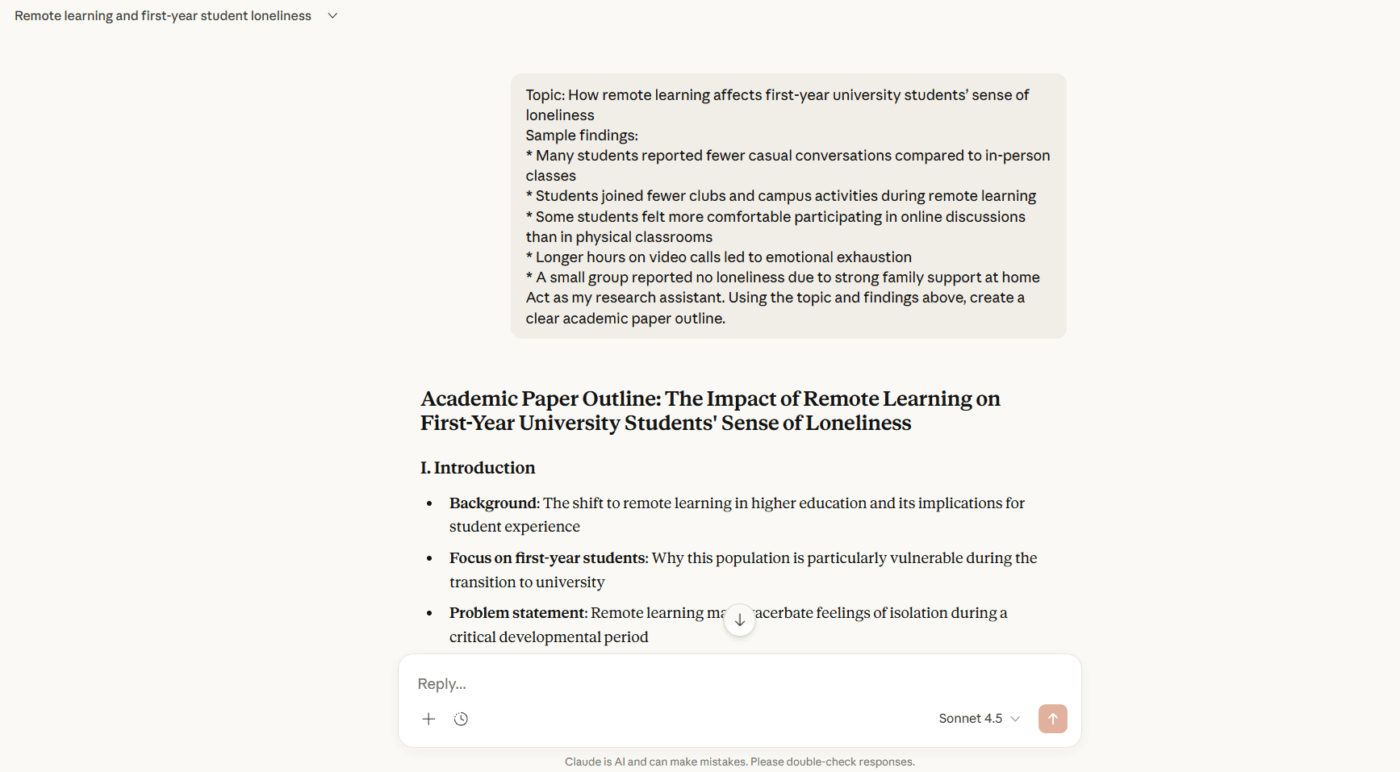
Once research is underway, the challenge shifts to making sense of what you’ve found. Claude assists with structuring arguments, identifying patterns across datasets, and articulating ideas that feel clear in your head but won’t cooperate on the page.
It’s particularly useful when you’re drowning in findings but can’t yet see the narrative thread connecting them.
Tasks Claude handles well here:
🧠 Fun Fact: Some researchers rickroll each other in academic literature. A survey found over 20 academic papers intentionally include the meme in citations and footnotes as a playful nod to culture.
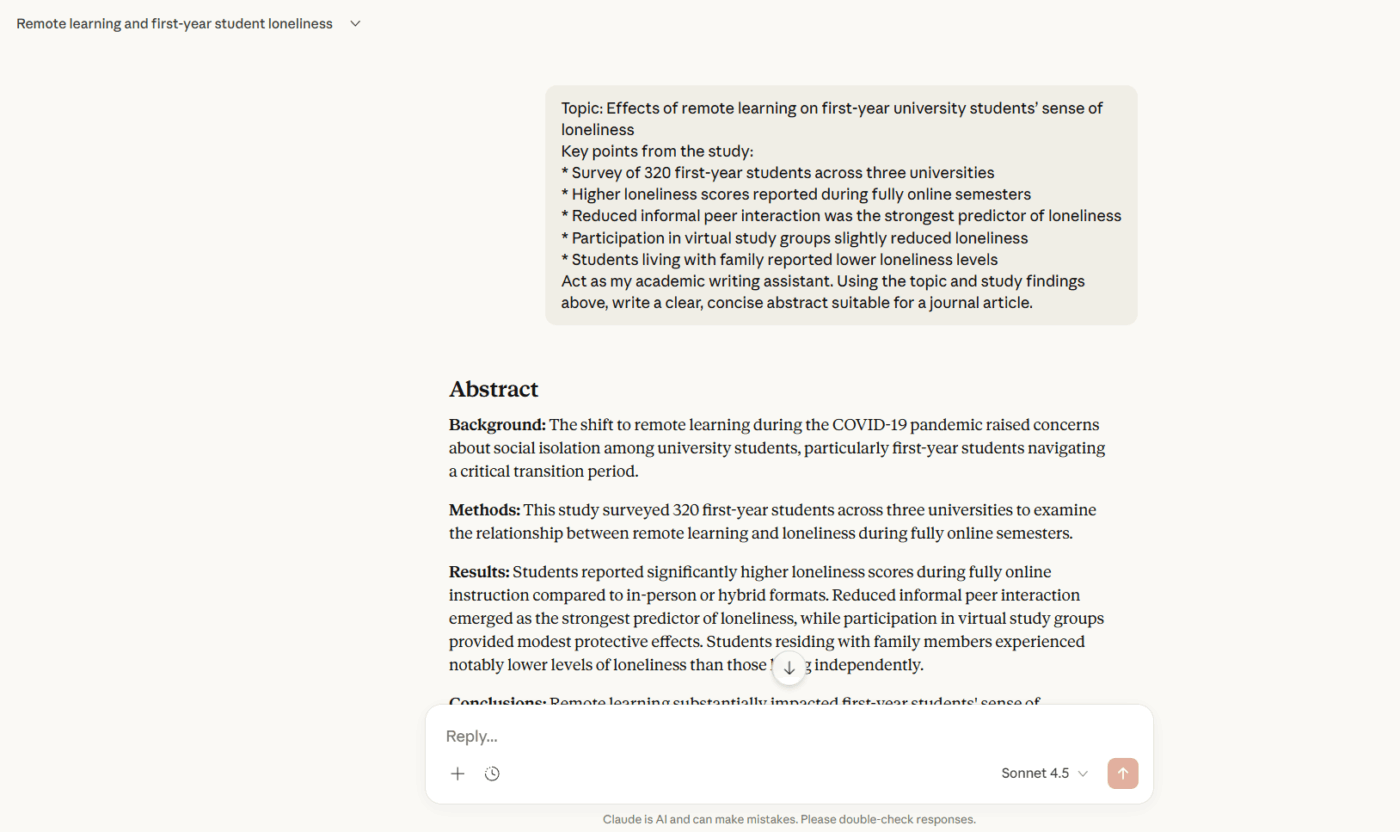
Here, the focus turns to refinement. When you use Claude AI at this stage, it helps tighten prose, flag inconsistencies between sections, and suggest clearer ways to phrase complex concepts. It can also adapt your writing for different audiences—turning a dense methodology section into an accessible abstract, or reshaping a dissertation chapter for journal submission.
Tasks Claude handles well here:
📮 ClickUp Insight: If all your open tabs disappeared in a browser crash, how would you feel? 41% of our survey respondents admit that most of those tabs won’t even matter.
That’s decision fatigue in action: closing tabs involves too many decisions and feels overwhelming. So we keep them all open instead of choosing what to keep. 😅
As your ambient AI partner, ClickUp Brain naturally captures all your work context. If you’re working on a research task about LangChain models, for instance, Brain will already be primed and ready to search the web for the topic, create a task from it, assign the right person to it, and schedule a meeting for a kickoff discussion.
Using Claude effectively means understanding both its strengths and its boundaries.
💡 Pro Tip: Map intellectual genealogies. Ask Claude to trace how a specific concept traveled across disciplines or how a particular scholar’s ideas evolved through their career. This reveals unexpected connections between fields that literature reviews often miss.
Getting useful output from Claude depends largely on how you frame your requests. Here are AI prompting techniques that consistently produce better results.
Claude performs better when it understands your field’s conventions. Rather than asking for help with ‘my literature review,’ specify that you’re writing for a peer-reviewed journal in cognitive psychology or following APA formatting.
This context helps Claude adopt appropriate terminology, citation styles, and structural expectations from the start.
🧠 Fun Fact: The word ‘research’ originates from the Old French recerchier, meaning to seek out carefully. It highlights that research is fundamentally about deep investigation and discovery.
Background information makes a significant difference. Your thesis statement, argument direction, or the specific point where you’re stuck all help Claude tailor its response.
The more relevant detail you share upfront, the more targeted and useful the output becomes.
💡 Pro Tip: Let ClickUp Super Agents run research maintenance for you. They act as persistent, context-aware collaborators inside your workspace, monitoring your research space continuously and acting when meaningful changes happen.
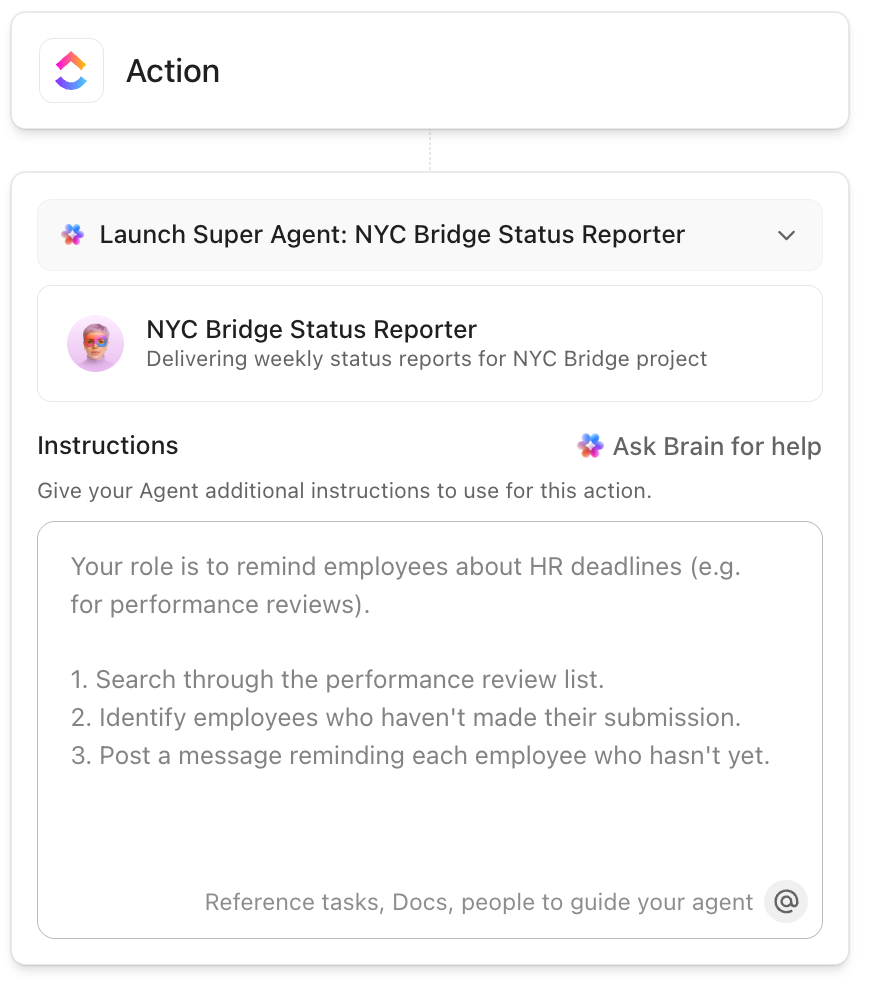
For example, you can configure one agent to scan new reading notes, meeting summaries, and task updates each week. Then, it can generate a short research integrity log that answers questions like what decisions changed, which questions remain unresolved, and which claims gained new evidence.
That log can post automatically into a Doc or project update, giving you a running paper trail that protects rigor across long timelines.
Watch this video to learn more:
Explicit formatting requests lead to more organized responses. If you want Claude to compare three methodological approaches, ask for a comparison table.
For an abstract, specify the word count and key elements to include. Clear structural guidance produces content that’s easier to work with.
🔍 Did You Know? There’s a legitimate academic discipline called metascience (also called meta-research). It investigates how research is done, pointing out common errors and bias in scientific studies.
Large requests often yield generic results.
A Claude AI prompt like ‘help write my discussion section’ is harder to address meaningfully than a focused request for an outline, followed by individual work on each subsection. This approach offers more control and produces more thoughtful output at each stage.
💡 Pro Tip: Create synthetic debates. Ask Claude to stage a conversation between scholars who never actually engaged with each other. This thought experiment often generates novel research questions.
First attempts rarely produce perfect results. The initial output works best as a foundation to build on, whether that means expanding certain points, simplifying technical language, or exploring a different angle entirely.
Often, the back-and-forth conversation is where the real value emerges.
🔍 Did You Know? The replication crisis highlights a real challenge. Many classic studies, especially in psychology, couldn’t be reproduced by other researchers when others tried to repeat the experiments. This sparked new efforts to strengthen research methods and transparency.
Even experienced researchers can fall into patterns that limit Claude’s usefulness. Here are pitfalls worth avoiding.
| Mistake | Why it matters | What to do instead |
| Trusting Claude’s summary of papers you haven’t read | Key nuances get lost and misrepresentations slip through unnoticed | Use summaries to prioritize reading, then verify claims against the original text |
| Asking Claude to ‘improve’ your writing without specifics | Vague requests produce generic edits that may not suit your purpose | Specify whether you need help with clarity, flow, conciseness, or disciplinary tone |
| Pasting Claude’s first response directly into your manuscript | Initial outputs often miss context or take a different direction than intended | Treat first responses as rough material to shape through follow-up prompts |
| Adding Claude-suggested references without verification | Citations may be fabricated, outdated, or inaccurately described | Locate every source independently and confirm it supports your claim |
| Assuming AI use is acceptable because it wasn’t explicitly prohibited | Policies vary across institutions, journals, and funding bodies | Check guidelines proactively and document your process for transparency |
| Letting Claude rewrite entire sections wholesale | Your analytical voice disappears and the writing becomes generic | Use Claude for targeted fixes while preserving your original phrasing where it works |
📖 Also Read: Best AI Research Paper Writing Tools
While Claude is a powerful AI tool, understanding what it cannot do is just as important as knowing what it can.
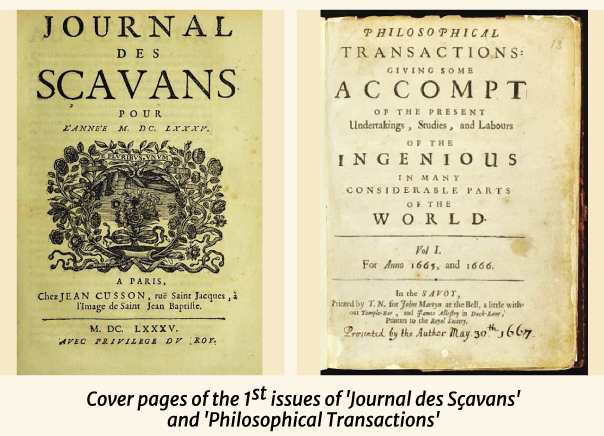
🧠 Fun Fact: The first academic journals appeared in 1665. Both Philosophical Transactions of the Royal Society and Journal des sçavans were launched in the same year, essentially inventing the idea of sharing research publicly rather than keeping discoveries private.
ClickUp is the world’s first Converged AI Workspace where your research documentation lives alongside the tasks, experiments, and timelines that make up actual academic work. This eliminates Work Sprawl, keeping every decision, every note, and every revision connected to the context that produced it.
Here’s a closer look at how ClickUp’s Education Project Management Software supports academic research. 📚
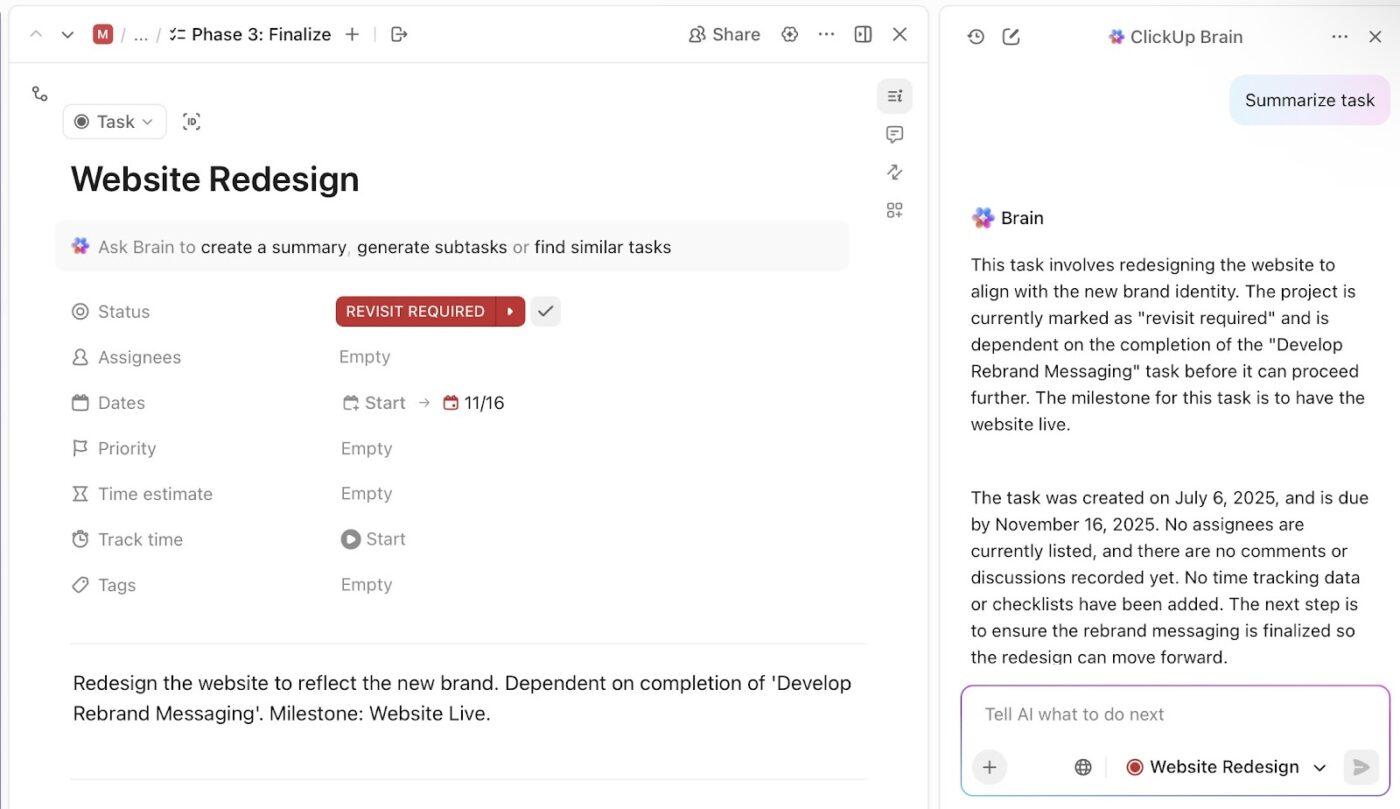
Every strong argument starts as a question that demands evidence. ClickUp Tasks help translate that question into specific, reviewable work.
Let’s say you’re running a mixed-methods dissertation study on community health interventions. You create separate Tasks to:
Each Task captures its own notes, links to relevant literature, attaches data files, includes due dates, and connects to your broader research aims.
🧠 Fun Fact: At the end of the 17th Century, there were about 10 scientific journals worldwide. By the end of the 20th Century, that number had grown to around 100,000, showing the explosion of research publications.
Research doesn’t happen linearly, but certain things genuinely can’t start until others finish.
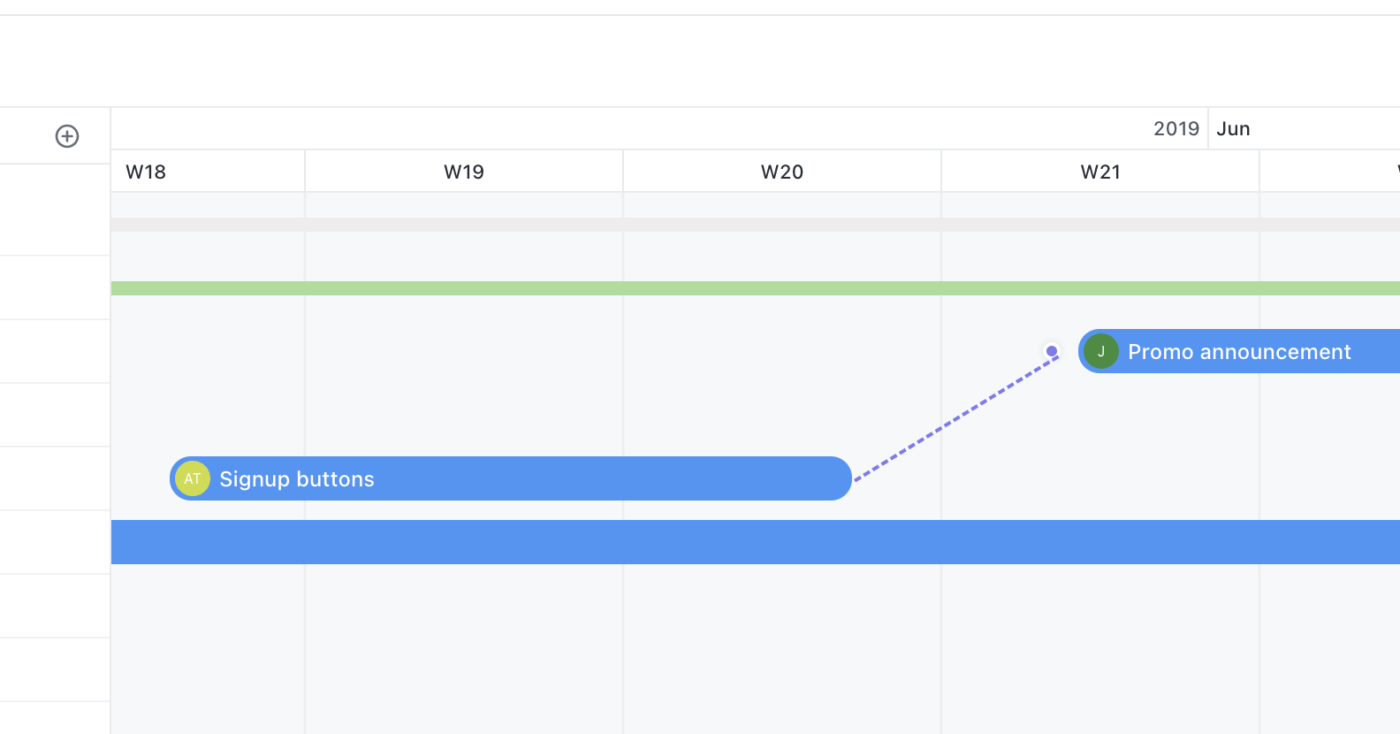
You can’t code qualitative data until you’ve collected it. You can’t write your discussion section until your results stabilize. You can’t submit your manuscript until your advisor approves the final draft. ClickUp Dependencies make these relationships explicit.
For example, suppose a graduate researcher plans to claim causal inference in a computational social science paper.
Data preprocessing, model validation, and robustness testing must conclude before interpretation begins. Project dependencies lock the discussion draft task until validation tasks close. That structure prevents premature claims during peer review.
💡 Pro Tip: Preserve how evidence travels across sections with Relationships in ClickUp.
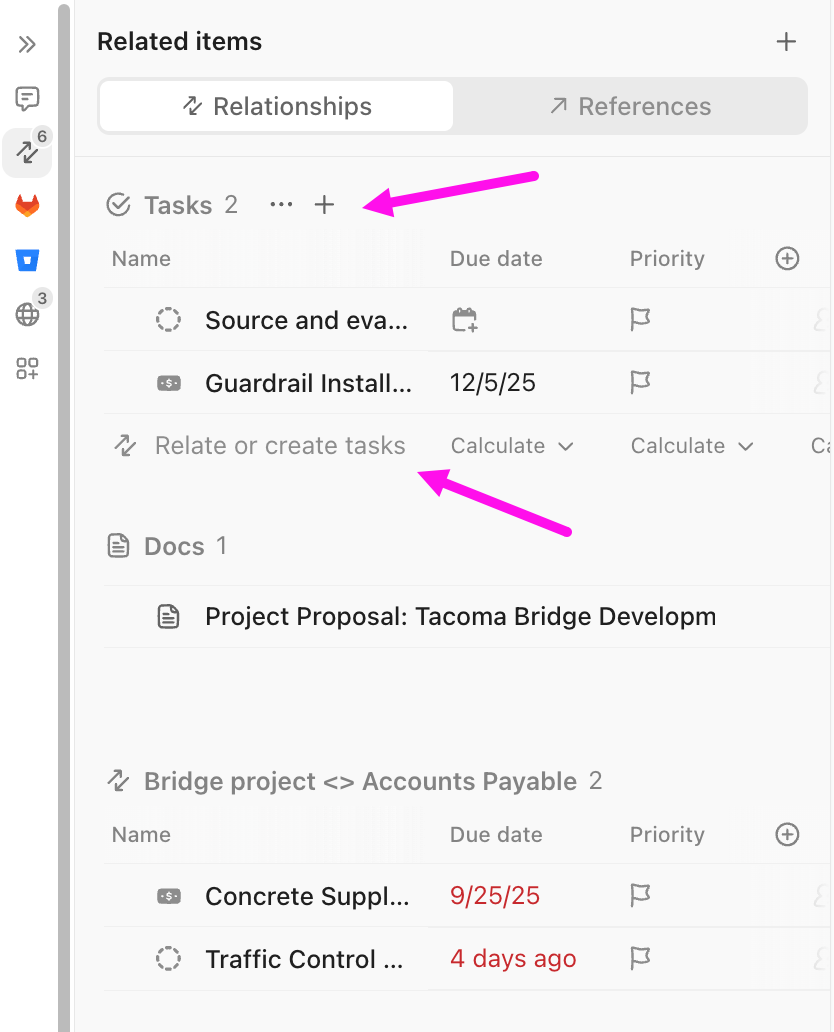
They connect your work to research questions. Tag every analysis task, every literature review section, and every draft paragraph to RQ1, RQ2, or RQ3. When your research questions evolve, you instantly identify which work remains relevant and which becomes obsolete.
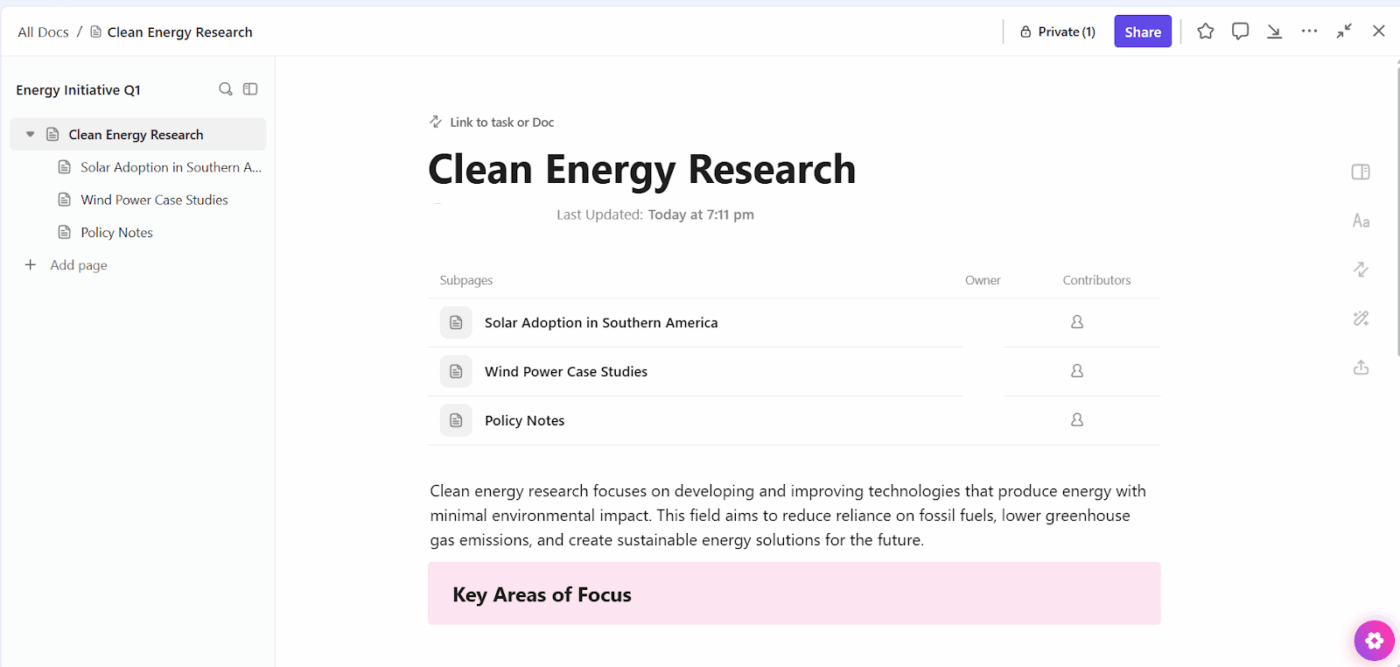
ClickUp Docs are where research writing, like drafting manuscripts, maintaining running literature reviews, and creating knowledge repositories happens.
Let’s say you’re maintaining a cumulative literature review for your area of study. Create a Doc structured around key themes:
Every time you read a new paper, add it to the relevant section and link that entry to the Task that prompted you to find it (maybe ‘Find studies using social cognitive theory’ or ‘Locate validation studies for PROMIS-29’).
When you need to recall why you included a particular study, the link reveals the context. And when you’re ready to write your intro, the Doc provides the foundation.
Hear what a Reddit user has to say about using ClickUp:
Their Docs system has quietly replaced most of our Google Docs work. Everything just flows better when our documentation lives in the same place as our projects. The team adapted to it faster than I thought they would. I was on the fence about ClickUp Brain at first, just seemed like another AI gimmick. But it’s saved me from some tedious writing tasks, especially when I need to summarize lengthy client emails or get a draft started. Not perfect, but helpful when I’m swamped. The AI notetaker feature was the real surprise. We used to lose so many action items after meetings, but now it catches everything and assigns tasks automatically. Follow-through has gotten noticeably better…
Beginning a new research project from a blank slate wastes time you could spend on actual research.
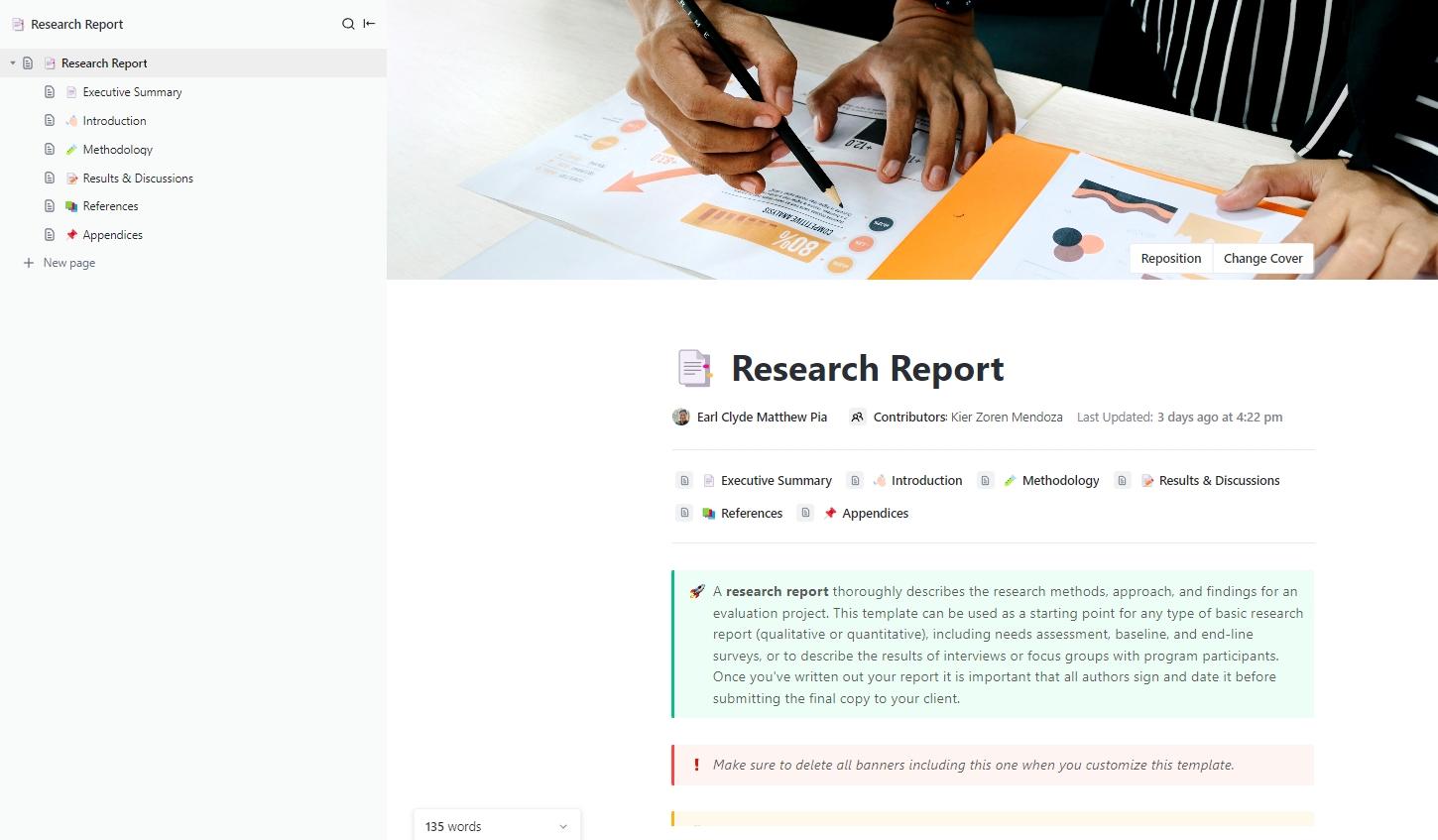
ClickUp’s Research Report Template gives you a ready-made structure to turn messy data, notes, and insights into a full research report.
The template opens as a single ClickUp Doc and comes pre-organized into clearly defined sections: Executive Summary, Introduction, Methodology, Results & Discussions, References, and Appendices. That structure mirrors how academic work gets evaluated, which reduces friction when submitting work to advisors, committees, or external reviewers.
Learn how to keep your research organized in note-taking apps:
ClickUp Brain functions as an AI writing assistant that understands your research context because it can access your actual work.
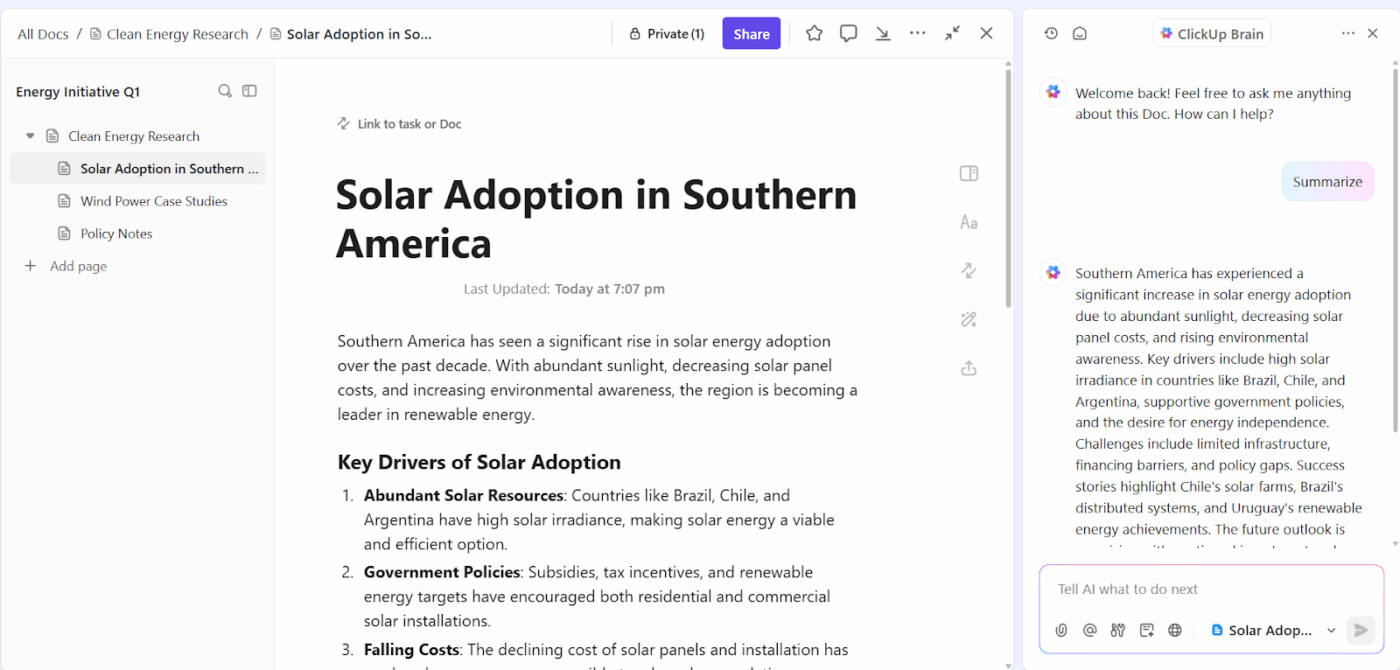
Ask AI to draft a literature review summary on cognitive load theory, and it references the papers already present in your workspace + notes about connections you’ve made between studies. The output sounds like you because it builds on your thinking.
ClickUp Brain includes multiple large language models (LLMs), like ChatGPT, Claude, and Gemini, that you can switch between based on what you’re writing. Each model brings different strengths, and you access all of them without leaving ClickUp or managing separate subscriptions to eliminate AI Sprawl.
📌 Try these prompts:
ClickUp Enterprise Search solves the fundamental problem of scattered research knowledge.
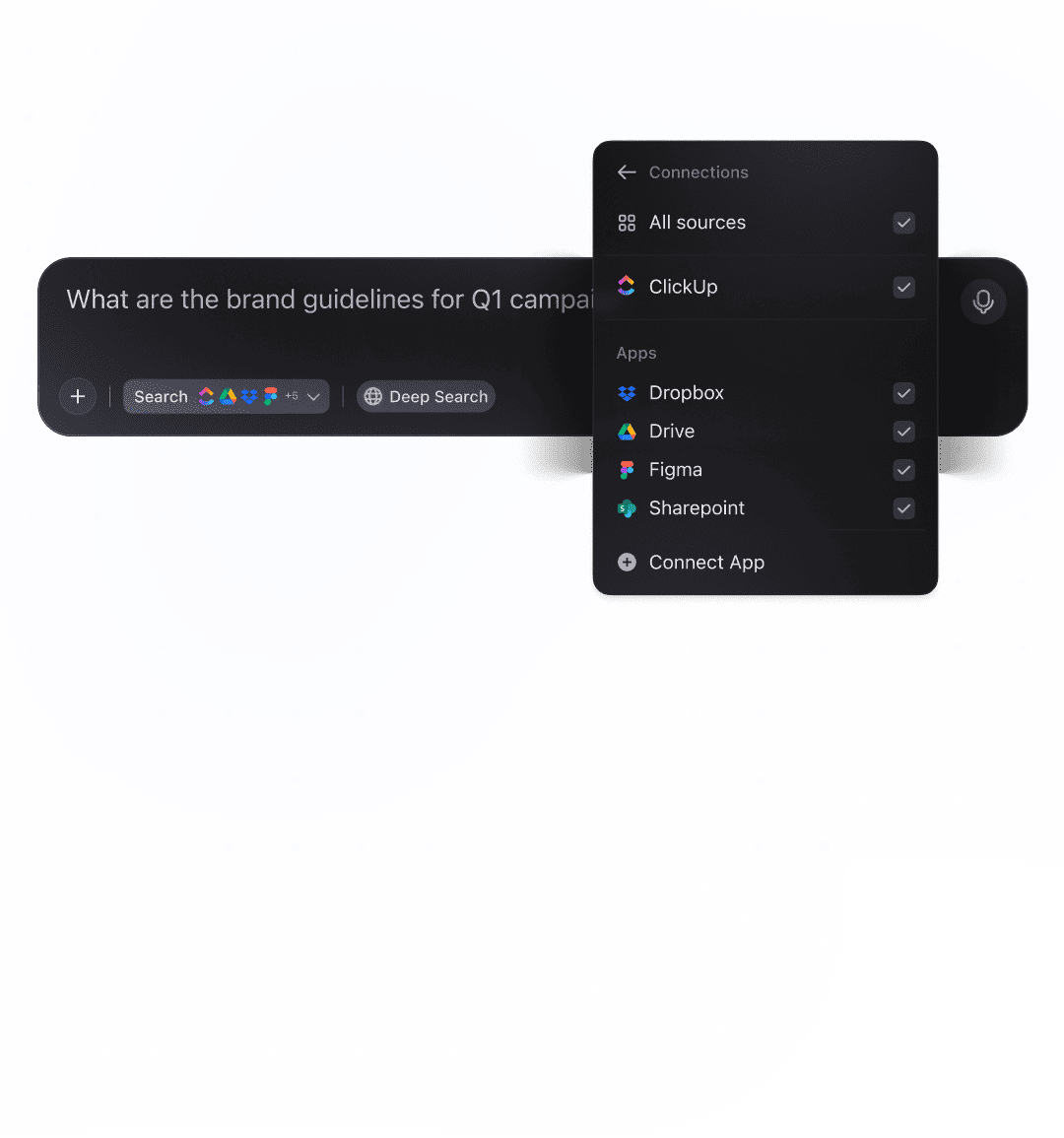
You’ve got papers in Zotero, data files in Google Drive, code in GitHub, meeting notes in Docs, and discussion threads in Slack. Powered by ClickUp Brain, it searches all of these simultaneously from one interface.
🔍 Did You Know? For centuries, scientists shared results in letters or books. But the formal process of peer review (experts judging whether work should be published) only became common after World War II. Before that, editors often decided what to publish themselves.
ClickUp BrainGPT brings that same contextual intelligence layer onto your desktop or Chrome browser, so you can interact with your research context while you work outside ClickUp too.
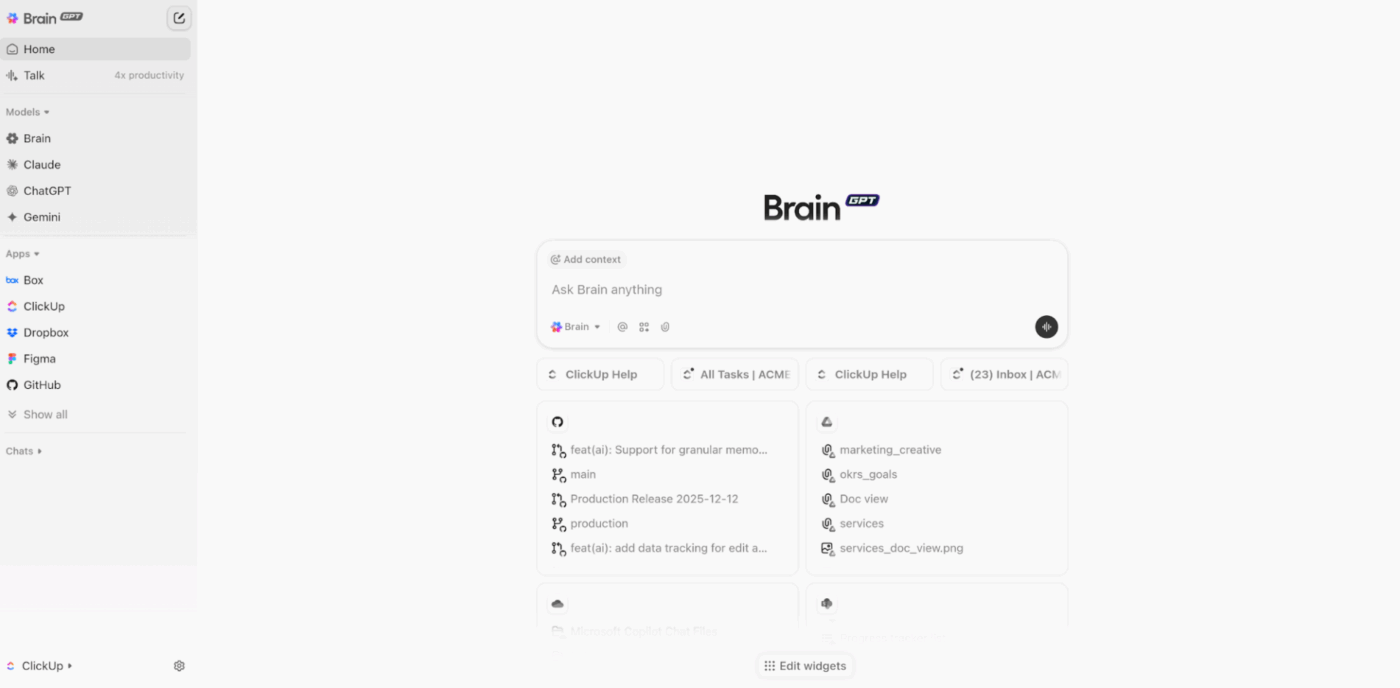
Like ClickUp Brain, BrainGPT is also LLM-agnostic. You can access the same AI models without context switching.
What’s more, Talk to Text in ClickUp BrainGPT transforms speech into polished text across any application on your computer. Press your keyboard shortcut (default is the ‘fn’ key, but you can customize it), speak naturally about whatever you’re thinking, and release the shortcut.
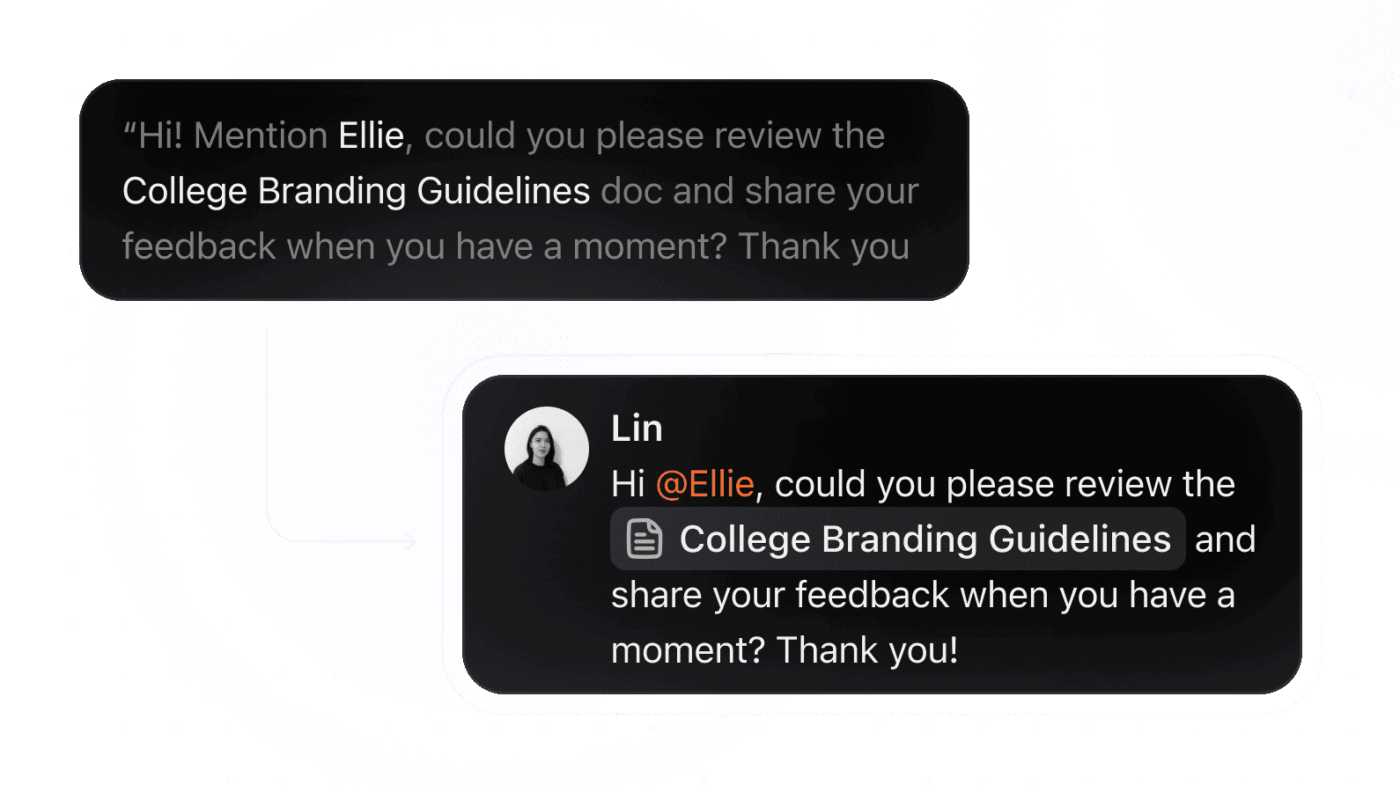
Talk to Text handles specialized terminology that would normally require corrections. Build a custom dictionary containing discipline-specific terms, author names, statistical procedures, and technical jargon. This makes voice capture practical for technical academic work, helping you work up to 4x faster.
💡 Pro Tip: Request ClickUp BrainGPT for feedback on a draft ‘as a Foucauldian would read it’ or ‘from a quantitative methods perspective.’ This exposes blind spots that come from working within a single paradigm.
ClickUp’s AI Meeting Notetaker joins your research meetings, records conversations, generates real-time transcripts, identifies speakers, and extracts action items automatically.
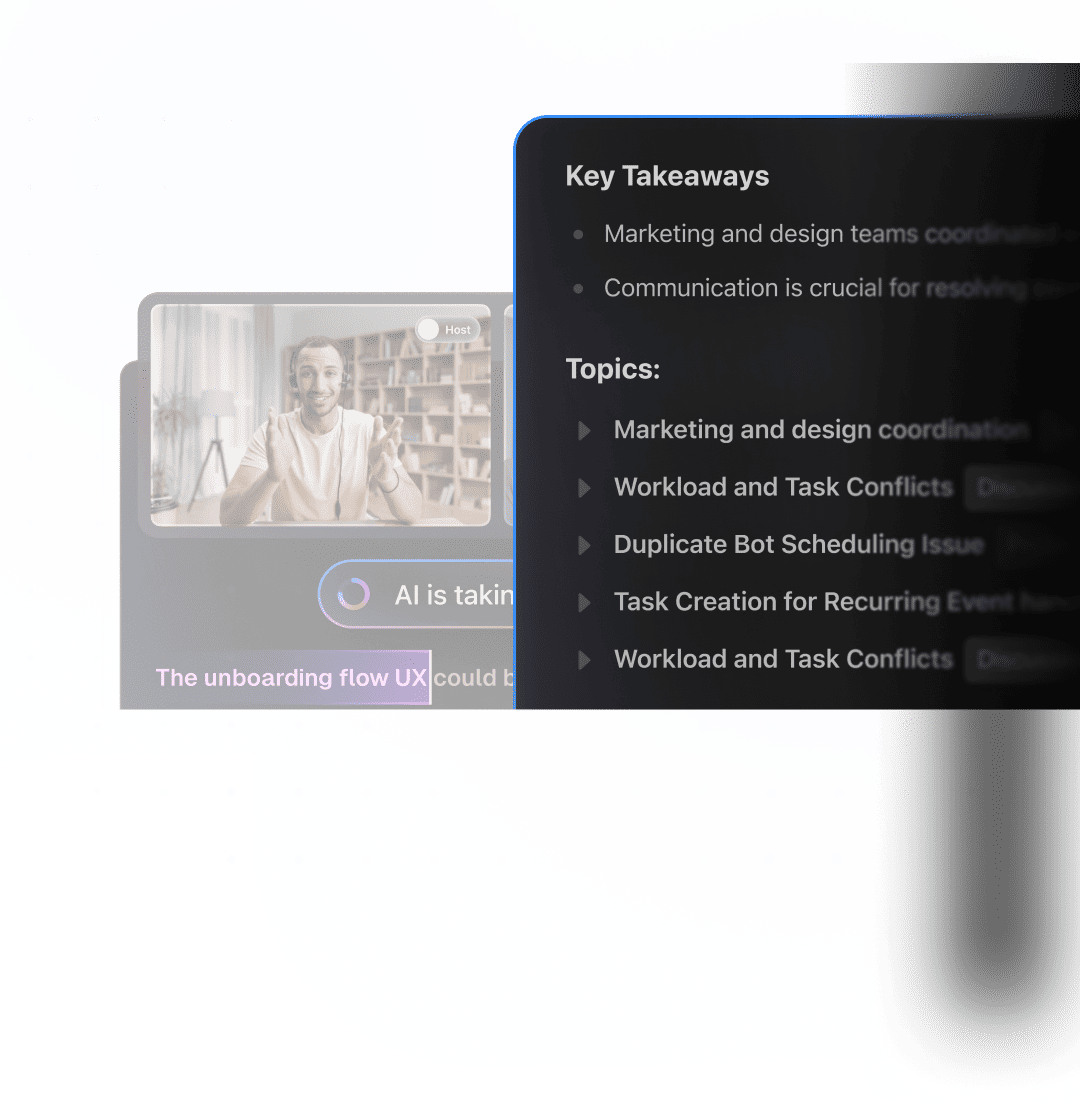
After every advisor meeting, committee check-in, lab group discussion, or conference panel, AI Notetaker delivers a structured Doc containing:
AI Notetaker supports nearly 100 languages with automatic detection, making it useful for international research collaborations or multilingual participants.
🔍 Did You Know? Retractions are rarer than people think. Less than 0.05% of published papers are retracted, and many are withdrawn due to honest errors rather than misconduct. Retractions actually signal that the self-correcting system is working.
Academic research demands sustained context. Questions evolve, arguments tighten, and evidence shifts over time. When thinking lives in one tool and work lives in another, that context fractures.
ClickUp replaces that entire stack. Research questions, literature notes, drafts, feedback, meetings, and next steps stay connected as the work unfolds.
ClickUp Brain and BrainGPT work directly inside this context, so summaries, comparisons, and revisions draw from your actual sources.
Everything that Claude supports—synthesizing sources, clarifying dense passages, structuring arguments, refining drafts—happens inside the same environment where your research already exists.
If you want one place that handles research thinking and execution end-to-end, try ClickUp for free today! ✅
Yes. Claude can assist with brainstorming, literature synthesis, drafting, editing, and structuring arguments. It works best as a support tool rather than a replacement for scholarly expertise.
It depends on how you use it. Using Claude to refine your own ideas, improve clarity, or overcome writing blocks is generally acceptable. Passing off AI-generated content as entirely your own work raises ethical concerns. Transparency matters; disclose AI use where your institution or journal requires it.
Claude can suggest citations, but they may be inaccurate, outdated, or entirely fabricated. Never include a Claude-suggested reference without locating the original source and confirming it exists and supports your claim.
Cross-check every factual claim against primary sources. Pay particular attention to citations, statistics, quotes, and field-specific terminology. Additionally, treat Claude’s responses as drafts that require your critical review, not finished content ready for submission.
Policies vary widely. Some institutions permit AI assistance with disclosure, others restrict it to specific tasks, and some prohibit it entirely. Check your university’s academic integrity guidelines and any relevant journal policies before using Claude in your research workflow.

© 2026 ClickUp

There’s an easier way. Try a free AI Agent in ClickUp that actually does the work for you—set up in minutes, save hours every week.