

With countless applications competing for the same roles, standing out in a crowded job market is tough. That’s why knowing how to make a lasting impression on recruiters isn’t just a nice-to-have skill—it’s essential.
LinkedIn is the go-to spot for professionals to explore career advancement opportunities. Its vast network lets you connect with decision-makers, showcase your skills, and apply for roles that aren’t publicly listed.
In fact, over 9,000 applications are submitted every minute. So, how to reach out to a recruiter on LinkedIn and create an impression that sticks?
Let’s find out.
How to Reach Out to Recruiters on LinkedIn (+Examples)
- Understanding the Role of Recruiters on LinkedIn
- Preparing to Message a Recruiter
- Crafting the Perfect Message to a Recruiter
- Examples of Effective LinkedIn Outreach Messages
- 4 Effective Follow-Up Strategies
- 3 Tips to Crush Your LinkedIn Outreach Campaign
- Utilizing LinkedIn Tools and Features
- Using ClickUp to Organize and Track Your LinkedIn Outreach
- Adopting a Consistent Networking Strategy
- Step Up Your LinkedIn Outreach Game With ClickUp

 Summarize this article for me please
Understanding the Role of Recruiters on LinkedIn
Recruiters on LinkedIn may work for a company, recruiting agency, or as independent headhunters. They use LinkedIn to find candidates whose skills and experience align with the job posting, often identifying talent beyond traditional job boards.
Their role primarily involves searching LinkedIn’s user base using keywords, job titles, skills, and education. For example, a recruiter seeking a ‘Senior Data Analyst’ might focus on skills like SQL or data visualization.
Here’s why LinkedIn is an effective tool for recruiters:
- LinkedIn highlights candidates’ skills, experience, endorsements, and recommendations
- Real-time updates notify recruiters about career changes or new skills, allowing timely outreach
- The platform integrates with many applicant tracking systems, enabling easy import of job and candidate details
🔍 Did You Know? Seven people are hired each minute on LinkedIn. This shows how effective the platform is for both recruiters and job seekers.
Summarize this article for me pleasePreparing to Message a Recruiter
Before hitting ‘Connect’ or sending a message to hiring managers, take these steps to ensure your profile stands out:
1. Optimize your LinkedIn profile before outreach
Your LinkedIn profile is more than just your online resume—it’s your first impression when you contact recruiters.
With numerous sections to fill out, it can be hard to know where to focus. Here are the essentials to prioritize before reaching out to recruiters:
- Headline: Create a clear, professional headline of not more than ten words that reflects your current position and most valuable skills
- Profile photo: Use a high-quality, professional image that aligns with your personal brand
- About: Craft a compelling career story in 2600 characters, showcasing your skills, experience, and unique qualities
- Education and certifications: Include your educational background and relevant certifications to demonstrate your qualifications
- Experience: Keep your job experiences up-to-date, clearly describing your responsibilities and achievements. Be transparent about any career gaps
- Skills and endorsements: Reach out to colleagues and supervisors for endorsements to build credibility
- Featured: Highlight key projects, articles, or achievements that showcase your skills and contributions
- Keywords: Incorporate industry-specific keywords in your headline, summary, and job descriptions to boost your visibility in recruiter searches
2. Research the recruiter and their company
Next, check the recruiter’s LinkedIn profile and company page to learn about their hiring process, specialized roles, and company culture. This will help you craft a personalized LinkedIn message that resonates.
To research properly:
- Apply filters like ‘Company Size,’ ‘Experience Level,’ and ‘Location’ to find recruiters in your industry and region
- Identify key skills and qualifications from job descriptions to highlight in your message
- Observe how the hiring manager interacts with their connections to adjust your tone accordingly
- Check the company’s social media for insights into its recruitment strategies and culture
Read More: 10 Best Skills Management Software
3. Personalize your connection request
A simple connection request won’t cut it—always include a brief yet impactful note to make your request more personalized. Briefly explain how you found their profile and why you’d like to connect.
| Generic Note | Personalized Message |
| Hi, I’d like to connect. | Hi [Recruiter’s Name], I came across your profile while researching [Company Name] and was impressed by your work in [specific area]. I’d love to connect and learn more about potential opportunities at your organization. |
Summarize this article for me pleaseCrafting the Perfect Message to a Recruiter
With your profile ready and recruiter insights in hand, it’s time to write a message that stands out and sparks a conversation.
1. Key elements to include in your message
Make your message crisp and clear by including who you are and what you’re looking for.
- Introduction: Start with a brief introduction that includes your name, current position, and a quick highlight of your professional background. This helps the recruiter understand who you are at a glance
- Reason for reaching out: Clearly articulate your purpose—whether you’re interested in an open position, seeking advice, or looking to network
- Value you bring: Mention your skills, specific achievements, and experiences that align with the recruiter’s needs
- Call-to-action: End with a CTA—ask if they’re open to discussing opportunities or if they can provide insight on roles that may fit your profile
2. Maintaining a professional tone
While personalization can make your message stand out, maintaining a professional tone is equally crucial for effective communication. Here’s how:
- Avoid casual language: Use formal language and maintain a respectful tone
- Be concise: Keep your message brief and direct—aim for 2-3 short paragraphs that focus on essential information
- Politeness is essential: Acknowledge their busy schedule and politely ask for their time before stating your request
- Proofread before sending: Double-check your message for spelling, grammatical errors, and punctuation
3. Questions to ask and avoid
Asking thoughtful questions can enhance your conversation with recruiters. However, avoiding questions that may leave a negative impression is equally important.
| Questions | Notes |
| ✅ Are there any roles that align with my skills and experiences? | This shows initiative and helps the recruiter connect you with suitable opportunities |
✅ Can you share more about the hiring process or company culture? | This shows genuine interest in the company and gives you valuable insights into what to expect |
| ❗What does your company do? | This makes you appear unprepared |
| ❗Can you get me a job? | This is too direct and can make you sound entitled. Instead, focus on building organic relationships and discussing potential roles naturally |
Summarize this article for me pleaseExamples of Effective LinkedIn Outreach Messages
Let’s look at a few LinkedIn message examples that’ll show you how to reach out to a recruiter on LinkedIn:
Example 1: Cold outreach for an open position
Hi [Recruiter’s Name],
I came across your profile while researching opportunities at [Company Name]. With [X years of experience] in [your field or specific skill], I believe I could be a great fit for [specific role or department]. I’d love to connect and explore any opportunities that align with my background.
Thanks for your time, and I look forward to connecting!
[Your Name]
Why it works: This message is direct, highlights relevant experience, and expresses genuine interest in a specific role—showing the recruiter the mutual benefits of connecting.
Example 2: Requesting information about the hiring process
Hi [Recruiter’s Name],
I hope you’re well! I recently came across the [Job Title] role at [Company Name] and am excited about the opportunity. Could you share some insights into the hiring process or what qualities the team is looking for?
Thank you so much for your time!
[Your Name]
Why it works: This message shows initiative and a genuine interest in the role while also inviting the recruiter to provide valuable information. It’s polite and shows respect for the recruiter’s time.
Example 3: Networking for future opportunities
Hi [Recruiter’s Name],
I see that you specialize in recruiting for [industry/field]. With my background in [your expertise], I’m actively exploring new opportunities. I would love to connect so that we can stay on each other’s radars for future roles.
Thanks, and have a great day!
[Your Name]
Why it works: This message positions you as a proactive candidate who values networking without putting immediate pressure on the recruiter. It keeps the door open for future opportunities.
Summarize this article for me please4 Effective Follow-Up Strategies
Following up after reaching out to a recruiter can feel like walking a tightrope—you don’t want to be pushy, but you also don’t want to disappear from their radar. A well-timed, thoughtful follow-up can make the difference between landing an interview and being forgotten in a pile of emails.
Here’s why:
- It brings your email back to the top of their inbox
- It demonstrates your interest in their business
Let’s break down how:
1. When and how to follow up after your initial message
Recruiters often handle multiple candidates, and your email may simply have been overlooked. A brief follow-up can help bring your message back to their attention.
Here’s how to nail it:
- Wait one to two days before following up. If necessary, send a second follow-up after 7-10 days, but avoid excessive emails
- Keep your follow-ups concise and respectful
- Mention your initial message to jog the recruiter’s memory
- Reiterate your enthusiasm for the opportunity
- Conclude with a specific CTA, like scheduling a call
Example: Hi [Recruiter], I just wanted to follow up on my previous email about [position]. I’m still very interested and would love to connect with you when you have a moment. Thanks for your time!
2. Handling no response or missed opportunities
If you don’t hear back after several follow-ups, don’t take it personally. Recruiters are busy, and it might not be the right time. The same applies if you don’t get the role—thank them for their time and ask them to stay connected for future opportunities.
Example: I completely understand and appreciate the update. I’d love to stay in touch for any future openings that might be a good fit.
3. Offering value and staying in touch
Maintaining a connection can be beneficial even if there’s no immediate role. Share industry news, relevant articles, or updates on your achievements to stay visible without being desperate.
Example: Hi [Recruiter], I found this article on [topic] and thought you’d find it interesting. I particularly like the author’s take on [sub-topic]. I would love to know your thoughts on it.
4. Preparing for the interview
Once you secure an interview, shift your follow-up strategy to preparation. Confirm the interview date, time, and format to avoid confusion. Also, ask if there’s anything specific you should prepare for, like a technical test or presentation, to tackle common interview questions confidently.
Hi [Recruiter’s Name],
Thank you for scheduling my interview for the [Job Title] position. Could you please confirm the date, time, and format? Let me know if there’s anything specific I should prepare for.
Looking forward to our conversation.
Best,
[Your Name]
Summarize this article for me please3 Tips to Crush Your LinkedIn Outreach Campaign
Here are effective outreach strategies to help you build meaningful connections with recruiters.
1. Publish trending topics and key insights
Share industry trends or personal experiences on trending topics regularly to establish credibility and attract recruiters who value thought leadership. Use relevant hashtags to expand your reach and engage the right audience.
2. Engage with recruiters’ content
Post meaningful replies on recruiters’ posts to demonstrate your knowledge and enthusiasm. Avoid using emojis or short replies. If someone responds, continue the conversation to foster connections.
3. Avoid common mistakes
- Not researching the recruiter: Failing to acknowledge the recruiter’s noteworthy accomplishments or values signals a lack of genuine interest
- Sending generic messages: A generic template fails to capture recruiters’ attention since they receive countless messages daily
- Being pushy or aggressive: Framing your outreach as a demand for a job can make you come across as entitled or desperate, deterring recruiters from engaging with you
Story from an expert: Successful outreach example
Let’s check out why this LinkedIn outreach message by David C. Baker is successful.

- Personalization: The message begins by mentioning specific details, making it highly likely to capture the recruiter’s attention
- Casual tone: Phrases like ‘Feel free to say no or ignore this—I won’t follow up’ reduce pressure, making the recipient feel comfortable
- Value proposition: The message highlights the sender’s experience with the recipient’s app and offers valuable insights on UX strategy improvements. This addresses the recipient’s pain points without sounding salesy
- Clear CTA: The message includes a clear invitation to discuss the UX strategy further via email
- Politeness: It concludes with a genuine appreciation for the recipient’s tool and a hopeful note for future connection
- No pressure to follow-up: Stating that the sender won’t follow up respects the recipient’s time, making the outreach feel more sincere
Summarize this article for me pleaseUtilizing LinkedIn Tools and Features
LinkedIn offers a comprehensive suite of tools and features to elevate your outreach to recruiters. Here’s how to make the most of them:
1. LinkedIn Premium
LinkedIn Premium is a paid feature that lets you reach out directly to recruiters without needing a mutual connection. Key features include:
- InMail: Send messages to recruiters outside your network. You receive a specific number of InMail credits each month—five with Premium Career and 15 with Premium Business
- ‘Who’s Viewed Your Profile’ feature: See who has viewed your profile in the past 365 days. If a recruiter has checked it out, use this as a conversation starter by expressing your interest in their company or open roles
💡Pro Tip: Use AI writing tools to create polished, attention-grabbing InMails that stand out. This can save time while guaranteeing your outreach maintains a professional tone.
2. Endorsements and recommendations
While endorsements are quick validations of your skills, recommendations are in-depth testimonials that serve as proof of your expertise and character.
Reach out to former colleagues or clients for recommendations, especially those familiar with your work. To encourage reciprocation, offer to write a recommendation in return.
Additionally, ensure your endorsements align with the skills recruiters in your field seek. For example, if you’re in marketing, focus on endorsements for SEO, content strategy, and digital marketing to enhance your profile’s appeal.
3. LinkedIn groups
Join LinkedIn groups to connect with like-minded professionals, recruiters, and industry leaders. Engage in discussions and share insights to establish yourself as an active contributor.
💡Pro Tip: Look for groups focused on job postings or industry-specific recruitment. Some recruiters share exclusive openings here before publicizing them.
4. LinkedIn events
LinkedIn events facilitate virtual networking and industry-specific meetups. Many recruiters attend these events to scout talent.
💡Pro Tip: Use the ‘Attendees’ feature to identify key recruiters and industry leaders during events. This can help you prepare personalized messages or questions.
While these LinkedIn features are helpful for outreach, managing your efforts can be challenging. That’s where business messaging tools like ClickUp come in handy.
Summarize this article for me pleaseUsing ClickUp to Organize and Track Your LinkedIn Outreach
ClickUp is a versatile project management tool that consolidates all your professional goals, networking tasks, and communications in one platform.
It helps you efficiently track your outreach efforts, including whom you’ve contacted, when to follow up, and the next steps in your networking journey.
Here’s how you can leverage ClickUp’s features for effective LinkedIn outreach:
1. Track conversations with ClickUp Tasks and Email
ClickUp Tasks centralizes all outreach-related activities in one place.

You can create specific tasks in ClickUp for different outreach segments, such as ‘Connect with startup founders’ or ‘Follow industry influencers.’ This organization allows you to manage outreach efforts for each group without mixing up strategies or messages.
You can also use Custom Fields to add extra details to each task—like contact info, response status, and priority.
With the Table or List View, you can easily track tasks across multiple segments to keep everything on course. Plus, the Calendar View gives you a clear visual of your outreach timelines, including follow-up dates and interview schedules.
Further, the ClickUp Email Management feature integrates with various email services, so you can manage all your LinkedIn-related outreach emails from one platform.
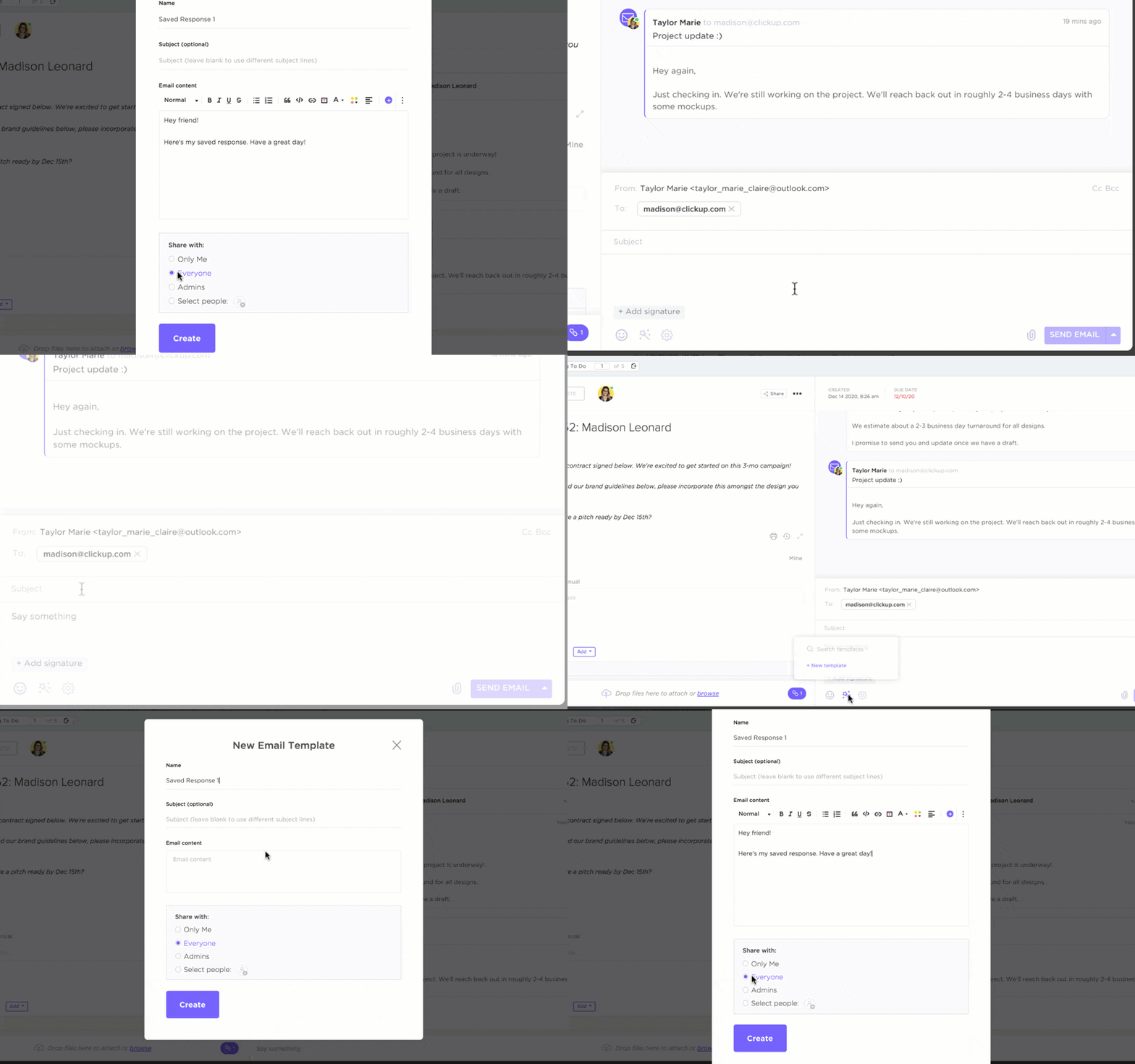
Real-time notifications also keep you updated on responses and new messages. This enables timely follow-ups and guarantees you make the most of each opportunity. Moreover, ClickUp’s mobile capabilities let you manage your outreach tasks and emails on the go.
Read more: How to Use AI in Email (Use Cases & Tools)
2. Write a professional introduction with ClickUp Brain
ClickUp Brain is your go-to AI assistant for generating ideas and crafting standout LinkedIn outreach introductions that grab recruiters’ and hiring managers’ attention.

Here’s how:
- Input a few keywords related to your introduction, and ClickUp Brain will provide multiple options to get you started
- Select your preferred tone—formal, informal, humorous, or serious—to match your personality and audience
- Paste your existing introduction to receive insights on clarity, conciseness, or engagement, and ask AI to shorten or lengthen the text or improve its tone
- Request compelling hooks or anecdotes to enhance your introduction
3. Store messages in ClickUp Docs
Use ClickUp Docs to create dedicated documents that organize messages by audience, purpose, or campaign. This structure makes it easy to find and reference specific outreach efforts, minimizing the risk of missed opportunities and forgotten follow-ups.
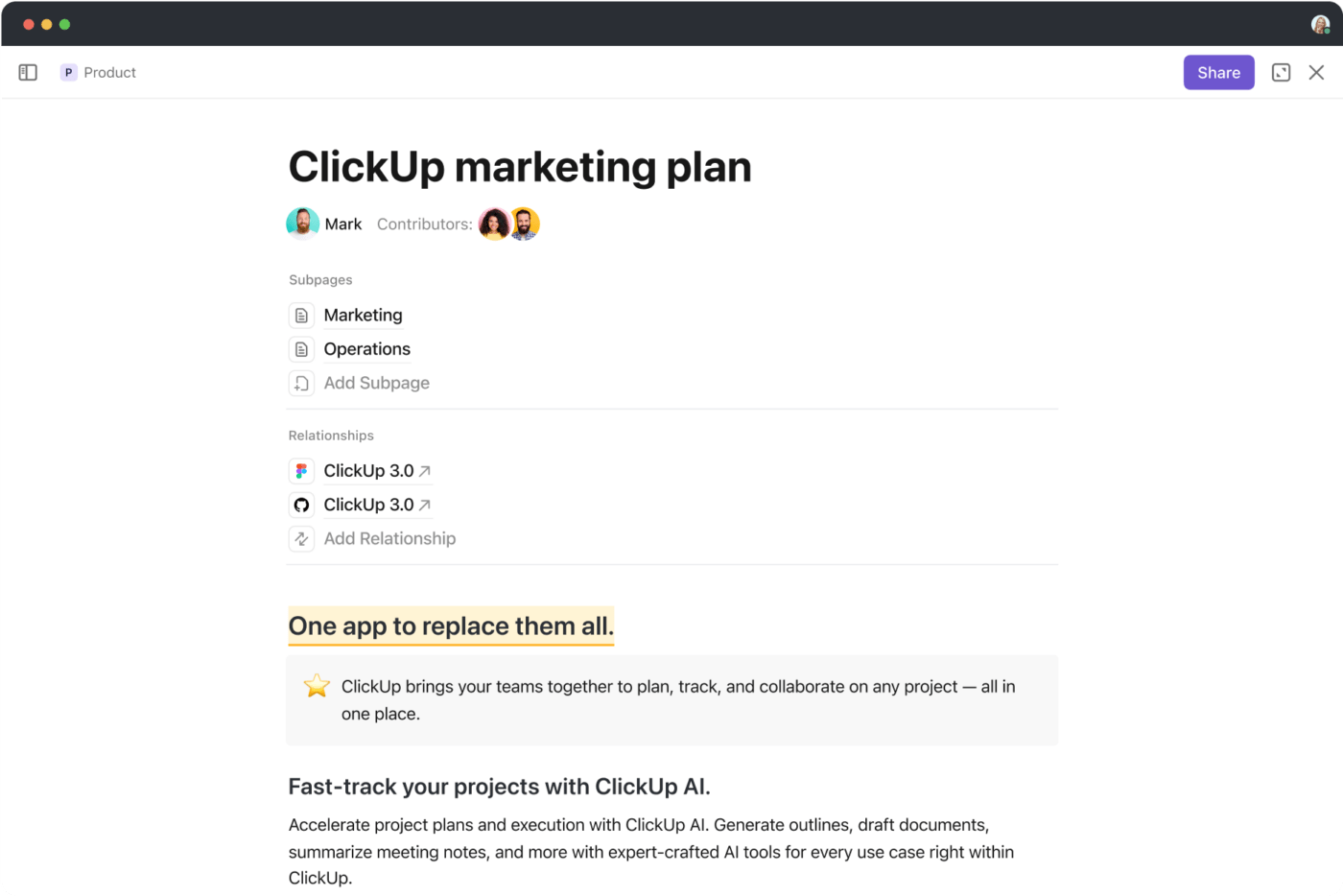
Additionally, using pre-built ClickUp templates for common outreach scenarios can save you time.
The ClickUp Job Proposal Template features a pre-populated structure, enabling quick customization for each job opportunity. This saves you from writing a job proposal from scratch and helps you efficiently outline your qualifications, services, and project timelines.

The template offers various views, including
- Gantt View: Map your proposal from start to finish and assign timeframes to different sections like research, drafting, and revisions
- Calendar View: Tracks important dates and deadlines related to your job proposal
- Board View: Offers a Kanban-style board to easily drag and drop tasks between stages like ‘Researching,’ ‘Drafting,’ ‘Reviewing,’ and ‘Completed’
Additionally, the ClickUp Job Search Template helps you organize all your job-related information—such as job applications, job openings, company ratings, and interview resources—in one place.

It suits beginners and advanced users, offering a quick setup and customizations for a tailored job search experience. The template also includes statuses such as ‘Open,’ ‘Applied,’ ‘Waiting,’ and more, providing clear visibility into where each application stands.
With different view options, you can visualize your job search progress conveniently. For example, the List View shows the detailed breakdown of all job applications, while the Calendar View helps visualize upcoming deadlines, interviews, and follow-up dates on a timeline.
ClickUp also offers technical resume templates to help you showcase your skills, projects, and achievements in a clear, professional format, whether you’re applying for a coding position or a tech project management role.
💡Pro Tip: Use a career map template to assess current competencies, identify skill gaps, and develop a strategy for achieving your career objectives.
Summarize this article for me pleaseAdopting a Consistent Networking Strategy
Besides knowing how to reach out to a recruiter on LinkedIn, you should also be able to maintain your own LinkedIn presence and grow your network. Consistency is key to this. Here’s how to achieve it:
- Building and maintaining your LinkedIn presence: Regularly post, engage with others’ content, and share industry updates. Keep your profile complete and up-to-date to attract recruiters
- Engage with content relevant to your industry: Interact with posts in your field to position yourself as an active industry participant
- Keeping your network active and growing: Connect with at least one new contact weekly through LinkedIn messages or posts. Nurture existing relationships by mentioning them in your posts and engaging with their content
- Scheduling regular LinkedIn activities and reminders: Use ClickUp Reminders to plan regular posts, engage with recruiters, and follow up on your outreach efforts to stay top-of-mind.
Summarize this article for me pleaseStep Up Your LinkedIn Outreach Game With ClickUp
Messaging recruiters on LinkedIn effectively expands your network and uncovers job opportunities. When done strategically, it sets you apart and boosts your chances of landing your dream job. We hope these tips showing you how to reach out to a recruiter on LinkedIn will be helpful.
ClickUp’s robust tools streamline your LinkedIn outreach process, reduce networking overwhelm, and enhance your potential for making meaningful connections that lead to job opportunities or professional growth.
ClickUp Docs stores and organizes outreach messages for quick access, while ClickUp Brain helps you craft standout introductions tailored to your audience. Plus, pre-built templates save you time and guarantee polished, professional communications.
Sign up for ClickUp today and take your networking to the next level.


Everything you need to stay organized and get work done.

Recent Articles
How to Set Product OKRs That Survive the Quarter (With Examples) 
How to Set Product OKRs That Survive the Quarter (With Examples)
Stretch Goals: What They Are, When They Work, and How to Set Them
Stretch Goals: What They Are, When They Work, and How to Set Them
Agency Capacity Planning: How to Find the Hours You Already Pay For 
Agency Capacity Planning: How to Find the Hours You Already Pay For
