







Still downloading templates?
There’s an easier way. Try a free AI Agent in ClickUp that actually does the work for you—set up in minutes, save hours every week.
Sorry, there were no results found for “”
Sorry, there were no results found for “”
Sorry, there were no results found for “”
Many professionals have sat across from clients who seemed to have mastered dodging payment conversations. That awkward dance—wanting to get paid while keeping relationships intact—is a challenge that tests even the most experienced business owners.
Consider it the business equivalent of asking someone to repay a loan. The conversation needs just the right balance of firmness and understanding.
The reality is most clients don’t intentionally delay payments. Sometimes, they’re juggling their own financial challenges, dealing with internal approval processes, or simply needing a reminder. But that doesn’t make the conversation any less necessary.
In this blog post, we’ll discuss how to ask for payment professionally. Let’s dig in! 💼
Follow these steps to ask for payment politely:
The moment to request payment arrives sooner than many business owners realize. Smart timing strengthens your position and increases the likelihood of prompt payment.
Consider sending your first reminder email three days before the due date. This gives clients time to process the payment through their systems.
You should also:
Clear payment expectations create the foundation for smooth transactions. During client onboarding, spell out essential details such as:
🧠 Fun Fact: Before formal invoices, ancient civilizations used clay tablets to record debts. The oldest known example is from 3000 BC in Mesopotamia, where merchants inscribed payment terms in cuneiform.
Before sending payment requests, double-check these key elements:
A documented paper trail supports your payment request email. Keep records of:
Your payment terms should outline specific actions and consequences. Include details about payment deadlines, grace periods, interest charges, service suspension policies, and required documentation.
Remember to review these terms regularly as market conditions change.
Adapt your service agreement to address common payment delays while maintaining reasonable expectations. This proactive approach minimizes awkward payment conversations and helps maintain positive client relationships.
🔍 Did You Know? The word ‘salary’ comes from the Latin salarium, which refers to payments made to Roman soldiers in salt. Back then, salt was so valuable it was sometimes used as currency.
Getting paid on time is vital for any business. If you’re unsure how to approach overdue payments, these techniques can help you navigate the process effectively. 👇
Email is a go-to for requesting payments. It’s professional, trackable, and gives clients time to respond. Use these templates to follow up based on how overdue the payment is:
Subject: Quick reminder: Invoice [Invoice Number]
Hi [Client Name],
I hope you’re doing well.
This is a reminder that Invoice [Invoice Number] was due yesterday. Let me know if the payment has already been made or if you need any clarification.
I’d appreciate a quick update.
Best,
[Your Name]
🧠 Fun Fact: In 2017, Unicode introduced the receipt emoji (🧾), adding a fun way to nudge someone for payment in text messages.
One week overdue
Subject: Friendly follow-up: Outstanding payment
Hi [Client Name],
I am following up on Invoice [Invoice Number], which was due last week.
If the payment has been processed, please let me know. Otherwise, I’d appreciate it if you could confirm when I can expect it.
Let me know if there’s anything I can assist with to speed this up.
Thanks,
[Your Name]
Subject: Urgent: Invoice [Invoice Number] still unpaid
Hi [Client Name]
I’m reaching out about Invoice [Invoice Number], which has been overdue for a month now. Please treat this as a priority and let me know when the payment will be made.
If there’s an issue or concern, feel free to share so we can address it quickly.
Best regards,
[Your Name]
💡 Pro Tip: Use email automation tools to set up follow-up reminders. You can schedule payment request emails to go out at specific intervals—like a day, a week, or a month after the due date. This ensures your clients stay gently nudged without extra effort on your part.
Sometimes, emails aren’t enough. A phone call can add a personal touch and show urgency without being confrontational. Here’s how to start the conversation and follow up effectively:
First, introduce yourself on the call: ‘Hi [Client Name], this is [Your Name] from [Your Company]. I wanted to discuss Invoice [Invoice Number], which is currently overdue. Is this a good time to talk about the payment status?’
After wrapping up the phone call, it’s essential to reinforce the conversation with a follow-up email. This helps document the details, provides clarity, and keeps the payment request top of mind for the client.
Try this email template:
Subject: Follow-up on our call about Invoice [Invoice Number]
Hi [Client Name],
Thank you for taking the time to speak with me earlier. As discussed, I’ve attached Invoice [Invoice Number] for your reference. Please confirm once the payment is processed or if you need further details.
Looking forward to your update.
Best,
[Your Name]
🤝 Friendly Reminder: Add context to your email per your call with the client. Personalizing your approach may lead to better outcomes.
If your clients prefer informal communication or are harder to reach, a text message or direct message can cut through the noise. Keep it short and polite.
📌 Example: ‘Hi [Client Name], just a reminder about Invoice [Invoice Number], which is overdue. Let me know once the payment is processed or if you have any questions. Thanks!’
Or, ‘Hi [Client Name], I wanted to follow up on Invoice [Invoice Number]. It’s currently overdue, and I’d appreciate an update on the payment. Let me know if there’s anything I can assist you with!’
📖 Also Read: 10 Free Proforma Invoice Templates
Escalation becomes necessary when repeated attempts to collect payments don’t yield results.
If the client remains unresponsive, consistently delays payments, or disputes the invoice without valid reasons, it’s time to consider the next steps. Ignoring the issue too long can impact your cash flow and business operations.
Here’s how to escalate effectively:
🔍 Did You Know? The phrase ‘in the red’ originates from old accounting practices where unpaid debts were marked in red ink. It’s now a universal term for financial troubles.
No one enjoys dealing with payment conflicts, but the good news is they’re often avoidable.
Effective client management and a few proactive steps upfront can save you from unnecessary stress and keep things running smoothly. Let’s explore how you can set the stage for seamless payments. 💰
⚙️ Bonus: Try retainer agreement templates to secure consistent payments and establish clear expectations with clients.
Requesting payments doesn’t have to be tricky. Avoiding a few common mistakes can make all the difference. Let’s dive into what to do (and what not to do) for smooth payment requests. 💁
When requesting payment, unclear or ambiguous language can confuse clients and lead to delays.
✅ Best practice: Be clear and specific. Instead of saying, ‘I need the payment soon,’ specify the due date: ‘Please ensure payment is processed by [date] to avoid delays.’
Similarly, rather than saying, ‘Pay immediately,’ try: ‘I noticed the payment is still pending. Kindly settle it by [new date]. Let me know if you need any clarification.’
🔍 Did You Know? Legend has it that famous deals were once sealed with IOUs scribbled on napkins. For instance, Picasso often paid for meals with doodles on napkins, suggesting his art was worth more than cash.
Getting pushy when a payment is overdue can damage client relationships. It’s important to strike a balance between persistence and professionalism.
✅ Best practice: Stay polite and professional. Don’t say, ‘You need to pay right now.’
Try, ‘I hope all is well on your end. The payment for [service] is still pending, and I wanted to check in on the status.’
A confusing subject line can cause your payment request to get ignored or lost in your client’s inbox.
✅ Best practice: Use clear, straightforward subject lines like ‘Invoice #1234 due in 5 days’ to make sure your request gets noticed and opened right away.
Overloading your client with unnecessary information can make your payment request harder to process.
✅ Best practice: Stick to the essential details: the invoice, due date, amount, and payment method. Leave out extra fluff so your client knows exactly what’s expected.
ClickUp, the everything app for work, is designed to help businesses organize, automate, and track their workflows without a hitch. For payment management, it offers a variety of features that simplify processes and reduce manual effort.
Let’s explore how you can use ClickUp’s Finance Solution to handle accounts payable, streamline communication, and stay on top of deadlines. 🗓️
Managing accounts payable and receivable requires precision, and ClickUp makes this easier with its task management features.

ClickUp Tasks are the foundation of payment tracking.
You can create a task for each invoice or payment request, assign it to a team member, and set a due date. Add ClickUp Task Tags like ‘accounts payable’ or ‘overdue’ to categorize tasks for better visibility.
📌 Example: You may create a task titled ‘Client Payment – January’ and assign it to your finance lead. Attach the vendor invoice to the task, set the due date, and mark it as a high priority. This ensures it won’t get lost in the shuffle.
Check out this video for a quick introduction to ClickUp Tasks.
🧠 Fun Fact: Before money was common, people asked for payment through barter systems. Want a cow? Better trade a bushel of grain or some pottery!

ClickUp Custom Fields let you track all payment-related details in one place. You can add and customize these based on your workflow. For example:

Communication is critical in payment management, and ClickUp’s integrated AI assistant, ClickUp Brain simplifies this. It helps you craft professional emails and texts in seconds, ensuring your tone remains clear and polite.
Need to remind a client about an overdue invoice? Just input key details like the client’s name, invoice number, and due date, and ClickUp Brain will generate a polished email ready to send.
You can also tweak the tone or add personalization, ensuring your communication stays professional and effective.
💡 Pro Tip: Use AI in email to test different subject lines and optimize for higher open rates. Experiment with tone, length, and keywords to find what resonates best.

ClickUp Forms eliminates the need for back-and-forth emails. These Forms let clients submit payment details, proof of payment, or other necessary information directly.
📮ClickUp Insight: 42% of team members still rely heavily on email for communication despite its siloed nature.
According to research by ClickUp, communication is often siloed and separate from actual workflows. To prevent broken communication, integrate messaging into your workflows with a centralized platform that unites project management, collaboration, and communication. Try ClickUp, the everything app for work.
Submissions automatically appear in ClickUp as Tasks, helping you track payments and their statuses in one place. For instance, instead of juggling emails or spreadsheets, you can set up the form builder software to capture essential payment data directly, keeping everything organized.
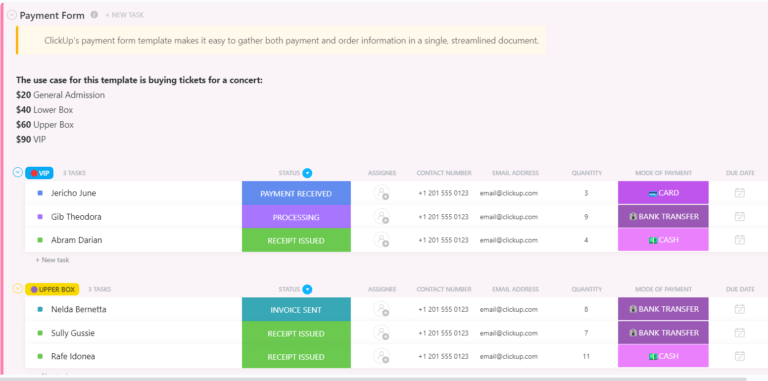
To save even more time, try the ClickUp Payment Form Template. Its design ensures that sensitive payment information remains encrypted and protected, building customer trust.
What makes this template truly stand out is its flexibility.
It provides multiple ClickUp Views, including the Payment Tracker and Processing Board, which let you visualize payment data in ways that align with your workflow. For example, you can track completed payments on the Processing Board or get a quick overview of outstanding ones on the Payment Tracker.
💡 Pro Tip: Reduce delays with ClickUp’s Simple Agreement Template. It’s an easy way to keep agreements clean and efficient.

ClickUp Automation simplifies repetitive payment management tasks, helping businesses save time and optimize their CRM strategy.
With Automation, you can create triggers for specific actions, like updating a task’s status to ‘Paid’ when a payment is marked complete or assigning follow-up tasks when a payment is overdue. These workflows run behind the scenes, so you can focus on other priorities while ensuring payment processes stay on track.
🔍 Did You Know? The first modern credit card, the Diners Club Card, was invented in 1950 after a businessman forgot his wallet at a restaurant. It created a new way to delay payment!
For tasks requiring a personal touch, ClickUp Reminders keep you on top of your payment deadlines. Set reminders for due dates, follow-ups, or periodic payment checks.
These notifications ensure you never miss an important payment-related task, giving you complete peace of mind.

Email Project Management in ClickUp takes communication a step further.
You can send payment reminders, follow-ups, or acknowledgments directly from ClickUp, tying email communication to tasks for better context.
📌 Example: When a payment is overdue, send an automated email to remind clients or share updates with your team—all within the same platform.
🧠 Fun Fact: Vikings were notorious for asking for ‘protection money,’ called Danegeld, from European kingdoms. Pay up, or they’d pillage your village—an early, extreme form of invoicing!
ClickUp Integrations allow you to connect your favorite payment systems and tools, creating a unified hub for all your payment management needs. Sync platforms like PayPal, Stripe, QuickBooks, and more to track transactions, process invoices, and manage accounts effortlessly.
For example, syncing Stripe to ClickUp enables automatic updates to tasks whenever a payment is processed. Pair this with Automations, and you can assign follow up actions or generate receipts instantly.
Integrating accounting software like QuickBooks helps consolidate payment records, eliminating the need for manual data entry while reducing errors.

ClickUp Dashboards provide a bird’s-eye view of your payment processes, making monitoring key metrics and identifying bottlenecks easier. Add cards for overdue payments, completed transactions, and unpaid invoices to create a customized dashboard tailored to your needs.
For example, you can set up a card to display outstanding invoices in real time, helping you prioritize follow-ups and maintain a steady cash flow.
Another card tracking completed payments offers valuable insights into revenue trends, giving you a clear picture of your business’s financial health.
💡 Pro Tip: Track all your payment activities in one place using ClickUp’s Payment History Template. It lets you log payment dates, amounts, and statuses, making it easy to spot trends or discrepancies.
Let’s be honest: chasing payments isn’t the highlight of anyone’s day. But when done right, it can be smooth, professional, and even painless. The key? A clear process and tools that do the heavy lifting while you focus on what you do best.
To make managing payments easier and more efficient, tools like ClickUp are invaluable. With its comprehensive Finance Solution, ClickUp helps you stay on top of every invoice and payment request.
Need to track invoices? Done. Automate reminders? Easy. Keep everything organized without losing your mind? Absolutely.
Don’t let overdue payments slow you down. Sign up for ClickUp today! ✅

© 2026 ClickUp

There’s an easier way. Try a free AI Agent in ClickUp that actually does the work for you—set up in minutes, save hours every week.