






Still downloading templates?
There’s an easier way. Try a free AI Agent in ClickUp that actually does the work for you—set up in minutes, save hours every week.
Sorry, there were no results found for “”
Sorry, there were no results found for “”
Sorry, there were no results found for “”

Your quality control process flagged a recurring issue, and now you need a systematic approach to fix it. But where do you start?
A corrective action plan (CAP) is your roadmap to identifying, addressing, and preventing problems from recurring.
Whether you’re dealing with manufacturing defects, safety incidents, or compliance issues, a well-structured CAP can help you get your business operations back on track.
In this blog post, we will discover how to develop effective corrective action plans, with real-world examples and templates for implementing them in your organization.
A corrective action plan (CAP) is a formal, documented strategy that outlines specific steps to address identified problems, eliminate their root causes, and prevent their recurrence in an organization’s processes, products, or systems.
In quality management systems, corrective and preventive actions are crucial in maintaining and improving processes.
While they’re often mentioned together (you’ll frequently hear the acronym CAPA – Corrective and Preventive Action), they serve distinct purposes and are implemented at different stages of the quality management lifecycle.
Understanding these differences is crucial for taking the right approach at the right time.
Here’s a concise comparison table highlighting the key differences:
| Aspect | Corrective action | Preventive action |
| Definition | Responds to existing nonconformities, defects, or incidents that have already occurred | Focuses on stopping problems before they occur |
| Initiation | Initiated after detecting a problem through customer complaints, audit findings, or quality inspections | Initiated based on trend analysis, risk assessment, or industry best practices |
| Urgency | Requires immediate attention to minimize the impact on operations and customers | Allows for planned, systematic implementation without time pressure |
| Tools used | Involves a thorough investigation of root causes using tools like 5 Whys or Fishbone diagrams | Uses risk assessment tools and predictive analysis to identify potential issues |
| Focus | Focuses on implementing both short-term fixes and long-term solutions | Emphasizes system improvements and process optimization |
| Success measurement | Elimination of the problem and prevention of its recurrence | Absence of anticipated problems |
| Documentation | Includes the creation of incident reports, investigation findings, and detailed action plans | Focuses on risk assessments, preventive measures, and monitoring protocols |
Think of it this way: corrective action is like treating an illness after symptoms appear, while preventive action is like maintaining a healthy lifestyle to avoid getting sick in the first place. Both are essential for a robust quality management system.
👀 Did You Know? The Failure Mode and Effects Analysis (FMEA), one of the oldest tools for risk detection and reduction, was developed by the United States Military in the late 1940s.
What began as a military procedure for evaluating equipment reliability has evolved into a universal methodology used across industries—from healthcare to automotive manufacturing.
At its core, FMEA provides structured frameworks that help teams systematically identify potential failures, assess their impact and likelihood, and implement preventive measures before problems occur.
A corrective action plan is more than a troubleshooting document; it’s a comprehensive strategy for organizational improvement.
CAPs resolve immediate issues and strengthen the overall quality management system when properly implemented. Understanding these key objectives will help you document more effective CAPs and achieve lasting improvements:
Organizations face various challenges impacting their operations, quality, and compliance.
Understanding when to initiate a corrective action plan is crucial for maintaining operational excellence and meeting stakeholder expectations. While not every problem requires a formal CAP, certain situations demand its structured approach:
🧠 Fun Fact: When Bank of America introduced a $5 monthly debit card fee in 2011, they expected some customer pushback. However, the backlash was far worse than anticipated, forcing the bank to reverse its decision.
This case highlights the difference between risks and issues—a risk is a potential problem that might happen, while an issue is a problem that has already happened and demands immediate action.
📖 Also Read: Best Enterprise Risk Management Software (ERM)
Creating an effective corrective action plan requires a systematic approach from problem identification to implementation and monitoring. As businesses move towards a digital-first environment, managing these complex processes demands more than traditional paper-based systems.
ClickUp, the everything app for work and a comprehensive work management platform, transforms your corrective action planning into a simplified, collaborative process. Its integrated features enable quality teams and other stakeholders to be directly involved in tracking investigations, implementing solutions, and verifying results.
Just as STANLEY Security’s global teams saved over 8 hours weekly on meetings and reduced report-building time by 50%, ClickUp’s integrated features enable quality teams to track investigations, implement solutions, and verify results in one place. This centralized approach improves efficiency and ensures consistent documentation and communication across distributed teams.
ClickUp has allowed our team to have clear and transparent priorities, identify opportunities to support one other, and helps us identify and manage potential risks along the way. Since using ClickUp, our team’s productivity has dramatically increased by reducing the number of meetings and unnecessary back and forth emails.
Here’s how you can create a corrective action plan with ClickUp:
Start by clearly documenting the issue, including when it occurred, who’s affected, and its impact on operations. Use specific data and observations rather than general statements.
👉🏼 For example, when a pharmaceutical manufacturing team notices temperature control issues, they should specify ‘Temperature excursions of 3°C above limit in Warehouse B, affecting 200 units of Product X, discovered during routine monitoring on February 15.’
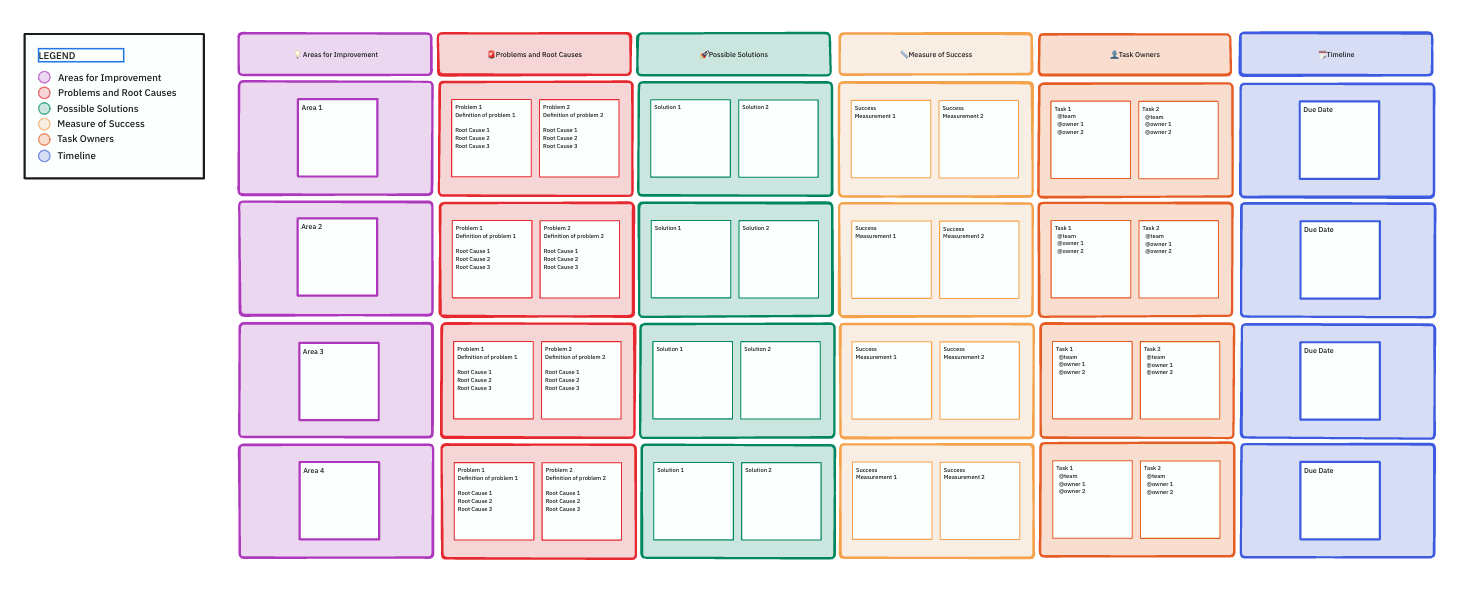
The ClickUp Corrective Action Plan Template provides a structured framework for problem documentation. This ready-to-use Whiteboard template is designed to simplify the initial problem-capturing process with dedicated sections for impact assessment and evidence collection.
With the Corrective Action Plan Template, teams can:
The template ensures all critical information is captured consistently.
💡 Pro Tip: Quality issues often involve many moving pieces—photos, defect data tables, initial observations from inspectors or line supervisors, timelines, and more.
ClickUp Docs lets you structure all of that clearly in one place, using nested pages, headers, tables, checklists, and embeds.
This makes it easier to conduct root cause analysis, collaborate cross-functionally on potential solutions, and document each stage of corrective and preventive actions for future audits or compliance reviews.
The investigation phase requires thorough analysis to identify underlying causes.
The goal: Go beyond surface-level symptoms and uncover the underlying factors that caused the nonconformance, defect, or failure. Without a clear root cause, any corrective action risks being a temporary fix rather than a sustainable solution.
Some common root cause analysis methods you can build into your process include:
When a medical device manufacturer investigates recurring calibration failures, it needs to document each investigation step methodically for greater visibility.
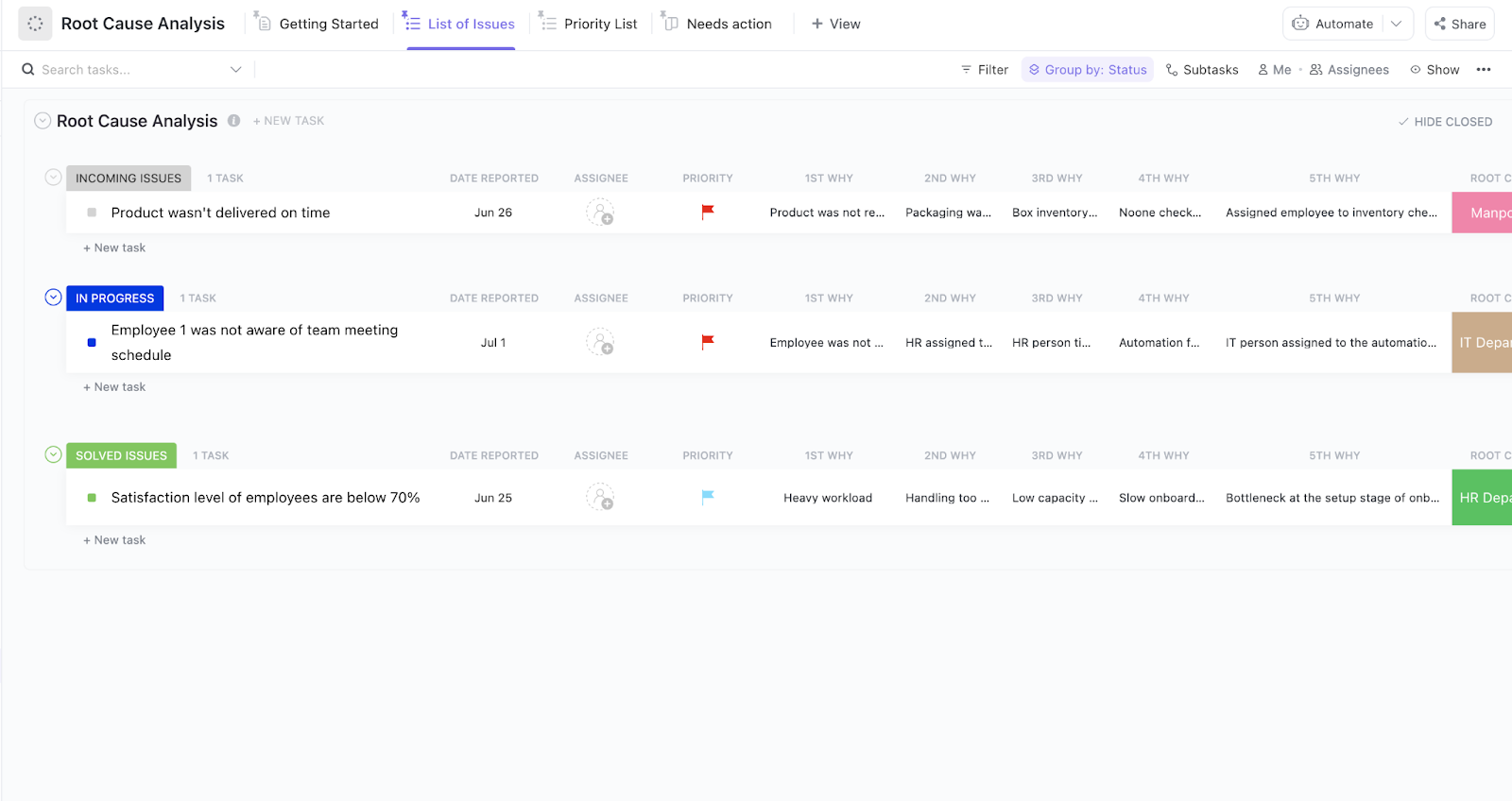
💡 Pro Tip: ClickUp’s integrated tools support comprehensive root cause analysis through structured investigation workflows.
Quality teams can also use the investigation framework of the Root Cause Analysis Template in ClickUp to track potential causes, gather evidence, and document findings.
👉🏼 For example, when investigating a production quality issue, teams can create tasks for equipment inspections, operator interviews, and data analysis, all managed within the same workspace
Once you’ve identified the root cause, it’s time to translate insights into action. This step involves defining specific, measurable, and time-bound tasks that directly address the root cause and prevent the underlying issue from happening again.
Create a clear plan of action that outlines what needs to be done, who’s responsible, and when it will be completed.
Some best practices that can make this step easier:
ClickUp Tasks let you transform your corrective plans into manageable, trackable action steps.
👉🏼 Example: Food safety scenario
Imagine a critical food safety issue has been identified during an audit—say, temperature control deviations in refrigerated storage. The root cause points to a combination of outdated HACCP documentation, improper staff practices, and an incorrectly calibrated sensor.
You can create a parent task in ClickUp like “Implement Corrective Actions for Refrigerated Storage Deviation”
Use subtasks to define each action:
Assign each subtask to a team lead, set deadlines, and prioritize based on severity.
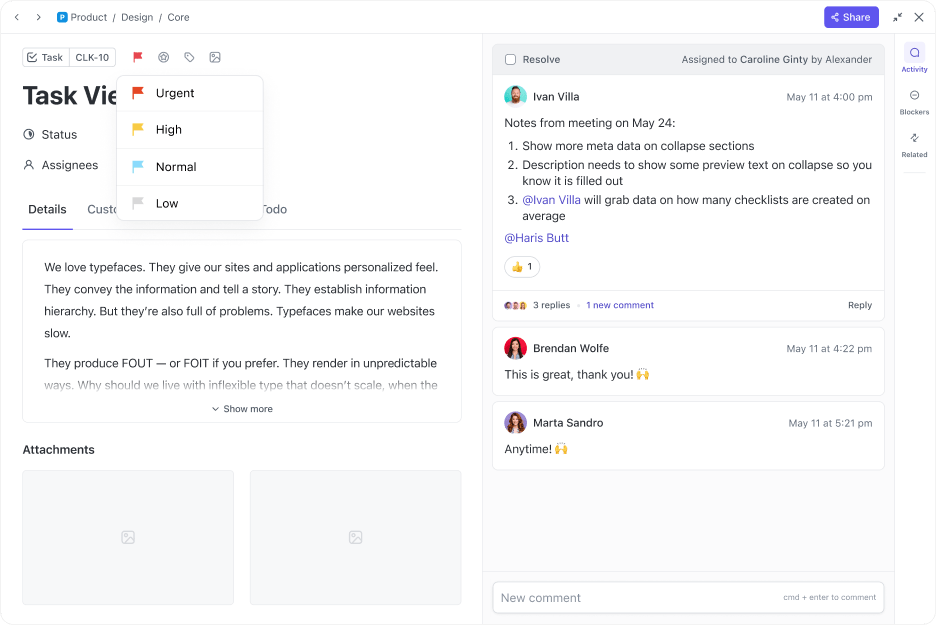
💡 Pro Tip: Using Custom Fields allows you to add context to each task with details such as costs, resources, and compliance requirements tracking. Similarly, you can use Custom Task Statuses in ClickUp to monitor progress on your action items.
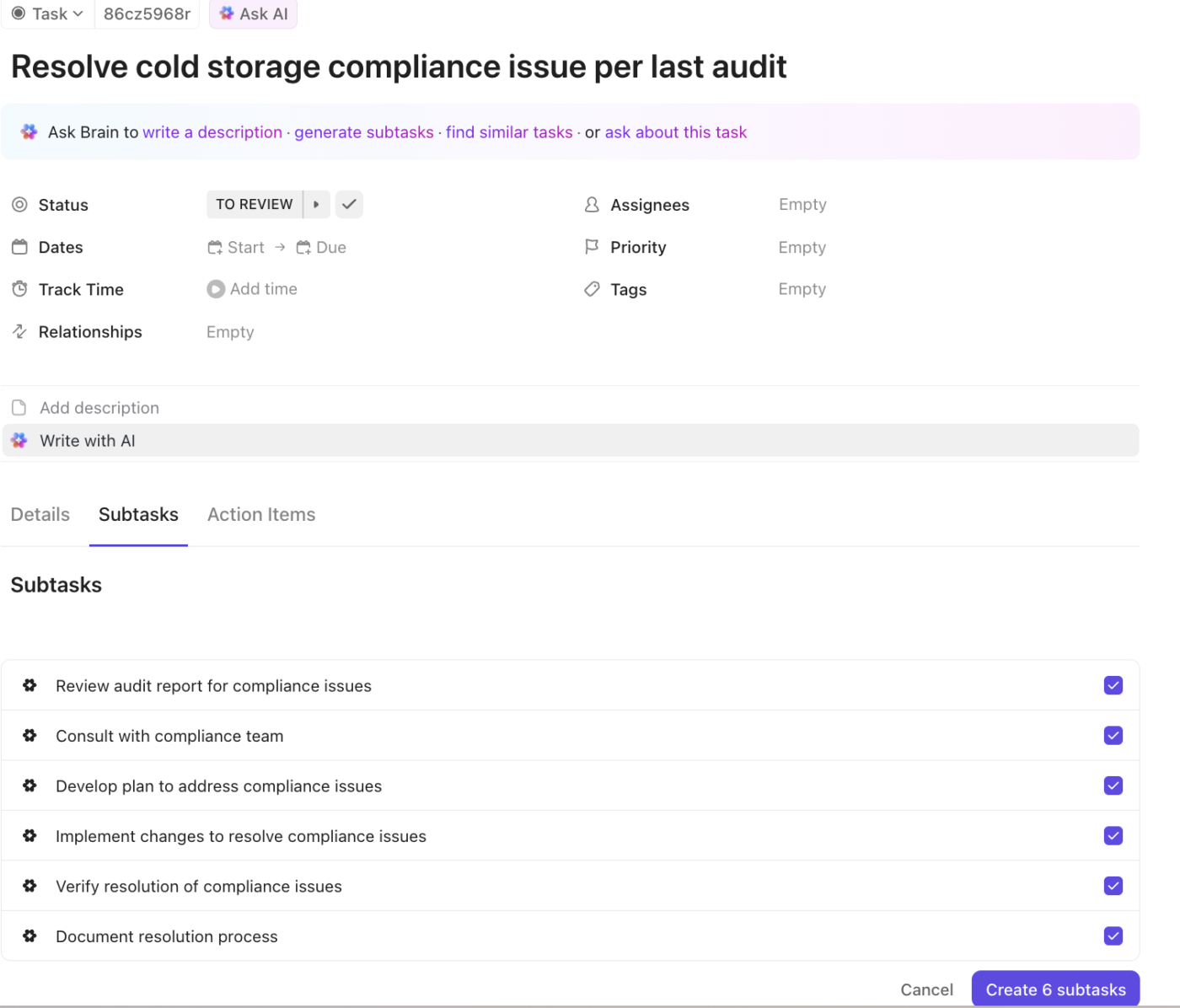
ClickUp Brain simplifies this step by automatically generating subtasks based on the parent task name or description.
👉🏼 For example: When you create a task titled: “Resolve cold storage compliance issue per last audit”, ClickUp Brain might instantly suggest subtasks like:
You can then approve, edit, or expand on these suggestions—saving time and ensuring nothing critical falls through the cracks.
📮ClickUp Insight: 92% of knowledge workers risk losing important decisions scattered across chat, email, and spreadsheets. Critical business insights get lost in the digital noise without a unified system for capturing and tracking decisions.
With ClickUp’s Task Management capabilities, you never have to worry about this. Create tasks from chat, task comments, docs, and emails with a single click!
Planning is only half the battle—now you need to make sure the actions are actually happening. This step involves tracking progress, addressing blockers, and ensuring that all assigned tasks are completed on time and to standard.
Hold weekly or bi-weekly CAP review meetings to check progress and identify and remove roadblocks quickly.
ClickUp Dashboards help you here by providing customizable views of implementation status, showing task completion rates, timeline adherence, and key performance metrics.
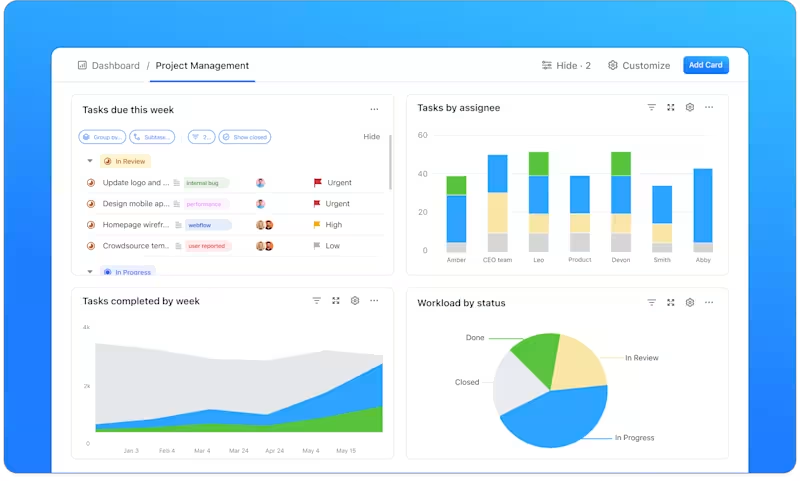
For instance, when implementing new quality control procedures, teams can track training completion rates, audit findings, and quality metrics in one centralized location.
Consider adding custom ClickUp Automations to notify relevant stakeholders when deadlines approach or tasks go off track.
Here’s some inspiration on building automations for your projects in ClickUp:
Finally, you can use comments and checklists to track partial progress or dependencies within tasks. If you have questions or need to bounce ideas and plans off your colleagues, ClickUp Chat is perfect for quick updates and problem-solving discussions right within your task management platform.
The final phase of the corrective action process focuses on confirming that implemented actions have resolved the original problem and prevented recurrence.
This documentation serves as valuable reference material for future improvements and audit purposes, while also helping teams identify patterns that might prevent similar issues.
The success of your corrective action plan depends heavily on how well you execute the fundamentals. Years of quality management experience across industries have revealed several core practices that consistently lead to successful outcomes.
When leaders prioritize corrective actions, teams are more likely to maintain momentum and achieve lasting results.
Let’s explore some examples demonstrating how different organizations can successfully implement corrective action plans to address significant challenges and improve operations.
⚠️ Scenario: A medical device manufacturer discovers inconsistencies in their sterilization process, affecting 15% of the latest production batch. Quality control tests reveal variable sterilization levels, risking patient safety and threatening FDA compliance. The issue results in product recalls, damaged customer trust, and potential regulatory penalties.
✅ Corrective actions: The organization implements a comprehensive quality improvement program:
🎯 Implementation tips: The organization uses a structured CAPA (Corrective and Preventive Action) system:
📖 Also Read: Improve Team Dynamics with Effective Strategies
⚠️ Scenario: A global food distribution company faces critical disruptions in its cold chain operations. Multiple temperature excursions during transport lead to product spoilage, delivery delays, and a 30% spike in customer complaints.
Financial losses exceed $500,000 in one quarter, while customer satisfaction scores drop by 40%.
✅ Corrective actions: The company initiates a comprehensive supply chain overhaul:
🎯 Implementation tips: The organization adopts the following risk management approach:
⚠️ Scenario: A financial services company experiences a data breach compromising 10,000 customer records, exposing sensitive financial and personal information. The initial investigation reveals multiple system vulnerabilities and inadequate security protocols.
The incident results in regulatory scrutiny, potential fines under GDPR, and a 25% drop in customer trust ratings.
✅ Corrective actions: The organization launches a comprehensive security enhancement program:
🎯 Implementation tips: The company follows a structured cybersecurity framework:
⚠️ Scenario: During an internal audit, a rapidly growing technology startup discovers significant inconsistencies in its HR practices. Issues include incomplete employee documentation, inconsistent performance reviews, and non-compliant overtime calculations.
These problems pose risks of labor law violations and affect employee satisfaction, with turnover reaching 30% annually.
✅ Corrective actions: The company implements a comprehensive HR compliance program:
🎯 Implementation tips: The organization uses a systematic HR management approach:
Each example demonstrates the importance of:
These examples showcase how different organizations can adapt the corrective action plan framework to address their specific challenges while maintaining compliance and improving operational efficiency.
👀 Did You Know?: The phrase ‘tsunami risk’ isn’t just about massive waves. The real danger lies in what you don’t see coming!
The Fukushima nuclear plant disaster in Japan is a classic example. In 2011, a massive earthquake triggered a tsunami, which then led to a nuclear meltdown. The cascading nature of this disaster—where one event triggered another, worsening the overall impact—makes it a perfect representation of tsunami risks.
In a broader sense, the term can be applied to business and global risks, where unforeseen events cause chain reactions that amplify damage beyond initial expectations.
The most successful organizations understand that solving problems is just the beginning—the real goal is building systems that prevent issues from recurring.
Remember, every challenge presents an opportunity for improvement. With the right tools and approach, you can turn today’s problems into tomorrow’s strengths, creating lasting positive change throughout your organization.
Well-executed corrective action steps transform challenges into opportunities for improvement. By following the structured approach outlined in this guide and leveraging tools like ClickUp’s Corrective Action Plan Template, you can effectively address issues and strengthen your organization’s processes.
Ready to streamline your corrective action planning? Sign up for ClickUp and start today.

© 2026 ClickUp

There’s an easier way. Try a free AI Agent in ClickUp that actually does the work for you—set up in minutes, save hours every week.