


Sorry, there were no results found for “”
Sorry, there were no results found for “”
Sorry, there were no results found for “”
Construction projects demand a lot of attention and effort. From creating blueprints to managing budgets and delivering projects on time–everything needs detailed planning and perfect execution.
The good news? There’s a tool for pretty much everything! Whether it’s managing costs, staying compliant with safety regulations, or keeping your team in sync, the right tools can make your job easier.
That’s why we have rounded up the top 11 construction apps that can help you with all aspects of construction projects—designing, task management, communication, and more.
So, start exploring and find your best fit!
Here are the top 11 construction apps that can help streamline your projects and enhance collaboration.
Build the perfect construction project management app with ClickUp! 🚀
Construction apps are digital solutions for construction management. They range from straightforward document management tools to design tools and robust construction management platforms that handle end-to-end project planning and delivery.
Construction apps help you manage multiple projects by:
🧠 Did you know? 35% of construction professionals spend over 14 hours per week on non-productive activities, like searching for project information, conflict resolution, and dealing with mistakes and rework.
Here are the key benefits of construction apps:
Construction apps offer real-time insights into your project’s progress with reports and dashboards. Construction project managers can continuously track on-site progress on their app and monitor project details like material usage, team productivity, and workload.
🌻 Example: If a specific crew is overworked or progress is lagging in one area, the app provides the visibility to make immediate adjustments.
You can access key features of resource management to view each team member’s workload and keep track of resources and expenses in real time. Construction apps also help you view costs incurred for the project and compare budgeted vs. actual costs to identify variances and make necessary adjustments.
🌻 Example: Suppose your high-cost drywall team works overtime, shooting up overall costs. You can review workload distribution and reduce their overtime by shifting the job to the available painting team. This way, you ensure optimal resource allocation and cut down on costs without compromising project quality.
Construction apps help you make data-driven decisions based on different reports and analyses. For example, you can analyze historical cost and labor trends to plan for current projects. Also, you can create risk analysis reports to mitigate risks, reduce their impact on the project, and avoid delivery delays.
🌻 Example: If the app flags weather conditions as a risk for an outdoor project, you can proactively reschedule tasks like concrete pouring to prevent delays and damage.
Whether you’re a construction business looking for clients or a construction industry expert looking for technical designing or cost management, there’s the right construction app for everything. Here’s a list of what you should look for in construction apps:
📌 Project planning and scheduling: Choose apps that make it easier to set and track project timelines, prioritize tasks, track progress, and monitor dependencies
📌 Resource management: Look for platforms that show real-time workload, available materials, and equipment
📌 Budgeting and cost management: Pick a construction software that helps you track project costs in real time—from material to labor, site preparation, and broader admin expenses. It should allow budget vs. cost comparisons to help you make timely adjustments
📌 Document management: Select an app that centralizes all project-related documents, such as site images, regulations, safety inspections, daily logs, and blueprints. It should enable tracking changes and allow access to the latest document versions
📌 On-site capabilities: Go for tools that work well both in mobile and desktop versions. It should have an offline functionality so that on-site teams can access docs, update progress, and submit reports even without the internet
📌 Quality control features: Look for apps that help you track issues, analyze risks, create inspection checklists, and document quality standards. This will help you proactively spot and fix project issues and resolve safety concerns
📌 Workflow automation: Pick a construction app that allows you to automate routine tasks and customize workflows. For example, automating design approval processes, setting alerts when approaching budget thresholds, changing task statuses, etc.

Building from the ground up is tough enough. Add miscommunication, scattered documents, delays, missed deadlines, and material theft, and it gets even harder.
The way out? A versatile construction management app like ClickUp. It helps you manage timelines, assign tasks, track real-time progress, and visualize projects with dashboards and Custom Views.
ClickUp for Construction Management centralizes everything from pre-sales and conception to close out. You can collaborate on plans, create project drawings and workflows, and convert your plans into actionable items with ClickUp Tasks.

Leverage ClickUp’s 15+ Project Views to sum up your plans, like Calendar View for task scheduling, List View for resource management, Board for task progress, and Gantt charts for timelines.
Here’s how you can add project views in ClickUp 👇
One of the top concerns of construction projects is timely delivery, and the ClickUp Time Management feature helps you manage construction timelines effectively. Use time-tracking to estimate task times, schedule time using Gantt charts, Calendar, Workload, and Timeline views, and log hours with timesheets.

That’s not all! ClickUp offers a vast library of construction management templates to maintain team coordination, track resources, and help you stay within budget.
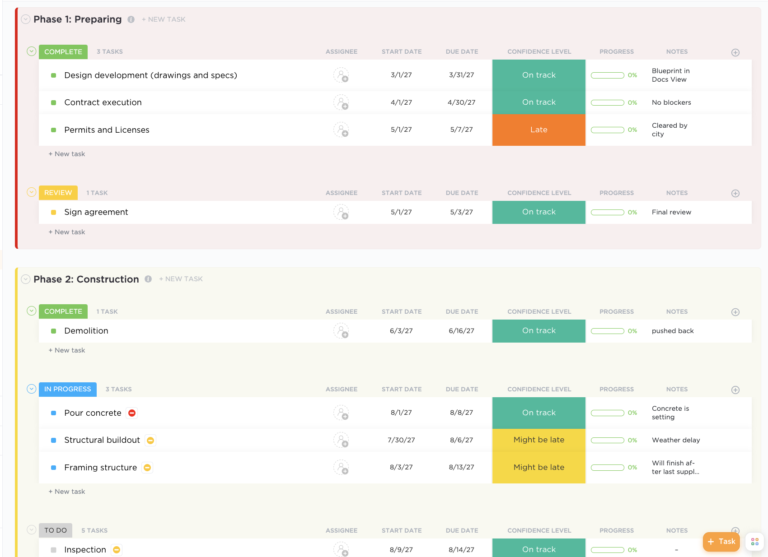
For example, the ClickUp Construction Management Template lets you plan and visualize project lifecycles, track progress, align resources, and ensure timely project delivery. The template also offers custom statuses and fields so you can add details like confidence levels and progress percentage bars, and track task progress.
Here’s a quick rundown of ClickUp features to make things easier.
ClickUp has been a game-changer for managing the tasks involved in completing client work. I needed a tool to organize tasks instead of keeping everything in my head, and Excel just wasn’t cutting it. ClickUp has proven to be an effective and user-friendly solution for my business.

Fieldwire’s job site management software allows on-field teams to access images, blueprints, jobs, project documents, and everything else on their smartphones.
It enables construction businesses and contractors to create tasks linked with specific locations, prioritize tasks, and share RFIs (Request for Information) in real time. You can use its custom workflows, inspection forms, and reporting features for commissioning before project handover.
🧠 Did you know? Many construction management apps are now integrated with drone technology. Drones provide real-time aerial data that syncs with these apps to create updated project maps, saving hours of manual inspections.

Procore is a project management software for subcontractors that provides intelligent risk management across projects, from preconstruction to closeout. You can predict risks using predictive modeling, priotitize risks, and send real-time alerts to stakeholders.
This construction project management tool also streamlines documentation, supports automations, and makes administrative tasks easier for remote teams. The tool’s highlight is its budget estimate feature that automatically calculates labor and material costs.
Procore is an amazing tool that streamlines the documentation and data entry processes effectively and is simple to use once you get the hang of it. Procore is used daily for our project by everyone including consultants, subcontractors, and the entire management team. However, it can be complicated to learn and understand.

AutoCAD is an online DWG (a file format that stands for drawings) editor and DWG viewer that lets you create project drawings using core drafting tools and commands. You can create 2D and 3D building structures, blueprints, and plans with precision. The best part is that it offers a preset library of ready-to-use materials to help you get started and ensure more project efficiency.
The program is useful for the creation of 2D drawings, with the purpose of hard-lining sketches within the computer- basically hand-drafting in a digital format.

Not all apps used in construction projects are specialized for the industry. For instance, GasBuddy, originally designed to find cheaper fuel, can also help construction teams manage fuel costs.
Builders and field workers can check gas prices at the nearest stations. It also has premium features like contests that help you win free fuel, redeem rewards, and save more on fuel.
💡Pro Tip: Use free carbon calculators to calculate the environmental impact of your construction projects. Identify high-emission areas and develop strategies to minimize your carbon footprint.

If you’re a construction company trying to centralize your construction documentation, Buildertrend can help. It gives you an at-a-glance view of everything—from project reports to images, schedules, and financials and enables you to streamline project operations.
The app’s construction scheduling helps users create schedules, manage dependencies, and sync updates for effortless schedule shifting.
I like how I can customize the platform to fit my specific needs from forms to reports. Honestly, sometimes I would like there to be even more possibilities for integration with other programs that my company uses.

PlanGrid Build by Autodesk Construction Cloud is a construction drawing tool. However, its features are now available in Autodesk Build, which helps you with construction management.
You can access everything in one app, from planning and creating blueprints to tracking project progress, reporting, and document management. Plus, you can edit drawings in real-time collaboration with your team.
📖 Read More: How to Use AI in Construction (Use Cases and Tools)

LetsBuild offers two products:
It helps you conduct mobile site inspections, identify and log issue types, progress, and due dates; attach images for details; measure plans in editor mode; and rework drawings.
LetsBuild enables streamlined communication among construction teams, subcontractors, vendors, and other stakeholders. It also provides real-time construction site visuals and up-to-date drawings for reporting, builds 6-week timelines, spots delays and overloads, and adjusts timelines using live Gantt charts.
The platform is easy to use, especially for people who are entering and do not have full knowledge of project management, but needs some changes to become a more powerful tool and be used as a single project management.
📖 Read More: How to Use a Gantt Chart in Construction
Autodesk offers a unified platform to access all project data—files, photos, Revit models, RFIs, sheets, and reports—in one place. It offers BIM (Building Information Modeling) coordination to edit models, spot defects, and rework. Its submittal section is especially useful when sharing shop drawings.
Autodesk’s project management gives builders and contractors real-time project insights. It also has cost management features to help you with construction estimations, forecast cost risks, and mitigate financial risks.
Overall, very good; had hiccups early on but ACC has devoted more resources and server support to ensure that interruptions are infrequent and that user requests are addressed accordingly.
Contractor Foreman is best for handling project financials and expense tracking. It lets you track costs and financial data at a granular level, estimate individual and bulk markups, and manage bids and change orders.
You can track your crew, create employee schedules, and maintain project documentation for records. Plus, the software has a support network that offers suggestions on making the most of the construction management software.
What I like most about Contractor Foreman is the vast scope of modules that allow for so many different options in managing projects. However, because there are so many features it can be a little bit overwhelming when you first go into the program.
📖 Read More: Free Construction Bid Templates for Project Success

Raken works great for field management. You can capture data in real time, track hours, and generate daily progress reports. Team members can use it to take daily notes, upload images, and maintain logs.
Raken’s highlight is its ease of use and ability to track hours, material, equipment, and production with daily and snapshot reports. You can use time cards to centralize time tracking, assign hours to the crew in bulk, and approve time card submissions on the go.
Raken ratings and reviews
Love that we can customize our cost codes and track prevailing wage classifications. Our field guys are notified their time cards are ready and it is very easy for them to go in and approve. The gallery on each project is so easy to use and upload and the one drive integration is amazing for our team. However, it would be nice if there were more features that were customizable.
Wrapping up our list of the best construction apps, we are certain of one thing—you can’t expect a successful construction project without the right technology.
The apps we have covered here are all great with tracking, scheduling, financial management, and collaboration features. But if you’re looking for a versatile solution that works for builders, construction workers, and project managers, it has to be ClickUp.
ClickUp stands out with its effective timeline management features, powerful collaboration, real-time tracking and reporting, advanced automations, and massive templates library. All of these features help you close your construction projects on time and without exceeding budgets.
Sign up to ClickUp for free and explore its features today!

Arya P Dinesh
Max 15min read

Manasi Nair
Max 15min read
Manasi Nair
Max 19min read

© 2026 ClickUp





