Most competency frameworks fail for a boring reason: they live in a document, while talent decisions happen in day-to-day work. Hiring scorecards drift, performance reviews get subjective, and development plans turn into “someday” goals.
This guide walks you through 10 ready-to-use competency framework templates in ClickUp so skills data connects directly to tasks, performance reviews, and career growth, where your team already works.
Summarize this article with AI
ClickUp Brain not only saves you precious time by instantly summarizing articles, it also leverages AI to connect your tasks, docs, people, and more, streamlining your workflow like never before.
Summarize this article for me please
10 Competency Framework Templates at a Glance
Not sure which template to start with? Use the Capability Matrix to map what skills you have today, then layer in Skills Mapping for staffing decisions, and Development Plans + Reviews to turn gaps into action.
Behavioral rating anchors, side-by-side self vs manager comparison, AI summary generation
Review form + rating matrix
Summarize this article with AI
ClickUp Brain not only saves you precious time by instantly summarizing articles, it also leverages AI to connect your tasks, docs, people, and more, streamlining your workflow like never before.
Summarize this article for me please
What Is a Competency Framework Template?
A competency framework template is a reusable structure for defining the skills, behaviors, and knowledge required for a role, rating proficiency consistently, and linking development actions to real work.
When you build this from scratch, you usually end up with scattered spreadsheets and inconsistent definitions. One team’s “expert” is another team’s “proficient,” which makes hiring, promotions, and reviews feel subjective.
A good template prevents that by standardizing the language and the rating scale, so assessments are comparable across teams and over time. And when the template lives inside ClickUp, it becomes a connected system: competency definitions, employee assessments, and development plans stay tied to tasks, goals, and review cycles instead of getting lost across docs and email threads.
Instead of a fragmented mess, you get a single source of truth. Your competency definitions, employee assessments, and development plans are all linked together and actionable where work actually happens.
📮 ClickUp Insight: 1 in 4 employees uses four or more tools just to build context at work. A key detail might be buried in an email, expanded in a Slack thread, and documented in a separate tool, forcing teams to waste time hunting for information instead of getting work done. ClickUp converges your entire workflow into one unified platform. With features like ClickUp Email Project Management, ClickUp Chat, ClickUp Docs, and ClickUp Brain, everything stays connected, synced, and instantly accessible. Say goodbye to “work about work” and reclaim your productive time.
💫 Real Results: Teams are able to reclaim 5+ hours every week using ClickUp—that’s over 250 hours annually per person—by eliminating outdated knowledge management processes. Imagine what your team could create with an extra week of productivity every quarter!
Summarize this article with AI
ClickUp Brain not only saves you precious time by instantly summarizing articles, it also leverages AI to connect your tasks, docs, people, and more, streamlining your workflow like never before.
Summarize this article for me please
Benefits of Using Competency Framework Templates
You’ve spent months designing the perfect competency model, but now it just sits in a shared drive, completely disconnected from daily work. No one remembers to update it, and it’s never referenced during performance conversations, making the entire effort feel like a waste of time. Career paths remain subjective, hiring is a guessing game, and you have no real data to guide your training investments.
Using a template inside your work management platform makes the framework a living part of your team’s workflow. It transforms your talent strategy from a forgotten document into an active system for growth.
You gain:
Consistency across the organization: Everyone uses the same language and criteria when discussing skills, which ends the “what does ‘proficient’ even mean?” debate for good
Faster implementation: You can skip the months of framework design and start assessing and developing your employees almost immediately
Clearer career conversations: Employees can see exactly what skills they need to develop for their next role, which removes ambiguity from promotion discussions
Better hiring decisions: Your interview scorecards and job descriptions finally align with the actual competency requirements for the role
Targeted training investments: You can easily identify skill gaps at the team or department level and then allocate your L&D budget where it will have the biggest impact
Connection to real work: When your templates live inside a project management platform, competency data stays linked to tasks, projects, and performance outcomes—no more orphaned spreadsheets
🎥 To help you understand how templates work in ClickUp and how they can streamline your workflow, watch this overview of project planning templates that demonstrates the core principles you’ll apply to these competency framework templates below.
Summarize this article with AI
ClickUp Brain not only saves you precious time by instantly summarizing articles, it also leverages AI to connect your tasks, docs, people, and more, streamlining your workflow like never before.
Summarize this article for me please
10 Best Competency Framework Templates in ClickUp
These 10 templates address the full scope of competency management—from mapping current skills to planning career progression and tracking training completion. Each template is fully customizable and works seamlessly with ClickUp’s task management, ClickUp Automations, and ClickUp Brain features to create a connected talent ecosystem.
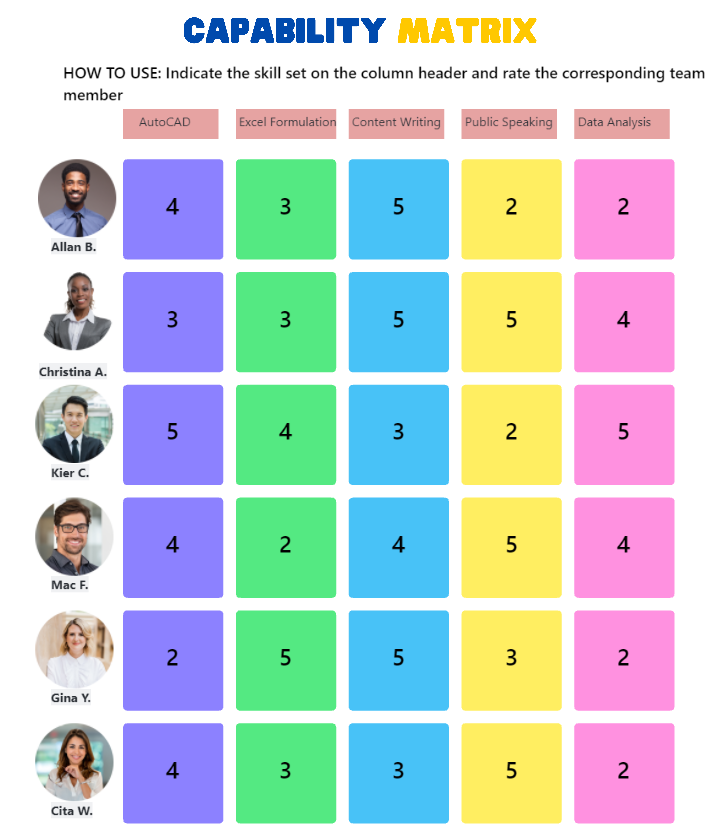
1. ClickUp Capability Matrix Template
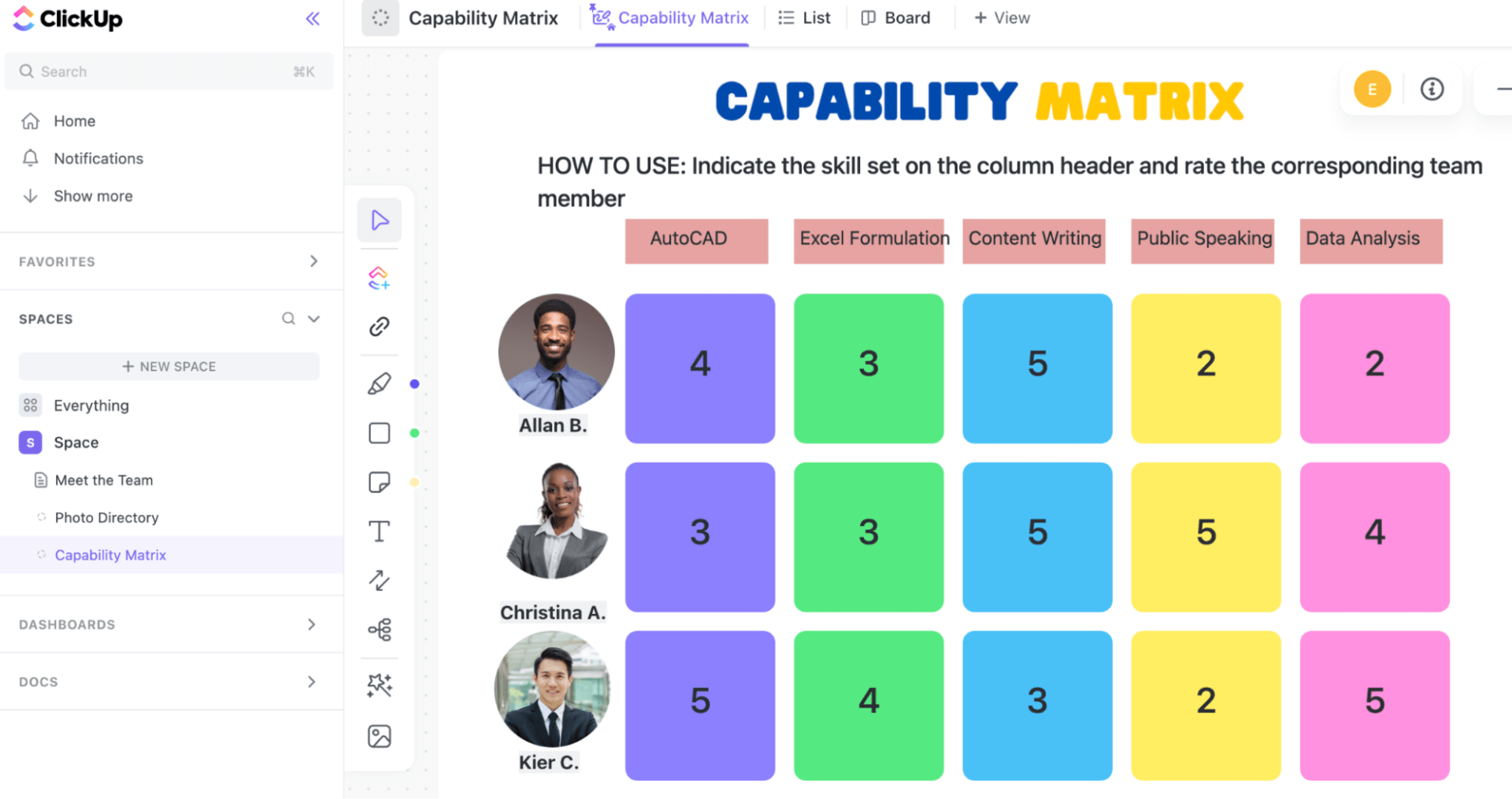
You have no idea what skills your organization has as a whole, and it’s all siloed in department-specific spreadsheets. This makes strategic workforce planning feel like you’re flying blind, and you’re constantly caught off guard by skill shortages when trying to staff important projects.
Stop getting surprised by talent gaps and centralize your skills inventory with this grid-based template. It’s designed for HR leaders and department heads who need a bird’s-eye view of team strengths and weaknesses. Spot organization-wide skill shortages before they become hiring emergencies by using a Matrix view. Now you can make data-driven decisions about talent instead of just guessing.
🚀 Ideal for: HR leaders, department heads, and people ops teams building a centralized view of workforce capabilities
2. ClickUp Skills Mapping Template
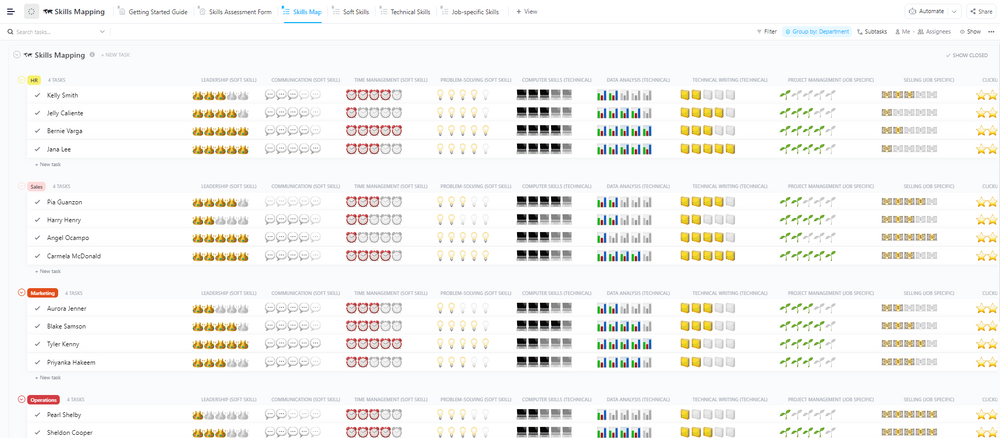
Project managers are constantly asking, “Who knows how to do X?” Staffing projects is based on who seems available, not who is actually the best person for the job. This leads to assigning the wrong people to critical tasks, causing project delays and delivering lower-quality work.
Eliminate the guesswork from project staffing with a template designed to document and visualize the specific skills each team member possesses. Use the Skills Mapping Template by ClickUp™ to make “who knows X?” a 10-second search instead of a weekly mystery. Find the right person for any assignment in seconds by searching for the exact skill and proficiency level you need with powerful Filters. Now your projects are staffed with the right experts every time, ensuring work gets done efficiently and to a high standard.
🚀 Ideal for: Project managers, team leads, and operations teams assigning work based on real skill coverage
3. ClickUp Technical Skills Matrix Template
Your engineering team’s skills are a black box. You’re not sure if you have the right expertise for the next product launch or a planned tech migration. This uncertainty means projects often get delayed when you discover critical skill gaps mid-sprint—48% of IT professionals abandoned projects in the past year due to lacking the right technical skills—and you risk compliance issues when certifications expire unnoticed.
Get a clear, real-time inventory of your team’s hard skills with a specialized matrix focused on programming languages, software tools, and certifications. Grab the Technical Skills Matrix Template by ClickUp™ if you need a clean view of languages, tools, and certifications—without spreadsheet gymnastics. This template makes it easy to track who knows what, identify training needs before they stall a project, and plan for future technology transitions. You’ll always have the right technical expertise on hand for any challenge.
🚀 Ideal for: Engineering managers, technical team leads, and IT leaders tracking hard skills, tools, and certifications
4. ClickUp IT Skills Matrix Template
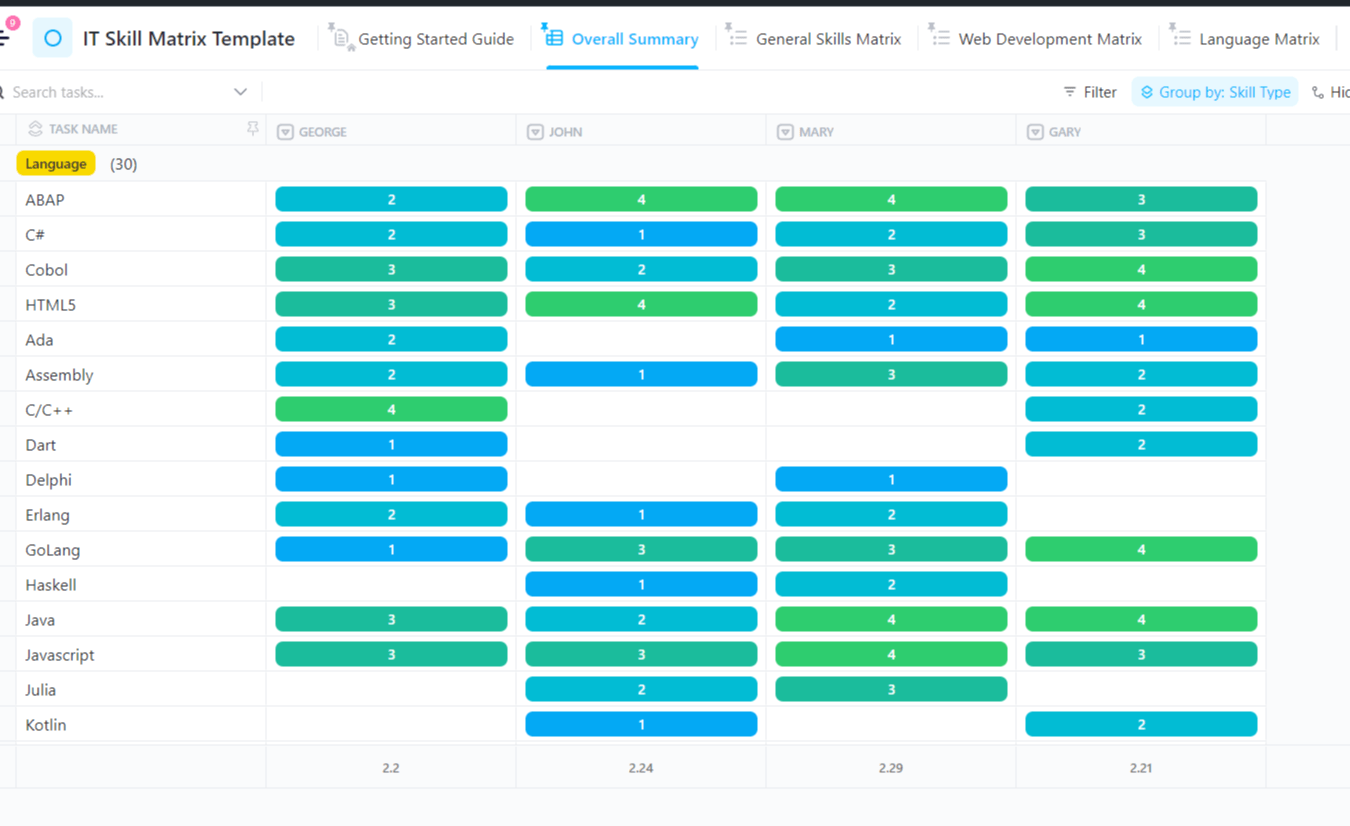
Your IT department has “single points of failure”—that one person who is the only one who knows how a critical legacy system works. If that person leaves, your operations could be at serious risk, but this knowledge gap is completely invisible until it’s too late.
Surface these hidden risks proactively with a template tailored for IT departments. The IT Skills Matrix Template by ClickUp™ is a great starting point for spotting coverage gaps and those scary single points of failure. It covers key competencies across infrastructure, security, development, and support, allowing you to identify and mitigate knowledge silos before they become a crisis. This gives you the visibility to plan cross-training initiatives and ensure business continuity, no matter who is on vacation or leaves the company.
🚀 Ideal for: IT departments, infrastructure teams, and security leaders identifying coverage gaps and reducing single points of failure
5. ClickUp Training Matrix Template
Tracking who has completed mandatory compliance training is a manual nightmare of chasing people down and updating endless spreadsheets. This administrative burden means training often falls through the cracks, leaving you scrambling and unprepared when an audit is announced.
Automate your training tracking and make audits a breeze with a template that keeps all completion data visible in one place. Use the Training Matrix Template by ClickUp™ to track completion, expirations, and audit readiness without chasing people down. You can stop worrying about non-compliance and focus on providing valuable training. With automated reminders and clear progress tracking, you’ll always be audit-ready.
🚀 Ideal for: L&D teams, compliance managers, and HR departments tracking training completion and audit readiness
6. ClickUp Training Framework Template
Your company’s training program feels like a random collection of courses in an LMS with no clear connection to the skills employees actually need to build. As a result, employees take training but don’t apply it, and you’re spending your L&D budget with no measurable impact on performance or business goals.
Transform your training program from a cost center into a strategic tool for closing skill gaps. The Training Framework Template by ClickUp™ helps you tie every course back to a real competency gap (aka training that actually sticks). This comprehensive template helps you design and manage your entire curriculum, tying learning paths directly to your competency model. Now every course has a purpose, and you can directly link training investment to improved capabilities.
🚀 Ideal for: Learning and development teams, HR leaders, and people managers designing role-based training programs
7. ClickUp Job Family Matrix Template
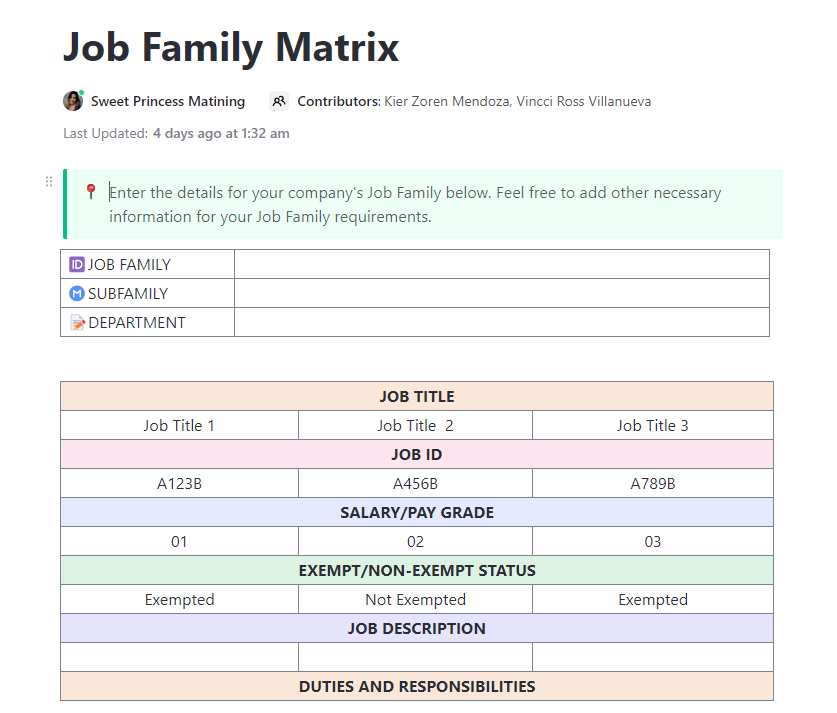
Career progression at your company feels like a mystery, and employees have no idea what it takes to get promoted. This lack of transparency leads to perceptions of favoritism, high turnover among your most ambitious team members, and inconsistent compensation for similar roles.
Create a transparent and equitable career architecture with a template that organizes roles into clear job families. Start with the Job Family Matrix Template by ClickUp™ to lock in role structure before you start debating leveling and promotions. By mapping the competencies required at each level, you establish clear criteria for what it takes to move up. This empowers employees to own their growth and helps managers make fair, data-driven promotion decisions.
🚀 Ideal for: HR teams, people ops leaders, and business partners building transparent role structures and promotion paths
8. ClickUp Career Path Template
During a one-on-one, a top performer asks, “What’s next for me here?” and you don’t have a clear, visual answer. This ambiguity makes them feel stuck and unvalued—23% of employees disagree that their job offers good opportunities to develop skills—and they start looking for opportunities elsewhere. You risk losing a great employee simply because you couldn’t show them a path forward.
Make growth opportunities visible and actionable with a template that helps you visualize individual career trajectories. Use the Career Path Template by ClickUp™ to turn “what’s next for me?” into a clear, visual plan. By showing employees possible progression routes, you turn vague career conversations into motivating, concrete plans. This helps you retain top talent by showing them they have a future at your company.
🚀 Ideal for: Managers, HR teams, and employees planning growth paths and visualizing internal career progression
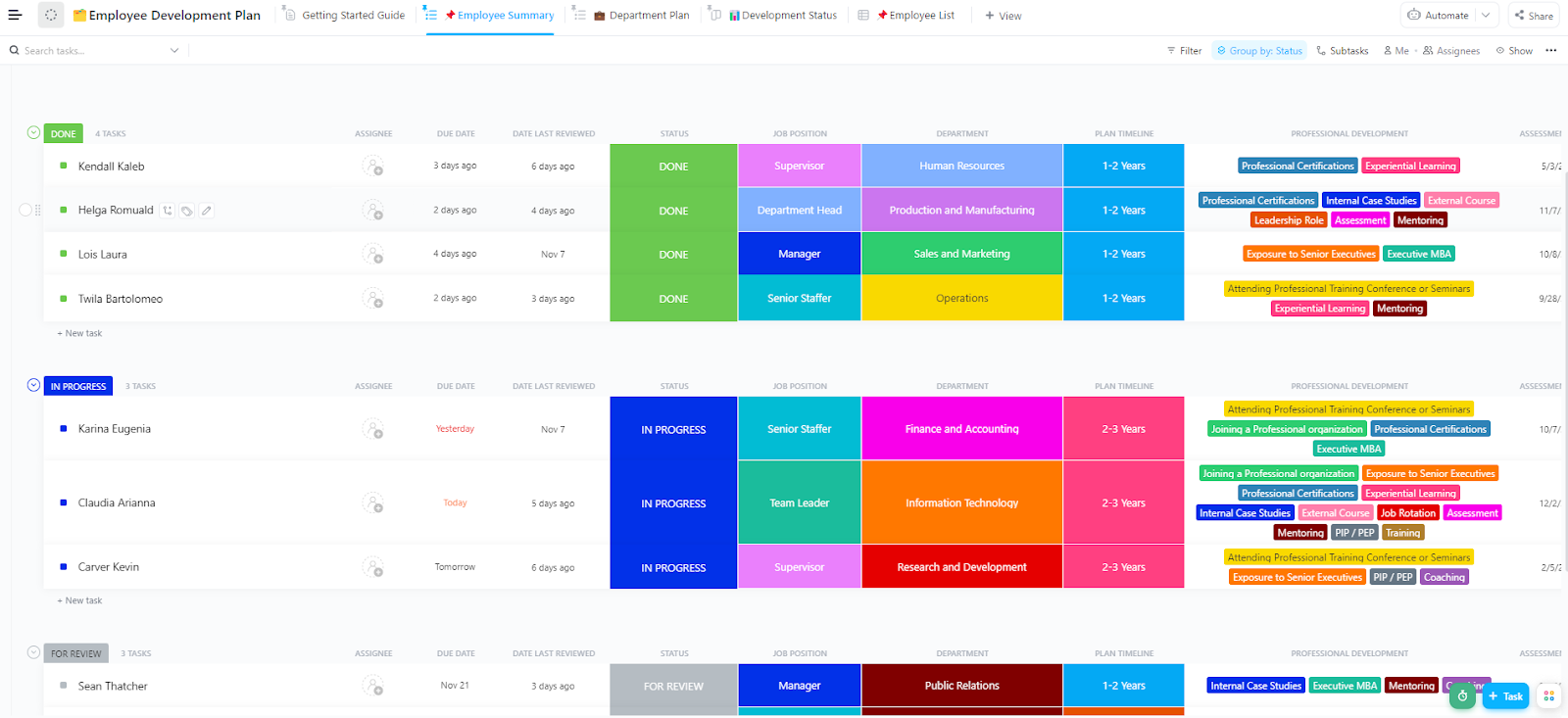
9. ClickUp Employee Development Plan Template
You and your employee create a great development plan during their performance review, but then it gets saved as a PDF and is completely forgotten for the next six months. No progress is made, the employee feels unsupported, and you end up discussing the exact same development needs in the next review cycle.
Turn static plans into living projects with an employee development plan template that connects competency gaps to specific, actionable learning activities. The Employee Development Plan Template by ClickUp™ makes the plan impossible to “forget,” because it lives as real tasks with dates and owners. By keeping development plans active with task assignments, due dates, and progress tracking, you ensure that growth is an ongoing process, not a one-time event. This leads to real skill development and more meaningful review conversations.
🚀 Ideal for: Managers, HR business partners, and employees turning development goals into trackable action plans
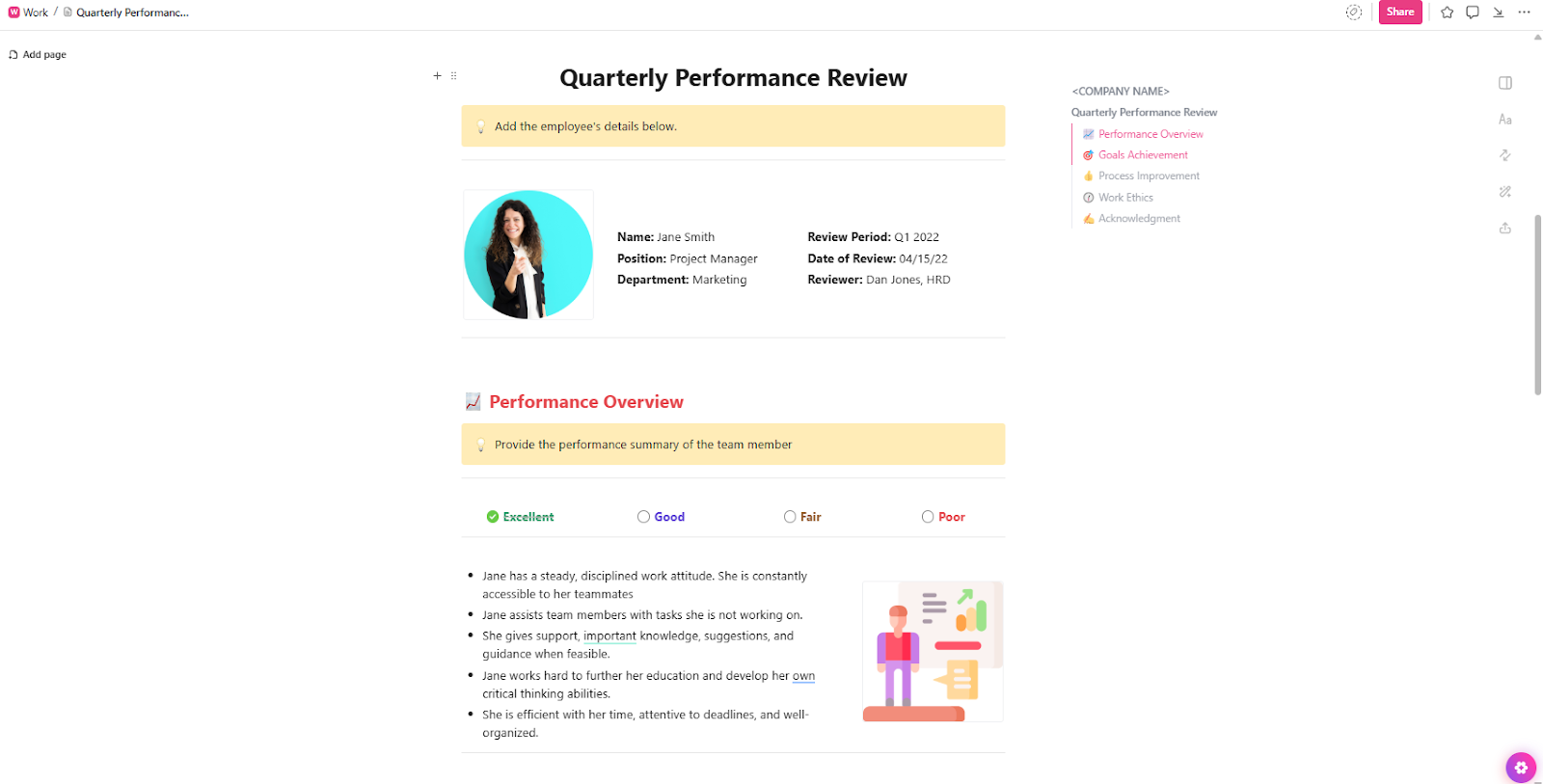
10. ClickUp Quarterly Performance Review Template
Your performance reviews feel subjective and disconnected from an employee’s day-to-day responsibilities. Managers struggle to provide concrete, behavioral feedback, which makes the whole process feel unfair and demotivating for employees.
Link review criteria directly to the competencies employees are expected to demonstrate with a template that structures your performance conversations. Use the Quarterly Performance Review Template by ClickUp™ to keep reviews consistent, competency-based, and actually tied to day-to-day work. This helps managers rate performance consistently and provides a framework for fair, data-driven feedback. Your reviews will transform from a dreaded administrative task into a valuable tool for growth.
🚀 Ideal for: Managers, HR teams, and people leaders running structured, competency-based performance reviews
Summarize this article with AI
ClickUp Brain not only saves you precious time by instantly summarizing articles, it also leverages AI to connect your tasks, docs, people, and more, streamlining your workflow like never before.
Summarize this article for me please
How to use competency framework templates effectively
You’ve downloaded the templates, but now what? If you just fill them out and let them sit, you’re right back where you started. A competency framework is only effective if it’s a living system that’s integrated into your team’s daily work.
Best practices to make sure your framework delivers real value:
Start with your competency model: Before you start customizing templates, make sure you’ve defined your organization’s core, functional, and leadership competencies. A template is only as good as the competency model behind it
Customize proficiency levels: Generic labels like “beginner” or “advanced” aren’t helpful. Define what each proficiency level looks like in terms of specific, observable behaviors for your organization
Connect templates to each other: Your talent management process shouldn’t be siloed. Create a fully connected system by using ClickUp’s Relations to link your skills mapping template to your training matrix and career path templates
Set up regular review cadences: Competency data gets stale fast. Ensure your information is always current by using ClickUp Automations to trigger quarterly skill assessments or annual framework reviews
Use AI to surface insights: Identify important patterns—like which departments have critical skill gaps or which employees are ready for promotion—by letting ClickUp Brain analyze competency data across all your templates
Involve employees in the process: Competency frameworks are most effective when employees actively participate in self-assessment and development planning, rather than just being passively rated by their managers
Summarize this article with AI
ClickUp Brain not only saves you precious time by instantly summarizing articles, it also leverages AI to connect your tasks, docs, people, and more, streamlining your workflow like never before.
Summarize this article for me please
Build Your Competency Framework Where Work Happens
Your talent strategy often lives in one system, like an HRIS or a folder of spreadsheets, while your team’s daily work happens in a completely different project management tool. This disconnect is where even the best-laid plans fail. Competency frameworks become an administrative burden that’s out of sight and out of mind.
The key is to stop treating talent management as a separate function. By bringing it into the same converged workspace where projects are planned, tasks are executed, and communication happens, you make it a part of everyone’s daily routine.
When your competency framework is built in ClickUp, it’s no longer an abstract HR concept. It becomes a living, breathing part of how your team grows, collaborates, and succeeds. This approach eliminates context sprawl and connects your team’s skills directly to business outcomes.
Ready to put your competency framework into action? Get started for free with ClickUp and connect your talent strategy to where work actually happens.
Summarize this article with AI
ClickUp Brain not only saves you precious time by instantly summarizing articles, it also leverages AI to connect your tasks, docs, people, and more, streamlining your workflow like never before.
Summarize this article for me please
Frequently Asked Questions
What is the difference between a competency framework and a skills matrix?
A competency framework is the overall blueprint that defines all the skills, behaviors, and knowledge required for success at your organization. A skills matrix is a specific tool, usually a grid, used to map employees against those competencies.
How do you create a competency framework from scratch?
You start by identifying core competencies for everyone, then define functional competencies for specific job families. For each one, write behavioral descriptors for different proficiency levels and validate them with managers before operationalizing them in a template.
Can the same competency framework template work across different departments?
Yes, but it requires customization. Core competencies like communication are usually universal, but functional competencies for engineering will be very different from those for sales.
How often should you update a competency framework?
You should review the entire framework annually to ensure it still aligns with your business goals. However, individual skill assessments should happen more frequently, such as quarterly or semi-annually, to keep the data current./
Everything you need to stay organized and get work done.