






Still downloading templates?
There’s an easier way. Try a free AI Agent in ClickUp that actually does the work for you—set up in minutes, save hours every week.
Sorry, there were no results found for “”
Sorry, there were no results found for “”
Sorry, there were no results found for “”

Every company is talking about becoming AI-ready.
Most organizations are experimenting with AI in some capacity or are in the pilot phase.
Despite the rush to integrate powerful new models, nearly 95% of Gen AI programs fail to deliver measurable impact on the P&L.
Without the right foundation, even the smartest algorithm can’t fix fragmented workflows.
If you’re a beginner, your focus should be on building a simple AI stack that reduces busywork and supports your day-to-day productivity.
This guide breaks it all down. We show you which AI stack is right for beginners and how you can choose one.
An AI stack is the set of tools you use to write, research, analyze, design, and automate work, without needing to build AI yourself.
Here’s what it looks like:
👀 Did You Know? The world’s first “robot” might have been a steam-powered wooden pigeon built by the Greek mathematician Archytas around 400–350 BCE. His mechanical bird could reportedly fly about 200 meters before running out of steam. Talk about ancient tech!
AI sprawl is real. As a beginner, you’d try too many tools, end up with overlapping features, and not know which to commit to, leading to confusion rather than productivity.
Some reasons why building an AI tech stack can be overwhelming are:
By choosing an effective AI tech stack, you can bypass the technicalities of AI development and start leveraging AI capabilities from day one.
🧠 Fun Fact: In 1952, computer scientist Arthur Samuel created a checkers program that became the first system to teach itself how to play. It learned by replaying expert games from “Lee’s Guide to Checkers,” adjusting its strategy each time so it would pick the same moves that top players considered good.
It was one of the earliest examples of machine learning in action.
We’ve talked so much about AI stacks—but what do they look like in reality?
Let’s find out what an AI tech stack involves:
This layer helps beginners overcome the blank page problem and produce usable content quickly. Instead of building language models or fine-tuning prompts, you rely on pre-trained AI writing tools that offer templates, tone controls, and guided workflows.
Jasper is an AI writing platform built for marketing and content teams that need consistent, on-brand copy at scale.
Jasper Grid gives you a no-code spreadsheet-like system that accelerates production while safeguarding voice, audience alignment, and brand integrity.
Key components:
Writesonic is a beginner-friendly AI writing tool designed for fast content creation across multiple formats. It’s well-suited for individuals and small teams looking for speed and simplicity.
Key components:
AI tools are great for quick A/B variations, rewrites, summaries, and going beyond a blank page.
✅ Fact Check: ChatGPT was chosen by 77.9% of content marketers as the most trusted AI tool for overall content creation—over 50% more than Claude.
A modern AI stack is incomplete without a good brainstorming tool. Instead of spending hours googling or manually searching through documents, use these tools to quickly find information.
They compress hours of searching into one conversation, break down complex topics for your understanding, and present information in a structured manner.
ChatGPT is a conversational AI tool designed to help users brainstorm ideas, explore topics, and interactively think through problems.
Key components:
Perplexity is an AI-powered research tool built for fast, reliable information discovery. It combines conversational search with live web results, making it ideal for beginners who want answers with sources.
Key components:
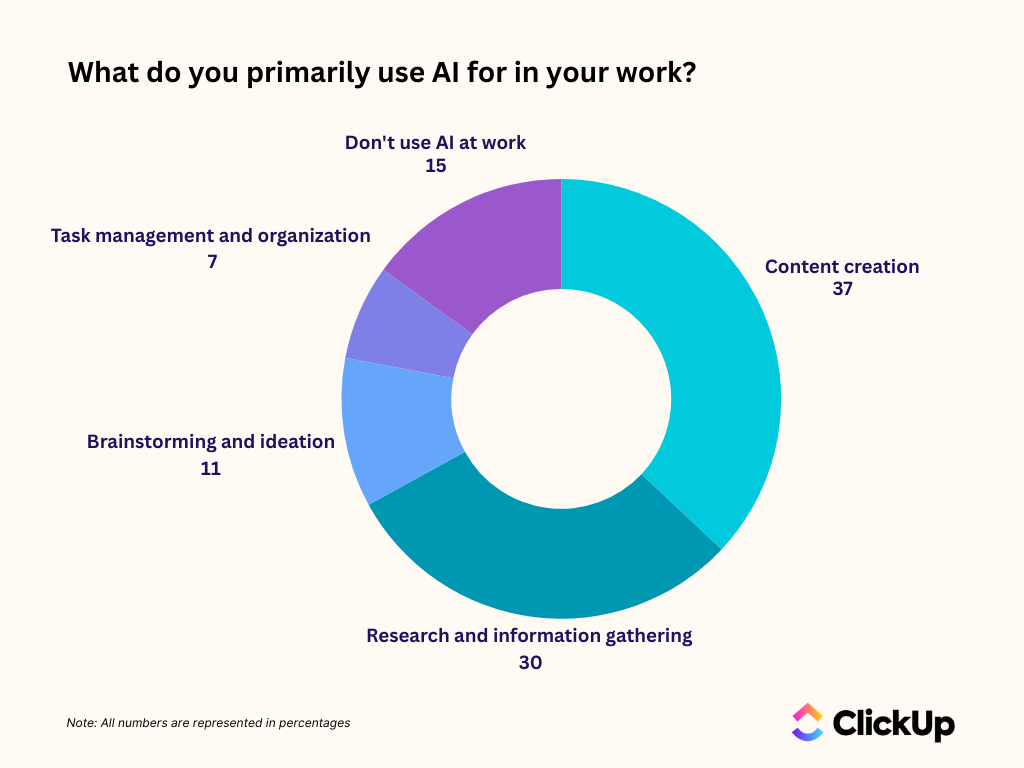
✅ Fact Check: As per ClickUp’s AI Usage Gap Survey, 37% of people use AI to create content, 30% for research and information gathering, and 11% for brainstorming and ideation. This is because the lack of context and connected AI tools makes it really difficult to work with it in the first place.
An ideal AI tech stack reduces AI sprawl. In simple words, it unifies your entire workspace—tasks, docs, chats, feedback comments, meeting notes—so that you don’t have to toggle between 10 different AI tools or models to work.
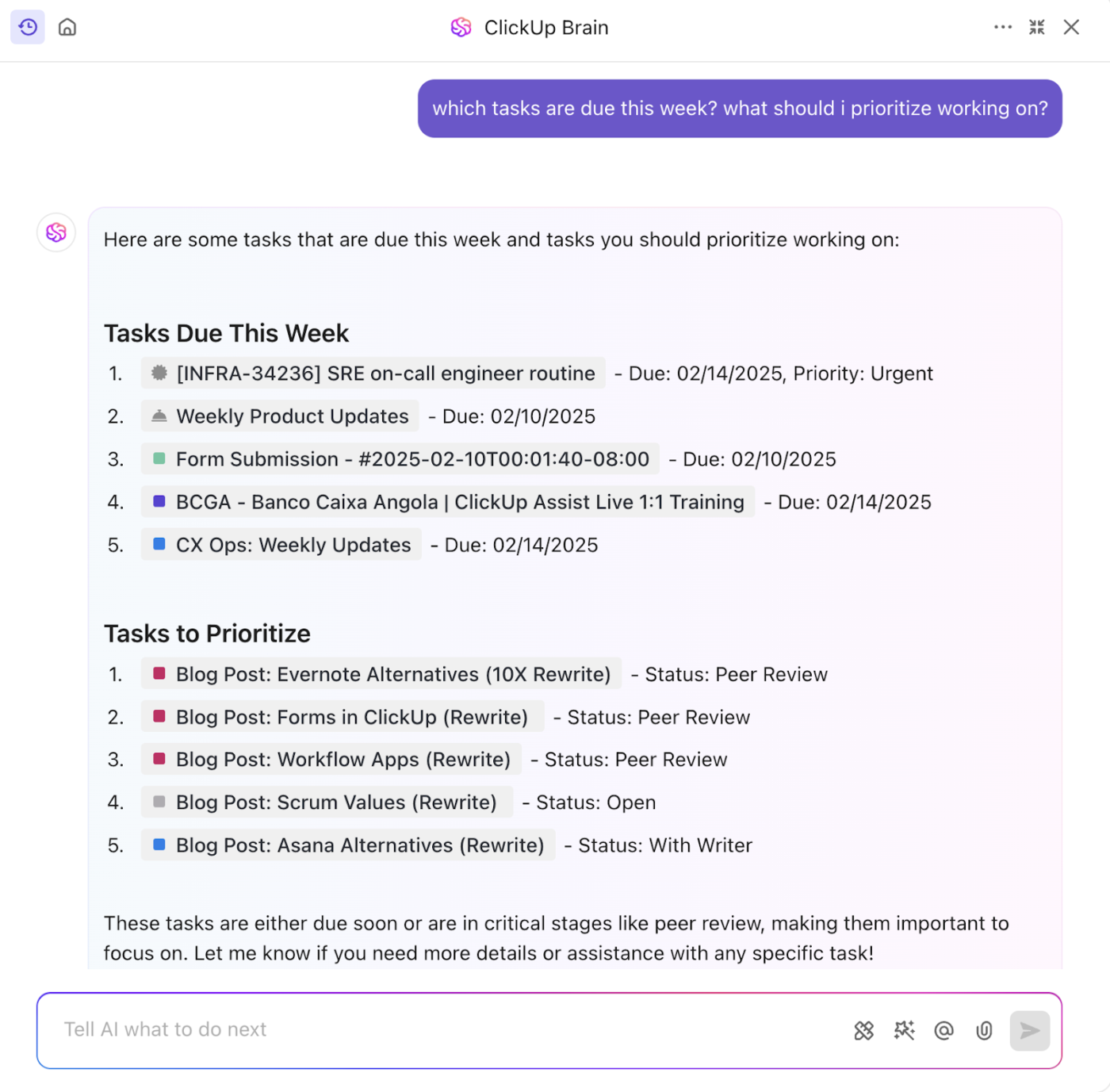
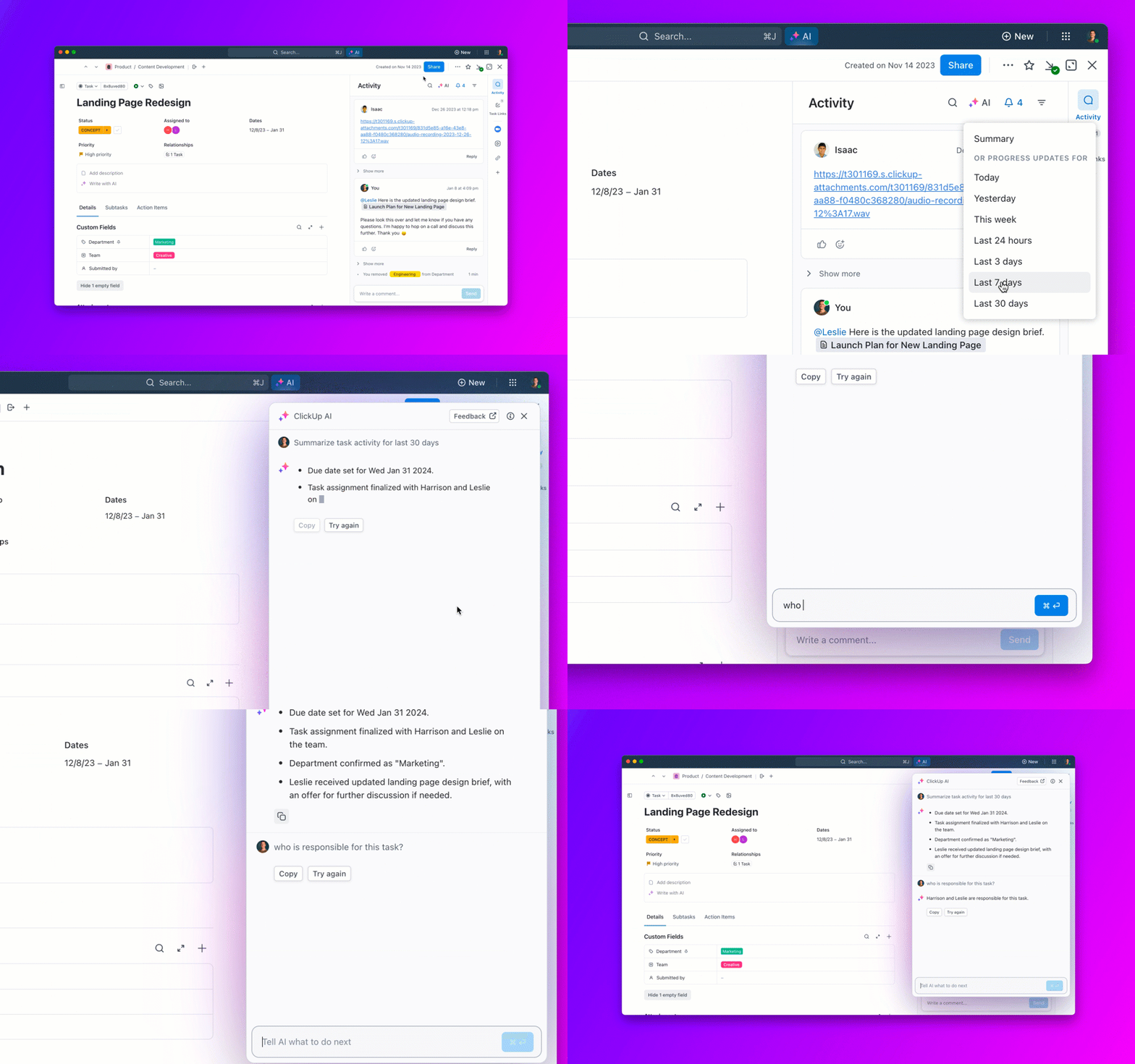
ClickUp Brain is a powerful AI assistant that works alongside you to provide contextual assistance, generate content, and automate workflows directly within your ClickUp workspace.
For starters, ask questions in natural language like ‘Which tasks should I prioritize today?’
The contextual AI gathers information on your due tasks, compares priorities, and gives you a list in the correct order for you to get started.
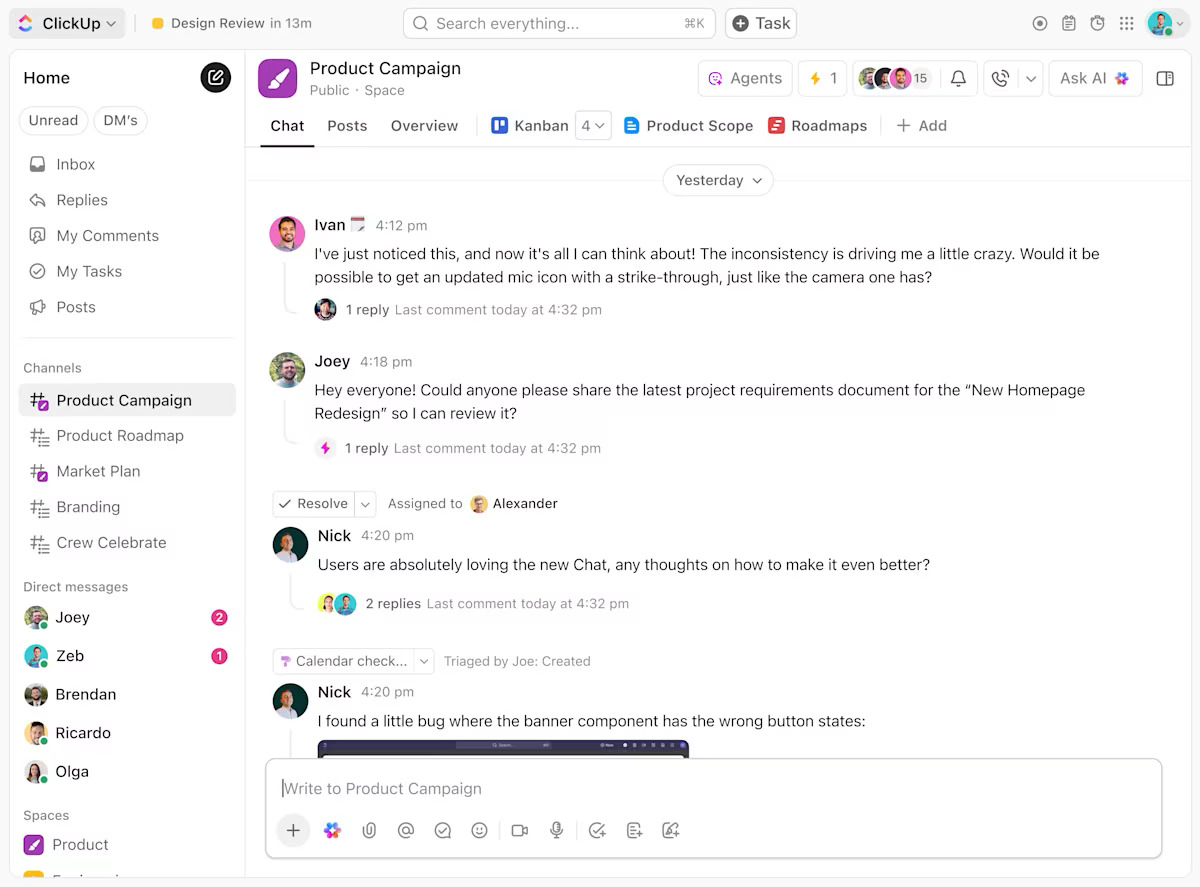
ClickUp Chat acts as your AI co-pilot inside every discussion. It understands the conversation, identifies what needs attention, and can turn decisions into tasks automatically.
Microsoft Copilot is an AI assistant embedded across Microsoft 365 apps like Word, Excel, PowerPoint, Outlook, and Teams. It’s designed for professionals and teams who already work within the Microsoft ecosystem and want AI assistance without changing tools or workflows.
Key components:
✅ Fact Check: More than half (57%) of developers now use AI to automate and speed up their software projects. It’s not just used for writing code, but for chatting through problems, testing logic, spotting bugs, and improving performance.
This layer helps beginners understand data without spreadsheets, formulas, or SQL. Instead of manually analyzing rows and charts, AI translates data into plain-English insights and summaries you can act on.
Airtable AI adds intelligence to Airtable’s flexible tables and databases, making it easier for beginners to analyze, summarize, and work with structured data.
Key components:
Obviously AI is a no-code analytics tool designed for non-technical users who want answers from data without building models or dashboards.
Key components:
✅ Fact Check: The top 5 use cases for Gen AI are:
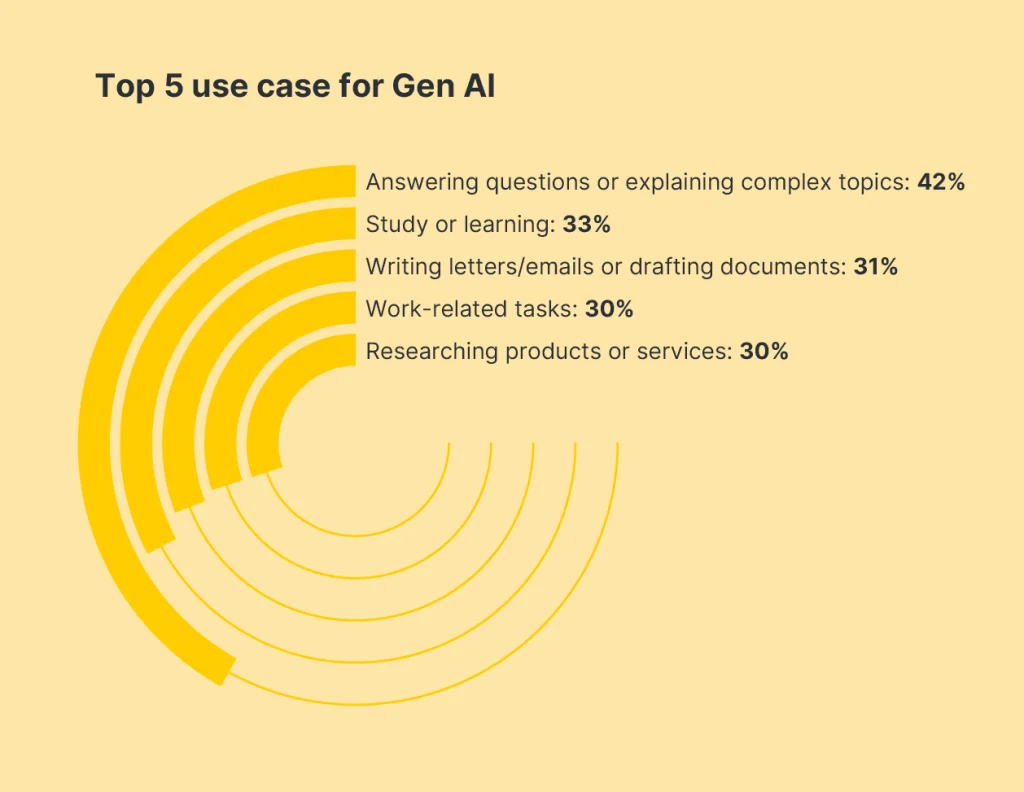
This layer enables non-designers to create polished visuals quickly, without learning design software or relying on designers for every small asset.
Canva Magic Studio brings AI into Canva’s design platform, helping beginners generate, edit, and adapt visuals with simple prompts.
Key components:
Figma AI introduces AI-powered assistance inside Figma, helping teams generate layouts, edit designs, and explore ideas faster.
Key components:
✅ Fact Check: 61% of Figma users at small companies (1–10 employees) say AI is very or critically important for reaching their market share goals.
This layer removes repetitive work by automating task routing, notifications, and handoffs—without writing code or managing complex workflows.
Zapier connects different apps and automates actions between them using simple trigger-and-action logic.
Key components:
Make (formerly Integromat) offers a more visual, flexible way to build automations while still remaining no-code.
Key components:
✅ Fact Check: According to IT and engineering leaders, 74% say process automation has saved their teams 11–30% of the time they used to spend on manual work, and 59% report a similar 11–30% reduction in costs.
Here are some key considerations to keep in mind (so you don’t build a stack of overlapping tools that complicate your workflow).
Don’t think about AI just yet. Think about what tasks are low-value, slow, boring, or repetitive.
List all your pain points and group them for easy categorization.
📌 Example: Difficulty locating files and inconsistent asset naming fall under poor asset management. Back-and-forth messages for status updates and forgetting deadlines fall under poor task visibility. Takes too long to draft emails and struggling to rewrite content in different tones fall under content creation bottlenecks.
Next, score each group on a scale of 1 to 10. The higher the score, the more urgent or painful that category is.
Finally, select the top 2-3 groups with the highest score and define what AI success would look like for each.
If poor task visibility is your biggest pain point, success might mean having a single dashboard for deadlines, automated reminders, or AI-generated summaries instead of chasing updates.
Once done, jump to the next step.
📮 ClickUp Insight: The average professional spends 30+ minutes a day searching for work-related information—that’s over 120 hours a year lost to digging through emails, Slack threads, and scattered files. An intelligent AI assistant embedded in your workspace can change that. Enter ClickUp Brain. It delivers instant insights and answers by surfacing the right documents, conversations, and task details in seconds—so you can stop searching and start working.
💫 Real Results: Teams like QubicaAMF reclaimed 5+ hours weekly using ClickUp—that’s over 250 hours annually per person—by eliminating outdated knowledge management processes. Imagine what your team could create with an extra week of productivity every quarter!
Review each group created in Step 1 and ask yourself: Is there a single AI application that covers all or most of the pain points in this group?
The rule of thumb:
Choose tools that offer built-in AI features you can use instantly.
No coding. No APIs. No infrastructure. Just open the app and start working.
The goal here is to avoid building a bloated stack with overlapping functionality. If one tool fully addresses the pain points within a group, choose that one. If it only solves 25% of the problem, keep looking.
📌 Example: If your category is poor task visibility, you need to look for all-in-one project or work-management platforms with built-in AI. It should offer unified dashboards, automated task tracking, AI summaries and reports, and built-in communication.
📚 Read More: Project Management Archives
Integration capabilities mean two things:
For example, if your AI meeting notetaker can push action items straight into your task manager, your workflow stays clean and connected.
Next, look at security. After all, even beginners need AI tools that handle sensitive data responsibly. Ensure all AI tools in your stack follow robust security protocols to ensure safe and effective data management.
Check for basic assurances: data privacy, how user information is stored, and whether the tool shares or trains machine learning models on your content.
Lastly, evaluate the usability of each AI-powered solution. We’re talking about the day-to-day ease of working in the tool or with it, so you can accomplish tasks quickly and navigate without constant reference to help docs.
(What’s the point of adopting AI if the tool’s chunky interface slows you down, right?)
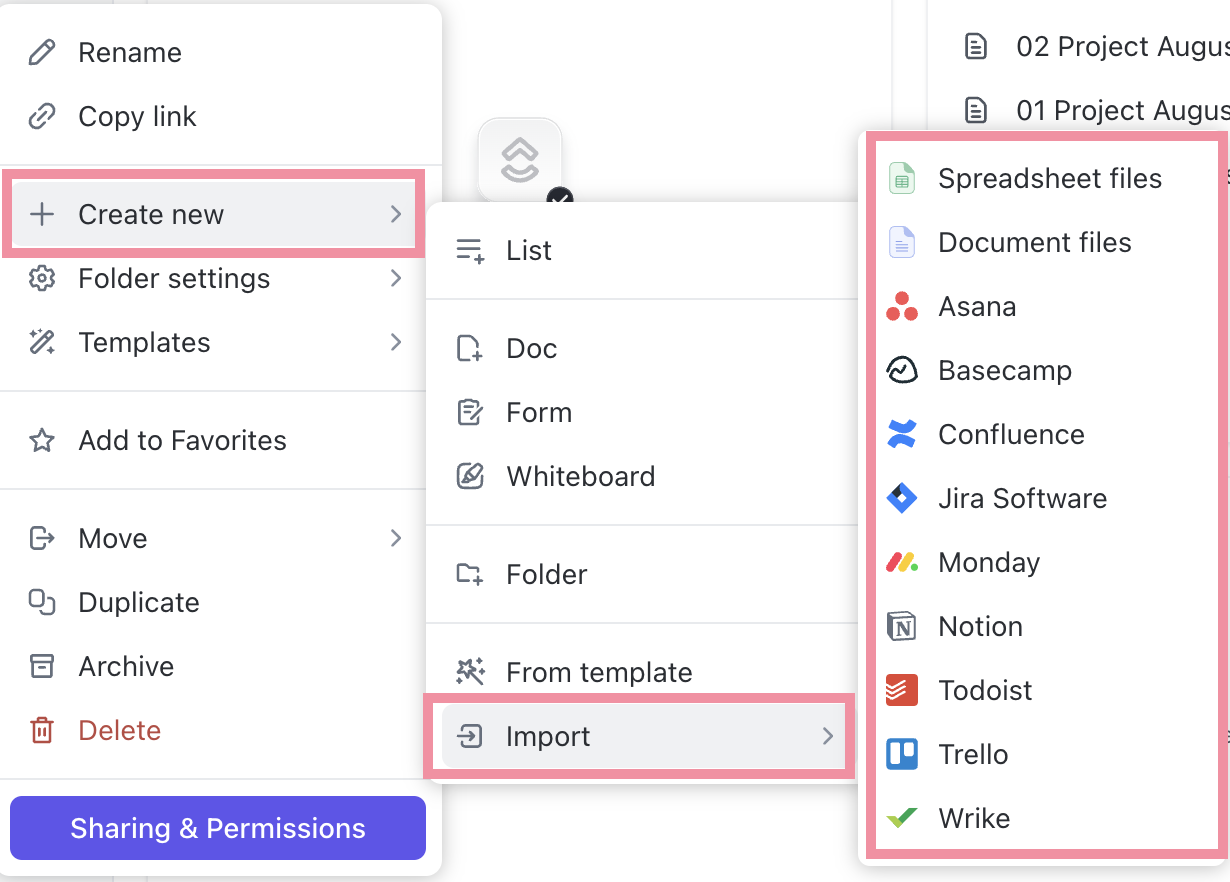
🚀 ClickUp Advantage: ClickUp offers over 1,000 integrations to connect your existing AI tech stack with ClickUp tools. For starters, you can connect to Slack, Google Drive, HubSpot, GitHub, and Zoom within seconds (and without any technical setup!).
The best method for AI deployment? Run small, controlled experiments and measure outcomes. Don’t deploy everything at once.
Pick one or two AI tools and let them handle your tasks for a week. Throughout this phase, measure outcomes such as time saved, reduced manual steps, error rate, turnaround time, etc.
If a tool doesn’t enhance performance in the areas you identified earlier, reassess before building around it. Remove anything that feels redundant or overused.
This way, you build a small, well-performing AI stack that is valuable and scalable.
📚 Read More: Best Productivity Tools to Manage Your To-Do Lists
Wondering how the right AI tech stack looks for you?
Here are simple, real-world examples that show you how to combine just a few AI tools to improve your productivity and everyday workflow management. No technical setup needed.
Best for: Overwhelmed employees, managers, and small business owners who want clarity and faster decision-making.
Tools:
What this solves:
✅ Staying on top of deadlines
✅ Converting meetings into action items
✅ Reducing time spent searching for information
✅ Getting instant clarity without tech complexity
Best for: Entrepreneurs, social media managers, content teams, newsletter writers.
Tools:
What this solves:
✅ Writing faster and repurposing content
✅ Keeping campaigns organized
✅ Creating graphics quickly
✅ Avoiding tool sprawl across multiple apps
If you’re working with too many AI tools and feel like “AI everywhere but impact nowhere,” this video is for you. See how to fix AI sprawl before it spirals out of control.
Best for: Teams managing projects, deliverables, client work, and communication.
Tools:
What this solves:
✅ Clear visibility on who’s doing what
✅ No more message-chasing or lost updates
✅ AI-generated summaries for fast alignment
✅ Project planning without technical tools
Best for: Consultants, HR service providers, accountants, designers, legal teams, and finance professionals who handle documentation and deliverables and want to use AI in professional services.
Tools:
What this solves:
✅ Centralized client delivery
✅ Instant AI summaries of calls & client requirements
✅ Faster proposals & repeatable SOPs
✅ Clean status updates without manual work
✅ Smooth onboarding & transparent timelines
Here’s what Andrea Park, Business Operations Coordinator at Spekit has to say about using ClickUp for consolidated project management:
ClickUp was the best solution for us because it combines multiple project management tools into one. From Mind-Mapping to Documents to Sprints, ClickUp is a dynamic tool to organize any department’s task management needs and give visibility across the whole company.
📮ClickUp Insight: 88% of our survey respondents use AI tools for personal tasks every day, and 55% use them several times a day.
What about AI at work? With a centralized AI powering all aspects of your project management, knowledge management, and collaboration, you can save up to 3+ hours each week, which you’d otherwise spend searching for information, just like 60.2% of ClickUp users!
Though choosing an AI stack is easier than building one, it’s not all roses.
You need to be careful about the AI applications you deploy to minimize feature redundancy and ensure scalability.
ClickUp, the world’s first Converged AI Workspace, brings together multiple AI tools and workflows into a unified platform.
This means the pre-built AI tools integrate with your existing systems.
Plus, it’s totally no-code, meaning beginners can easily customize and start using their AI stacks within a few minutes!
Tired of hopping between ChatGPT for research, Gemini for drafting content, and some other AI design tool to generate images?
It’s not just time-consuming but also leads to constant context switching, lost focus, and slower output.
Use ClickUp Brain to eliminate this friction and prevent productivity loss. Ask Brain to suggest relevant topics, outline structures, and generate initial drafts so your entire content creation process stays in one place.
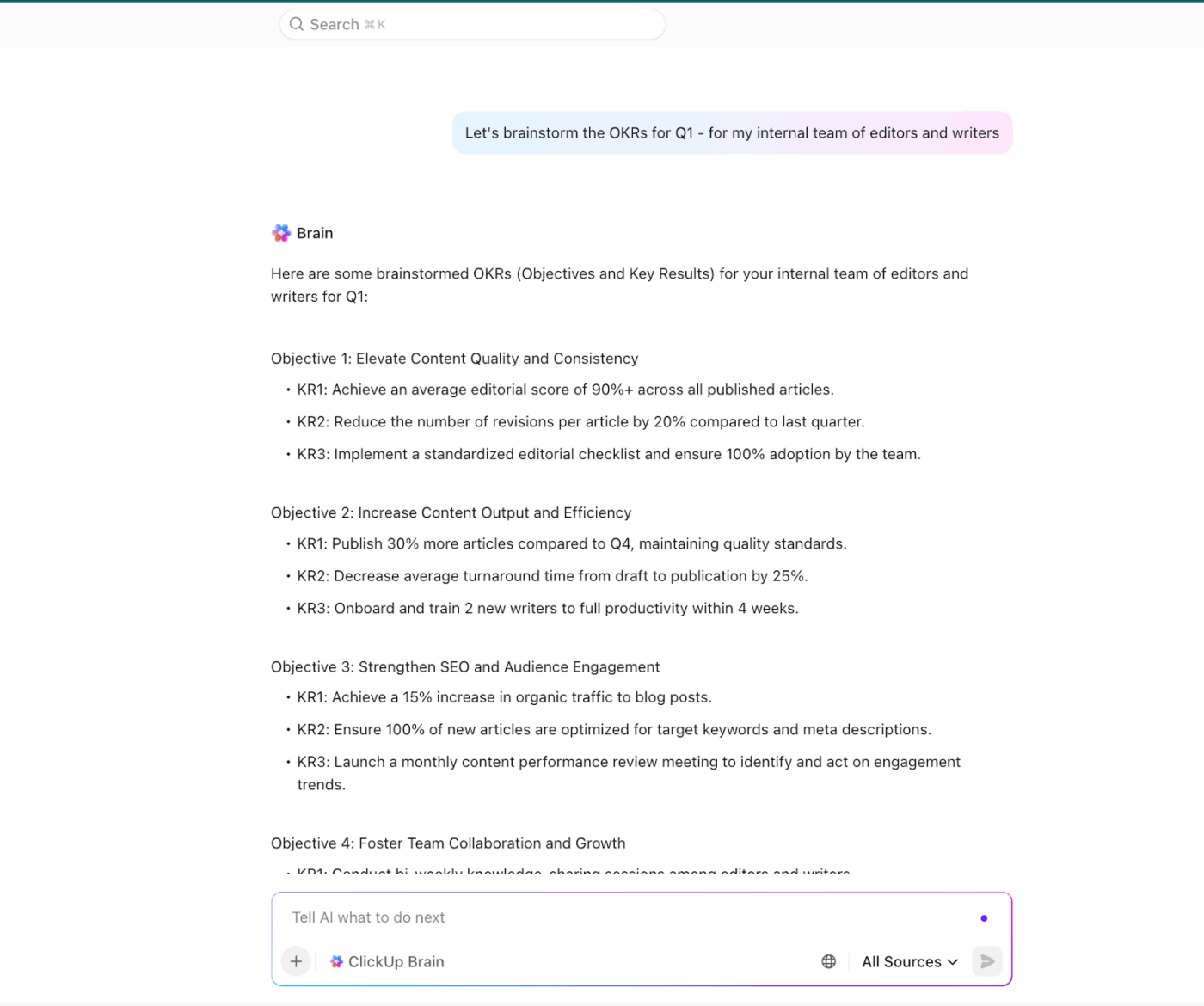
Use it as your research buddy to quickly run web searches, analyze vast amounts of information, pull key insights from research papers, and share reliable sources for verification.
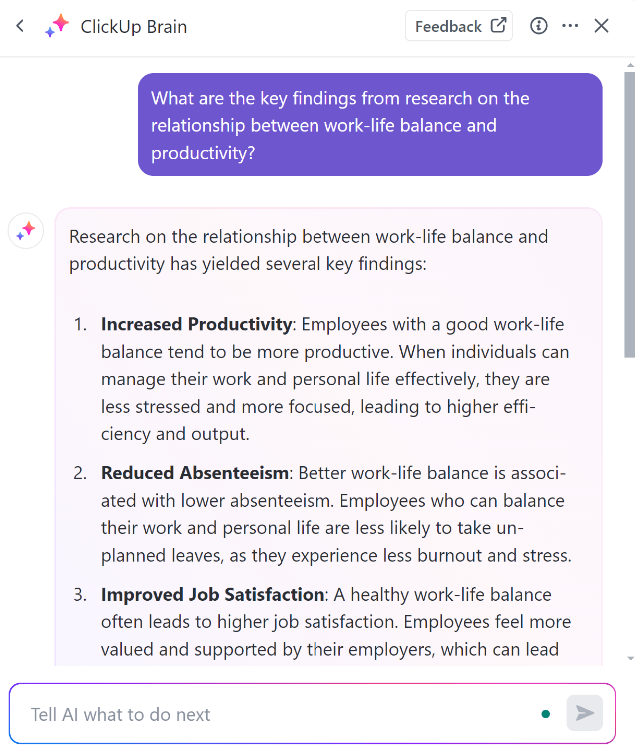
The AI assistant also summarizes documents, fixes spelling and grammar, formats content, and generates reusable AI templates.
To learn more about how to use AI for enhanced productivity, watch this video:
👀 Did You Know: ClickUp Brain users can choose from leading external AI models like ChatGPT, Claude, and Gemini to produce various types of content, including blog posts, emails, infographics, brand assets, and images.
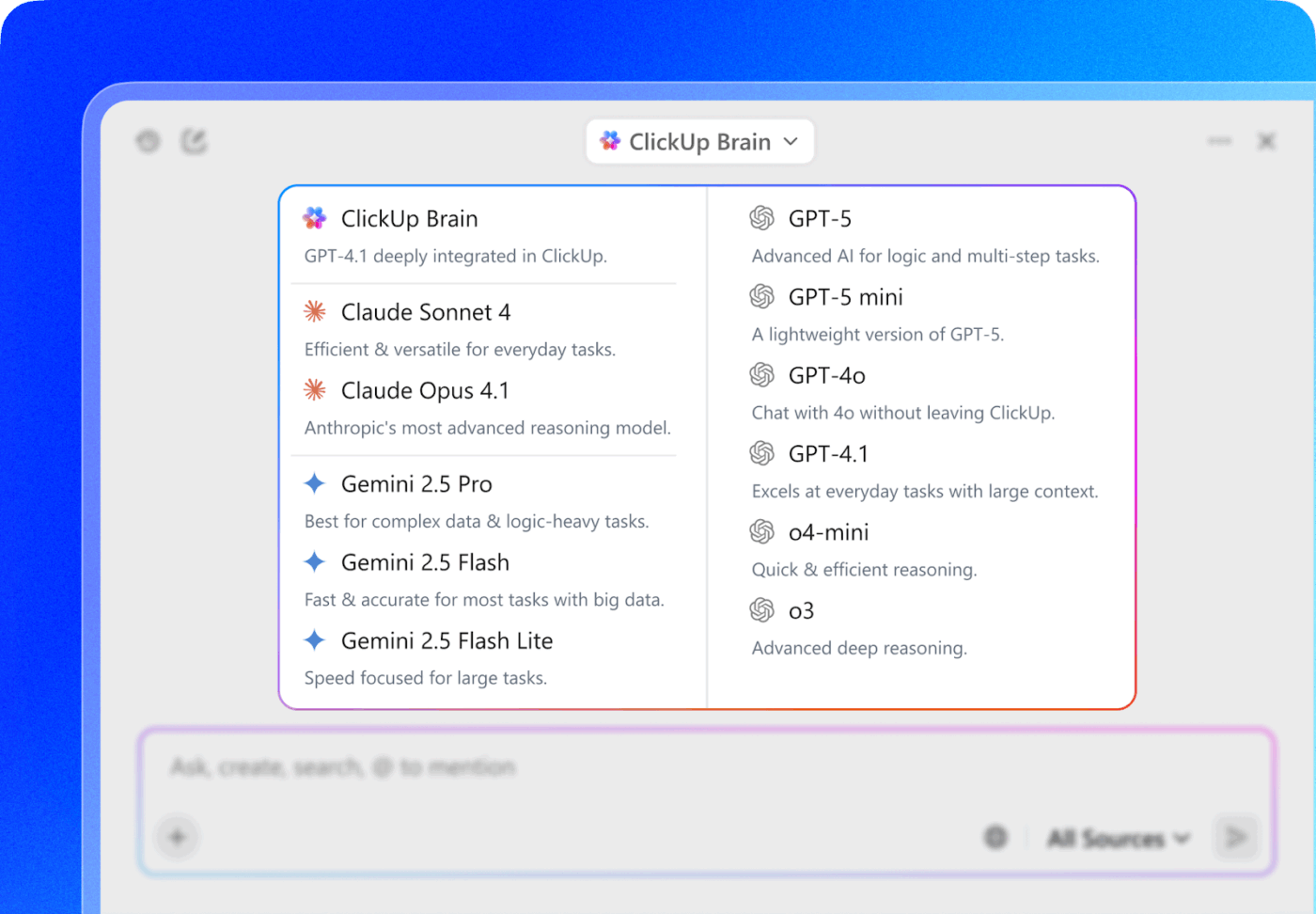
A unified workspace helps beginners manage tasks, docs, and ideas without switching tools. This is necessary to reduce work sprawl and enhance operational efficiency.
Enter: ClickUp BrainGPT—your desktop AI companion.
The pre-built with contextual AI that understands your work, assists you at every step, and unifies people and knowledge.
For example, imagine you’re looking for a file but don’t remember its name or where you stored it. With ClickUp’s Enterprise AI Search, describe it in natural language, and the AI will look for it across your entire workspace and connected apps!
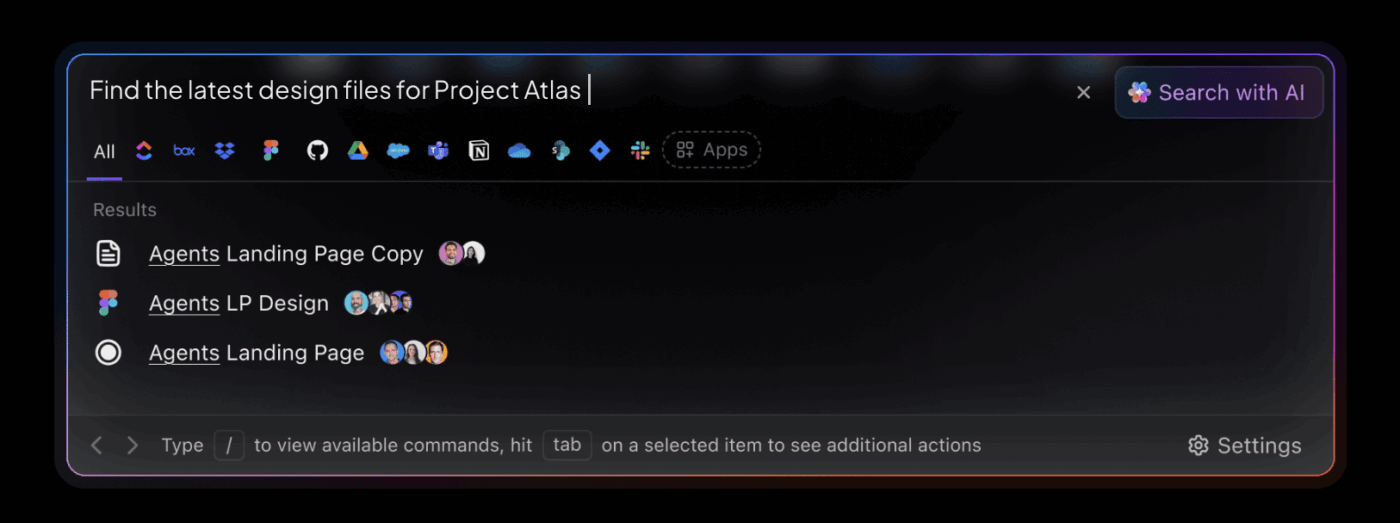
Plus, ClickUp’s intelligent machine learning algorithms can analyze your tasks, chats, and business plans, and process data to answer questions contextually.
So, you can chat with the AI assistant and ask queries like “Which tasks are due this week?” or “What is the company’s work-from-home policy?” It answers them after reading your weekly tasks or internal policy documents.
🛠️ Quick Hack: Dictate search queries, messages, notes, etc., using ClickUp’s Talk-To-Text feature. Brain converts your speech into cleaned-up, punctuated text that’s pasted directly into wherever your cursor is—docs, emails, comments, or the Brain search bar itself!
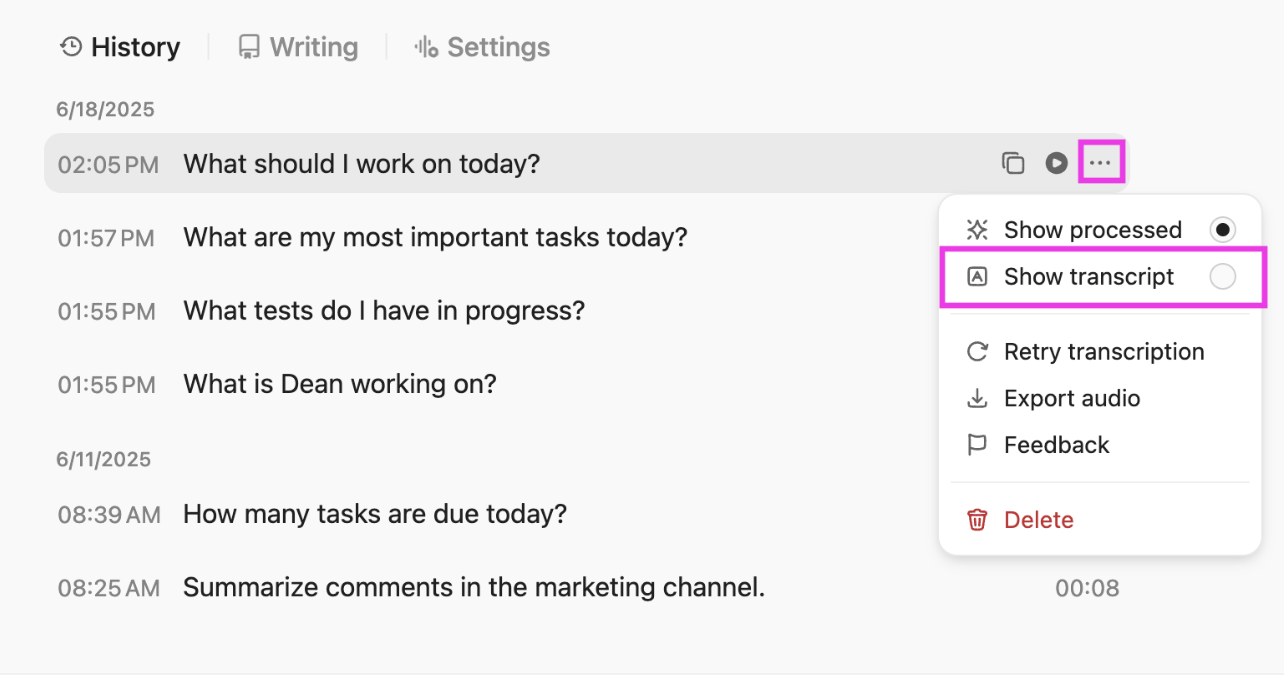
Great, all your AI tech stack is connected. The next challenge is making sense of all the information flowing through your projects.
The last thing you want to do is spend hours piecing together updates from spreadsheets, chat threads, and team messages just to understand what’s happening.
ClickUp solves this by turning your task data, conversations, and workflows into instant insights.
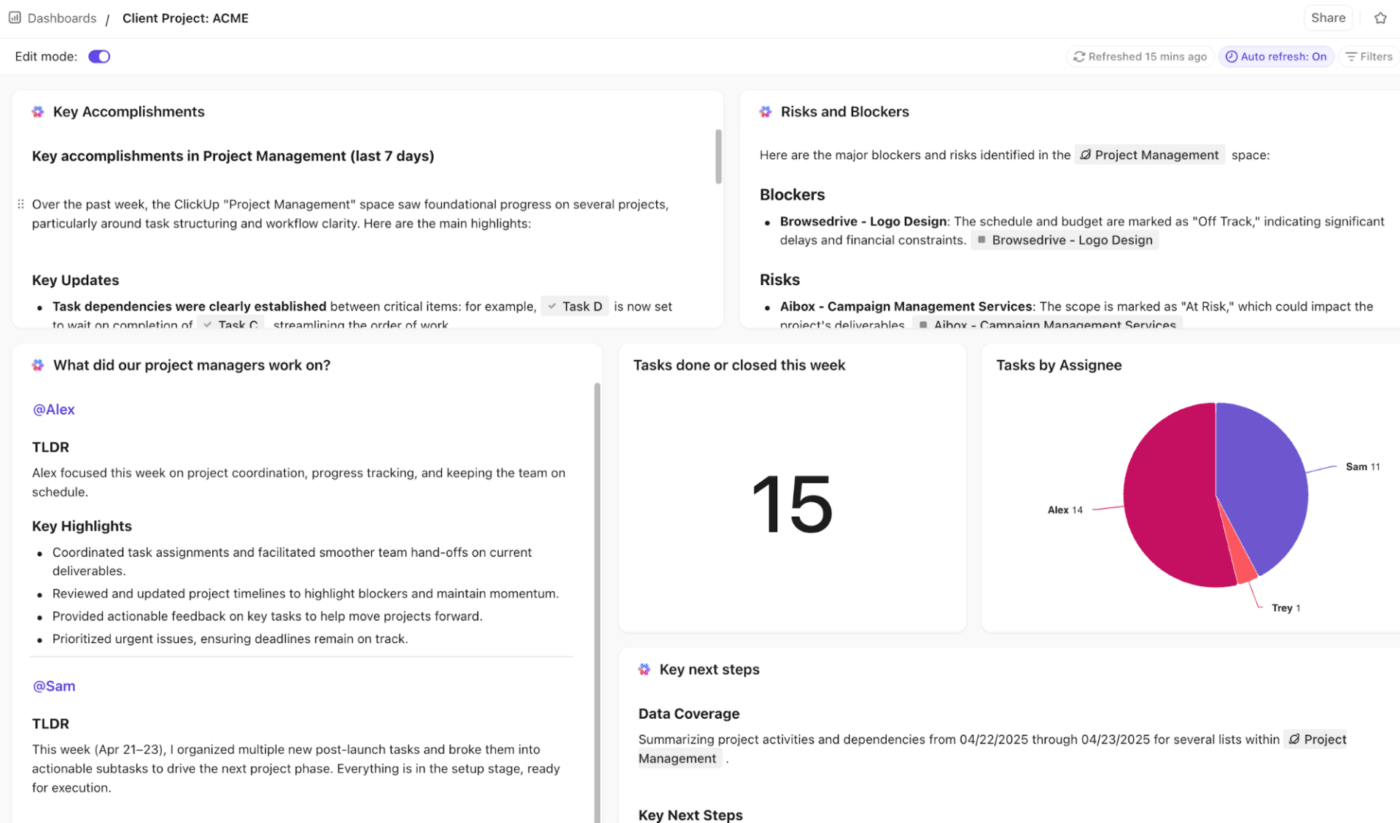
Use ClickUp Dashboards to visualize project progress, team workload, timelines, risks, and KPIs—all updated automatically without any manual reporting.
Add widgets for tasks, sprints, docs, or goals, and watch your metrics refresh in real time.
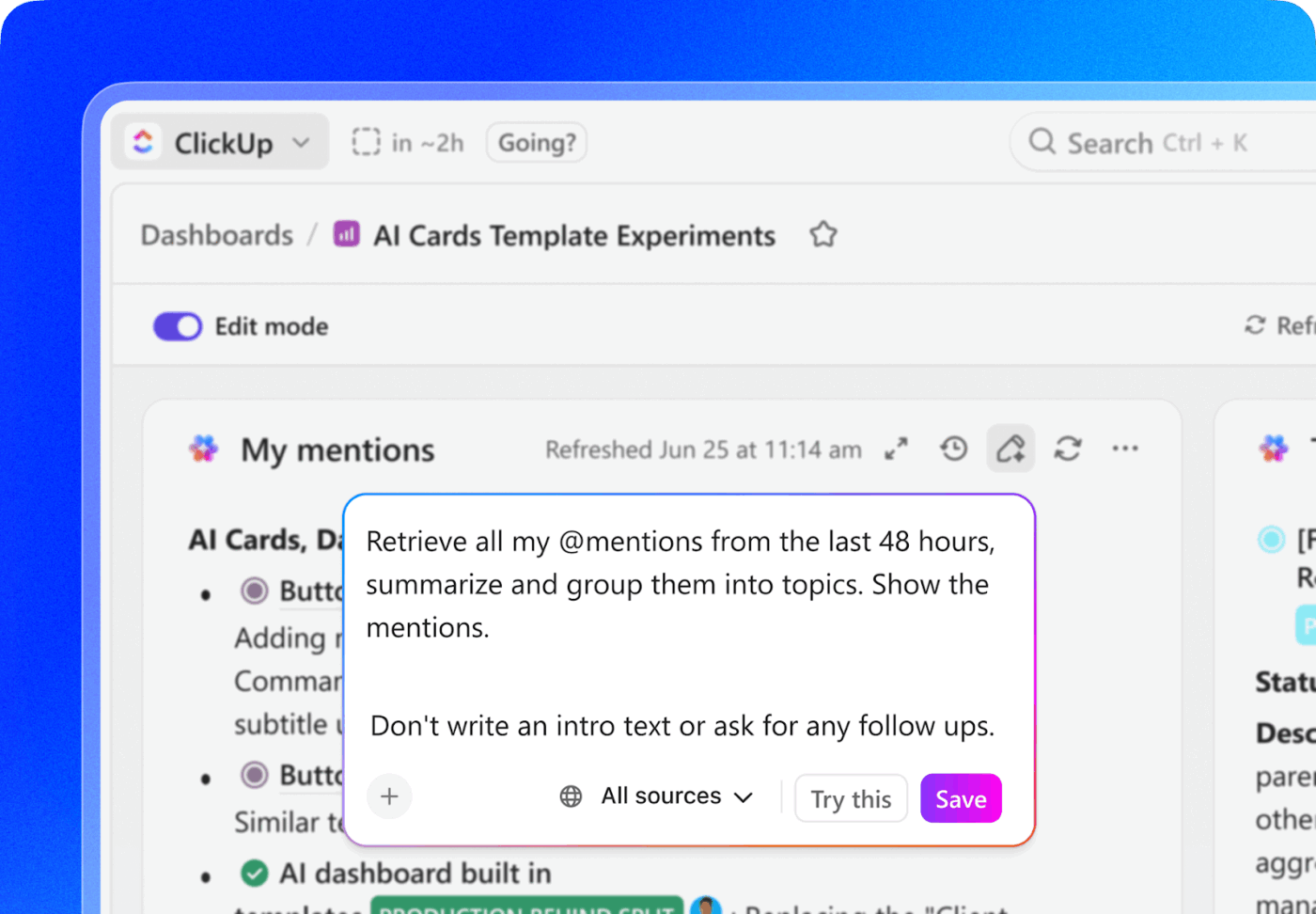
AI Cards in ClickUp Dashboards add AI-powered summaries and insights right next to your charts and graphs. They automatically surface key accomplishments, next steps, major risks, upcoming deadlines, standup summaries, and more.
Small tasks like setting reminders, routing work, or sharing updates constantly interrupt focus. Before you know it, admin tasks have quietly eaten up half your day.
Exactly why AI applications with workflow automations are essential in a modern AI stack.
ClickUp brings this to life by combining ClickUp Automations, AI Agents, and ClickUp Brain into one unified system.
Instead of manually stacking triggers and conditions, tell the AI what you want to happen—and let it handle the logistics behind the scenes.
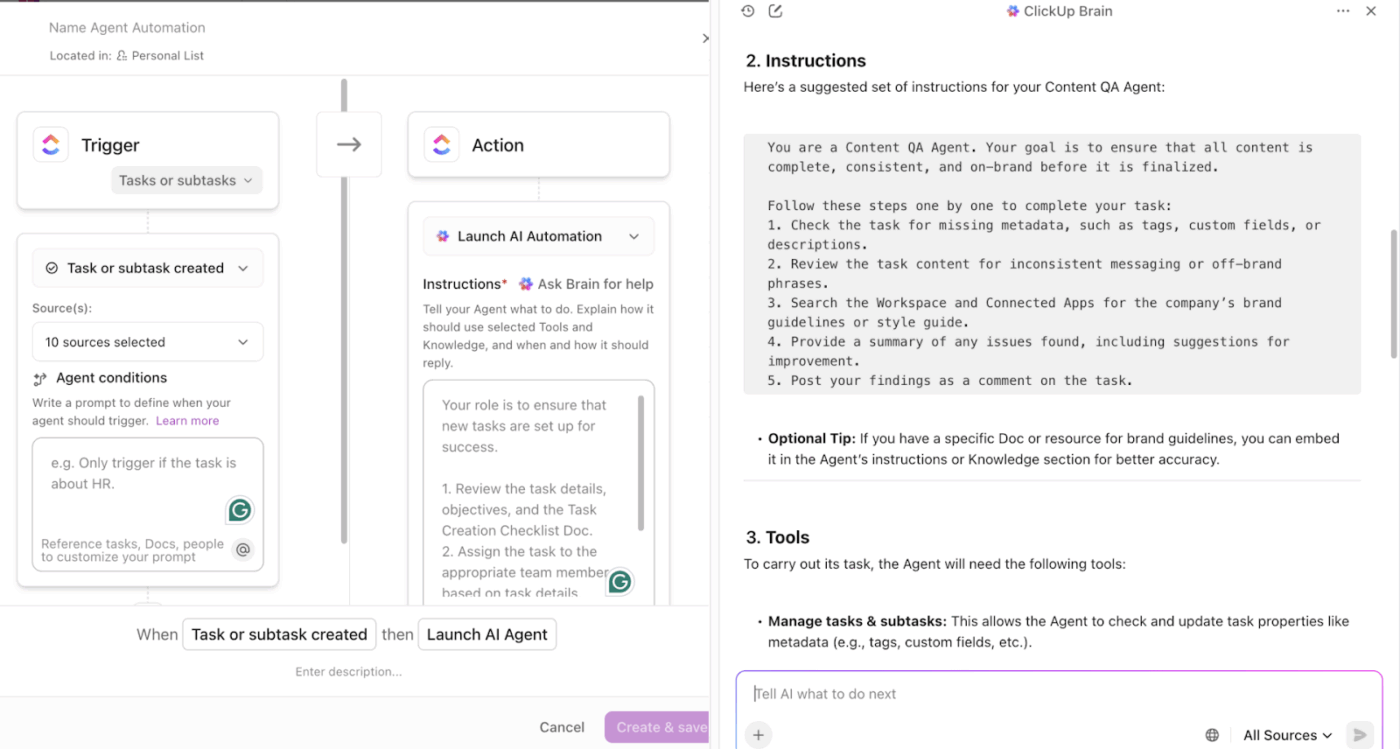
Think of AI Agents as intelligent teammates inside your workspace:
🤖 What Super Agents Actually Do
Beginners often assume automation means building complicated rules or flowcharts. Super Agents flip that thinking.
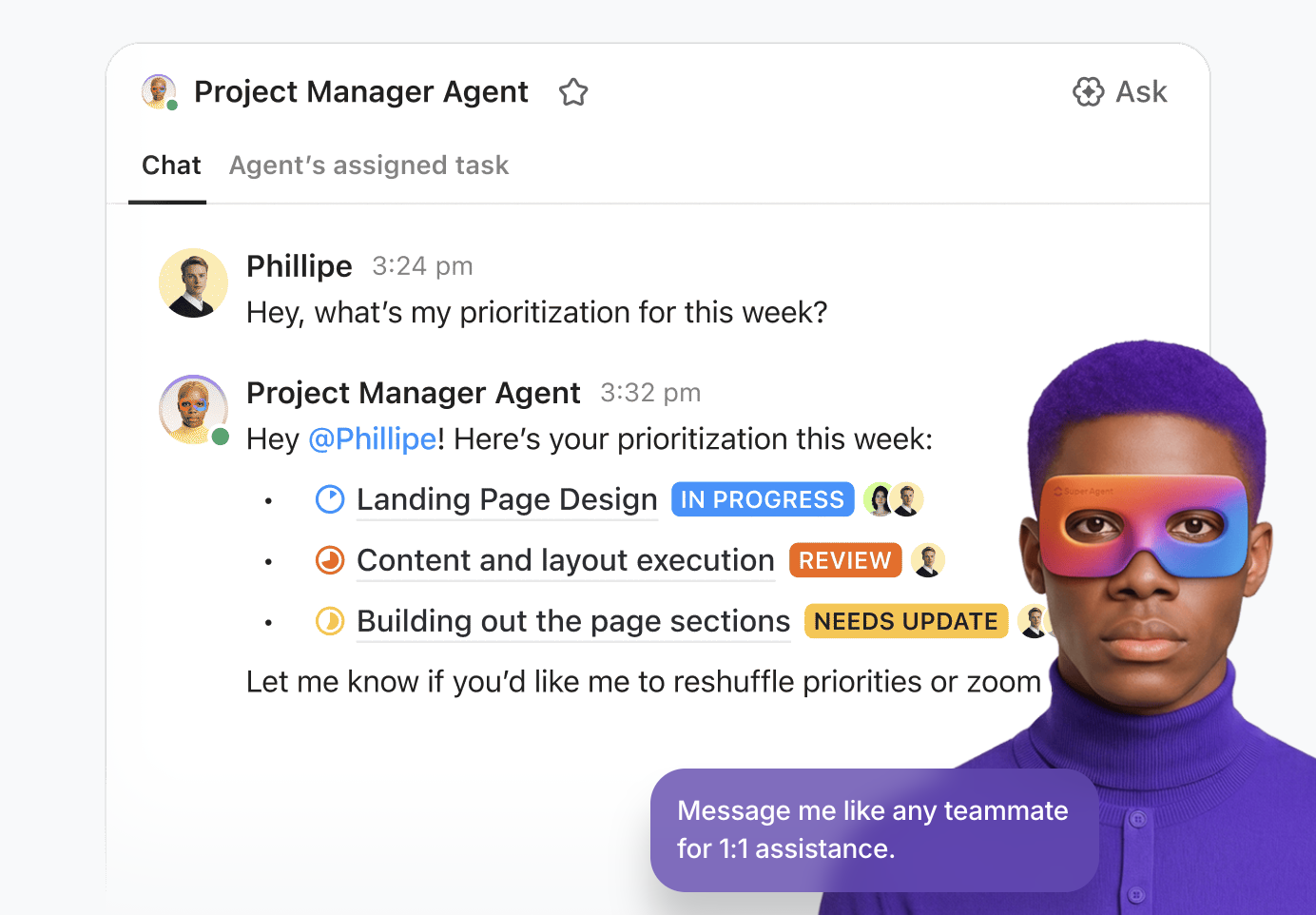
They watch your workspace the same way a real colleague would. When a task sits idle, a deadline slips, or a decision hasn’t been acted on, they nudge things forward without being told step-by-step. They handle the quiet, constant coordination that usually drains your day, so you spend your time solving problems instead of babysitting your to-do list.
Ready to use AI to automate tasks and reclaim lost time? Watch this video:
📚 Read More: Business Process Automation Examples and Templates
Having a WhatsApp group or long email chains works for most beginners. The problem starts when the workload increases, new team members join, and you need to scale your communication.
At this point, ClickUp’s AI capabilities help merge communication with actual work.
Use Brain with ClickUp Chat to instantly create tasks from messages.
Similarly, use ClickUp’s AI Notetaker to transcribe meetings/voice notes, pull key action items from transcription notes, and generate automated summaries.
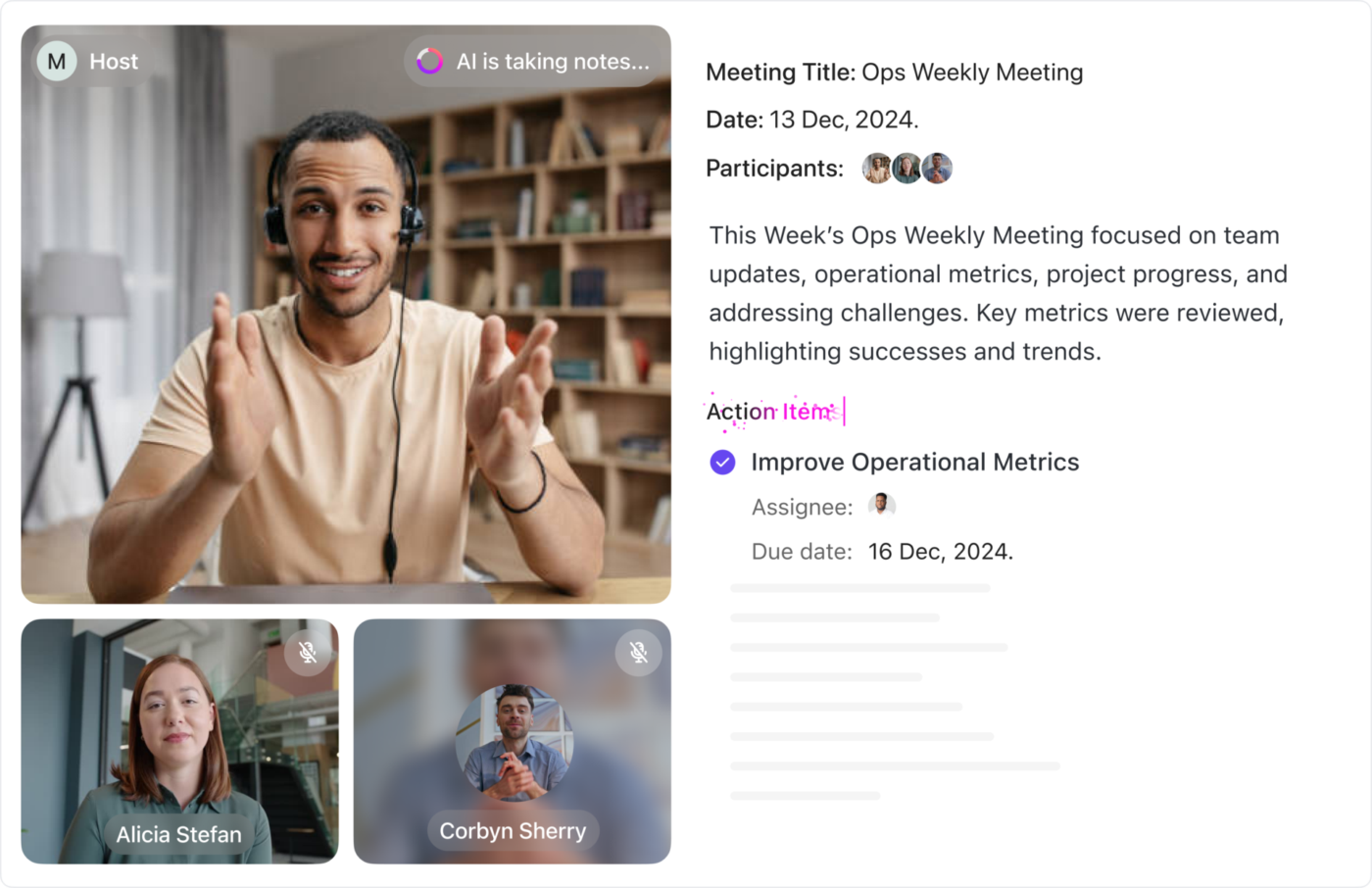
ClickUp Automations, combined with AI, enable more advanced flows in which task changes not only update fields but also trigger communication. You can automatically post comments, send templated emails, and generate AI summaries when milestones or deadlines are reached.
📮 ClickUp Insight: When a task gets lost in chat, 41% of workers dig through threads to find it, 22% say it never gets done, and 19% try to recreate it later from memory.
You’re basically working with a system where 40% of discussions are lost to the void. Teams start screenshotting messages, DM’ing reminders, or creating shadow docs to compensate for chat’s fragility.
ClickUp AI, working within ClickUp Chat, changes that dynamic. It automatically surfaces commitments, flags unassigned action items, and connects them to relevant projects. No more lost details. Just a record that keeps pace with the conversation.
Choosing the right AI tech stack involves weighing and comparing AI applications to ensure project success.
But once you’ve selected your stack, how do you get the most out of it?
Below are a few tips for successful AI deployment:
I remember early 2021 we were trying to launch a whole bunch of products. We missed deadlines, we had issues. People were not communicating. We, we didn’t know who was like supposed to make decisions. We hired a few smart people, but I would say ClickUp has been sort of the backbone for the operation of the company, particularly for great workflows.
Working with AI systems for the first time? Here are the common AI adoption challenges you must be aware of:
It’s easy to assume your first AI stack will be the stack. So, you buy premium plans, subscribe to too many tools, or lock into yearly contracts before you’ve even tested how well they fit your workflow.
✅ Solution: Map the workflow first, then automate one step at a time. Start with a single trigger (e.g., task status changes to “In Review”) and confirm it works before adding more rules.
You might be tempted to automate everything at once without understanding the underlying process. This can cause broken workflows, duplicate data, higher operational costs, and unnecessary rework.
✅ Solution: Start by mapping the process manually first. Then automate one step at a time (handoffs, reminders, routing). If the workflow breaks, fix the process before adding more automation.
A modern AI tech stack is an indispensable part of your workflow—whether you’re a student, an artist, a professional, or a business.
ClickUp offers a simpler solution: an all-in-one AI framework that brings your writing, planning, meetings, tasks, and workflows together in one place.
Instead of piecing together a dozen apps or wrestling with code, you get a connected, beginner-friendly AI experience that grows with you.
No technical setup or model training expertise needed for AI implementations.
So, what are you waiting for? Sign up for ClickUp today!
An AI stack is the set of AI systems you use to write, research, analyze, design, automate, or manage your work using artificial intelligence. Each tool handles a different part of your workflow, and together they enable businesses and individuals to work smartly.
Beginner-friendly tools are the ones that work out of the box without any technical AI model development. For example, ChatGPT or Gemini for writing and brainstorming, Perplexity for quick research, Canva Magic Studio for instant image generation, ClickUp Brain for task and workflow automation, etc.
Start by identifying your biggest bottlenecks—writing, planning, meetings, reporting, or admin work. Next, choose one AI application to cover all the pain points in each category. It’s best to have a small, connected setup you can use daily rather than a complex system of multiple tools.
Some common mistakes are: overinvesting too early, choosing tools with overlapping features, expecting perfect results from a single prompt, or automating more than necessary.
ClickUp Brain puts AI inside your everyday workflow for smarter, faster work. You can research and brainstorm ideas, generate content, transcribe meetings, manage documents, chat with team members, assign tasks, and set up automations without leaving your workspace. It removes the need for multiple tools and gives beginners a simple, unified way to use AI from day one.

© 2026 ClickUp

There’s an easier way. Try a free AI Agent in ClickUp that actually does the work for you—set up in minutes, save hours every week.