






Still downloading templates?
There’s an easier way. Try a free AI Agent in ClickUp that actually does the work for you—set up in minutes, save hours every week.
Sorry, there were no results found for “”
Sorry, there were no results found for “”
Sorry, there were no results found for “”
You had a slide deck loaded with a brilliant strategy…but your client could only focus on whether the campaign could move faster and generate more returns. Without upping the investment. 🙄
With client expectations at an all-time high and tight budgets straining margins, a brilliant strategy deck alone won’t cut it.
You also need alternatives to slow, manual workflows that drain time and energy.
And they’re well within reach thanks to AI campaign execution for agencies. With AI and machine learning, you could ideate, iterate, and optimize campaigns in half the time—and actually watch return on ad spend (ROAS) climb.
How?
In this blog post, you’ll get a no-nonsense, peer-to-peer breakdown of:
Ready to upgrade your execution engine? Read on.
Let’s discuss why agencies that aren’t exploring AI are already behind and why those embracing it are rewriting their timelines—and bottom lines.
Agencies are using generative AI tools like Midjourney and ElevenLabs to mock up visuals and voiceovers in pitches and campaigns. They can turn around complex concepts in weeks instead of months, winning bigger campaigns in the process.
This is true even for creative-heavy execution.
📌 At BETC, for instance, the team crafted an AI-generated “Fluffy GOAT” character (representing the ‘Greatest of All Time’ care for clothes) for a Woolite relaunch. It not only helped retain the brand’s prestige and used a modest budget, but also wrapped up in six weeks, not the usual three to six months.
Once a campaign goes live, traditional reporting can lag by days—meaning optimization often comes too late.
AI flips that by analyzing live campaign performance data and adjusting variables mid-flight. Smart algorithms can also identify the most receptive audience segments to allocate budgets where they’ll have the highest impact, reducing wasted ad spend.
📌 Take L’Oréal, for example. They wanted to make every marketing dollar work harder. Partnering with WPP’s Choreograph, they rolled out a custom AI algorithm that analyzed audience data and real-time performance signals.
The result? Smarter ad targeting and a 22% boost in paid social budget efficiency, without spending a cent more.
From social to search to email, AI enables multi-channel orchestration without multiplying manual effort. You can adapt, schedule, and localize assets at scale, maintaining brand consistency everywhere.
Here’s proof.
📌 NT Technology, a Mediatech company, wanted to improve customer engagement across channels like email, social, and in-app messaging. Before using AI, their campaigns ran in silos. The messages weren’t sequenced, and personalization was minimal.
They implemented Streamlogic’s AI-powered cross-channel orchestration agents, which synchronized messaging across every touchpoint and adapted content in real time to each user’s behavior.
The results over 12 months were dramatic: engagement rose 180%, customer churn fell 62%, and the initiative delivered a 312% ROI.
Campaign launch used to be the slowest part of the process—handoffs between creative, media, and ops teams dragging for days. Now, AI-driven deployment tools are cutting that lag to hours.
The Omnicom Media Group Hong Kong automated its omnichannel reporting using Windsor.ai’s pipelines, eliminating 40 manual hours per week. They also enabled near-real-time data feeds, unified governance over 1,900 ad accounts, and freed analysts to focus on strategic insights and creative testing.
📮 ClickUp Insight: 37% of our respondents use AI for content creation, including writing, editing, and emails. However, this process usually involves switching between different tools, such as a content generation tool and your workspace.
With ClickUp, you get AI-powered writing assistance across the workspace, including emails, comments, chats, Docs, and more—all while maintaining context from your entire workspace.
Wondering why AI can do all of the above better?
Here’s a head-to-head comparison between AI and traditional campaign workflows:
| Criterion | Traditional execution | AI-powered execution |
| Speed & iteration | Ideation and creative rounds can drag on—weeks, sometimes months | AI tools generate mock-ups, voiceovers, and visual storyboards in hours or days |
| Audience targeting | Manual audience segmentation, guesswork, repetition | AI learns from vast amounts of data, delivering micro-segmented, high-converting audiences |
| Budget & optimization | Manually reallocated post-campaign; slower reaction times | Dynamic budget shifts in-flight |
| Creative testing | A/B testing is labor-intensive and slow | Multivariate creative testing at scale enables fast learning loops |
| Efficiency & scale | Manual touchpoints, high error risk | Automated workflows free agency time for strategy and craft |
The benefits are clear, but how do you go about implementing AI-powered campaign execution?
You need the right set of tools, of course!
📚 Also Read: How to Use AI in Advertising
Your agency’s DNA consists of clarity, speed, collaboration, and seamless execution. So should your AI campaign management tool’s.
Here are the five platforms that simplify AI campaign execution for future-ready agencies like yours:
Imagine you’re leading a campaign kickoff for a big client. Information spills across briefs, docs, Slack threads, and you’re racing against a deadline.
That’s where ClickUp Brain steps in as your agency’s neural engine. It connects your knowledge, workflows, people, and actions. As the planet’s most complete work AI, it retains context of all your data—across ClickUp and connected apps—to save your agency over one day every week!
Here’s what that looks like:
Instead of hunting down objectives in scattered sources, you prompt Brain to “summarize campaign brief and outline deliverables based on the latest Slack discussion and client doc.” In seconds, Brain delivers a clear, scoped project brief.
You can also brainstorm a client brief from scratch!

It even spins up structured ClickUp Tasks, Milestones, and relevant content calendar templates—drawing from intake forms, docs, the kickoff call, and prior project patterns.
As a result, your time moves from admin drudgery—brief prep, task assignment—to high-value strategy, messaging, and nurturing client relationships.
💡 Pro Tip: Record your briefing calls and client discussions using ClickUp’s AI Notetaker. It sends you a call recording—complete with a transcript, action items, and meeting summary for reference. Brain can then answer all your questions from the transcript, such as, “Which ideas did Acme’s creative department approve in the discussion?” Or “What’s the go-live date decided for the XYZ print ad?”
Brain is also your creative co-pilot.
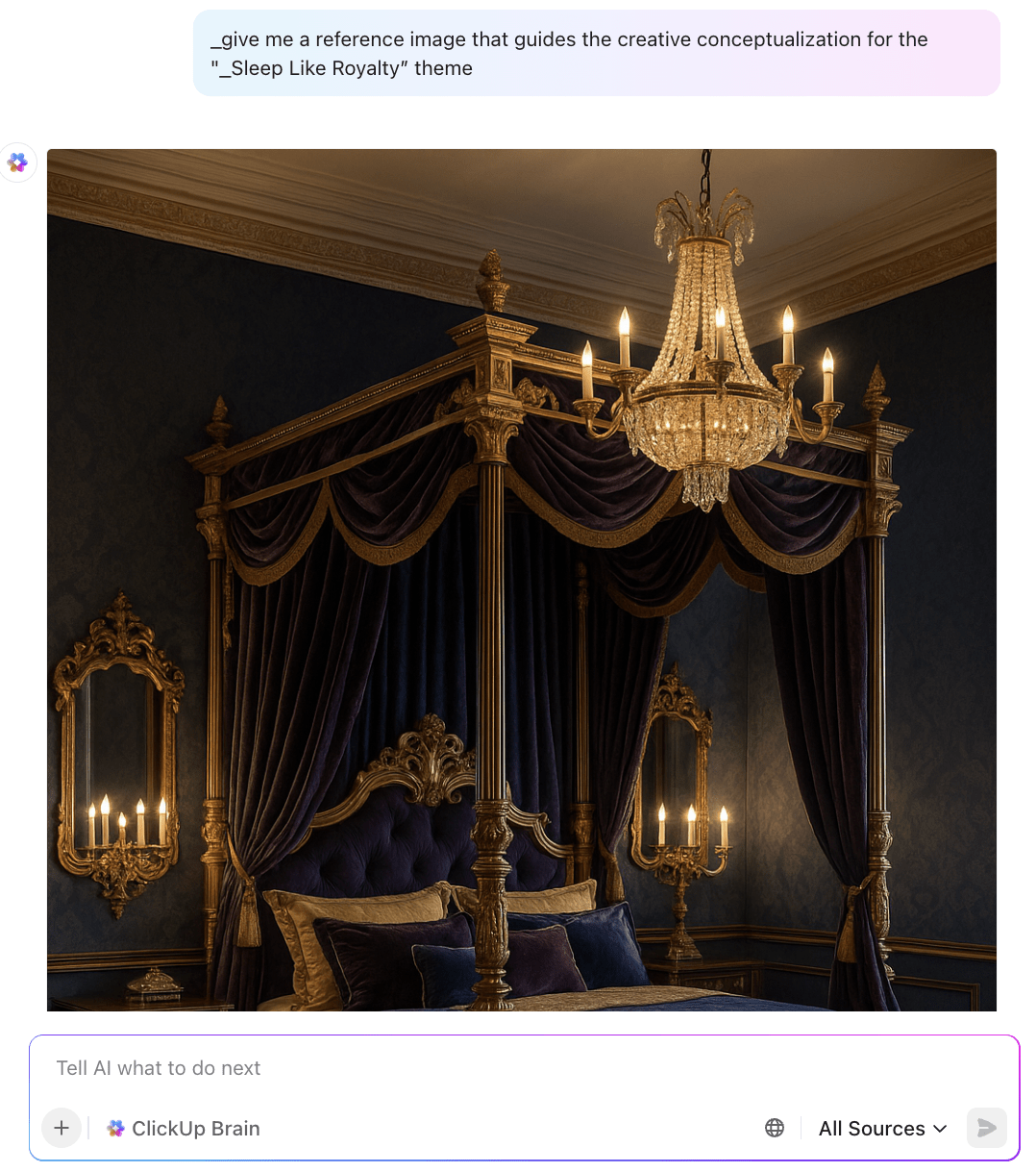
Ask it to “generate three outdoor campaign theme ideas for a luxury mattress brand with tone, messaging examples,” and it delivers thoughtful, audience-aligned concepts instantly—yanked from the context of your workspace, campaign history, and brand assets. No complex prompt engineering needed.
💡 Pro Tip: You can also generate creative images using Brain to bring your ideas to life. And for research and text generation, you can switch between the latest models from GPT, Claude, Gemini, and others—in one workspace.
Step 3: Turning intelligence into action with Autopilot AI Agents
Now, cue the Autopilot Agents in ClickUp.
🤝 Friendly Reminder: ClickUp Autopilot Agents are proactive and autonomous AI-powered workflow automations that watch for specific triggers in your workspace—like a task being approved or a status changing—and then take multi-step actions automatically. They can assign tasks, update fields, send client updates, or move work between tools, helping teams reduce manual handoffs and keep campaigns moving without bottlenecks.
You configure one in your campaign list:“When the brief is marked ‘Approved’ → assign tasks to the creative and media leads, set due dates, and post a progress summary in Slack.”
📌 Example AI agent workflow:
Watch how to create an Autopilot Agent in the video below 👇🏽
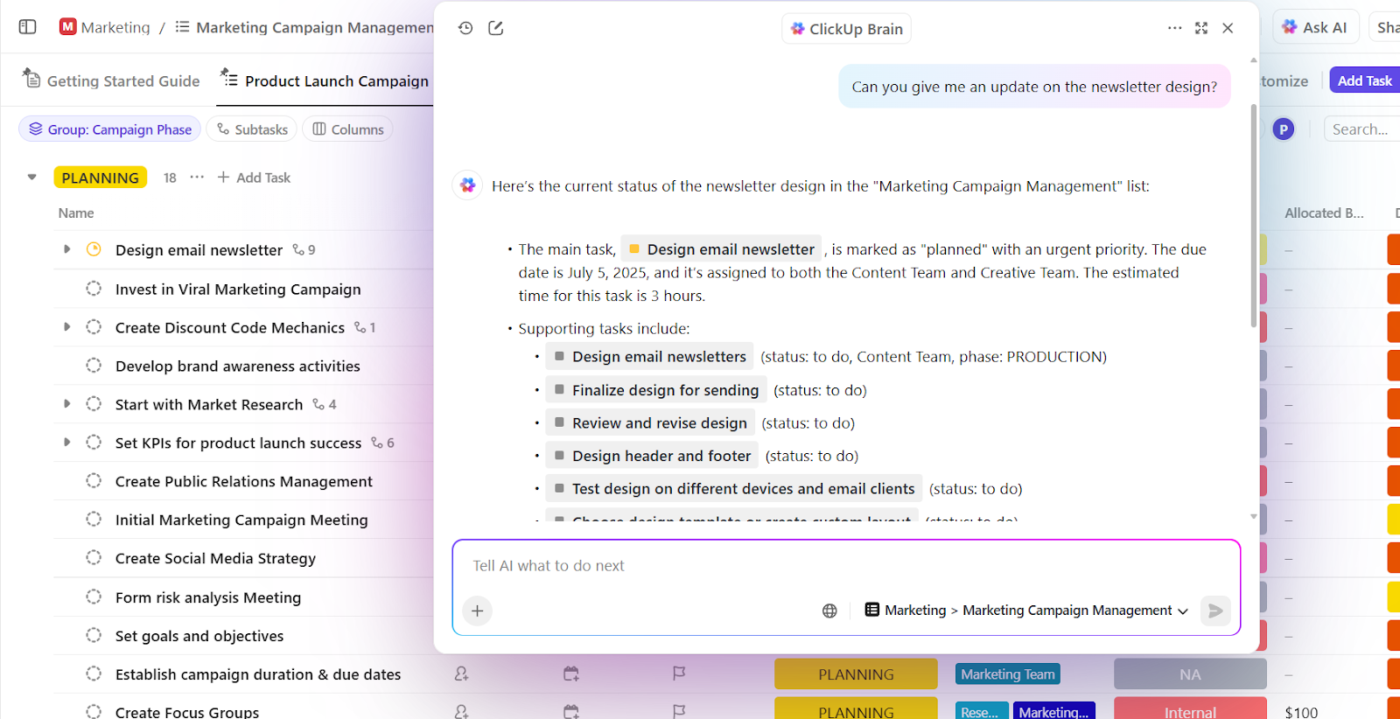
As work unfolds, Brain stays live—ready to answer: “What’s the update on the newsletter design?” or “Show me last campaign’s performance summary.”
Plus, ClickUp’s Enterprise AI Search digs across tasks, docs, chats, and even connected apps like Slack or Gmail to bring you the right resources at your fingertips.
Imagine generating video, banner, or ad copy that’s optimized for conversion—in seconds. AdCreative.ai promises up to 14× better CTR and conversion rates, harnessing templates and AI scoring to create, iterate, and scale high-impact creatives fast.
With their Product Videoshoot AI model, you can convert your static product images into a video product ad, almost instantly. Use AI-suggested prompts for speed or write your own to get the best results.
Whether you need multi-language versions, rich media, or in-app ads, its AI marketing tools have it ready. Reviews report strong support for A/B testing, dynamic versioning, and even campaign scheduling inside the platform.
If social media consumes your team’s bandwidth, Predis is a one-stop shop for ideating, creating, and scheduling posts. Need to get client approvals? The tool’s got that covered, too.
It’s also great for creating UGC avatar videos and product ads, plus enriching your content with competitor insights to boost performance. You can use their API to create brand-consistent carousels, videos, memes, and captions using your logos, colors, voice, and tone. Then, schedule them across platforms, all in one calendar view.
🧠 Fun Fact: 47% of ClickUp’s survey respondents have never tried using AI to handle manual tasks, yet 23% of those who have adopted AI say it has significantly reduced their workload.
HubSpot’s AI layer—Breeze AI Agents—sits inside the all-in-one HubSpot marketing platform. That means you don’t have to juggle separate tools or risk data getting lost between systems.
Think of an AI marketing agent like a co-strategist on your team that can:
Breeze can also auto-create content for email or social and adapt copy to match your brand’s tone. Pair this with optimized send times based on past engagement patterns, and you’ve got campaigns that feel personal and reach the right people, without your team burning hours on manual work.
And when you need a quick health check on a live campaign? You can ask Breeze Copilot for a plain-English summary of performance, complete with key metrics and trends, so you can make adjustments without diving into raw reports.
📮ClickUp Insight: 11% of our respondents leverage AI primarily for brainstorming and ideation. But what happens to these brilliant ideas afterward? This is where you need an AI-powered whiteboard, like ClickUp Whiteboards, which helps you instantly turn ideas from the brainstorming session into tasks.
And if you can’t quite explain a concept, simply ask the AI image generator to create a visual based on your prompt. It’s the everything app for work that enables you to ideate, visualize, and execute faster!
Smartly is an ad platform designed for agencies managing high-volume, cross-channel campaigns where consistency, speed, and scale are non-negotiable.
At the heart of the platform is AI Studio, which blurs the line between creation and optimization. Instead of building one static ad set and hoping it works everywhere, AI Studio automatically adapts dynamic creatives for every format and platform—whether that’s a vertical TikTok video, a square Instagram post, or a display banner. This ensures your message looks sharp and fits natively, no matter where it appears.
Beyond creative, Smartly Media handles campaign automation, taking care of repetitive setup, targeting, and budget allocation tasks so your team can focus on strategy and storytelling. It pulls performance data from all channels into a single, easy-to-read dashboard. Here, you get actionable insights—like which creative variant is winning in a specific region or which audience segment is driving the most conversions.
📚 Also Read: How to Grow a Digital Marketing Agency
Now, let’s bring AI-powered campaign execution down from theory to reality.
Imagine you’re leading a mid-sized creative agency tasked with launching a three-month omnichannel campaign for a sustainable shoe brand. The client’s budget isn’t huge, but expectations are sky-high: they want measurable lift in online sales and market share in two regions.
Here’s exactly how you could pull this off with an AI-powered campaign management platform like ClickUp for Marketing Teams.
More of a visual learner? Watch how we plan our campaigns at ClickUp, using ClickUp.
We’ve broken the plan down into steps you can run tomorrow.
Before you touch any AI tool, nail down what success looks like and what you’re not willing to compromise on.
How to do it well:
🦄 How ClickUp helps: Drop your initial notes, client email threads, and past campaign reports into a single ClickUp Doc that serves as your campaign’s command center.
Ask ClickUp Brain to distill them into a concise project brief, then instantly convert that brief into an actionable task list with owners and deadlines using ClickUp’s AI Fields. That means from day one, your “big picture” is also a concrete execution plan.
AI is only as good as the data you train it on. If your audience lists are outdated or your creative results are scattered across files and folders, you’re setting yourself up for bad recommendations.
How to do it well:
🦄 How ClickUp helps: Want to do this 10x faster? Use ClickUp’s AI Enterprise Search to pull up “top performing Q4 creatives” or ask ClickUp Brain to fetch “email segments with CTR >5%” from your ClickUp Tasks, Docs, and integrated tools, without manually logging in to five different tools.

Define a short experiment matrix (what you’ll test, success criteria, minimum sample size), then create templates for variants and localization. Here’s where AI becomes your co-strategist.
How to do it well:
🦄 How ClickUp helps: You can feed your North Star brief to ClickUp Brain and ask for “3 creative angles with sample headlines, captions, and visual prompts.”
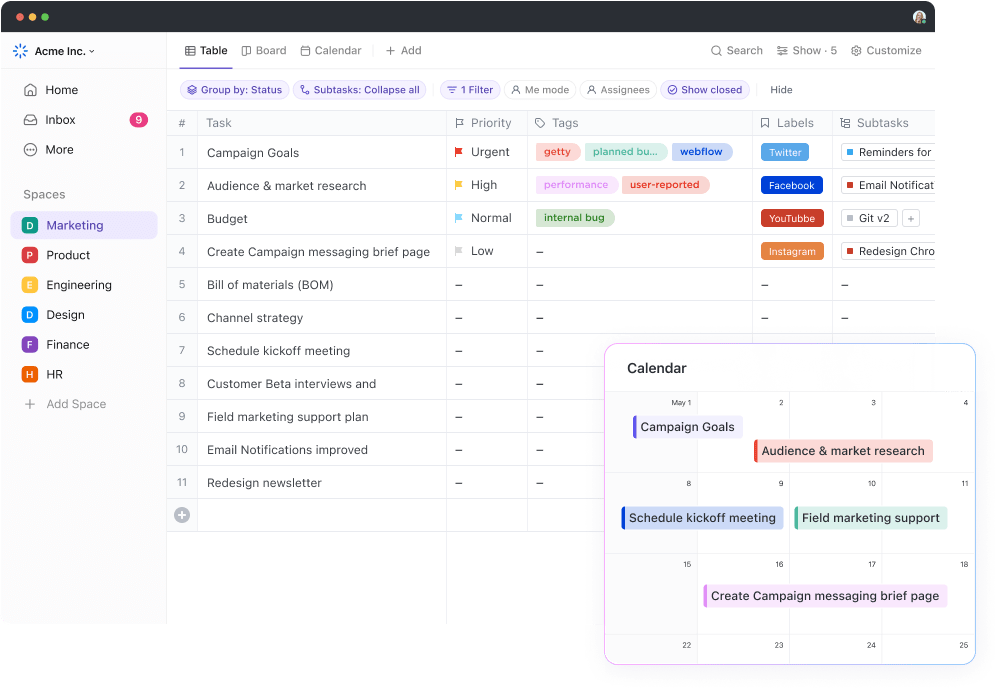
Drop the approved ones as separate Tasks into a ClickUp Table View with columns for asset type, status, and test audience. Attach the AI-generated drafts right inside each Task so the design team can iterate without chasing files.
⚡️ Template Archive: Content Writing Templates
Campaign execution fails when creative approval or ad trafficking eats up days you don’t have.
How to do it well:
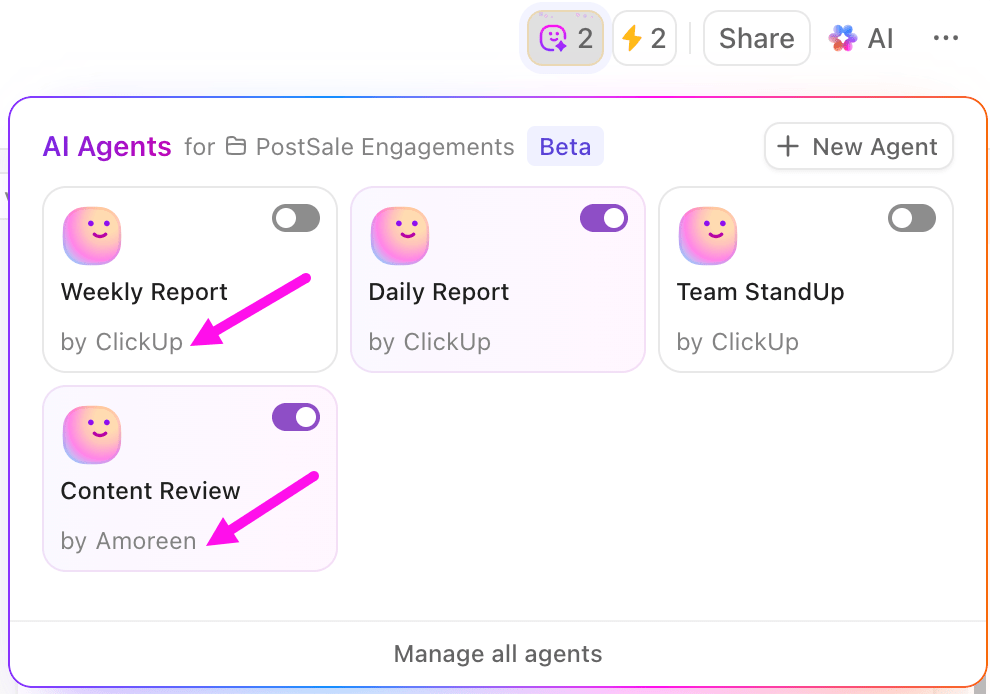
🦄 How ClickUp helps: Assign Custom ClickUp Autopilot Agents to watch for the “Approved” status and then:
This keeps launches moving while freeing your senior team to work on strategy, not chasing file handoffs.
📚 Also Read: How to Use AI for Marketing Automation
Multi-channel launches are notorious for version control nightmares. You don’t want one platform to get the old headline and another to miss the seasonal offer.
How to do it well:
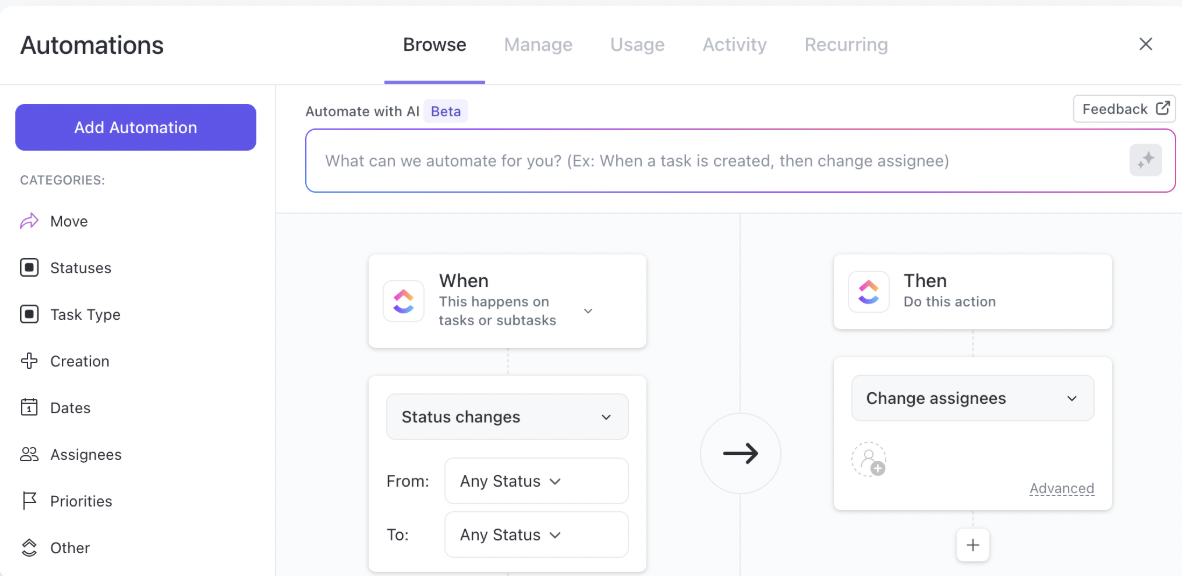
🦄 How ClickUp helps: Use ClickUp’s Calendar View to visualize the campaign rollout. Attach the correct creative to each scheduled task, and set a ClickUp Automation to update the “Launch Status” Custom Field the moment a piece goes live. That way, if the client asks, “Is the Instagram Story live in France?” you can answer in seconds.
This is where most campaigns either coast or course-correct too slowly.
How to do it well:
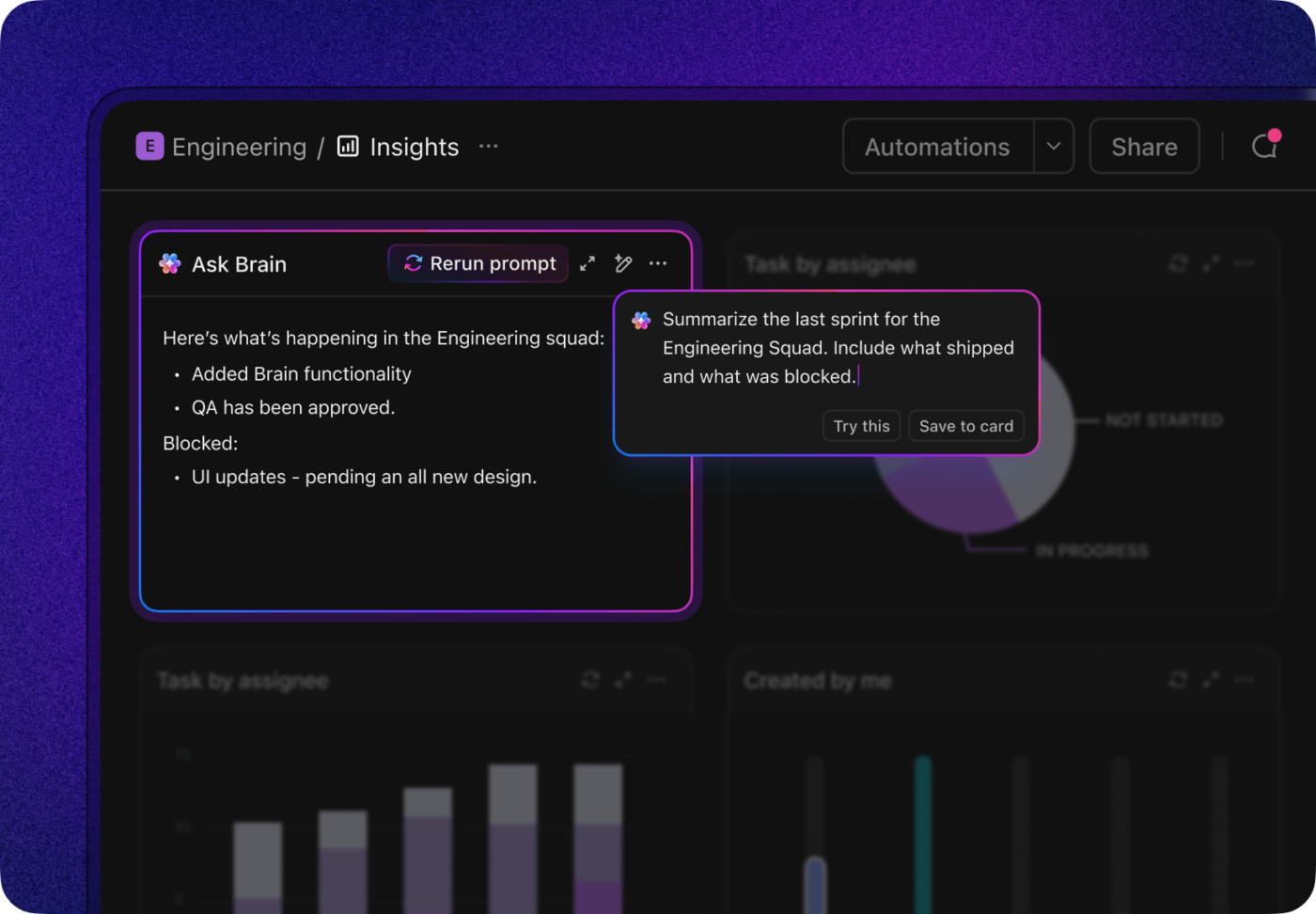
🦄 How ClickUp helps: Build a ClickUp Dashboard that pulls in live performance from your ad and analytics tools. Add a Brain AI Card to “summarize changes in performance over the last 24 hours and suggest next actions”, then create actionable tasks based on its recommendations directly from the dashboard.
Your AI playbook should get stronger with each run.
How to do it well:
🦄 How ClickUp helps: Save the entire campaign—tasks, automations, AI prompts, and even reporting formats—as a ClickUp Template. Tag it by client type, region, or campaign goal so it’s easy to pull for the next relevant project. Don’t worry, you can still customize everything later!
The best part about using AI within ClickUp’s everything app for work is that it builds a repeatable, data-driven system you can keep coming back to.
And that’s a win-win for both you and your clients.
All things said and done, without data-backed proof, you’ll never convince skeptical clients or your CFO that AI is really the growth lever behind stellar campaign results.
So, here’s a quick blueprint for measuring the ROI from your AI-driven campaigns:
| Metric | What it tells you | How to act on it |
| ROAS / ROMI | How much revenue each ad dollar generates | Track per campaign; shift budget live toward variants hitting ≥ 3× return |
| CAC vs. CLV | Customer acquisition cost vs. lifetime value | If CAC is creeping past CLV/3, activate retention upsells or refine targeting |
| CTR & Conversion Rate | Creative appeal and marketing effectiveness | Promote top creatives quickly; revisit low-converting ones with AI-driven tweaks |
| Time Saved / Cost per Asset | Efficiency gains from AI creative vs. traditional | Calculate hours saved × team rates; reinvest in more tests or deepening your strategy |
| Incrementality / Attribution | True impact across touchpoints and long-term value | Set holdout tests, use algorithmic attribution to capture AI’s full swing |
🤝 Friendly Reminder: Not all AI implementations will yield positive ROI, so remember to be strategic about AI usage, not just tactical.
📚 Also Read: How to Use AI for Lead Generation
The best approach is to start small, weaving AI into one specific part of the process rather than the whole thing at once. Here’s a walkthrough:
🧠 Fun Fact: At the ad agency WPP, half of their 96,000 employees are already using AI for creative ideation and personalization using the WPP Open platform. It leverages four AI models—the Audience, Brand, Channel, and Performance Brains—to improve decision-making across the entire customer journey.
AI can supercharge agency work, but it’s not without friction. Use these tips to navigate the uncertainties like a pro:
Your AI-generated ad copy performs 18% better in tests than the handcrafted headline your senior copywriter swears by. Do you ditch the human touch for numbers? Or risk performance for artistry?
Automation thrives on patterns, while creativity often comes from breaking them. Leaning too hard into AI may make your campaigns technically effective, but only in the short term. You risk your audience not building a deep enough emotional connection with the brand.
The solution: Treat AI as a concept generator, not a replacement. Let it handle the first draft or rapid variants, then run those through your creative leads for tone, cultural nuance, and brand storytelling.
Most advanced machine learning models promise hyper-personalized ads, but what happens when that personalization becomes creepy or violates GDPR?
The solution: Bake privacy into the process.
In-depth human oversight at this stage can be your brand’s legal safety net.
AI speeds campaign creation up. But what about approvals?
If internal teams are running AI-first workflows while clients are still in “traditional approval mode,” you can end up waiting days for sign-offs on something AI created in minutes.
The solution: Make clients part of the process from day one. Walk them through your AI workflow, show them side-by-side examples of AI vs. human-only output, and set expectations for review cycles.
💡 Pro Tip: Start sending “AI snapshot” decks to clients—highlighting new creative ideas, test results, and performance gains—so trust in the process grows alongside results.
Most agencies start with one AI tool and suddenly find themselves juggling seven—each with its own login, billing, and learning curve. Creative in Figma. Copy in Jasper. Briefs in Docs. Media plans in Sheets. Analytics in Looker. Now you’re not just managing campaigns—you’re managing a zoo.
The solution: Consolidate where it makes sense and use a central hub for orchestration. This is where ClickUp’s everything app for work for agencies makes the biggest difference. It’s a single campaign source of truth your team and clients can trust.
41% of ClickUp customers have already used it to replace three or more tools and save money.
A G2 review confirms:
ClickUp offers unmatched flexibility with customizable views (List, Board, Gantt, Calendar), powerful automations, and built-in docs, goals, and time tracking—all in a single workspace. It centralizes team collaboration and project management, allowing us to replace multiple tools like Trello, Asana, and Notion with one cohesive system.
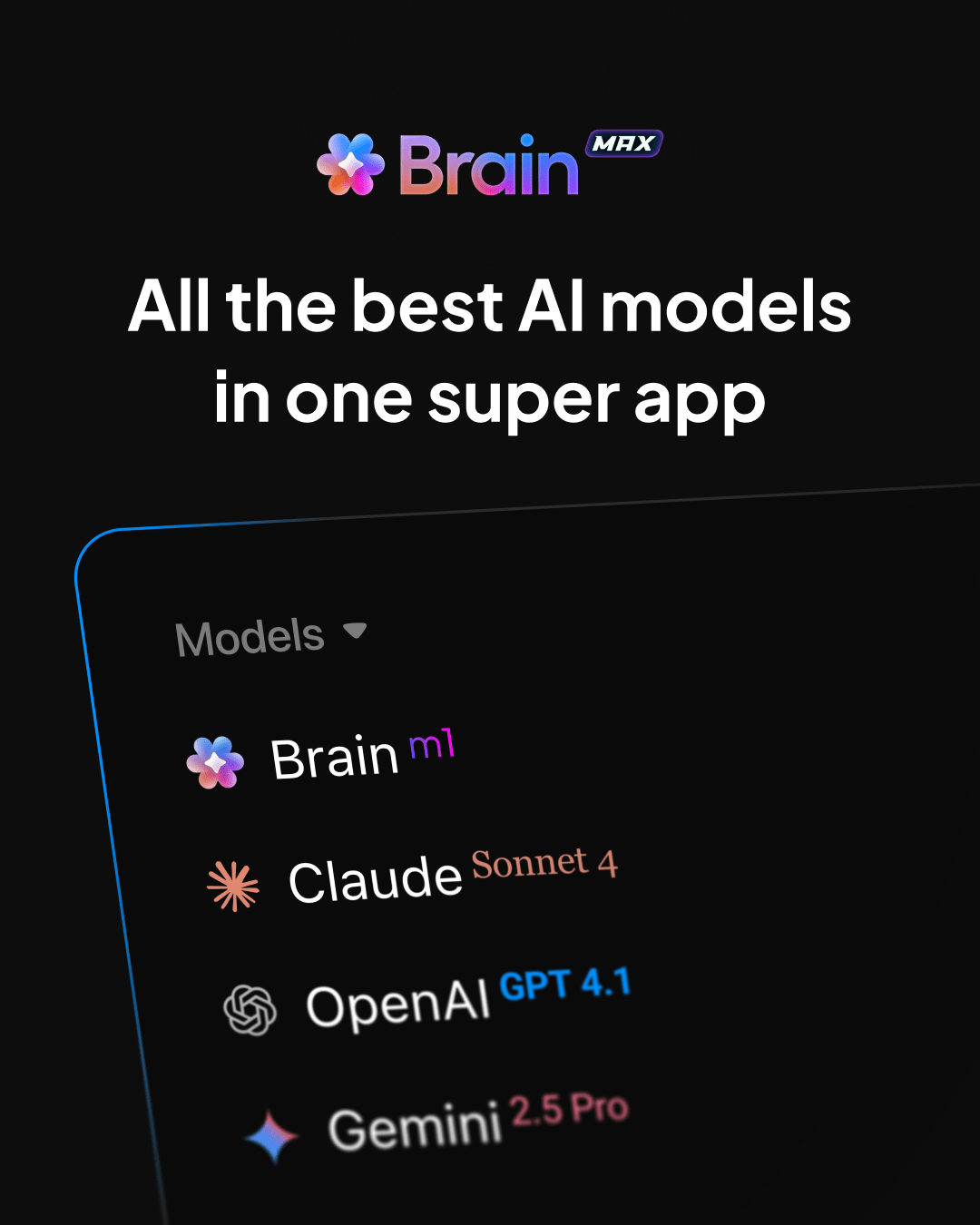
With ClickUp’s desktop AI companion, ClickUp Brain MAX, you can reduce AI sprawl, too:
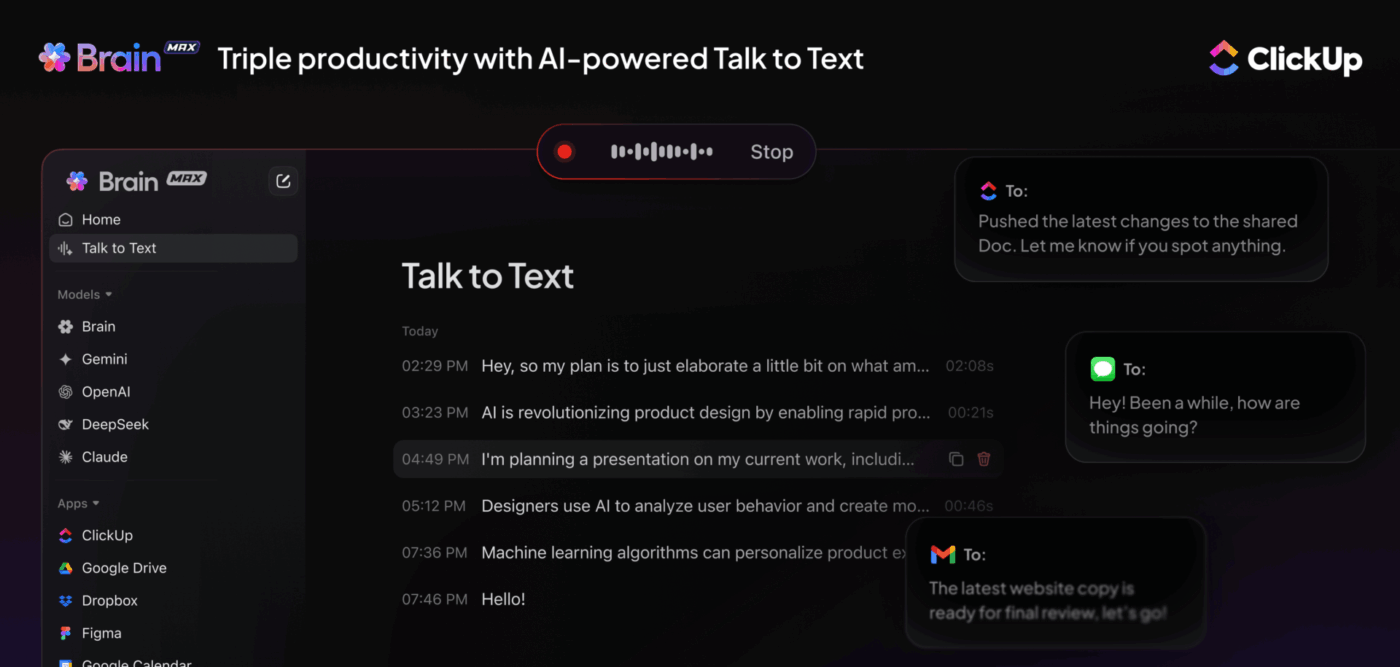
The most successful teams see these challenges coming and design around them—turning potential pitfalls into competitive advantages.
📚 Also Read: How ClickUp’s Marketing Team Uses ClickUp
Let’s explore three fresh, real-world case studies of marketing agencies harnessing AI to radically improve campaign outcomes. These examples show how AI partners with people, helping teams move faster, smarter, and more creatively.
Movement Strategy, a creative agency known for building immersive, culture-driven campaigns for brands like Netflix, Warner Bros., and Amazon, was approached by Intuit to take something as dry as personal finance and turn it into an experience people would share.
As the company behind financial tools like TurboTax, Credit Karma, and QuickBooks, Intuit wanted to humanize AI and make finance approachable, even fun.
The result was Automagical, an interactive microsite where users uploaded selfies and answered a few quirky questions about their financial habits. Behind the scenes, generative AI analyzed the answers, paired them with the image, and produced two things: a whimsical “financial aura” and a custom avatar that reflected the user’s money personality.
🎯 The impact: Over 570,000 engagements and a 62% spike in TikTok interaction—proof that interactive personalization can deeply engage audiences.
✅ Why it matters for agencies: AI can bring personality into a brand campaign, turning abstract software tools into emotional experiences.
Fashion retailer Omoda faced a hefty return rate. Nearly 50% of their revenue growth was coming back. They turned to their partners at Dept agency and Google to solve the challenge.
Working together, they built a predictive AI model using customer and order data in BigQuery, then pushed real-time return likelihoods into their Google Ads campaigns. This allowed them to prioritize ads that generated more profitable, less return-prone orders.
🎯 The impact: The AI model correctly predicted returns for 70–75% of orders. As a result, Omoda saw a 5% drop in return rates and a 14% increase in profit margin on its Google Ads–driven revenue.
✅ Why it matters for agencies: AI doesn’t always have to chase clicks. It can optimize for profitability by helping clients find their best customers, not just any customers.
Ogilvy and Wavemaker teamed with generative AI tech platforms (Gan.ai and Uberduck) to deliver what felt like magic: a QR code on Cadbury packages that triggered a fully AI-powered, personalized birthday song. Users chose nicknames and music styles—and AI generated lyrics, melody, and vocals in real time.
🎯 The Impact: Over 20,000 songs generated in week one, with more than 700,000 user interactions in total.
✅ Why it matters for agencies: AI unlocks a new form of brand intimacy. Personalization at this level builds emotional resonance, word-of-mouth, and shareability—a powerful mix for brand lift.
👀 Did You Know? The use of AI across business functions has jumped: 78% of organizations now report using AI in at least one function, and 71% say they regularly use generative AI. Yet the scoreboard is mixed. Less than 30% of AI leaders say their CEOs are satisfied with AI returns.
When it comes to AI campaigns, agencies are set to combine fast experimentation with rigorous measurement, consolidate context to avoid sprawl, and treat AI as a teammate—not a replacement.
Let’s look at the emerging trends:
Agencies are moving from single-prompt experiments to agentic systems that plan and execute multi-step work (think: brief → test variants → monitor → scale). McKinsey and other trackers call agentic AI a top technology trend to watch out for. That means campaigns will increasingly run with “virtual teammates” that coordinate work across systems.
Teams will prefer platforms that let them pick the best model for the job (long-context vs. fast creative vs. code generation) and use voice or image inputs—rather than juggling dozens of separate UIs and dealing with AI sprawl. This drives consolidation and better context retention across briefs, assets, and analytics.
As AI gets better at content creation, human marketers will need to get better at orchestration and evaluation. We’ll need to know how to brief the machine, decide which ideas to advance, and stitch AI-generated pieces into cohesive campaigns.
The real competitive edge won’t be in typing the prompt, but in designing the system, interpreting the output, and ensuring it aligns with brand, strategy, and ethics. In short, AI will do more of the making; humans will do more of the meaning-making.
The final verdict? Agencies that consolidate AI capabilities into one contextual workspace (LLMs + asset history + AI-powered automations) will be able to operate faster and possibly charge premium rates for reliable delivery.
The writing on the wall is clear.
When it comes to intelligent campaign execution, your aim should be to integrate AI into the workflow so naturally that the client barely notices the tech, only the results.
The agencies that will dominate may not have the fanciest tech stack, but they’ll have the ability to orchestrate people, processes, and AI as if they were a single, well-tuned team. That means fewer silos, less busywork, and a sharper focus on the big creative swings that win clients and keep them.
That’s exactly where ClickUp comes in. It’s not just another AI add-on—it’s the everything app for work and AI.
With ClickUp, you’ll be able to run your entire campaign lifecycle—from ideation to optimization—in one connected, intelligent workspace.
If you take one thing from this guide, let it be this: start small, measure everything, consolidate your stack, and keep your creative voice at the heart of it all. The future is coming fast.
Sign up for ClickUp today so you’ve the blueprint to run toward it, not away from it.
AI campaign execution involves using artificial intelligence to plan, create, deploy, and optimize marketing campaigns. AI automates repetitive tasks, improves targeting, and accelerates decision-making while keeping human strategy in the driver’s seat.
Yes. AI can segment audiences, tailor creative, and deliver one-to-one messaging to thousands, while maintaining brand consistency and measuring what works.
Absolutely. By automating briefs, asset creation, approvals, and deployment workflows, AI can cut launch timelines from weeks to days—sometimes hours.
No. AI is a powerful assistant, but campaign managers provide strategic direction, creativity, client alignment, and judgment that AI can’t replicate.

© 2026 ClickUp

There’s an easier way. Try a free AI Agent in ClickUp that actually does the work for you—set up in minutes, save hours every week.