
Sorry, there were no results found for “”
Sorry, there were no results found for “”
Sorry, there were no results found for “”
How much do you depend on your calendar? A good deal, we’d guess!
Without a trusty online calendar, keeping tabs on your schedule is like trying to catch confetti in a hurricane.
Going beyond a to-do list, a calendar gives you a complete overview of activities planned throughout a day, week, or month. It maps out your time and even nudges the right people with reminders just when they need it. 🔔
However, the question remains—which calendar app reigns supreme?
We’ve rounded up 11 options, chosen for their intuitive interfaces, powerful time-blocking features, and robust integration across multiple devices.
Let’s take a look at their features.
We’ve rounded up the top calendar and scheduling tools for 2025, each offering unique features to match different scheduling needs:
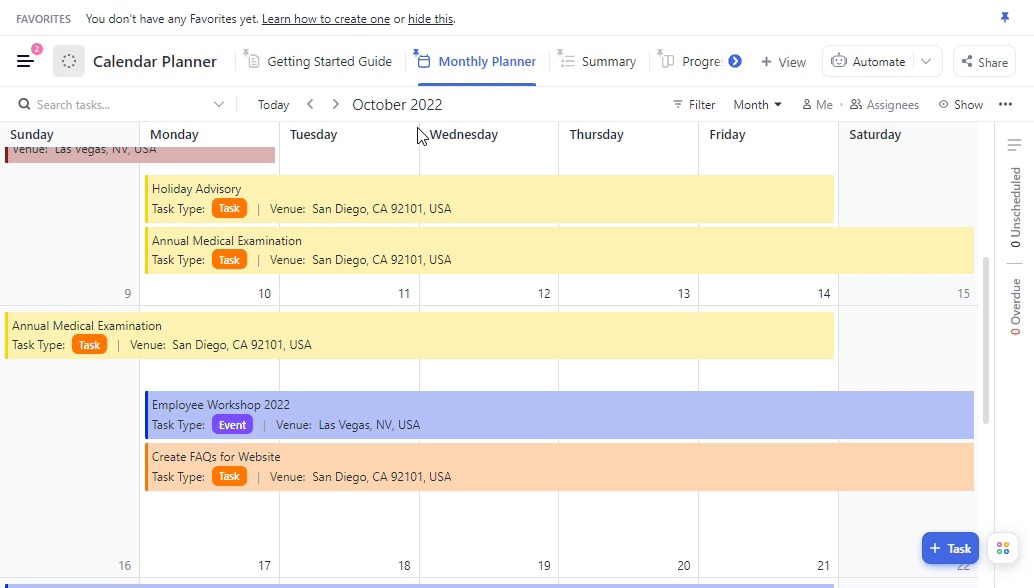
Drowning in calendar chaos and missed deadlines? Try the free ClickUp Calendar Planner Template to simplify your schedule and actually get things done.
Finding the best calendar apps can transform how you manage your time and responsibilities. Here’s a breakdown of the basic features to consider before choosing one.
💣 Need more ammo? Pick a tool with time blocking features to stay focused on the task at hand while ensuring all the important tasks have a dedicated spot on your calendar.
ClickUp, the everything app for work, has transformed your calendar into a time management powerhouse.
Because ClickUp Calendar is more than just a meeting scheduler.
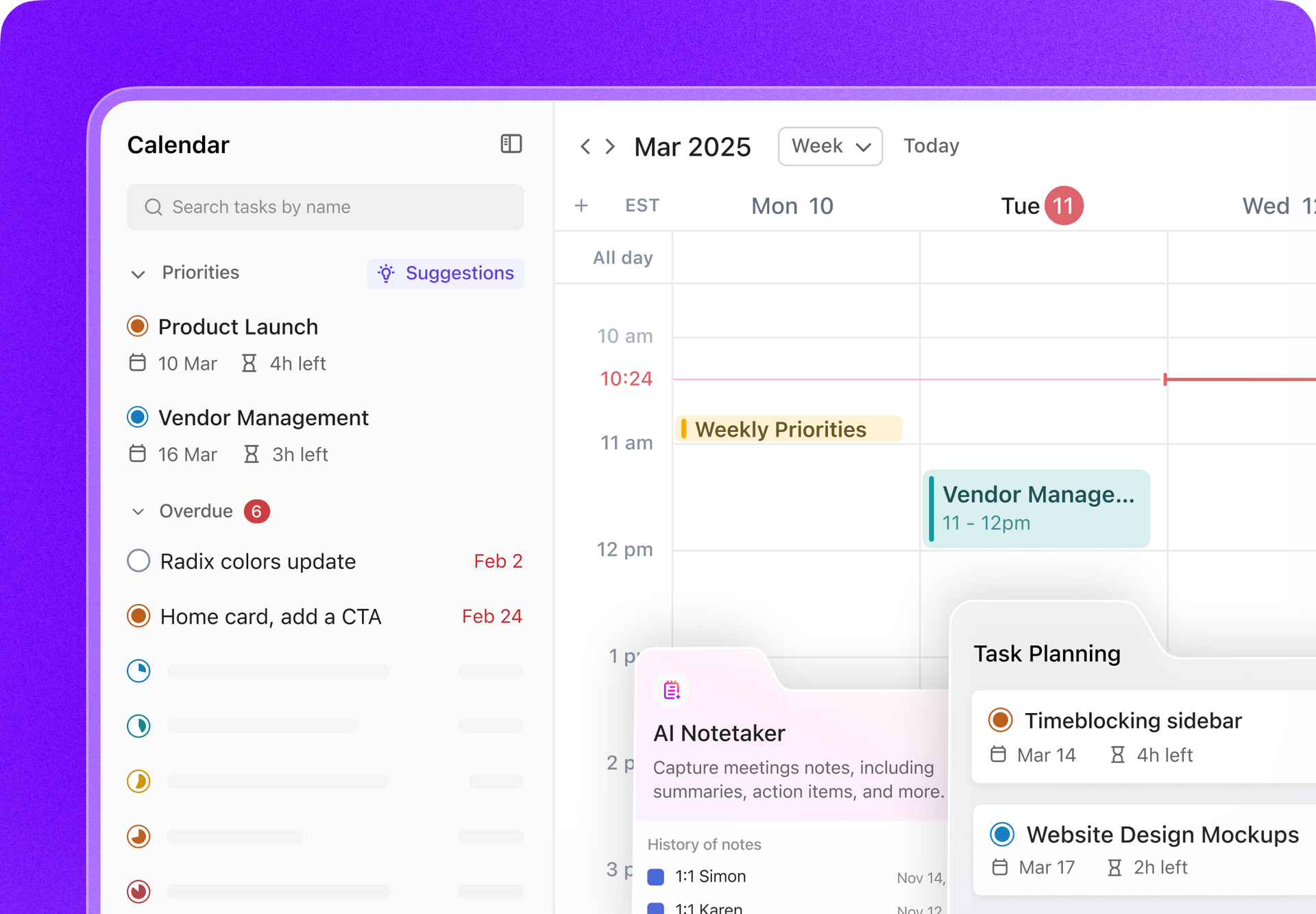
It connects your tasks to your schedule, offering AI-driven prioritization and automatic adjustments to keep you on track.
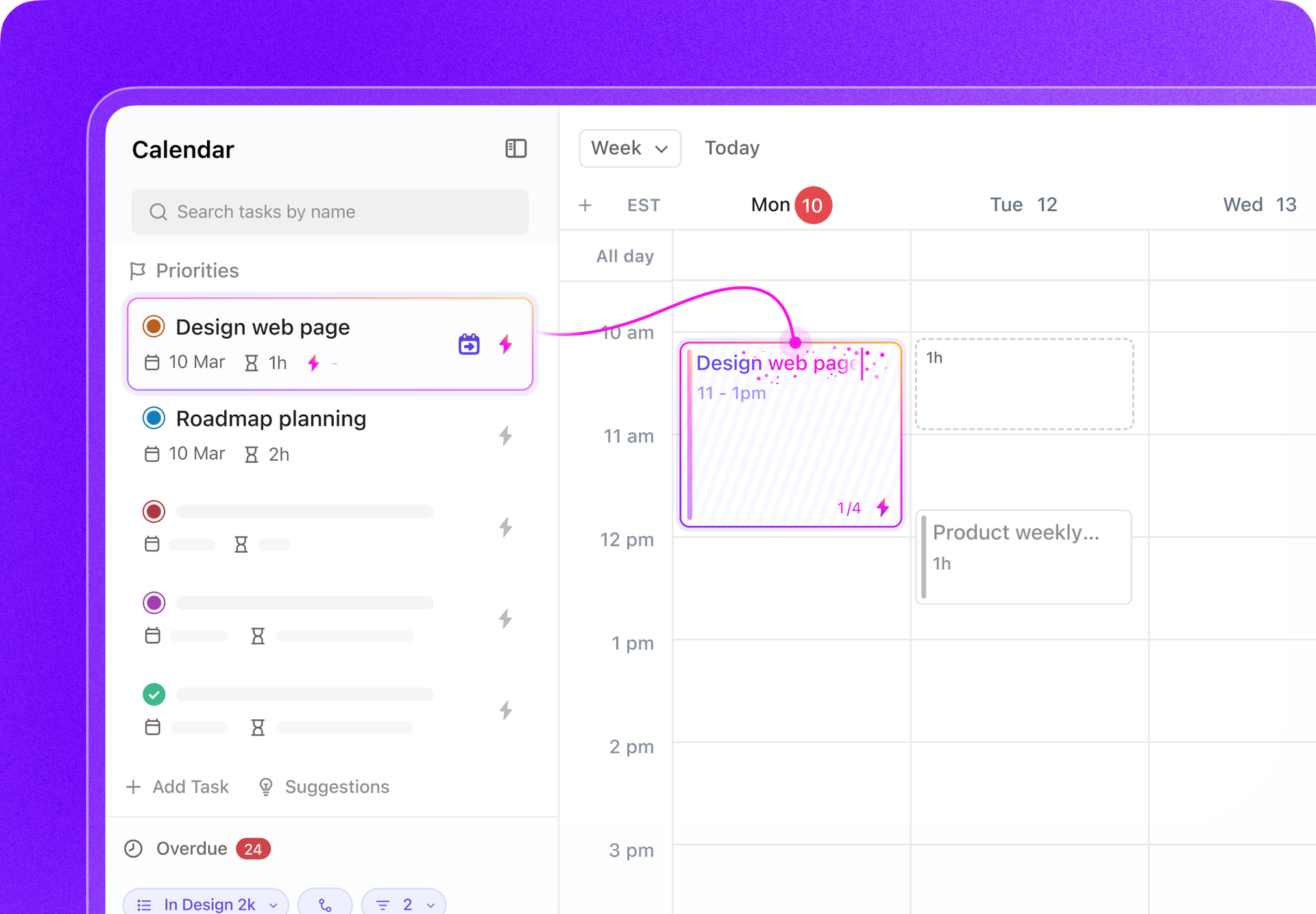
For instance, ClickUp AI can automatically suggest time slots for tasks based on your calendar availability. This feature helps you efficiently allocate time for your priorities without manually searching for free slots between meetings.
When you toggle on the AI button next to a task in your Priorities, the AI recommends where to schedule the task on your calendar. If you agree with the suggestion, you can easily add it to your calendar.
It can also suggest tasks that should be prioritized. This feature helps you focus on the most important tasks by analyzing your backlog and current priorities.
With ClickUp, your calendar is essentially your Work planner, run by AI and bundled where your tasks already are. Track time, set estimates, add notes, and view time reports from anywhere in your workspace.
Sharing is simple, too. Whether it’s for your team or an external stakeholder, you can securely share your calendar. They’ll see real-time updates, so you don’t need to send email reminders about schedule changes.
ClickUp Reminders is another must-have in your productivity arsenal.
This nifty feature lets you transform task comments into handy reminders. You can also add extra context with important files, media, and deadlines—so when follow-up time rolls around, you’ll know exactly what’s up and why it matters.

Now, here’s a bonus we think you’ll like. Plan smarter with ClickUp’s Calendar Planner Template.
Creating a schedule your team can follow is easy, so everyone stays on track. No more re-inventing the wheel, no more silos. Customize it however you like, and you’ll be ready to go.
This template will help you:
🔍 Did You Know? AI scheduling tools can save up to 40% of your time by creating a personalized weekly schedule and can help you complete 25% more tasks.
📮ClickUp Insight: 18% of our survey respondents want to use AI to organize their lives through calendars, tasks, and reminders. Another 15% want AI to handle routine tasks and administrative work.
To do this, an AI needs to be able to: understand the priority levels for each task in a workflow, run the necessary steps to create tasks or adjust tasks, and set up automated workflows.
Most tools have one or two of these steps worked out. However, ClickUp has helped users consolidate up to 5+ apps using our platform!
Experience AI-powered scheduling, where tasks and meetings can be easily allocated to open slots in your calendar based on priority levels. You can also set up custom automation rules via ClickUp Brain to handle routine tasks. Say goodbye to busy work!

Calendly is a scheduling tool that simplifies booking meetings and appointments. It allows you to share your availability directly from your inbox, LinkedIn, or CRM, allowing others to book a time that works for both of you—no back-and-forth emails required.
You can also create a custom dashboard to track activity trends and event types, which is especially helpful for managing team schedules.
➡️ Read More: 10 Best Calendly Alternatives & Competitors

Even though it provides only basic functionalities, Google Calendar remains the most widely used tool for managing personal life and professional routines in one place.
You can add time-specific tasks, integrate event details from third-party apps, and create an ‘Appointment schedule’ that allows others to pick meeting slots from a booking page.
💡Pro Tip: Use a Google Calendar template to stay organized even when juggling multiple tasks and deadlines.
If you are using Outlook for emails and looking for shared calendar apps that fit into your current workflow, Microsoft Outlook Calendar might be exactly what you need. You can set reminders, share your availability, or schedule meetings with Microsoft Teams or SharePoint.
🎈Fun Fact: In the 18th century, Sweden briefly used February 30 while transitioning from the Julian to the Gregorian calendar, but the change was disrupted by the Great Northern War. In 1712, Sweden restored the Julian calendar by adding extra leap days and later switched to the Gregorian calendar in 1753.

Apple Calendar is as straightforward as it gets. It syncs across all your devices and integrates with tools like iCloud and Google Calendar. As an Apple user, you can set up separate calendars for work, personal, or family events and even get travel time notifications for scheduled meetings.
If you’re looking for Fantastical alternatives, Apple Calendar offers many of the same conveniences without additional costs.

Zoho Calendar, with its ‘Smart Add’ feature, lets you create events without having to fill out forms.
Just type in the details in this format, “<Title> <date> <time>”, and it creates the event for you—no extra steps needed. For in-person meetings, you can add a list of conference rooms in your organization, and teams can book spaces based on time and availability.

Fantastical makes managing multiple calendars easier by integrating directly with platforms like iCloud, Google, and Microsoft Exchange. Its templates let you quickly schedule recurring events, and you can share your availability with a simple link.

Any.do blends calendar and task management features by allowing you to color-code events, set recurring tasks, and integrate your account with Google Calendar. The tool is especially useful for managing both work and personal schedules in one calendar app. If you’re looking for a project management calendar that also handles to-dos, this one might fit the bill.

Need shared calendars for your family members? Cozi keeps it simple and effective. Its color-coded family calendar lets you see who’s doing what and share to-do lists and meal plans to keep the whole household on the same page.

Teamup Calendar is a solid tool for managing schedules and team availabilities. You can customize it to organize events, track resources, or share updates. It’s free for small teams but scalable for larger ones, making it a good fit if you’re looking for digital planner apps that grow with your needs.

If you’re already using Monday.com, its calendar feature makes project planning more visual. You can assign tasks, set due dates, and track progress in daily, weekly, or monthly views. The ‘Split View’ feature lets you see your calendar alongside a detailed task board.
Choosing the right online calendar starts with understanding your needs. With so many options available, it’s easy to feel overwhelmed. Begin by identifying your goals—whether it’s coordinating team schedules, sharing meeting notes, or tracking deadlines.
If you’re after a tool that seamlessly consolidates all this and integrates it into your daily routine, consider ClickUp. It combines your tasks, meetings, and work in one place with user-friendly simplicity, giving you the flexibility to work your way.
Sign up for ClickUp for free to experience the difference.
© 2025 ClickUp