


Developing a new product or service is like preparing an elaborate dish for people with particular tastes. ??
A huge part of your success depends on understanding what the target customers crave and are willing to spend on. Equipped with this knowledge, you can create a user-focused solution that’s likely to sell.
One of the best techniques to tailor products for buyers is working with a user persona, a generalized profile of your ideal customer. It helps developers add features that resonate with end users.
If you’re looking for an easy way to share buyer profiles with your team, fall back on user persona templates. They help you build concise and on-point customer profiles to steer the development process in the right direction. ?
This article will present 9 superb user persona templates to help you create nuanced buyer profiles relevant to any intent.
9 Free User Persona Templates To Understand Your Customers
- What Is a User Persona Template?
- What Makes a Good User Persona Template?
- 9 User Persona Templates to Use in 2024
- 1. ClickUp User Persona Template
- 3. ClickUp User Story Mapping Template
- 3. ClickUp User Research Plan Template
- 4. ClickUp User Flow Template
- 5. ClickUp User Story Template
- 6. ClickUp User Studies Template
- 7. ClickUp Voice of the Customer Template
- 8. ClickUp Voice of the Customer Journey Template
- 9. ClickUp Customer Journey Map Template

 Summarize this article for me please
What Is a User Persona Template?
A user persona template gives you an efficient framework for cohesively outlining your ideal customers’ mindset, lifestyle, pain points, and behavior. The document lets you create an imaginary (or semi-fictional) individual with predictable goals, actions, and spending habits.
Product teams often struggle with creating accurate user profiles as they have to derive them from diverse demographic data and market surveys. It’s like making a mosaic with hundreds of pieces in different shapes, colors, and sizes.
But once you have your user persona, all you have to do is communicate it with relevant team members. The document will help shape your product or service to target buyer profiles with precision. ?
The applications of user persona templates go beyond product development. Design, sales, and marketing teams frequently rely on these frameworks to reach and engage their audience with greater confidence.
Summarize this article for me pleaseWhat Makes a Good User Persona Template?
An ideal user persona template caters to your intent and the nature of the product or service you’re developing. In general, it should be:
- Customizable: The user persona template should avoid misleading stereotypes and conform to the major user persona categories—such as goal-based, fictional, and role-based
- Defined and organized: See that the template allows addressing key categories like age, gender, educational and professional background, and pain points of the user. The sections should be easy to follow
- Aesthetically appealing: It should let you add graphs, charts, character sketches, and illustrations to make the persona appear realistic, which helps your team empathize with user needs ?
- Collaborative: The user persona template should be accessible to different departments involved in the product development or marketing campaign, allowing them to add inputs in real time
- Observable: It should have multiple views or layouts to add fresh perspectives to the persona and promote the generation of new ideas
Summarize this article for me please9 User Persona Templates to Use
Our selection of the top 9 user or customer persona templates from ClickUp work for any scenario, whether launching a new product, adding features updates, or planning a marketing campaign. Go through them and pick your favorites! ?
1. ClickUp User Persona Template
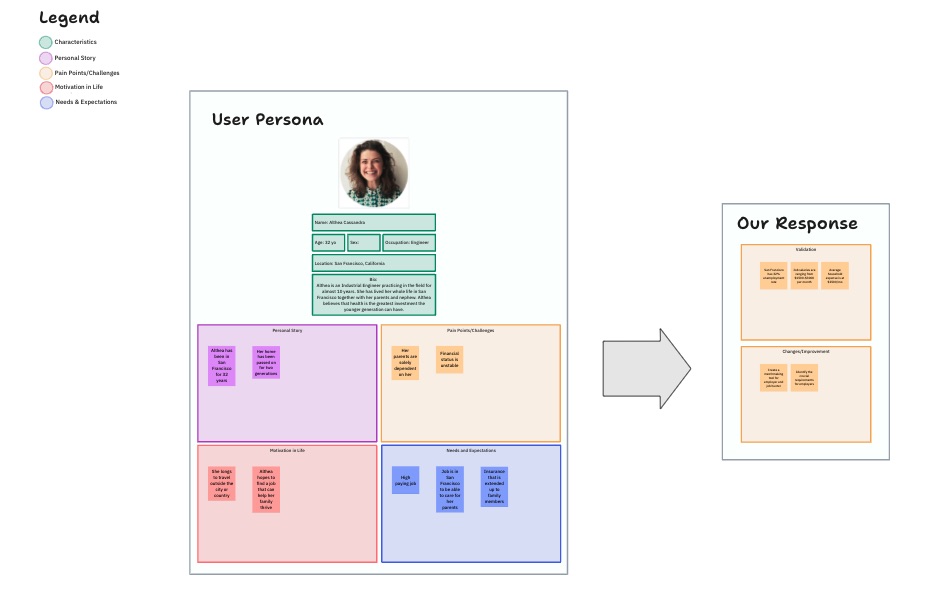
Whether looking to expand or retain your customer base, the ClickUp User Persona Template is ideal for profiling any group like a seasoned detective. ?️
Depending on your research team’s needs, the template can extract the right data from different audience groups. By default, it sorts personas by industry, profession, or service fields. Create multiple persona types for each of these categories!
Using the template is hardly rocket science. Click on a blank persona, and the system will launch a User Persona Form for you. Customize the profile by adding the intended details, such as name, gender, ethnicity, age, marital status, salary, occupation, and internet usage.
Add or remove elements to ensure the final profile captures essential data for your teammates. You can add any image file as a headshot, mostly to distinguish the profile from other personas you’ve added.
Let’s say you’re creating user personas for a media streaming app. In this case, the user personas should have attributes like age, motivations for watching video content, and frustrations (like limits to password sharing). If you want to optimize the app’s media content, you may also want to add marital status, gender, preferred genre, and personality data.
Once you’ve added the user personas, create tasks within the template and assign them to one or more teammates.
3. ClickUp User Story Mapping Template
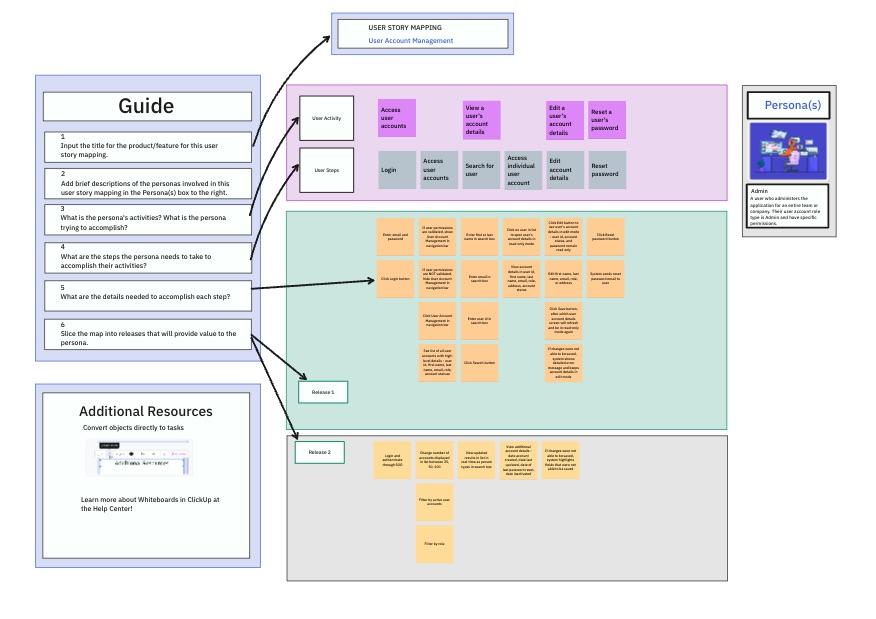
If you’re looking for a single tool to handle persona research and creation, try the ClickUp User Story Mapping Template! This beginner-friendly Whiteboard template allows you to identify user personas and visualize your customers’ perspectives and values for practically any use case. ?
User story mapping can feel overwhelming because there are sticky notes EVERYWHERE, but this template brings order to the procedure.
Visually, you can turn the template into a complex network connecting user personas with product requirements. Since it’s an elaborate effort, we recommend creating on-document steps to add structure to the mapping process, especially for distributed teams.
Once you’ve prepped up the Whiteboard, invite your team and start outlining the user persona activities relevant to your product. For example, if you plan to set up an e-commerce website, you can trace the process from signup to checkout.
The template helps you answer questions like:
- What’s not sitting well with the target user?
- What features need to be added/updated?
- How can a particular team member or department contribute?
You can trust this template to rescue Agile teams from dysfunctional backlogs that get lost in everyday operations. That way, you can speed up work for different phases of product release.
3. ClickUp User Research Plan Template
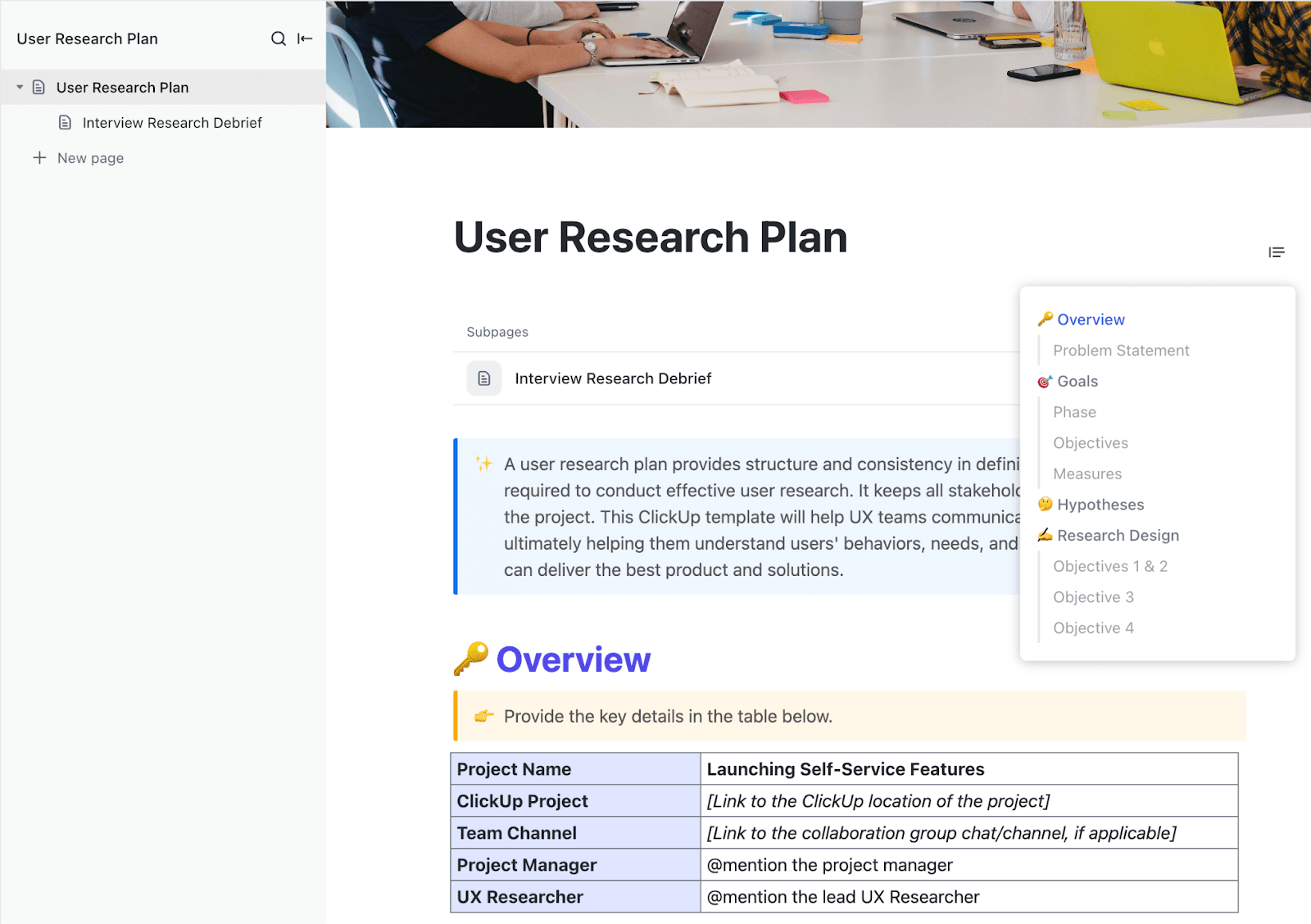
Researching a user persona precedes creating one, but the process can be equally overwhelming. The ClickUp User Research Plan Template is just what you need to support rich, data-backed user persona design and mapping! ?
The template guides you through the A to Z of the persona-building exercise. You get a clear structure and predefined elements—you’re not starting from scratch but filling out fields based on a tried-and-tested research process. ?
Whether you want to improve your product due to negative feedback or are considering rolling out a new feature, the template will help you define consistent goals, set hypothesis questions, and pinpoint the needs and motivations of your persona.
You have a living, breathing document designed to keep the product stakeholders aligned throughout the development cycle. For larger teams, you can summarize the persona-building steps under Research to reduce unpredictability.
Its Problem Statement section outlines the triggers for user research, such as customer dissatisfaction or declining revenue numbers. Once the research is over, you can add key takeaways and debriefs to communicate conclusions with the rest of the team. Revisit the template anytime to update the captured research. ?
4. ClickUp User Flow Template
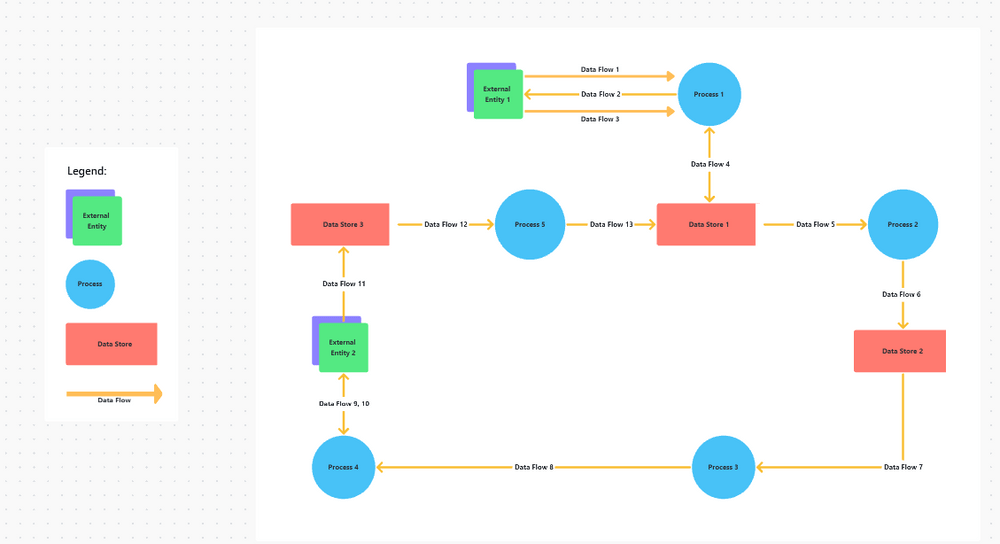
Micro-analyzing the user experience is an important element of tailoring products and services from a buyer’s perspective. If you want to put yourself in the shoes of your average customer, leverage the ClickUp User Flow Template. ?
The template helps you build flowchart diagrams depicting user flows—you get a visual representation of how many steps customers take to complete a specific activity. It allows you and your team to empathize with the user, prospect areas for improvement, and work out a functional product strategy.
This is another Whiteboard template on our list, so expect the whole range of editing and diagramming features to organize even the most bending user flows. ?
Building a diagram is child’s play—insert and connect shapes from the Start to the Decision points, and you’ll have a professional-looking chart in no time!
New to flowcharts? Use these three unique shapes for visualizing user flows:
- Orange circle: Start/end of a process ?
- Green rectangle: Process step/activity ?
- Red diamond: Decision points (yes/no) ?
To help your executing team follow the process better, add screenshots of what the user is experiencing at various points throughout the flow.
5. ClickUp User Story Template
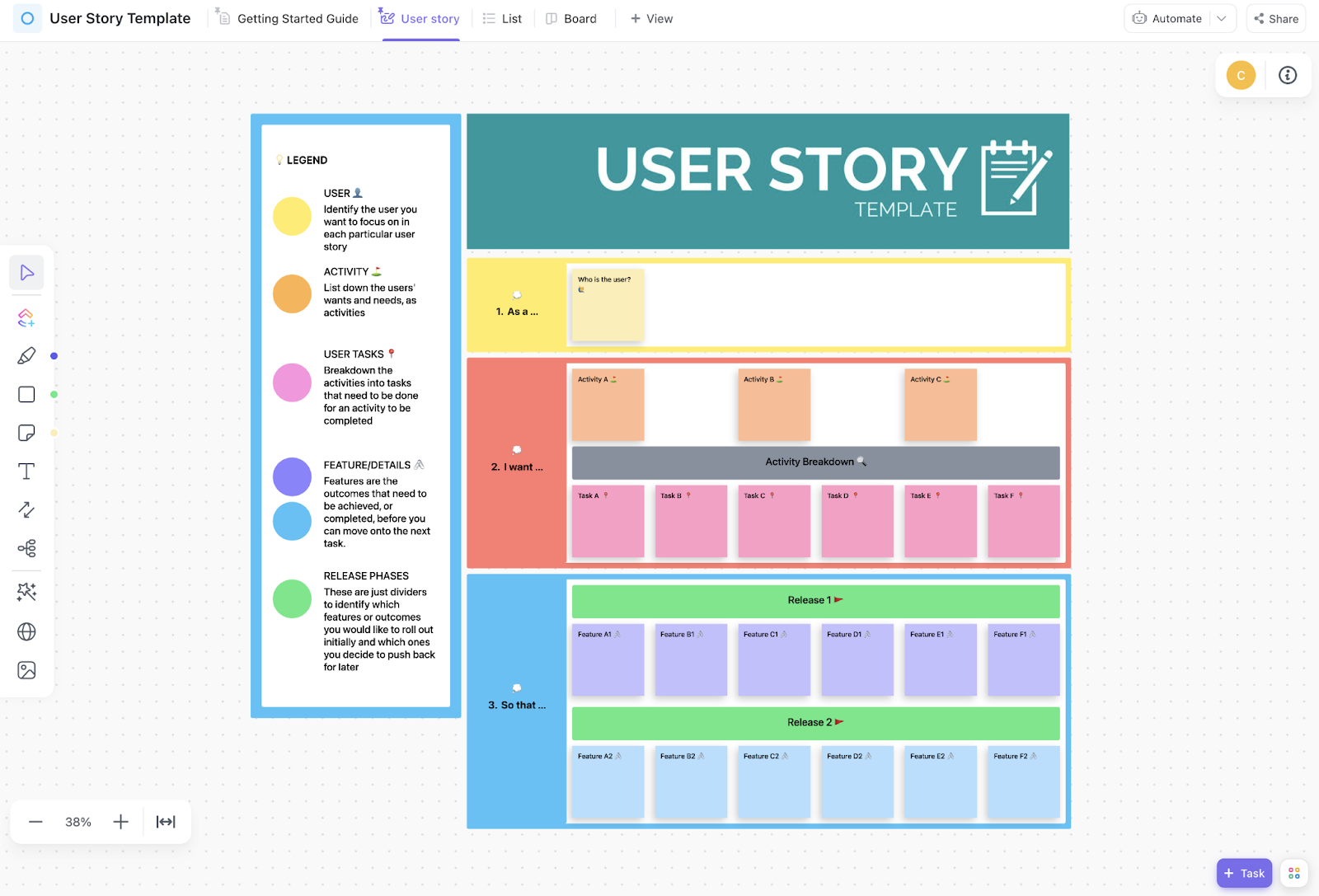
The ClickUp User Story Template is a powerful tool for directly connecting users’ activities with actionable tasks relevant to specific features. It’s a reliable partner in any development stage, helping you sketch out evolving user personas across interlinked phases of product release. ?
This Whiteboard template is all about developing, updating, and tracking user stories for Agile and Scrum teams. It lets you:
- Capture multiple user stories within a consistent layout, such as: As a [user], I want [goal] so that [reason]
- Prioritize which stories should be addressed
- Create tasks and nested subtasks and track their progress
- Review whether the changes and additions resolve identified frustrations
The template is equipped to handle several user profiles simultaneously, and managing them all is super sorted. Like other ClickUp templates, you can add Custom Fields to add context to individual feature requests. Use Custom Statuses to keep an eye on WIPs.
You have 15+ views to monitor the template. For example, try the Workload View to ensure the user stories are evenly distributed among teammates. Use the Calendar View to prepare the updates before the next release phase.
6. ClickUp User Studies Template
Launched a new product, app, or website? That’s quite a feat, but as cliché as it sounds, your job doesn’t end there.
User personalities are fluid, so prepare to be flooded with users’ changing requirements, routines, wishes, and objectives. Luckily, ClickUp’s User Studies Template helps you promptly respond to these shifts! ?
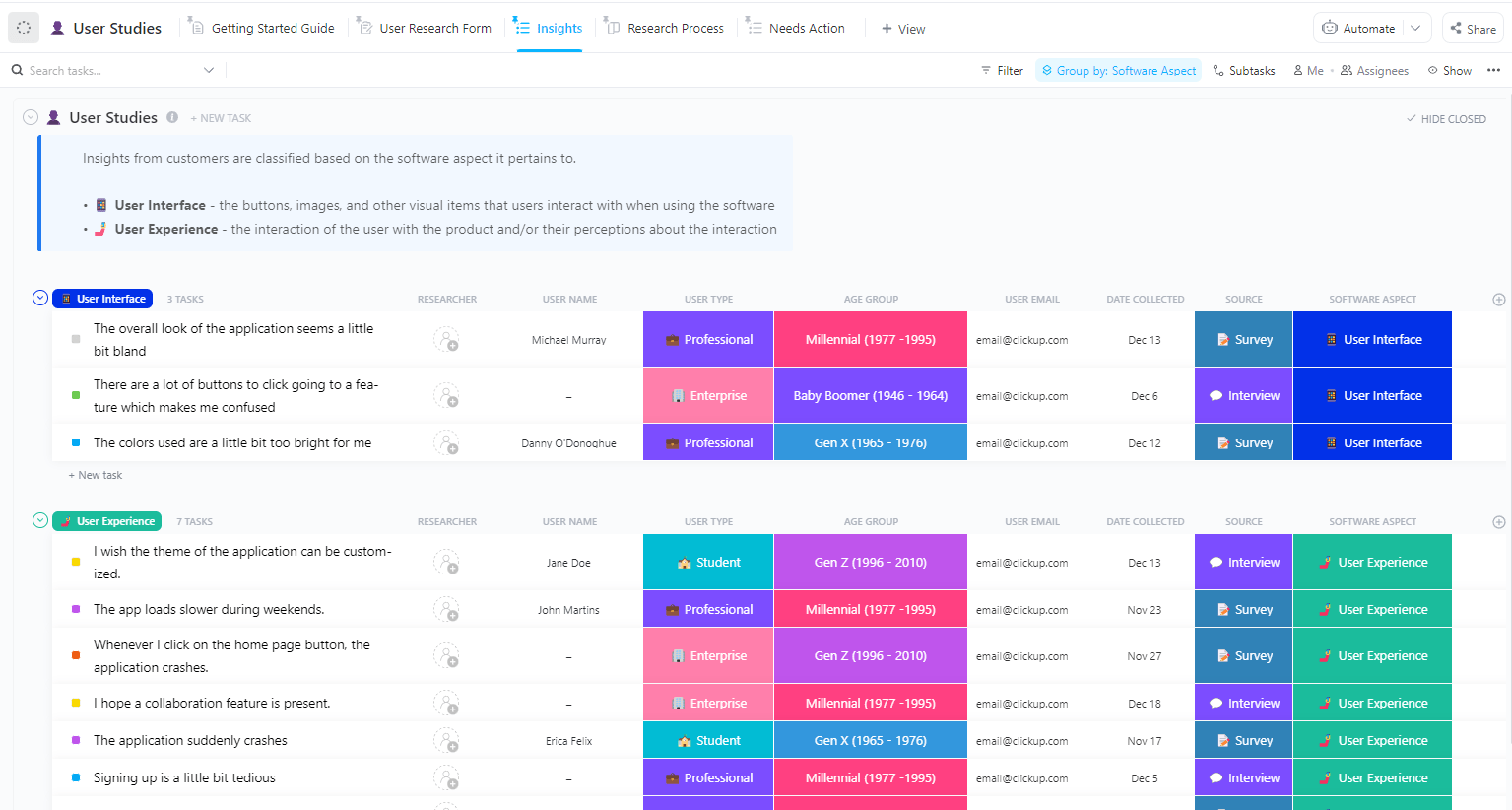
Think of this template as a portal for shifting from one persona to another. You have 10+ Custom Fields to define the updated target profiles. Gather data for specific feature aspects and determine what areas require further research.
But how to collect that data? Relax! The template comes with feedback forms you can send to existing customers. The gathered information will be the core of your efforts to quantify user impressions—access them through the Insights, Research Process, and Needs Action views.
The template is comprehensive enough to analyze the validity of the proposed changes. Use statuses like Discarded, Recommendation, and Analysis to facilitate tasks for the next Sprint. ?
7. ClickUp Voice of the Customer Template
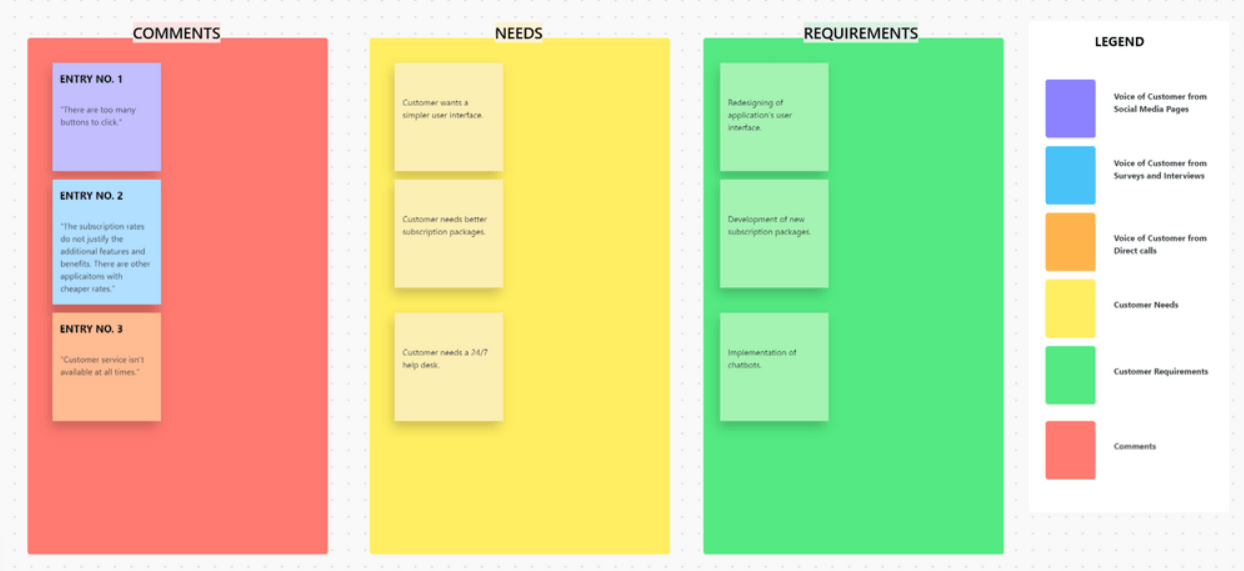
The ClickUp Voice of the Customer Template is a no-frills user persona template that centralizes customer data collected from three sources:
- Social media pages
- Surveys and interviews
- Direct customer support calls
The template presents the collected info in browsable, color-coded sections. Each section has cards specifying particular aspects of the “customer voice.” ?️
Once you have the complete picture of the user persona, proceed to the next section of the template, which deals with:
- Comments: Captures key or common feedback points. For example, a bunch of customers posted on social media that they were unhappy with the product’s pricing plans. To acknowledge, you’ll add an entry labeled “Pricing dissatisfaction”
- Needs: Outlines user needs sensibly derived from the comments. Considering our example from above, you can add “Reconsider subscription packages” here
- Requirements: Converts the needs into actionable tasks. Following the same case, you can put “Creating more pricing plans” here and give your team concrete tasks to focus on
The template’s decluttered look is ideal for peeps who tend to freak out at the sight of complex network diagrams. ?
8. ClickUp Voice of the Customer Journey Template

The ClickUp Voice of the Customer Journey Template is much like the previous option on our list but in a practical format more in tune with operational product management. This template is all about getting stuff done. ✔️
It lets you assemble feedback from different VoC (Voice of Customer) categories, including surveys, recorded calls, online behavior, and social media. ?
Its main strength lies in creating process-specific solutions. Use a card to add summaries of the issues bothering your users, interpret them with your team, and note resolutions right below the problems. Assign tasks and subtasks to implement the solution.
You essentially outline a VoC source, the problem, and the solution—that’s it. This makes the template ideal for addressing product defects and drawbacks under strict deadlines and keeping your customer relationships on track. ?️
Being an operational-level template, it offers a clarity-focused List and Board views to interpret the collected data.
9. ClickUp Customer Journey Map Template
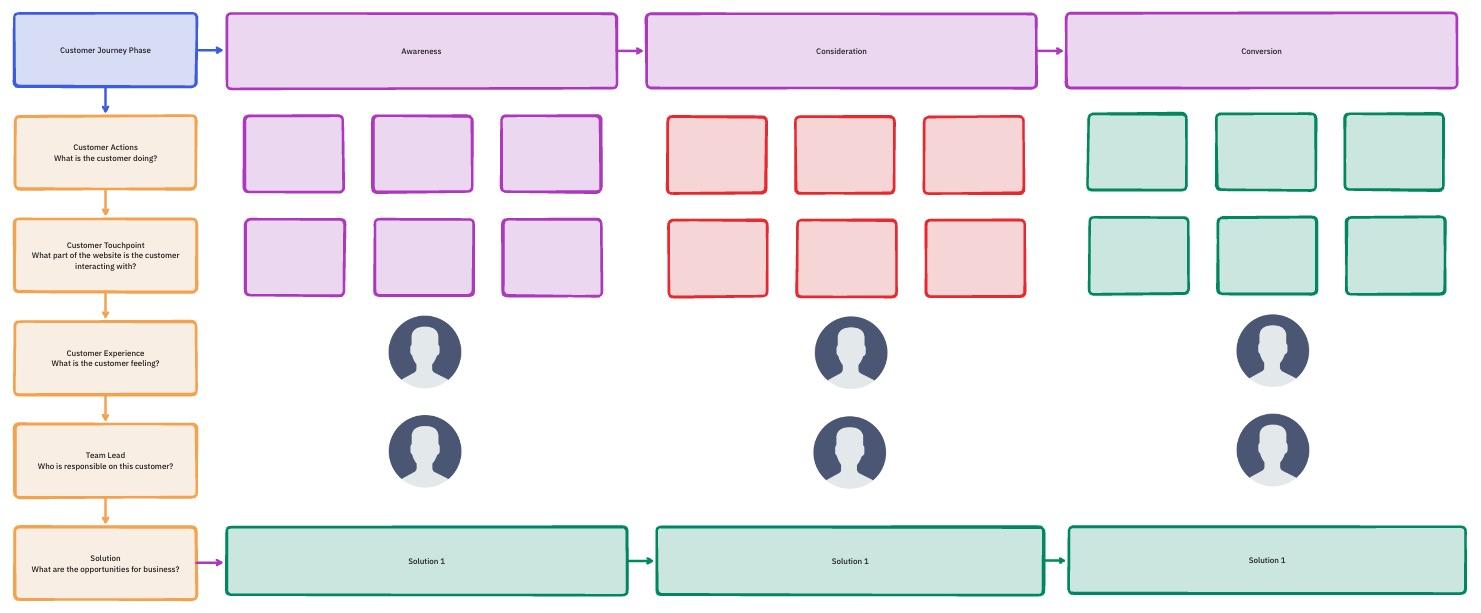
Need to visualize customer journeys and get more lead conversions? You’ll be impressed with what the ClickUp Customer Journey Map Template can do! ?
The template helps you spread out an extensive customer journey, marking the direct and indirect interactions leads have with your product or company. Record and analyze customer touchpoints, experiences, and friction points.
Once you’ve mapped out the journey, build solutions for the following three stages:
- Awareness: Specify actions to increase the visibility of your product. For instance, using an ad service or social media influencer
- Consideration: Strategize ways to increase user engagement and spot growth opportunities for conversion
- Conversion: Identify the driving force behind a user’s loyalty (or the lack of it) and get them to purchase what you’re offering
You can assign team members to oversee each stage and establish accountability throughout the customer’s journey. Use the Gantt chart View to track the progress in a timeline format.
This is another Whiteboard template, giving you access to ClickUp features like screen recording, automations, AI writing assistant, and collaborative editing as you establish user personas on the go!
Summarize this article for me pleaseHumans Are Complex, and So Are User Personas!
Many products fail to take off because they’re based on self-referential designs with little regard for the intended user. Relying on well-researched user personas is the only battle-tested way to create products for the sake of buyers. ?
While deciphering customer personas is a tricky job, our templates serve as strong launchpads to propel you forward. Try one today and start connecting with your target market right away! ?

Everything you need to stay organized and get work done.
