


Managing a team’s tasks, deadlines, and projects can be challenging. The more complex the project, the more difficult scheduling becomes.
But don’t worry! Task scheduling software is here to help automate common repetitive tasks, introduce process efficiencies, schedule jobs, improve team efficiency, and make sure you never miss a deadline.
10 Best Task Scheduling Software for Task Managers in 2024

 Summarize this article for me please
What Should You Look for in Task Scheduling Software?
In task scheduling software, search for functionalities that work best for your workflow. You need a tool to be customizable, so it doesn’t limit its capabilities to just one team. Choose a tool that can be used by marketing, sales, and software teams for scheduling tasks.
Here are some of the best features to look for in your task and workload automation software:
- Task creation and assignment: Is it easy to quickly schedule multiple tasks and assign them? Automation features are crucial for task scheduling to cut the busy and manual work
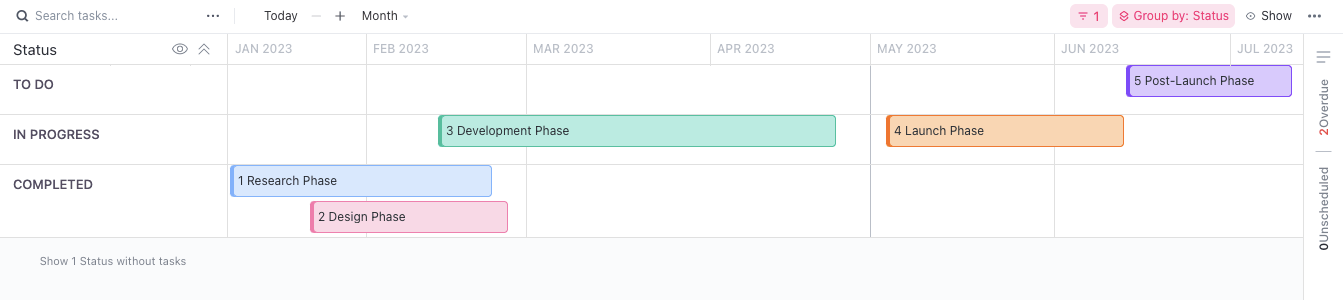
- Visual project timelines: Can teams understand their priorities and dependencies at a glance? You need visual scheduling software that gives everyone the 10,000-foot view
- Task prioritization: What task needs to be addressed first? Prioritization features are crucial to successful workload automation so you prevent over- or under-working your team
- Robust reporting: How do you analyze it all? The best task and job scheduler tools give you everything in a detailed report with simple breakdowns
- Team collaboration capabilities: Can anyone schedule tasks and will everyone be alerted? The best scheduling software keeps teams in communication and out of the email blackholes
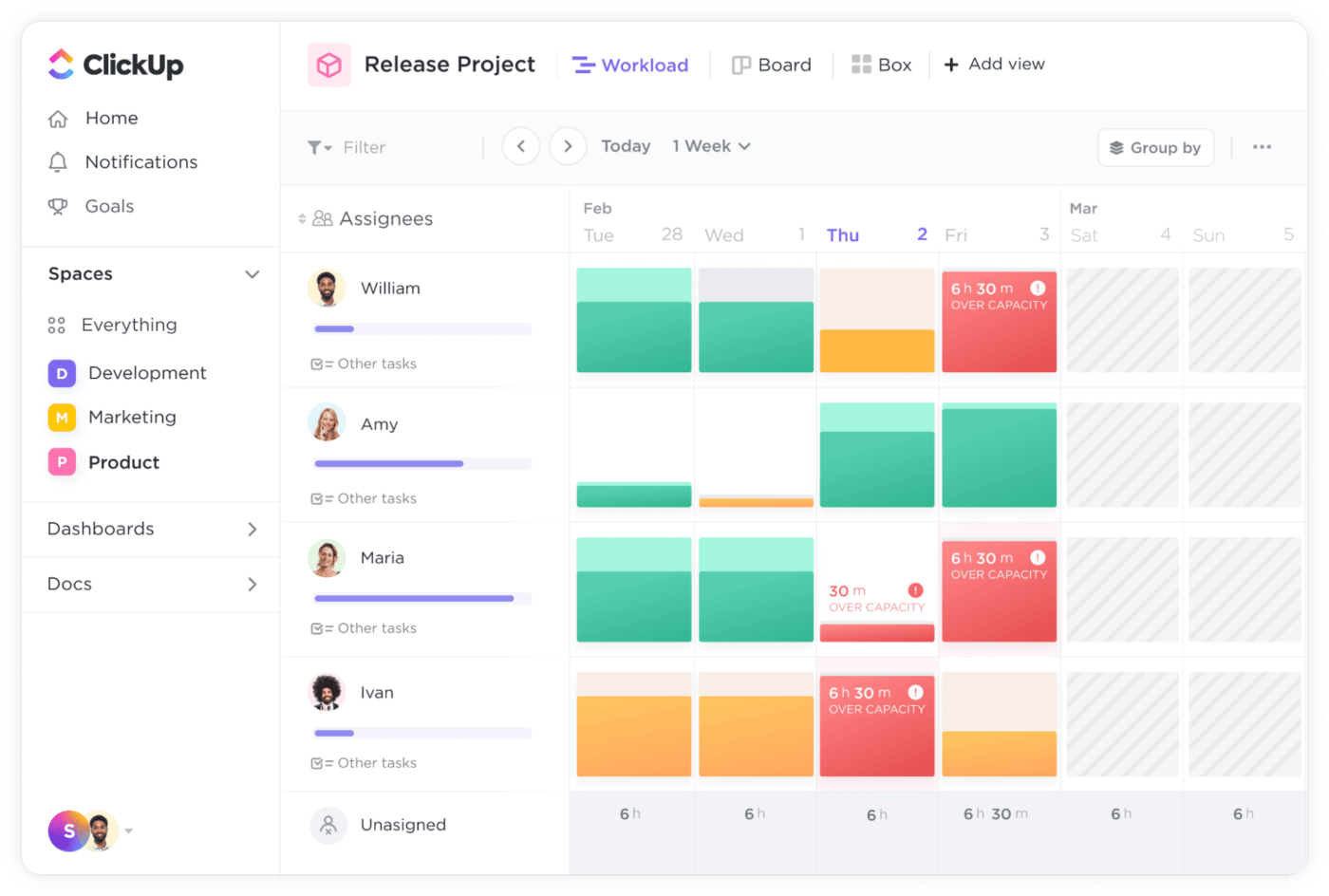
- Real-time job scheduling: Does your job scheduler have drag-and-drop capabilities to quickly change and update workloads? Real-time job schedulers use workload automation to correctly assign quick or last-minute changes with error-handling capabilities to avoid unrealistic schedules
Also, pay attention to the importance of an easy-to-use interface, scalable features, and seamless integration capabilities in an advanced task scheduler. After all, the tool should fit your team like a glove, not vice versa.
Summarize this article for me pleaseThe 10 Best Task Scheduling Software to Use
1. ClickUp
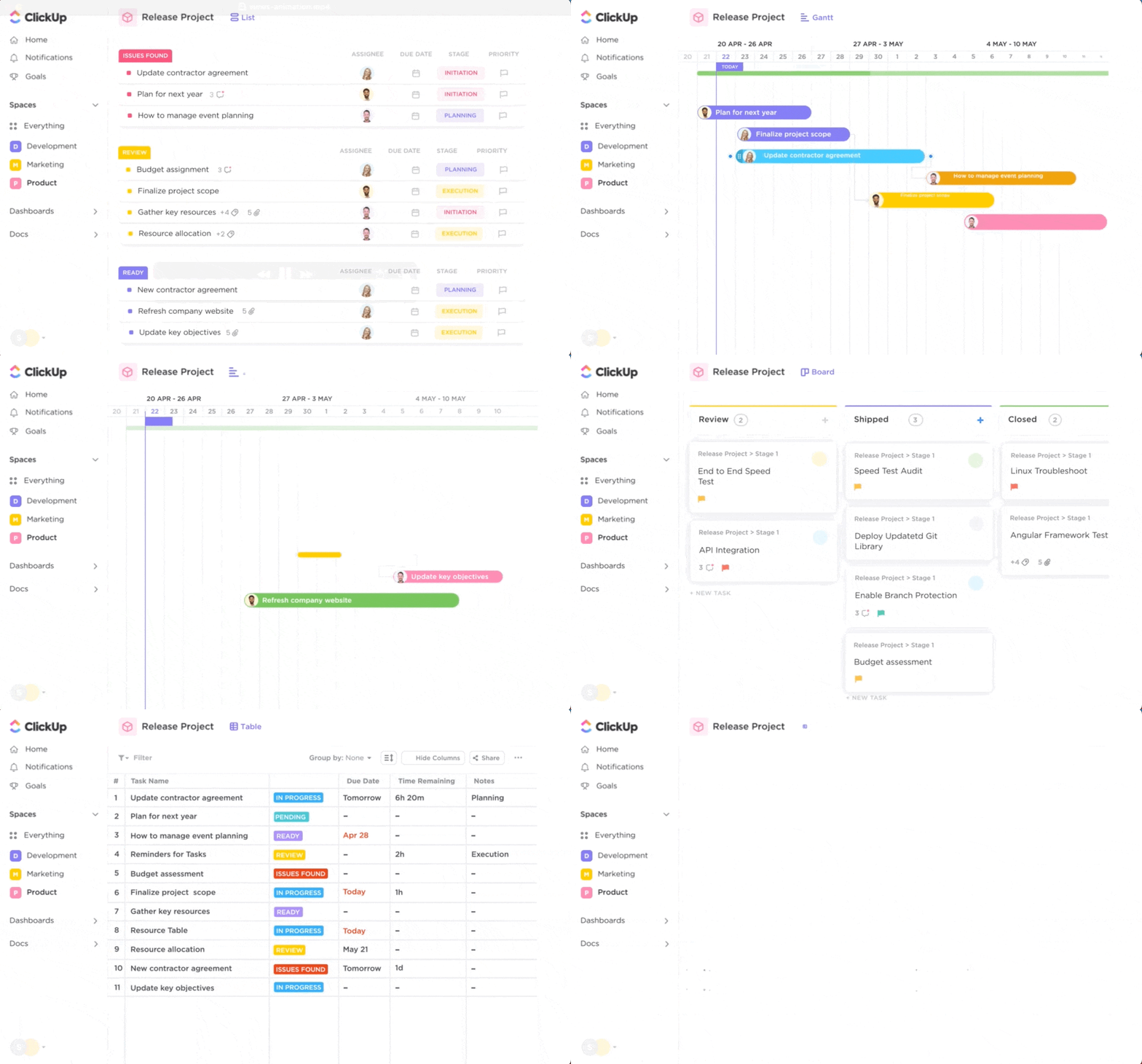
With ClickUp, task management has never been easier because it has all the features you could need as an advanced task scheduler professional.
Designed to streamline your workflow, ClickUp is an advanced tool to schedule tasks with impressive features for task creation, assignment, and prioritization.
The platform’s intuitive task scheduler ensures you’re always on top of your project schedule without the hassle of context-switching. With ClickUp, managing a complex project becomes as straightforward as managing your daily to-do list.
In addition, ClickUp offers tons of business management and task management templates, a robust resource to enhance your team’s productivity despite complex schedules. And with the ClickUp Calendar View, you can visualize your schedule, tasks, and deadlines, enabling you to better prioritize your work and avoid last-minute rushes.
ClickUp best features
- ClickUp Tasks in a list, board, box, calendar, and Gantt chart view, depending on your working style
- Project managers rejoice—ClickUp is robust enough to serve as your entire team’s central coordination point
- Built-in time tracking is perfect for tracking productivity and to see if tasks are completed within the estimated time
- Seamlessly integrate with many other tools, so you can keep all your work in one place.
- AI learns your common repetitive tasks and builds those tasks and subtasks for you
- Keep track of specific discussions or feedback related to tasks with assigned comments so no critical information is lost
- Task templates make scheduling activities simple compared to other productivity apps
ClickUp limitations
- The vast range of features might initially overwhelm some users
- Occasional delays in real-time synchronization on mobile devices
- Customization of notifications for individual projects can be a bit complex
ClickUp pricing
- Free Forever
- Unlimited: $5/month per user
- Business: $12/month per user
- Business Plus: $19/month per user
- Enterprise: Contact for pricing
ClickUp ratings and reviews
- G2: 4.7/5 (2,000+ reviews)
- Capterra: 4.7/5 (2,000+ reviews)
2. Hitask
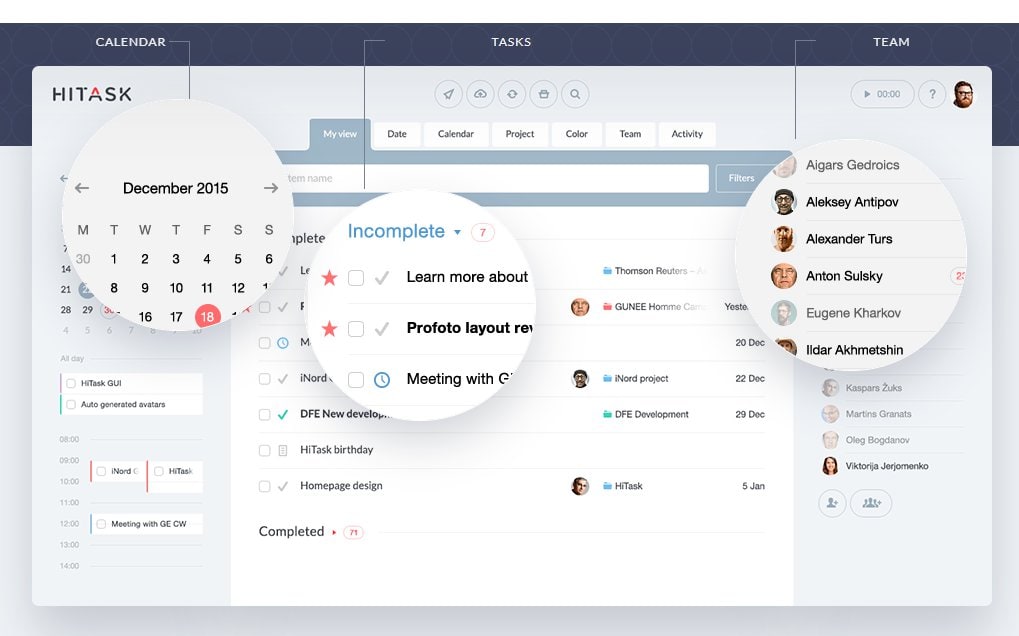
Hitask offers simple task scheduler features in an easy-to-use package. It seamlessly facilitates collaboration, making sophisticated job scheduling and team progress tracking feel like a breeze.
The tool’s mobile app is robust and user-friendly, so you can create tasks on the go. And no matter where you are in the world, Hitask has got you covered with multilingual support.
In addition to basic task management software features, Hitask offers color-coded tasks and Google Calendar Sync, making it a visually appealing and practical choice to manage tasks. Its in-app file sharing and team chat functions promote effective communication, making it easier than ever to get quick feedback from your team.
Hitask best features
- Shared task and project management makes it easy to delegate work and keep everyone in the loop
- Color-coded tasks not only bring aesthetic appeal but also make sorting and prioritization a visual treat for workload automation
- In-app file sharing and team chat functions promote effective communication and quick feedback
- Google Calendar Sync keeps your tasks and deadlines aligned with your existing schedule
- Multilingual support broadens accessibility for international teams
Hitask limitations
- Limited integration options can limit seamless workflow with other tools
- The interface, though user-friendly, may seem outdated to some
Hitask pricing:
- Free
- Business: $5/month per user
- Enterprise: $20/month per user
Hitask ratings and reviews:
- G2: 4.4/5 (90+ reviews)
- Capterra: 4.0/5 (40+ reviews)
3. Hub Planner

Hub Planner specializes in resource scheduling and time tracking.
As a project manager, you’ll find it easy to monitor who’s doing what, when, and for how long with this advanced task scheduler.
Beyond its impressive project scheduling software capabilities, Hub Planner takes a deep dive into analytics, providing you with insights that can help optimize your resource management.
With its timesheet feature, it simplifies time tracking and reporting.
To top it all off, Hub Planner is customizable, meaning you can tailor it to fit the exact needs of your project or team.
Hub Planner best features
- Easily allocate and manage resources, making optimal use of your team’s time and skills
- Gathers and presents data on your resource allocation, providing insights for improved efficiency
- Simplifies time tracking and reporting, keeping your project schedule on track
- The customizable interface allows you to tailor the tool to fit the exact needs of your project or team
Hub Planner limitations
- Steeper learning curve for new users compared to other productivity apps
- Could use more integrations with popular tools
- User interface could be more intuitive
Hub Planner pricing
- Pro: $7/month per user
- Business: $25/month per user
- Enterprise: Contact Hub Planner for pricing
Hub Planner ratings and reviews
- G2: 4.0/5 (100+ reviews)
- Capterra: 4.2/5 (60+ reviews)
4. nTask
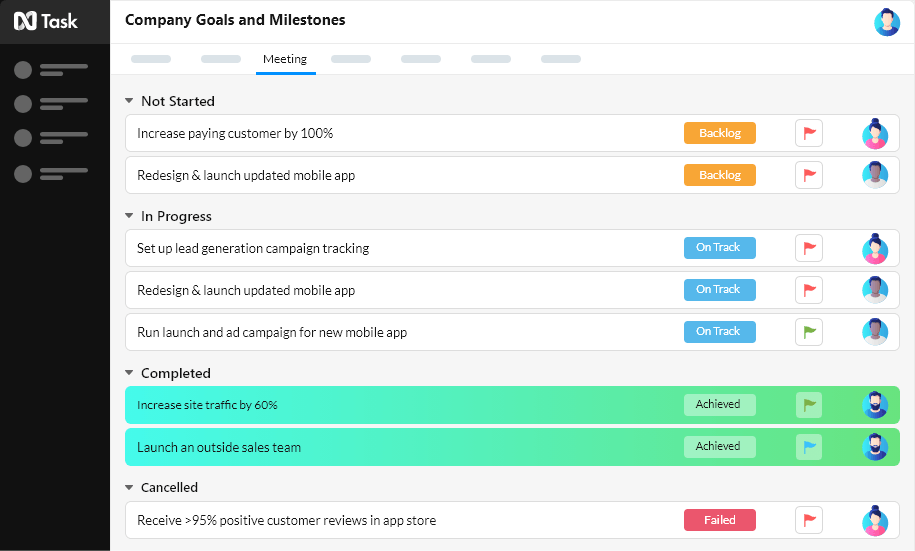
nTask is more than just task scheduling software. It’s a comprehensive project management solution that ensures you have everything you need to see a project from inception to completion.
While it’s equipped with an impressive array of features, it remains user-friendly and easy to navigate, ensuring you’re always on top of your tasks.
nTask brings team members together by offering collaborative tools that facilitate effective teamwork. It also helps you keep an eye on the bigger picture with Gantt charts and project timelines.
Risk and issue tracking are also part of the package, making sure you’re always prepared to deal with unexpected hurdles.
nTask best features
- Despite being feature-rich, it’s easy to navigate, making task management hassle-free
- Bring team members together and streamline communication
- Use risk and issue tracking to stay prepared and ready to deal with any unexpected hurdles in your project
nTask limitations
- While nTask provides a comprehensive suite of project management tools, it can be overwhelming for first-time users due to its steep learning curve
- Its mobile app is a bit lacking in terms of functionality when compared to its web version
- Some users have also mentioned the absence of more robust file storage and sharing capabilities
nTask pricing
- Premium: $3/month per user
- Business: $8/month per user
- Enterprise: Contact nTask for details
nTask ratings and reviews
- G2: 4.4/5 (10+ reviews)
- Capterra: 4.2/5 (100+ reviews)
5. Quire
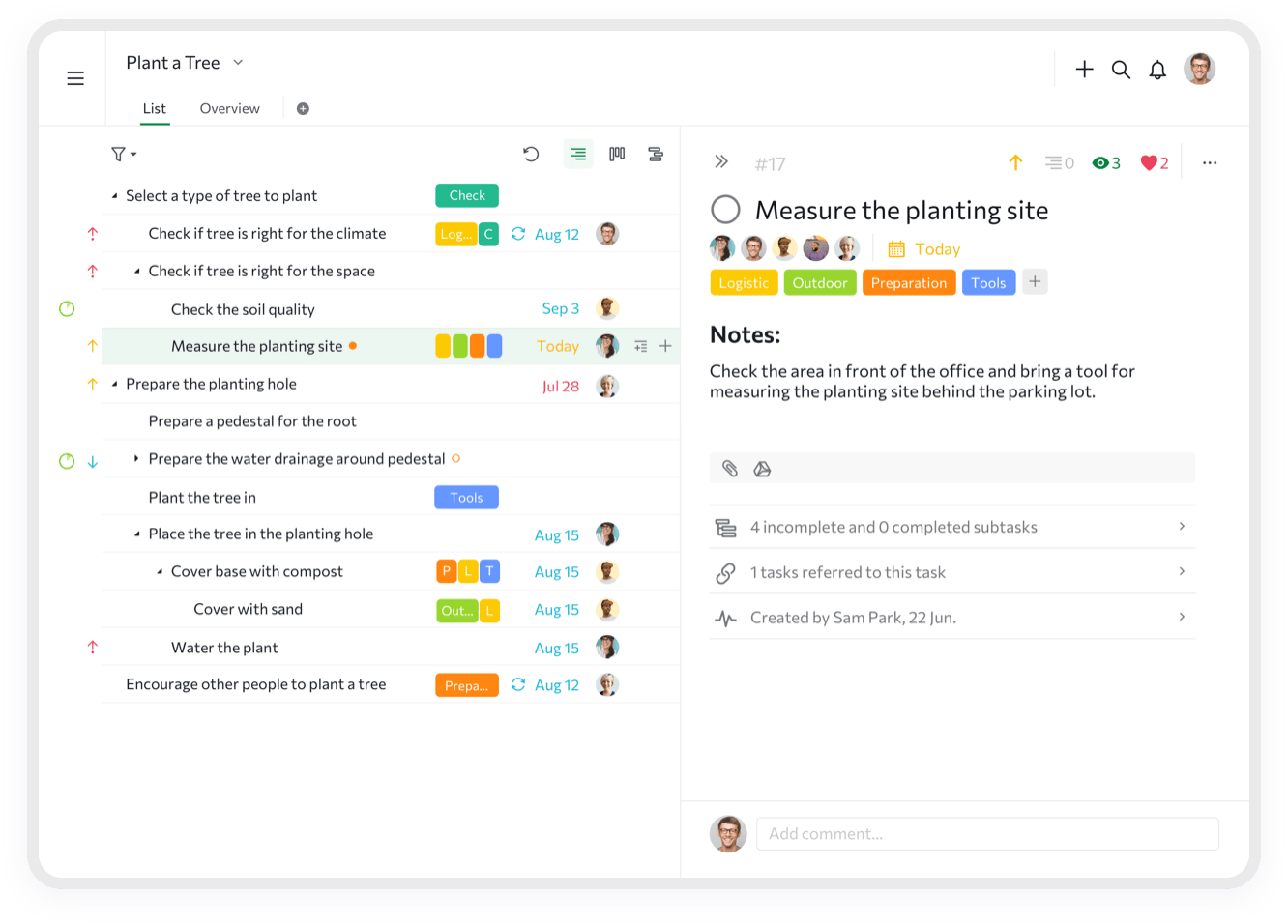
If you prefer a clean and uncluttered workspace, Quire has got you covered. It offers a visually appealing, tree-structured view of tasks, making it easy to break down big projects into manageable tasks and subtasks.
In Quire, you have a platform that encourages focused work, free from unnecessary distractions. It also caters to those who enjoy visual planning, with Kanban boards to manage your tasks visually.
For those who are always on the go, Quire’s powerful mobile apps ensure you can manage your tasks no matter where you are.
And with built-in collaboration features, team communication, and coordination are made easy.
Quire best features
- Break down complex projects into manageable tasks and subtasks with Quire’s tree-structured view
- Kanban boards offer a visual way to track tasks and manage workflow
- Be more productive and manage tasks from anywhere thanks to a powerful mobile app
- Facilitate team communication and coordination, promoting a cohesive work environment
Quire limitations
- Quire’s minimalist design, while appealing to some, might lack advanced features for more complex project management needs
- No built-in time-tracking feature, which may be inconvenient for teams needing to monitor task duration for critical jobs
- Users have mentioned the need for more integrations with other commonly used tools
Quire pricing
- Free
- Professional: $7.65/month per user
- Premium: $13.95/month per user
- Enterprise: $19.95/month per user
Quire ratings and reviews
- G2: 4.6/5 (60+ reviews)
- Capterra: 4.7/5 (100+ reviews)
6. Clockify

For teams that want to dive into the nitty-gritty of task management, Clockify is the tool of choice. It offers in-depth time tracking, enabling you to see exactly how much time is spent on each task.
Clockify doesn’t stop at just task scheduling and time tracking. It also provides detailed reports, giving you insights into team productivity.
You can also add time estimates to tasks, compare them with actual time spent, and identify discrepancies.
With Clockify, you have a solution that ensures every minute counts.
Clockify best features
- See exactly how much time is spent on each task, fostering transparency and accountability
- Gain insights into team productivity, helping identify areas for improvement
- Identify discrepancies between estimated and actual task completion time
Clockify limitations
- Clockify focuses heavily on time tracking and might fall short for those seeking extensive project management features
- While it offers numerous integrations, they may require a learning curve to set up and use effectively
- Users have also mentioned occasional glitches with the desktop app
Clockify pricing
- Free
- Basic: $3.99/month per user
- Standard: $5.49/month per user
- Pro: $7.99/month per user
- Enterprise: $11.99/month per user
Clockify ratings and reviews
- G2: 4.5/5 (100+ reviews)
- Capterra: 4.7/5 (4,000+reviews)
7. Things
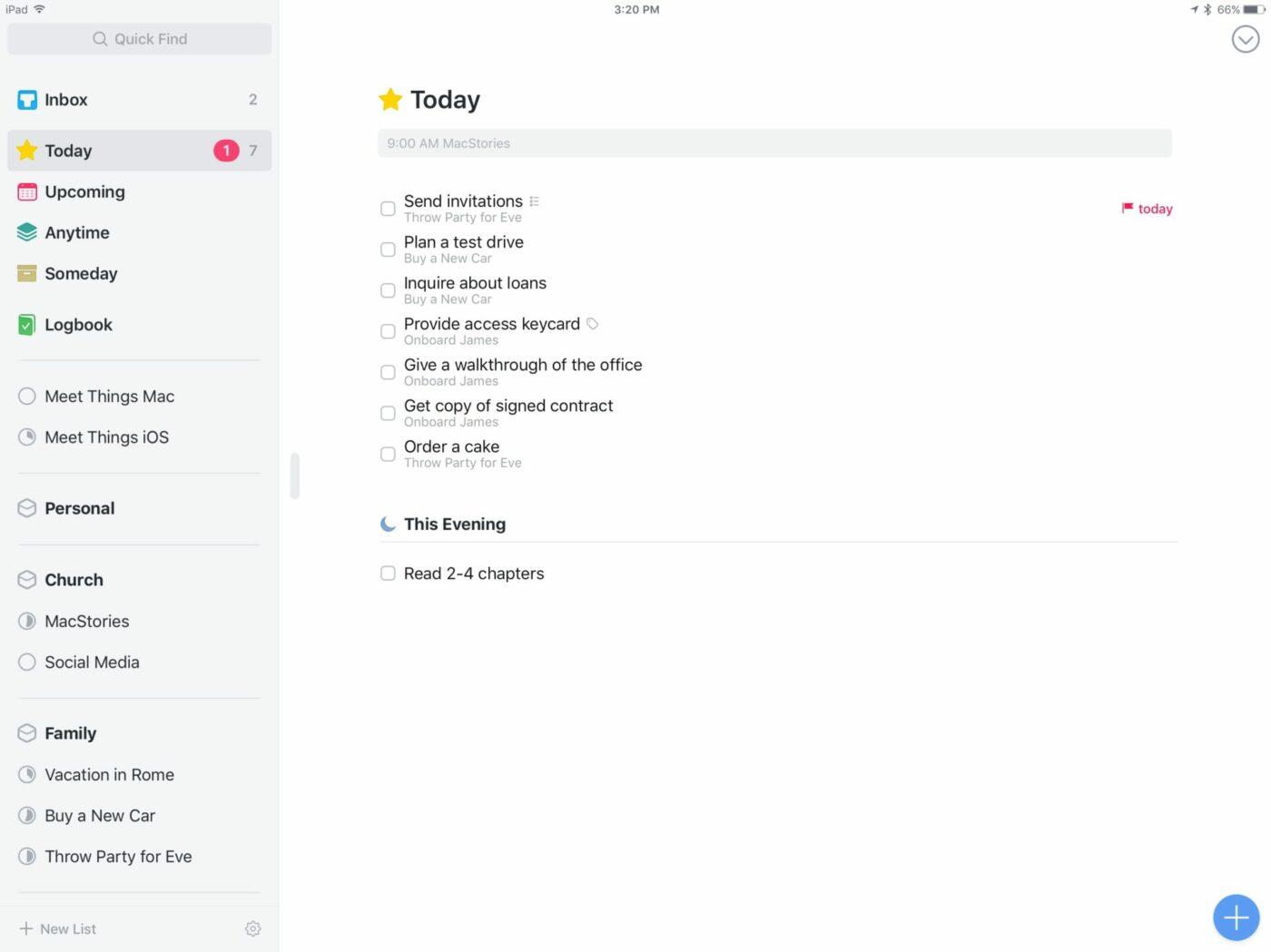
Things isn’t just another task scheduling software; it’s a productivity companion.
Built with a beautiful, clutter-free interface, it’s a delight for managing tasks. Whether you’re organizing your daily tasks, planning a project, or even outlining your future goals, Things provides the tools to do it easily.
The tool’s magic lies in its simplicity, yet its power to manage complex projects is impressive. With key features like Quick Find, task tracking is effortless.
Its integration with Calendar and Reminders ensures that you never miss a deadline. Its natural language parsing makes creating advanced tasks as easy as writing a sentence.
Things best features
- Prioritizes usability and aesthetics, making task management a delight
- Navigate your routine tasks swiftly and effortlessly.
- Stay on top of deadlines and never miss a task with calendar and reminder integrations
- Creating tasks is as easy as writing a sentence, promoting usability
Things limitations
- Things is a macOS and iOS exclusive, which limits convenient and quick access for users on other platforms
- It also lacks key features for collaboration, which can be a drawback for project managers trying to automate tedious tasks
- No built-in calendar view
Things pricing
The app costs $9.99.
Things ratings and reviews
- G2: 4.3/5 (19 reviews)
- Capterra: 4.9/5 (106 reviews)
8. Microsoft To Do
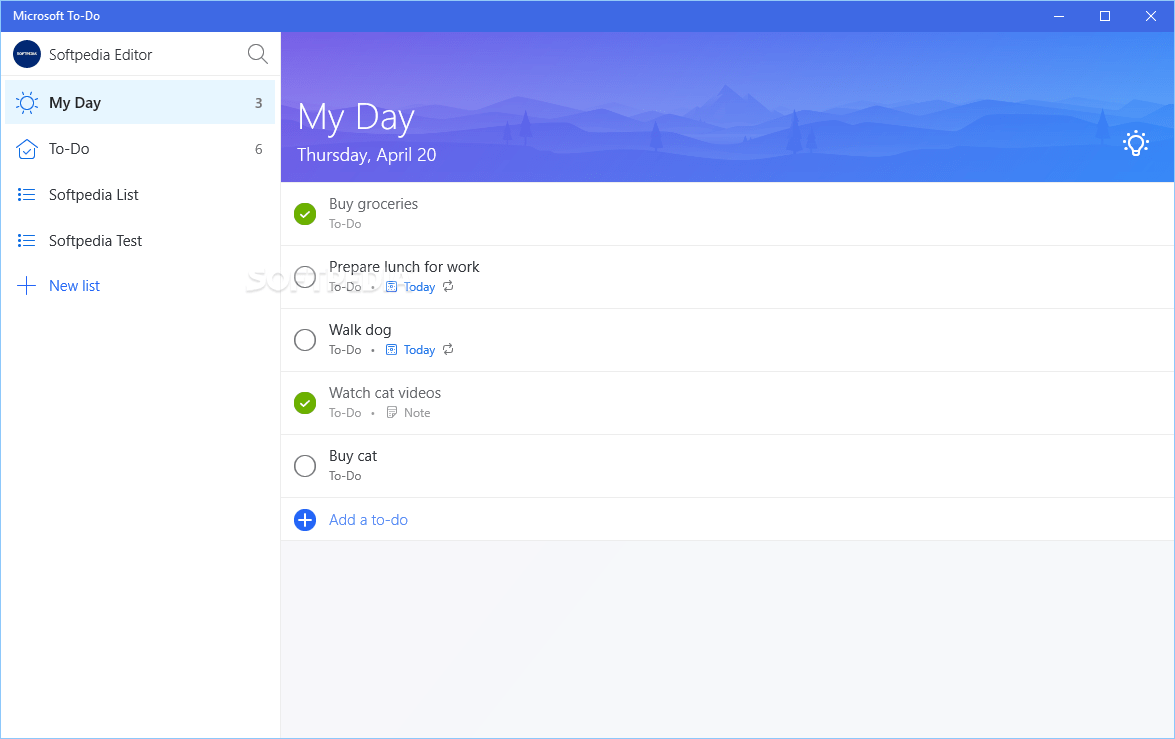
Microsoft To Do is a perfect blend of simplicity and power. This Windows task scheduler has been designed to help you organize your tasks and to-dos straightforwardly and effectively.
To Do provides an intuitive way to list your tasks and mark them as they’re completed, and it seamlessly integrates with the rest of the Microsoft system center, creating a smooth workflow. This Windows scheduling tool has a smart daily planner that provides an intelligent and personalized list of daily tasks.
In addition, you can create shared lists for collaborative tasks, making it easy to coordinate with others.
And for those with a lot on their plate, Microsoft To-Do’s reminders and due dates make sure everything runs smoothly.
Microsoft To Do best features
- Sync your tasks across Microsoft’s suite of tools, creating a smooth workflow between your Windows task scheduler software and the rest of your digital toolkit
- Provides an intelligent and personalized list of tasks for the day
- Coordinate with others and keep everyone on the same page
Microsoft To Do limitations
- Limited features for complex project management
- No option for task dependencies compared to advanced task schedulers
- Unlike some enterprise job schedulers, this tool may not be robust enough for larger teams
Microsoft To Do pricing
- Free
Microsoft To Do ratings and reviews
- G2: 4.4/5 (50+ reviews)
- Capterra: 4.6/5 (2700+ reviews)
9. TimeHero

TimeHero is on a mission to make task scheduling automatic. It uses smart algorithms to plan your tasks around your calendar events, so you make the most of your day.
With TimeHero, you don’t have to worry about manually scheduling tasks; just input what needs to be done and let the job scheduling software handle the rest. Its project templates save you the hassle of setting up similar projects from scratch.
Its forecast technology also alerts you of missed deadlines, allowing you to adjust your task scheduler accordingly.
Its integrations with popular tools make TimeHero a great addition to your existing productivity suite.
TimeHero best features
- Uses smart algorithms to plan your recurring tasks around your calendar events and automate processes
- Save time by not having to set up similar projects from scratch
- Reliable and actionable alerts remind you of potential missed deadlines, allowing you to adjust your schedule accordingly
TimeHero limitations
- The artificial intelligence system scheduler feature in TimeHero, while innovative, can sometimes create scheduling conflicts
- Its interface can be overwhelming for some users
- There’s a need for more customizable reporting features, according to user feedback
TimeHero pricing
- Basic: $4.60/month per user
- Professional: $10/month per user
- Premium: $22/month per user
TimeHero ratings and reviews
- G2: 4.6/5 (10+ reviews)
- Capterra: 4.7/5 (20+ reviews)
10. Infolio
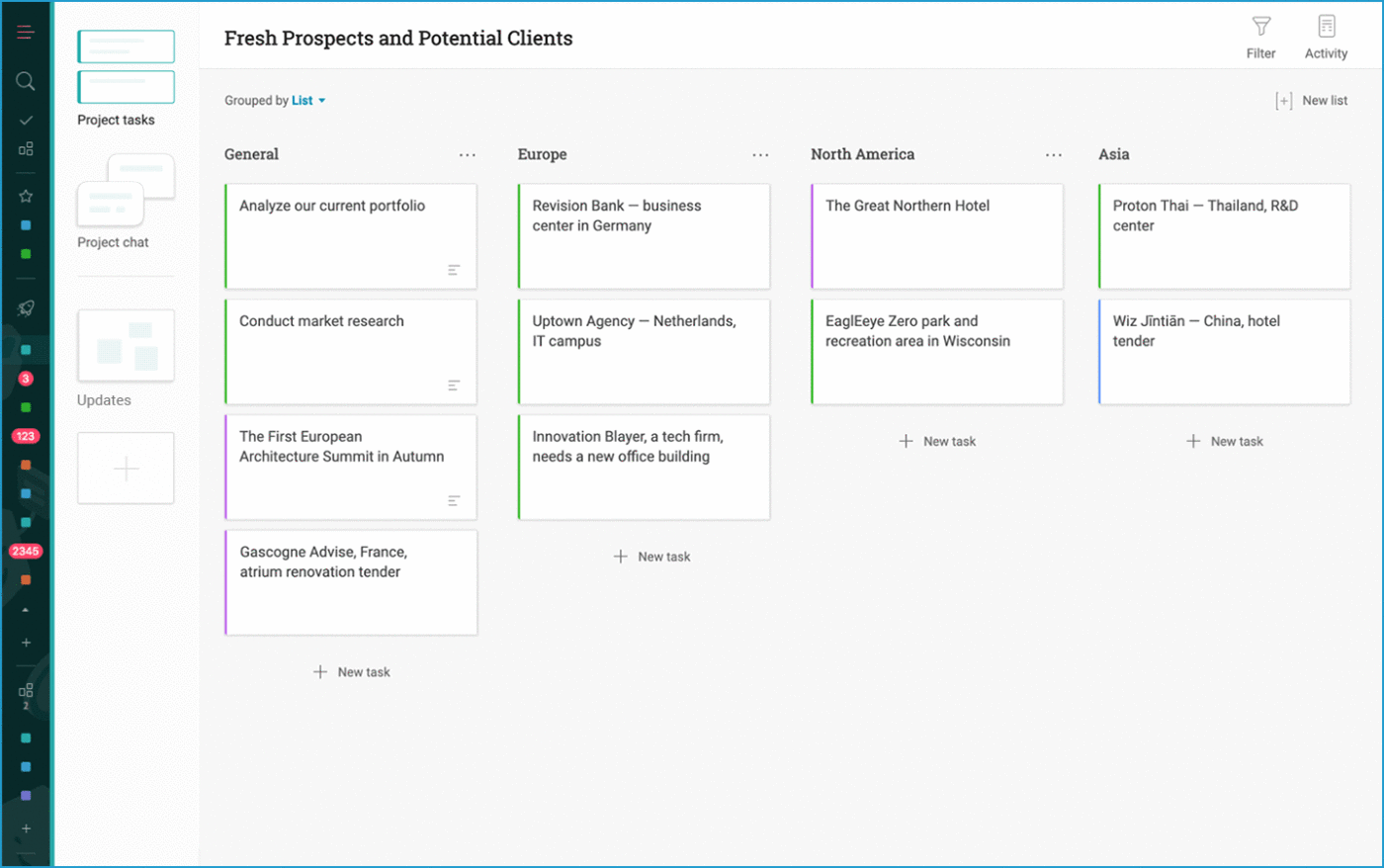
Infolio takes task scheduling further by transforming it into a comprehensive digital workspace.
With Infolio, you can manage complex tasks, collaborate on projects, hold discussions, and even create stunning visual presentations—all in one place. This holistic approach to task management makes it an ideal choice for teams looking for a unified platform to house their project information.
Its digital whiteboards are perfect for brainstorming sessions or visually plotting ideas. Meanwhile, the ability to create visual project presentations makes it a breeze to share your project progress with stakeholders.
Infolio is more than a task scheduling tool; it’s a complete project command center.
Infolio best features
- Comprehensive task management with custom fields gives you flexibility in categorizing your scheduled tasks
- Team collaboration and chat functions support real-time communication and teamwork for enterprise job scheduling
- Project spaces offer a centralized location for all task scheduler information, promoting organization
- Digital whiteboards offer a platform for brainstorming and visually plotting ideas
- The ability to create visual project presentations can help when sharing progress or results with stakeholders
Infolio limitations
- Limited number of integrations may require additional manual work when used with other tools
- Could benefit from more task filtering options for better task organization
- Lack of a native time-tracking feature means you’ll need a separate tool for time management
Infolio pricing
- Standard: Free
- Professional: $4.99/month per user
Infolio ratings and reviews
- G2: 4.5/5 (15+ reviews)
- Capterra: 4.5/5 (20+ reviews)
Looking for more tools to manage sales? Check out our sales apps guide!
Summarize this article for me pleaseClickUp—The Best Scheduling Choice for Your Team
Choosing the best task-scheduling software is about finding the right blend of features and usability that suits your team’s needs. From the comprehensive task scheduler features of ClickUp to the user-friendly interface of Microsoft To-Do, your final choice depends on your unique requirements for your workload automation software.
Want to explore more? Check out ClickUp Task features and see how the Calendar View can become integral to your daily workflow. The goal isn’t just about automating complex tasks—it’s about making your work process more streamlined, efficient, and productive.
Discover how ClickUp can make a difference in your project management journey.


Everything you need to stay organized and get work done.

Recent Articles
7 Best Zoom Alternatives in 2026: Free Plans and Meeting Limits 
7 Best Zoom Alternatives in 2026: Free Plans and Meeting Limits
How to Create a Fillable Form in Microsoft Word (With Templates)
How to Create a Fillable Form in Microsoft Word (With Templates)
7 Best Perplexity AI Alternatives I Tested for Work in 2026 
7 Best Perplexity AI Alternatives I Tested for Work in 2026
