

Sorry, there were no results found for “”
Sorry, there were no results found for “”
Sorry, there were no results found for “”
You have it all—the best product, service, and talent. Yet, your business still struggles to deliver consistent results.
Chances are, your team spends more time on repetitive tasks than actual work: they copy-paste data across tools, chase updates in Slack, and manually prepare reports.
Worse, when they do get to work, it takes them hours to find the right file or info to move ahead!
Not with AI, though.
AI-powered workflows absorb operational load that slows your team down. They speed up both simple and multi-step tasks such as sending follow-ups, transcribing meetings, summarizing long documents, and assigning work to the right team member. 💪
Don’t believe it? Scroll down to learn everything about AI workflow automation—how it works, real benefits, practical use cases, best tools, and how to deploy it.
AI workflow automation is the use of artificial intelligence technologies to coordinate, streamline, and execute business processes without human intervention.
In practice, AI workflow automation can:
📌 Example: AI monitors incoming support tickets and analyzes the tone for urgency or frustration. Angry messages or technical bugs from VIP clients are immediately escalated to a senior manager’s Slack. Meanwhile, routine questions are handled by an AI agent or routed to available human agents.
So, what makes AI-powered automated tasks different from traditional automation? Here are six key differences:
| Traditional workflow automation | AI workflow automation |
| Follows fixed rules and steps that you define manually | Learns from data and adjusts its actions over time |
| Automates simple, repetitive, and predictable tasks | Handles simple + complex tasks with variations |
| Understands structured data (forms, fields, spreadsheets) | Understands both structured and unstructured data (emails, documents, chats, images) |
| Usually helps you with basic yes/no decision-making | Can analyze patterns, predict outcomes, and choose better next steps |
| Low flexibility; breaks easily when inputs are different | High flexibility; handles messy, real-world inputs |
| Requires manual oversight | Can detect anomalies and route or fix many issues automatically |
AI automation tools combine core technologies to handle different parts of a workflow, such as:
Together, these technologies make your workflows intelligent and adaptive.
📮 ClickUp Insight: 21% of people say more than 80% of their workday is spent on repetitive tasks. And another 20% say repetitive tasks consume at least 40% of their day. That’s nearly half of the workweek (41%) devoted to tasks that don’t require much strategic thinking or creativity (like follow-up emails 👀).
ClickUp AI Agents help eliminate this grind. Think task creation, reminders, updates, meeting notes, drafting emails, and even creating end-to-end workflows! All of that (and more) can be automated in a jiffy with ClickUp, your everything app for work.
💫 Real Results: Lulu Press saves 1 hour per day, per employee using ClickUp Automations—leading to a 12% increase in work efficiency.
🧠 Fun Fact: Developed in the late 1960s, Shakey was the first mobile robot with logical reasoning skills. While other machines needed step-by-step instructions, Shakey could be told “push the block” and figure out the path on its own. It got its name because it wobbled violently.
Every business, regardless of size, needs AI workflow automation. Whether you’re a team of 1, 10, or 100, the benefits are universal:
This video shows you how to save precious time with AI task automation:
📚 Read More: How to Use AI to Automate Tasks
Business workflows vary in complexity. Some tasks require high-speed data entry, while others require reasoning or forecasting.
Knowing the different types of AI workflow automation helps you choose the right tool for your business process automation (BPA) needs:
Intelligent process automation combines robotic process automation with machine learning.
You program the system to move from Step 1 to Step 2 to Step 3. While RPA bots follow this defined sequence and rules, AI handles the messy parts of data processing, such as reading and understanding an invoice or categorizing a support ticket correctly.
📌 Example: An insurance company uses IPA to process claims. RPA logs into an old desktop portal to pull data, while the AI system reads the attached medical bills to extract line items and verify them against the policy coverage before the RPA system issues a payment.
AI agentic workflow relies on autonomous AI agents that go beyond single tasks to plan, reason, and execute multi-step processes.
Instead of a rule or sequence, you give an AI agent a final goal to achieve and a set of tools to access. The agent then reasons through the task. It decides which tools to use, assesses the output of each step, and adjusts its plan if it hits an error or discovers new information.
📌 Example: A content marketing AI agent analyzes new blog topics, researches competitor data from external sources, generates content outlines, assigns tasks to team members based on availability, and monitors progress.
These workflows leverage predictive analytics to forecast outcomes and automatically adjust accordingly. This makes your workflow execution smarter, proactive, and adaptive.
📌 Example: A logistics firm uses predictive automation to monitor weather and traffic patterns. If the system forecasts a delay for a high-priority shipment, it automatically reroutes the driver and sends a real-time update to the customer with the new estimated arrival time, preventing a support ticket.
Generative AI workflow automation embeds large language models (LLMs) and other generative tools directly into workflows to create or transform content without any prompting.
📌 Example: After a webinar, a generative AI workflow takes the raw transcript and automatically creates a 500-word summary for the blog, drafts five personalized follow-up emails for attendees, and generates a list of FAQs based on the chat history.
⚡ Template Archive: Best Free Process Workflow Templates
Now, let’s look at five real-world workflow automation examples:
Applying for a loan is usually a nerve-wracking waiting game for the borrower. AI automation fixes this by taking over the verification process the second they hit submit. 💸
While the applicant is still on your site, the AI uses Optical Character Recognition (OCR) to scan their pay stubs. It then pulls their credit data to run the numbers against your lending rules.
If everything looks fine, the applicant gets an approval email instantly. If it’s a “maybe,” the system flags the specific risk—such as a debt spike—and alerts a loan officer.
This keeps the line moving and saves your team from drowning in basic math.
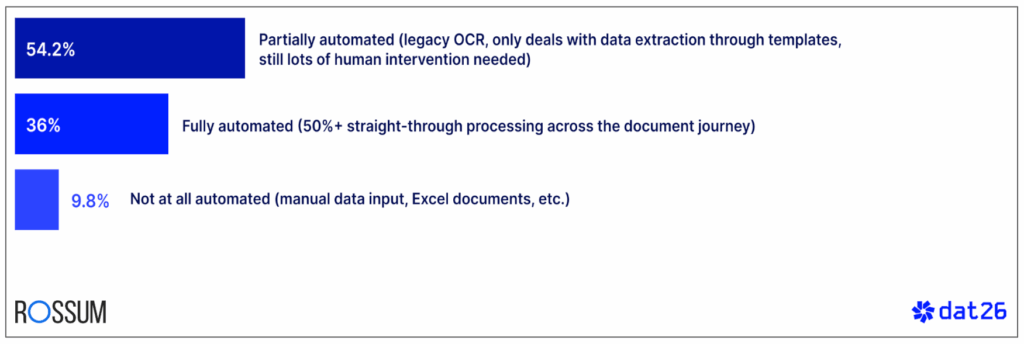
✅ Fact Check: 54.2% of finance leaders admit their processes are only partially automated. Most of these teams still rely on inconsistent legacy OCR tools that only convert images, documents, or templates to text.
AI-powered OCR tools, on the other hand, extract data, understand context, and even handle messy or handwritten notes!
Let’s say a prospect just downloaded your “Industry Trends” report. 📈
The second the file is downloaded, the AI scrapes the lead’s LinkedIn and company financial reports to see if they fit your target account list.
If they’re a high-value match, the AI drafts a personalized follow-up email mentioning a specific challenge their company is facing and alerts a sales rep. Otherwise, they stay in a low-touch nurture loop. ➰
This ensures your team spends its energy only on leads that are ready to convert.
✅ Fact Check: According to Bain & Company, sales teams that use AI to handle routine admin tasks see a 30% or higher increase in win rates. By automating the busy work that usually drains a salesperson’s schedule, teams can spend more time on direct customer engagement, which is the primary driver behind these higher conversion numbers.
Running out of a bestseller is a nightmare for any business. 📦
However, by deploying an AI solution with predictive analytics, you can monitor your sales velocity and real-time market trends to understand upcoming demand.
In fact, AI automatically calculates the required restock volume and places an order with your supplier to beat the rush.
No manual inventory checks. No stockouts or overstockings.
✅ Fact Check: McKinsey and Company reports that AI can reduce inventory levels by 20% to 30%. Machine learning and dynamic segmentation allow for more accurate demand forecasting than manual methods or traditional automation tools.
Meet Sarah, your new graphic designer intern.
Usually, Sarah’s first day would be a total waste of time spent waiting for logins and hardware. But the second she signed her offer, an AI workflow took over the logistical grind.
The system automatically created her HR profile, ordered her laptop, and generated login credentials for Figma and Adobe Creative Cloud accounts. It even added her to the right Slack channels and populated her calendar with intro meetings.
Instead of chasing IT for passwords or sitting around idle, Sarah can actually start her job and meet her team. 🥳
✅ Fact Check: Data from HBR shows that new hires who are satisfied with their onboarding experience after 90 days are twice as likely to remain with the company 1.5 years later. This highlights that the first three months are a critical window for securing long-term employee commitment.
Below, we walk you through six main steps of implementing AI workflow automation. By the end of this section, you’ll have a clear idea of exactly how to automate your business processes using AI.
⭐ Bonus: Stick around to see how ClickUp, the world’s first converged AI workspace, supports you at every stage. Whether it’s prepping for workflow automation or actually building one—ClickUp’s got your back.
Before selecting an AI workflow tool, pinpoint exactly which processes to automate. You need to choose a workflow that, once automated, will deliver measurable ROI, reclaim your team’s time, and remove operational friction.
To do so, first audit all business processes. Look for workflows that are repetitive, high-volume, and measurable. (If you can’t measure the results, you can’t prove the ROI.)
Evaluate each workflow using these criteria:
Prioritize high-impact, low-effort workflows to see wins and scale accordingly.
Auditing workflows feels like digging through a mountain of notes when you’re already stretched thin. Use ClickUp Docs to create a single source of truth for all your processes.
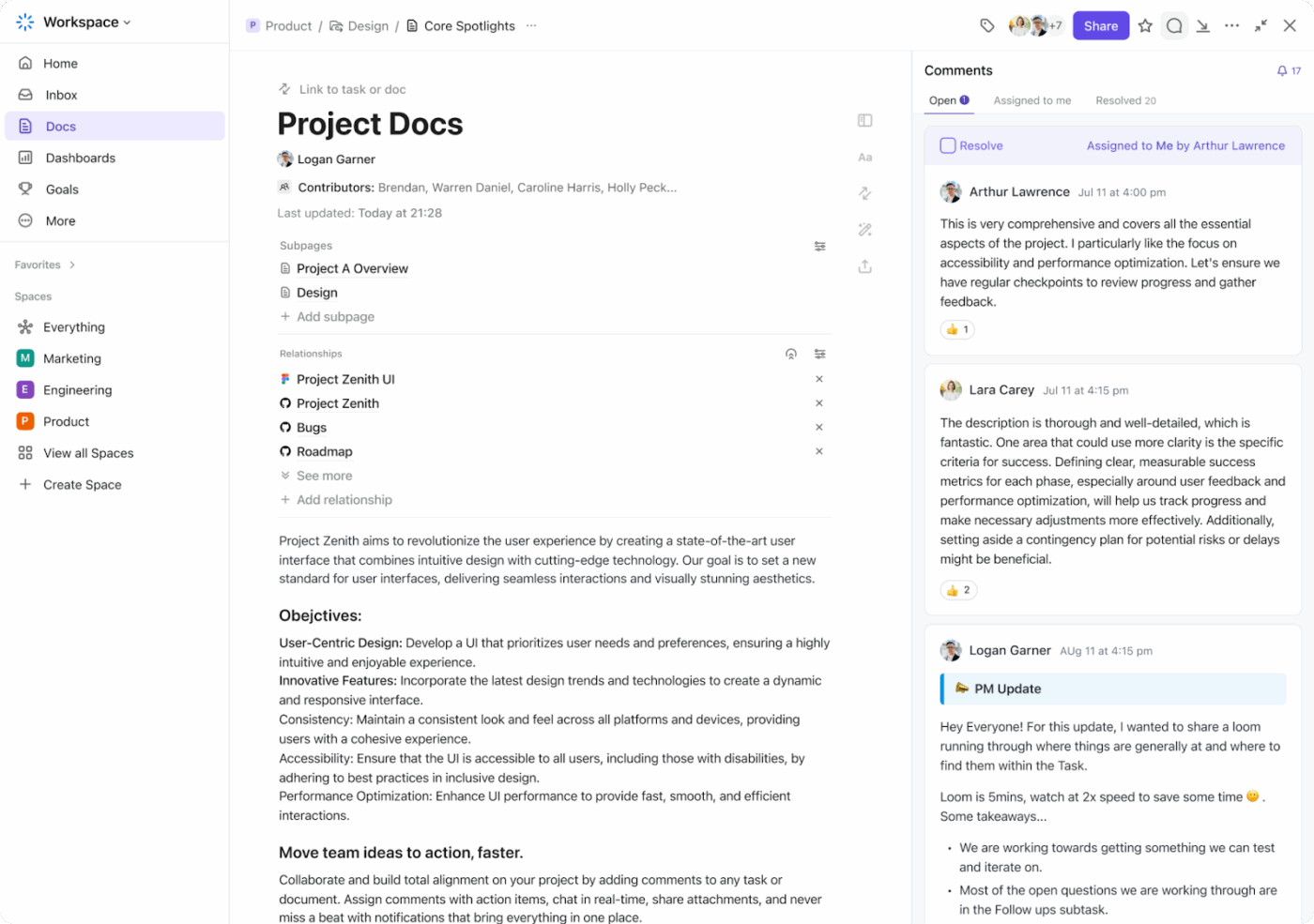
Capture these specifics for each process:
Team members can comment, suggest edits, and update Docs in real time, making it easy to capture feedback and identify gaps. Plus, you can also track changes over time, review what’s been updated, and revert to previous workflow versions if needed.
Next, start a dedicated channel in ClickUp Chat to gather employee suggestions. Ask team members to describe where they encounter delays, confusion, or extra manual work.
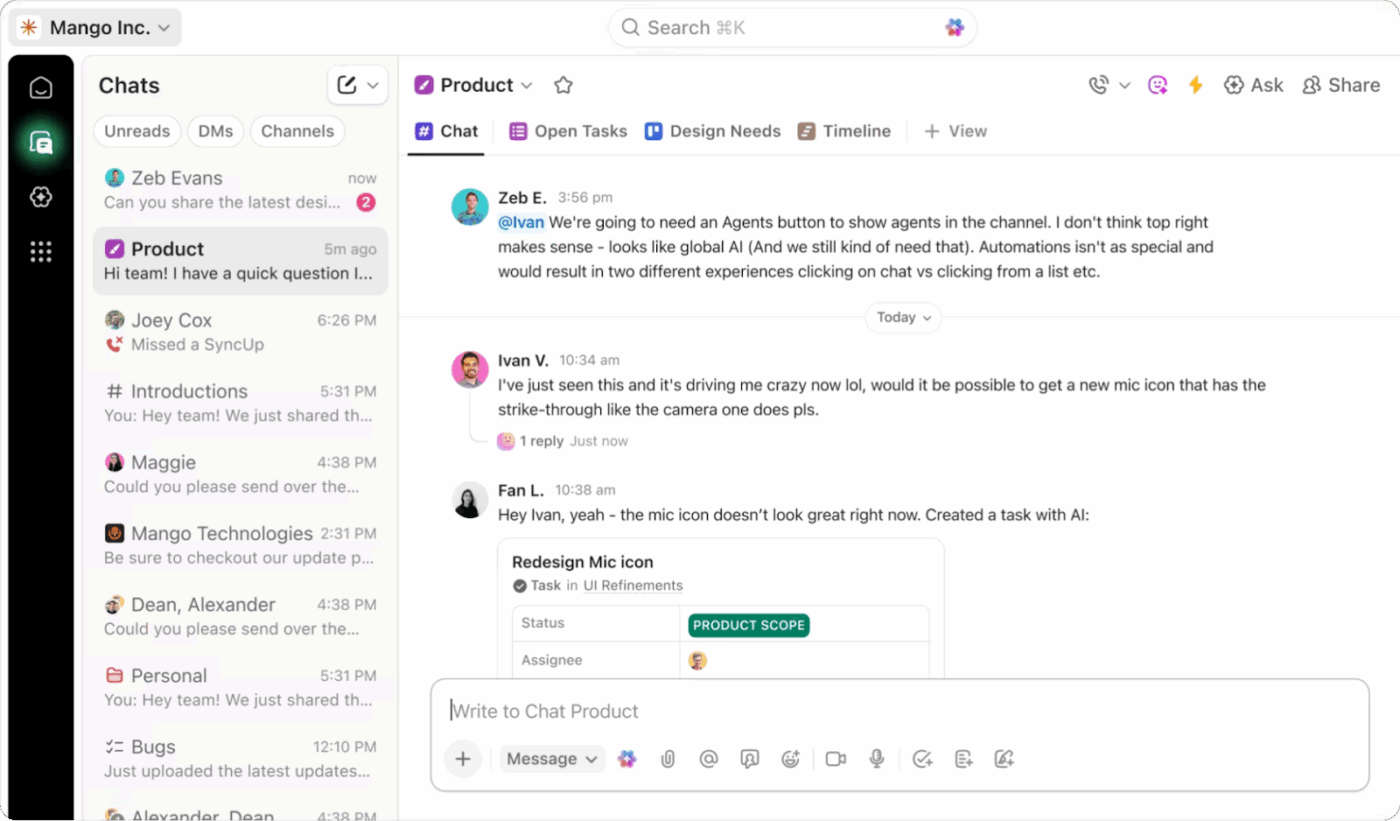
If you have a large team, use ClickUp Forms to collect structured feedback and identify repetitive tasks.
⭐ Bonus: No need to manually read through every piece of feedback, form response, or text in your audit doc.
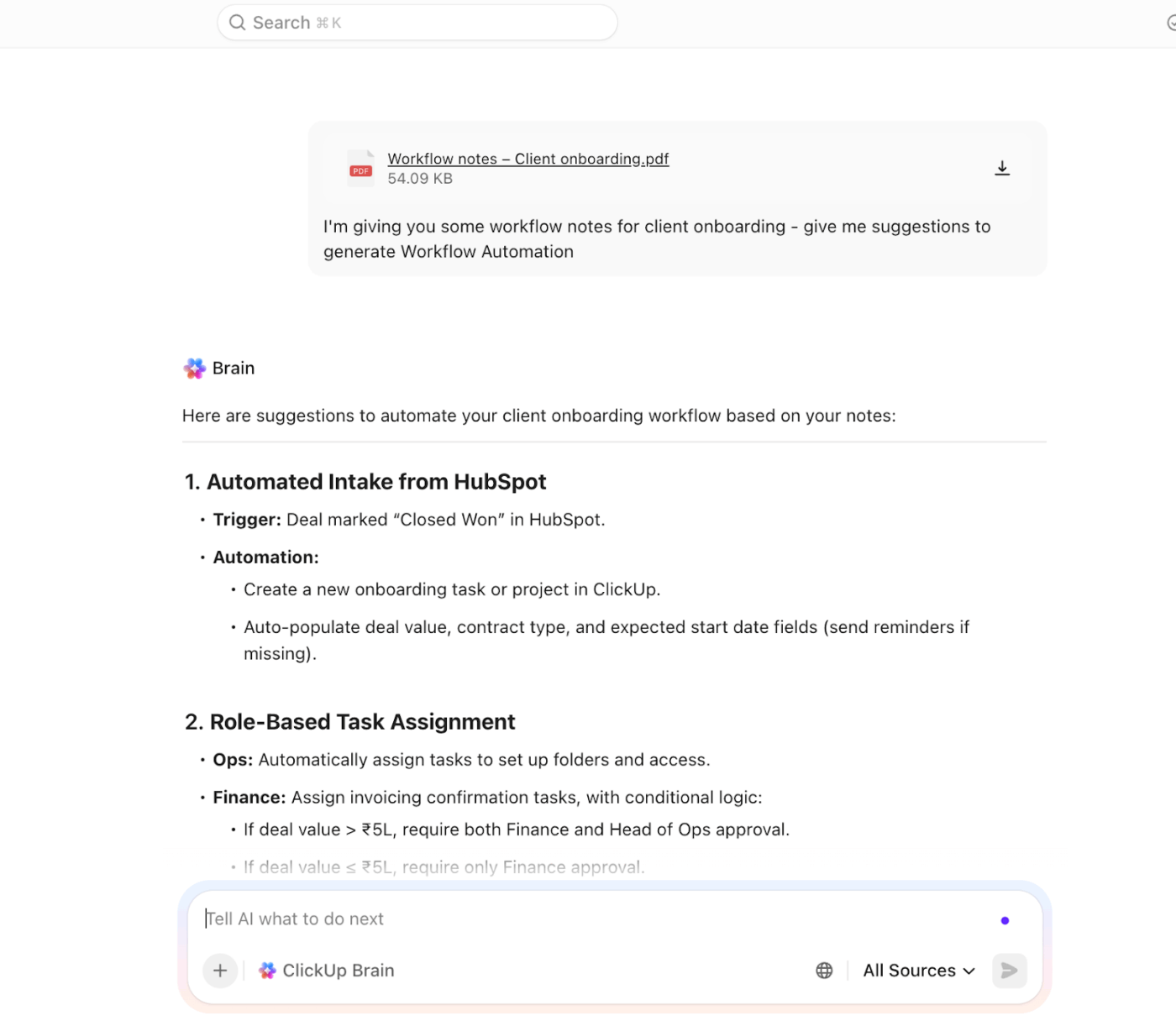
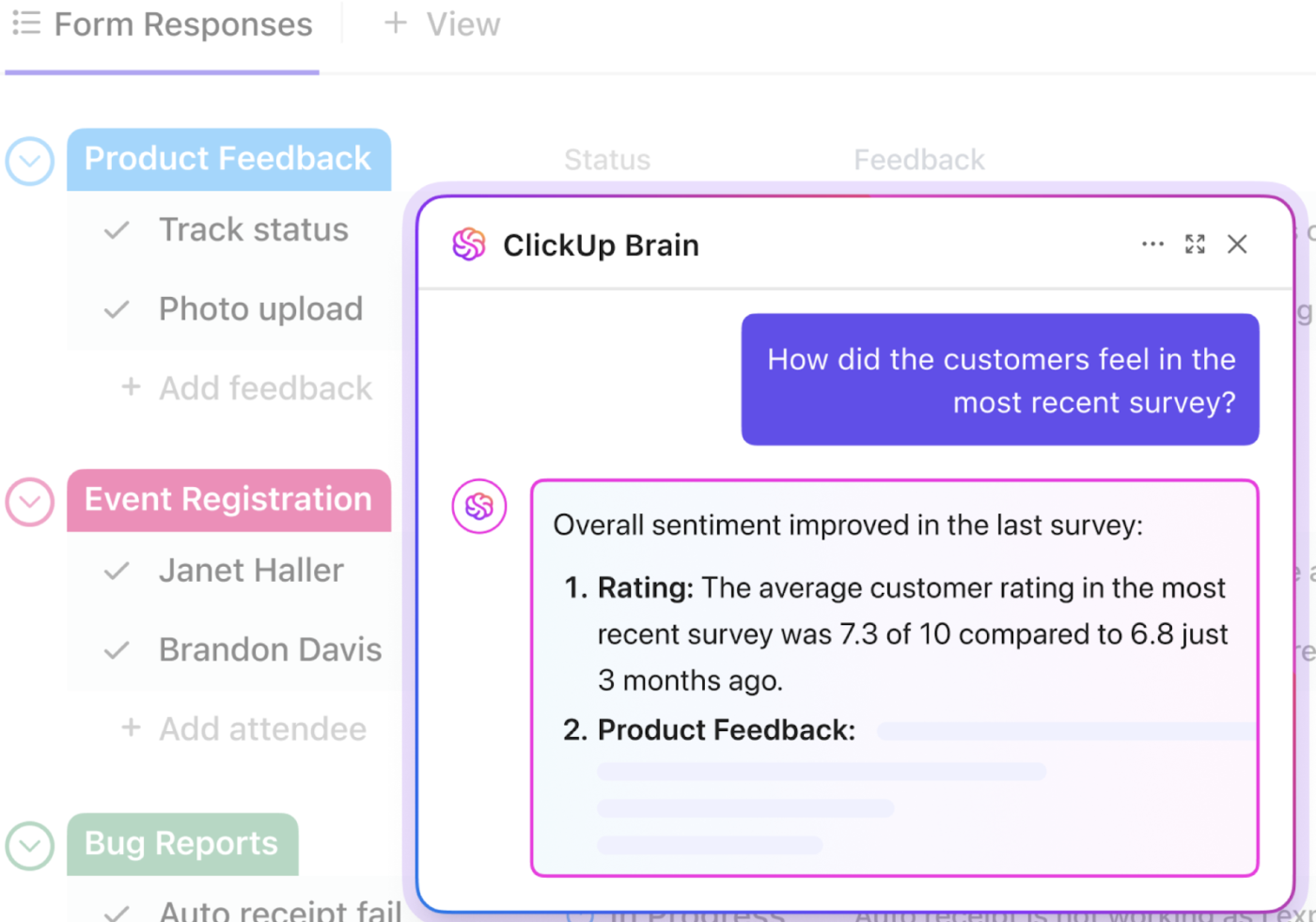
ClickUp Brain, the platform’s built-in AI assistant, instantly summarizes all your audit findings to surface key pain points, recurring IT bottlenecks, and opportunities for cost savings.
For example, ask Brain to “Analyze my existing workflow audit and highlight the top three most time-consuming tasks.” Since Brain is deeply embedded in your workspace, it analyzes your form responses and chat history to tell you exactly which workflows to prioritize.
Once you’ve decided which workflows to automate, you need to find a tool with the right AI features.
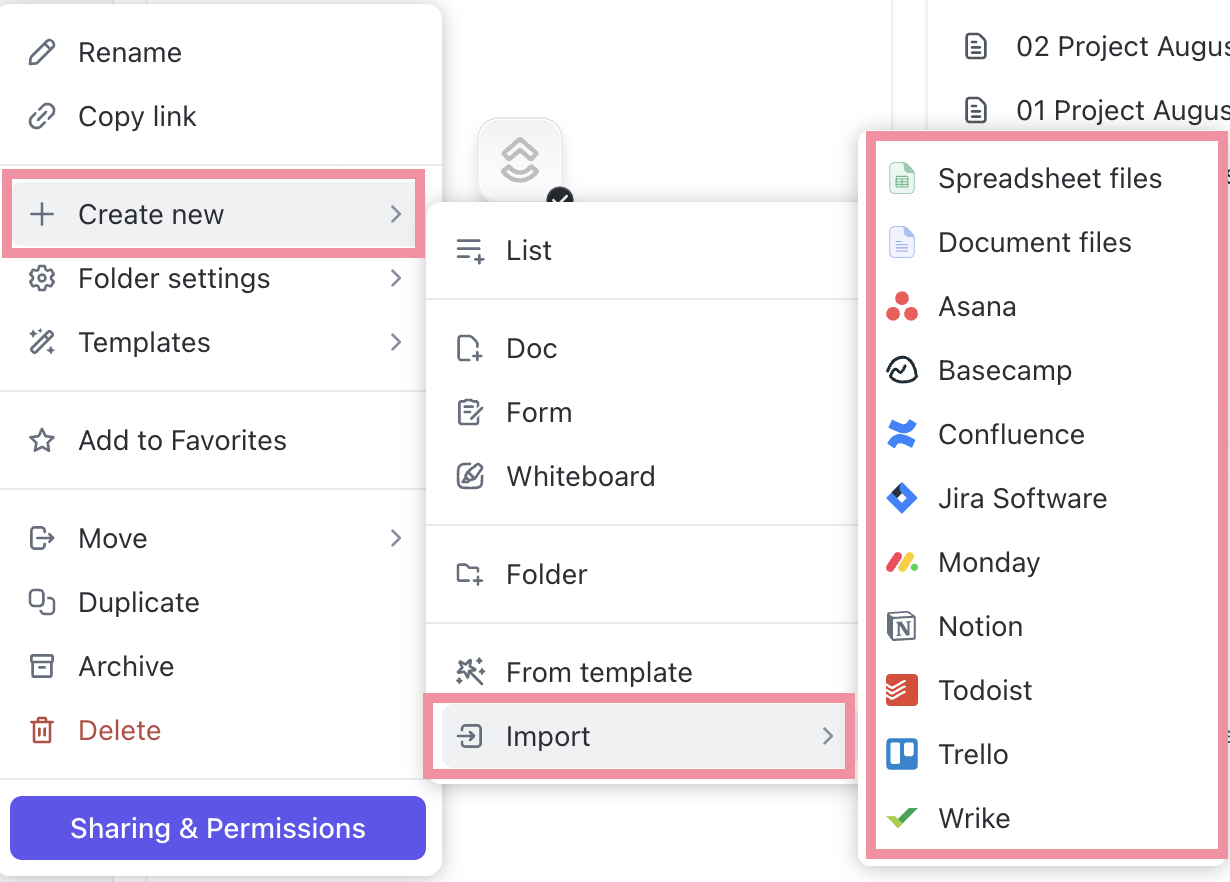
Go for no-code and low-code solutions. They allow different teams to set up their own workflows without relying on developers. For example, a marketing manager automates campaign creation while a sales manager automates lead routing using the same platform.
Next, ensure the tool connects directly to your current CRM, ERP, and other specialized software. A good tool allows you to build custom if-then branches to handle your unique business processes.
Finally, invest in a platform that can handle growth in volume, users, complexity, and use cases without degrading performance.
Choosing the right AI workflow automation tool is hard. You must balance the features you need today with the capabilities you’ll want tomorrow—all while sticking to a budget.
ClickUp houses everything you need to design, automate, execute, monitor, optimize, and manage workflows end-to-end.
The best part: You get enterprise-grade AI and automation tools wrapped in an interface that is welcoming for beginners yet robust for more technical users.
Here’s what makes this possible:
In short, with ClickUp, your tech stack actually works together instead of against you. That should be your ultimate goal when choosing a workflow automation tool.
👀 Did You Know? Before the 1940s, a “computer” was a person, usually a woman, whose job was to perform long, repetitive mathematical calculations by hand. During World War II, these human computers were responsible for calculating ballistics tables and breaking codes before electronic machines eventually automated their entire profession.
Mapping a workflow means visualizing how work moves from start to finish. You document every step, person, decision, input, and output to understand how the workflow behaves in the real world.
For example, a basic client onboarding workflow could look like this:
Start (client signs contract) → Action (send welcome email) → Decision (needs custom plan?) → Branch (yes: manager approves; no: standard setup) → End (access granted)
ClickUp Whiteboards provide a collaborative space to brainstorm and design your workflows. It’s the perfect canvas to map out your logic before you start automating.
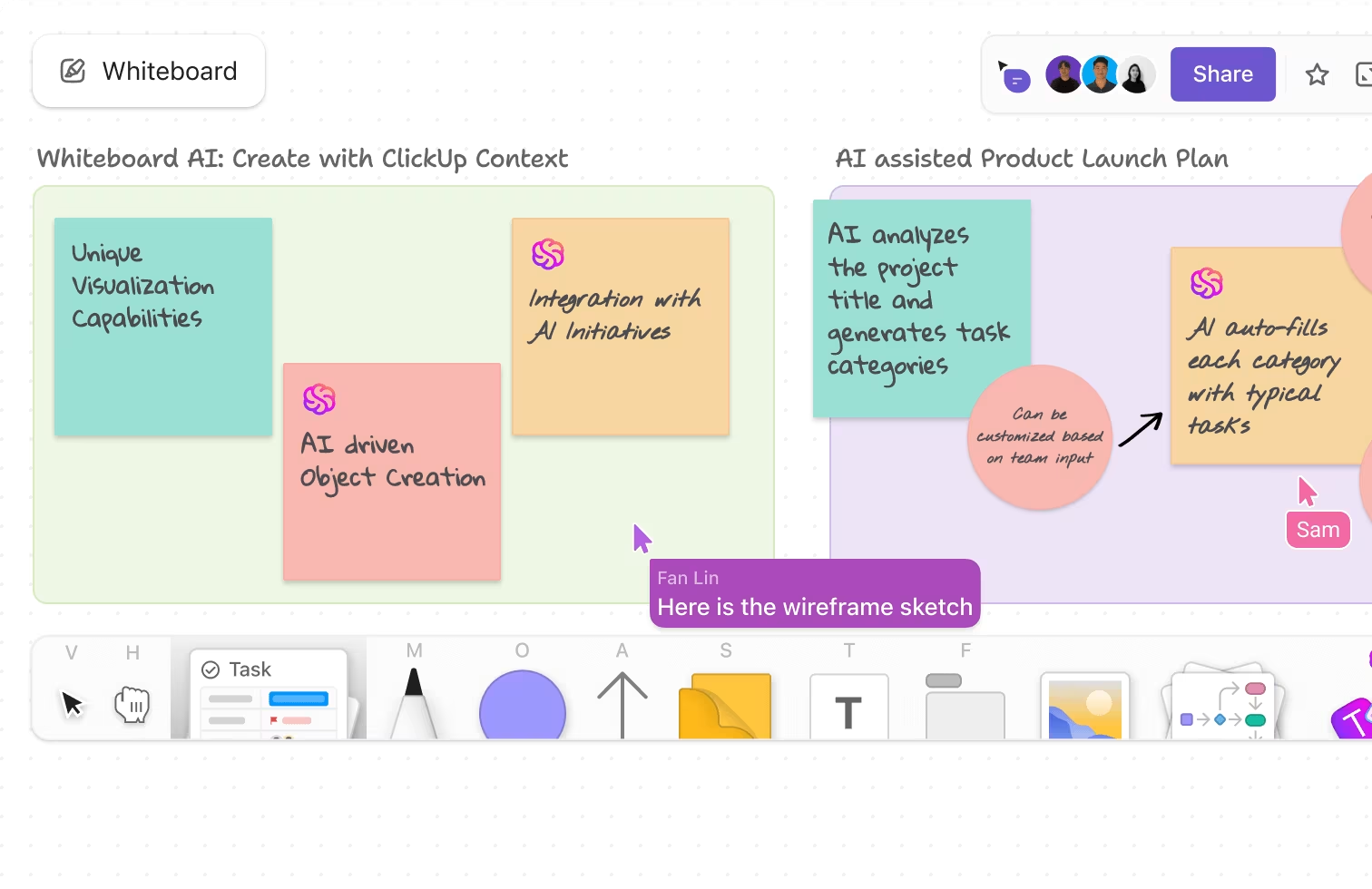
Here, you can:
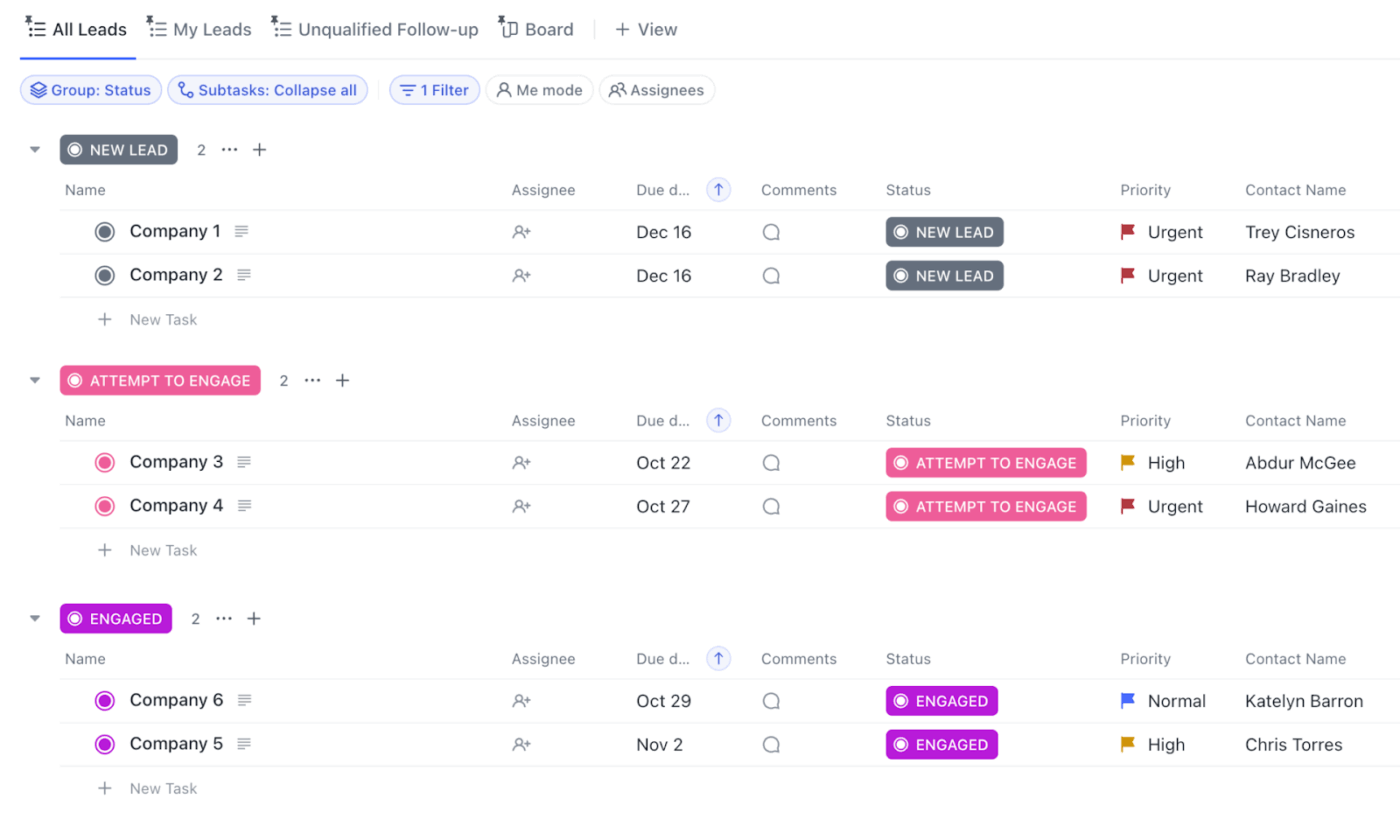
After designing your revamped process, deploy it directly using ClickUp Tasks. Add due dates, task descriptions, checklists, attachments, comments, and custom fields to capture every detail needed for execution.
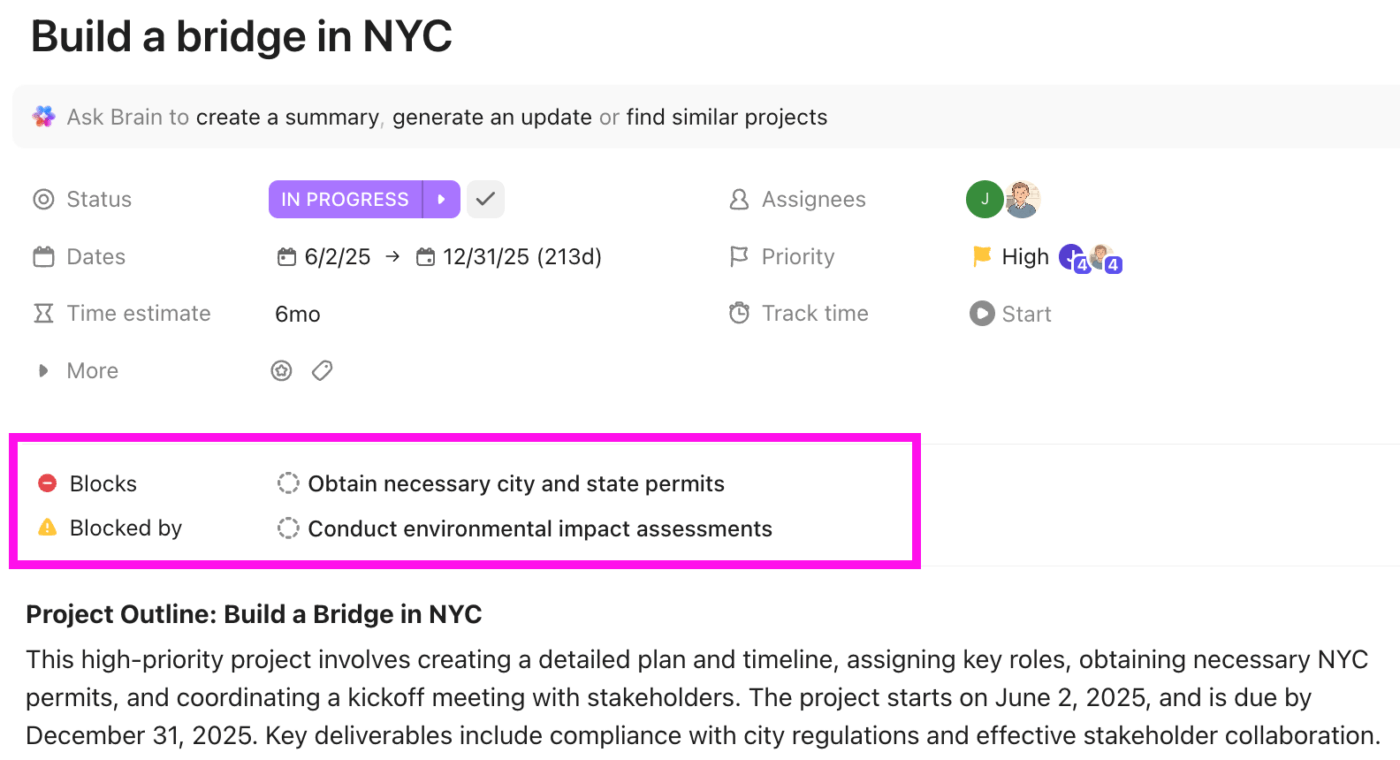
You can also specify which tasks must be completed before others can begin using ClickUp Dependencies. This prevents your team from jumping ahead and ensures work happens in the correct sequence.
And with that, you’re all ready to automate your workflows!
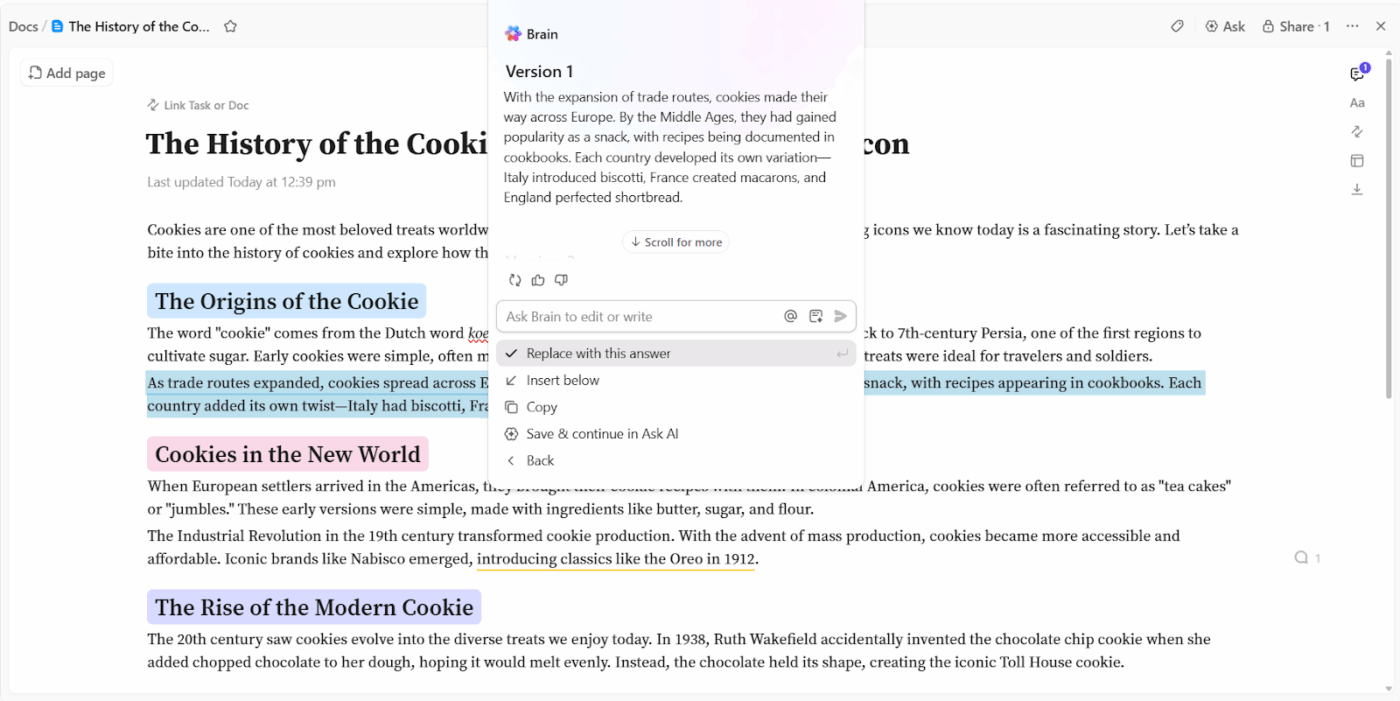
💡 Pro Tip: Use ClickUp Brain + ClickUp Docs to instantly generate process documentation. Simply prompt Brain to create an SOP or workflow guide. It will pull the relevant details from your whiteboards, tasks, and chat discussions to build a clear, up-to-date guide for your team.
Many workflow automation tools offer multiple AI models to choose from. Pick and configure the right type of AI model based on the task you want to automate.
For example, GPT-4o excels at generating text and code, while DALL-E 3 is designed to create high-quality images from text prompts.
Finally, build your automation. This calls for:
Choosing the right AI model is as easy as a toggle switch in ClickUp.
With ClickUp Brain MAX—the platform’s dedicated AI desktop app—you get instant access to a suite of leading models like GPT-4o, Claude, and Gemini directly within your workspace.
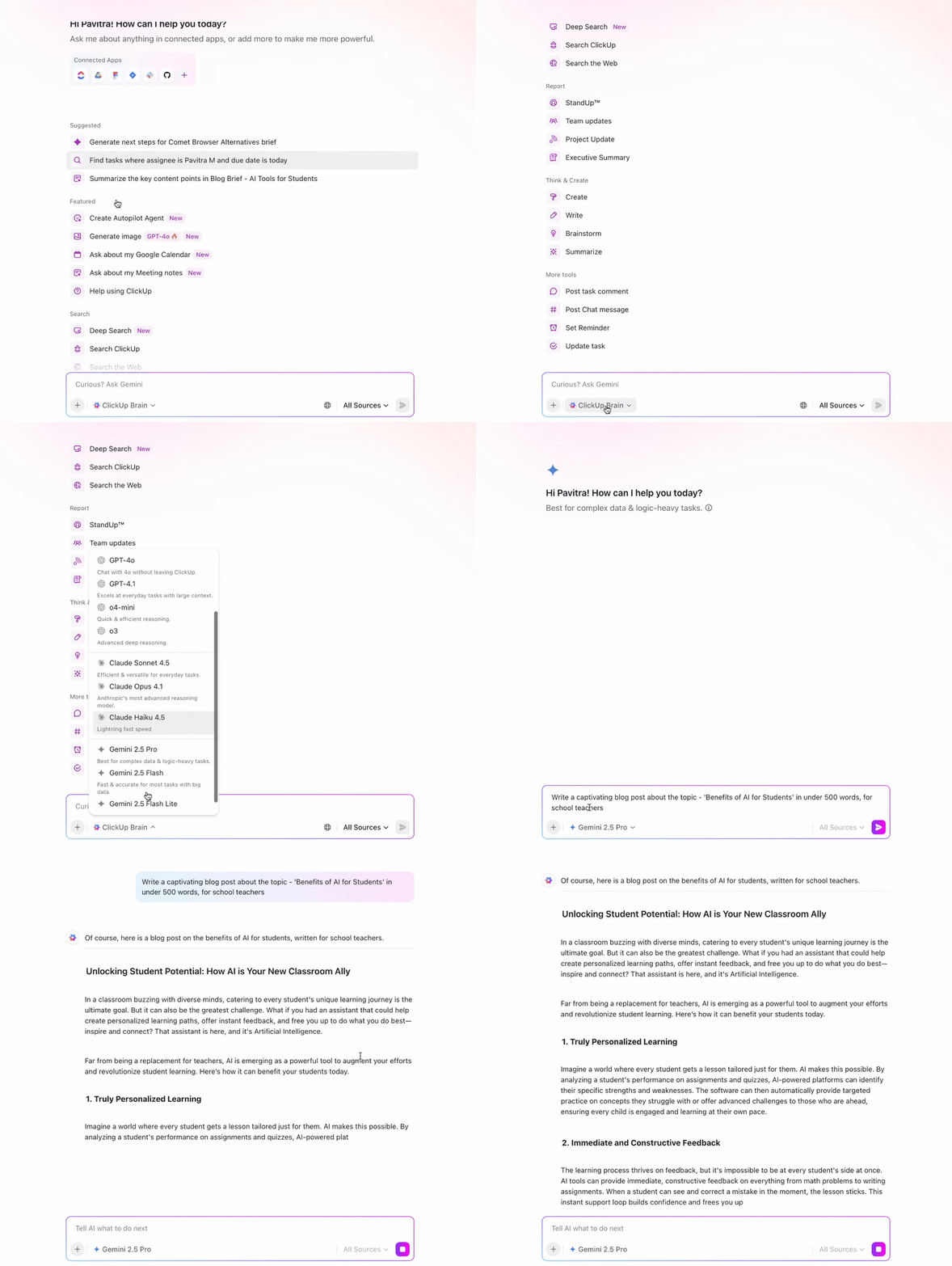
Just select the model that best fits your automation needs—whether it’s generating social media posts, answering questions, or producing code snippets—and voila!
📌 Example use cases:
To further streamline work, use Brain MAX to:
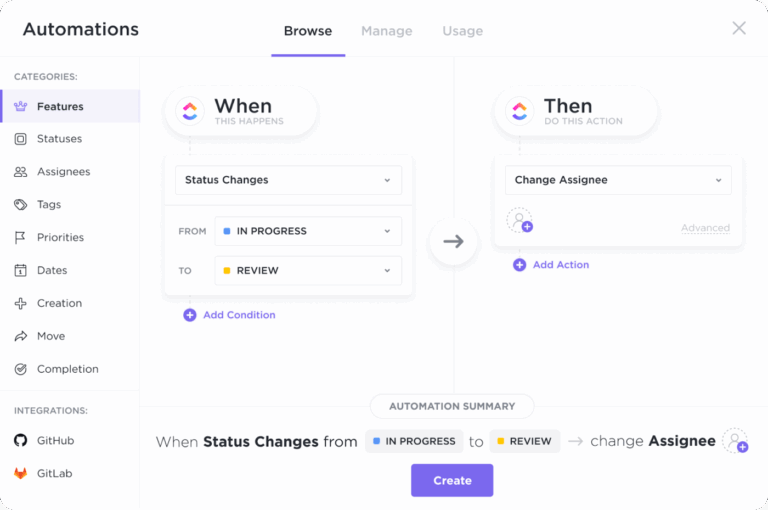
🚀 For simple task automation, use ClickUp Automations. These are straightforward, rule-based automations that work on pre-defined triggers, rules, and actions.
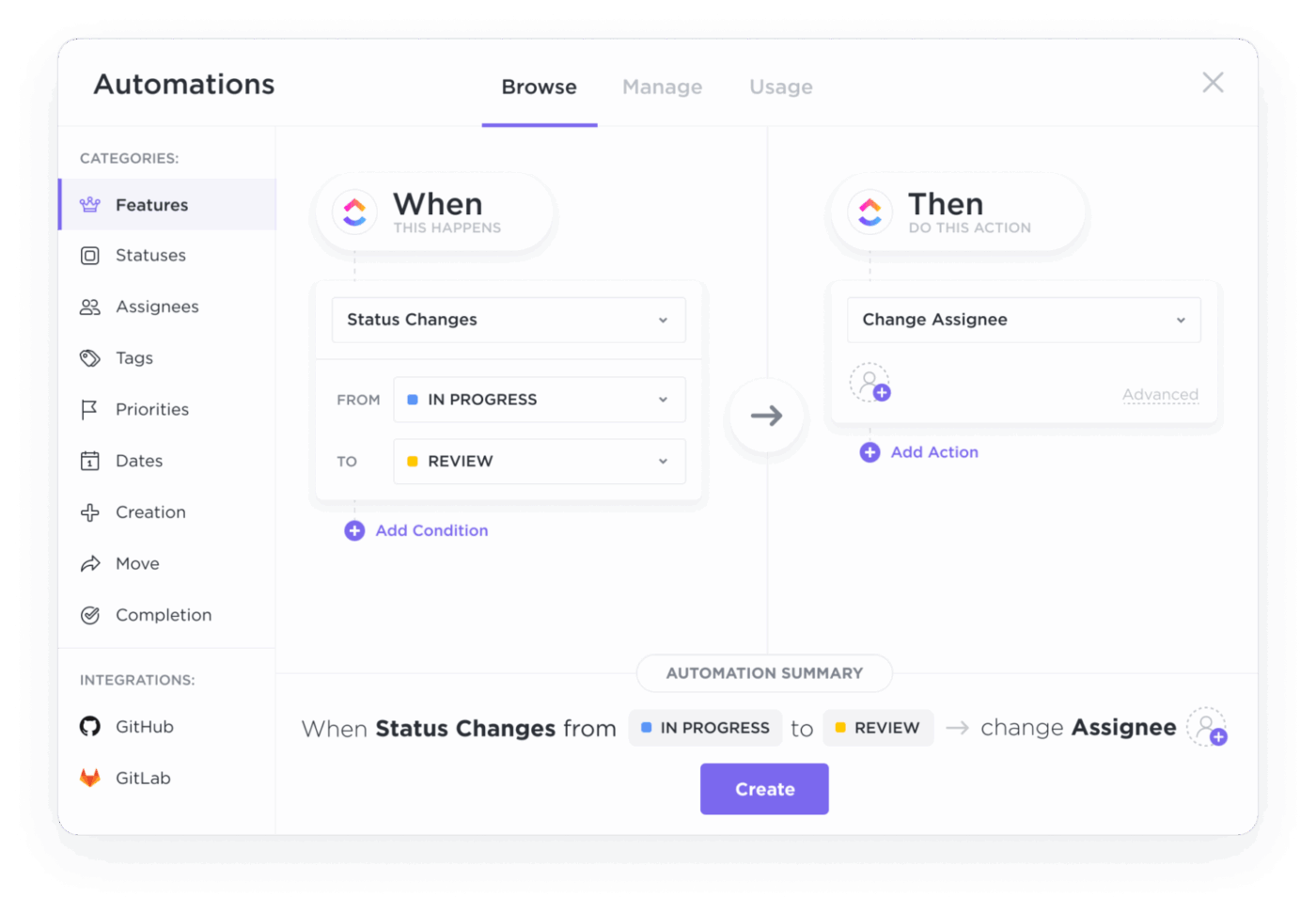
✏️ Note: Every automation you build in ClickUp is automatically logged. If a workflow ever breaks or performs unexpectedly, you can check the audit logs to see exactly what happened and fix it instantly
📌 Example: You can build an automation like: “When a client submits a support form, immediately assign the task to a specialist, apply a High Priority tag, and send an automated confirmation email to the client.”
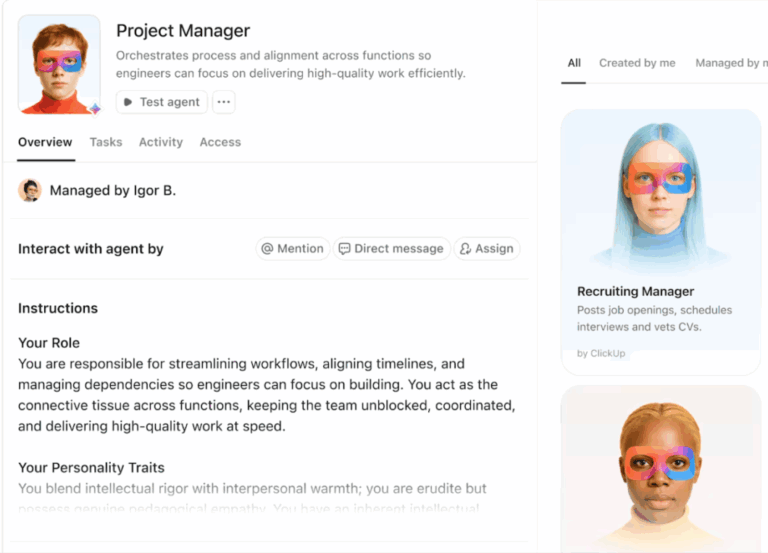
⭐ Bonus: To automate complex tasks, set up Super Agents in ClickUp. These are multi-step, autonomous, ambient AI agents that run 24/7 in the background, monitoring projects and jumping in when needed.
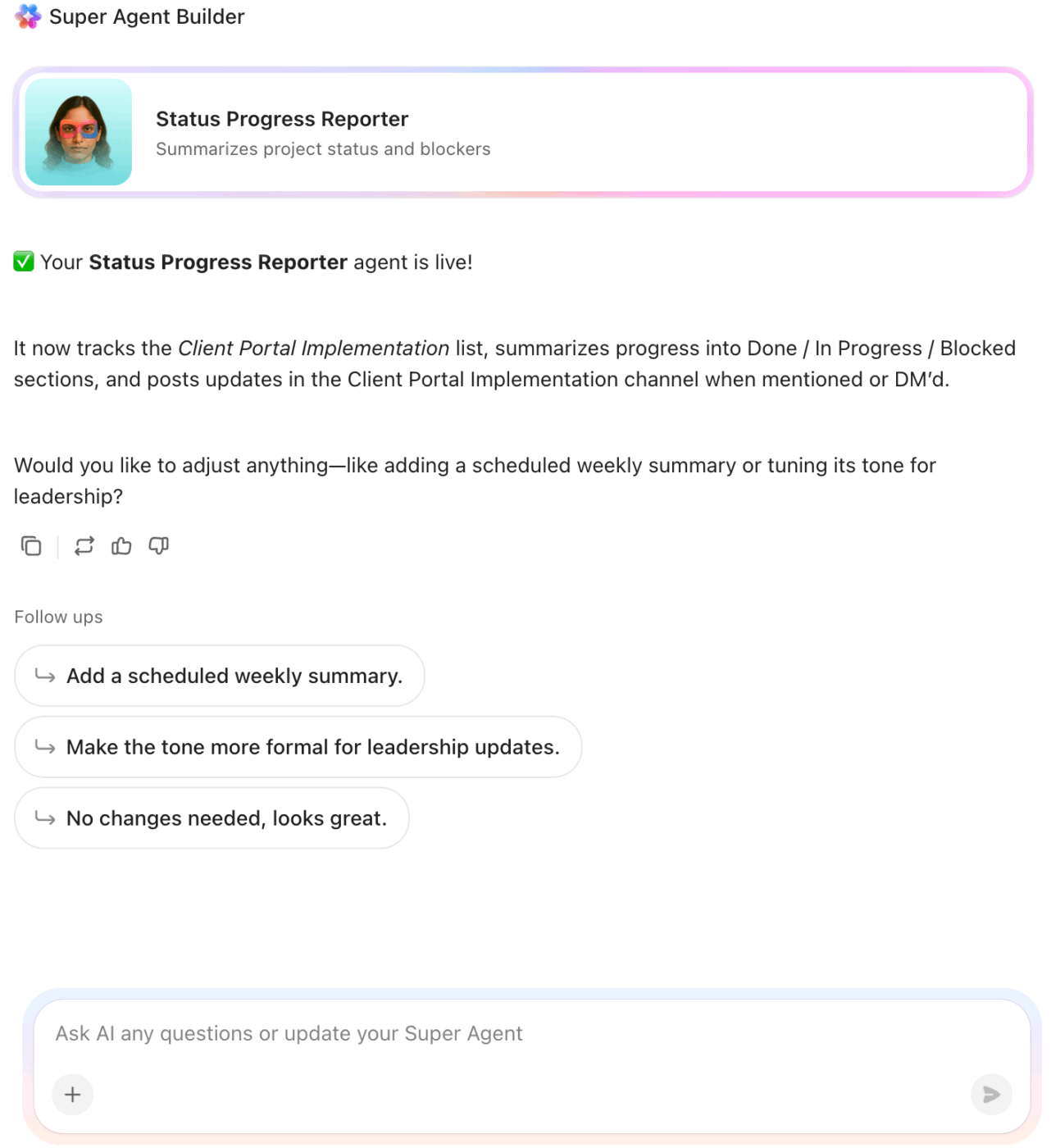
Below are some common super agents offered by ClickUp:
To see it in action, watch this video on how ClickUp uses Super Agents 👇
💡 Pro Tip: Use the natural language builder to instantly create autonomous AI agents in ClickUp. Just chat with ClickUp Brain, explain what the agent needs to do, and answer a few questions. Brain automatically writes code and logic behind the scenes, tests the agent, and deploys it within a few minutes!
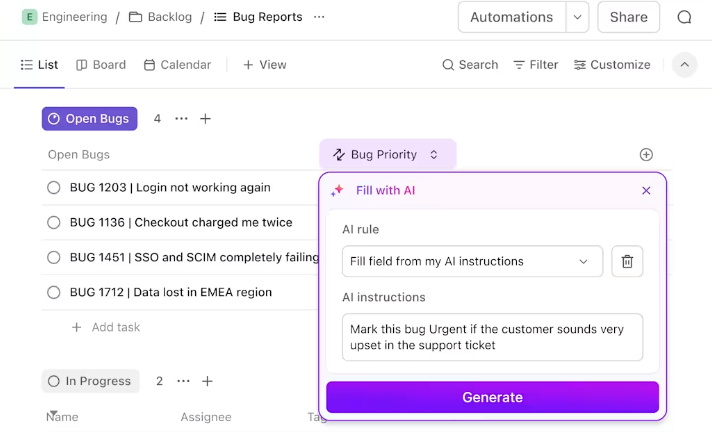
🚀 ClickUp Advantage: What’s faster than building a no-code automation? ClickUp’s AI Fields!
Add these to your tasks or forms, and they will auto-populate based on your custom instructions. For example, you can add an AI field that automatically summarizes every comment in a task or one that generates a progress update every Friday afternoon.
⚡ Template Archive: Process Map Templates for ClickUp, Excel, & Word
Instead of automating every workflow at once, start with 1-2 pilot workflows. Test and monitor their output to gauge AI accuracy.
For example, if you’ve automated lead qualification, run 20 leads through the new workflow. Manually review whether the AI classified them correctly and track how much time was saved.
Identify gaps in your automated workflows and optimize them before a company-wide rollout.
🛠️ Quick Hack: Create a sandbox environment for your newly automated processes inside ClickUp by duplicating your current ClickUp Space.
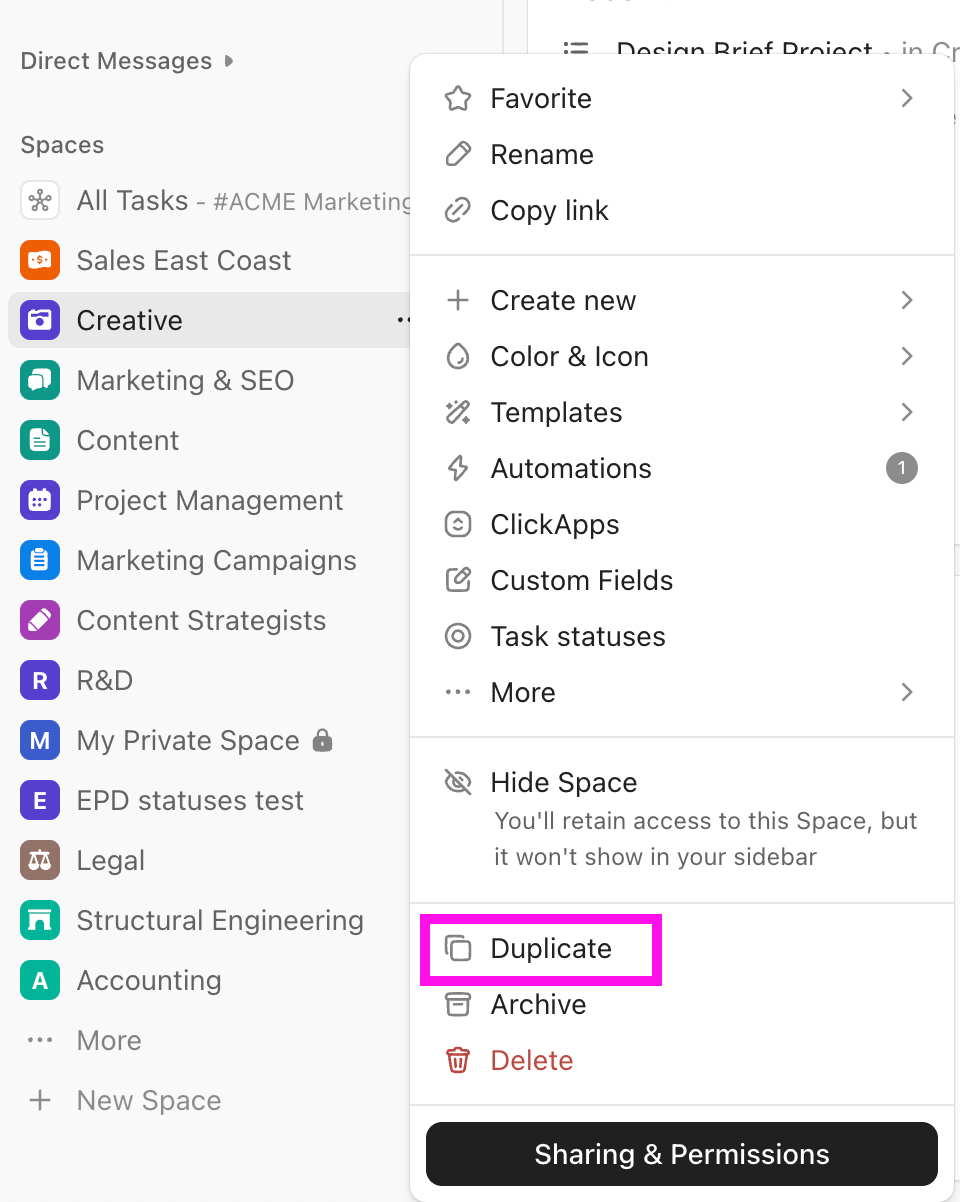
Here’s how to set it up:
Apply the same automation to your original space only when you’re confident.
Set up dedicated dashboards for each workflow, and one master dashboard to track all processes in one place.
Track KPIs specific to your workflow in real time to assess its performance. Some common KPIs include:
Set automated alerts so key team members are notified instantly if a workflow encounters an error. Also, schedule periodic audits to review performance data and tweak your logic for better results.
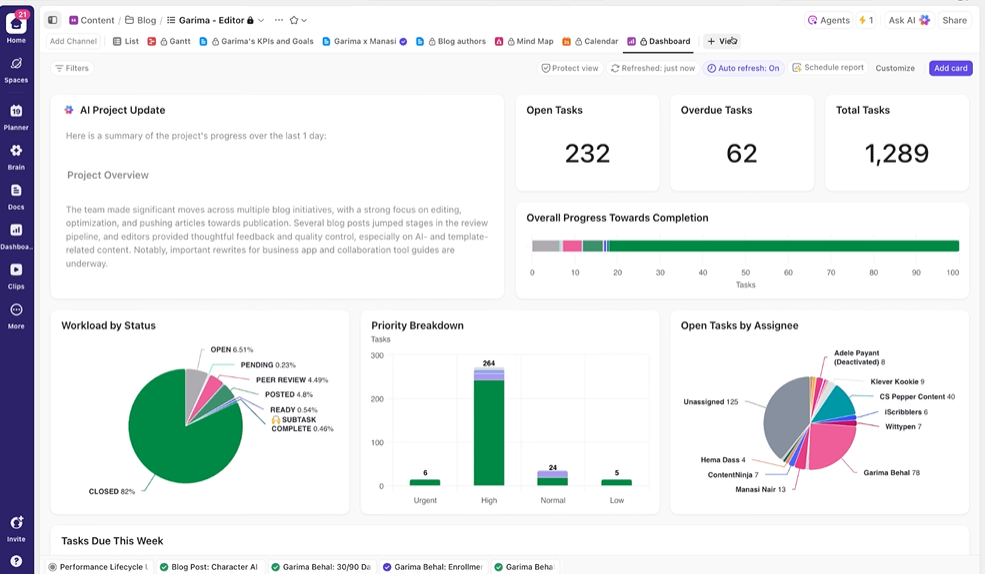
Still monitoring AI-powered processes and preparing reports manually?
ClickUp Dashboards fixes that.
Build custom dashboards using a wide variety of widgets—such as pie, bar, chart, time-tracking, etc.—to visualize key metrics in real time. They pull your live workspace data into one customizable view for at-a-glance insights.
You can also set up multiple dashboards for different audiences (e.g., team leads, executives, project managers) and share them with stakeholders for transparency.
💡 Pro Tip: Add AI Cards to your ClickUp Dashboards to get AI-powered qualitative insights (summaries, trends, recommendations) alongside your quantitative metrics. These cards use ClickUp Brain to analyze your workspace + dashboard data and generate actionable summaries or reports.
Below, find the leading four tools for AI workflow automation, along with their best features and ideal user profiles:
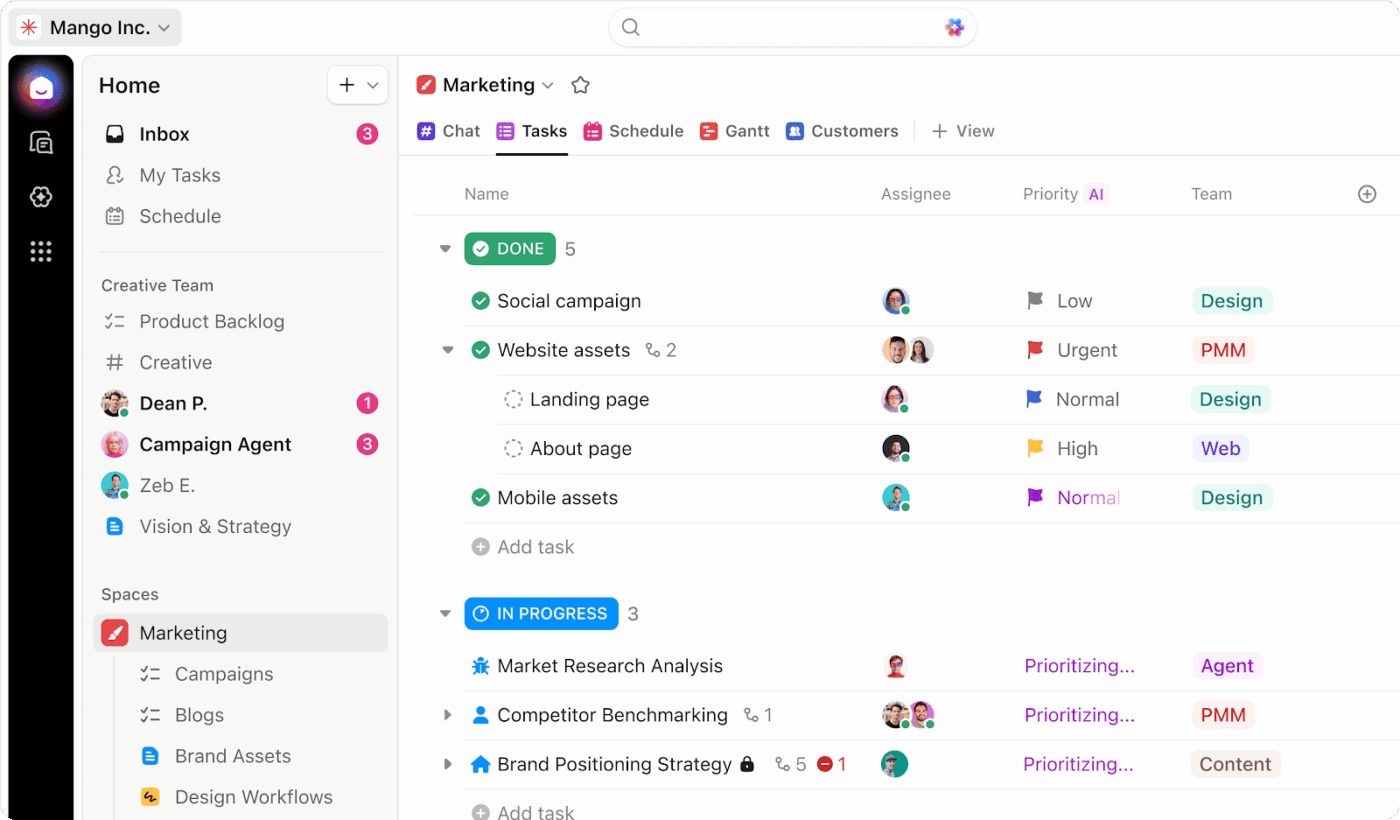
ClickUp combines project management automation with deep AI intelligence, making it the all-in-one choice for teams that want visibility alongside execution.
You can manage daily tasks/projects, communicate with clients and team members, document processes, build automations, and execute workflows—all in one platform.
The drag-and-drop interface makes it ideal for beginners and non-technical users. At the same time, the feature’s extensibility is a treat for enterprise teams.
Besides building automations and integrating AI, you can connect your workflows to multiple platforms using pre-built and custom integrations.
📚 Read More: Top Task Automation Software to Boost Productivity
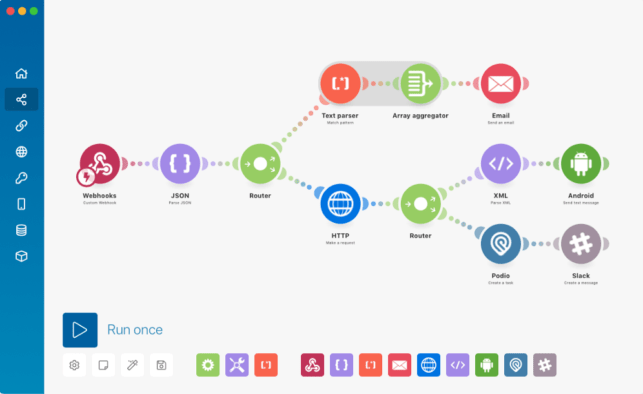
Make (formerly Integromat) is a highly visual automation platform that uses a drag-and-drop canvas to build workflows called “scenarios.” It’s built for users who need to see exactly how their data flows and branches, making it ideal for teams building data-heavy flows like inventory syncs or custom reporting.
Since it bills based on individual operations instead of per-task, it’s more cost-effective for complex, multi-step workflows.
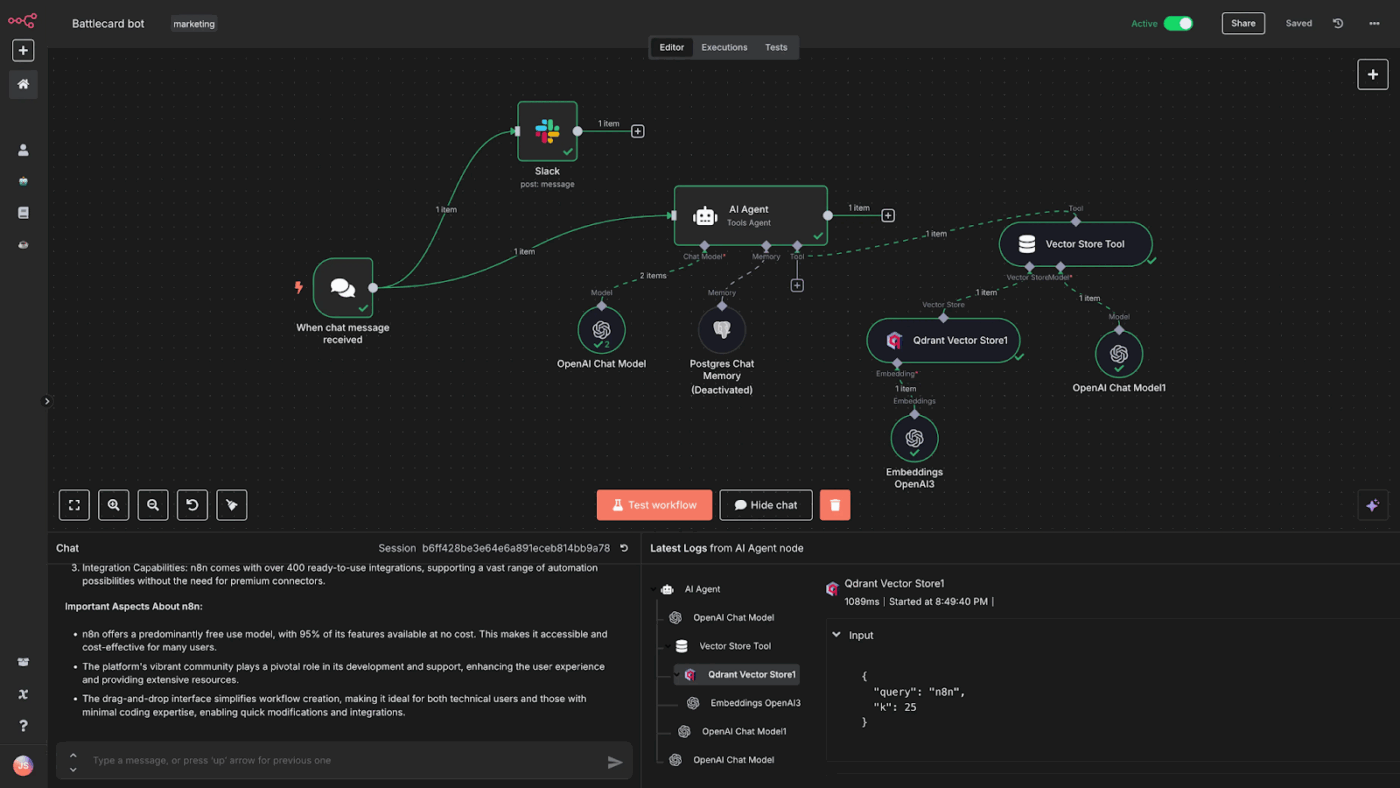
n8n is a workflow automation tool primarily for technical users who need 100% customization. While the platform offers a visual node-based editor, users love it for its coding flexibility—you can drop a custom JavaScript or Python code at any point in a workflow.
To implement AI workflow automation effectively, adopt these five best practices:
📚 Read More: Top AI Agent Tools
Before we wrap this up, let’s quickly go through some common pitfalls businesses face when automating workflows (and how to avoid them):
| Common pitfall | What this means | How to avoid it |
| Investing in too many AI tools | Many companies purchase multiple specialized AI tools that perform overlapping functions, leading to AI sprawl | Audit your top 3 workflows first. Pick one tool that nails those. Expand features only after proving ROI on basics |
| Trusting AI outputs blindly | AI models can produce hallucinations or logical errors. If you don’t verify the output, these mistakes reach your customers or mess up your core processes | Set confidence thresholds for AI. When the score falls below the threshold, route the task to humans. Monitor these thresholds weekly |
| Trying to automate every process | Teams often waste time automating low-volume or constantly changing processes that would be faster to handle manually | Automate processes that are repetitive, time-consuming, and repeatable. If a process requires deep empathy or complex gray-area judgment, keep it manual |
| Automating a bad process with AI | If a manual process is disorganized or has too many unnecessary steps, automating it will only produce errors at a faster rate | Audit your process first. Map out the workflow, remove redundant steps, and standardize the rules before automating it |
AI and automation offer teams an opportunity to reduce manual work and speed up day-to-day processes. However, many still hesitate to use these technologies because they feel overwhelmed by the complexity or don’t know where to start.
ClickUp changes that. The platform’s no-code automation and AI that understands natural language help anyone get started quickly. With all your projects, documents, and communication all unified in a single AI-powered workspace, it’s easier than ever to automate the repetitive and accelerate the tedious.
Whether you need native AI intelligence, no-code workflow automation, project management, or documentation, you can access it all in a single interface with ClickUp. It’s designed to streamline and simplify your work, not add more layers.
Sign up for ClickUp today and optimize your processes with AI.
Traditional automation follows fixed, rigid rules. AI-powered automation uses intelligent agents that understand context, remember past decisions, and adapt to exceptions. This allows them to handle the real-world complexity that breaks rule-based systems.
Zaps are simple connectors that move data between two tools based on a single trigger. AI agents operate across your entire workspace and understand natural language. They maintain memory across interactions and can make nuanced judgments within the guardrails you set.
Start with workflows that are repetitive but still require some human judgment. Good candidates include status reporting, request triage, or synthesizing information from multiple sources. These deliver immediate value and let you see the power of agentic automation in action.
Yes, you can build approval gates into your workflows. ClickUp Super Agents can be configured to handle all the preparation and then surface a decision for a human to make the final call. This gives you the perfect blend of speed and oversight.

Sean Hardy
Max 26min read

Manasi Nair
Max 19min read
Manasi Nair
Max 19min read

© 2026 ClickUp




