


With so much of our lives online these days, cybersecurity is a real issue. A compromised password and subsequent data breach can have serious repercussions.
However, keeping all our personal data safe requires a host of passwords—and online security experts tell us that each of those passwords needs to be unique.
So how are we supposed to keep track of them all? ?
The answer is online password managers.
Password managers work by offering one central place to store all your passwords. You can then set up a master password that gives you access to everything. ?
Understandably, you might be a little nervous about putting all your passwords in one place. That’s why we’re sharing the top password managers–including free options–to keep your data secure and give you peace of mind. ?
We’ll also suggest a tool that can streamline every other aspect of your day-to-day—because getting access to your data is just the beginning.
10 Best Password Managers in 2024 (Reviews & Pricing)

 Summarize this article for me please
What Should You Look For in Password Managers?
While passwords are just one aspect of data security, they’re incredibly important because they’re gateways to your online accounts.
Web browsers like Firefox, Chrome, Opera, and Safari all offer ways to store your passwords and MacOS offers a password manager called Keychain Access. But they’re simply not as effective as purpose-built password managers.
With that in mind, these are some features and functionality most password managers share:
- The ability to encrypt, store, and secure passwords
- Password generators that quickly create new passwords for you
- Functionality that helps you create strong passwords and warns you if you reuse one by mistake
- Alerts when your password may have been compromised
- The choice to opt out of auto-fill password features
- Browser extensions or apps that let you manage your passwords across all your devices and operating systems
- Security features like multi-factor authentication
- An intuitive user interface so you can easily access your data
Summarize this article for me pleaseThe 10 Best Password Managers to Use in 2024
Ready to find the best password manager for your team? Discover the pros and cons of each tool, along with ratings and reviews, so you can make the most informed choice.
1. Bitwarden

Bitwarden is a cross-platform password manager that securely saves your sensitive data and manages your logins. It also allows you to generate unlimited passwords and passkeys on as many devices as you like. Security features include zero-knowledge, end-to-end encryption, comprehensive compliance, and third-party security audits of its open-source software.
While the free version gives you a secure password vault, the inexpensive Premium plan includes emergency access, vault health reports, and the Bitwarden authenticator app. This allows you to verify your identity when completing two-factor authentication on websites or apps.
Bitwarden best features
- Get access to passwordless authentication using biometric verification, a one-time code, or a security key
- Use this password manager on your browser, desktop, or mobile device
- Sync your private data across all your devices
- Securely share passwords and other private data using Bitwarden Send
Bitwarden limitations
- Some users say the password-sharing feature isn’t as secure as it could be
- The user interface could use an update
Bitwarden pricing
- Free
- Premium: Less than $1/month for 2 users
- Families: $3.33/month for up to 6 users
- Teams Starter: $20/month for up to 10 users
- Enterprise: $6/month per user
- Corporate: Contact for pricing
Bitwarden ratings and reviews
- G2: 4.6/5 (140+ reviews)
- Capterra: 4.7/5 (150+ reviews)
2. KeePass

KeePass is a free password manager that uses open-source code to store all your passwords, so you only need to remember one password to get access to the rest. You can set reminders to update your passwords regularly and the system also stores your password history to avoid reusing them.
KeePass best features
- Use KeePass in over 45 languages ?
- Feel free to inspect the source code yourself to make sure it’s secure
- Customize the password manager to your personal requirements using a range of plugins
- Use the desktop app on Microsoft Windows, MacOS, or Linux, or add browser extensions to Chrome, Firefox, or Edge
KeePass limitations
- Ease of use isn’t a priority so you’ll need some technical expertise to set it up
- Some experts feel that KeePass could be vulnerable to hacks
KeePass pricing
- Free
KeePass ratings and reviews
- G2: 4.5/5 (200+ reviews)
- Capterra: 4.7/5 (570+ reviews)
3. Dashlane

The Dashlane password manager allows you to save your passwords, passkeys, and payment information and then retrieve that data wherever you are. The auto-fill feature conveniently supplies your personal details and login credentials.
This password manager also includes a VPN and dark web monitoring, which automatically scans for signs that any of your accounts may have been compromised. ?
Dashlane best features
- Easily migrate info from other password managers
- Access this password manager from any device or platform
- Use the add-ons for most major browsers
- Share passwords securely and easily revoke access from anywhere if you need to
Dashlane limitations
- There’s no desktop application
- The Friends & Family and Starter plans don’t offer a VPN for plan members
Dashlane pricing
- Premium: $4.99/month per user
- Friends & Family Plan: $7.49/month for up to 10 users
- Starter (for Teams): $20/month for up to 10 users
- Business: $8/month per user
- Enterprise: Contact for pricing
Dashlane ratings and reviews
- G2: 4.5/5 (290+ reviews)
- Capterra: 4.5/5 (240+ reviews) For Dashlane Business
4. LogMeOnce

The LogMeOnce platform offers passwordless password management. You can use a selfie, a PIN code, a fingerprint, or a biometric face ID to log in, instead of a password—although you can also use a password if you prefer.
The free version allows you to store an unlimited number of unique passwords on as many devices as you choose. The paid plans also securely save your credit card details and give you a certain amount of encrypted storage space, depending on the plan you choose. ?
LogMeOnce best features
- Protect your sensitive information with multi-factor authentication
- Save time and hassle with the auto-fill feature
- Sync your data across MacOS, Windows, Linux, Android, and iOS
LogMeOnce limitations
- The free Premium version doesn’t offer emergency access or multi-factor authentication
- There are numerous features, which may be overwhelming at first
LogMeOnce pricing
- Premium: Free
- Professional: $2.50/month per user
- Ultimate (Personal): $3.25/month per user
- Family: $4.99/month for up to 6 users
- Teams: $4/month per user
- Business: $7/month per user
- Enterprise: Contact for pricing
LogMeOnce ratings and reviews
- G2: 4.0/5 (17 reviews)
- Capterra: 4.8/5 (130 reviews)
5. 1Password

Designed for individuals, families, and global workforces, 1Password uses full encryption to keep your passkeys, passwords, and other private data safe. The secure autofill feature saves you time when filling in a form and also helps you sign into other providers, like Google or Apple.
A Secret Key offers an extra layer of security and third-party audits ensure any potential threats are picked up early and handled quickly. ?
1Password best features
- Ask the password generator to generate complex passwords
- Use 1Password offline or online
- Keep your data safe on the road using Travel Mode, which removes your vaults from your devices before you cross an international border and then restores them afterward with one click ✈️
- Integrate with other tools like Microsoft, Google Workspace, and GitHub
1Password limitations
- It’s not easy to import your passwords from another tool
- Some users report the autofill feature doesn’t always work seamlessly
1Password pricing
- Individuals: $2.99/month per user
- Families: $4.99/month for up to 5 users
- Teams Starter Pack: $19.95/month for up to 10 users
- Business: $7/month per user
- Enterprise: Contact for pricing
1Password ratings and reviews
- G2: 4.7/5 (1,300+ reviews)
- Capterra: 4.7/5 (2,000+ reviews)
6. RoboForm

RoboForm bills itself as a next-generation password manager. It generates strong and unique passwords for you, then saves them and quickly logs you in the next time you visit that site.
This password manager also scans the web and warns you if any of your passwords have been compromised. ?
RoboForm best features
- Quickly fill in forms using your saved data
- Use the RoboForm authenticator for 2FA authentication on other sites
- Share your passwords securely while keeping your data safe from prying eyes
- Use RoboForm on iPhone and Android devices, as well as web browsers
RoboForm limitations
- The free plan gives you access on only one device
- The user interface isn’t as intuitive as it could be
RoboForm pricing
- Free
- Premium: $1.99/month per user
- Family: $3.98/month for up to 5 users
- 1-Year Business Subscription: $39.95/year per user
- 3-Year Business Subscription: $33.95/year per user
- 5-Year Business Subscription: $29.95/year per user
- Enterprise: Contact for pricing
RoboForm ratings and reviews
- G2: 4.5/5 (1 review)
- Capterra: 4.6/5 (300+ reviews)
7. NordPass

NordPass is an easy-to-use “digital life manager” that generates and saves passwords and allows you to securely share them. It also saves your credit card details and auto-fills forms for you. ?
This password manager supports several types of multi-factor authentication and offers access to your account by a trusted friend or family member in case of an emergency.
NordPass best features
- Enjoy the convenience of passwordless passkeys
- Find out if your data has been compromised with the Data Breach Scanner
- Securely store other information like Wi-Fi passwords or your Social Security number
- Use NordPass on your desktop, mobile device, or web browser via a browser extension
NordPass limitations
- The free option is fairly limited
- Some users report that the password autofill doesn’t always work
NordPass pricing
- Free
- 1-Year Premium: $1.69/month per user
- 2-Year Premium: $1.29/month per user
- 1-Year Family: $2.99/month for up to 6 users
- 2-Year Family: $2.49/month for up to 6 users
- 1-Year Teams: $1.99/month per user
- 2-Year Teams: $1.79/month per user
- 1-Year Business: $3.99/month per user
- 2-Year Business: $3.59/month per user
- 1-Year Enterprise: $4.50/month per user
- 2-Year Enterprise: $4.10/month per user
NordPass ratings and reviews
- G2: 4.7/5 (70+ reviews)
- Capterra: 4.5/5 (20+ reviews)
8. Enpass

Enpass allows you to save your passwords wherever you prefer, whether it’s OneDrive, Dropbox, Google Drive, iCloud, or offline on your own device. You can create separate vaults for your personal details, work data, and family information. ?
Syncing is done by third-party services and because your data isn’t stored on Enpass’s servers, you don’t have to worry about it being hacked.
Enpass best features
- Regularly check for old and expired passwords using the password audit feature
- Use one of the templates to store different types of information, like your credit card data, insurance documents, or passport
- Pay monthly or make a one-time payment for lifetime access
- Use Enpass on Windows, macOS, Linux, or your mobile device
Enpass limitations
- The user interface could use an update
- The password strength assessment can be a little over the top, assuming that the highest strength is always required
Enpass pricing
- Individual: $1.19/month per user
- Family: $2.39/month for up to 6 users
- One-Time: $99.99/month per user
- Business Starter: $8.49/month for up to 10 users
- Business Standard: $2.99/month per user
- Enterprise: $3.99/month per user
Enpass ratings and reviews
- G2: 4.6/5 (25 reviews)
- Capterra: 4.3/5 (3 reviews)
9. Keeper

Keeper is a password manager that also stores other information, like confidential files or your company’s critical infrastructure. It works well for personal use, families, or enterprises.
The zero-trust and zero-knowledge architecture ensures your information is always safe yet can be easily retrieved when you need it, even if you’re offline.
Keeper best features
- Automate password rotation to reduce your risk even further
- Do a dark web scan to find out if your password has been compromised
- Take advantage of the resource library, which includes training on how to use Keeper ?
- If you qualify, take advantage of the 50% discount for students and 30% for Military, First Responders, Nurses, Doctors, and Hospital Employees
Keeper limitations
- The autofill feature doesn’t always work perfectly
- The user interface isn’t very intuitive for non-technical users
Keeper pricing
- Personal: $2.92/month per user
- Family: $6.25/month for up to 5 users
- Business Starter: $2/month per user
- Business: $3.75/month per user
- Enterprise: Contact for pricing
Keeper ratings and reviews
- G2: 5.0/5 (40+ reviews)
- Capterra: 4.7/5 (470+ reviews)
10. LastPass
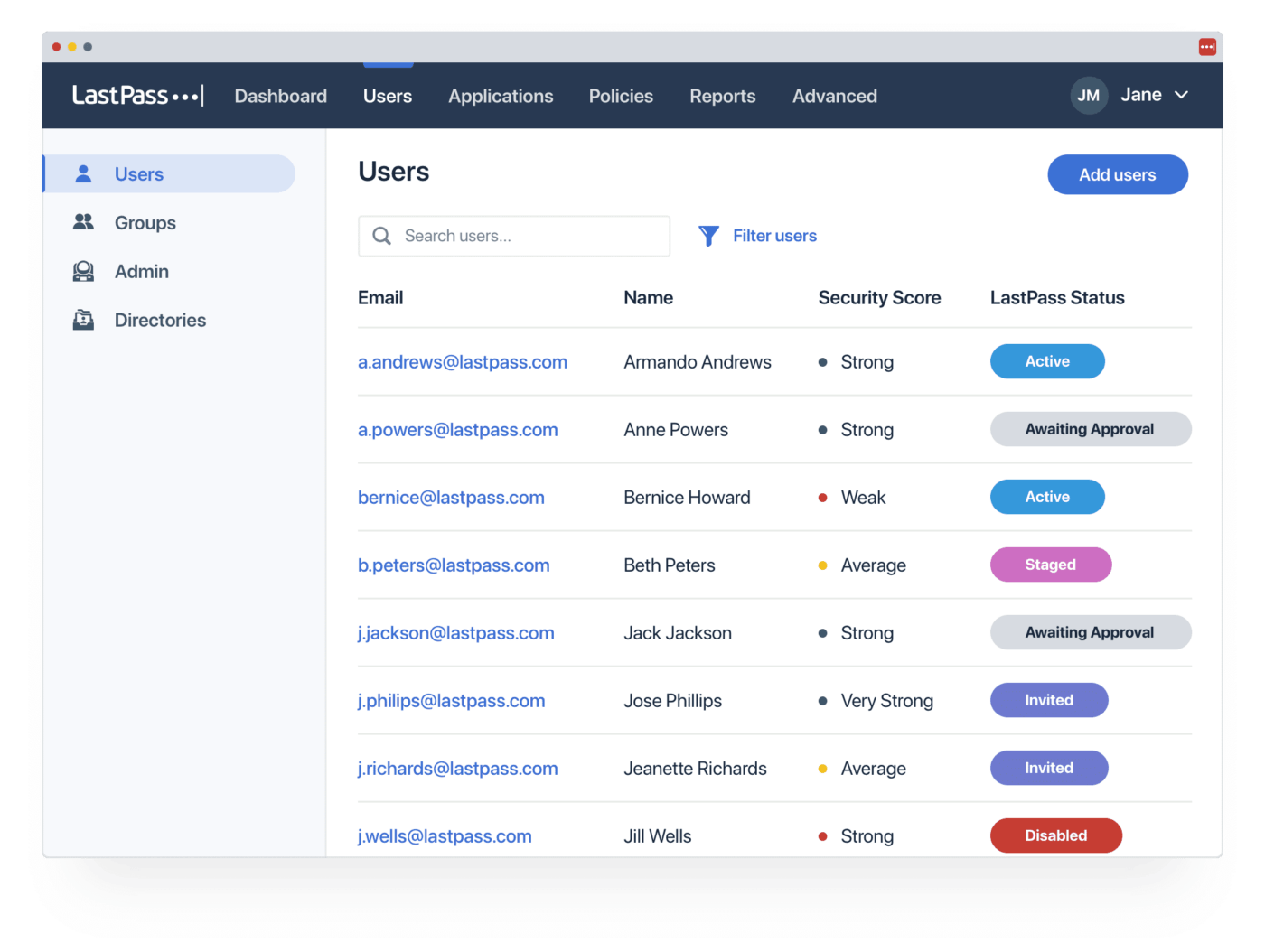
This password manager saves unlimited passwords and can generate passwords. It also auto-fills forms and allows you to securely share your passwords with others. ?
The easy-to-use admin dashboard helps you stay on top of your family’s or business’s password security.
LastPass best features
- Access your passwords whether you’re online or offline
- Store digital records of all kinds, such as software licenses and Wi-Fi information
- Keep your data safe with multifactor authentication on the Premium and Business packages
- Easily scale up to the next account level as your business grows
LastPass limitations
- The free plan only allows access from one device
- A security breach in 2022 damaged the credibility of the company, but they have boosted security since then
LastPass pricing
- Free
- Premium: $3/month per user
- Families: $4/month for up to 6 users
- Teams: $4/month per user
- Business: $7/month per user
- Enterprise: Contact for pricing
LastPass ratings and reviews
- G2: 4.4/5 (1,300+ reviews)
- Capterra: 4.6/5 (2,700+ reviews)
Check out these LastPass alternatives!
Summarize this article for me pleaseOther Password Management Tools
Ensuring access to saved passwords is critical, but it’s just one aspect of managing your sensitive information. You want a comprehensive project management platform for a big-picture view and seamless workflow for daily tasks. That’s where ClickUp comes in.
ClickUp
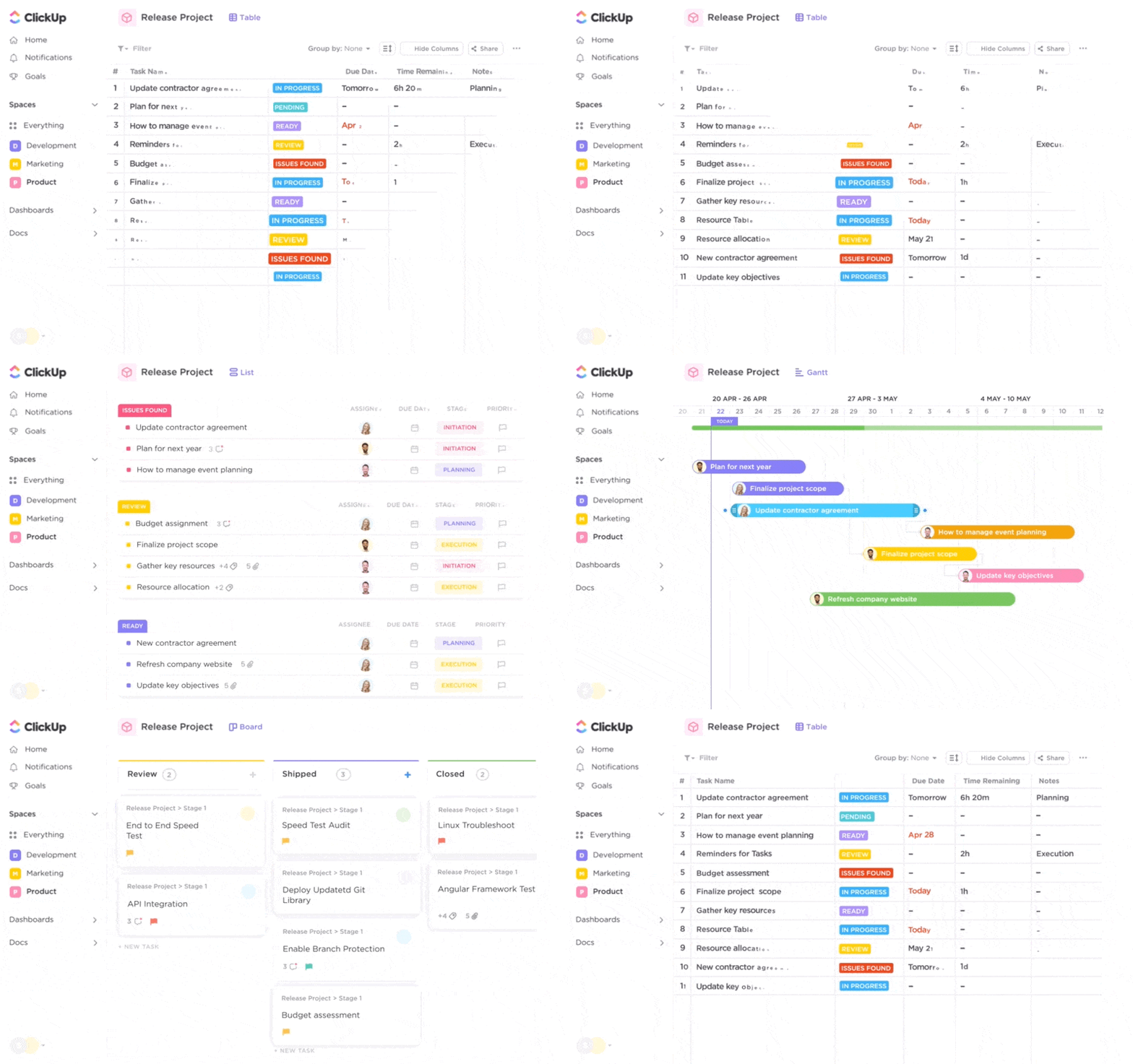
ClickUp is an all-in-one project management platform that boosts productivity and enhances team collaboration on every level.
Start your project by using ClickUp Whiteboards and ClickUp Mind Maps to brainstorm and map your process. Then use those notes to draw up a final project management roadmap that includes your scope and deliverables, milestones and timelines, plus key resources and potential risks. Project collaboration software makes it easy to work with others throughout this process. ?️
Once the project is up and running, manage all your own tasks and get clear oversight of your team’s progress with the built-in task management software.
Collaborate on documents with your team in real time or asynchronously. Then save the ClickUp Docs you create on the platform so you can always find what you need.
View every aspect of your project in the format of your choice—for example, as a List, Gantt Chart, Board, or in Table view.
Pro tip: You can use Table view to save your passwords and use the AI password generator for secure, unique passwords. ?
ClickUp best features
- ClickUp’s free project management software offers a vast range of functionality at no cost
- Choose from 1,000+ templates and ClickUp AI’s writing assistant to draw up a business plan or an action plan, manage your CRM, improve team performance, and so much more
- Control who has access to what with custom permissions per user role
- Rest easy knowing that ClickUp’s security features are top-class
- Streamline your workflow even further by integrating ClickUp with other tools in your tech stack like Slack, HubSpot, Microsoft Teams, Google Drive, and Zendesk
- Use ClickUp on Windows, Mac, or Linux desktop systems or iOS or Android apps
ClickUp limitations
- Clickup AI is only available on paid plans
- The mobile app isn’t yet as fully-featured as the desktop version
ClickUp pricing
- Free Forever: Free
- Unlimited: $7/month per user
- Business: $12/month per user
- Enterprise: Contact for pricing
- ClickUp Brain: Available on all paid plans for $5/Workspace member/month
ClickUp ratings and reviews
- G2: 4.7/5 (9,200+ reviews)
- Capterra: 4.6/5 (3,900+ reviews)
Summarize this article for me pleaseProtect Your Sensitive Data and Ensure Peace of Mind
Keeping your data safe from hackers is a must in today’s online world. You could save your passwords in a spreadsheet or let your browser handle it. But dedicated password managers are far more secure. ?
Once you’ve chosen the password manager that works best for you, optimize the rest of your workflow with ClickUp. You’ll gain productivity and project management tools to support every aspect of your work.
Sign up for free with ClickUp today.


Everything you need to stay organized and get work done.

Recent Articles
Notion vs. Google Docs: Which One Actually Helps You Write in 2026? 
Notion vs. Google Docs: Which One Actually Helps You Write in 2026?
10 Best ChatGPT Alternatives We Tested for Work in 2026 
10 Best ChatGPT Alternatives We Tested for Work in 2026
