Sorry, there were no results found for “”
Sorry, there were no results found for “”
Sorry, there were no results found for “”
Picture this: You’re at a family dinner, enjoying some much-needed downtime, when your phone buzzes—it’s an email from your boss. Do you ignore it and risk missing something important, or reply and let work invade your personal time?
Scenarios like this are becoming common because a personal cell phone now often doubles as a work device. While convenient, this setup blurs the boundaries between personal life and professional duties. This growing overlap between personal and professional boundaries can lead to stress and burnout.
But, what’s the correct way to deal with this situation?
Let us help you with a detailed tour of the pros and cons of using a personal phone for work. So you can make a well-informed decision.
Employers often ask staff to use their personal phones for work to save costs—think of it as BYOD (Bring Your Own Device) savings.
It also means you’re always accessible; if a client calls during your weekend hike, you’re still reachable. Modern smartphones juggle work emails and personal apps effortlessly, so you can switch from a Zoom meeting to ordering lunch without missing a beat.
While this setup is convenient for employers, it can sometimes be difficult to create a solid boundary between work and personal life. Both employers and employees should weigh the pros and cons before merging personal devices with work duties.
Using personal phones for work is becoming increasingly popular. It offers several benefits for both employers and employees, making it a convenient option in today’s connected world.
While using personal phones for work has its advantages, there are notable drawbacks too. Let’s explore some concerns that both employees and employers should consider.
To create a better work environment, both employers and employees should be proactive about these risks. It will eventually protect privacy and maintain trust between both parties.
Both employers and employees must understand the various laws and regulations that may apply to the use of personal phones for work.
Depending on where you are, employee rights and company liabilities might come into play. Understanding workplace policies on phone usage will help you navigate potential issues and resolve them.
Several laws govern data protection and privacy regarding personal devices used for work. Regulations like the General Data Protection Regulation (GDPR) in Europe and the California Consumer Privacy Act (CCPA) in the U.S. set strict guidelines on how personal and company data should be handled.
Employers must ensure that any work-related data accessed or stored on personal phones complies with these laws to prevent data breaches and protect sensitive information.
Employees have the right to privacy on their personal devices. Employers should not access personal information without explicit consent. Establishing clear boundaries between personal and work data is essential to safeguarding employee privacy.
Additionally, laws like the Fair Labor Standards Act (FLSA) require that non-exempt employees be compensated for work done outside regular hours, such as responding to emails or messages on their personal phones.
Using personal devices at work raises concerns about data security and potential liability for employers.
Personal cell phones may lack the robust security features of company-issued equipment, increasing the risk of data breaches. Employers can be held liable if confidential information is compromised due to inadequate security on personal phones.
Also Read: How to Assess Risk
Open communication between employers and employees is key. Employers should provide clear guidelines to help employees protect sensitive data on their personal phones. Regular training can keep everyone informed about best practices and legal obligations.
Optimally managing personal and work phone use is essential for maintaining privacy and reducing stress. Let’s explore practical strategies for employers and employees to navigate this effectively.
Employers should establish a comprehensive Bring Your Own Device (BYOD) policy that outlines expectations and guidelines for using personal phones for work purposes.
This policy should address critical areas such as data security, acceptable use, and privacy concerns. By clearly defining these parameters, companies can protect sensitive information while respecting employee privacy.
For example, the policy might specify security requirements like mandatory use of strong passwords, regular software updates, and protocols for reporting lost or stolen devices.
Offering training on best practices for data protection and device security is crucial. Employers need to ensure that employees understand the importance of keeping work data confidential and are equipped with the knowledge to do so.
This could include workshops on recognizing phishing attempts, using secure networks, and safely accessing company resources.
Providing ongoing support helps employees stay updated on the latest security threats and how to counter them effectively.
Encouraging a culture where employees can “leave work at work” is vital for preventing burnout. Employers should define acceptable hours for work-related communications, promoting a healthy work-life balance.
With clarity about after-hours availability, employees can feel comfortable disconnecting during their personal time without fearing negative repercussions.
This approach not only helps in managing stress but also enhances overall productivity by ensuring employees are well-rested and focused during work hours.
One effective strategy is to use different apps or profiles for work tasks to avoid mixing personal and professional data.
For example, you might use one email app for personal messages and another for work-related communications. It is also crucial to be mindful of work notifications during personal time.
Consider setting specific times to check work emails or business-related messages and disable work notifications after hours to help “leave work at work” and manage stress.
Keeping your phone’s software updated is vital to protect against security vulnerabilities that could compromise sensitive information.
Use strong passwords or biometric authentication like fingerprint or facial recognition to safeguard both personal and work data. Installing reputable security apps can add an extra layer of protection.
These steps not only secure your personal information but also help protect company data, addressing concerns about data security and confidentiality issues.
Open communication with your employer is key to successfully managing personal and work phone use. Discuss any concerns you have about using your personal phone for work.
Inquire about solutions like a company-provided device or compensation for phone usage. Your employer might offer alternatives or implement policies to support a healthier work-life balance.
Understanding and aligning expectations can lead to a more productive and satisfying work experience.
Also Read: All About Work-life Integration
A VPN encrypts your data, protecting sensitive information when accessing work resources. It adds a layer of security, especially when using public Wi-Fi networks.
Employers can use MDM solutions to manage and secure work data on personal devices. These tools can remotely wipe company data if required, without affecting personal information.
Utilize apps designed for business use that keep work data isolated. Consider using productivity tools like ClickUp to manage tasks efficiently.
📮 ClickUp Insight: Work worries don’t stop when the workday ends. 28% of employees say work constantly follows them, while another 8% frequently struggle to switch off. That’s over a third of workers bringing stress home. 😣
ClickUp’s Reminders can help reinforce your end-of-day rituals and maintain boundaries. Automate a “wrap-up” reminder, set work-free notification zones, and schedule personal time. Switching off should be intentional, not optional!
💫 Real Results: Lulu Press saves 1 hour per day, per employee using ClickUp Automations—leading to a 12% increase in work efficiency.
Must Know: The everything app for work ✨
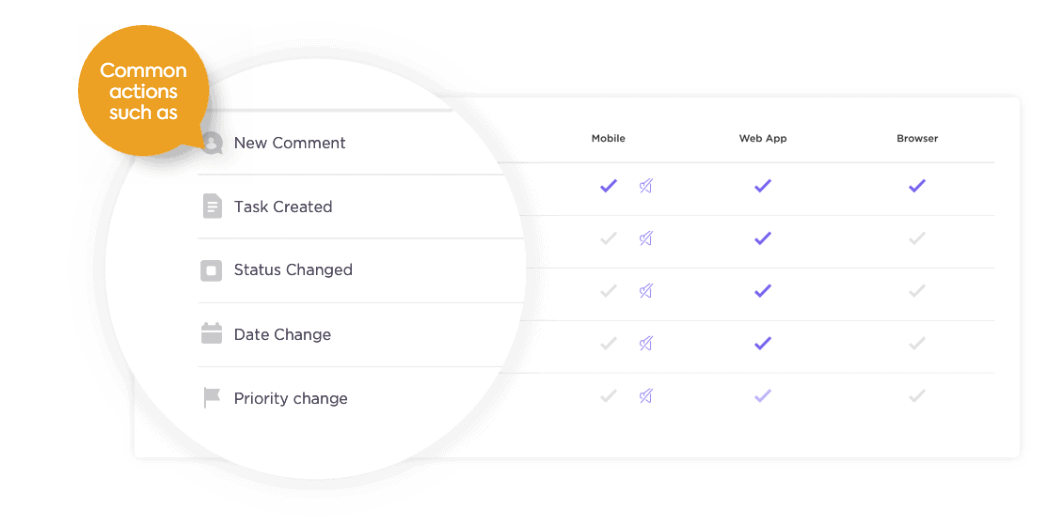
As discussed above, productivity tools like ClickUp can significantly help separate personal and work communications. This separation is crucial for maintaining a healthy work-life balance and ensuring that work doesn’t intrude into your personal time.
Whether you work from the office or home, or have a hybrid setup, maintaining clear communication is the most important aspect. Making proper communication plans and the use of technical solutions help ensure a healthy work-life balance while maintaining privacy.
Also Read: Best Business Messaging Apps
Feel like your personal phone has become the proverbial ball and chain, keeping you tied to work 24/7? You’re not alone! The ‘always-on’ nature of our devices today is blurring the line between office and home.
This constant connectivity isn’t just a mild annoyance—it can ramp up stress levels and make it tough to unplug after hours. So, what’s the solution?
Adopting a separate work or company phone might just be the game-changer you need to reclaim your time and privacy.
A work-only phone offers several benefits that can enhance both your professional and personal life:
Being able to turn your work phone off after hours helps you truly detach, improving work-life balance and reducing stress. No more work notifications at the dinner table!
A dedicated device makes it easier to adhere to security protocols, protecting both you and your employer from potential breaches. Plus, you don’t run the risk of sensitive work information mixing with personal content.
With a separate work phone, work-related calls and messages are in one place, reducing the chance of missing important communications. You’re also able to focus better on work as you can’t be sidetracked by personal apps or notifications during work hours.
Read More: 10 Ways to Be More Productive at Work
Before making the switch, it’s important to consider the following aspects:
Remember to discuss any compensation for using your personal phone with your employer to ensure you’re not bearing unnecessary costs.
Making the move to a dedicated work phone can be straightforward:
Adopting a separate work phone is a proactive step towards managing the complexities of modern work communication, benefiting both your personal well-being and professional efficiency.
So, next time you’re juggling between a work email and your friend’s meme on your personal phone, remember it’s all about balance.
By setting clear boundaries and maybe even considering a separate work phone, you can keep the work you distinct from the off-work you, and maintain your privacy.
With the right strategies and tools, you can have the best of both worlds—staying productive without sacrificing your personal time.
Tools like ClickUp can help you centralize and manage your work communication with one unified platform, helping maintain the work-life separation you want.
Sign up for a free account today.

Sudarshan Somanathan
Max 22min read

Manasi Nair
Max 20min read
Sudarshan Somanathan
Max 23min read

© 2026 ClickUp