






Still downloading templates?
There’s an easier way. Try a free AI Agent in ClickUp that actually does the work for you—set up in minutes, save hours every week.
Sorry, there were no results found for “”
Sorry, there were no results found for “”
Sorry, there were no results found for “”

‘I can’t focus on anything for more than 10 minutes!’
Between endless notifications, back-to-back meetings, and constant context switching, staying focused feels impossible for many of us. A study shows that most people get work for less than four hours per day—yep, out of a whole 8-hour workday.
But what if you could plan your day so precisely that distractions became irrelevant?
That’s where timeboxing apps help. Think of them as your personal bouncers, guarding your calendar so you can focus.
Whether you’re juggling freelance deadlines, managing a remote team, or just trying to tame your never-ending to-do list, these tools help you schedule time blocks for specific tasks, build better routines, and, yes, finally complete tasks that matter.
Let’s talk about 10 of the best time blocking apps—including ones with project time management—to block your day on purpose.
Here are some of the best tools out there—each with its edge, depending on how you like to plan, track, or block your time:
| Tool Name | Best For | Key Uses | Pricing* |
| ClickUp | All-in-one tool for time management; Team size: Freelancers, solopreneurs, small teams, startups, SMBs, enterprises | Task management, project planning, time tracking, scheduling, recurring tasks, and integrations with tools like Google Calendar and Slack | Free plan, Customizations for enterprises |
| Sunsama | Daily planning with calendar integration; Team size: Freelancers, small teams, startups | Organizing tasks from Gmail, Slack, and GitHub into calendar slots, AI-powered time estimates, and daily planning rituals | Starts at $20 per user/month |
| Todoist | Daily planning with calendar integration; Team size: Freelancers, small teams, and startups | Task prioritization, recurring tasks, custom filters, and integrations with Google Calendar, Gmail, and Slack | Free; paid plans starting at $5 per user/month |
| Motion | AI-powered schedule automation; Team size: SMBs, enterprises | AI-driven task prioritization, conflict resolution, timeline views, and resource planning | Paid plans starting at $49 per user/month |
| Akiflow | Centralized task and calendar management; Team size: Freelancers, and solopreneurs, | Task capture from emails and messages, drag-and-drop scheduling, and daily/weekly planning rituals | Free trial, $34 per user/month |
| Reclaim | Smart time blocking; Team size: Small teams, SMBs | Auto-scheduling tasks, focus time blocking, unified calendar view, and real-time adjustments | Free; paid plans starting at $10 per user/month |
| TickTick | Personal productivity with built-in timer; Team size: Freelancers, solopreneurs, individuals | Task management, habit tracking, recurring reminders, and multiple calendar views | $35.99 per user/year |
| TimeCamp | Time-tracking with billing features; Team size: Freelancers, consultants | Automatic time tracking, productivity categorization, reporting, and integrations with tools like Trello and Asana | Free; paid plans starting at $3.99 per user/month |
| Toggl Track | Lightweight time tracking across projects; Team size: Small teams, SMBs | Real-time and offline time tracking, calendar integration, and background activity tracking | Free; paid plans starting at $10 per user/month |
| Clockwise | Team calendar optimization and focus time; Team size: SMBs, and enterprises | AI-driven meeting scheduling, focus time creation, analytics for meeting loads, and scheduling links for external coordination | Free; paid plans starting at $6.75 per user/month |
Finding the right timeboxing app can seriously level up your daily workflow. Based on user feedback and real-world needs, here are the key features to look for when picking your go-to time blocking tool:
🧠 Fun Fact: Happy employees = productive teams! A study suggests happier workers are 13% more productive. That’s one additional reason to block time chunks for productive work and breaks in your organization!
If you’re ready to get more done and stress less, a reliable timeboxing app benefits your work routine.
From automated timesheets to intelligent scheduling, these are the best timeboxing apps to help you reclaim your calendar and focus better.
Our editorial team follows a transparent, research-backed, and vendor-neutral process, so you can trust that our recommendations are based on real product value.
Here’s a detailed rundown of how we review software at ClickUp.
Want to make every hour count? ClickUp, the everything app for work, is built to handle your task management, project planning, and timeboxing needs without bouncing between platforms.
Plan projects in fixed time periods, set calendar events, and stay ahead of deadlines with built-in time tracking, scheduling, and progress tools. Even better, let ClickUp handle all of your ‘work about work’, so you can focus on tasks that move the needle on your goals.
Whether you’re managing a team or your own packed schedule, ClickUp keeps work moving—and visible—every step of the way. How?
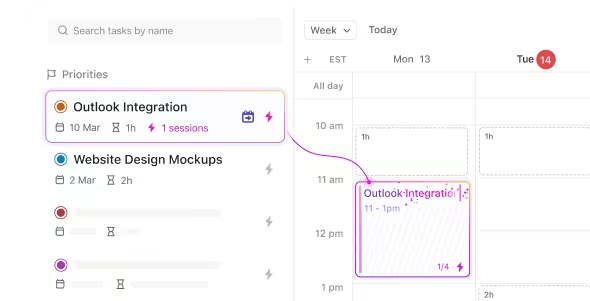
Say hello to ClickUp Calendar! It isn’t just a tool for keeping track of dates—it’s built for timeboxing your day with purpose.
Easily schedule time blocks, drag and drop tasks, and align your calendar events with team goals or personal priorities. It syncs with tools like Google Calendar and Microsoft Outlook Calendar and pulls directly from your task list, so your planning stays dynamic and actionable.
Once you link your calendar app to ClickUp, timeboxing your day becomes a breeze. You can easily view and plan your schedule right where your tasks reside. Plus, get the calendar to auto-block your schedule for a new hobby or presentation practice.
Did you know that you lose four hours a week toggling between apps? With ClickUp, you can eliminate context switching. Join Google Meet, Zoom, or Microsoft Teams meetings directly from the app to save time. And with the AI Notetaker, you can capture meeting notes while staying focused on the conversation.
ClickUp’s Project Time Tracking is also a powerhouse for anyone serious about staying on top of their work and timeboxing their day. It lets you monitor exactly how long tasks take, helping you manage workloads, stay on schedule, and create structured time blocks for your most important tasks.
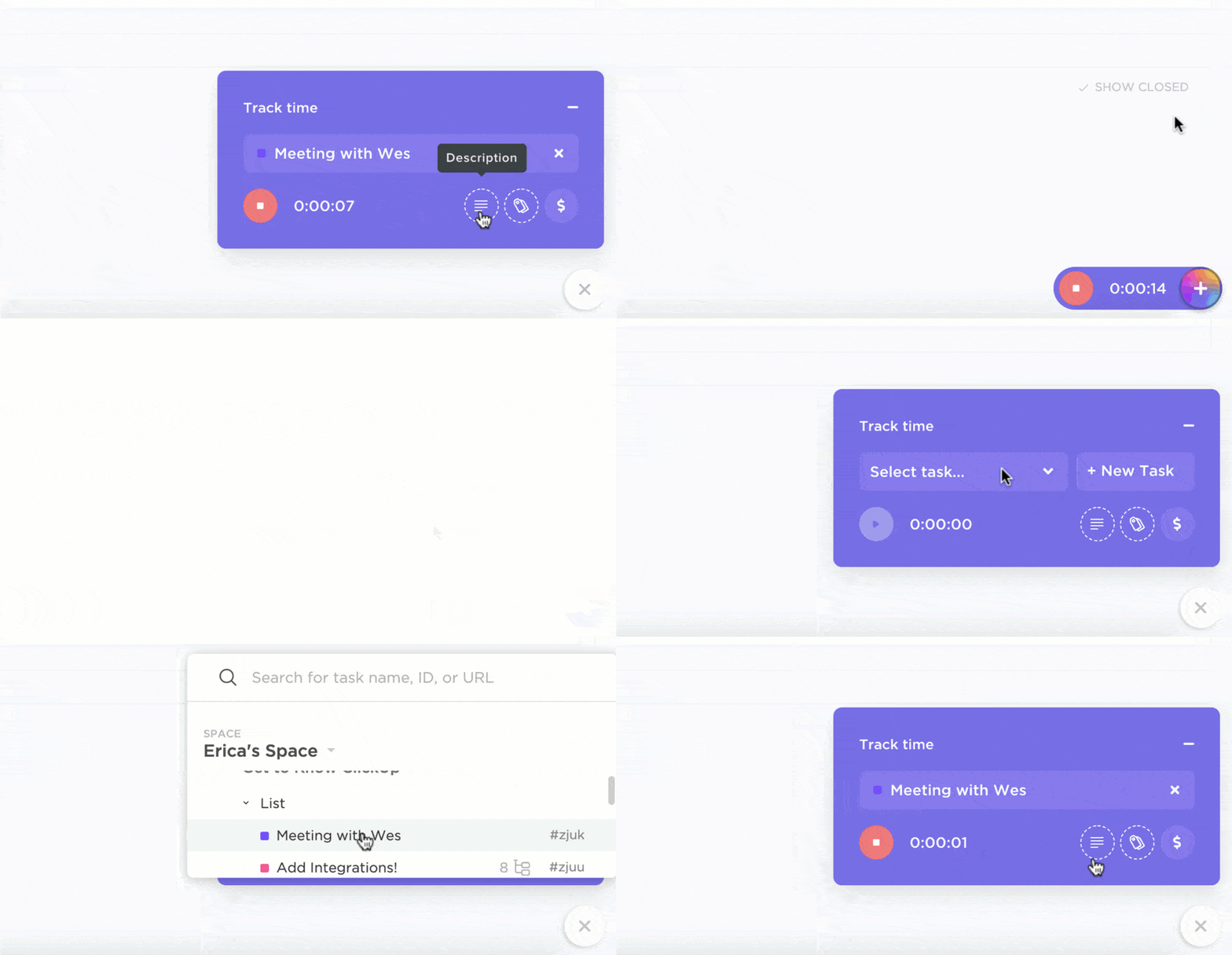
Whether you’re working solo or with a team, ClickUp’s time management features make your time tracking endeavors effortless. You can start and stop timers directly from tasks, tracking work in real time without switching apps.
Missed starting a timer? No worries—just log time manually for past work to keep everything accurate. And when you need to dig deeper, ClickUp generates detailed time reports, giving you a clear view of where your time goes. You can even compare estimated vs. actual time to improve future planning and meet deadlines more consistently.
Plus, setting recurring tasks on ClickUp is a breeze. For example, you can set a task to “Check Email” every morning at 9 a.m., so it automatically reappears every day, helping you build a more predictable routine.
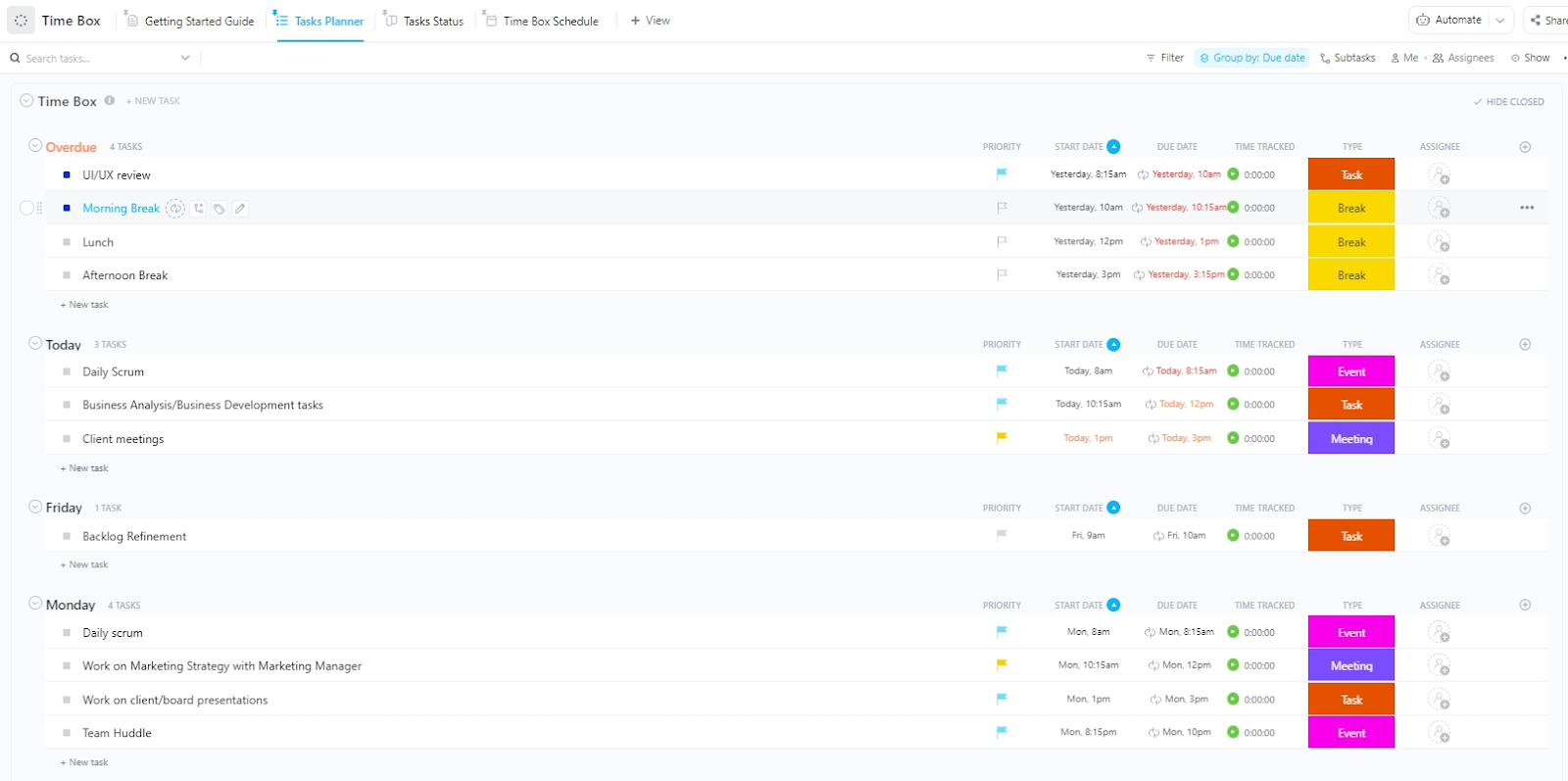
Ready to kickstart your timeboxing journey? Begin with the ClickUp Time Box Template. It’s built to solve common time management problems by helping you block your day into focused, intentional work sessions.
This template lets you:
A G2 reviewer says:
ClickUp is very easy to use, even with all the features it offers. I love how everything is in one place – from task management to docs to the calendar view. The calendar especially helps me keep track of deadlines and plan ahead efficiently. It’s a great tool for both personal and team productivity.
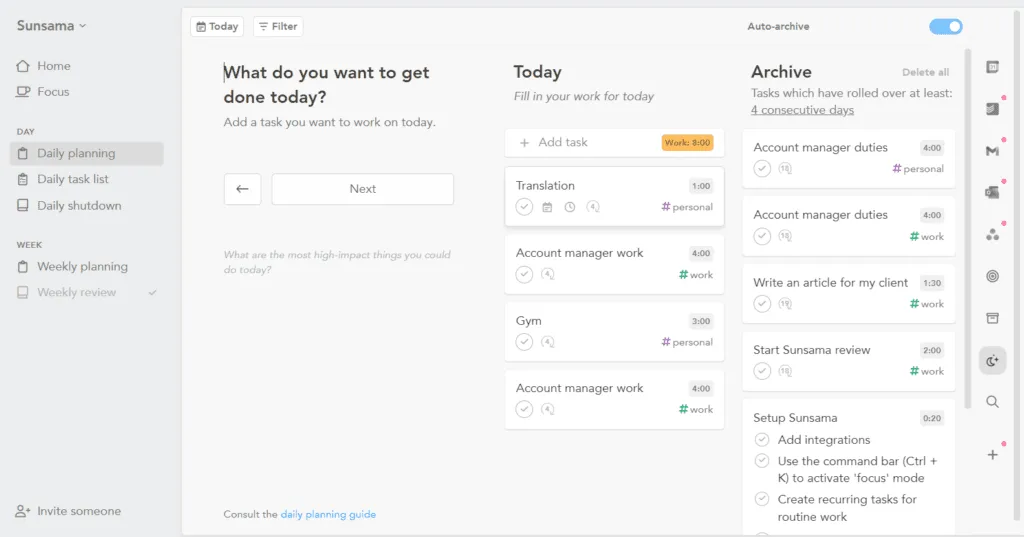
Ever feel like your day is a blur of scattered tasks across different apps? Sunsama helps you cut through the chaos by pulling tasks from tools like Gmail, Slack, and GitHub and organizing them into fixed time slots on your calendar.
With a simple 10-15 minute planning ritual each morning, you can review what’s unfinished and set realistic goals for the day. Instead of overwhelming features, it focuses on helping you plan with intention and purpose.
A Capterra review reads:
As a solopreneur, it is often challenging to tackle the number of tasks I have in a day. Sunsama reminds me to take breaks, gives me a realistic view of how much time a task will take, and delivers a weekly summary of how I spend my time. I can incorporate my personal and business calendars, wellness activities, and family time all in one place. This helps me to stay aligned with my goals and intentions.
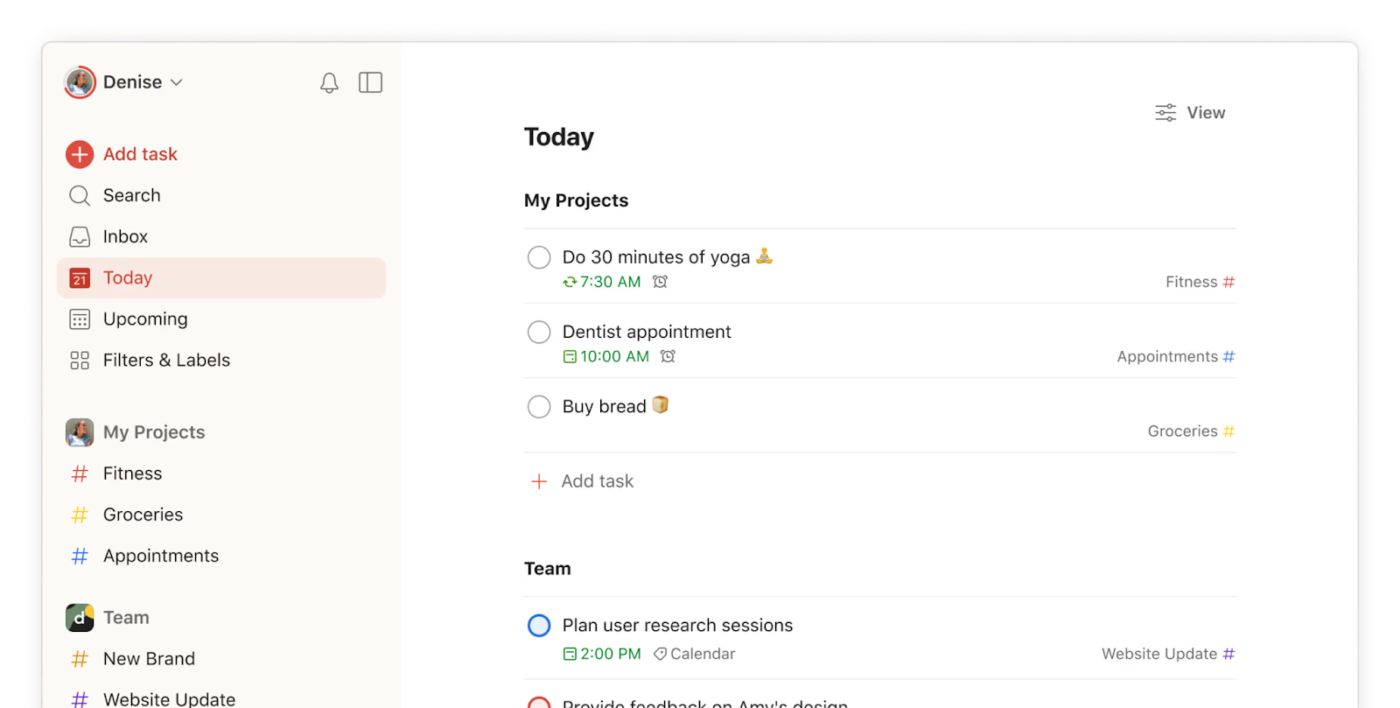
Todoist brings semblance to personal and team task management, teaching users how to save time through innovative organization features.
The app’s clean, intuitive interface makes capturing and organizing tasks feel natural, whether you’re planning your workday or managing complex team projects.
A Capterra review reads:
Todoist is the cornerstone of my time management strategy along with Spark Mail and Google Calendar. The integration is perfect with these and other apps, and the mobile app is crucial so I do not miss anything.
📮 ClickUp Insight: 50% of people structure their time by dedicating certain days to admin vs. focused work, but only 22% say they automate or delegate tasks.
Manual time management helps, but it doesn’t eliminate the repetitive tasks that still eat into deep work. ✔️
ClickUp’s Calendar, Time Blocking, and AI Agents work together to protect your time. Automatically schedule repetitive work, move tasks based on priority, and trigger reminders—so your week runs itself.
💫 Real Results: Lulu Press saves 1 hour per day, per employee using ClickUp Automations—leading to a 12% increase in work efficiency.
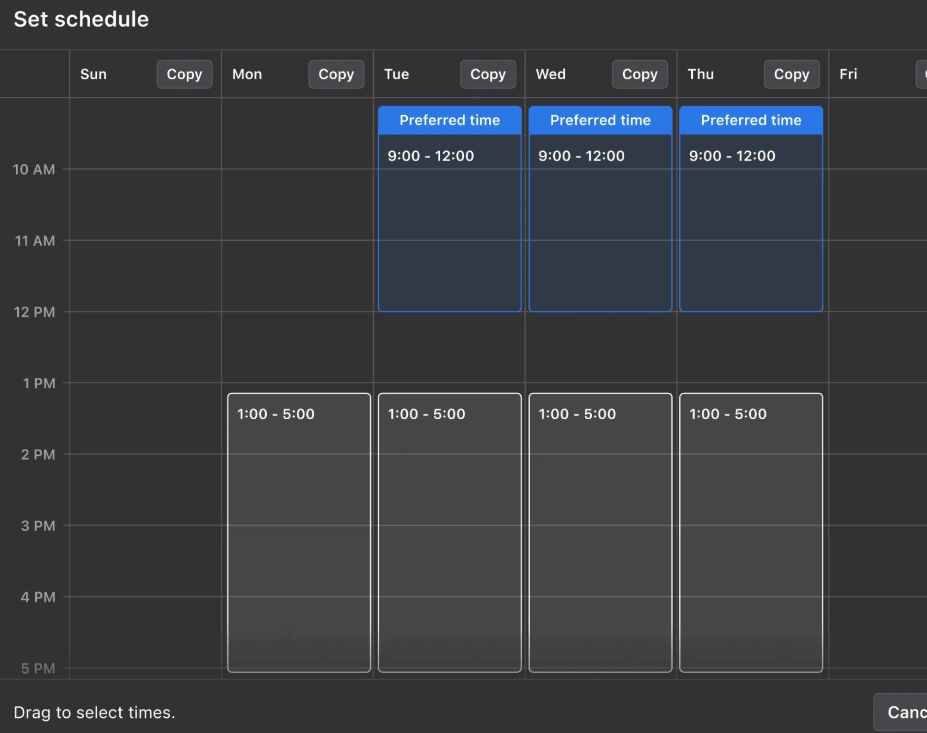
Motion brings fresh thinking to the timeboxing technique by using artificial intelligence to your day’s schedule for maximum impact. This smart scheduling tool analyzes your tasks, meetings, and priorities to create a personalized daily plan that adapts to your work schedule and style.
For example, if you’re juggling a client meeting and a tight project deadline, Motion will prioritize these tasks and adjust your schedule to ensure both are completed on time. The app stands out with its AI-driven task prioritization, considering project dependencies, deadlines, and durations.
💡 Pro Tip: Want to make life easier? Use ClickUp’s integrations with over 1,000 tools. Whether it’s time tracking with Everhour or syncing your Google Calendar, you can keep everything in one place and stay productive without having to jump between apps.
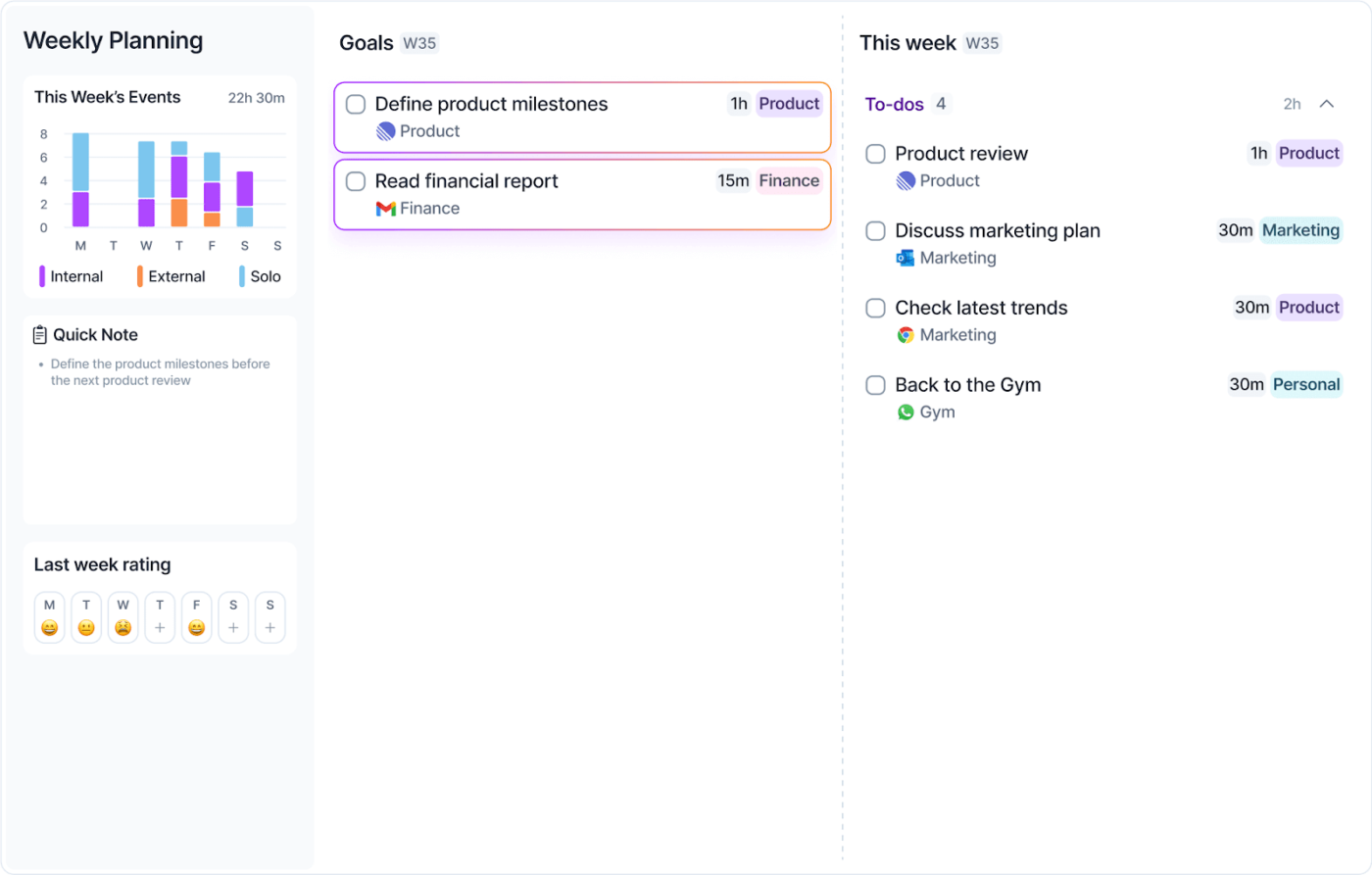
Want to stop jumping between apps to manage your daily schedule? Akiflow brings all your tasks and calendar events into one clean workspace. This makes it easier to plan your day without constantly switching between apps.
This scheduling tool shines in gathering tasks from popular platforms like Google Calendar, Outlook, Gmail, and Slack. When you update a task in Akiflow, it automatically syncs back to the source app, keeping everything consistent across your tools.
📖 Also Read: Best Employee Monitoring Software
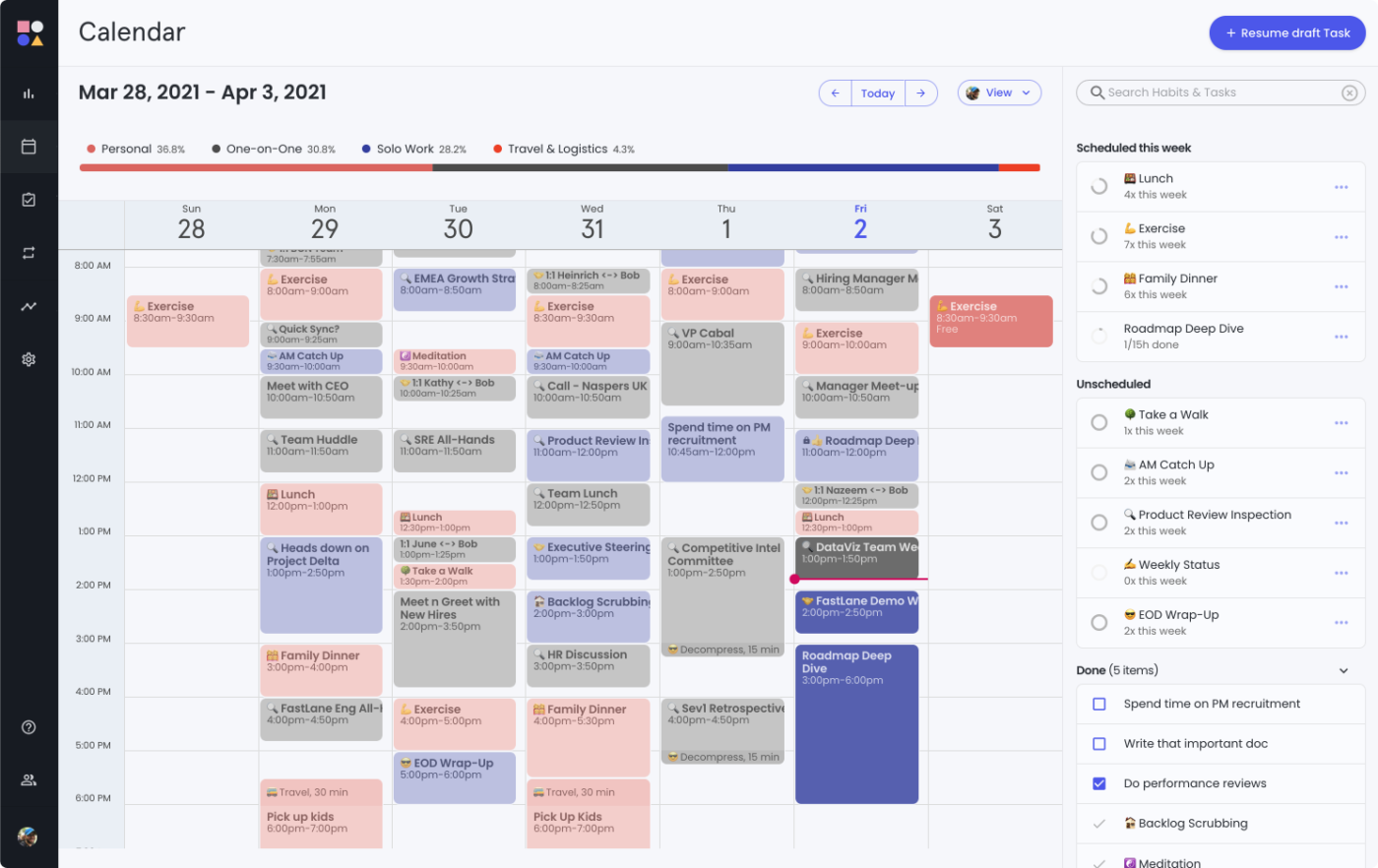
Imagine a tool that automatically arranges your tasks around your meetings without you lifting a finger. Reclaim AI from Dropbox does just that by syncing with your calendar and adjusting schedules in real time based on your workload and priorities.
It takes into account deadlines and available time to allocate the right moments for tasks. Rather than spending time manually adjusting your day, it lets you focus on what matters while the tool ensures your calendar stays optimized and conflict-free.
A G2 reviewer says:
As a student, my ability to allocate time to do projects is limited. Now, I only have to add the task to my to do list and it is automatically scheduled. It is also easy to see if I am too far behind and need to work extra hours to catch up on assignments.
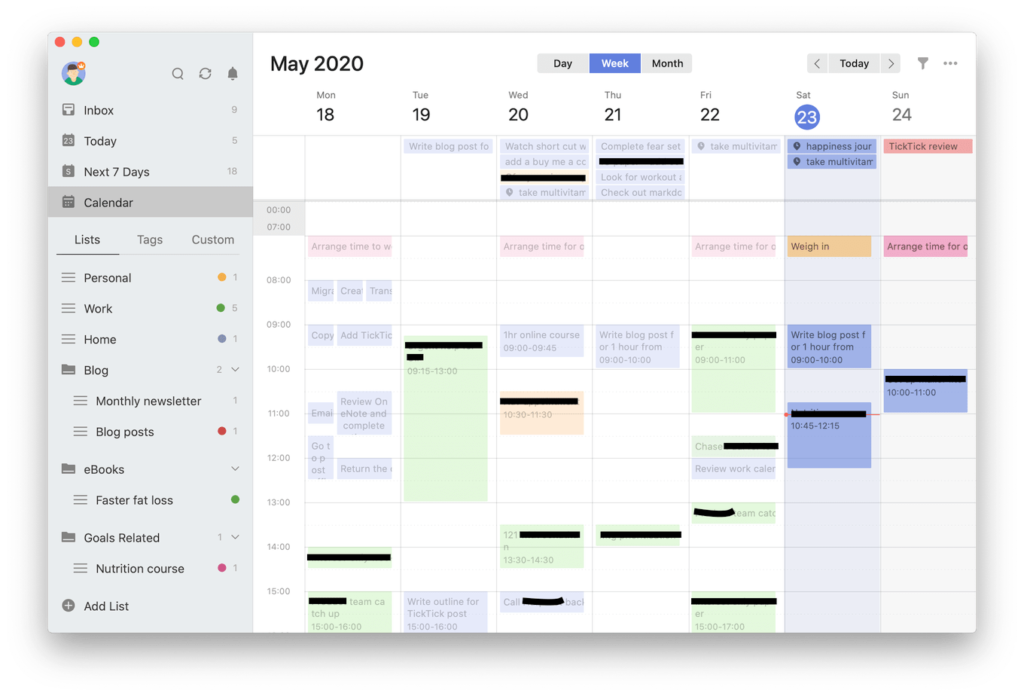
TickTick blends smart task management, calendar scheduling, and habit tracking to help you plan your day with purpose. With multiple calendar views—monthly, weekly, agenda, multi-day, and multi-week—you can easily visualize your entire schedule.
It’s more than just a to-do list app. It offers Pomodoro timers and smart reminders to keep your focus sharp and consistency on track. Whether you’re creating tasks or building new habits, TickTick helps you stay on top of your goals.
👀 Did You Know? The Eisenhower Matrix, popularized by President Dwight D. Eisenhower, is a time management technique that helps you categorize tasks by urgency and importance. It’s all about focusing on the tasks that are important but not necessarily urgent, so you don’t waste time on things that aren’t a priority.
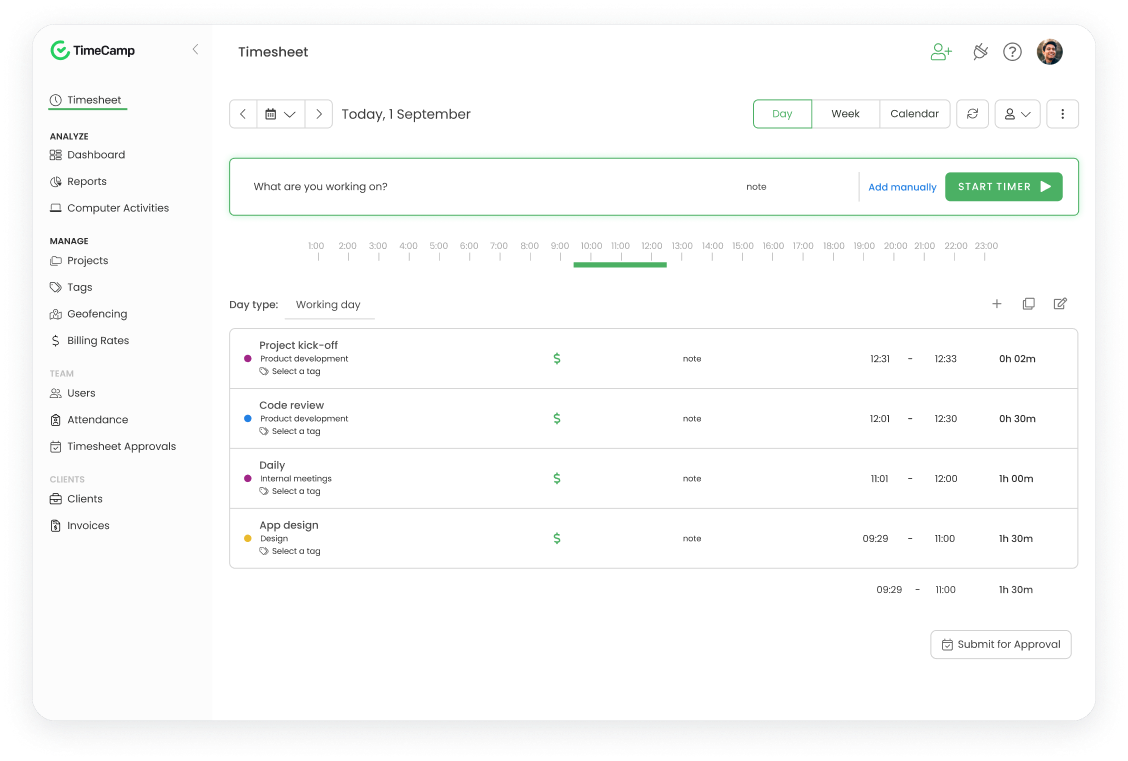
Need a timesheet that tracks time without the hassle? TimeCamp works quietly in the background, so you don’t have to guess or manage spreadsheets. It automatically logs your hours and turns that data into valuable insights.
Whether it’s tracking productivity, managing projects, or generating invoices, TimeCamp helps you understand your work habits and find ways to improve. Plus, it integrates with all your favorite tools, making it a seamless addition to your workflow.
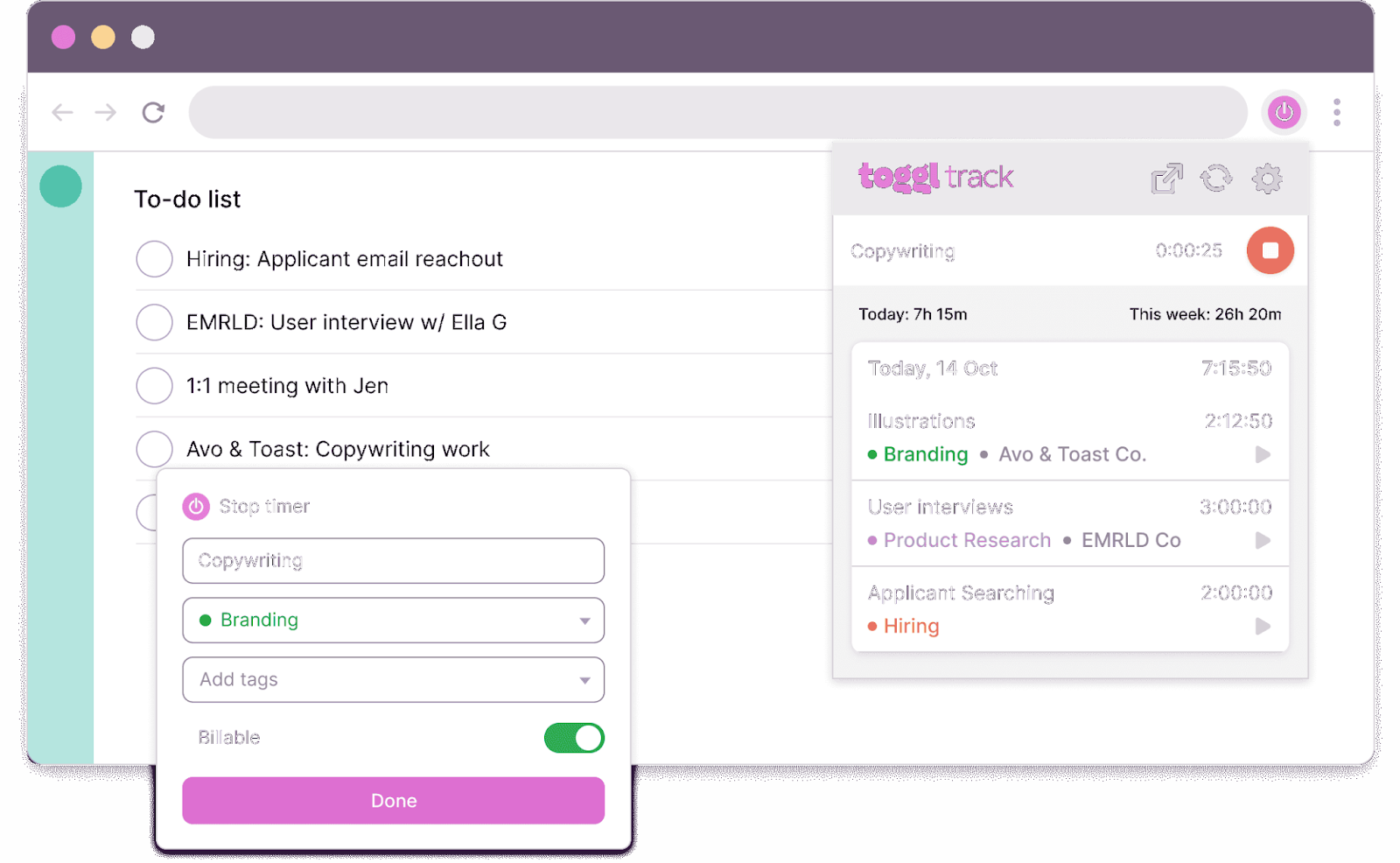
Need a clean, reliable way to track how you spend your workday? Toggl Track offers a no-frills, intuitive experience that helps you stay on top of all your tasks, without disrupting your flow.
It’s built to slot into your routine, whether you prefer using a desktop app, browser extension, or mobile device.
With features like calendar app integration, background tracking, and one-click timers, it brings the true benefits of timeboxing apps to life, turning scattered hours into structured, focused work blocks.
🧠 Fun Fact: Timeboxing started in software development, where teams would allocate fixed periods (or “boxes”) to work on specific tasks. Originally introduced in the context of Agile methodologies, it helped keep teams focused and on track. Today, it’s a popular productivity technique used by everyone, from CEOs to students, to minimize distractions and ensure tasks are completed efficiently within a set time frame.
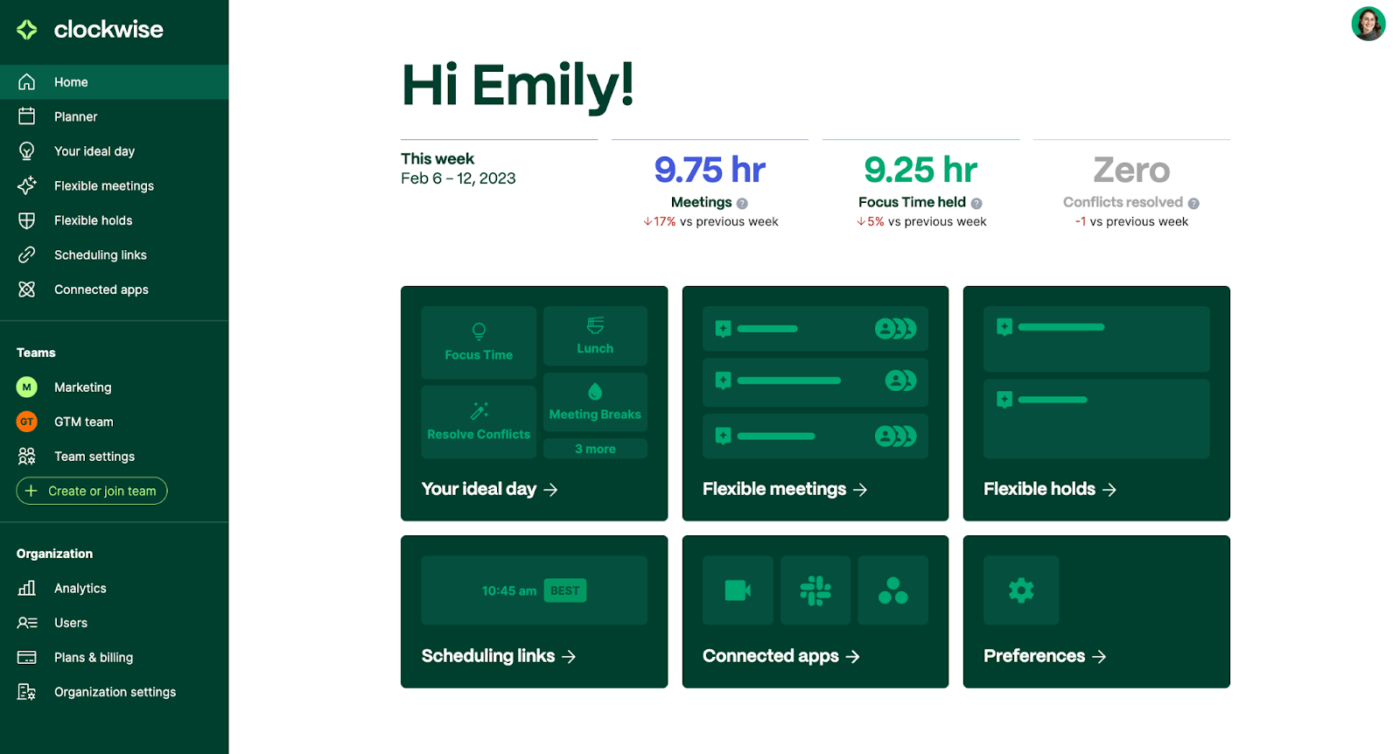
Overwhelmed by endless meetings and struggling to carve out time for deep work? Clockwise has you covered.
This AI-driven scheduling assistant optimizes your day by automatically scheduling meetings, safeguarding focus time, and syncing effortlessly with Google Calendar, Slack, and Asana. It’s built to help you take back control of your calendar and boost productivity.
A G2 review says:
It builds in the focus time that I need, but that I find too cumbersome for me to consistently put in place myself. I like that the AI scheduler responds to changes in my calendar even before I do. I’ve found that it’s positively impacted my productivity, and made my colleagues more sensitive when it comes to booking over pre-allocated time in my calendar too. For a single user, I think the price is also reasonable and it was also easy to integrate with key tools I already use for work, e.g. Outlook, Asana.
Time is the one resource we can’t make more of. That’s why picking the right timeboxing app is so crucial for your productivity.
Each app on our list brings something special to the table—some excel at personal task management, helping you carve out focused work periods, while others shine in team settings.
But if you want a complete solution that combines timeboxing with robust project management features, ClickUp stands out from the pack. Its customizable time tracking app, automated workflows, and team collaboration tools help you do more than just manage time—they help you make the most of it.
You can set up timeboxed tasks, track progress in real time, and adjust your schedule on the fly. Plus, with features like custom dashboards and detailed reporting, you’ll always know exactly how your team is spending their hours.
Ready to take control of your time and boost your productivity?
Sign up for ClickUp today.

© 2026 ClickUp

There’s an easier way. Try a free AI Agent in ClickUp that actually does the work for you—set up in minutes, save hours every week.