

Anyone who’s ever been in charge of anything—a bake sale, their neighborhood Little League baseball team, a surprise birthday party—has war stories to tell. 😵💫
Some of those are about risks—potential problems that could have derailed the best-laid plans. Others are about issues—mishaps that actually happened.
When you’re making plans, distinguishing between risks and issues beforehand isn’t always easy. The same holds true for project management.
But, understanding this difference is crucial for keeping your projects on track and stress levels in check.
In this post, we’ll unravel the mystery of risks vs. issues in project management. We’ll also cover why telling them apart matters and how you can master telling the difference. This will help you effectively identify risks and confidently navigate the complexities of project management.
Risks vs. Issues – What’s the Difference?

 Summarize this article for me please
What Is a Risk in Project Management?
According to the Project Management Institute, a risk is defined as “an uncertain event or condition that, if it occurs, has a positive or negative effect on a project’s objectives.”
To illustrate, consider this statement:
“If you fail to check your fuel tank before a road trip, you may run out of fuel midway and end up being stranded in the middle of nowhere.”
Here, the cause of the risk is failing to check your fuel tank. The risks are:
- You run out of fuel midway through your trip
- This happens far away from a gas station, so you’re left stranded
This example perfectly highlights how risks are often linked to future events or conditions that can significantly affect a project’s success.
Project risks can stem from any source—project environments, team members, clients, or external factors like market changes.
Also, different businesses face different types of project risks.
Different types of project risks
An SEO agency might be at risk if Google changes its algorithm, impacting its operations. Or, an automotive manufacturer faces the risk of new or amended regulations restricting the use of certain materials in new cars.
A big part of managing risks is identifying them early on and crafting a plan to tackle them if they arise. Risk management plays a crucial role in project management, helping to steer projects away from unexpected pitfalls.
In the context of project management, here are some common types of project risks:
Cost risks
Cost risks include unexpected expenses, inaccurate cost estimations, and economic fluctuations that may lead to budget overruns. Therefore, it’s essential that they’re managed effectively and proactively.
Schedule risks
Unexpected delays, resource unavailability, or dependencies on other projects that increase the likelihood of not meeting project deadlines are schedule risks.
Performance risks
The risk of not achieving the desired quality or output levels is called performance risk.
Scope creep risks
Uncontrolled changes or continuous growth in project scope, often arising from vague project objectives, can lead to increased costs and delays. These come under scope creep risks.
Skills resource risks
Staffing-related challenges, such as skill gaps or inadequate team expertise, are skill resource risks.
Technology risks
Software glitches, hardware failures, and compatibility issues come under the umbrella of technology risks.
Organizational risks
Shifts in management, cultural changes, or external factors like mergers and acquisitions are organizational risks.
Market risks
Market fluctuations, evolving customer needs, or new competitors can pose significant threats.
Operational risks
Unexpected changes in the production process, supply chain issues that can disrupt operations, and mismanaged human and material resources are operational risks.
Strategic risks
Strategic risks are external factors, such as market changes or regulatory shifts, that can affect a project’s alignment with its strategic objectives.
External risks
Unpredictable factors, such as natural disasters, legal issues, or market volatility, can impact project outcomes and are known as external risks.
Effective risk management software can be a game changer in proactive risk identification and risk tracking.
Summarize this article for me pleaseWhat Is an Issue in Project Management?
While risks are potential problems that may or may not occur, issues are the problems that have already surfaced and need immediate attention.
Issues can range from minor glitches that are easily fixable to major disruptions that halt progress entirely. They can pop up at any stage of the project and pose a threat to meeting project goals.
Issues often stem from risks—whether anticipated or not—that have come to fruition. A good contingency plan can help you tackle risks before they become issues.
An example:
On a road trip, you run out of fuel midway and end up being stranded in the middle of nowhere. Turns out you ran over a rock that pierced a hole in your fuel tank.
You couldn’t have foreseen this issue beforehand—and one without an easy fix.
Now, just like risks, there’s more than one type of project issue. Let’s break them down:
Internal issues
These include internal roadblocks such as communication breakdowns, misaligned goals, and team members not meeting their responsibilities. Ensuring that team members understand their roles within the project management framework can help prevent these misunderstandings.
Time-related issues
Missed deadlines and delayed tasks are classic examples. Establishing a realistic timeline is vital since it sets expectations and guides the entire team toward the finish line.
Cost-related issues
Budget overruns are among the most common hurdles for project managers. If managed well, they don’t always derail a project, but it’s essential to keep them documented in your issues register to prevent recurring financial problems.
External issues
Unpredictable factors like political changes or adverse weather conditions can significantly impact projects. Having a solid contingency plan in place ensures that such external disruptions don’t derail your project.
Now, let’s look at some examples to see how risks and issues play out in real life.
Boeing’s 787 Dreamliner: Complexity leading to unavoidable issues
Boeing’s rollout of the 787 Dreamliner is a classic case of risks turning into issues.
In an interview with the Seattle Times, a Boeing engineer said that the aircraft was “a more complicated airplane, with newer ideas, new features, new systems, and new technologies.“
This complexity made it nearly impossible to highlight all the potential issues beforehand.
However, some risks were apparent. As the project progressed, these risks materialized into severe issues, including delays and an additional $10 billion in costs. The company acknowledged that it had “outrun their ability to manage it effectively.”
Here, the combination of high risks and insufficient risk management led to inevitable project issues and setbacks.
Bank of America: When risks escalate into major issues
In 2011, Bank of America introduced a new $5 monthly fee for debit card users, anticipating some negative customer feedback—a common occurrence with price hikes. However, the backlash was far more intense than expected.
A protest movement called “Bank Transfer Day” gained traction on Facebook, urging customers to leave Bank of America in response to the new fee. This customer exodus forced the bank to backtrack on its new fee structure.
Although the risk register had identified the possibility of customer dissatisfaction, the risk evolved into a more severe issue than the company had prepared for. A more proactive approach to identifying and documenting these risks could have altered the outcome.
Summarize this article for me pleaseWhat Is the Difference Between Risks and Issues?
Flying—that’s a risk. Fear of flying? That’s an issue.
Knowing whether you’re dealing with a risk or an issue determines your approach. Risks require proactive strategies to prevent or mitigate potential problems, while issues need immediate action to resolve current problems and move on. To help with the proactive approach, you can use a free tool like ClickUp’s Risk Assessment Calculator.
But confusing the two can lead to misplaced efforts and resources. You don’t want to be preparing for a thunderstorm when your boat is already leaking!
Let’s look at risks and issues, how they’re similar, and how they differ.
Risks vs. issues: Timeline
One key difference between risks and issues lies in timing. Risks are future-focused—they’re the “what-ifs” that could disrupt your project later.
For example, consider a construction project where you might face a delay in acquiring permits. This delay is a risk, as it hasn’t happened yet, but it could affect your schedule.
You plan for these scenarios using tools like a RAID log (Risks, Assumptions, Issues, Dependencies) to track and manage potential threats.
By contrast, issues are current problems that need immediate attention.
Imagine unexpected weather causing work stoppages on a construction site. It’s happening now and directly impacts your project.
The key difference is that while risks need planning, issues need solutions in real time.
Risks vs. issues: Certainty
Risks are uncertain. You might assess their likelihood and impact, but you can’t be sure if or when they’ll happen.
For example, the possibility of a competitor launching a similar product before yours is a risk. You can evaluate market trends to gauge the probability, but it’s still a guess.
However, issues are already on your plate and demand action.
If your product testing reveals a critical error, that’s an issue—it’s certain and needs fixing before you can move forward.
This difference between uncertainty and certainty helps you train your focus on what needs immediate attention versus what needs strategic planning.
Risks vs. issues: Impact
Risks have a hypothetical potential impact until the event occurs. They can range from minor setbacks to major disruptions.
For example, rising material costs might threaten your project budget, but until they happen, it’s just a risky possibility.
Issues, by contrast, have a definite impact that is already affecting your project.
Hidden costs discovered during construction, for example, demand immediate budget adjustments.
Risks vs. issues: The management approach
Managing risks means being proactive. You anticipate potential problems and create plans to prevent them from materializing. This might involve identifying alternative suppliers, building extra time into your schedule, or employing different frameworks to safeguard against threats.
For example, you can develop a succession plan to handle the risk of key team members leaving the project, thereby minimizing disruption.
Issues, however, require a reactive approach.
When a key team member unexpectedly resigns, it becomes an issue. You must act quickly—redistributing tasks, hiring replacements, or adjusting your timeline.
Risks vs. issues: Focus
Risk management, an integral part of your project management plan, is all about prevention. You aim to stop risks from becoming issues by identifying threats early and taking steps to avoid them. This might involve creating a risk register, actively monitoring potential risks, and preparing contingency plans.
For example, employing agile practices and conducting regular software testing helps prevent the risk of delays.
If a critical bug emerges during testing, it’s now an issue, and the focus shifts to resolving it as fast as possible.
The priority moves from stopping risks to tackling issues head-on, ensuring the project can still meet its goals.
Risks vs. issues: Combat strategy
While proactive risk management involves thorough planning and developing mitigation strategies, dealing with issues often means adapting on the fly, whether by reassigning resources, adjusting timelines, or even pivoting project goals.
By keeping a well-maintained RAID log and using risk registers, you can document your strategies and be ready to switch gears when necessary. The more prepared you are for risks, the better you can handle issues as they arise, making your project management efforts more effective overall.
Risks vs. issues: A comparison chart
| Aspect | Risks | Issues |
| Timeline | Future-focused; potential events that may happen and impact the project later | Present-focused; current problems affecting the project now and requiring immediate action |
| Certainty | Uncertain; likelihood and impact can be assessed, but occurrence is not guaranteed | Certain; these are real, existing problems that have already occurred |
| Impact | Consequences are hypothetical until the risk materializes | Directly affecting project progress, budget, or timeline right now |
| Management approach | Proactive; involves planning, prevention, and risk mitigation strategies like using risk registers | Reactive; requires immediate resolution and adapting current plans to fix the issue |
| Focus | Prevention; aims to avoid risks turning into issues by planning and implementing controls | Resolution; focuses on fixing problems as they happen to minimize the impact |
| Planning | Involves detailed planning, using measures such as RAID logs and cybersecurity risk management frameworks, to address possible future threats | Requires quick action to modify existing plans and manage the immediate problem |
Summarize this article for me pleaseWhat Are the Similarities Between Risks and Issues?
Despite their differences, risks and issues are essential aspects of project management. They’re similar in certain ways:
- Projects can face a wide range of risks and issues, which can vary greatly from one project to another
- Using lessons learned from similar projects is a great way to prepare for risks and handle issues effectively
- The project manager and project team need to work together to identify risks, manage them, and address issues as they arise
- There are specific documents for tracking both project risks and issues
- As a project progresses, the nature and scope of risks and issues can change, and the project manager must guide the project team through these shifts
Recognizing that both risks and issues are part of project management helps in understanding their importance and handling them effectively.
Summarize this article for me pleaseHow to Manage Risks and Issues?
Identifying risks early on allows you to address potential problems before they escalate. It’s also important to keep meticulous records of these concerns to manage them effectively throughout the project.
A great way to stay on top of risks and issues is by using tools designed for the job.
That’s where ClickUp comes in. It’s your ultimate strategic project management partner.

ClickUp is a project management tool packed with hundreds of customizable and functional features designed to help teams of all sizes manage risks, monitor project updates, promote transparency, and collaborate seamlessly—all in one platform.
ClickUp makes work management feel effortless and offers so much more than your average risk management software. From brainstorming on ClickUp’s interactive whiteboards to creating in-depth wikis in collaborative docs, ClickUp provides a versatile workspace that stands out.
Here’s how ClickUp can help you assess and handle risks and issues:
Gain insights with dashboards

Think of ClickUp Dashboards as your project’s mission control—bringing everything into one customizable view.
You get a high-level snapshot of every aspect of your project’s progress, allowing you to manage risks and issues easily.
The best part? You build it your way.
Choose from over 50 widgets, including tables, workload trackers, custom charts, and more, to display exactly what matters to you. This tool is perfect for staying informed about every project detail and risk.
Automate repetitive tasks
Nobody enjoys boring, repetitive tasks. Thankfully, ClickUp Automations cuts down the time spent on monotonous tasks so you can focus on more important things.

With over 100 automation options, you can set rules that change task statuses, update priorities, adjust due dates, and more.
Plus, 50 trigger actions allow you to create custom automation tailored to your workflow. It’s all about keeping the focus on what truly matters without the constant oversight.
Explore customizable templates
Possibly the most user-friendly aspect of ClickUp is its vast library of templates, such as specialized ones for risk assessment and failure mode and effects analysis (FMEA).
Let’s look at some of the best templates for managing risks and issues in project management.
ClickUp’s Risk Assessment Whiteboard Template is perfect for helping teams prioritize and visualize risks.

With this template, your team can assess different risk categories and their potential impacts, dive into data to spot potential trouble areas, and plan preventive measures to minimize risk exposure.
Here’s how you use it:
- Describe risks, brainstorm, and create a risk register with ClickUp Docs
- Create a spreadsheet of risks and view their likelihood using a Table View
- Establish a risk-rating system and use ClickUp Custom Fields to rate the likelihood of each risk
- Develop a plan of action, for which you can create and assign individual tasks using ClickUp Tasks
- Monitor the progress of your risk management efforts and review the results
- Update your Risk Assessment Whiteboard regularly with new information or changes using the ClickUp Board view
This template is exactly what you need to ensure your team is aligned and ready to tackle risks head-on.
For straightforward risk analysis, ClickUp’s Project Management Risk Analysis Template is your go-to.

Setting up this template in ClickUp can immensely help during a project team’s status review meetings. It allows your team to:
- Quickly and accurately identify potential risks
- Analyze the chances of each risk occurring
- Develop prevention strategies to manage risks proactively
Whether your project is large or small, this template helps keep everything on track.
Next, take a peek at ClickUp’s Issue Tracker Template. Issues are bound to happen, but this template is designed to make managing them easier.
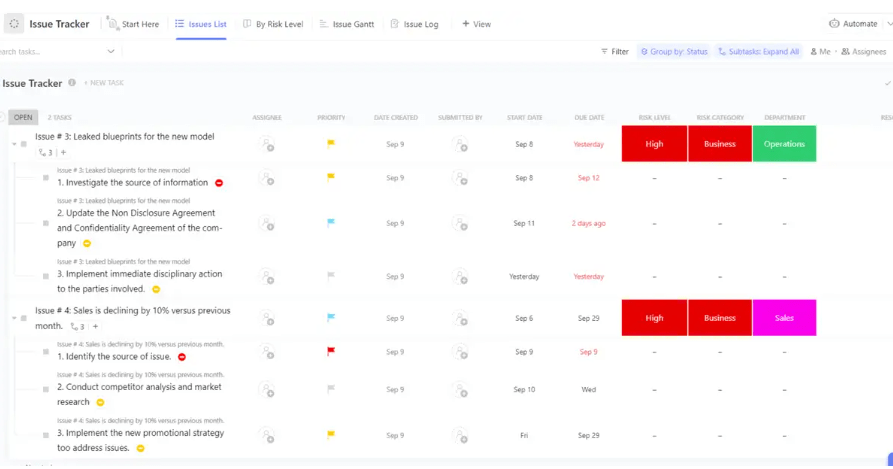
With this template, you can:
- Report, track, and prioritize bugs, errors, and other issues with ease
- Enhance team collaboration to resolve issues more swiftly
- Keep all issue reports organized in a shared database
It centralizes all issue reports in one place, enhancing collaboration and helping you meet deadlines faster.
And if you still can’t find what you need, or if you’ve tailored a template that works best for you, saving it is just a click away. ClickUp lets you capture any task, process, or view as a template, ready to use whenever you need it.
Ultimately, ClickUp seamlessly combines all these features in an intuitive and integrated way, providing you with the tools to tackle risks and issues without missing a beat.
Summarize this article for me pleaseMitigate Risks and Issues with ClickUp
In project management, risks are everywhere, and they come in all forms—both challenging and providing unexpected opportunities. Managing these diverse risks effectively is key, and that’s where ClickUp shines! It’s a versatile solution for managing risks and optimizing your projects.
With ClickUp, you get access to many customizable features like Dashboards and Goals. Plus, it offers multiple communication options to keep everything running smoothly.
And the best part? You can start managing risks without spending a dime with ClickUp’s Free Forever Plan.
So why wait? Tackle risks head-on and give ClickUp a try today!


Everything you need to stay organized and get work done.

Recent Articles
Jira Project Management: What It Does Well and Where It Taps Out 
Jira Project Management: What It Does Well and Where It Taps Out
8 Communication Strategies That Actually Fix Team Chaos
8 Communication Strategies That Actually Fix Team Chaos
