






Still downloading templates?
There’s an easier way. Try a free AI Agent in ClickUp that actually does the work for you—set up in minutes, save hours every week.
Sorry, there were no results found for “”
Sorry, there were no results found for “”
Sorry, there were no results found for “”
For some teams, recruitment runs on memory.
That quick call last week. A note scribbled mid-interview. The resume someone swore they sent.
Details scatter fast, and in the middle of it all, good candidates get away.
Recruitment database software is built to fix that. It anchors the search—names, conversations, timelines—everything sits in one place, easy to find and easier to act on.
Here are 10 solid options worth looking at. 👀
| Tool Name | Use Case | Best For | Pricing* |
| ClickUp | Builds a unified hiring system with customizable workflows, tags, and dashboards | Managing multiple roles and recruiters in one workspace | Forever free plan; Paid plans available |
| Workable | Guides recruiters through structured pipelines with audit-ready compliance tools | Streamlining hiring while staying legally aligned | Paid plans start from $360/month |
| Greenhouse | Equips teams with evaluation frameworks and diversity analytics | Reducing bias and improving candidate assessment consistency | Custom pricing |
| Zoho Recruit | Adapts easily through automation, configurable fields, and multi-channel sourcing | Customizing processes without heavy overhead | Free plan available; Paid plans start from $30/user/month |
| Recruit CRM | Balances talent tracking with branded client submissions and white-labeled portals | Staffing agencies focused on client experience | Paid plans start from $100/user/month |
| Manatal | Matches roles to candidates using AI-enriched profiles and intelligent recommendations | Tech-forward hiring across diverse locations | Paid plans start from $19/user/month |
| Fetcher | Automates outreach and sourcing using email campaigns and engagement insights | Proactive recruiters scaling outbound efforts | Paid plans start from $499/month |
| SeekOut | Surfaces hard-to-find candidates through Boolean logic, research data, and enriched profiles | Tapping into niche or underrepresented talent pools | Custom pricing |
| JobAdder | Simplifies daily tasks with templates, bulk actions, and seamless device syncing | Recruiters optimizing daily workflows and mobility | Custom pricing |
| Gem | Keeps passive candidates engaged with long-term nurture campaigns and analytics | Relationship-driven hiring and talent pipeline growth | Paid plans start from $300/month |
Our editorial team follows a transparent, research-backed, and vendor-neutral process, so you can trust that our recommendations are based on real product value.
Here’s a detailed rundown of how we review software at ClickUp.
The right recruitment database software organizes candidate data, automates tedious tasks, and fits your team’s recruiting tech stack. To pick a winner, zero in on these must-haves:
Great hiring needs more than a place to store resumes. You need recruitment tools that help you keep everything organized, track progress, and make quick decisions.
Here are the best options to help you do exactly that. 👇
You’re frantically toggling between 17 browser tabs, trying to piece together which UI designer candidates made it to the final round. Was it the one with the impressive portfolio but spotty video connection, or the one your lead developer raved about in that email thread you can’t find?
Tomorrow’s executive meeting looms, and you’ve got nothing but fragmented data. 📊
Enter ClickUp: your hiring command center.
The ClickUp HR Solution combines project management, knowledge management, and chat—all powered by AI that helps you work faster and smarter.
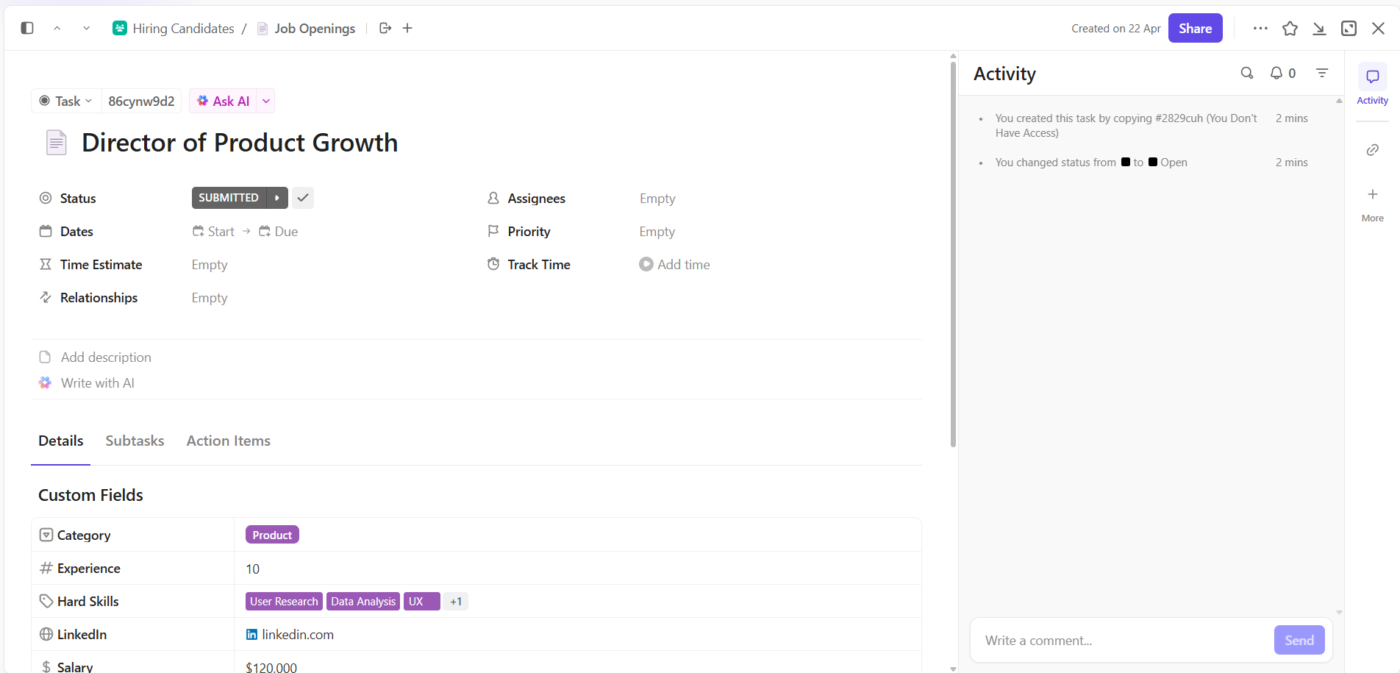
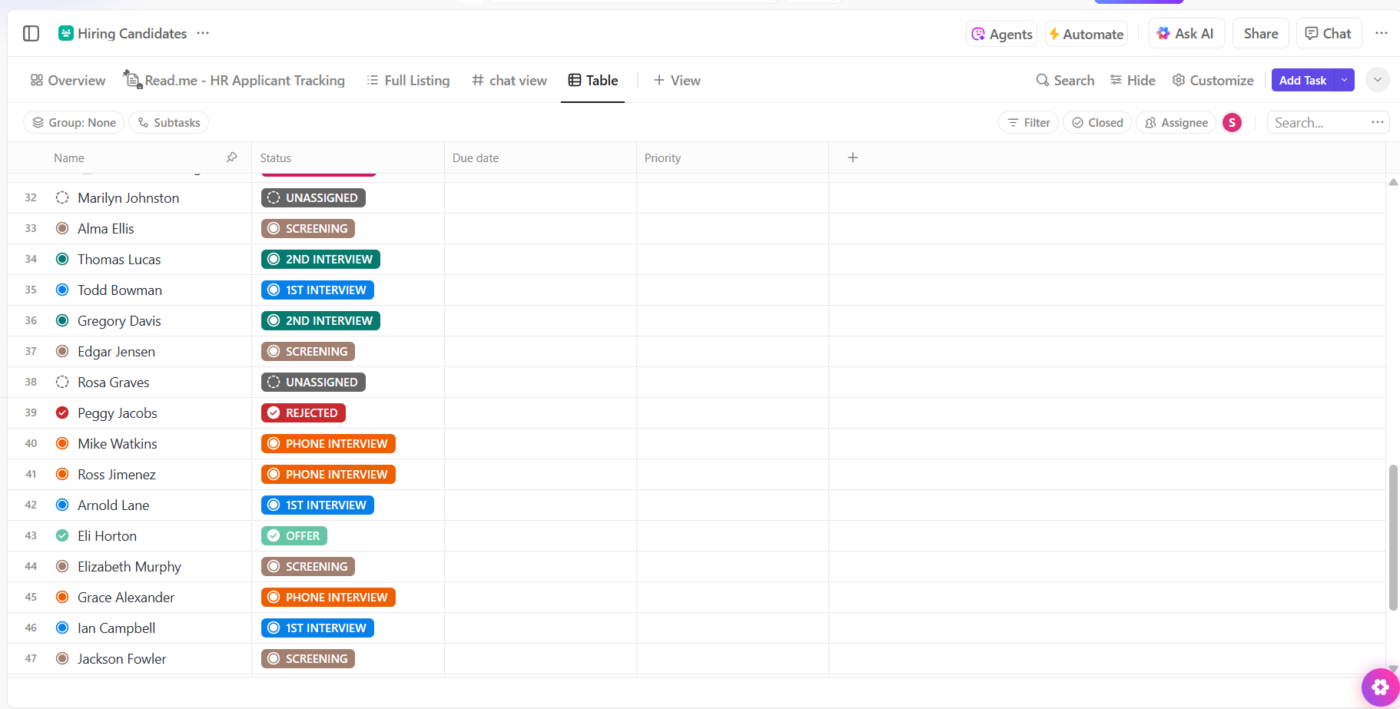
Start by building your hiring workflow inside ClickUp Tasks. Think of each role as a task, like ‘Customer Success Manager – East Coast,’ and create subtasks for each hiring step.
Assign recruiters, set due dates, attach resumes or portfolios, and drop comments for context.
Then layer in ClickUp Custom Fields to turn that workflow into a true database. Add fields like ‘Visa sponsorship needed,’ ‘Time zone overlap,’ or ‘Preferred notice period. ’ When you’re filling five roles at once and need to pull up all candidates open to contract work and available within two weeks, you won’t have to dig.
To make sense of everything at a glance, switch between ClickUp Views. 👇🏼
ClickUp’s Board View is perfect when you want to drag candidates across stages: sourced, interviewed, and shortlisted. Meanwhile, ClickUp Table View helps when you’re comparing things like expected comp, recruiter notes, or hiring stage across roles.
When it’s time to dig deeper, ClickUp Docs keeps all the extra context right where you need it. Create a Doc to collect written assessments, interview notes, or feedback summaries, then link it directly inside a Task.
Let’s say the hiring manager drops detailed feedback after the panel round. You can centralize that input and tag recruiters or stakeholders to loop them in, without toggling between tools.
Then there’s ClickUp Automation and AI Autopilot Agents, which quietly handle what you’d rather not.
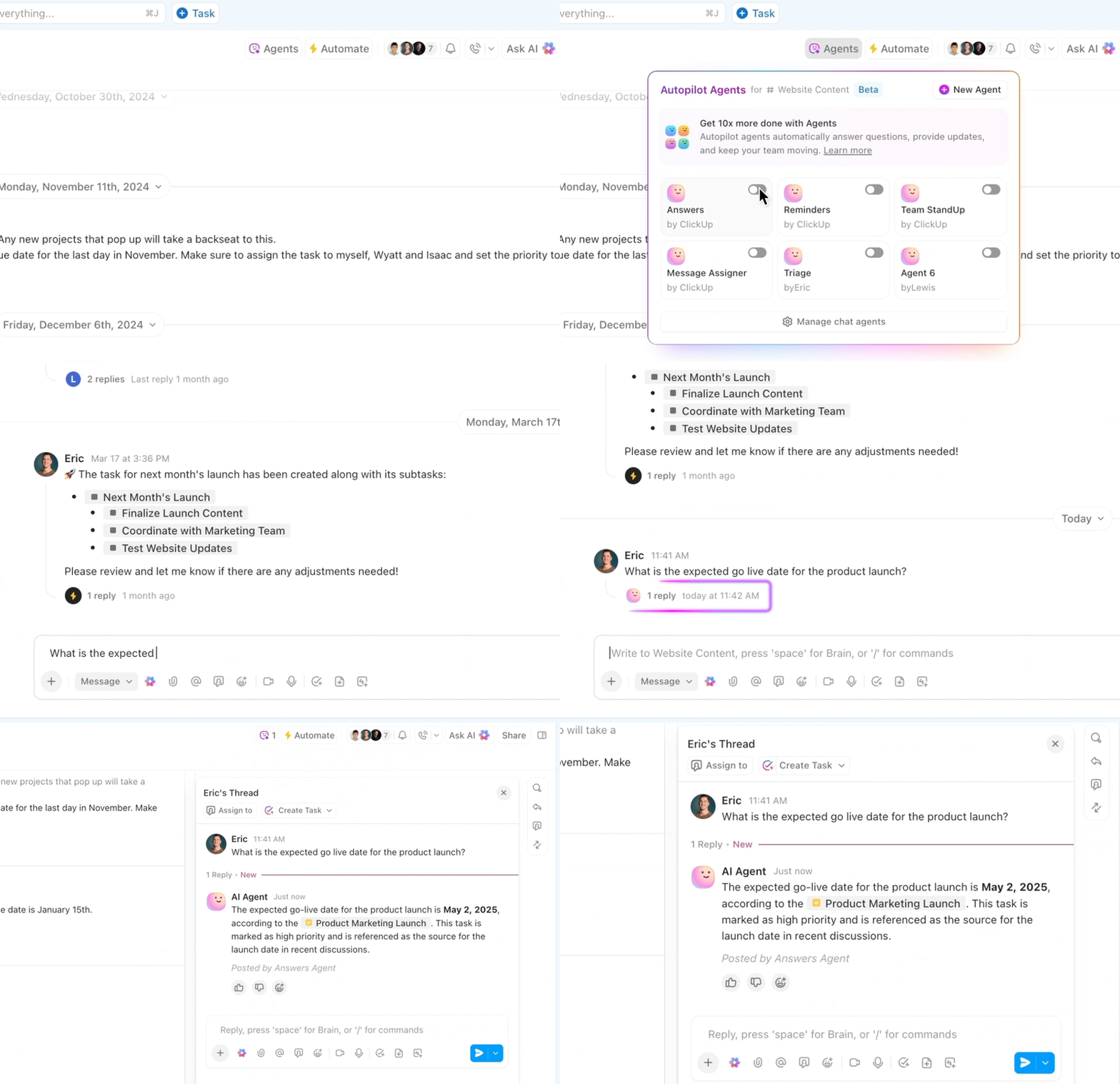
Set up rules like: when a task moves to ‘Final Interview’, notify the recruiter and add a checklist for next steps. Or when a candidate is marked ‘Rejected’, auto-assign a follow-up email task and move the role back to ‘Open’. It’s the stuff that usually slips; now, it doesn’t.
And if you’d rather not build from scratch, use the ClickUp Recruitment Action Plan Template. It’s already set up with hiring stages, task templates, and views tailored for recruitment.
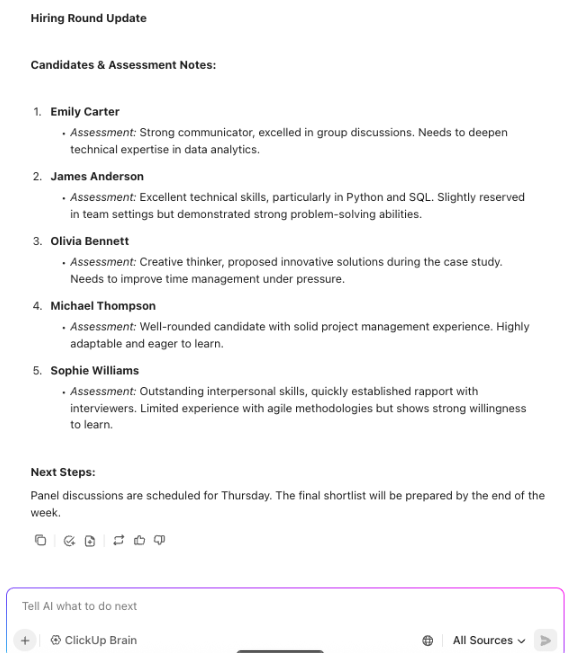
Here’s what a G2 reviewer wrote about ClickUp:
Like any project management system, it takes some planning and set up (to ensure your team is using it the same way across the board) but, once you’ve got your core needs in place, it’s very easy to use and customize. In fact, one of our favorite things about ClickUp is how customizable it is. They offer a Custom Fields feature that allows you to create any relevant fields that will work best for your team. Additionally, they have dashboards that allow you to create reports filtered by those custom fields. It’s really great!
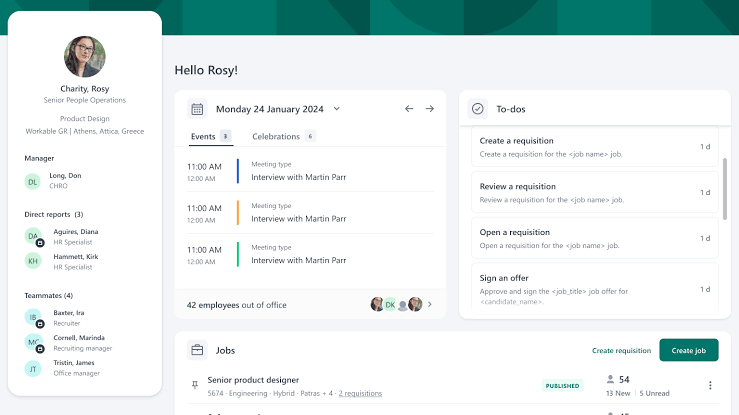
Workable feels like having a recruitment legal expert and data analyst on your team 24/7.
It ushers you through hiring workflows that are locked down for legal precision, gathering every candidate detail with care as you progress from job posting to final hire. The flow shifts seamlessly to its reporting dashboard, a crisp interface that rolls out real-time hiring metrics and team performance data, ready for you to act on.
The system syncs with over 70 free and paid job boards to draw in talent from all corners and an employee referral portal that gets your team pitching their top picks.
This is what a G2 review said about Workable:
Favorite ATS so far. Very intuitive, saving a lot of time in training and implementation. The system provides high flexibility to accommodate unexpectancy in hiring. The customer support team was great as well. They replied promptly with useful information.
📖 Also Read: How to Improve Your Recruitment Skills
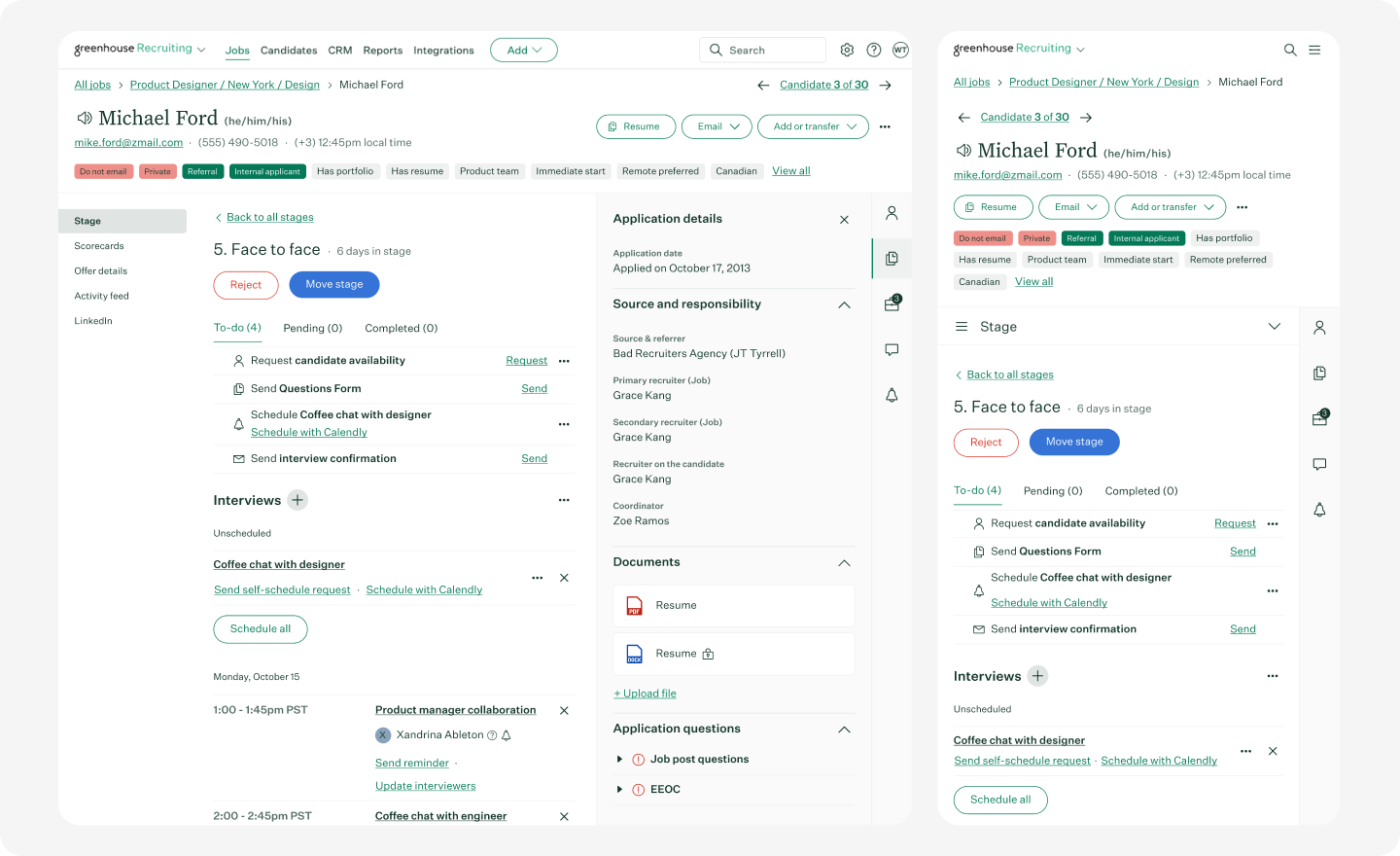
Looking to eliminate hiring bias while scaling your team? Greenhouse shines here. This recruitment database software turns interviewers into structured assessment pros with customized scorecards that focus on skills, not gut feelings. Talk about a refreshing approach!
You’ll notice how the candidate experience gets a major upgrade, too—automated communications keep applicants informed without you lifting a finger. And forget awkward handoffs between teams; the collaborative interface keeps everyone from recruiters to hiring managers on the same page.
A user review says:
Greenhouse makes building and customizing recruitment workflows incredibly easy. I can tailor stages, emails, and approvals to exactly match our hiring process. The user experience is intuitive, and it’s clear the platform was designed with recruiters and hiring managers in mind. It’s flexible enough to work for everything from high-volume roles to specialized searches, and the reporting tools help us keep a close eye on progress.
🔍 Did You Know? According to LinkedIn, companies with strong internal mobility programs see 2x the employee retention rate over two years. A recruitment database helps track internal skills and surfaces the right people when roles open up.
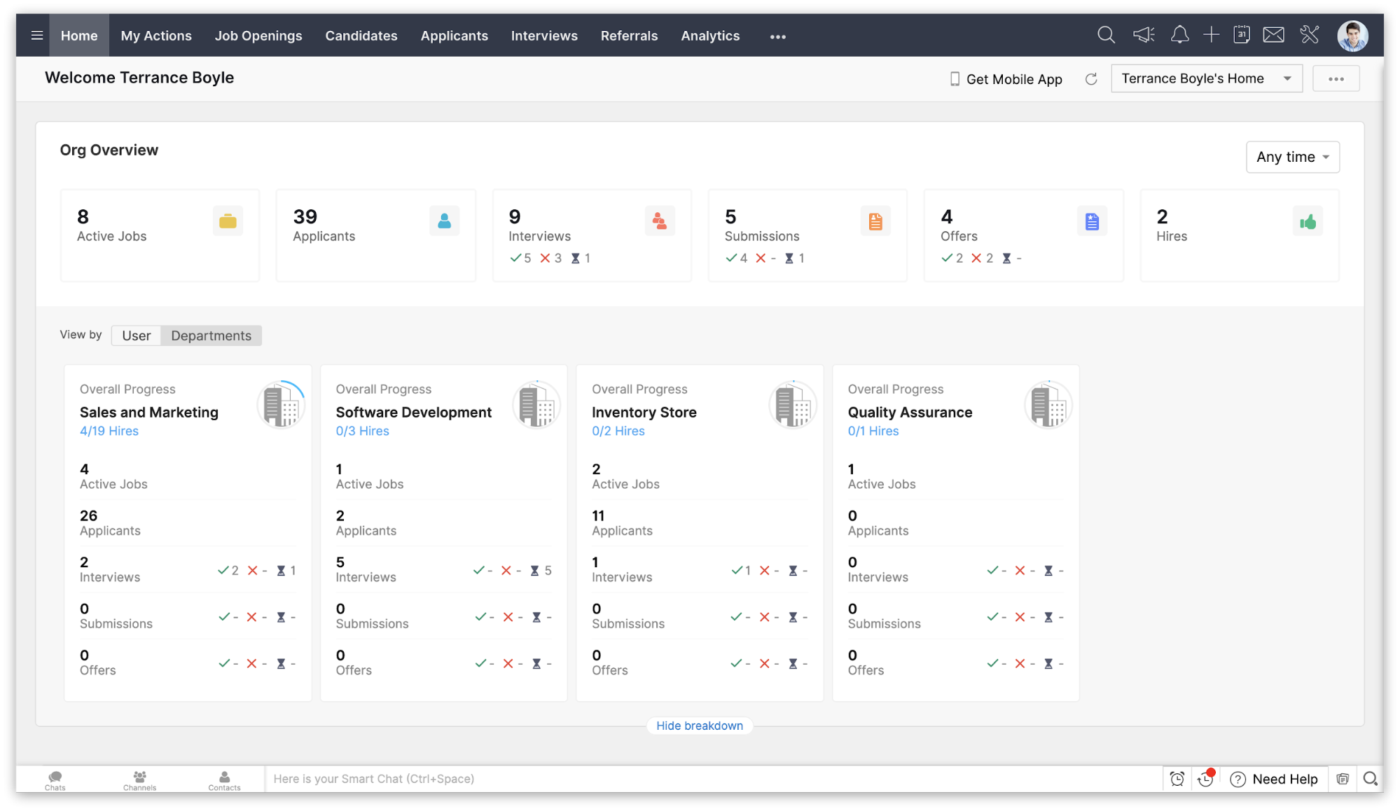
Zoho Recruit delivers impressive functionality without the enterprise price tag. Customization forms the cornerstone of this talent management software, allowing teams to adapt the system to their specific needs rather than conforming to rigid structures.
Need fields for obscure certifications or industry-specific assessments? Done. Small recruiting teams particularly appreciate how the interface eliminates unnecessary clicks and screens.
Of course, being part of the Zoho ecosystem means smooth sailing if you already use their other tools.
For corporate HRs
For staffing agencies
Here’s a G2 reviewer’s take on this tool:
It has rich features like customizable automated workflow actions, resume parsing configurations, and nearly every action can be templated for easy engagement and notifications. The pricing is also very reasonable and is flexible for our hiring velocity. Having implemented various other ATS options in the past, I’m very pleased we chose Zoho for our next ATS. Support has also been very great and I receive continuous proactive check-ins from their business development team.
💡 Pro Tip: Every time you lose a strong candidate to timing or budget, tag them clearly and write a short internal note on why they were a top choice. Next time a similar role opens, you’ll already have a warm lead.
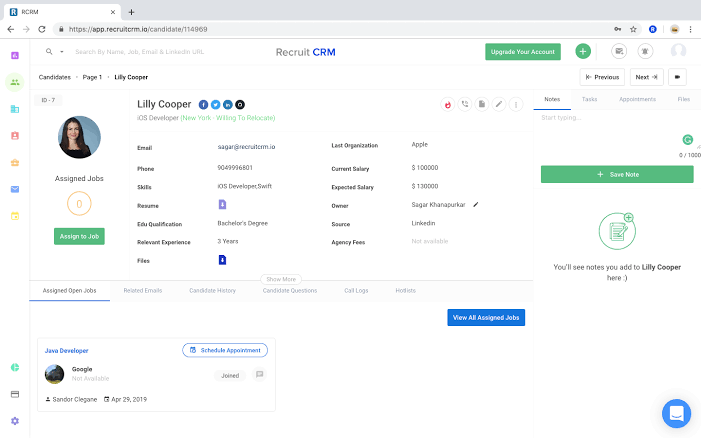
Recruit CRM centers around a dual-focused approach, giving equal weight to talent pipelines and client engagement. Email sequences keep both candidates and clients informed without manual intervention.
The intuitive drag-and-drop interface accelerates adoption, particularly for teams transitioning from spreadsheets. AI-powered candidate matching suggests optimal talent for open roles, reducing the time recruiters spend sifting through databases.
Additionally, the white-labeling options allow agencies to maintain brand consistency when sharing candidate profiles with clients.
A user review says:
Great functionality at a really reasonable price. Also, there is a monthly rolling contract option which is refreshing when everyone else seems to want 12 months commitment. Since I’ve been with RecruitCRM, the development is huge and the new features just keep coming, they clearly have a drive for continuous improvement and it’s needed in this era of AI. The customer support is also brilliant, queries are answered very efficiently and my account manager is always happy to jump on a call when needed. It’s fast becoming a one stop shop reducing the need for a huge tech stack, now including multichannnel outreach, linkedin messaging integrations, phone calling, data enrichment etc.
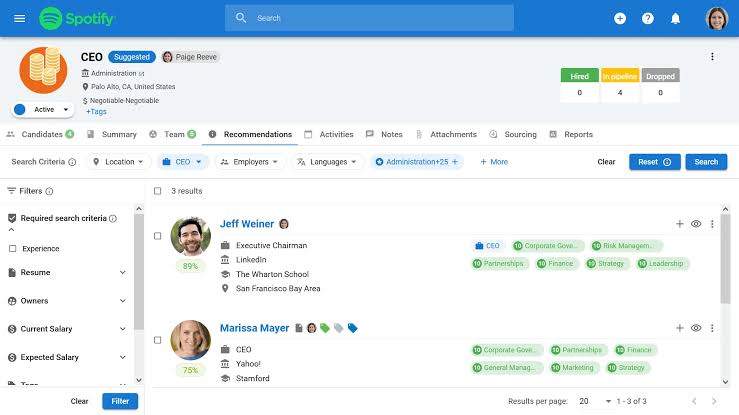
Manatal distinguishes itself through powerful AI matching capabilities that accurately connect qualified candidates to appropriate roles. The recruitment database software analyzes keywords, contextual information, skills, relationships, and even career progression patterns.
For organizations operating globally, this AI tool for recruitment provides multi-language support when working across different regions. Its built-in collaboration tools facilitate smooth handoffs between team members throughout the hiring process.
A Capterra reviewer says:
Great features overall. Makes sourcing candidates via Linkedin a breeze and through our mutual candidate pool, me and my colleagues can really leverage on our past candidates. Super easy to move candidates around and keep everything organized.
💡 Pro Tip: Break feedback into repeatable categories like ‘technical fit,’ ‘culture alignment,’ and ‘communication style.’ Over time, you’ll spot patterns in team preferences and close hiring loops faster.
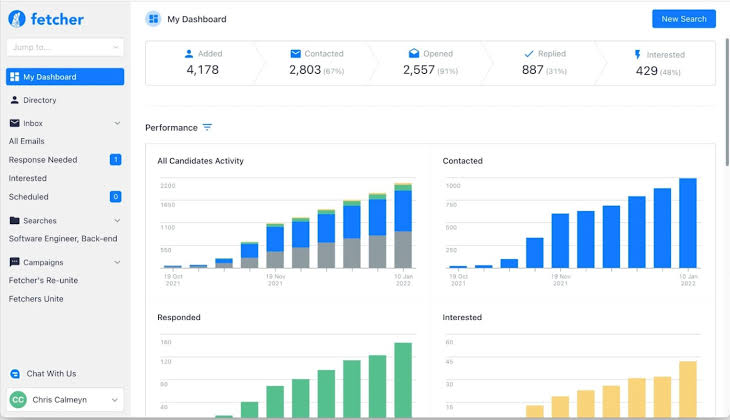
Fetcher AI helps you find candidates through smart search that adapts to what recruiters like. You can send personalized email sequences to many people at once that sound natural.
The Chrome extension allows you to add promising candidates from LinkedIn or other sites directly to your Fetcher pipeline with a single click.
Plus, teams can work together without contacting the same people twice. The dashboard shows you how candidates actually engage with your outreach, not just basic numbers. This works well for technical and specialized positions where qualified people typically don’t use standard job boards.
Here’s a G2 review left for this recruitment database software:
Fetcher takes the headache out of sourcing for candidates. Their team does a great job taking the feedback you give on searches and really tailoring the search. We have made multiple hires through Fetcher and as a recruiter, it has made my life so much easier! Their system easily incorporates with chrome and our ATS!
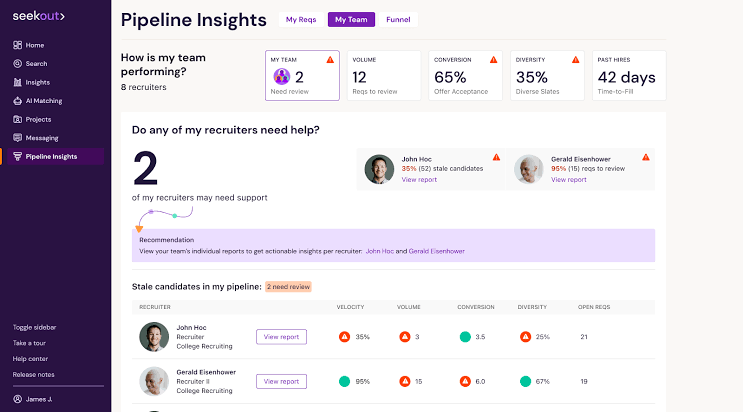
SeekOut pulls together information from various sources like public profiles, academic research, patents, and niche websites to create detailed candidate snapshots.
If you’re hiring engineers or technical roles, you’ll appreciate being able to search specifically for coding languages, frameworks, and actual technical contributions candidates have made.
And unlike databases with stale information, SeekOut continuously refreshes candidate profiles, so you’re always working with current information instead of outdated credentials.
A user review says:
My favorite part about Seekout is the ability to source diverse candidates. Working in tech, the talent pool of female to male is usually a 1 – 2 ratio, making it harder to find diverse talent. With a tool like Seekout, you can find the best diverse candidates, quickly!I also really like how detailed you can get on it’s search features. I think it’s better than the industry standard, Linkedin.
🧠 Fun Fact: In 1901, the National Cash Register Company formed the first dedicated HR team after a major strike. Their job? Handle employee grievances, improve morale, and keep the peace. Basically, the original ‘people ops.’
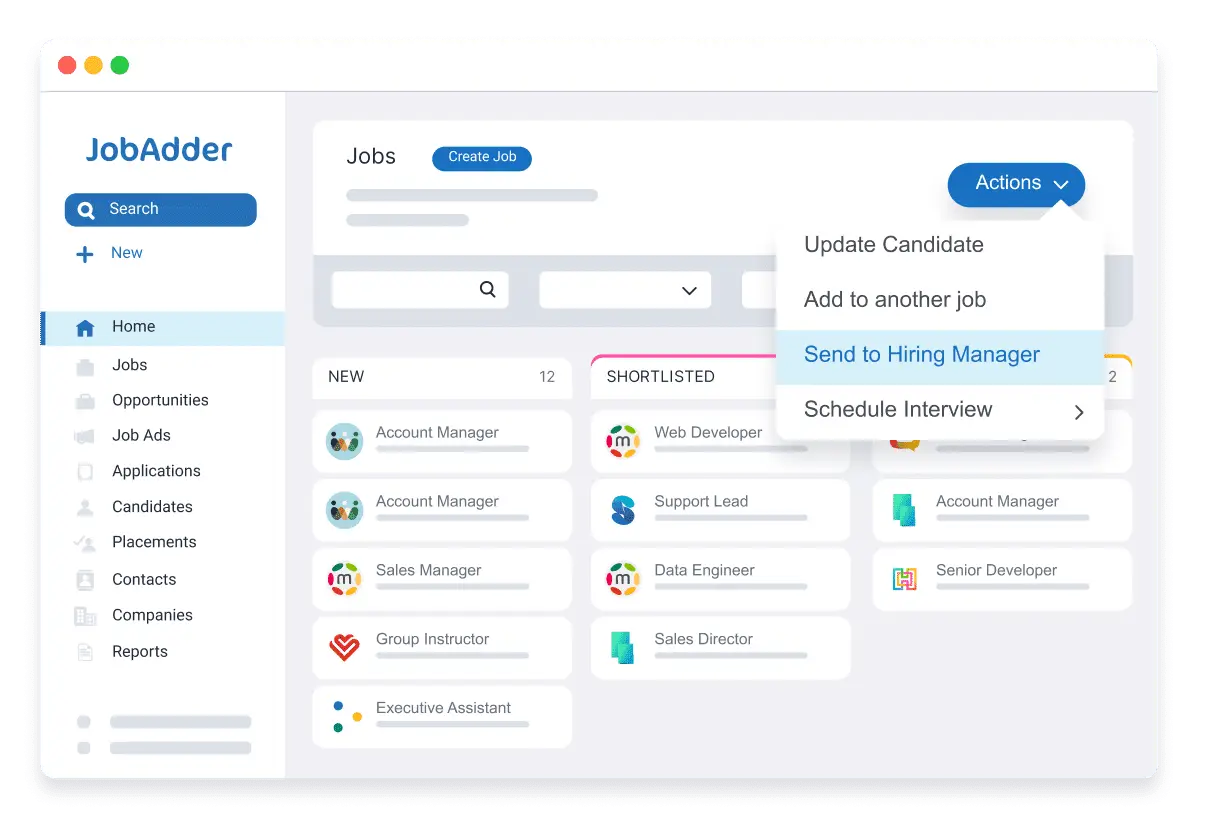
JobAdder makes your recruitment process smoother with a thoughtfully designed interface that follows recruiters’ daily workflow. You’ll notice right away that it eliminates unnecessary clicks and screens that waste your time.
The platform saves you hours with practical features like handling multiple candidates at once, accessing ready-to-use onboarding templates, and setting up automated follow-ups that keep things moving without your constant attention.
JobAdder is comprehensive enough to handle complex recruiting workflows but intuitive enough that new team members can pick it up quickly.
A user review says:
I’ve been using JobAdder for over six years – and it just keeps getting better.
From day one, I’ve been suitably impressed by both the software and the team behind it. The platform continues to evolve with meaningful updates that genuinely improve functionality and user experience.
Response times for technical support are outstanding – fast, efficient, and always helpful. As someone who’s run a recruitment business for years, I’ve found JobAdder to be a powerful and scalable solution that suits both boutique agencies and larger operations.
I wouldn’t hesitate to recommend it. A world-class product backed by an exceptional team.
📖 Also Read: Free Staffing Plan Templates for Recruiters
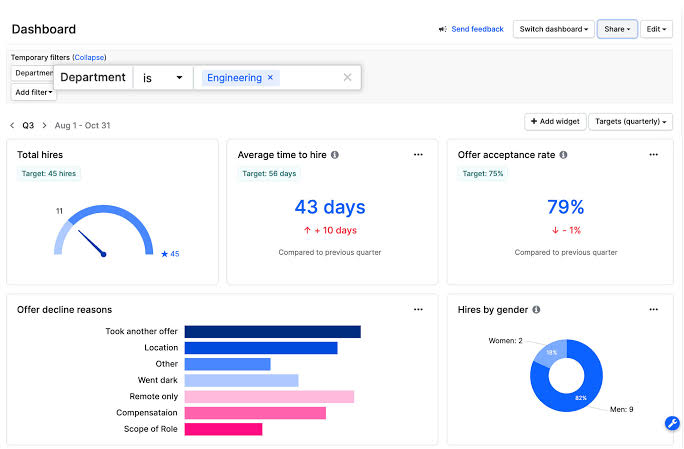
Gem focuses on the often-overlooked aspect of recruitment: maintaining relationships with passive candidates over extended periods. It excels at creating personalized recruitment campaigns that keep talent engaged until the right opportunity emerges.
Recruitment marketing analytics provide clear visibility into which messages and approaches generate the highest engagement rates. The platform builds a unified candidate database that preserves all interactions over time, creating institutional memory even through recruiter turnover.
Here’s a G2 reviewer’s take on this recruitment database software:
Gem’s sourcing and data analytics products are very user friendly – we can get new hires ramped up using them within a day or two, and don’t have to lean on an external analytics team to surface important data & metrics. They also are great about taking feedback and making improvements to their product quickly!
💡 Pro Tip: Track reasons why candidates accept or reject offers. Beyond compensation and title, are they joining smaller companies for autonomy? Are they choosing hybrid roles or remote roles, for instance? Capture these details as searchable insights in your recruitment database software—it helps refine employee value proposition (EVP) messaging and role scoping.
Every recruitment database software on this list solves a specific piece of the hiring puzzle.
Some focus on outreach, others shine at compliance or pipeline analytics. But if your goal is to manage the entire hiring journey, without switching tools or losing context, ClickUp stands out.
ClickUp combines candidate tracking, role-based workflows, recruiter collaboration, and real-time dashboards in a single, customizable workspace.
It keeps your process sharp and scalable, from tagging candidates to automating follow-ups. You can build workflows tailored to each role, link feedback directly inside tasks, and use filtered views to focus only on what matters now.
Recruiters commonly use databases such as Applicant Tracking Systems (ATS), job boards (like LinkedIn, Indeed, Monster), and internal talent pools to store and manage candidate information. Some also use specialized recruitment databases or CRM (Customer Relationship Management) tools tailored for talent acquisition.
The best recruitment software depends on your organization’s needs, but popular options include Greenhouse, Lever, Workable, iCIMS, and BambooHR. These platforms offer features like applicant tracking, interview scheduling, and candidate communication to streamline the hiring process.
Yes, an Applicant Tracking System (ATS) also functions as a recruitment database. It stores candidate resumes, application details, communication history, and other relevant information, making it easier for recruiters to search, filter, and manage applicants.
An ATS (Applicant Tracking System) is designed to manage job applications and streamline the hiring process, focusing on tracking candidates through various recruitment stages. A CRM (Customer Relationship Management) in recruitment, often called a Recruitment CRM, is used to build and nurture relationships with potential candidates, even if they are not actively applying for jobs. While ATS is process-driven, CRM is relationship-driven.

© 2026 ClickUp

There’s an easier way. Try a free AI Agent in ClickUp that actually does the work for you—set up in minutes, save hours every week.