






Still downloading templates?
There’s an easier way. Try a free AI Agent in ClickUp that actually does the work for you—set up in minutes, save hours every week.
Sorry, there were no results found for “”
Sorry, there were no results found for “”
Sorry, there were no results found for “”

Project managers often rely on structured frameworks to bring clarity and control to project execution. RACI and RAID are two of the most commonly used and frequently confused tools.
They seem similar at a glance: both are acronym-heavy models designed to bring order to complex projects.
But in practice, they solve completely different problems.
RACI improves role clarity and speeds up the decision-making process, while RAID helps teams anticipate and manage risks, assumptions, issues, and dependencies.
This post breaks down both models, covers their differences, and shows you when to use each to keep your project on track.
A RACI chart or Responsibility Assignment Matrix is a powerful project management tool that helps teams know who does what by labeling each task with one of four roles:
Project managers and PMO professionals use the RACI chart to prevent duplicate work, missed tasks, or confusion around decision ownership. It also helps streamline the decision-making process by defining who has authority and who needs to be involved.
Use an RACI chart when:
For more context, let’s see an RACI chart example.
Project: Website launch
| Task | Designer | PM | Developer | Marketing |
| Approve the final design | R | A | C | |
| Approve final design | A | C | ||
| Implement front-end code | I | R/A | ||
| Launch announcement copy | C | R/A |
However, building a chart from scratch each time means there is no consistency in defining and reviewing the roles. That’s where RACI chart templates give you the structure to plug in tasks and roles. They help you reduce the set-up time, standardize the process across projects, and ensure minimal oversight of common roles.
👀 Did You Know? RACI is not the only framework for your project team.
RACI might feel too rigid if your project involves fast-moving teams, frequent decision pivots, or blurred accountability.
That’s why many teams are switching to RACI alternatives like:
A RAID log is a project tracking tool that helps managers monitor four critical categories: Risks, Assumptions, Issues, and Dependencies.
As a team lead, you must be aware of the blockers in your project before they become delivery risks. The RAID log acts as your early warning system, giving you a clearer picture of the project’s health beyond task completion.
It ensures all decisions receive careful consideration, critical for the correct and thorough completion of the project.
🔑 Key Insight: Unlike a RACI chart, which focuses on who, the RAID log focuses on what could impact the project.
Use a RAID log when:
Let’s contextualize it with a RAID analysis example for the same project as above.
Project: Website launch
| Type | Description | Owner | Status | Action plan |
| Risk | The client will provide brand assets on time | SEO specialist | Open | Run early audits |
| Assumption | Final copywriting from the marketing team | Account manager | Un-verified | Follow-up weekly |
| Issue | Homepage design delayed due to late feedback | Project manager | In progress | Schedule design review ASAP |
| Dependency | Final copywriting from marketing team | Content lead | Pending | Set deadline |
Whether you’re managing a launch, a migration, or a cross-functional initiative, a RAID template helps you stay in control by keeping potential blockers front and center.
👀 Did You Know? During a 2022 Project Management Institute Global Summit session titled “Show Me Your RAID Log,” a quick in-event survey revealed that:
Here’s a quick side-by-side comparison to help you understand the key differences between RACI and RAID:
| Aspect | RACI | RAID |
| What it covers | Assigns four roles for project tasks: Responsible, Accountable, Consulted, Informed | Tracks four project impact areas: Risks, Assumptions, Issues, Dependencies/Decisions |
| Main focus | Clarifying who does what and who has the decision-making authority for the project | Spotting potential problems, ongoing issues, and task ties that affect project flow |
| Purpose | Prevent role confusion and miscommunication. Boost accountability & ownership | Raise awareness, control issues, and make sure decisions/dependencies are visible and managed |
| When to use it | During planning and kickoff; especially in complex, cross-team projects. Use across all tasks | Planning, then continuously during execution; use in stand-ups, reviews, audits. Best in dynamic or risky environments |
| Who it helps most | Team leads, PMs, stakeholders, especially when tasks and responsibilities overlap | PMs, risk managers, operations; anyone tracking project health & looking to prevent surprises. |
| Outcome/ benefit | Clear roles = fewer email chaos, fewer missed approvals. Better handoffs | Full visibility into what might go wrong, what’s broken, and what’s holding the project back. Less firefighting |
| Tool type | Static responsibility matrix (often spreadsheet/doc) | Living log, updated frequently with new items and decisions |
| Works together with | RAID. Once roles are clear, you can use RAID to monitor project health | RACI. Once risks or issues are spotted, roles defined via RACI ensure proper ownership of fixes |
💡 Pro Tip: You can use ClickUp Brain, ClickUp’s built-in AI assistant, to help you manage and implement both of these frameworks.
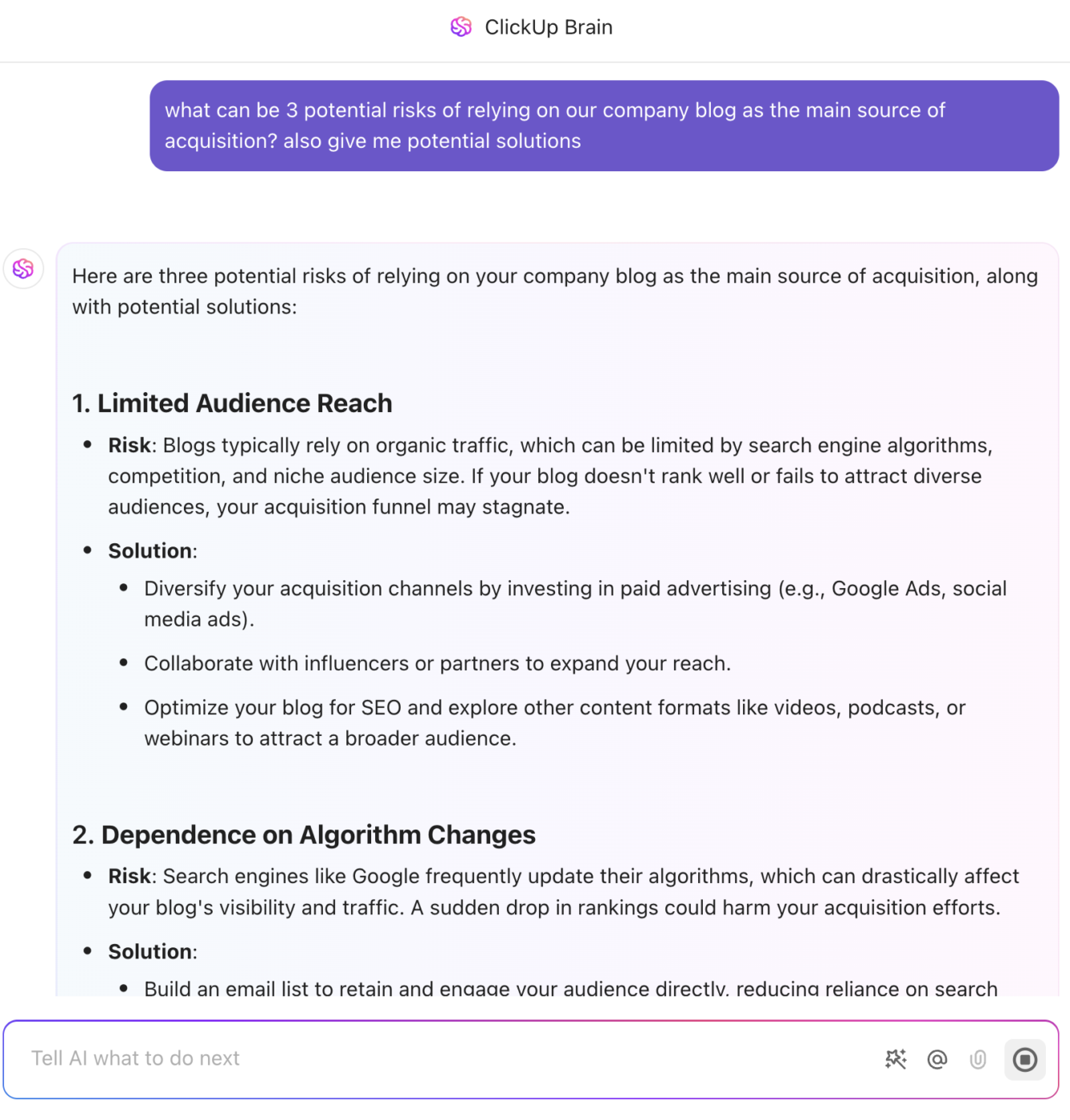
It can automatically generate role assignments, identify stakeholders, and surface potential risks or dependencies from your project data. You can also ask it to summarize updates or flag issues, keeping your plans actionable and aligned.
🧠 For RACI, with Brain, you can create and manage Custom Fields in your tasks or lists to track who is Responsible, Accountable, Consulted, and Informed for each task.
🧠 For RAID, Brain can generate summaries or reports of all current risks, issues, assumptions, or dependencies in your projects.
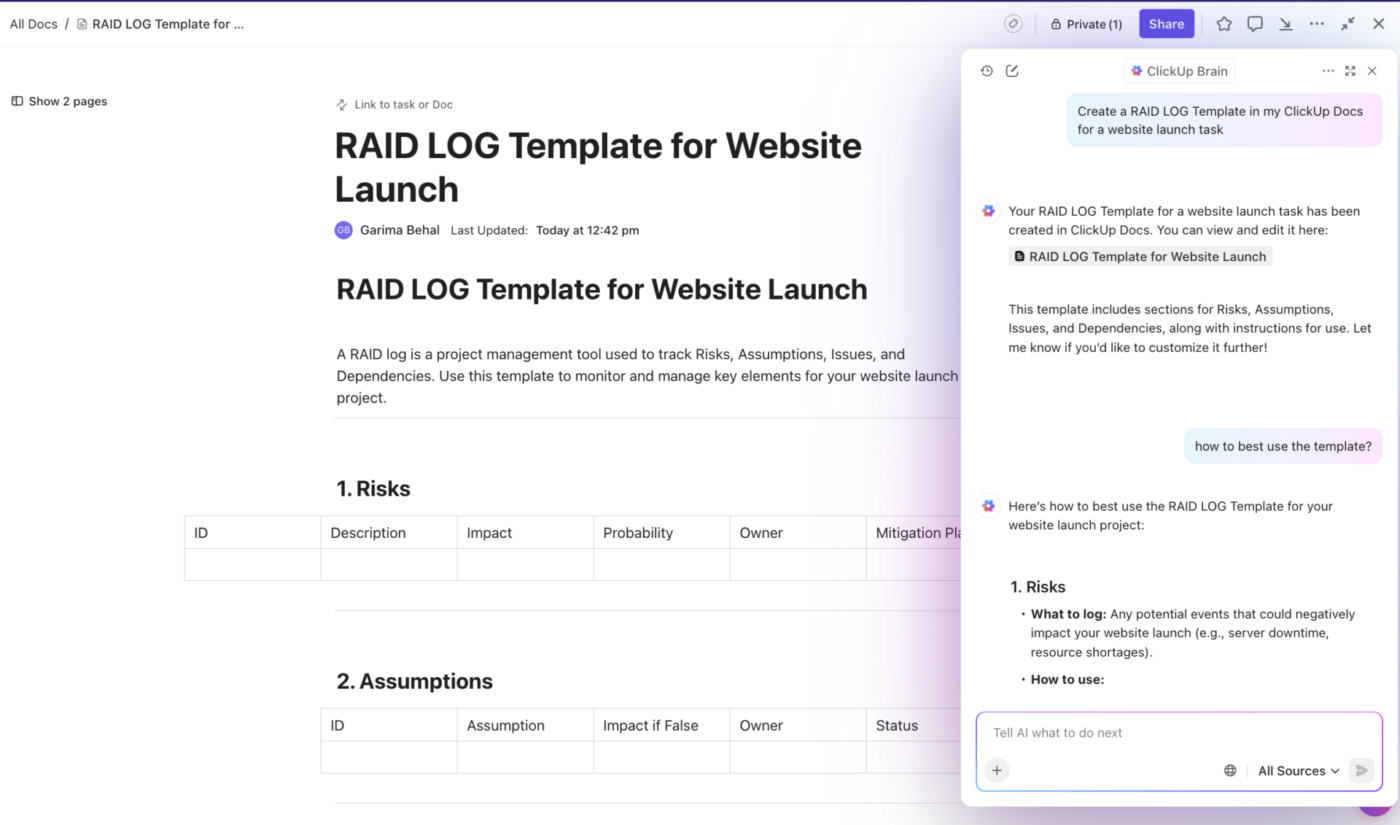
⚡ Template Archive: Navigate uncertainty like a pro with these risk assessment templates that help you identify, evaluate, and mitigate project risks efficiently.
Knowing when to use RACI or RAID (or both!) can make a huge difference in your project’s success. Here’s when to use each:
RACI is your go-to framework before the actual work begins. It helps lay the foundation by answering a simple but critical question: “Who’s doing what here?”
Without clear roles, projects often suffer from task duplication, confusion, or worse, important project information.
📌 Here’s why and when you should use RACI:
Unlike RACI, which is mostly used during planning, RAID stays active throughout the project lifecycle. It helps you stay ahead of problems, not just react to them when it’s too late.
📌 Here’s why and when you should use RAID:
🎥 Need help defining project stakeholders? This video will give you some clarity:
RACI defines who’s doing what, RAID shows what’s happening and what could go wrong.
Combined, they help you lead like a pro with fewer surprises, better collaboration, and a project that delivers on time.
📌 Here’s why and when you should use both RACI and RAID:
📮 ClickUp Insight: Context-switching is silently eating away at your team’s productivity. Our research shows that 42% of disruptions at work come from juggling platforms, managing emails, and jumping between meetings.
What if you could eliminate these costly interruptions?
ClickUp unites your workflows (and chat) under a single, streamlined platform. Launch and manage your tasks from across chat, docs, whiteboards, and more—while AI-powered features keep the context connected, searchable, and manageable!
Without the right tools, RACI charts live in disconnected spreadsheets, and RAID logs get buried in docs no one updates.
That’s where ClickUp comes in.
ClickUp, the everything app for work, lets you manage both who does what (RACI) and what’s going on (RAID) in the same workspace.
Be it planning your team structure or tracking real-time project risks, ClickUp’s Project Management platform has flexible features, customizable templates, and automations that make it all smooth and collaborative.
Here’s how ClickUp ties RACI and RAID together, making your project planning and tracking more efficient than ever:
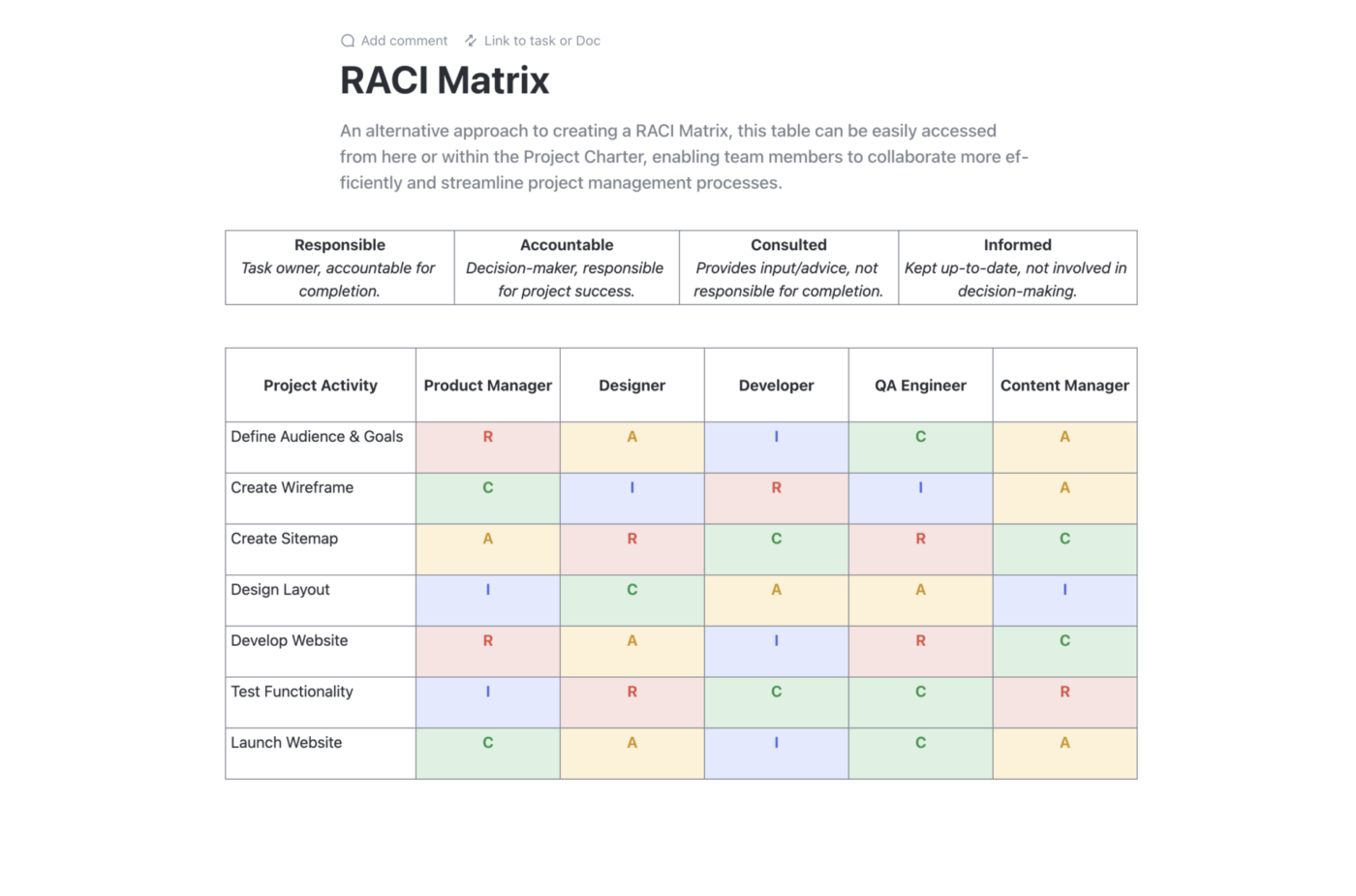
ClickUp Docs offers a clean and customizable way to build your RACI matrix right where your team already works. You can create a simple table that lists your tasks or functions across the top and team members down the side, just like a standard RACI chart.
Here’s why it works so well:
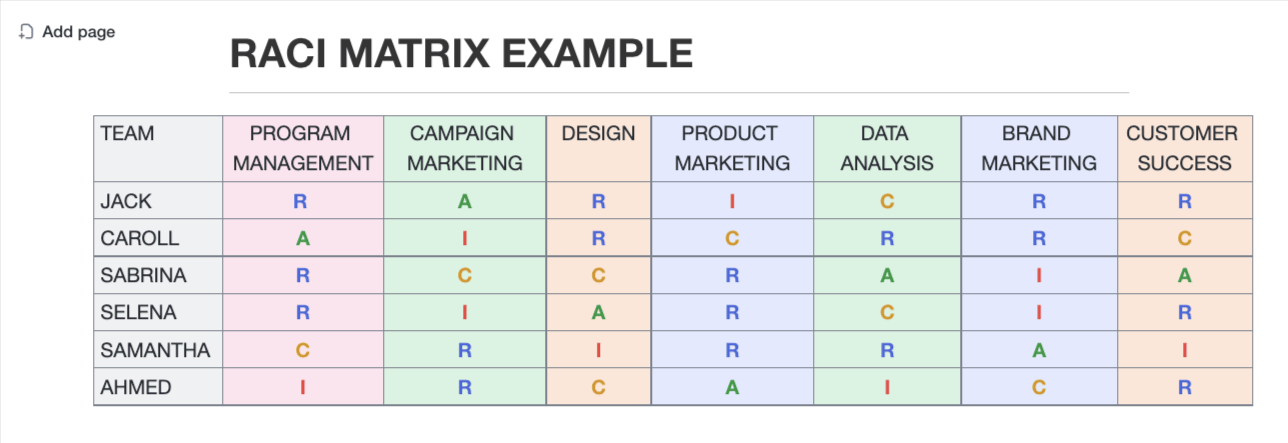
Plus, as shown in the RACI matrix example above, it’s super easy to scan—color-coded R, A, C, and I entries instantly tell you who’s in charge, who’s helping, and who just needs to stay in the loop.
ClickUp doesn’t just help you plan; it embeds accountability into your workflow. And that’s exactly what you need when applying a framework like RACI, where clarity of roles can make or break a project.
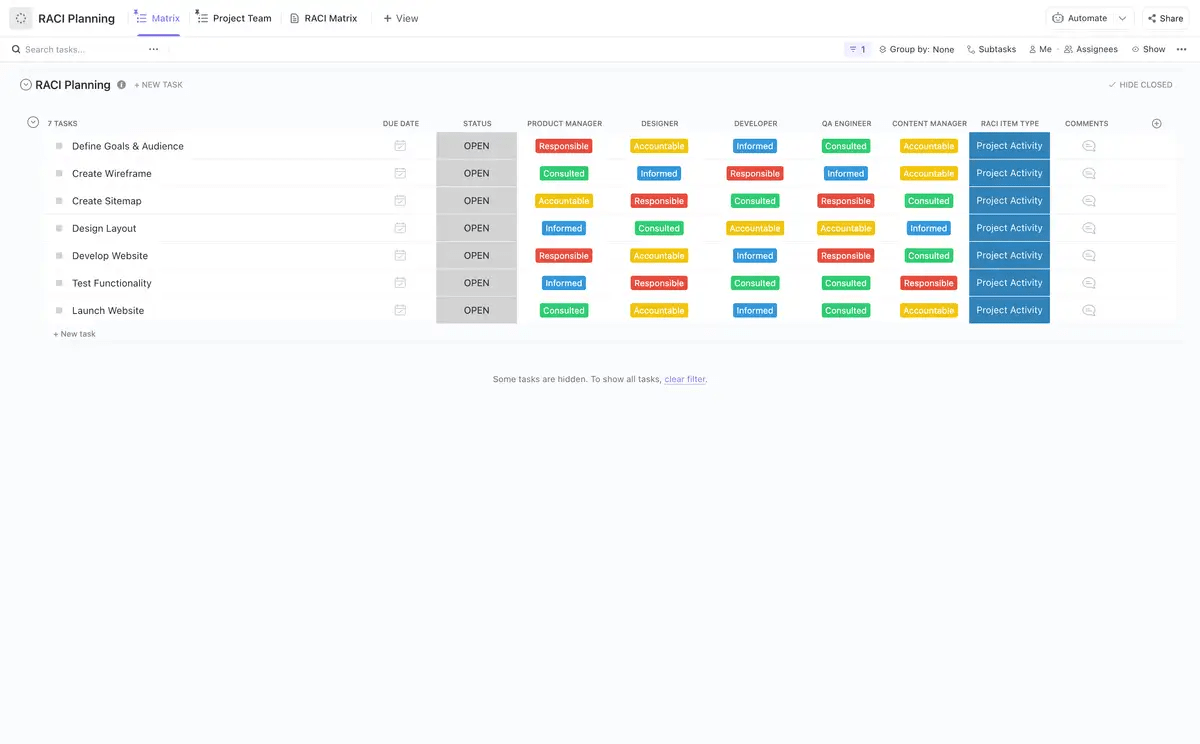
With ClickUp Tasks, you can track, assign, and manage every moving part of a project. Add in ClickUp Custom Fields, and your tasks become role-aware, decision-ready command centers.
Once set up, here’s how it comes together:
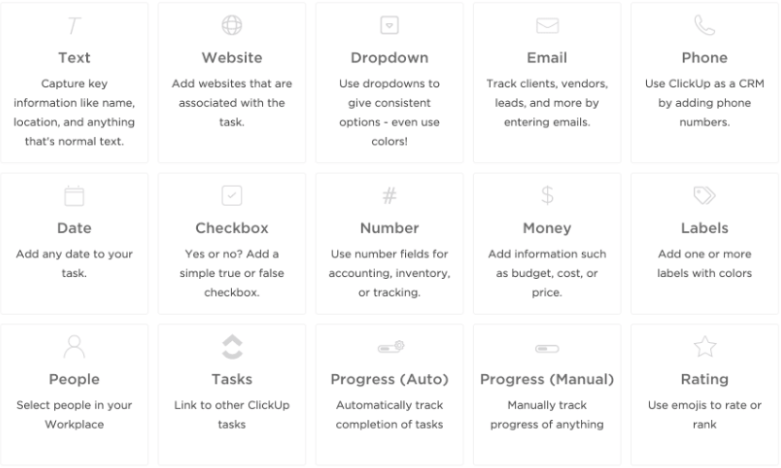

This task-level setup is especially useful for projects where team members switch roles often or where overlapping responsibilities create confusion. Instead of relying solely on external documents, RACI lives inside your task board right where the action happens.
⚡ Template Archive: Struggling to juggle workloads and avoid burnout? These resource planning templates help you allocate people, time, and tools the right way!
When it comes to managing Risks, Assumptions, Issues, and Dependencies (RAID), ClickUp gives you all the flexibility you need, without switching between spreadsheets, docs, and chats.
With ClickUp List View and ClickUp Table View, you can create a RAID log that’s visual, organized, and actionable in real time.
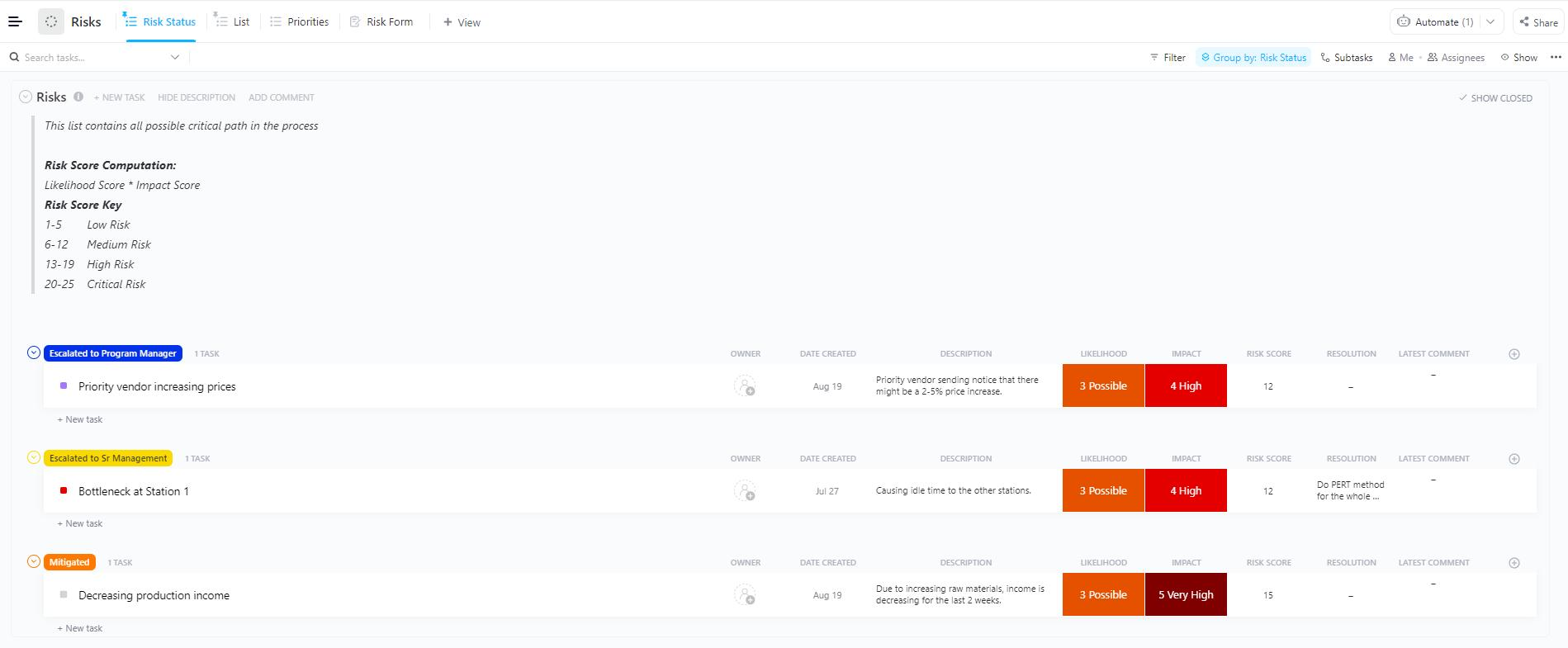
Start by creating a dedicated List for your RAID items. Use Custom Fields to tag each entry as a Risk, Assumption, Issue, or Dependency, and capture critical details like priority, impact, owner, and mitigation plan.
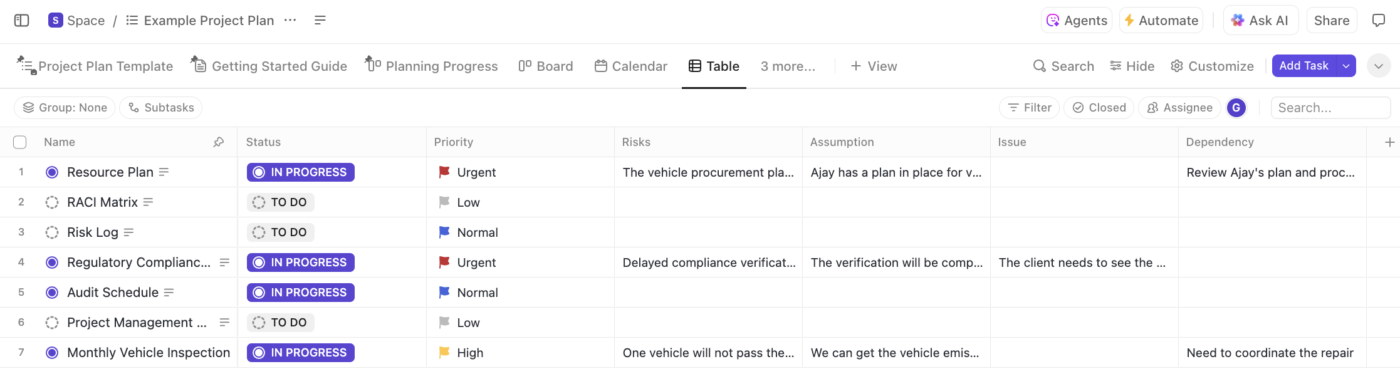
The List View lets you group entries by category or status so your team can focus on unresolved or high-risk issues. The Table View adds a spreadsheet-style layout with sortable columns and filters, perfect for quickly scanning and organizing by impact, team owner, or resolution status.
💡 Pro Tip: Color-coded priority tags, inline editing, and real-time updates make weekly reviews a breeze. Just pull up the view during syncs, make changes, and move forward.
What makes it even better? Everything updates in real time, so there is no more version confusion or scattered notes.
Tracking RAID items manually can quickly become a full-time job, especially in fast-moving projects. That’s where ClickUp Automations save your day. They help you eliminate repetitive actions, reduce human error, and keep your RAID log accurate and up-to-date.
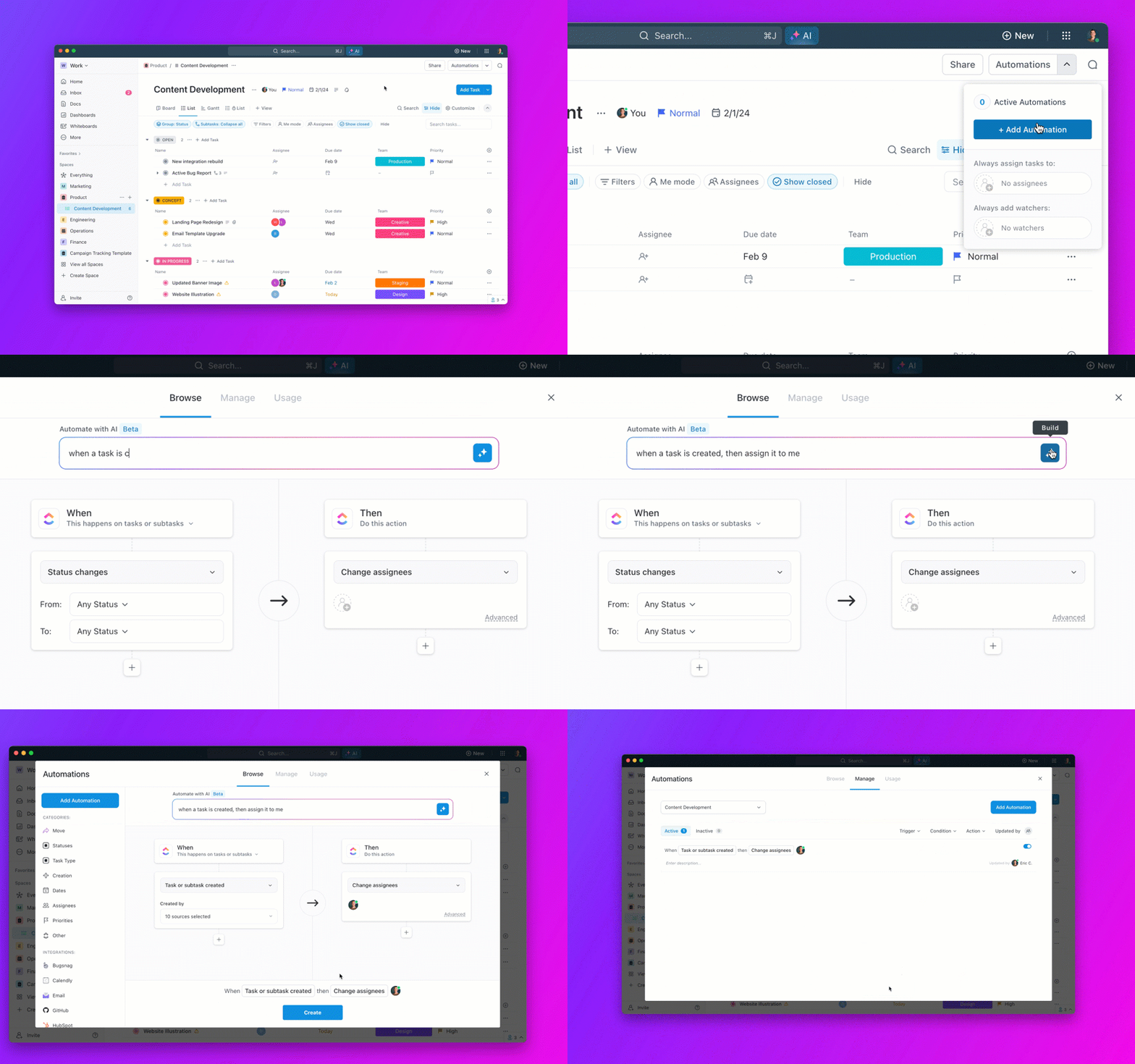
Here’s how you can bring automation magic to RAID tracking:
Since ClickUp Automations are no-code and customizable, you can set them up in just a few clicks, tailored exactly to your RAID process.
RACI and RAID frameworks thrive on clear communication, and ClickUp makes that seamless with its built-in real-time collaboration features. Whether assigning roles or managing project risks, ClickUp keeps everyone aligned and in the loop without the chaos of email threads or delayed updates.
With ClickUp’s @Mentions, you can instantly loop in the right people, like tagging the Accountable owner of a task or notifying a Consulted stakeholder for input.
Building on that foundation, ClickUp’s Assigned Comments take clarity a step further by turning feedback or decisions into actionable items with clear ownership. This is especially useful in RACI and RAID workflows—Responsible team members can be assigned to specific comments, ensuring tasks or risk mitigations don’t fall through the cracks.
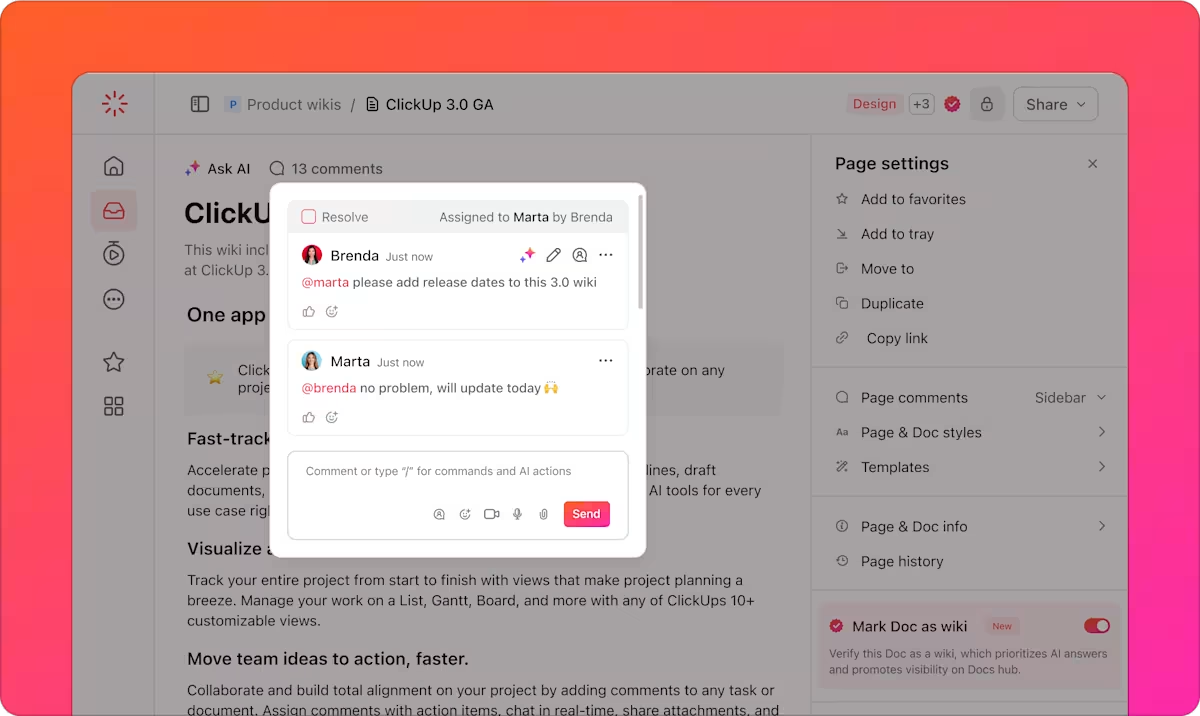
Once addressed, resolving the comment provides a clear audit trail, making it easier to track decisions, actions taken, and accountability across the project lifecycle—like a built-in decision log.
Best of all, these conversations happen right where the work lives, inside Docs, Tasks, or List Views, so there’s no context-switching. Everyone, from marketing to product to dev, sees the same information in one workspace.
ClickUp offers several ready-to-use project management templates that make it super easy to implement RACI or RAID frameworks, without building everything from scratch. Here are two of the most helpful templates to get started:
The ClickUp RACI Matrix Template offers a clean, customizable layout to map out who’s Responsible, Accountable, Consulted, and Informed for every task in your project. It’s built with drag-and-drop simplicity, allowing you to update fields, add new tasks, assign roles, and collaborate in real time, all inside ClickUp’s flexible workspace.
Why you’ll love it:
✅ Ideal for: Projects where clear task ownership and role-based accountability are crucial to avoid confusion and delays
The ClickUp RAID Log Template makes it easy to log, track, and resolve all your project’s risks, assumptions, issues, and dependencies in one central space. It’s fully customizable and helps you stay ahead of blockers by keeping everything organized and visible in real-time.
Why you’ll love it:
✅ Ideal for: Projects that require ongoing risk tracking and issue resolution to stay on schedule and avoid last-minute surprises
📚 Also Read: Best Free Project Management Software
Be it defining roles or tracking risks, clarity is key in project management.
RACI helps you assign the right people to the right tasks, and RAID helps you stay prepared for roadblocks.
But juggling both can get tricky, unless you have the right tool.
With ClickUp, you don’t just document RACI and RAID, you make them a regular part of your workflow. From task assignments to risk tracking, everything stays updated, visible, and in sync with your team.
Start using ClickUp to simplify your process and manage projects with confidence.

© 2026 ClickUp

There’s an easier way. Try a free AI Agent in ClickUp that actually does the work for you—set up in minutes, save hours every week.