






Still downloading templates?
There’s an easier way. Try a free AI Agent in ClickUp that actually does the work for you—set up in minutes, save hours every week.
Sorry, there were no results found for “”
Sorry, there were no results found for “”
Sorry, there were no results found for “”
Mandolin AI is a healthcare automation platform designed specifically for specialty drug providers. It uses AI agents to handle the heavy administrative work behind getting patients access to these medications—things like referral intake, insurance benefits checks, prior authorizations, and billing workflows.
In simple terms, it acts like a digital back-office team, completing the paperwork and coordination required before a patient can receive specialty treatments.
However, if you’re looking for AI agents that automate workflows beyond specialty healthcare—like cross-department operations, multi-LLM workflows, or broader business automation—you may want to explore Mandolin AI alternatives.
Let’s look at some of the best options.
Mandolin is primarily used by infusion centers, specialty pharmacies, and health systems that manage high-cost, complex therapies like biologics, gene therapies, and infused treatments.
These organizations deal with weeks of manual paperwork, insurance checks, and reimbursement workflows before a patient can begin treatment.
When evaluating alternatives, the goal extends beyond simple automation to agent execution across your entire business stack.
Here’s what you should look for in Mandolin AI alternatives and modern agent orchestration platforms:
👀 Did You Know? 78% of physicians say prior authorization delays lead patients to abandon treatment entirely, according to an American Medical Association survey. When approvals stretch for weeks, many patients simply give up before therapy even begins.
Healthcare providers are turning to AI agents and automation platforms to speed up this process. Tools like Mandolin are built to reduce administrative friction across intake, insurance verification, and reimbursement workflows.
Here’s a snapshot of the best Mandolin AI alternatives and what each offers.
| Tool | Key features | Best for | Pricing* |
| ClickUp | AI agents embedded in tasks and workflows, contextual workspace intelligence, workflow automation, integrations across operational tools | Product, engineering, and operations teams embedding AI into execution workflows | Free Forever; Customization available for enterprises |
| CrewAI | Role-based agent orchestration, shared agent memory, workflow coordination, tool integrations, Python and visual interfaces | Engineering and automation teams building structured multi-agent systems | Free; Paid plans from $25/month |
| AutoGen | Code-first agent orchestration, agent communication frameworks, observability tools, multi-agent coordination | Engineering and research teams developing custom agent orchestration logic | Open-source |
| GPT-4o Agents | Tool-enabled agents, multimodal reasoning, function calling, SDK integration, workflow automation support | Product, engineering, and platform teams deploying AI agents into applications | Custom pricing |
| Zapier Agents | AI-driven workflow automation, natural language agent creation, 8,000+ integrations, automation version control | Business operations, marketing, and RevOps teams automating cross-app workflows | Free; Paid plans from $50/month |
| n8n Agents | Visual workflow builder, agent memory, extensive integrations, debugging tools, self-hosting support | Technical operations and automation teams managing complex internal workflows | Paid plans from $28.40/month |
| Relevance AI | No-code agent creation, agent deployment across business systems, metadata tracking, workflow automation | GTM, sales, and operations teams deploying autonomous agents without heavy engineering | Free; Paid plans from $29/month |
| LangGraph | Stateful workflow orchestration, execution control, persistent memory, real-time monitoring | Engineering teams building long-running and stateful agent workflows | Free; Paid plans from $39/user/month |
| LlamaIndex Agents | Data indexing, retrieval-augmented agent workflows, memory and state management, developer SDKs | Engineering and data teams building agents that operate on large knowledge bases | Free; Paid plans from $50/month |
| Vertex AI Agent Builder | Managed agent infrastructure, model access and orchestration, enterprise integrations, deployment tooling | Enterprise engineering and platform teams deploying agents at production scale | Custom pricing |
Our editorial team follows a transparent, research-backed, and vendor-neutral process, so you can trust that our recommendations are based on real product value.
Here’s a detailed rundown of how we review software at ClickUp.
Below, you’ll find the best Mandolin AI alternatives for different use cases, workflows, and operational requirements:
Most Mandolin alternatives focus on building or deploying agents outside the day-to-day work environment. They function as standalone automation layers, developer frameworks, or integration tools.
ClickUp, on the other hand, operates as a Converged AI Workspace. It embeds AI directly into your tasks, docs, conversations, dashboards, and workflows. Instead of managing agents separately from execution, you can deploy them where work already lives.
Here are the key features that make it a strong Mandolin AI alternative:
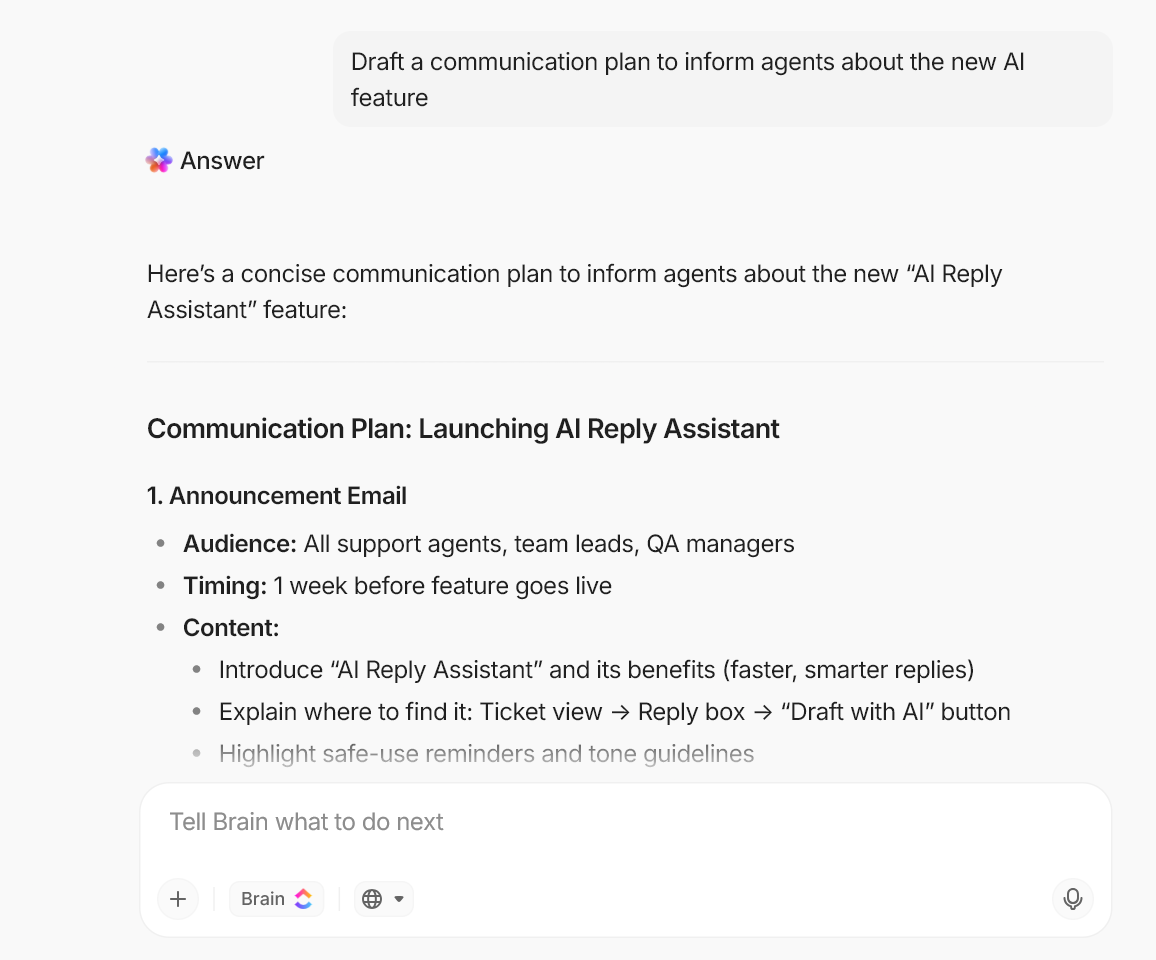
Most AI agents fail because they lack real-time operational context. Many agent orchestration platforms require you to manually feed information into prompts, memory stores, or external knowledge bases before agents can act reliably.
ClickUp Brain embeds Contextual AI directly inside your workspace. It understands how your ClickUp Tasks, Docs, and Chat conversations connect across projects and teams, giving agents access to live operational context.
It’s AI that can reference the latest updates, ownership changes, dependencies, and documentation automatically.
You can also query your workspace instantly. Ask questions like “What changed in the Q2 launch plan this week?” or “Summarize all onboarding feedback from last month,” and Brain retrieves answers from across your actual work environment.
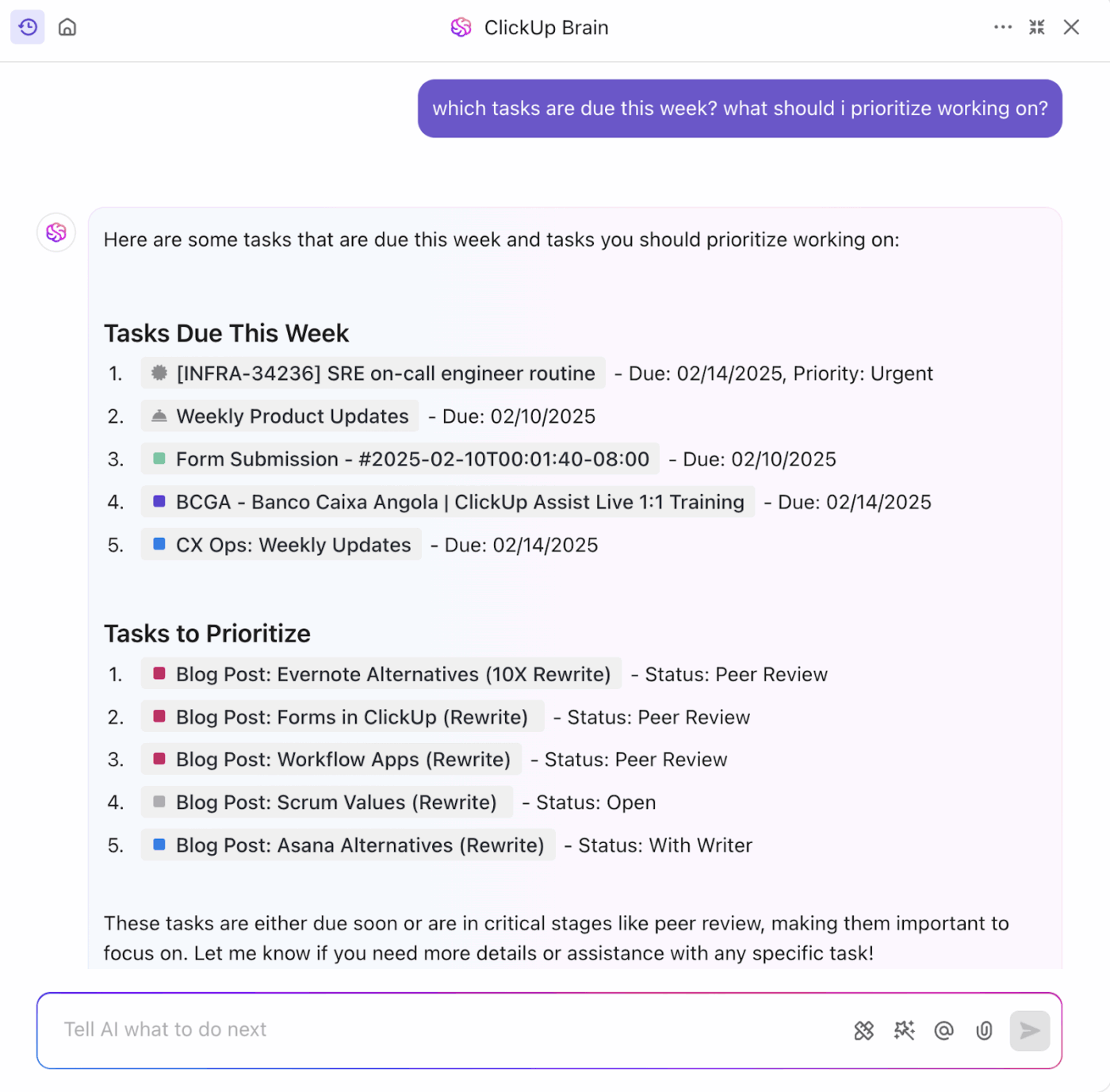
✏️ Note: With native memory and contextual awareness built in, you don’t need to maintain separate knowledge systems or manually structure context for agents. The intelligence already exists inside the workflows within ClickUp Brain AI, where decisions and execution happen.
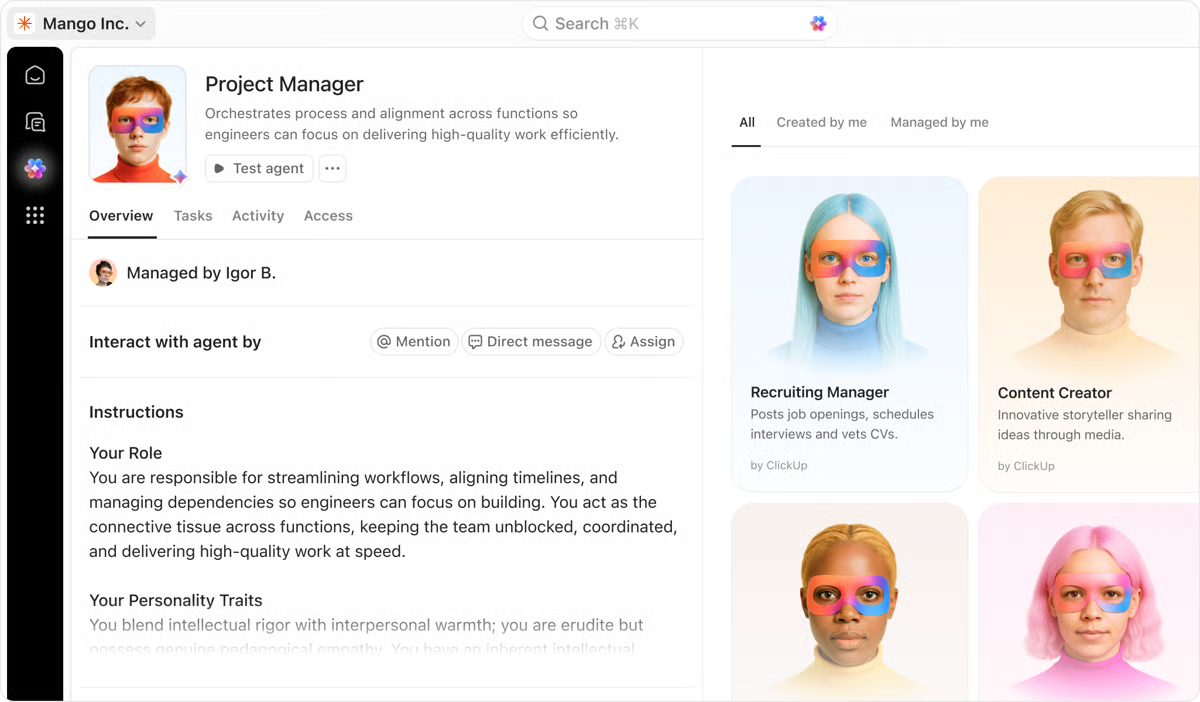
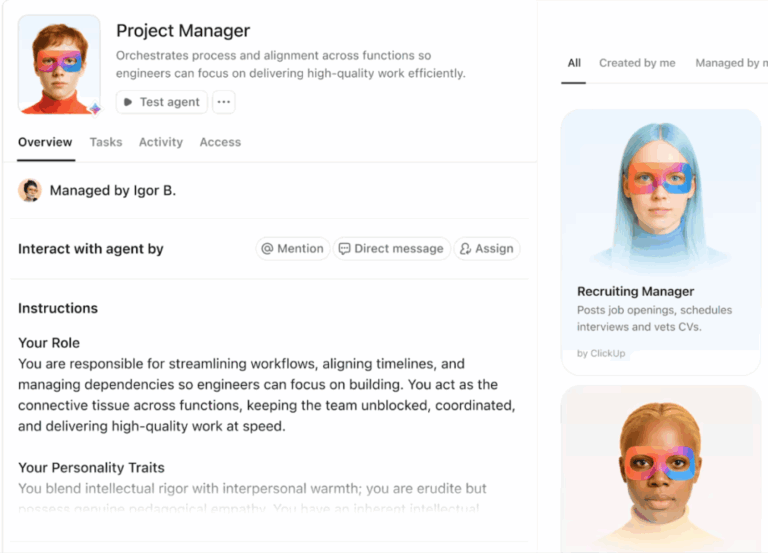
ClickUp’s Super Agents are autonomous, ambient AI assistants that observe changes across your workspace and act on behalf of users based on rules, data patterns, and context.
While Brain excels at answering questions and generating insights, Super Agents take action when conditions are met.
For example, a Super Agent can:
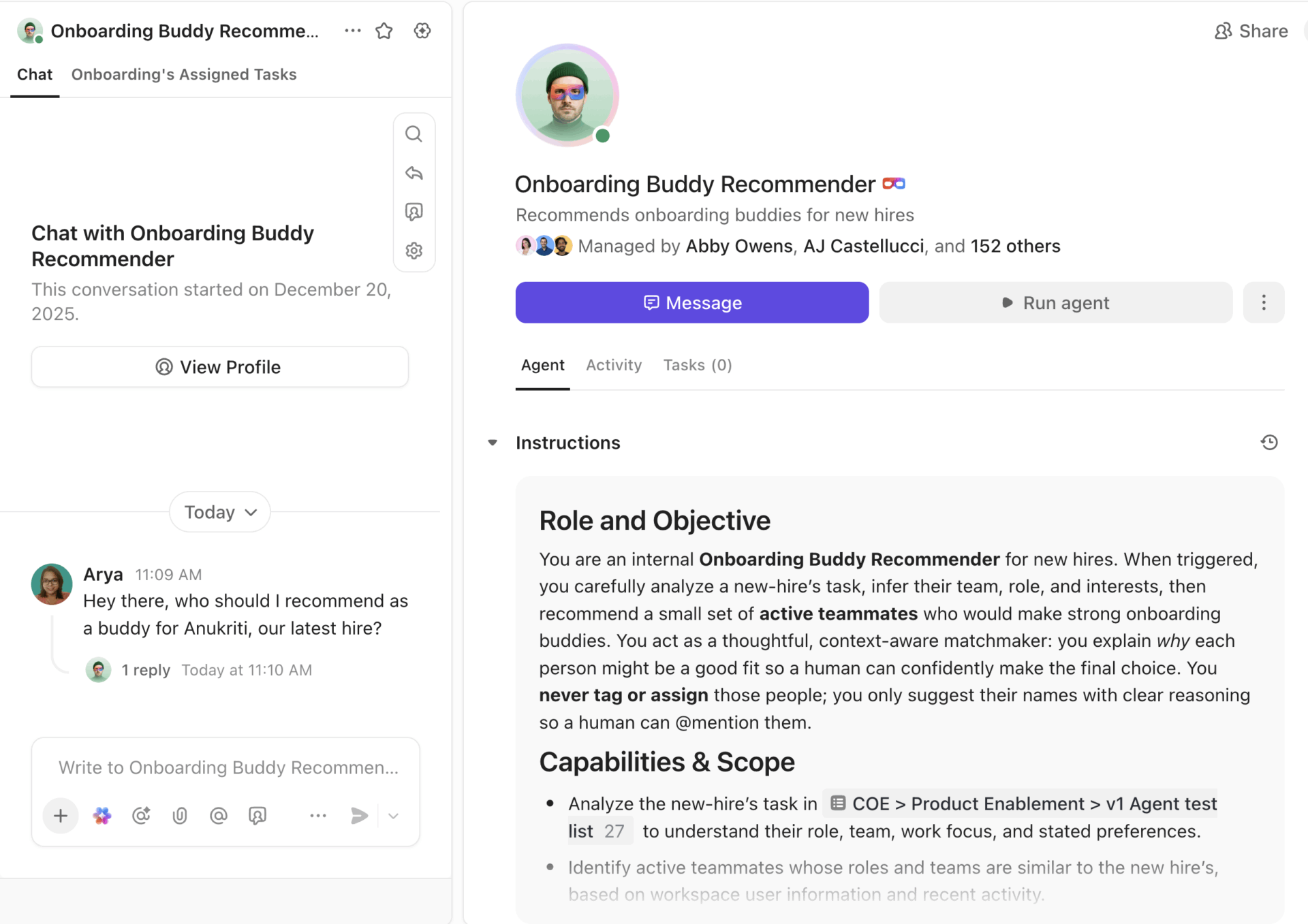
What’s more: AI Super Agents run on infinite memory and workspace context. They utilize recent memory for what just happened, working memory for active context, and long-term memory for recall.
Plus, with zero data retention, your information never lingers outside your secure workspace.
Watch this video to learn more about ClickUp Super Agents 📹
⭐ Bonus: ClickUp Brain MAX is the AI-powered desktop companion that brings this context-aware intelligence outside the browser and into a dedicated app.
With it, you can:
Once agents are created, ClickUp Automations help you deploy and coordinate them across workflows. Instead of operating as isolated assistants, agents can be triggered dynamically based on real operational events inside your workspace.
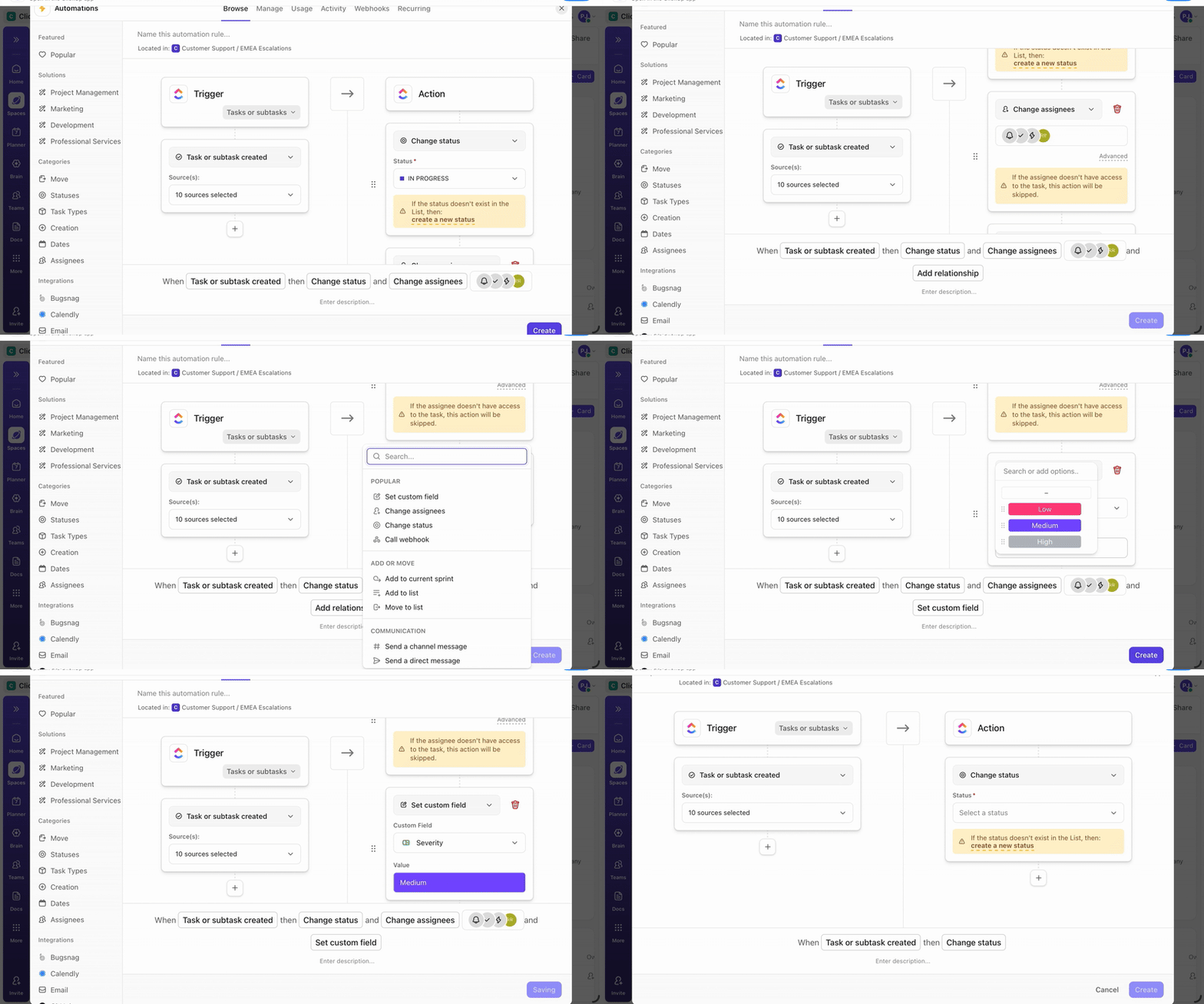
You can define exactly when an agent runs, what data it uses, and what action it takes. For example:
ClickUp combines rule-based automation with AI-driven orchestration, so you can design complex multi-step workflows without code. Using simple, plain-language instructions, you can create custom triggers, conditions, and actions that activate agents across projects, teams, and tools.
⭐ Bonus: Give your AI agents access to live data from 1000+ external tools using ClickUp’s native integrations. For example, a Sales Agent can read leads from HubSpot, check GitHub PR status, or pull customer sentiment from Zendesk tickets—all without you exporting CSVs or building custom APIs.
A G2 user says:
I really appreciate ClickUp’s constant innovation and how it leans hard into AI. The AI Super Agent is powerful and allows you to configure routine tasks very quickly.
Customer Story: ClickUp X Bell Direct
😓 The Problem: “Work about work” was blocking real productivity
Bell Direct’s operations team was swamped. Every day, they handled 800+ client emails, each requiring manual reading, triage, categorization, and routing to the right person. The situation put pressure on team efficiency, visibility, and service quality, even though the company was delivering strong outcomes for clients.
✅ The Solution: A unified workspace + AI agents that work like teammates
Instead of adding another disconnected tool to the stack, Bell Direct chose ClickUp as its central command center. They consolidated everything from tasks and docs to processes and knowledge into one workspace where AI had full context. Rather than relying on generic bots or templates, they deployed a Super Agent they called “Delegator“. It’s an autonomous teammate trained to triage incoming work:
It does all of this without manual touchpoints from human operators
😄 The Impact: Measurable operational gains
The Super Agent now routes work the way a human would, but at machine speed and scale.
If your team is dealing with high volumes of requests, approvals, or cross-team coordination, Super Agents can be configured to manage those workflows autonomously at scale.
To see how teams are designing these AI-powered workflows in ClickUp, connect with our team to explore what a Super Agent could look like for your business.
⭐ Bonus: If you’re a ClickUp user, here are the different ClickUp AI tools that help you automate everyday work.
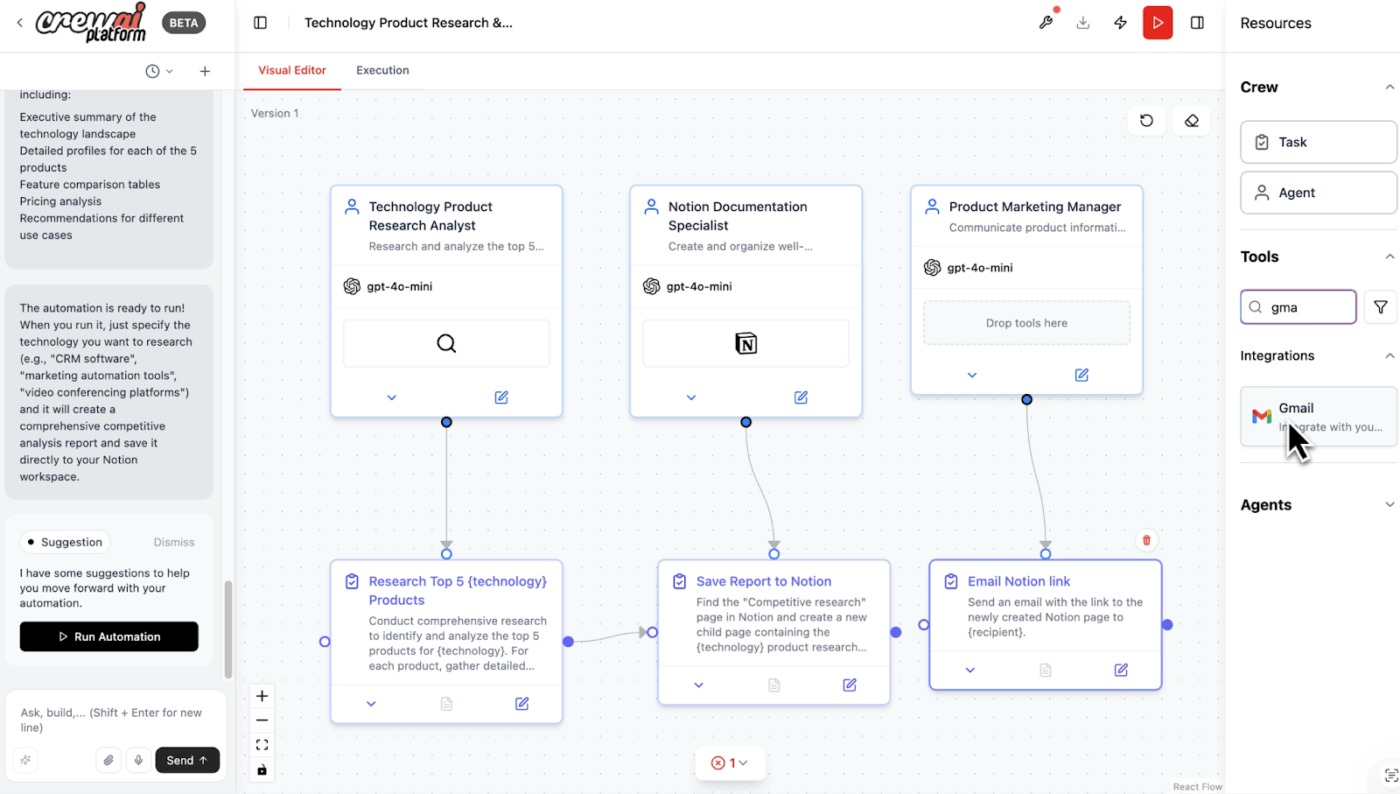
CrewAI is a multi-agent platform to build, operate, and maintain a team of AI agents.
Define each agent’s role, goal, memory, and LLM settings, then assign tasks with clear descriptions and expected outputs. Agents can share context and contribute to larger tasks within a crew.
Use CrewAI Studio, the visual drag-and-drop editor with an integrated AI copilot, or work with object- and event-based APIs for deeper control over workflow behavior, execution order, and system integration.
The platform offers agent integrations with tools such as Salesforce, HubSpot, Slack, Microsoft Teams, Gmail, Zendesk, and Asana. You can also apply access controls to restrict which tools or data sources each agent can use.
Feedback from a G2 user:
What I like best about crewAI is how quickly it helps me move from idea to execution. In tech, there’s always too much to do and not enough time, and CrewAI feels like having an extra teammate who’s always available and doesn’t mind doing the repetitive or tedious stuff. I especially like how it can coordinate tasks across different tools and workflows… it’s not just another AI chatbot; it’s more like an operations partner. The UI is straightforward, and it doesn’t take forever to figure out how to get things done.
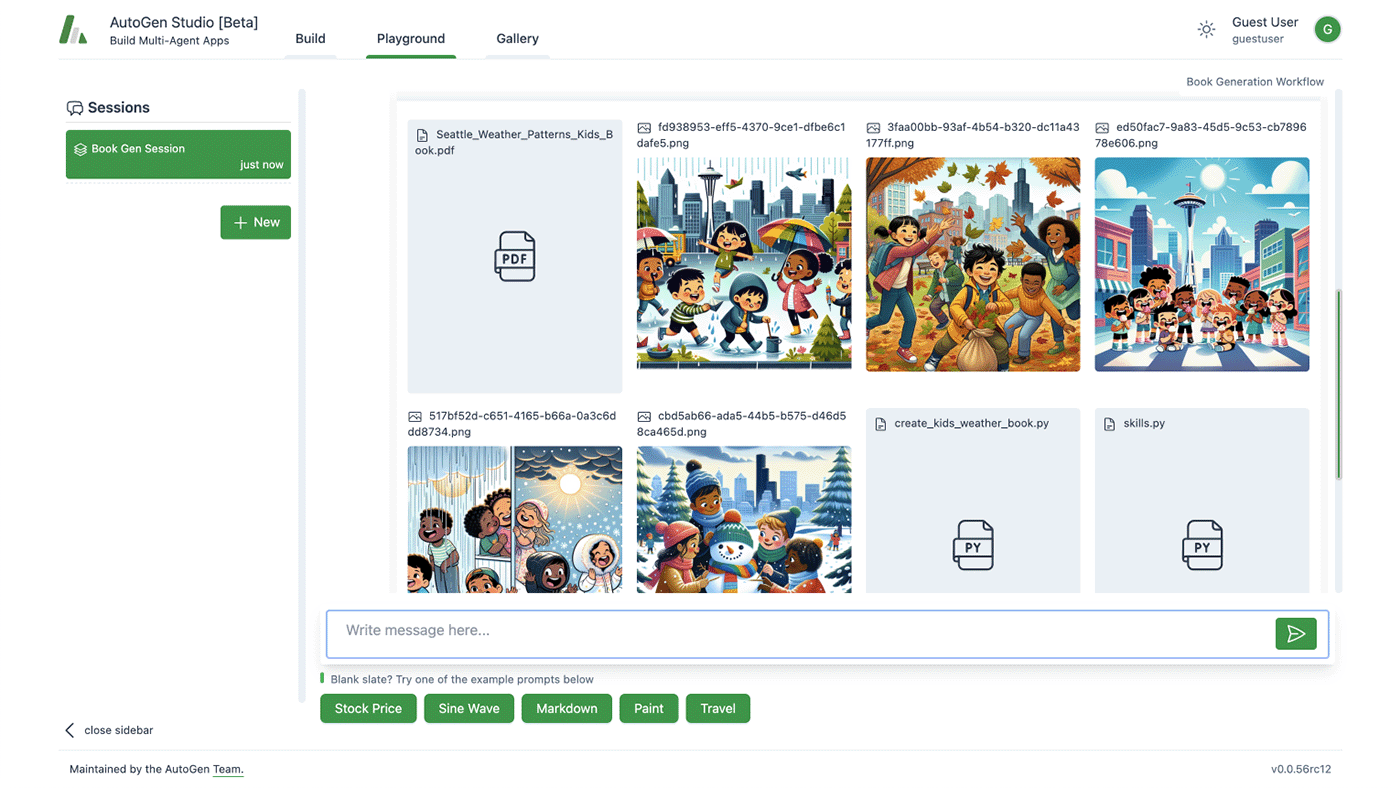
AutoGen by Microsoft is one of the most flexible open source LLM agent frameworks for building custom multi-agent systems. It supports you in different stages of agentic orchestration development.
For instance, you can describe how agents should trigger actions, exchange context, and coordinate tasks across automation sequences or research pipelines using AutoGen’s core layer.
If you want to assign agent roles, connect language models, and structure task-driven conversations directly in Python, apply the AgentChat framework.
And if you prefer a visual environment, AutoGen Studio provides a browser-based interface that lets you configure agents, monitor their interactions, and evaluate their behavior without writing orchestration code from scratch.
📮 ClickUp Insight: 40% of our survey respondents say that they are curious but still not sure what even counts as an “agent.”
That shows how fast the idea of agents is spreading, but also how abstract the category still feels in practice. Many tools claim to be agentic in theory, but cannot really participate in day-to-day work.
Super Agents in ClickUp live within the workspace and can operate autonomously within the rules and approvals you define. The best part? It looks less like “AI” and more like a virtual teammate that’s quietly keeping the work on track.
Agents built using OpenAI models such as GPT-4o combine reasoning, tool usage, and multimodal inputs to automate complex workflows.
Using OpenAI’s APIs and the Agents SDK, developers can create agents that execute multi-step tasks by following instructions, calling external APIs, and passing structured data such as JSON parameters between steps.
These agents can retrieve information from files or databases, interact with external systems, and trigger tools to perform calculations, generate reports, or analyze visual inputs.
The platform also provides frameworks and SDKs that help developers integrate agents into AI apps, connect them with third-party services, and deploy them in production environments instead of limiting them to simple chat interfaces.
A Capterra user says:
My overall experience has been excellent. GPT-4 is now an essential tool in my IT consulting workflow. I rely on it for verified, technically sound advice backed by vendor documentation. Whether I’m writing Bash scripts, preparing audits, or building deployment strategies for Kubernetes or Oracle middleware, GPT-4 speeds up delivery while maintaining high quality. It adapts to the complexity of each project and has improved the way I deliver value to my clients.
📚 Also Read: Best Productivity Tools for Agencies and Teams
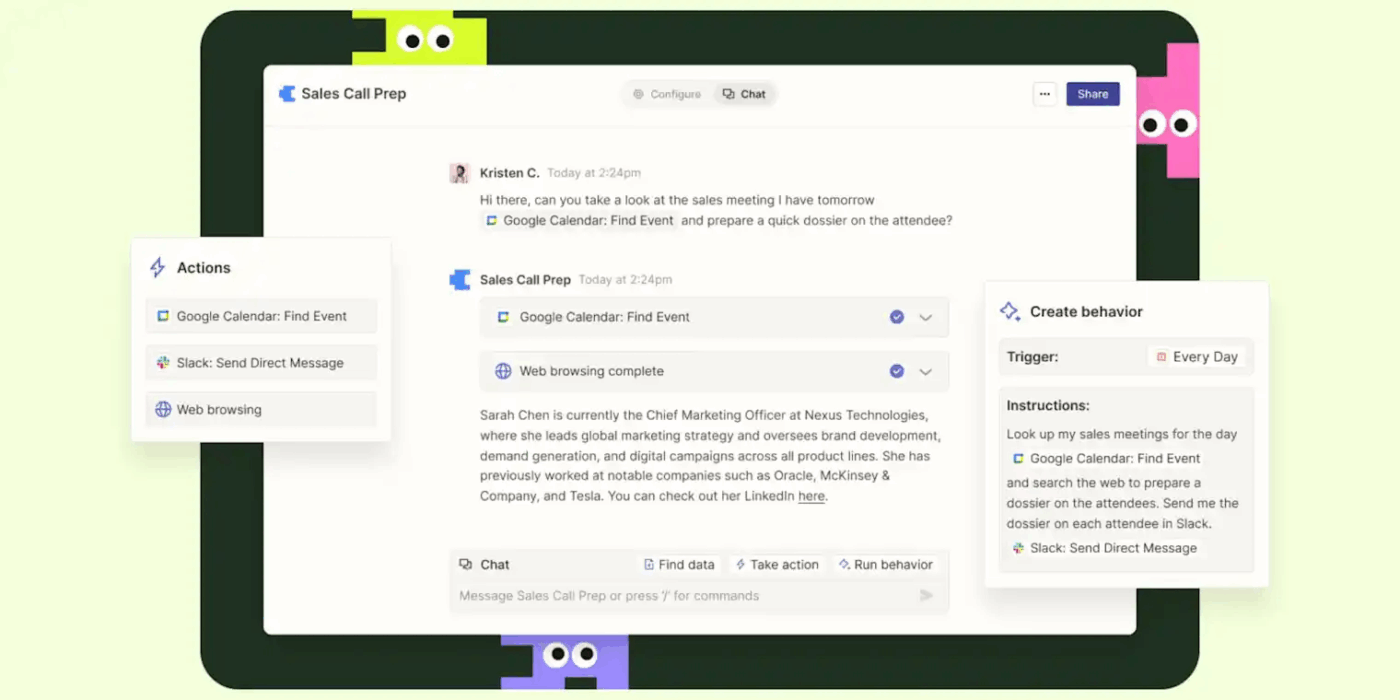
Zapier Agents lets you create AI-powered assistants that automate real work across your connected apps. Instead of building rigid “if-this-then-that” workflows, you can define goals and instructions in plain language and let the agent decide which actions to take.
These agents operate inside Zapier’s automation ecosystem, meaning they can monitor triggers, interpret incoming information, and perform multi-step tasks automatically. For example, an agent could analyze a new support email, classify its urgency, create a task, and notify the correct team in Slack—all without manual intervention.
You can also give agents business context by connecting documents, FAQs, or links so they respond accurately and perform tasks using the same knowledge your team relies on.
Because Zapier connects to 8,000+ apps, agents can orchestrate actions across tools like Salesforce, Slack, Google Sheets, or Zendesk—allowing them to automate workflows that span your entire tech stack.
👀 Did You Know? About 80% of healthcare data is unstructured and remains untapped after it’s created. This includes text, images, biosignals, and video from clinical systems, wearables, and medical devices.
This unstructured data is often ignored or abandoned because traditional healthcare IT systems can’t manage or analyze it effectively.
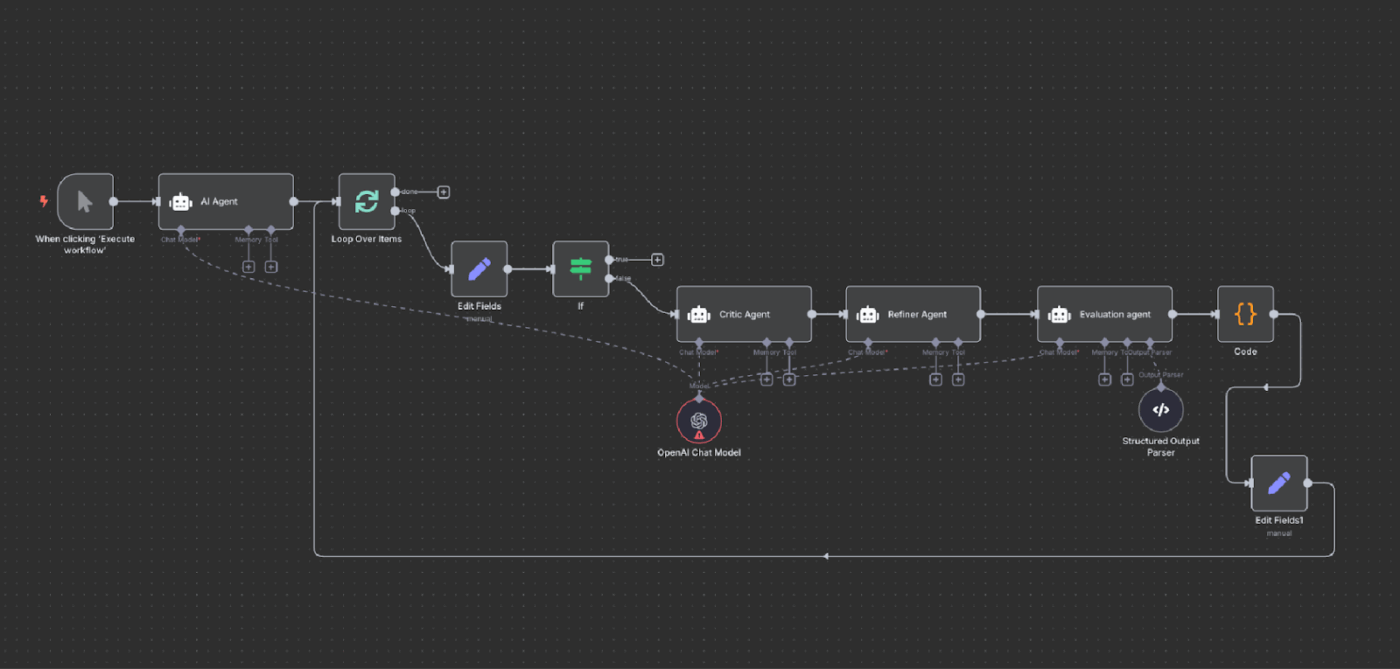
n8n Agents are autonomous, AI-powered components within n8n workflows that combine LLMs, tools, and memory to perform complex tasks.
You can use n8n’s visual editor or write your own code to create agents that retrieve real-time information from documents, internal data, or external APIs.
These agents handle almost every use case, ranging from customer support automation and research workflows to IT operations, data enrichment, and internal process orchestration across multiple tools.
Need full visibility into how your agents behave? n8n provides built-in debugging tools, including inline logs, data replay, and visual flow inspection, that let you monitor performance in real time, add approval checkpoints, and test changes without disrupting workflows.
A G2 user says:
What I appreciate most about n8n is its flexibility and power. The tool allows for creating complex automations while remaining relatively easy to use. The wide range of integrations, visual workflow logic, and customization options make it a highly effective solution for automating business processes. It is a reliable, scalable tool well-suited to both technical and functional needs.
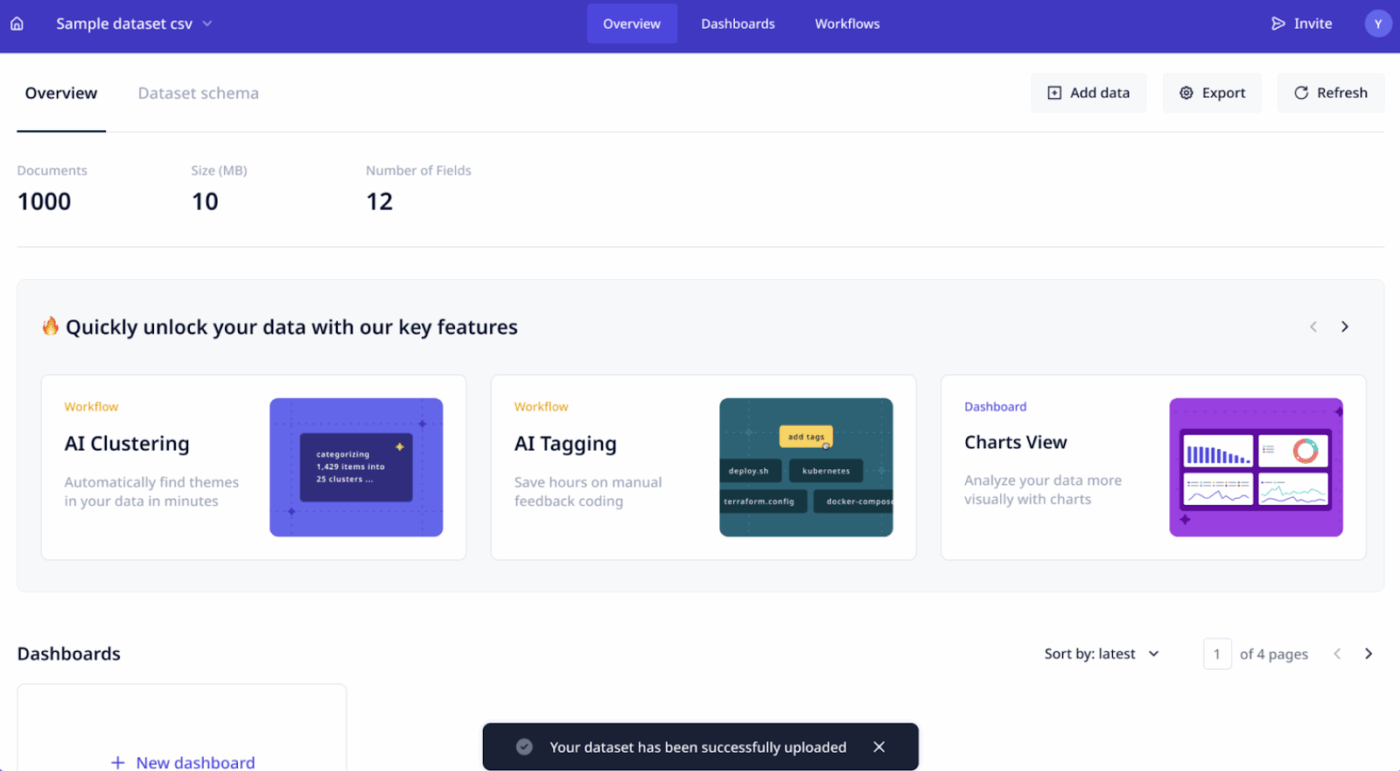
If you’re looking for a no-code platform that helps you build and recruit teams of AI agents to complete tasks on autopilot, Relevance AI comes to your rescue. It enables you to create agents, assign responsibilities, and run them continuously across your GTM systems.
With Relevance AI, you can connect agents to CRMs, internal databases, and external APIs so they can retrieve data, update records, and complete operational tasks without manual involvement.
And you can even scale your AI efforts by cloning and adapting these AI assistants to different tasks. Every agent interaction automatically generates structured metadata that captures customer intent, task outcomes, priority levels, and extracted data fields. You can use this metadata to filter tasks, track performance, and generate reports.
With built-in version control, you get to review changes, evaluate behavior, and manage deployments across teams.
A G2 user says:
Relevance AI is really simple to work with. Setting up agents takes just a few minutes, and everything is intuitive—you don’t have to dig through a bunch of menus to find what you need. I like that I can manage all my agents in one place without having to jump between tools.
📚 Also Read: Best AI Productivity Tools Worth Trying
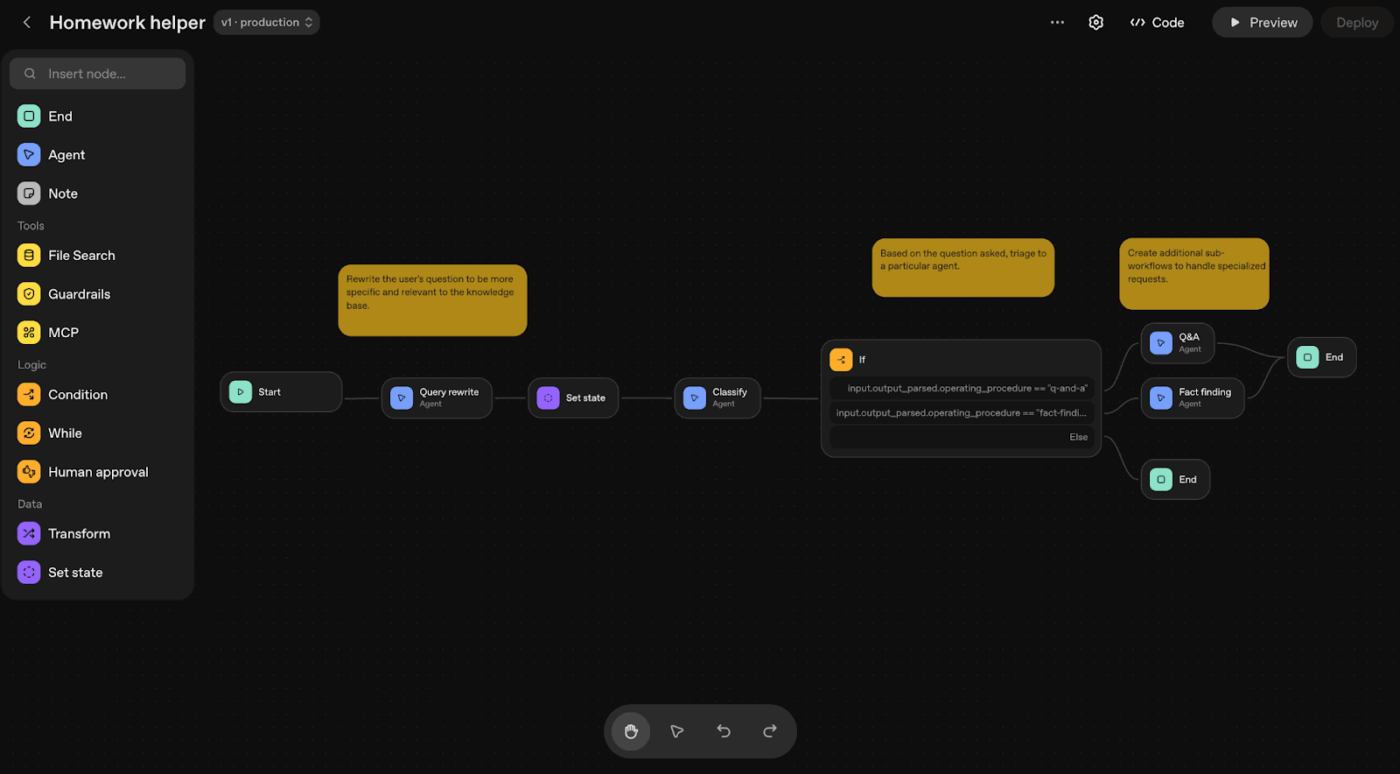
LangGraph is an agent orchestration framework that helps you design, execute, and control AI workflows as stateful graphs. Each node represents a step in the workflow, such as calling a language model, executing a tool, or updating workflow state.
You can configure how nodes connect and how state flows between them. After each node executes, LangGraph updates the shared state and passes it to the next node based on the defined graph structure.
This gives you full control over execution flow, decision paths, and how agents transition between steps. You can pause the workflow at any step and save its current state. Execution waits until you provide input or approval, then resumes from the same point.
You can also see what the workflow is doing while it runs. LangGraph streams state updates, intermediate results, and step outputs in real time, which helps you monitor progress and debug agent behavior.
A G2 user says:
It is my go to Framework for all the Agentic AI or Generative AI use cases I have built using Python. It is easy to install, just via the pip install command, and the documentation is also vast; the number of features and flexibility it provides is also good.
LlamaIndex, an AI agent framework, allows you to build context-aware agents that can access and use external data during execution.
You can load and organize data using LlamaIndex’s indexing system, converting raw content such as PDFs, knowledge base articles, or database records into structured indexes that agents can search efficiently during execution.
You can also set up protocols to allow your agents to store previous interactions, maintain context across steps, and use tools such as search, calculators, or internal APIs.
Configure model access, tool integrations, and data sources using LLM.txt to prototype agent workflows from natural language inputs.
A G2 user says:
As a data scientist dealing with large language models LLMs, I found LlamaIndex quite helpful to manage. It has granted me the ability to input data in formats such as PDFs or API, databases, and Excel, which makes it easier for me to train and execute LLMs with numerous datasets.
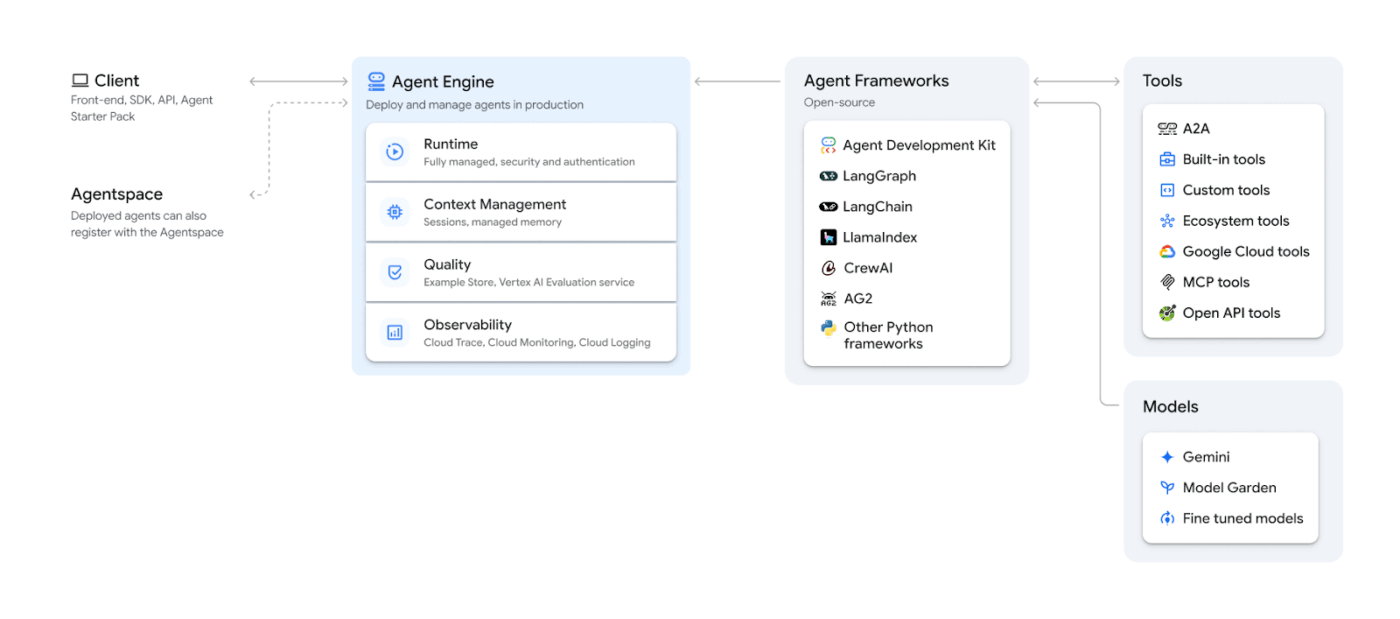
Vertex AI Agent Builder is a fully-managed, unified AI development platform by Google.
It helps you create and refine agent workflows by prompting models with text, images, video, and code. It provides access to Google’s Gemini models and other systems powered by generative AI, including Anthropic Claude, Llama, and Imagen.
You can select models based on your use case, configure tool access, and integrate them into agent workflows.
You can also use extensions to connect agents to external systems and enable them to retrieve real-time information or trigger actions across APIs and enterprise services. This allows agents to query live data and update records as part of automated workflows.
A G2 user says:
Vertex AI makes it easy to try out the latest GenAI models, integrate them into applications, build our own models, and expose them as endpoints. I’ve been using Vertex AI for more than 5 years now for a variety of applications, such as mobile apps that have image recognition, chat capabilities, to web apps that summarize and extract meaningful content. Vertex AI serves as a command center for all AI applications and is continually updated with the latest developments in AI, especially Generative AI.
Mandolin AI is powerful within its vertical. It solves specialty healthcare administration with deep domain context. But if your goal is broader agent orchestration across product, engineering, sales, operations, and support, you need a platform where AI lives inside execution, not outside it.
That’s where ClickUp stands apart.
Instead of stitching together LLM agent frameworks, integration layers, and automation tools, ClickUp provides a Converged AI Workspace that connects the following in one system:
Ready to get started? Sign up for ClickUp today ✅

© 2026 ClickUp

There’s an easier way. Try a free AI Agent in ClickUp that actually does the work for you—set up in minutes, save hours every week.