


Sorry, there were no results found for “”
Sorry, there were no results found for “”
Sorry, there were no results found for “”
Ever felt like your team’s communication is a chaotic game of telephone, with messages lost in translation and tasks slipping through the cracks? We’ve all been there!
Whether juggling remote work, or managing global teams, internal communication apps are key to keeping everyone on the same page (and sane).
We’ve rounded up the top 11 internal communication mobile apps to transform your team’s collaboration game.
Think fewer email threads, faster updates, and maybe even fewer “urgent” late-night messages. These apps will make you wonder how you ever worked without them.
It’s all about finding that perfect internal communications tool. Let’s get communicatin’!
Here’s a quick look at the 11 best internal employee communication apps we’ll be exploring in this blog:
Choosing the right internal communication app is critical to improving your team’s productivity. But with countless options in the market, how do you decide which app is the best fit for your organization?
Here’s what you should prioritize when evaluating your options:
So, where can you find all these features at once?
Here is a comprehensive list of internal communication apps that will meet your team’s needs, foster collaboration, and support long-term business goals:
ClickUp is more than just a project management tool; it’s all-in-one messaging app for work that combines project management, knowledge management, and chat—all powered by AI that helps you work faster and smarter.
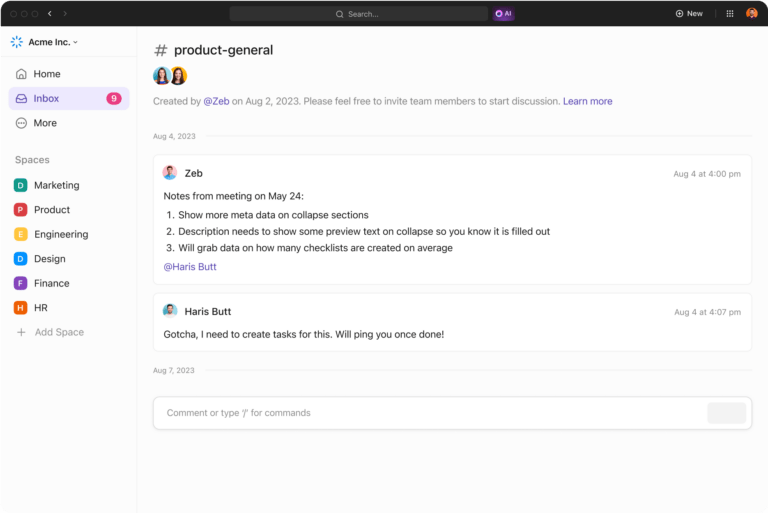
ClickUp Chat is your team’s built-in messaging superstar. Unlike third-party chat tools, it keeps all project-related discussions tied directly to tasks.
This means no more hunting through emails or juggling between platforms to find crucial information.
With Chat, you can discuss project updates, brainstorm ideas, or share quick updates, all while linking messages directly to relevant tasks or projects.
Pin important messages for easy reference and keep conversations flowing seamlessly in one place.
Want to document those discussion points somewhere? ClickUp Docs improves document collaboration. Users can create, edit, and share documents directly within ClickUp, linking them to tasks or projects for easy accessibility.

Real-time editing allows team members to contribute simultaneously, and the ability to embed tasks into docs bridges the gap between planning and execution.
Whether drafting a proposal or outlining a project, ClickUp Docs ensures your team works smarter together, with version history keeping everything transparent.
For moments when words just won’t cut it, ClickUp Clips comes to the rescue. This screen-recording feature lets you capture your screen, narrate processes, or provide visual task instructions.

It’s perfect for sharing updates, explaining complex workflows, or onboarding new team members without lengthy emails or meetings. Record, share, and let your visuals do the talking.
ClickUp Collaboration Detection keeps your team synchronized in real time. This feature notifies users when someone else is editing the same task or document, preventing conflicting changes and improving coordination.

Whether it’s a project plan or a shared doc, you’ll always know who’s working on what, fostering teamwork and transparency.
Flexibility is another key factor contributing to effective project management, and ClickUp’s Custom Views deliver precisely that. Choose from List, Board, Calendar, Timeline, and more to visualize tasks in the way that works best for your team.

Boards offer a Kanban-style workflow, while Gantt views help track dependencies and timelines. The ability to switch between views ensures everyone on your team stays in sync, no matter their working style.
Gone are the days of long, disjointed email chains. ClickUp’s @Mentions and Assign Comments features allow you to tag team members directly within tasks, assign responsibilities, or draw attention to updates.

Use threaded comments to keep discussions organized and actionable, ensuring everyone knows exactly what’s required of them without confusion.
Whether your team needs to chat, plan, or brainstorm, ClickUp keeps everything in one place for seamless collaboration.
🧠 Did You Know: ClickUp was recently named the No. 1 software in 18 categories in the G2 2024 Winter Report! Two of the 18 categories it topped were Project Collaboration and Workflow Management.
Slack is a leading internal communications app known for its real-time messaging capabilities and extensive integrations. It is ideal for teams aiming to enhance employee communication and collaboration.
The Slack mobile app offers user-friendly navigation, featuring a tab bar that provides quick access to essential functions. So, you can catch up on messages, respond to direct mentions, and manage tasks through your mobile.
➡️ Also Read: How to Close Communication Gaps in Your Workplace

Combine traditional tools with features that promote employee engagement via Workvivo.
With the Workvivo mobile app, you can stay updated through a personalized activity feed, share posts with images and videos, and recognize colleagues’ achievements using shout-outs.
It’s built to help employees feel more connected to their work and the organization’s mission, regardless of location.

Microsoft Teams offers an internal communication mobile app that seamlessly integrates with the Microsoft Office suite. It provides a unified platform for team communication, collaboration, and video conferencing with some great features.
The Microsoft Teams mobile app allows users to join meetings with a single tap, share content directly from their mobile, and collaborate using other office apps in real time.
The app also supports push notifications, promptly informing users of important messages.
Note: Microsoft Teams is available as part of the Microsoft 365 suite. Prices listed are for the Microsoft 365 suite.
💡 Pro Tip: Avoid notification overload by customizing alerts to receive only the most relevant updates. For example, set Slack or Microsoft Teams to notify you only for direct mentions or critical channel updates.

Are you seeking a user-friendly internal communications app that excels at visual tasks and team management? Trello provides a solid solution with its intuitive Kanban boards.
It enables teams to organize projects and tasks visually, promoting collaborative communication.
The Trello mobile app allows you to create new cards, set due dates, and attach files directly from your mobile devices. The app supports real-time synchronization, ensuring that changes are instantly reflected across all devices and for all team members.
📮ClickUp Insight: Knowledge workers send an average of 25 messages daily, searching for information and context.
This indicates a fair amount of time wasted scrolling, searching, and deciphering fragmented conversations across emails and chats. 😱 If only you had a smart platform that connects tasks, projects, chat, and emails (plus AI!) in one place. But you do: Try ClickUp!

Chanty is an internal communication app tailored for small businesses seeking an affordable, all-in-one solution for team collaboration.
Chanty’s mobile app, available on iOS and Android, ensures that team members stay connected and manage tasks efficiently, even while on the move.
The app’s intuitive interface allows you to navigate between chats and tasks, facilitating effective collaborations and smooth workflows per your communication strategy.

If you work extensively with frontline teams or on-ground personnel in the field, Connecteam is a must-have. It is an all-in-one communication app that offers a comprehensive suite of tools to optimize operations and strengthen team communication.
The Connecteam mobile app empowers employees to access essential tools and perform tasks such as clocking in, accessing schedules, and communicating with team members directly from their smartphones.
👀 Did You Know? For deskless workers, Connecteam’s geofencing feature ensures accurate clock-ins by only allowing employees to check in when they’re within a specific location.

RingCentral is a reliable communication app that connects your team through robust video conferencing and cloud-based tools. It is ideal for businesses that need a scalable solution.
This mobile app is built for users on the go, providing you and your team with a cohesive and connected workflow. The app users can participate in video meetings, send and receive messages, and manage phone calls directly from their mobiles.

Deliver company-wide updates and internal newsletters and ensure employees stay informed and engaged with Staffbase.
The Staffbase mobile app ensures that employees have immediate access to company news, updates, and resources, even if they are working remotely.
Employees can access important documents through the mobile app and participate in interactive features like surveys and feedback mechanisms.

monday.com is a dynamic platform offering project management tools and workflow customization. It’s ideal for teams looking to optimize processes, visualize tasks, or collaborate effectively.
With the monday.com mobile app, you can create and edit boards, assign tasks, set important events, and monitor your team’s real-time progress.
The app supports all the views that its desktop version does, including Kanban and Calendar, so you can visualize your workflows according to your needs.
💡 Pro Tip: Save time by creating task templates for frequently repeated workflows, like onboarding new employees or planning weekly sprints. Most apps allow you to duplicate tasks with predefined subtasks and deadlines.
Leaks of internal company discussions and messages (whether accidental or deliberate) are every manager and executive’s worst nightmare. But, prevention is better than cure, and Troop Messenger is there to help prevent such a scenario from becoming a reality.
It is a secure internal communication mobile app tailored for teams that prioritizes security and straightforward interfaces.
You can use it for one-on-one or group chats, share files in various formats, and conduct audio and video calls directly from your mobile devices.
The Troop Messenger mobile app also supports features like screen sharing and location tracking in a mobile format, enhancing your team’s collaborative efforts.
➡️ Also Read: 10 SMART Communication Goals for Teams With Examples
Remember that telephone game analogy from the start? Just like that, miscommunication can cripple a team.
Each tool we discussed above offers unique features to fit different workflows and priorities. But if you’re looking for an everything app for work that integrates task management, project workflows, AI, and automation with team communication, ClickUp is your go-to tool. It’s versatile, easy to use, and designed to adapt to your team’s needs.
Build a more intelligent, connected team network—sign up for your free ClickUp account today.

Manasi Nair
Max 26min read
Manasi Nair
Max 20min read

Arya P Dinesh
Max 23min read

© 2026 ClickUp





