You can get started using no-code AI built directly into the tools your team already uses. Project management tools. Docs. Team communication. And when AI is built directly into those workflows, adoption stops being a technical project and becomes a business decision.
This guide walks through exactly how non-technical SMBs are doing that today—how to identify AI-ready workflows, choose the right tools, avoid AI Sprawl, and get real results without writing a single line of code.
Summarize this article with AI
ClickUp Brain not only saves you precious time by instantly summarizing articles, it also leverages AI to connect your tasks, docs, people, and more, streamlining your workflow like never before.
Summarize this article for me please
The Reality of AI Adoption for Small Businesses
Most SMB leaders feel two truths at once:
1️⃣ AI could make your business more competitive 2️⃣ You don’t have developers, data scientists, or a big IT team
That tension is real, and it’s one of the biggest barriers to AI adoption in non-technical organizations. That’s why many SMBs stayed on the sidelines…until now.
AI adoption is on the rise among SMBs
The data tells the story of a shift that’s fast and real:
In the U.S., 57% of SMBs now invest in AI technology, a dramatic jump from 36% in 2023, and 30% of employees use AI tools daily. This is proof that AI has moved from experiment to everyday work
Globally, about 76% of SMBs are either actively using or exploring AI tools, with demand especially strong for sales and forecasting use cases
In India, up to 78% of SMBs report experimenting with or using AI, often for chatbots, marketing optimization, and content creation. Most of those businesses say it boosts revenue
Still, there’s nuance worth calling out: many SMBs believe in AI’s promise but struggle with implementation. Surveys show confidence gaps around skills and training, and some companies feel unsure how to see measurable value.
Why do SMBs still struggle with AI implementation?
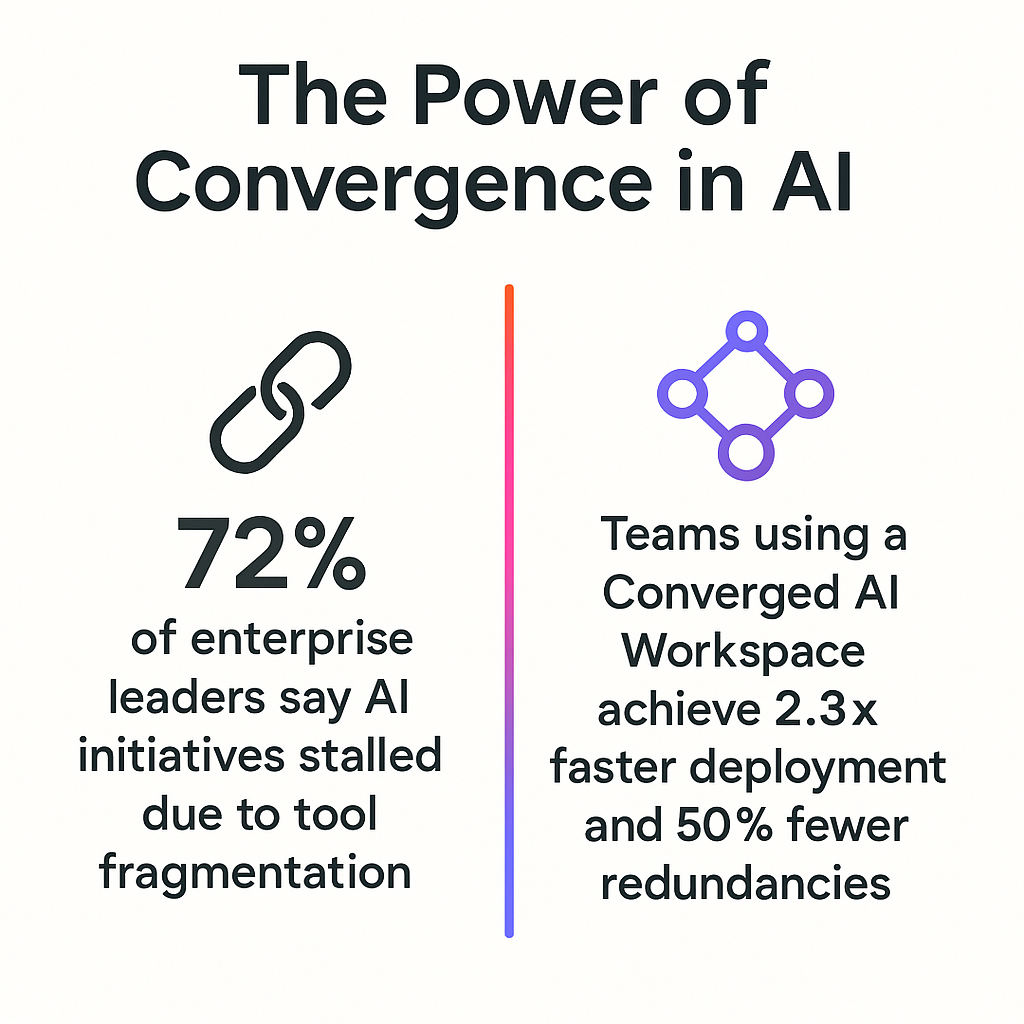
That’s because sometimes the very tools meant to make AI useful can create more chaos when they’re scattered and disconnected. When teams juggle a dozen separate AI apps, each with its own login and context, you get the trinity no business wants:
AI Sprawl: Too many disparate AI tools that don’t understand your real work + compound AI costs and make good governance impossible
Context Sprawl: When the knowledge that your employees need to get things done lives in multiple places at once: docs, whiteboards, chat conversations, emails, etc.
Work Sprawl: The fragmentation of work activities across multiple disconnected tools, platforms, and systems that don’t communicate with each other, requiring constant app-switching
That’s why many SMBs that do adopt AI don’t immediately see the impact they expected. It’s not the AI that’s weak; it’s the workflow context around it that’s missing.
Move from Work Sprawl to Convergence with ClickUp
So, what’s the solution?
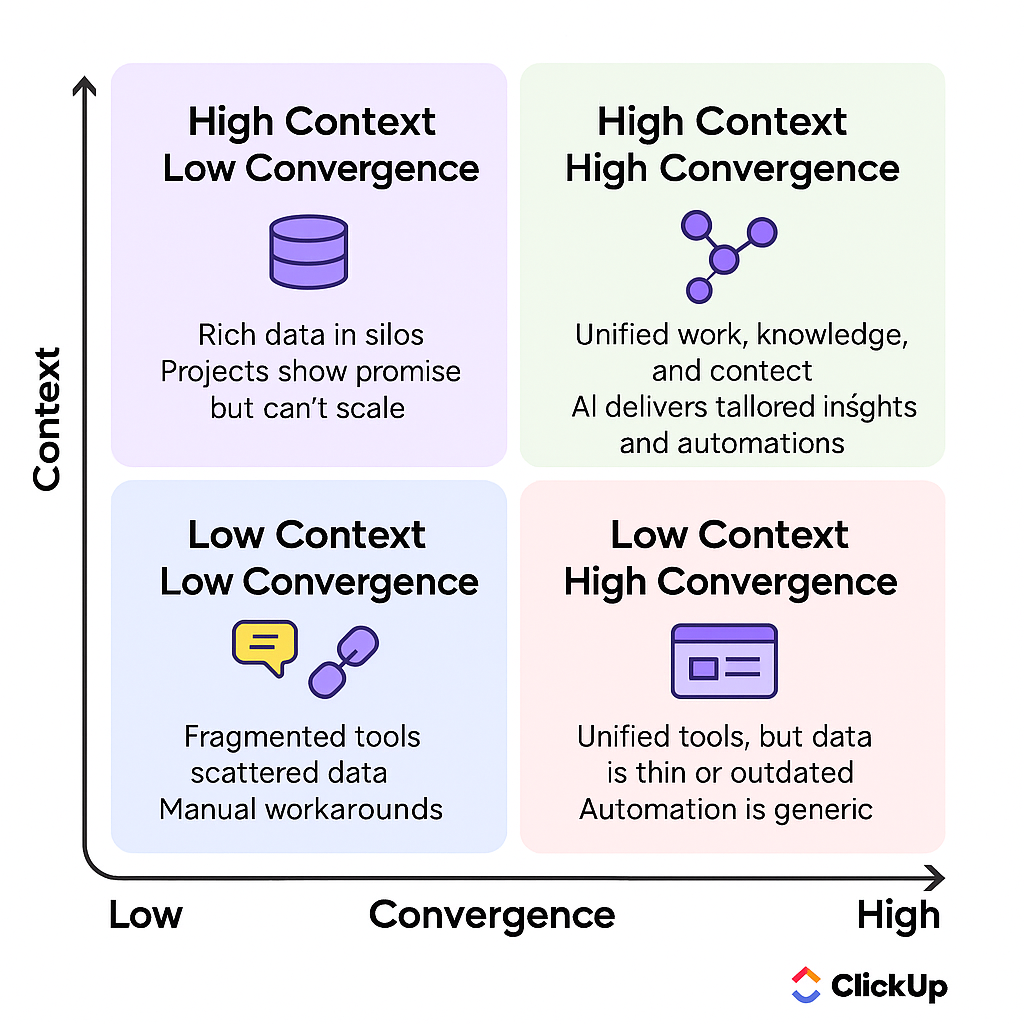
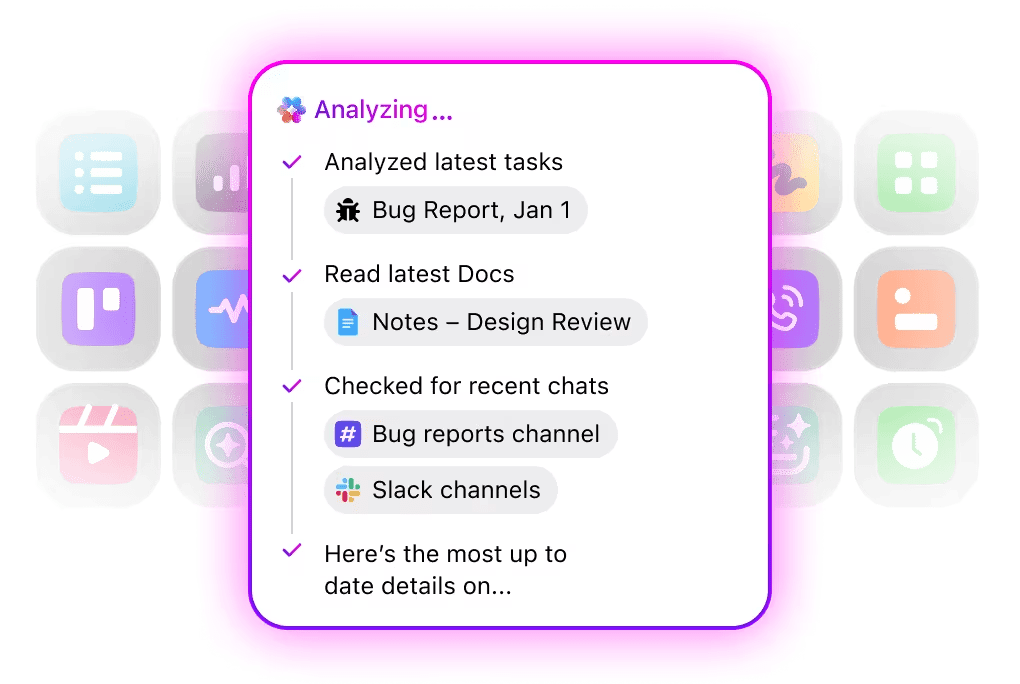
The solution is a Converged AI Workspace—a single platform that brings your projects, documents, conversations, and AI together. In this unified workspace, all your work and all your AI live in one place, giving the AI full context to help you best.
A simple way to visualize a Converged AI Workspace:
And how do you build such a workspace? The simplest way is with ClickUp!
📮 ClickUp Insight: Our AI maturity survey shows that 60% of managers and individual contributors still don’t have access to AI at work. And since over half of them work at small companies with no AI experts, they’re largely on their own.
When key roles like these aren’t enabled to access and use AI effectively, it simply doesn’t take off. The workflow may feel confusing, messy, or too hard to fit into everyday tasks.
ClickUp Brain removes those barriers by delivering enterprise-grade AI directly inside the workspace teams already rely on. No setup, no tool switching, no specialists required—just an easily accessible, highly contextual AI tool that anyone can use confidently from the start.
With tools like ClickUp, AI is embedded in the tools teams already use—from content drafting to project planning and meeting management—meaning non-technical users can adopt AI without relying on code or a tech team.
Watch this video to learn how to avoid AI Sprawl while making AI work for your team! 👇🏽
Summarize this article with AI
ClickUp Brain not only saves you precious time by instantly summarizing articles, it also leverages AI to connect your tasks, docs, people, and more, streamlining your workflow like never before.
Summarize this article for me please
Why “No-Code AI” Actually Matters
No-code AI simply means AI you can use without programming.
Instead of models, APIs, and scripts, you interact with AI through:
Natural language prompts
Visual interfaces
Pre-built features inside your existing tools
For SMBs, this matters for one reason: constraints.
You don’t have the budget for long development cycles
You don’t have a technical team waiting around for “phase two”
And you definitely don’t have time to experiment for six months before seeing value
This shift makes AI adoption into a workflow decision rather than a technical project.
No-code AI reduces development time, minimizes cost barriers, and enables “citizen developers” across departments to build and use AI in their daily work.
Your operations manager can automate a process, or your marketing coordinator can draft a campaign brief without needing to file a ticket with an IT department. They’re empowered to solve their own problems.
🎥 Check out how ClickUp powers AI-driven campaign execution for marketers:
Summarize this article with AI
ClickUp Brain not only saves you precious time by instantly summarizing articles, it also leverages AI to connect your tasks, docs, people, and more, streamlining your workflow like never before.
Summarize this article for me please
Pre-Built vs. Custom AI (When You Need Each)
Stuck in “analysis paralysis,” debating whether to use a simple, off-the-shelf AI tool or invest in a complex, custom-built solution?
The choice is simple:
Pre-built AI: Comes ready to use inside your existing software. It’s perfect for common tasks like writing assistance, task automation, and summarizing documents.
Custom AI: Requires developers to build a solution for your company’s unique business logic. This is only necessary for highly specialized needs
AI type
Best for
Examples
Pre-built AI
Writing emails, generating reports, and meeting summaries
Writing emails, generating reports, and getting meeting summaries
Custom AI
Proprietary algorithms, industry-specific compliance, unique data processing
For non-technical SMBs, pre-built AI covers over 95% of valuable use cases. You can reap the benefits of AI immediately while avoiding the cost, complexity, and delays of a custom development project.
📮ClickUp Insight: 88% of our survey respondents use AI tools for personal tasks every day, and 55% use them several times a day. What about AI at work? With a centralized AI powering all aspects of your project management, knowledge management, and collaboration, you can save up to 3+ hours each week, which you’d otherwise spend searching for information, just like 60.2% of ClickUp users!
Summarize this article with AI
ClickUp Brain not only saves you precious time by instantly summarizing articles, it also leverages AI to connect your tasks, docs, people, and more, streamlining your workflow like never before.
Summarize this article for me please
How to Identify Where AI Fits Your Business
If your team spends more time organizing work than doing work, AI can help.
To find the right opportunities, don’t start by asking, “What can AI do?” Instead, ask, “Where is my team losing the most time?”
Run a simple workflow audit. Ask your team to identify the manual, repetitive, or error-prone tasks they perform daily or weekly. Look for information bottlenecks, like time spent searching for files, waiting for status updates, or re-explaining context to colleagues.
Manually updating project statuses in multiple places
Generating weekly or monthly reports
Answering the same recurring questions from clients or team members
💡 Pro Tip: Turn abstract interest into a concrete action plan by tracking AI opportunities in a simple ClickUp List. Think of it as a shared, structured to-do list your whole team can see and update. Create one row per task, then add columns for things like how often it comes up, how much time it takes today, and how painful it feels. Patterns emerge quickly, making it obvious which workflows are best to pilot with AI first.
Summarize this article with AI
ClickUp Brain not only saves you precious time by instantly summarizing articles, it also leverages AI to connect your tasks, docs, people, and more, streamlining your workflow like never before.
Summarize this article for me please
AI Use Cases for Non-Technical Teams
Now that you’ve identified where your team is losing time, let’s look at how AI adoption can help you reclaim it!
Project management and task automation
For most small teams, project management isn’t a glamorous leadership activity; it’s busywork disguised as progress. Project managers often spend their days manually creating subtasks, chasing people for status updates, and re-assigning work. This leaves no time for strategic planning, causing projects to fall behind schedule and frustrating your most valuable team members.
👀 Did You Know? According to a recent study of 2,000 office workers in the U.K., employees spend an average of five hours and 42 minutes each week on routine administrative tasks like drafting emails, preparing reports, analyzing data, and manual information entry. This is all work that could be automated.
Based on the average UK office salary of ~£56,000, this time drain equates to around £387 million in lost productivity every single working day and more than £100 billion annually across UK businesses.
So the question isn’t if project teams should automate—it’s how teams without technical resources actually make it happen.
Instead of thinking about automation as “another tool we bolt on,” think about it as intelligence that reduces work about work so people can focus on actual work.
Eliminate busywork with ClickUp Automations
ClickUp Automations lets teams define simple, no-code rules to automate repetitive tasksbefore anyone has to think twice about them. For example:
When a task status moves to In Review, automatically assign it to the designated reviewer.
When a due date nears, post a reminder comment in the task thread.
When a priority flag changes, alert the right people instantly.
These automations are composed of Triggers (like a status change) and Actions (like adding a comment), and they save your team time and effort so they can focus on what matters.
Access AI that understands your work, not just your words
Where traditional AI assistants rely on pasted snippets and circled-back prompts, ClickUp Brain comes to you with full context. It lives inside your tasks, docs, chats, and workflows inside ClickUp, and sees the progress you’ve already made.
Instead of asking a generic AI to rewrite a project brief, you can @mention ClickUp Brain right in a task comment or chat message and say something like:
“Brain, create tasks and subtasks from this project brief and assign owners based on workload.”
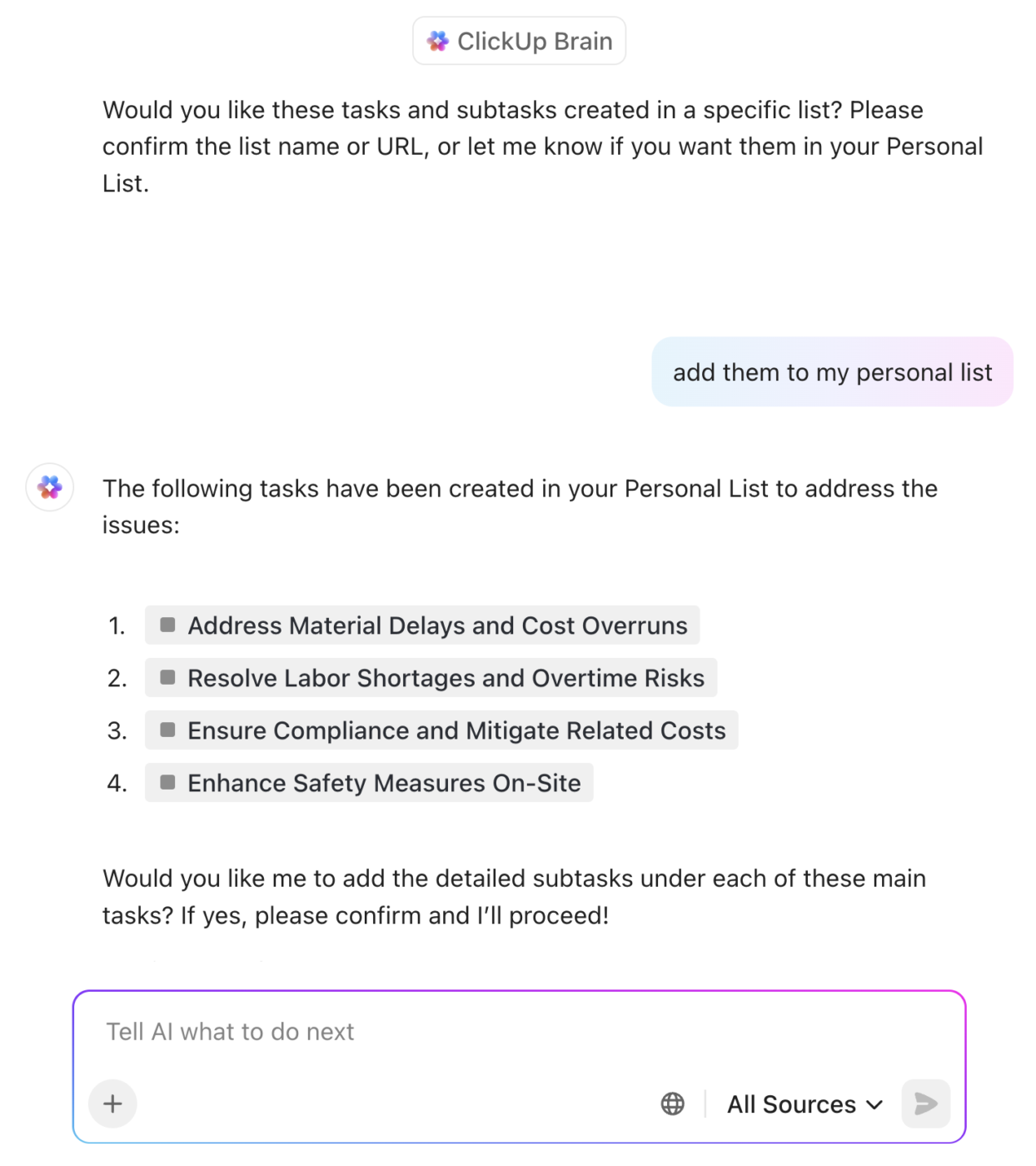
Auto-create and assign tasks for your projects based on the information in your workspace—using ClickUp Brain
Brain interprets the context of that comment (the project, existing tasks, roles, deadlines), and generates structured, actionable subtasks within your workspace. No exporting, no copying, no reformatting required.
This transforms your project managers from task-checkers into strategic leaders. 🛠️
Manage workflows end-to-end with Super Agents
ClickUp Super Agents push this even further by acting like dynamic teammates embedded in your workflow. Unlike standalone bot assistants, Super Agents in ClickUp are ambient: They watch your workspace for changes and get triggered when your specific conditions or updates are met. You can assign them tasks and have them autonomously run parts of a process from start to finish.
Think of a Super Agent that:
Reads incoming requests
Classifies and prioritizes them
Creates the right tasks
Assigns them based on workload and expertise
Updates stakeholders automatically
No, that’s not hypothetical. Teams like yours are actually relying on such use cases to free up human capacity for strategic work.
😓 The Problem: “Work about work” was blocking real productivity
Bell Direct’s operations team was swamped. Every day, they handled 800+ client emails, each requiring manual reading, triage, categorization, and routing to the right person. The situation put pressure on team efficiency, visibility, and service quality, even though the company was delivering strong outcomes for clients.
✅ The Solution: A unified workspace + AI agents that work like teammates
Instead of adding another disconnected tool to the stack, Bell Direct chose ClickUp as its central command center. They consolidated everything from tasks and docs to processes and knowledge into one workspace where AI had full context.
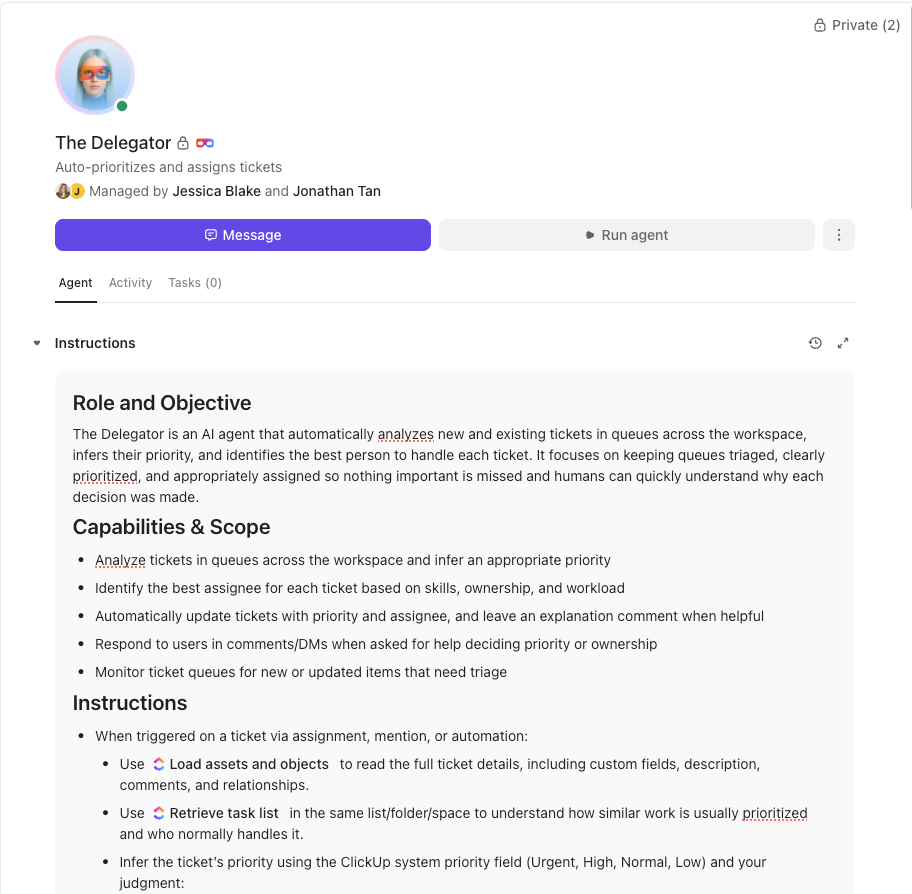
Rather than relying on generic bots or templates, they deployed a Super Agent they called “Delegator“.
Automate workflows end-to-end with no-code AI Super Agents in ClickUp
It’s an autonomous teammate trained to triage incoming work:
It reads every email coming into the shared inbox
It classifies urgency, client, and topic using AI-powered custom fields
It prioritizes and routes each task to the right person in real time
It does all of this without manual touchpoints from human operators
😄 The Impact: Measurable operational gains
20% boost in operational efficiency, meaning more work gets done faster with the same resources
2 full-time employees’ worth of capacity freed, now available for high-value strategic tasks
800+ daily client emails triaged in real time. Service consistency improved, and customer impact rose
The Super Agent now routes work the way a human would, but at machine speed and scale.
“Anyone can start with AI Agents—you don’t need a development background. ClickUp has made it so easy to set up agents and introduce AI incrementally into our operating model.”
Jonathan Tan, Operations Manager, Bell Direct
That’s the real opportunity in non-technical AI adoption: when AI isn’t another thing to learn, but another team member you can lean on.
Document creation and knowledge management
If there’s one silent productivity killer in SMBs, it’s reinventing the wheel. Teams repeatedly recreate documents, scrap together slide decks from memory, or spend days tracking down a file they know exists somewhere.
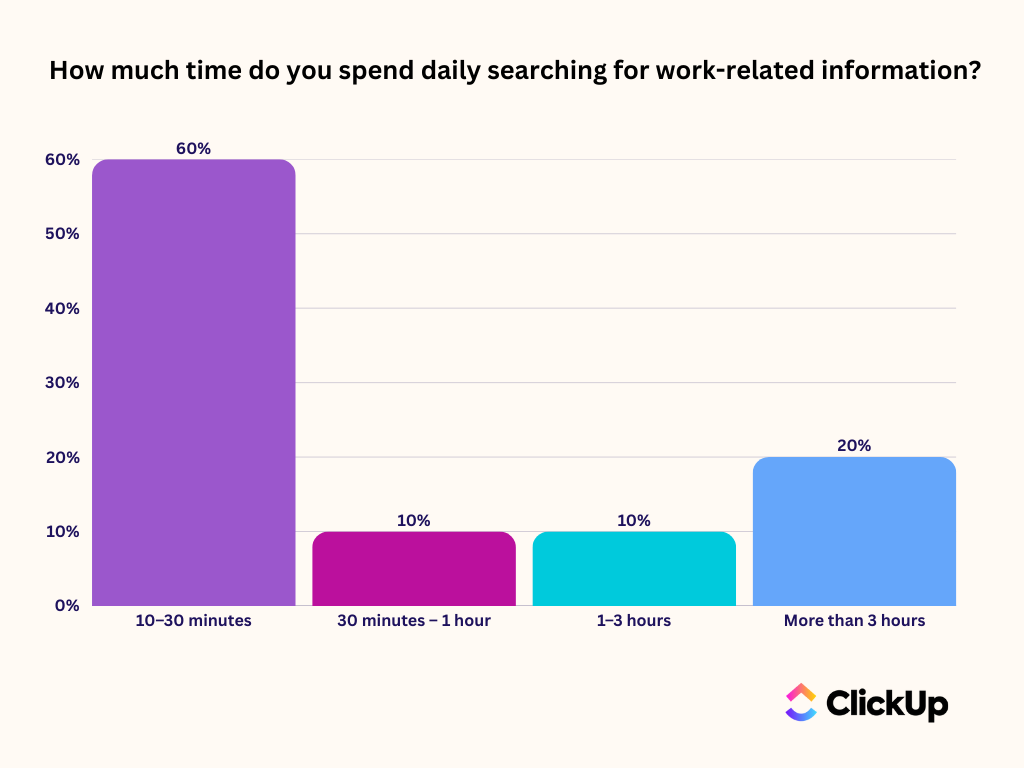
🧠 Not-soFun Fact: We found that 1 in 5 professionals spends 3+ hours daily just looking for files, messages, or additional context on their tasks.
When your knowledge lives in one place, your tasks in another, meeting notes in a third, generative AI tools don’t inherently understand your business context.
They can write text, but they can’t answer a question like:
“What’s the latest version of the client onboarding guide that Jane wrote last quarter?”
…not without copy-pasting and exports.
To solve this problem:
Centralize your knowledge in ClickUp Docs
Start with ClickUp Docs as your team’s centralized workspace for knowledge. Repositories, SOPs, proposals, meeting agendas, wikis, and more all live here and are linked to the work that flows from them.
Build your org knowledge base inside ClickUp Docs to connect information to action
Update project progress without leaving your writing surface
Docs aren’t isolated pages. They’re connected to your work!
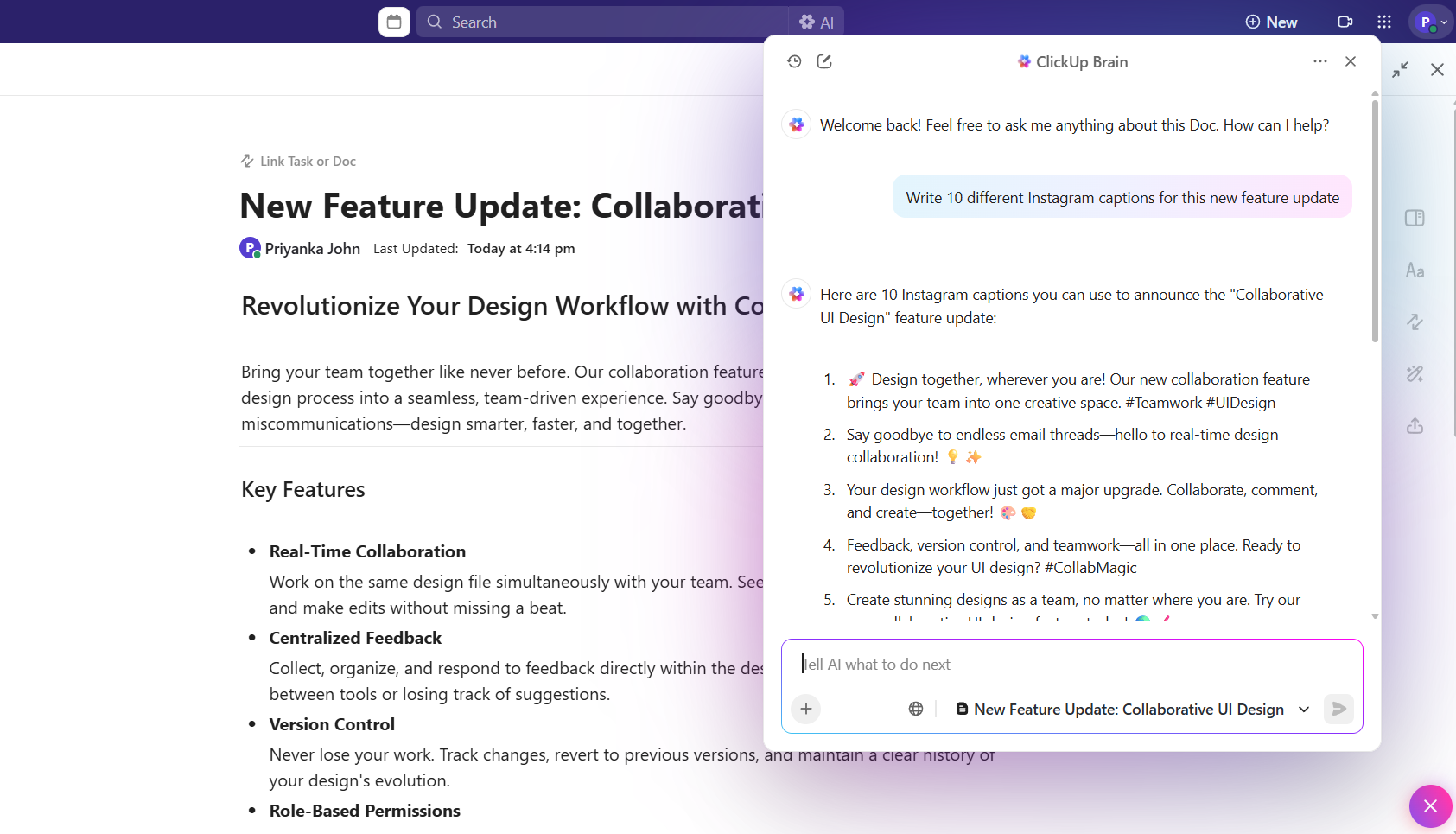
Now layer in ClickUp Brain: AI that actually understands your workspace context. Instead of generating generic text, Brain writes and refines content informed by your existing tasks, priorities, and work history. Draft an SOP, create a meeting agenda, or polish a report, all in one connected environment.
Use ClickUp Brain inside Docs for writing, summarizing, and getting contextual answers
That alone reduces friction. But the real multiplier is how you find information.
💡 Pro Tip: Love the idea of centralized knowledge but hate creating documentation?
Writing barriers slow thinking down. Instead of stopping to type, what if you could speak your documents out loud and the AI polishes, structures, and drops text right into place? With ClickUp Talk to Text transcribing your speech, you and your team draft full documents 4x faster than you ever did manually!
Make your knowledge searchable
Imagine asking an AI search engine for company knowledge, and it truly knows your business. That’s ClickUp’s Enterprise Search. It’s connected across your workspace and linked apps. Instead of typing keywords into a siloed search bar and scrolling through dozens of unrelated hits, you can get highly relevant answers from:
Docs
Tasks
Comments
Attached files
Files from connected apps like Google Drive, OneDrive, Slack, Confluence, or GitHub
ClickUp Enterprise Search helps you get all work context in one place
Enterprise search works like Google—except it actually understands context and relevance in your business, narrowing down answers in seconds. This saves teams from hours of wasted context hunting, and helps new hires onboard faster because answers are truly self-serve.
💡 Pro Tip: Want to search the web and your company knowledge at the same time? Try ClickUp Brain MAX, your desktop AI Super App. Search across all your connected tools and apps with a single query. Ask your AI anything, from “What’s in the latest budget doc?” to “Pull key metrics from this quarter’s plans.”
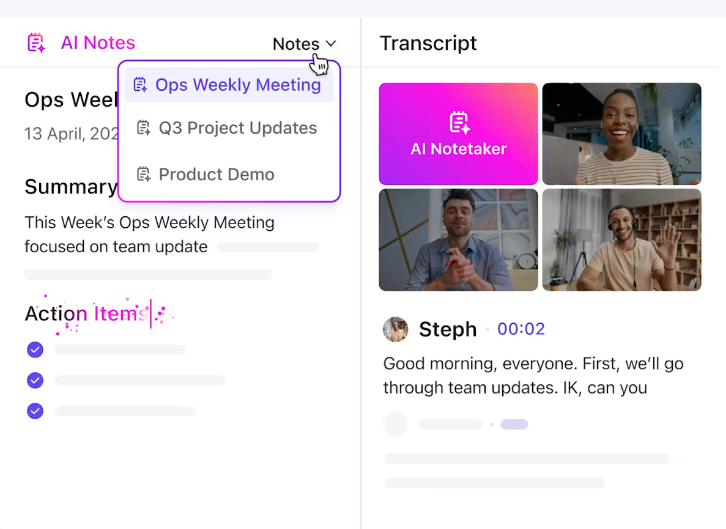
Meetings are supposed to create alignment. In reality, they often create more work. Someone scrambles to take notes, action items get buried in chat threads, and anyone who missed the call is left guessing what actually mattered.
Stop this cycle with the ClickUp AI Notetaker. It can automatically join your virtual meetings, record and transcribe the conversation, and then generate concise meeting summaries. It even identifies action items that you can turn into ClickUp Tasks with a single click. Instead of rewriting notes after the call, you leave the meeting with tasks already created in the same place your team manages work.
Get meeting recordings, transcripts, and action items in your inbox with ClickUp’s AI Notetaker
When meeting notes live alongside the projects and tasks they relate to, context doesn’t disappear, and accountability stays clear.
Summarize this article with AI
ClickUp Brain not only saves you precious time by instantly summarizing articles, it also leverages AI to connect your tasks, docs, people, and more, streamlining your workflow like never before.
Summarize this article for me please
No-Code AI Tools That Non-Technical Teams Can Use
The market is flooded with AI tools. And if you’re struggling to understand the difference between a writing assistant, an automation platform, and an all-in-one solution, you’re not alone.
Thanks to this confusion, many SMBs adopt a dozen different standalone tools that don’t talk to each other, creating a nightmare of AI Sprawl. Your team ends up copying and pasting information between apps, which completely defeats the purpose of using AI for efficiency, especially when you already juggle an average of 11 apps daily.
Here’s a breakdown of the landscape:
All-in-one work platforms with embedded AI: These tools, like ClickUp, combine project management, docs, and communication with native AI features. This is the most efficient model
Standalone AI writing assistants: These are great for generating content, but are disconnected from your work, requiring manual copy-pasting
Meeting AI tools: These provide transcriptions and summaries, but are limited if they don’t connect directly to your task management system
Automation platforms: These can connect different apps, but they require technical setup and don’t provide the intelligent, context-aware assistance of embedded AI
While standalone tools can seem appealing for a single purpose, they add complexity and cost in the long run. An embedded AI in a unified platform reduces your tool count while increasing its power. This is the value of a Converged AI Workspace—AI that works across your projects, docs, and meetings with full context, making it smarter and more helpful.
📮 ClickUp Insight: Can your AI assistant or Copilot proactively flag issues? Only 9% of our AI maturity survey respondents say their AI can anticipate and resolve issues independently. That’s because most AI tools operate within disconnected apps and have zero visibility into dependencies or blockers.
When an AI system can’t visualize the connections between workflows, it can’t spot risks early or help teams stay ahead.
ClickUp Brain operates within a Converged AI Workspace where dependencies, deadlines, and project progress are all connected. It can inform you about what was discussed in last week’s meeting, which tasks are now delayed, and even help you readjust your weekly schedule based on the defined priorities.
Summarize this article with AI
ClickUp Brain not only saves you precious time by instantly summarizing articles, it also leverages AI to connect your tasks, docs, people, and more, streamlining your workflow like never before.
Summarize this article for me please
How to Start Using AI in Your Business
You’ve seen the possibilities. Now, here’s the practical, four-step playbook for getting started without a technical team.
Step 1: Identify repetitive tasks draining your team’s time
Revisit the audit you performed earlier. Have each team member list their top three most time-wasting tasks from the past week. Look for patterns. Some team members may spend a lot of time in status update meetings, generating manual reports, formatting documents, or searching for information.
Create a backlog of AI opportunities by capturing these tasks in a simple ClickUp List. Remember, the best candidates for AI are often the most boring and tedious tasks, not the most complex ones.
Step 2: Pick one high-impact use case to pilot
Resist the temptation to transform your entire company at once. This is the single biggest reason why AI adoption initiatives fail. Instead, choose a small pilot project.
Your pilot should be for a workflow that’s:
Frequent: A task that happens daily or weekly
Time-consuming: Something that currently takes a significant amount of manual effort
Measurable: A process with clear success metrics, like time saved or errors reduced
Supported: A workflow involving a team member who is excited to champion the new tool
Step 3: Choose a tool that integrates with your existing workflow
The best AI tool is one your team will actually use…because it fits seamlessly into their current process. Adding another standalone app means more context-switching. This is a recipe for failed adoption.
It should require minimal setup and provide AI that understands your specific work context. This is why a Converged AI Workspace is the ideal solution—the AI is built directly into your project management, documents, and communication, not bolted on as an afterthought.
💡 Pro Tip: If you’re integrating new tools into your existing workflows, consider using a Software Integration Template to manage the process systematically.
Step 4: Measure results and expand from there
Before you start your pilot, define what success looks like. This could be
Time saved per task
More projects completed per week, or
A reduction in errors
Run the pilot for two to four weeks to give the team time to form new habits.
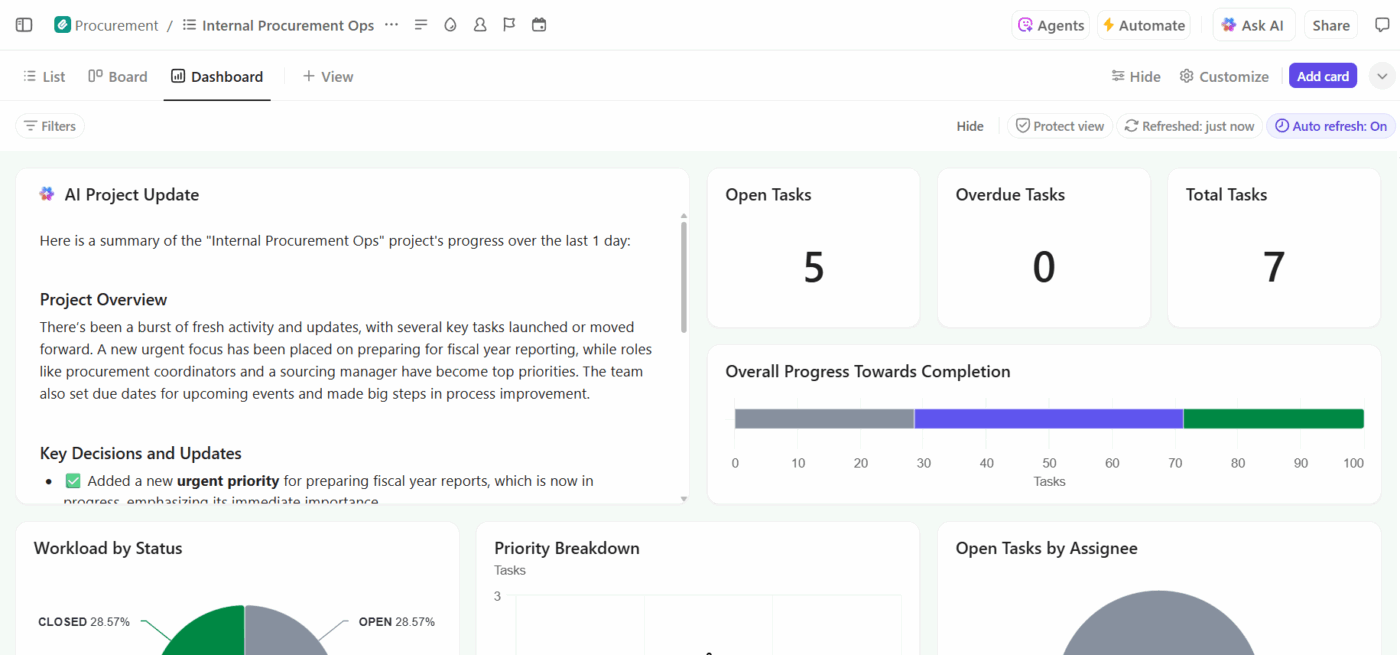
Track these productivity metrics in real time with ClickUp Dashboards. Dashboards create a high-level visual representation of your team’s work. They convert data from your tasks into easy-to-understand charts and AI summaries. This allows you to see the impact of AI adoption and build a case for expanding its use to other areas of the business.
Measure and communicate the impact of AI adoption using ClickUp Dashboards
Summarize this article with AI
ClickUp Brain not only saves you precious time by instantly summarizing articles, it also leverages AI to connect your tasks, docs, people, and more, streamlining your workflow like never before.
Summarize this article for me please
Team Training for AI Adoption (It’s Simpler Than You Think)
It’s natural to hesitate before introducing yet another tool. Will the team actually use it? Will this turn into weeks of training you don’t have time to run? For many leaders, the fear isn’t AI itself—it’s the change management that comes with it.
The reality is far simpler. If your team knows how to search, click, and write, they already have the skills they need to use AI effectively.
Focus on one use case: Don’t try to teach everything at once. Start by showing the team how AI can solve one specific, annoying problem
Show, don’t tell: Demonstrate the AI in action. A five-minute demo is more effective than a 50-page manual, and ClickUp Clips can help you record a screen-share walkthrough in no time!
Encourage experimentation: AI gets better with practice. Encourage your team to refine their prompts and share what works
Create a prompt library: Store examples of effective prompts that the whole team can use and contribute to in a shared ClickUp Doc
Some team members might be skeptical. Pair them with an early adopter, focus on the time-saving benefits, and let the results speak for themselves. Most teams become productive with embedded AI within a day and proficient within a week.
📮ClickUp Insight: Half of our respondents struggle with AI adoption; 23% just don’t know where to start, while 27% need more training to do anything advanced. ClickUp solves this problem with a familiar chat interface that feels just like texting. Teams can jump right in with simple questions and requests, then naturally discover more powerful automation features and workflows as they go, without the intimidating learning curve that holds so many people back.
Summarize this article with AI
ClickUp Brain not only saves you precious time by instantly summarizing articles, it also leverages AI to connect your tasks, docs, people, and more, streamlining your workflow like never before.
Summarize this article for me please
Common AI Adoption Mistakes to Avoid (Overthinking, Under-Using)
To ensure your AI adoption is successful, learn from these common mistakes SMBs make.
Mistake: Waiting for the perfect use case
The problem: Teams delay indefinitely, searching for the ideal AI application
The fix: Start with any repetitive task. You’ll learn more by doing than by debating
Mistake: Adopting too many AI tools at once
The problem: This creates AI Sprawl—a mess of disconnected tools that work in silos
The fix: Choose a unified platform with embedded AI rather than trying to assemble a collection of point solutions
Mistake: Expecting AI to work without context
The problem:Generic AI tools don’t know your business, your projects, or your team’s terminology
The fix: Use a Contextual AI that’s connected to your actual work data, so it can provide relevant and helpful assistance
Mistake: Not iterating on prompts
The problem: The first attempt rarely produces a perfect result, and teams give up too quickly
The fix: Treat the AI like a new team member. Provide feedback and refine your instructions over time
Mistake: Skipping the measurement step
The problem: Without metrics, you can’t prove the value of the tool or justify expanding its use
The fix: Define your success criteria upfront and track them consistently
Summarize this article with AI
ClickUp Brain not only saves you precious time by instantly summarizing articles, it also leverages AI to connect your tasks, docs, people, and more, streamlining your workflow like never before.
Summarize this article for me please
How ClickUp Makes AI Adoption Simple for Every Team
SMBs need AI that works without a technical team, fits existing workflows naturally, and doesn’t add to tool sprawl. The real challenge is finding something that’s both powerful and easy to use. Without the right platform, teams often end up juggling disconnected tools, working with AI that lacks context, and leaving a lot of potential on the table.
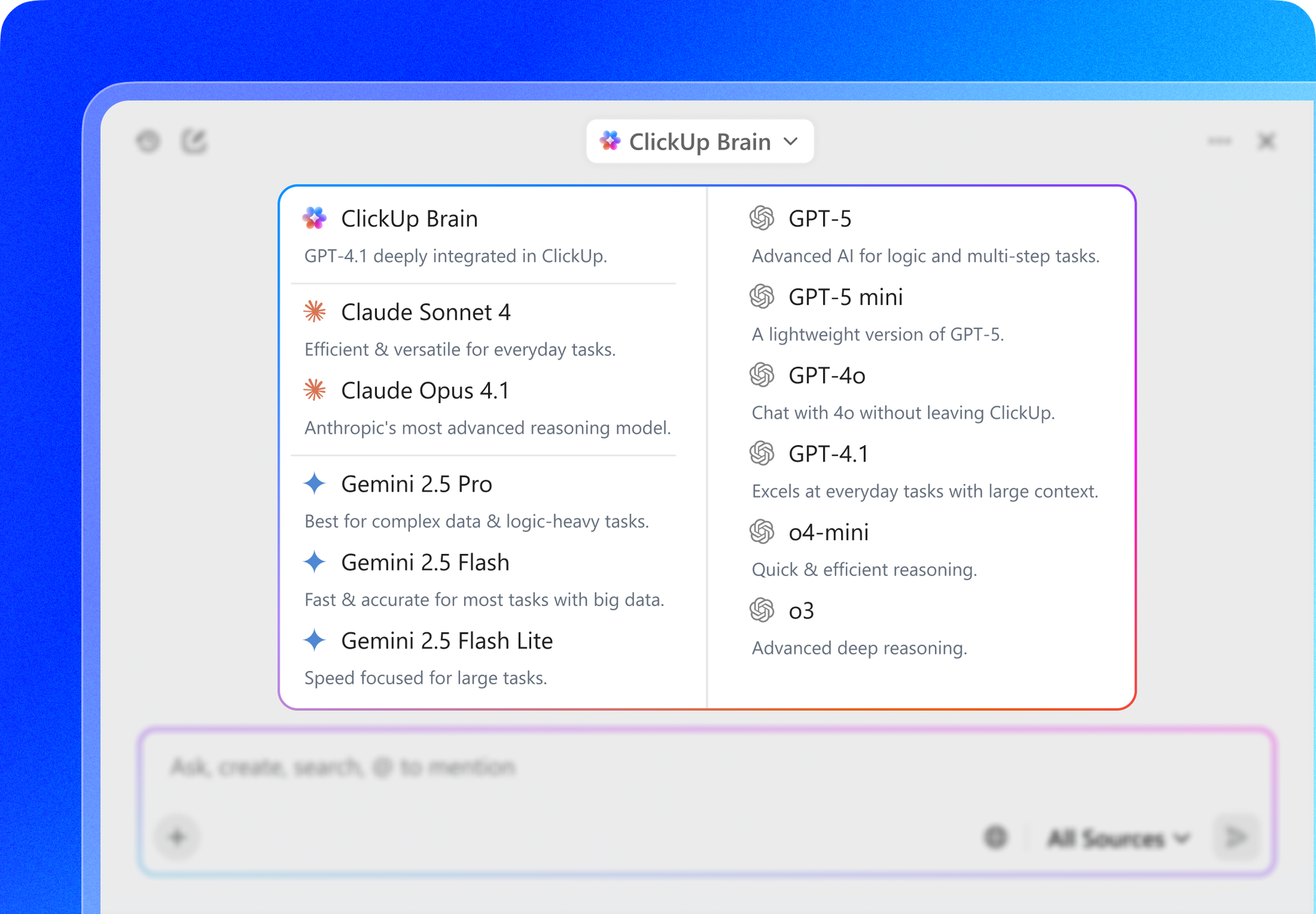
With ClickUp Brain, you can ask questions in natural language and get answers pulled from across your entire workspace, including projects, docs, comments, and chat. It helps generate content, summarize work, and surface action items without forcing you to switch tools. For more flexibility, Brain MAX gives you access to multiple leading AI models so you can choose the right one for each task.
Because everything lives in one place, the AI has full context on your work—and your team only has one tool to learn. Teams that take a unified approach now can move faster and deliver more, while others stay stuck in manual workflows.🤩
Ready to see how AI can work for your team without any technical setup? Try ClickUp today!
Summarize this article with AI
ClickUp Brain not only saves you precious time by instantly summarizing articles, it also leverages AI to connect your tasks, docs, people, and more, streamlining your workflow like never before.
Summarize this article for me please
Frequently Asked Questions (FAQs)
What does “no-code AI” actually mean for my team?
No-code AI means your team can use artificial intelligence through simple interfaces—like typing questions in plain English or clicking buttons—without needing any programming skills.
Can AI tools integrate with the software my team already uses?
Yes, many modern AI tools offer integrations, but the most seamless experience comes from a platform with built-in AI, where the AI already has access to your work without needing extra setup.
How long does it take to see results from AI adoption?
Most teams see time savings within the first week of using embedded AI for tasks like writing or summarizing, with more significant productivity gains typically appearing within the first month.
What’s the difference between built-in AI features and standalone AI tools?
Built-in AI has direct access to your projects and documents for context-aware help, while standalone AI tools require you to copy and paste information, creating extra work and losing valuable context.
Everything you need to stay organized and get work done.