

Rolling out new software can transform how your team works—but only if employees know how to use it effectively. The challenge lies in not just introducing the tool but ensuring it becomes a natural part of their workflow. This is where mastering how to train employees on new software becomes critical.
In this guide, we’ll explore practical steps to design training programs that engage your team, simplify the learning process, and drive real results. Ready to turn your software investment into success? Let’s begin.
How to Train Employees on New Software Efficiently
- Why Training on New Software is Essential
- Common Challenges in Training Employees on New Software
- How to Train Employees on New Software
- Step 1: Identify key training objectives
- Step 2: Choose the right training model
- Step 3: Schedule and prioritize training sessions
- Step 4: Engage employees through interactive sessions
- Step 5: Encourage a safe space for learning and mistakes
- Step 6: Gather employee feedback to improve training
- Step 7: Support continuous learning beyond the training
TL;DR: How to train employees on new software

 Summarize this article for me please
Why Training on New Software is Essential
Introducing new software can transform workplace efficiency, but its success hinges on effective training. Without proper guidance, employees may struggle to adopt the software, reducing productivity and increasing frustration. Here’s why training on new software is crucial:
- Smooth transitions: Well-structured training ensures employees adapt quickly to the software, minimizing downtime during implementation
- Increased productivity: Employees equipped with software knowledge perform tasks more efficiently, boosting workplace output
- Knowledge retention: Comprehensive training programs enhance long-term retention, reducing repeated queries and errors
- Employee confidence: Adequate training instills confidence, enabling employees to embrace technology changes without hesitation
- Improved collaboration: Training fosters team alignment by ensuring everyone understands the software’s functionalities
- Job satisfaction: Providing learning opportunities shows employees their growth matters, enhancing satisfaction and reducing turnover
- Technology adoption: Effective training helps overcome resistance, ensuring the entire team adopts the software seamlessly
- Reduced errors: Proper guidance prevents mistakes, safeguarding data and ensuring optimal usage
Training isn’t just about familiarizing employees with tools but empowering them to excel. By leveraging an effective new technology training method and prioritizing a smooth training process, HR professionals and leaders can maximize the returns from their software investment and drive organizational success.
Summarize this article for me pleaseCommon Challenges in Training Employees on New Software
Training employees on new software can be complicated, often accompanied by unique challenges that need careful attention.
Below are the key challenges organizations face, with actionable insights to overcome them.
Resistance to change
Employees often perceive new software as a disruption to their established workflows. This resistance is not just about the technology—it’s a reaction to feeling unprepared or unsure about the transition. When teams lack clarity about how the software will improve their daily tasks or the organization’s goals, pushback becomes inevitable.
Limited time and resources
Organizations frequently underestimate the time and resources required to execute effective training. Tight project timelines lead to condensed sessions, while limited budgets restrict access to high-quality training programs. This often forces teams to work with basic materials or limited facilitator support, which hampers learning.
Inadequate training methods
Traditional lecture-based training methods fail to create an engaging learning environment. A lack of practical, hands-on approaches often leaves employees without the confidence to apply what they’ve learned. Many programs also neglect adaptive techniques, such as role-based learning, to address varied employee needs.
Low engagement levels
Sitting through monotonous, unstructured sessions can cause employees to lose focus. Training programs that fail to connect the software’s features to employees’ specific job functions tend to lack relevance, leading to disengagement. The absence of interactive elements further diminishes the training’s impact.
Knowledge gaps
Training programs often fail to identify and bridge gaps in employees’ prior knowledge. When basic concepts are skipped, or advanced features are introduced too quickly, employees can feel left behind. This results in inconsistent adoption and creates silos where only some employees fully understand the software.
Difficulty tracking progress
Many organizations lack systems to measure the effectiveness of training initiatives. Without proper tracking mechanisms, such as assessments or performance metrics, it’s impossible to know if employees are equipped to use the software proficiently. This can lead to knowledge gaps that persist long after training ends.
Poorly designed training content
Unstructured and generic training content doesn’t resonate with employees. When training materials don’t align with actual use cases or workflows, employees struggle to see the relevance of what they’re learning. Overloading sessions with complex details without proper breakdowns further complicates comprehension.
Lack of leadership support
Leadership often focuses on the software implementation itself and overlooks the importance of training. Without leaders emphasizing the value of training or participating in the process, employees may perceive it as an afterthought. This lack of involvement reduces buy-in and impacts motivation.
Integration challenges
Post-training struggles often arise when the software isn’t integrated seamlessly into daily operations. Employees may find themselves trained on features they don’t use regularly or discover that workflows are incompatible with the software. This disconnect makes it difficult to apply the training effectively.
Understanding these challenges and addressing them with clear strategies can pave the way for a smoother training process and more successful software adoption.
Summarize this article for me pleaseHow to Train Employees on New Software
Training employees on a new system or technology requires a well-thought-out strategy to ensure seamless adoption and long-term success. By breaking the process into clear steps and using targeted methods, HR professionals and training managers can create an effective and engaging learning journey.
Step 1: Identify key training objectives
Defining clear training objectives is the foundation of an effective training program. Start by pinpointing the critical skills employees need to master to use the software efficiently. Applying the Pareto Principle (80/20 rule) can help prioritize efforts.
Focus on the 20% of software features that will drive 80% of the outcomes, such as improving workflows or automating repetitive tasks.
Utilize dashboards to monitor these high-impact activities. ClickUp Dashboard provides real-time insights into employee progress and highlights areas needing attention, ensuring your training aligns with organizational goals. This data-driven approach keeps the training process focused and results-oriented.
Step 2: Choose the right training model
Selecting the right training model is key to ensuring employees grasp the new software effectively. Different learning approaches, such as blended learning, hands-on sessions, and microlearning, cater to various needs, forming the foundation of successful product knowledge training.
Blended learning combines online modules with in-person training for flexibility and deeper engagement. Hands-on sessions focus on practical applications, ideal for complex software, while microlearning delivers short, focused lessons that are easy to retain.
Matching the training model to your organization’s needs ensures employees stay engaged and empowered throughout the process.
Select the model that fits your organization
Choosing the right training model starts with understanding your organization’s unique requirements. Use these criteria to guide your decision:
- Company culture: For collaborative teams, blended learning fosters teamwork while providing flexibility. For independent employees, microlearning offers quick, self-paced solutions
- Software complexity: Complex software benefits from hands-on sessions where employees can practice directly, while simpler tools align well with microlearning or self-paced modules
- Employee roles: Tailor the training model to how employees will engage with the software in their day-to-day responsibilities
To make this process seamless, utilize ClickUp’s Training Framework Template. This template is highly versatile and offers:
- Customizable frameworks: Create detailed training plans that align with your organization’s goals, employee roles, and software requirements
- Clear objectives and timelines: Define and track key training objectives, ensuring employees stay on course throughout the program
- Integration with team dashboards: Monitor real-time progress and adjust training methods to address gaps effectively
- Streamlined collaboration: Facilitate input from team leaders, training managers, and HR professionals to create a cohesive approach

Additionally, for a smooth implementation process, you can rely on ClickUp’s Training Rollout Plan Template. It simplifies the execution phase, ensuring all key steps are covered.
By combining these templates with the right training model, you can create an effective, structured, and adaptable training process.
Step 3: Schedule and prioritize training sessions
Proper scheduling and resource allocation are critical for successful employee training. By planning sessions at optimal times and ensuring all necessary resources are in place, you can streamline the learning process with tools like training video software and reduce disruptions to daily workflows.
Plan the training at optimal times

Timing plays a crucial role in effective training. Schedule sessions during periods with minimal workload to ensure employees can focus fully. Utilize the ClickUp Calendar View to organize training dates, set reminders, and avoid conflicts with other team priorities.
Additionally, ClickUp’s Time Tracking helps monitor the time spent on training activities, ensuring that employees maintain a balance between learning and their regular tasks.
By leveraging these tools, HR professionals and managers can ensure smooth training logistics and employee participation.
Allocate necessary resources
Successful training requires more than scheduling—it demands the right materials and tools. ClickUp Brain can streamline the creation of comprehensive training manuals tailored to specific employee needs.
You can also utilize ClickUp Clips which lets you record short, engaging training videos, perfect for providing visual demonstrations or walkthroughs of software features.

To further enhance your planning, use the ClickUp ADDIE Template. This template supports a structured training process and offers the following benefits:
- Comprehensive framework: The ADDIE Template (Analyze, Design, Develop, Implement, Evaluate) guides you through every stage of your training program, ensuring a systematic and effective approach.
- Customizable sections: Adapt the template to include key training materials like manuals, video links, and schedules, keeping everything in one place for easy access.
- Feedback integration: Use the template to collect and analyze feedback, allowing for continuous improvement of the training process.
By pairing these tools with a thoughtful schedule and resource allocation, you can deliver an efficient, well-organized training program.
Read More: How to Make a Training Video at Work?
Step 4: Engage employees through interactive sessions
Interactive sessions play a vital role in making software training engaging and effective. Rather than relying solely on lectures or presentations, focus on creating opportunities for active participation and collaboration. This approach helps employees better understand the software’s applications and fosters deeper involvement.
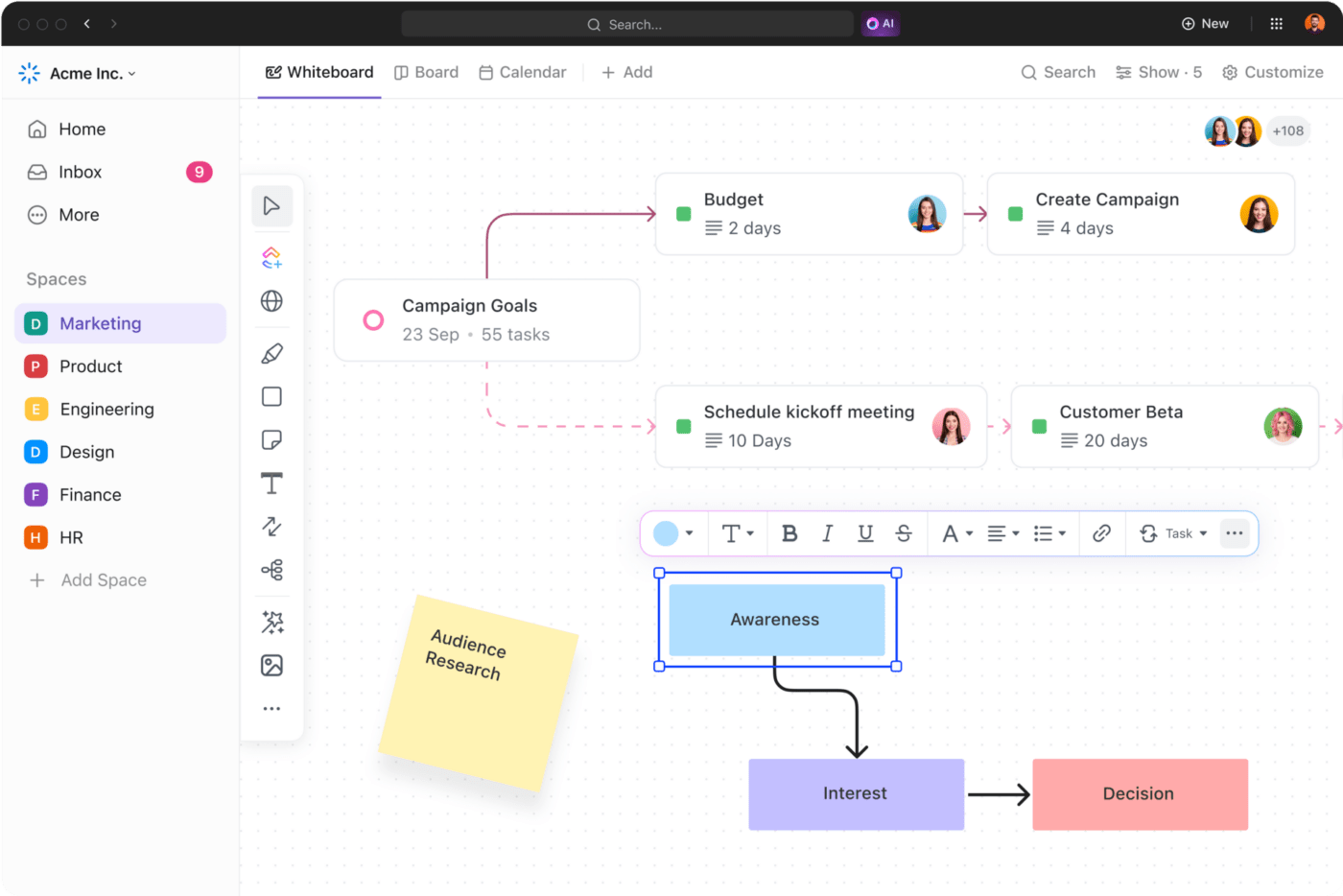
ClickUp Whiteboards provide an excellent way to facilitate collaborative and interactive learning. These digital whiteboards enable real-time brainstorming, process mapping, and idea sharing, making training sessions more dynamic.
By incorporating hands-on activities and encouraging employees to contribute during sessions, you can ensure they remain engaged and retain critical information.
Step 5: Encourage a safe space for learning and mistakes
Creating a safe and supportive learning environment is essential for effective software training. Employees should feel comfortable experimenting with the software and making mistakes without fear of criticism. This approach fosters confidence, promotes active participation, and accelerates the learning process.
Leverage ClickUp’s Assign Comments on various tasks to provide constructive feedback and address questions in real-time. This feature allows for open communication, enabling employees to seek help or clarification when needed.
💡Pro Tip: ClickUp Automations can also be used to send reminders or follow-ups, ensuring that employees stay on track while learning at their own pace.
By encouraging a safe and iterative learning process, you empower employees to explore the software confidently, paving the way for long-term success.
Step 6: Gather employee feedback to improve training
Employee feedback is a valuable tool for refining your training programs and ensuring they meet the needs of your team. Actively seeking feedback allows you to identify areas of improvement, address gaps in understanding, and adapt the training process for future sessions.
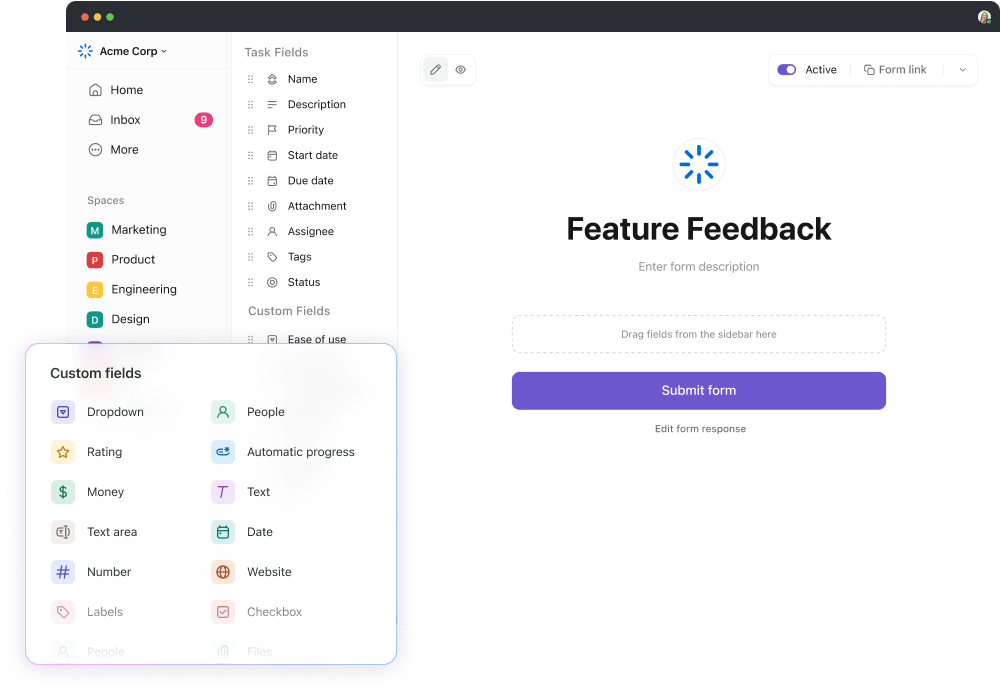
ClickUp Forms make it easy to gather and organize employee input. These forms allow you to create customized surveys that capture actionable feedback on various aspects of the training, such as content quality, pacing, and delivery methods.
Once feedback is collected, use ClickUp Tasks to assign action items for addressing concerns, implementing suggestions, and tracking improvements.
The results are automatically compiled and organized, providing clear insights that you can use to enhance your approach. By integrating feedback into your training strategy, you can create a continuous improvement cycle that keeps your programs effective and aligned with employee needs.
Step 7: Support continuous learning beyond the training
Training doesn’t end when the sessions are over. Supporting employees with continuous learning resources ensures they can revisit key concepts, explore advanced features, and resolve challenges as they arise. This ongoing support solidifies their understanding and boosts confidence in using the software.

ClickUp Docs is an excellent tool for centralizing learning materials. Create a repository of training manuals, FAQs, troubleshooting guides, and advanced tutorials, all stored in one easily accessible location. Employees can refer to these materials at their convenience, fostering independent learning and reducing reliance on supervisors for guidance.
By prioritizing continuous learning, you create a culture of growth and adaptability, empowering employees to fully integrate the software into their workflows.
Also Read: 10 Best Online Employee Training Software
Summarize this article for me pleaseEmpower Your Team With Effective Training
Training employees on new software is more than a necessity—it’s a strategic move to future-proof your organization. A well-structured training program ensures employees not only understand the software but can also use it confidently to enhance productivity, streamline everyday tasks, and improve software usage across all roles.
By focusing on clear objectives, continuous learning, and adaptable training methods, you can effectively train employees while fostering growth and adaptability. Ready to transform how your team learns and works? Sign up for ClickUp today and access all the tools, templates, and features you need to simplify and supercharge your training programs.


Everything you need to stay organized and get work done.

Recent Articles
What Is a Tiger Team? Definition, Origin, and When to Use One 
What Is a Tiger Team? Definition, Origin, and When to Use One
Marketing Agency Productivity: Where Your Margin Actually Goes
Marketing Agency Productivity: Where Your Margin Actually Goes
8 Communication Strategies That Actually Fix Team Chaos 
8 Communication Strategies That Actually Fix Team Chaos
