


Sorry, there were no results found for “”
Sorry, there were no results found for “”
Sorry, there were no results found for “”
Does your workday feel like Groundhog Day? You wake up, tackle the same email replies, manually update the same spreadsheets, and go through yet another round of approvals, only to do it all again tomorrow.
Many businesses are stuck in the pre-internet age of repetitive and soul-sucking tasks that drain productivity and often lead to employee burnout.
The Stepstone Group recently reported that an average full-time employee spends about 8.7 hours per week on repetitive tasks.
But hey! As it turns out, transitioning to an automated workflow isn’t as complicated as you thought! This article will show you exactly how to automate manual business processes, saving time, cutting costs, and boosting productivity.
Wondering how to automate manual business processes? Here’s a step-by-step process:
Manual processes are workflows or tasks performed without the assistance of automation or advanced technology. These processes rely on human effort, physical tools, or basic software with minimal interconnectivity. They are typically labor-intensive and require manual input at every stage, making them prone to inefficiencies and errors.
Some common examples of manual processes include:
These manual processes often lead to bottlenecks, errors, and inefficiencies that hinder business growth and operational excellence.
While these processes are essential, they tend to affect your productivity. Here are some challenges of manual processes.
Every business has mind-numbing, repetitive manual tasks, be it sorting emails or assigning daily responsibilities. While these seem minor in isolation, they collectively devour countless hours that could otherwise go toward strategic and creative initiatives.
Just think about it. It’s 9 AM, and instead of grabbing coffee and enjoying a fresh start to your workday, you’re stuck in a loop of monotonous work. It’s no fun for anybody!
Imagine approving a million-dollar invoice because someone missed a decimal—ouch! Manual errors like this may lead to problematic outcomes, especially in data-sensitive fields like finance or regulated industries.
A simple typo or oversight can derail projects, disrupt workflows, and cost businesses a fortune (not to mention your dignity in team meetings).
👀 Did You Know? Mizuho Securities, a Japanese company, lost over $225 million due to a typographical mistake in a stock trade in 2005—a costly reminder of how manual data entry can lead to errors.
Every task that requires manual intervention also demands labor hours, which results in monetary expenditure. Whether hiring additional staff or paying overtime to complete processes, the reliance on human effort for repetitive tasks can unnecessarily inflate operational costs.
Ready for a truth bomb? One of the biggest problems managers face is getting everyone to follow the same steps for consistent results. This often leads to confusion and delayed work.
Employees may do things their way without proper Standard Operating Procedures (SOPs). It’s like asking five people to make the same dish without a recipe. One dish is too salty, one is burnt, and no one knows what went wrong.
But does that make you a bad manager? Absolutely not! You just need the proper process.
Relying on manual processes to handle tasks means your available human resources are limited.
If your business scales up, taking on more clients, handling larger data sets, or managing multiple stakeholders, your current business processes might buckle under the pressure.
Collaborations at work should be fun, not like a never-ending email tennis match of “Hey, did you approve this?” and “Oh, I thought you did!”
Add in some meetings, and the delays pile up. This results in endless communication threads that fail to communicate effectively, leaving everyone drained and frustrated.
📮ClickUp Insight: 83% of knowledge workers rely primarily on email and chat for team communication. However, nearly 60% of their workday is lost switching between these tools and searching for information.
With an everything app for work like ClickUp, your project management, messaging, emails, and chats all converge in one place! It’s time to centralize and energize!
All of these irregularities can be solved with a straightforward solution: automation.
Here are some ways automation can help your business.
In short, automation doesn’t just fix inefficiencies; it improves your business overall.
🧠 Fun Fact: The Harvard Business Review reported that 60% of employees feel automation has increased their productivity and quality of work, making their jobs safer.
How do you get started with your business process automation? You can refer to countless examples of business process automation available online, but not all of them would work for you.
You must experiment and create a unique workflow process that meets your requirements. Here’s a step-by-step guide to get you started:
Before jumping directly into automation, take a step back and assess your existing processes. Ask yourself these questions.
These questions will help you pinpoint the process ready for a digital glow-up. To make this process easier, use business process automation tools.
ClickUp is the best task automation software that helps you automate business processes, collaborate, and track progress all in one platform.

Use tools like ClickUp Mind Maps to visualize your workflow and easily identify areas for improvement at a glance.
💡Pro Tip: Bring your team into the mix, collaborating with them to work together in real time. Need to connect your visual brainstorming—with sticky notes, shapes, and connectors—to actual tasks? Try out ClickUp Whiteboards and make the act of refining your workflow a lot more fun!
Once you’ve mapped out inefficiencies, it’s time to set clear goals. What outcomes do you want from automation? ClickUp allows you to create custom task types that are tailored to different aspects of your business.
Whether you manage customer inquiries, track project milestones, or handle HR processes, you can define each type of task with unique Custom Fields and Statuses that reflect its purpose.

Use ClickUp’s Custom Fields to add specific information relevant to each task type, such as dropdowns for priority levers or formulas for calculating progress.
📌 Example: If you’re tracking marketing project categories, you can create a dropdown Custom Field with options like “Paid Media,” “Organic Content,” and “User-Generated Content.” Add unique fields to capture important details, like publishing deadlines or channel types.
This helps maintain consistency in information recording. Save these custom task types as templates for reusing across your organization.
Also Read: Workflow Automation Examples and Use Cases
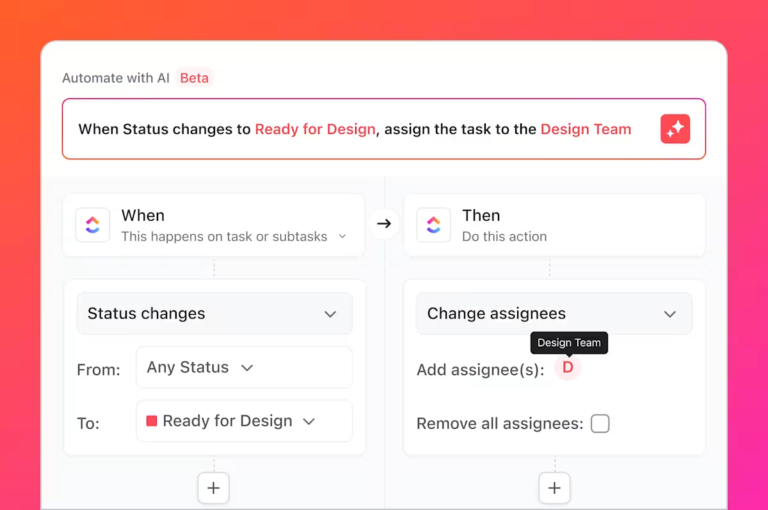
With your tasks defined, it’s time to automate them! ClickUp Automations allow you to set up recurring tasks and create triggers that initiate actions automatically.

You’d think it requires coding skills. It does not! It’s like a domino—one action triggers the other in perfect sync, ending in the automatic execution of even the most tedious tasks.
📌 Example: Say your team marks a design task as ‘complete.’ You can create custom automation that instantly notifies you for approval and schedules a quality check with a deadline. This keeps you accountable and ensures no derailment in progress.
There is no longer a need for manual reminders that we might forget to give. With just a few clicks, you can save the risk of avoidable oversight on all tasks involved!
Before the automations, whenever a copywriter finished a task, we had to manually communicate up the chain of command that the copy was ready. That could take 36 hours. It’s been great, because the whole team follows up on their daily tasks in ClickUp.
Once your automation process is live, monitor it closely and test what works for your team.

Choose from the 15+ ClickUp Views to track your work in a way that makes sense for your team. Use the List View for detailed task management, the Calendar View for deadline tracking, and the Gantt View to view all your milestones and dependencies.
These views are entirely customizable, so you can tweak them however you want. You can also filter the tasks by status, assignees, and more to further bring order to your business process management.

In addition, ClickUp Dashboards provide a real-time overview of your workflows and allow you to track KPIs effectively.
From employee workloads to project timelines, these dashboards let you keep tabs on everything and automate your business reporting.
As convenient as automation is, it still needs some level of human oversight. So, don’t just set it and forget it.
ClickUp offers the most robust reporting tools for automation. Our reporting software allows you to build all-in-one dashboards as your mission control center.
It’s as easy as adding measurement cards and charts, dropping in your data, and customizing visuals. You can see all the work at a high level to manage people, tasks, time, documents, embeds, and sprints in one place.

Set your quarterly goals and track every employee’s work in a single dashboard. Resource management helps you visualize how well you’re leveraging your team, and workload analysis shows how productive your team is by tracking task completion.
The end goal? Identifying what you’re doing well and removing bottlenecks in your processes through effective automation. By visualizing every step of your workflow, you’ll run tighter teams and produce better work.
📮ClickUp Insight: We recently discovered that about 33% of knowledge workers message 1 to 3 people daily to get the context they need. But what if you had all the information documented and readily available?
With ClickUp by your side, context switching becomes a thing of the past via automated updates.
Want a quick summary of the team’s progress without going through the dashboard? Use ClickUp Brain, your AI-powered assistant!

Brain has an answer for every project-related question because it sources its information from your own workspace—tasks, meeting notes, and even chat conversations. This means you only get what you need with no added fluff and 100% accuracy!
You can also use it to build custom automations in ClickUp using prompts in natural language.

Your team is your biggest asset—so involve them! Add comments in tasks to gather feedback on automated workflows and encourage suggestions for improvement.
Schedule regular check-ins to discuss what’s working and brainstorm ideas for optimization.
Everything from ideation to implementation and reporting happens here at ClickUp:
ClickUp’s user-friendly interface and completely customizable features help you finally say goodbye to those dreaded manual tasks:
It is great for automating repeating processes, to increase visibility and accountability and frankly, to prevent the need to go around the factory 3 times to collect info from 3 different team members. I guess people mostly use it to support their administration or projects, but we have implemented it quite well to digitalize our manufacturing process.
💡 Pro Tip: Don’t start from scratch. To fast-track automation, use templates tailored to your industry, such as ones for customer onboarding workflows or marketing campaign trackers.
Automating your business process management is a journey, not a destination. Follow these best practices to ensure a smooth and successful transition.
Don’t try to automate everything at once. Begin with a single, well-defined process within a specific department. This allows you to test the waters, identify potential challenges, and refine your approach before scaling automation efforts across the organization.
Automation significantly changes your workflow, so make sure you involve multiple stakeholders from the planning phase.
This keeps everyone invested in the process and helps them understand the automation goals. Gather input from employees, managers, and even customers to identify pain points and areas for improvement.
Before implementing any automation, define, document, and standardize your process across the organization. This lays the foundation for a smooth and successful transition to automated workflows.
Consider creating and implementing Standard Operating Procedures (SOPs) for all key processes so even a newbie can use the platform with minimal manual guidance.
Thoroughly test your automated workflows before finalizing them. Monitor performance closely after implementation. Track key metrics such as processing time, error rates, and customer satisfaction.
This allows you to identify and address any issues promptly, ensuring the automation delivers the expected results.
AI can significantly enhance your automation efforts. So, use it as much as possible to make your life easier. Explore AI-powered solutions for data analysis, predictive modeling, and customer service tasks.
It helps you identify patterns, make more informed decisions, and personalize customer experiences.
While automation can significantly reduce human intervention, it’s crucial to maintain a degree of human oversight. Some tasks will always require human judgment, creativity, and critical thinking.
Balance automation with human oversight to ensure the best possible outcomes.
By following these best practices, you can maximize the benefits of process automation, improve workflow efficiency, and successfully transition to automation without being overwhelmed by the technological side of it.
Repetitive tasks are like tiny pebbles in your shoes—you bear with them at first, but over time, they frustrate and slow you down. Remember the feeling when you can finally take these pebbles out? That’s what automation feels like.
But why should you choose ClickUp to automate?
It’s the ultimate platform for process automation, with custom automations, dashboards, and an intelligent AI assistant. It is your key to smoother workflows, happier teams, and satisfied customers. So, why settle for monotony when innovation is just a few clicks away?
It’s pretty simple. Start small, involve your team, and tweak as you go. Before you know it, you’ll wonder how you ever managed without automation.
Ready to get automatin’? Sign up for a free ClickUp account now!

Manasi Nair
Max 18min read

Arya P Dinesh
Max 26min read

Sean Hardy
Max 26min read

© 2026 ClickUp




