






Still downloading templates?
There’s an easier way. Try a free AI Agent in ClickUp that actually does the work for you—set up in minutes, save hours every week.
Sorry, there were no results found for “”
Sorry, there were no results found for “”
Sorry, there were no results found for “”

📢 Disclaimer: While we’re talking to growth managers here, this guide is really for anyone who’s ever struggled to plan, track, or align content across multiple channels. If you’ve felt the pain of trying to keep it all straight, this is for you!
As a growth manager, you’re always busy playing the human router for your company.
You’re pinging Product to lock in the launch dates, briefing Marketing on the next big campaign, and checking with Analytics for the latest numbers. It never ends. 😩
It’s a tough job, hard enough when you’re managing content for one or two channels. But the moment you add more, your role suddenly shifts from driving growth to holding the chaos together.
But what if you could ditch most of that madness? What if every team (including yours) could see exactly what’s going live, when and where, all in one place?
Enter: multi-channel content calendar.
Let’s see how growth managers can manage multi-channel content calendars.
Creating a separate calendar for each channel isn’t just time-consuming, but also highly inefficient. Here’s why this setup often fails:
When content is scattered in spreadsheets, documents, shared folders, and team-specific tools, everything’s scattered, and no one has the full picture. By the time you try stitching together the full context, the opportunity to make an impact is already gone.
📮 ClickUp Insight: 46% of knowledge workers rely on a mix of chat, notes, project management tools, and team documentation just to keep track of their work. For them, work is scattered across disconnected platforms, making it harder to stay organized.
As a converged AI workspace, ClickUp unifies it all. With features like ClickUp Email Project Management, ClickUp Notes, ClickUp Chat, and ClickUp Brain, all your work is centralized in one place, searchable, and seamlessly connected. Say goodbye to tool overload—welcome effortless productivity.
When each team manages its own calendar for social, email, or paid campaigns, priorities start to drift apart. Maintaining a consistent posting schedule becomes a challenge in itself.
What feels urgent to one team often clashes with another’s schedule. Before you know it, everyone is competing for the same resources—designers, writers, or legal reviewers.
This lack of coordination creates repetition or even conflict in content themes and messaging across multiple channels.
🧠 Fun Fact: Long before we had calendar apps to remind us of important dates, people in Scotland had their own system. It was created 10,000 years ago—making it the oldest calendar.
They carved out twelve pits in the earth, one for each lunar month, and likely placed wooden posts in them. These pits aligned perfectly with the southeast horizon, helping hunter-gatherers track the seasons by following the moon’s phases.
That makes it one of the oldest known calendars in the world, predating Stonehenge by thousands of years!
Say you run a campaign across three channels: email, a social media channel, and your blog. To track their performance, you have to visit three different platforms: the email automation tool, social scheduler, and the blog analytics center.
Without a unified view, you’re left piecing data together from three different dashboards to understand deeper insights.
👀 Did You Know? According to the State of Multi-Channel Marketing Report, only 16% of marketing teams say their tech stack can accurately measure performance across all channels. A staggering 52% admit they can only measure part of their efforts, leaving the remaining 32% with very little or no visibility at all.
In other words, most marketers are still flying half-blind when it comes to understanding what’s driving results across multiple channels.
What happens even every team follows a separate calendar?
Collaboration starts breaking down. Because you lose sight of what other teams are working on, why certain decisions are made, and how their work fits into the larger product-led growth marketing strategy.
You may spend more time prodding your team or other teams for updates, feedback, and approvals than actually getting work done.
In a distributed or remote team where you can’t just walk up to your team member for that one quick update, it leads to slow progress and cascades into frustration.
❗️Is constant tab switching for research, collaboration, and project management slowing you down? We have a solution.👇🏼
⚡ Template Archive: Free Content Strategy Templates for Marketing
Whether you’re using Google Sheets or a project management tool to manage the multi-channel content calendar, some basics remain the same.
A place to list down all the channels you’re using for each campaign, the status of content, stakeholders, and deadlines for each content asset.
With that in mind, let’s get started on making a multi-channel content calendar.
Before you fix anything, walk through all your existing content workflows to understand how content moves from idea to distribution in each channel.
Here’s what you need to do:
Auditing requires a lot of manual work, like reading documentation, reviewing past content marketing management plans, collecting feedback, etc.
Use ClickUp Brain, our built-in AI assistant, to speed up the information-gathering phase.
For starters, if your current process is in a Google Doc (or Word), feed this text into ClickUp Brain and ask it to generate a clean, sequential, bulleted list of the current workflow steps.

ClickUp Brain can even read all your SOPs and flag repetitive or unnecessary steps.
Going forward, the AI assistant converts these steps into Tasks that you can directly assign to your team members.
Also, here are some examples of AI-generated content you can use for inspiration as you map how each content type flows through your team.
🎺 ClickUp Advantage: You’ve conducted the audit, but where do you put all your audit findings? Give ClickUp Docs a try—it’s super easy and productive.
You can organize everything neatly into pages and subpages, creating detailed sections for checklists, process maps, notes, and interview summaries. Rich formatting elements, such as heading styles, fonts, and color banners, make your audit content more functional and easy to digest.
Plus, Docs allow for real-time collaboration, so your entire audit team can review, edit, and leave comments simultaneously.

⚡ Template Archive: Free Social Media Calendar Templates to Make Your Content Planning Easier
Centralize everything into one shared calendar. This gives your marketing team complete visibility into upcoming campaigns and content.
Drag-and-drop calendars are useful here because you can quickly change the scheduled content if needed. This is often the case with granular calendars, such as a social media marketing calendar.
You still need space to adapt, regardless of the type of content you’re producing.
Spreadsheets offer limited functionality, as you cannot just change the schedule and keep everything else intact.
You would want to explore a content calendar that adapts to your priorities. It should make it seamless to move fields and tasks as campaign priorities change.
With ClickUp’s AI-Powered Calendar, you can plot all activities in one place. Adjust dates on the fly without breaking dependencies. Block focus time for prep work. Customize views to filter by campaign, channel, or owner.
This video shows you the superpowers of ClickUp Calendar.
ClickUp’s Calendar isn’t just for viewing tasks; you can also modify or update them directly from the calendar.
Sync external calendars for your meetings, deadlines, and content to live in the same space.
In multi-channel distribution, where multiple people are involved, ClickUp’s Multiple Assignees feature ensures all contributors for a single content piece stay aligned.
Writers, designers, editors, and channel owners can all be assigned to the same task. They see the same deadlines, track the same updates, and collaborate from one place without maintaining separate lists.
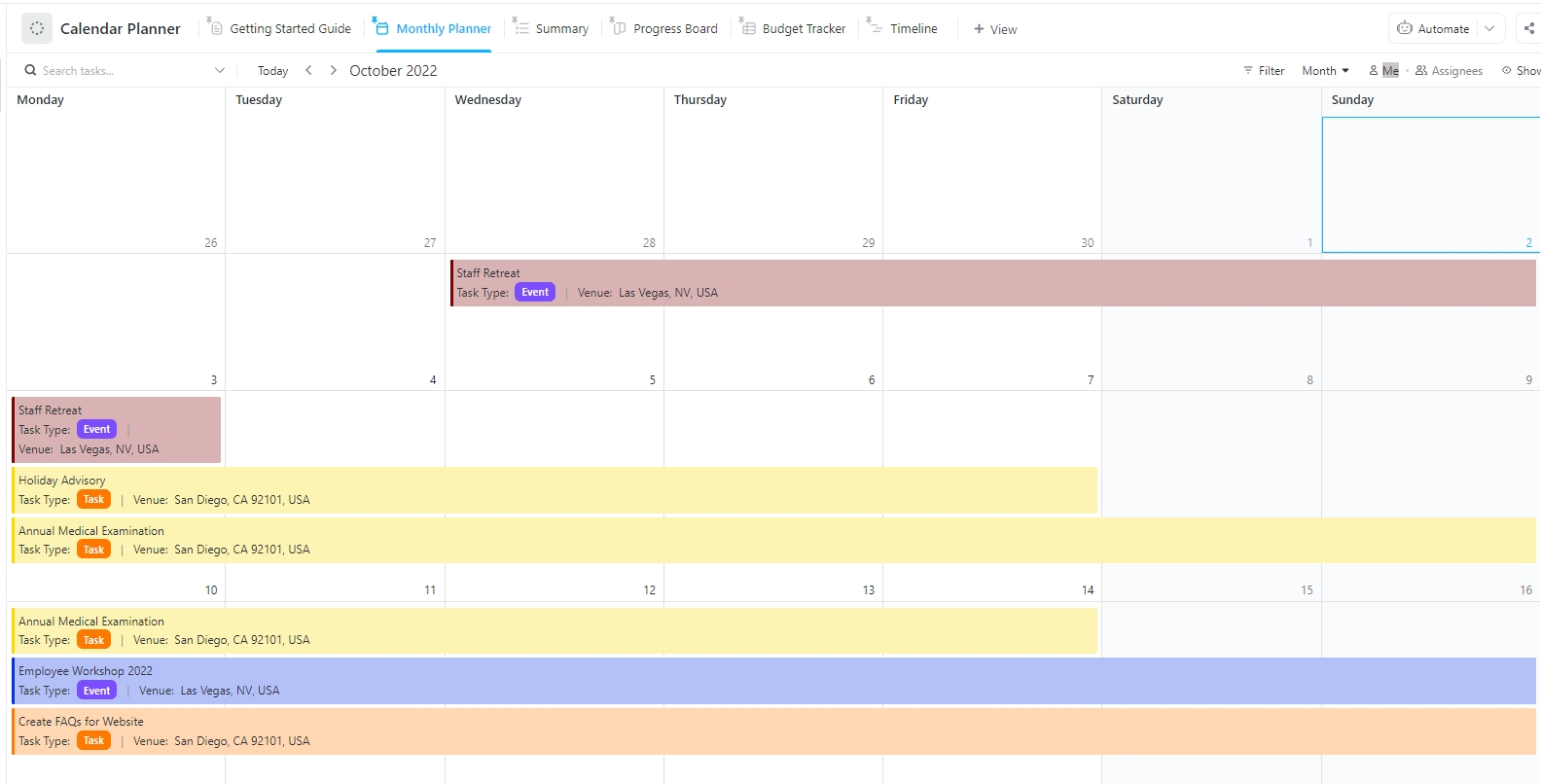
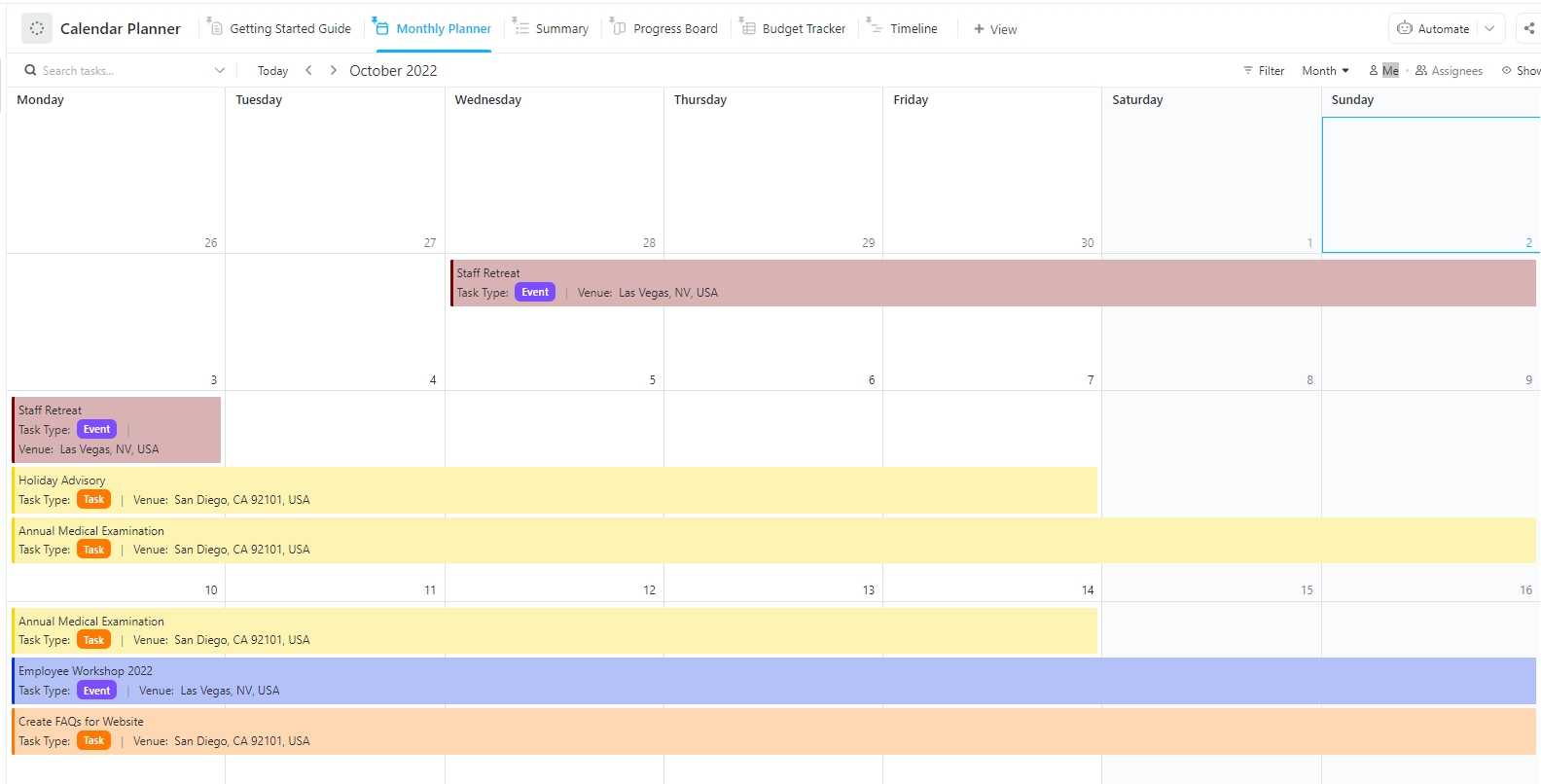
🛠️ Toolkit: Kickstart this entire process with ClickUp’s Calendar Planner Template. It’s designed to help you manage content for various channels right through completion.
This template offers key benefits like:
The Calendar Planner Template centralizes all your time-sensitive content into one intuitive workspace, eliminating confusion over deadlines and making team collaboration seamless.
⚡ Template Archive: Free Content Calendar Templates for Social Media
Assign one person to each campaign. While multiple teammates can provide input, only one person gives a sign-off.
Follow the reverse-engineering approach when you set deadlines. Start with the final publish date and work backward. Factor in time for every stage: briefing, creation, review, revisions, and scheduling. Add some buffer time between stages to absorb unexpected delays.
Another good practice is to look at how much work each team member has to prevent burnout. One way to do so is to ask the team member to share their workload.
However, there’s a better way to do this.
ClickUp’s Workload View lets you visualize how much each person has on their plate based on task estimates, priorities, and capacity.
See the exact workload distribution across your team without asking for manual updates. When someone is overloaded, red bars flag capacity issues, helping you redistribute tasks before burnout happens.
When it comes to assigning and managing work, ClickUp Tasks is your go-to. You can:
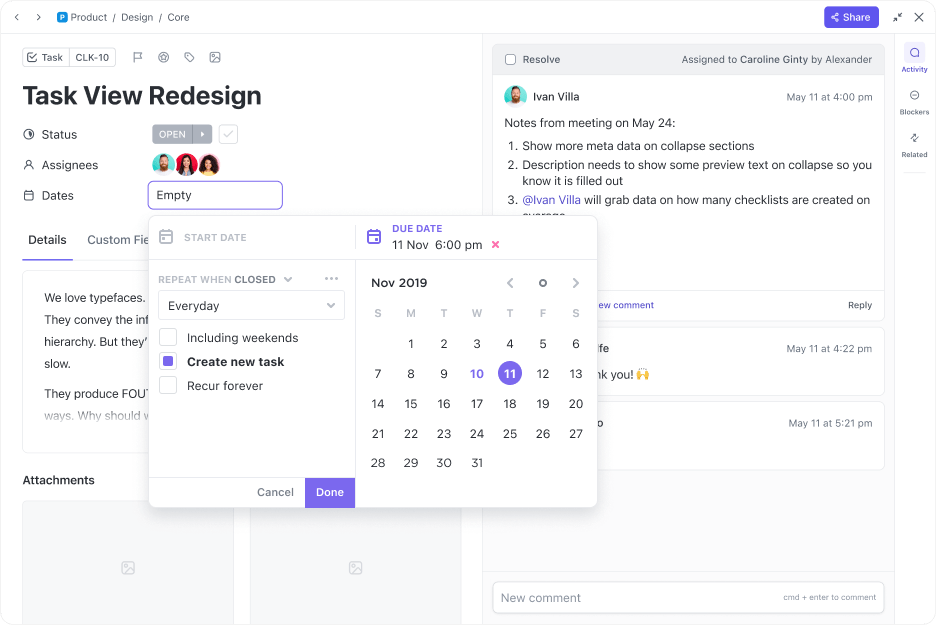
You can also utilize features like AI Assign and AI Prioritize to automate this process completely. See how:
It’s easy to miss deadlines when you’re managing multiple channels. Worse, communicating updates manually is time-consuming.
There’s a chance that social media content calendar shifts don’t reach the right owners, leading to outdated creatives, mismatched captions, or posts published at the wrong time.
This can be avoided with a simple step in your ClickUp Workspace. Automate your notifications using ClickUp Automations.
Choose from the pre-built template library, use a suggested Automation, or build a custom Automation from scratch. Then, configure your Trigger, Condition, and Action.
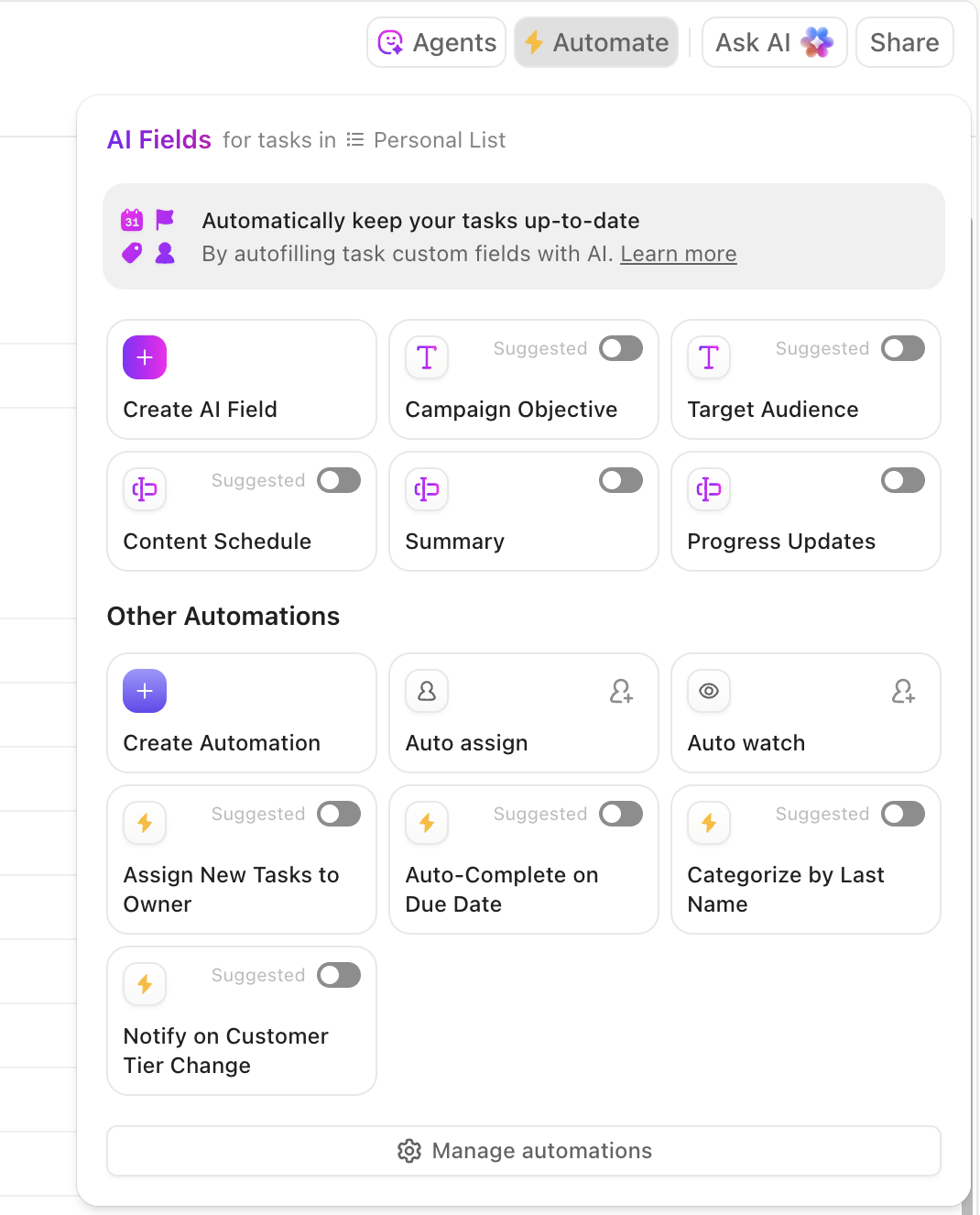
Let’s take the example of alerting stakeholders on campaign progress Automation. When a campaign status changes (Draft → In Review → Scheduled → Live), stakeholders receive an instant email update.
You can also schedule recurring reminders in ClickUp so that task owners are automatically reminded of the nearing deadlines.
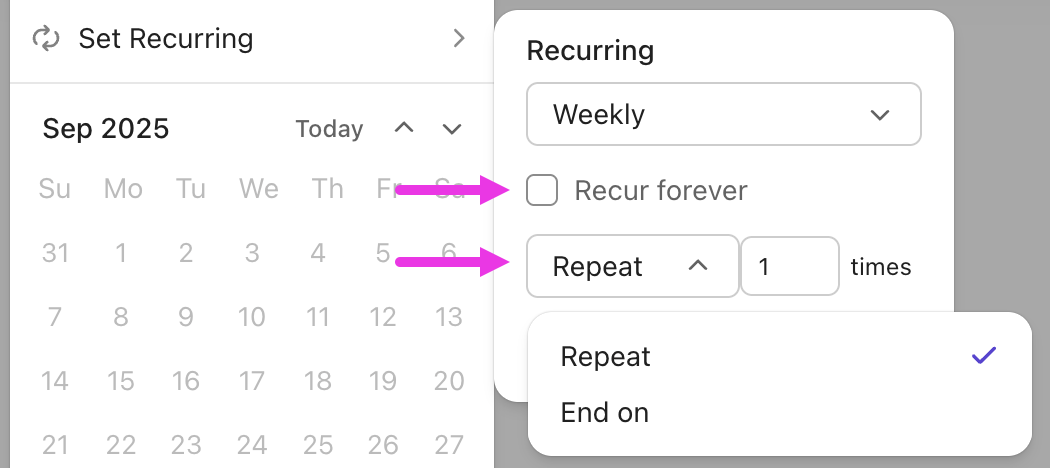
Here are the common types of automated alerts that can help speed up your content process:
Project or milestone updates: Summary alerts about major changes to content calendars, campaign phases, or critical workflow events so that everyone is on the same page
⭐ Bonus: Let ClickUp Agents watch your calendar for you.
ClickUp Automations handle routine alerts, but ClickUp Agents can actively watch your multi-channel content calendar and surface what needs attention without you digging for it.
Add a custom agent to scan your Workspace for risks and gaps. It can flag content pieces with no owner, campaigns that are at risk of missing launch dates, or tasks that are overdue across key channels. It can also recommend next steps based on past work, like assigning a reviewer or creating a follow-up task.
Monitor key performance indicators (KPIs), including audience engagement metrics, conversion rates, website traffic, and lead quality.
This shows how effective your centralized content calendar really is.
Adjust your calendar, team workflows, and your entire multi-channel content marketing strategy to stay aligned with your success criteria.
These adjustments might include:
Instead of hopping between various platforms to analyze your content performance, bring all your valuable insights into one workspace using ClickUp Dashboards.
Teams can create tailored dashboards to monitor key metrics specific to their channel or role, while you, as a growth manager, can use an all-in-one dashboard to easily compare content performance across every channel for effective growth marketing.
And with ClickUp’s AI Cards, create a performance dashboard in minutes instead of stitching screenshots from multiple tools.

Here are the useful AI Cards for content teams:
⭐ Bonus: Make multi-channel content easier to run with ClickUp Brain MAX.
Managing content across blogs, social, email, ads, and product updates means constant searching, rewriting, and checking. ClickUp Brain MAX simplifies content operations from day one—no extra tools, no messy setup:
Whether you’re planning weekly social posts, publishing blogs, coordinating designers, or tracking campaign performance, ClickUp Brain MAX becomes your AI Content Super App—one that actually understands your work because it lives inside it.
Let’s look at how different businesses can effectively use a multi-channel content calendar:
Goal: Drive awareness and sign-ups for a new AI-powered analytics feature
Content channels in focus: Blog, LinkedIn, Email, YouTube
How the multi-channel content calendar works:
Goal: Boost online sales during the busy holiday season
Content channels in focus: Instagram, TikTok, Email, Website
How the multi-channel content calendar works:
Goal: Coordinate marketing campaigns for several clients across diverse industries
Content channels in focus: Blog, Instagram, and Paid Ads
How the multi-channel content calendar works:
Did you know that you can build your entire social calendar with ClickUp Brain? Watch this video to see how.
⚡ Template Archive: Free Publishing Plan Templates to Streamline Your Content Workflows
There’s actually nothing wrong with having separate content calendars for individual channels.
The real problem starts when you lack a centralized multi-channel content marketing calendar to connect them all and align with your broader marketing goals.
Multi-channel content calendars provide a shared view of everything happening across your channels, helping teams coordinate better, avoid overlap, and promote a consistent brand identity.
And ClickUp helps here by offering that central AI-powered space you need to plan, organize, and manage content across every channel. Best of all, it’s incredibly easy to use, whether you’re building your very first content calendar or migrating one over from another tool.
To get started, sign up for ClickUp for free.
For a growth manager, seeing the entire marketing picture is critical for effective strategic planning. Using a calendar tool, you can easily coordinate multi-channel campaigns. Your team can visualize the team workload, spot roadblocks, capacity issues, and establish a strong social media presence for a single tool or a suite of tools. And because everything lives in one place, you can adjust priorities without losing momentum.
ClickUp is a converged AI workspace that streamlines multi-channel content planning by giving you a unified view of your multi-channel marketing plans.
You can assign tasks, set reminders, automate parts of your content workflow, and even measure the effectiveness of your multi-channel strategy across multiple social media accounts.
The most common challenge in multi-channel management is the lack of centralized visibility: when content lives in separate spreadsheets or across multiple tools, no one can see the full picture.
The result is overlapping deadlines and content conflicts across different channels, conflicts between teams, and ultimately, it slows down progress.
When you track KPIs (audience data like conversions, engagement, or lead quality) against your content, you can:
– Validate success: Immediately see which content formats or channels deliver the highest ROI. Whether it’s paid campaigns on social media platforms for sign-ups or email newsletters announcing product launches
– Adjust resources: Reallocate time and budget away from underperforming channels and double down on what’s driving growth
– Identify gaps: Pinpoint why a piece failed in your multi-channel marketing strategy. Was it the topic, the channel, or the timing?
This data-driven insight helps you refine your multi-channel approach, amp up your content marketing efforts, and fill gaps where your target audience is underserved.

© 2026 ClickUp

There’s an easier way. Try a free AI Agent in ClickUp that actually does the work for you—set up in minutes, save hours every week.