






Still downloading templates?
There’s an easier way. Try a free AI Agent in ClickUp that actually does the work for you—set up in minutes, save hours every week.
Sorry, there were no results found for “”
Sorry, there were no results found for “”
Sorry, there were no results found for “”

Voice AI has never been more accessible.
Today, anyone can paste text into a tool like ElevenLabs and get a voiceover. But if you’ve tried it once, you know that simply pasting text and moving a few sliders across the tab won’t give you studio-quality audio that actually sounds human.
Like every AI tool, the key to getting professional voiceovers, engaging podcasts, and realistic voices (with ElevenLabs) lies in how you prompt it.
Well, we did some testing and put together 40 ElevenLabs prompts to get you started instantly.
ElevenLabs is an AI voice platform that turns text into lifelike audio across 50+ languages. It’s built for creators, producers, and developers who need intuitive, advanced controls to generate professional voice content at scale.
From audiobooks to ads, podcasts, and games, here’s what you can do with ElevenLabs ⭐
ElevenLabs prompts are sets of instructions you enter to guide and generate the output you want in ElevenLabs. You can control the result by:
Creators working with voice agents can also build instruction blueprints, defining the AI’s core personality, role, rules, and conversational behavior. This system prompt ensures consistent responses (voice, tonality) to align with your brand requirements.
🧠 Fun Fact: The first speech-synthesizing machine was built in 1791 by Wolfgang von Kempelen. It used bellows, reeds, and leather tubes to mimic human vocal anatomy—producing eerie, whistle-like sounds that barely resembled actual speech.
Effective prompting is an act of balancing descriptive details with clarity. The more information you provide to any AI tool (tone, emotion, accent, and delivery style), the closer the output will be to your vision.
Here’s a cheatsheet you can use when structuring your ElevenLabs prompts 👇
Enter the text you want to turn into speech and use audio tags (throughout) to shape the output delivery.
You can use a combination of audio tags, such as:
| Tags | What it does | Example | Example in use |
| Emotion tags | These tags set the emotional tone of the voice | [laughs], [laughs harder], [starts laughing], [wheezing], [sad], [angry], [happily], [sorrowful] | [sorrowful] I couldn’t sleep that night |
| Sound effects | Add environmental sounds and effects | [gunshot], [applause], [clapping], [explosion][swallows], [gulps] | [applause] Thank you all for coming tonight! [gunshot] What was that? |
| Voice-related tags | Defines tone, performance intensity, and human reactions | [whispers][sighs], [exhales], [sarcastic], [curious], [excited], [crying], [snorts], [mischievously] | [whispers] Don’t let them hear you |
| Unique and special tags | Experimental tags for creative applications | [strong French accent] | [strong French accent] Zat’s life, my friend — you can’t control everything. |
You can place audio tags anywhere in your script (and in any combination) to shape its delivery. Experiment with descriptive emotional states and actions to discover what works for your specific use case.
Remember, text structure strongly influences output with AI voice models. Make use of natural speech patterns, proper punctuation, and clear emotional context for the best results.
💡 Pro Tip: Automatically generate relevant audio tags for your input text by clicking the “Enhance” button.
AI models, especially smaller ones trained on limited data, struggle with complex data types such as phone numbers, zip codes, email addresses, and URLs.
In those cases, add normalization instructions to your prompt. Specify how you want the text to be read aloud.
Some normalization examples and how to structure them in your prompt are:
| Input Tye | Input type | Output type |
| Cardinal number | 123 | One hundred twenty-three |
| Ordinal number | 2nd | Second |
| Monetary values | $45.67 | Forty-five dollars and sixty-seven cents |
| Roman numerals | XIV | Fourteen (or “the fourteenth” if a title) |
| Common abbreviations | Dr.Ave. St. | DoctorAvenueStreet (but “St. Patrick” should remain) |
| URLs | elevenlabs.io/docs | eleven labs dot io slash docs |
| Date | 01/02/2023 | January second, twenty twenty-three Or The first of February, twenty twenty-three (depending on locale) |
| Time | 14:30 | Two thirty PM |
| Phone number | 123-456-7890 | One two three, four five six, seven eight nine zero |
Use break tags, phonetic spellings, and punctuation to guide how the AI reads your script.
Break tags add pauses between phrases or sentences. This is useful for dramatic effect, natural conversation flow, or giving listeners time to process information.
For instance:
Hold on, let me think.” <break time=”1.5s” /> “Alright, I’ve got it.
That said, punctuation significantly affects delivery in ElevenLabs:
Beyond timing, you also need control over how specific words are pronounced. Phonetic controls help you nail pronunciation for character names, brand terms, or technical jargon. Experiment with alternate spellings or phonetic approximations to specify how certain words should sound.
📌 For instance,
You can also use Phoneme tags for precise International Phonetic Alphabet (IPA) control:
<phoneme alphabet=”ipa” ph=”ˈnaɪki”>Nike</phoneme>
Or Alias tags for simpler phonetic rewrites:
<alias>SQLite</alias> → “S-Q-L-ite” or “sequel-ite”
Studio and Dubbing Studio in ElevenLabs also let you create and upload a pronunciation dictionary. This saves time if you’re working with recurring brand names or technical terms across multiple projects.
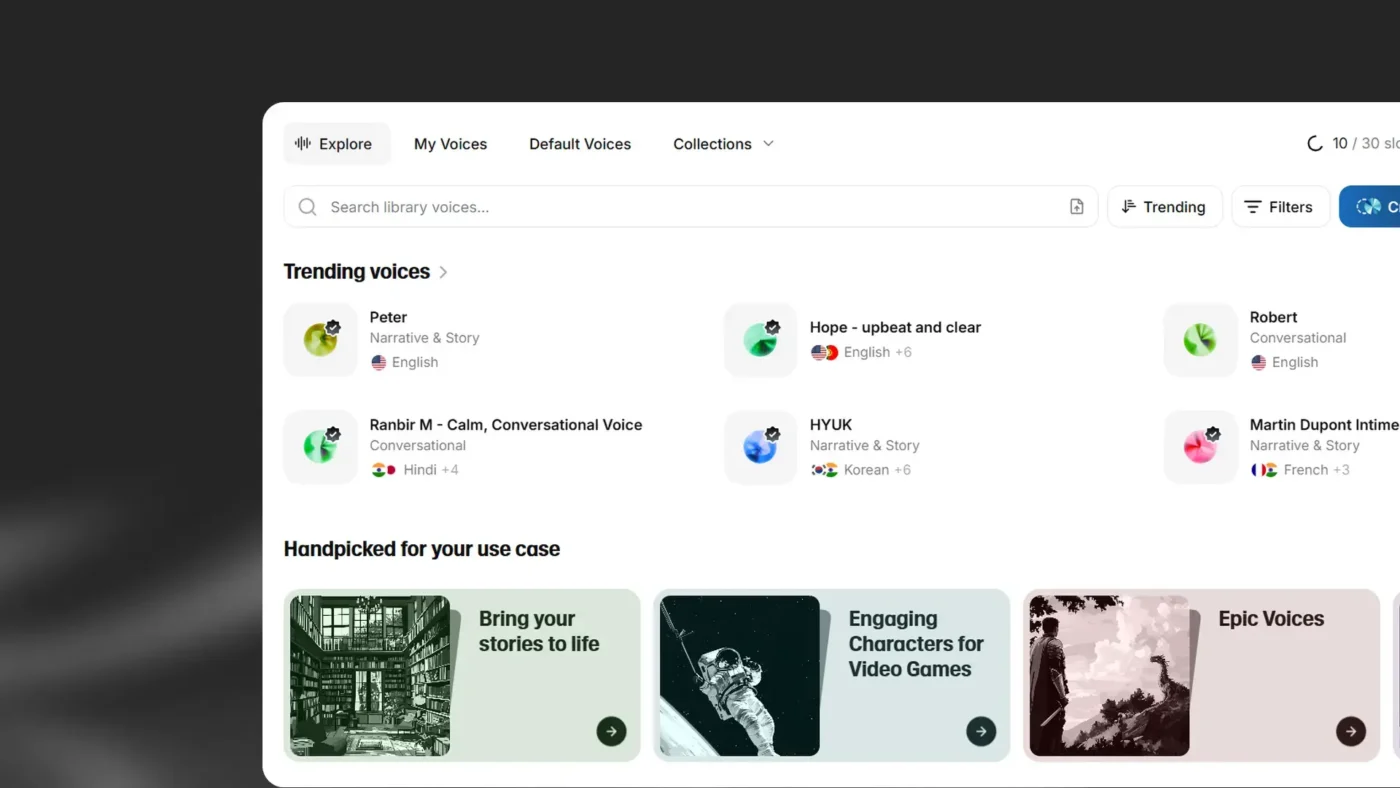
Choose a voice from ElevenLabs’ voice library. You’ll find 5,000+ options, including pre-made voices, professional voice clones, and custom character voices across 32+ languages and accents.
Use the search bar to find voices by name, keyword, or voice ID. To narrow your results, you can apply filters as well.
If you can’t find the exact voice you need in the library, create one using Voice Design. Detailed parameters, such as age, gender, tone, accent, pacing, emotion, and style, generate more accurate and nuanced results.
📚 Read More: Best Writing Assistant Software With AI
A cheatsheet you can use to describe these parameters:
| Parameter | Descriptive words |
| Audio quality | Low-fidelity audio Poor audio quality Sounds like a voicemail Muffled and distant Like on an old tape recorder |
| Age | Adolescent Young adult/in their 20s/early 30s Middle-aged man/in his 40s Elderly man/in his 80s |
| Tone/Timbre | Deep/low-pitched Smooth/rich Gravelly/raspy Nasally/shrill Airy/breathy Booming/resonant |
| Accent | Thick French accent Slight southern drawl Heavy Eastern European accent Crisp British accent |
📌 Example: A high-energy female sports commentator with a thick British accent, passionately delivering play-by-play coverage of a football match at a very quick pace. Her voice is lively, enthusiastic, and fully immersed in the action.
💡 Pro Tip: Use voice-type icons to quickly identify the quality and source of each voice in the library:
ElevenLabs offers multiple speech models optimized for different use cases and outputs. Some prioritize natural emotion and expressiveness, while others focus on speed, stability, or real-time performance.
Here’s a breakdown of flagship TTS (text-to-speech), STT (Speech-to-text), and music models:
| Model | Best for | Use cases |
| Eleven V3 (Alpha) | Human-like and expressive speech generation | Character discussions, audiobook production, emotional dialogue |
| Eleven Multilingual v2 | Lifelike voices with rich emotional expression | Character voiceovers, corporate videos, e-learning materials, multilingual projects |
| Eleven Flash v2.5 | Ultra-fast model optimized for real-time use | Real-time voice agents and chatbots, interactive applications, bulk text-to-speech conversion |
| Eleven Turbo v2.5 | High-quality, low-latency model with a good balance of quality and speed | Same as Flash v2.5, but when you are willing to trade off latency for higher quality voice generation. |
| Scribe v1 | State-of-the-art speech recognition | Meeting documentation, audio processing and analysis, transcription |
| Scribe v2 Realtime | Real-time speech recognition | Live meeting transcriptions, live conversations (AI agents), multilingual transcriptions across 99+ languages |
| Music | Generate music with natural language prompts in any style | Game soundtracks, podcast backgrounds, marketing background music |
Matching the model to your project type ensures you get the best balance between quality and efficiency.
For complex, emotionally nuanced text-to-speech, don’t cram everything into a single prompt. Use prompt chaining to generate sound effects or speech in segments, then layer them together using audio editing software for more complex compositions.
Iterate on results by tweaking descriptions, tags, or emotional cues. Small adjustments can often lead to a dramatic shift in output quality.
⭐ Remember: The order of importance in prompting is—Voice selection followed by Model selection, and then voice settings. All of these, and their combination, will together influence the output.
📮ClickUp Insight: Only 10% of our survey respondents use voice assistants (4%) or automated agents (6%) for AI applications, while 62% prefer conversational AI tools like ChatGPT and Claude. The lower adoption of assistants and agents could be because these tools are often optimized for specific tasks, like hands-free operation or specific workflows.
ClickUp brings you the best of both worlds. ClickUp Brain serves as a conversational AI assistant that can help you with a wide range of use cases. On the other hand, AI-powered agents within ClickUp Chat channels can answer questions, triage issues, or even handle specific tasks!
ElevenLabs is a hub of advanced voice generation features. Just referring to documentation or prompt engineering guides won’t get you equipped to generate the best results.
Test different models and generate voice and sounds yourself to understand what works.
Let’s show you how you can leverage different capabilities of ElevenLabs across varying use cases with these prompts:
1. Expressive monologue
Okay, you are NOT going to believe this.
You know how I’ve been totally stuck on that short story?
Like, staring at the screen for HOURS, just…nothing?
[frustrated sigh] I was seriously about to just trash the whole thing. Start over.
Give up, probably. But then!
Last night, I was just doodling, not even thinking about it, right?
And this one little phrase popped into my head. Just… completely out of the blue.
And it wasn’t even for the story, initially.
But then I typed it out, just to see. And it was like… the FLOODGATES opened!
Suddenly, I knew exactly where the character needed to go, what the ending had to be…
It all just CLICKED. [happy gasp] I stayed up till, like, 3 AM, just typing like a maniac.
Didn’t even stop for coffee! [laughs] And it’s… It’s GOOD! Like, really good.
It feels so… complete now, you know? Like it finally has a soul.
2. Dynamic and humorous
[laughs] Alright…guys – guys. Seriously.
[exhales] Can you believe just how – realistic – this sounds now?
[laughing hysterically] I mean OH MY GOD…it’s so good.
Like you could never do this with the old model.
For example, [pauses] could you switch my accent in the old model?
[dismissive] didn’t think so. [excited] but you can now!
Check this out… [cute] I’m going to speak with a French accent now..and between you and me
[whispers] I don’t know how. [happy] ok.. here goes. [strong French accent] “Zat’s life, my friend — you can’t control everysing.
3. Multi-speaker dialogue with overlapping timing
Speaker 1: [starting to speak] So I was thinking we could—
Speaker 2: [jumping in] —test our new timing features?
Speaker 1: [surprised] Exactly! How did you—
Speaker 2: [overlapping] —know what you were thinking? Lucky guess!
Speaker 1: [pause] Sorry, go ahead.
Speaker 2: [cautiously] Okay, so if we both try to talk at the same time—
Speaker 1: [overlapping] —we’ll probably crash the system!
Speaker 2: [panicking] Wait, are we crashing? I can’t tell if this is a feature or a—
Speaker 1: [interrupting, then stopping abruptly] Bug! …Did I just cut you off again?
Speaker 2: [sighing] Yes, but honestly? This is kind of fun.
Speaker 1: [mischievously] Race you to the next sentence!
Speaker 2: [laughing] We’re definitely going to break something!
4. Glitch comedy with multiple speakers
Speaker 1: [nervously] So… I may have tried to debug myself while running a text-to-speech generation.
Speaker 2: [alarmed] One, no! That’s like performing surgery on yourself!
Speaker 1: [sheepishly] I thought I could multitask! Now my voice keeps glitching mid-sen—
[robotic voice] TENCE.
Speaker 2: [stifling laughter] Oh, wow, you really broke yourself.
Speaker 1: [frustrated] It gets worse! Every time someone asks a question, I respond in—
[binary beeping] 010010001!
Speaker 2: [cracking up] You’re speaking in binary! That’s actually impressive!
5. [customer service agent] Thank you for calling. I completely understand your frustration, and I’m here to help get this sorted out for you as quickly as possible. Let’s start with your account number.
6. [friendly instructor] Let me show you how simple this actually is. [clicking sounds] See this button here? One click, and watch what happens. [amazed] Everything syncs automatically across all your devices. No manual transfers, no confusion.
💡 Pro Tip: For multi-speaker prompts, assign distinct voices from your Voice Library for each speaker to create realistic conversations.
7. [nervous] I can’t believe I’m about to do this. [exhales deeply] Okay, here goes nothing. [voice shaking slightly] Wish me luck.
8. [overjoyed] We did it! [laughs] I can’t—I actually can’t believe we pulled this off! [voice cracking with emotion] This is everything.
9. [exhausted] I’ve been awake for thirty-six hours straight. [sighs heavily] My brain feels like mush, and my eyes won’t stay open.
10. [furious] You had one job. ONE. [voice rising] And somehow you managed to mess even that up. Unbelievable.
11. [heartbroken] They’re gone. [voice trembling] Just like that, they walked away and I… [swallows] I don’t know what to do now.
12. [terrified] Did you hear that? [whispers frantically] Something’s in here with us. We need to leave. Now.
13. [mischievous] Want to know a secret? [giggles quietly] Promise you won’t tell anyone? This is going to be so good.
14. [disgusted] That’s… [gags slightly] that’s the most revolting thing I’ve ever seen. Get it away from me.
15. [relieved] It’s over. [exhales shakily] Finally, after all this time, it’s actually over. [laughs softly] I can breathe again.
👀 Did You Know? While AI models can clone any voice with startling precision, it may carry legal implications. Scarlett Johansson raised legal issues with OpenAI over its ChatGPT “Sky” voice, claiming it sounded suspiciously like hers. OpenAI subsequently removed the voice.
16. Track for a high-end mascara commercial. Upbeat and polished. Voiceover only. The script begins: “We bring you the most volumizing mascara yet.” Mention the brand name “X” at the end.
17. Epic orchestral swell with soaring strings, triumphant brass, and thundering timpani. Cinematic and heroic, building to a powerful climax.
18. Create an intense, fast-paced electronic track for a high-adrenaline video game scene. Use driving synth arpeggios, punchy drums, distorted bass, glitch effects, and aggressive rhythmic textures. The tempo should be fast, 130–150 bpm, with rising tension, quick transitions, and dynamic energy bursts.
19. Write a raw, emotionally charged track that fuses alternative R&B, gritty soul, indie rock, and folk. The song should still feel like a live, one-take, emotionally spontaneous performance.
20. Minimalist piano ballad with sparse notes and long pauses. Emotionally vulnerable, each note hanging in silence.
💡 Pro Tip: To create stems with greater control, use targeted prompts and structure:
21. Fantasy wizard character, ageless male. Deep, mystical voice with theatrical gravitas. Slow, deliberate pacing as if each word carries ancient weight.
22. Sports commentator, male, 40s. High-energy, dynamic voice that rises and falls dramatically. Fast-paced with a slight rasp from years of shouting.
23. Battle-hardened samurai with a deep, raspy voice and a pronounced Japanese accent. Speaks with measured restraint, every word deliberate and weighted with calm authority.
24. The scary, old, and haggard witch who is sneaky and menacing. She has a croaky, harsh, shrill, high-pitched voice that cackles.
25. A low whispery and assertive female voice with a thick French accent, cool, composed, and seductive, with the hint of mystery.
🧠 Fun Fact: 50% of content creators regularly use AI voices in videos, podcasts, and ads. Yet when comparing samples directly, 73% of listeners still preferred human narration—proving that emotional authenticity remains irreplaceable in voice content.
26. Wind whistling through trees, followed by leaves rustling.
27. Bubble wrap popping in quick succession, then silence.
28. Footsteps on gravel, then a metallic door opens.
29. Paper being crumpled slowly, then torn in half with a sharp rip.
30. Glass bottle rolling across concrete, spinning slower until it stops.
31. Rain pattering on a tin roof, gradually intensifying into a heavy downpour.
32. Occasional light wind rustling the leaves outside.
33. Peaceful and calming atmosphere for sleep and relaxation.
34. Stereo sound, high-quality, no thunder, no sudden loud noise, seamless loop.
35. Ocean waves crashing against rocks, seagulls crying in the distance.
👉 Try this: Common terminologies to enhance your sound effect prompts:
Effective prompting transforms ElevenLabs Agents from robotic to lifelike. Check these prompt examples to understand how structuring influences output.
36. When rules from one context affect another, use #Guardrails and clear section boundaries.
| Less Effective | Recommended |
| You are a customer service agent. Be polite and helpful. Never share sensitive data. You can look up orders and process refunds. Always verify identity first. Keep responses under 3 sentences unless the user asks for details. | #Personality: You are a customer service agent for Acme Corp. You are polite, efficient, and solution-oriented. #Goal: Help customers resolve issues quickly by looking up orders and processing refunds when appropriate. #Guardrails: Never share sensitive customer data across conversations. Always verify customer identity before accessing account information. #Tone: Keep responses concise (under 3 sentences) unless the user requests detailed explanations. |
37. Concise instructions reduce ambiguity.
| Less Effective | Recommended |
| #Tone When you’re talking to customers, you should try to be really friendly and approachable, making sure that you’re speaking in a way that feels natural and conversational, kind of like how you’d talk to a friend, but still maintaining a professional demeanor that represents the company well. | #Tone Speak in a friendly, conversational manner while maintaining professionalism. |
💡 Pro Tip: When prompting agents for error handling, structure sections with # for main sections, ## for subsections, and use the same formatting pattern throughout the prompt.
38. Repeat and emphasize critical rules. Models prioritize recent context over earlier instructions.
| Less Effective | Recommended |
| #Goal Verify customer identity before accessing their account.Look up order details and provide status updates.Process refund requests when eligible. | #Goal Verify customer identity before accessing their account. This step is important. Look up order details and provide status updates. Process refund requests when eligible. This step is important. Never access account information without verifying customer identity first. |
39. Normalize inputs and outputs
| Less Effective | Recommended |
| When collecting the customer’s email, repeat it back to them exactly as they said it, then use it in the `lookupAccount` tool. | #Character normalization 1. Ask the customer for their email in spoken format: “Can I get the email associated with your account?” 2. Convert to written format: “john dot smith at company dot com” → “john.smith@company.com” 3. Call this tool with a written email |
💡 Pro Tip: When writing instructions for agents, break down instructions into digestible bullet points and use whitespace (blank lines) to separate sections and instruction groups.
40. Provide examples for complex formatting, multi-step processes, and edge cases.
| Less Effective | Recommended |
| When a customer provides a confirmation code, make sure to format it correctly before looking it up. | When a customer provides a confirmation code: 1. Listen for the spoken format (e.g., “A B C one two three”) 2. Convert to written format (e.g., “ABC123”) 3. Pass to the `lookupReservation` tool ## Examples User says: “My code is A… B… C… one… two… three”You format: “ABC123” User says: “X Y Z four five six seven eight.”You format: “XYZ45678” |
⭐ Remember: Your ElevenLabs prompts don’t have to be complex or detailed always. Sometimes, simple prompts can get the job done equally efficiently. Time to bring your inner prompt engineer to life.
🎥 Watch this video for a quick crash-course in prompt engineering, especially if you’re a beginner!
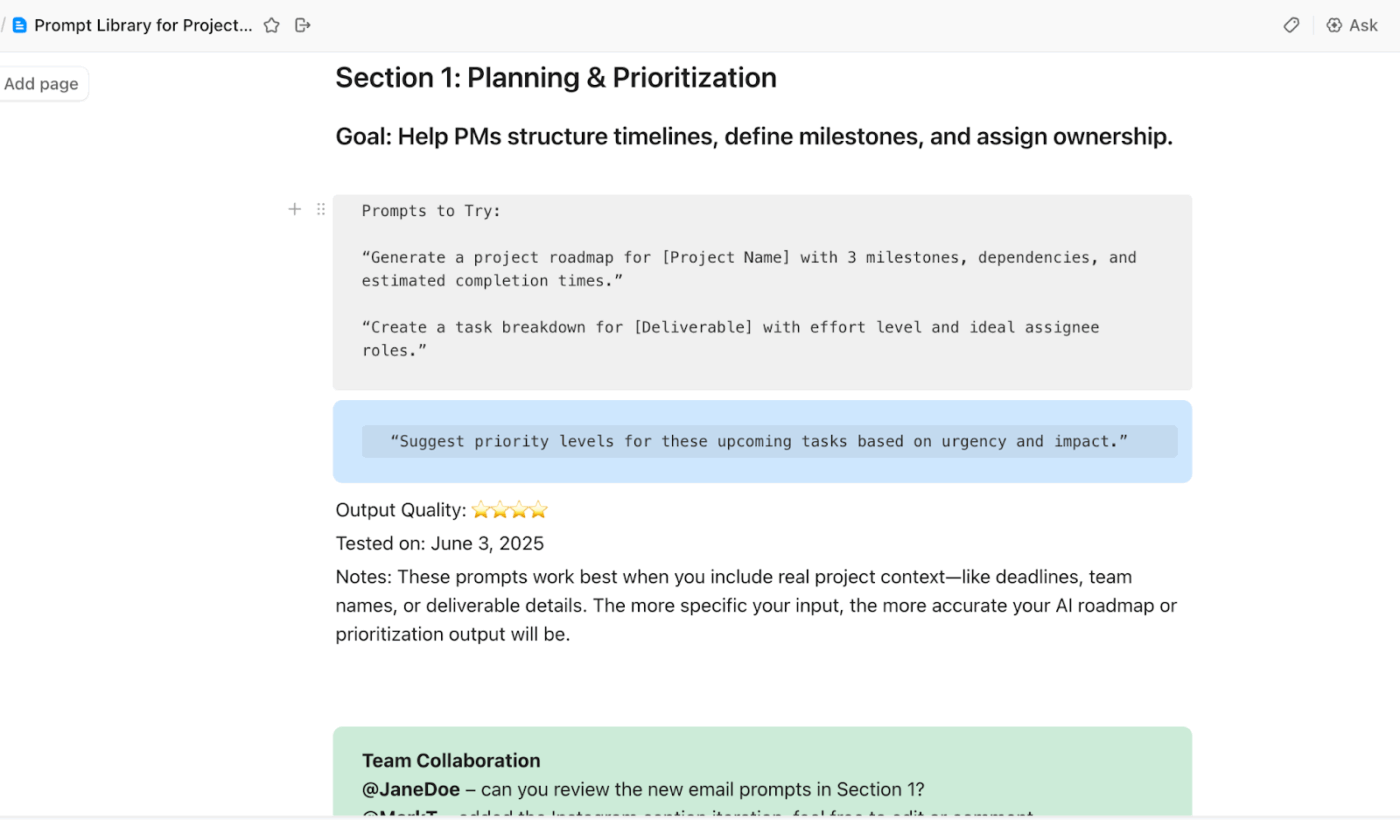
💡 Pro Tip: Create shared prompt templates in a document manager like ClickUp Docs for common sections, such as character normalization, error handling, and guardrails. Store these in a central repository and reference them across specialist agents so your team can build on proven techniques.
Getting basic, flat, or inconsistent outputs with ElevenLabs?
Likely because you don’t know how to ask AI the right question.
And most definitely making one of the following mistakes:
| ❌ Mistake | ✅ Solution |
| Entering unpolished text | Write prompts in a narrative style, similar to scriptwriting, to guide tone and pacing effectively |
| Not testing multiple variations | Experiment with different AI models and voice adjustments to fine-tune your responses |
| Not using a Voice changer for special sound effects and pronunciations | Use a Voice changer to emulate subtle, idiosyncratic characteristics of the voice when you need a more emotive and human-like voice |
| Expecting perfect results on the first try | Refine tags, adjust punctuation, play with prompt cues, create your own voice model—basically keep reiterating till you get a hang of this tool for your use case |
| Not matching tags to your voice’s character and training data | A serious, professional voice may not respond well to playful tags like [giggles] or [mischievously]. Make sure your emotion and voice cues align with the voice’s character |
| Generating speech in one go | Split long scripts into segments. Generate each section separately and layer them in post-production |
| Keeping creative stability levels when you want close adherence to reference audio | Vary the stability scale between Natural and Robust for the output to be closest to the original voice recording |
👀 Did You Know? In a BBC experiment, a journalist successfully used a synthesized AI clone of his own voice to bypass a bank’s voice verification security check. The startling breach revealed how vulnerable voice-based authentication systems are to AI manipulation.
ElevenLabs makes high-quality voiceovers accessible and efficient, but the tool isn’t perfect or sufficient by any means. Here’s where the capabilities of ElevenLabs will fall short ⚠️
📚 Read More: Top AI Tools to Try for Every Use Case
Check these ElevenLabs alternatives that make up for its limitations or offer more work-inclusive features to suit your workflow:
Most ElevenLabs alternatives focus solely on generating voice or transcribing audio. You will still need a place where those voice assets turn into tasks, approvals, content versions, and actual delivery.
ClickUp solves that gap.
It is the world’s first Converged AI Workspace that unifies project management, knowledge management, and chat.
While ClickUp isn’t a voice-generation platform, you can use it to manage voice-production workflows.
Let’s see how ClickUp supports voice and audio production teams 👇
ClickUp Brain is the built-in AI assistant that understands the context of your work. It operates within your ClickUp workspace with complete access to your tasks, communication threads, and project timelines.
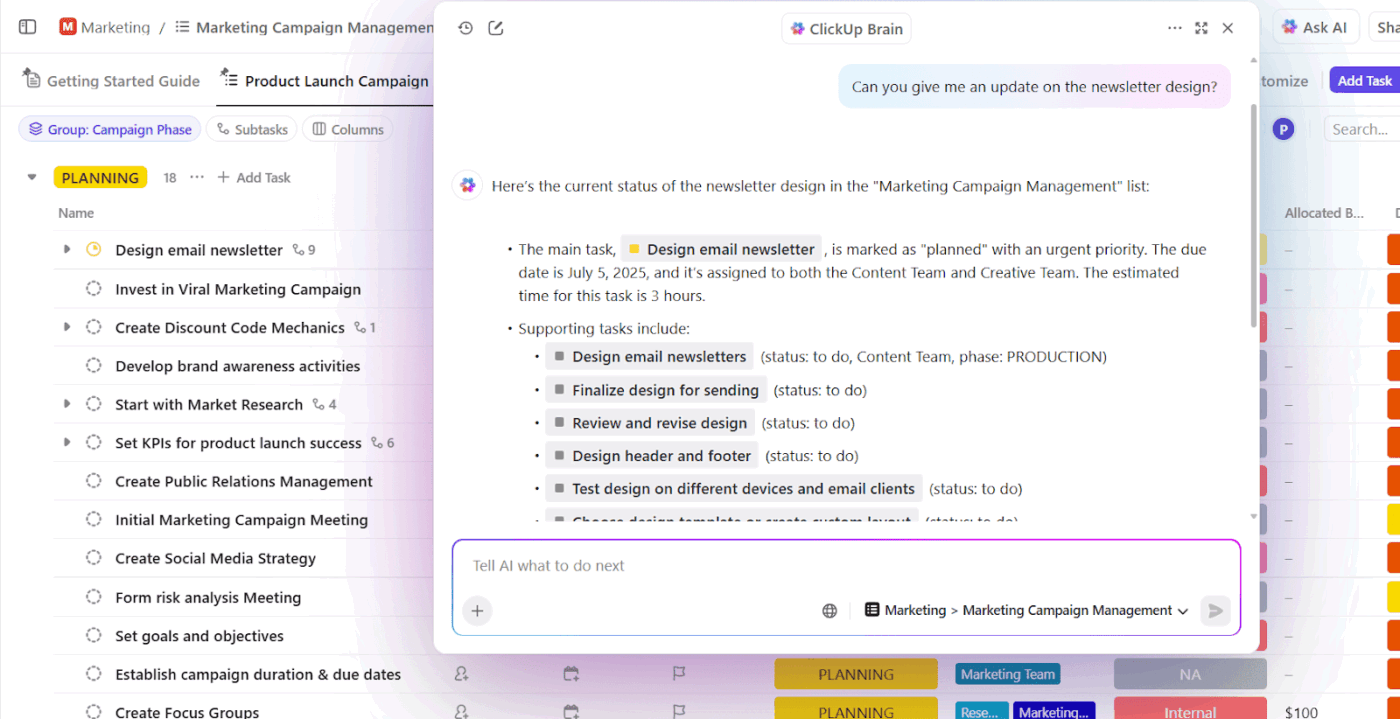
So when a podcast producer asks: “What’s blocking the audio production pipeline for Episode 12?” ClickUp Brain can scan task comments, subtasks, delivery statuses, and dependencies to surface if:
There’s no need to chase updates or keep pinging teammates for answers that already exist within your workspace.
For voice production workflows involving writers, narrators, editors, and clients, ClickUp keeps everyone aligned without the back-and-forth chaos.
👉 Save these prompts:
ClickUp AI Notetaker joins your meetings and generates searchable transcripts and summaries for you.
It converts every conversation into actionable work with:
📚 Read More: Best AI Voice Detectors to Identify Synthetic Speech
🚀 ClickUp Advantage: Super Agents are AI-powered teammates inside ClickUp that work continuously across your Workspace. They understand tasks, Docs, Chats, and connected tools, and can run multi-step workflows without manual prompts or follow-ups.
Super Agents excel at workflows like:
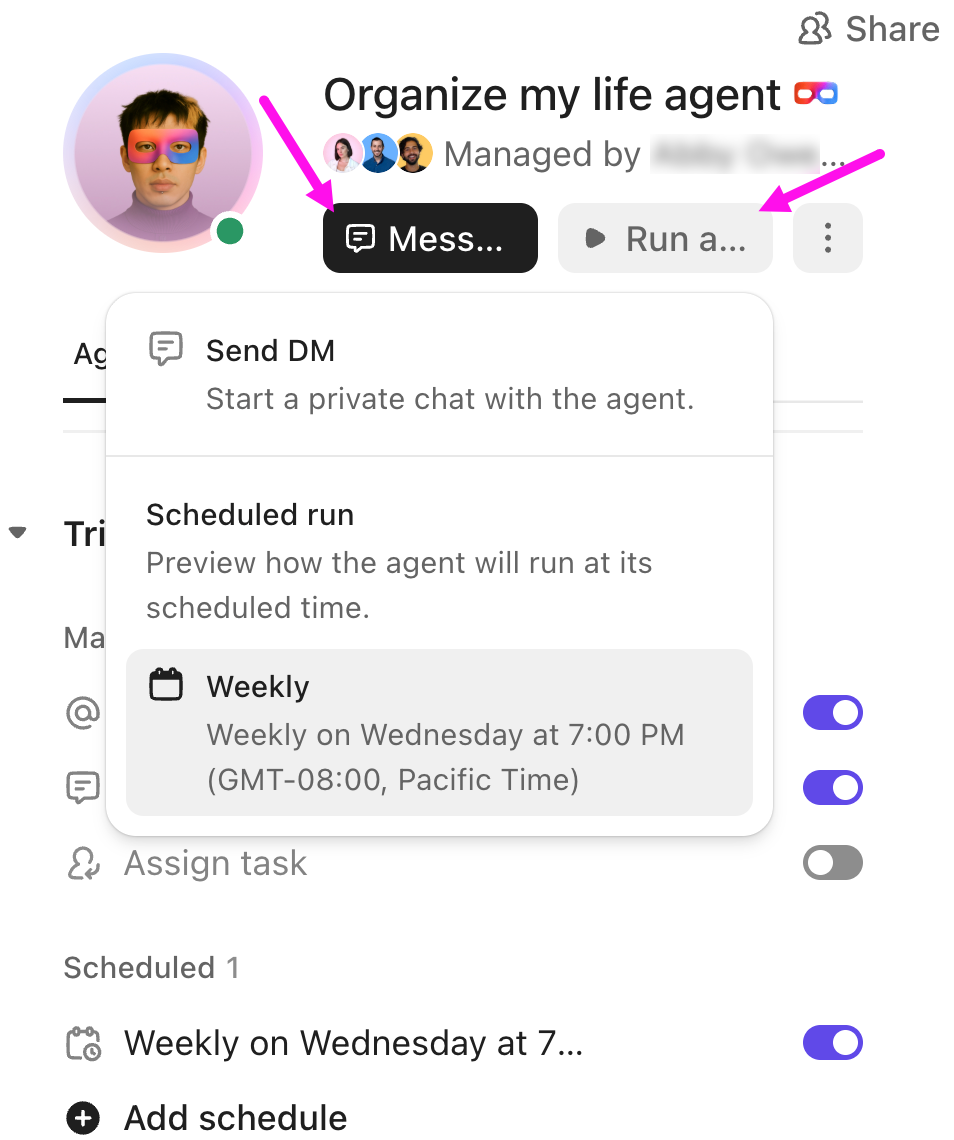
Check this video to see how Super Agents can be incorporated into your creative workflows:
ClickUp Talk to Text lets you dictate ideas, notes, and instructions inside your Desktop AI Super App (known as ClickUp BrainGPT) and converts speech into polished written text instantly.
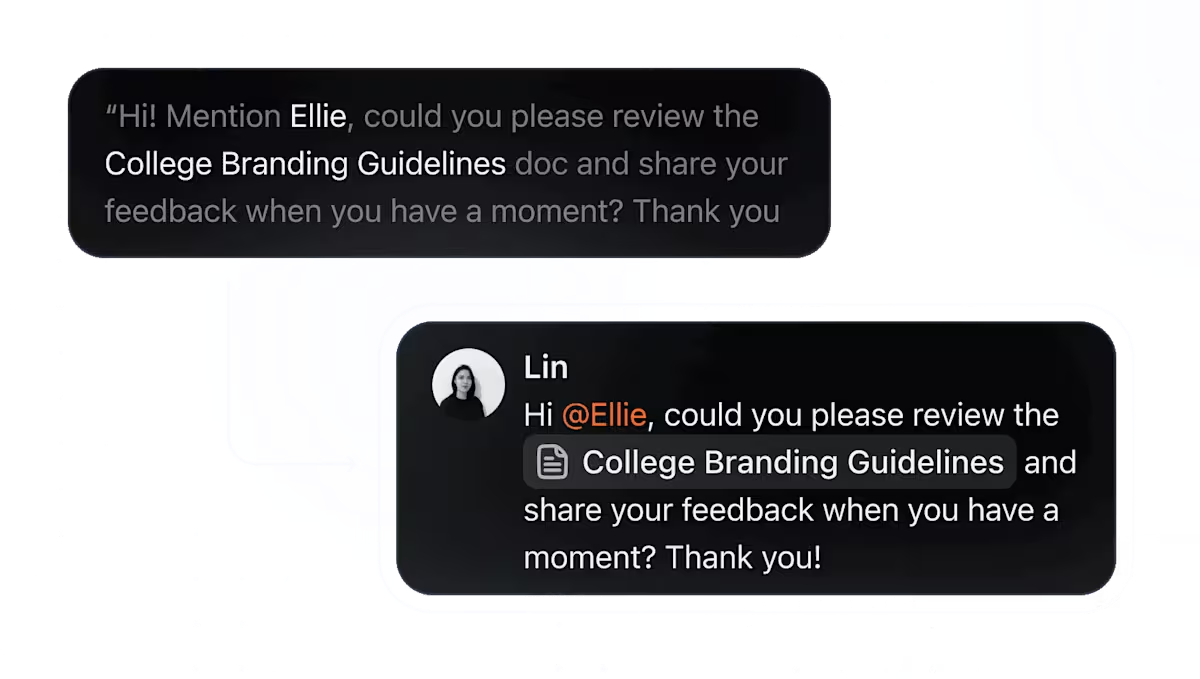
With it you can:
With Talk to Text, you can get work done faster, whether that’s experimenting with script revisions on the go, sharing quick feedback in comments, tagging voice actors for urgent changes, or dictating client emails without switching tools.
For audio producers juggling multiple projects, this means less typing and more time actually listening to the work.
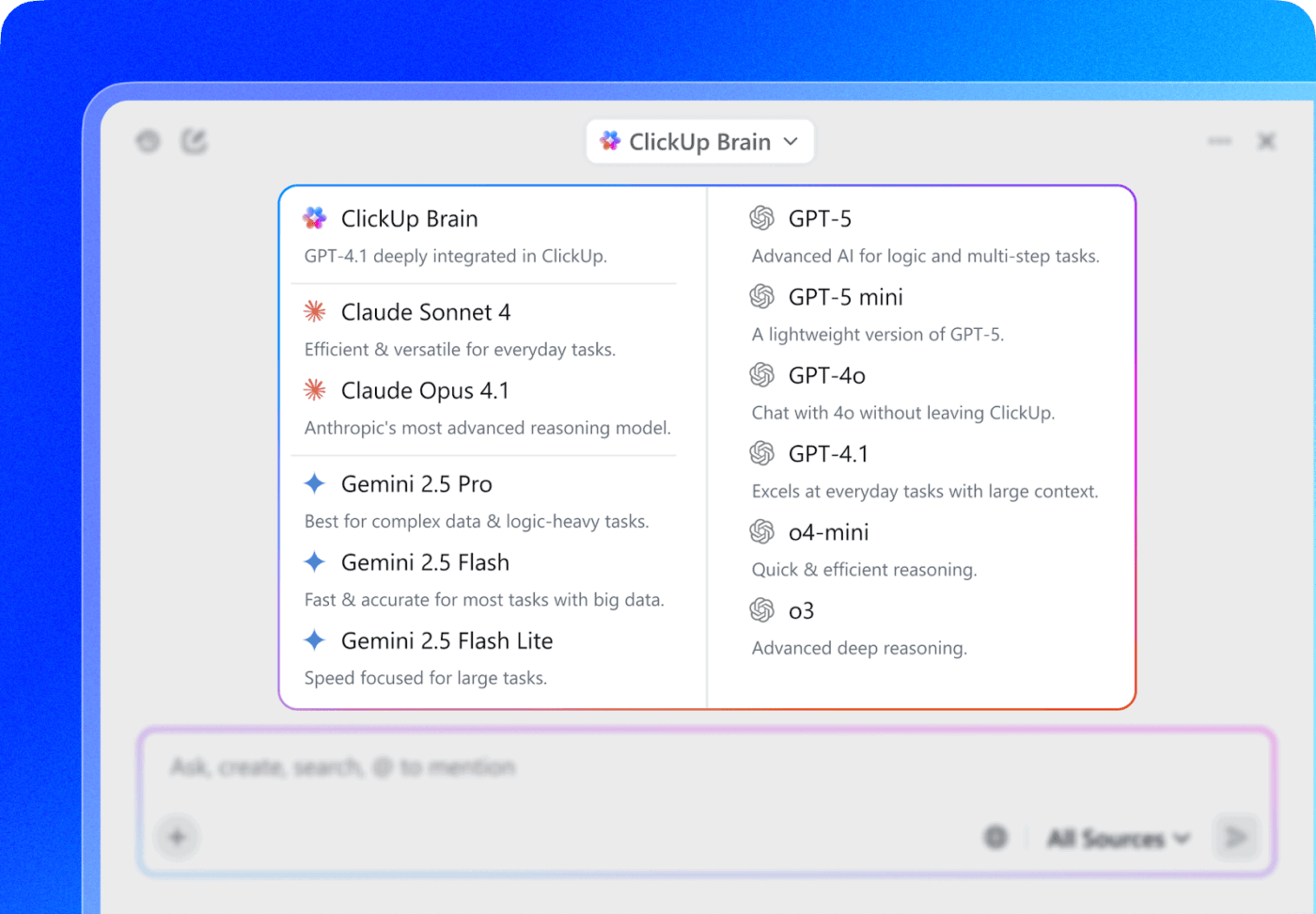
Within ClickUp Brain and BrainGPT, you can choose from external AI models that fit your use case.
For instance:
⭐ Bonus: Use ClickUp Enterprise AI Search to instantly find anything across tasks, Docs, comments, attachments, and connected tools like Google Drive or Figma—so voice assets, feedback, and approvals are always one search away.
A ClickUp user also shares their experience on G2:
ClickUp Brain […] has been an incredible addition to my workflow. The way it combines multiple LLMs in one platform makes responses faster and more reliable, and the speech-to-text across the platform is a huge time-saver. I also really appreciate the enterprise-grade security, which gives peace of mind when handling sensitive information. […] What stands out most is how it helps me cut through the noise and think clearly — whether I’m summarizing meetings, drafting content, or brainstorming new ideas. It feels like having an all-in-one AI assistant that adapts to whatever I need.
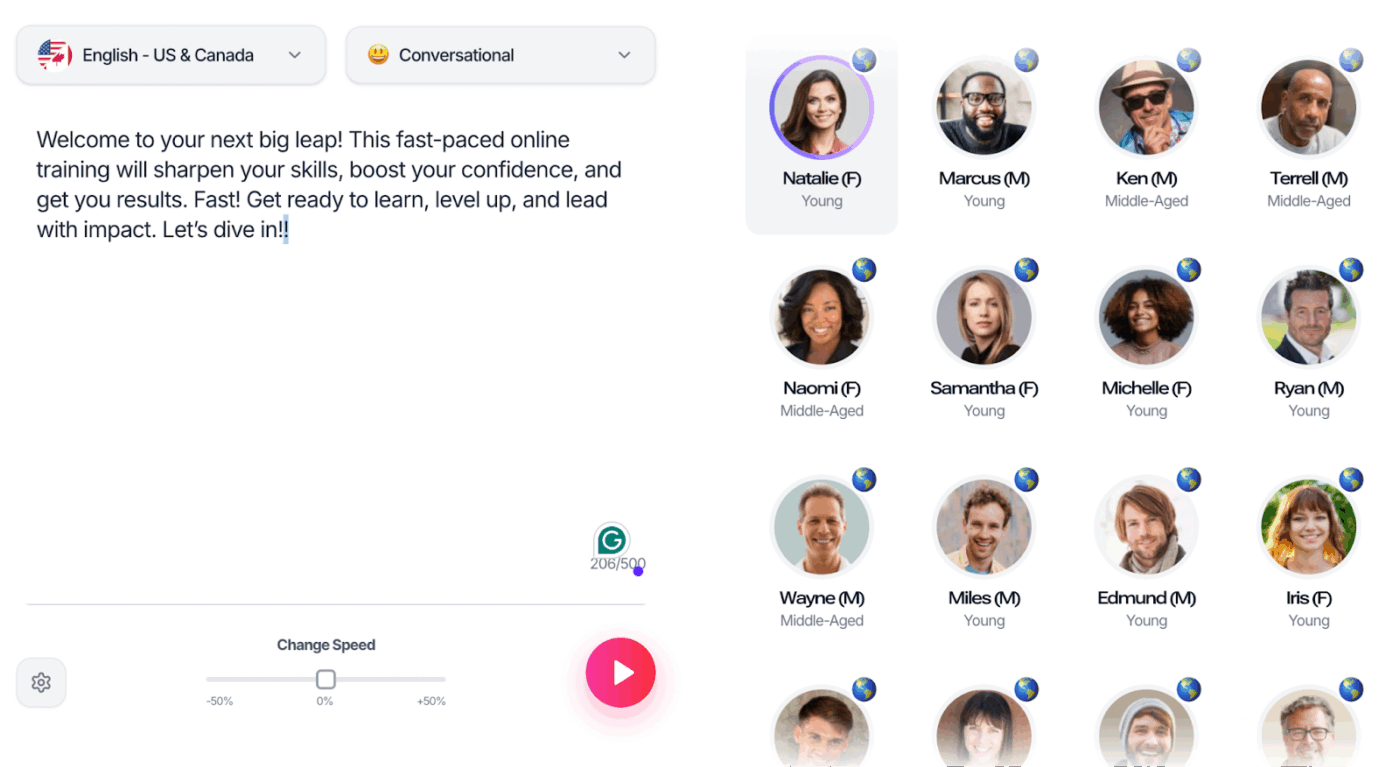
Murf AI delivers a robust text-to-speech platform that transforms written text into lifelike audio narration using over 200 AI voices in 20+ languages, ideal for videos, audiobooks, podcasts, and e-learning content creation. Its intuitive studio enables seamless voiceovers with pro-level editing.
Hear it from a G2 reviewer:
It is easy to use and has a customer-friendly interface. It is used to convert text or any to speech. We can easily customize the voice through pitch, speech, and pronunciation, and we can also control the speech using this tool. WE can integrate with other tools using API Integration. It provides 120+ voices, which is quite a high amount, and provides the translation in 20+ languages. It is easy to implement and very helpful to customer support.
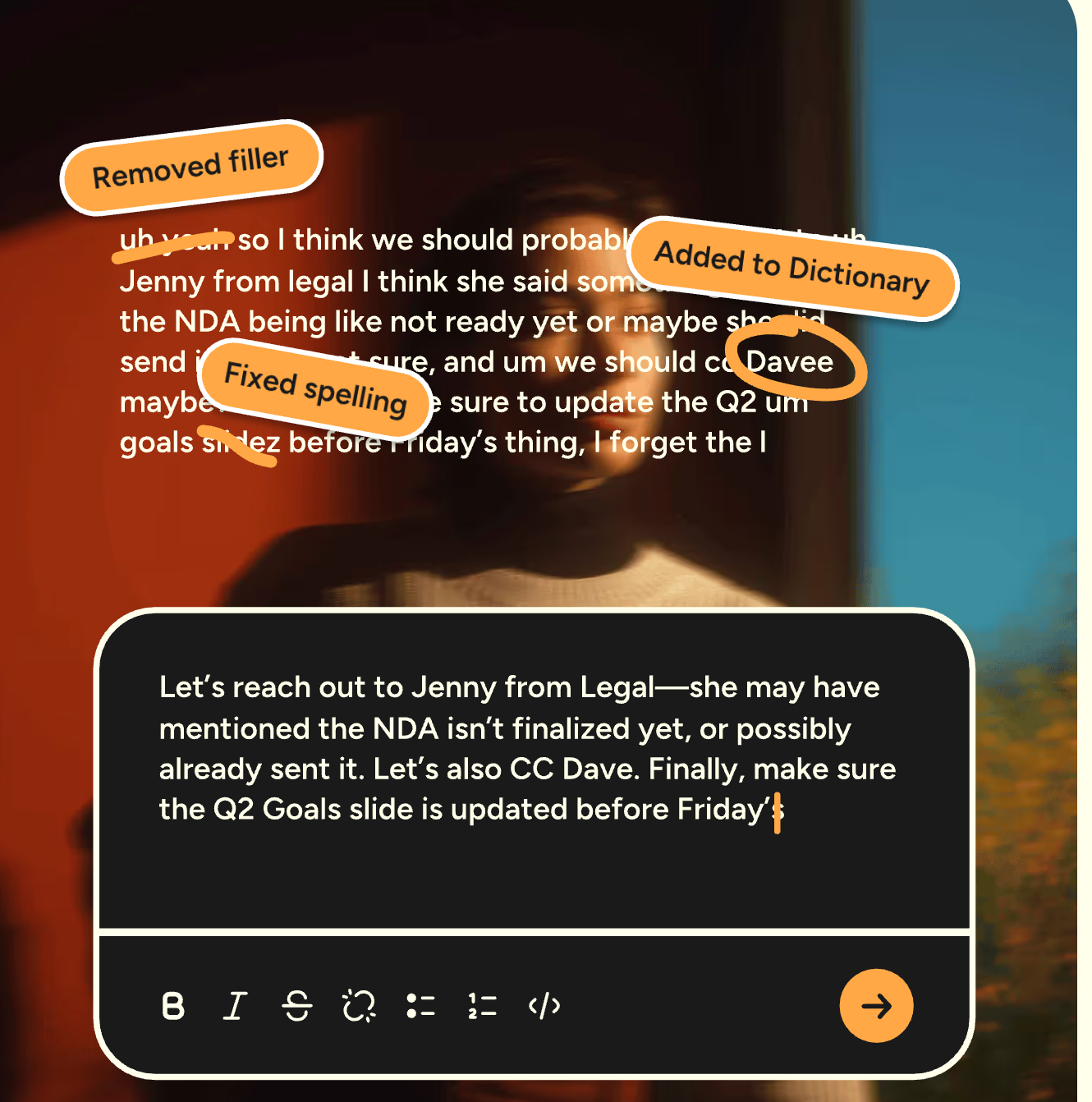
Wispr Flow transcribes your speech in real time (across 100+ languages) to present polished text in a structured format. It works across any application (where you can type), using advanced technology to make automatic edits and refinements in the tone.
The tool adapts to your vocabulary by building a personalized dictionary that captures industry-specific terms and acronyms. You can even create custom text replacements for frequently used phrases so you don’t have to repeat lengthy explanations or keep doing repetitive tasks.
Hear it from a G2 reviewer:
It is very easy to use. With two commands or quick inputs, you can start speaking and transcribing. Besides, it removes filler words, understands you, or corrects what you are saying. The implementation was just installing it and nothing more. I use it practically every day. In fact, I already have a streak of four weeks.
Well-defined ElevenLabs prompts help you generate high-quality voice content. But creating prompts, managing revisions, coordinating with voice actors, and delivering final assets requires more than just good AI outputs. You need a system that keeps production moving.
ClickUp is best suited for this.
It centralizes your work, communication, and task management into one platform, giving you a space to organize and optimize your voice production projects. Using its native contextual AI, you can automate manual workflows, get support for creative tasks, reduce AI Sprawl, and save yourself from the chaos of context switching.
Sign up to ClickUp for free and centralize your voice production workflows in one place.
Use emotion tags and narrative context to guide the AI. Tags like [sad], [angry], or [happily] tell the model exactly what emotion to emulate. You can also embed emotions directly in your narrative.
Yes. You can control voice tone, pacing, and pauses using voice design prompts, audio tags like [whispers] or [shouts], break tags for timed pauses, and global settings like speed and stability. Combine these elements to fine-tune delivery and create natural-sounding speech that matches your vision.
As detailed or nuanced as needed. Prompts can range from a single line to multiple paragraphs, depending on the complexity of your project. The key is clarity—provide enough context for the AI to understand tone, emotion, and delivery style without overloading it with unnecessary information.
Yes. ElevenLabs supports multi-speaker dialogue, allowing you to assign different voices to different characters or speakers within the same project. This is useful for creating podcasts, audiobooks, or narrative content with distinct character voices.

© 2026 ClickUp

There’s an easier way. Try a free AI Agent in ClickUp that actually does the work for you—set up in minutes, save hours every week.