
Sorry, there were no results found for “”
Sorry, there were no results found for “”
Sorry, there were no results found for “”
Think of customer enablement as the operational engine behind customer success. It empowers customers to adopt your product confidently, discover value early, and stay engaged long-term.
An effective customer enablement strategy combines onboarding workflows, learning content, and continuous feedback to create a seamless, personalized customer experience. Your customer education strategy may involve self-serve resources, contextual in-app guidance, or a lightweight learning management system; the goal is the same: enabling customers to succeed on their own terms.
Whether you’re a product marketer designing tooltips, a customer success manager reducing time-to-value, or an onboarding specialist focused on customer retention, you’re in the right place.
Let’s break down the real “how” behind building and scaling a successful customer enablement strategy (one that works).
Let’s clarify something: enablement isn’t the same as customer support or acquisition. Support is reactive, and acquisition is often direct and even aggressive in some cases.
Enablement takes a more proactive approach. It involves anticipating the friction points customers might hit and smoothing them out before they even realize they’re there.
But that’s onboarding? Yes, but there’s more to it! Onboarding is a critical part of the process, but enablement looks after the full customer lifecycle. It covers everything from that first login to the advanced workflows your power users discover six months in.
A good enablement strategy says: “Here’s not just how to use this product — but how to win with it.”
And that “winning” will look different for each user. That’s why the best enablement programs blend structured content with flexible support paths and regular feedback loops.
🧠 Did You Know: Nearly 70% of customers expect reps to already know their history—and love it!
That means customers want a sales rep who behaves like a psychic support, ready with context before a single question. It’s like they want you to read their minds… and your CRM better agree
Customer enablement is your strategy for helping customers unlock value again and again.
When done right, it’s the difference between a one-time user and a long-term advocate. Let’s break it down:
Customers don’t wait around. If they don’t hit their “aha moment” fast, they’re gone. Enablement ensures they have the right context, resources, and nudges to get there without relying on 10 back-and-forth support emails.
What are the actions that signal a user is getting value from your product? Maybe it’s creating their first project, completing a workflow, or inviting teammates. Once you know those milestones, you can build enablement content — tutorials, templates, nudges — around them.
And this is where ClickUp CRM steps in. Unlike traditional CRMs built just for sales, ClickUp’s CRM is fully customizable to your customer journey. You can:
Every piece of self-serve content or guided workflow means fewer tickets and less strain on your support team. It’s a win-win: customers get answers fast, and your team can focus on high-value conversations.
If users only engage with 10% of your product, you’re leaving value and renewals on the table. Enablement helps users discover more advanced features at the right time (not all at once).
People don’t just stay because your product “works.” They stay because they feel confident using it. Enablement empowers users to grow their skills and take control of their outcomes. And confident users? They’re the ones who upgrade, expand, and advocate.
📮ClickUp Insight: 62% of our respondents rely on conversational AI tools like ChatGPT and Claude. Their familiar chatbot interface and versatile abilities — to generate content, analyze data, and more — could be why they’re so popular across diverse roles and industries.
However, if a user has to switch to another tab to ask the AI a question every time, the associated toggle tax and context-switching costs add up over time.
Not with ClickUp Brain, though. It lives right in your Workspace, knows what you’re working on, can understand plain text prompts, and gives you answers that are highly relevant to your tasks! Experience 2x improvement in productivity with ClickUp!
➡️ Read More: How to Improve Customer Centricity
You’re probably already thinking about customer enablement in a few different ways.
But how do you pull it all together into a cohesive, strategic program? Successful enablement requires the right mix of resources, processes, and feedback loops to ensure customers adopt your product and thrive with it.
Let’s break down the critical components of a winning program:
Your customers need more than just a product manual — they need structured, easily accessible resources that help them understand how your product solves their unique challenges.
Think of your knowledge base as the foundation of your enablement program. The goal is to create a single source of truth that customers can reference whenever they need assistance. A well-organized knowledge hub should include:
We use ClickUp for all our project and task management, as well as as a knowledge base. It has also been adopted for monitoring and updating our OKR framework and several other use cases, including flow charts and holiday request forms and workflows. It is great to be able to serve all of these within one product, as things can very easily be interlinked.
People absorb information differently, so don’t limit yourself to written documentation. Include video tutorials, interactive guides, and even webinars. Offering various formats ensures that all learning styles are catered to.
The more you can automate or organize your documentation, the better. For example, linking relevant content within your product’s interface can lead users directly to help articles when they need them.
Start by centralizing all your educational materials into a knowledge hub. ClickUp’s Knowledge Management features can come in handy here.
💡 Pro Tip: Want to get started faster? Use ClickUp’s Knowledge Base Template to build and get your knowledge hub up and running in no time!
The first 90 days are critical. If you fail to onboard your users in a way that drives value early on, they’ll likely fall off or churn — especially in a competitive SaaS space.
Tailor your onboarding flows based on customer profiles or use cases. For instance, if you’re a SaaS product with small businesses and enterprise customers, each onboarding process will look different.
➡️ Read More: Best Client Onboarding Software
The best onboarding experiences are also scalable. Set up automated workflows that guide users through their first key tasks, such as creating an account, setting up preferences, or integrating with other tools. This ensures that even as your customer base grows, the quality of onboarding remains consistent.
If your onboarding includes tasks like sending onboarding or follow-up emails, automate those actions to keep customers on track without extra manual work.
Enablement doesn’t end after onboarding. It’s a process that needs constant tweaking. Collecting feedback on an ongoing basis lets you know what’s working, what’s not, and where you can improve.
Instead of treating feedback like a quarterly chore, integrate feedback loops into key milestones along the customer lifecycle. Think lightweight, well-timed check-ins (helpful, not intrusive). Depending on your product, you could use:
Collecting feedback is only useful if you act on it. Whether it’s addressing a usability issue, refining a feature, or adding content to your knowledge base, customers appreciate knowing their feedback is being heard and acted upon. This fosters trust and shows that you’re committed to improving their experience.


💡Pro Tip: Create a dedicated “Customer Feedback” List to keep all insights organized. This helps teams spot trends and make data-driven roadmap decisions.
One of the most overlooked aspects of customer enablement? Timing.
You could have the perfect email, the most helpful video, or a beautifully written guide — but if it lands at the wrong moment, it’s just noise. Let’s look at getting the timing right.
Great enablement lives in those small interactions — the helpful message, the quick reminder, the well-placed nudge that moves someone forward without breaking their flow.
Don’t wait for customers to reach out when they’re stuck. Proactively check in with them throughout their journey, especially during critical periods like post-onboarding or after a major product update.
Use these check-ins to offer helpful tips, introduce new features, and guide customers toward getting more value from your product.

In-app messaging is another great way to keep the conversation going without overwhelming your users with emails. You can trigger helpful tips, reminders, and nudges based on where the customer is in their journey. These messages can help customers move from beginner to advanced usage with ease, reducing confusion and increasing overall satisfaction.
🛠️ How to do this:
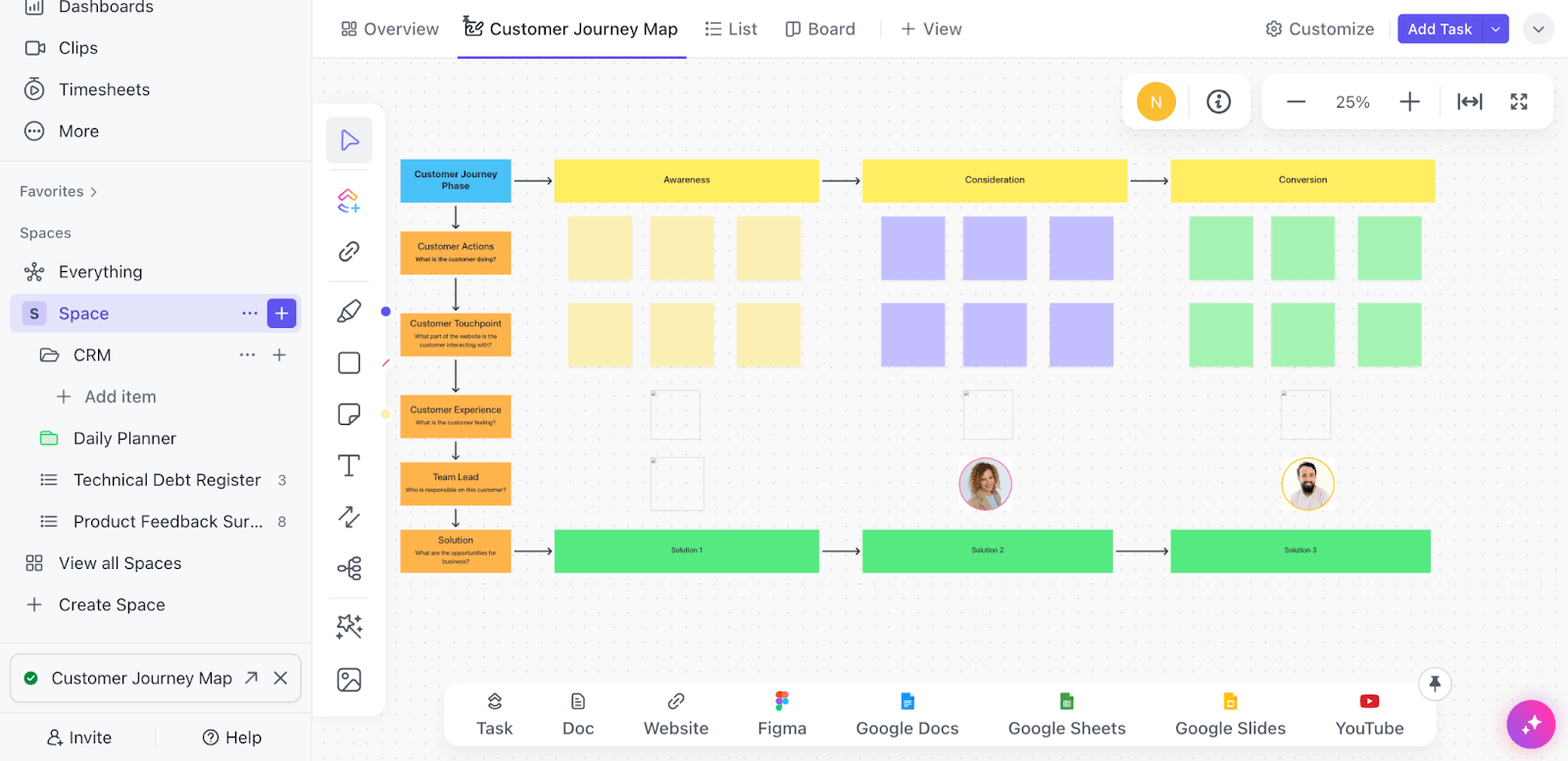
With ClickUp’s Customer Journey Map Template, you can break the experience down into specific stages—onboarding, activation, adoption, renewal — and pinpoint the moments that matter most. These are your chances to guide, support, and engage without being intrusive.
Use it to:
Once those touchpoints are mapped, it’s easier to layer in proactive outreach.
➡️ Read More: Free Customer Journey Map Templates
Bonus tip: Build customer communities and leverage user-generated content to drive enablement
In customer enablement, customer communities and user-generated content don’t often get the spotlight they deserve. These spaces let users share advice, troubleshoot, and highlight how they’re using your product or service in real life.
That means faster answers, less pressure on your customer support team, and more satisfied customers overall.
Even better? Communities give you a direct line to your customers. You can collect customer feedback, spot trends, and implement customer feedback that actually matters — making your customer success strategy stronger and more responsive.
And because users are helping each other, it’s full of real, relatable customer enablement examples. That kind of peer-to-peer help adds real ongoing support without scaling your headcount.

Building a customer enablement program is one thing — demonstrating its success is the real challenge.
To improve the experience, drive adoption, and justify the investment, you need more than anecdotes. You need data. That means going beyond vague success stories and tracking the metrics that actually reflect how well your efforts are landing.
These are the kinds of questions your metrics should answer, because they help you double down on what’s working and spot gaps before they become churn. Let’s break down the key numbers that matter most when it comes to measuring enablement.

This is the time it takes for your customer to experience meaningful value from your product. A shorter TTV is crucial — your customers need to feel the benefit quickly, or you risk losing them.
Is your customer using the features they need to be successful? Measure usage rates, feature adoption, and overall engagement to ensure users aren’t just logging in but using your product.
Enablement should decrease the number of repetitive questions or support tickets. Track how often your knowledge base or in-app guides are accessed to gauge if they’re filling the gaps.
Are your customers happy? Tracking customer satisfaction (CSAT) or Net Promoter Scores (NPS) will give you a clear indicator of whether your enablement program is achieving its goal of customer success.
Customer journey is full of ups and downs. Your users may experience moments of excitement, success, and growth, but also face obstacles and challenges — all within a span of 2 days. To effectively support them through this dynamic experience, it’s crucial to have visibility into their progress at every stage.
Create a “Customer Enablement” dashboard to track key metrics across the entire customer journey —from onboarding success to advanced feature adoption. This centralized view will help your team monitor progress, identify bottlenecks, and take action to improve the customer experience.
And no, this doesn’t have to be a painful task. With ClickUp’s no-code Dashboards, you can easily bring all your data together in one place and visualize it in a way that drives clarity and alignment. These ashboards are fully customizable, allowing you to track the metrics that matter most to your team, such as time-to-value, engagement trends, and support ticket resolution times.
Here’s what makes ClickUp Dashboards a game-changer:
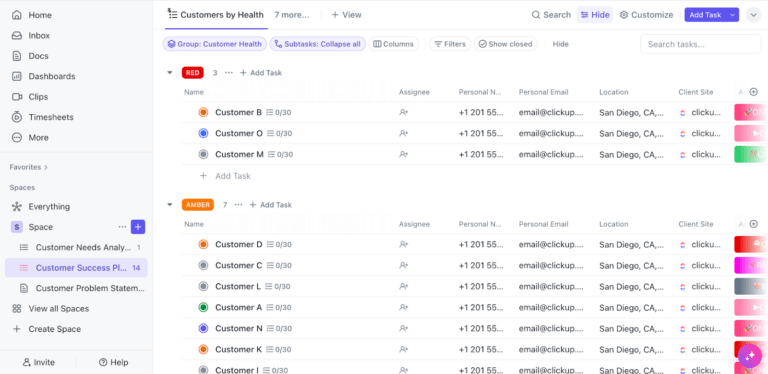
By combining data from multiple sources, ClickUp Dashboards empower your team to make informed, data-driven decisions. Whether you’re tracking customer health scores or identifying areas for improvement, Dashboards provide the clarity and focus you need to drive results.
When your customers succeed, you succeed. It’s that simple.
What does this look like in practice? It might mean streamlining your onboarding so new users get that “aha!” moment faster, building a knowledge base that answers questions before they’re even asked, or simply listening to feedback and making improvements that matter.
An everything app like ClickUp can help you scale your enablement efforts from onboarding to renewal, so you can focus on what really matters: delivering value to your customers — consistently.
Sign up for a free ClickUp account today and switch up your enablement strategy!

Sudarshan Somanathan
Max 23min read

Sean Hardy
Max 44min read
Sudarshan Somanathan
Max 30min read

© 2026 ClickUp