Sorry, there were no results found for “”
Sorry, there were no results found for “”
Sorry, there were no results found for “”
87% of construction leaders say their projects are under more scrutiny than ever.
While a few somehow manage to finish on time (superpowers, maybe?), the real secret lies in having a solid plan.
A comprehensive Construction Management Plan (CMP) is your blueprint for staying ahead of supply chain hiccups, labor shortages, and market curveballs before they throw your project off track.
The good news? We’ve built a handy guide to help you craft a CMP that covers every stage—before, during, and after construction.
A Construction Management Plan (CMP) is a comprehensive roadmap that outlines how a construction project will be managed from start to finish. It details the strategies, timelines, resources, and workflows required to ensure smooth execution and project delivery.
Beyond just planning the build, it also anticipates potential challenges, outlines contingency measures, and aligns all stakeholders—contractors, engineers, and project managers—toward shared goals and successful outcomes.
Whether you want to build a skyscraper or a corner shop, a construction project management framework can help you plan the scope of work and establish a project overview.
Here’s why it should be a top priority for construction professionals:
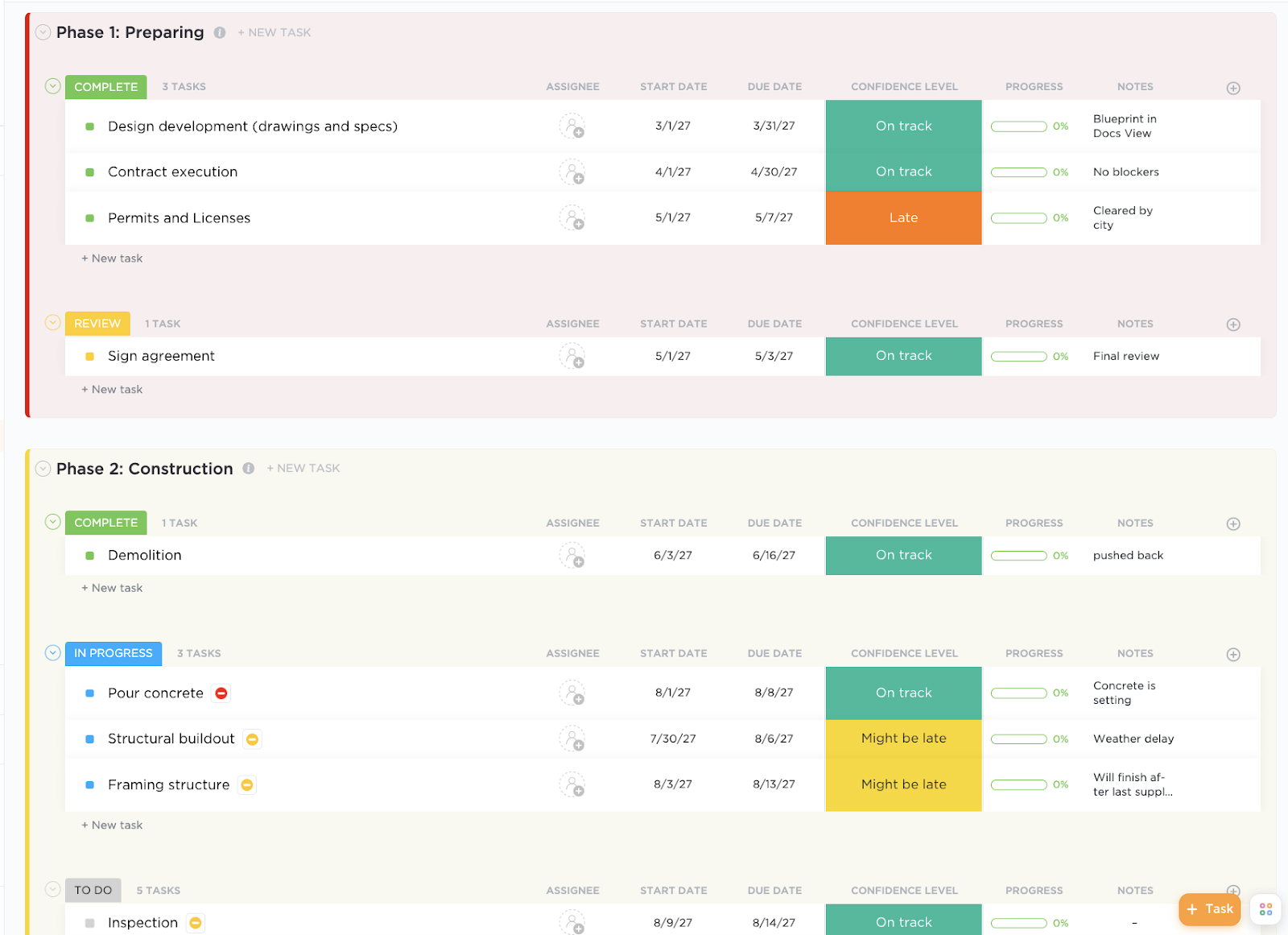
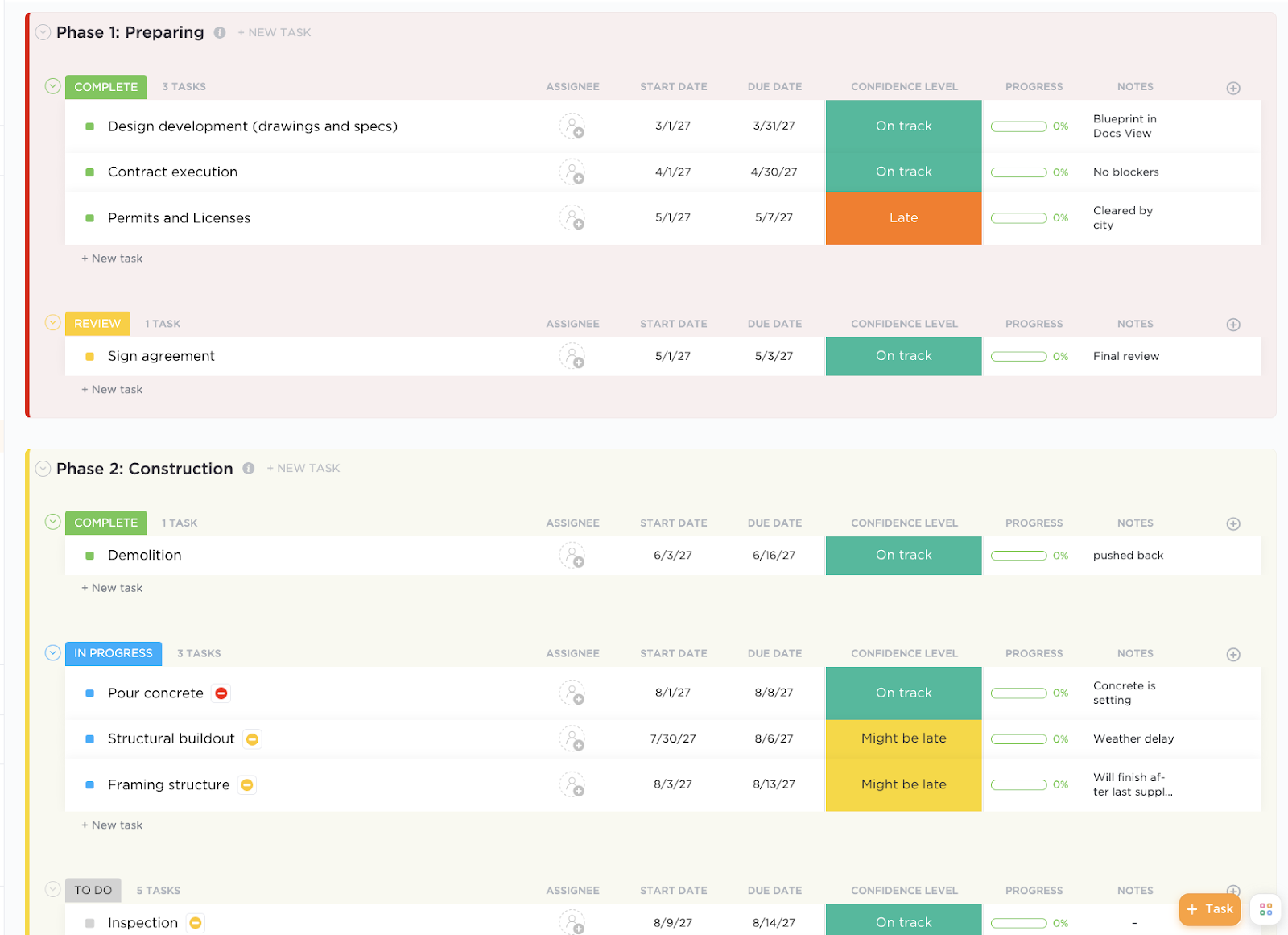
The ClickUp Construction Management Template is purpose-built for construction teams to plan, schedule, and track every phase—from pre-construction to closeout. It includes ready-made lists for tasks, RFIs, and punch lists, along with Gantt charts, workload views, and budget tracking—making it the perfect foundation for a detailed and realistic construction plan.
📮ClickUp Insight: Low-performing teams are 4 times more likely to juggle 15+ tools, while high-performing teams maintain efficiency by limiting their toolkit to 9 or fewer platforms. But how about using one platform?
As the everything app for work, ClickUp brings your tasks, projects, docs, wikis, chat, and calls under a single platform, complete with AI-powered workflows. Ready to work smarter? ClickUp works for every team, makes work visible, and allows you to focus on what matters while AI handles the rest.
A detailed construction management plan covers different phases of your project to ensure all aspects are meticulously planned and executed.
📌 For example, the CMP will detail steel delivery schedules (resource management), implement daily safety checks (safety management), and outline community noise reduction measures (environmental control) for a complex bridge project.
Here’s what your CMPs’ detailed framework should include:
60% of construction projects run behind schedule worldwide.
One key reason is poor communication and scattered information. Using a centralized platform, such as construction project management software, can make a world of difference in tackling this challenge.
And we’ve got the best one here for you—ClickUp, the everything app for work!
It brings teams together by centralizing communication, offering real-time updates, and enabling seamless task tracking. Plus, with built-in resource management tools, it helps ensure your projects stay on schedule and on budget.
The Construction Project Management Software by ClickUp organizes project data into a single space, preventing mix-ups or inefficiencies. Its features allow you to relay feedback, annotate documents, connect with clients, and create estimates using custom formulas.
But this barely scratches the surface.
ClickUp also doubles as your handy AI partner in construction.
Here’s a user review from G2 to check out before we show you EXACTLY why it makes sense to choose ClickUp for your construction project management.
From the base layout creation to volumetric proposals and construction designs, I have to track every aspect of creation, from flooring options and landscape design to lighting production and structural compatibilization. There is NO WAY I can work as fast and focused without Clickup to help me create structured and neatly organized lists. I know which tasks were executed and what is yet to be performed; I can append comments, reminders and documents to each task and track the time I take to complete single tasks and full projects. I could go on and on and on. I LOVE Clickup. And Honestly, I’m not even using 30% of what the tool is capable of. It has a GANTT feature which I have played with a little, and I loved MINDMAPS, which are just delicious, and more…
But for now, let’s walk you through a detailed breakdown of creating a successful construction management plan with the right tools.
Clearly outlining objectives before a construction project begins helps simplify complex workflows, align stakeholders early, and lay the foundation for a realistic, resource-aware schedule.
When everyone—from architects to subcontractors—knows what success looks like, it’s easier to identify critical paths, spot potential delays, and coordinate dependencies before they become costly change orders
Answer these questions to define your scope for an effective construction management plan:
You can document this in one place using ClickUp.
🗂️ Start by creating a ClickUp Space or Folder for your project (e.g., “Downtown Tower Build”). This becomes the centralized hub for all your plans, docs, timelines, and tasks.
📜 Use ClickUp Docs to outline high-level project objectives—budget goals, timeline expectations, scope of work, stakeholder responsibilities, safety or compliance benchmarks, etc.
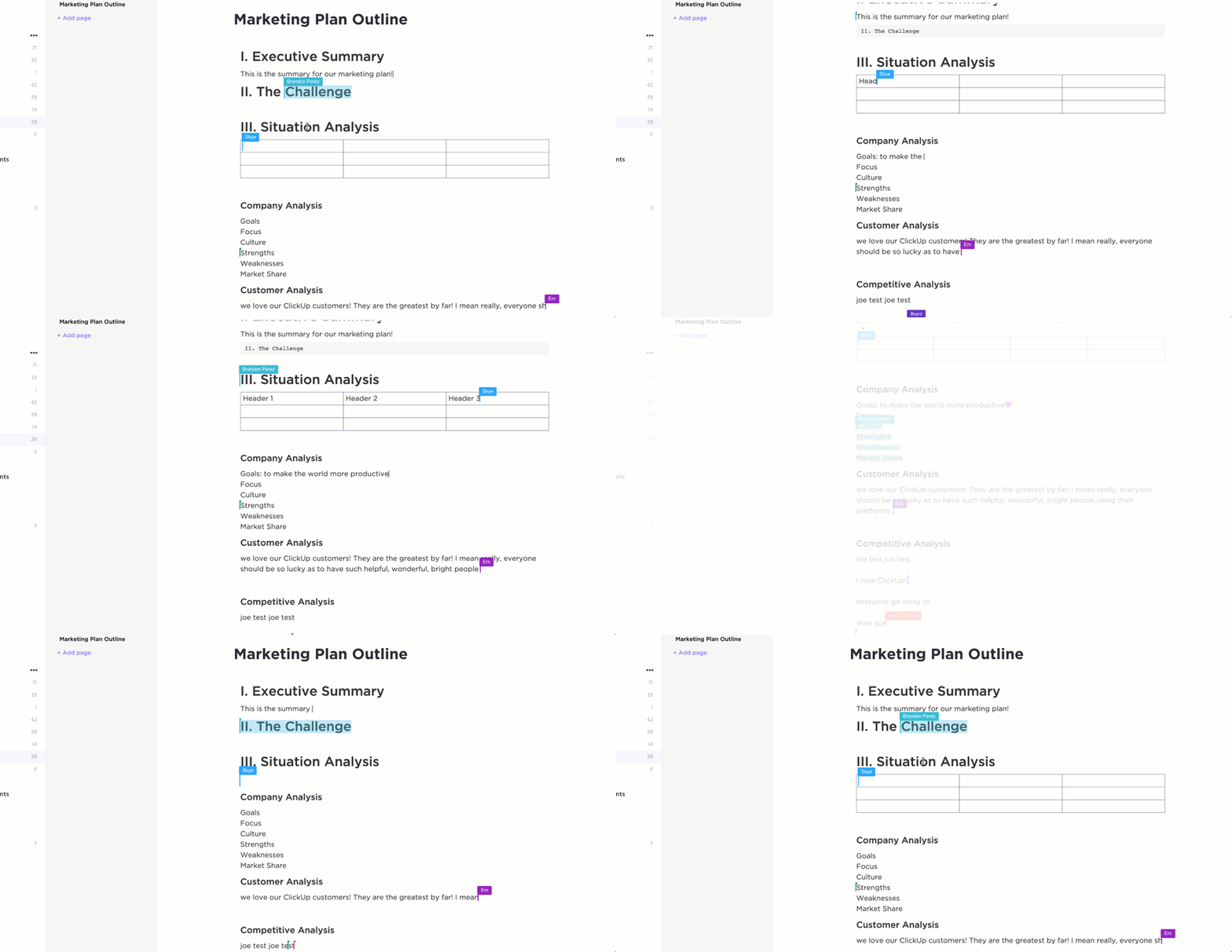
Here’s how Docs help construction managers in their planning phase:
💡 Pro Tip: Use ClickUp Brain to help you quickly draft this based on past projects or input notes. Its generative AI capabilities, paired with access to multiple latest LLMs of ChatGPT, Claude, Gemini, and more, allow it to synthesize complex construction data, generate clear and actionable project objectives, and even adapt tone and format to match client expectations or regulatory standards.
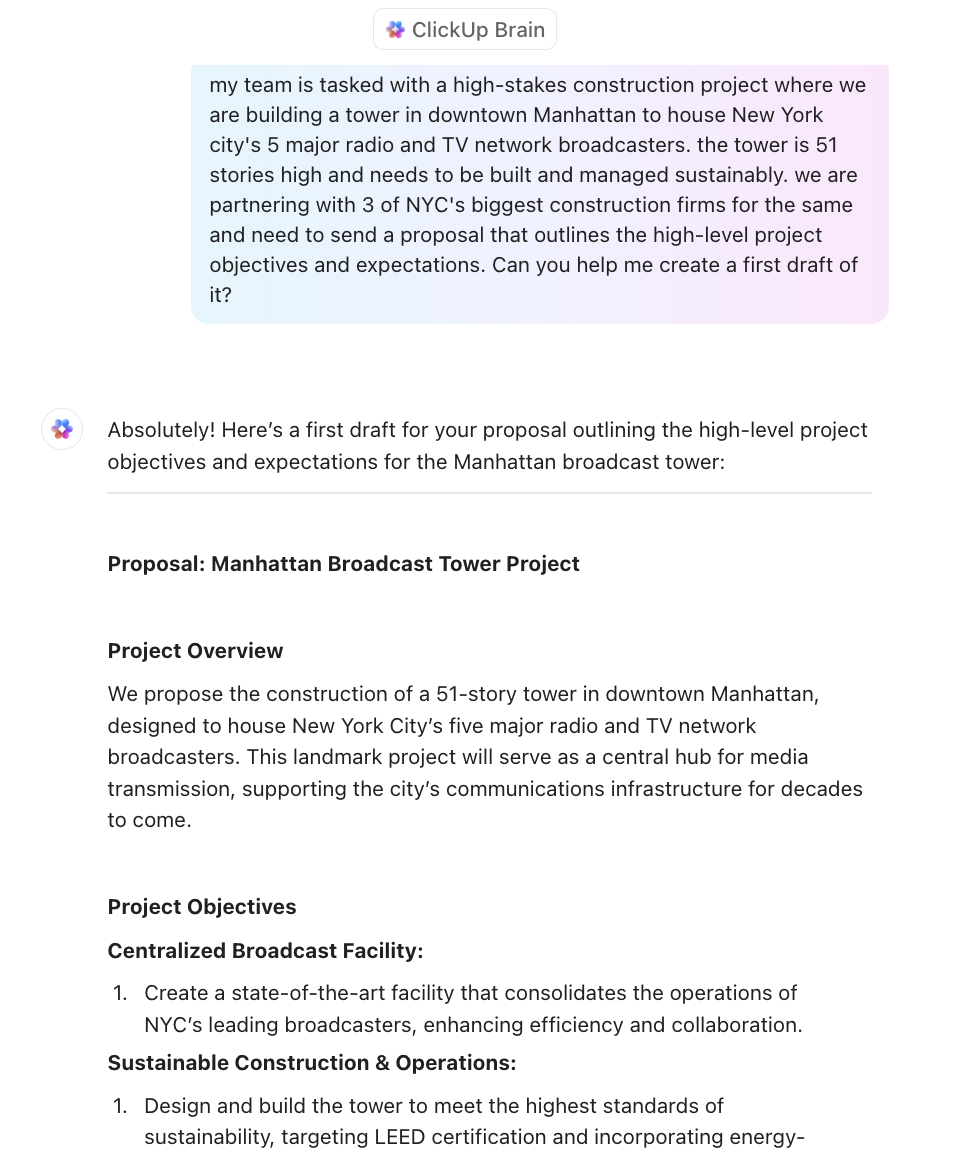
A work breakdown structure (WBS) divides the project into smaller, manageable tasks to simplify execution.
To create one, start by:
📮ClickUp Insight: 37% of workers send follow-up notes or meeting minutes to track action items, but 36% still rely on other, fragmented methods. Without a unified system for capturing decisions, key insights you need may get buried in chats, emails, or spreadsheets.
With ClickUp, you can instantly turn conversations into actionable tasks across all your tasks, chats, and docs—ensuring nothing falls through the cracks.
ClickUp Mind Maps provide a visual, interactive, and flexible way to create, edit, and refine a WBS.
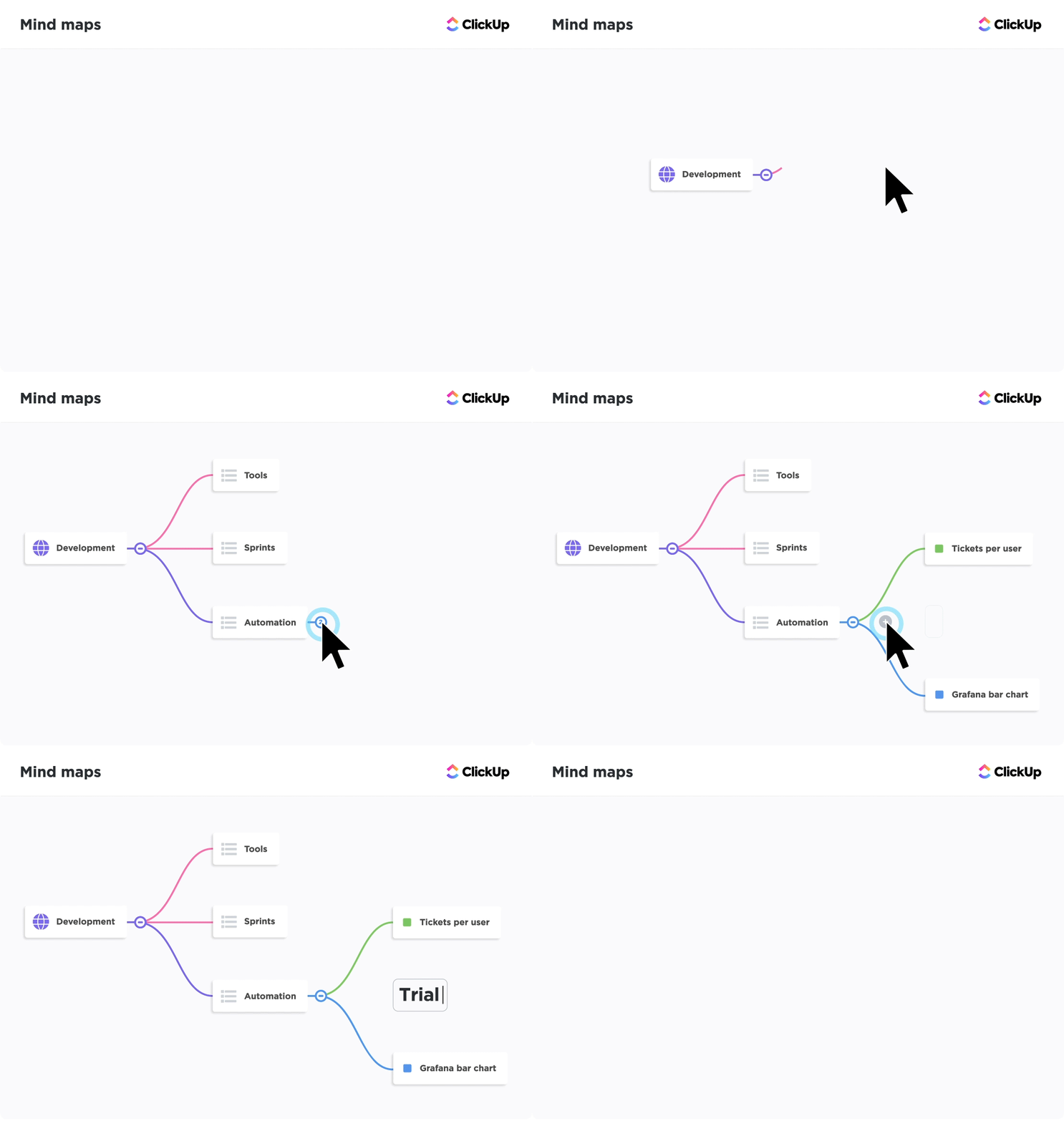
Use ClickUp Mind Maps for:
📌 For example, the ‘Install Electrical Wiring’ task can be linked to ‘Obtain Electrical Permits’ to indicate that wiring can’t start until the permit is secured.
💡 Pro Tip: Want to fast-track creating your WBS? Try ClickUp’s Work Breakdown Template.
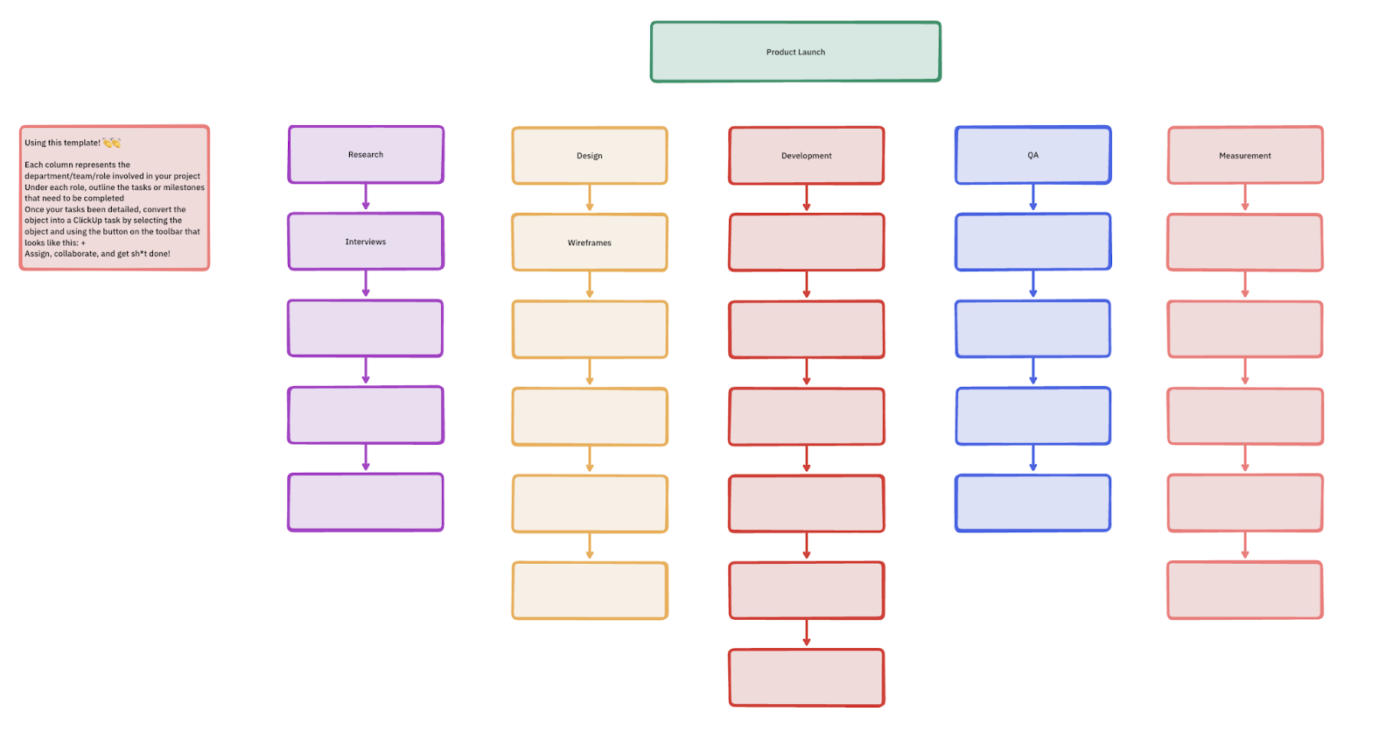
Customize task hierarchies with pre-built phases (like Design, Procurement, Execution, QA). Then, apply Custom Fields for cost, duration, and resources—so you can analyze scope, budget, and timelines side by side from day one. Pair it with the Gantt view in ClickUp to visualize dependencies and spot bottlenecks early.
You identify potential hazards, evaluate their impact, and create contingency plans here.
Estimate possible challenges with these questions:
📌 For example, a high-risk building project site near a river may require additional drainage solutions and flood prevention measures to avoid work disruptions.
A realistic budget and efficient allocation of resources prevent financial strain and promise smooth project execution.
Key steps to include:
You can also use ClickUp Dashboards here. They give construction project managers real-time financial insights, helping them track costs, monitor resource allocation, and prevent budget overruns. You can connect tasks, time tracking, and cost data in ClickUp to your Dashboard for instant visibility into how your budget is spread across work packages or phases.
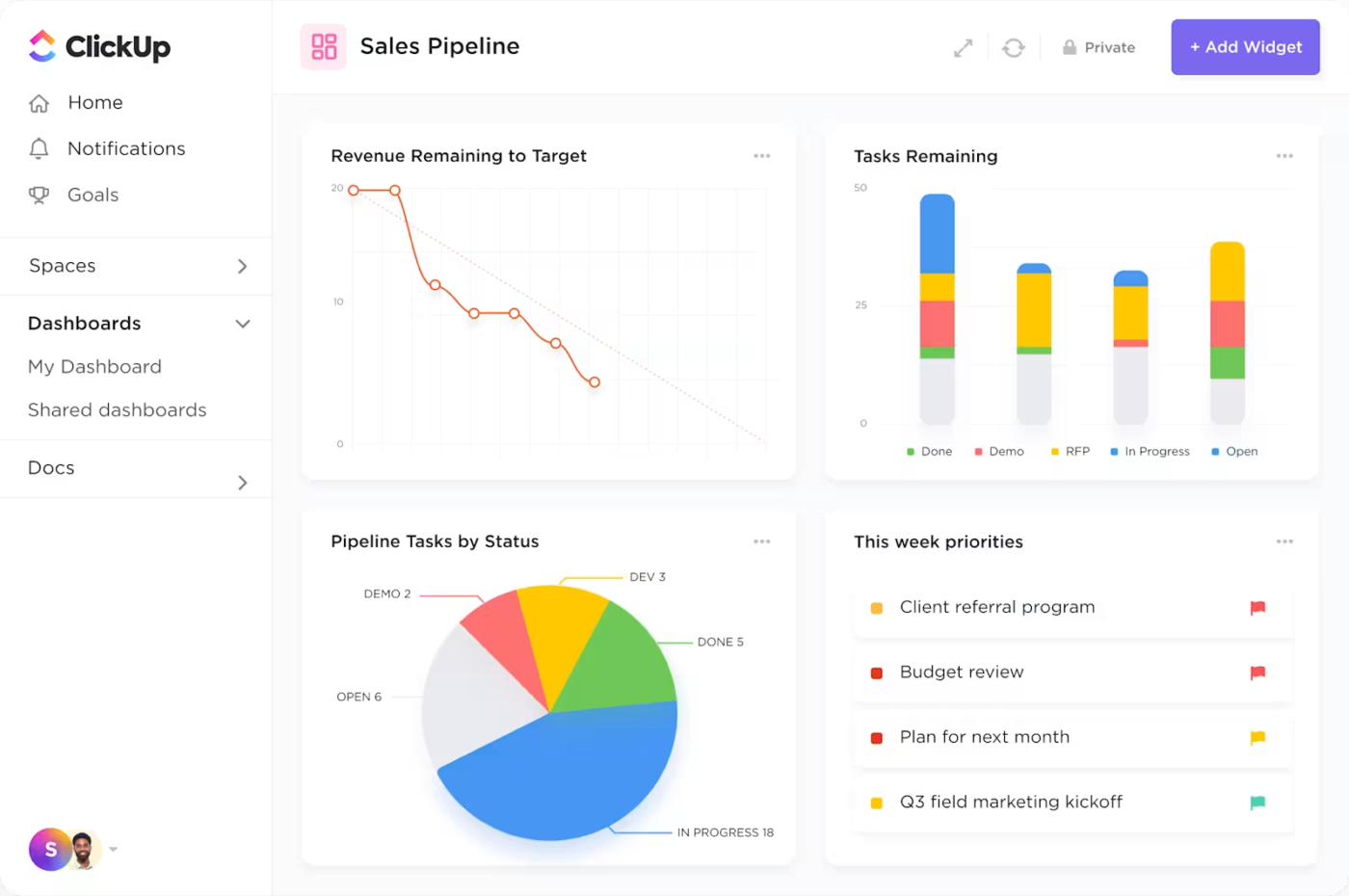
With dashboards, you can:
👀 Did You Know? 14% of construction industry rework results from poor project data.
Learn how to create a solid project management dashboard in this video:
Keep the construction project on track and meet deadlines with a realistic schedule.
Here’s what your proposed schedule should include:
Use ClickUp Gantt Charts to create a visual timeline of your proposed schedule. They help identify critical tasks that directly impact project deadlines, allowing teams to focus resources where they matter most.
You can also see completion percentages and status updates for individual tasks and milestones to identify risks before they become delays.
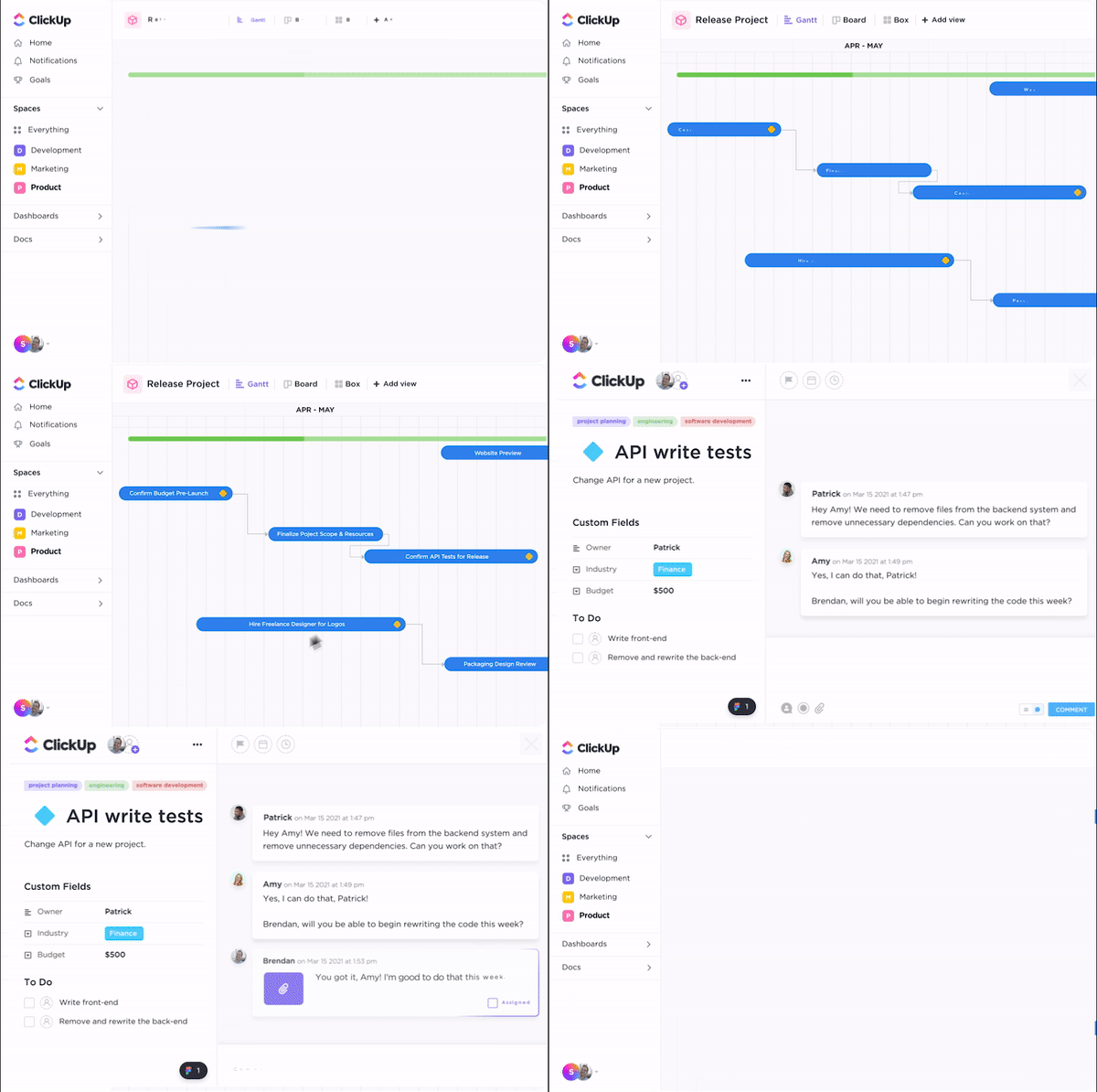
With a drag-and-drop interface, managers can adjust task durations and reorder milestones to accommodate shifting priorities. Finish-to-Start dependencies ensure logical sequencing, such as requiring concrete to cure before framing begins.
📌 For example, if a supplier delay pushes material delivery back a week, ClickUp automatically shifts dependent tasks and updates the timeline, keeping everyone informed.
Poor quality control can lead to defects, costly rework, legal liabilities, and potential safety hazards. A well-defined quality control plan proactively identifies and mitigates issues before they escalate.
Here’s what to pay attention to:
📌 As a final step, managers should create a construction project handover checklist. It helps verify that all deliverables, documentation, and final inspections are complete before handing the project to the client or facility managers.
If the above steps seem too time and effort-intensive, the ClickUp Construction Management Template offers a faster solution. It simplifies complex workflows by offering pre-built views, customizable fields, and real-time collaboration tools.
With integrated Calendar, List, Board, and Timeline views, teams can easily allocate resources, monitor progress, and adjust schedules.
Here’s how you can use this construction management template:
📌 Similarly, ClickUp offers multiple construction budget templates to visualize cost breakdowns in intelligent spreadsheets. Managers can use them to track cost estimates for entire project lifecycles.
🧠 Fun Fact: Gustave Eiffel, the creator of the Eiffel Tower, built a private apartment for himself at its summit.
Now that we have created a construction management plan, let’s discuss how to apply it to a project.
Without on-site strategies, construction sites become chaotic, inefficient, and potentially dangerous. Clear guidelines help establish safety, quality, and communication protocols. In essence, they directly affect project success or failure.
Here’s what you can do to implement them:
Construction projects rarely unfold as imagined. Unexpected challenges, such as weather delays, material shortages, or design changes, are inevitable.
Adapting plans in real time allows project managers to mitigate these risks, ensuring the project stays on track. Regular monitoring provides valuable data on performance, enabling informed decisions and proactive adjustments.
You can use the ClickUp Board View here. It is a visual workflow management tool with a Kanban-style layout that enables teams to organize and track tasks through various stages. Tasks are presented as cards within customizable columns for different project phases.
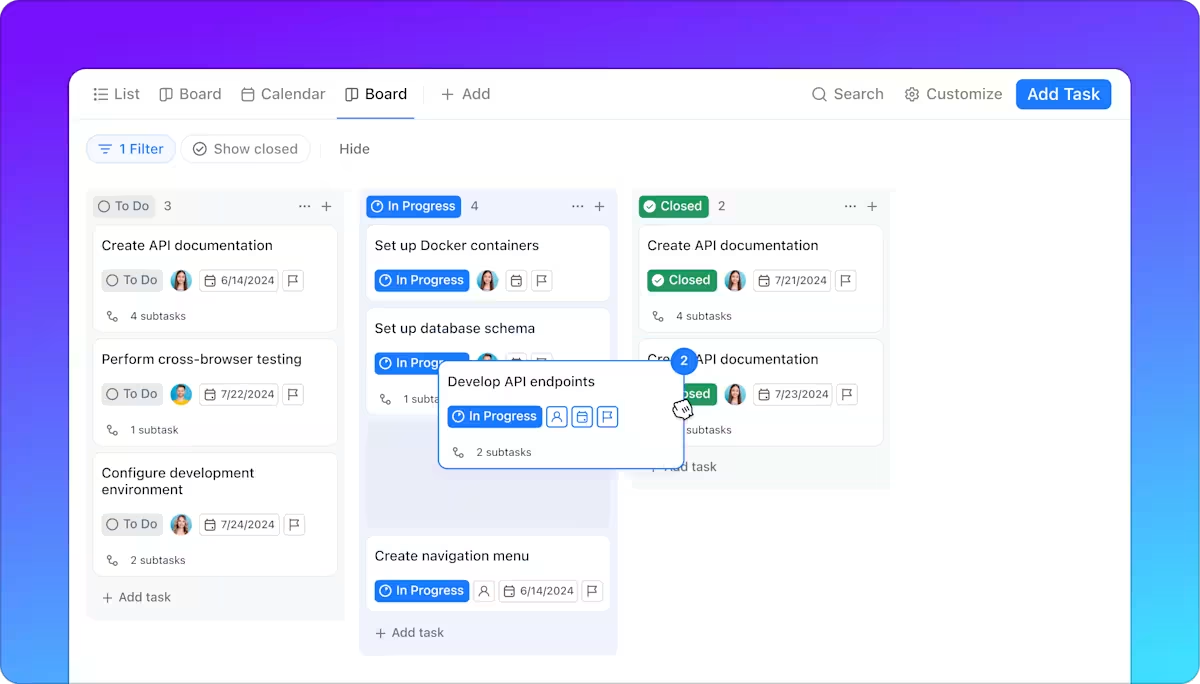
With the ClickUp Board View, you can:
Similarly, the ClickUp Timeline View provides a linear and visual representation of tasks and their durations. It displays them as horizontal bars along a chronological timeline, allowing for clear visualization of task dependencies, overlaps, and potential scheduling conflicts.
Like dedicated construction scheduling software, the Timeline View helps monitor progress against planned deadlines and adapt to unforeseen delays or changes.
💡 Pro Tip: ClickUp Automations help you proactively manage construction workflows by:
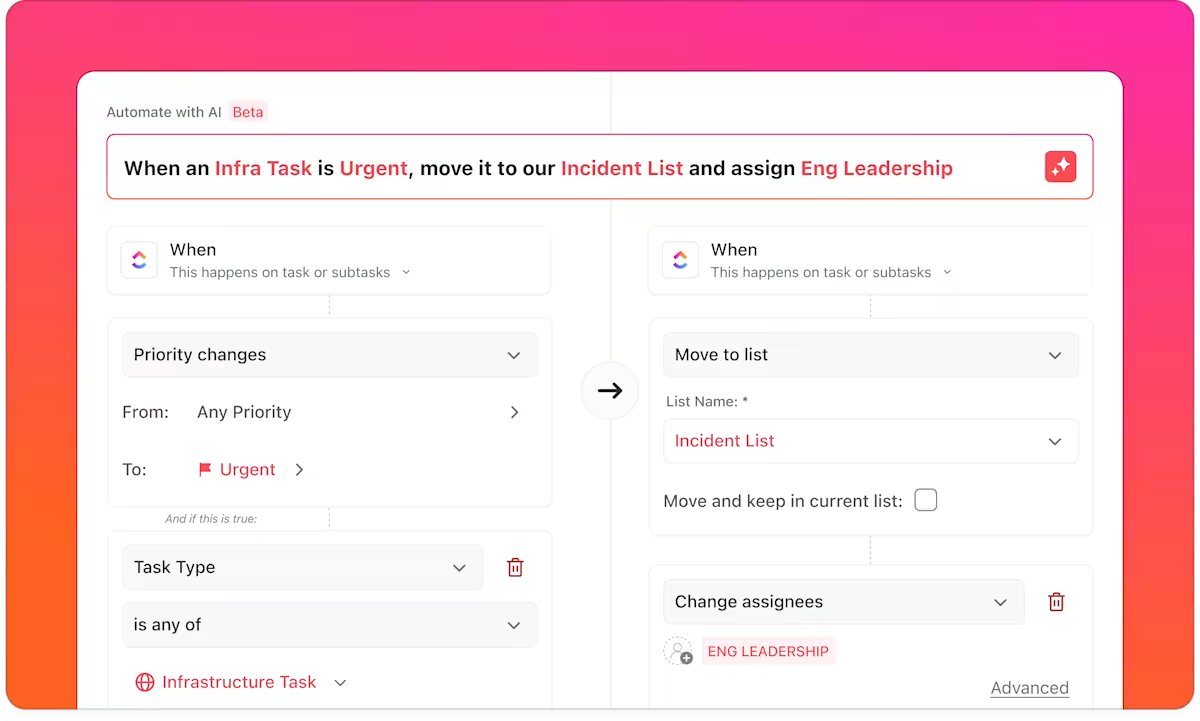
Construction projects involve numerous specialized teams, each with its own schedules and tasks. Without proper coordination, these individual efforts can clash, leading to delays, errors, and increased costs.
Key considerations to resolve this are:
The frequency of communication depends on the project’s complexity, stakeholder expectations, and the nature of updates.
Clearly defining roles and responsibilities prevents information gaps and ensures accountability.
Choosing the proper communication channels ensures efficient information sharing and accessibility for all stakeholders.
Within the ClickUp ecosystem, use @mentions in threaded task comments to eliminate lengthy email chains or phone calls, while notifying them of updates, requesting their input, or assigning tasks to them.
📌 For instance, if the wiring plan changes, the site supervisor can tag the electrical team directly in a task comment or in the relevant ClickUp Chat channel, ensuring immediate visibility and a quicker response.
When a comment requires a specific action, such as ‘Verify the rebar placement, ‘ a user can assign it directly to the relevant team member or contractor using Assigned Comments in ClickUp.
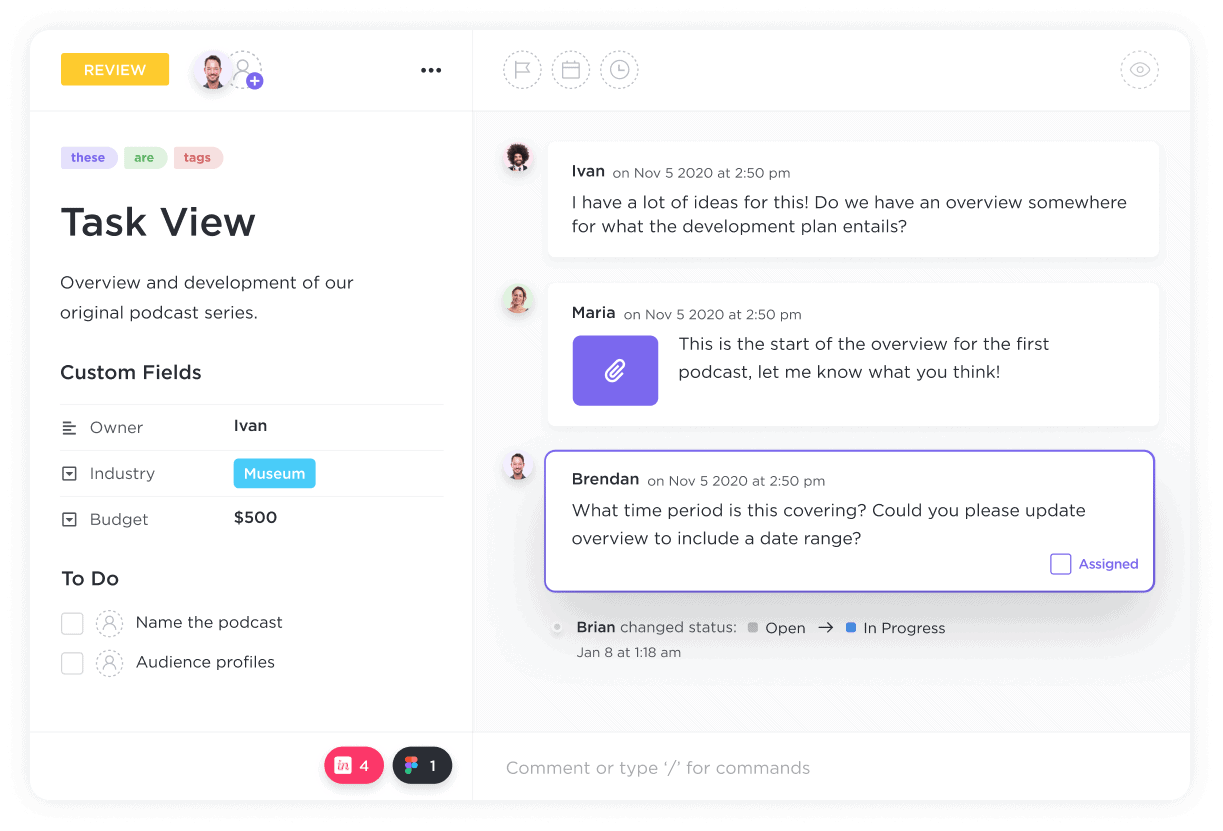
This creates a clear, accountable task that can be tracked, resolved, and monitored. ClickUp Assign Comments also eliminates the ambiguity of simple comments and transforms them into actionable steps, ensuring everyone understands their responsibilities.
Construction projects are complex, involving multiple stakeholders, tight deadlines, budget constraints, and unpredictable risks. For ultimate management, understand these challenges and be ready with their solutions.
When schedules slip, costs inevitably rise due to extended labor hours, equipment rentals, and potential penalties. The repercussions can be severe, ranging from strained client relationships to financial losses and legal disputes.
✅ To tackle this, managers can:
A lack of qualified personnel can severely impact project quality and safety.
👀 Did You Know? 45% of contractors have turned down work because they haven’t been able to find skilled workers.
✅ The construction industry can:
Safety incidents cause injuries and fatalities, leading to project delays, increased insurance costs, and reputational damage. Inadequate safety training, lack of proper personal protective equipment (PPE), and poor site management contribute to these risks.
✅ For a safer environment, managers need to:
🧠 Fun Fact: The Golden Gate Bridge’s iconic ‘International Orange’ color? Total happy accident. It wasn’t in the original blueprint—but hey, sometimes the best things aren’t planned!
Managing a construction project is no small task—it requires precise scheduling, resource management, real-time collaboration, and adaptability to unforeseen challenges.
ClickUp adapts to these complexities by offering an all-in-one solution tailored for construction teams.
The platform offers everything in a singular space, from collaboration tools and real-time data insights to AI tools for construction. It saves time and reduces costs because you no longer need to app-hop.
Sign up for ClickUp for free today and start mindful management.

© 2026 ClickUp