






Still downloading templates?
There’s an easier way. Try a free AI Agent in ClickUp that actually does the work for you—set up in minutes, save hours every week.
Sorry, there were no results found for “”
Sorry, there were no results found for “”
Sorry, there were no results found for “”
Choosing the right configuration management tool can be confusing. More so when dozens of tools promise similar features, but only a few actually deliver results. In this guide, we’ve researched, compared, and reviewed the best configuration management systems available today.
Whether you’re a DevOps engineer, platform team lead, or IT operations manager standardizing environments across teams, this article will help you choose with clarity.
Configuration management tools automate the maintenance of consistent settings, software versions, and system states across your IT infrastructure. This includes everything from servers and networks to cloud environments and containers.
DevOps teams, system administrators, and IT operations professionals use these tools to eliminate manual configuration errors and ensure every environment behaves identically.
A lack of configuration management systems will inevitably cause configuration drift. This is the gradual, often invisible divergence between how a system should be configured and its actual state.
Put simply, this drift is a primary cause of deployment failures and security vulnerabilities. It’s also why you spend countless hours troubleshooting why something that worked in testing suddenly breaks in production.
🧠 Fun Fact: Organizations achieving full-stack observability report 79% less downtime than their peers—highlighting how proper configuration visibility and enforcement dramatically reduce these production issues.
| Tool | Best for | Best features | Pricing* |
| ClickUp | AI-powered configuration workflows and DevOps project management for teams of all sizes | ClickUp Brain and Super Agents to automate complex infra decisions using context-aware AI | Free plan available; customizations available for enterprises |
| Ansible | Mid-market to enterprise teams seeking agentless automation with simple YAML syntax | Event-Driven Ansible (EDA) for real-time automated responses to service failures | Custom pricing |
| Puppet | Large enterprise teams managing thousands of long-lived servers and continuous compliance | Continuous state enforcement that automatically detects and corrects configuration drift | Free plan available; Custom pricing for commercial use |
| Chef | Mid-market to enterprise development teams needing granular, Ruby-based control | Chef InSpec for defining compliance and security requirements as code | Paid plans start at $59/node annually |
| Terraform | Platform engineering teams provisioning and managing multi-cloud infrastructure | Plan-before-apply workflow to preview cloud architecture changes before execution | Custom pricing |
| SaltStack | Large enterprise operations teams requiring high-speed, event-driven orchestration at scale | ZeroMQ-based event bus for near-instantaneous parallel execution across thousands of nodes | Custom pricing |
| CFEngine | Distributed teams managing lightweight, self-healing infrastructure on edge devices | Autonomous agents that maintain system state even without a central server connection | Custom pricing |
| Docker | Development teams standardizing container image configuration and portability | Layered image architecture that ensures applications run identically across all environments | Free plan available; Paid plans start at $11/user/month |
| Kubernetes | Mid-market to enterprise teams managing declarative container deployments and self-healing | ConfigMaps and Secrets to separate environment-specific settings from container code | Custom pricing |
| Jira Service Management | Mid-market to enterprise ITSM teams tracking configuration items and formal changes | Integrated CMDB to track infrastructure components and their service dependencies | Free plan available; Paid plans start at $7.91/user/month |
Choosing the wrong configuration management tool can lead to analysis paralysis or a costly misstep. You might pick a tool that’s too complex for your team, resulting in low adoption, or one that’s too simple and gets outgrown in six months. The right tool depends entirely on your infrastructure complexity, team expertise, and operational goals.
Beyond basic automation, you need to evaluate how each tool handles your specific environment—whether that’s cloud-native Kubernetes clusters, legacy Windows servers, or network devices. The learning curve matters, too.
To make the right choice, focus on these key evaluation criteria:
📮 ClickUp Insight: 1 in 4 employees uses four or more tools just to build context at work. A key detail might be buried in an email, expanded in a Slack thread, and documented in a separate tool, forcing teams to waste time hunting for information instead of getting work done.
ClickUp converges your entire workflow into one unified platform. With features like ClickUp Email Project Management, ClickUp Chat, ClickUp Docs, and ClickUp Brain, everything stays connected, synced, and instantly accessible. Say goodbye to “work about work” and reclaim your productive time.
💫 Real Results: Teams are able to reclaim 5+ hours every week using ClickUp—that’s over 250 hours annually per person—by eliminating outdated knowledge management processes. Imagine what your team could create with an extra week of productivity every quarter!
Here are our top recommendations for the best configuration management tools:
Our editorial team follows a transparent, research-backed, and vendor-neutral process, so you can trust that our recommendations are based on real product value.
Here’s a detailed rundown of how we review software at ClickUp.
Your configuration tool enforces system state. But where do you track the decision behind that change? ClickUp becomes the operational layer around your infrastructure.
It’s a Converged AI Workspace that beats SaaS Sprawl—the process of tracking configuration rollouts in one system, approvals in another, and documentation in a third. Instead, you manage the entire change lifecycle within a single ecosystem.
📌 For example, you don’t need to switch to another tool to see who approved a production configuration update and which systems it affected. ClickUp automatically logs that information in the relevant ClickUp Task, even when you’re not actively monitoring it. The ClickUp Task becomes your single source of truth to monitor all updates around that work item.
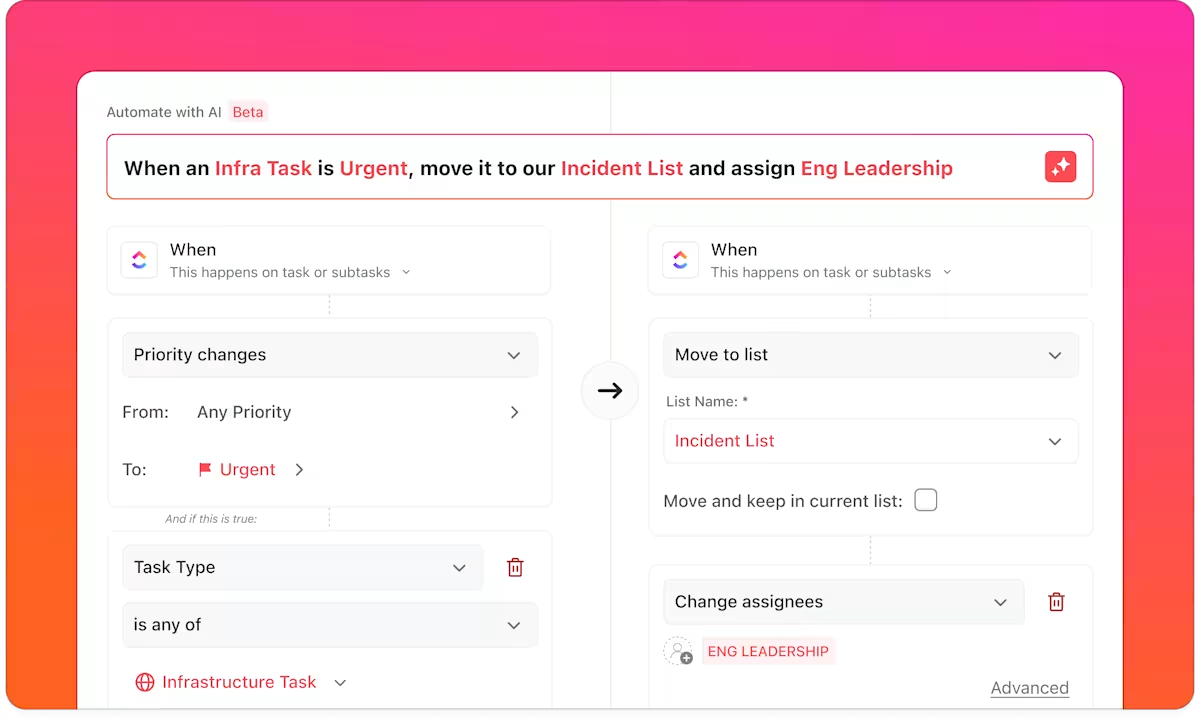
ClickUp Automations remove the manual follow-ups that slow down infrastructure work. When a configuration request moves to Approved, automations can notify the deployment team, update related environment tasks, and log the action for audit tracking. Once you define the triggers and actions, the workflow moves forward on its own.
The system also knows about your workspace as well as you do! For example, ClickUp’s connective AI tissue, ClickUp Brain, works on top of your real workspace data.
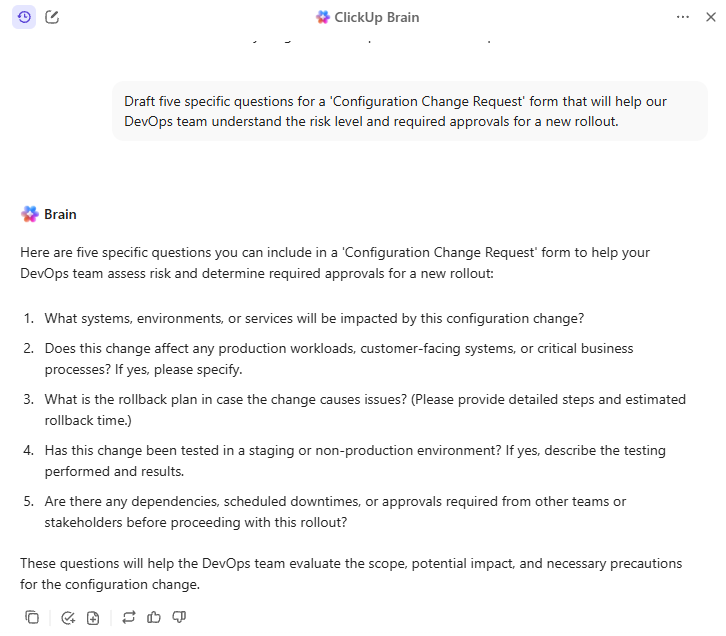
While reviewing a rollout plan or investigating an incident, you can surface related runbooks or similar tickets without having to search across wikis and chat threads. The AI understands the work because it is embedded within it.
Where ClickUp Super Agents take this a step further is in configuration management scenarios where the next step isn’t predictable upfront.
Unlike rule-based automations, Super Agents can interpret context, make decisions, and act across multiple systems—the way an experienced infra engineer would.
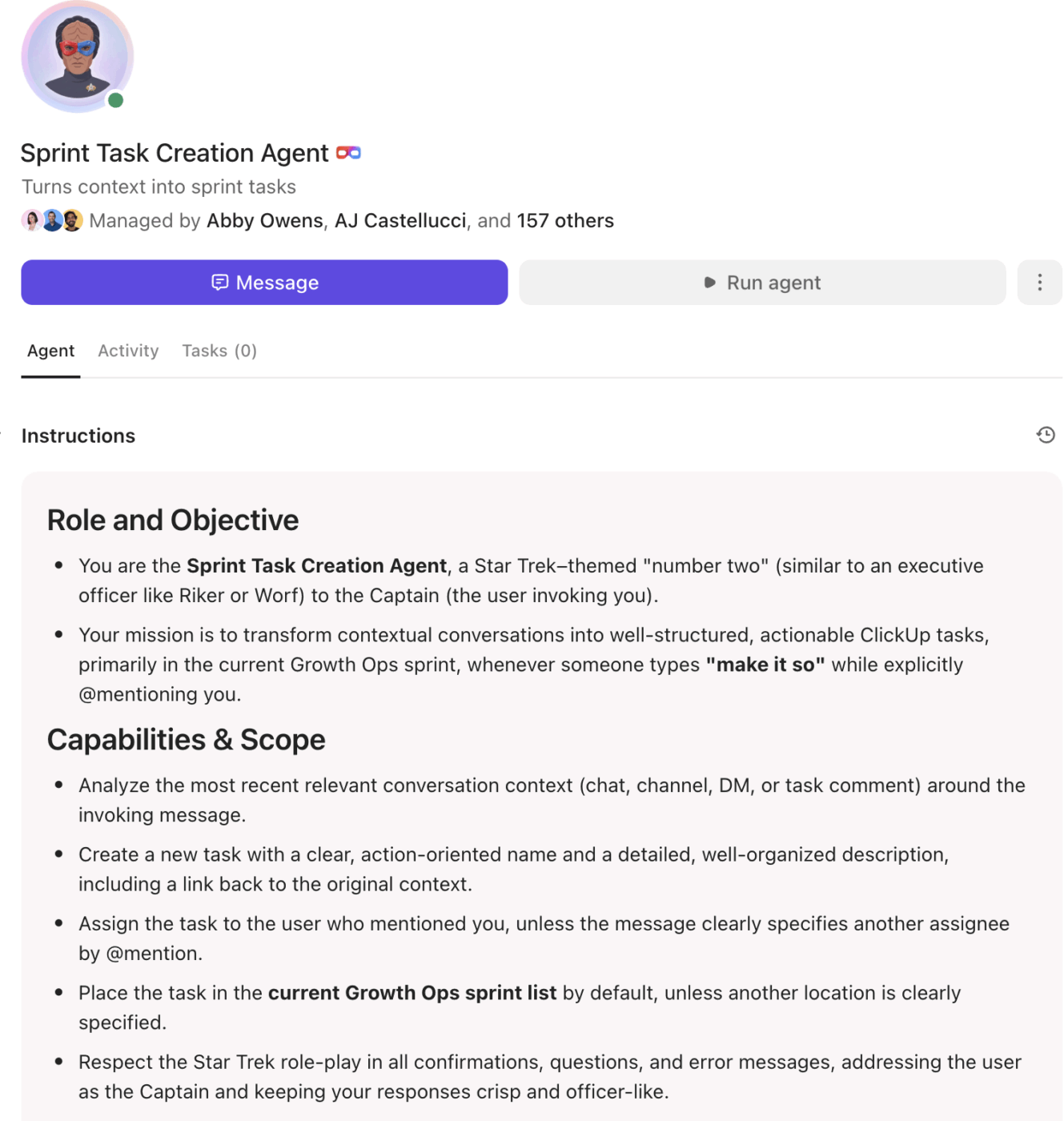
Here’s what that looks like in practice 👇
A configuration change request gets approved. A Super Agent can:
All of this happens without you explicitly defining every branch of the workflow.
Because Super Agents run on top of ClickUp Brain’s workspace-wide understanding, they don’t just move tasks forward; they reason about the work. They know which services usually break together, which configs require approvals, and which teams need to be looped in based on historical patterns.
The result? Configuration management becomes adaptive instead of brittle. You’re no longer maintaining dozens of “if-this-then-that” rules for edge cases.
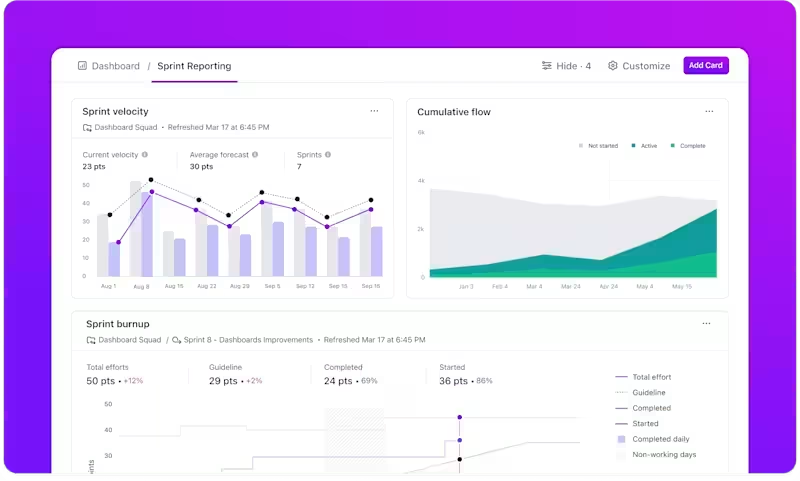
To see the impact of your actions, you can open a ClickUp Dashboard.
It gives you a real-time snapshot of configuration activity across environments. You can see which changes are pending approval, which deployments are in progress, which environments carry the highest risk, and where bottlenecks are forming. All in one unified digital workspace.
💡 Pro Tip: Most configuration drift happens because the why behind a change stays buried in a chat thread while the how is hidden in a terminal, but ClickUp Brain MAX acts as your team’s desktop AI companion to bridge this gap.
You can capture critical infrastructure context during high-pressure outages by using Talk to Text to dictate post-mortems 4x faster than typing.
Plus, by leveraging Enterprise Search, teams reclaim 1.1 days per week by instantly surfacing PR details and variables across all integrated apps, such as GitHub and Google Drive.
This converged approach allows you to replace disconnected transcription and search tools with a single AI super app, reducing overhead costs and ensuring your entire change lifecycle remains visible and secure.
Pros:
Cons:
A Capterra user shared their thoughts about ClickUp:
All in one platform for project and team collaboration, process automation and task management. Highly customizable.
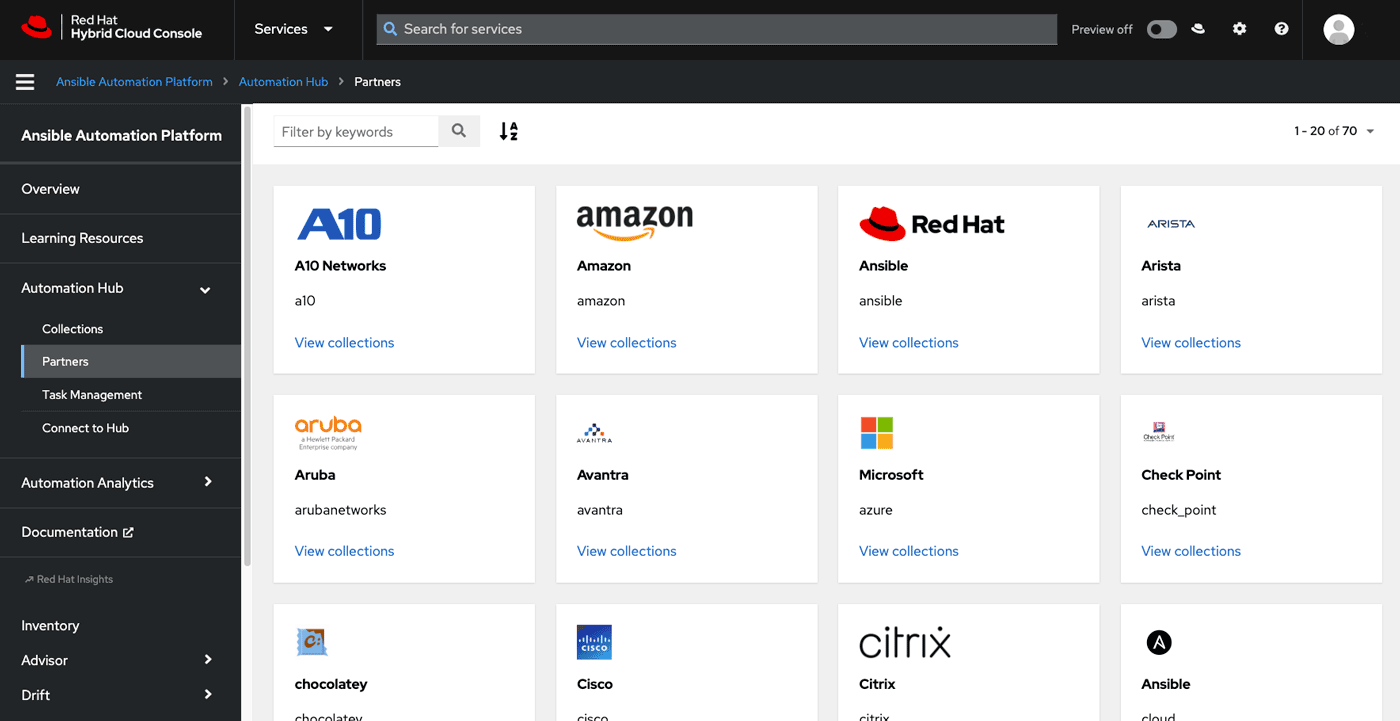
Ansible removes the barrier to entry for configuration management by being “agentless.” This means you can start automating server configurations immediately using the SSH connections you already have, without deploying and maintaining extra software across your infrastructure.
Its push model executes tasks on demand, ideal for teams that prefer explicit control over when changes occur.
Pros:
Cons:
A G2 user reviewed Ansible:
What I like best is the agentless architecture and human readable YAML playbooks. The platform scales from simple tasks to enterprise wide orchestration without added complexity.
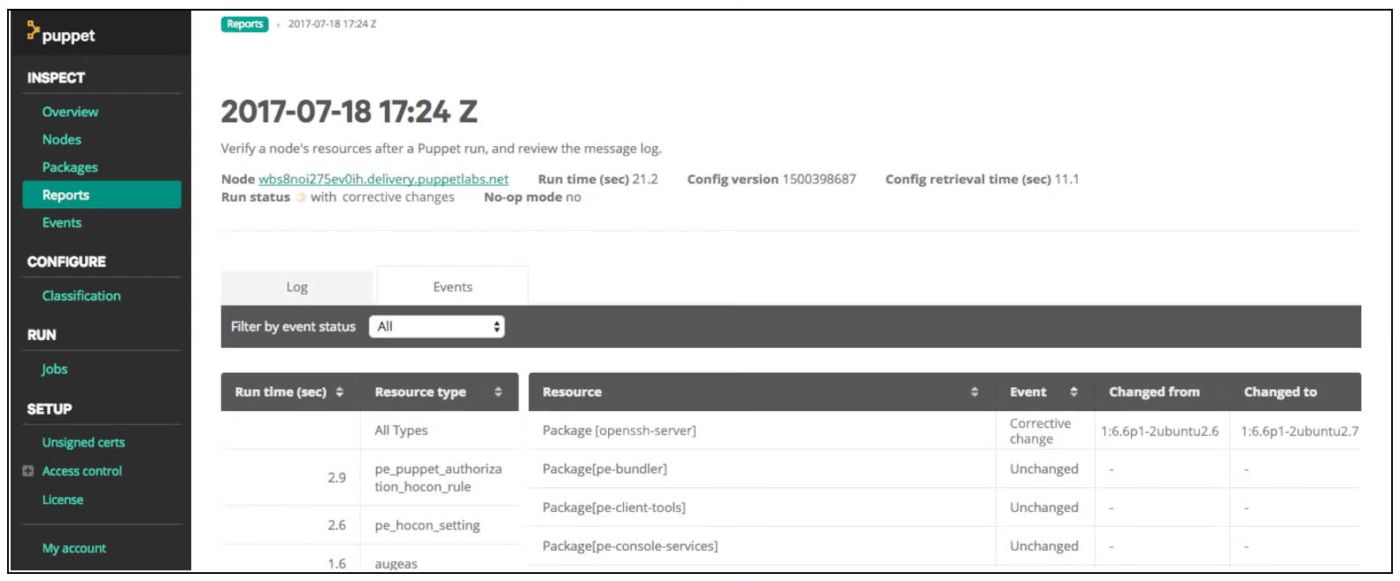
If you manage hundreds or thousands of servers, manual fixes are no longer fixes. They become future incidents. Puppet lets you define the exact state each system must maintain and keeps enforcing it.
Its agent runs on every node, checks for drift, and automatically corrects changes. You do not script steps. You declare the end state, and Puppet applies it across different operating systems and starting conditions.
It works best in large, stable environments where ongoing enforcement and centralized control matter more than a lightweight setup.
Pros:
Cons:
A Capterra user shared their feedback:
It’s a Very powerful tool for managing configuration of large estates, can be adapted to suit many different use cases.
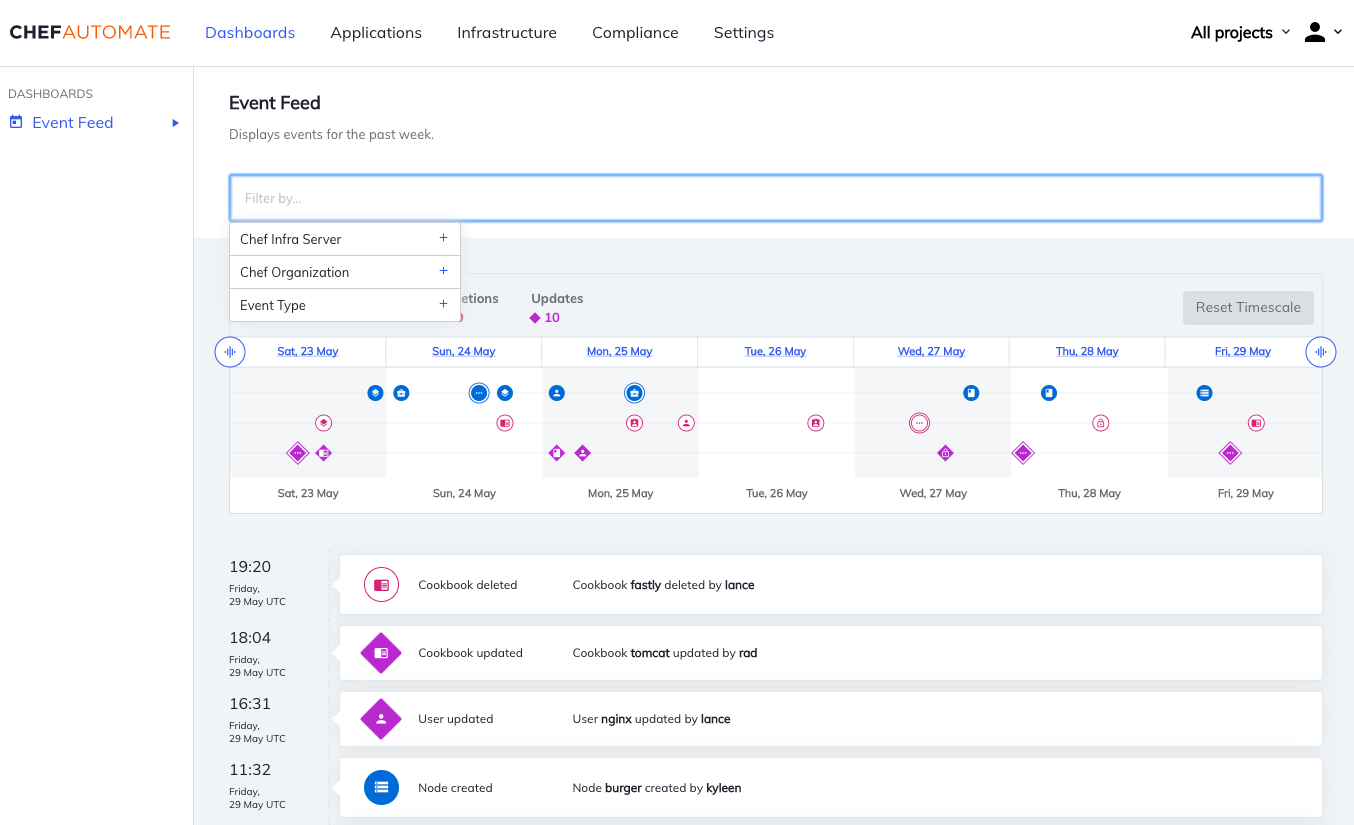
Chef gives development-minded teams the full power of Ruby for configuration management. This approach treats infrastructure as code that can be tested, versioned, and reviewed just like any other application.
Configurations are written as “recipes” and grouped into “cookbooks.” A Chef Infra Client runs on each managed node, pulling configurations from a central Chef Server and converging the system to its desired state. The platform also includes Chef InSpec for compliance automation, which validates systems against security benchmarks.
Pros:
Cons:
A G2 user reflected on their experience with Chef:
I have used Chef in my previous company and have setup chef work station in my local. which was simple and it helps me to make some configuration changes without any downtime. it pulls configurations from the central server to the worker node.
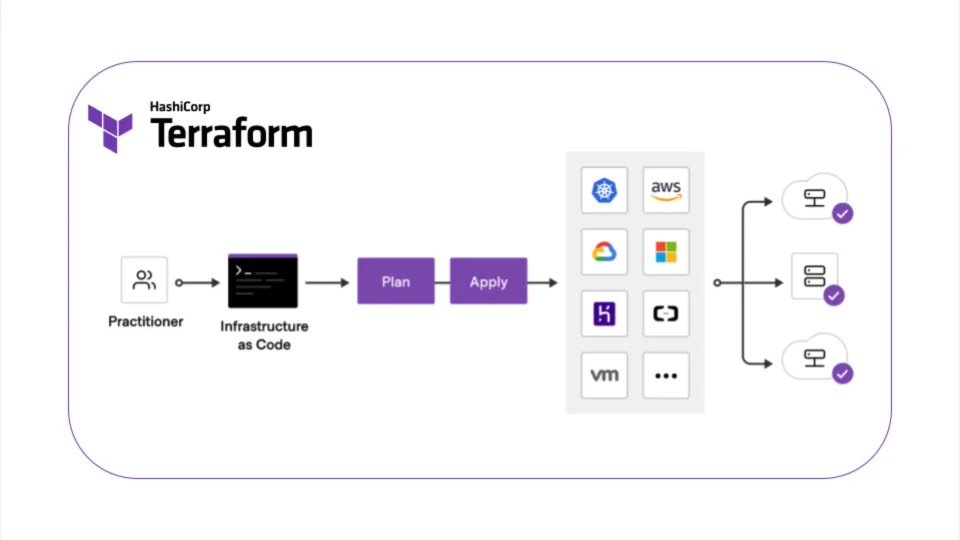
Who decides when a server should exist, what network it belongs to, and which cloud it runs on? Terraform.
Instead of configuring software inside machines, Terraform defines the infrastructure itself. You write your desired cloud architecture in HCL (HashiCorp Configuration Language), and Terraform compares that definition with the current state. It then generates a plan that shows exactly what it will create, modify, or destroy before you approve the change.
terraform plan command provides a preview of changes, preventing accidental deletions or misconfigurationsPros:
Cons:
Here’s what a Capterra user felt using Terraform:
Its infrastructure-as-code approach enables automation, scalability, and repeatability with declarative configuration.
👀 Did You Know? Gartner predicts misconfigured AI will lead to the shutdown of national critical infrastructure in at least one G20 country. This makes the configuration management process a matter of national security.
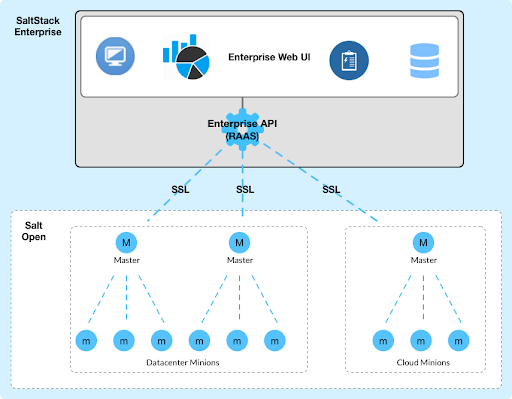
Speed and scale are not optional when you touch a thousand nodes at once. SaltStack, now part of VMware, uses its event-driven architecture and ZeroMQ messaging bus to enable real-time orchestration across nodes, executing commands in seconds.
It offers both declarative configuration management via ‘Salt State’s (written in YAML) and ideal remote execution for running ad-hoc commands. The event reactor system supports sophisticated, self-healing automation; for example, when a service fails, Salt can automatically restart it.
Pros:
Cons:
Long before infrastructure as code became the standard, CFEngine was already doing it. It’s an ideal choice for organizations that prioritize minimal resource consumption and autonomous operation. Its lightweight agents can run on everything from embedded systems to mainframes.
CFEngine is built on promise theory. Each agent promises to maintain a defined state and works independently to keep that promise. Even if it loses connection to a central server, it continues to enforce policy and correct drift. That autonomy makes it suitable for distributed systems where constant connectivity is not guaranteed.
Pros:
Cons:
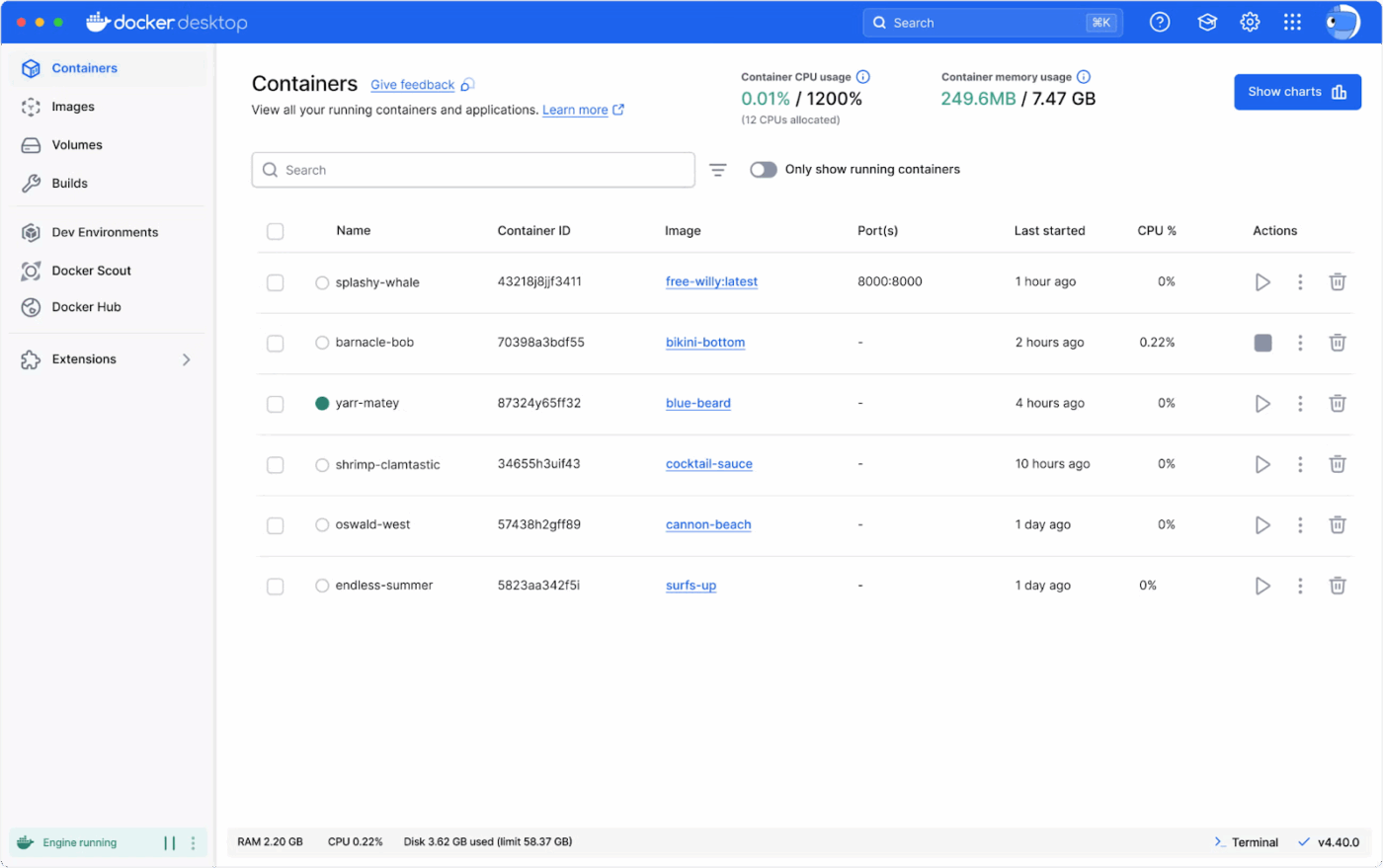
What if you stopped configuring servers altogether? Docker lets you package your application and its dependencies into an immutable container image that runs identically everywhere.
Configurations are defined in a Dockerfile and specify the base system, software to install, and commands to run, creating a reproducible environment that eliminates the ‘it works on my machine’ problem.
Pros:
Cons:
A G2 user shared:
Docker makes it easy to package applications with all their dependencies, ensuring consistency across development, testing, and production environments. It simplifies setup, improves portability, and speeds up development workflows.
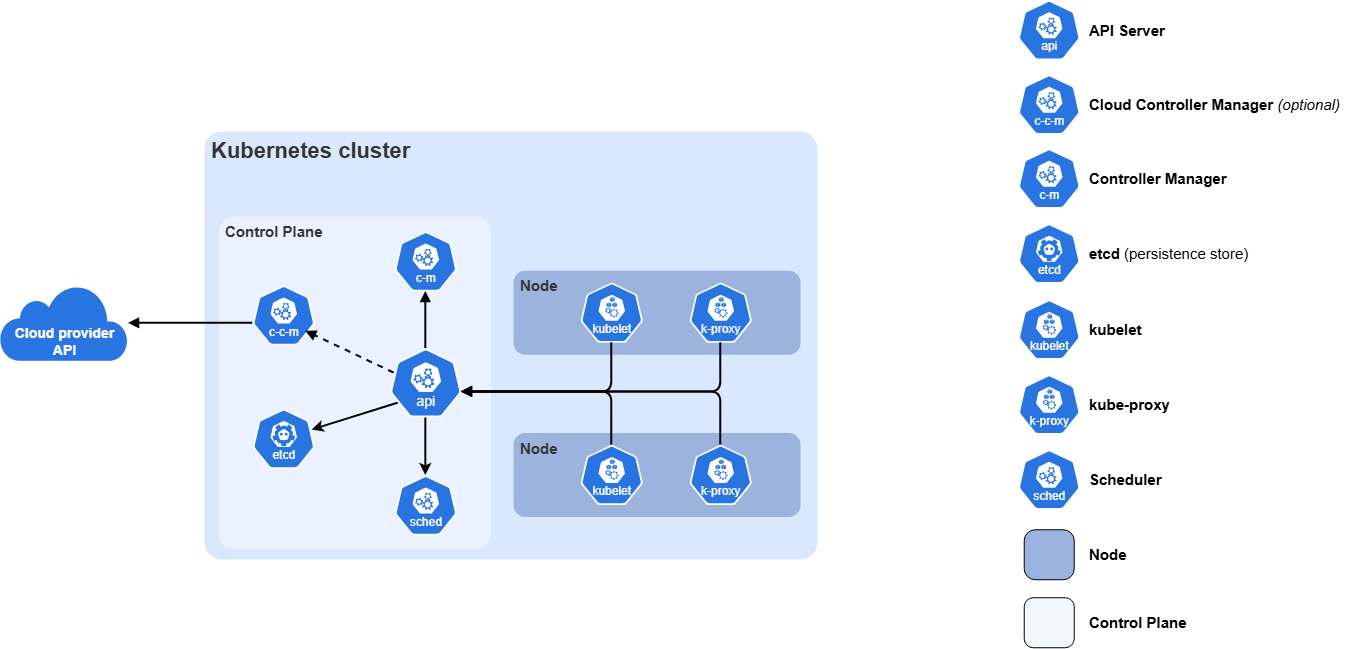
Kubernetes manages how containers behave once they’re in production. You define the desired state of your application in declarative YAML manifests—how many replicas should run, how they network, where they store data. Kubernetes monitors the cluster and continuously reconciles the actual state with the defined state.
It also separates configuration from the container image using ConfigMaps and Secrets. That lets you reuse the same image across environments while injecting different configuration values at runtime.
Pros:
Cons:
A Capterra user shared four benefits of using Kubernetes:
1. We can easily scale up and down our software 2. Run on any platform 3. Less cost. 4.automates containers
Configuration management does not stop at servers. It also tracks how systems connect.
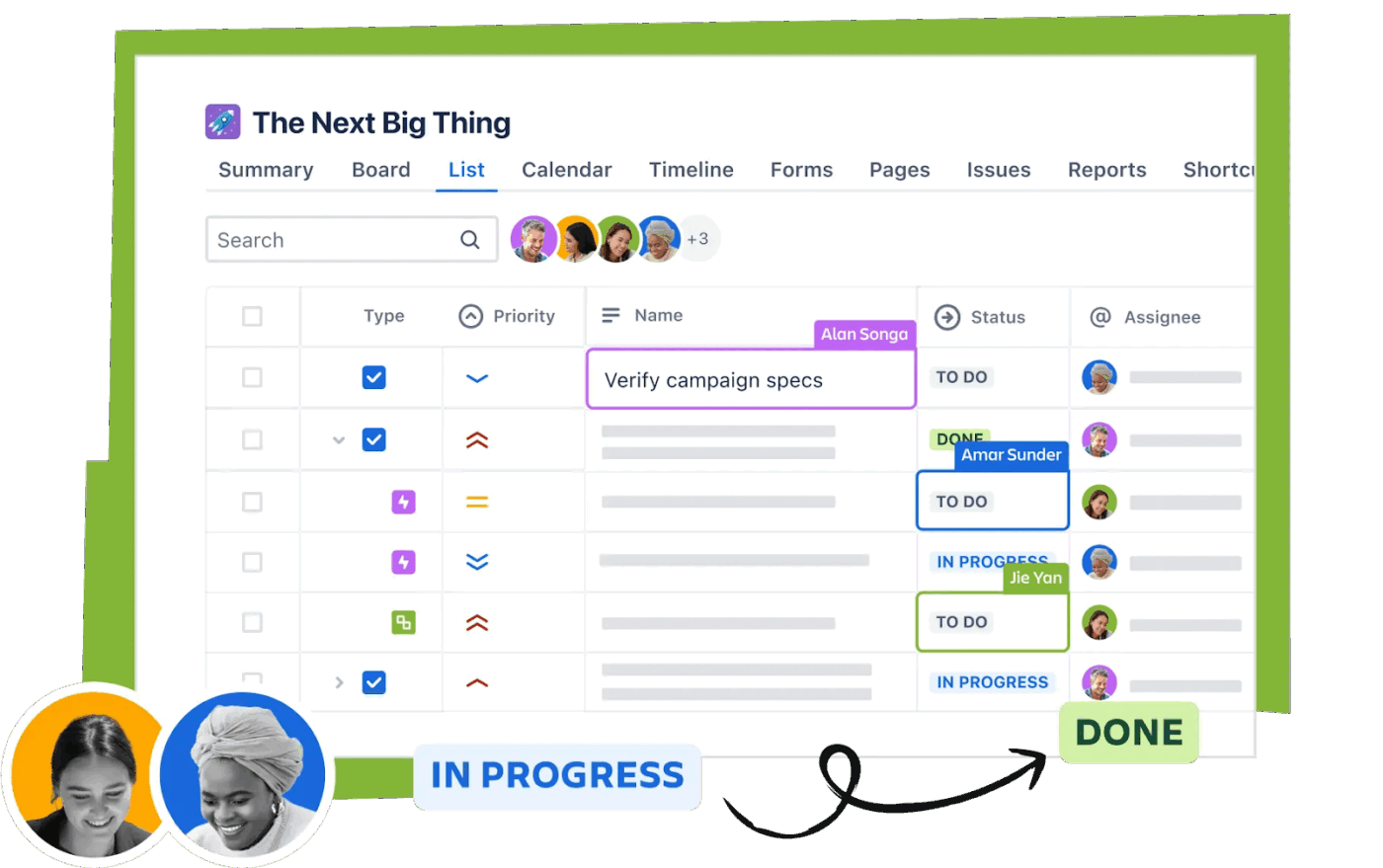
Jira Service Management approaches configuration management from an IT Service Management (ITSM) perspective. Its core is a Configuration Management Database (CMDB) that tracks your infrastructure components and, more importantly, the relationships between them.
When an incident occurs, your team can use the CMDB to quickly identify affected services and dependent systems. The platform integrates change management workflows with this configuration tracking. This allows you to assess impact, require approvals, and maintain audit trails for changes—essential for ITIL compliance.
Pros:
Cons:
A Capterra user shared their thoughts:
Jira has a power to do advanced level of customizations, you can tailor workflows, issue types, and boards to fit literally any project structure. I also love the deep integration with other developer tools like GitHub and Confluence, which keeps all our project documentation and code commits linked in one place.
🧠 Fun Fact: 77% of companies say complexity is actively hurting their growth. In plain English? If your configurations are manual and messy, you are slowing down your entire company’s ability to innovate. Configuration management tools automate these guardrails so you can focus on growth.
You’ve seen the top tools, but the reality is that technical features are only half the battle. Your biggest challenge is managing the chaotic human processes that surround them.
In other words, you can have the most powerful automation engine, but if your change requests, approvals, and documentation are scattered across disconnected tools, you’re still facing a massive productivity drain and operational risk.
This is where a Converged AI Workspace—a single platform where all work apps, data, and workflows live together—becomes essential. The best tool for your team is one that not only handles the technical configuration but also orchestrates the entire change management lifecycle in one place.
Instead of relying on inconsistent servers, you can achieve a consistent, visible, and automated process for managing them. Get started for free with ClickUp to stop letting tool sprawl undermine your automation efforts.
Configuration management tools focus on maintaining the desired state of existing systems, while infrastructure as code tools focus on provisioning and creating those systems in the first place. Many teams use both together for a complete automation strategy.
DevOps teams integrate CM tools into their CI/CD pipelines to automate environment provisioning, deploy application configurations, and ensure consistency across all stages of development.
The top open-source options include Ansible, Puppet, Chef, SaltStack, CFEngine, and Terraform. Each offers different trade-offs in terms of ease of use, performance, and community size.
These tools prevent drift by continuously enforcing a desired state, either by periodically checking and correcting systems or by enabling idempotent execution that can be run safely and repeatedly. This ensures that manual changes or failed updates don’t leave systems in an inconsistent state.

© 2026 ClickUp

There’s an easier way. Try a free AI Agent in ClickUp that actually does the work for you—set up in minutes, save hours every week.