






Still downloading templates?
There’s an easier way. Try a free AI Agent in ClickUp that actually does the work for you—set up in minutes, save hours every week.
Sorry, there were no results found for “”
Sorry, there were no results found for “”
Sorry, there were no results found for “”

Your customer just clicked ‘Add to Cart.’
But your pricing tool hasn’t updated since last week, your inventory data is out of sync, and your fulfillment app still doesn’t know which warehouse to pull from.
All this results in a delayed order, an unhappy customer, and a lost sale.
When your AI tech stack isn’t connected, every system works in isolation. Teams waste time chasing reports, matching numbers, and fixing issues that AI automation could easily handle.
In this blog post, we’ll explore which AI stack is right for e-commerce brands, what each layer does, and how tools like ClickUp can bring it all together. 🎯
At its core, every e-commerce AI stack has three main parts:
Let’s break down each part so you can see how the front-end, back-end, and supporting layers work together to drive real results.
Front-end AI components shape what shoppers see, feel, and experience. These tools optimize engagement, personalize content, and improve conversions in real time.
🧠 Fun Fact: In August 1994, Phil Brandenberger bought a Sting CD on NetMarket, marking the world’s first e-commerce transaction. That single click started a trillion-dollar digital economy.
Back-end systems are where intelligence meets execution. These components manage your data, optimize inventory, and forecast demand, all critical for profit and scalability.
These layers keep your artificial intelligence stack running smoothly, ensuring information flows seamlessly between tools and teams. Tools like ClickUp centralize project tracking, data visibility, and automation triggers.
🔍 Did You Know? AI went through two ‘winters’ (in the 1970s and late 1980s) when funding and interest dried up because computers weren’t powerful enough to support big ideas.
A well-built AI stack creates a connected ecosystem where decisions, data, and teams move in sync. Here’s what that looks like in action:
A unified stack eliminates redundant hand-offs and repetitive tasks across departments. When your CRM, inventory system, and AI marketing tools connect seamlessly, updates flow automatically.
🔍 Did You Know? In 1997, Coca-Cola installed vending machines in Finland that accepted payments via SMS. This makes it one of the earliest examples of mobile commerce (m-commerce).
With AI-powered analytics and live dashboards, your team can spot demand shifts, pricing anomalies, or campaign performance changes as they happen. For instance, if a product surges in one region, you can instantly adjust ads and fulfillment plans instead of waiting for end-of-day reports.
When personalization engines and campaign tools share the same intelligence layer, every user interaction feels relevant. Your AI stack can execute AI marketing campaigns that tailor product recommendations, emails, and discount offers based on user behavior, location, and timing, enhancing both conversions and loyalty.
🧠 Fun Fact: The first AI-driven personalization system was built in the 1990s. MIT researchers created GroupLens, a system that recommended news articles based on user preferences. This concept has evolved into today’s AI recommendation algorithms.
A connected AI stack keeps your supply chain one step ahead. Forecasting models, pricing tools, and fulfillment systems anticipate trends together, preventing overstock, stock-outs, and margin loss. Brands using predictive AI in inventory management see sharper accuracy and leaner operations.
Unified systems replace endless update loops with shared visibility. Teams can plan AI campaign execution for e-commerce, sync fulfillment timelines, and track performance in one workspace, reducing miscommunication and speeding up execution.
🔍 Did You Know? Coined by the National Retail Federation in 2005, ‘Cyber Monday’ came from data showing people shopped online more when returning to work after Thanksgiving weekend. AI now powers most of those recommendation engines and email triggers.
Building an AI stack might sound complex, but it’s simply about layering the right internal tools on a strong foundation. Let’s explore how to build or choose an AI stack tailored to your e-commerce business goals.
Before you pick tools, you must build a strong foundation. This ensures your AI stack solves the right problems and can scale.
Define one or two measurable objectives, such as ‘Improve repeat purchase rate by 15% the next 12 months’, or ‘Reduce inventory holding cost by 20% while cutting stock-outs’. Ensure these goals align with your broader strategy (such as growth, profitability, increasing customer lifetime value, or retention).
For instance, if your biggest leak is cart abandonment, then your AI stack must focus on real-time personalization plus messaging rather than heavy supply-chain forecasting.
You’ll need consistent data across key domains such as orders, web traffic, product catalog, inventory logs, and CRM records. For meaningful models, you’ll often need 12-18 months of data (or enough volume of events) to establish patterns.
A checklist to perform a data audit:
Decide if you’ll use a standard managed platform (e.g., Shopify Plus, Magento/Adobe Commerce, BigCommerce) or a headless/composable architecture (front-end decoupled from back-end).
Managed platforms help with faster setup and come with built-in features and AI plugins. Meanwhile, headless/composable architecture provides flexibility and future-proofing (you can swap modules). However, you need more technical resources.
🧠 Fun Fact: Back in 2000, Google launched AdWords, and its first big advertiser was an e-commerce store selling live lobsters from Maine named Lobster Gram. After this, digital advertising changed forever.
Once your foundation is ready, pick the right tools for the right problems. Here are three high-impact areas where AI can make a real difference:
Use AI recommendation engines that look at browsing, purchase history, session data, and real-time behavior to personalize shopping experiences. You can tie in dynamic content such as homepage banners or landing pages tailored to segments (new vs. returning customers) and behaviour (abandoned-cart visitors).
📌 Example workflow: When a visitor lands on the website, a personalization engine shows ‘Recommended for you’ blocks based on their segment and session behaviour. In email follow-up, a similar engine drives product suggestions.
📊 Monitor metrics: Conversion rate from personalized blocks, click-through rate (CTR), average order value (AOV), and repeat purchase rate.
Go for AI chatbots that can handle simple queries (order status, returns), proactive outreach (e.g., ‘You left items in cart, can I help?’), and escalate to human agents when required. This frees your team to handle higher-value tasks.
Pair this with your CRM so it can pull order info and trigger returns.
📌 Example workflow: When a shopper asks, ‘Where’s my order?’, the AI chatbot retrieves shipping info from your OMS and responds instantly. If the issue is complex (e.g., missing item or refund), the bot transfers the chat to a support agent with complete context.
📊 Monitor metrics: First response time, chatbot resolution rate, escalation percentage, customer satisfaction (CSAT), and repeat interaction rate.
Leverage predictive forecasting models to analyze historical sales, seasonality, promotions, and returns to predict sales per SKU. Combine this with AI-powered pricing and logistics automation to maintain lean inventory and healthy margins.
📌 Example workflow: Your AI engine forecasts that SKU #1234 will see a 20% spike next month due to an upcoming sale. It automatically adjusts reorder quantities, updates supplier requests, and syncs prices based on inventory and competitor data.
📊 Monitor metrics: Stock turn rate, excess inventory percentage, back-order rate, % of orders fulfilled from the nearest warehouse, and average lead time.
As you’re selecting your e-commerce software, apply criteria that ensure you don’t end up with one-off apps or technical debt.
Here’s a quick checklist to help you choose the right AI tools:
🧠 Fun Fact: In 1979, British inventor Michael Aldrich connected a modified TV to a computer via telephone line, creating the world’s first system for online shopping.
This is him!

Once your AI stack is live, the real work begins. These campaign management tools will evolve, new models will emerge, and your workflows will shift. What matters is how easily you can keep learning, upgrading, and optimizing without tearing everything down.
Here’s what you can do:
🤝 Friendly Reminder: Include governance by reviewing models periodically for bias and monitoring for unintended outcomes.
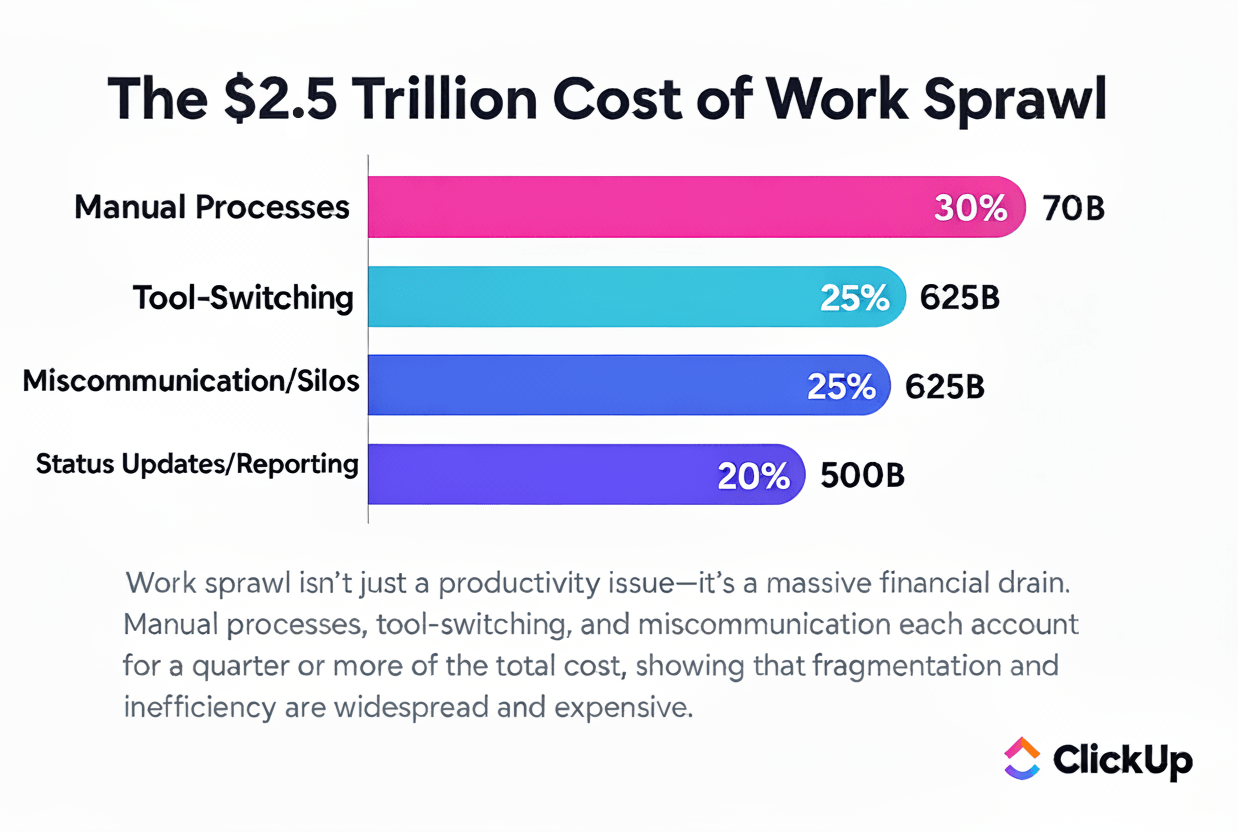
Tool sprawl drains productivity, budgets, and focus. It sneaks up gradually, turning into work sprawl, where updates, files, and decisions are scattered across apps, chat threads, and inboxes. This problem balloons into an estimated $2.5 trillion global productivity loss every year.
This is why, once your AI stack is in motion, you’ll need a single orchestration layer to connect efforts across marketing, data, and fulfillment.
ClickUp becomes that layer.
It’s the everything app for work that combines project management, knowledge management, and chat—all powered by AI that helps you work faster and smarter.
📮 ClickUp Insight: Low-performing teams are 4 times more likely to juggle 15+ tools, while high-performing teams maintain efficiency by limiting their toolkit to 9 or fewer platforms. But how about using one platform?
As the everything app for work, ClickUp brings your tasks, projects, docs, wikis, chat, and calls under a single platform, complete with AI-powered workflows. Ready to work smarter? ClickUp works for every team, makes work visible, and allows you to focus on what matters while AI handles the rest.
Here’s a sample blueprint to help you structure your AI tools for e-commerce. Use this as your reference map for designing an AI stack that fits your growth goals and avoids tool chaos.
This layer is your foundation. It gathers and unifies all relevant data (orders, web traffic, product catalogue, inventory logs, and CRM) so the rest of your stack has consistent, accurate input.
Google BigQuery is a fully managed, serverless data warehouse aligned for e-commerce scale. It allows control over reporting and lets you combine multiple data sources into one warehouse.
Key components:
It’s a modern cloud data platform that supports large-scale data consolidation, analytics, and AI workloads. For retailers, Snowflake has a ‘Retail Data Cloud’ offering where multiple data types (purchase orders, inventory, manufacturing, partners) reside in one place.
Key components:
Segment is a Customer Data Platform (CDP) built to collect and unify customer data from multiple sources into a single profile.
Key components:
🚀 ClickUp Advantage: Turn your unfiltered data from orders, traffic, catalog, inventory logs, and CRM into an e-commerce control panel with ClickUp Dashboards.
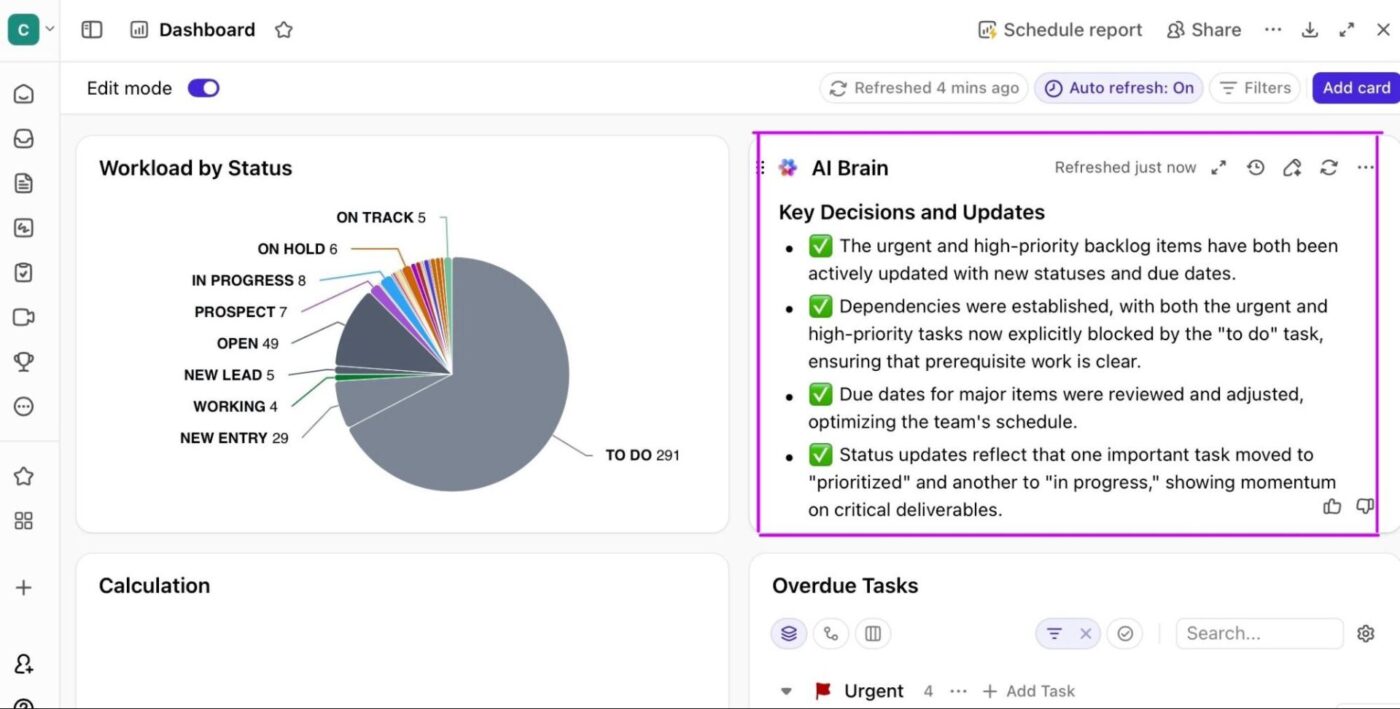
Build custom visualizations using a variety of chart and card types to track and optimize every part of your e-commerce workflow. Here are some data dashboard examples:
You can also use the built-in AI Cards to surface insights, spot anomalies in sales data, or predict low-stock items before they become a problem. And because dashboards can auto-refresh and send scheduled reports, you don’t need those Monday morning check-ins just to align on numbers.
This layer leverages behavior, session, and purchase data to deliver tailored experiences across the customer journey. When you tailor your e-commerce marketing strategies and content to the individual (and context), you drive higher conversion, better retention, and stronger loyalty.
It’s a B2C CRM platform that uses AI for marketing automation, unifying customer data, offering advanced customer segmentation options, and allowing AI-driven personalized flows across email, SMS, and push.
Key components:
Bloomreach is an AI-powered personalization and analytics platform that provides customer and product insights and delivers custom site search.
Key components:
It’s a generative-AI platform focused on messaging and content personalization. Persado analyzes language, emotions, and segments to deliver message variants that drive action.
Key components:
🔍 Did You Know? Amazon derives nearly 35% of its sales from suggestions generated by its e-commerce recommendation engine.
When you scale products, variations (size, region, language), and channels (web, mobile, social), manual content processes become a bottleneck. Generative AI in e-commerce addresses content scalability by creating compelling product descriptions, social media posts, visual assets, and dynamic banners without sacrificing quality or brand voice.
It’s an AI writing platform designed for marketing and e-commerce teams to write creative copy, product descriptions, and SEO content quickly for your brand.
Key components:
It’s an AI design platform for generating branded visuals, product banners, and campaign assets. Typeface helps teams create consistent design outputs without relying heavily on manual design work.
Key components:
Gamma is a generative presentation and content tool that turns ideas or outlines into engaging visual decks and product explainers.
Key components:
🚀 ClickUp Advantage: ClickUp Brain, the platform’s AI-powered assistant, merges projects, chat, and documentation in a single workspace. Its AI Writer for Work helps you spin up marketing content, such as product descriptions, promo headlines, and campaign blurbs in seconds.
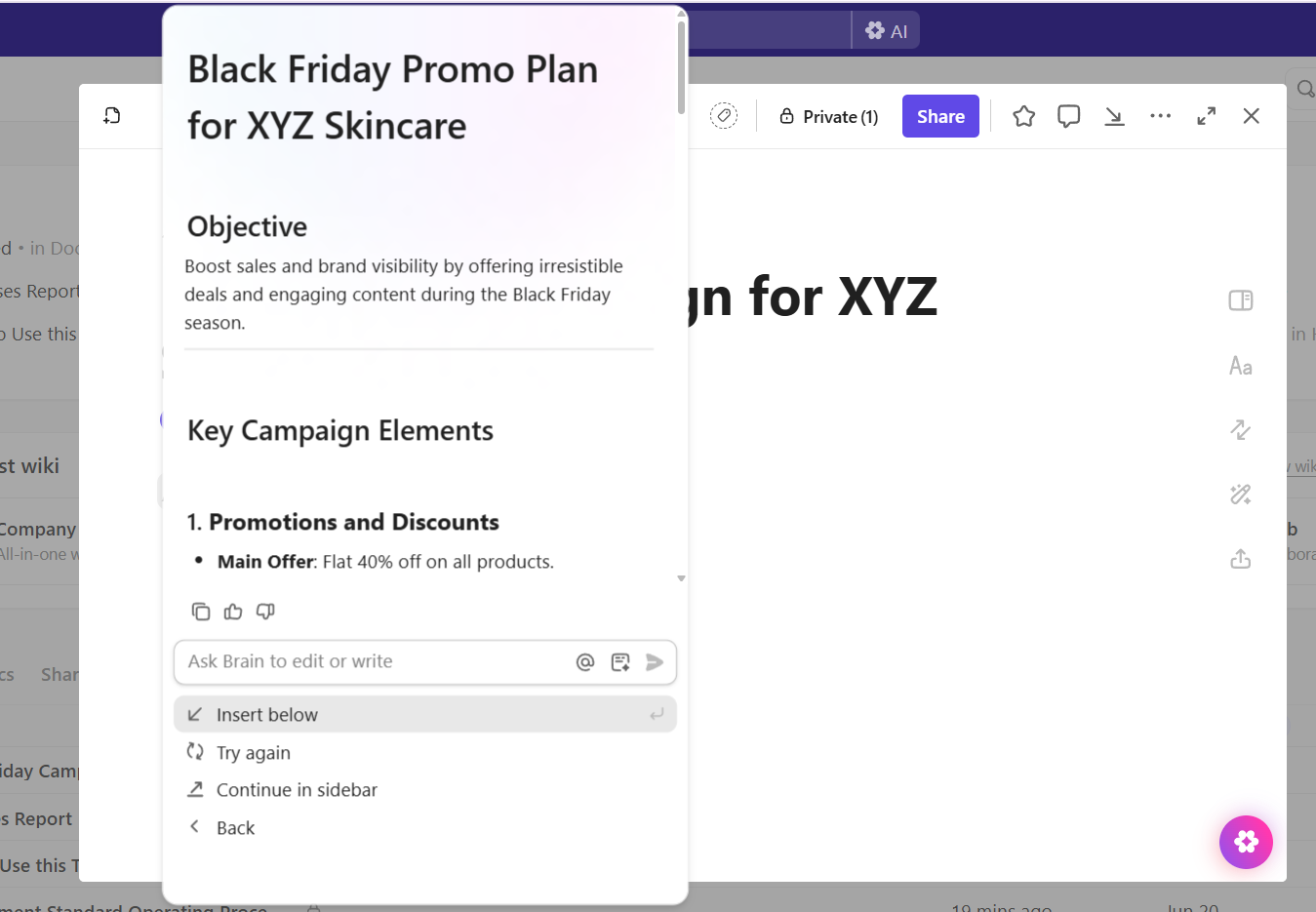
Suppose you’re prepping a new product drop. You can ask ClickUp Brain to draft 10 product descriptions based on your tone guide and drop them straight into a ‘Launch Campaign’ doc in ClickUp Docs, where your team can edit in real time.
Plus, you don’t have to worry about context. ClickUp Brain pulls cues from your workspace, briefs, or even past campaigns to deliver a copy that fits your brand voice without extra prompting.
📌 Example prompts:
These tools help you optimize stock levels, forecast demand, and set dynamic pricing based on margin, competitor pricing, and inventory levels.
DataRobot is an enterprise-grade AI platform built for data teams that want accuracy without manual coding. It automates predictive modeling for pricing, demand forecasting, and inventory optimization.
Key components:
Inventory Planner is a demand planning and forecasting tool to integrate directly with platforms like Shopify, Amazon, and WooCommerce, managing replenishment and cash flow.
Key components:
🚀 ClickUp Advantage: If you need to know which SKUs moved fastest last quarter, what your pricing adjustments were, and how those changes impacted margin, just ask ClickUp Brain. Its AI Project Manager pulls context from all your sources, including personalization engines and forecasting apps, to automate routine tasks like generating summaries.
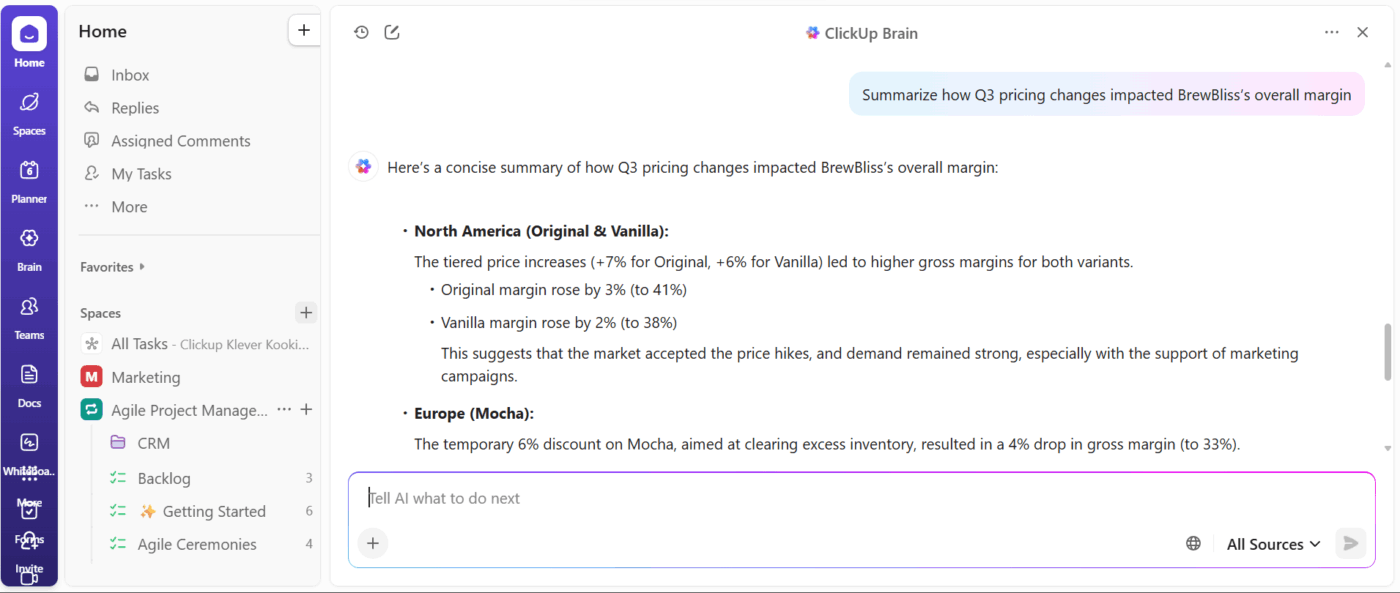
It instantly summarizes last quarter’s pricing changes, finds ClickUp Tasks linked to inventory optimization, and pulls insights from forecasts. You can even recall competitor benchmarks, margin targets, and previous pricing tests to finalize pricing.
📌 Example prompts:
These sophisticated tools automate customer service queries, self-service workflows, and escalation to humans when needed, freeing your team to focus on high-value tasks.
It’s an AI platform that enhances customer support through intent recognition and self-service automation. Forethought integrates with major helpdesk systems, like Zendesk and Salesforce, to resolve tickets faster and reduce agent workload.
Key components:
A conversational AI platform built for scaling personalized customer interactions, Ada empowers teams without technical skills to build chat and voice experiences that feel natural and context-aware.
Key components:
🚀 ClickUp Advantage: Enhance your customer service workflow with ClickUp Ambient Agents that live right inside your workspace. Whether you switch on a Prebuilt Agent or design your own Custom Agent, they automatically act when certain triggers occur.
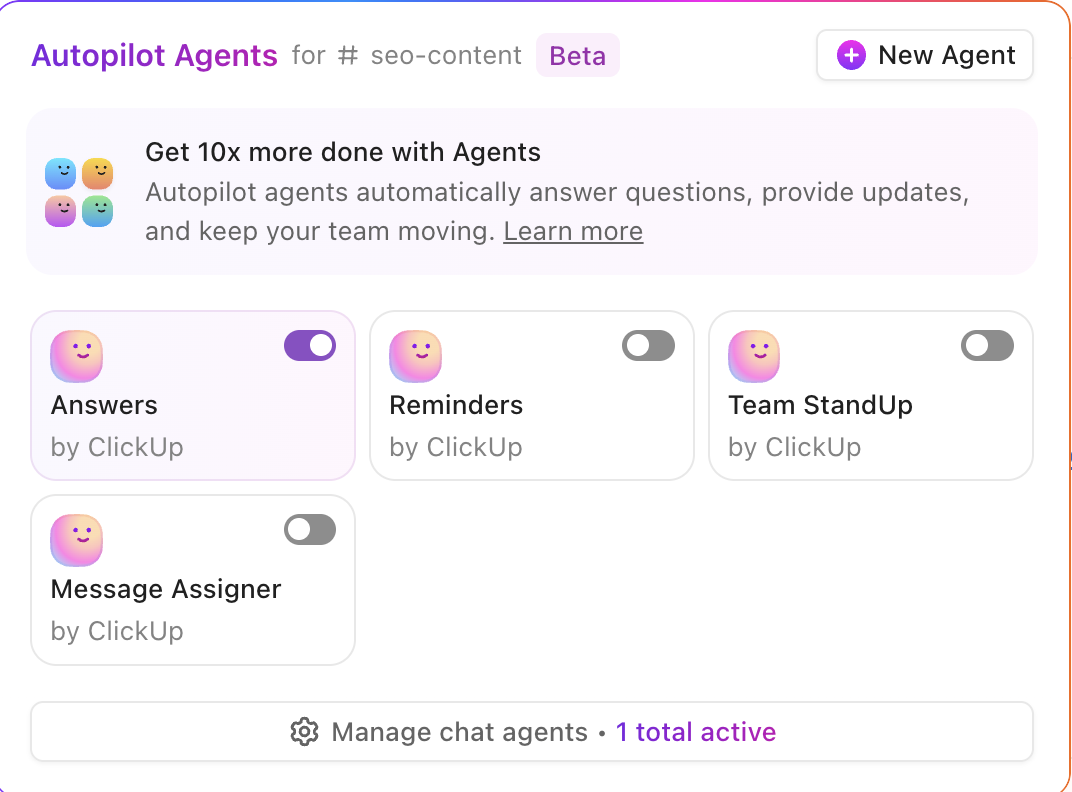
Say a customer support task is updated with a ‘high priority’ tag. You can create an agent to:
Build your own AI agent:
In an e-commerce AI stack, the workflow orchestration layer is the glue that holds everything together, and ClickUp plays that role brilliantly.
After exploring some (excellent) ClickUp features, let’s look at some others that keep your work streamlined:
ClickUp Brain MAX brings all your AI tools together in one powerful desktop workspace. It combines search, automation, and intelligent assistance so you can manage your entire e-commerce workflow without tool-hopping.
Here’s how you can use it:
Here’s what a Reddit review says about the platform:
Has access to you (sic) ClickUp so makes work much more streamlined. Can easily create tasks, update them etc. Very handy…It allows to use different AI models, which for some people can be a big thing, for me not so much, but I will give credit for this…It can access your other apps, for example, I have my drive synced, and it’s so much quicker to find a spreadsheet or something through Brain Max then (sic) opening drive, looking for it etc.
Now, eliminate AI sprawl with ClickUp Brain MAX! 🤩
ClickUp Automations eliminates repetitive manual work, keeping your e-commerce workflows fast and connected. You can create rules that automatically trigger actions based on updates from your AI tools or internal tasks.
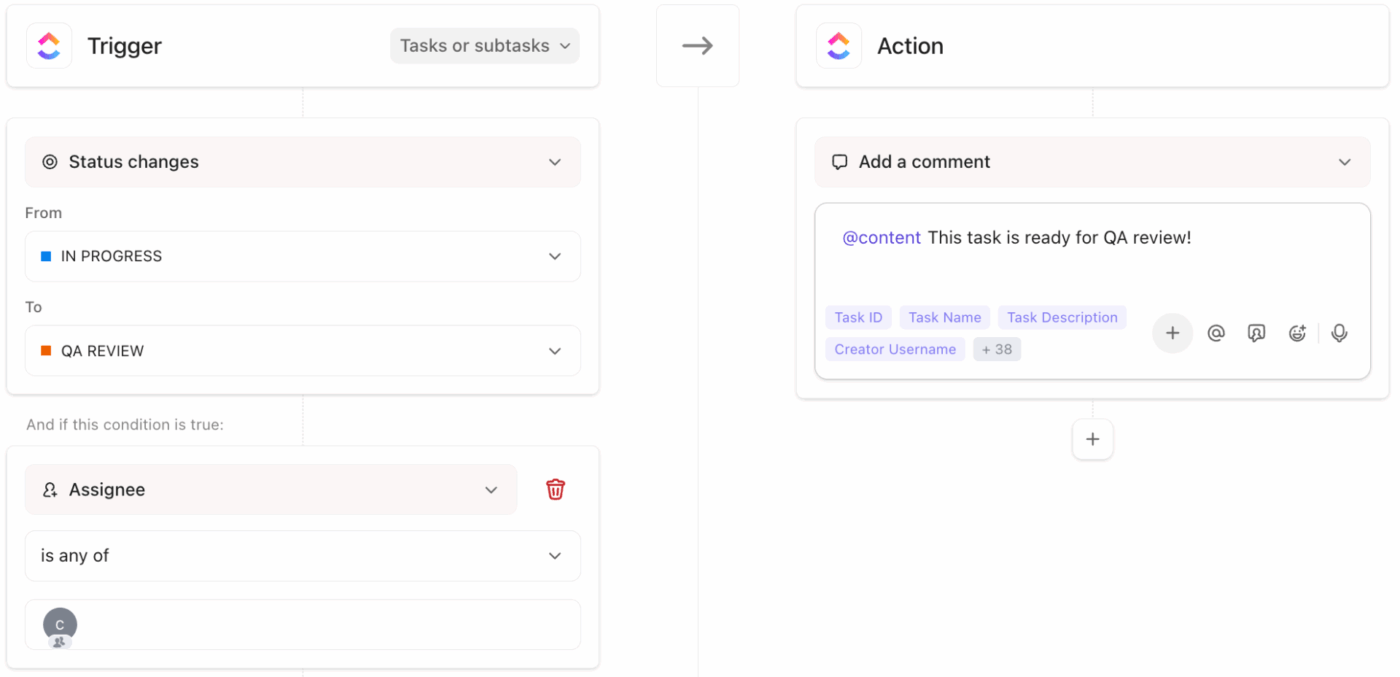
You can set ‘if this, then do that’ prompts with triggers and conditions. For instance, ask Automations to create a ‘Purchase Task’ if your inventory forecast shows low stock, or notify marketing when prices change on the website.
This way, updates are routed automatically between departments, ensuring operations, marketing, and fulfillment teams stay aligned without manual check-ins.
Here’s how you can use ClickUp Automations:
ClickUp Integrations support over 1,000+ apps, allowing you to connect tools like Shopify, HubSpot, and Google BigQuery directly to your workspace.
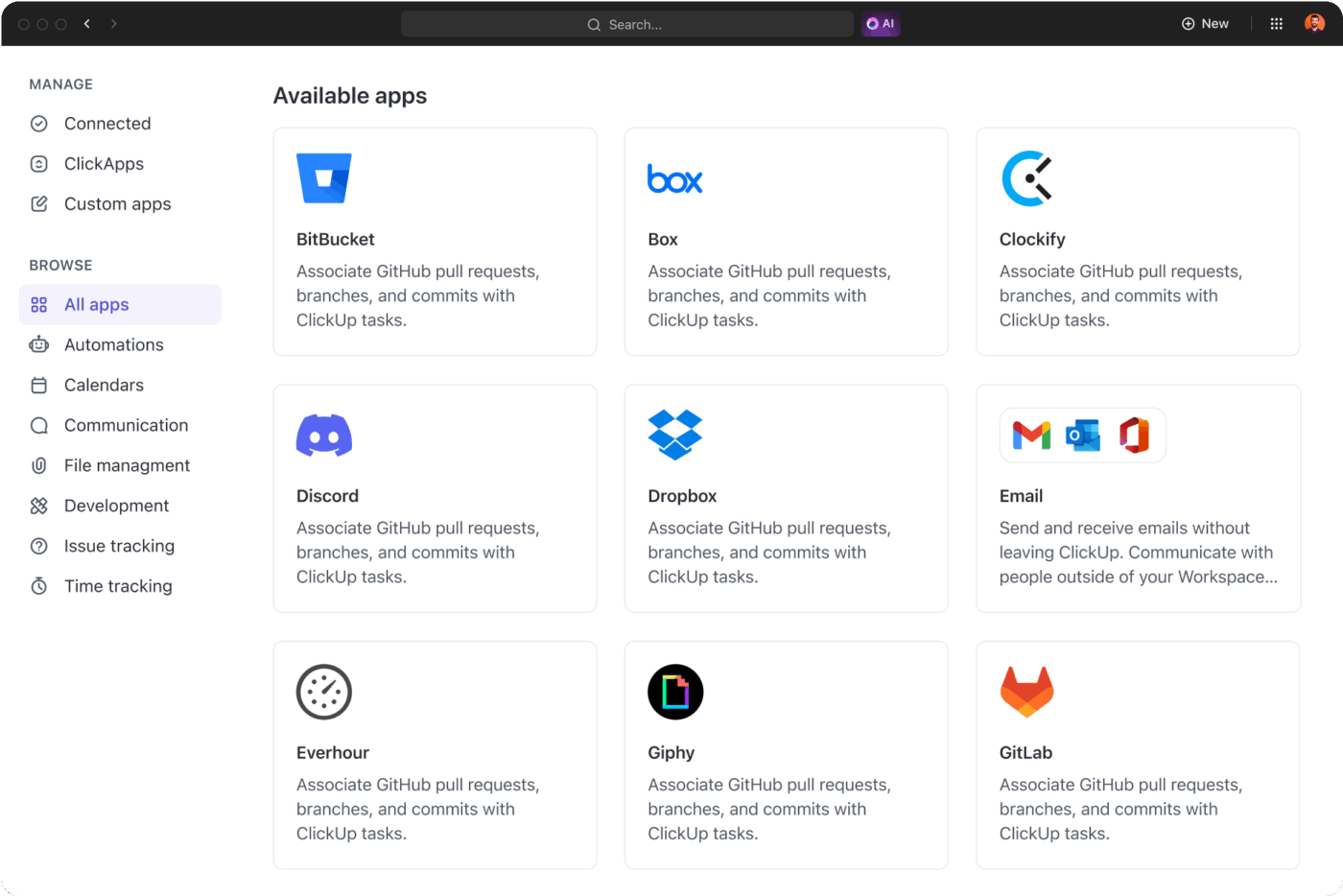
You can use prebuilt integrations for common e-commerce tools or set up custom connections via API to sync data and automate workflows.
📖 Also Read: How ClickUp’s marketing team uses ClickUp
Many teams fall into predictable traps that limit ROI and slow adoption when building an AI stack. Here are the most common mistakes to avoid:
| Problem | Solution |
| Buying tools before defining a strategy | Set clear goals first, and then align AI tools with specific business outcomes before adoption |
| Ignoring data quality and structure | Clean, standardize, and centralize data before automating for accurate insights |
| Overloading the stack with point solutions | Streamline to a few well-integrated tools instead of many disconnected apps |
| Skipping integration and workflow planning | Build workflows and integrations that connect data and teams seamlessly |
| Trying to scale too fast | Start small, test, prove value, then expand AI use cases gradually |
| Neglecting user adoption and training | Invest in onboarding and training to ensure teams actually use the tools |
A strong AI stack for e-commerce combines tools that work together seamlessly across workflows, from marketing and sales to fulfillment and support.
ClickUp, the everything app for work, acts as your orchestration layer, the place where all your work connects. With its integrations and API, ClickUp brings information from your disparate tools in one place, reducing cognitive load and tool sprawl.
ClickUp Brain’s AI lets you instantly recall pricing strategies, inventory insights, and campaign data, while ClickUp Brain MAX gives you an integrated experience, connecting all your third-party AI tools.
With your e-commerce business tasks, documents, CRM data, and team chat centralized, ClickUp becomes the one converged AI workspace that holds everything together for you and your team.
Before your next big sale hits, sign up to ClickUp for free! 🏁
An AI stack in e-commerce is a grouped set of technologies and platforms that cover all the key workflows in your business, from data ingestion and analytics to personalization, inventory forecasting, pricing, and customer service. When executed properly, the stack enables automation across your entire store.
AI powers personalization by analyzing large amounts of data, such as browsing behaviour, purchase history, demographics, and session data, to tailor product recommendations, on-site content, email flows, and dynamic offers. For example, a system can recognize that a repeat customer is shopping for winter gear and then adjust site banners, promo emails, and push messages accordingly.
Top AI tools in inventory management focus on demand forecasting, stock optimization, and dynamic replenishment. Platforms like ‘Inventory Planner’ or solutions from forecasting-specialist vendors use historical sales, seasonality, promotions, and returns to predict future demand and recommend ideal stock levels.
Yes, if they choose strategically. Smaller e-commerce brands should start with one or two meaningful use-cases (for example: personalized email flows or predictive restocking), and deploy tools that integrate easily and scale as the business grows. The key is avoiding tool sprawl and focusing on workflow impact. AI marketing tools are an easy first step.
Success can be tracked via clear business metrics that align with the workflows you’re automating. Examples include: increased website traffic and average order value (AOV), reduction in cart abandonment rate, improved inventory turnover rate, decreased manual support tickets, visibility in search engine results, or uplift in repeat purchase rate. Monitor these alongside adoption metrics (how many tasks are automated, how often predictions are acted on) and adjust based on feedback, model drift, or business changes.

© 2026 ClickUp

There’s an easier way. Try a free AI Agent in ClickUp that actually does the work for you—set up in minutes, save hours every week.