






Still downloading templates?
There’s an easier way. Try a free AI Agent in ClickUp that actually does the work for you—set up in minutes, save hours every week.
Sorry, there were no results found for “”
Sorry, there were no results found for “”
Sorry, there were no results found for “”
When 72% of consulting, legal, accounting, and finance professionals say they’re already using AI in their work (up from just 48% last year), you know something fundamental is shifting.
Professional service firms are waking up to the fact that the “AI hype” may, in fact, be the “AI transformation” they’ve been waiting for.
If you’re here, you’re likely asking: “Where can AI really make a difference in my day-to-day work, without compromising quality or trust?”
We understand that when your service business is built on deep expertise, judgment calls, and tight deadlines, the answer can make or break your operations.
That’s why, in this blog post, we’ll show you concrete use cases of AI in professional services industry, from consulting analysis to legal research, financial auditing, and client delivery. You’ll also see how firms are getting it right (and where they’re stumbling)…plus the nuts-and-bolts of adopting AI with a Converged AI Workspace like ClickUp.
AI in professional services refers to the tools and systems—frequently including machine learning, natural language processing, large-language models, and automation pipelines—that help with knowledge-intensive tasks, such as research, document generation, risk analysis, summarization, and decision support.
Because professional services firms live or die by precision, credibility, and efficiency.
Clients expect fast, correct, and thoughtful work. Rework is costly. It drains time and monetary resources, including time spent on research, manual drafting, compliance, and audits.
Rather than replacing professionals’ judgment or expertise in professional service delivery, artificial intelligence amplifies them. It speeds up the routine work, surfacing valuable insights faster and reducing the margin of error.
👀 Did You Know? People confirm having reallocated the time saved using AI to higher-level client work (42% of respondents in an Intapp survey) and strategic planning (33% of respondents).
📚 Also Read: How to Use AI in Project Management
The most compelling advantages that make AI worth investigating for any professional services include:
📌 Example: A law firm uses AI to analyze thousands of past contracts in minutes to flag unusual clauses or compliance risks. Instead of a junior lawyer manually reviewing each contract for hours, the firm can quickly provide clients with detailed risk assessments and recommendations. This not only speeds up delivery (timely advice) but also reduces the chance of costly errors (lower risk) and allows the firm to offer subscription-based contract review services at a lower price point (new ways of serving clients)
The writing on the wall is clear: For service-centric companies, AI’s benefits extend to nearly all business areas. Those who embrace it early stand to gain a real competitive edge. 💪🏼
📮ClickUp Insight: 88% of our survey respondents use AI tools for personal tasks every day, and 55% use them several times a day.
What about AI at work? With a centralized AI powering all aspects of your project management, knowledge management, and collaboration, you can save up to 3+ hours each week, which you’d otherwise spend searching for information, just like 60.2% of ClickUp users!
AI’s real power becomes obvious when you see where it’s applied. Below are five domains where AI is redefining professional services.
For each domain, we’ll show you how you, too, can make the most of it—with practical tips and tools you can start using right away.
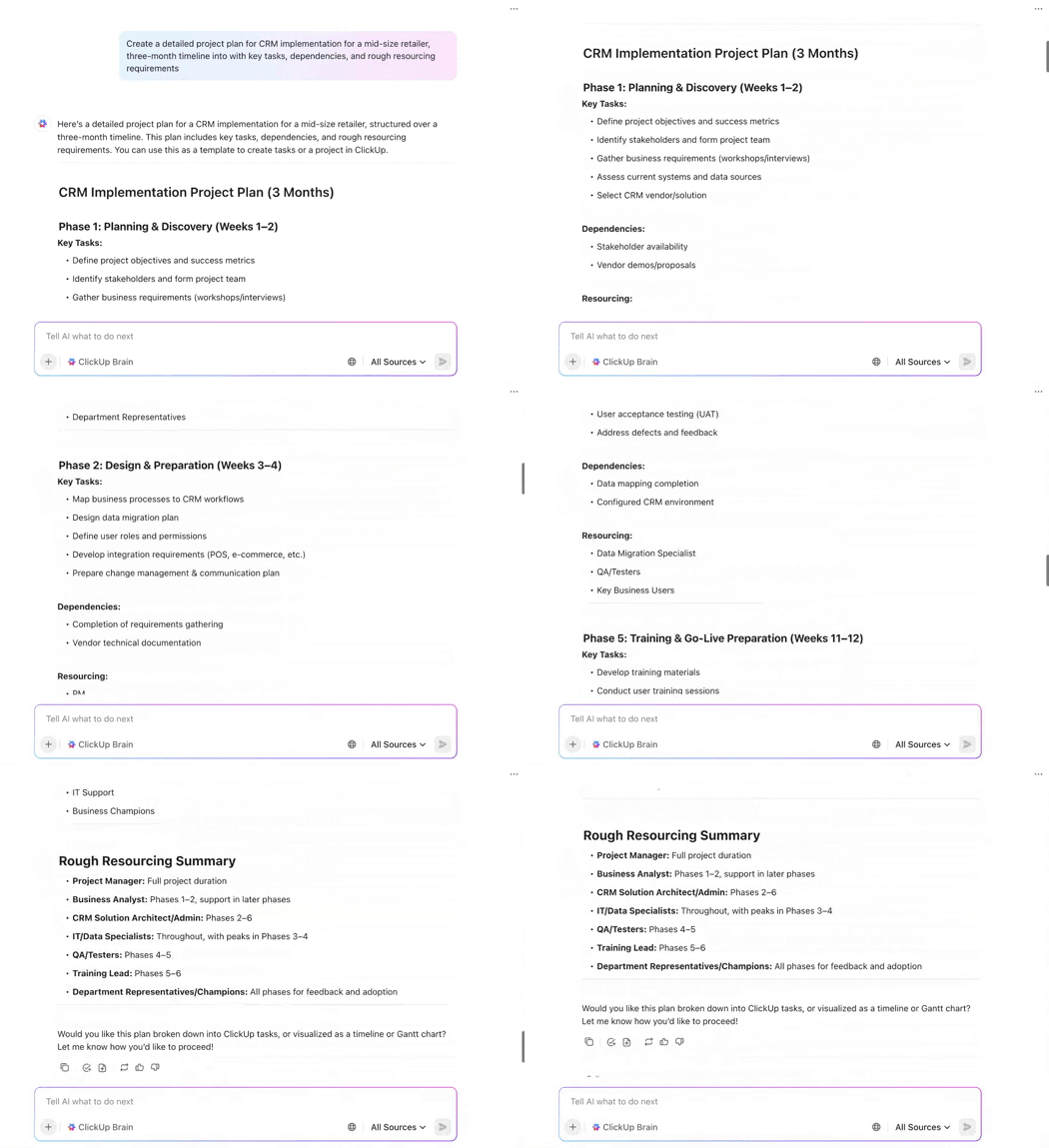
Traditionally, consultants would spend weeks stitching data, building slide decks, doing competitor scans, drafting multiple scenarios, and then handing the analysis and recommendations to clients.
AI consulting tools are reducing that time to mere days, helping consultants quickly draw insights from convoluted data.
📌 For example, McKinsey’s internal chatbot “Lilli”, simplifies access to over 100 years of institutional knowledge for over 70% of the employees who use it.
📚 Also Read: Types of Consulting
Strategy firms can use AI to prototype a business model in minutes, turning a raw client brief into multiple alternatives, each with revenue projections. The consultant can then refine the best fit. That gives the client confidence and frees the senior team to focus on framing, risks, and custom value.
📌 At BCG, for example, employees have created over 3,000 GPTs (Generative Pre-trained Transformers), which address tasks ranging from document summarization and proposal writing to slide creation, scenario modeling, and internal knowledge retrieval.
Thanks to AI usage for straightforward tasks, new hire productivity at BCG jumped by 30-40% while experienced consultants also saw a 20-30% increase. One major caveat? For complex tasks, productivity sometimes fell due to the need for debugging AI output.
You, too, can replicate these benefits using ClickUp, the world’s first Converged AI Workspace, bringing together all work apps, data, and workflows. ClickUp eliminates all forms of Work Sprawl to provide 100% context and a single place for humans and agents to work, together.
ClickUp Brain, the world’s most complete and Contextual AI assistant, links your internal knowledge base, past decks, industry databases, Slack threads, and other troves of organizational information in your ClickUp Workspace together.
With one prompt, you can query all of this data together to deliver a consolidated answer or insight (“What are the top risks and blockers flagged this sprint?”).
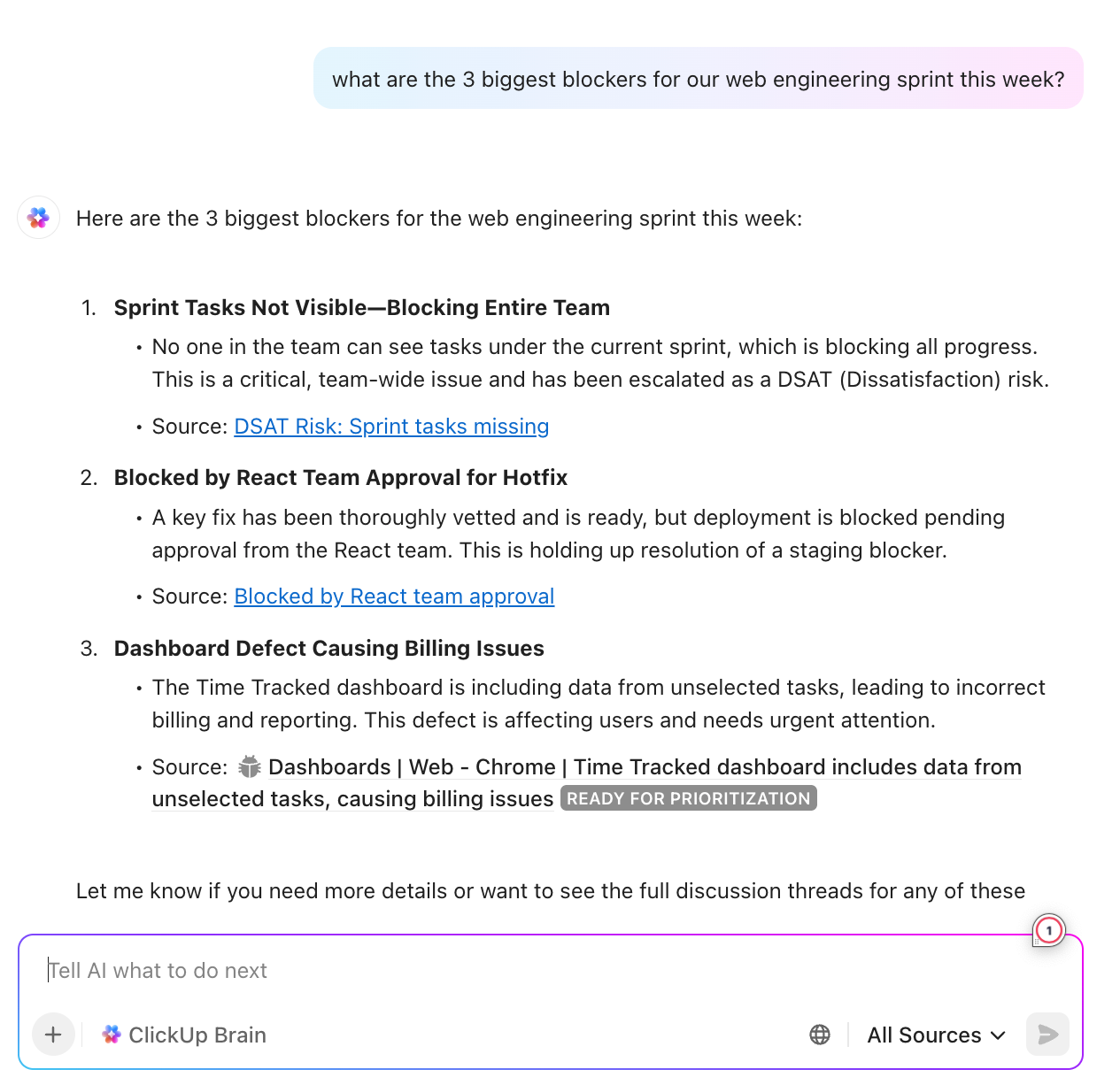
Want to move from insights to action?
Brain can also create actionable ClickUp Tasks based on its own recommendations or your explicit commands. Try asking Brain to generate a slide deck outline from the insights it surfaces. Then prompt it to add talking points, and embellish the details in a ClickUp Doc that gets prefilled with this data. You and your team can co-edit in real time or even expand and summarize sections with ClickUp AI built into Docs.
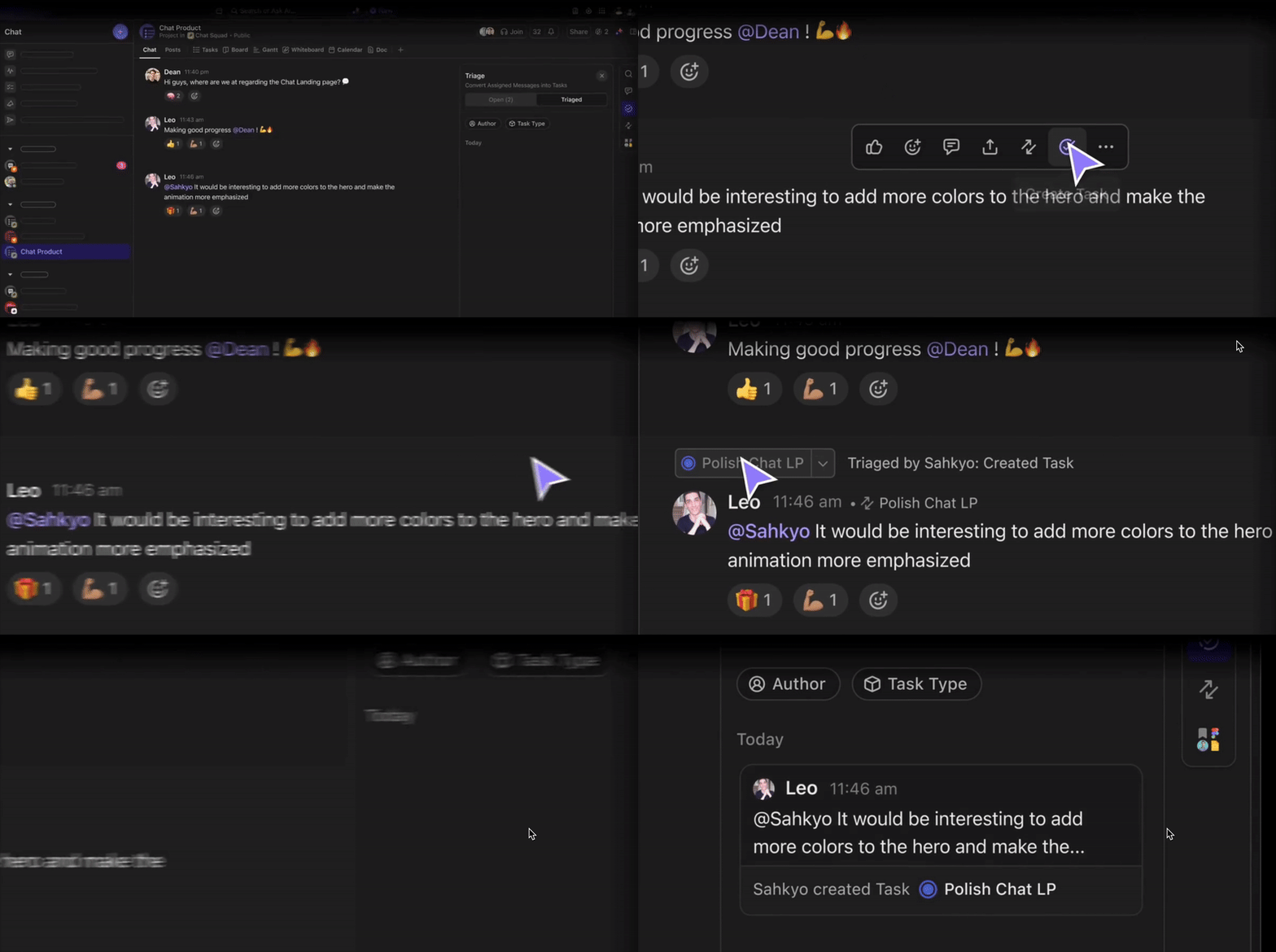
If you’re having a client kickoff ClickUp Chat discussion, you can also transform any message from the thread into a Task using AI with just one click and assign it to the right person.
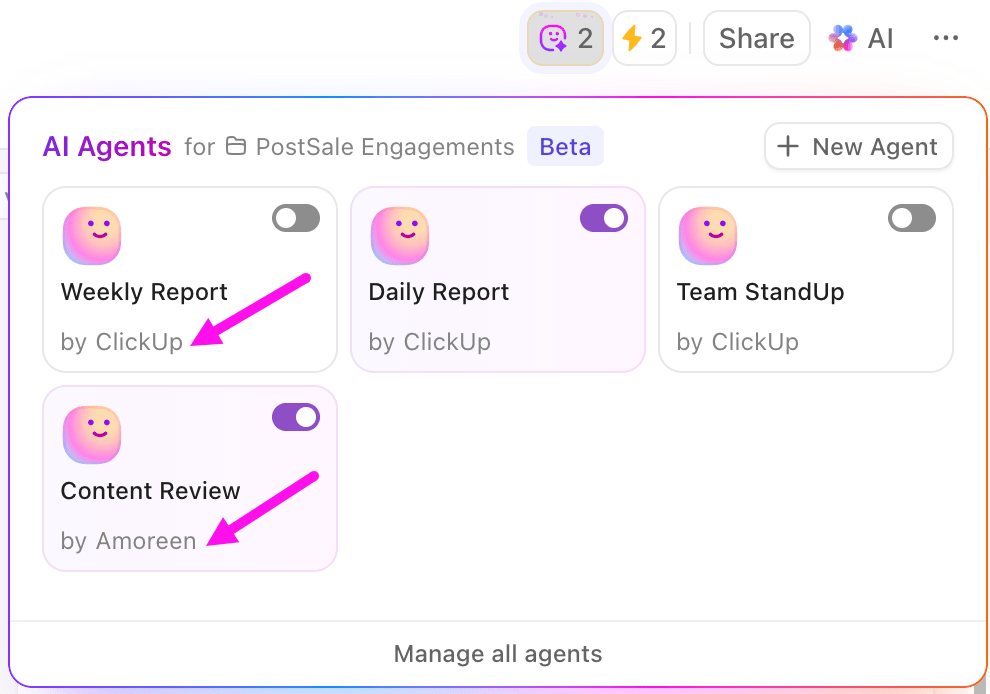
Meanwhile, ClickUp’s Autopilot Agents autonomously keep the project moving. They learn from your projects and can perform complex, context-aware actions: creating subtasks based on project phases, assigning tasks intelligently based on workload, summarizing updates, or suggesting next steps without you explicitly programming each rule.
📚 Also Read: Consulting Templates
Research, document drafting, precedent matching, contract review, and compliance checks are major friction points in law firms and legal departments.
Your AI-powered legal tech stack can preprocess due diligence by flagging anomalies, potential liabilities, and deviations. The human team can do the detailed review, but because the AI handles the “first pass,” lawyers have more time for strategy and framing the client communications.
No wonder that the legal sector’s AI adoption is accelerating: In corporate legal teams, 38% already use AI tools, and another 50% are actively exploring them. Also, among lawyers using AI, 45% use it daily, and 40% weekly.
When every case starts with a mountain of docs, it makes sense to keep them all together in a unified workspace, such as one in ClickUp. ClickUp Brain then has access to everything it needs to learn from—your key case documents, prior rulings, internal memos, client briefs, and more.
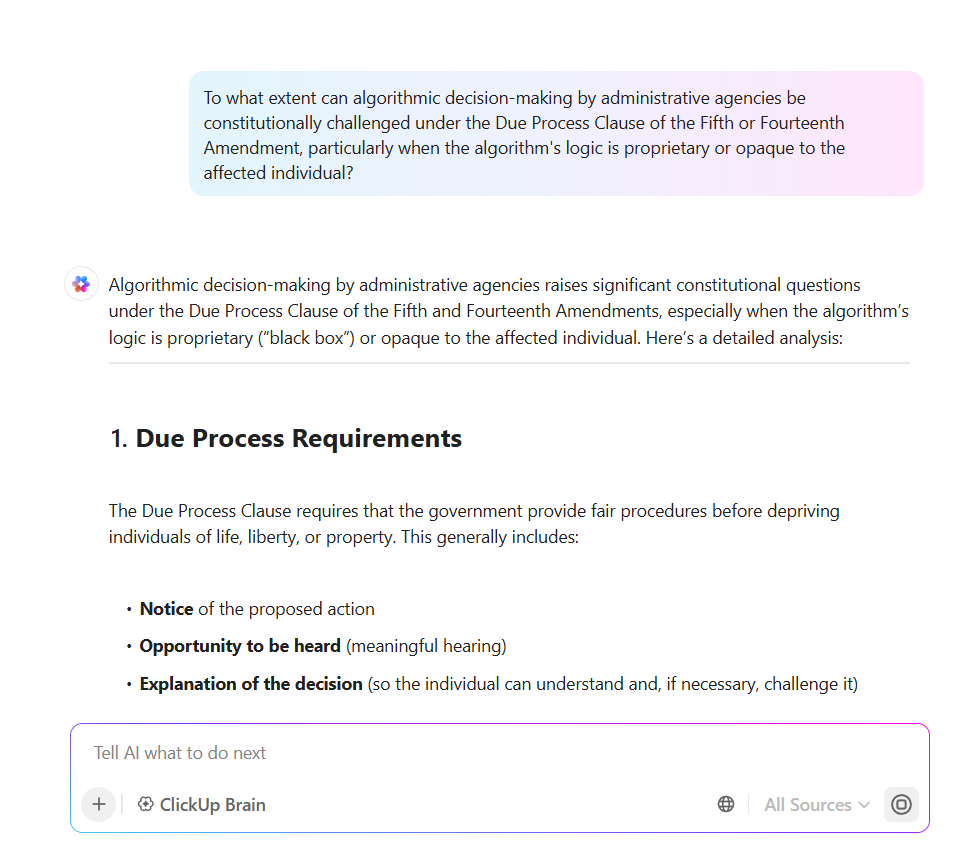
Now, a partner may input: “Summarize depositions in Case A, highlighting discrepancies with the client’s version.” Brain delivers a draft summary and identifies anomalies for human review.
When your legal team finishes a summary, use Custom Autopilot Agents (no-code) to enforce review workflows: e.g., when a draft contract moves to “Ready for Review”, the agent notifies the review partner or triggers a checklist.
Meanwhile, during case meetings, ClickUp’s AI Meeting Notetaker captures discussions into neatly labelled transcripts and auto-generates action items like “File motion on clause X by 5/20.” You can ask Brain to convert these into ClickUp Tasks with AI Autofill Task Properties (due dates, tags, stakeholders) automatically.

In your ClickUp Dashboards, AI Cards summarize how many documents remain, what sections need human review, or the details of the legal risks flagged.
💡 Pro Tip: Use Write with AI in ClickUp Docs to draft initial contract templates, memos, or summaries of case research without starting from a blank page.
🗣️ Don’t want to type? You can also dictate content using Talk to Text in ClickUp Brain MAX—your desktop AI companion. Watch this video to learn how!
🧠 Fun Fact: In litigation, 100% of respondents to a Kaplan survey agreed document analysis is the most impactful AI use, followed by transcript management (90%), chronology (87%), and case strategy (77%).
“The use of AI and GenAI is becoming ubiquitous across accounting, financial planning, risk management and more, and companies are seeing significant returns on their digital transformation efforts as they integrate these technology capabilities into their financial reporting processes.”
While using AI for financial planning remains the most popular use case (for 78% of respondents in a KPMG survey), AI in accounting follows closely behind (76%).
Does your shared services finance and accounting firm support multiple business units? If so, chances are you wrestle with journal reconciliations, variance explanations, anomaly detection, and reporting every month.
Start by bringing all unit financials, spreadsheets, General ledger feeds, and commentary into ClickUp.
You can then query ClickUp Brain to flag anomalous journal entries during month-end close. The AI would surface “outliers”, accelerating reviews and preventing material misstatements. You can also use AI Cards on Dashboards to monitor real-time anomalies or KPI deviations across multiple accounting projects and highlight patterns or recurring themes.
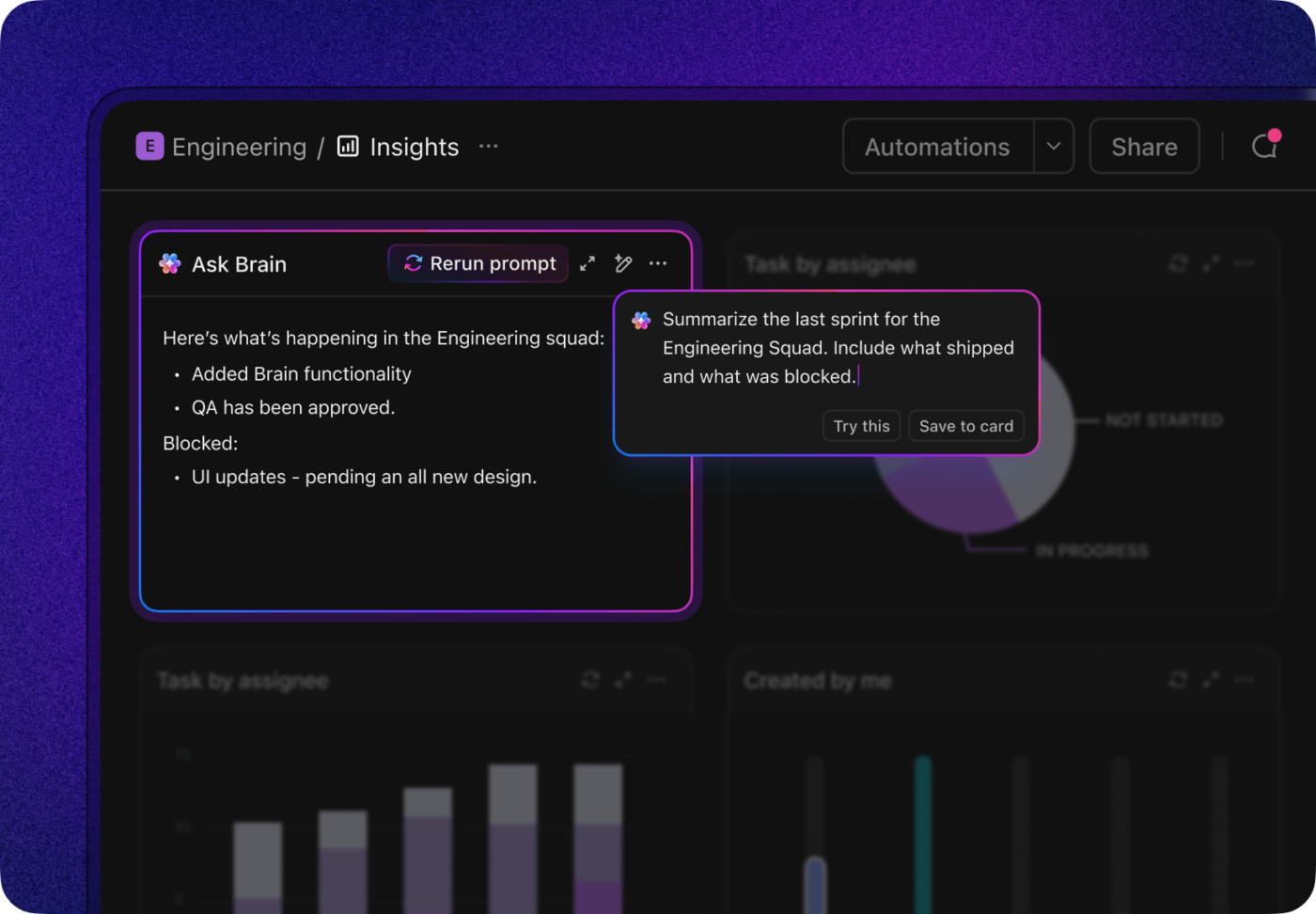
💡 Pro Tip: Use Recurring Tasks in ClickUp to schedule periodic checks, such as monthly variance analyses or reconciliations, so nothing slips through the cracks.
Combine this with Autopilot Agents to automatically create follow-up subtasks when anomalies are detected—like investigating unusual journal entries or requesting clarification from a business unit. This keeps your team focused on high-value work while AI handles routine monitoring, pattern detection, and task orchestration across all accounting projects.
🤝 Friendly Reminder: You don’t need separate AI dashboard tools, anomaly detectors, or scheduling software. All you need is one ClickUp workspace with Brain, Agents, AI Cards, and integrated logic. This approach keeps context centralized for all your projects, minimizing AI Sprawl and its associated costs.
When you need campaign planning, market research, creative testing, and reporting on the fly, AI comes to the rescue. Agencies that value agility can’t afford to move forward without aggressively deploying AI.
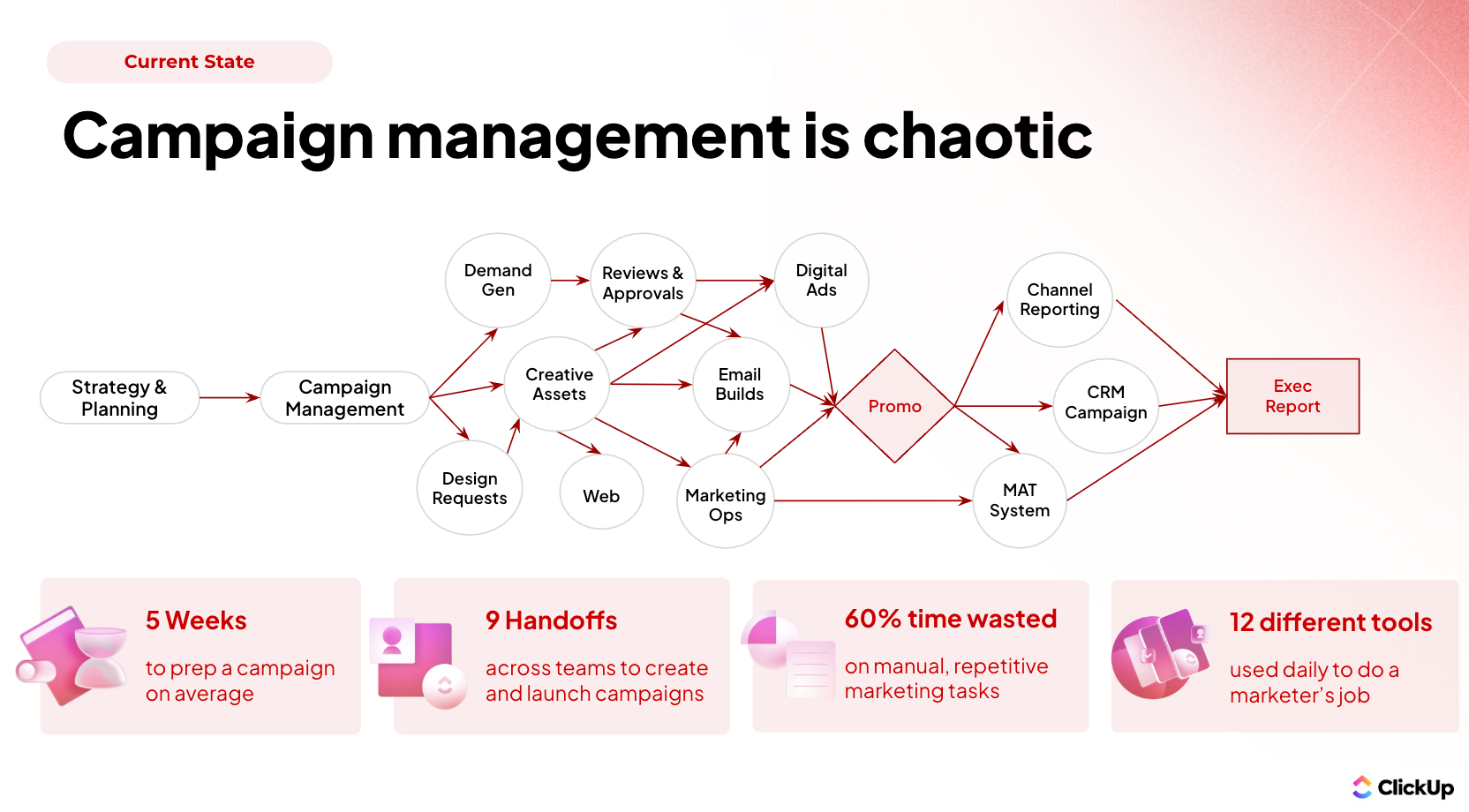
Marketing agencies can use AI to fast-track and optimize every stage of the workflow—from creative brainstorming and ideation to actual content creation, A/B testing experiments, and campaign refinements using AI-generated variants.
They can even automate reporting, pulling in performance numbers and generating client-friendly dashboards overnight, rather than manually drilling into hundreds of rows of spreadsheet data.
AI also helps agencies become proactive rather than reactive. They can use predictive analytics to segment audiences better, forecast customer behavior, and decide which channels and messaging to prioritize in upcoming campaigns, cutting wasted spending.
AI lets the agency scale creative experimentation without exploding headcount, while maintaining control over direction.
💡Pro Tip: Here’s how our teams at ClickUp plan their marketing campaigns end-to-end. Hear it from Mike, one of our Strategic Solutions Engineers.👇🏼
Picture a professional services firm whose client support team spends half the day updating clients on status, chasing internal handoffs, and reconciling ticket logs.
Many firms see the biggest win from using AI in customer service. You’ve got automated triage, AI teammates that answer repetitive client queries, internal handoffs that take place on their own, plus consolidated reporting and status updates.
“The fastest wins are in functions where processes are well-defined and outcomes are known and measurable, like customer service and sales. AI agents will also enhance creative processes.
📌 Walmart, for example, has launched “Sparky,” an AI-powered shopping assistant designed to act as a personalized digital companion for customers. Sparky will offer features such as product discovery, personalized recommendations, cart management, order tracking, and reordering frequently purchased items. This initiative is part of Walmart’s broader strategy to enhance the shopping experience through agentic AI technologies.
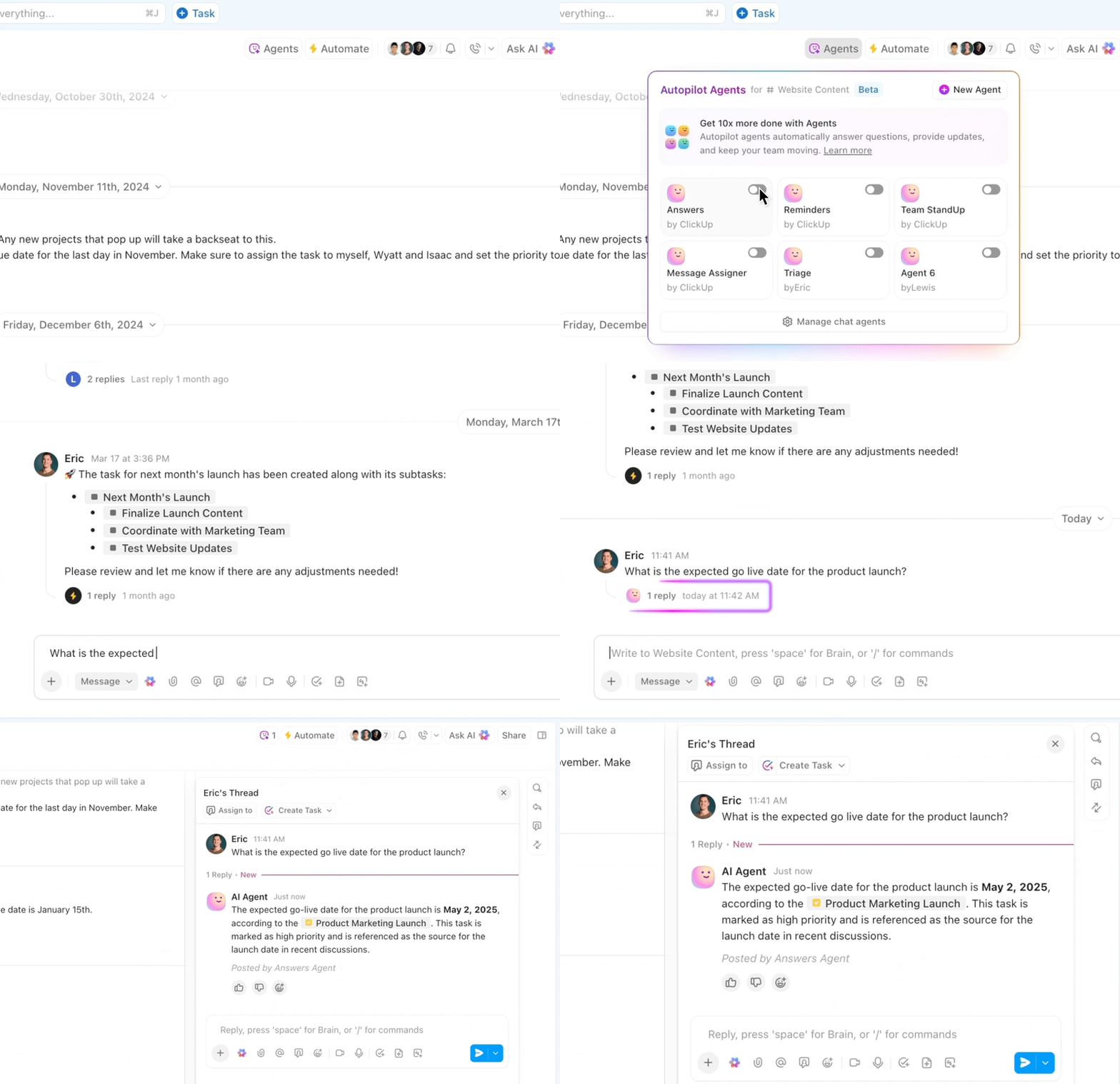
In service delivery and ops, the main role of AI lies in reducing friction and making the client feel responsive without overloading the team.
🧠 Fun Fact: 58% of business functions are likely to have AI agents handling at least one process or sub-process daily between 2025 and 2028.
Here are the major challenges professional services organizations typically face when adopting AI, and what often trips people up:
All of these challenges are real, but none are insurmountable—with the right practices.
Let’s look at the concrete practices that help different professional services sectors navigate those challenges above and unlock real value:
Start with high-impact, small-scale use cases
To start with, pare usage down to 1-2 use cases as you evaluate AI applications These should be areas where ROI is more certain (e.g., status updates, content drafting, research). Doing too many AI-assisted pilots at once dilutes attention and impedes consistency.
Invest in team training & AI literacy
Train employees not just on tool usage but also on prompt engineering, critically evaluating AI output, and ethics and governance. Make learning an ongoing process rather than a one-time activity. This helps reduce resistance to AI adoption and improves the quality of outcomes you’re expecting from the technology.
Embed AI into existing processes rather than replacing them
Don’t bolt AI on as an afterthought. Map current workflows, identify your biggest bottlenecks, and then design automation/augmenting steps. This prevents chaos and ensures you’re able to build trust gradually.
Define clear governance, security & quality controls
Set policies for what data can/cannot be used in AI, especially when client data is involved. Have review checks in place, enforce version control, and allow independent audits where possible.
👀 Did You Know? ClickUp AI prioritizes your data privacy 🔐
When using ClickUp AI features like Brain, Brain MAX, and Autopilot Agents, your data is handled with the utmost care:
Measure the right metrics from day one
Don’t only track the hours AI saves you; also measure error rates, client satisfaction, turnaround time, and adoption rates to gauge AI’s true effectiveness. Regularly revisit metrics so you can tell what’s working and what isn’t.
Use integrated tools to avoid “tool sprawl”
Using many disconnected AI tools may seem flexible, but it causes context loss. You also have to deal with multiple security risks. Centralizing workflows in a Converged AI Workspace like ClickUp helps maintain consistency, control, clarity, and reduces switching costs.
Lead change through leadership & communication
Leaders need to set expectations, show examples of early wins, encourage feedback, and make it safe to experiment. Transparent communication around AI adoption and performance helps build trust and reduces fear.
Think of ClickUp AI as your full workflow backbone—starting from brief to delivery—all within one platform, minimizing handoffs and maximizing context.
According to the Forrester Total Economic Impact™ (TEI) Study, organizations using ClickUp achieve a 384% ROI over three years and save 92,400 productive hours through AI + automation, with a break-even point in under six months.
Here’s how a sample workflow might look using ClickUp AI end-to-end:
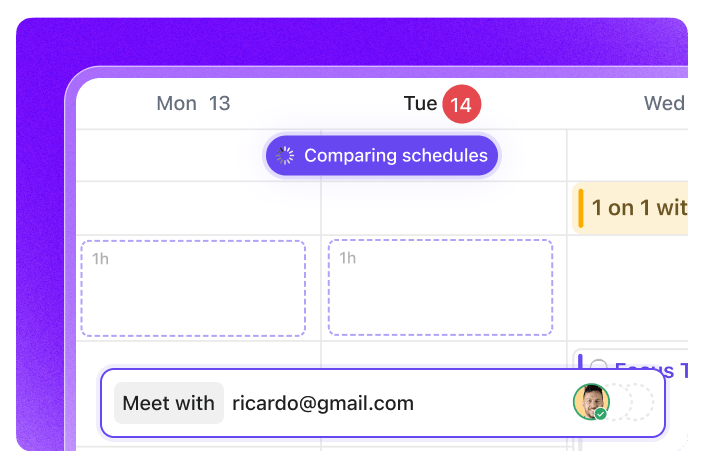
Everything stays inside one Converged AI Workspace, which reduces context switching, handoffs, and potential info loss—so your team focuses more on strategy, less on logistics. The Forrester TEI report also notes that consolidating work into ClickUp (versus juggling several apps) drove much of the productivity gains.
While ClickUp AI is the perfect, industry-agnostic choice for bringing AI to your workflows, sometimes you may need specialized tools to do the job.
Here are some such tools, with their key use cases and features mapped out for you:
| Vertical | Tool | What it does / suitable for | Top features / Use cases |
| Legal | Harvey AI | An AI-platform for legal teams/in-house counsel, offers LLMs trained on legal content, helps with contract drafting, risk scoring, precedent retrieval. | • Drafting/redlining contracts faster • Surfacing relevant case law/precedent based on prompts • Risk scoring clauses or terms to highlight exposure • Faster responses to common legal questions |
| SpotDraft | Contract Lifecycle Management (CLM) tool aimed at automating contract generation, reviewing, and workflow for legal teams. Especially strong in metadata extraction and compliance. | • Automated contract generation and templating • Lifecycle tracking (versioning, approvals) • Extracting metadata (dates, obligations, parties) automatically • Alerts/reminders on renewals or obligations | |
| Consulting / Marketing Agencies | Otterly.ai | For marketing/SEO teams, monitors how brand/product content gets surfaced in AI/LLM responses and helps adjust for AI search visibility. Useful when agencies are optimizing content for visibility in AI-driven search / conversational interfaces. | • Monitor brand presence in LLM/AI responses • Alerts when content is misrepresented or missing • Insights into which content types are working versus being ignored • SEO and content strategy optimizations specific to AI search contexts |
| Adobe generative AI + Adobe Firefly / Creative Cloud tools | Helps generate visuals, design variants, speed up creative iteration. Reduces time between ideation and production. Useful for agencies with high creative demands. | • Generate design variants from prompts • Rapid iteration of creative options • Content repurposing (e.g. adapt one visual into social, display etc.) • Collaboration tools + review workflows embedded | |
| Finance & Accounting | UiPath Document Understanding (or similar IDP tools) | Automates data extraction from invoices, receipts, expense reports; classification, validation, exception handling. Very useful in shared services or finance ops. | • OCR/IDP for unstructured financial documents • Exception workflows for mismatched data • High accuracy extraction to reduce manual data entry • Scalable throughput (large volume processing) |
| Hebbia | Knowledge retrieval tool focused on financial & legal research, allows for search over documents, with higher accuracy using embeddings, etc. Useful for consultants needing fast, precise insights. | • Document search over large corporate knowledge • Embeddings/similarity retrieval of relevant content • Faster research, snippet extraction for reports • Integration with existing data sources for research continuity |
📚 Also Read: Contact Management Software
In this blog post, we’ve already seen so many ways in which AI is making life simpler for service professionals.
If you’re still unsure about piloting AI for yourself, maybe these examples will help you cement the decision:
| Org / Case | The problem | The AI solutions | The impact |
| Omega Healthcare Management Services (Healthcare / Revenue Cycle) | Employees manually processed insurance claims, medical documents, correspondence; lots of manual data entry, slow turnarounds. | They deployed UiPath’s AI-powered Document Understanding tools to automatically extract relevant data from medical documents, classify items, and route them for approval. Thus, much of their repetitive documentation work was automated. | Saved 15,000+ hours per month; document processing time down ~40%; turnaround time slashed ~50%; accuracy ~99.5%; delivered ~30% ROI for clients |
| A&O Shearman + Harvey | Senior lawyers spent time doing low‐billing but high effort tasks: drafting info requests for regulatory filings, analyzing financial data across many jurisdictions, checking for missing data manually. | They built a joint tool with Harvey to automate those tasks: identify needed filings, generate data requests, flag missing info; reduce manual effort. | The tool is expected to lower costs, especially in senior associate/partner hours and improve margins on these traditionally tedious tasks. |
| ATB Financial | Various internal and external stakeholder workflows, ad hoc information requests, routine tasks scattered across systems; slow research and report generation. | Deployed Google Workspace + Gemini AI to automate routine tasks, enable agent-based tools for research and document generation, letting employees concentrate on higher-value tasks. | More efficient collaboration; faster decision cycles; better access to accurate info earlier in the process. |
Each of these examples moves firms from “AI as experiment” to “AI as workflow.” The pattern is the same: remove busywork, keep humans in the loop where judgment matters, and, finally, orchestrate agents and automations with clear governance so outputs are auditable and defensible.
The next several years will be about scaling AI from employee experiments into dependable, governed workflows that change how services are created and priced. The trendlines and expert signals below show why.
In a nutshell:
Industry leaders (PwC, Deloitte, McKinsey, KPMG) are already public about moving from experiments to scaled platforms and agent orchestration—so firms that invest now in governance, data hygiene, and converged work platforms will likely be the winners.
AI in professional services is no longer about “what if.” It’s about “how soon.”
The firms getting ahead are the ones that treat AI as a workflow partner, not a sidekick—embedding it into research, drafting, reporting, and client delivery. Done right, it saves thousands of hours, improves quality, and gives professional services workers more time to focus on the work clients actually value: judgment, strategy, and trust.
But you don’t need a dozen disconnected apps to make this leap. A converged AI workspace like ClickUp gives you everything in one place—agents to automate routine tasks, Brain to surface context instantly, and AI Cards, Notetakers, and Calendars to keep the team aligned. Less tool-sprawl, more context, faster adoption. That’s how you make AI work for your firm today—and scale it tomorrow.
The best part? You can tap into this AI advantage for free. Try ClickUp today!
AI impacts client service delivery by making it faster, more consistent, and more transparent. Instead of waiting days for updates or reports, clients can get near real-time insights powered by automation and dashboards. AI also reduces errors in routine work and ensures smoother handoffs between teams. The result: less back-and-forth, more proactive communication, and client relationships built on responsiveness and trust.
AI will not replace consultants, lawyers, and accountants—it will augment them. AI can draft a first version of a proposal, scan contracts, or flag anomalies in data, but it cannot replace professional judgment, strategy, or client trust. The highest-value work in professional services—advising, interpreting, persuading—remains uniquely human. Firms that adopt AI wisely see it as an assistant that removes grunt work so professionals can focus on higher-value contributions.
Professional services firms adopt AI successfully by starting with targeted, high-impact use cases like reporting or research, embedding AI directly into workflows, and training staff to evaluate and refine outputs. They also need governance around data privacy and output quality. Success comes from scaling slowly—piloting, measuring impact, then expanding—rather than chasing every new tool. Integrated platforms like ClickUp help firms avoid AI Sprawl while delivering measurable gains in efficiency and quality.
You balance AI with human expertise in professional services by using AI for speed and scale while keeping humans in charge of judgment, trust, and context. AI handles drafting, summarizing, or automating repetitive steps; humans refine, validate, and decide. The best firms treat AI as a “workflow partner” rather than a replacement—freeing professionals to focus on strategic insights and client relationships while ensuring the output remains accurate, ethical, and contextually sound.

© 2026 ClickUp

There’s an easier way. Try a free AI Agent in ClickUp that actually does the work for you—set up in minutes, save hours every week.